 KitGuru KitGuru.net – Tech News | Hardware News | Hardware Reviews | IOS | Mobile | Gaming | Graphics Cards


We will outline the performance increases that can be obtained from using the MSI X99A SLI Plus motherboard to overclock our system. Our overclocked processor frequency was 4.4GHz and memory speed was maintained at 2666MHz.
As a performance comparison, we have shown the increase in system performance when going from a stock-clocked system to an overclocked one. Further comparisons will be included as we build up our test results database.
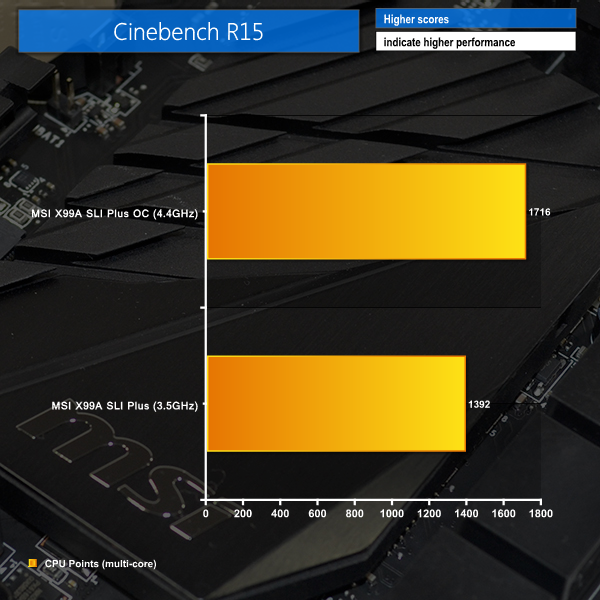
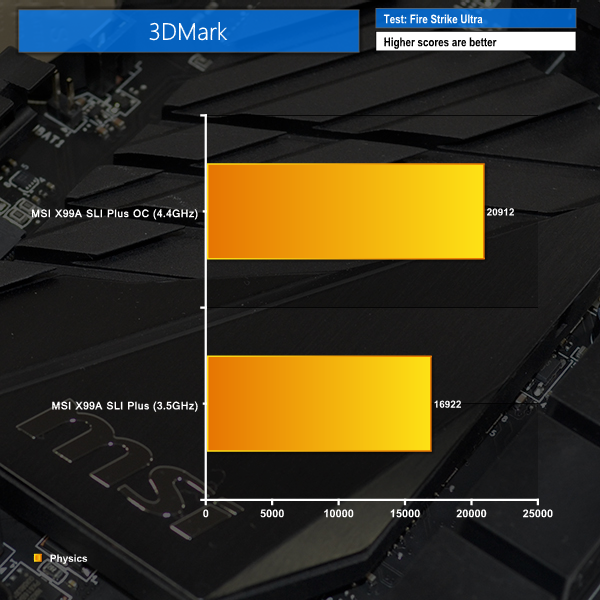
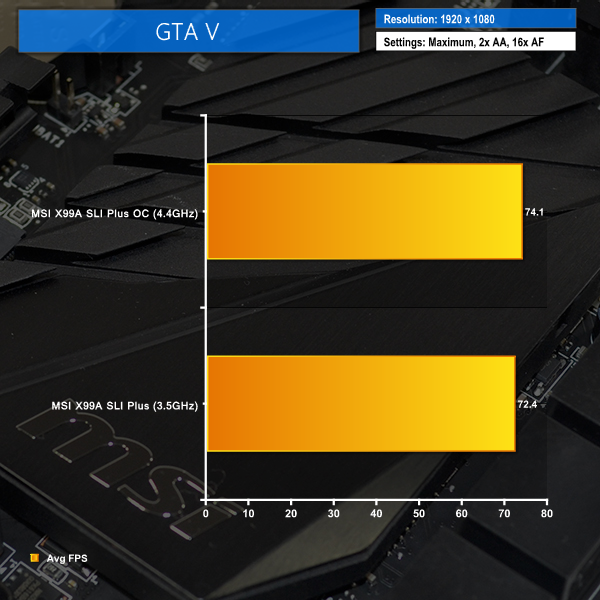
Strong performance boosts are shown by the overclocked system. MSI's X99A SLI Plus was able to push the 5960X at 4.4GHz with stability even through Cinebench's demanding rendering test and a session of Prime95.
Wow, what a board! I’ve been eyeing this MSI motherboard for ages. It looks stunning and so cheap too. I think I’ll have to buy this come Black Friday!
I have S version of that board, the only difference is that this one has additional USB 3.1 controller. This board gave me a lot of problems to boot with G.Skill 8GB RAM sticks. It booted only with one stick and what was more frustrating it could boot only from the second BIOS. After I did BIOS update all started booting fine with all slots occupied.