KitGuru KitGuru.net – Tech News | Hardware News | Hardware Reviews | IOS | Mobile | Gaming | Graphics Cards


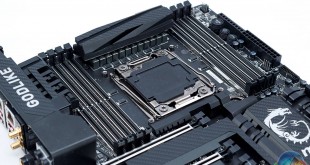
MSI's Godlike Gaming X99 motherboard first made an appearance mid last year with a striking design and a brazen claim to X99 motherboard superiority. Positioned against the ASUS Rampage V Extreme, now the Rampage V Edition 10, the Godlike Gaming motherboard is MSI's no holds barred X99 implementation.
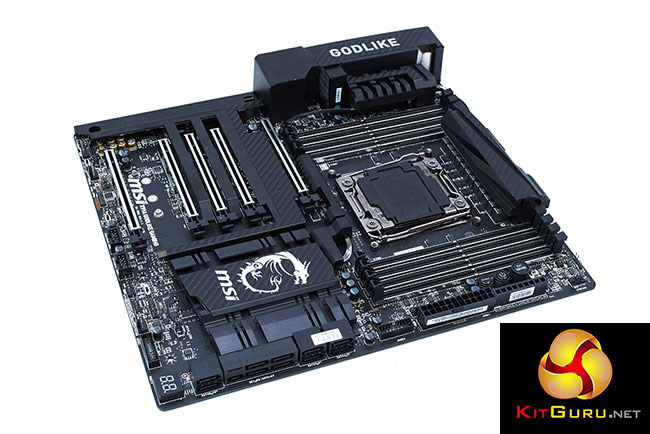
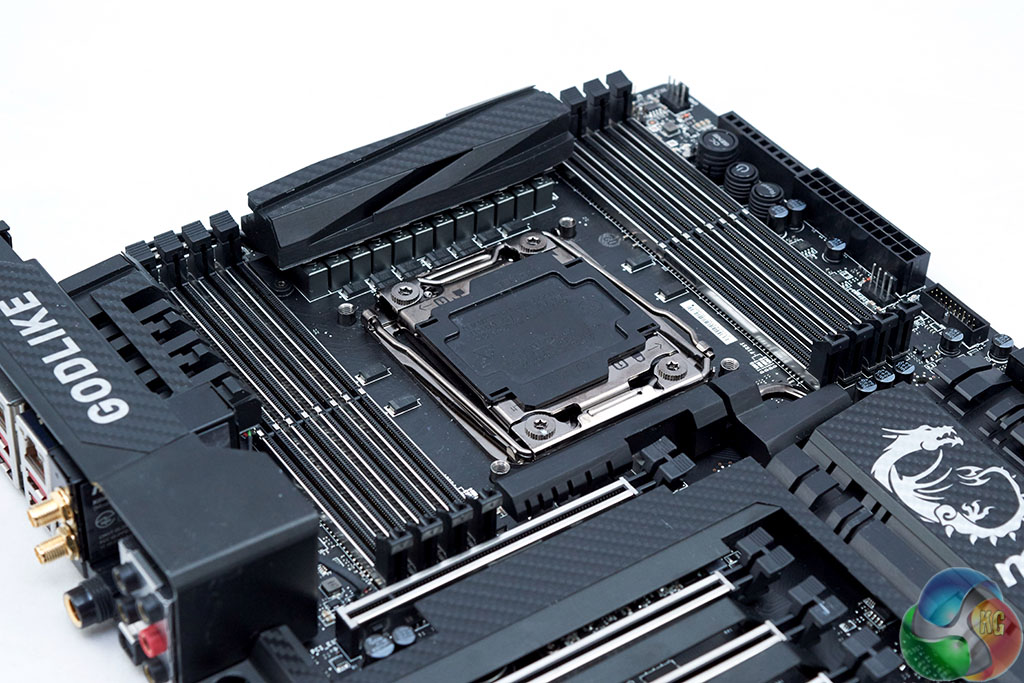
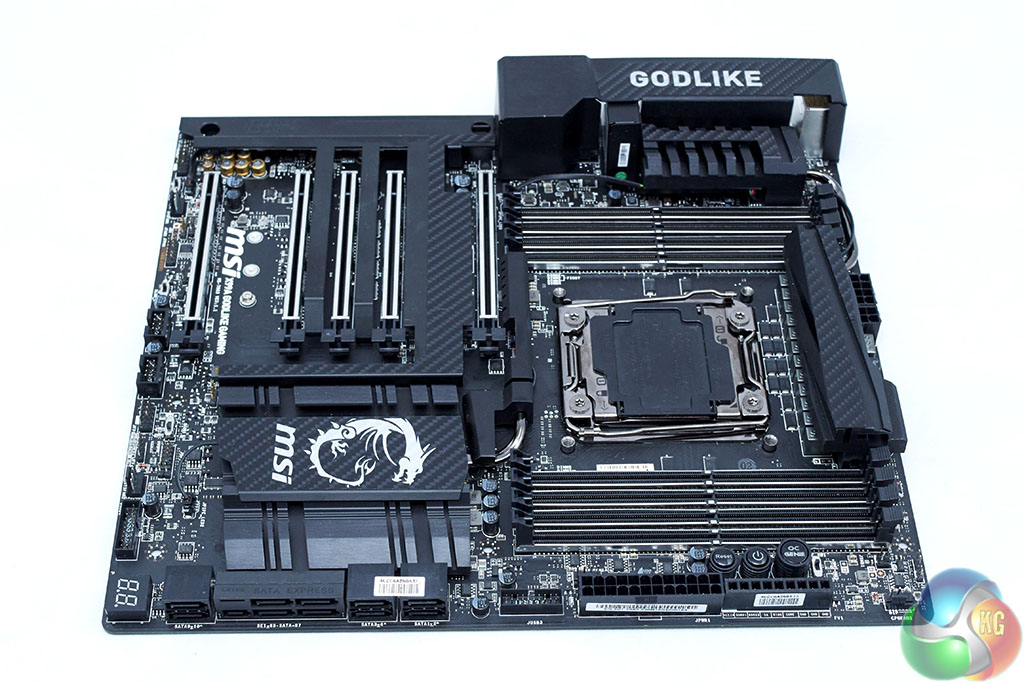
The refreshed version of the Godlike Gaming, the X99A Godlike Gaming Carbon, has taken onboard community feedback and revised the somewhat garish colour scheme of its sibling. Out goes the bright red and in it's place is a more refined black and white design, enhanced with a carbon fibre wrap.
However, styling aside there isn't much, if anything, fundamentally different between the new Carbon variant and the pre-existing red version which we presume will be sold alongside the Carbon.
The specification sheet is decidedly high-end with USB 3.1 (inc. Type-C), SATA Express, M.2, U.2 and support for 4-Way GPU configurations.
The networking aspect is well-addressed with dual Killer E2400 Gigabit LAN and Wireless Killer 1535, the trio of which can combine with software based teaming for a total theoretically network throughput of 2.87 Gbps.
Audio is covered with a Realtek ALC1150 codec backed by headphone amplifiers, amp switches, high-grade audio capacitors and a 6.35mm jack on the rear I/O for premium audiophile headphones.
Features:
- Supports New Intel Core i7 processors Extreme Edition in LGA 2011-3 socket
- Supports Quad Channel DDR4-3400+(OC) Memory
- Support lntel Turbo Boost Max Technology 3.0
- Mystic Light: Style your favourite color from now on
- 2X Faster USB 3.1: Delivering speeds up to 10Gb/s, USB 3.1 offers performance twice as fast as a regular USB 3.0 connection.
- DoubleShot-X3 PRO: Use Killer DoubleShot-X3 Pro to combine Killer WIFI with two Killer LANs for the best online gaming experience
- Turbo U.2 SSD Solution: Take advantage from the whole new storage solution up to 2.4GB/s read speed
- Turbo M.2 : Delivering next generation M.2 Gen3 x4 performance with transfer speeds up to 32 Gb/s
- SATA Express + USB 3.1 + SATA 6Gb/s
- Multi-GPU: 4-Way NVIDIA SLI & AMD CrossFire Support
- OC Engine: Reach higher overclocking results with more flexible BCLK adjustments at 100/125/167MHz.
- Audio Boost 3 PRO: Hear the sound from the heaven with 6.3mm audio jack and ESS audio DAC
- USB Audio Power: Serve Stable 5V Power & Better Signal Transmission over USB
- XSplit Gamecaster: Show off you skills to the world with a 1 year premium license for this popular streaming software
- Guard-Pro: Improved Protection and Power Efficiency
- OC Genie 4: Overclock in 1 Second
- Gaming App: Boost your framerate
- Click BIOS 4: Easily Fine-tune Your System
- Nahimic Audio Enhancer: Enjoy sound that pushes the limits of reality.
- Gaming Device Port: Optimized with Triple Gold-plating for High Polling Rate Gaming Devices
MSI's X99A Godlike Gaming Carbon certainly takes a different approach to high-end X99 from other vendors. Greater focus is made on styling, audio and networking with less emphasis on overclocking and this is reflected in the packaging.
The headline features are the “Mystic Light” RGB lighting, the “Audio Boost 3 Pro” package of hardware and software and the Killer Doubleshot-X3 Pro triplet of networking adapters. MSI's Gaming Series is well established these days and while it may not be as long-standing as ASUS' Republic of Gamers, it is cementing MSI's reputation in the PC Gaming space.
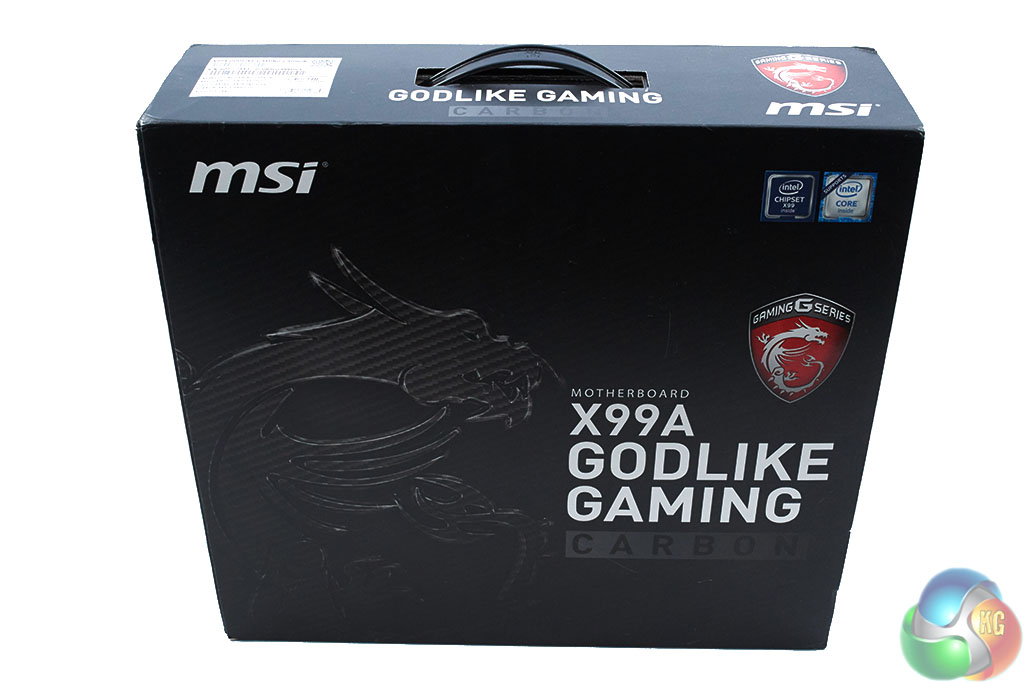
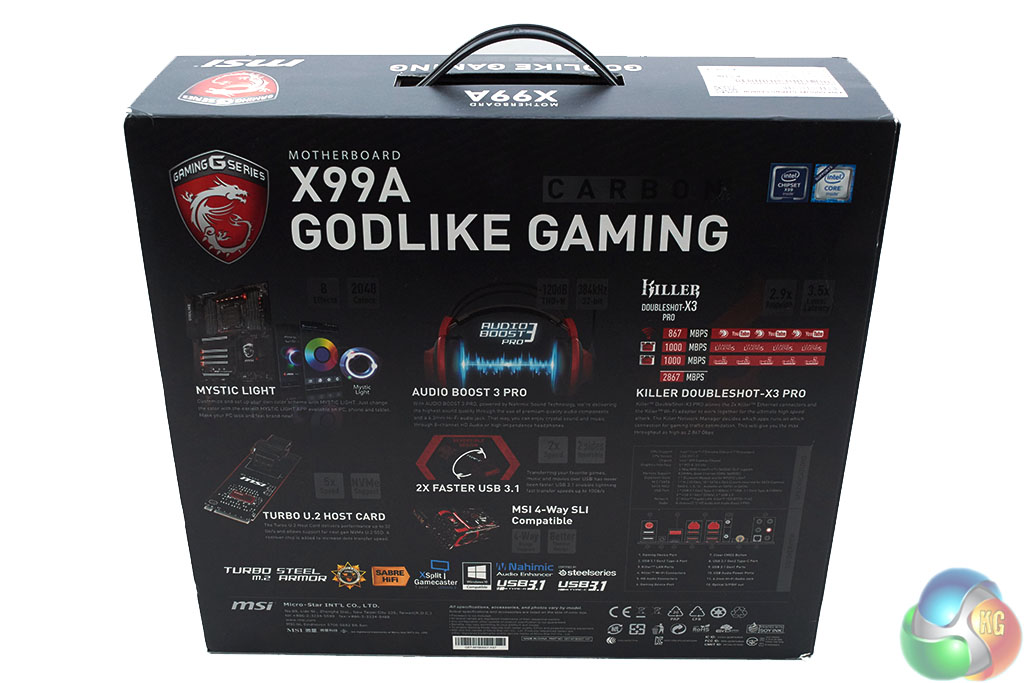
The accessory package is exuberant, though at this price point it is something of a minimum expectation for this to be the case.
MSI includes a number of 2,3 and 4-way Nvidia SLI adapters for multi-GPU configurations, AMD users are able to enable multi-GPU CrossFire with “bridge-less” technology thus no CrossFire bridges are included.
A full complement of 10 SATA cables is provided meaning you can saturate all SATA ports on the motherboard, at the expense of SATA Express. Also on the storage side U.2 is provided via an M.2 conversion card, a sensible move given that M.2 has taken off while U.2 has remained limited in consumer options.
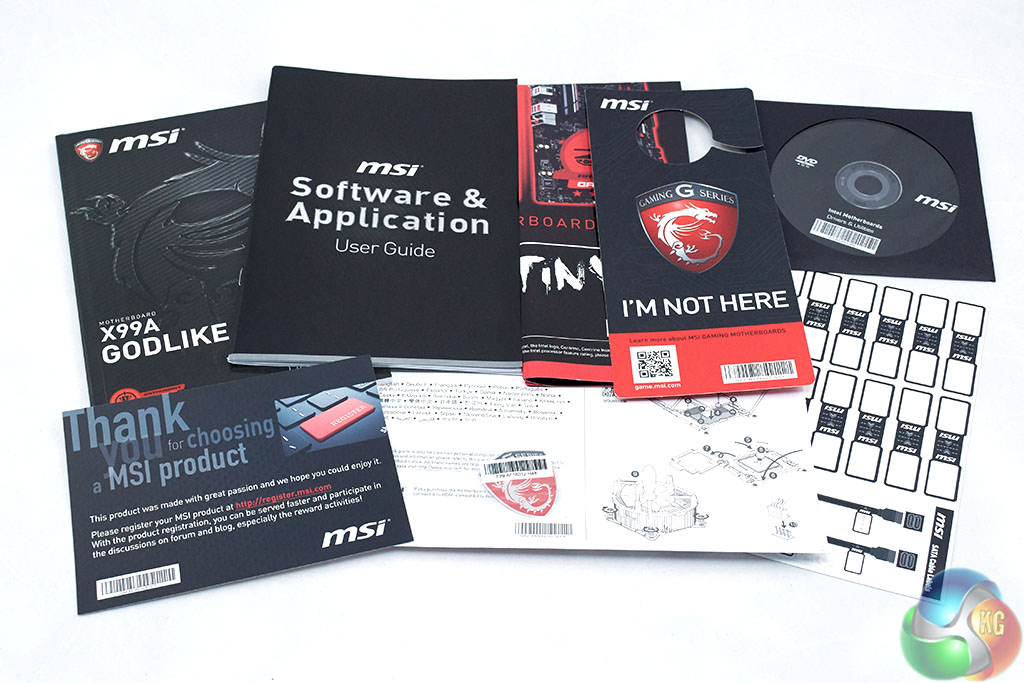
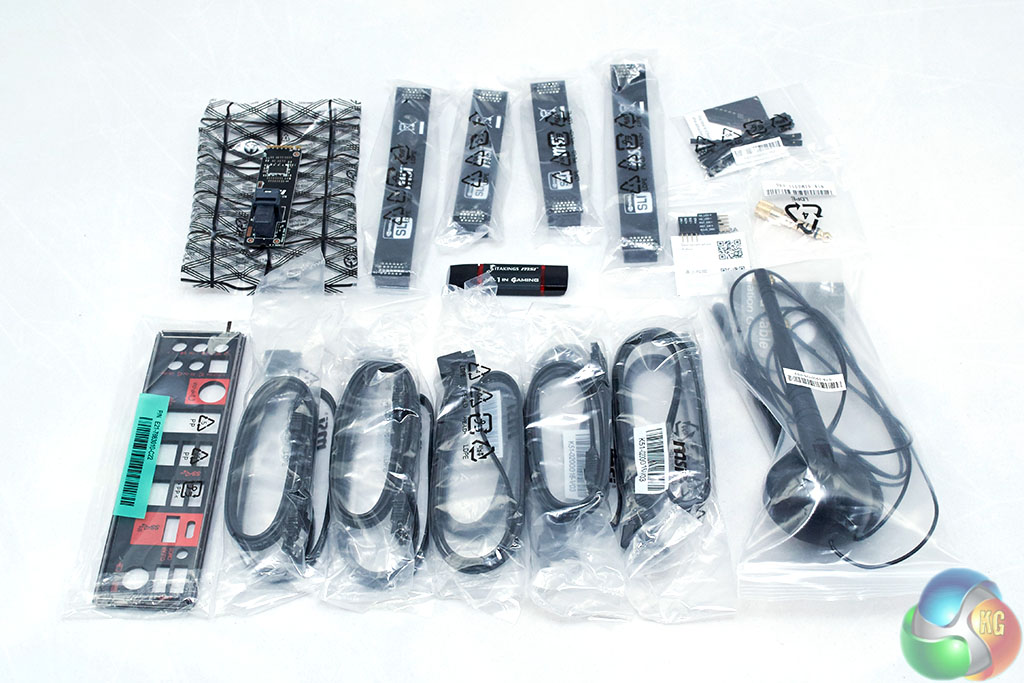
Additional accessories include a dual-interface (micro USB + type-C) flash drive loaded with drivers and software, voltage read-off cables, a 6.35mm to 3.5mm audio adapter, WiFi Antennae, the rear I/O shield and a stack of documentation.
There are no stickers or any form of customisation accessories to change the colour scheme of the motherboard like ASUS provided with its ROG STRIX X99 Gaming, something MSI would benefit from including.
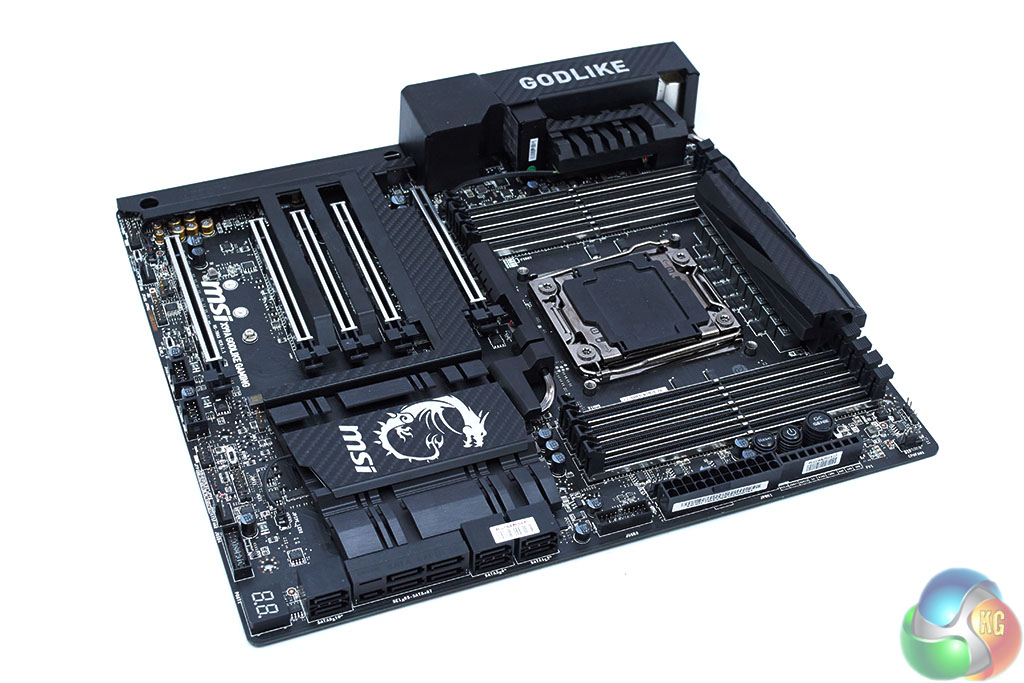
The decision to transition towards a dominantly black colour scheme means the X99A Godlike Gaming Carbon is more adaptable to a variety of different build colour schemes. It's possible to add colour via the RGB lighting software and through other key system components like graphics cards or memory. MSI's flagship GTX 1080, the Gaming 8G, isn't consistent with the colour scheme of the Godlike Carbon though it does feature RGB.
The trend towards “colour-less” components with RGB lighting isn't exclusive to MSI, ASUS has implemented a similar thing for X99 but also carried this over to its graphics cards with software to unify the two.
It would be wise for MSI to consider a “Carbon” RGB-enabled variant of the GTX 1080 Gaming 8G and work with memory manufacturers to sell some similarly themed RAM.
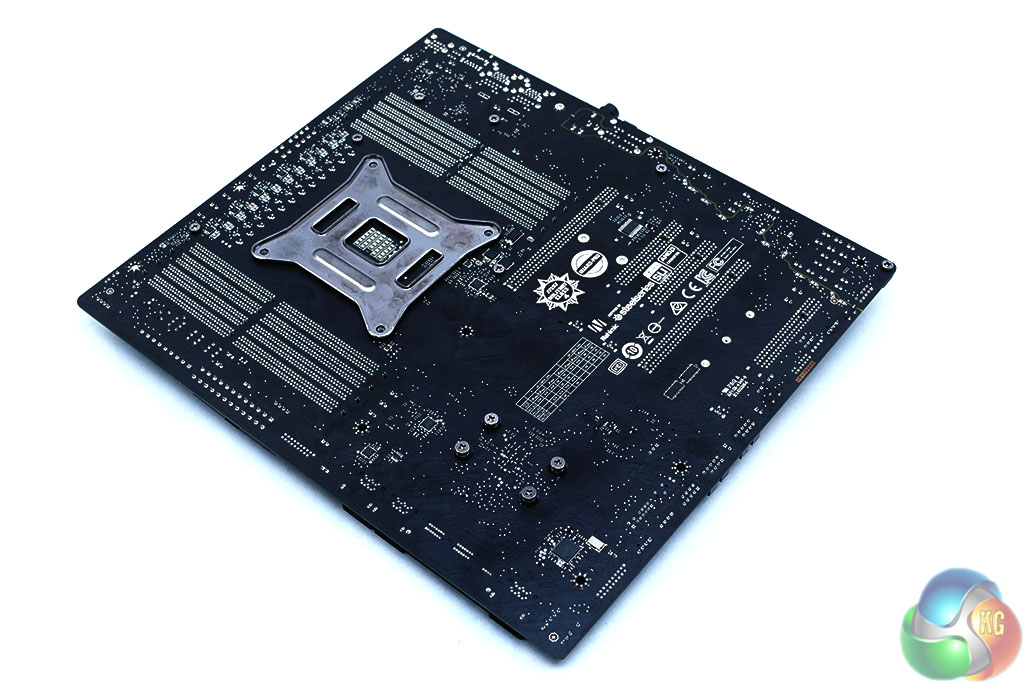
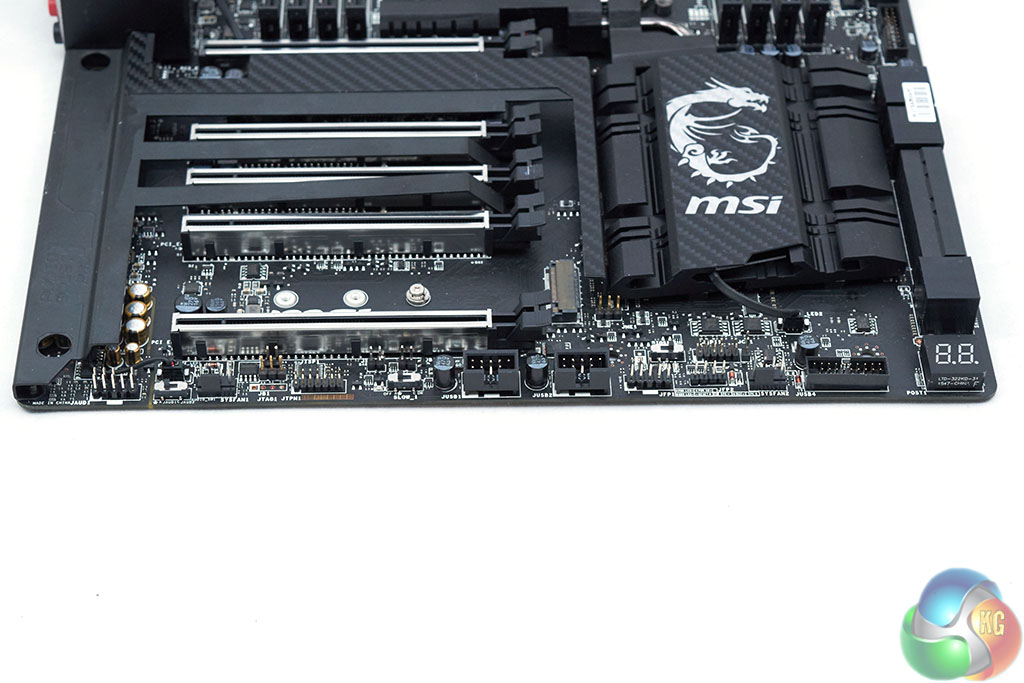
The underside of the motherboard reveals the PCIe wiring of 16X, 8X, 8X, 16X, 8X though the electrical configuration varies depending on the PCIe slots populated, the CPU used and PCIe bandwidth sharing with storage devices and other system controllers.
There is, unfortunately, no armour, reinforcement or heatspreaders underneath the motherboard which is something other vendors offer. At this price point it would be nice to see as it adds another level of structural rigidity and improves overall build quality.
The armour on the top of the motherboard is made from metal so may have some cooling benefits but primarily it feels good quality and adds a more refined edge to the aesthetic. The metal armour on the motherboard is easily removable if you're that way inclined.
Storage connectivity is par-for-the-course – 10 SATA (shared with SATA Express) and M.2 or U.2. The tendency for motherboard vendors to add extra SATA ports has fizzled out into a distant memory since Intel bolstered the baseline storage for the X99 chipset, compared to X79.
As a premium motherboard the heatsinks function for more than just decoration, MSI links the two CPU heatsinks with a 6mm heatpipe to aid heat transfer away from the VRMs. A cut-out in the heatsink allows the CPU power connectors to be accessed though installation of these cables can be tricky with a pre-installed radiator inside the case.
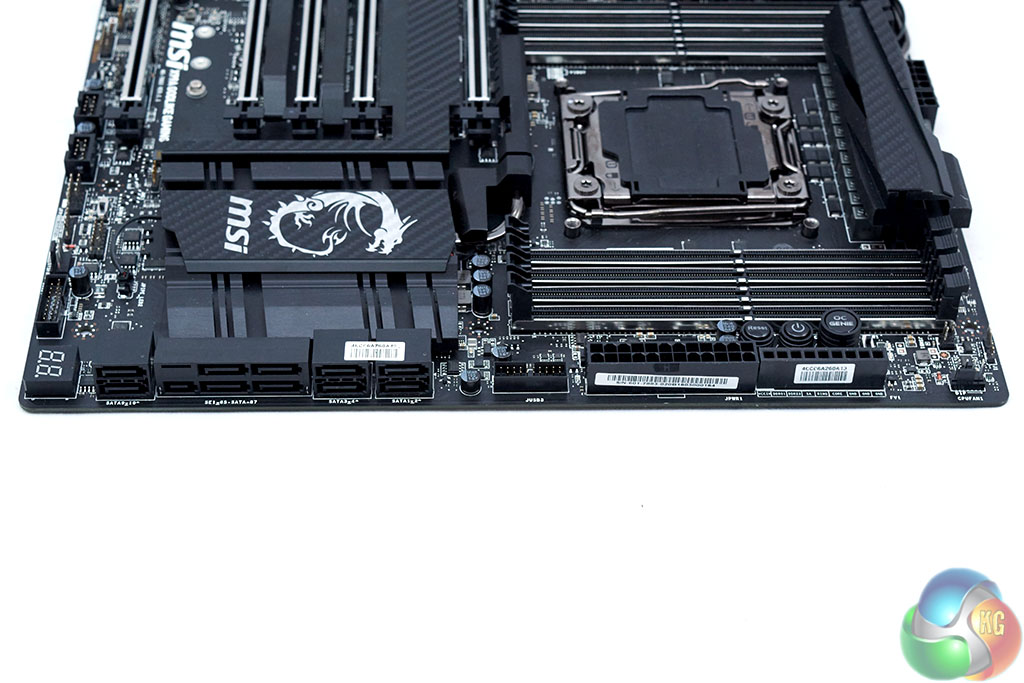
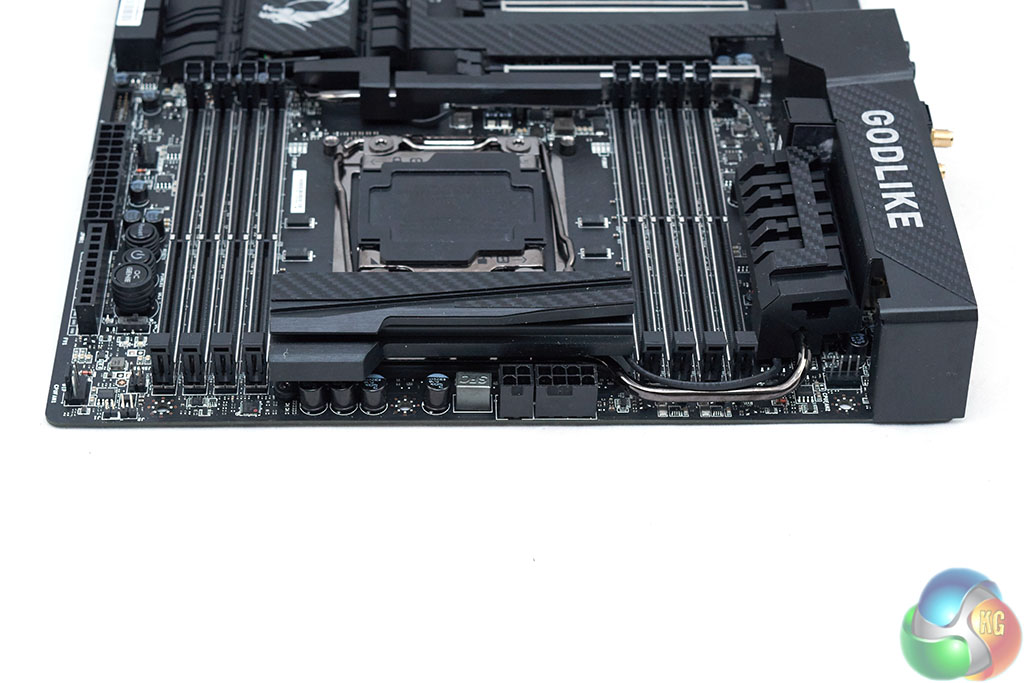
Running along the bottom edge of the motherboard is a number of USB connectors (2 x USB 2.0, 1 x USB 3.0, another USB 3.0 is next to the 24pin), front panel connectors, a UEFI switch for the dual BIOS chips and a debug code reader. Near the audio section you will find the front panel HD audio connector and a switch for the dedicated amplifiers.
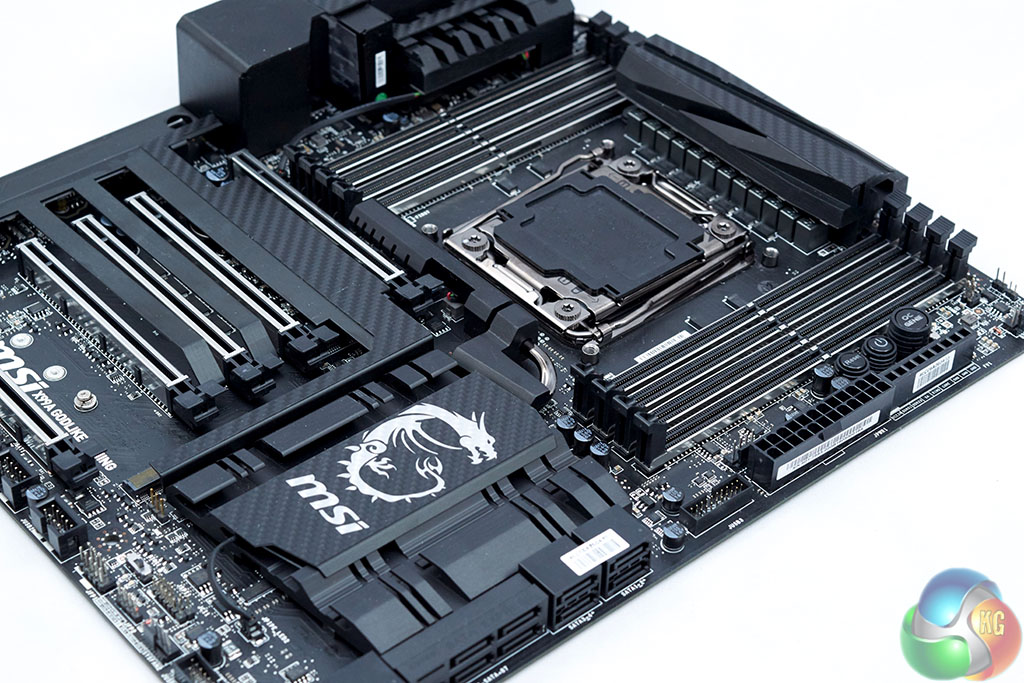
The rear I/O seems a bit light on USB ports though the overall trend for most motherboards has been towards a greater variety of connections rather than a large quantity of a singular type.
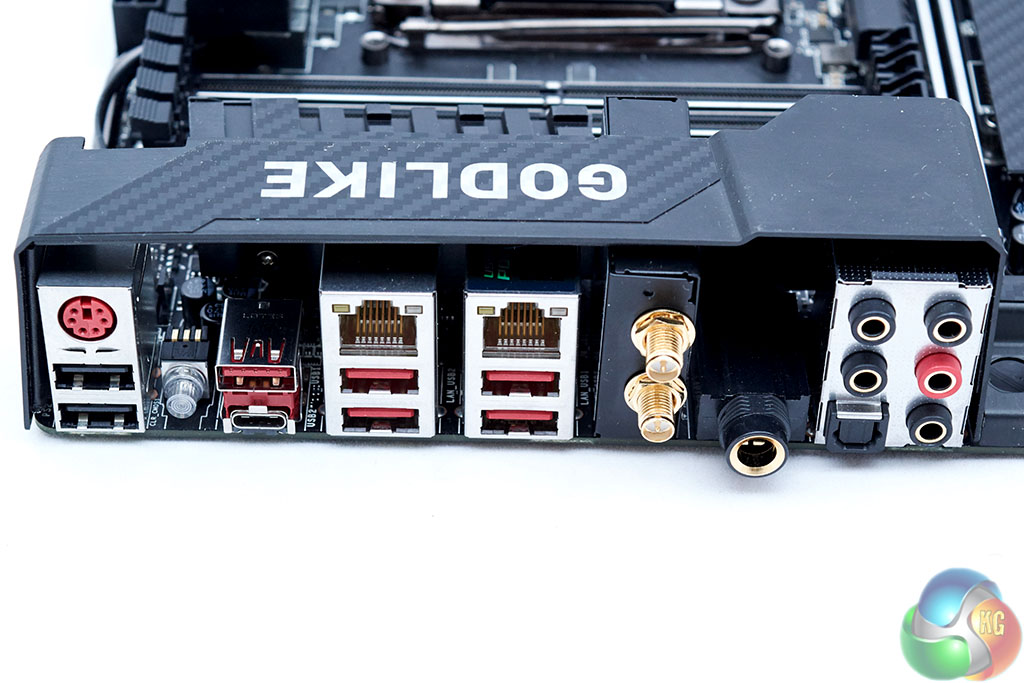
MSI has 8 USB ports of varying speeds (3.1/3.0/2.0), a PS/2 combo, dual LAN, WiFI antenna sockets, audio jacks including a 6.35mm jack and a clear CMOS button.
The MSI Click BIOS is consistent in its design across the bulk of MSI's motherboard portfolio, though X99 brings with it some additional features and settings not present elsewhere.
Click Bios 5 is presented in either the “EZ mode” or an advanced mode. The EZ mode is a single page which offers key functions like boot priority, XMP, OC Profiles (OC Genie 4) and numerous other things.
In light of our recent review of the ASUS ROG STRIX X99 Gaming, we're pleased to see MSI only enables a 3.5GHz all-core overclock when you enable XMP – as opposed to the power-hungry 4GHz profile ASUS applies with XMP.
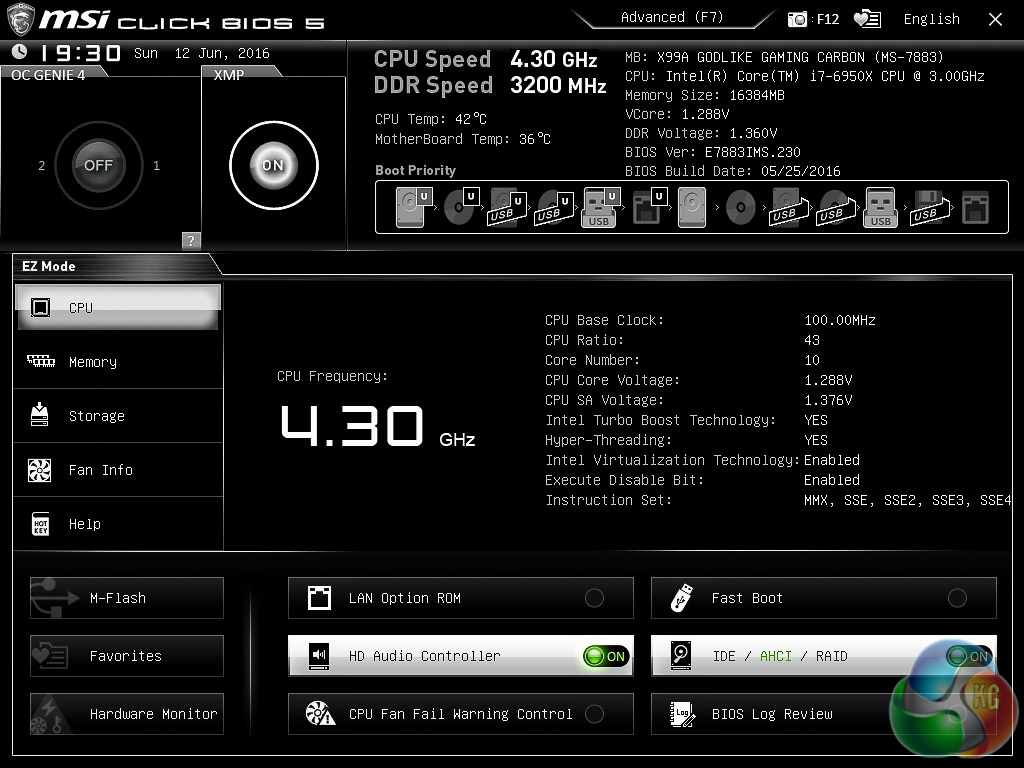
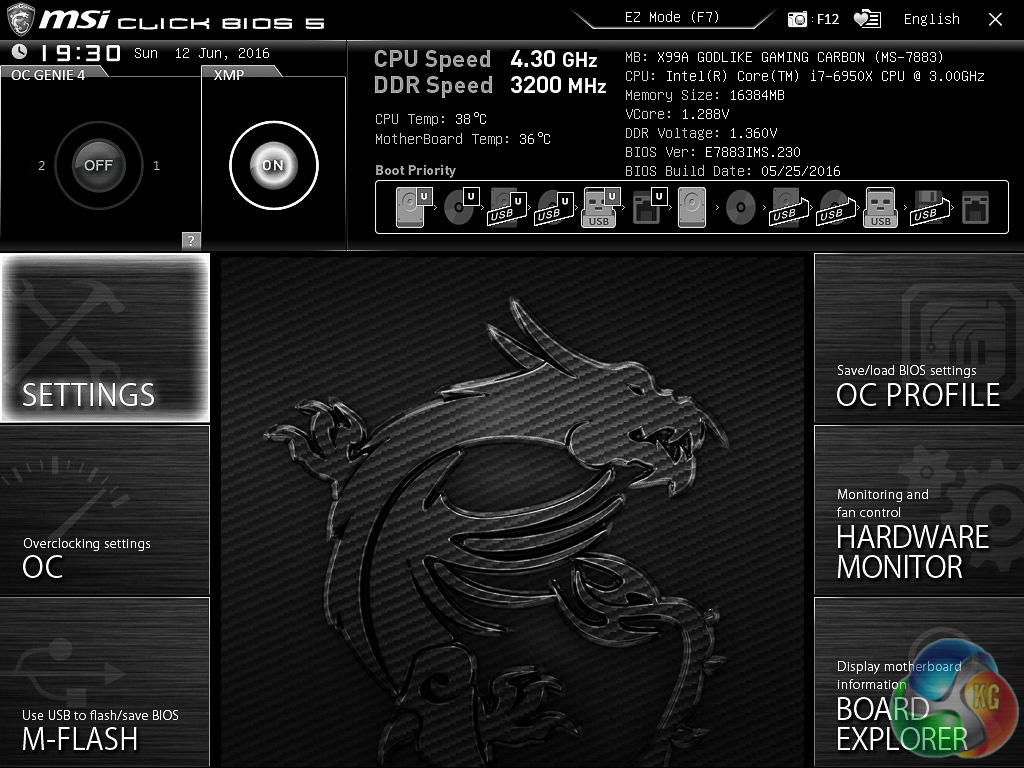
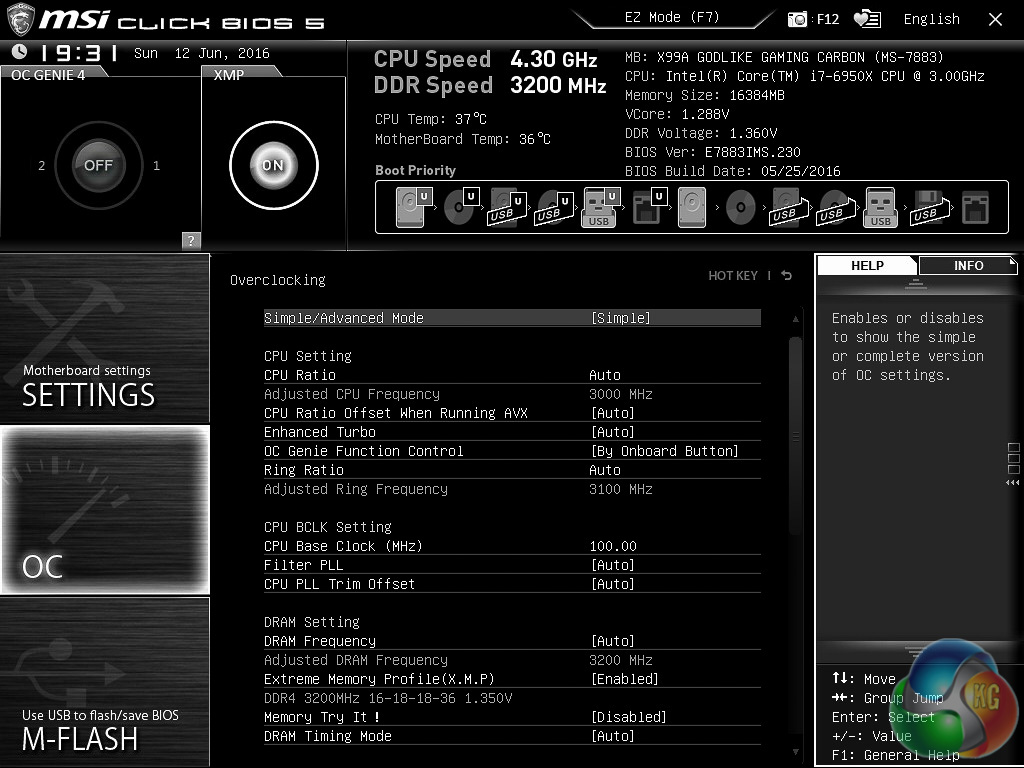
MSI attempts to offer a more intuitive advanced mode with further “difficulty” filtering in the OC tab. You can choose between a simple layout or an advanced one, the main difference being the simple layout hides the more obscure functions.
Within the simple mode you can still overclock through the multiplier, increase the voltages and so on.
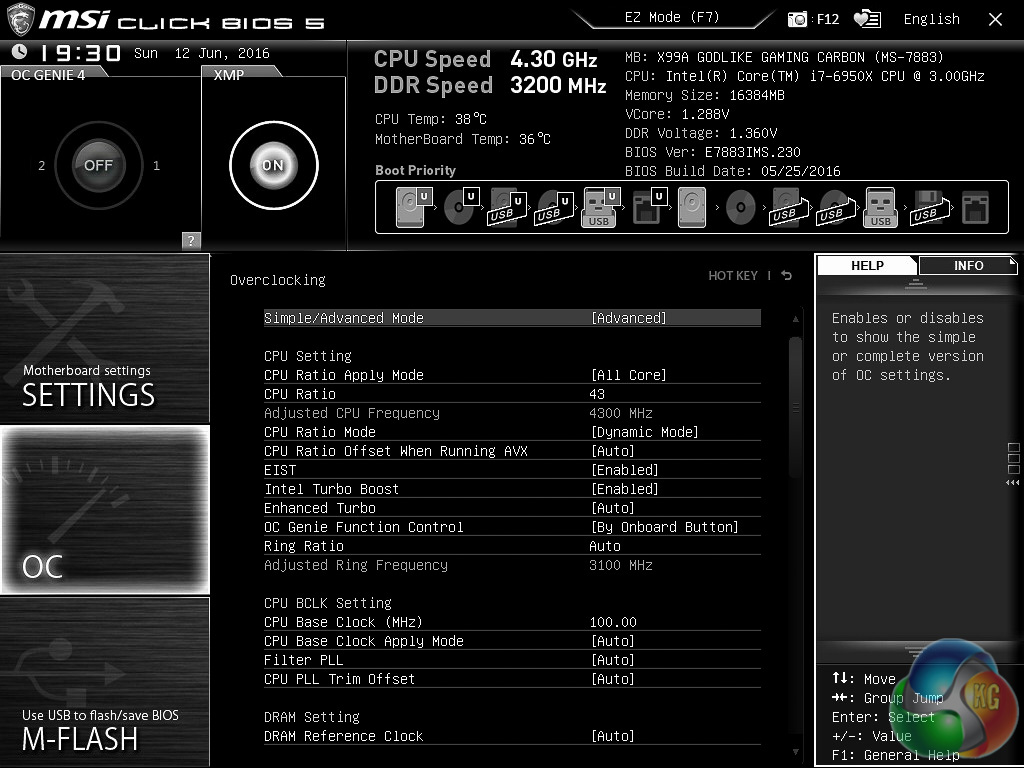
Advanced mode will bring in to play one of the key features of Broadwell-E – the per core overclocking. Older platforms have and do support different CPU core frequencies per core, though with Broadwell-E you get an indication of which core is the most capable.
MSI's implementation is a lot better than ASUS' because rather than telling you what the best core is, MSI rank them in order of overclocking quality. This means if you want to implement a profile which significant core variation, e.g. 2 cores at 4.5GHz, 2 cores at 4.4GHz, 2 cores at 4.3GHz, etc, you know which are the most capable cores to select.
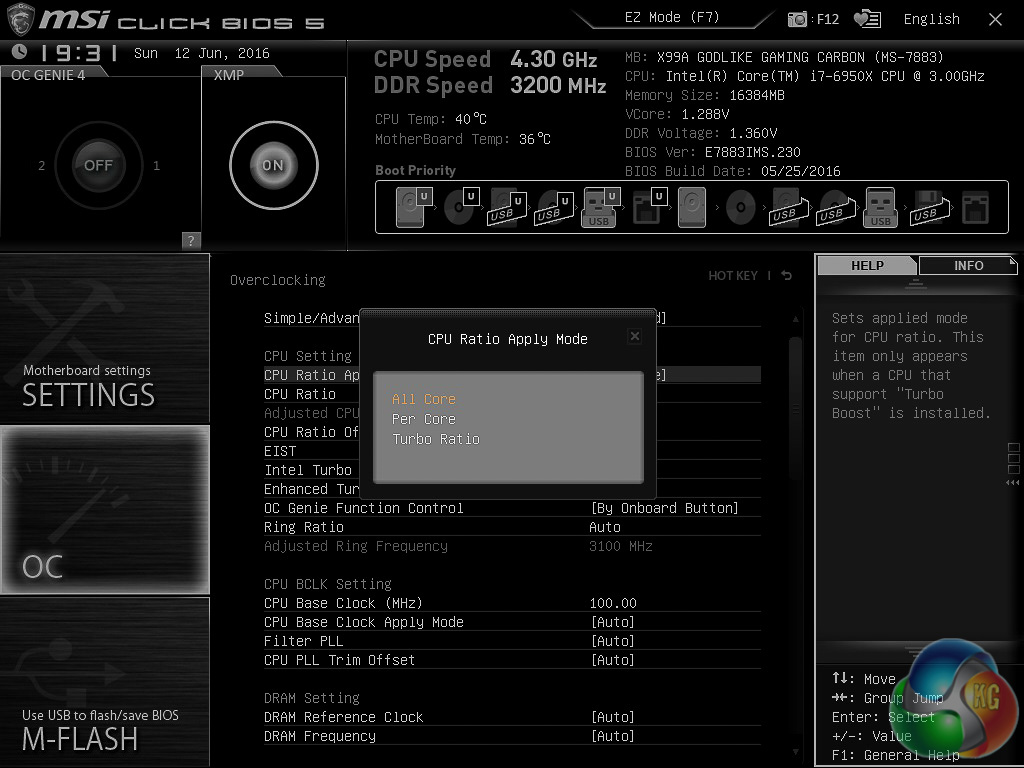
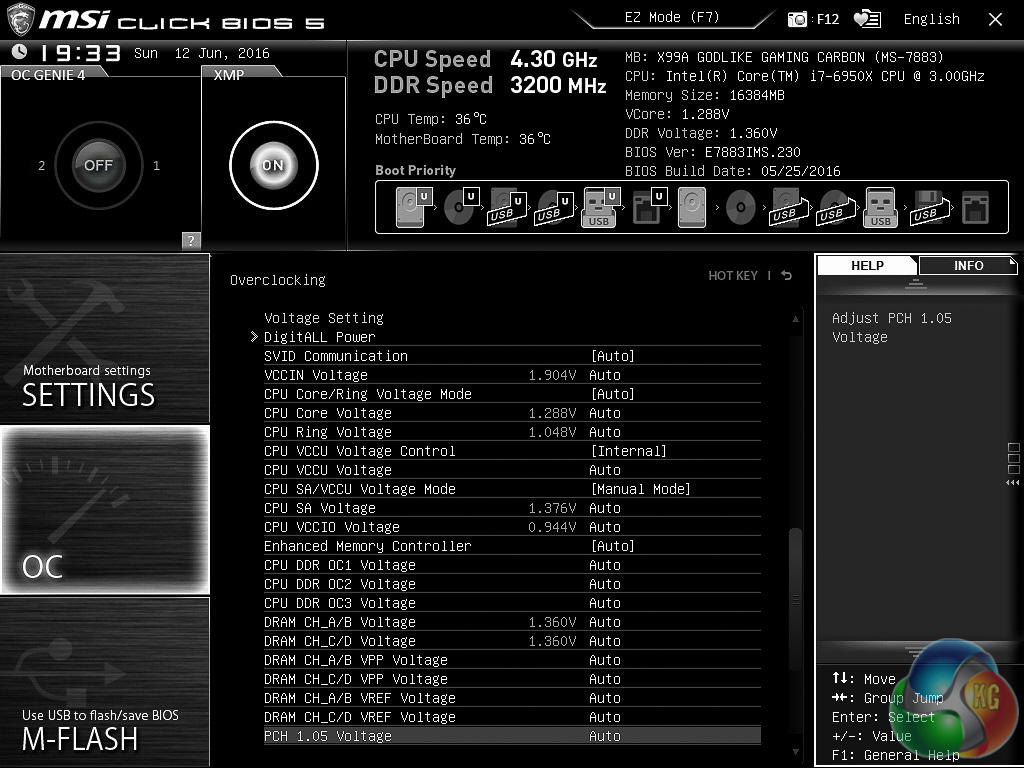
MSI's UEFI is often overlooked, particularly in the HEDT segment, but it is very competent for overclocking prowess. Under the advanced section you'll find a long list of CPU features that can be tweaked, as well as an endless list of voltages.
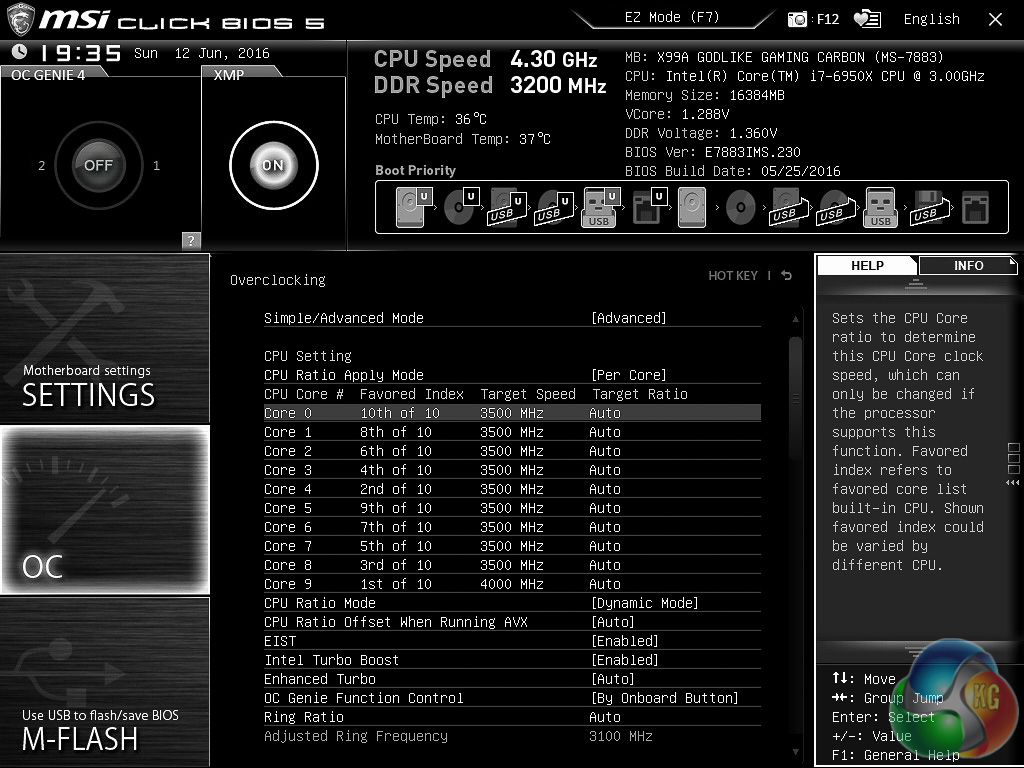
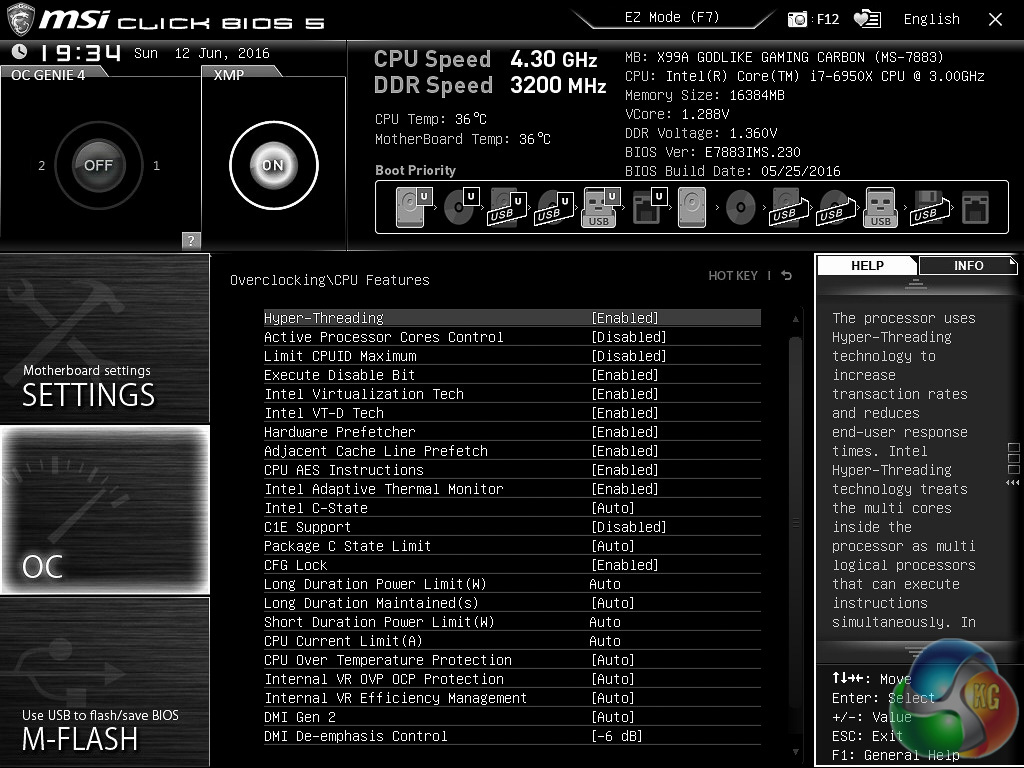
In practice most people will not want to change these settings, neither will they need to, but the freedom to experiment is part of what makes an enthusiast product.
MSI, like other motherboard vendors, doesn't hold back in offering an expansive range of software utilities to its customers. The mainstay of MSI's software suite is Command Centre which is its performance tuning software utility for change voltages and frequencies on-the-fly, tweaking fan speeds and enacting software-based USB speed boosting.
It also includes the MSI OC Genie automated overclocking utility, the same utility which can be found in the UEFI. It is a well-presented and polished piece of software, we just wish MSI did a better job at integrating this with its numerous other software utilities rather than heading off on a tangent with the disconnected Gaming App.
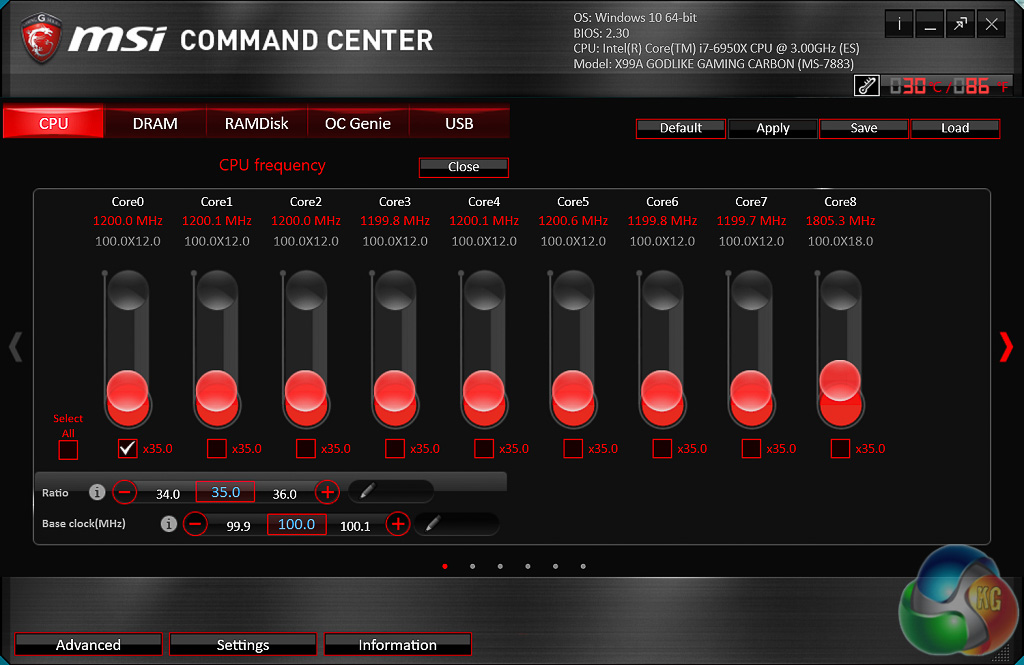

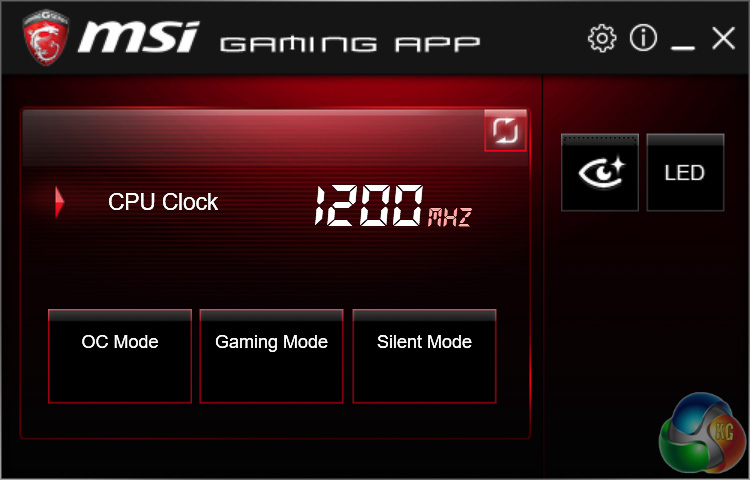
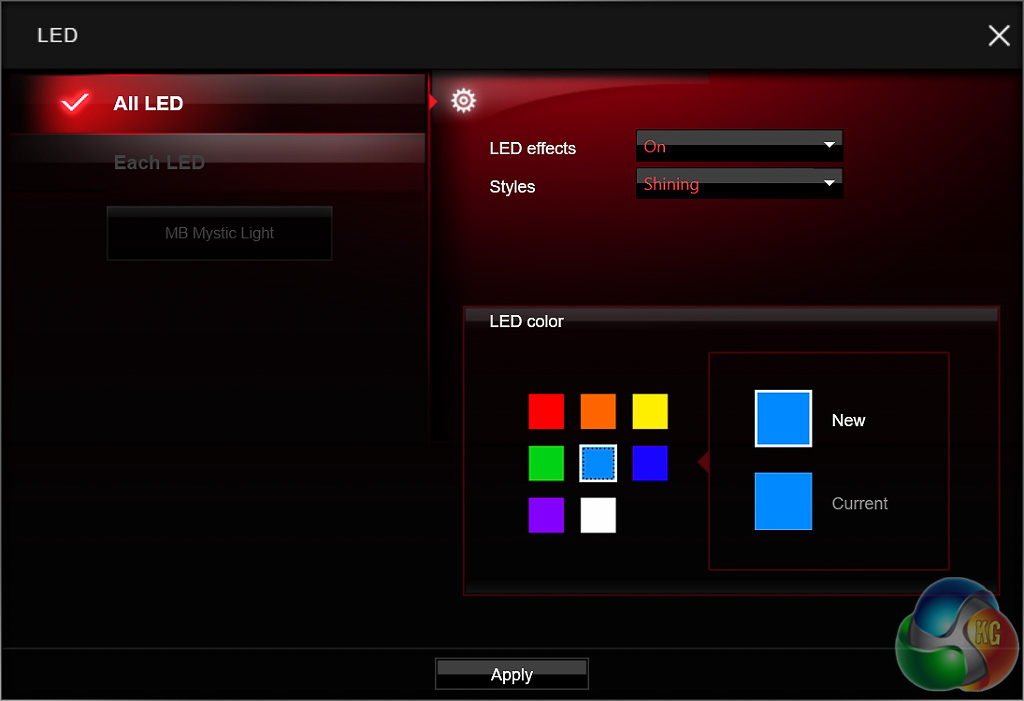
MSI's LED controls are integrated into the Gaming App which also features some 1 click profiles that change frequencies and fan speeds to suit different scenarios and additional utilities like MSI's Mouse Master and Gaming Hotkey are also available should you wish to install them.
The LED functionality is basic in design but intuitive – you pick a colour and you pick a lighting mode. We were disappointed to see that the “Each LED” section remained greyed out on out particular motherboard, despite us using the latest version of the software.
We've seen other MSI motherboard reviews, such as the X99A Gaming Pro Carbon, and it seems to allow for each independent LED zone to have a unique colour and lighting mode. We're not sure why that feature isn't ready on the X99A Godlike Gaming Carbon, there's also no option to add and control external RGB strips as far as we can tell.
The last mention of MSI's software suite is the Nahimic audio suite which is additive to the baseline audio software that comes with the Realtek ALC1150 driver installation.
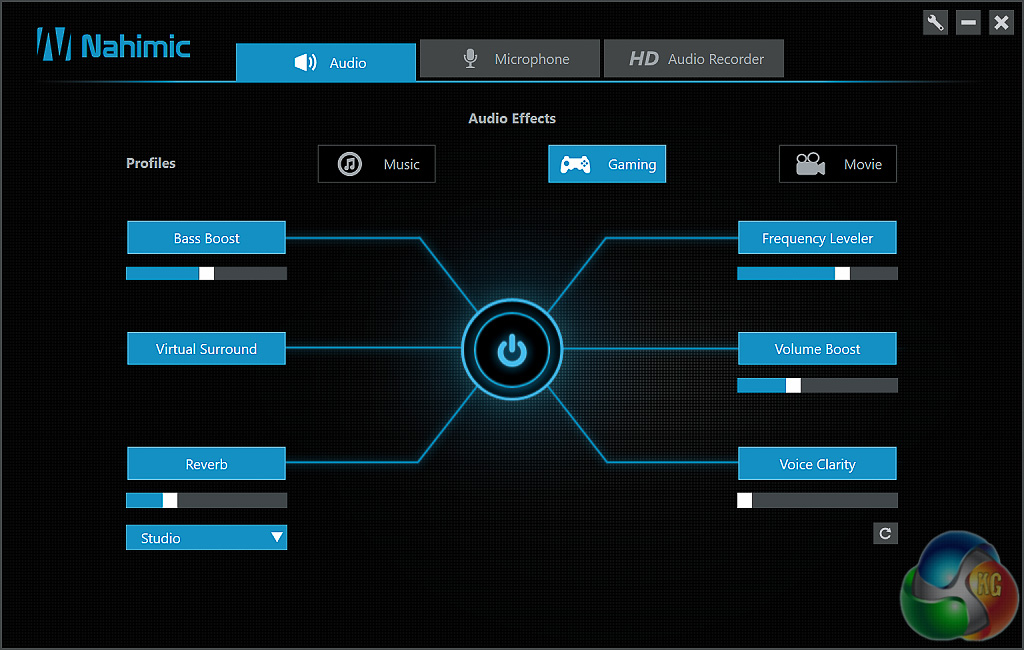
Nahimic is a third party software that works with MSI's audio hardware to provide a variety of software tweaks and enhancements. MSI and Nahimic have a close partnership so, to our knowledge, you'll only find this software on MSI products.
X99 Motherboard Test System:
- Processor: Intel Core i7-6950X (3.5GHz all-core turbo).
- Memory: 16GB (4x4GB) Corsair Special Edition Dominator Platinum, 16-18-18-36 DDR4 @ 1.35V.
- Graphics Card: Nvidia GTX 980 Ti.
- System Drive: Mushkin Chronos 120GB
- Storage Test Drive: OCZ Trion 150 480GB (with a USB 3.0 to SATA adapter for USB 3.0 testing.)
- CPU Cooler: Antec Kuhler H20 1200
- Power Supply: Seasonic Platinum 760W.
- Test Bench: Lian Li PC-T60B.
- Operating System: Windows 10 Pro 64-bit.
Z170 Motherboard Test System:
- Processor: Intel Core i7-6700K (4.2GHz all-core turbo).
- Memory: 16GB (4x4GB) G.Skill Ripjaws V 3200MHz 16-16-16-36 DDR4 @ 1.35V.
- Graphics Card: Nvidia GTX 980 Ti.
- System Drive: Mushkin Chronos 120GB
- Storage Test Drive: OCZ Trion 150 480GB (with a USB 3.0 to SATA adapter for USB 3.0 testing.)
- CPU Cooler: Antec Kuhler H20 1200
- Power Supply: Seasonic Platinum 760W.
- Test Bench: Lian Li PC-T60B.
- Operating System: Windows 10 Pro 64-bit.
Comparison Z170 Motherboards:
Software:
- MSI BIOS v2.3 (Release Date 26/05/2016)
- Nvidia GeForce 364.72 WHQL Driver
Tests:
- Cinebench R15 – all core CPU test and CPU power consumption figures.
- Handbrake – converting a short 720p movie file into a smartphone suitable format using the Android preset.
- SiSoft Sandra – processor arithmetic and memory bandwidth test sequences.
- AIDA 64 Engineer – memory and cache test.
- 3DMark – Firestrike (1080p) test.
- Ashes of the Singularity – built-in benchmark tool @ 1080p using the Crazy preset.
- Unigine Valley – built-in benchmark using the Extreme HD preset.
- Rightmark Audio Analyser – record and playback test using a line-in to line-out loopback on a high quality gold-plated 3.5mm cable.
- ATTO – default disk benchmark for SATA and USB testing
Cinebench R15
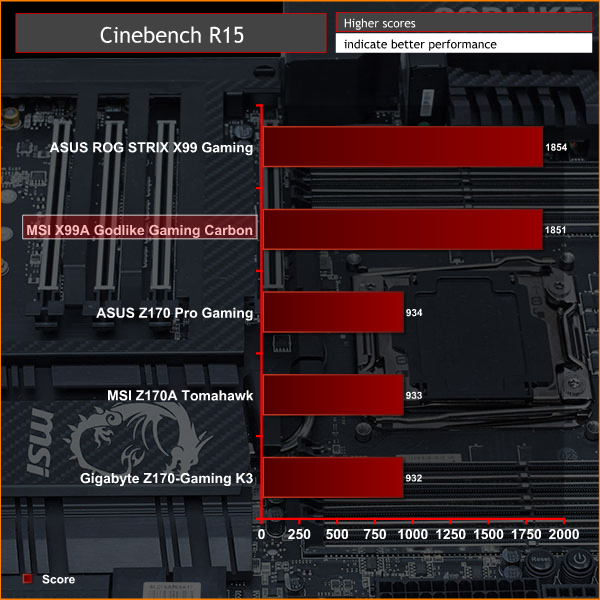
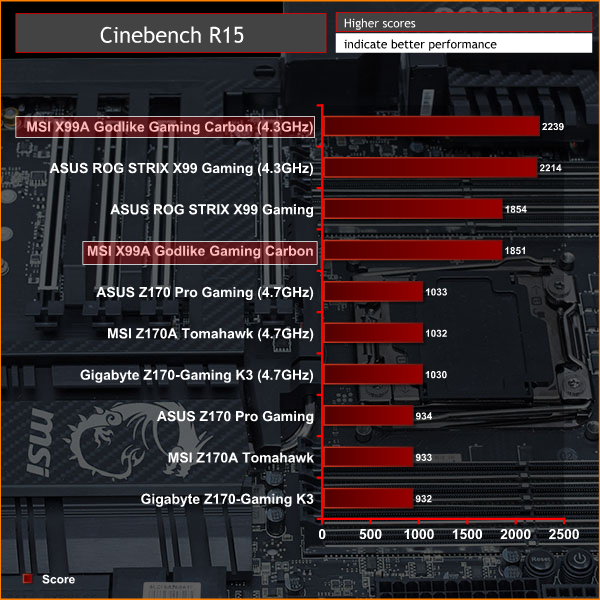
Cinebench is an application which renders a photorealistic 3D scene to benchmark a computer's rendering performance, on one CPU core, all CPU cores or using the GPU. We run the test using the all core CPU mode.
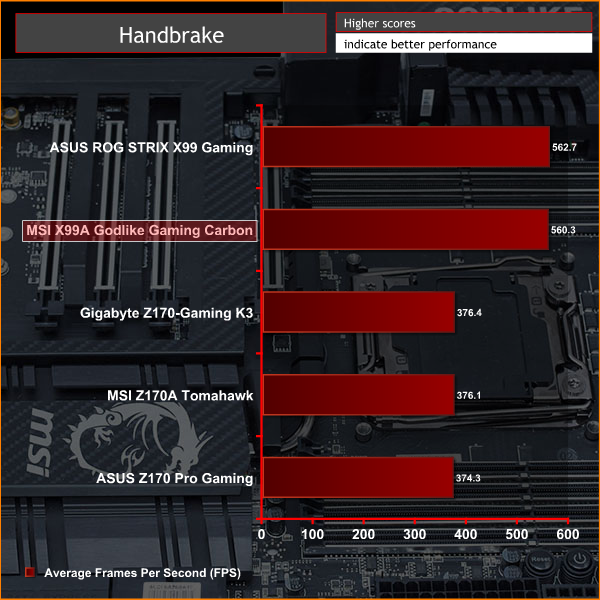
Handbrake
Handbrake is a free and open-source video transcoding tool that can be used to convert video files between different codecs, formats and resolutions. We use Handbrake to convert a short 720p into the Android preset built into the application.
SiSoft Sandra
SiSoft Sandra 2016 is a multi-function utility program that supports remote analysis, benchmarking and diagnostic features for PCs, servers, mobile devices and networks. We run the application's processor arithmetic test to gauge the CPU performance on each tested motherboard.
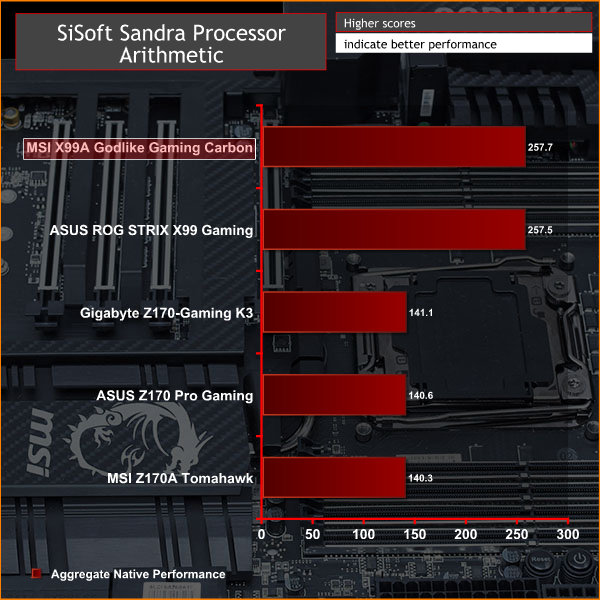
CPU performance shows only margin of error variability between the ASUS motherboard, so we have no complaints here.
AIDA64 Engineer
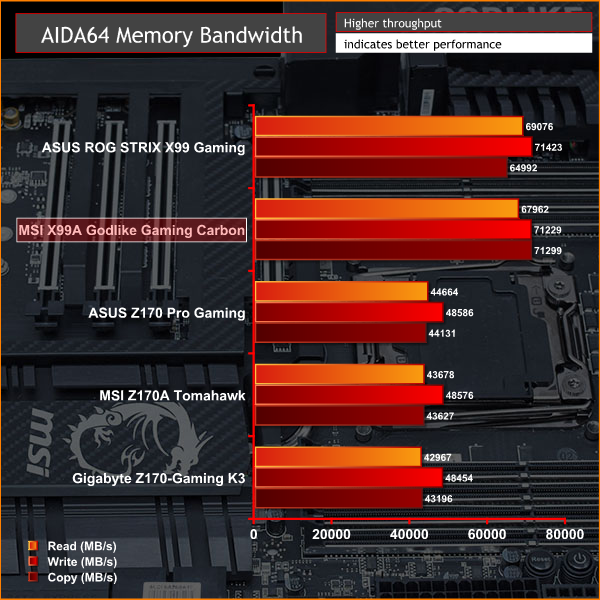
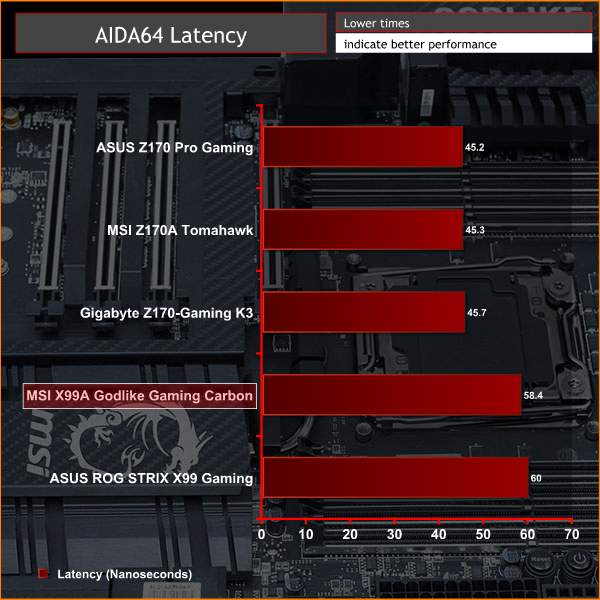
AIDA64 Engineer is a multi-featured software suite for diagnostics, stress testing, benchmarking, software auditing and various other measurement parameters. We use AIDA64 Engineer to benchmark memory throughput and latency.
SiSoft Sandra
SiSoft Sandra 2016 is a multi-function utility program that supports remote analysis, benchmarking and diagnostic features for PCs, servers, mobile devices and networks. We use the SiSoft Sandra memory bandwidth test to give us an extra set of memory bandwidth results.

Synthetic memory performance seems to be slightly better on the MSI motherboard than the ASUS equivalent, by around 3~5%.
We can't assign this difference to an obvious UEFI setting since both boards applied the same XMP profile and both boards also Auto selected the same 3.1GHz cache ratio for the CPU when opting for the 3.5GHz all-core turbo.
3DMark
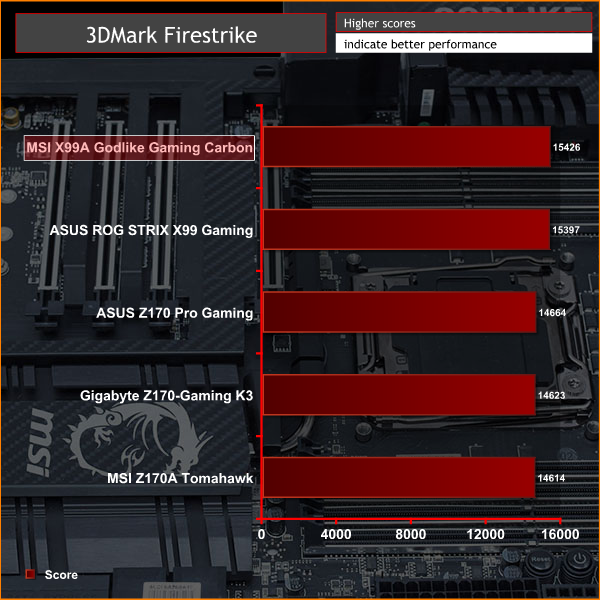
3DMark is a multi-platform hardware benchmark designed to test varying resolutions and detail levels of 3D gaming performance. We run the Windows platform test and in particular the Firestrike benchmark, which is indicative of high-end 1080p PC Gaming.
Ashes of the Singularity
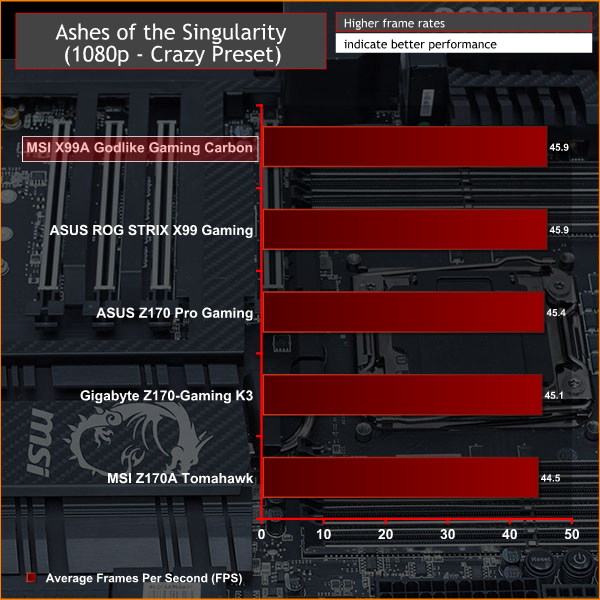
Ashes of the Singularity is a Sci-Fi real-time strategy game built for the PC platform. The game includes a built-in benchmark tool and was one of the first available DirectX 12 benchmarks. We run our tests using DirectX 11, a 1080p resolution and the Crazy preset.
Unigine Valley
Unigine Valley is a GPU stress testing and benchmarking tool that succeeds its predecessor, Unigine Heaven. Valley makes use of dynamic lighting, depth of field, ambient occlusion and dynamic weather patterns. We utililise the built-in benchmarking tool with the Extreme HD preset.
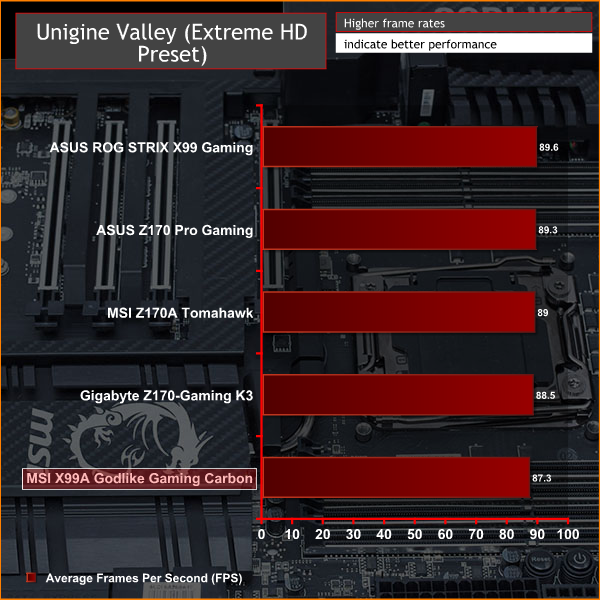
GPU performance was within margin of error too.
ATTO Disk Benchmark
The ATTO disk benchmark is a Windows-based utility for testing storage performance of any storage drive or controller. We use the default benchmark setup and run this on an OCZ Trion 150 SSD directly connected to the SATA ports and then again over a USB 3.0 port using a USB 3.0 to SATA III adapter.
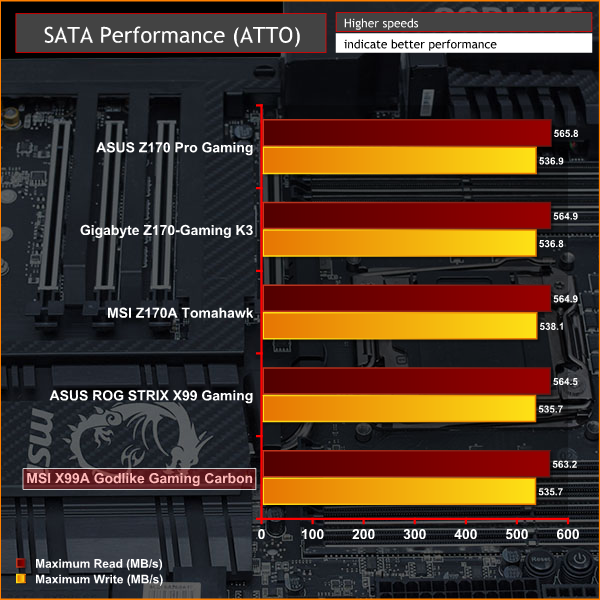
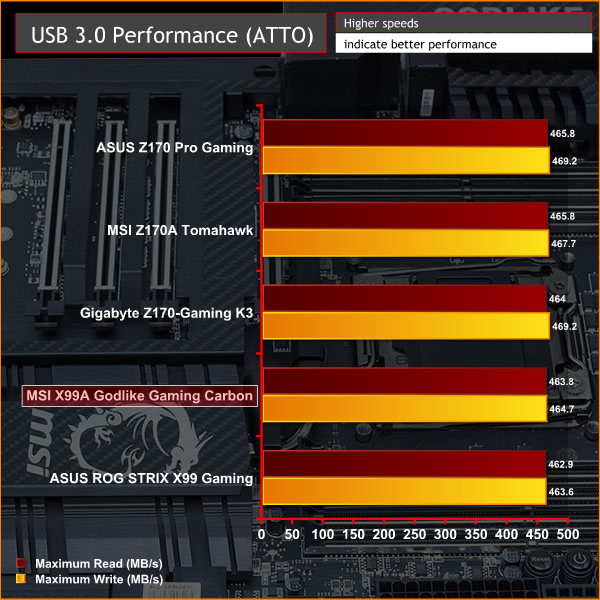
USB 3.0 and SATA III performance delivered no surprises as they are consistent across Intel's chipsets, in the future we hope to implement M.2 NVMe and USB 3.1 testing to stress the new connectivity standards.
Rightmark Audio Analyser
Rightmark Audio Analyser is a freeware benchmarking utility designed to objectively test the performance characteristics of audio solutions. We setup a line-in line-out loop and execute the record/playback test before generating the results report you see below. This test was run at 16bit audio depth and 192KHz frequency.
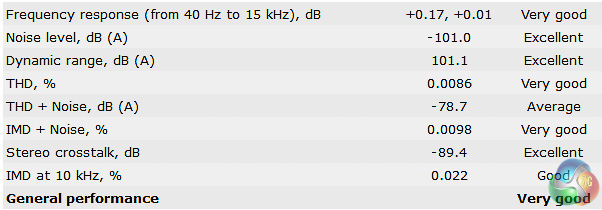
The audio results were very good and we'd expect nothing less from a board of this price point. RightMark shows us that the quantitative performance is on point and the qualitative listening experience is helped by the amplifiers and the Nahimic software.
We'd imagine the large 6.35mm jack comes in handy for audiophiles with a fancy array of headphones, though if you've got that kind of money to spare the chances are you may already own a discrete headphone amplifier and DAC.
Power Consumption
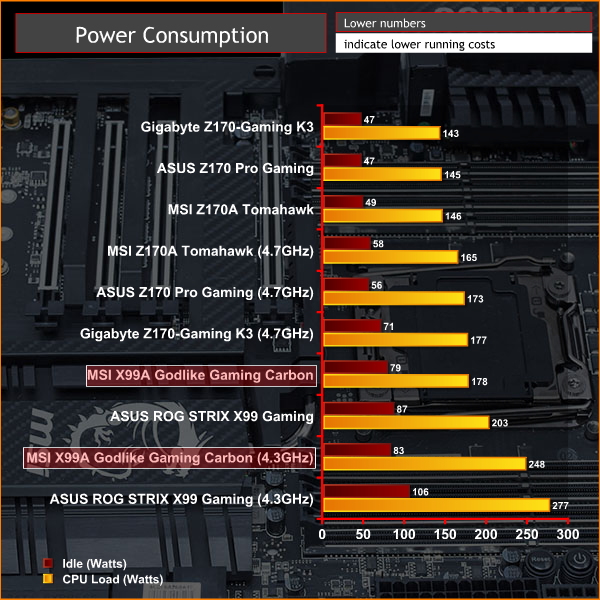
We leave the system to idle on the Windows 10 desktop for 5 minutes before taking a reading, for CPU load results we run Cinebench and take a reading in the middle of the render progress.

Power consumption was about 25-watts lower than the ASUS motherboard which we can put down to the “Auto” voltages being less aggressive across the board for the same frequencies.
Overclocking
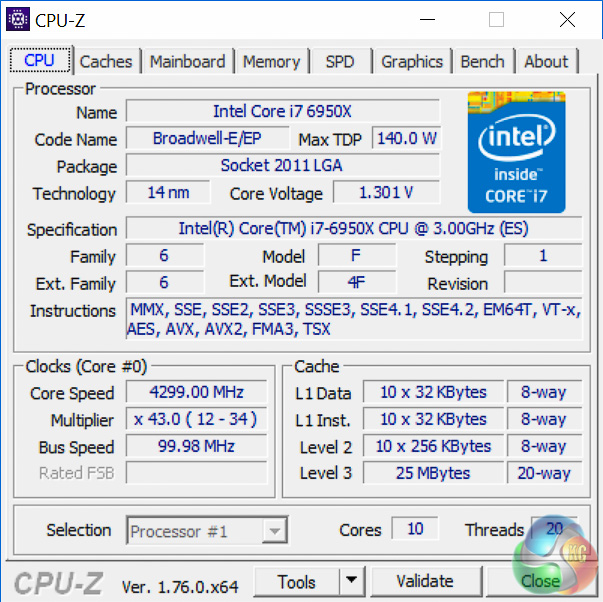
Our chip isn't stable enough to run beyond 4.3GHz with safe voltages and the MSI Godlike Gaming Carbon was equally as capable of achieving the maximum clock speed as other X99 boards we've tested.
Performance was in line with the frequency though a slight advantage over the ASUS motherboard of 25 Cinebench points is hard to pin down as memory and cache frequencies were identical. We were also pleasantly surprised to see power consumption lower on the MSI motherboard despite identical core voltages.
Given CPU-Z measured no voltage droop on either motherboard we'd assume the power consumption difference derives from the auto voltages set on other parameters like the CPU cache, VCCIO and PCH as well as the background power draw of network controllers and other board components.
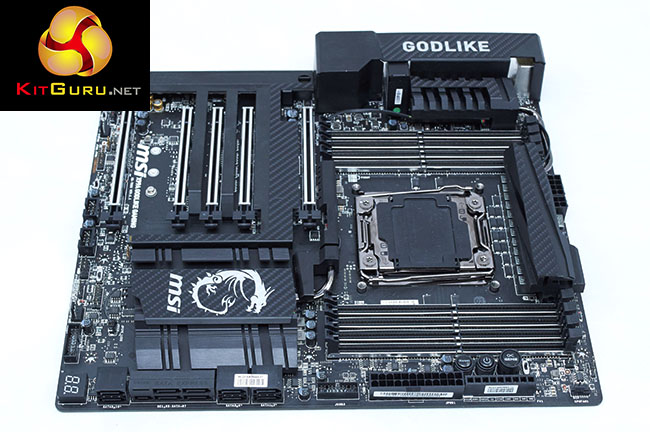
There's certainly no shortage of high-end motherboards on the Intel X99 platform – ASRock, ASUS, Gigabyte and MSI all have motherboard options over £400 in this space. The MSI X99A Godlike Gaming Carbon is MSI's top-flight option and with a price of £454.99 in the UK, $600.00, it is out of the realistic grasp of most PC gamers.
Such a serious price point requires a serious number of features and extras and thankfully MSI's X99A Godlike Gaming Carbon does deliver enough to warrant consideration. As far as connectivity and expansion are concerned this motherboard has everything covered – dual Gigabit LAN, AC WiFi, USB 3.1, USB Type-C, 4-Way GPU, M.2, U.2 and SATA Express.
The X99A Godlike Gaming Carbon hits the mark for building and overclocking experiences too – a debug code reader, onboard power buttons, voltage checkpoints and a comprehensive UEFI that'll help you squeeze the most out of your CPU. The clean colour scheme with RGB customisation is beneficial to the building experience as well, giving you more flexibility to mix and match any variety of colours you may choose. The budding modder should also note the shroud and heatsinks are easily removable for painting or different carbon fibre wraps.
There are some things that let this MSI motherboard down a little bit though, not least the somewhat ropey RGB software that doesn't allow individual LED zone adjustment or the Android app that resets the colour every time the lighting mode is changed. The problems we encountered hopefully have a fix in the works and will be fixed in future, so shouldn't present a barrier to purchasing, though the lack of an RGB header on the motherboard may put some buyers off.
The main sticking point for purchasing will undoubtedly be the steep price point which is trumped only by the ASUS Rampage V Edition 10 and ASRock X99 Extreme 11. With so much financial outlay required prospective buyers will expect near perfection – the MSI X99A Godlike Gaming Carbon isn't perfect though it is still a very competent motherboard.
In addition to some oversights in the RGB department the lack of armour or reinforcement plates underneath the motherboard seems a bit stingy, so too does the “only” 8 rear USB ports, which is a couple less than the the competition presumably because MSI chose to instead allocate rear I/O space to a PS/2 port and 6.35mm audio jack.

You can buy from Overclockers UK for £454.99 inc VAT HERE
Discuss on our Facebook page, over HERE.
Pros:
- Striking aesthetics.
- Broad connectivity options for storage, networking and peripherals.
- Supports up to 4-Way GPU configurations.
- Onboard buttons, debug LED and voltage checkpoints.
- UEFI well-geared towards overclocking.
- Premium audio package.
- Generous accessory bundle.
Cons:
- RGB software needs work, no RGB headers.
- Steep price point.
- No underside armour/reinforcement or heatsink customisation stickers.
- Only 8 rear USB ports.
KitGuru says: It's not going to be your God but the MSI X99A Godlike Gaming Carbon is a worthy consideration for any premium Intel X99 system. Features-galore, overclocking prowess and refined styling make this pricey motherboard a solid enthusiast option.