KitGuru KitGuru.net – Tech News | Hardware News | Hardware Reviews | IOS | Mobile | Gaming | Graphics Cards


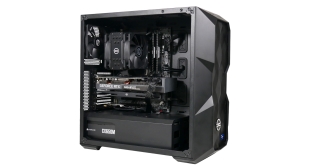
PCSpecialist (PCS) is well known in the United Kingdom for producing some of the finest custom PC builds targeting the enthusiast audience. We have reviewed many of their builds over the years and have been generally impressed with their attention to detail and competitive pricing, as well as their consistency in selecting a balanced component configuration which work well together. This time PCS told us they wanted to focus on a sub-£2k build that worked well for gaming at 1440p. This system comprises an Intel Core i7-12700K, RTX 3070 Ti, 32GB of DDR4 memory, along with a 1TB SSD and 2TB hard drive.
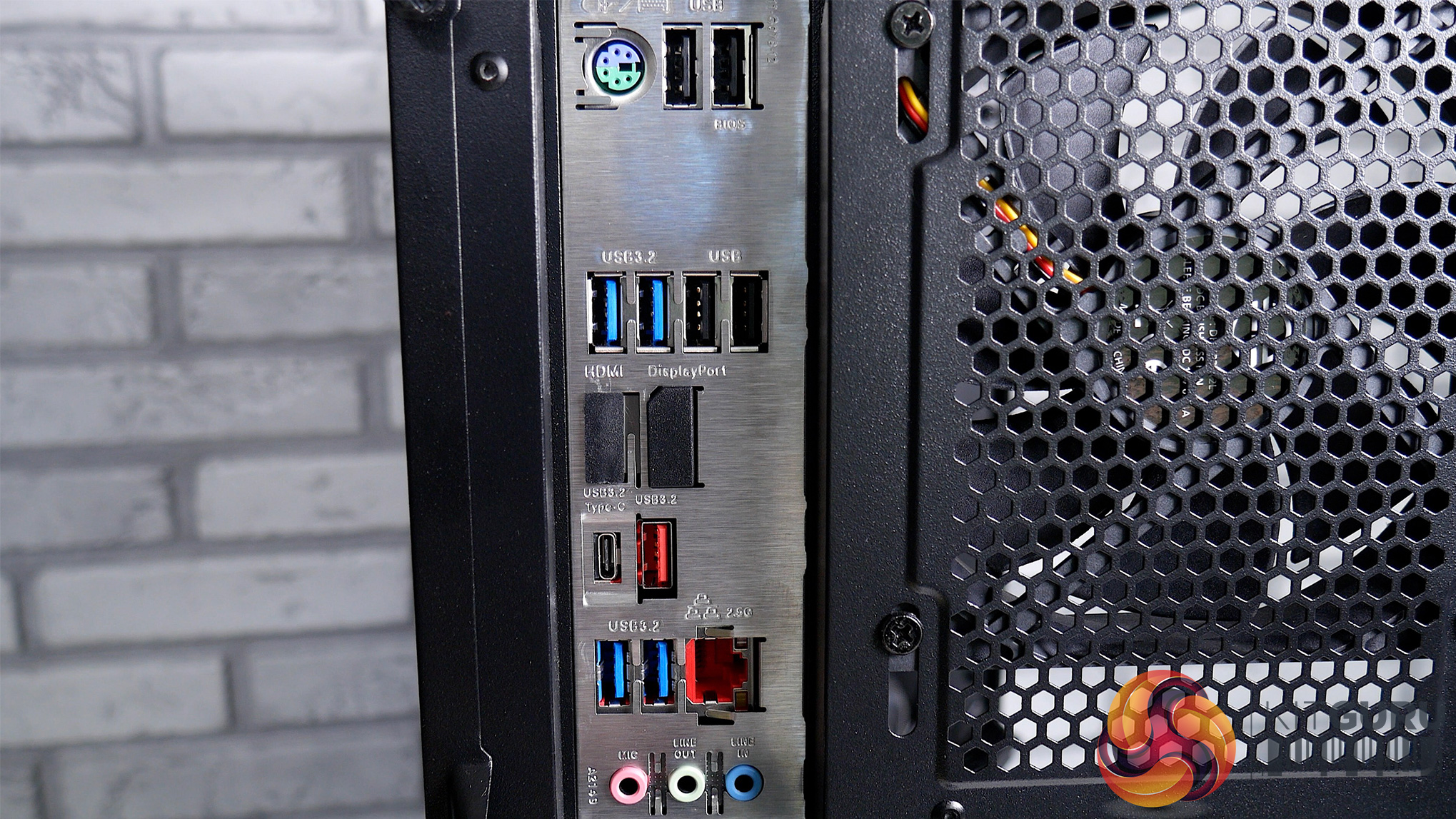
Specification
- Case: Cooler Master MasterBox TD500 Mesh ARGB (Black Colour)
- CPU (Processor): Intel® Core i7-12700K
- Graphics Card (GPU): Gigabyte GeForce® RTX 3060 Eagle OC 8GB
- CPU Cooling: PCS Frost Flow 150 Series CPU Cooler
- Motherboard: Gigabyte Z690 UD DDR4 (LGA1700, USB 3.2, PCIe 5.0) – ARGB Ready
- Memory (RAM): 32GB (2x16GB) DDR4/3200MHz Dual Channel Memory
- PSU (Power Supply): Corsair CX-M Semi Modular 650W 80+ Bronze Certified Gaming Power Supply
- M.2 SSD Drive: 1x 1TB Samsung 970 Evo Plus M.2 PCIe NVMe SSD
- SATA HDD Drive: 1x 2TB Seagate Barracuda SATA-III HDD 7200RPM
- Operating System: Windows 11 Home 64 Bit
- Warranty Service: Standard Warranty 3 Years' Labour, 1 Years' Parts, 1 Month Collect and Return plus Life-Time Technical Support
- Price: £1849 from PCSpecialist HERE
The PCSpecialist Odin i7 Ti Air arrives in a rather plain box with very little information on the outside to indicate what has just landed on our doorstep. Opening up the packaging, we find our system is well packaged, surrounded by foam, and complimented with an accessories box. PCSpecialist also included foam packing to the inside of the case for transport, helping to protect the components further, especially the graphics card to prevent it from swaying about in its PCIe slot.
The accessories box includes all the additional cables, brackets, and screws from our components and it’s great to have these included so that any potential future upgrades can be accommodated without having to try and source any extra screws or mounting hardware. It’s here that we also find our PSU dust filter, component manuals, and power cord.
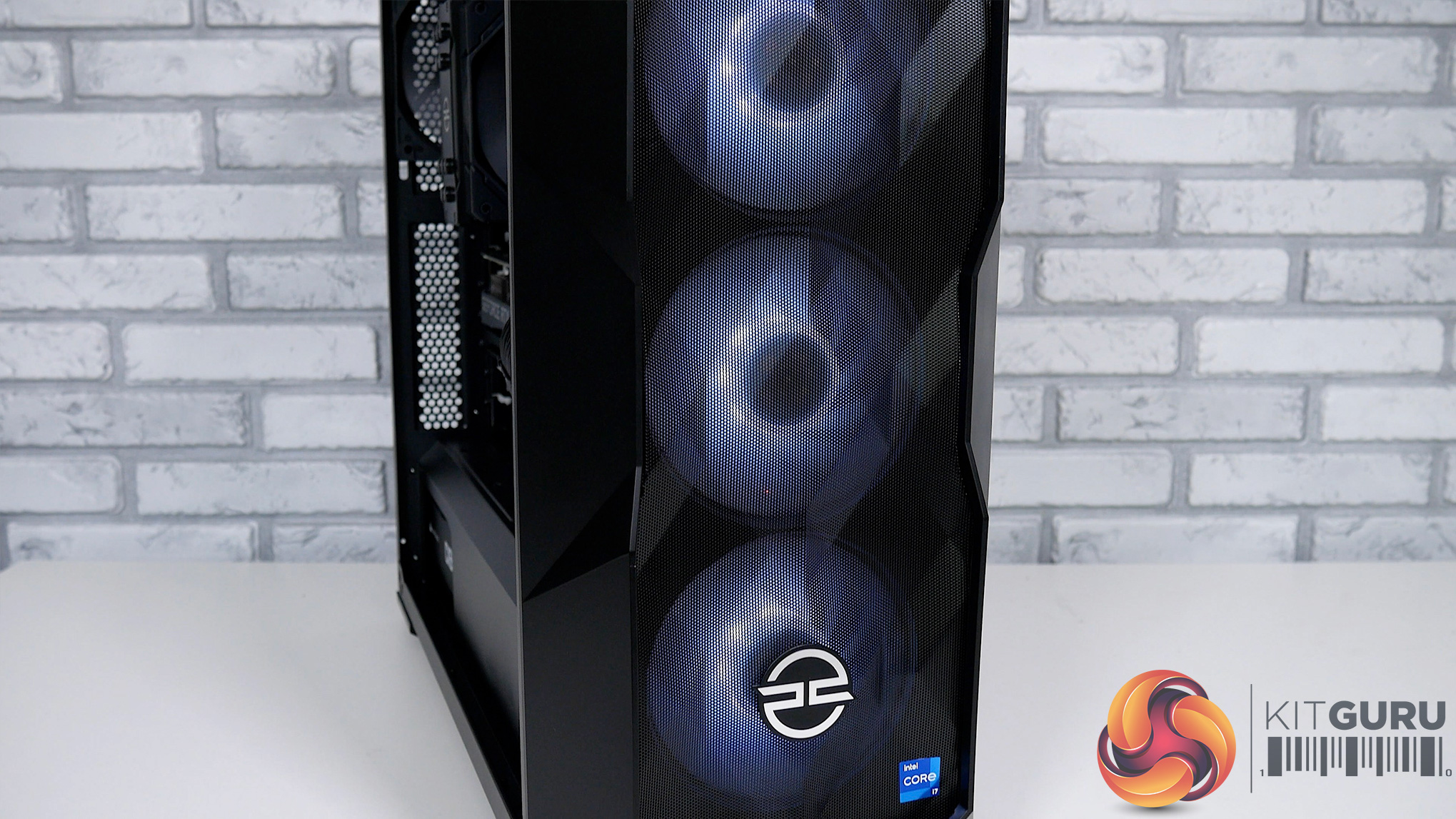
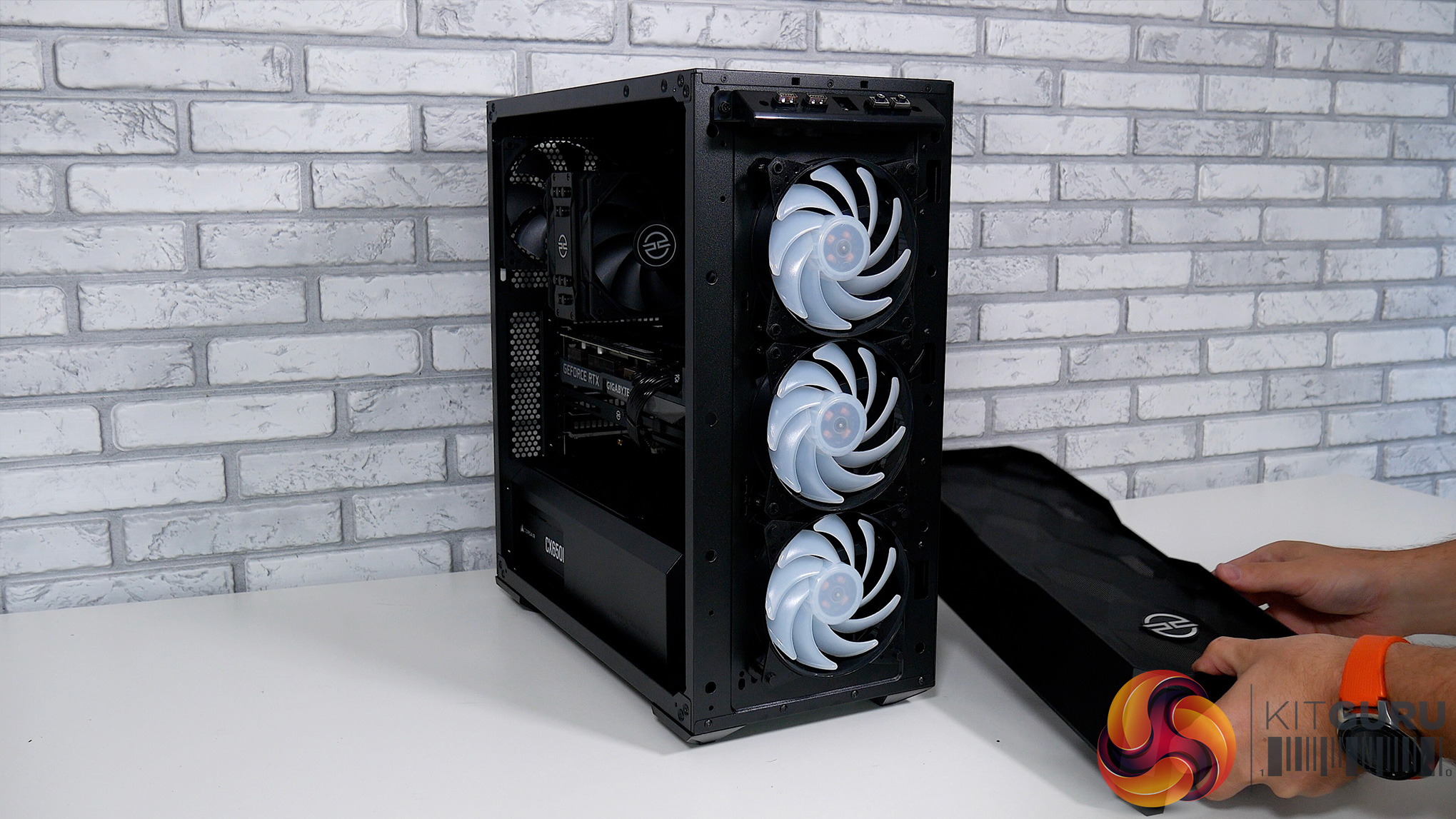
Moving on, the Cooler Master TD500 Mesh ARGB feels like a well-built chassis, and in terms of aesthetics, with that ‘sliced' tempered glass side panel it is a rather attractive case. Given this is a mesh case, airflow isn’t badly restricted to the front intake so we are expecting to see good thermal performance later on.
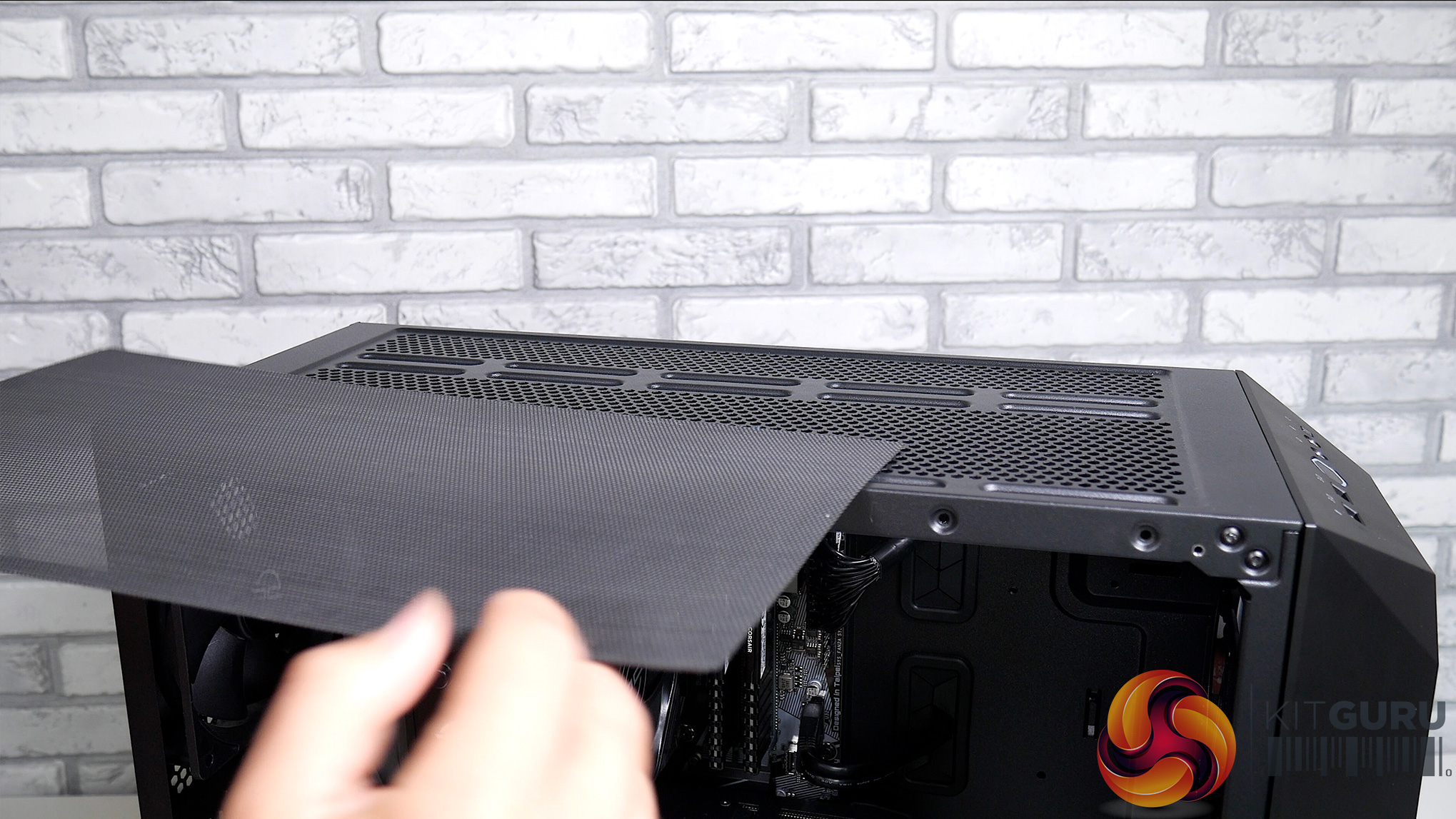
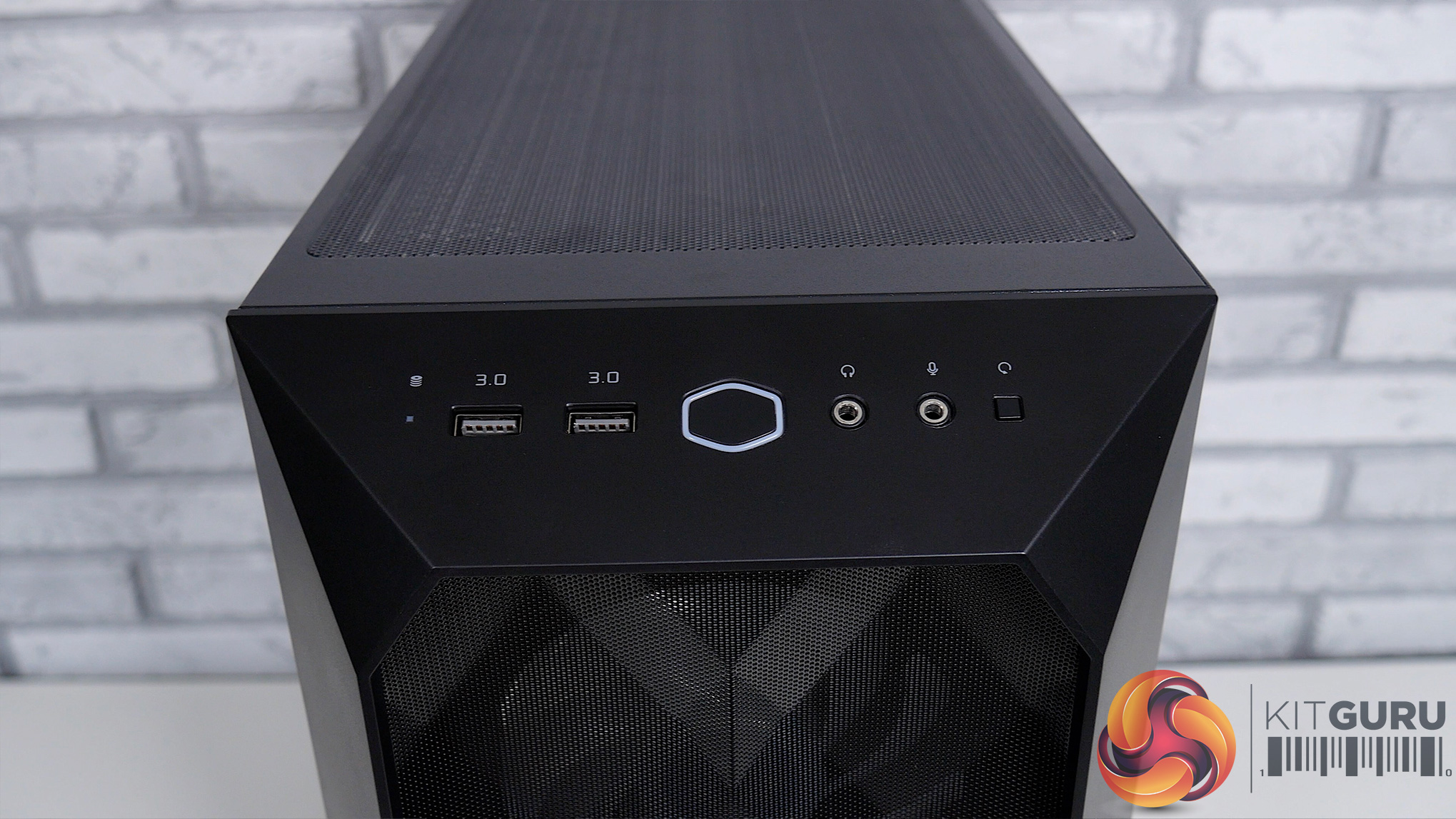
The case has scope for future upgrades too, supporting two 360mm radiators, and it can hold up to four 2.5-inch drives or two 3.5-inch drives and two 2.5-inch drives. It also includes three ARGB fans, a magnetic dust filter to the top, an easily removable front panel to provide access for cleaning, and a slot in the PSU dust filter. The TD500 also comes with two USB 3.0 ports, headphones, and mic jacks for the front I/O.
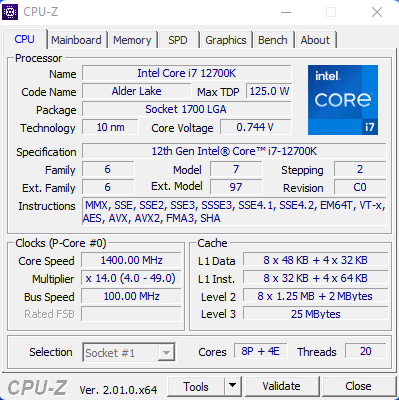
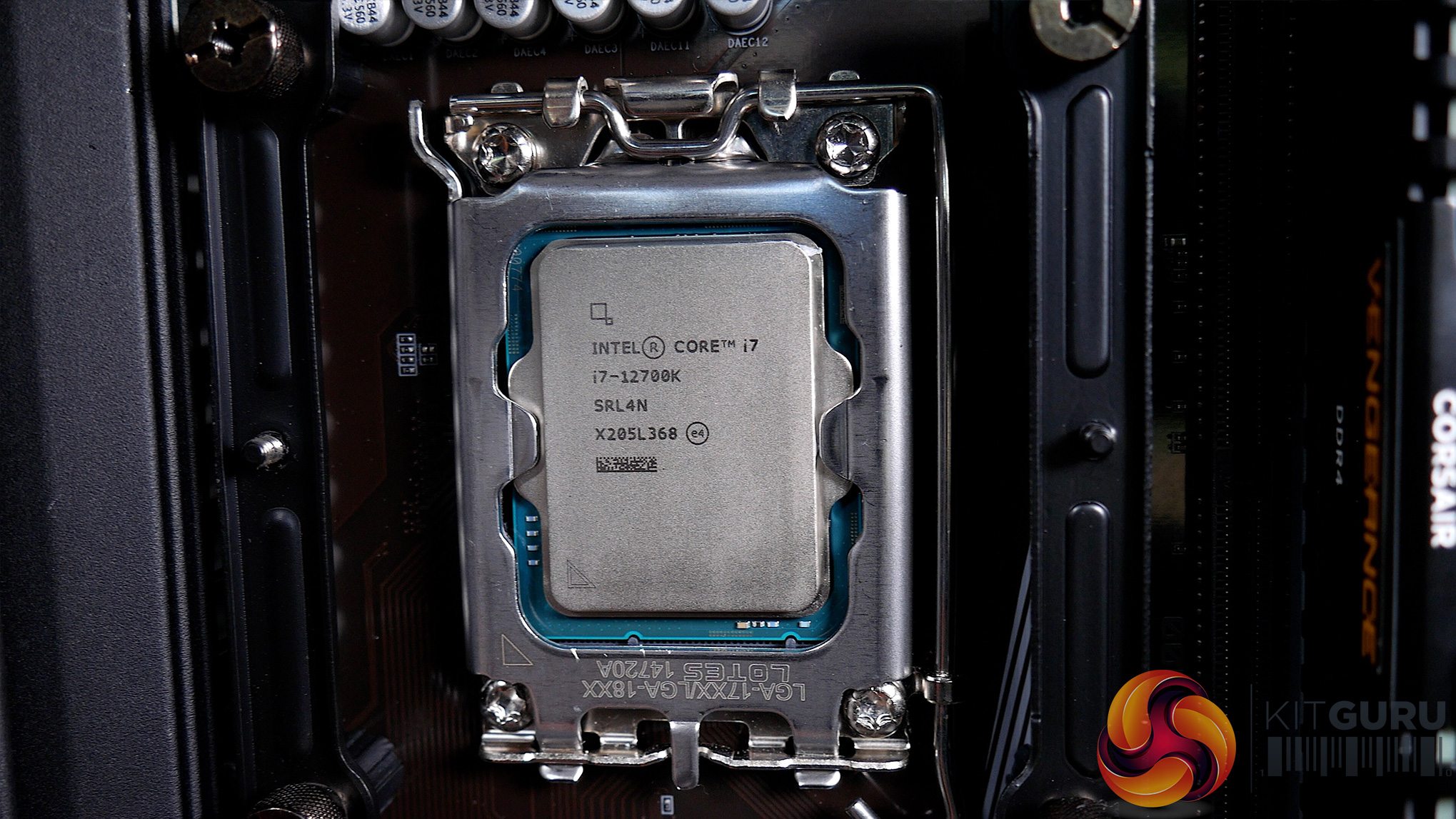
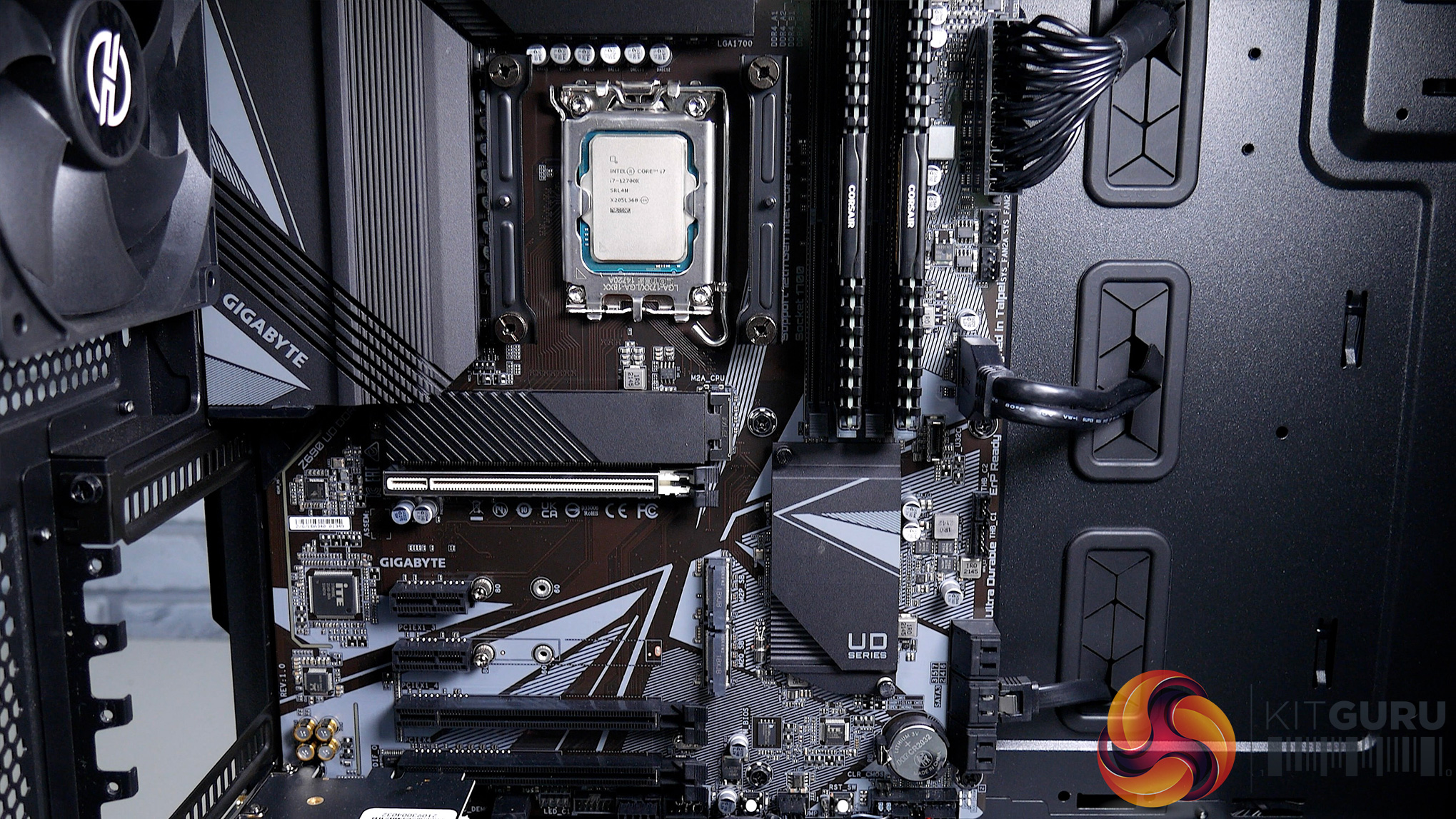
The Intel Core i7-12700K is a 12-core, 20-thread CPU comprising eight Performance cores and four Efficiency cores. The 12700K offers solid performance and better value than the 12900K, though if you were looking to save a bit of cash, the i5-12600K could also be one to consider. That said, I can’t fault PCSpecialist for going with the 12700K as it is a great CPU and should perform very well in both gaming and productivity tasks.
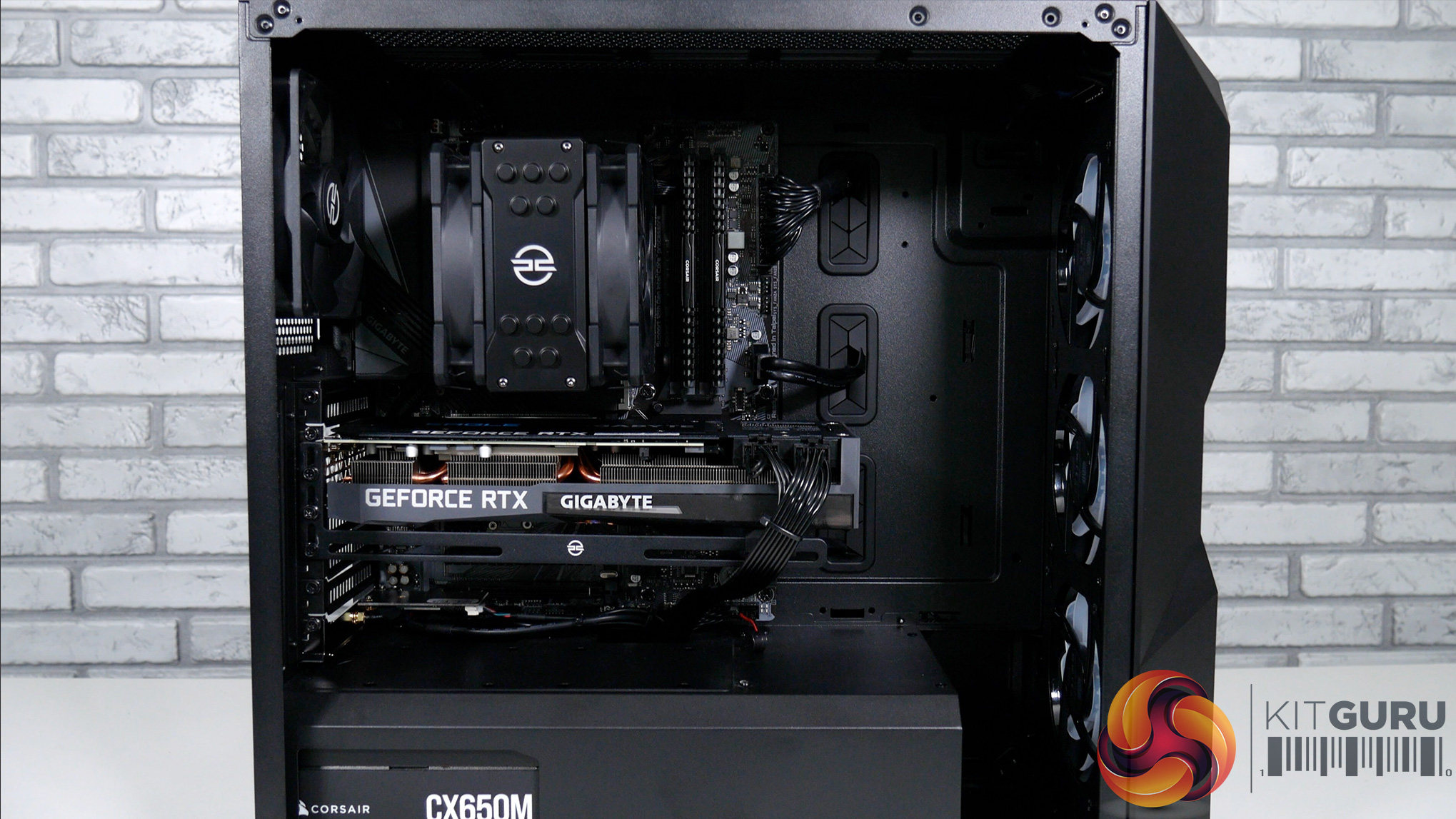
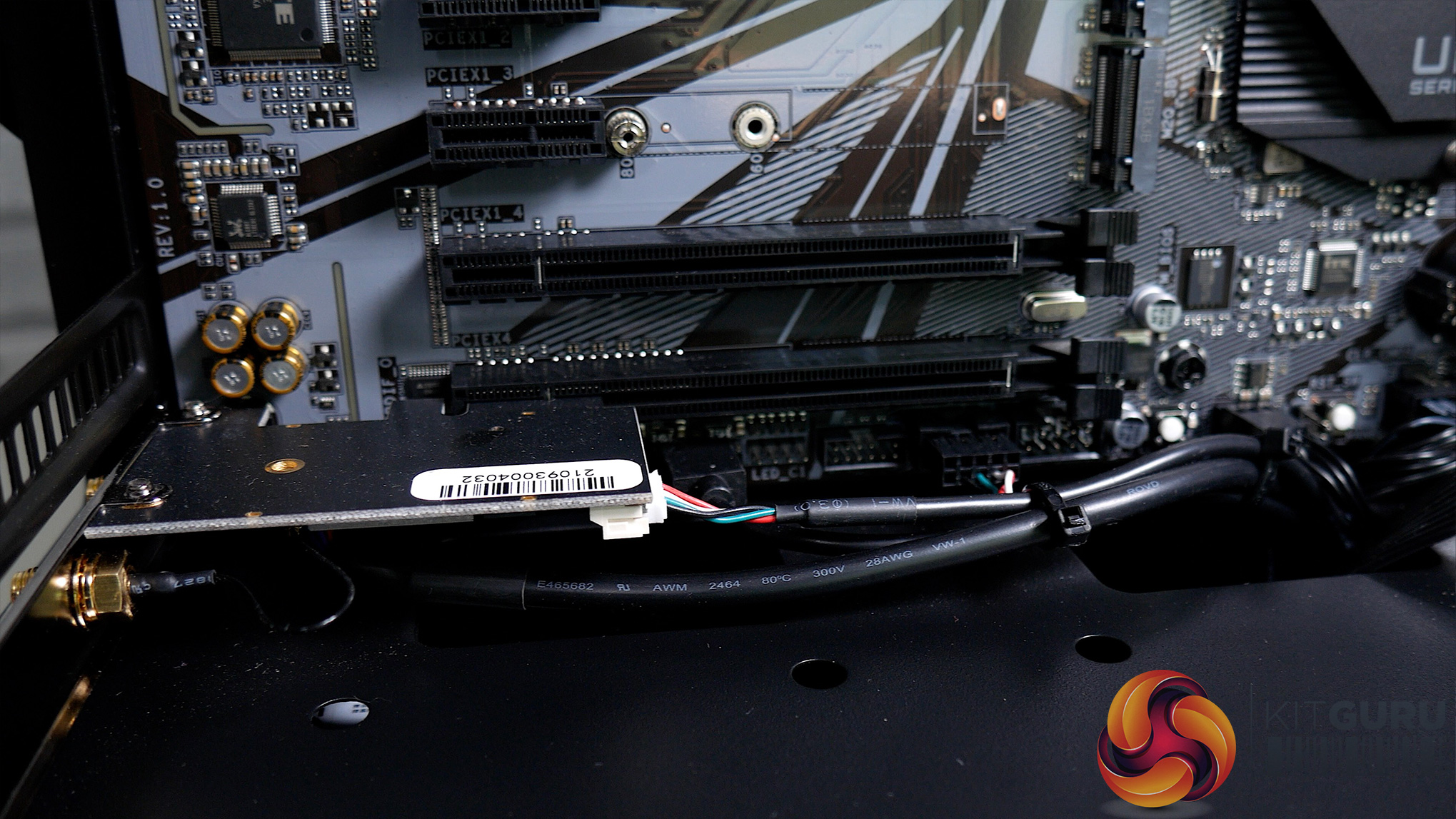
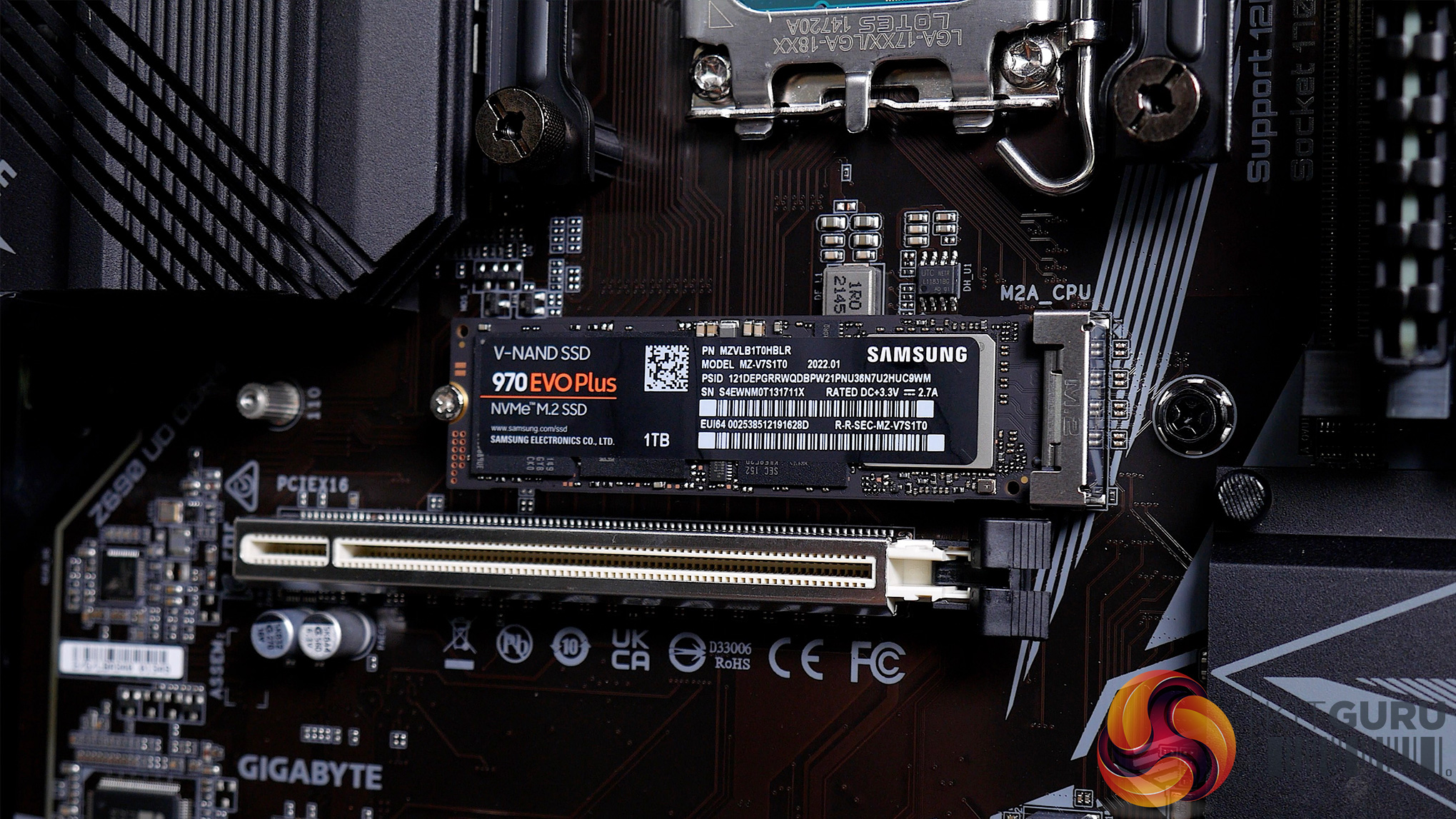
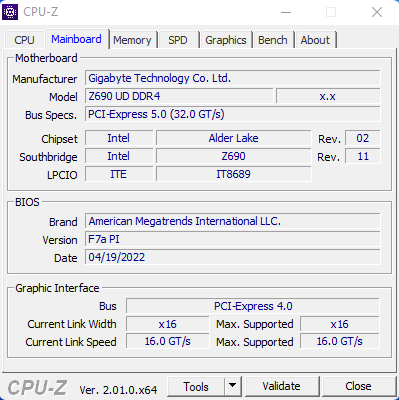
PCSpecialist has opted to pair that CPU with the Gigabyte Z690 UD60, an ATX, DDR4-based motherboard. This has been chosen instead of a DDR5 option and I think this is a good area to save some of the cost, as the benefit to DDR5 is still minimal, especially for gaming. The motherboard includes three M.2 slots, all capable of PCIe Gen 4 at x4 speeds, one via the CPU and two via the chipset. One is populated but there’s plenty of room for further storage expansion down the line as we also have six SATA connectors too. Sadly there is no onboard WiFi, so PCSpecialist has used a dedicated WiFi card in the lower PCIe slot.
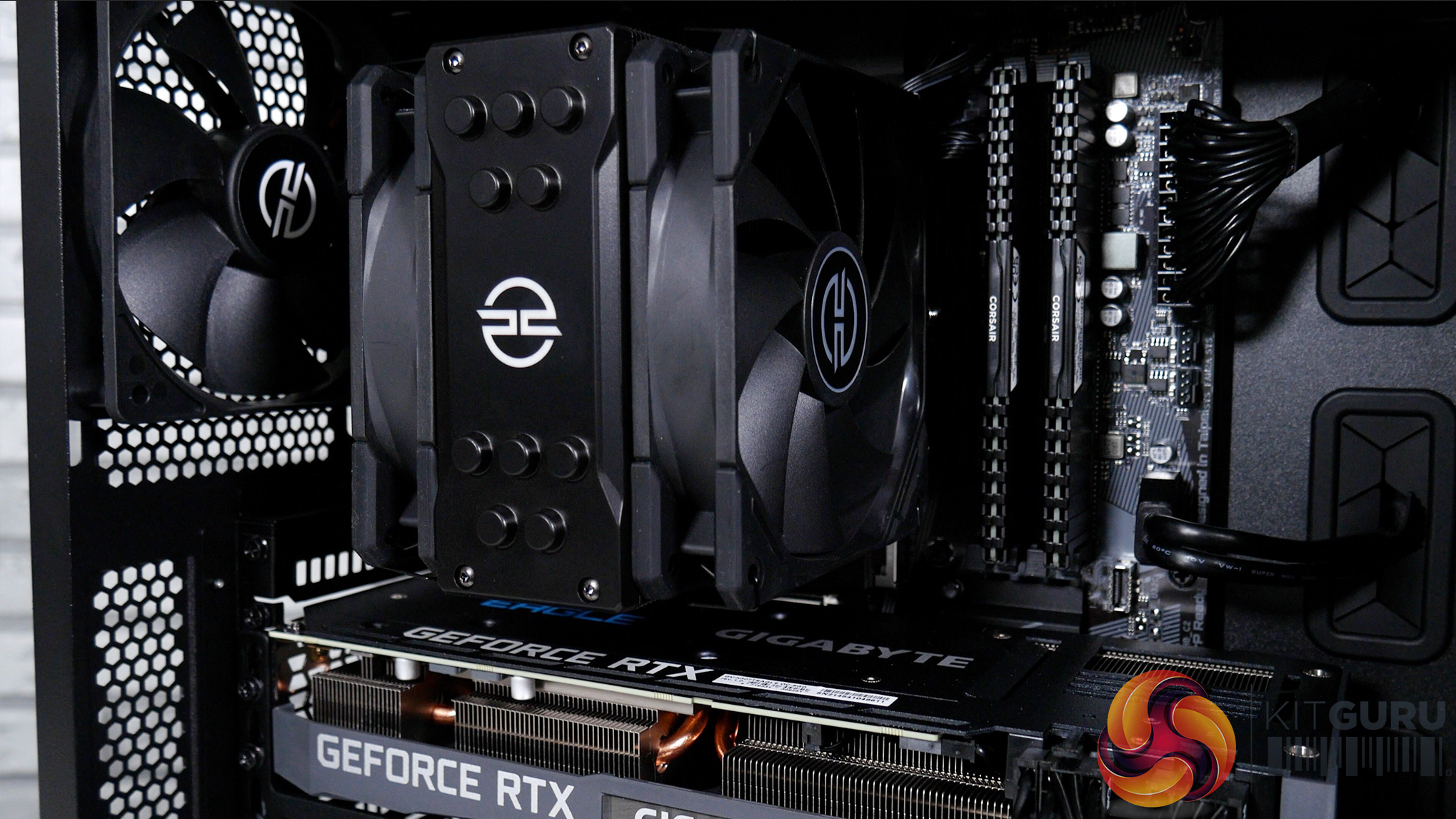
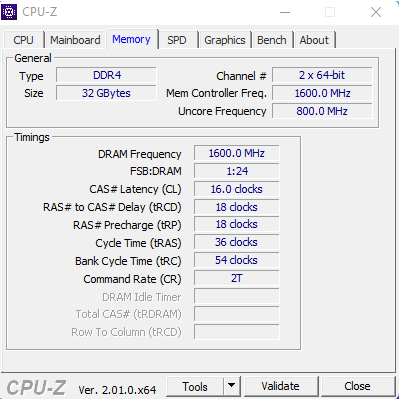
As for memory, we have 32GB of Corsair Vengeance LPX DDR4 at 3200 MHz, with memory timings of 16-18-18-36. Corsair Vengeance memory kits are tried and trusted and perform very well, but if you were looking for RGB lighting then you are out of luck here. PCSpecialist has kept it nice and simple, no fuss, just a memory kit that just does exactly what it says on the box.
For our Windows drive, we have a Samsung 970 Evo Plus NVMe SSD with 1TB capacity, meaning that there is plenty of space left for files, documents, and games… but if that’s not enough we also have a 2TB Seagate Barracuda 7200RPM spinning drive.
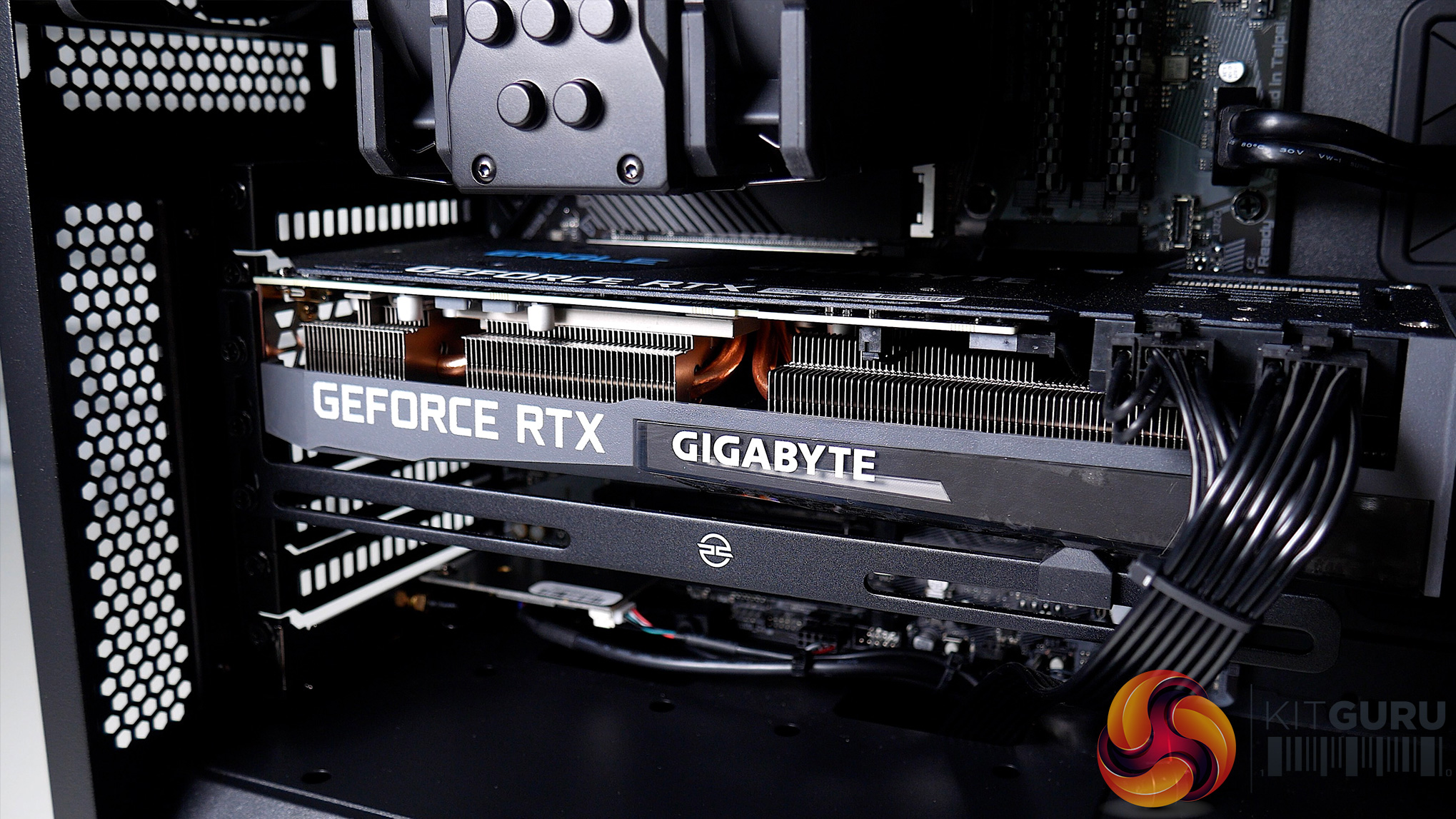
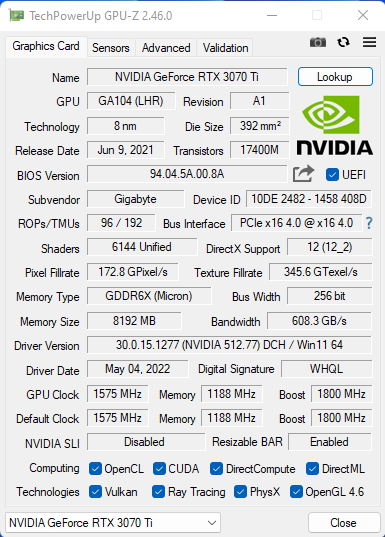
For graphics goodness, PCS has opted for a Gigabyte Eagle OC RTX 3070 Ti, an 8GB card with Gigabyte's WindForce 3 alternate-spinning cooling solution. It offers 6144 CUDA cores, GDDR6X memory, and 19000MHz memory clock speed with a core clock of 1800MHz, including a 30MHz boost from the reference design. PCSpecialist also includes an anti-sag bracket which is a nice touch from them.
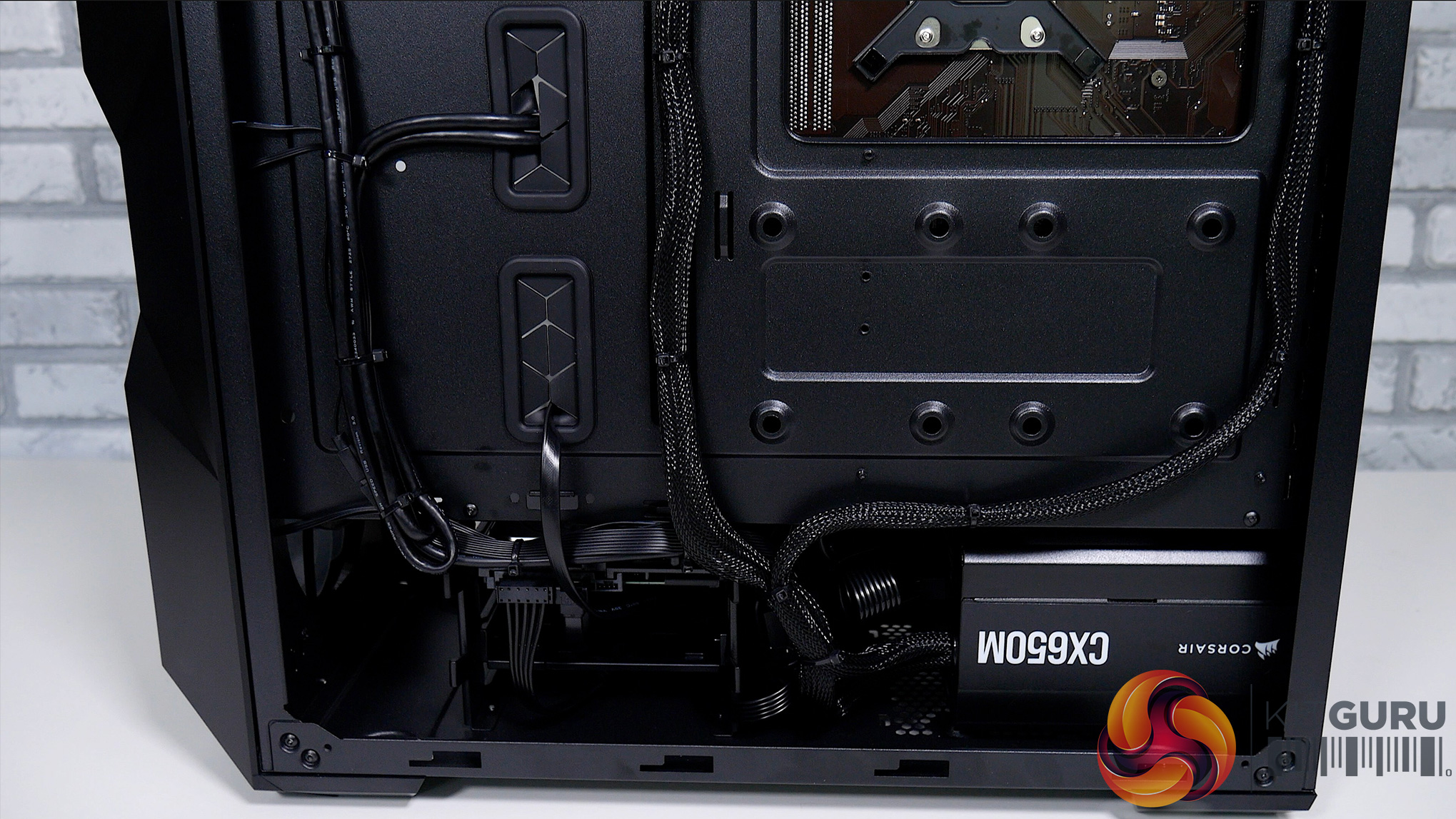
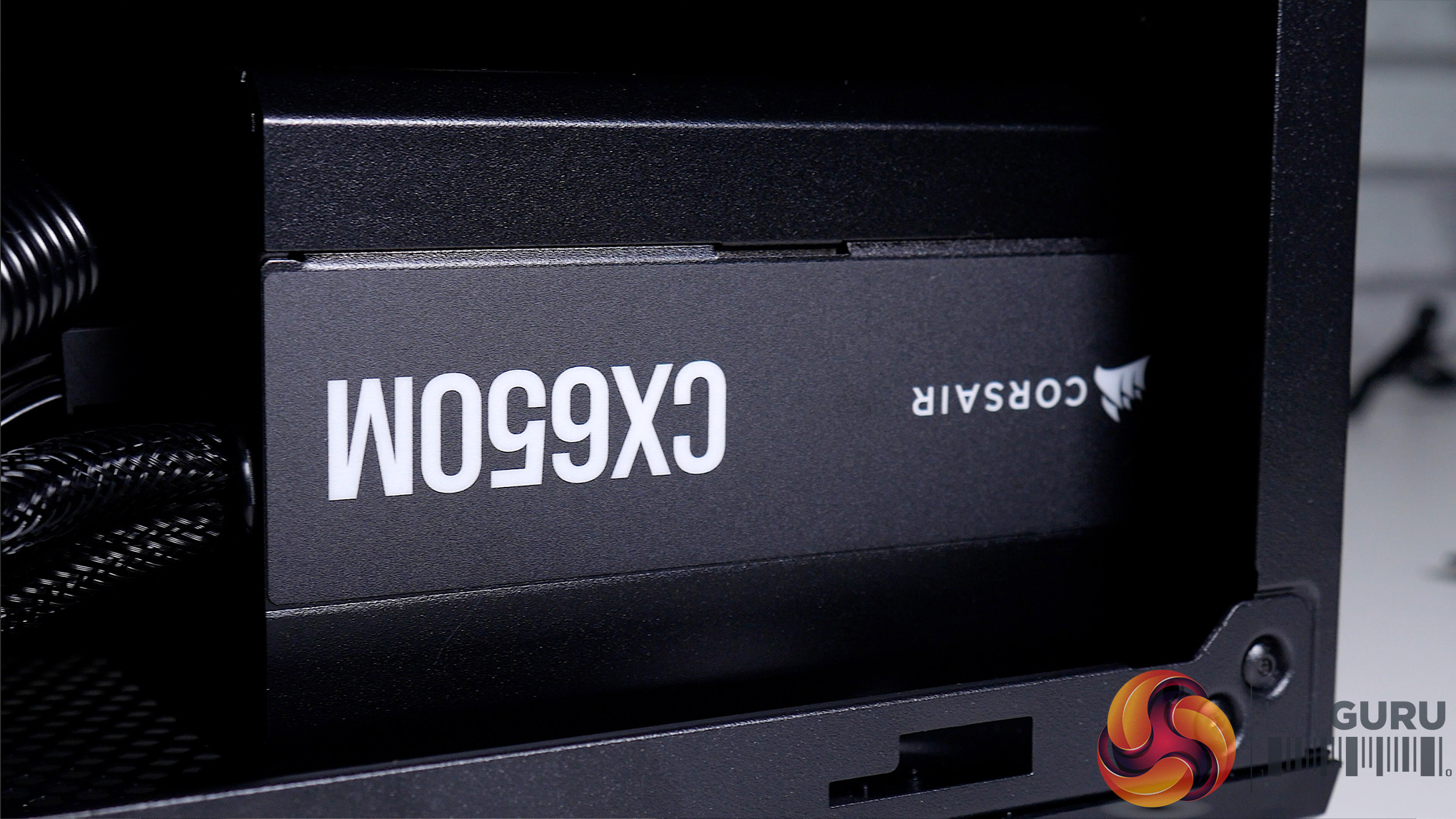
The Corsair 650W CX-M semi-modular power supply has been used in the Odin i7 Ti Air, again another trusted component from Corsair- but it is only an 80+ Bronze rated unit meaning that it sits at the lower end of the efficiency scale. Being semi-modular allows for most unneeded cables to be kept out of the equation and while we would have preferred to see a Gold-rated unit here, it’s not a deal-breaker.
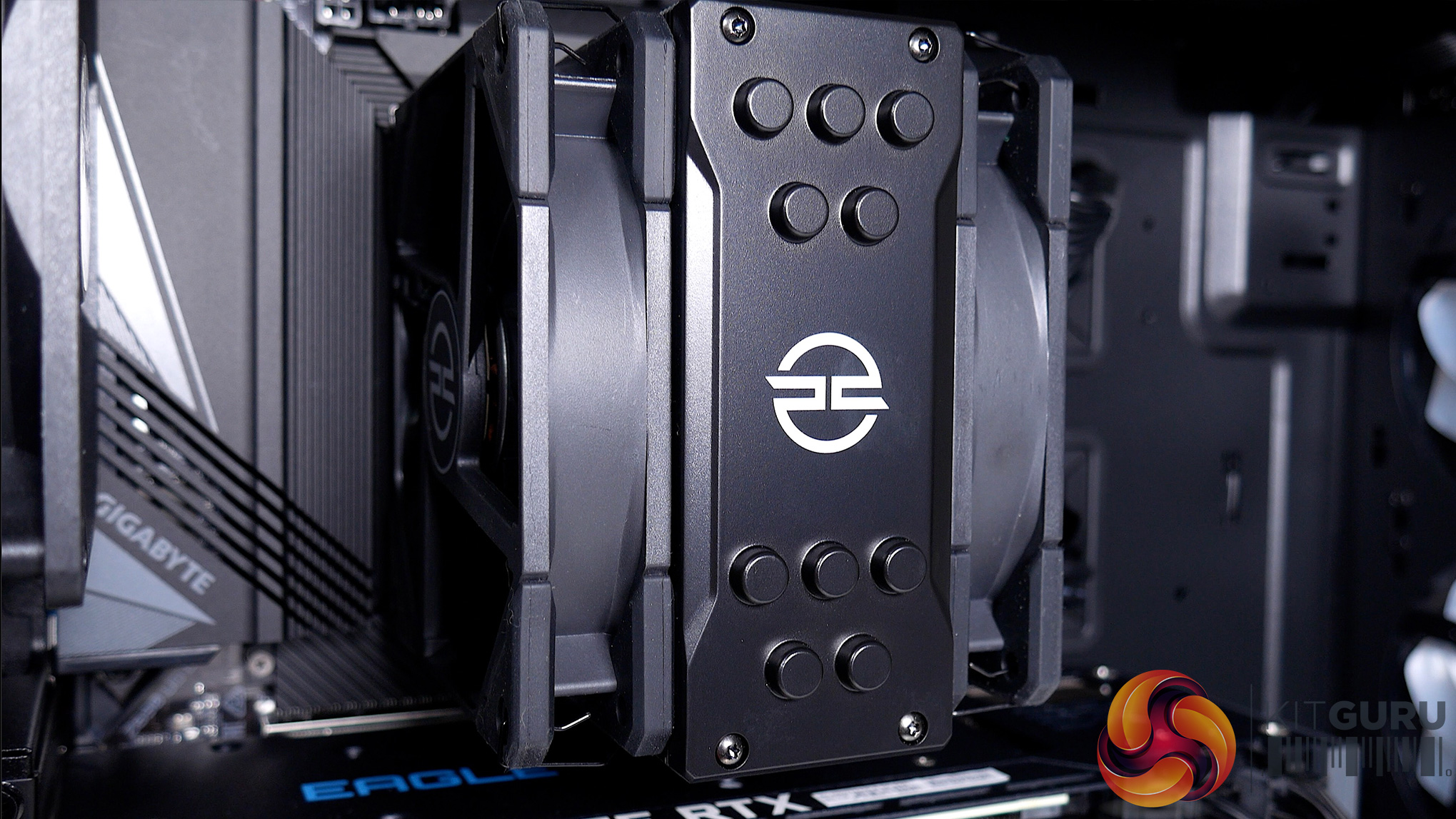
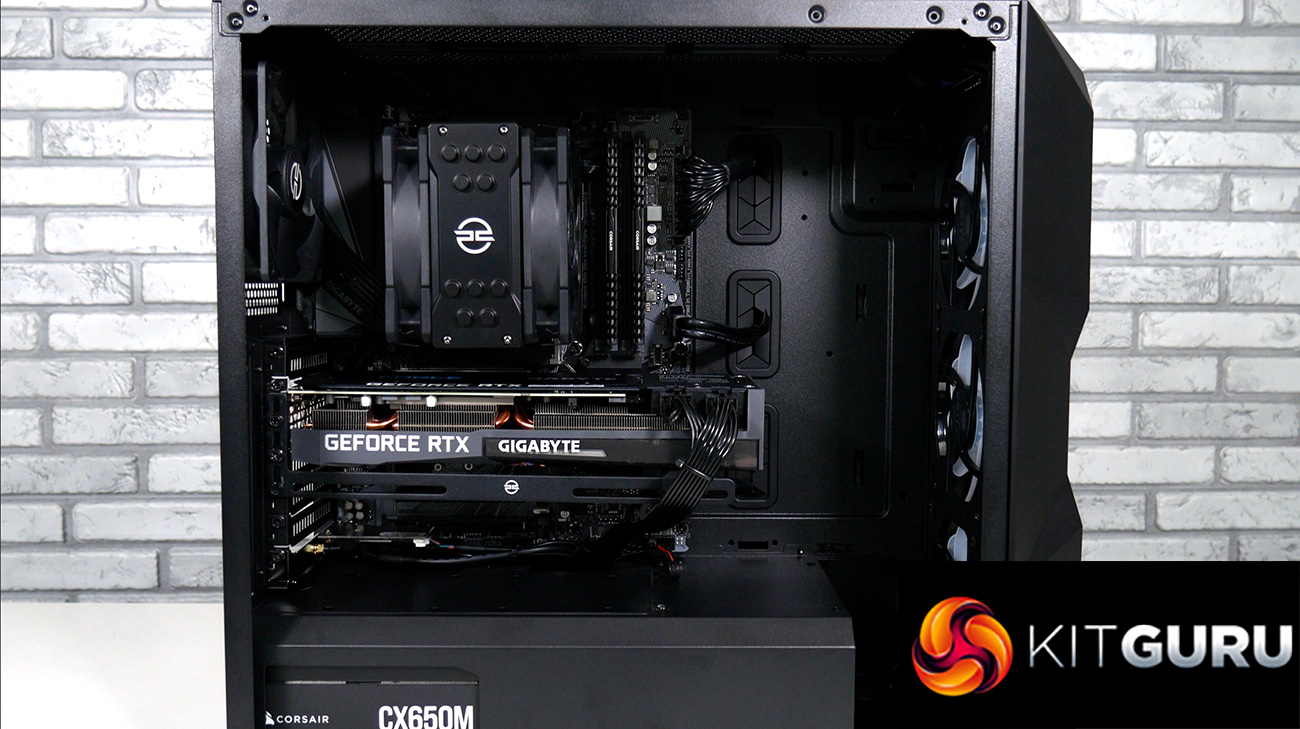
The TD500 does come with three pre-installed 120mm ARGB fans, PCSpecialist has added in a rear exhaust 120mm non-ARGB fan, while our CPU is cooled by the PCS Frost Flow 150 featuring a push-pull configuration. On closer inspection the Frost Flow 150 is actually a rebranded ID-Cooling SE-225-XT, which seems well regarded online, so it will be interesting to see how it performs later on. The CPU cooler lines up nicely to the rear fan too, meaning that any warm air is going to be exhausted straight out the back of the case.
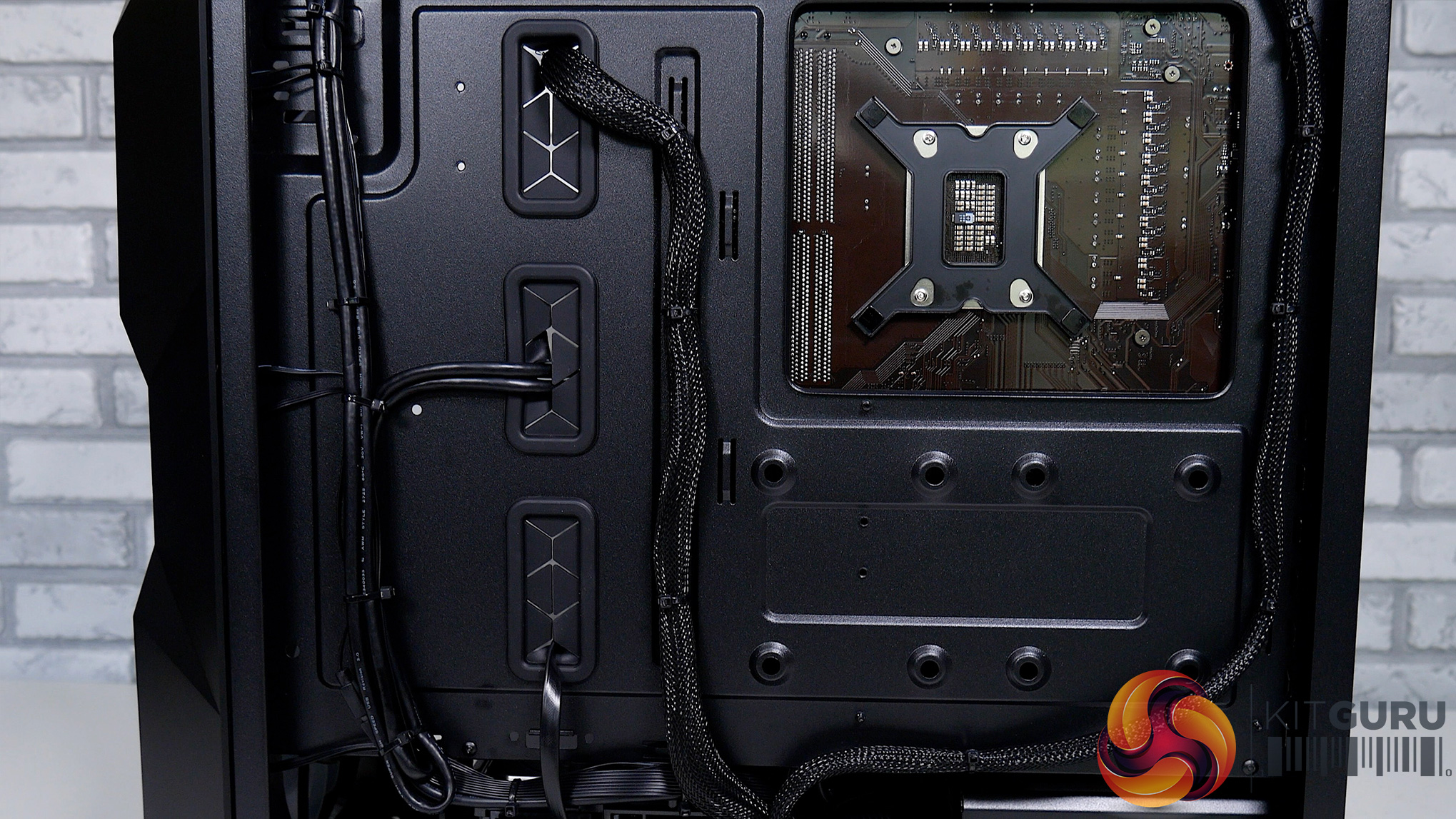
If you saw Dominic's recent video on the PCSpecialist Magnus Spark, he commended them for their cable management with that system, and it’s no different here, PCS has done an exceptional job keeping everything really nice and tidy.
Price: £1849 from PCSpecialist
Software and Games
To test the PCSpecialist Odin i7 Ti Air, we used the following software/games:
- Cinebench R23
- AIDA64 Engineer
- PCMark 10
- 3DMark Time Spy
- Crystal Disk Mark
- Shadow of the Tomb Raider (DX12)
- Forza Horizon 5 (DX12)
- Red Dead Redemption 2 (DX12)
- Guardians of the Galaxy (DX12)
- Rainbow Six Siege (Vulkan)
We used the Nvidia 512.77 driver at the time of testing.
Comparison Systems
The systems listed below have been used as a reference during our benchmarks.
- PCS P209 ARGB MID TOWER CASE
- Intel® Core™ i5 Six Core Processor i5-12400F (2.5GHz)
- ASUS® PRIME B660-PLUS D4 (DDR4, USB 3.2, 6Gb/s)
- 16GB Corsair VENGEANCE DDR4 3200MHz (2 x 8GB)
- 8GB AMD RADEON™ RX 6600 – HDMI, DP – DX12
- 1TB PCS PCIe M.2 SSD (2200 MB/R, 1500 MB/W)
- CORSAIR 550W TXm SERIES™ SEMI-MODULAR 80 PLUS® GOLD
- PCS FrostFlow 100 RGB V3 Series High Performance CPU Cooler
- 1x 120mm Black Case Fan
- WIRELESS INTEL® Wi-Fi 6 AX200 2,400Mbps/5GHz, 300Mbps/2.4GHz PCI-E CARD + BT 5.0
- Windows 11 Home 64 Bit
- Corsair 5000X Case
- AMD Ryzen 9 5900X
- Corsair H150i Elite Capellix RGB 360mm AIO Cooler
- MSI MAG X570 Tomahawk WIFI Motherboard
- Corsair RGB Pro SL 32GB 3200MHz DDR4 RAM
- Corsair 1TB MP600 NVMe Gen 4 M.2 SSD
- Seagate 1TB HDD
- MSI RTX 3080 TI Gaming X Trio 12GB
- Corsair RM850w PSU
- Corsair SP120 RGB Elite 120mm Fans
- ASUS TUF Gaming B560-PLUS WiFi motherboard
- Intel Core i5-11400F six-core Processor
- 4GB AMD Radeon RX 5500 XT GPU
- 16GB Corsair Vengeance DDR4 3200MHz, 2x 8GB sticks
- 512GB PCS-branded PCIe M.2 SSD
- 1TB Seagate Barracuda 7200RPM HDD
- Corsair 750W TXm semi-modular 80 Plus Gold PSU
- PCS FrostFlow 100 RGB V3 CPU cooler
- 3 PCS ARGB LED fans + controller kit
- Windows 10 Home 64 Bit
- PCS Prism X RGB mid tower case
We also use some data from Leo's Alder Lake reviews, using his test bench setup:
- Intel Core i7-12700K and i5-12600K
- Corsair H150i Elite LCD
- MSI Z690 Unify
- 32GB Corsair Vengeance DDR5-5200
- Palit RTX 3080 Gaming Pro 10GB
- Seasonic Prime Titanium 850W
- 500GB Sabrent Rocket 4.0 M.2 NVMe
- Windows 11

The PCSpecialist Odin i7 Ti Air with the 12700K scored 22694 points in Cinebench R23's multi-core test, with 1944 points in the single-core benchmark. When we compare this with Leo's 12700K, we can see we are right on the money in terms of performance, even edging his chip slightly.
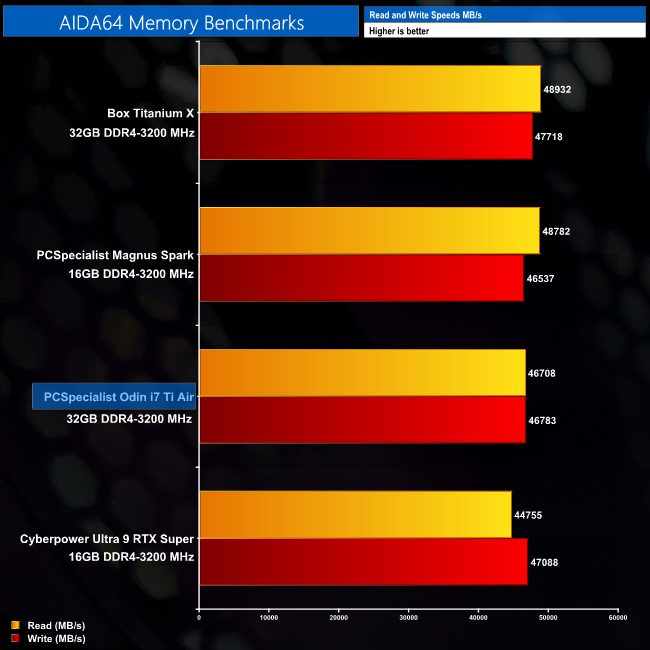
In AIDA64, our 32GB kit Corsair Vengeance DDR4-3200 delivers strong performance, both read and write results, capping out at 46708 MB/s read and 46783 MB/s writes.
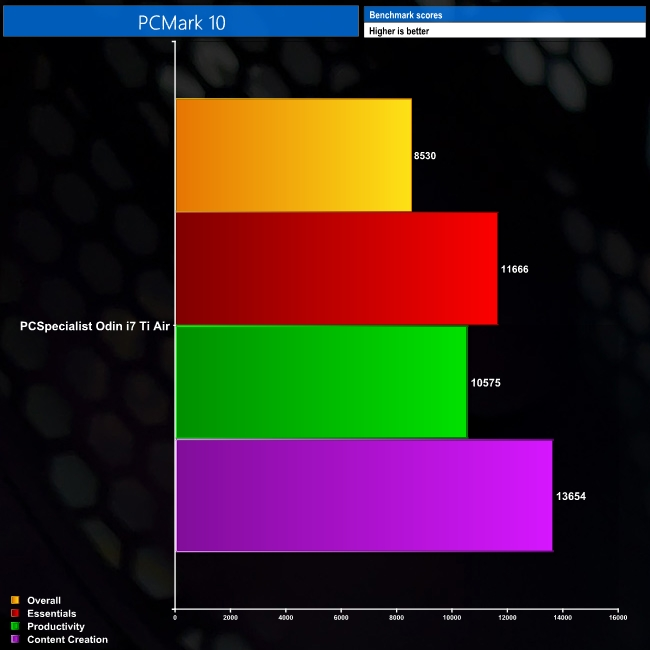
Next, we have PC Mark 10 which gives us an overall picture of how the system performs. While we don’t list any comparisons here, it’s a great way to test your own system and see how it compares to this prebuilt.
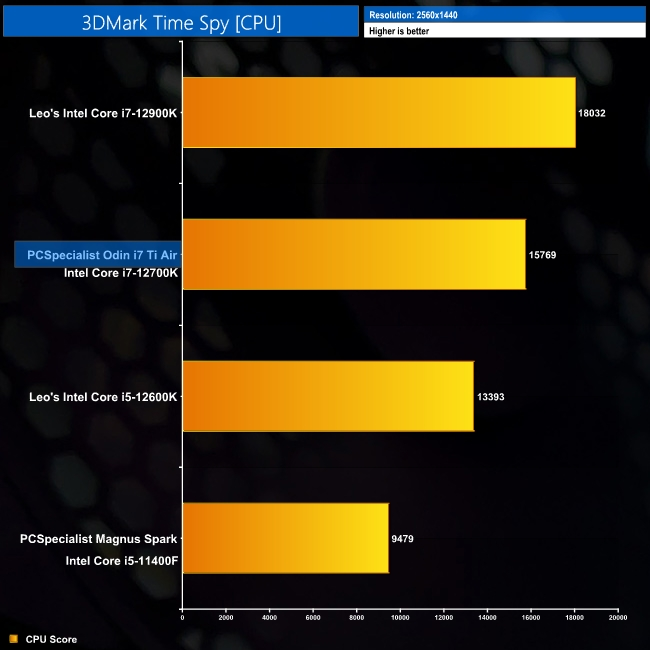
Our Time Spy CPU score is comfortably better than the i5-12600K, delivering 15769 points, 2376 more than the i5. Leo's 12900K scored 18032, so we are right in the middle here.
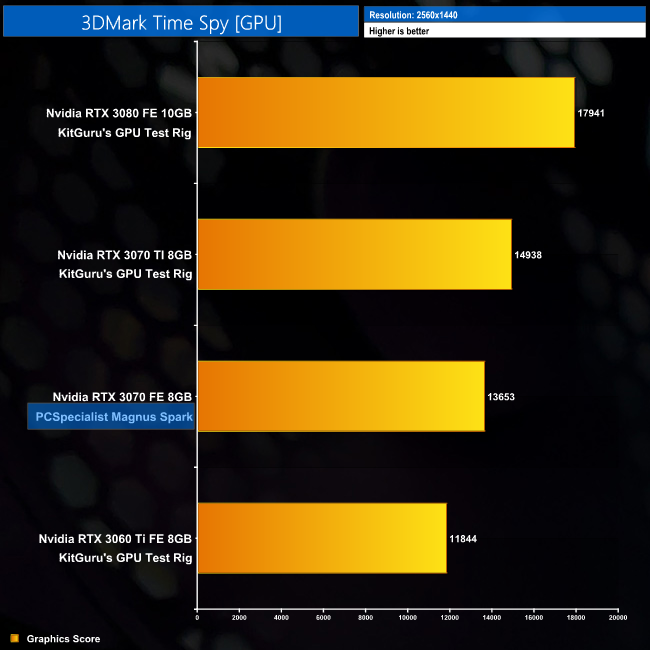
On the GPU side of Time Spy, the Gigabyte RTX 3070 Ti hits 14938 points, which is over 1200 points more than the RTX 3070 FE. Compared to an RTX 3080 however, it lags behind by 3003 points, though that is to be expected.
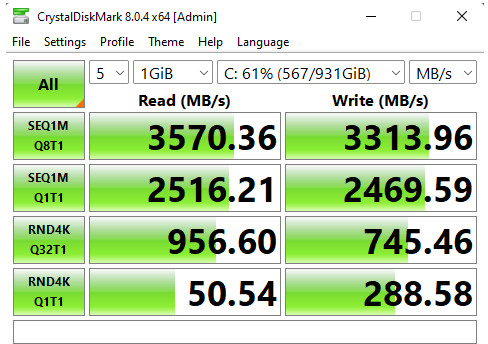
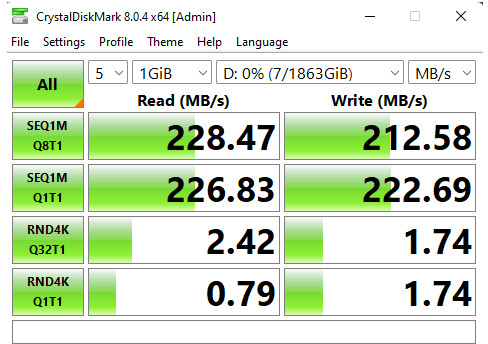
Above: Samsung 970 Evo Plus 1TB, left. Seagate Barracuda 2TB HDD, right
Our Samsung 970 Evo Plus performed exactly as expected in CrystalDiskMark 8, with reads of 3570 MB/s and writes of 3313 MB/s. Our secondary drive, the Seagate Barracuda again, as expected scored 228 MB/s reads with 212 MB/s. It certainly does open your eyes to how far storage has come over recent years but overall having this extra capacity is great, providing you have a little bit of patience during game loading times.
Gaming benchmarks
Each test was run using the Ultra or pre-set equivalent at 1080 and 1440p resolutions.
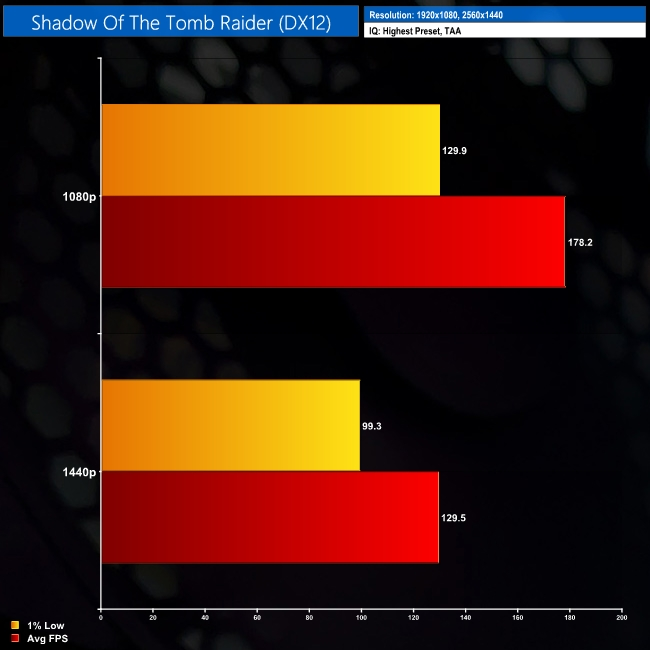
First up we have Shadow of the Tomb Raider, here we run the full built-in benchmark. It’s an older title but still looks beautiful, hitting almost 179FPS at 1080p and 130FPS at 1440P, with our 1440P 1% lows just a touch under the 100FPS mark.
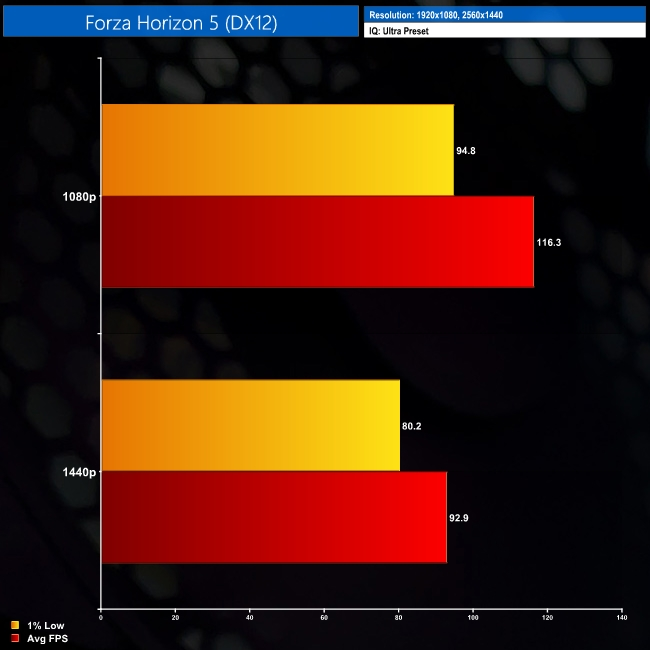
Forza Horizon 5 brings fast-paced racing action, with the system reaching 116FPS average at 1080P with 92FPS at 1440P. Anyone who plays this title will not be disappointed with the performance on offer from the 3070 Ti.
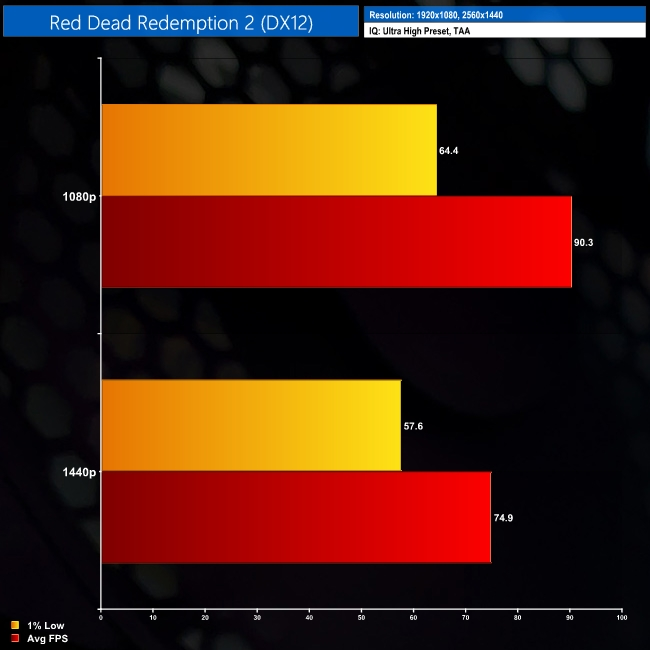
Next up is Red Dead Redemption 2, using the benchmark scene where Arthur robs the shop in Saint-Denis. At 1080P we are getting just over 90FPS and then at 1440P, we are sitting at 74.9FPS, with a 1% low of 57.6FPS.
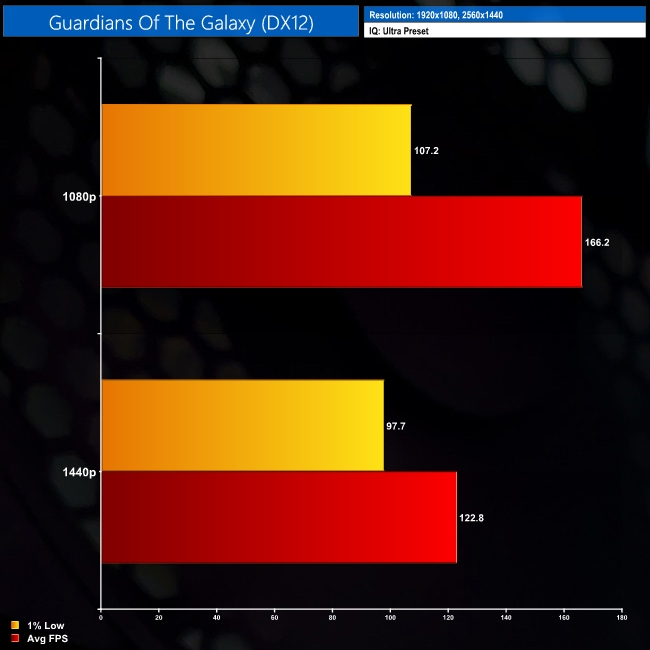
Our fourth title takes us to Guardians Of The Galaxy, we see great frame rates here, delivering 166FPS at 1080P while at 1440P we can still enjoy smooth gameplay at 122FPS.
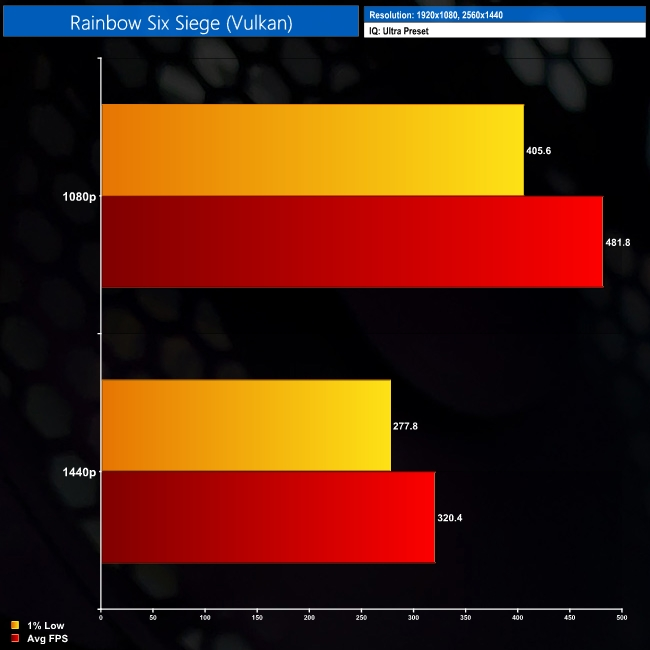
Finally, we have Rainbow 6 Siege, a game that remains a highly popular E-Sports title, and it brings up some huge numbers. First, at 1080P, we are hitting 481FPS, and then at 1440P, that drops down to a paltry 320FPS.
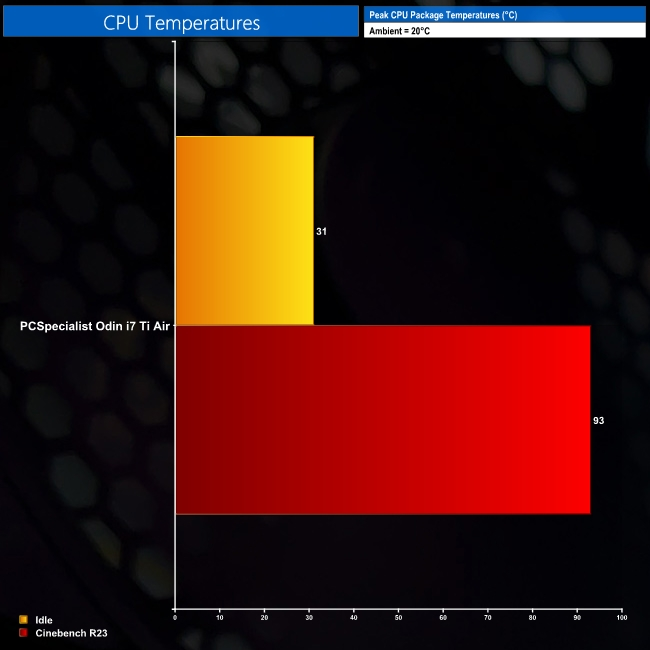
Next, we are looking at temperatures, starting with the CPU. Here the Cooler Master TD500 performs well with those three included front fans, and with it being an airflow-orientated case, our idle temperature of 31 is perfectly acceptable. Running a 30-minute Cinebench R23 loop, we hit 93 degrees, with the PCS Frost Flow CPU cooler doing its best to keep the Intel 12700K cool.
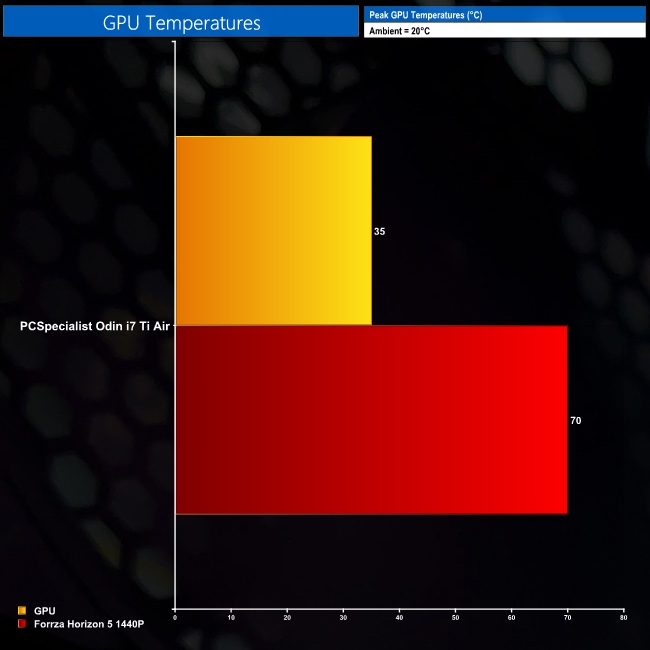
Our GPU also performs well, sitting at 35 degrees idle and moving up to 70 degrees when running our Forza Horizon 5 benchmark.
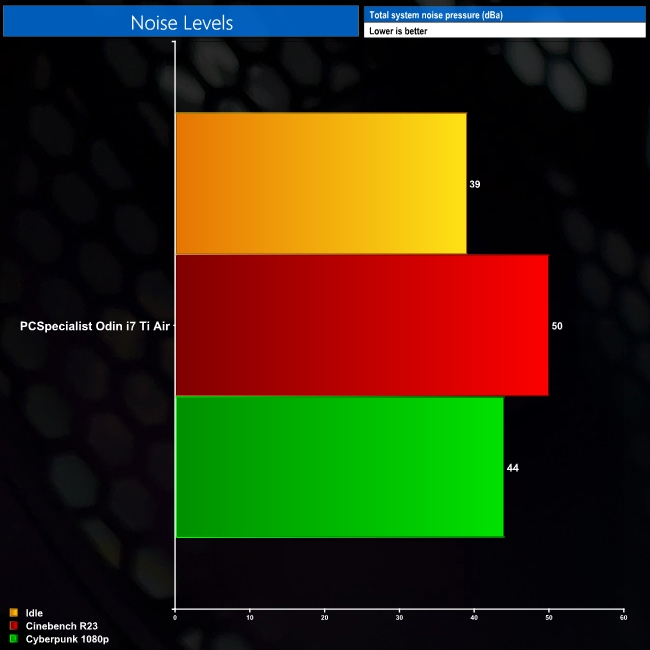
When we look at noise levels from the Odin i7 Ti Air, at idle it sits comfortably at 39 decibels while this rises to 44 decibels when we start gaming. It’s not particularly loud or distracting, and when you slap on some headphones or crank up your speakers it isn’t even noticeable.
Things do get a little louder when we ran Cinebench R23, raising the volume to 50 decibels. We could probably reduce these results if we altered our fan curve, but running these tests with the system as delivered gives you a real-world look at how this system will perform.

Our final test looks at the power consumption of the Odin i7 Ti Air. Starting with Cinebench R23 load, we saw a power draw just shy of 300W, hitting a maximum value of 292W. During our Forza Horizon 5 session, playing at 1440P, we peaked at 397W total system power draw, ensuring a fair bit of headroom if users want to upgrade this system down the line.
As part of PCSpecialist's next-day range, the Odin i7 Ti Air is designed to offer a well-balanced spec at a fair price-point – in this case, £1849. It's not a small investment by any means, but that money gets you an i7-12700K processor, RTX 3070 Ti graphics card, 32GB of DDR4 memory and a total of 3TB of storage space (1TB SSD and 3TD hard drive.)
It certainly sounds good on paper, and we were not disappointed during our testing. The Odin i7 Ti Air zipped through our benchmark suite, with impressive Cinebench and PCMark 10 scores, while its gaming performance is also just as good as we'd hope. The system crunched through every single game we tested at 1440p, with frame rates not dipping below the 70FPS region.
There are a couple of areas we would want to tweak however. First, opting for a motherboard that comes with built-in WiFi would just help free up that lower PCIe slot should you be looking to add a number of expansion cards. It’s only going to be a small percentage of people who would look to do this, but for some it would definitely help.
The PSU is another area that I would also potentially look to change, throwing in a higher efficiency unit like an 80+ Gold rated supply. We had no issues with the Corsair CX650M during our testing, but it does feel a touch on the low-end of things considering the choice of CPU and GPU.
To see if I could put this system together myself at a lower price-point, I hopped on over to PCPartPicker, dropped in the exact same components and found that, give or take £20, you could build this system yourself for around the same price. Don’t forget, though, that PCSpecialist is building the system and shipping it to you, and including a 3-year warranty, for basically the same money as it would cost to build this system yourself – quite a remarkable feat from PCS!
Overall then, the value is there, the build quality is there, and there’s also none of the hassle of building it yourself. The Odin i7 Ti Air provides more than enough performance and value, with room for upgrades for when you eventually need them. A couple of small tweaks would improve it further, but if you're looking for a quality prebuilt PC, this will serve you very well indeed.
You can buy the PCSpecialist Odin i7 Ti Air directly from PCSpecialist for £1849 HERE.
Discuss on our Facebook page HERE.
Pros
- Excellent for 1080p and 1440p gaming.
- Build quality.
- Value.
- Clear upgrade path.
- Warranty / Free delivery.
Cons
- Only a Bronze-rated PSU.
- No onboard motherboard WiFi.
KitGuru says: For £1849, there's plenty of value on offer from the PCSpecialist Odin i7 Ti Air. With a couple of small changes this would be knocking on the door for our top award.