 KitGuru KitGuru.net – Tech News | Hardware News | Hardware Reviews | IOS | Mobile | Gaming | Graphics Cards


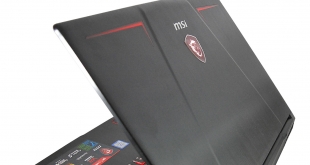
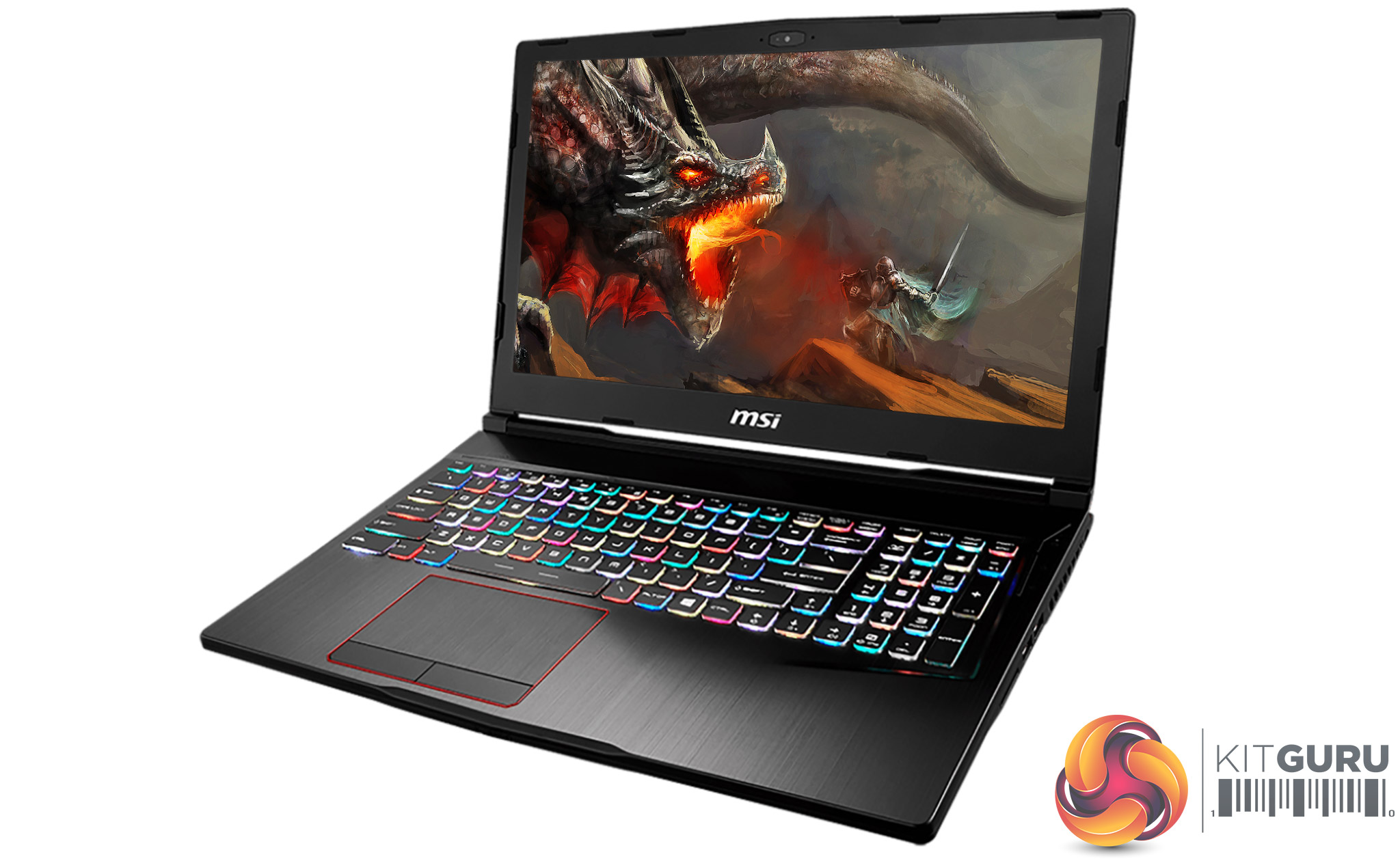
Another week, another red-accented RGB gaming laptop. But MSI’s new Raider series isn’t just a decent mid-range laptop with an RGB keyboard thrown in, like the Asus ROG Strix GL753VD we looked at recently. The Raider name stands for hardcore gaming, and even the lowliest member of the range which we’re looking at here brings some kick-ass specs to the table.
First an overview: there are several distinct models in the MSI GE Raider VR family, with the main differentiator being that all-important GPU. Our GE63VR 7RE (also known to his friends as “MSI GE63VR 7RE(Raider)-045UK”) starts off with a GeForce GTX 1060, the minimum mobile Nvidia solution that’s marketed as VR-capable. Next up is the 7RF model with a 1070, and several variations offering this card.
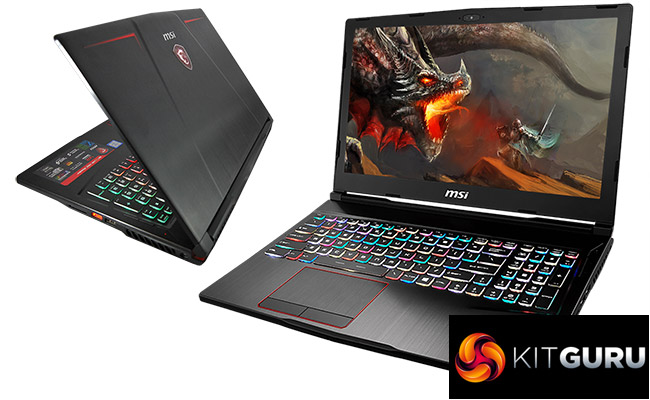
So with a relatively lowly GTX 1060, where do the hardcore gaming bits come in? Well, the GE63VR Raider 7RE’s 15.6in display sports a 120Hz panel with 3ms claimed response time and 100% sRGB “True Color 2.0” technology, which should make for smooth and hopefully good-looking gaming – as long as that 1060 can keep up of course.
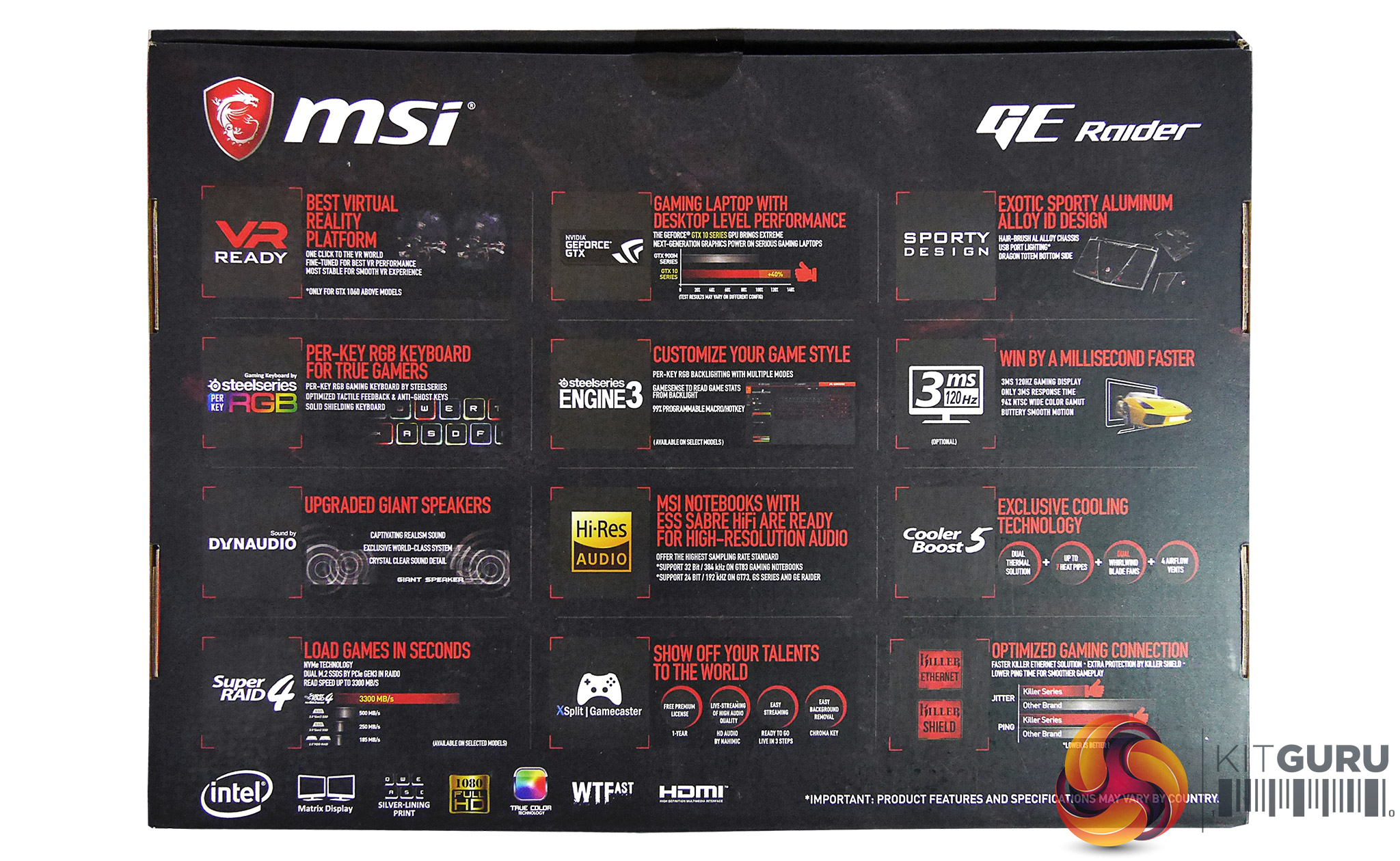
Then there’s highlights like its Core i7 CPU, SteelSeries RGB gaming keyboard with per-key lighting, impressive Dynaudio speaker solution with twin woofers, ESS SABRE HiFi Audio DAC, USB LED lighting (yes really), Killer DoubleShot Pro Gb LAN, advanced Cooler Boost 5 system with dynamic control, and more.
Based on specs then, it seems MSI has done a good job of putting together a well-balanced mid-range system for the gamer on a somewhat limited budget. But as always the proof is in the pudding (or in this case, the metal-alloy and plastic chassis), so join us as see just how well this Raider can live up to its name.
MSI GE63VR Raider 7RE Specs
- OS: Windows 10 Home 64-bit
- CPU: Intel Core i7-7700HQ (7th gen), quad-core, 2.8-3.8GHz, 6MB cache, 35-45W TDP, socket 1440
- Memory (installed / supported): 8GB / 32GB DDR4 (16GB on our review model)
- Memory slots: 2
- Storage (main): M2 256GB SSD (Kingston RBU-sns8152s3256GG5)
- Storage (secondary): 1TB 7200RPM 2.5” HDD (Seagate BarraCuda ST1000LM048)
- Graphics card (integrated): Intel HD 630
- Graphics card (dedicated): Nvidia GeForce GTX 1060 (GP106), 6GB GDDR5
- Display (size, resolution, Hz, Type): 15.6″ (16:9), FHD (1920×1080), 120Hz, TN
- Touch support: no
- Keyboard type, design, backlit: membrane, chiclet, RGB backlit
- Connectivity (wireless)
Wi-Fi 802.11 AC (Killer)
Bluetooth V4.2
Connectivity (physical)
Audio: 1 x Microphone-in jack, 1 x Headphone-out/SPDIF jack
Data: 1 x USB 3.1 TYPE C port(s), 3 x USB 3.0 port(s)
Network: 1 x RJ45 LAN
Video: 1x HDMI 2.0, 1 x mini DP 1.2
Card: SD(XC/HC) - Optical drive: no
- Webcam: yes, HD
- Speakers: 2x 2W stereo, 2x 3W woofer
- Dimensions (WxDxH): 383 x 260 x 27.5 mm
- Weight: 2.39kg (with battery)
- Battery: integrated, 51Wh
- Warranty: 24 months (EU)
- Price: £1500 inc. VAT at time of review
MSI GE63VR 7RE Packaging & Accessories
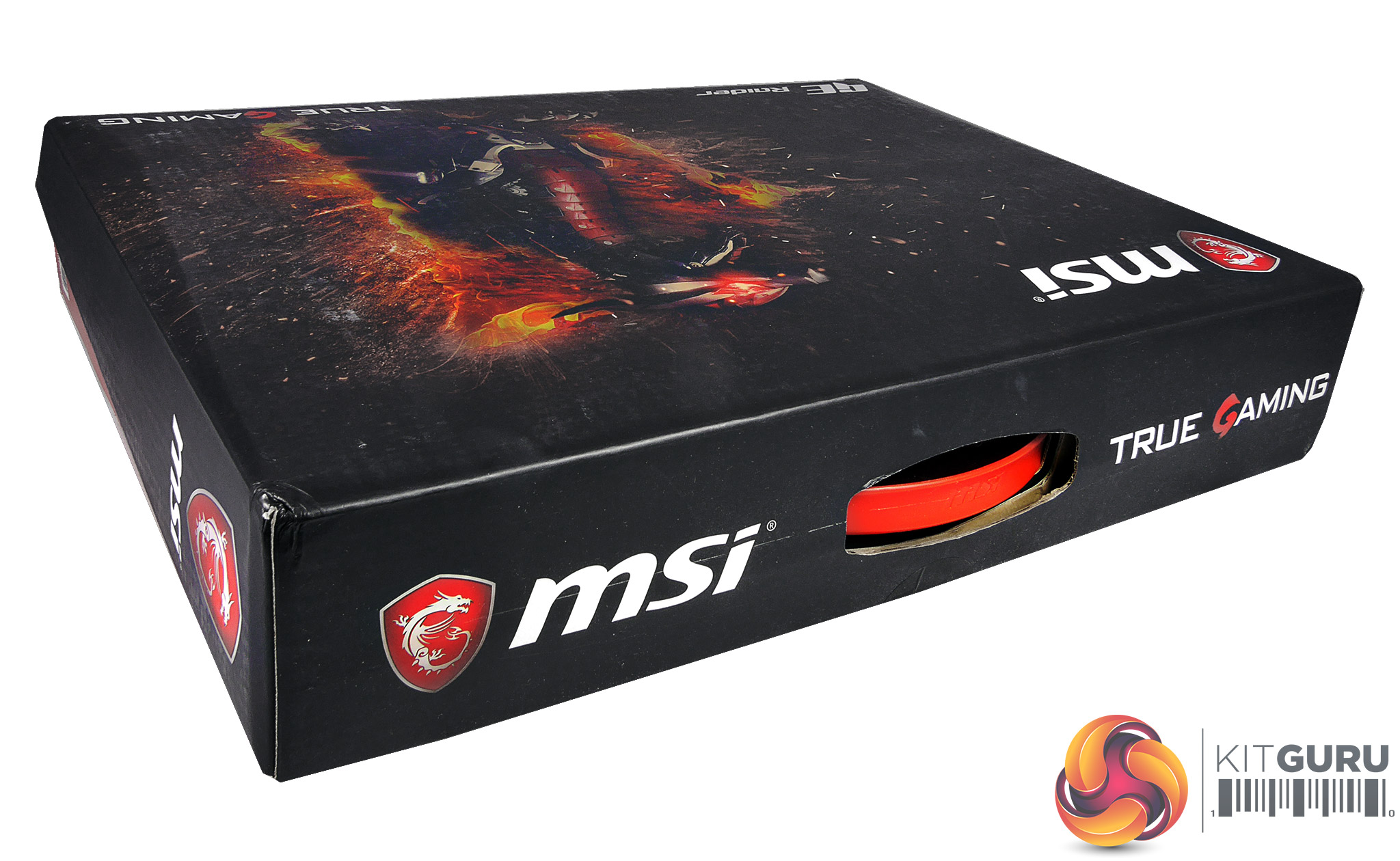
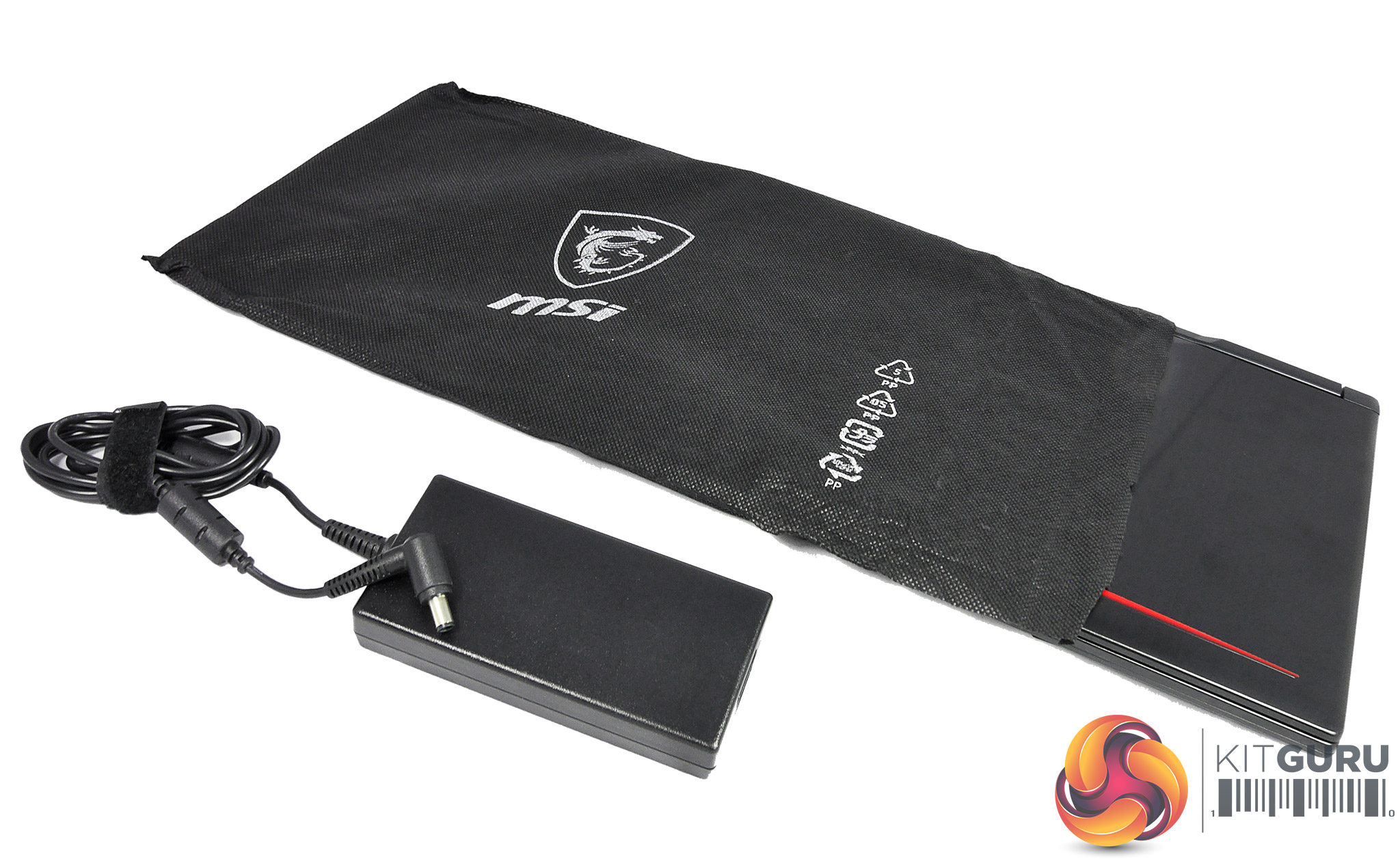
It’s nice to see that when you buy a gaming laptop from MSI’s premium range, they pay attention to how it’s packaged. While the box itself is attractive yet nothing too special, the GE63VR Raider 7RE comes wrapped in a neat black cover, and opening it up reveals a (very) soft cloth protecting the screen and keyboard from any harm.
We imagine this can also be utilised for cleaning dust and fingerprints off the chassis. The only other thing we would have liked to have seen is possibly a proper laptop cover, as finding a decent third-party one can be difficult for thicker laptops like these.
Naturally, you also get the basics provided with any laptop, such as the Quick Start Guide, warranty card and power cables. As with many laptops that can actually be used for gaming (rather than just being marketed as such), this Raider’s power brick is big and heavy, weighing a hefty 596g with its cable included and measuring 7.5 x 15.5 x 3 cm.
Its power cord measures 1.6m and, on the PSU’s other end, takes a standard clover-type lead.
MSI GE63VR 7RE Design
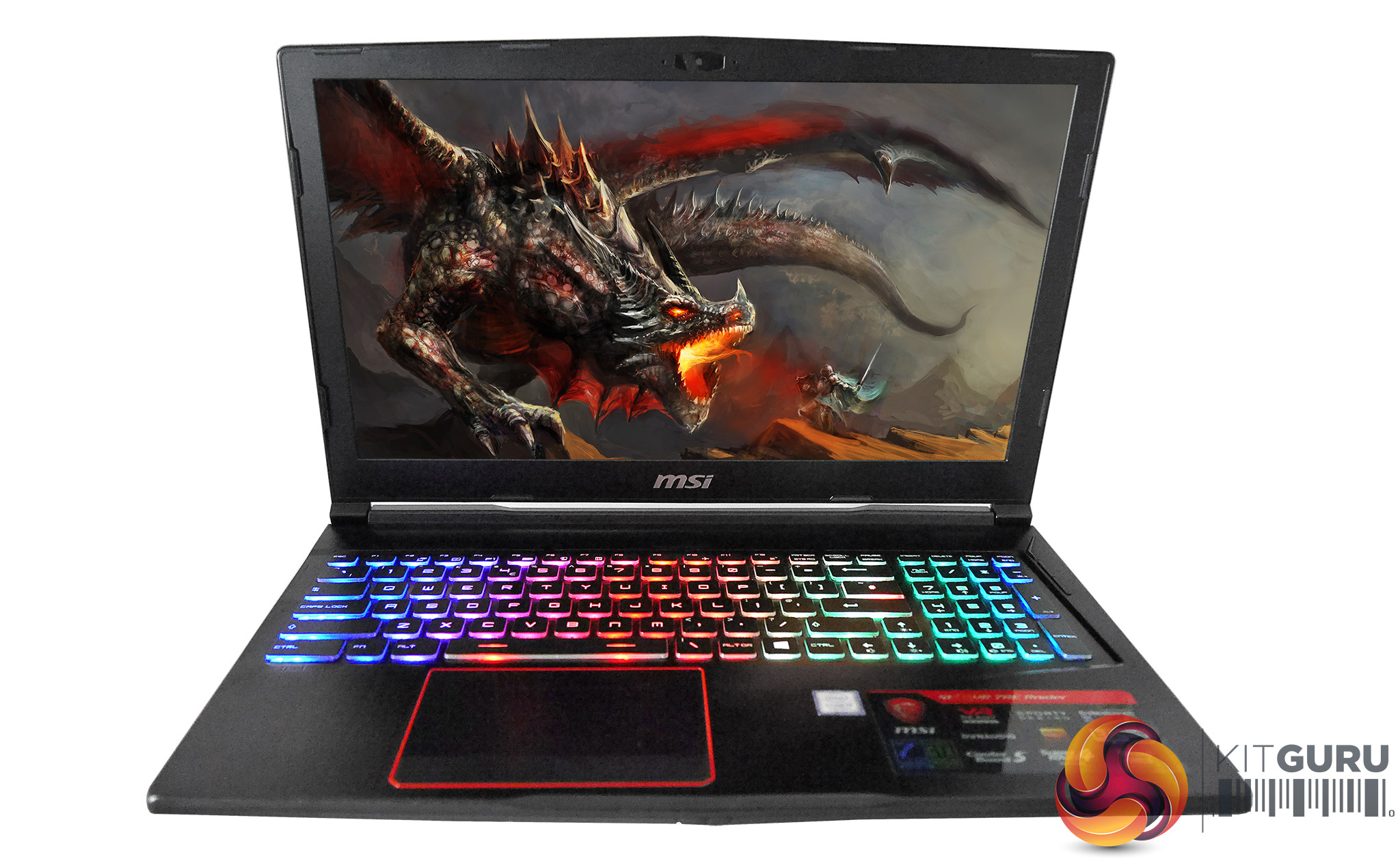
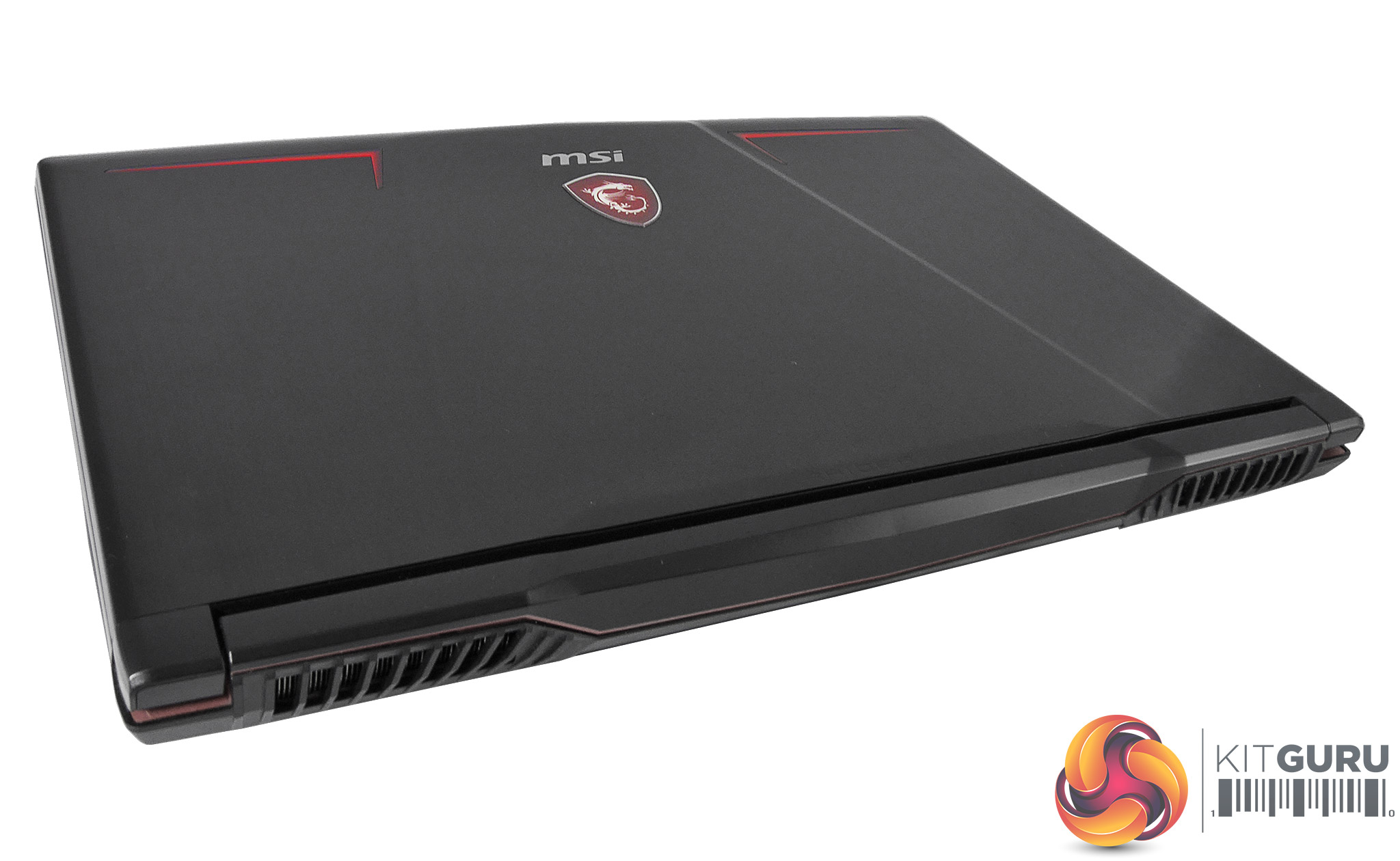
As with most gaming machines these days, the GE63VR 7RE utilizes a combination of a black chassis with red highlights and sculpted angles, since the powers that be have decided this is the look most gamers want. In this regard it’s indeed very similar to the Asus ROG Strix GL753VD we looked at recently. However, while these things are arguably a matter of personal taste, we don’t feel this MSI manages its look as gracefully.
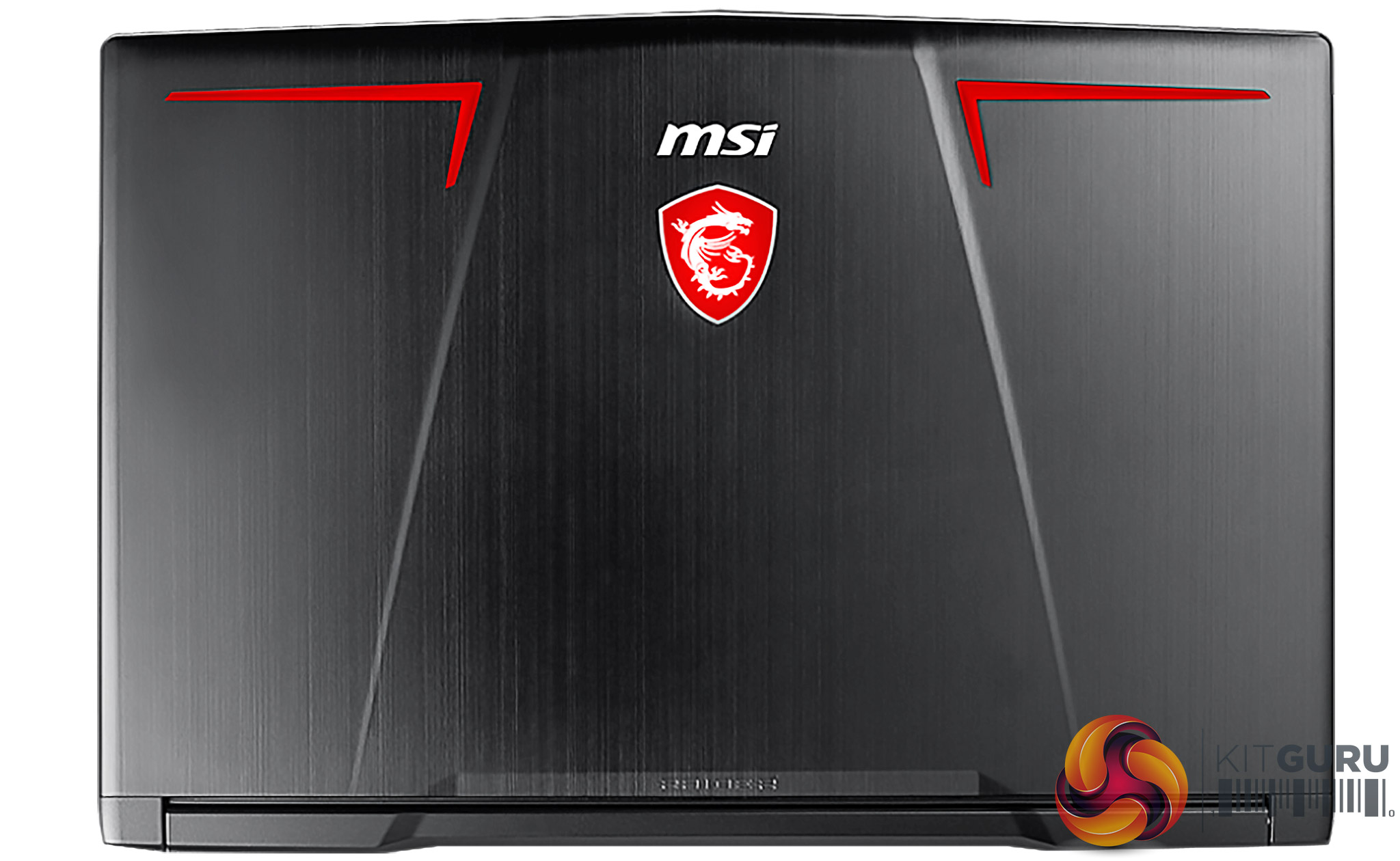
The moulded metal lid with its brushed texture looks fantastic even if it is rather fonder of fingerprints than we might hope, but the plastic hinge is highly visible with the laptop closed and the effect is slightly disruptive – not helped by an unnecessary indent that makes it look busy rather than cool, and the larg e standoff between the hinge and its inset.
Meanwhile the angular red markings to either side of the MSI logo sport a painted gradient that makes them appear subtle from a distance but like cheap stickers from up close. And while we’re certainly fans of the MSI logo proudly emblazoned on the GE63VR Raider 7RE – come on: it has a white-backlit dragon, it can’t fail – it’s perhaps being displayed a little too proudly; its prominence disturbs the laptop’s clean lines and it could have done with being a little more understated. That dragon does look great in the dark though.
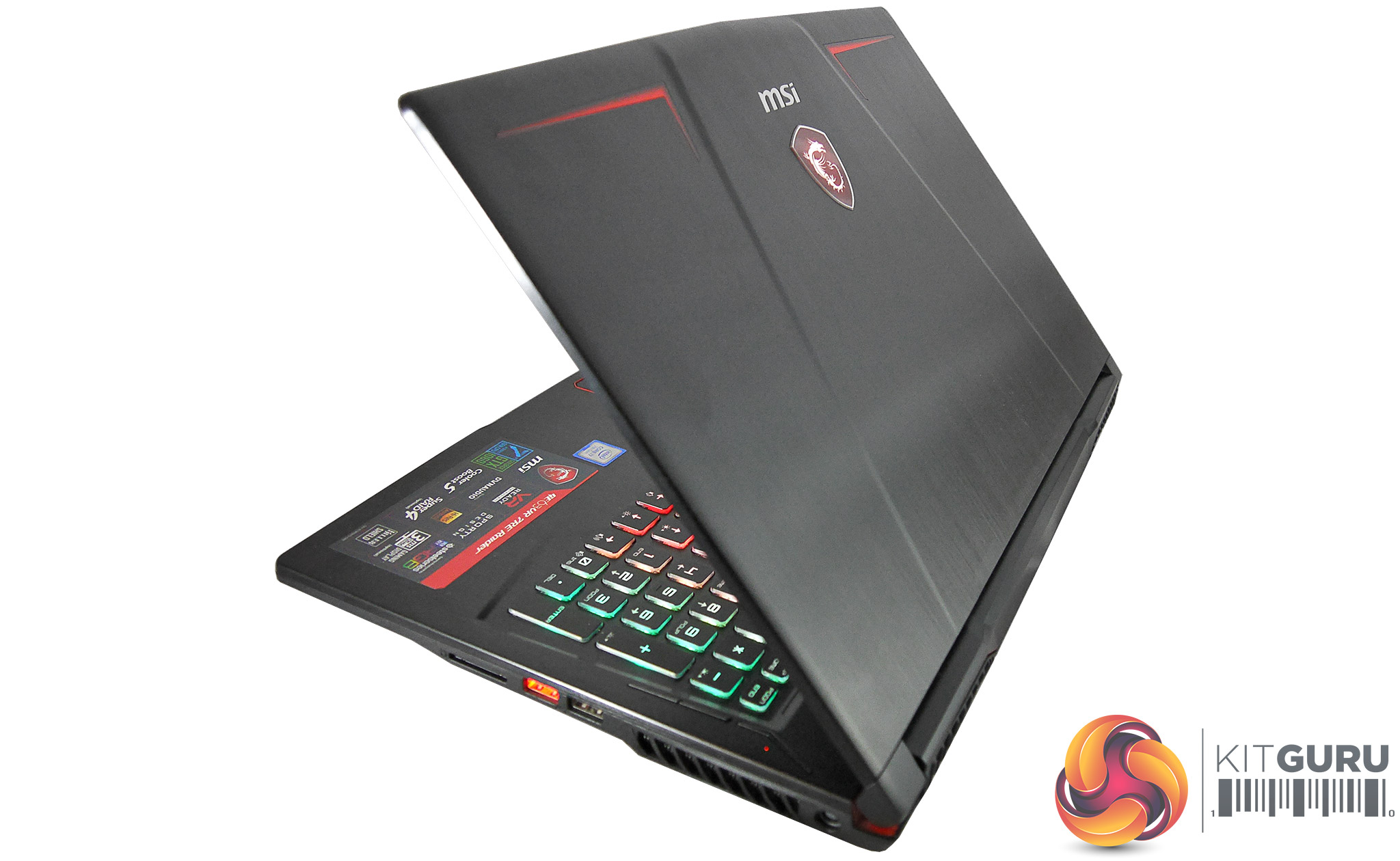
Opening this Raider up, the screen sports a thick plastic bezel whose lower part again prominently displays the MSI lettering. Thankfully, the bezel’s matt finish means there will be no reflections to distract from that crucial headshot.
The base shows simplicity can be elegant, and the only downsides are some removable stickers and the red-demarcated touchpad, which looks a bit cheap but at least increases the pad’s visibility. Otherwise the keyboard surround is again brushed and sculpted metal (not just plastic made to look like it), while the keyboard is attractively integrated.
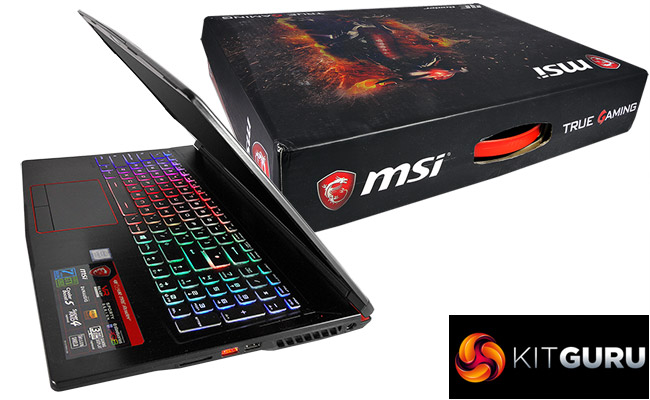
When you first set the MSI GE63VR Raider 7RE up, this keyboard will be lit like 1970s disco ball with every single key flashing a different colour, but really it’s just MSI trying to impress on you the fabulousness of SteelSeries’ per-key RGB lighting. Don’t worry, this light feast can be fully controlled by the SteelSeries Engine 3, which we’ll cover later.
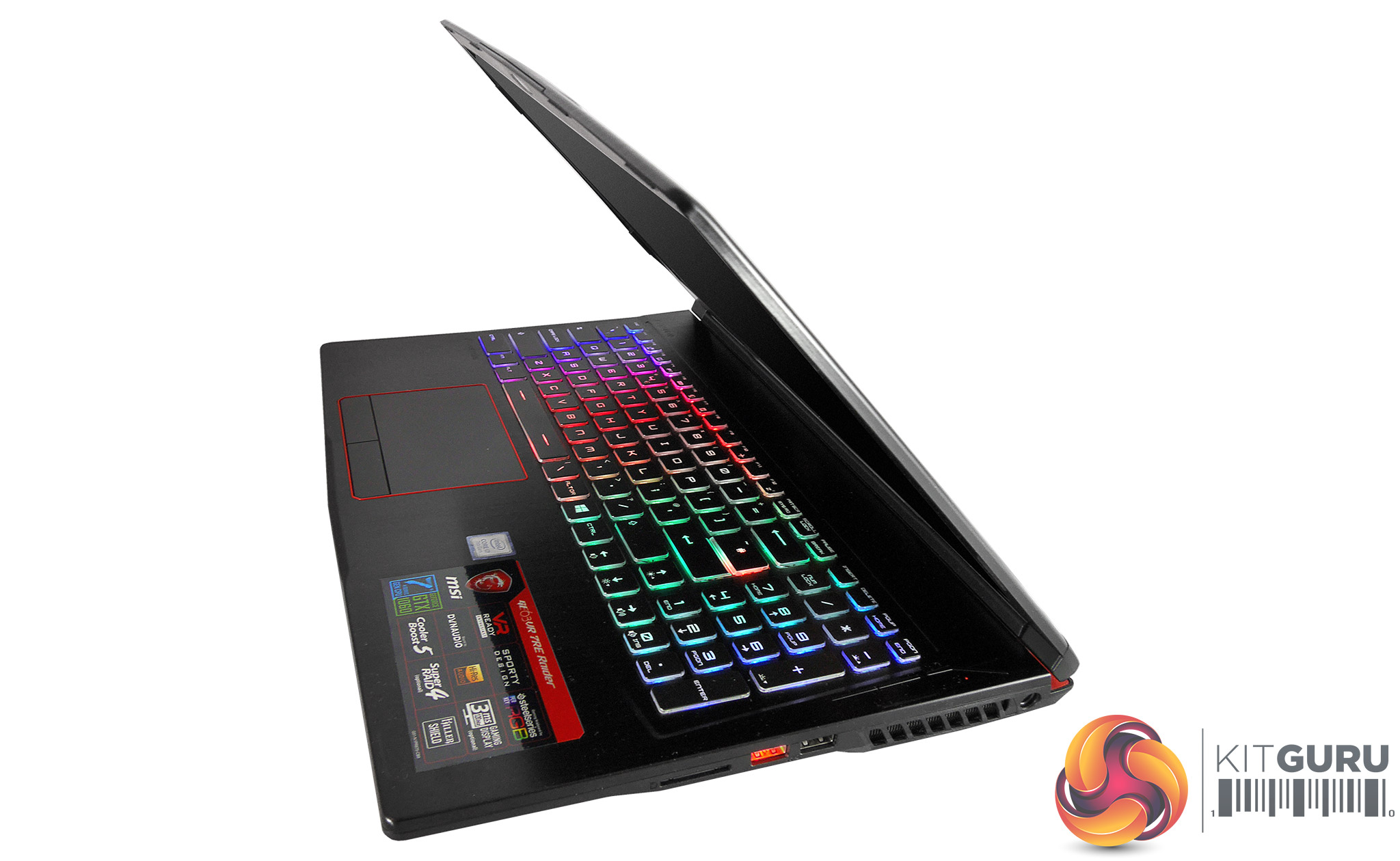
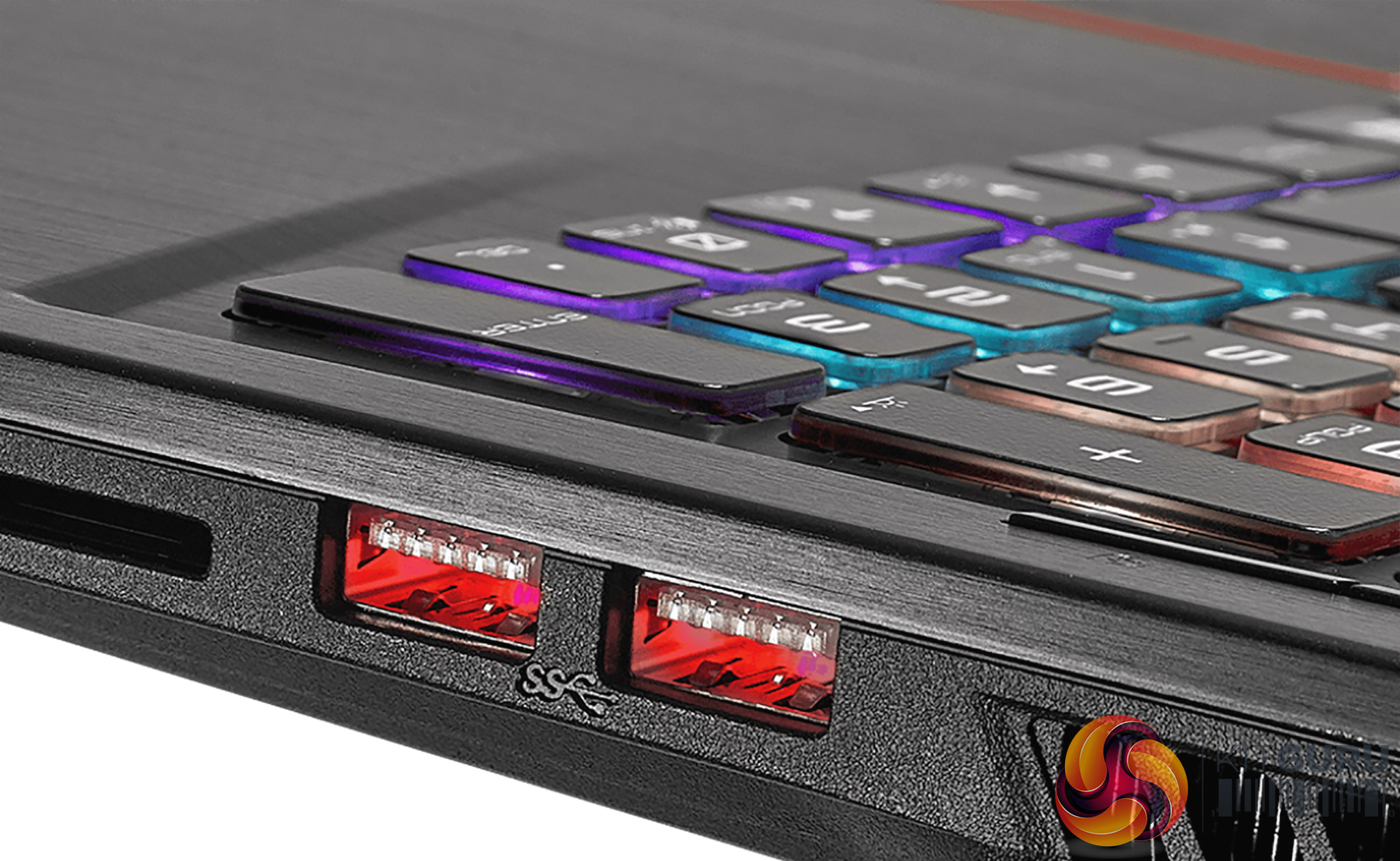
Moving on, this is the first laptop we’ve ever seen with LED-lit USB ports. That’s right, each standard USB port on the sides of this Raider thinks it’s a Cylon, though if you don’t like the effect or red’s not your colour, this can be disabled in the MSI Dragon Center.
Finally the GE63VR Raider 7RE’s base is a massive collection of vents and small angles. It has several sharply angled feet, some of which are soft rubber while others are hard plastic. The latter really don’t make for a very comfortable experience on your lap if you’re wearing shorts, so we’d say that’s a bit of a design flaw.
MSI GE63VR 7RE Build
Build quality on this MSI Raider is mostly pretty good. The lid – which is usually the weakest part on non-unibody gaming machines such as this – feels a little more solid than usual, though you can still flex it. Likewise the keyboard area flexes only minimally, and both these sections feel like actual metal compared to the flimsier implementations on some competitors.
The plastics used throughout also feel like quality, with minimal creak. The lid cannot be opened with one finger as it takes the base with it, but its hinge action feels smooth and solid, and the screen generally stays exactly at the angle you’ve put it with no wobble. It can be opened to around 150°, which is impressive and quite handy in some scenarios.
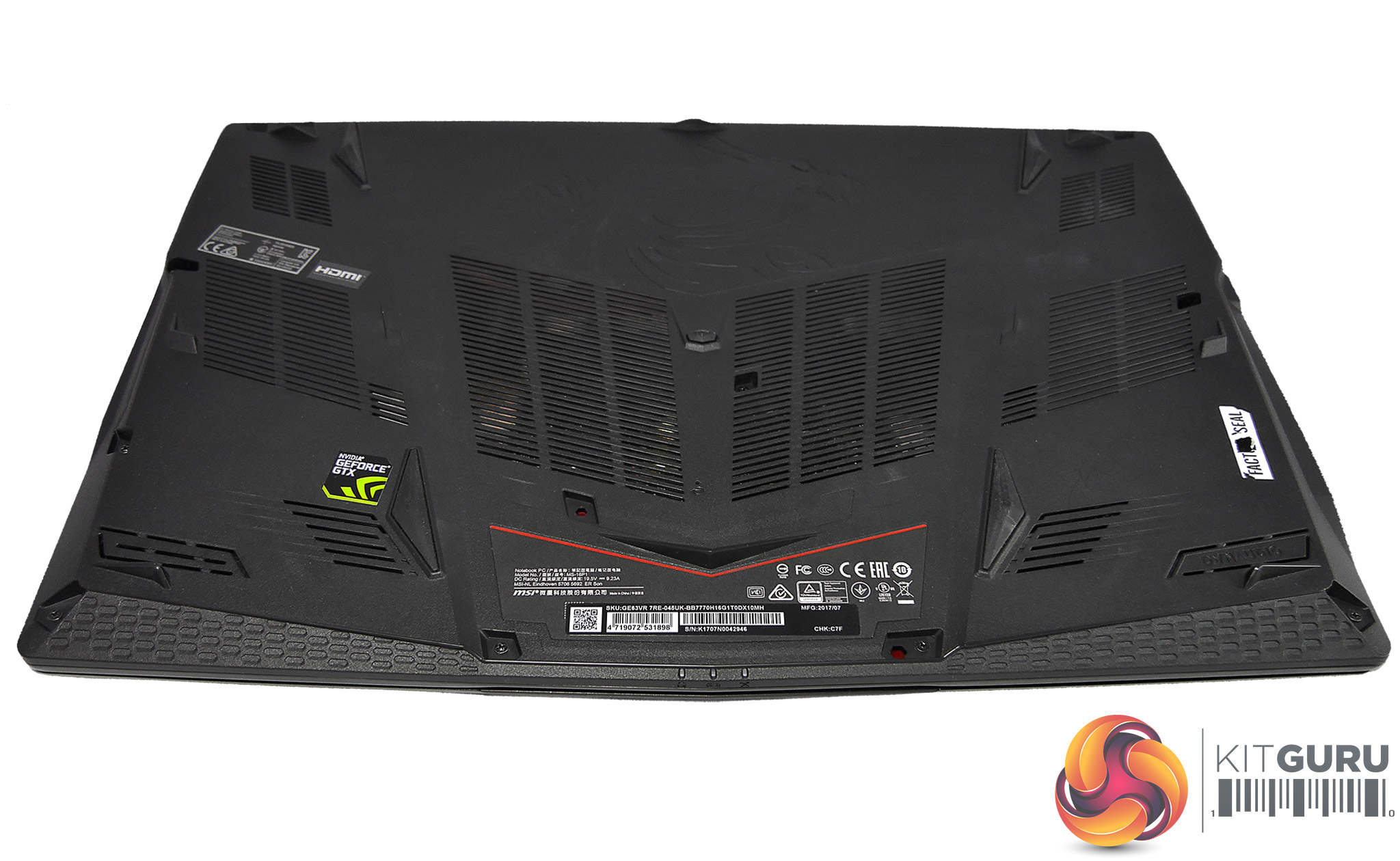
There is no easy panel to access the components for potential upgrades, but the whole plastic base does come off by removing 11 tiny cross-head screws. Don’t worry about the factory seal across one of them if it’s there; we checked with MSI and you’re free to make upgrades without voiding your warranty.
MSI GE63VR 7RE Connectivity
For a 15in laptop, the GE63VR Raider 7RE is generously endowed, though at this kind of price point we would be hoping for Thunderbolt 3; mainly to give the user the option of upgrading to an external graphics solution like the Razer Core in future.
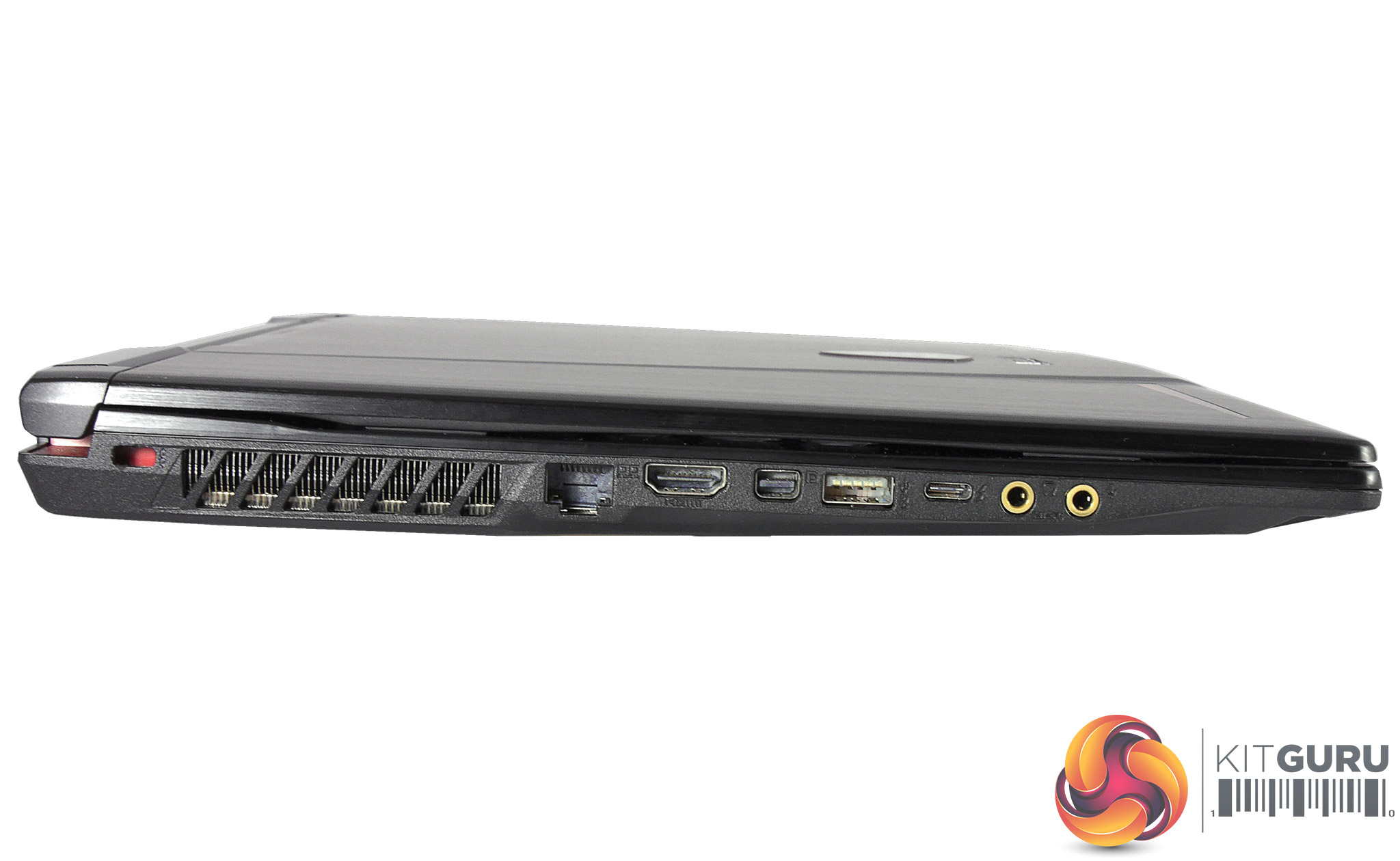
On the left this consists of a Kensington lock slot, Killer Gb LAN jack (which prioritizes gaming packets over any other traffic), full size HDMI 2.0 port, mini DP (DisplayPort) 1.2, USB 3.0 connector which can be lit with a red LED, and USB Type-C 3.1 port.
This is followed by microphone and headphone jacks. It’s worth noting that, thanks to its GTX 1060 GPU and HDMI 2.0 port, this Raider should do just fine outputting content to your 4K UHD TV at 60Hz, where some gaming laptops still only manage 30Hz thanks to being saddled with older HDMI 1.4 ports.
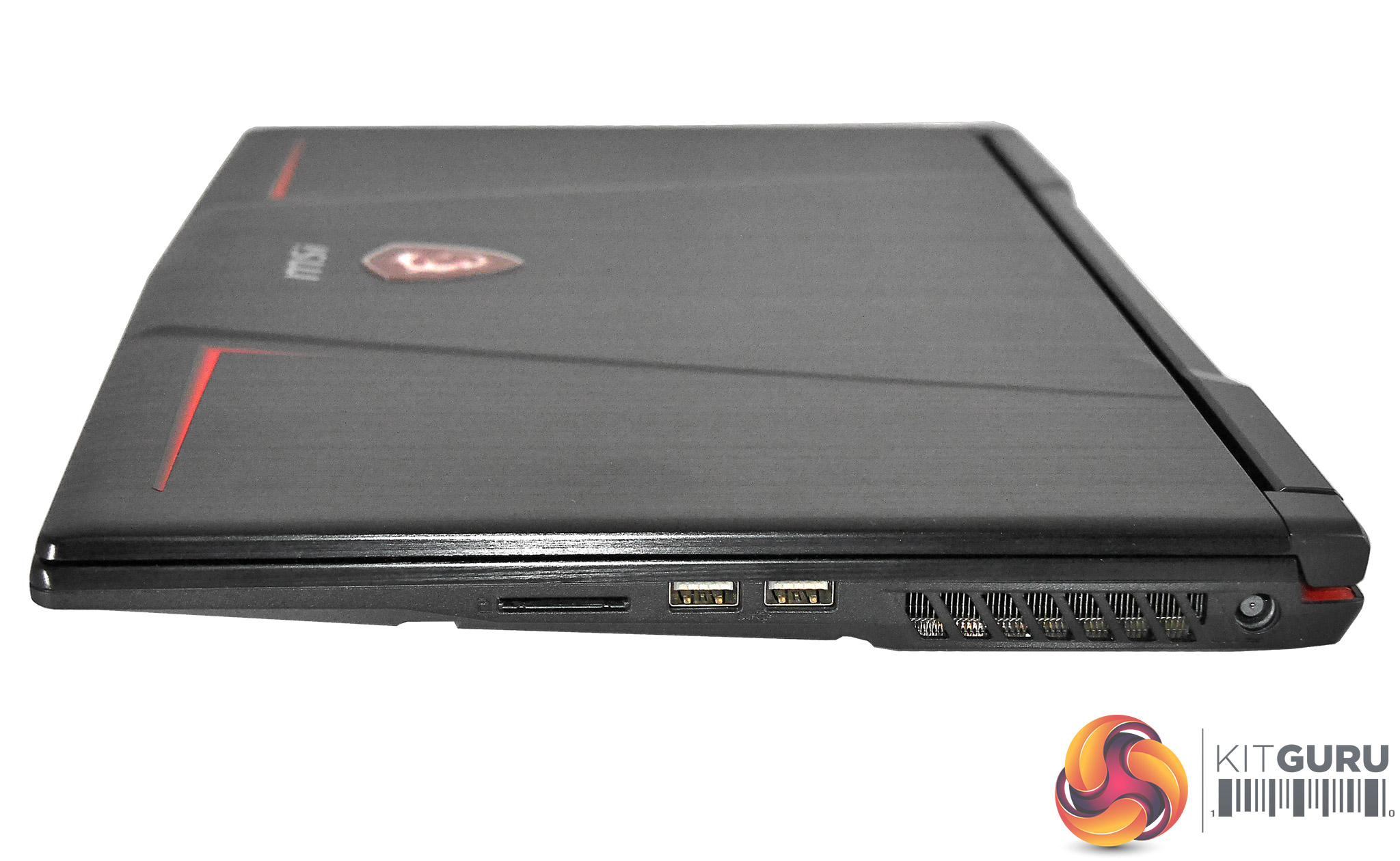
To its starboard side, MSI’s little beast offers a full SD card slot, twin USB 3.0 ports again lit up in red like miniature Cylons, and the power jack. Personal preference from an aesthetic viewpoint aside, we really like the option to make the USB ports glow as this makes it very easy to insert cables and memory sticks even in the dark.
It’s these kind of extra touches which genuinely enhance usability (and looks if you’re a fan of red) that set manufacturers apart from their competitors. Just keep in mind that SD cards will stick out slightly from the reader, so some care is required.
The front and rear of the GE63VR are thankfully port-free, which is really as it should be to make them easy to use on the tiny tables in many trains and airplanes, and to prevent potential damage of your ports and/or cables. Finally on the wireless side of things you get Killer Wi-Fi 802.11 AC and Bluetooth V4.2.
MSI GE63VR 7RE Usability – Touchpad
The touchpad on the MSI GE63VR Raider 7RE is a fairly standard affair but ends up on the good side of average. It offers a large, slightly soft surface which allows for smooth and comfortable movements with just the right amount of resistance for good control.
We also always prefer to see physical buttons on gaming laptop pads, as that single click can be too important to get wrong because you didn’t press far enough down on the integrated ones. Mind you, it goes without saying that any self-respecting gamer would be using a mouse where possible, but these buttons have a nice solid action.
MSI GE63VR 7RE Usability – Keyboard
When a peripheral or input device bears the SteelSeries name it’s usually pretty good, and the keyboard on this MSI Raider is no exception. While this is not a mechanical model but rather a chiclet affair with membrane key switches, feedback is still nice and crisp with plenty of travel and no unwanted flex. Plus you enjoy the added benefit of very quiet key travel so you won’t disturb your significant other when gaming in bed with headphones (aside from all the cussing and yelling, that is).
Layout is slightly on the odd side: while the GE63VR 7RE(Raider)-045UK sports a UK style keyboard with most symbols exactly where you would expect, the Enter key is shaped like a US model with an extra-wide hash key right above it. Right-shift is also slightly truncated by the full-size cursor keys, but luckily we didn’t notice an increased error rate because of it. Essentially, all of this has been squeezed in beside a full-size number pad without any significant compromise.
Yet where this SteelSeries keyboard really shines (pun intended) is its per-key illumination. SteelSeries Engine 3, which we’ll be looking at in detail in the Software section, allows you to configure the RGB backlighting in a huge variety of ways, with different colours, rhythms, effects and settings all linked to a selection of presets or even to what software you happen to be running. Heck you can even set the keyboard to show things like ammo count or health by colour coding in certain titles. Unnecessary? Maybe. Way cool? Definitely!
MSI GE63VR 7RE – Software
As usual with enthusiast machines, the MSI GE63VR Raider 7RE comes with an assortment of software to add a little spice to many of its features. Noteworthy candidates include three free months of TriDef VR to play ‘regular’ 3D games in VR, Nahimic audio software for virtual 7.1 sound, a premium license for XSplit Gamecaster which does what its title suggests, and two months of WTFast gamers’ VPN. However, the two gems we’ll be focusing on here are the aforementioned SteelSeries Engine 3 and MSI’s Dragon Center.
Likely you won’t be surprised to hear that SteelSeries Engine 3 controls the 16.7m-colour per-key RGB lighting on this Raider’s SteelSeries keyboard. Initially the interface is not that intuitive, since the home page is black with only a small drop-down menu that lets you choose from four presets. Fear not; just pop into the Engine Apps tab and the fun can begin. This store is still in beta so the app selection is quite limited but it can only grow, and it even allows you to ‘make’ your own app with macro-level control if you can’t find what’s required.
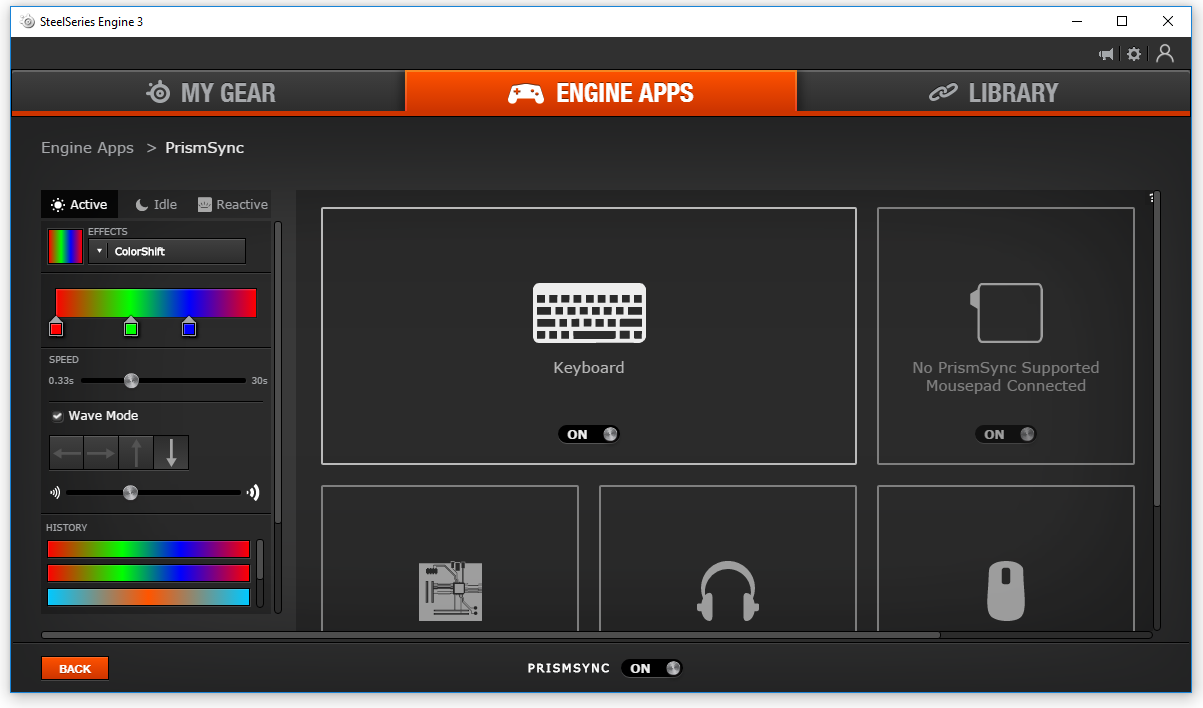
So far, supported games (where you can have colours or patterns show you things like health or ammo count) with apps pre-built include GS:GO, Dota 2 and Minecraft. Then there’s an app that allows you to turn the keyboard into an audio visualizer, or even one where you can use an animated GIF as an illumination animation! The potential possibilities are endless, and Engine 3 is by far the most comprehensive programmable keyboard lighting solution we’ve come across.
Most users will likely be using the PrismSync app primarily though. This lets you set a range of effects, colours, modes, rhythms and templates, all variable by your laptop’s status and assignable to presets. A cool example of how to disco up your keyboard in PrismSync is setting ColorShift to a slow speed and setting the Wave Mode from left to right, which makes the GE63VR Raider 7RE look like a Technicolor rainbow is undulating gently across its typing area.
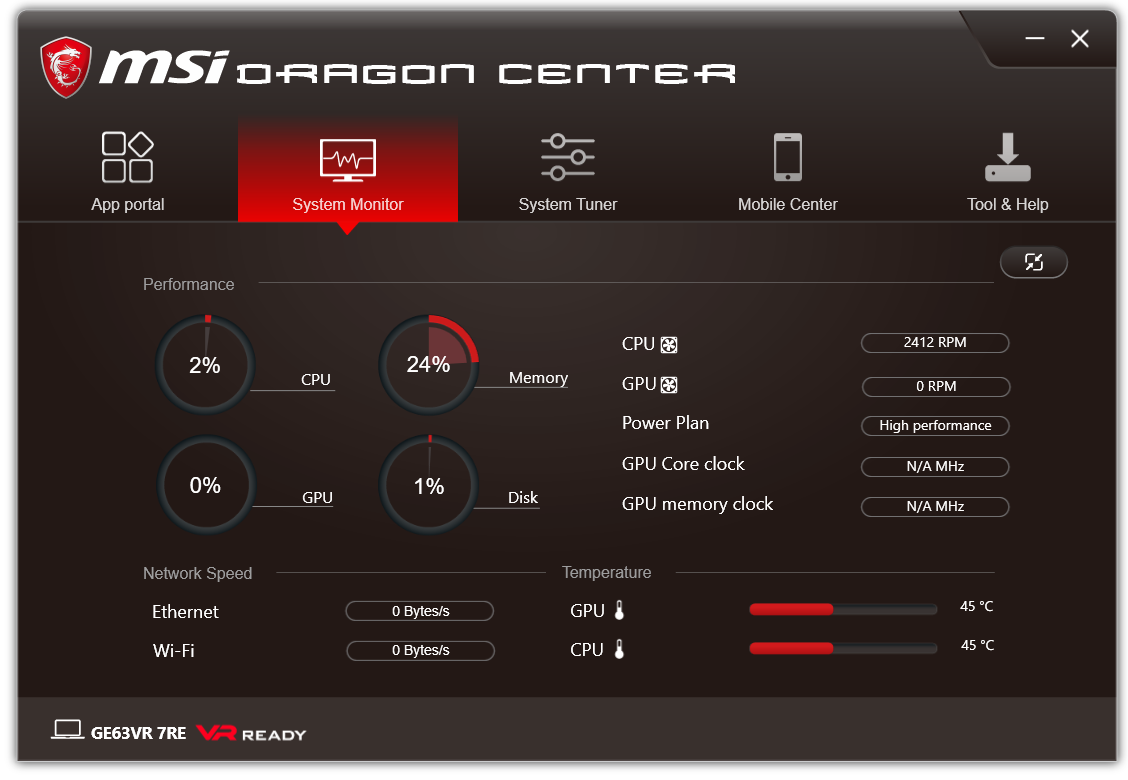
Next up is MSI’s exclusive Dragon Center. Similar to Asus’ ROG Gaming Center, this is the hub that controls and shows all the performance stats for your machine, and it’s divided into several sections: App portal, System Monitor, System Tuner, Mobile Center, and Tool & Help [sic]. It’s a tad unfortunate to see basic grammatical faults like that latter example throughout Dragon Center, with another painful one being that this software gives you “Highly flexibility!”. ‘Nuff said…
App portal lets you link apps, though we can’t particularly see the advantage over a (shock, horror) good old Windows folder. System Monitor is far more useful and lists CPU and GPU clock frequencies, fan speeds and temperatures, along with Ethernet and Wi-Fi speeds. It also allows you to select different power plans.
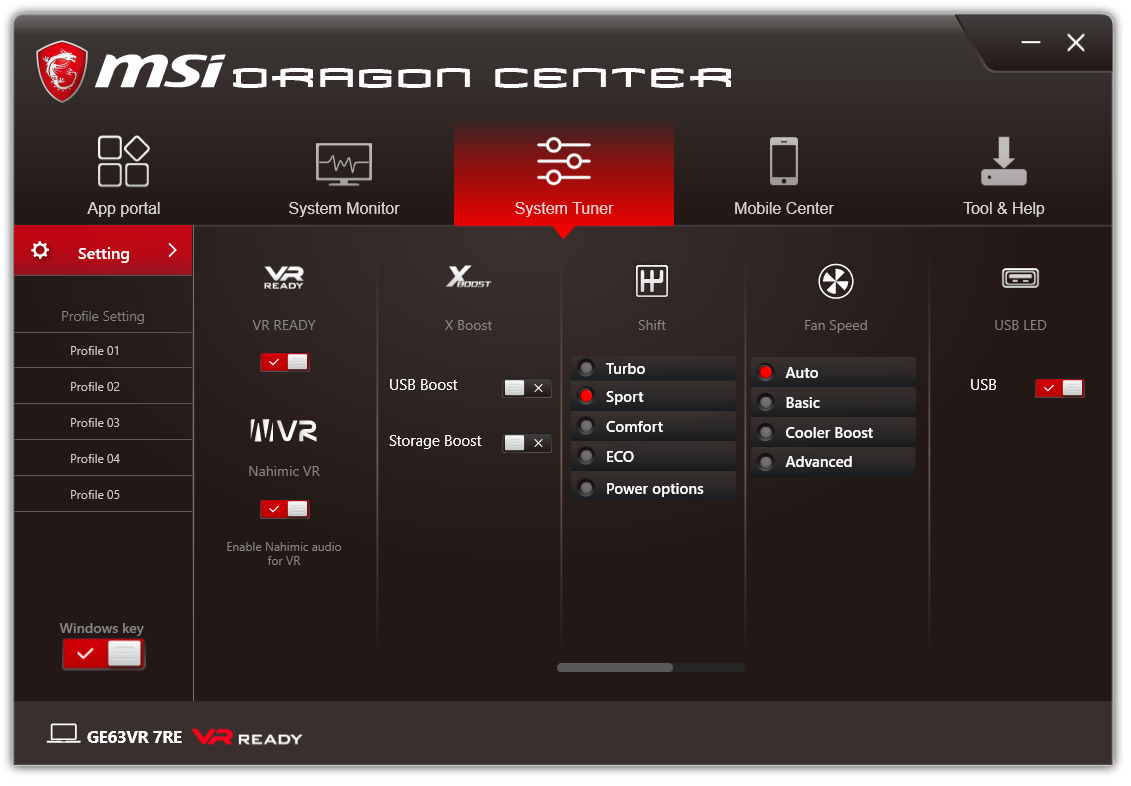
System Tuner has a nifty set of extras, such as enabling or disabling USB Boost and Storage Boost, selecting between various performance profiles and/or fan speeds, and turning the USB LED lights on or off. It also lets you select game genre presets for the Nahimic audio driver, and more importantly, screen presets such as sRGB (the default), Gamer, Anti_Blue (low blue light), Designer, Office and Movie.
If we have one complaint here, it’s that all these latter options are hidden and need to be revealed by a light grey scroll bar that’s so subtle it’s difficult to spot; MSI, make these important bits a bit more visible please. However, at least in the case of the display presets, these are also available through the highly impressive MSI True Color app, which we will be discussing further in the Screen section of the review since it’s relevant to the display’s performance.
Finally Mobile Center – as its name suggests – lets you monitor various bits of the GE63VR Raider 7RE via your smartphone, while Tool & Help contains bits like backup and restore, the User Manual, and product registration. Overall a pretty decent selection.
MSI GE63VR 7RE – Screen
As mentioned in the introduction, one of the things that makes MSI’s new Raider series of 15.6in gaming laptops so special is the option of a 120Hz Full HD display. Unfortunately, the panel type that offers this option here is a TN affair, which usually means poor viewing angles, average-at-best contrast and so-so colour accuracy compared to VA or IPS. While there is a GE63VR 7RE version with a UHD-resolution IPS panel that offers AdobeRGB colour coverage, this comes with a 60Hz refresh and is not available in most regions. So based on specs it’s a choice between quality and speed. Yet most gamers will probably be glad MSI went for the latter and, in this Raider’s case, there might be more of the former than you would expect.
The notable absentee on both options is any kind of adaptive sync, like Nvidia’s G-Sync or AMD’s FreeSync, which synchronises your graphics card’s output to the display’s refresh. It’s a slightly puzzling omission given that the GE63VR 7RE’s GTX 1060 could probably use the help in demanding 3D titles, but adding G-Sync would likely have added to the overall cost (though mobile G-Sync doesn’t require the same proprietary hardware module as on monitors, we imagine Nvidia still charges licensing fees).
When it comes to assessing and measuring the performance of any display – and especially LCD-backlit types – please do keep in mind that the results should only be used as a guideline: not only is every panel different to some extent, but a number of other factors can affect measurements too.
Subjectively, the 120Hz Innolux (N156HHE-GA1) matt-finish TN display made a surprisingly impressive… impression. Horizontal viewing angles were on the good side for a TN panel, meaning you can shift slightly out of the central ‘sweet spot’ without too much damage to perceived colours or contrast. Vertical angles are always TN’s biggest challenge and that’s no less the case here, but again it’s among the better TN examples we’ve seen, and the washed-out effect we’ve suffered on far too many panels of this type is noticeable only by its absence.
Backlight uniformity too was visually very good: both at its impressively low 6.5cd/m2 (a measure of brightness also known as nits) minimum and highest 310cd/m2 luminance levels, there was no variation strong enough to cause visible ‘patches’ on a dark background, and no backlight bleed whatsoever. For those intending to use this laptop for photo or video editing though, do keep in mind that our measurements showed a relatively minor deviation of up to 6.8 percent vertically across the right third of the screen.
And while we’re on the topic of luminance, we would like to commend MSI on the option to adjust the screen’s brightness low enough to ensure comfortable use in dark environments, and conversely bright enough to still be legible on a sunny day outside.
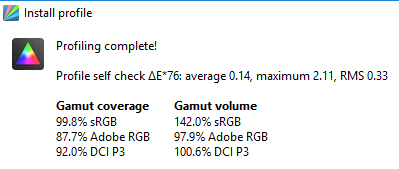
The good news continues with colour coverage, which MSI rightly crows about. Not only did we measure 99.8 percent of sRGB, which within margin of error is a perfect score, but also a whopping 87.7 percent AdobeRGB and frankly stunning 92 percent DCI P3. In fact, this is even above the standards required for HDR colour coverage, and certainly beats the stuffing out of most laptop displays, let alone TN ones.
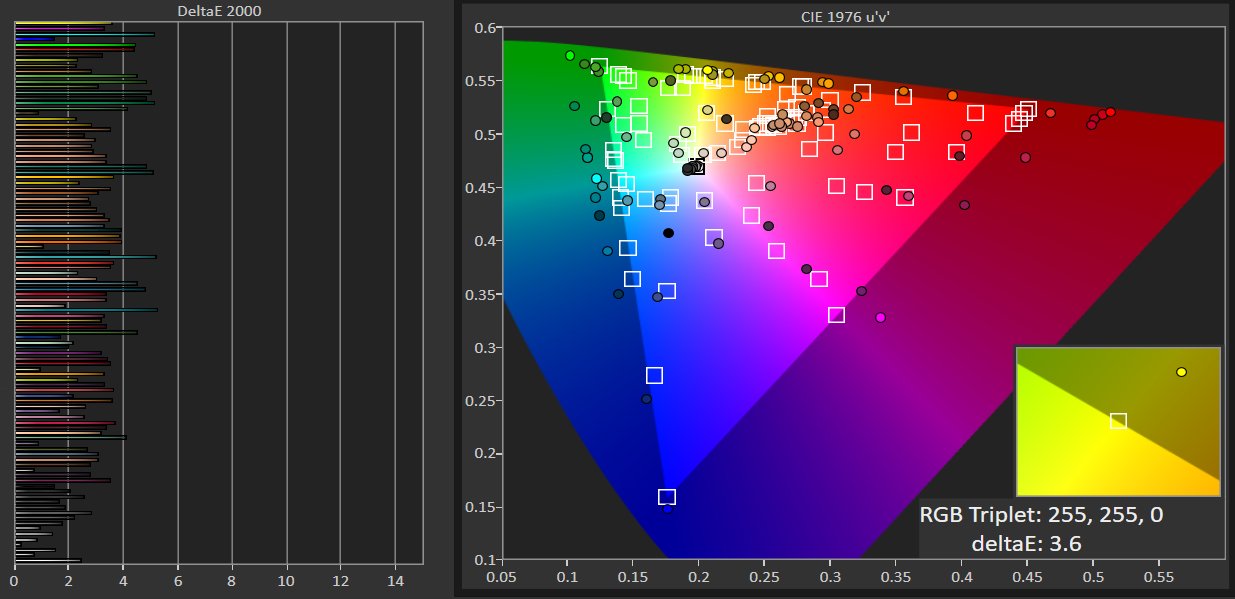
Colour accuracy, meanwhile, is also pretty impressive. At dE76 we measured an average of 0.14 and maximum of 2.11, while the more recent and demanding dE2000 gave a still excellent 3.0 average and 5.3 maximum. Gamma was only a bit off from the 2.2 ideal at 2.1, while likewise colour temperature of 6382K is close enough to the 6500K ‘daylight’ standard. So overall you can be pretty confident you’re seeing games close to ‘as the director intended’, and even for some non-critical colour and graphics work the MSI GE63VR Raider 7RE will serve you well.
As some of our readers likely already know, contrast is one of the most important visual factors when it comes to entertainment, and even here this display does a great job. At our preferred luminance level of 120cd/m2, we measured a decent black level of 0.11, which gave a nice contrast of just over 1040:1. For a TN-type panel this is pretty much as good as it gets, with only VA guaranteeing a better figure.
Last but not least we had a look at the panel’s pixel responsiveness and high 120Hz refresh. Unlike on a monitor, where pixel overdrive is nearly always adjustable at a hardware level, most laptops don’t offer this kind of control; so we’re pleased to report that we noticed absolutely no overdrive artefacts, trails or smearing.
The panel’s native high refresh also meant that everything looked really smooth on the GE63VR 7RE – as long as the display was being fed at that refresh rate, of course. At this stage it’s worth mentioning that the Nvidia GTX 1060 card in this particular Raider model will likely struggle to deliver many recent games at a consistent 120Hz refresh rate, but we’ll get to that in the Gaming section. For now, suffice to say that a refresh faster than the usual 60Hz makes everything (not just games) look and feel pretty sleek, so it’s definitely worth having.
MSI GE63VR 7RE – True Color
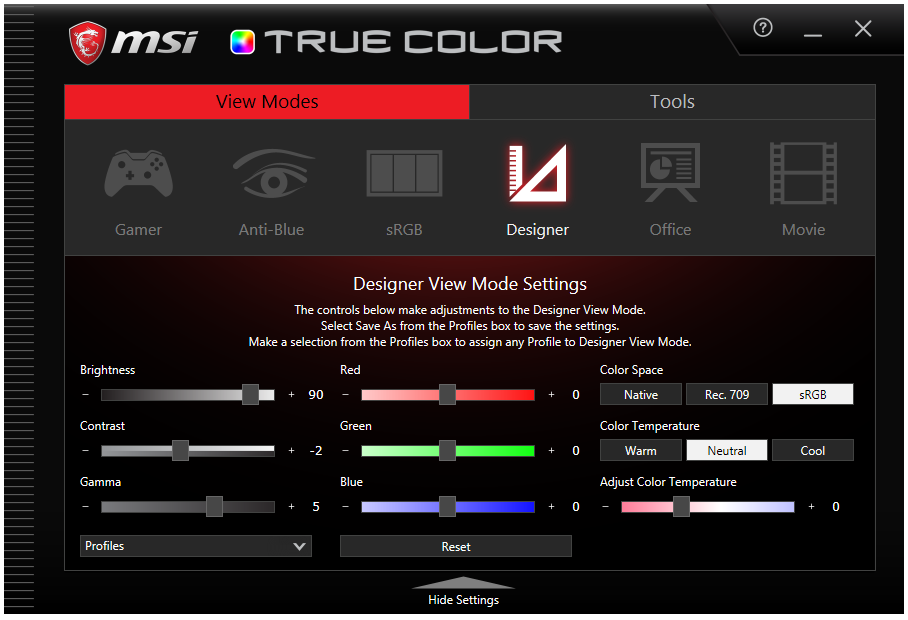
As mentioned in the software section, MSI’s Dragon Center gives you a number of presets for the display – but these are also available from the MSI True Color app, which is far easier to access. Not only can you get to it in the traditional ways, but it’s been cleverly added to the menu that pops up when you right-click on the desktop too.
True Color contains two tabs: View Modes, and Tools. View Modes is MSI’s name for the display presets, which as mentioned include the default sRGB, Gamer, Anti_Blue (low blue light), Designer, Office and Movie. However, unlike the selections on many laptops these are all customisable, allowing you to adjust factors as diverse as colour temperature, RGB values, brightness, gamma, and more.
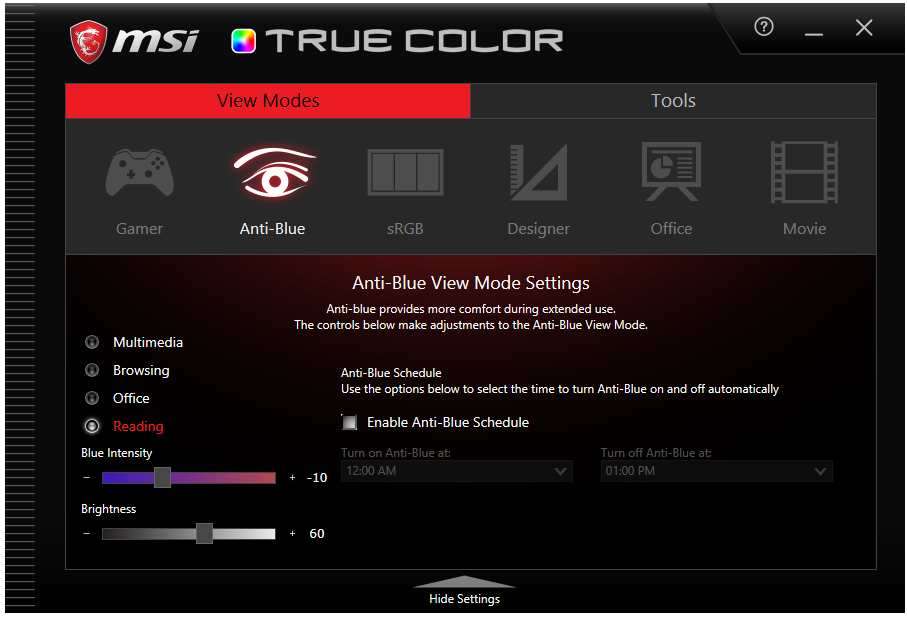
The Gamer ‘view mode’ also lets you save, import and export profiles with any combination of these settings. Anti_Blue, meanwhile, lets you set start and end times in addition to intensity and various sub-presets. MSI has done a really good job of making these presets genuinely useful compared to many other implementations we’ve come across.
The equally useful Tools tab has several sub-sections, two of which we’ll take a quick look at. First of all, App Sync can set modes or profiles on a per-application basis. The second is called Calibrate, which does exactly what it says on the tin. For calibration, True Color requires that you get your hands on either the Xrite i1 Display Pro or one of SpectraCal’s C3 or C6 colorimeters, as they all share the same basic hardware. If you’re lucky enough to own, beg, borrow or steal (please note, KitGuru does not condone theft) one of these, MSI’s software will calibrate every preset automatically, with no user input whatsoever required.
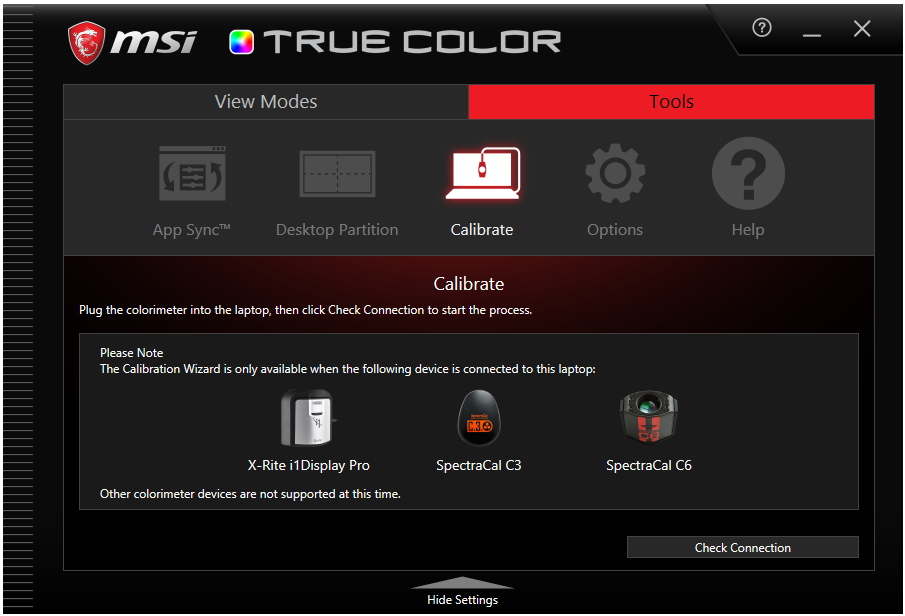
Of course we had to check to see how much panel performance improved post-calibration, and unfortunately the answer is not much. In fact, in some cases it made things worse. Colour temperature went from 6382K to 6455K, which is closer to the 6500K ideal. However, gamma didn’t fare so well, now measuring 2.05 rather than its previous 2.1, which was already off from the 2.2 ideal. And while we’re hardly surprised sRGB coverage stayed the same, we were disappointed to discover that colour accuracy had not changed either, with the exact same figures measured as before. So mixed results here then, although your mileage may vary.
MSI GE63VR 7RE – Speakers
For its Raider lineup, MSI has gone for something a bit unusual: Dynaudio Giant Speaker. Memo: Worst. Marketing. Name. Ever! On the other hand, as you might expect from the Dynaudio brand, the aural results live up to that terrible moniker in the best possible way.
There is a logic to the name too: it refers to the five-times-larger-than-usual resonance chamber, in which two speakers and two woofers can duke it out to impress your eardrums. And yes, the results prove MSI is onto something, as the GE63VR Raider 7RE is not just one of the loudest but also one of the best-sounding 15in laptops we’ve ever heard.
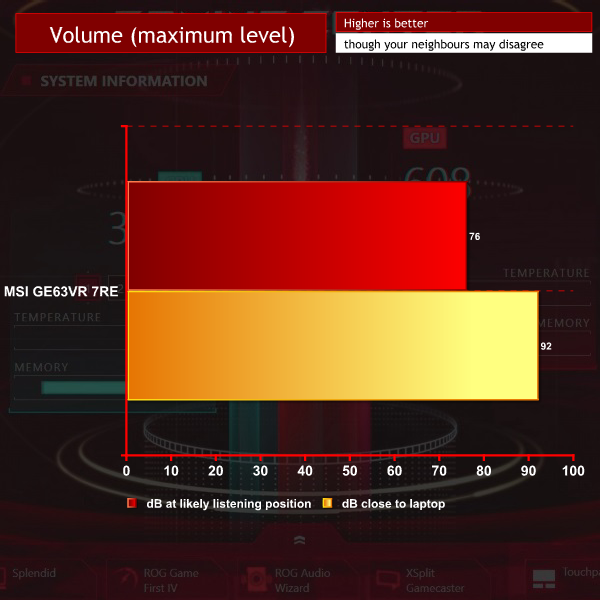
In terms of sheer volume we measured a whopping 92dB maximum near the laptop’s front, which as a point of reference is pretty much as loud as the average motorbike. Depending on your sitting position, your ears will get around 76dB, and this Raider can effortlessly fill a small room with sound.
And it’s pretty decent sound, at least when you run it a bit below max volume to avoid distortion. Mids and highs come across as reasonably well-defined and there’s a nice sense of depth and space. However, it’s the bass that really impresses. Usually this is the weakest element of any mobile device’s audio setup, for the simple reason that the laws of physics (those pesky things) determine there’s only so much oomph you can fit into a small chassis. However, here there’s not only quite a bit of bass on offer, but it’s also far tighter and better-controlled than the sloppy, tinny rumblings you’ll find on most laptops.
Downsides? Occasionally we felt the Giant Speaker (that seems to be the plural) couldn’t quite handle some high frequency treble notes without going a bit snap, crackle and pop on us, even at reduced volume levels. And the speakers’ down-facing orientation means your thumpin’ tunes are likely to get far less so when you put the GE63VR 7RE laptop onto any soft surface like a bed or, you know, your lap.
That said, this is one gaming laptop we would happily play on all day without feeling the urgent urge to hook up some external speakers, so good job MSI and Dynaudio!
Noise guide:
10dBA – Normal Breathing/Rustling Leaves
20-25dBA – Whisper
30dBA – High Quality Computer fan
40dBA – A Bubbling Brook, or a Refrigerator
50dBA – Normal Conversation
60dBA – Laughter
70dBA – Vacuum Cleaner or Hairdryer
80dBA – City Traffic or a Garbage Disposal
90dBA – Motorcycle or Lawnmower
100dBA – MP3 player at maximum output
110dBA – Orchestra
120dBA – Front row rock concert/Jet Engine
130dBA – Threshold of Pain
140dBA – Military Jet takeoff/Gunshot (close range)
160dBA – Instant Perforation of eardrum
MSI GE63VR 7RE – Acoustic Performance
Among the other features that supposedly set MSI’s Raider line aside from the kind of boring laptops that people take to the office every day is its Cooler Boost 5 system which, as its moniker suggests, chills the bits that get toasty – always a good thing when dealing with components like quad-core Core i7 processors and higher-level dedicated GPUs. It has two fans fed by seven heat pipes, and we’ll get to how effective it is in a moment.
What it’s not, however, is particularly quiet. Now to be fair that’s a challenge we have yet to see any gaming laptop worthy of the name truly meet but, after running Prime 95 and FurMark simultaneously for 15 minutes, idle cooling of around 30dB jumped up to a considerable 71dB, which is louder than the speakers of some laptops.
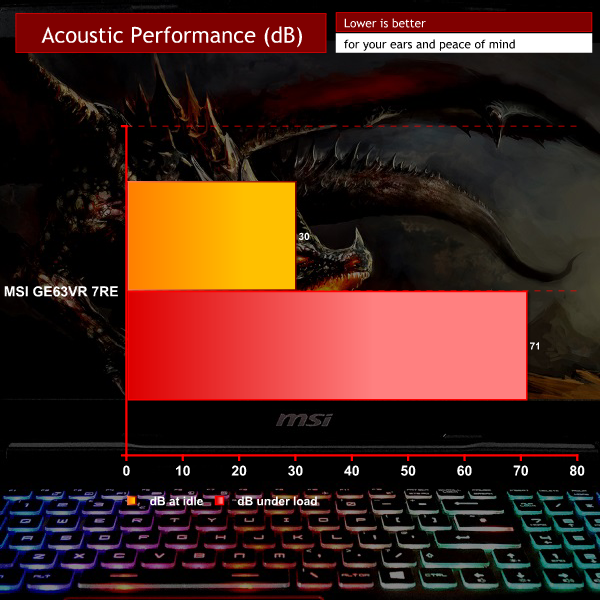
Worth noting here is that the Cooler Boost 5’s second (only slightly quieter) fan can be activated or deactivated by the push of a dedicated button to the right of the keyboard, which gives you all this beautiful fan noise in stereo. It’s like having a hair dryer and vacuum cleaner in one portable little package.
MSI GE63VR 7RE – Thermal Performance
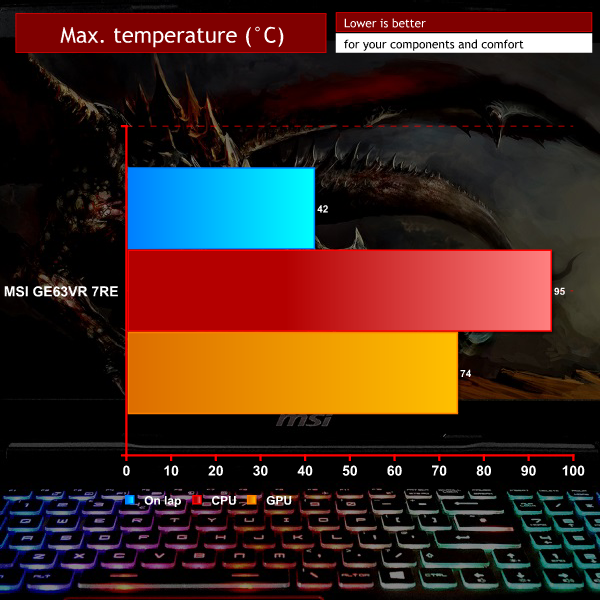
Our trusty Prime 95 and FurMark combo pushed temperature on this Raider’s Intel Core i7-7700HQ up to a rather worrying 95°C, nearing the 100°C thermal limit of the chip. Thankfully this kind of load is unlikely in most real-life use, but we would recommend keeping an eye on this if you’re going to be stressing it out.
In a sensible move for a gaming machine, MSI seems to have focused most of the power of its Cooler Boost 5 solution on the GPU, which never reached higher than 74°C. Interestingly, activating the aforementioned maximum cooling switch (or the maximum noise switch, as we prefer to call it) took those temps down to 94°C /70°C, with the fans for both running between 4200-4800rpm.
Unlike its internal bits, most of the laptop’s base remained fairly cool meaning it should be comfortable on the lap. Do note that heat gets exhausted from four different main grills: one to the left, two to the rear, and one to the right, so the only heat-free area is the laptop’s front. We used a laser IR thermometer to measure the main chassis’ temperature at six points on the top and bottom. Below are the results rounded to the nearest degree Celsius.
| BOTTOM | ||
| 29 | 25 | 27 |
| 42 | 29 | 27 |
| TOP | ||
| 34 | 39 | 33 |
| 26 | 25 | 38 |
Temperature guide:
<30°C – Comfortable for long periods
<40°C – Noticeable heat but comfortable depending on other factors
<50°C – Uncomfortable heat, prolonged exposure may be painful
>50°C – Likely be highly uncomfortable or painful
MSI GE63VR 7RE – Power Consumption
At idle, the GE63VR 7RE draws an average of between 29-65W. Average under load was around 178W, while the highest we measured from the wall was 184W. This is with the screen at maximum brightness and GPU/CPU under full load.

MSI GE63VR 7RE – Battery Life
MSI has fitted its Raider laptop with an own-brand non-removable 53Wh lithium ion battery with a chargeable capacity of around 46300mWh/4289mAh. This is not a huge offering for what’s being driven here and, concomitantly, battery life isn’t stellar. To be fair that’s the case for the vast majority of ‘proper’ gaming laptops, but we must admit the results here are below even that unimpressive average.
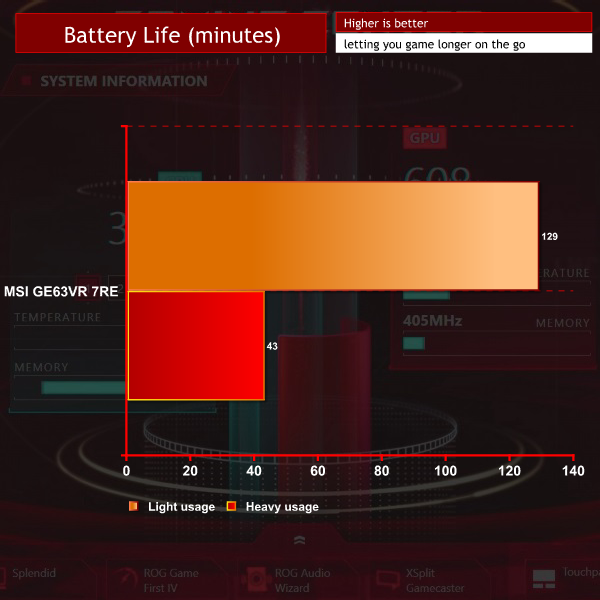
With screen brightness set to 120cd/m2 the battery only lasted 129 minutes in the Reader test, which reflects light usage. Running an intensive test to simulate gaming with the screen at maximum brightness, the GE63VR 7RE managed just 43 minutes, so this may not be the best machine if you’re looking for something that will last you for long train or plane journeys without a power outlet.
3D Mark
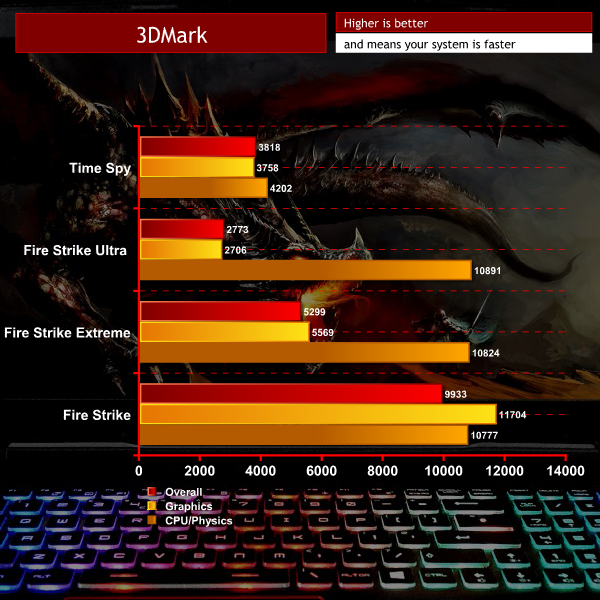
Results as expected, with the high-end Core i7 taking the lead over its mid-range GTX 1060 GPU counterpart.
Cinebench R15
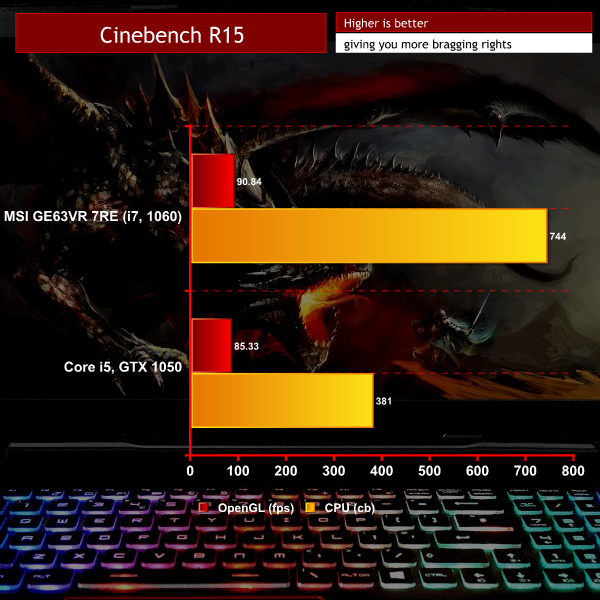
Here we've thrown in the performance for a laptop with a Core i5 and GTX 1050 combo to give a comparison with the i7 and 1060 in our MSI Raider.
AS SSD
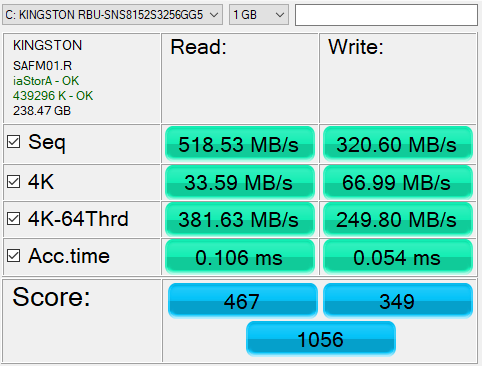
Please note, storage benchmark results are for the primary (SSD) drive.
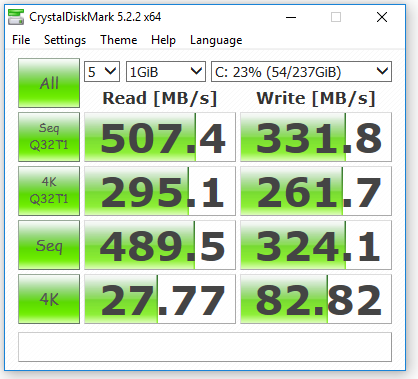
Crystaldiskmark
Rise of the Tomb Raider

In Tomb Raider the GE63VR 7RE Raider’s GTX 1060 graphics card, ably assisted by the rest of the spec, managed to show off the screen’s 120Hz native refresh rate. Especially in DirectX 12, the maximum frame rate nicely exceeded the refresh while the average stayed close enough for comfort.
However, reminding you that we’re dealing with the lowest Nvidia mobile gaming GPU worthy of that name, minimum frame rates still dipped below 30fps, which is why it would have been nice to see some G-Sync love.
Deus Ex: Mankind Divided
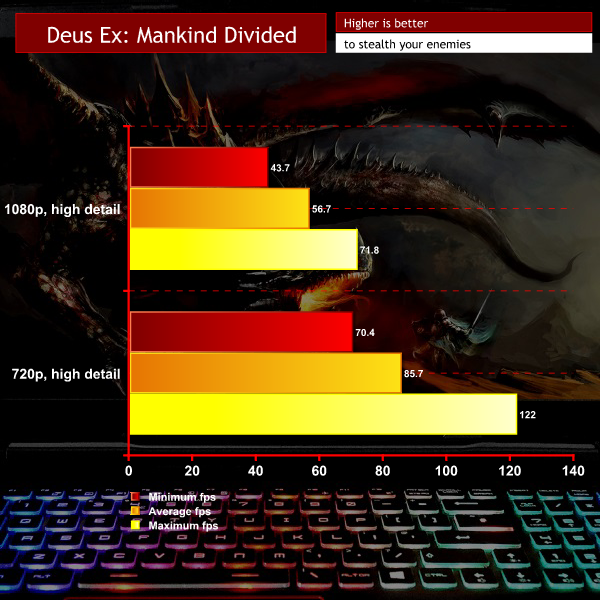
Deus Ex is generally slightly less demanding than Tomb Raider which is why – despite the maximum framerate not stretching the panel’s refresh – we see the minimum fps double to around 60Hz. In titles with this kind of performance level you’re not as likely to experience tearing or stuttering, so the absence of adaptive sync is felt less keenly.
Ashes of the Singularity (All settings low, Avg. FPS all batches)
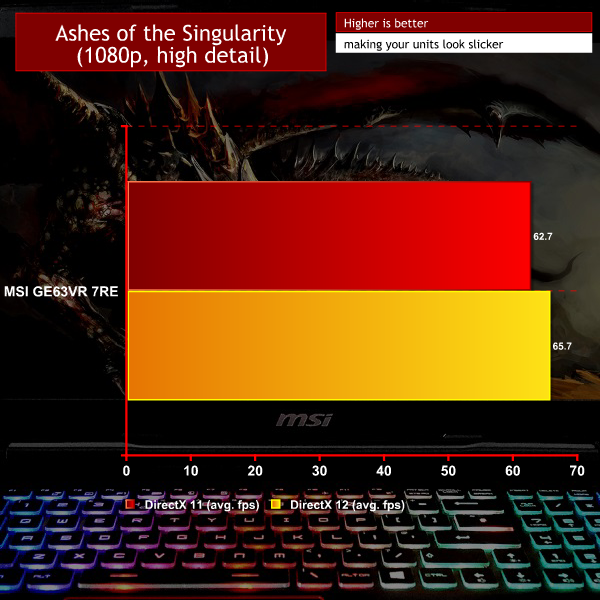
In Ashes of the Singularity, which like any self-respecting epic RTS throws boatloads of units onto the screen with nary a thought for the poor graphics card that has to render them all, the GTX 1060 again shows its limits.
However, while you might not be able to consistently take maximum advantage of the GE63VR 7RE’s fast display, it’s worth pointing out that all of our test titles ran smoothly enough to be nicely playable. Since “gaming” laptops are being sold with GTX1050 Ti and even vanilla 1050 cards pumping in their electronic hearts which won’t even manage consistent framerates above the high twenties, it’s important to emphasise that MSI’s choice here does so reliably and will let you see the advantage of a faster-than-60Hz screen – as long as you don’t get too greedy with the detail settings or other kinds of eye-candy like antialiasing.
And while we’re on the topic of enabling great experiences, it’s also worth noting that the 1060 is the minimum recommended Green Team card for a good VR experience in the playbooks of both Oculus’ Rift and HTC’s Vive virtual reality headsets, lending a bit more versatility to the MSI GE63VR 7RE Raider’s gamer tag than some lower-specced beasties.
So has MSI succeeded in creating a Raider that can plunder your gaming heart while it raids your wallet? Overall the answer has to be “yes”. It’s not perfect by any means, but the highlights overshadow the weaknesses enough that we would still recommend it.
On balance, the GE63VR 7RE has a decent selection of specs. The GTX 1060 video card is enough to run most recent games at nice frame rates, and it’s the baseline Nvidia card for an enjoyable VR experience. Paired with that quad-core Kaby Lake Core i7 processor, a main SSD and generous hard drive, it’ll power happily through most work or play scenarios albeit with some compromises for the latter.
While we would rather have seen a Core i5 paired with a GTX 1070 – because for 99 percent of games GPU always trumps CPU – the former’s downgrade would not have been enough to keep the price at a similar level. Do remember that if your budget allows you can opt for this Raider’s bigger, badder sibling with exactly that card and the same Core i7, which will give you a superior gaming experience.
MSI’s choice of 120Hz TN display was a very pleasant surprise. By TN standards it’s pretty darn good; in fact, poor viewing angles aside it’s one of the better gaming laptop screens we’ve come across. It offers fantastic colour coverage and adequate accuracy for casual photo editing, contrast that’s up there amongst the best of its kind, and no artefacts or backlight bleed to distract from the gaming experience.
Speaking of gaming experience, in those titles where the 1060 could push the frames out consistently close to its native 120Hz refresh, it was an absolute joy to play on, especially since its fast pixel response meant there was virtually no ghosting or smearing. We just wish MSI had managed to implement G-Sync as this scenario is going to be pretty rare if you like running the latest 3D games at maximum detail.
Pulling you further into your entertainment experiences, the GE63VR Raider 7RE’s Giant speakers merit the terrible name and space they take up, providing not just pretty decent mids and trebles at impressive volume levels, but also that rarest of things in the laptop audio world: bass that actually has some tightly-controlled kick to it.
While it’s not mechanical, the SteelSeries RGB keyboard is a pleasure to use for gaming or typing, and its dizzying array of backlight options through apps and macro-key control makes it the most comprehensive solution we’ve yet encountered. It’s paired by a very usable touchpad, and a good selection of connectivity.
Unfortunately, there are also a few serious caveats. This laptop gets noisy under load, very noisy, and still only manages to keep its CPU within a few degrees of the throttling threshold when pushed. And battery life is on the poor side of average, so don’t expect to be able to complete any gaming marathons away from a socket.
The GE63VR Raider 7RE as reviewed (except with 8GB of RAM rather than 16GB of our review sample) is available from SaveOnLaptops for £1,497.00 here.
Discuss on our Facebook page, over HERE.
Pros:
- Good build quality with lots of real metal
- Nvidia GTX 1060 and Core i7 combo provides adequate performance for decent gaming and VR
- Speedy 120Hz TN display wows with excellent colours and good contrast
- Some of the best speakers we’ve heard on any gaming laptop with bass that packs a punch
- Gorgeous per-key RGB-backlit SteelSeries keyboard
Cons:
- GTX 1060 is not powerful enough to consistently game at the screen’s native resolution and refresh
- TN display still means limited viewing angles
- Gets very noisy under load, CPU runs seriously hot when stressed
- Battery life on the poor side of average
- Edgy plastic feet can be uncomfortable on your lap
KitGuru says: The good definitely overshadows the bad for this member of the Raider family, packing as it does a great 120Hz display, game-worthy GPU, stunning speakers and a simply gorgeous keyboard. Just make sure you can live with the noise and poor battery life.


Why would anyone pay £1497 for this with a GTX 1060 when you can get a Gigabyte with an I7 and a GTX 1070 for £1499? https://www.overclockers.co.uk/gigabyte-p57x-v7-cf2-nvidia-gtx-1070-8gb-gddr5-17.3-fhd-ips-intel-i7-7700hq-gaming-laptop-lt-07s-gi.html
120Hz screen. 60Hz is cancer in comparison
I concur. Yet there is no point matching a GTX 1060 with 120Hz display. Unless medium settings is more appealing?
People chose 120hz for competitive gaming, not casual single player games because there is no point in there. Also no one use high settings in any competitive game like CS: GO, Overwatch, therefore 1060 can push 120 hz easily.