 KitGuru KitGuru.net – Tech News | Hardware News | Hardware Reviews | IOS | Mobile | Gaming | Graphics Cards


We will outline the performance increases that can be obtained from using the Asus X99-A motherboard to overclock our system. Our overclocked processor frequency was 4.5GHz and memory speed was 2400MHz.
As a performance comparison, we have included the overclocked results from two other X99 motherboards. The maximum overclocked configuration achieved with each board was a 4.5GHz processor frequency and 2400MHz memory speed.

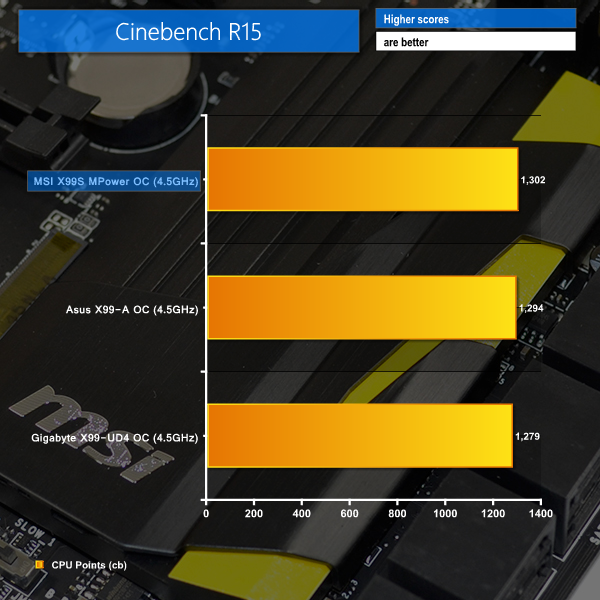

Asus' X99-A reacts well to a 900MHz boost in CPU frequency. The board manages a joint-top finish in Cinebench and remains competitive with the MSI offering in 3DMark's Physics test.
Bioshock Infinite performance is where the X99-A really shines. While MSI's X99S MPower dropped its gaming performance with a CPU overclock (a very odd issue that we still do not have a clear explanation for), the Asus board was able to maintain the vast majority of its stock-clocked FPS level.
That frame rate retention opens up a 2.2% performance gap between Asus' board and the competing solutions (although Gigabyte had other, more significant issues).

Luke, fantastic review. I am interested in two things.
Firstly, is the M.2 slot physically blocked by a second graphics card. For example, 2x4GB EVGA GTX 980? This card extends the whole width of this motherboard and I suspect the second card would occupy the third PCIe slot (PCIEX16_3 on the schematic). Due to the thickness of the card, I am worried that the M.2 slot is obscured.
Secondly, what benefit would I or other readers experience in your opinion by upgrading to the x99 Deluxe motherboard given the following components:
> Intel Core i7 5960X Haswell-E 8 Core
> 2x 4GB EVGA GTX 980
> 8x8GB Corsair DDR4 Vengeance
> 250GB Samsung 840 EVO Basic SSD SATA III
Thanks for your thoughts.