 KitGuru KitGuru.net – Tech News | Hardware News | Hardware Reviews | IOS | Mobile | Gaming | Graphics Cards


One of the suggested benefits (that we can actually test) of Asus' OC Socket is enhanced memory performance. Asus suggests that the extra pins allow enhanced CPU Cache frequencies to be set, leading to better memory performance.
We used G.Skill's Ripjaws4 modules set to their 3GHz XMP frequency to test memory bandwidth and latency numbers. This is a set of performance metrics that we may look to include in future reviews.
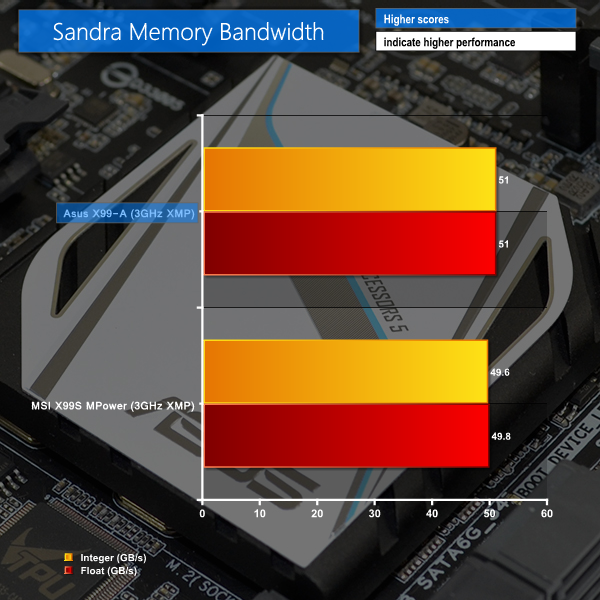
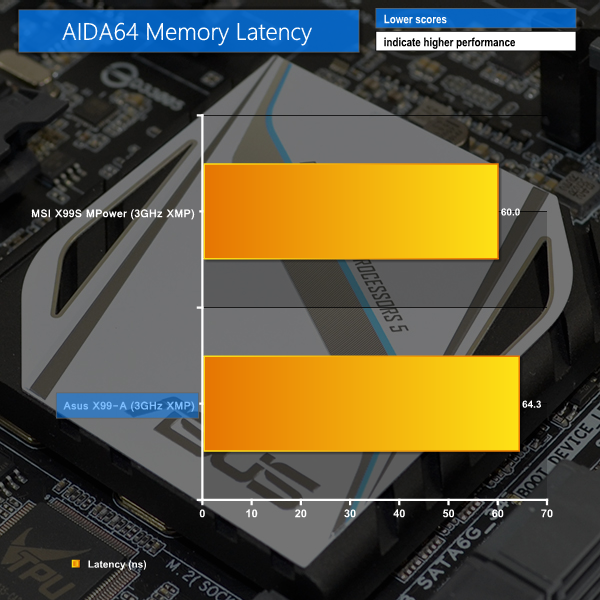
While Asus' X99-A is indeed able to deliver greater memory bandwidth than MSI's X99S MPower, memory latency performance shows the opposite result.
The main performance differences are derived from tighter secondary timings set by the MSI-based configuration.
Data was gathered using the default Cache frequency that is set when XMP is enabled. Further tweaking of Cache speed may deliver better results for one solution over the other and is something that could be explored in future articles.

Luke, fantastic review. I am interested in two things.
Firstly, is the M.2 slot physically blocked by a second graphics card. For example, 2x4GB EVGA GTX 980? This card extends the whole width of this motherboard and I suspect the second card would occupy the third PCIe slot (PCIEX16_3 on the schematic). Due to the thickness of the card, I am worried that the M.2 slot is obscured.
Secondly, what benefit would I or other readers experience in your opinion by upgrading to the x99 Deluxe motherboard given the following components:
> Intel Core i7 5960X Haswell-E 8 Core
> 2x 4GB EVGA GTX 980
> 8x8GB Corsair DDR4 Vengeance
> 250GB Samsung 840 EVO Basic SSD SATA III
Thanks for your thoughts.