 KitGuru KitGuru.net – Tech News | Hardware News | Hardware Reviews | IOS | Mobile | Gaming | Graphics Cards


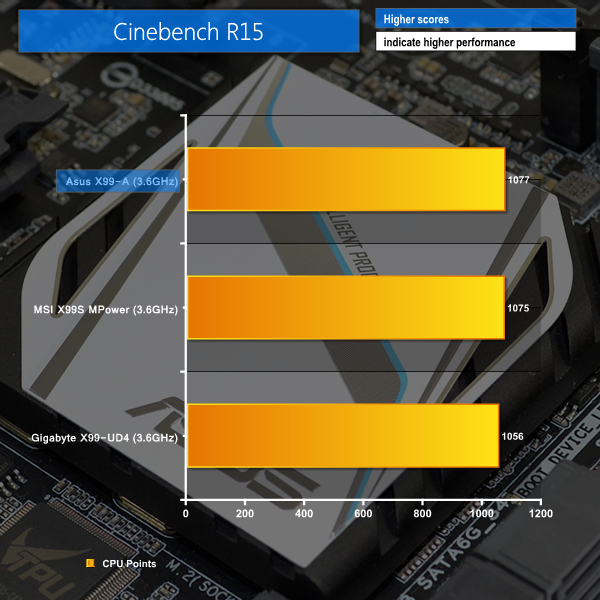
Cinebench
We used the ‘CPU’ test built into Cinebench R15.
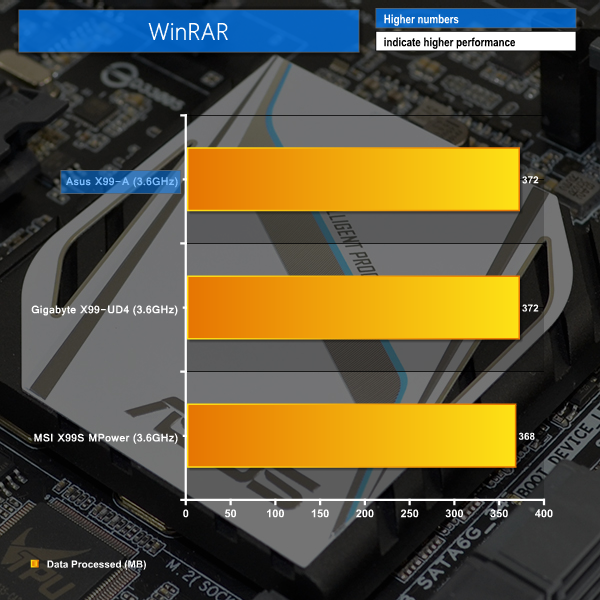
WinRAR
WinRAR’s built in benchmark and hardware test can help us outline the performance differentials between each motherboard. We record the amount of data processed after a 30-second run.
Handbrake Conversion
We measured the average frame rate achieved for a task of converting a 4.36GB 720P H.264 movie (in the MKV container) to one in the MP4 container.

Positive performance numbers are shown in the Cinebench test. A Cinebench score of 1077 with the 5820K CPU installed puts Asus' X99-A at the top of our chart. WinRAR performance is also positive, with the Asus and Gigabyte boards holding joint-top place.
MSI's MPower motherboard pips the X99-A to the top spot in our Handbrake conversion test by registering an extra frame per second over the Asus competitor.

Luke, fantastic review. I am interested in two things.
Firstly, is the M.2 slot physically blocked by a second graphics card. For example, 2x4GB EVGA GTX 980? This card extends the whole width of this motherboard and I suspect the second card would occupy the third PCIe slot (PCIEX16_3 on the schematic). Due to the thickness of the card, I am worried that the M.2 slot is obscured.
Secondly, what benefit would I or other readers experience in your opinion by upgrading to the x99 Deluxe motherboard given the following components:
> Intel Core i7 5960X Haswell-E 8 Core
> 2x 4GB EVGA GTX 980
> 8x8GB Corsair DDR4 Vengeance
> 250GB Samsung 840 EVO Basic SSD SATA III
Thanks for your thoughts.