 KitGuru KitGuru.net – Tech News | Hardware News | Hardware Reviews | IOS | Mobile | Gaming | Graphics Cards


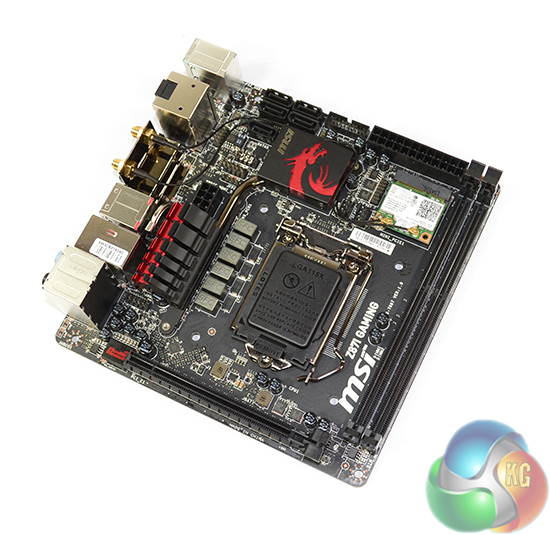
Much of the computing industry is rapidly moving towards physically smaller components without downsizing performance. Can MSI's Mini-ITX Z87I Gaming AC prove that Small Form Factor gamers need not worry about finding a motherboard which tends to their requirements?
MSI's first take on a gaming-orientated Mini-ITX motherboard sees the inclusion of a Killer E2205 NIC, Audio Boost sound system (with Sound Blaster Cinema support), 802.11ac WiFi, a specific Gaming Device Port, and a segregated power path for USB audio.
Holding all of those components together in the Z87I Gaming AC's Mini-ITX dimensions is a set of Military Class 4 components. And when stock speeds aren't satisfactory, the fourth iterations of MSI's Click BIOS and OC Genie packages open up the possibility of overclocking your SFF system.
With its red and black colour scheme and wealth of gaming-orientated features crammed onto a 6.7″ x 6.7″ PCB, does MSI's Z87I Gaming AC provide the performance that makes it the worthy backbone of a powerful SFF system?
Features:
- Killer E2205 NIC.
- Audio Boost.
- 802.11ac WiFi, Bluetooth 4.0.
- OC Genie 4.
- Military Class 4.
- USB Audio Power.
- Sound Blaster Cinema.
- Gaming Device Port.
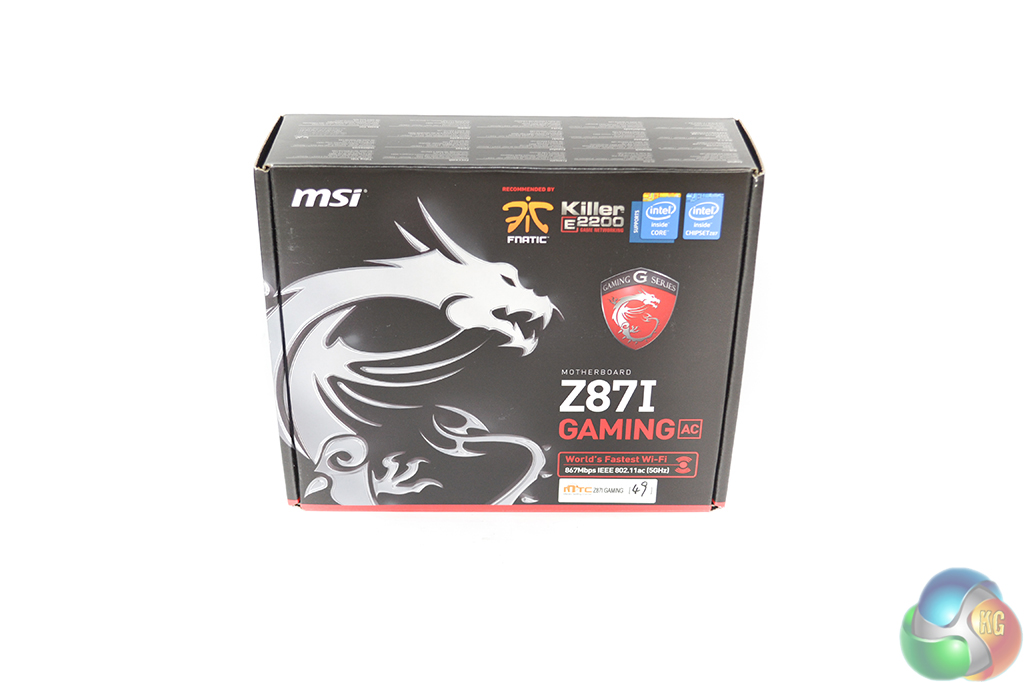
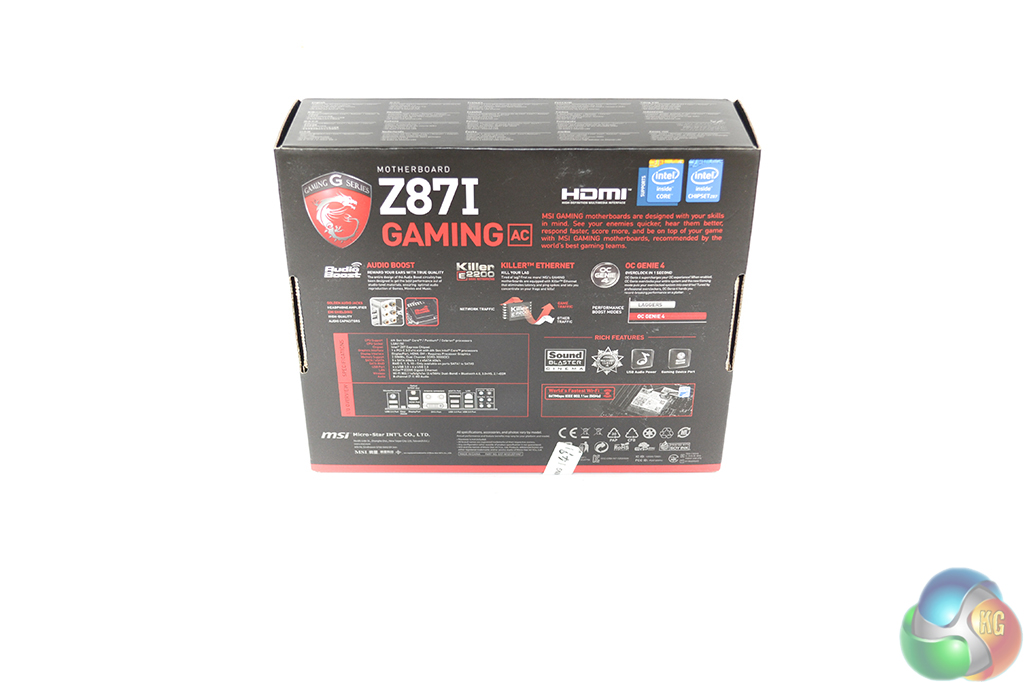
MSI ships the Z87I Gaming AC in packaging which is typical for the company's Gaming Series products. A red and black box features the symbolic dragon logo and plenty of information regarding the motherboard.
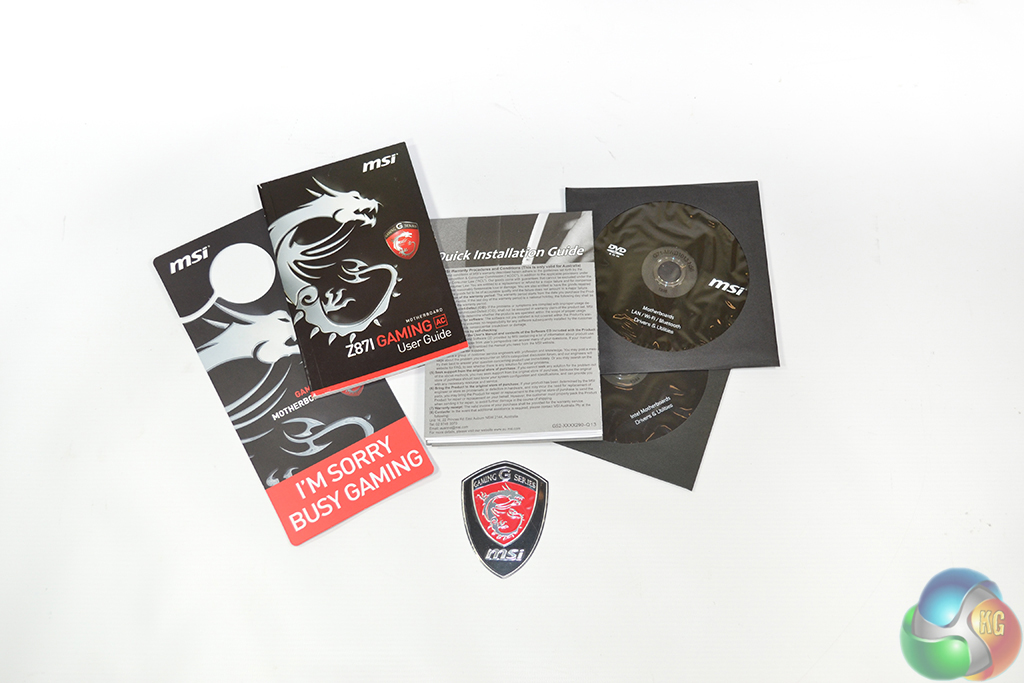
The typical manuals, drivers disc, and case badge form the supplied literature. MSI also includes a comedic door hanger which warns people against disturbing you when gaming is taking place.
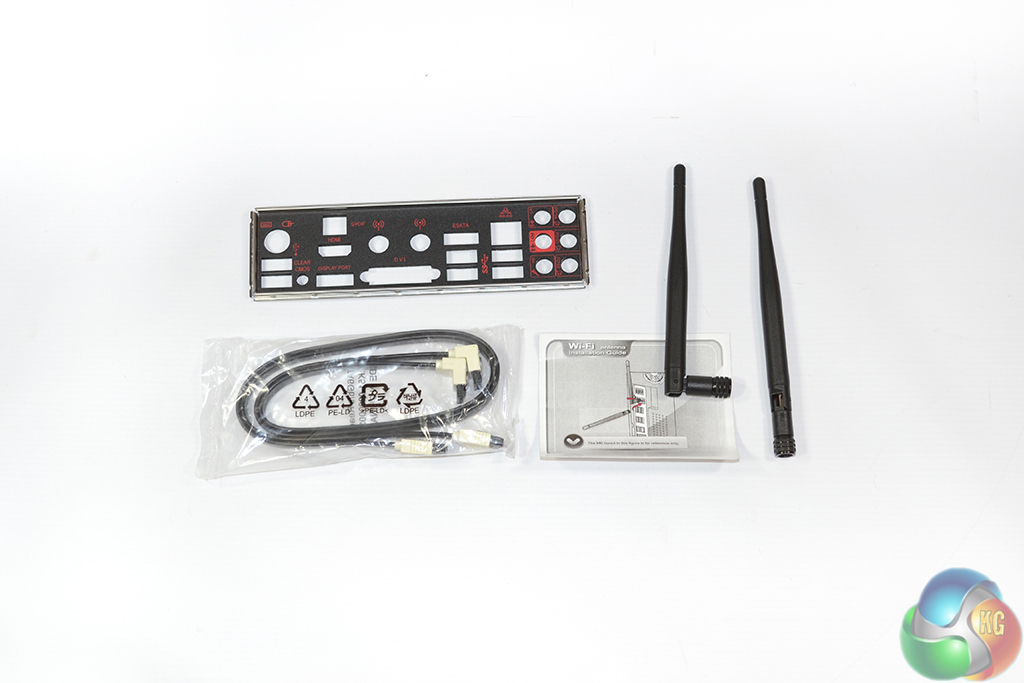
The Z87I Gaming AC's slim accessory bundle consists of two SATA cables, a pair of WiFi antennae, and the rear IO shield.
A notable omission is MSI's ultra-convenient M-connector; the basic block would have made connecting cables in a cramped, mITX environment a much easier task.
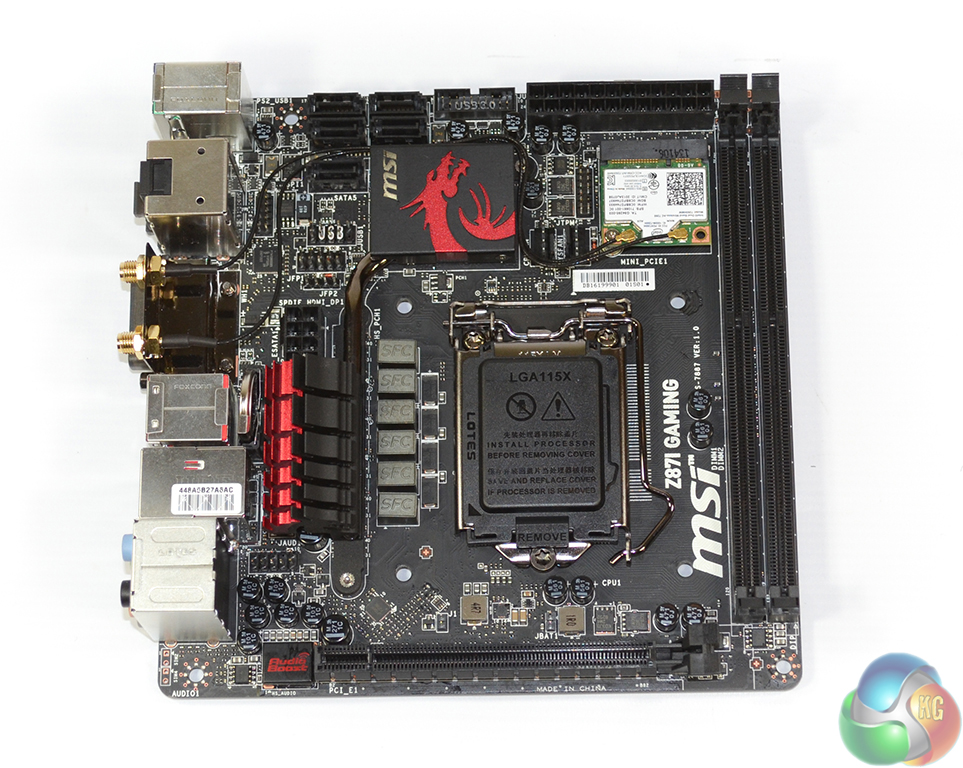
Measuring in at 6.7″ x 6.7″, MSI's Z87I Gaming AC conforms to the typical mITX form factor. As a Gaming Series product, the Z87I Gaming AC uses a red and black colour scheme. Given the board's smaller dimensions, the dark shade of red is limited to accents on heatsinks.
Knowing that style is key on a modern gaming product, irrelevant of its form factor, MSI builds the Z87I Gaming AC around a matte black PCB. Users who enjoy showing off their system are likely to be impressed by the Z87I Gaming AC motherboard's overall appearance.
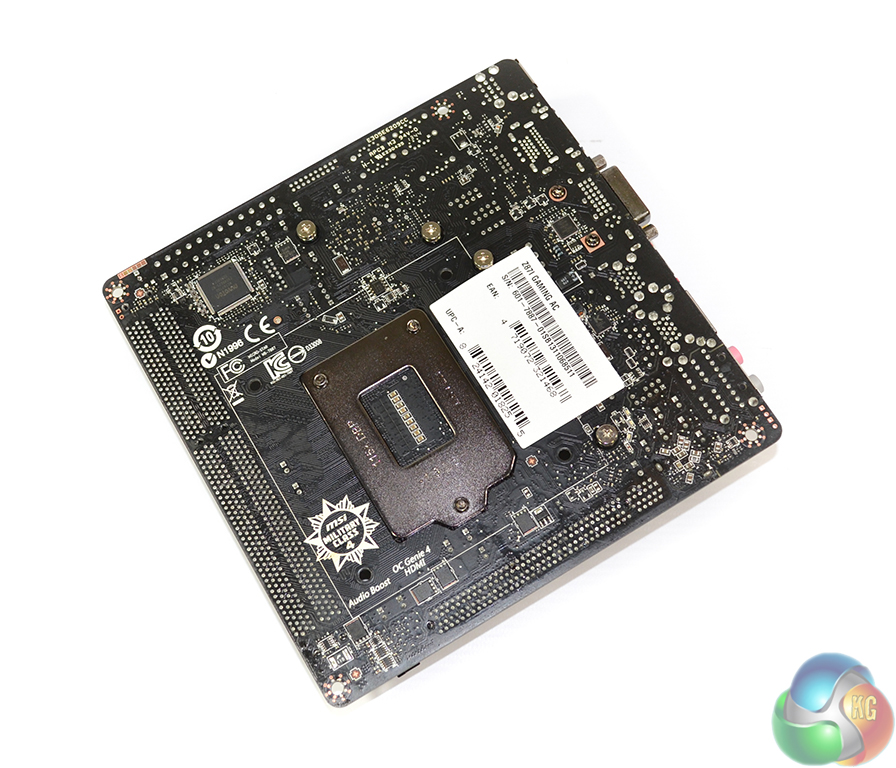
A pair of controllers is found on the motherboard's rear side, one of which is a Nuvoton NCT6779D, as well as spring-loaded screws which hold the heatsink in place.
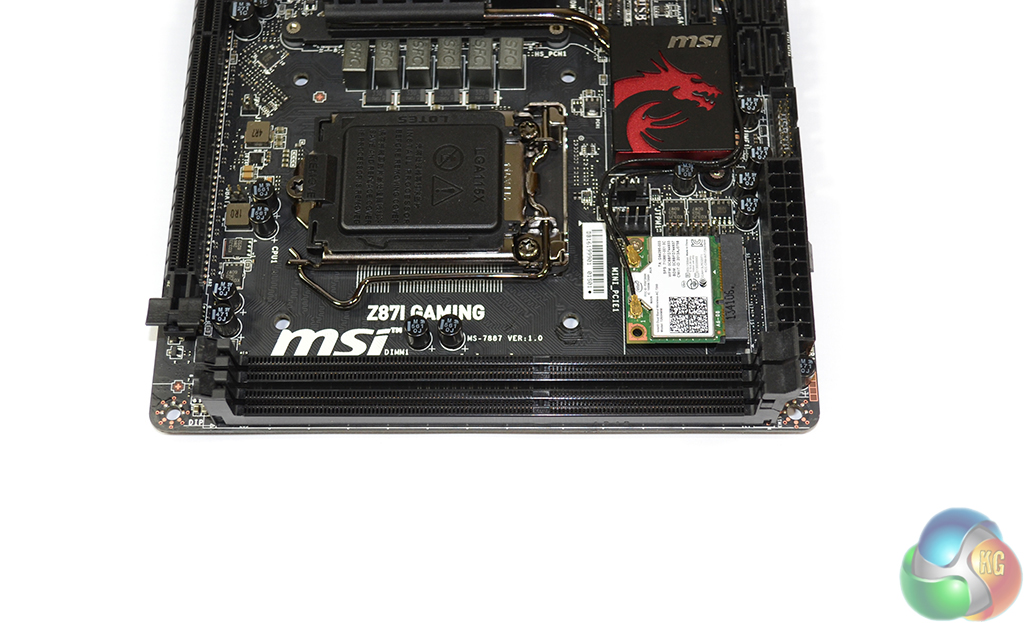
Up to 16GB of DDR3 memory can be installed in the two single-latch DIMM slots. As is the case with its other Z87-based Gaming Series motherboards, MSI claims support for up to 3GHz memory speeds. Of course, the real-world maximum frequency will also be related to the strength of a CPU’s IMC.
Spacing between the DIMM banks and CPU socket was sufficient to eliminate interference between the pump unit and exiting hoses of our Corsair H100i CPU cooler. Larger, dual-tower air coolers are likely to cause interference problems with tall RAM heatspreaders.

MSI uses a six phase power delivery system to feed an LGA 1150 CPU. Given the board's intended usage, the six phase system should be sufficient for the type of overclocks that SFF users are likely to apply. Thermal stability of a Haswell chip will become an issue before the motherboard's power delivery system does.
Unlike many lower-priced Military Class 4 motherboards, the Z87I Gaming AC does use MSI’s full complement of power delivery components. Super Ferrite Chokes (SFC), Hi-c CAPs, and aluminium-core ‘Dark’ capacitors all make an appearance. The components are implemented with efficiency, stability, and longevity at the forefront of their design.
Tucked beside the dragon-shaped MOSFET heatsink is the 8-pin CPU power connector. Its location makes it a little tricky to disconnect due to the surrounding space constraints, but it also keeps the thick cable away from the valuable SATA ports.
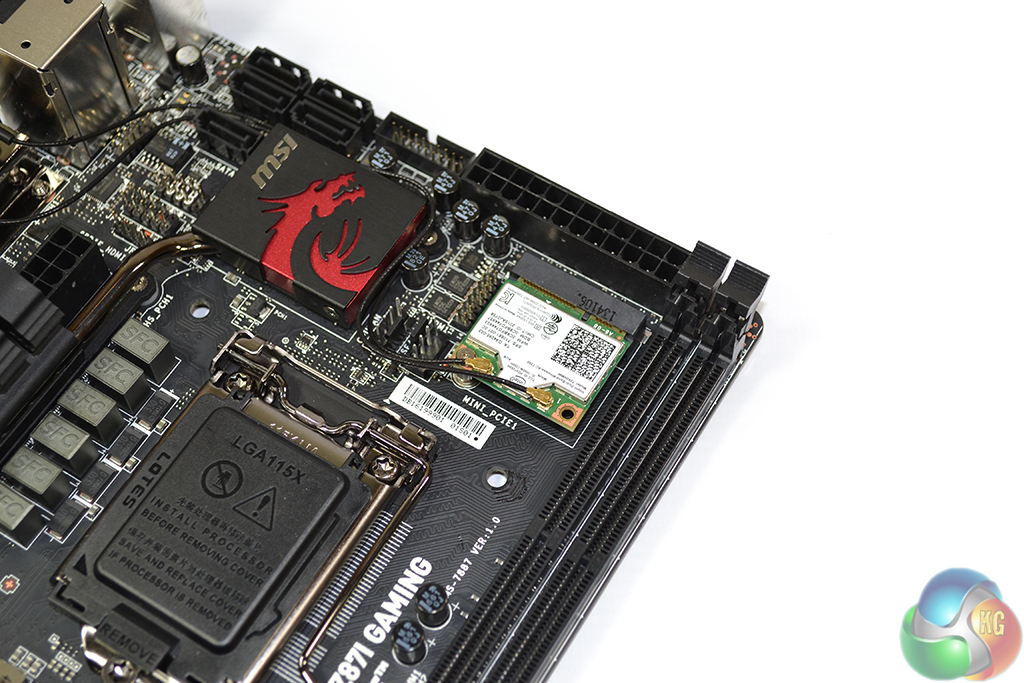
A mini-PCIe card sporting the Intel 7260 chipset provides dual band, two stream 802.11ac Wi-Fi. The chipset can reach a theoretical speed of 867Mbps and is able to operate on both the 5GHz and 2.4GHz frequency bands. Bluetooth 4.0 is also provided by the chipset.
It is actually quite surprising to see MSI opting for an Intel chipset rather than the popular Broadcom alternative that many of its competitors use. One clear benefit of the Intel chipset is its support for Intel's Wireless Display (WiDi), although the technology's relevance is up for debate.
Only two fan headers are found on the entire motherboard, both of which are 4-pin outputs situated between the WiFi card and chipset heatsink. One of the headers is connected to the CPU fan lane, while the other is given system fan duties.
We would have liked to see MSI provide at least one more fan header; one CPU fan and another for case duties is particularly scarce, even by mITX standards.
A miniature heatsink embossed with the dragon logo cools the Z87 chipset.
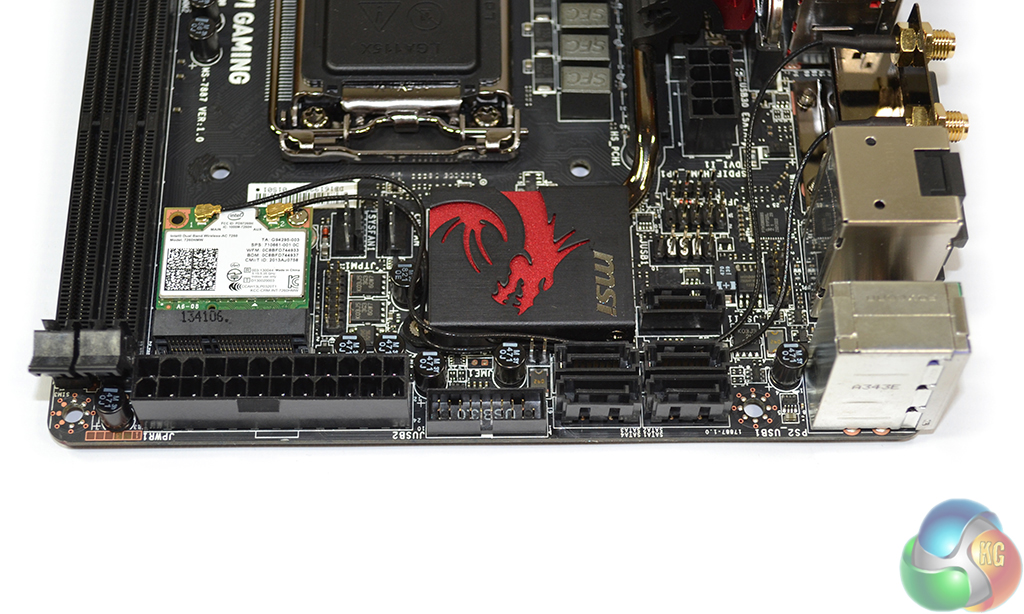
Positioned along the Z87I Gaming AC's upper edge are the 24-pin power connector, internal USB 3.0 header, and five SATA 6Gbps ports.
Both of the storage interfaces operate natively from the Z87 chipset, while the remaining SATA port is implemented as a rear IO eSATA connection.
One notable omission is an mSATA connection which is becoming increasingly popular across space-constrained motherboards. It is clear that MSI had little room spare to place an mSATA connection on the board's front side, but it could have deployed one on the board's rear.
Whether or not users will miss the mSATA connection is related to the specific person's requirements, but adding in its functionality (and maintaining the five internal SATA connections by sharing a lane) may have been welcomed by a proportion of the target audience.
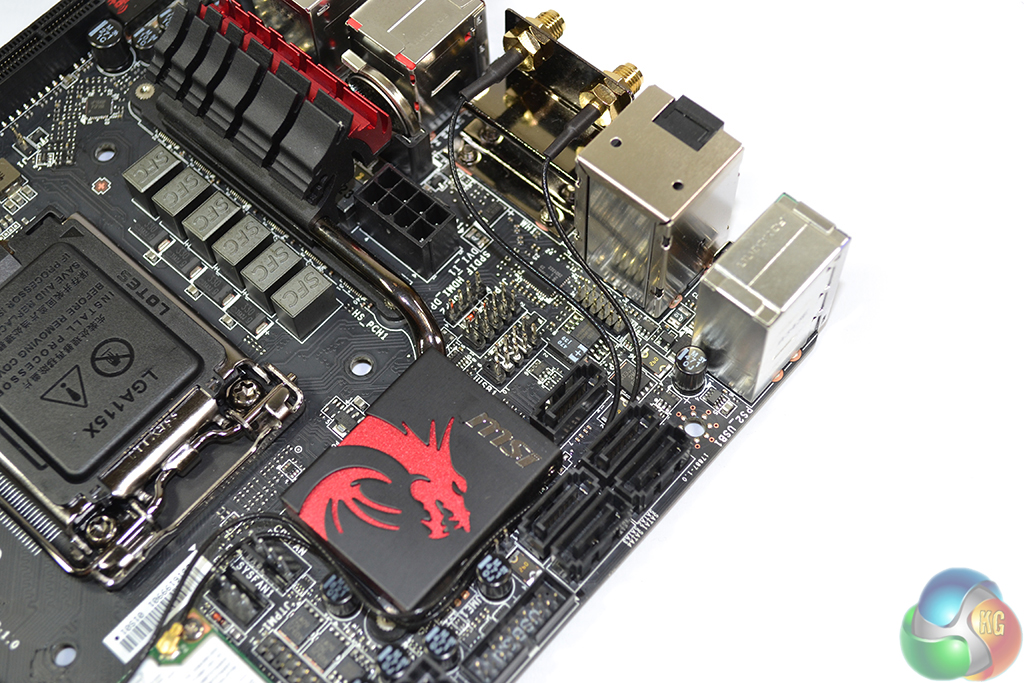
A cluster of headers located between the SATA ports and 8-pin CPU power connection serve USB 2.0 and front panel duties.
Quite frankly, attaching front panel cables to the Z87I Gaming AC is a nightmare. MSI does not include its M-connector block in a scenario where it would provide its greatest support, nor does the company print the name of each front panel header on the board's PCB.
We were forced to determine the relevant headers via the motherboard's manual while working carefully in a tight space to ensure that each connection was attached correctly. The M-connector block would have allowed the tricky procedure to be completed outside the constrained environment of a mITX chassis before being attached to the motherboard with ease.
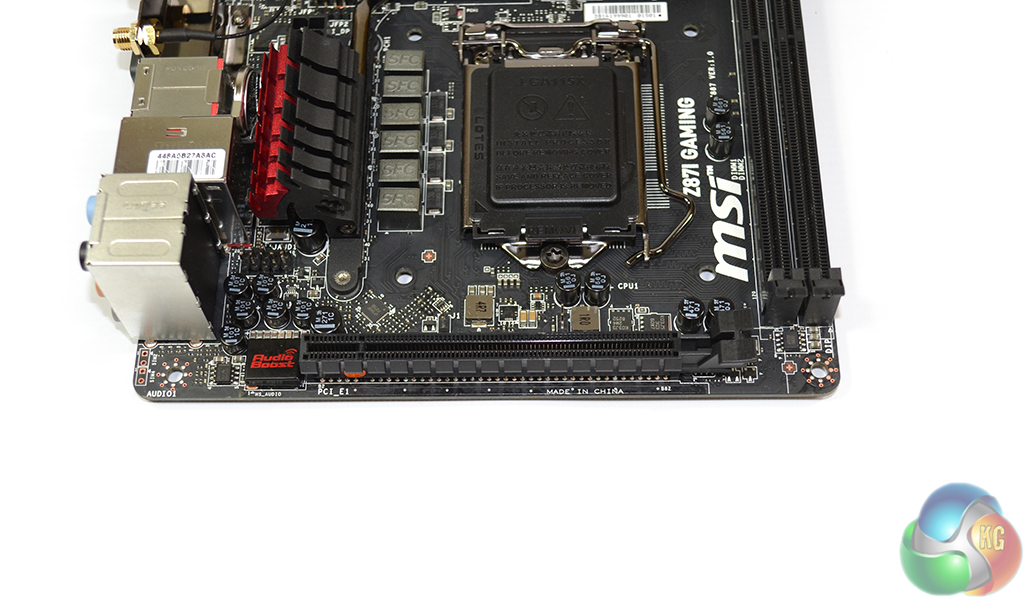
A single PCI-E 3.0 x16 connection allows users to install a modern graphics card in their Z87I Gaming AC-based system. MSI gives the slot clear access so that large graphics cards can pass the motherboard's edge without interference.
MSI equips the Z87I Gaming AC with its Audio Boost sound system which somewhat eliminates the requirement for a gamer to purchase an add-on sound card. It's moves like these which help to make mITX components viable solutions for gamers and enthusiasts who do not want to sacrifice any part of the immersive experience.
Audio Boost consists of a Realtek ALC1150 audio codec which sends the raw signal through a Texas Instruments OPA1652 operational amplifier and a series of audio capacitors before outputting it to the audio jacks. The process takes place on an isolated circuit and outputs the signal to gold-plated audio jacks, with both measures helping to reduce signal interference.
Sound Blaster Cinema is also supported by the Z87I Gaming AC.
And if you're a gamer who uses a USB headset, MSI suggests that its USB Audio Power helps to deliver a higher quality signal to the USB DAC. The array of electrical components situated above the PCI-E slot work to ensure that voltages fed to the rear USB 3.0 ports are maintained at optimum levels.

The Z87I Gaming AC's healthy rear IO panel includes four USB 3.0 ports, an eSATA connection, and the ever-convenient clear CMOS button. The Gigabit Ethernet port is fed by a Killer E2205 NIC to provide reduced-lag gaming.
Gold-plated audio jacks reduce the amount of interference that is inserted into a sound output signal, while an optical SPDIF jack serves media purposes.
Up to three displays can be powered simultaneously via the DVI-I (which can be converted to VGA), HDMI, and DisplayPort connections. The DisplayPort connection is able to output high-resolution (2560 x 1600) signals, while the HDMI and DVI connections are limited to 1920 x 1200, according to MSI.
With all of this said, it is highly likely that a user of the Z87I Gaming AC will also be making use of a discrete graphics card.
Both of the adjustable antennae are screwed into gold-plated connectors to provide a clean signal.
Motherboard rear ports:
- 1 x PS/2 keyboard/mouse combo port
- 1 x Clear CMOS button
- 2 x USB 2.0 ports
- 4 x USB 3.0 ports
- 1 x Optical S/PDIF OUT connector
- 1 x RJ45 LAN jack
- 2 x Antennae connectors
- 1 x eSATA port
- 6 x OFC audio jacks
- 1 x DVI-I port
- 1 x HDMI port
- 1 x DisplayPort

Continuing its Gaming Series trend, MSI employs an attractive dragon-shaped heatsink on the Z87I Gaming AC.
Firstly, we are pleased to report that our Leetgion Hellion mouse worked to its usual standard in the MSI Z87I Gaming AC motherboard’s UEFI BIOS.
MSI’s Z87I Gaming AC uses the Click BIOS 4 interface that is equipped with the rest of the company's Z87 Gaming Series motherboards, including the Z87M Gaming and Z87-G43 Gaming.
There are subtle differences between the interface on each board, the most notable of which relates to parameters for the OC Genie profile; MSI’s Z87I Gaming AC only includes one OC Genie 4 configuration, not two like some of the other Gaming Series boards.
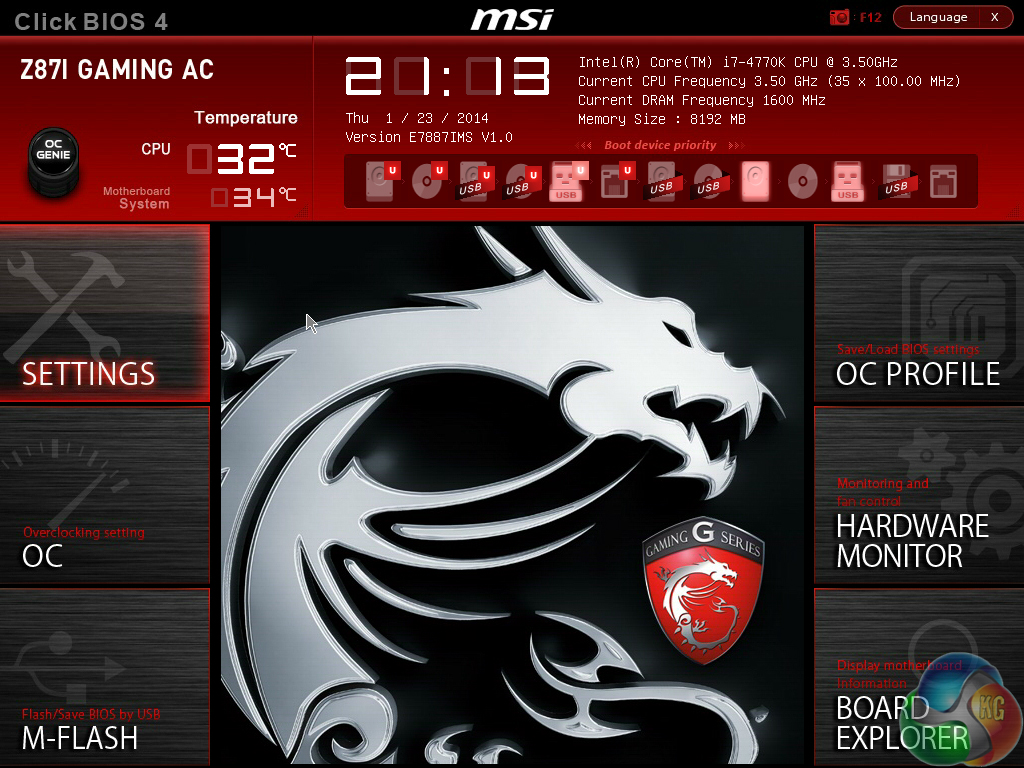
Upon launching into the Z87I Gaming AC’s UEFI BIOS, users are met by a large image of MSI’s G Series dragon. Six specific sub-sections can be accessed via the main page. System information is constantly displayed at the top of the UEFI page.
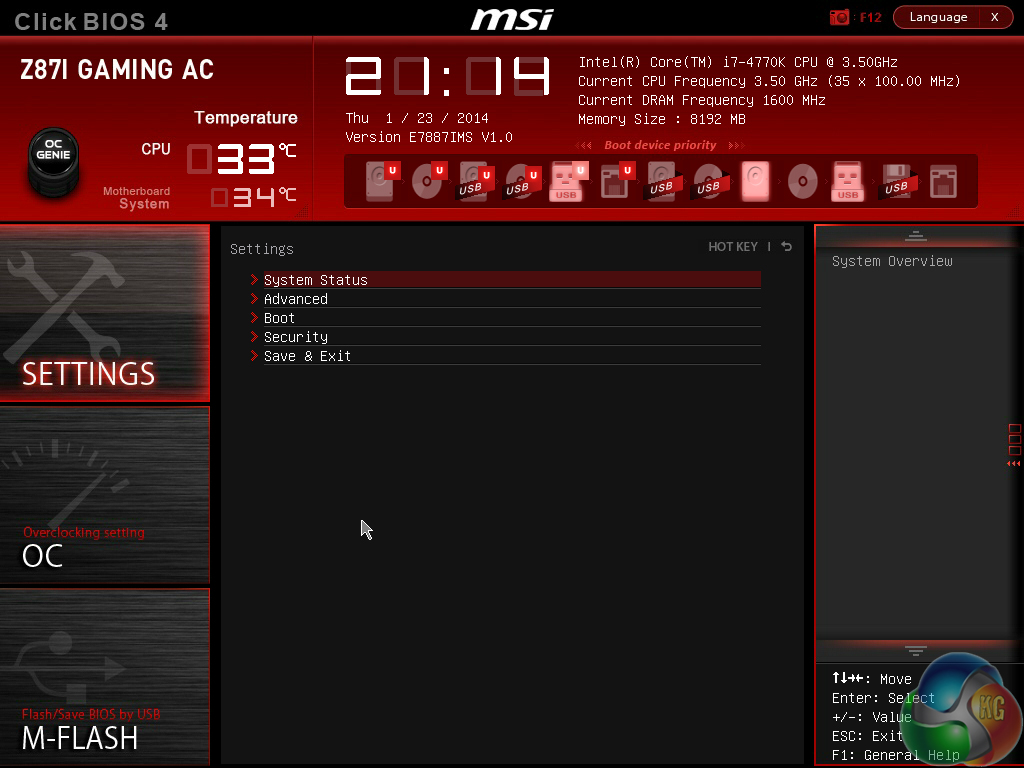
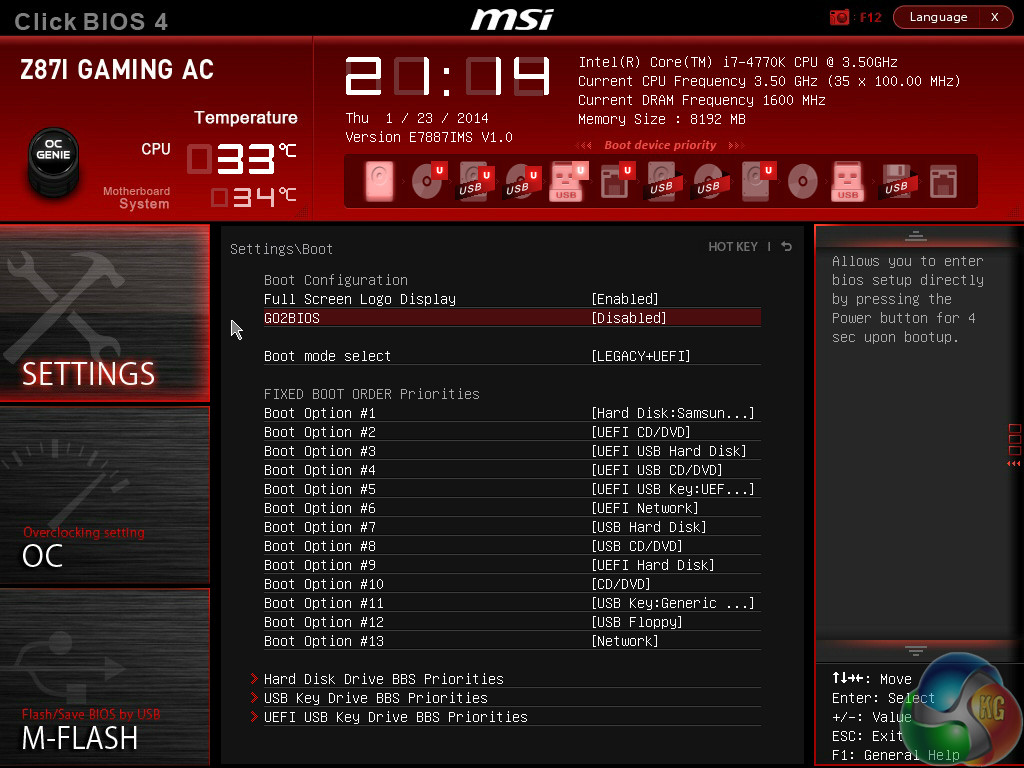
Settings can be adjusted on an allocated page. MSI includes a convenient parameter which allows users to boot their system directly into the UEFI BIOS by holding the power button for 4 seconds. This is similar in concept to Asus’ ‘DirectKey’ button.
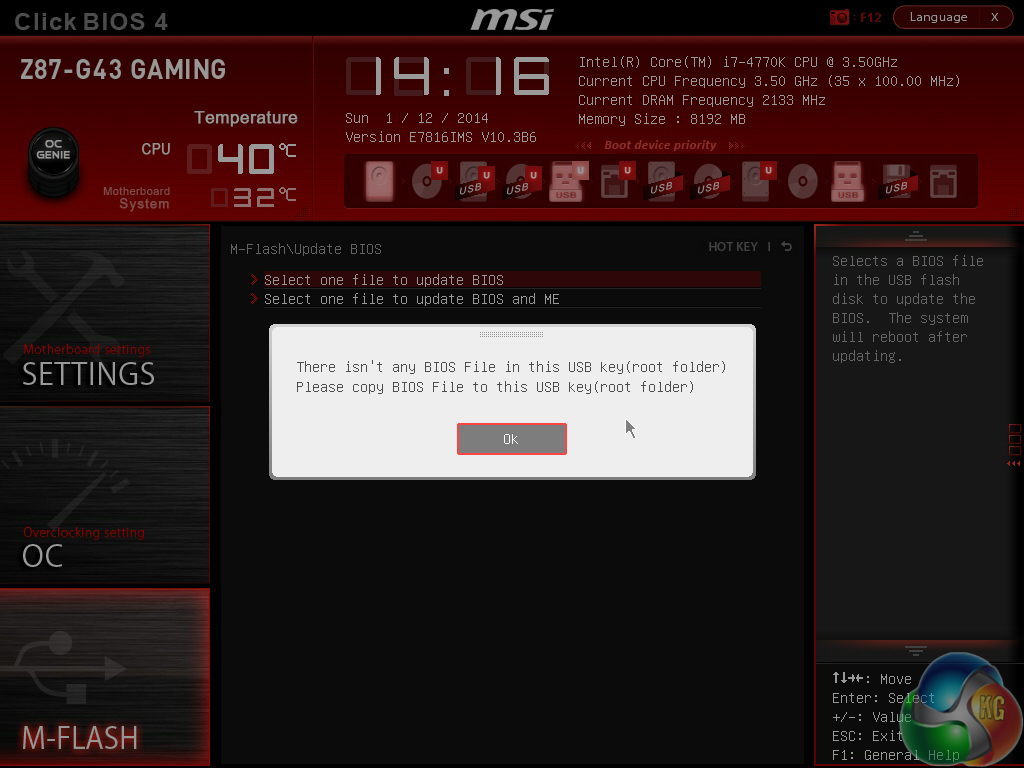
M-Flash is MSI’s version of updating the BIOS via a USB flash drive. Unlike many of its competitors’ implementations, MSI’s tool is limited to searching through a flash drive’s root folder for the necessary file. This is a little disappointing given that MSI’s competitors are able to search within a drive’s folders.

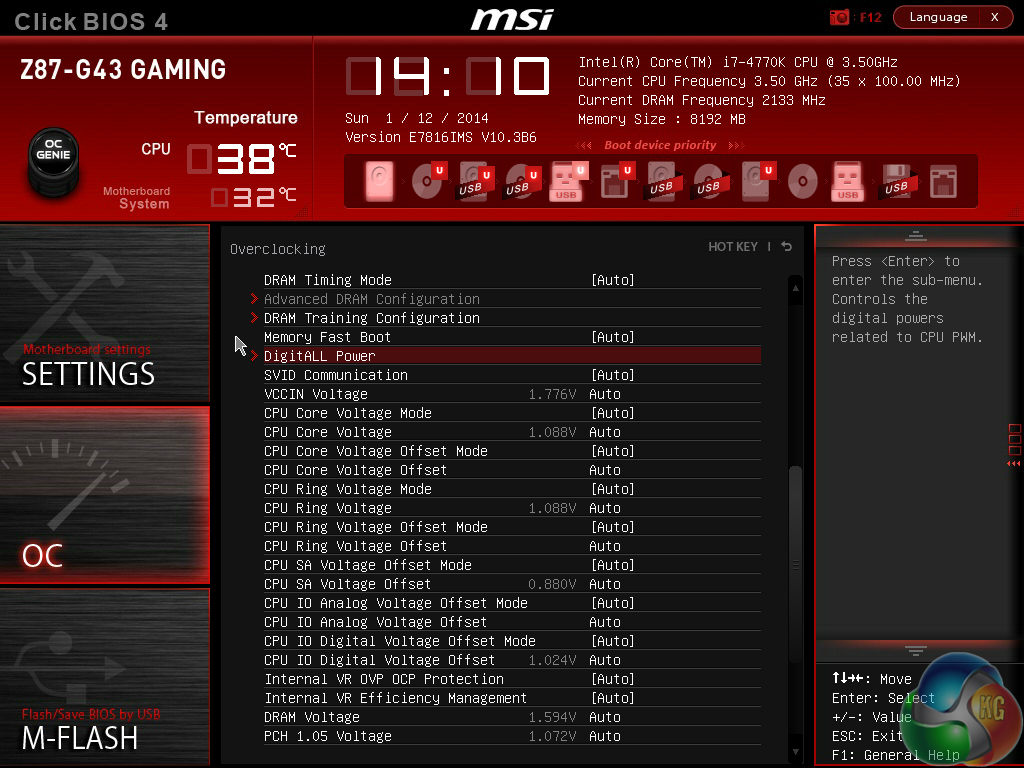

MSI provides plenty of adjustable voltage, frequency, and power settings which give users a good degree of control over their system – a degree far greater than many mITX users will require. Layout-wise, the OC page is a mess. Readouts are mixed together with input parameters, making the page somewhat difficult to understand.
MSI would be wiser to separate readouts and adjustment parameters to make the interface easier to use.
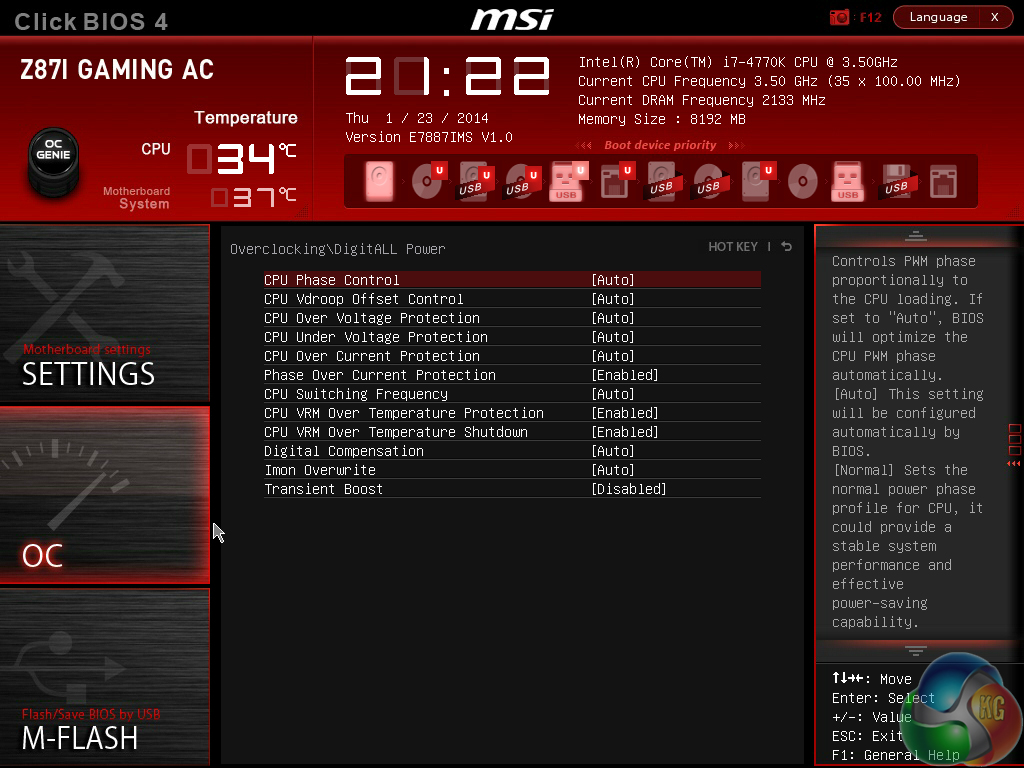
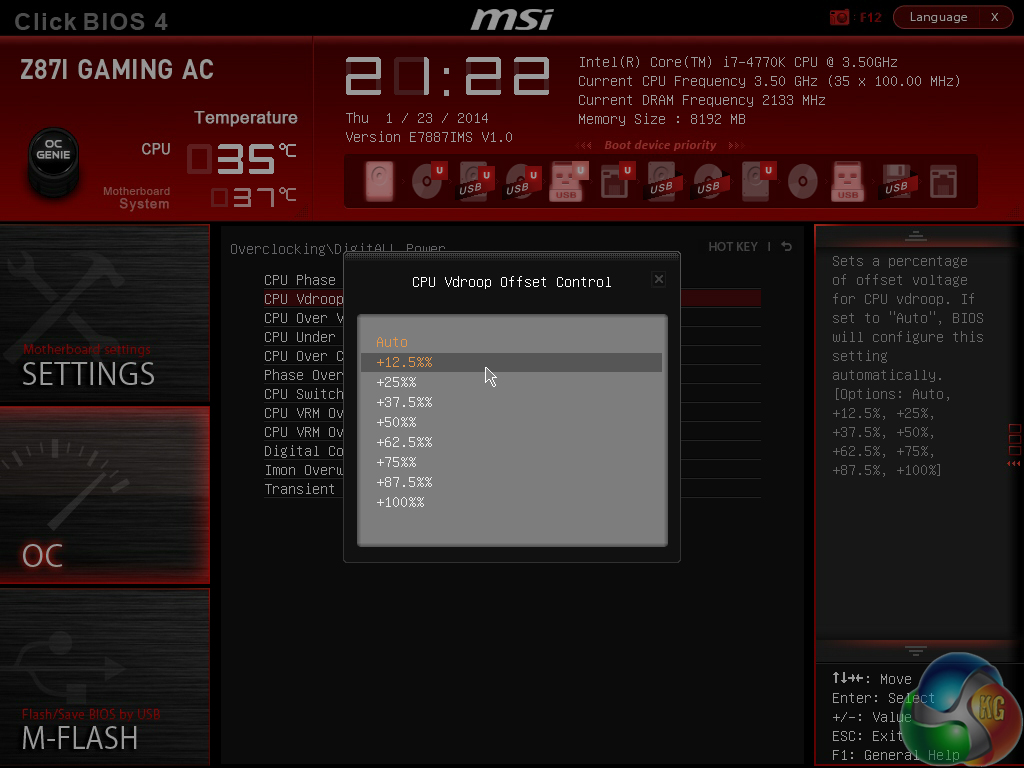
The ‘DigitALL Power’ section provides users with additional parameters to adjust power, voltage, and current settings.
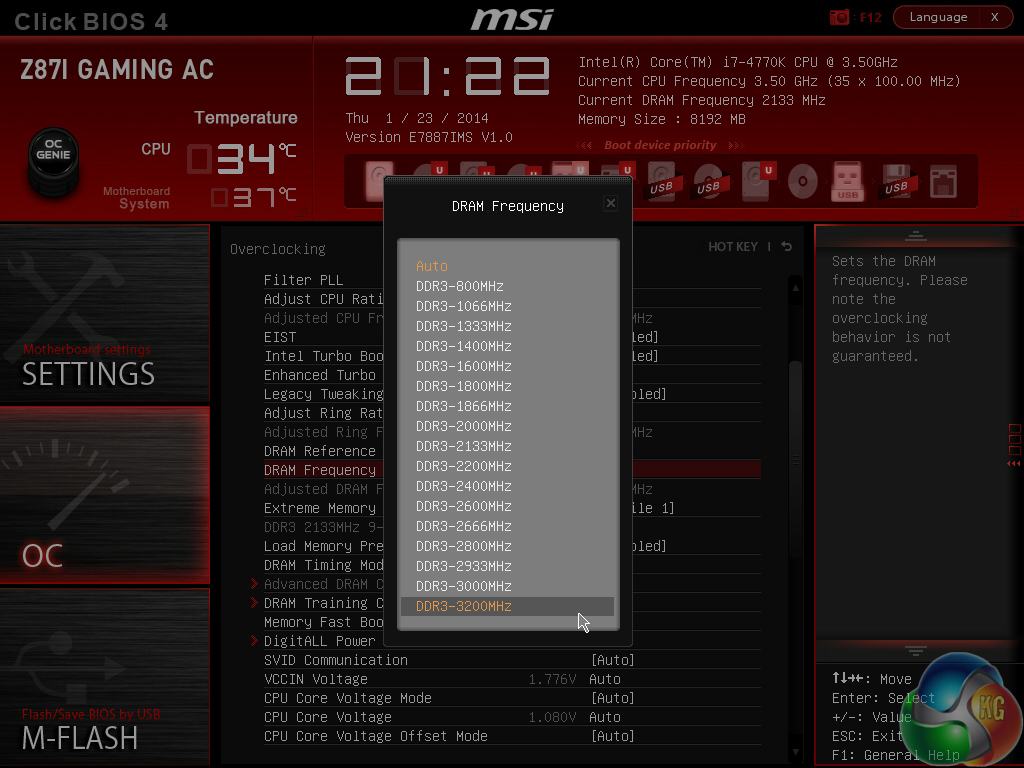
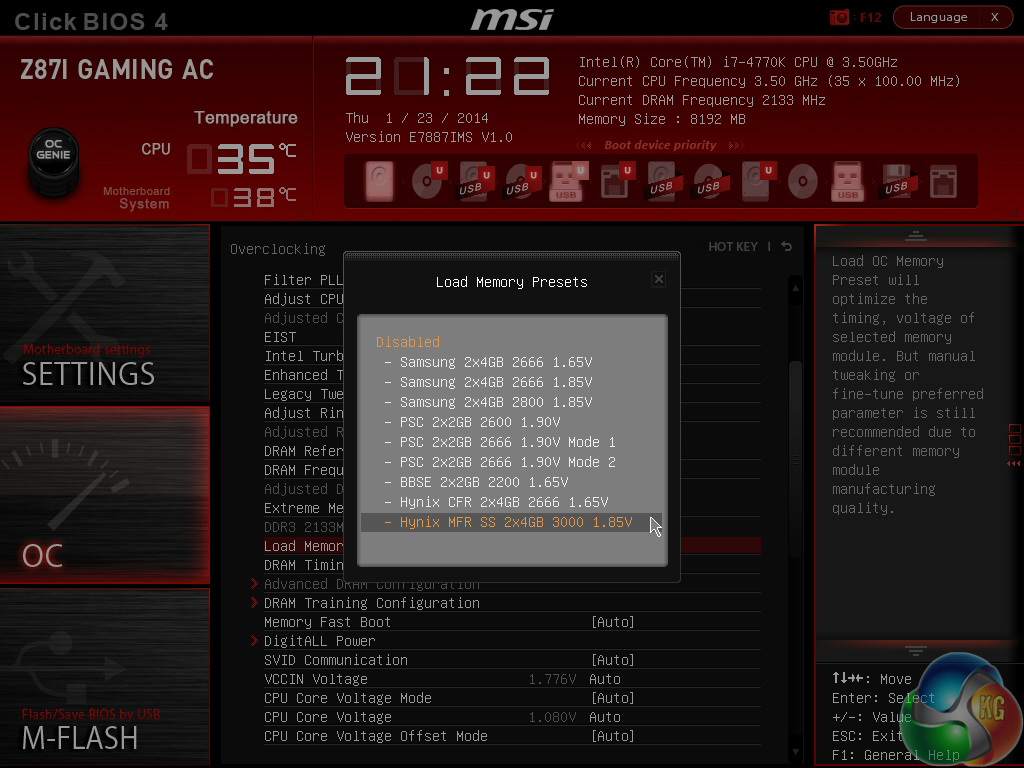
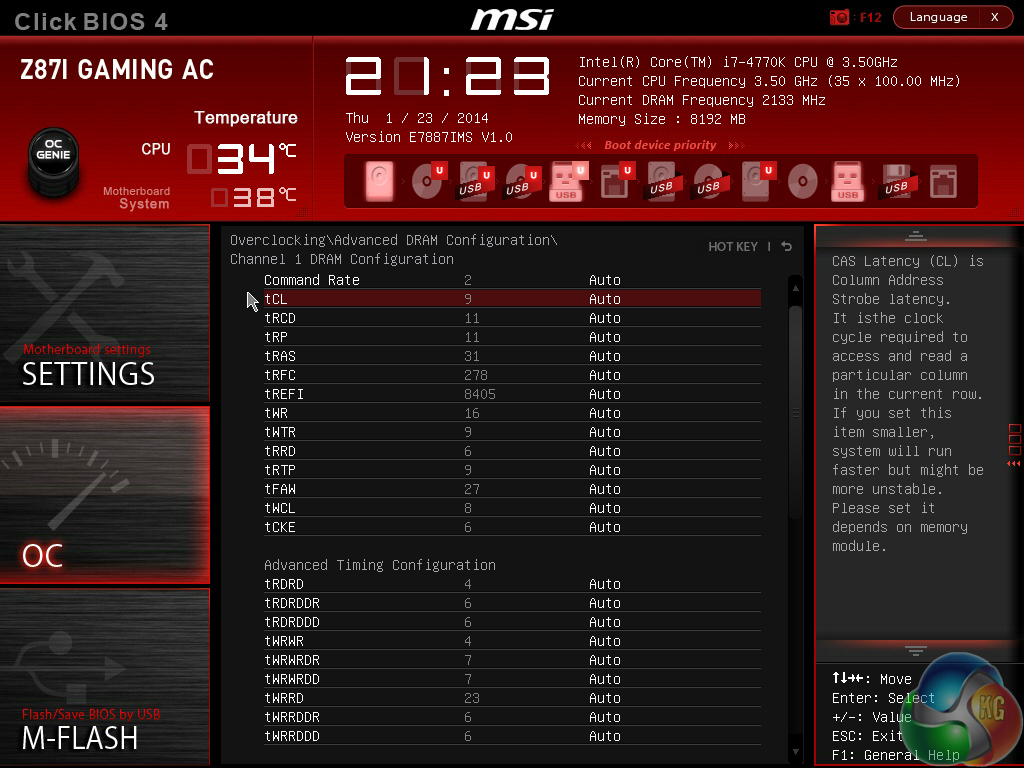
High memory multipliers can be selected and a host of timings parameters can be adjusted. The Z87I Gaming AC motherboard’s BIOS is equipped with preset memory profiles that make use of tweaked overclocking configurations for specific kits, including a setting for the enthusiast-grade 3GHz Hynix MFR.
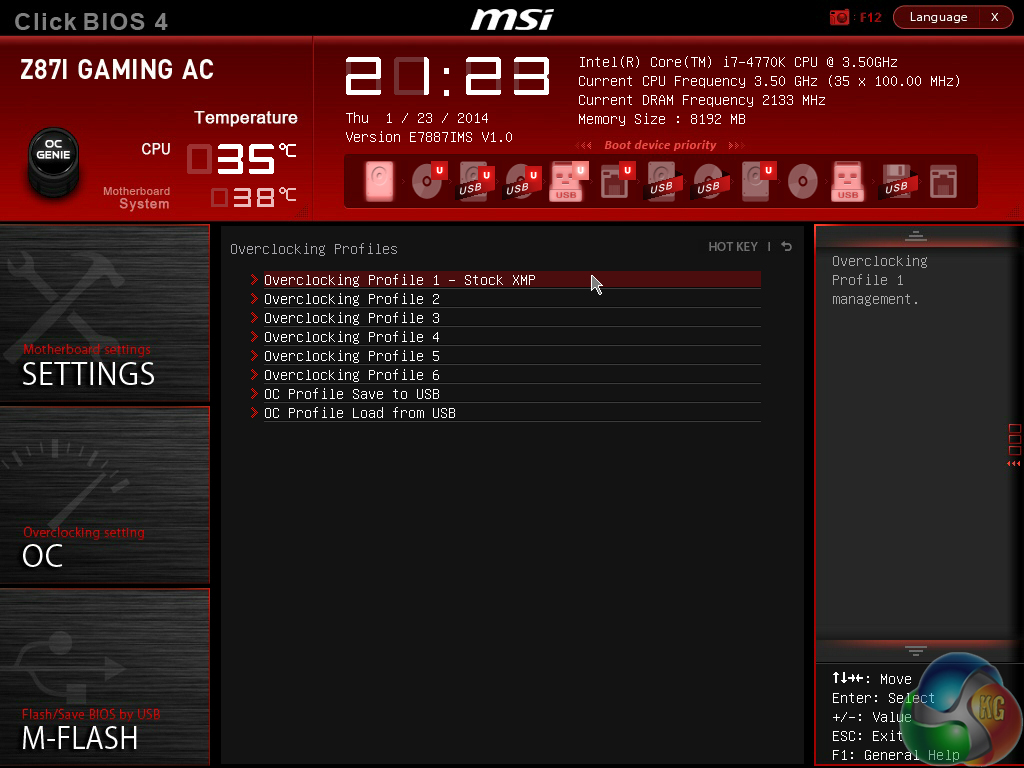
Up to six OC profiles can be saved and named. This is a good number to provide as it gives users flexibility when testing out different overclocking configurations. Profiles can also be imported and exported from or to a USB drive for backup and sharing purposes.
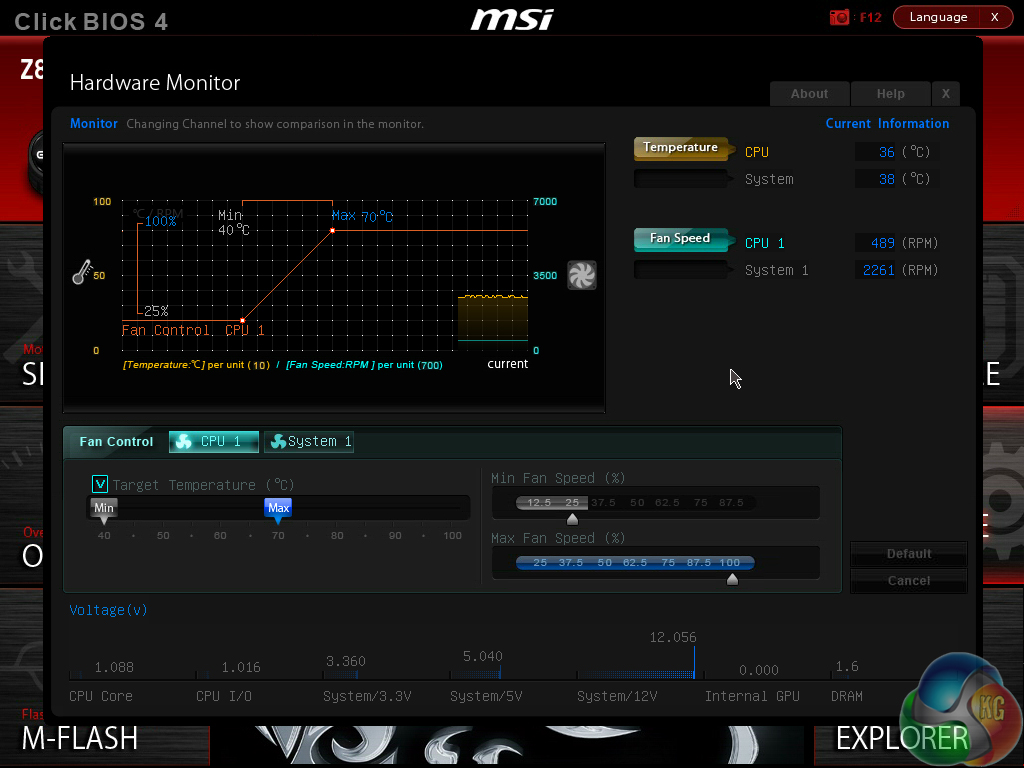
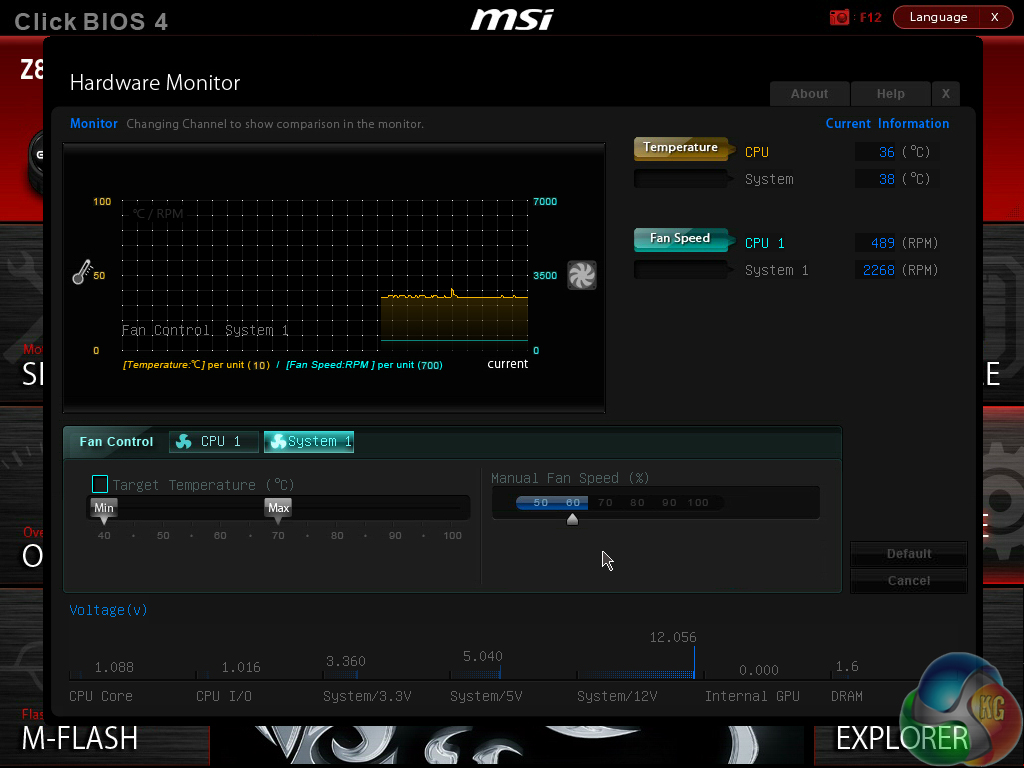
MSI employs a complex, feature-heavy fan and temperature control system. The interface allows a specific fan channel to be selected and then its notable speeds to be tied in with certain temperature targets. The CPU fan header gets a greater level of control in regards to minimum fan speed, but the system fan channel also provides a good degree of flexibility.
While the graphical approach may be a little confusing to some users, a small amount of practice allows it to become an efficient way of mapping fan speed settings with temperature targets.
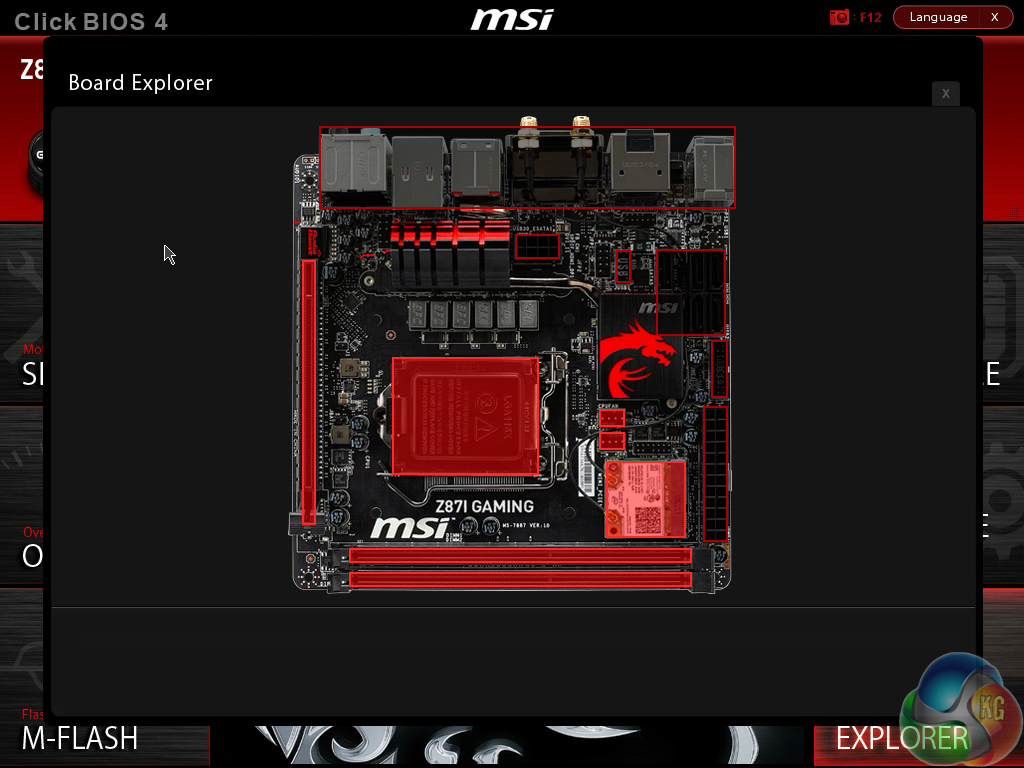
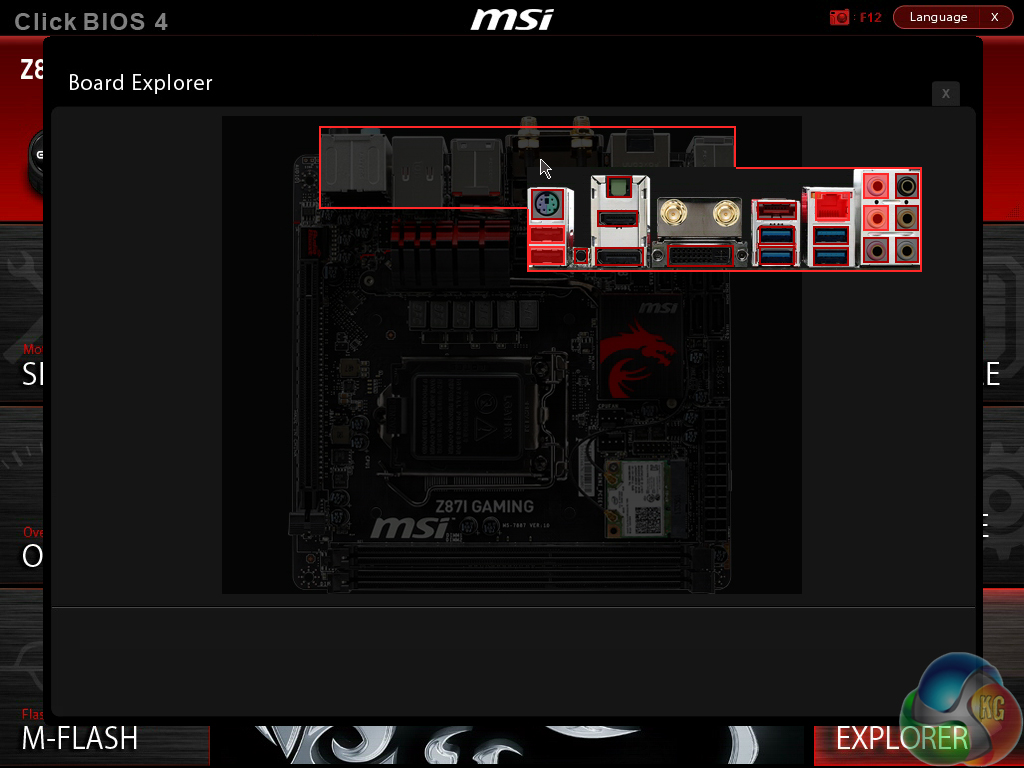
One of the most useful features in MSI’s BIOS is Board Explorer. The tool displays an image of the board which highlights the components that are installed. Hovering over the specific sections displays information regarding the connected components or devices.
The tool has great potential as a troubleshooting measure. For example, a faulty memory stick can be easily identified if its function isn’t highlighted in the board explorer tool.
Overall, the BIOS interface used by MSI’s Z87I Gaming AC is good, but it still isn’t quite at the level of Asus’ and, to a lesser extent, ASRock’s typical implementations.
Regarding style, MSI’s attractive interface is excellent. Board explorer and the inventive fan control system are more strengths of the interface. Mouse compatibility was also better than that offered by the interfaces of many competing vendors.
But in terms of ease-of-use MSI’s UEFI would benefit from some improvements. The main issue is the disordered OC section which can become difficult to navigate and understand, although this is unlikely to be a major problem for many users of a mITX motherboard.
To test the MSI Z87I Gaming AC, we partnered it with an Intel Core i7 4770K processor and 8GB of 2133MHz CL9 memory from the G.Skill RipjawsX (F3-2133C9Q-16GXL) kit. We will be outlining the MSI Z87I Gaming AC motherboard's performance with the Core i7 4770K CPU at its stock frequency of 3.5GHz (3.9GHz due to forced turbo). Overclocked performance will be outlined later in the review.
We will be comparing the MSI Z87I Gaming AC motherboard’s performance to that of five other Z87 parts. All motherboards are partnered with identical hardware and software, so the results are directly comparable.
By default, the MSI Z87I Gaming AC motherboard forces the 4770K to a constant 3.9GHz when XMP is enabled. This will be displayed as the ‘stock’ setting (and outlined in the charts' brackets after the non-turbo stock speed is displayed).
LGA1150 Motherboard Test System:
- Processor: Intel Core i7 4770K Retail (3.9GHz forced turbo).
- Memory: 8GB (2x 4GB) G.Skill RipjawsX (F3-2133C9Q-16GXL) 2133MHz 9-11-11-31.
- Graphics Card: Asus R9 280X Matrix Platinum 3GB.
- System Drive: 500GB Samsung 840 Series SSD.
- CPU Cooler: Corsair H100i.
- Case: NZXT Phantom 630.
- Power Supply: Seasonic Platinum 1000W.
- Operating System: Windows 7 Professional with SP1 64-bit.
Compared Z87 Motherboards:
- MSI Z87I Gaming AC (BIOS v1.00 – newest).
- ASRock Z87 Extreme11/ac (BIOS 1.10).
- ASRock Fatal1ty Z87 Killer (BIOS v1.10).
- Gigabyte G1.Sniper Z87 (BIOS v1.0).
- MSI Z87-G43 Gaming (BIOS V10.3B6).
- MSI Z87M Gaming (BIOS v1.00).
Settings:
- MSI Z87I Gaming AC BIOS v1.00.
- Catalyst 13.11 Beta9.2 VGA drivers.
- Intel 9.4.0.1026 chipset drivers.
Software Suite:
- 3DMark
- 3DMark 11
- SiSoft Sandra 2013 SP4
- Cinebench R11.5 64 bit
- WinRAR
- HandBrake 0.9.9
- ATTO
- RightMark Audio Analyzer
- Totusoft LAN Speed Test
- Bioshock Infinite
- Metro 2033
- Metro: Last Light
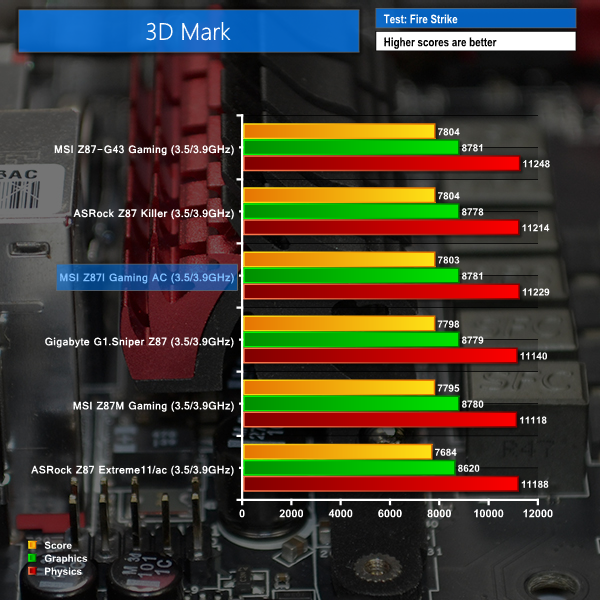
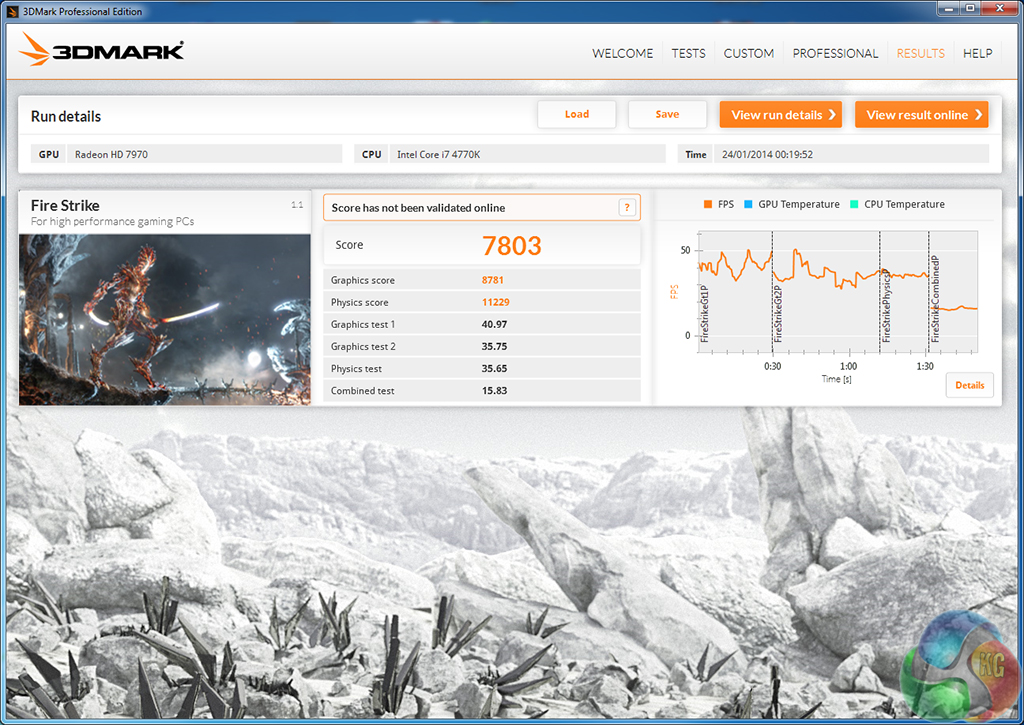
We used 3DMark‘s ‘Fire Strike’ benchmark which is designed to be used on gaming PCs. We opted for the Normal setting, NOT the Extreme mode.
We used the ‘Performance’ test in the 3DMark 11 benchmark.
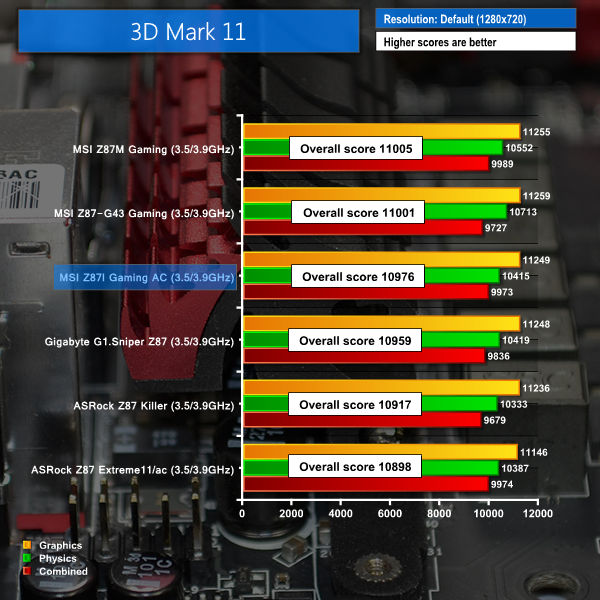
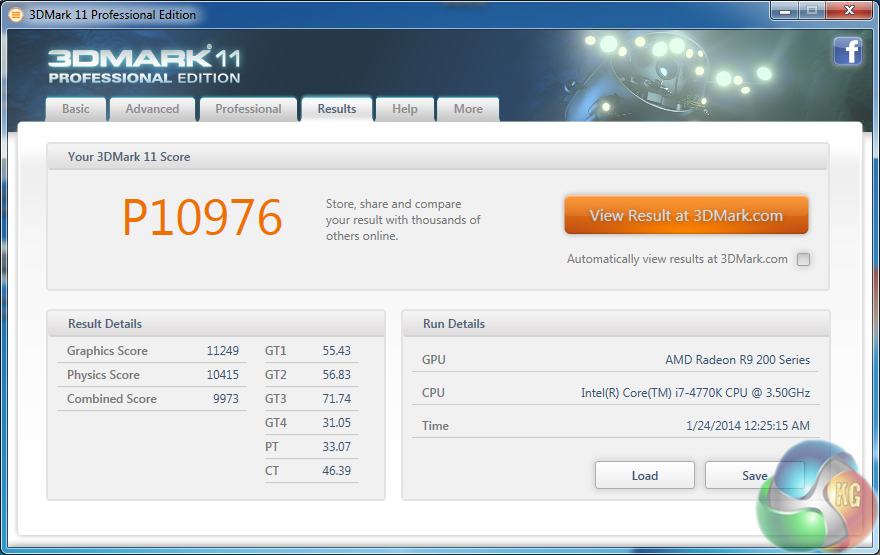
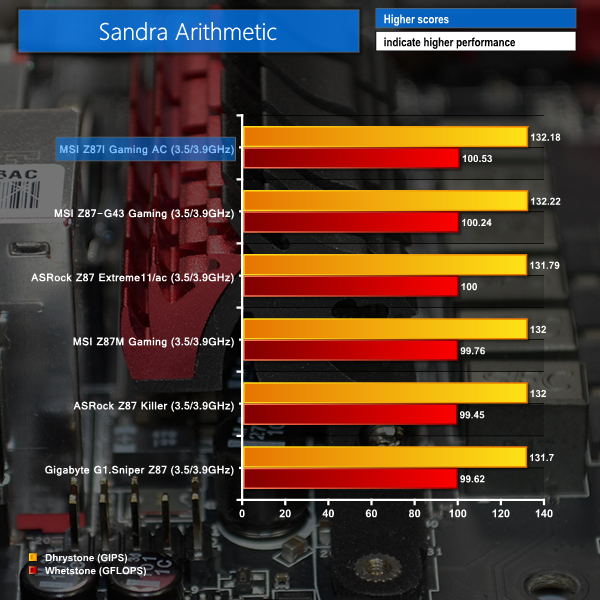

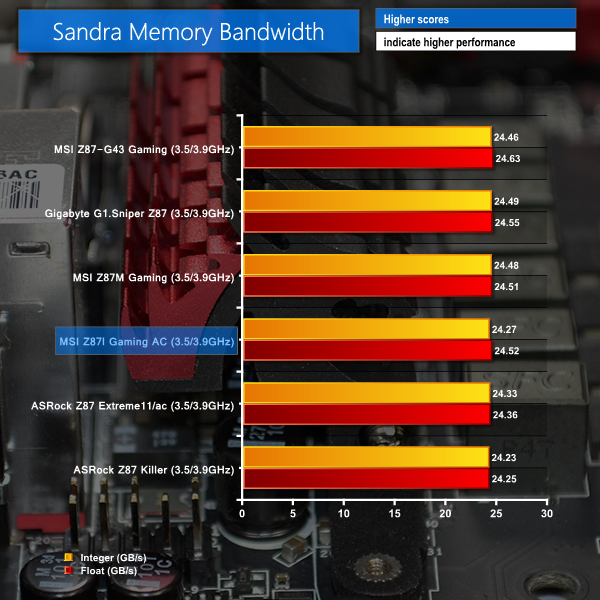

Our array of system-related benchmarks does not throw up any errors or performance discrepancies for the Z87I Gaming AC. MSI's Mini-ITX board has no problems offering similar performance to contenders which also use the Z87 chipset.
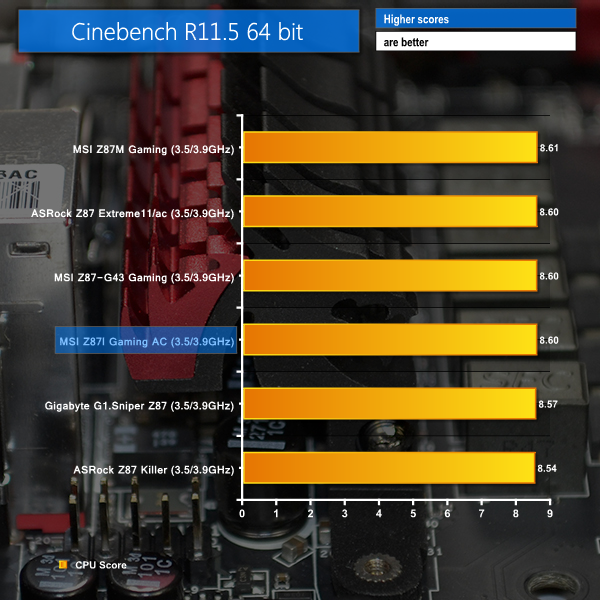
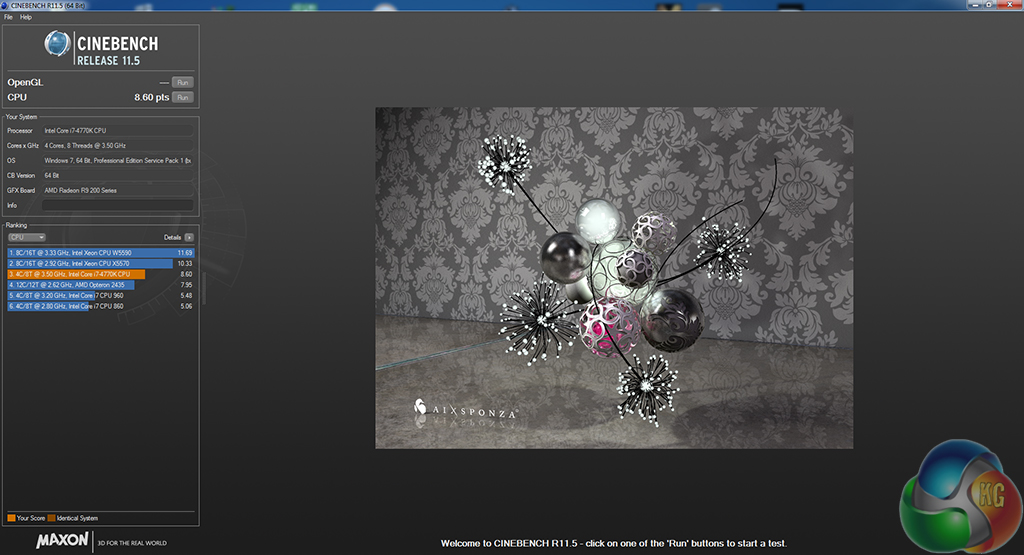
We used the ‘CPU’ test built into Cinebench R11.5 64-bit.
WinRAR’s built in benchmark and hardware test can help us outline the performance differentials between each motherboard.
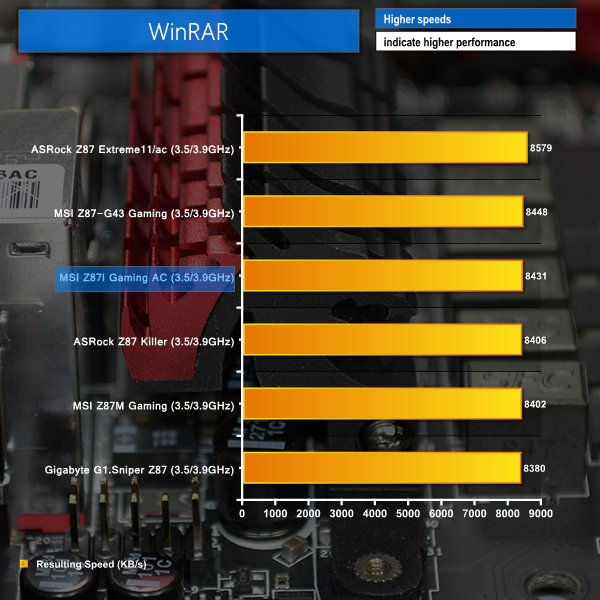
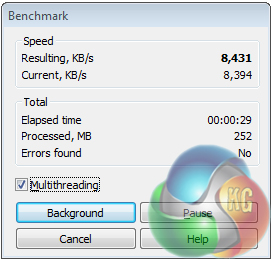
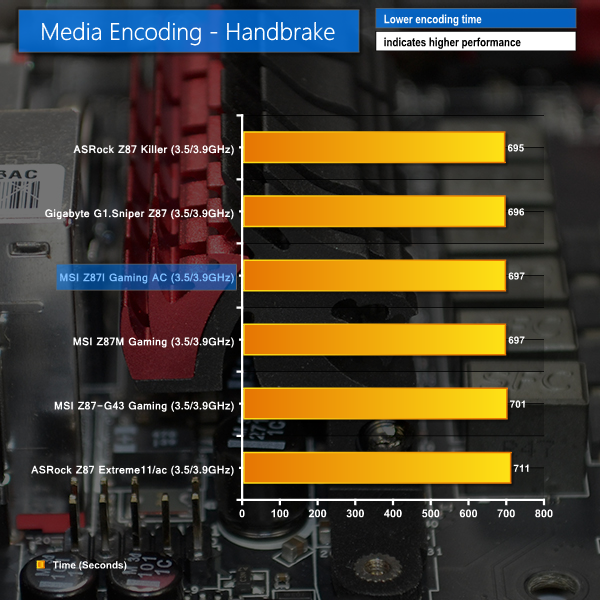
CPU-led performance is as we would expect from an LGA 1150 motherboard. Despite its diminutive form factor, MSI's Z87I Gaming AC provides performance numbers that are typical of a 4770K CPU.
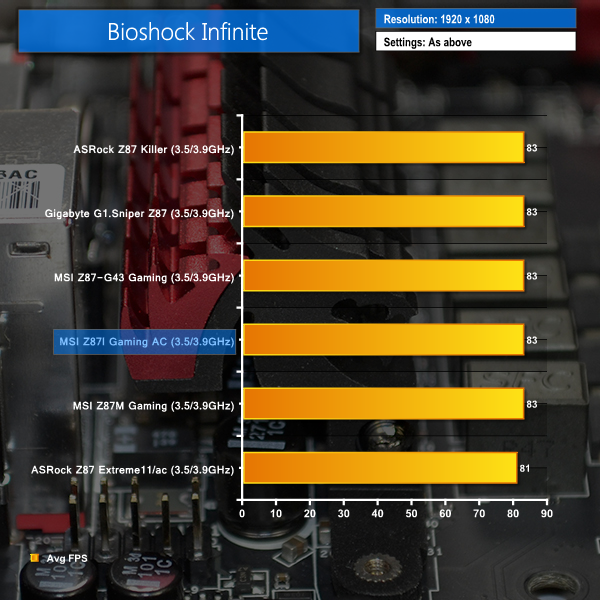
We used the Bioshock Infinite‘s demanding ‘Ultra’ setting and a 1920 x 1080 resolution to push today’s gaming hardware. Our data was recorded using a section of the game, not the built-in benchmark.

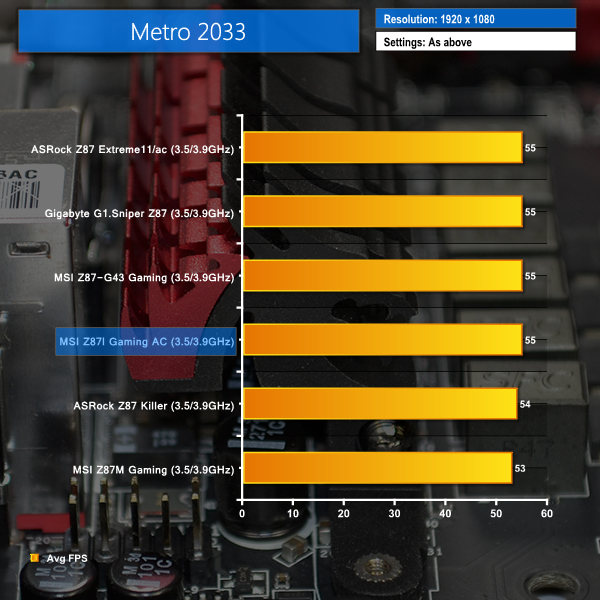
We used a 1920 x 1080 resolution and Metro 2033‘s built-in benchmark set to ‘Very High’ quality to offer an intense challenge for the gaming hardware while also making playable frame rates a possibility.

We used a 1920 x 1080 resolution and the Metro: Last Light‘s built-in benchmark set to ‘High’ quality to offer an intense challenge for the gaming hardware while also making playable frame rates a possibility.

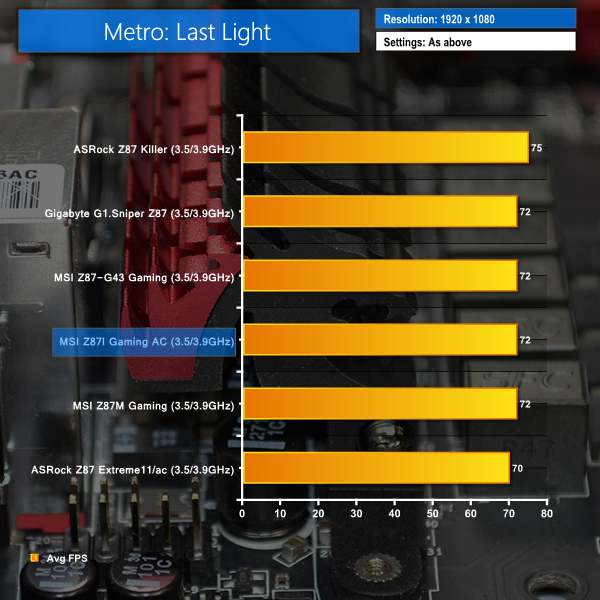
Gaming performance on the Z87I Gaming AC is as good as many of the larger motherboards that we have compared it with.
With the correct graphics card and supporting hardware, there is no reason why the Z87I Gaming AC cannot serve as the foundation for a powerful gaming system.
For SATA 6Gb/s testing we use a Kingston HyperX 3K SSD. We tested USB 3.0 performance using the same Kingston HyperX 3K SSD connected to a SATA 6Gb/s to USB 3.0 adapter powered by an ASMedia ASM1053 controller.
SATA
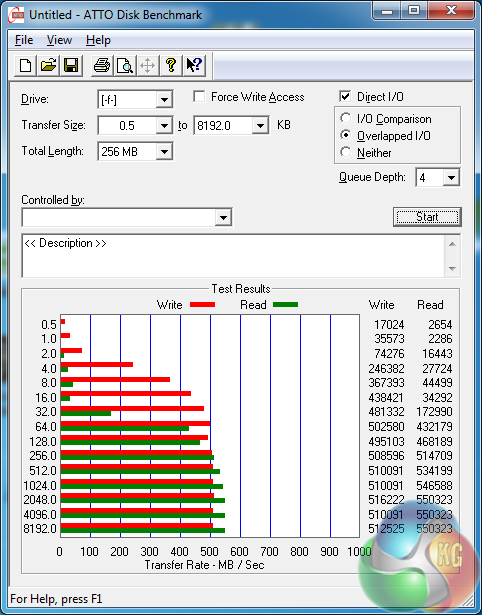
Using five SATA 6Gb/s ports fed by the Z87 chipset (with the sixth connection deployed as an eSATA port), the Z87I Gaming AC is able to push the performance boundaries of a modern, SATA-based SSD.
USB 3.0
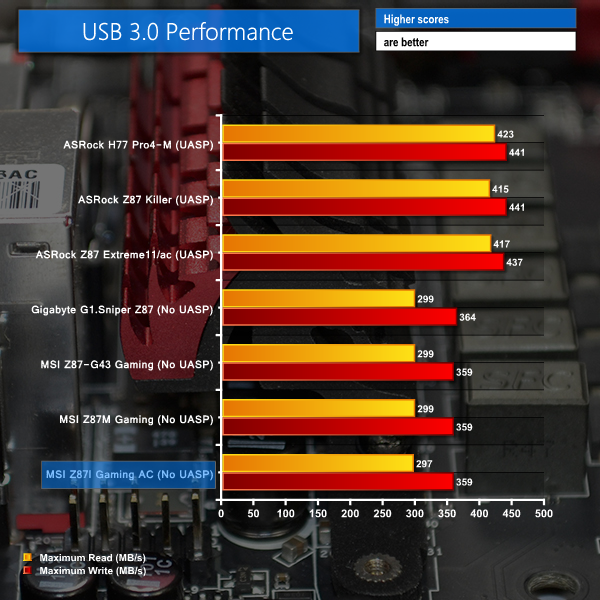
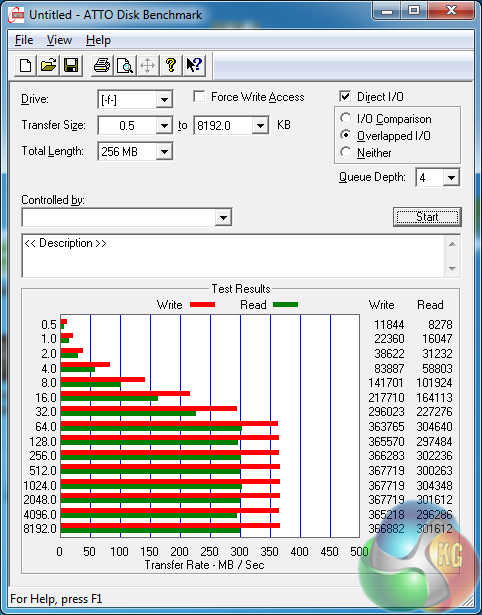
USB 3.0 throughput numbers are exactly as we would expect for a motherboard without a UASP-activating software tool. As we have pointed out many times in the past, the relevance of the substantial speed deficit, compared to ASRock's and Asus' offerings, will be related to an individual's usage scenarios.
Audio
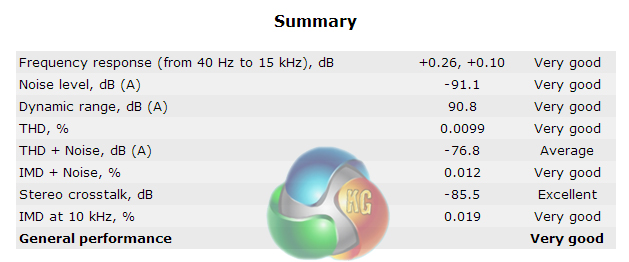
We use RightMark Audio Analyzer to analyse the performance of the motherboard’s onboard audio solution. A sampling mode of 24-bit, 192 kHz was tested.
Audio Boost consists of a Realtek ALC1150 audio codec which sends the raw signal through a Texas Instruments OPA1652 operational amplifier and a series of audio capacitors before outputting it to the audio jacks. The process takes place on an isolated circuit and outputs the signal to gold-plated audio jacks, with both measures helping to reduce signal interference. Sound Blaster Cinema is also supported by the Z87I Gaming AC.
MSI's Audio Boost-equipped Z87I Gaming AC delivers Very Good audio performance, according to RightMark Audio Analyzer. To a certain degree of surprise, some of the performance parameters scored differently on the Z87I Gaming AC, as opposed to the Z87M Gaming and Z87-G43 Gaming which both use a similar (if not identical) audio system.
Given the volatility of audio signals and the discrepancies related to testing a system's performance, marginal errors in the testing procedure may be part of the reasoning behind the slightly different results. Another possibility is that signal interference may be a bigger issue on the compressed, mITX design of the Z87I Gaming AC.
Wireless
We use Totusoft’s LAN Speed Test software to measure the real-world wireless throughput when transferring a 100MB file from a wired ‘server’ computer (connected to the network via Gigabit Ethernet). LAN Speed Test provides real-world performance results as it creates the file, measures the time taken to transfer it, and calculates the effective network throughput.
The test motherboard was located in close proximity to our Tenda N60 router which is limited to 300Mbps Wireless-n speeds, not 802.11ac. We tested using the 5GHz frequency band and kept network resources free to ensure the transfer rates were not capped.
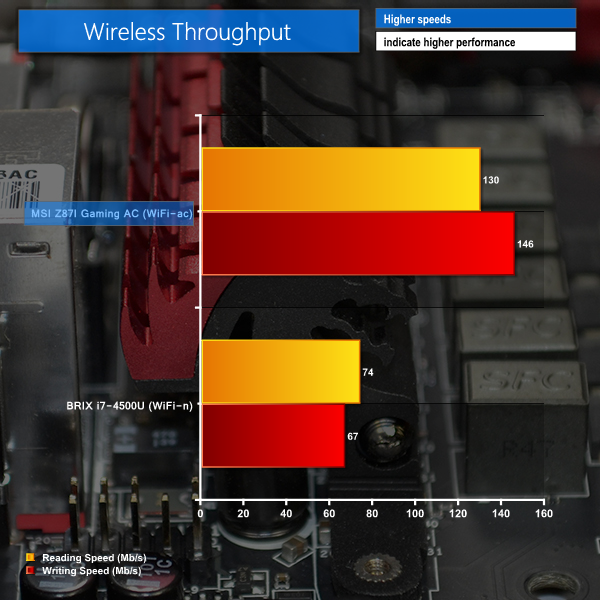
Using a pair of antennae and a strong wireless chipset in the Intel 7260, MSI's Z87I Gaming AC is able to deliver the best wireless throughput speeds that I have recorded with our Tenda-based hardware to date.
Streaming data across the network at over 130 Mbps, MSI's Z87I Gaming AC has great potential as a media playback device linked to a NAS or server.
Automatic CPU Overclocking:
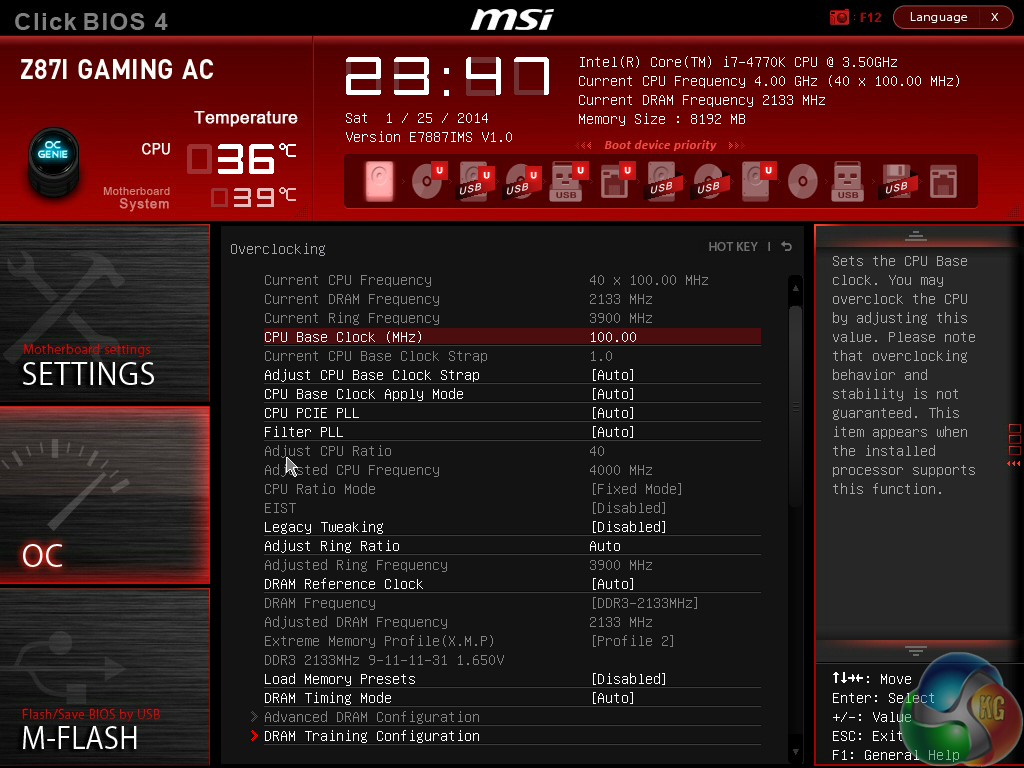
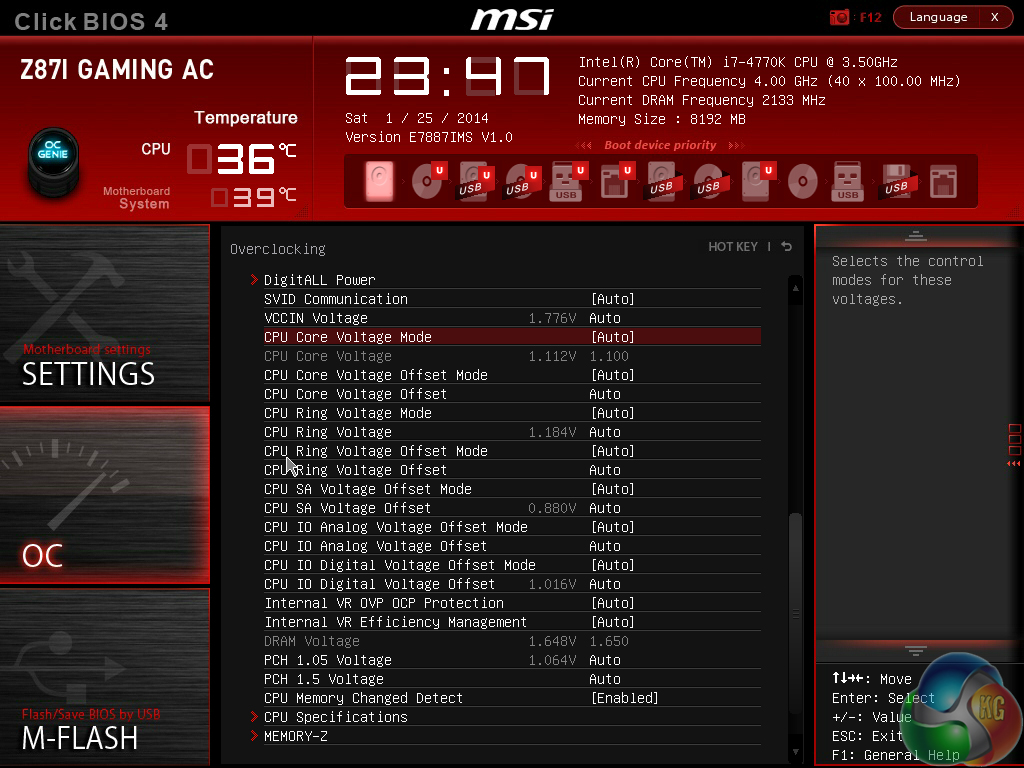
MSI's OC Genie 4 automatic overclocking tool is identical to the implementation found on the Z87-G43 Gaming, hence our analysis starts to sound a lot like repetition.
The automatic overclocking tool can only be configured via the UEFI BIOS, not via an onboard button that MSI typically implements on its higher-priced motherboards. Thinking about the situation logically, it is highly unlikely that a user will feel compelled to enter their SFF system to press the OC Genie button; the BIOS-activated option is far more convenient.
The OC Genie 4 setting applied a 4.00GHz CPU frequency to our 4770K and opted for a 1.100V VCore. Other settings remaining untouched.
Our memory operated at its rated frequency of 2133MHz, but OC Genie 4 had automatically applied the secondary XMP profile which used a 50mV higher DRAM voltage. This didn’t present an issue for us, but it may for users of memory kits with XMP profiles of different frequencies.
This is actually a fairly well-tuned setting for the 4770K as it provides a small clock speed boost, but does so with a reduction in the VCore level. While this is a thoughtful feature on MSI's ATX and mATX motherboards, it becomes a particularly relevant parameter on a Mini-ITX board to which thermal concerns are ever present.
Unlike some of MSI’s other OC Genie 4-equipped motherboards (the Z87M Gaming, for example), the Z87I Gaming AC features a single automatic overclocking profile, not two. Given the SFF target audience, excluding the secondary profile may have a positive impact on the lifespan of MSI's Mini-ITX motherboard; a higher-voltage 4.2GHz overclock would serve as a challenge for the heat dissipation potential of many low profile CPU coolers.
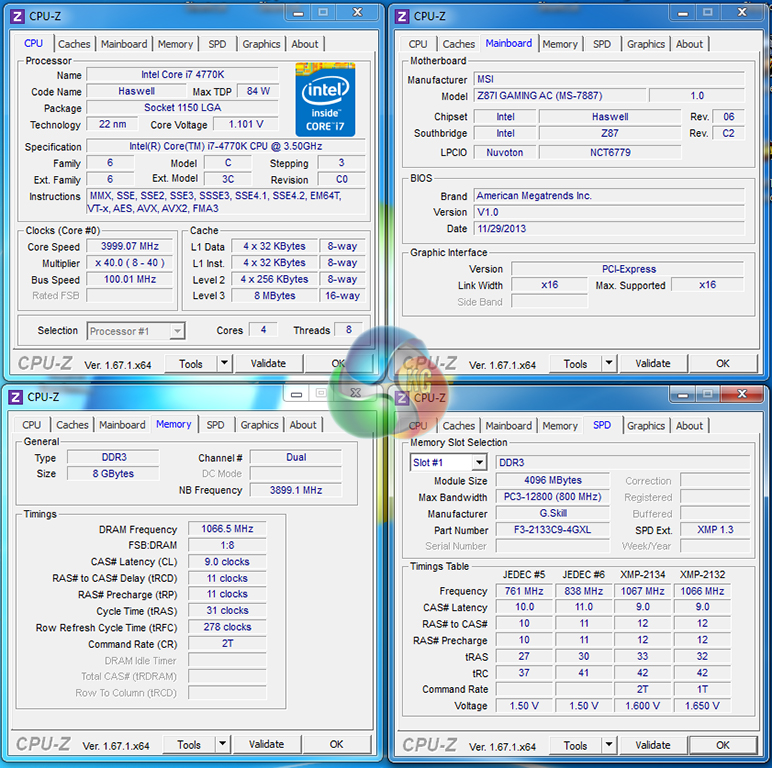
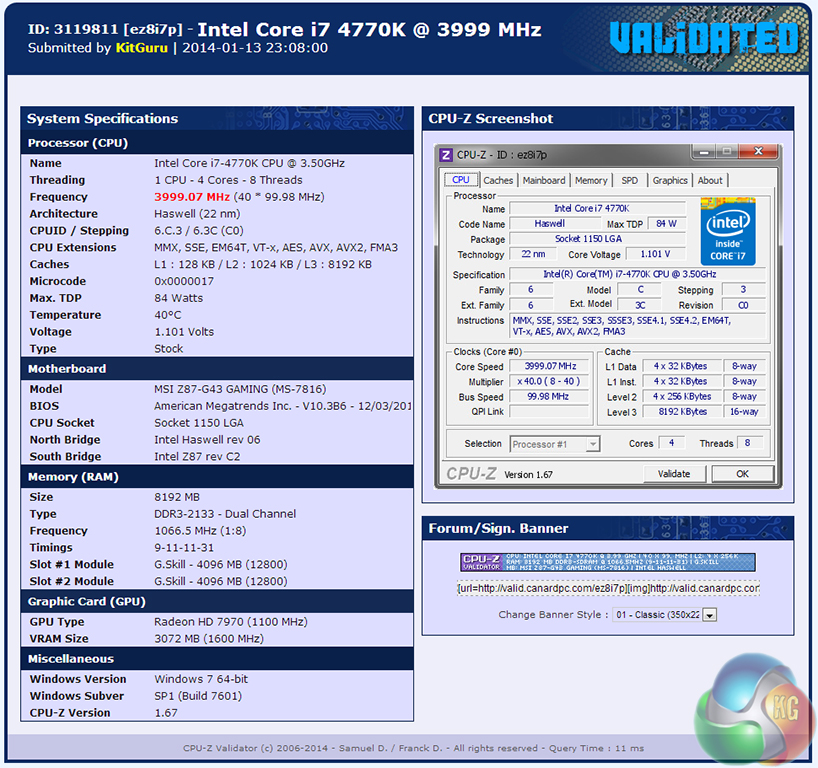
The automatic overclock validation can be found here.
Manual CPU Overclocking:
To test the MSI Z87I Gaming AC motherboard’s CPU overclocking potential, we first increased the CPU VCore to 1.325V, Cache voltage to 1.275V, and CPU Input Voltage to 1.900V. These settings represent levels which will near the thermal limits of a system housed in a Mini-ITX enclosure, with a low profile CPU cooler.
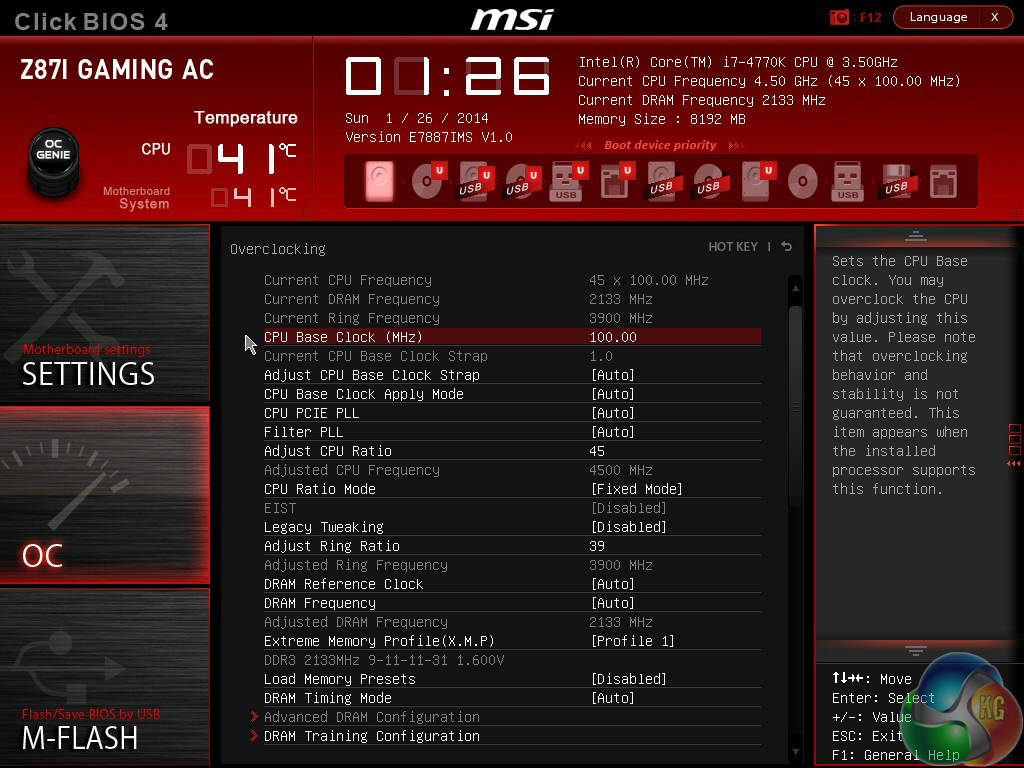
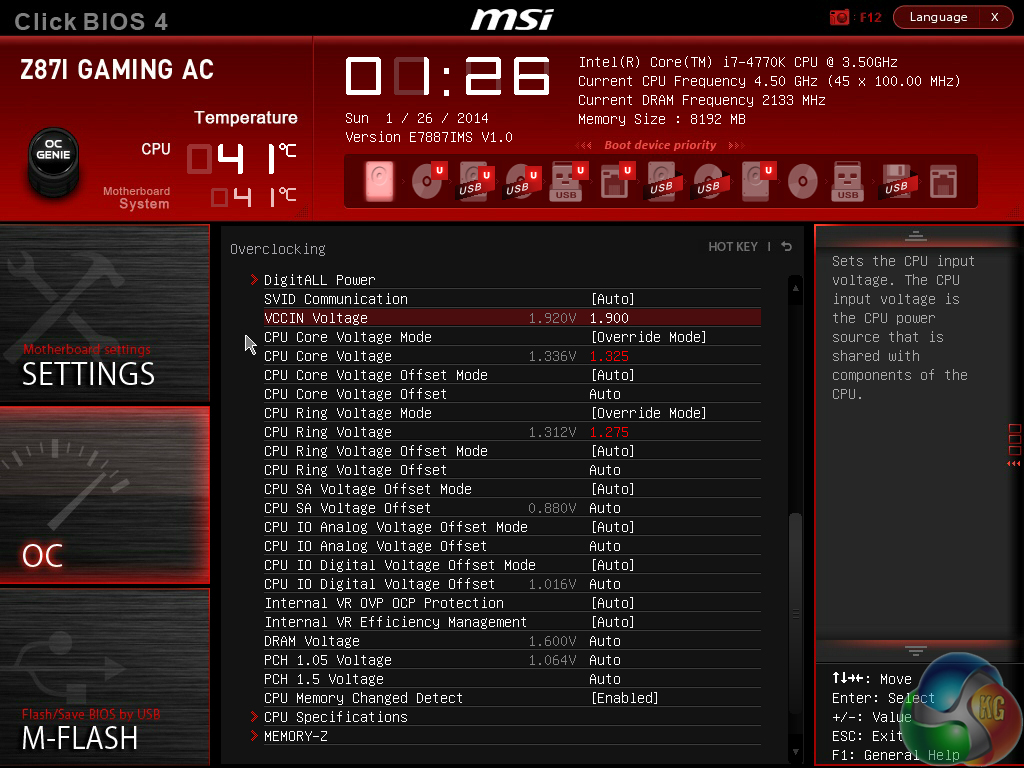
Accustoming to the UEFI interface is the most challenging part of overclocking MSI's Click BIOS 4-equipped motherboard. Having spent a sizable chunk of time in the interface over the last few months, I can safely say that its functionality and ease-of-use do become far easier to deal with. As with most things in life; practice makes perfect.
We altered three voltage settings to provide extra stability and boosted our 4770K’s clock speed to 4.50GHz without hassle.
Although readouts in the BIOS showed that some voltage levels were higher than our desired settings, MSI’s Z87I Gaming AC was happy to deliver our input levels in an OS environment. We didn’t need to fuss about with load-line calibration or offset voltages.
The ease of overclocking with the Z87I Gaming AC motherboard is aided by Haswell’s simplicity, and a stable BIOS implementation on MSI’s part.
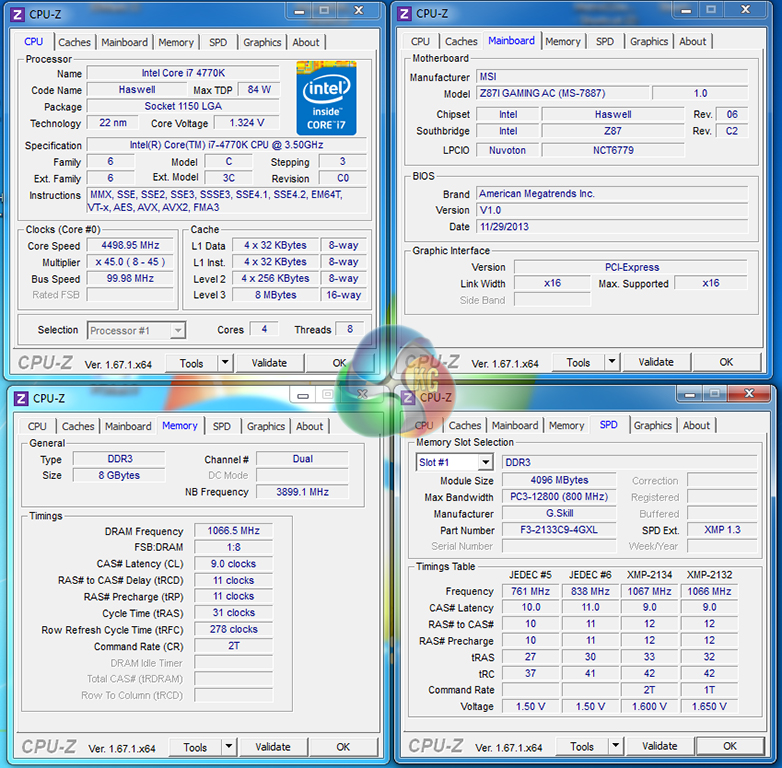
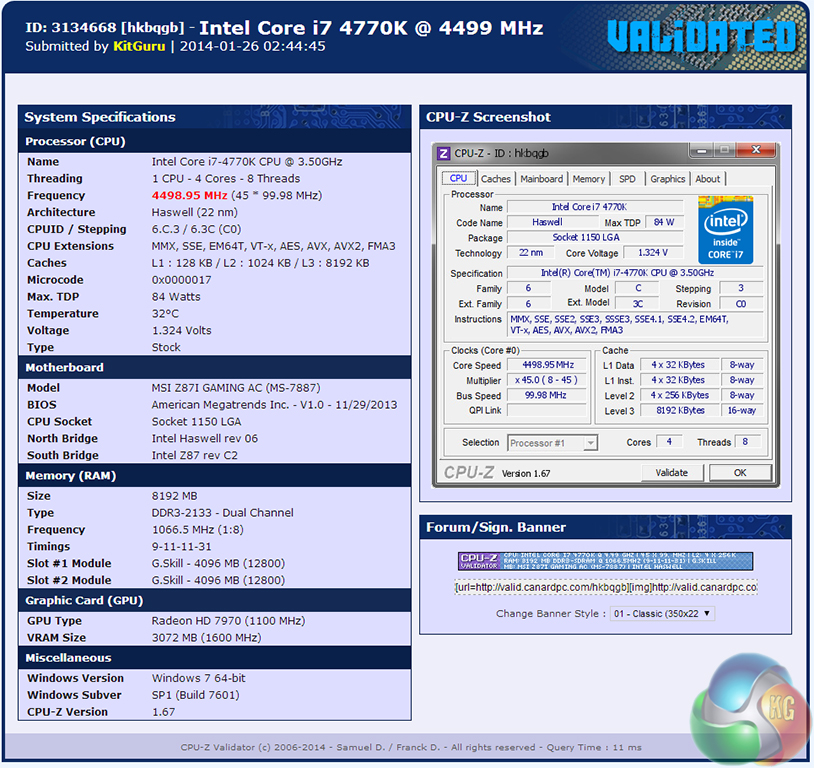
Providing 1.324V after we dialed in 1.325V proves that MSI's Z87I Gaming AC and accompanying Click BIOS 4 UEFI implementation provide excellent CPU VCore accuracy.
We pushed for stability at 4.6GHz, but as has been the case for every other Z87 motherboard that we have tested with our 4770K, a BSOD would quickly ruin our attempts.
Our 4.5GHz validation can be viewed here.
We will outline the performance increases that can be obtained from using the MSI Z87I Gaming AC motherboard to overclock our system. Our overclocked processor frequency was 4.5GHz and memory speed was 2133MHz.
As a performance comparison, we have included the overclocked results from five other Z87 motherboards. The maximum overclocked configuration achieved with each board was a 4500MHz (45 x 100MHz) processor frequency and 2133MHz CL9 memory speed.
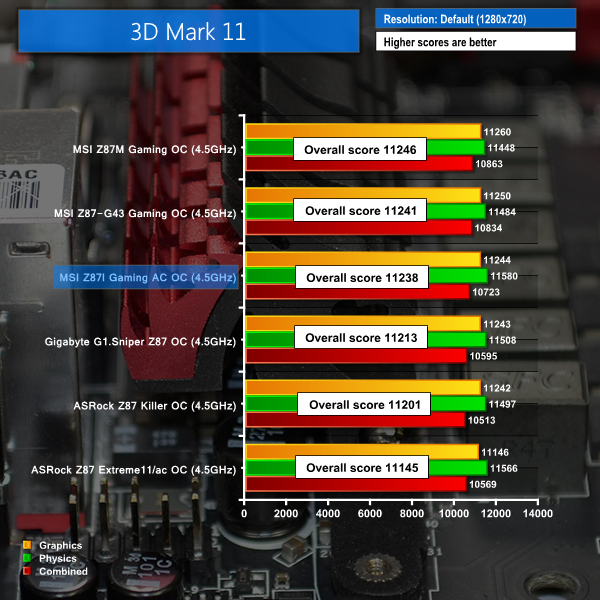
When overclocked, MSI's Z87I Gaming AC delivers strong performance in 3DMark 11.

Our Cinebench tests prove that the mITX motherboard can compete with larger alternatives, even when operating in an overclocked state.

Metro: Last Light performance doesn't scale with CPU frequency. In fact, the Z87I Gaming AC's frame rate seems to drop by a marginal amount (compared to the stock speed result), although the difference is negligible when rounding is factored in.
We measured the power consumption with the system resting at the Windows 7 desktop, representing idle values.
The power consumption of our entire test system is measured at the wall while loading only the CPU using Prime95′s Small FFTs setting. The rest of the system’s components were operating in their idle states, hence the increased power consumption values (in comparison to the idle figures) are largely related to the load on the CPU and motherboard power delivery components.
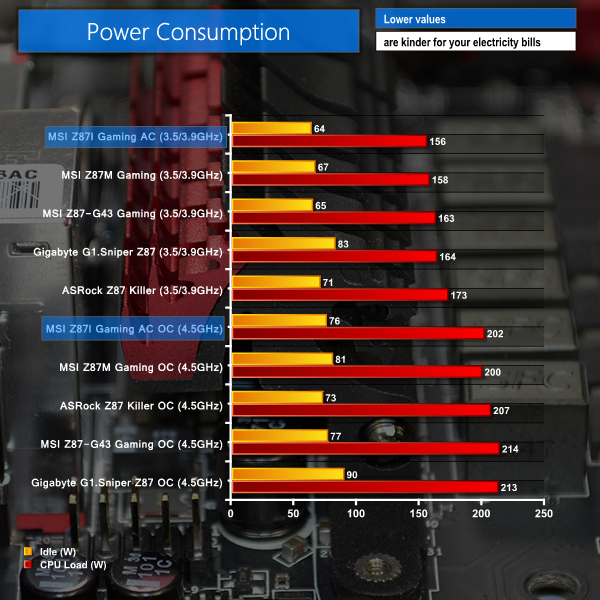
Power consumption levels for the Z87I Gaming AC are the lowest that we have recorded for our updated LGA 1150 test system. This doesn't come as much of a surprise; the board's physically smaller form factor and strong power delivery system helps to minimise current losses and reduced efficiency.
Even when overclocked, the Z87I Gaming AC's six phase power delivery system continues to deliver low energy usage numbers.
The MSI Z87I Gaming AC is a very good Mini-ITX motherboard that has no problem competing with full-ATX alternatives. With its Killer NIC, Audio Boost sound system, and wealth of storage connections, MSI's Z87I Gaming AC is able to serve as the foundation of a high performance gaming system which isn't forced to accept compromises.
Irrelevant of its mITX form factor, MSI's Z87I Gaming AC was able to offer competitive performance against an array of Z87 contenders. Overclocking performance was as strong as we have come to expect from a Z87-powered motherboard; the Z87I Gaming AC took our 4770K to 4.5GHz with ease.
Making a Mini-ITX gaming system a possibility for many users are the controllers and functionality that MSI gives its Z87I Gaming AC. The high performance audio system lessens serious gamers' preference towards an add-on sound card. And with a lag-reducing NIC built directly onto the board, the only add-on device that most users will require is a graphics card.
Factor in the strong 802.11ac wireless networking adapter, and it is clear that the vast majority of gamers will be happy with the onboard devices. While this point sounds like it is being over-stressed, the limited expansion options of motherboards from previous generations have typically dissuaded gamers from opting for a mITX system. By that logic, it is crucial that a gaming-caliber, Mini-ITX motherboard comes equipped with all of the features that a user will desire. MSI's Z87I Gaming AC ticks this box.
Layout decisions for the Z87I Gaming AC are a little hit-or-miss. MSI was wise to place the 24-pin and 8-pin power connectors in locations where they would not cause interference. Opting for single-latch DIMM slots was another smart move.
But placing the cluster of front panel and USB headers in a location where they are difficult to access is frustrating. Equally irritating is the fact that the Z87I Gaming AC does not feature on-PCB writing to direct users when connecting the front panel cables. MSI would have been wise to include its M-connector in an attempt to eliminate such issues.
The number of fan headers that MSI provides is borderline insufficient. Allocate one header for the CPU cooler and that leaves users with just one route for controlling the speed of a chassis fan. Even the popular gaming-caliber Mini-ITX cases of today (such as the BitFenix Prodigy and Corsair 250D) typically come equipped with at least two fans. This forces users to resort to untidy splitters or less effective low noise adapters which provide a poorly-optimised, constant fan speed.
I would be telling lies if I didn't admit that MSI's Click BIOS 4 UEFI interface has grown on me since I first used its Z87 implementation. I wouldn't put the interface at the top of the pile in regards to layout, style, or ease-of-use, but the sheer number of adjustable parameters that it provides are welcomed once the UEFI becomes easier to navigate. I still stand firmly by my primary feedback point, though; I am certain that separating the OC section's readouts from its adjustable settings will make the interface easier on the eye and simpler to use effectively.
Priced at £134.99 from OverclockersUK, the MSI Z87I Gaming AC represents very good value for money. It manages to squeeze gaming-orientated features into a Mini-ITX form factor, and does so will maintaining a competitive price tag. Asus' ROG Maximus VI Impact costs around £40 more, while ASRock's comparable Z87E-ITX is also slightly more expensive.
While MSI's Z87I Gaming AC offers strong performance, a wealth of worthwhile features, and an attractive design, it also features some slightly disappointing factors such as limited fan speed control and some inconvenient layout choices. The fact of the matter is that many users will be able to overlook the awkward header connection procedure due to it being an infrequent task. The insufficient number of fan headers is far more likely to cause headaches, though.
MSI really has done a lot of things right with its Gaming Series of Z87 motherboards. The company's Mini-ITX variant is no different. Provided you can work around the issue of fan connections, the MSI Z87I Gaming AC motherboard is an excellent option if you're looking to downsize your gaming system without sacrificing usability and brute performance.
Discuss on our Facebook page, over HERE.
Pros:
- Strong performance with good overclocking potential.
- Excellent networking connectivity – Killer NIC and Intel 802.11ac WiFi.
- High performance audio system.
- Plenty of storage connections.
- Attractive design.
- Very good value for money.
- Wise OC Genie 4 settings.
Cons:
- Only two fan headers.
- Connecting front panel headers is needlessly challenging – MSI should include M-connector.
- UEFI BIOS layout can be confusing at first.
KitGuru says: An impressive motherboard that can provide a strong foundation for powerful Mini-ITX gaming systems.


Awesome board, love MSI products – building a media center soon and this was already on my shortlist. unless something comes out soon which is better.
This is my dream in 2014 – build a silent, small system which can play games at 1080p and not break the bank. Still working on it !
Little Giant! Brilliant design, small but fully loaded.
I just hope I could win that kind of awesome motherboard 😀
Great performing board, great looks and very stable.
Using it in a corsair 250D case atm.
Motherboard layout can give some problems with cablemanagement tho when u want everything neat and clean. Thats something that could be improved next time.
Having only 1 chafan conn is simply absurd.