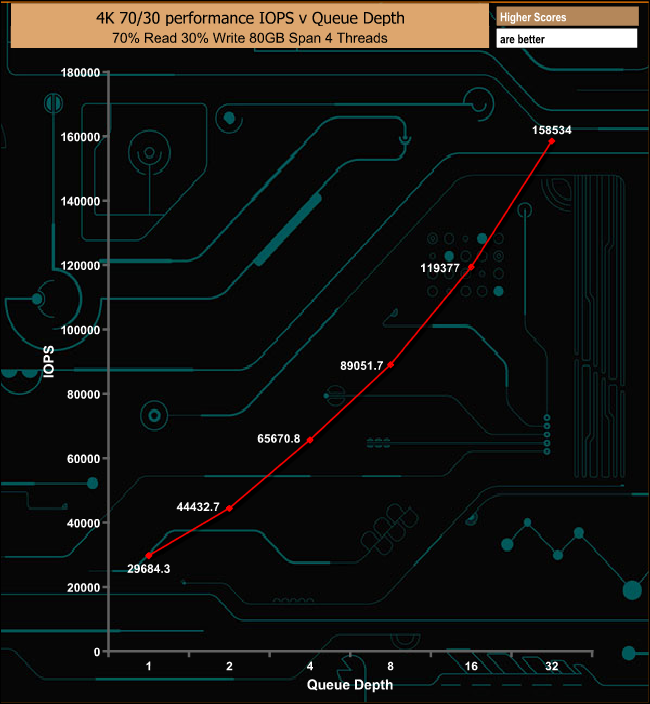
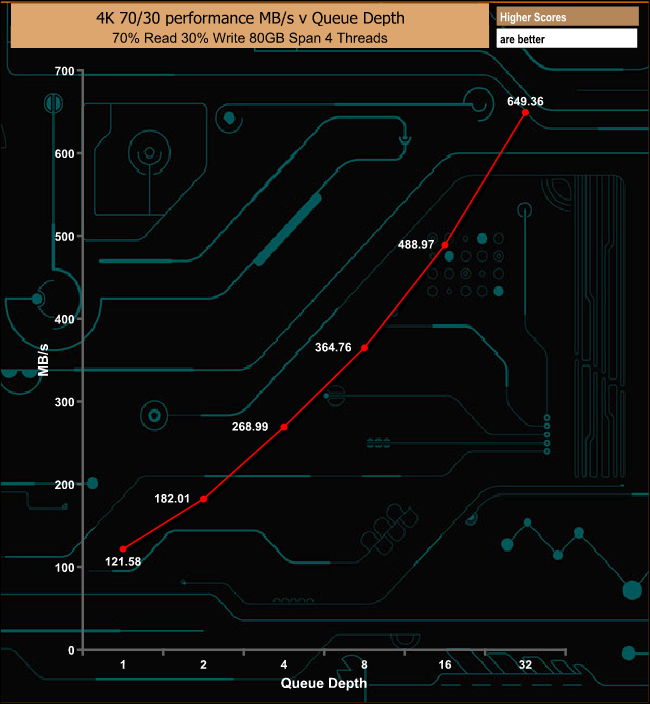
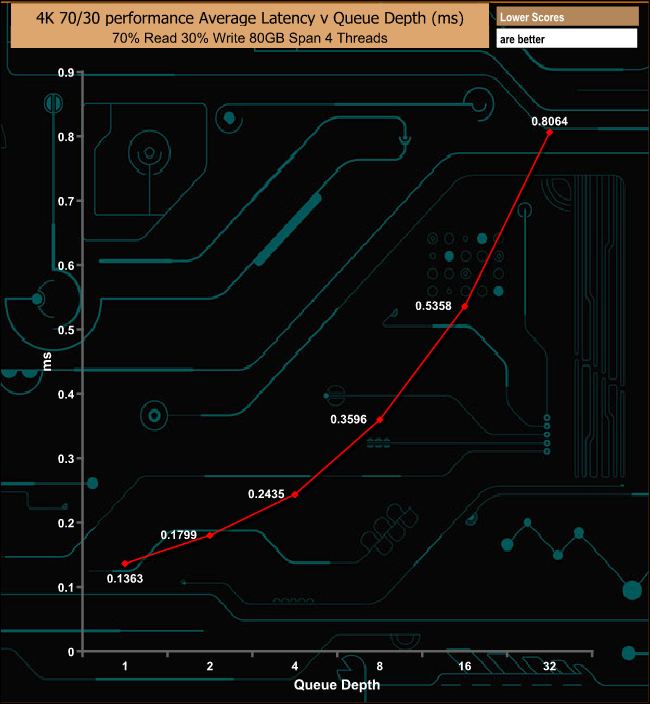
Aorus, Gigabyte's premium sub-brand, offers a full range of products from laptops to gaming peripherals - including a range of SSDs in AIC, 2.5" SATA and NVMe M.2 formats. The NVMe M.2 Aorus RGB 512GB drive uses the tried and tested combination of 3D TLC NAND and a Phison controller with, as the name suggests, added bling in the shape of RGB lighting in the drives heatsink. There are just two models in Gigabytes Aorus RGB M.2 range, a 256GB drive and the flagship 512GB drive we are reviewing here. The Aorus RGB uses a combination of Toshiba BiCS3 3D 64-layer TLC NAND and a Phison E12 controller. The PS5012-E12 is Phison’s second generation PCIe Gen3 x4 NVMe controller. Built on a TSMC 28nm process, the 8-channel controller has been designed to work with TLC and QLC NAND technologies with support for Phison’s SmartECC and the latest LDPC (Low-Density Parity Check) error correction as well as AES256, TCG OPAL and TCG Pyrite hardware encryption support. With 8 NAND channels and 32 NAND chip enable lines, the maximum amount of NAND the controller can support is 8TB. Sequential performance figures for the 512GB drive are quoted as up to 3,480 MB/s for reads and up to 2,000 MB/s for writes. The 256MB drive is rated at up to 3,100MB/s reads and 1,050MB/s writes. Random performance is quoted as up to 360,000 IOPS for reads and up to 440,000 IOPS for writes for the 512GB drive. The 256GB drive is rated at 180,000 IOPS reads and writes at 240,000 IOPS. Endurance is quoted at 800TBW and the drive is backed by a 5-year warranty. Physical Specifications: Usable Capacities: 512GB. NAND Components: Toshiba BiCS3 3D 64-layer TLC. NAND Controller: Phison PS5012-E12. Cache: 512MB SK Hynix DDR4. Interface: PCIe 3.0 x4, NVMe 1.3. Form Factor: M.2 2280. Dimensions: 22 x 80 x 10mm. Drive Weight: 28g. Firmware Version: ECFM12.1 The box outer sleeve has the Aorus Falcon in silver on the front along with the drive's name, along the bottom. The rear of the sleeve has the drives name at the top along with its capacity and a small multilingual list of the drives Sequential performance. The drive ships in a good quality box with the Aorus Falcon in silver on the front and is held tightly in place in a dense foam box inner layer. The 512GB Aorus RGB is a dual-sided design. Sitting under the well-designed aluminium heatsink there is the Phison E12 NVMe 8-channel controller, a pair of Toshiba BiCS3 64-layer NAND packages and a 512MB SK Hynix DDR4 DRAM cache IC. The rear side of the PCB is home to another pair of NAND packages. If you look closely at the top of the PCB you will see the three LEDs that are used for the RGB effects sitting to the right hand side of the controller. The heatsink is held in place by two tiny screws and once removed you can see the two large thermal pads Gigabyte have used to help dissipate the heat from the controller and NAND packages. Although we tested the drive in an Asus motherboard, the basic RGB effect still worked. To control it properly you will need to use a RGB supporting Gigabyte motherboard (X299 or Z390 Aorus are the ones stated on the Gigabyte web site). Gigabyte's SSD Tool Box has a had a bit of update and with it you can monitor SSD Status as well as get general information such as model name, FW version, health and drive temperature. It also supports Secure Erase. For testing, the drives are all wiped and reset to factory settings by HDDerase V4. We try to use free or easily available programs and some real world testing so you can compare our findings against your own system. This is a good way to measure potential upgrade benefits. Main system: Intel Core i7-7700K with 16GB of DDR4-3200 RAM, Sapphire R9 390 Nitro and an Asus Prime Z270-A motherboard. Other drives Corsair Force MP500 480GB Corsair Force MP510 960GB Crucial P1 1TB Intel Optane SSD900P 480GB Intel Optane SSD905P 480GB Intel SSD760p 512GB Kingston A1000 480GB Plextor M9Pe(Y) 512GB Plextor M8PeG 512GB Patriot Viper VPN100 1TB PNY CS3030 1TB PNY CS2030 240GB Samsung SSD970 EVO 2TB Samsung SSD970 PRO 1TB Samsung SSD960 PRO 2TB Samsung SSD960 EVO 1TB Samsung SSD960 EVO Plus 1TB Toshiba XG6 1TB Toshiba OCZ RD400 512GB Western Digital Black SN750 1TB Western Digital Black SN750 1TB with Heatsink Western Digital Black NVMe 1TB Western Digital Black PCIe 512GB Software: Atto Disk Benchmark 3.5. CrystalMark 6.0. AS SSD 2.0. IOMeter. Futuremark PC Mark 8 All our results were achieved by running each test five times with every configuration this ensures that any glitches are removed from the results. Trim is confirmed as running by typing fsutil behavior query disabledeletenotify into the command line. A response of disabledeletenotify =0 confirms TRIM is active. CrystalDiskMark is a useful benchmark to measure theoretical performance levels of hard drives and SSD’s. We are using v6.0. The Gigabyte Aorus RGB uses the same controller and NAND combination as Patriot's Viper VPN100. At a deep queue depth of 32, it's the Viper that has the faster read performance than the Aorus but Gigabyte's drive has better write performance. At a queue depth of 1, both the Gigabyte Aorus RGB and Patriot Viper VPN100 have virtually the same performance figures in CrystalDiskMark as you might expect with both drives using the same NAND and controller combination. The ATTO Disk Benchmark performance measurement tool is compatible with Microsoft Windows. Measure your storage systems performance with various transfer sizes and test lengths for reads and writes. Several options are available to customize your performance measurement including queue depth, overlapped I/O and even a comparison mode with the option to run continuously. Use ATTO Disk Benchmark to test any manufacturers RAID controllers, storage controllers, host adapters, hard drives and SSD drives and notice that ATTO products will consistently provide the highest level of performance to your storage. We are using version 3.5 for our NVMe disk tests. Officially the 512GB Aorus RGB drive is rated at up to 3,480MB/s for Sequential reads and up to 2,000MB/s for writes. Using the ATTO benchmark we got a read score of 3,414MB/s with writes at 2,110MB/s, confirming the official figures. AS SSD is a great free tool designed just for benching Solid State Drives. It performs an array of sequential read and write tests, as well as random read and write tests with sequential access times over a portion of the drive. AS SSD includes a sub suite of benchmarks with various file pattern algorithms but this is difficult in trying to judge accurate performance figures. The read score of 2013 in the AS SSD benchmark puts the 512GB Gigabyte Aorus RGB firmly in the middle of our results chart. The write score of 2254 is very strong. IOMeter is another open source synthetic benchmarking tool which is able to simulate the various loads placed on hard drive and solid state drive technology. There are many ways to measure the IOPS performance of a Solid State Drive, so our results will sometimes differ from manufacturer’s quoted ratings. We do test all drives in exactly the same way, so the results are directly comparable. We test 128KB Sequential read and write and random read and write 4k tests. The test setup’s for the tests are listed below. Each is run five times. 128KB Sequential Read / Write. Transfer Request Size: 128KB Span: 8GB Thread(s): 1, Outstanding I/O: 1-32 Test Run: 20 minutes per test 4K Sustained Random Read / Write. Transfer Request Size: 4KB Span: 80GB Thread(s): 4, Outstanding I/O: 1-32 Test Run: 20 minutes per test 4K Random 70/30 mix Read/Write. Transfer Request Size: 4KB Span: 80GB Reads: 70% Writes: 30% Thread(s): 4 Outstanding I/O: 2 – 32 Test Run: 20 minutes. 128KB Sequential Performance With our 128KB Sequential read/write tests we could confirm the official figures of up to 3,480MB/s for reads and up to 2,000MB/s for writes, the review drive producing 3473.36MB/s for reads with writes at 2153.05MB/s. 128KB Sequential Read v QD Performance The Aorus RGB's Sequential read performance remains strong through queue depths 1 and 2 before dropping off a little at QD4. The QD32 performance is very strong. 128KB Sequential Write v QD Performance The Sequential write performance of the drive remains pretty consistent through the tested queue depths. 4K Random Read v QD Performance The official random read performance of the 512GB version of the Aorus RGB is quoted as up to 360,000 IOPS. With our 4K random tests, 217,836 IOPS was the maximum figure we saw when testing at a QD of 4. 4K Random Read v QD Performance Compared Gigabyte's Aorus drive uses the same controller and NAND combination as PNY's XLR8 CS3030 and at low queue depths the Aorus keeps pace with the PNY drive, however as the queue depth deepens, the Aorus drops back. 4K Random Write v QD Performance Gigabyte quote a random 4K write performance figure for the drive as up to 440,000 IOPS. We couldn't get close to that with our QD4 tests, the fastest IOPS figure we saw was 195,752 IOPS. 4K Random Write v QD Performance Compared As mentioned in the 4K random read results, the Aorus RGB drive uses the same controller and NAND combination as PNY's XLR8 CS3030. At queue depths 1, 2 and 4 the PNY drive outperforms the Gigabyte drive, however at a QD of 32, this switches around with the Aorus RGB being the faster of the two drives. 4K 70/30 Mixed Performance In our mixed read/write test, the Aorus RGB performs reasonably well, producing a nice smooth performance curve with the deepening queue depth. The fastest average read throughput test we got from the drive was 2,818.22MB/s right at the end of the test. The 2,818.22MB/s peak read throughput score puts the Aorus RGB 512GB firmly in the top ten consumer NVMe drives we've tested to date. Peak average write performance came at the 8MB block mark at 2,141.78MB/s before dropping back at the end of the test. The write throughput score of 2,141.78MB/s puts the 512GB Aorus 512GB RGB into the middle of our results chart. Futuremark’s PCMark 8 is a very good all round system benchmark but it’s Storage Consistency Test takes it to whole new level when testing SSD drives. It runs through four phases; Preconditioning, Degradation, Steady State, Recovery and finally Clean Up. During the Degradation, Steady State and Recovery phases it runs performance tests using the 10 software programs that form the backbone of PCMark 8; Adobe After Effects, Illustrator, InDesign, Photoshop Heavy and Photoshop Light, Microsoft Excel, PowerPoint, Word, Battlefield 3 and World of Warcraft. With some 18 phases of testing, this test can take many hours to run. Preconditioning The drive is written sequentially through up to the reported capacity with random data, write size of 256 × 512 = 131,072 bytes. This is done twice. Degradation Run writes of random size between 8 × 512 and 2048 × 512 bytes on random offsets for 10 minutes. It then runs a performance test. These two actions are then repeated 8 times and on each pass the duration of random writes is increased by 5 minutes. Steady State Run writes of random size between 8 × 512 and 2048 × 512 bytes on random offsets for final duration achieved in degradation phase. A performance test is then run. These actions are then re-run five times. Recovery The drive is idled for 5 minutes. Then a performance test is run. These actions are then repeated five times. Clean Up The drive is written through sequentially up to the reported capacity with zero data, write size of 256 × 512 = 131,072 bytes. Overall the Aorus RGB drive handles the rigours of PCMark 8's Consistency Test very well, although there is a noticeable drop in bandwidth during the sixth Degradation run. The drives performance during the recovery phases is excellent. PCMark 8’s Consistency test provides a huge amount of performance data, so here we’ve looked a little closer at how the 512GB Gigabyte Aorus RGB performs in each of the benchmarks test suites. Adobe Creative Cloud The drive gets hit hard during the Adobe CC tests with large falls in bandwidth in a number of places. It does recover reasonably well, if very erratically. Microsoft Office The Microsoft Word trace causes the drive a whole host of problems during the test run but the Excel trace suffers a huge bandwidth drop during the second Steady State phase. The drives recovery is steady without being spectacular. Casual Gaming There's a huge difference between the two casual gaming tests. The Battlefield 3 trace causes the drive problems but with pretty good bandwidth figures, whereas the World Of Warcraft test displays very few problems apart from the very low overall bandwidth during the Degradation and Steady State phases. However the recovery performance of the trace is spectacular. Just like the Consistency test, PCMark 8’s Standard Storage test also saves a large amount of performance data. The default test runs through the test suite of 10 applications three times. Here we show the total bandwidth performance for each of the individual test suites for the third and final benchmark run. The Aorus RGB displays strong bandwidth performance for each of the applications used by the benchmark, particularly in the Adobe Photoshop Heavy and Light traces as well as the Adobe InDesign one. Gigabyte's Aorus RGB drive produced an overall bandwidth speed of 626.94MB/s for PCMark 8's Standard Storage test, a wee bit slower than the PNY XLR8 CS3030 and Patriot's Viper VPN1000 which use the same NAND and controller combination as the Aorus RGB. For the long term performance stability test, we set the drive up to run a 20-minute 4K random test with a 30% write, 70% read split, at a Queue Depth of 256 over the entire disk. The 512GB Aorus RGB averaged 52,950 IOPS for the test with a performance stability of 40.54%. To test real life performance of a drive we use a mix of folder/file types and by using the FastCopy utility (which gives a time as well as MB/s result) we record the performance of drive reading from & writing to a 256GB Samsung SSD850 PRO. 100GB data file. 60GB iso image. 60GB Steam folder – 29,521 files. 50GB File folder – 28,523 files. 21GB 8K Movie demos. 12GB Movie folder – 24 files (mix of Blu-ray and 4K files). 11GB 4K Raw Movie Clips (8 MP4V files). 10GB Photo folder – 621 files (mix of png, raw and jpeg images). 10GB Audio folder – 1,483 files (mix of mp3 and .flac files). 5GB (1.5bn pixel) photo. The Gigabyte Aorus RGB handled our real life transfer tests without any problems. It’s much happier dealing with large file sizes than smaller bity files. To get a measure of how much faster PCIe NVMe drives are than standard SATA SSD's we use the same files but transfer to and from a 512GB Toshiba OCZ RD400. Taking the SATA drive out of the loop, the drive shows some excellent performance when dealing with the large files in the 4K movie and 12GB Movie folders and the 5GB photo. When we took the heatsink off the drive to take photos of the PCB we took the chance to see what difference the heat sink makes if any. We pushed the drive by running our performance stability test (a 4K random test with a 30% write, 70% read split, at a Queue Depth of 256 over the entire disk) and tracking the temperature as the test was running. Without the heatsink the drive averaged 51.4° for the test while with the heatsink installed it averaged 45.3° making it a useful drive for use in a compact PC build. Gigabytes's Aorus RGB is the latest member of quite an exclusive club, namely SSD's with added bling in the shape of RGB lighting. Although the Gigabyte Aorus drive features RGB, it's subtly done and it certainly isn't over the top. The Aorus Falcon logo in the middle of the drive's heatsink is the lit up by the technology and although it needs a RGB supporting Gigabyte motherboard (X299 or Z390 Aorus) to control it properly, it cycled through its seven colours when installed in our test Asus motherboard without any problems. The drive uses the tried and tested combination of a Phison E12 8-channel controller and Toshiba BiCS3 64-layer NAND. The 512GB drive is a dual sided design with the controller, cache chip and two of the four NAND packages the drive uses covered by the well designed and manufactured heatsink. Gigabyte quote Sequential performance figures for the 512GB drive as up 3,480 MB/s for reads and up to 2,000 MB/s for writes, both figures we were able to confirm with the ATTO benchmark with the drive producing read/write figures of 3,414MB/s and 2,110MB/s respectively. Gigabyte random 4K performance figures for the drive as up to 360,000 IOPS and 440,000 IOPS for read and write's respectively. We couldn't get close to either of those figures with our QD4 4-threads tests, the fastest read IOPS figure we saw was 217,836 IOPS and for writes, 195,752 IOPS. However quickly testing the drive at a QD of 32 using 8 threads produced a maximum read figure of 389,512 IOPS and a write figure of some 549,025 IOPS. Gigabyte's SSD Tool Box utility has had a bit of a refresh and although it doesn't have as many features as the management utilities of say Samsung or Western Digital for example, it's still a useful tool. With it you can monitor SSD Status as well as get general information such as model name, FW version, health and drive temperature. It also supports Secure Erase. We found the 512GB Gigabyte Aorus RGB on CCL Computers for £92.99 (inc VAT) HERE Pros. Overall performance. Endurance. RGB. Cons. Only two capacities at present. Limited RGB compatibility. KitGuru says: Gigabyte has gone down a tried and tested route with the NAND and controller for the Aorus RGB drive but that's no bad thing in this case. It's a fast performing drive with tasteful RGB and a pretty competitive price tag.