 KitGuru KitGuru.net – Tech News | Hardware News | Hardware Reviews | IOS | Mobile | Gaming | Graphics Cards


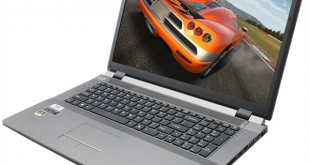
The DinoPC Pegasus 17.3” GTX 765M gaming laptop is a hefty slab of slate grey plastic that weighs in just over the 3kg mark. It combines a Full HD screen with Core i5 CPU, boot SSD with 1TB data drive and nVidia GTX765M graphics so the specification is broadly similar to the MSI GS70 2OD-Stealth, however the price is a snip at £799 inc VAT.
Today we are interested to see how it stacks up as an all round, general purpose gaming laptop.
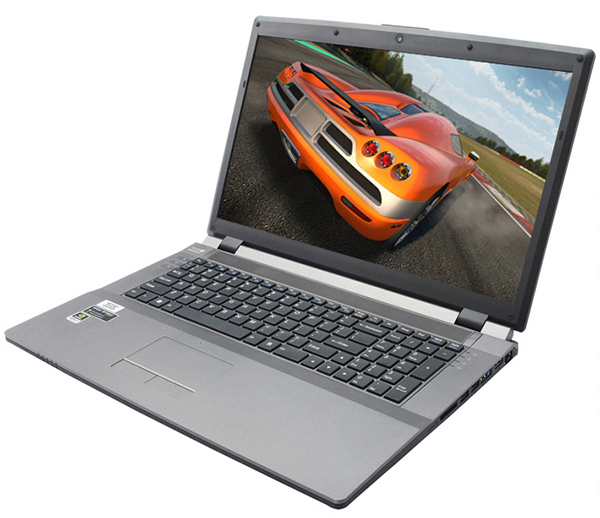
DinoPC Pegasus 17.3” GTX 765M Specification:
- Screen Size: 17.3″
- Screen Type: Backlight LED LCD
- Screen Resolution: 1920×1080
- Processor Type: Intel Core i5-4200M
- Hard Drive: 5,400 rpm 1 x 1TB
- Solid State Drive: 1 x 120GB
- Memory Supplied: 2x4GB 1600mhz (8GB) DDR3
- Operating System: 64-bit Windows 8.1
- Graphics Chipset: 2GB NVIDIA GeForce GTX 765M
- Audio: VIA HD Audio with Creative Sound Blaster Cinema software
- Speaker(s): 2 x 2W Onkyo Speakers
- Microphone: Built-in
- LAN Card: Realtek Gigabit
- LAN Speed: 10/100/1000
- Wireless NIC: Realtek RTL8723BE 802.11n
- Bluetooth: v4.0
- Optical Drive: Slimline 8x DVD+RW/DVD-RW
- Card Reader: SDXC/HC/MS/MS Duo
- Web Camera: 2 Megapixel Full HD
- 413mm wide x 277.5mm deep x 17.5-44mm high
- Product Weight (g): 3.2Kg (w/Battery)
- Warranty: 1 Year parts and labour, second and third years labour only
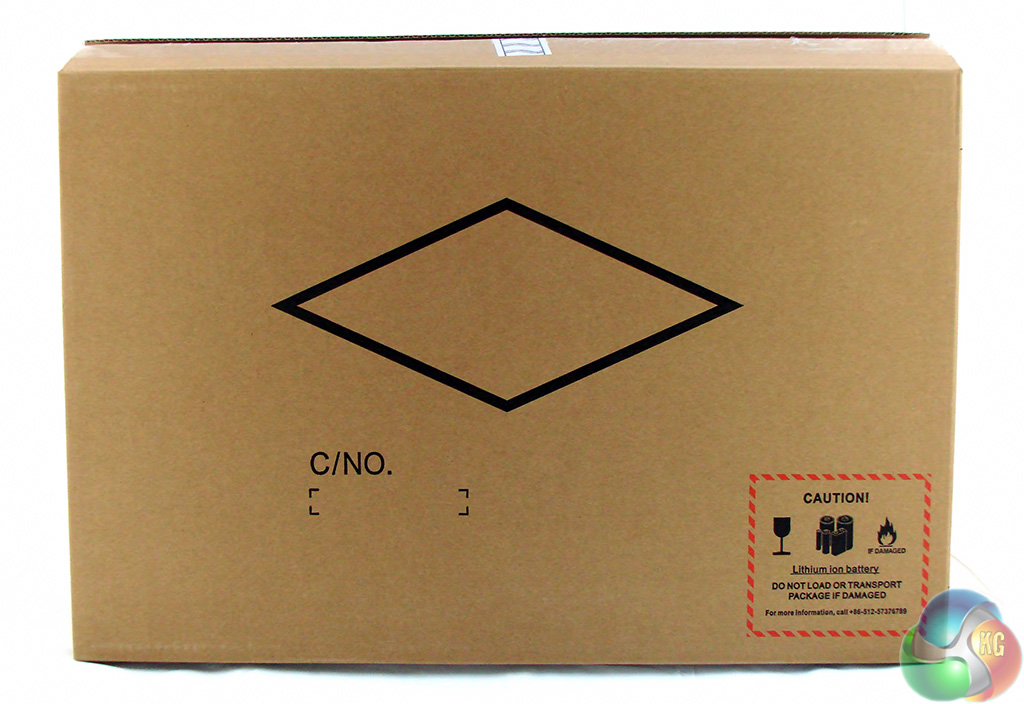
The DinoPC Pegasus 17.3” GTX 765M arrived in a large DinoPC box with a load of bubble packaging. Inside the shipping case there is an outer box and an inner carry case that carries the slightly bizarre slogan ‘Enjoy with me'. The packaging looks rather plain however it is very effective and the laptop arrived in perfect condition.
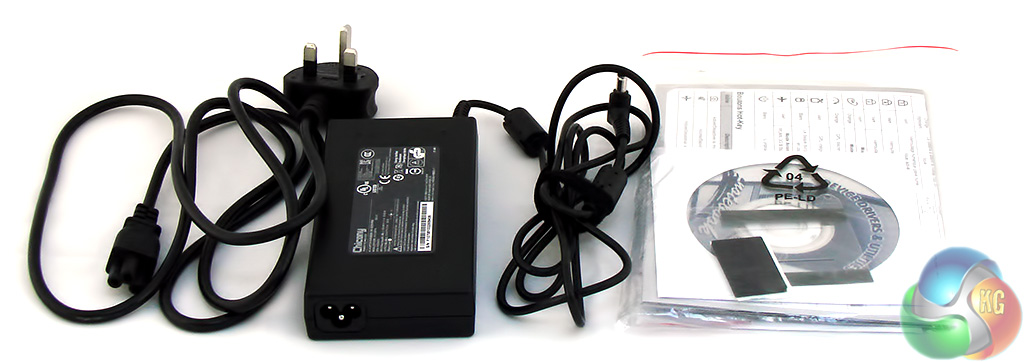
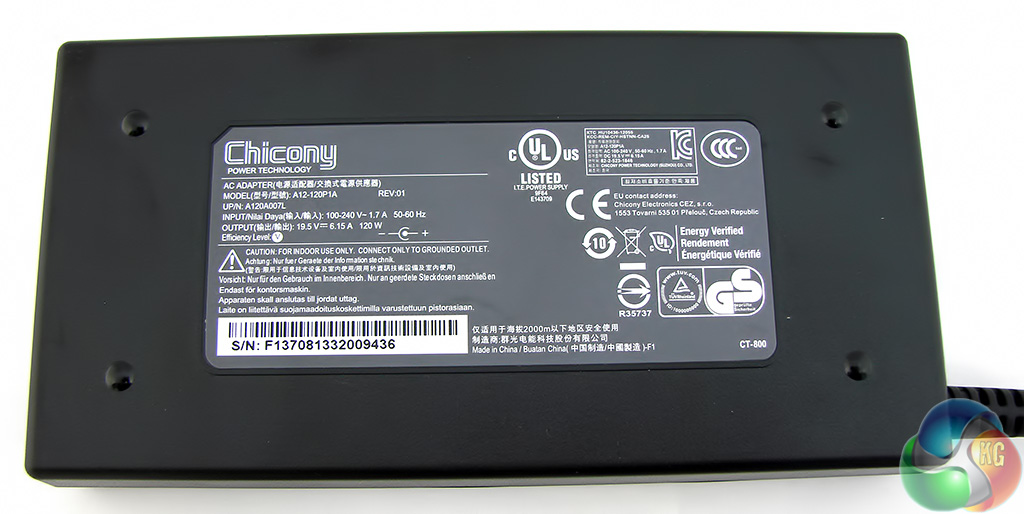
The 120W power brick is fairly flat in shape and measures 145mm x 73mm and 25mm thick. The power supply uses a clover leaf mains cord.
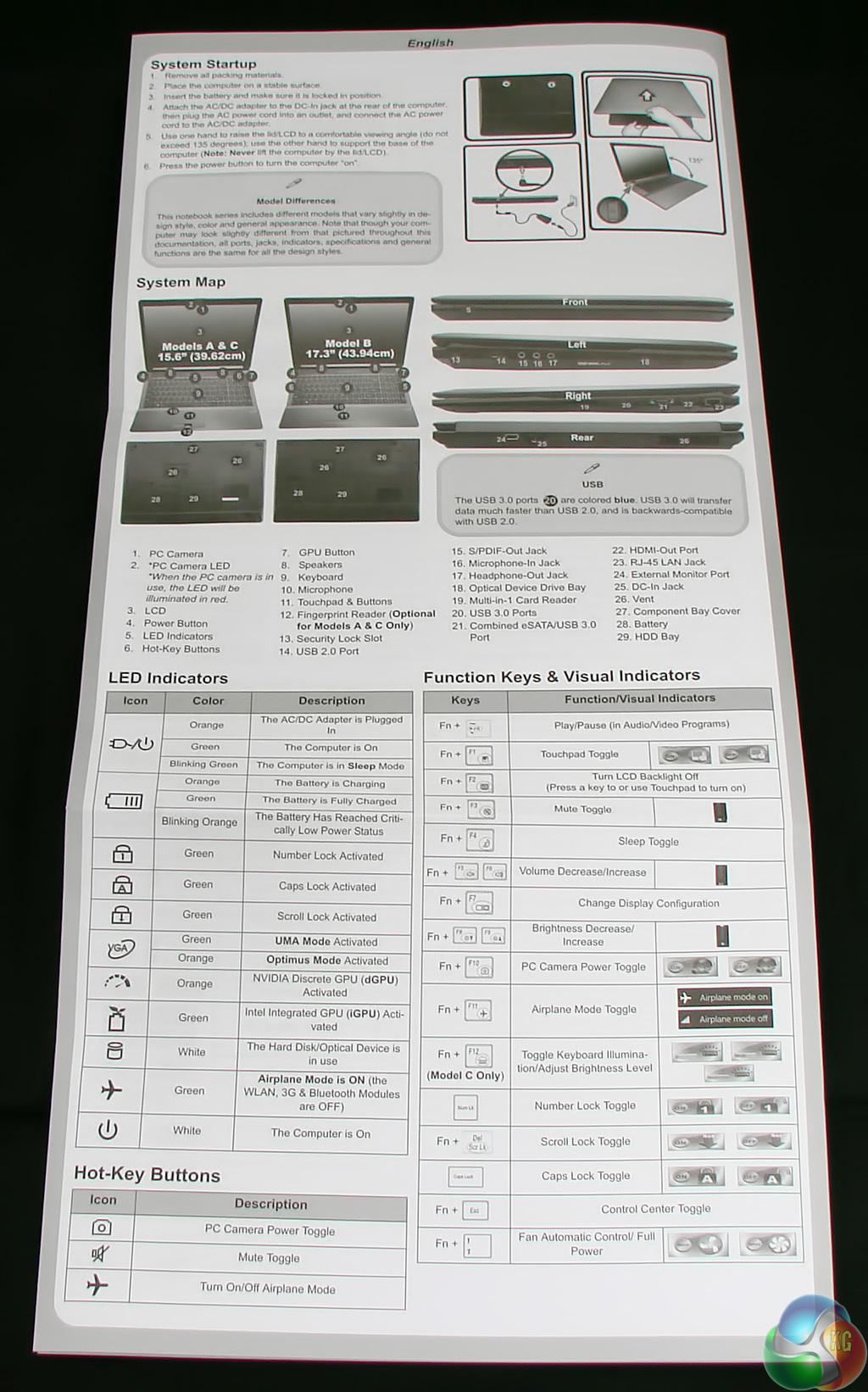
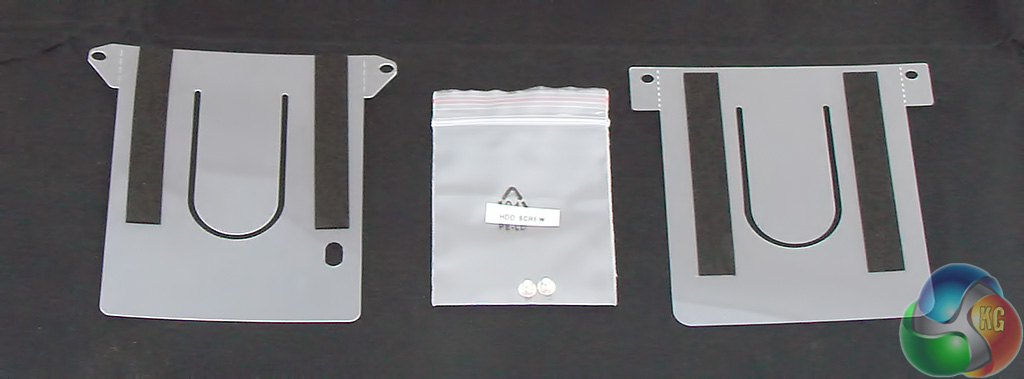

You don't get much in the way of accessories. The product guide covers three variants of this chassis (this 17.3-inch and two 15.6-inch versions). There are separate driver discs for Windows 8 and 8.1 and you get two plastic shims that you use to pack out the dual drive bays in the event you switch to a super slim hard drive.
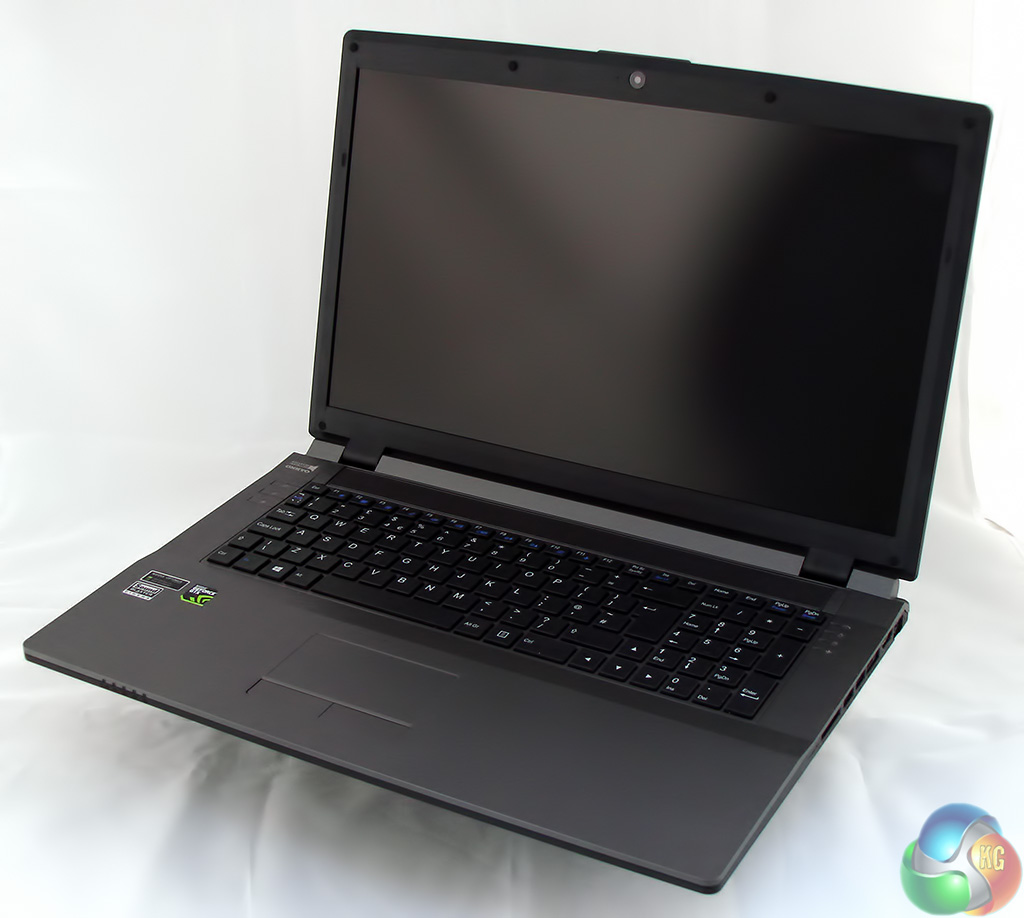
The laptop chassis is a Clevo W370ST. Visit the Clevo website to get more information on this, over here. You will see that a fair number of the decisions about the specification of the DinoPC Pegasus 17.3” GTX 765M were made before the chassis left the factory.
Specifically, the CPU socket accommodates a mobile Haswell, the chipset is Intel HM87, the screen is 17.3-inch in size, there are dual Intel HD 4600/GTX 765M graphics and you also get dual 2.5-inch SATA drive bays.
It is clear that Clevo intends that this chassis should be used as a gaming laptop. On the one hand we have nVidia GTX 765M graphics and on the other the Full HD screen comes in a choice of two resolutions (1,920×1,080 and 1,600×900) however there is no touch screen option.
The W370ST chassis is certified for either Windows 8 or 8.1 so you might expect touch screen to make an appearance. Instead the emphasis has been firmly placed on the quality of the screen without those touch screen gubbins getting in the way.
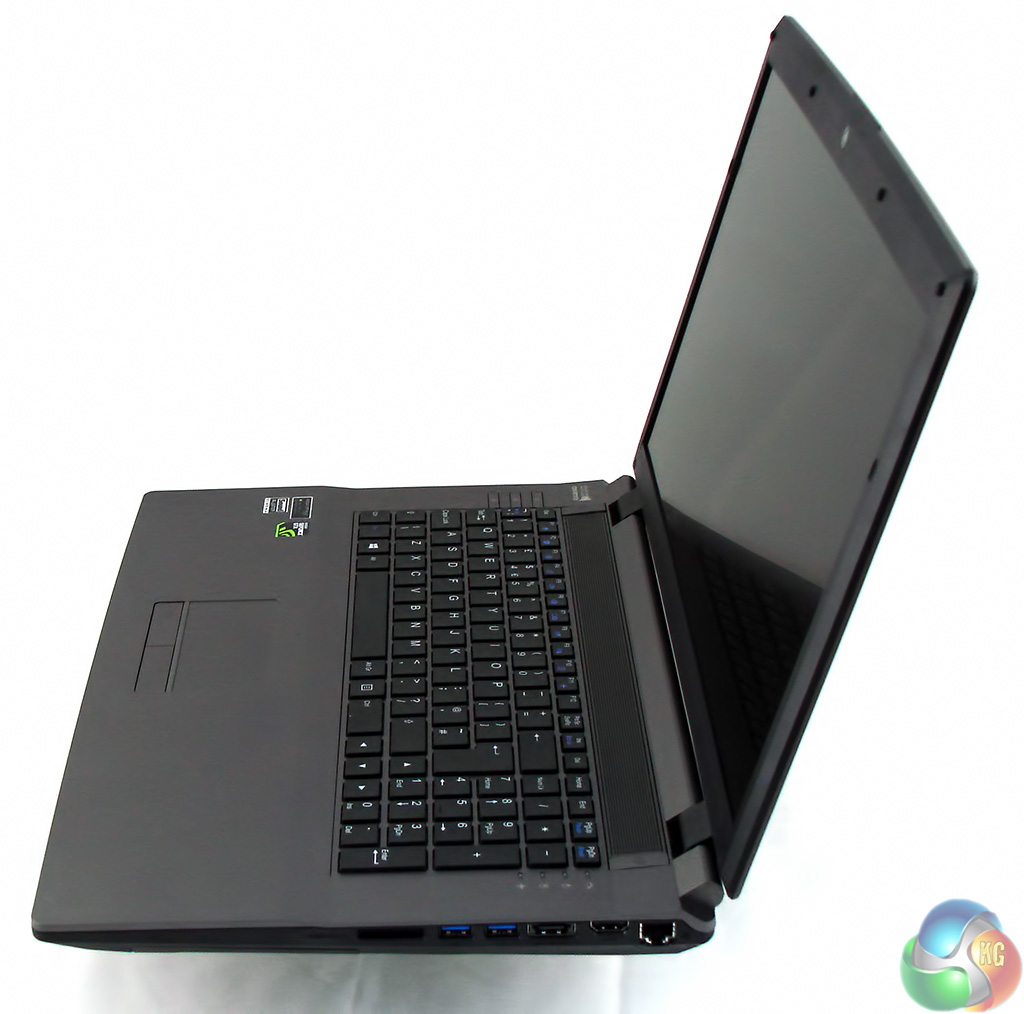
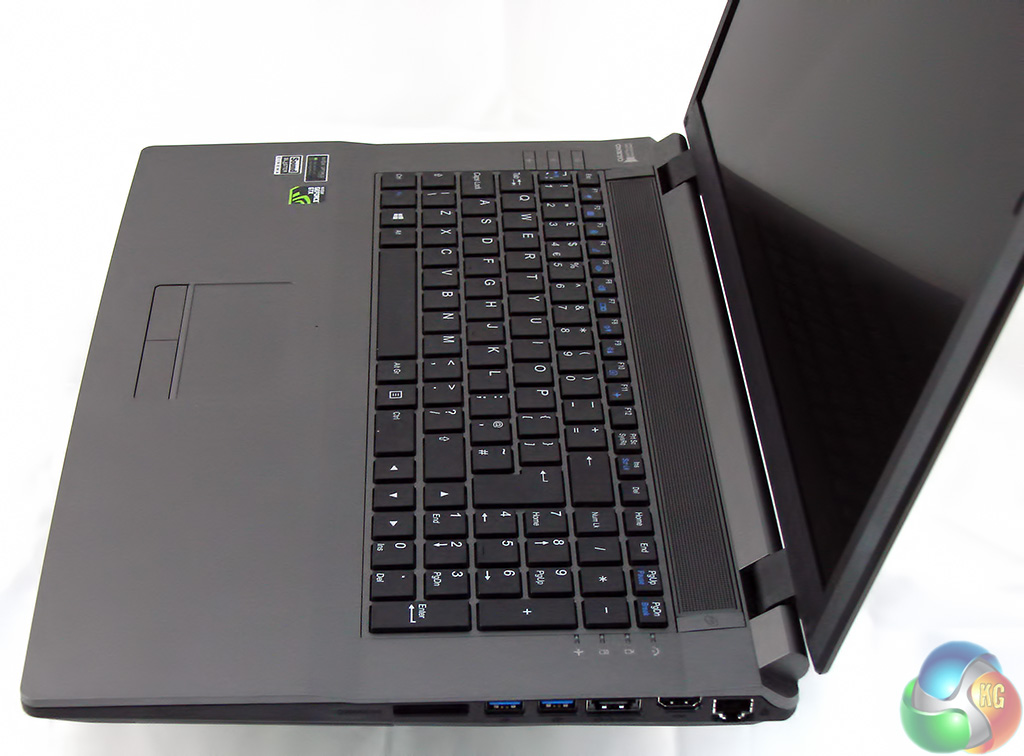
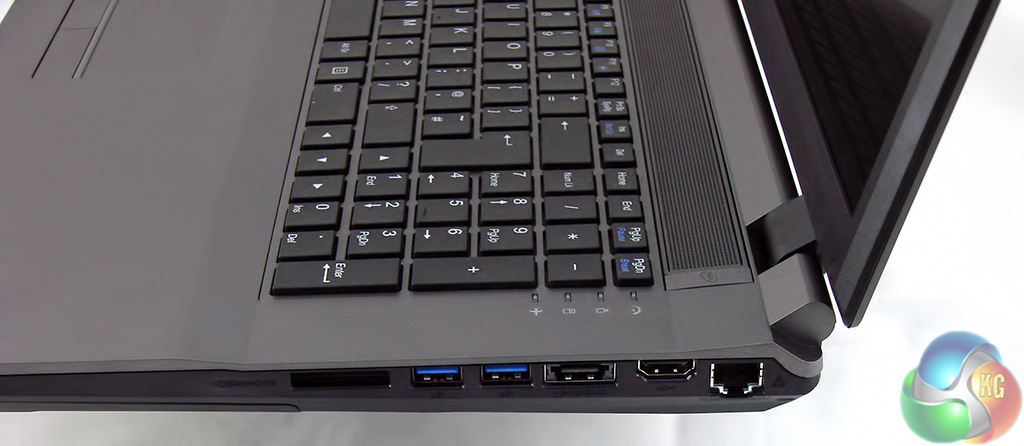
Taking a tour around the laptop we can see the ports and connectors are arranged on the two sides with nothing on the front and very little on the rear.
On the right hand side we have a 9-in1 card reader for SD and Memory Stick, two USB 3.0 ports, a combo USB 3.0/eSATA, HDMI and Gigabit Ethernet.
I wasn't entirely happy with the way these ports have been squeezed together as you may well struggle to use the ports simultaneously, unless you make a point of using slender cables, flash drives and what not.
If you have something ambitious in mind such as a TV tuner then it is best plugged into the USB 2.0 port on the other side.
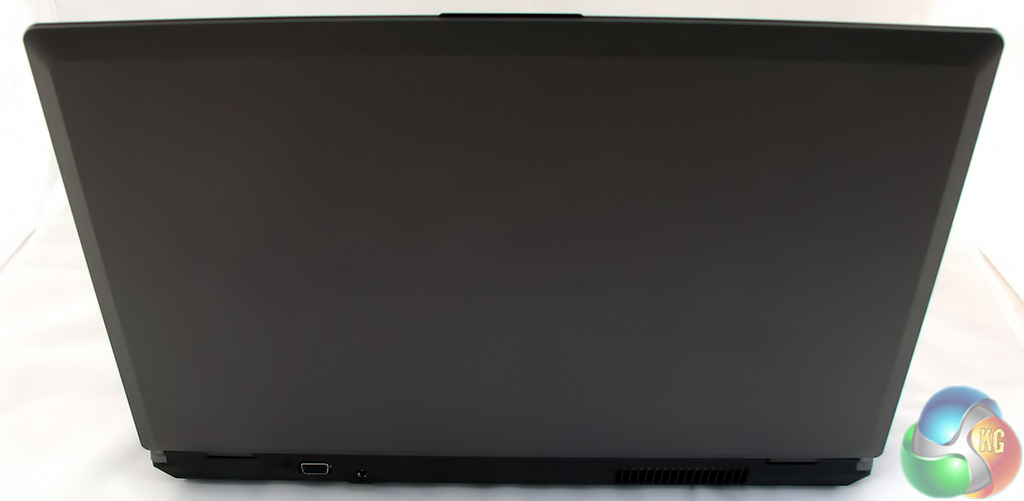

Turning to the rear there is a VGA output (which might be useful for an older model of projector) and the power jack.
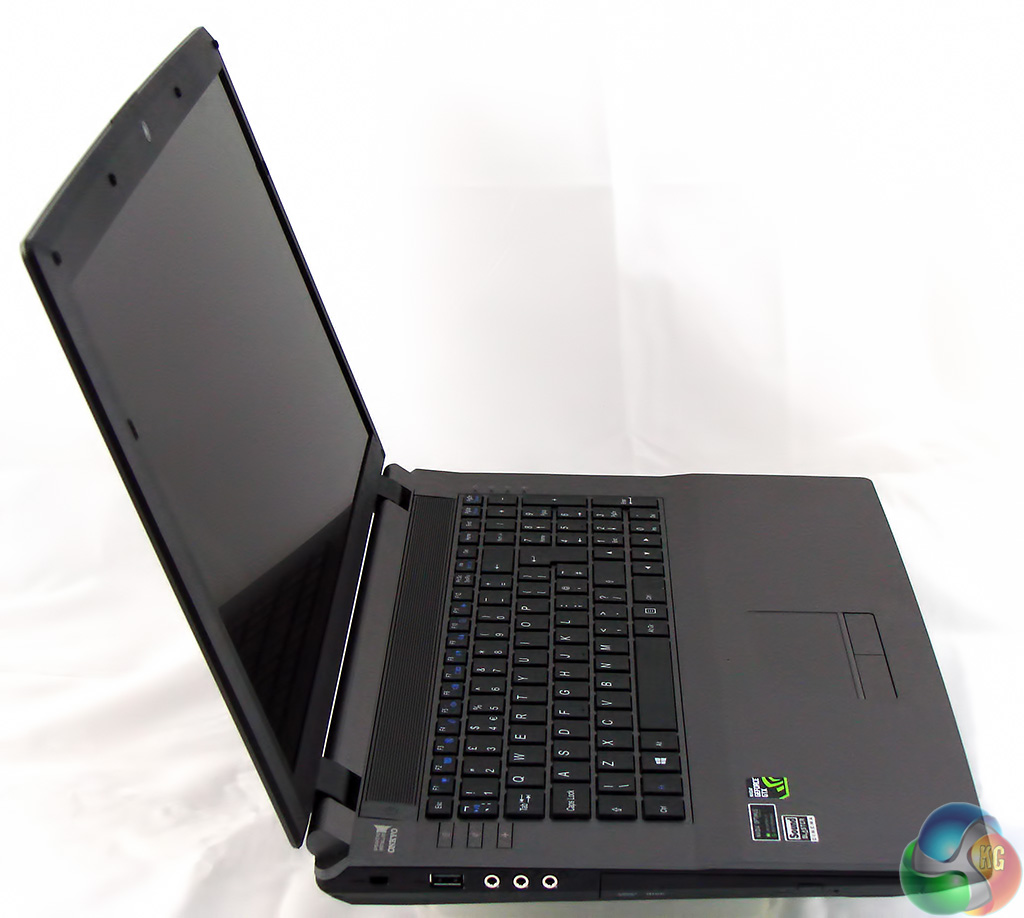
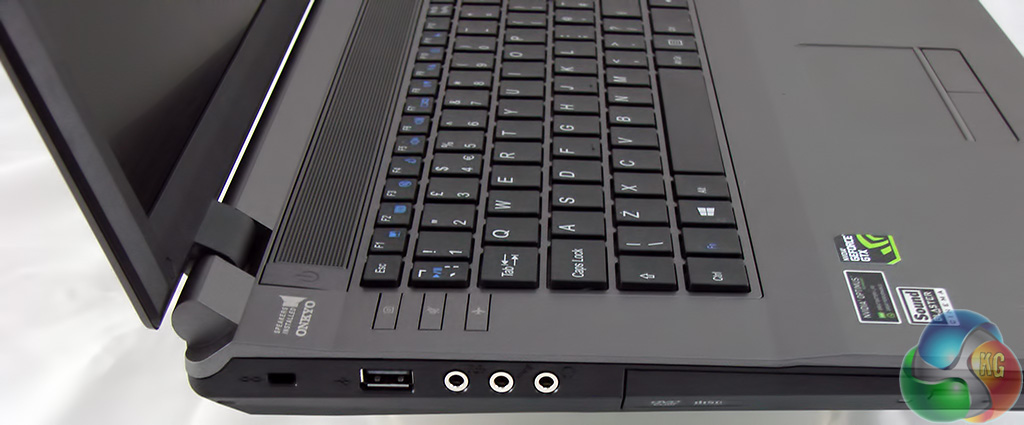
The left hand side sports a USB 2.0 port, a set of audio jacks and a slimline 8x DVD writer.
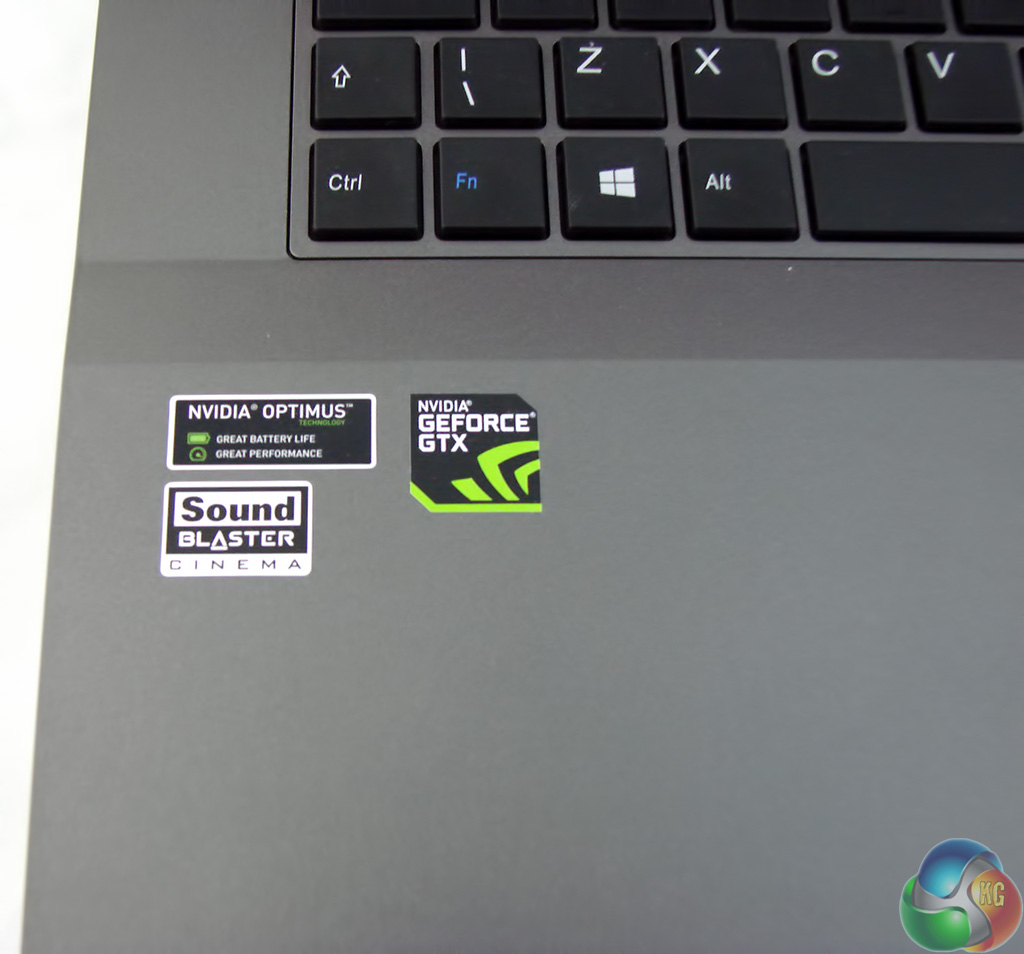
Features of note include the nVidia Optimus technology which switches between the GTX 765M graphics and Intel GPU. When the graphics load is low Intel handles the strain but when it ramps up the nVidia chip takes over.
The sticker that boasts about Sound Blaster Cinema might suggests that a Creative audio chip lies inside the chassis however this is not the case. Instead the hardware consists of a VIA HD audio chip and the Sound Blaster Cinema package is actually a piece of software that enhances the audio.
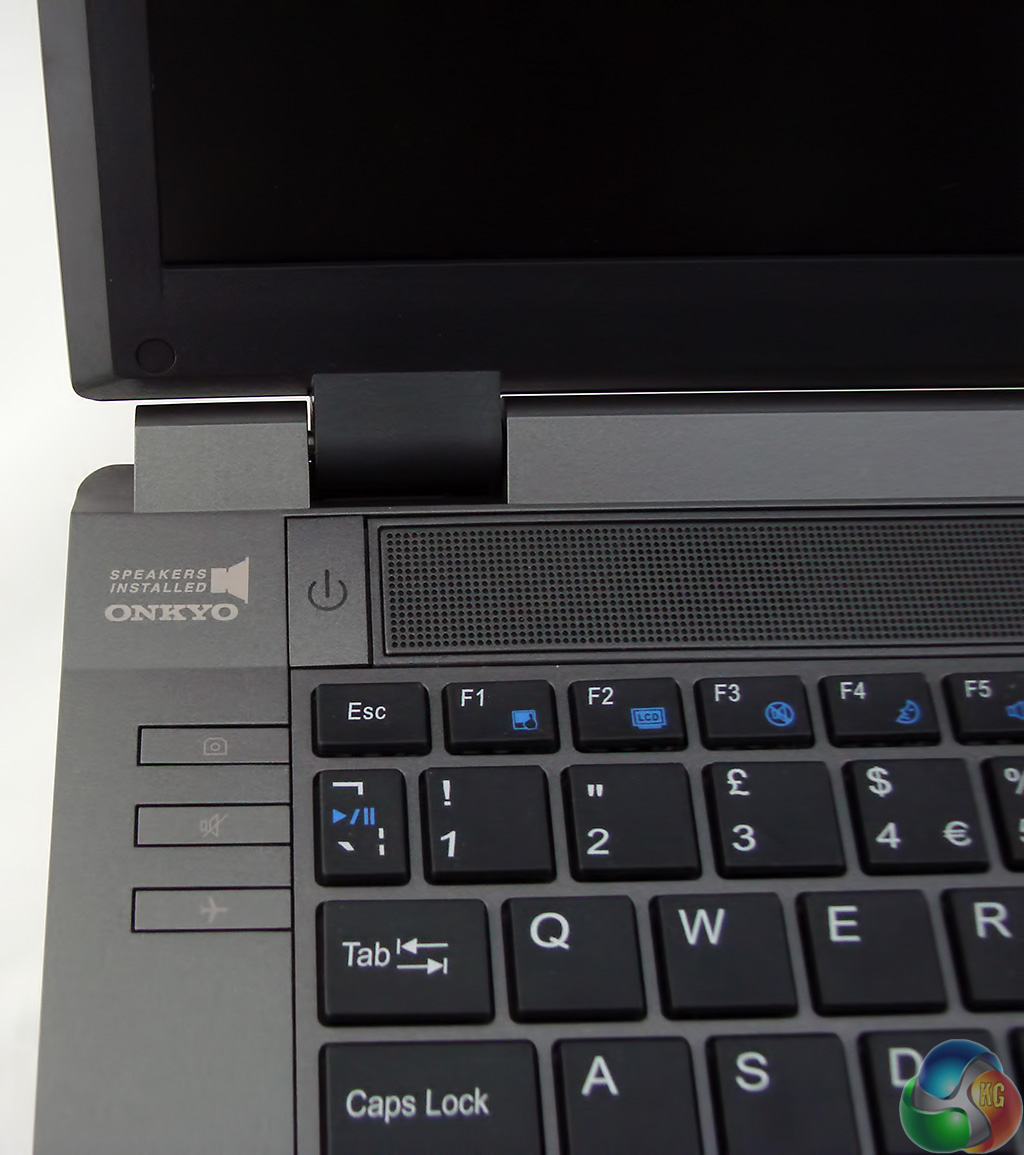
The other half of the audio package is a pair of 2W Onkyo speakers. When I first used the Pegasus laptop the audio was very quiet and even with the Windows volume slider cranked to the max the audio was barely adequate.
Then I looked in the VIA control panel where I found a second volume slider and once that was above 50 percent things improved hugely. I cannot honestly say the speakers rocked my world but they did a decent job.
With a decent set of headphones plugged in the audio is decent quality and packs a decent punch for gaming.
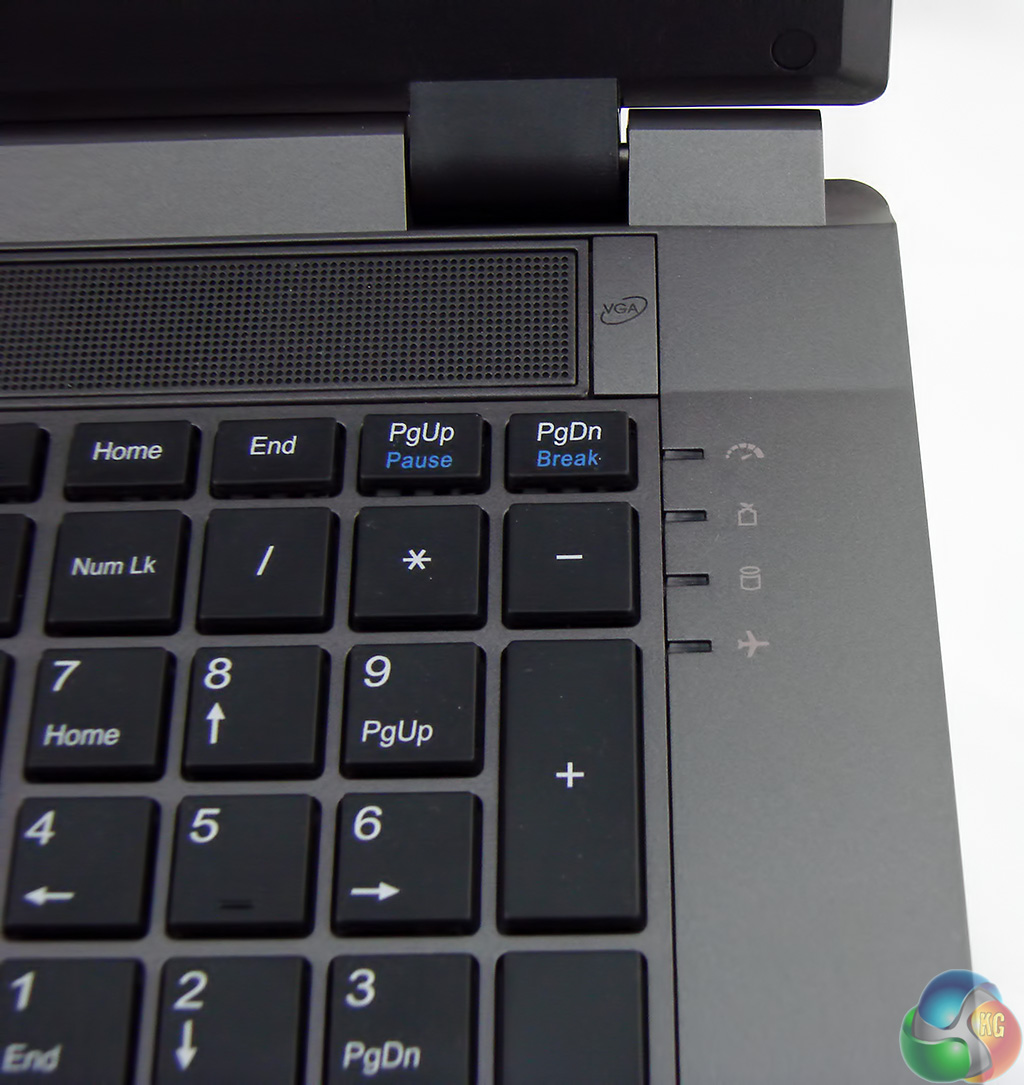

On the right side of the keyboard we have the usual activity LED'S as well as a button labelled VGA. This is so you can manually trigger the Optimus switch between nVidia and Intel graphics, should you feel the urge.

This is the part of the Pegasus that I like the least. Windows 8.1 does nothing for me and while it is passable on a touch controlled tablet or small laptop it has no obvious place on this 17.3-inch monster.
I am tempted to recommend that you pay DinoPC an extra £55.19 for the privilege of owning Windows 7, however this is personal taste.
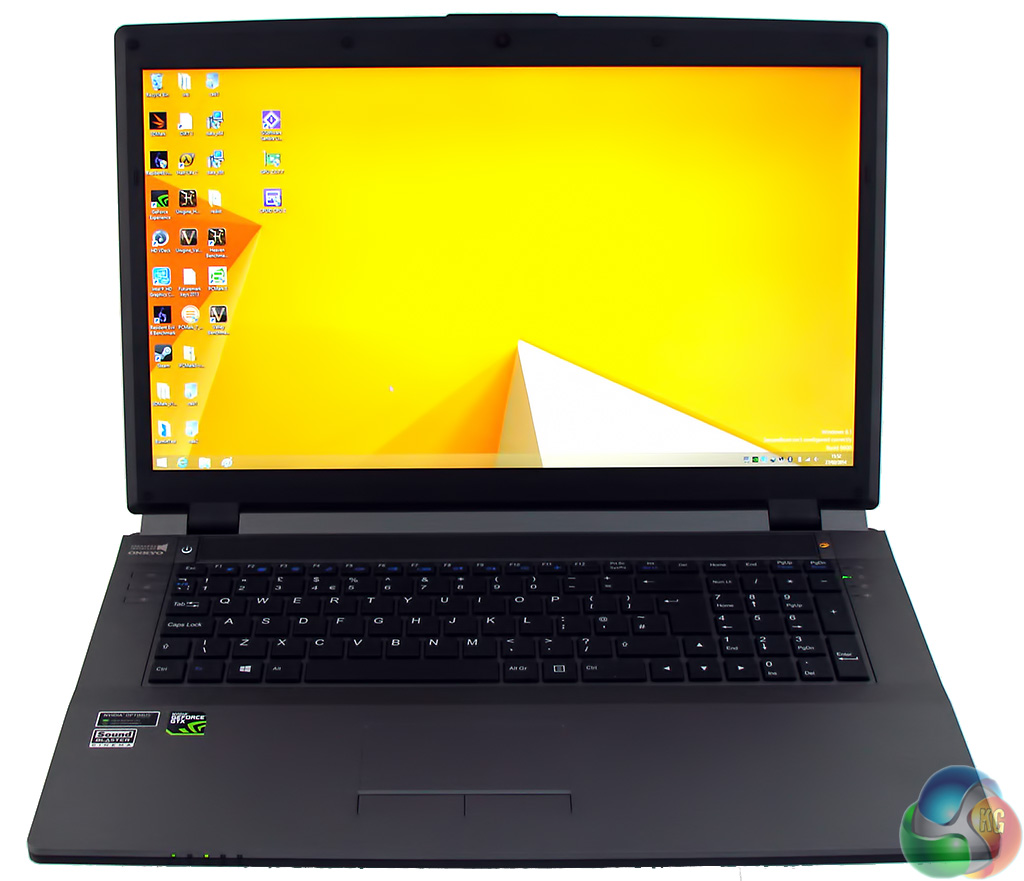
Better to simply click the desktop icon and switch to the old familiar GUI that we know and love.
Incidentally the yellow wallpaper that came with the sample laptop really shows off the screen to good effect. The colour is bright and clear with a punchy quality that really grabs your attention. In my opinion the screen is so bright that it is unnecessary to crank the brightness setting beyond 70 or 80 percent unless you are out in strong daylight.
While we're looking at the business face of the Pegasus, the keyboard feels very good to type on. The keys are all nicely separated and move with a lovely smooth movement. The wrist rest area is solid and the function keys are clearly marked. By contrast the touch pad is annoying and while the multi touch action works moderately well I found myself regularly activating the Windows 8.1 controls at the sides of the screen.
Plugging in a Wi-Fi mouse made the experience much, much better.
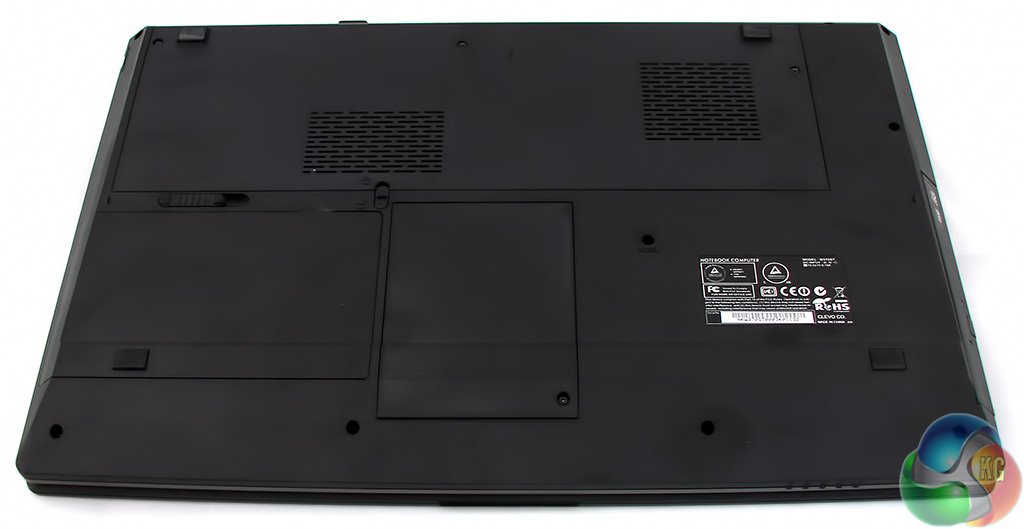
The bottom of the laptop may look dull however this is far from the case.
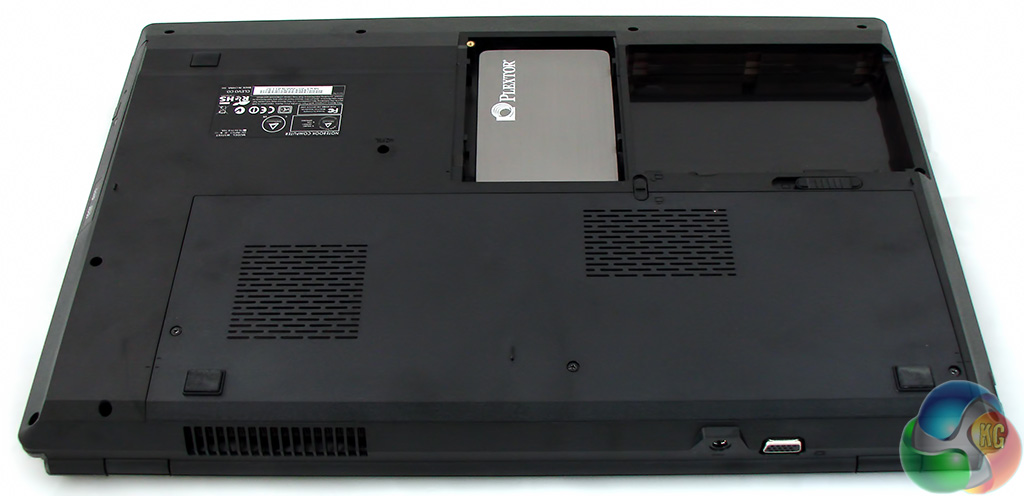
DinoPC has installed the Plextor SSD in the bay that sits in the centre of the chassis towards the front edge. The default specification for this laptop includes a Corsair Force GS SSD with SandForce SF-2200 controller and the Plextor PX-128M5S with Marvell 9174 we received would cost an extra £10.
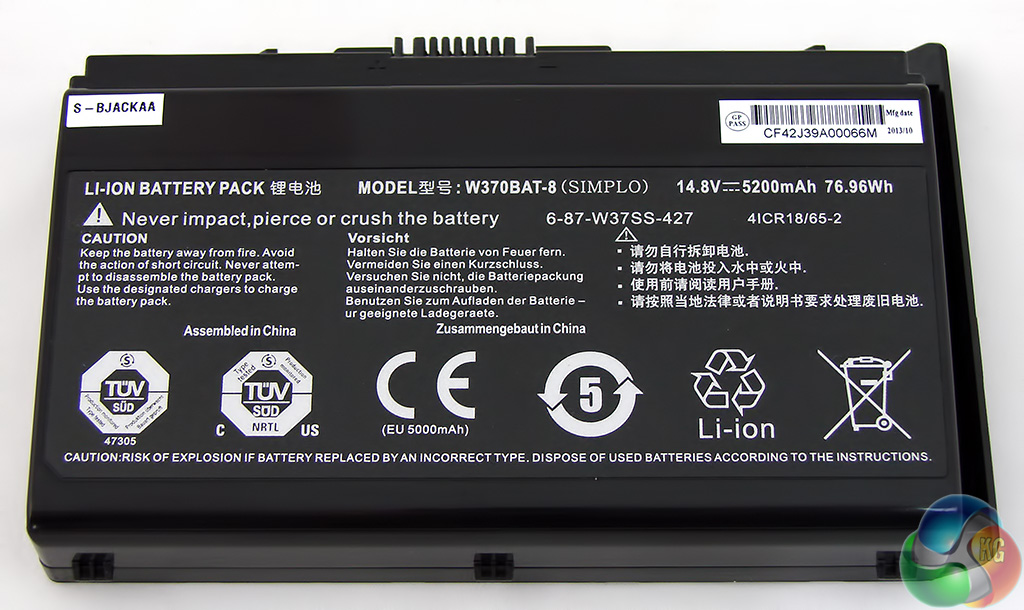
The 5200mAh battery (rated at 76.96Wh) sits in the bay next to the SSD so it lives at the front of the PC and not at the rear where you might expect to find it.
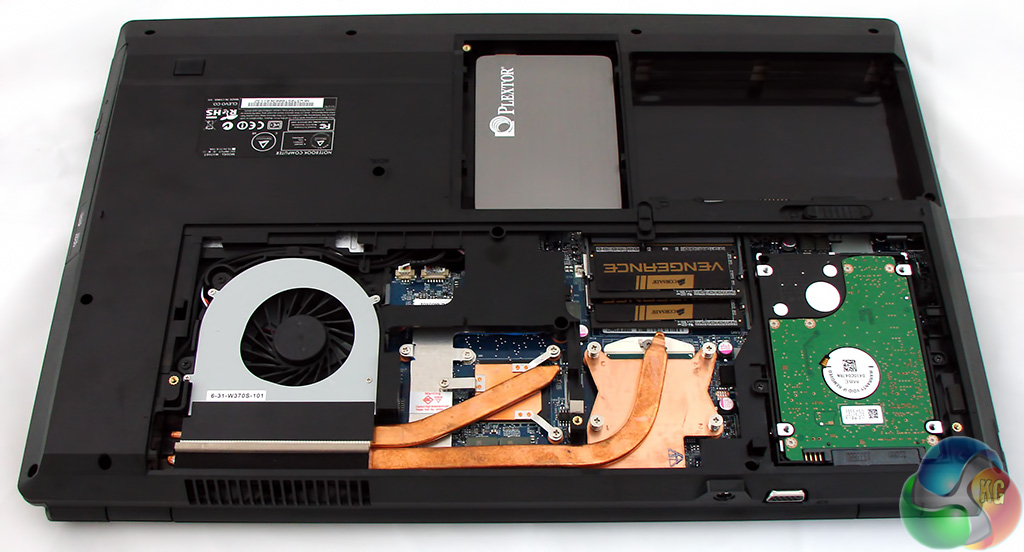
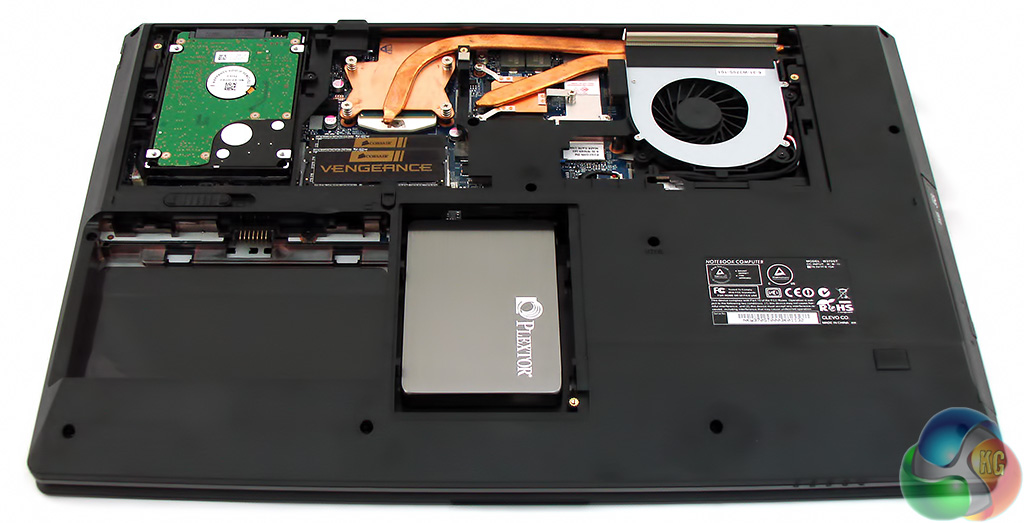
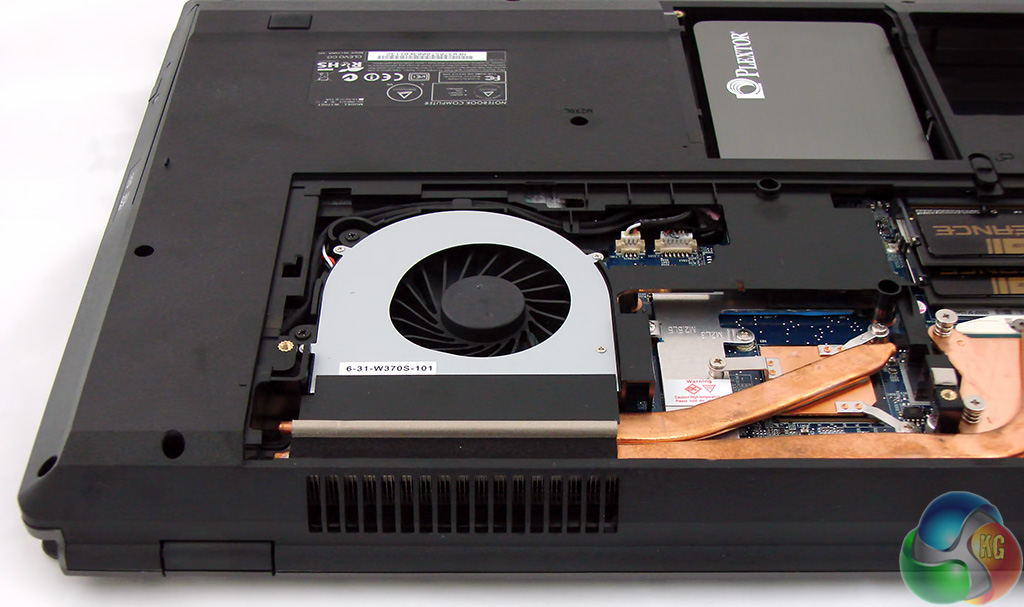

With the main cover removed from the bottom of the Pegasus you can clearly see the thinking behind the cooling system. The 1TB data drive sits to one side in its own compartment which leaves plenty of room for the CPU, GPU, DDR3 RAM and the heatpipes that connect the copper heatsinks to the exhaust blower.
No doubt this design has been assisted by the size of the chassis but the simplicity of the design is superb and there are no obstructions to get between the hot components and all that lovely cool air.
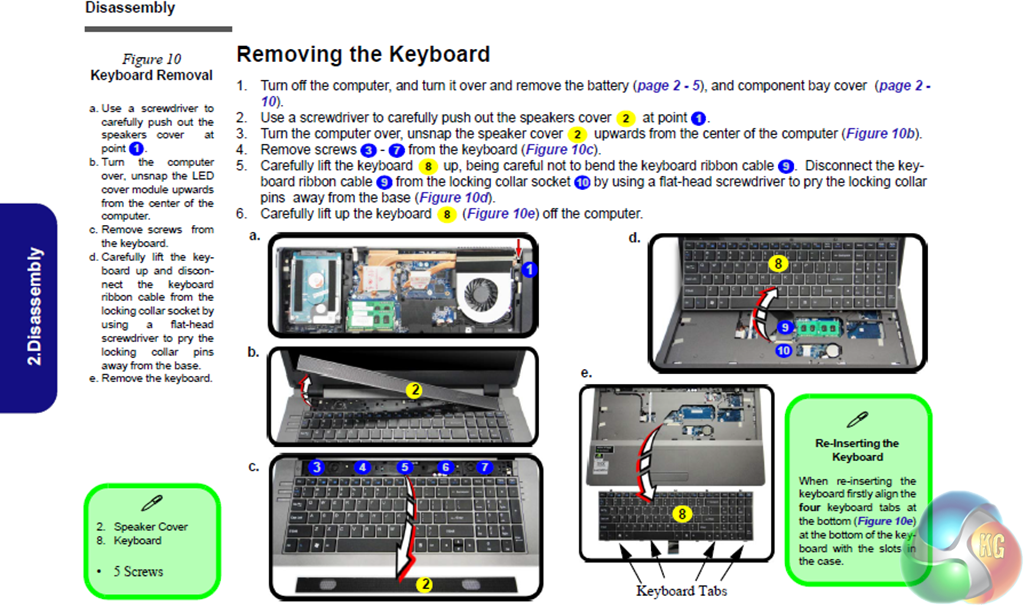
Clevo describes the chassis as having three DDR3 memory slots. I could only see two so dropped them a line to raise a query. They replied with an illustration that shows the third slot is located under the keyboard, which came as something of a surprise.
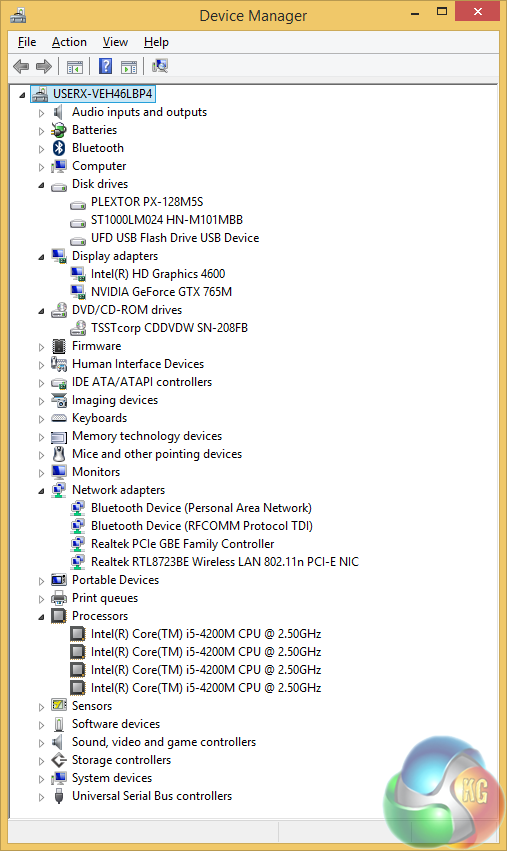
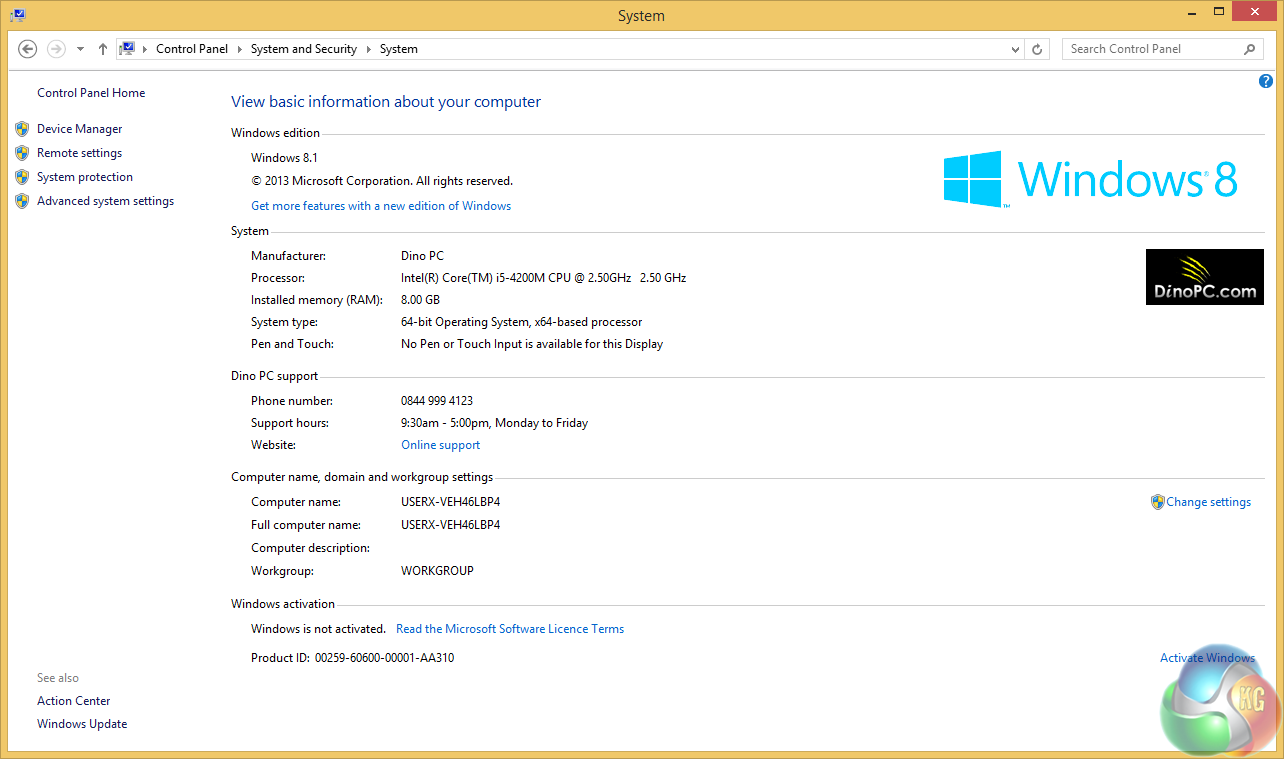
Here are listings from Windows Device Manager and System Properties that show the main pieces of hardware in this model.
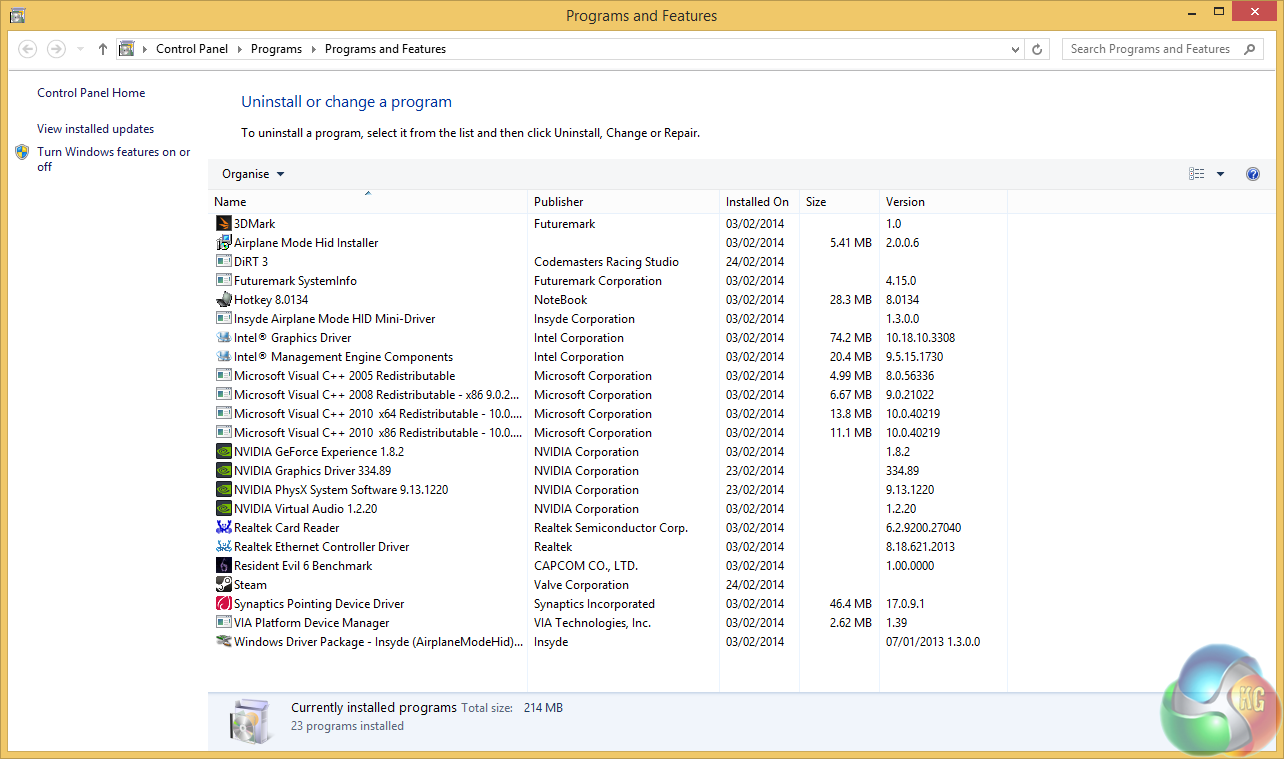
DinoPC states that it doesn't install any bloatware on its systems and this screen grab proves the point nicely.
You can look at this another way, which is that the chassis is a generic barebones from Clevo and the installation of Windows 8.1 is a very basic installation, so there is no obvious value added by DinoPC. The burning question is how well it performs.
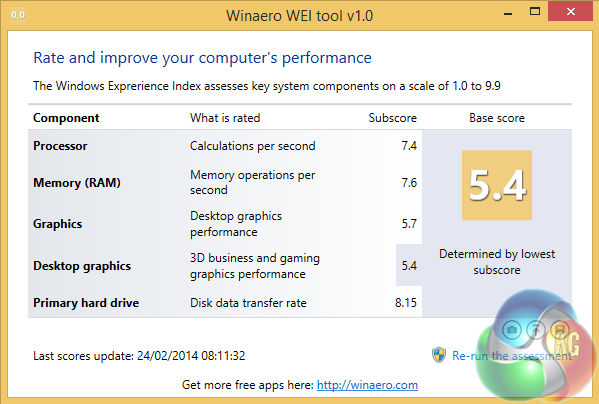
Microsoft has mucked up the Windows Experience Index in Windows 8.1 however the figures can be retrieved with a bit of work.
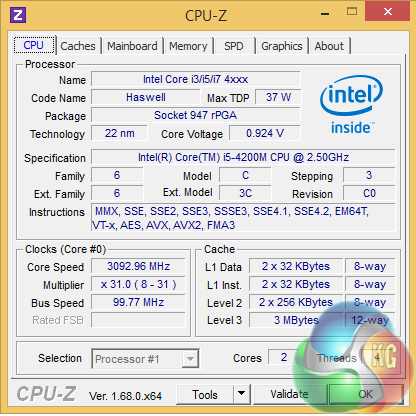
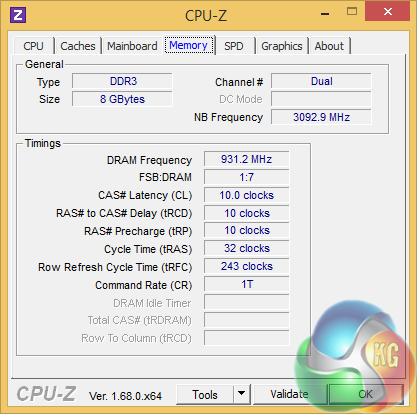
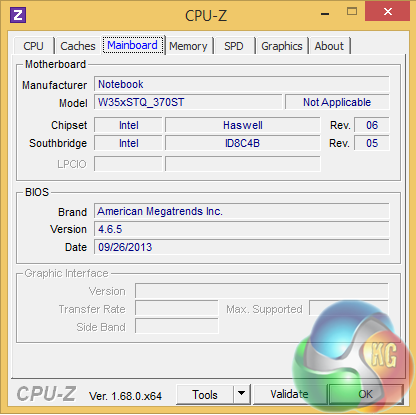
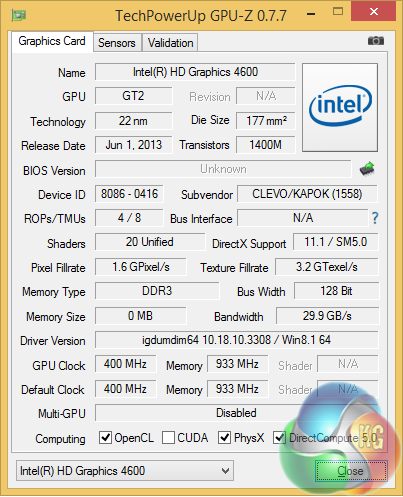
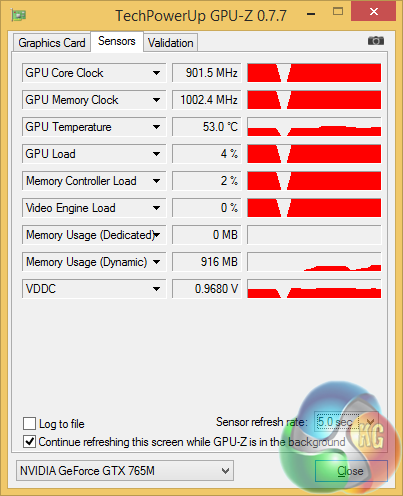
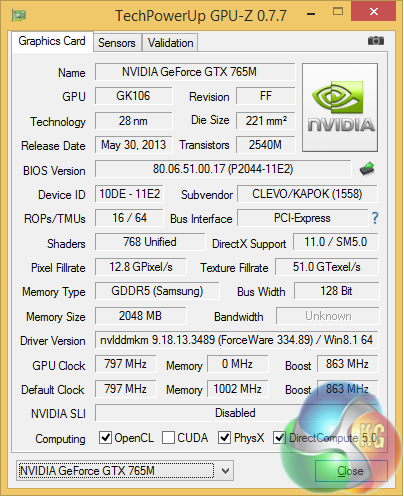
Here's a break down of the CPU, memory and GPU hardware which is all familiar stuff and looks exactly the way you would expect.
3DMark is an essential tool used by millions of gamers, hundreds of hardware review sites and many of the world’s leading manufacturers to measure PC gaming performance.
Futuremark say “Use it to test your PC’s limits and measure the impact of overclocking and tweaking your system. Search our massive results database and see how your PC compares or just admire the graphics and wonder why all PC games don’t look this good.
To get more out of your PC, put 3DMark in your PC.”

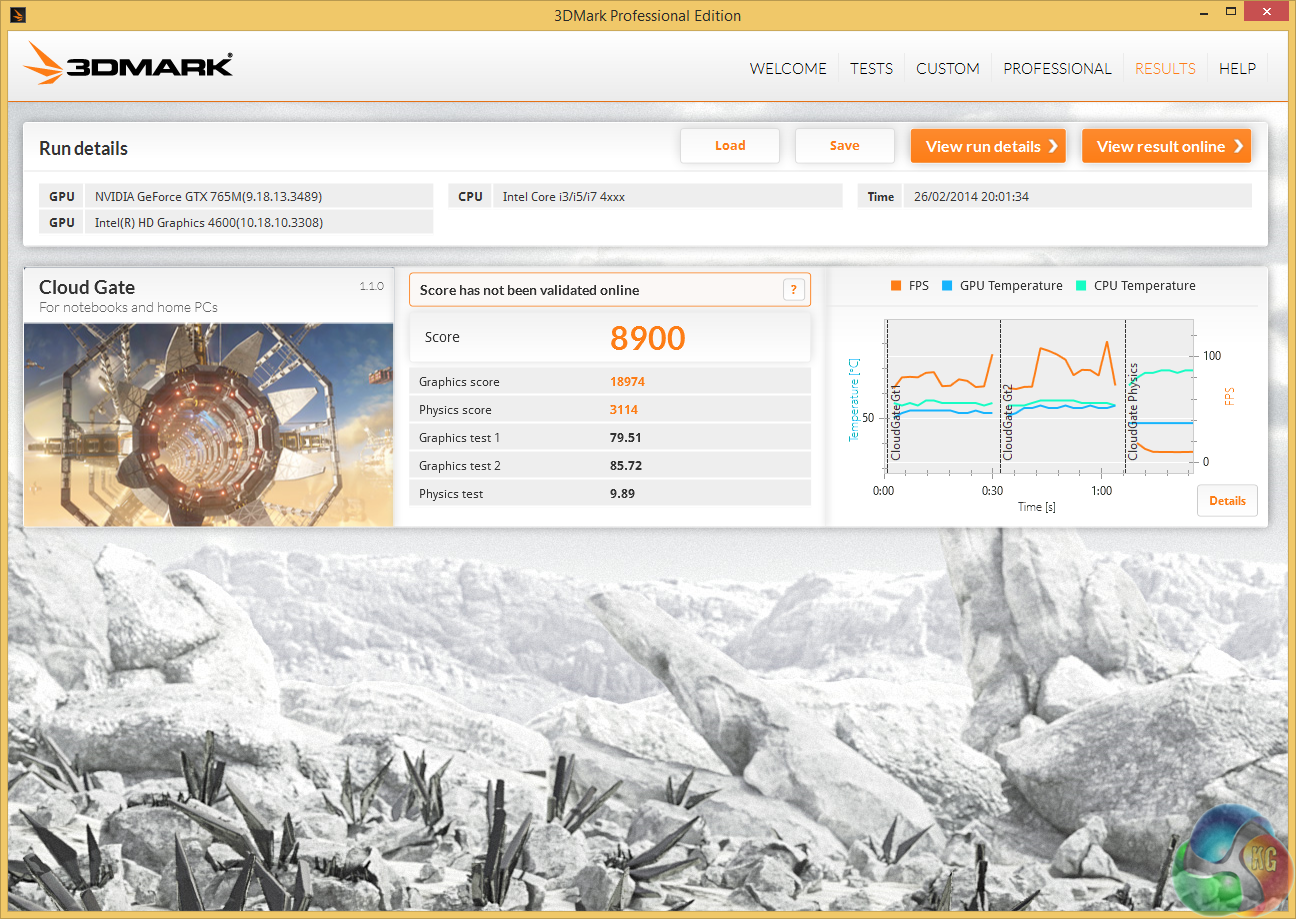

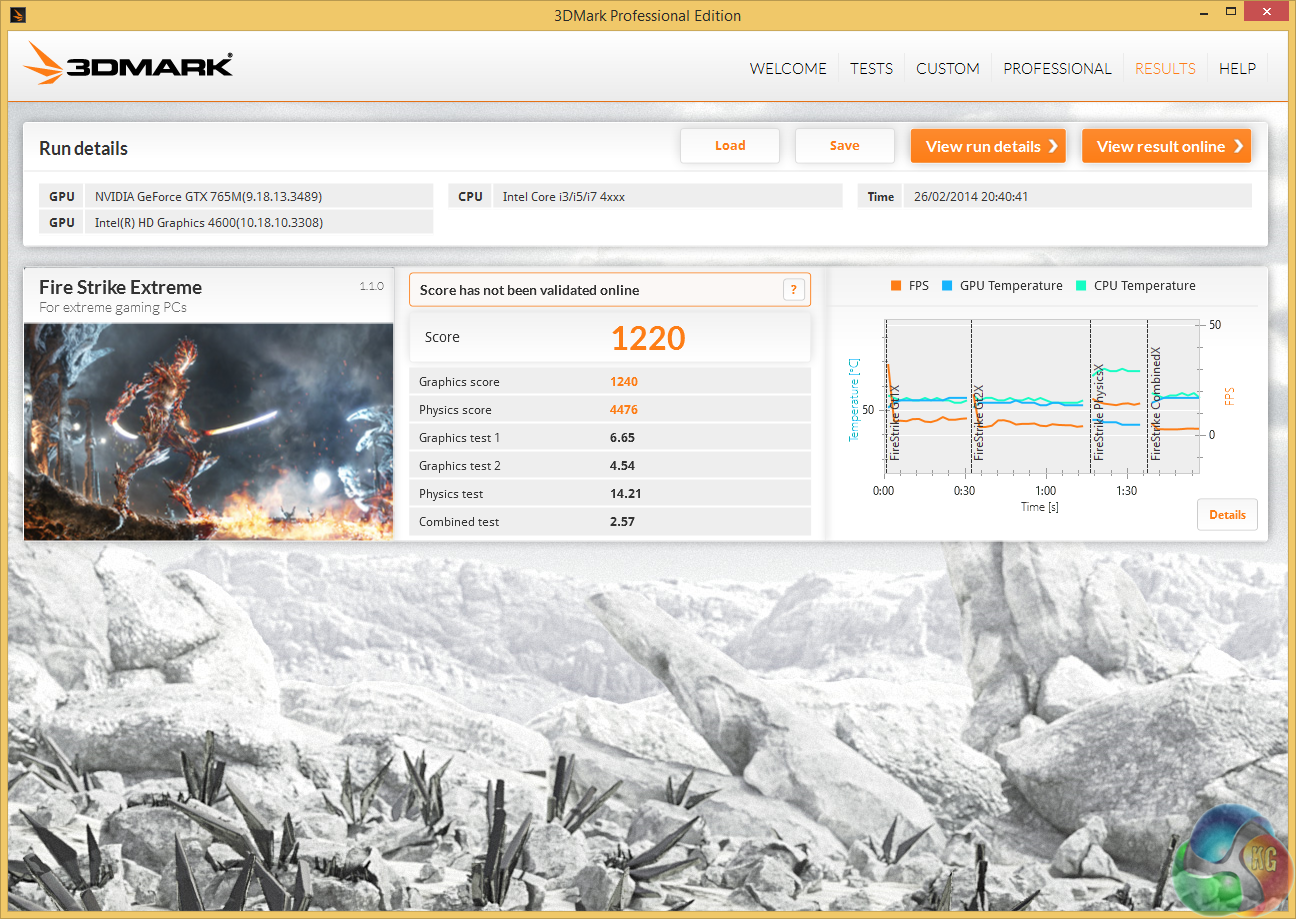
The Pegasus hauls along at an impressive rate in 3D Mark and delivers scores that match a mid-range PC.
The point of reference for the DinoPC Pegasus is the MSI GS70 2OD-Stealth that also measures in at 17.3-inches and uses the same nVidia GTX 765M graphics. The main difference is that the MSI has a pair of SSD in RAID and is powered by a Core i7 whereas the DinoPC has to limp along with a Core i5.
You get a clear comparison in 3D Mark Fire Strike where the MSI scored 2,238 and the DinoPC scored 2,493. In the Physics section of the benchmark the MSI scored 8,971 while the DinoPC achieved 4,466 (half the CPU cores, half the score) however that didn't have an impact on the overall score so both laptops scored equally well,
While I was benchmarking the DinoPC it quickly became apparent that the processor would put the cooling system under a modest amount of load. The fan would speed up audibly in quick bursts and then slow down once the CPU was under control.
By contrast the GTX 765M graphics were able to work the cooling rather harder and the fan became relatively noisy however the sound level was always perfectly bearable when the audio was coming through the speakers.
PCMark 8 is the latest version in our popular series of PC benchmarking tools. Improving on previous releases, PCMark 8 includes battery life measurement tools and new tests using popular applications from Adobe and Microsoft. Whether you are looking for long battery life, or maximum power, PCMark 8 helps you find the devices that offer the perfect combination of efficiency and performance for your needs.
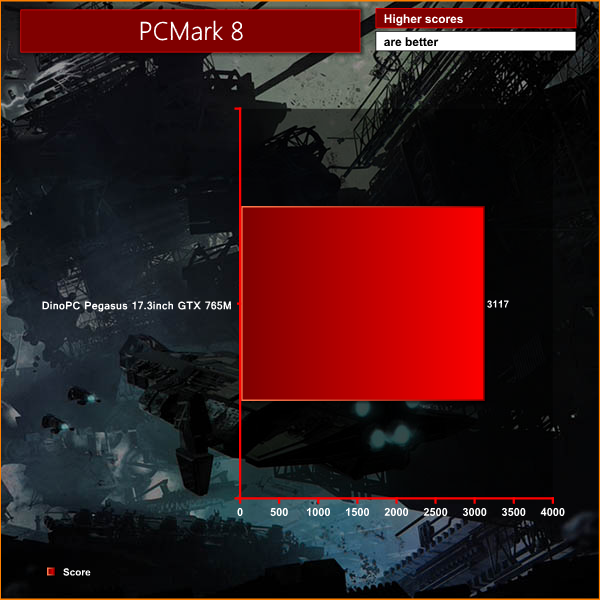
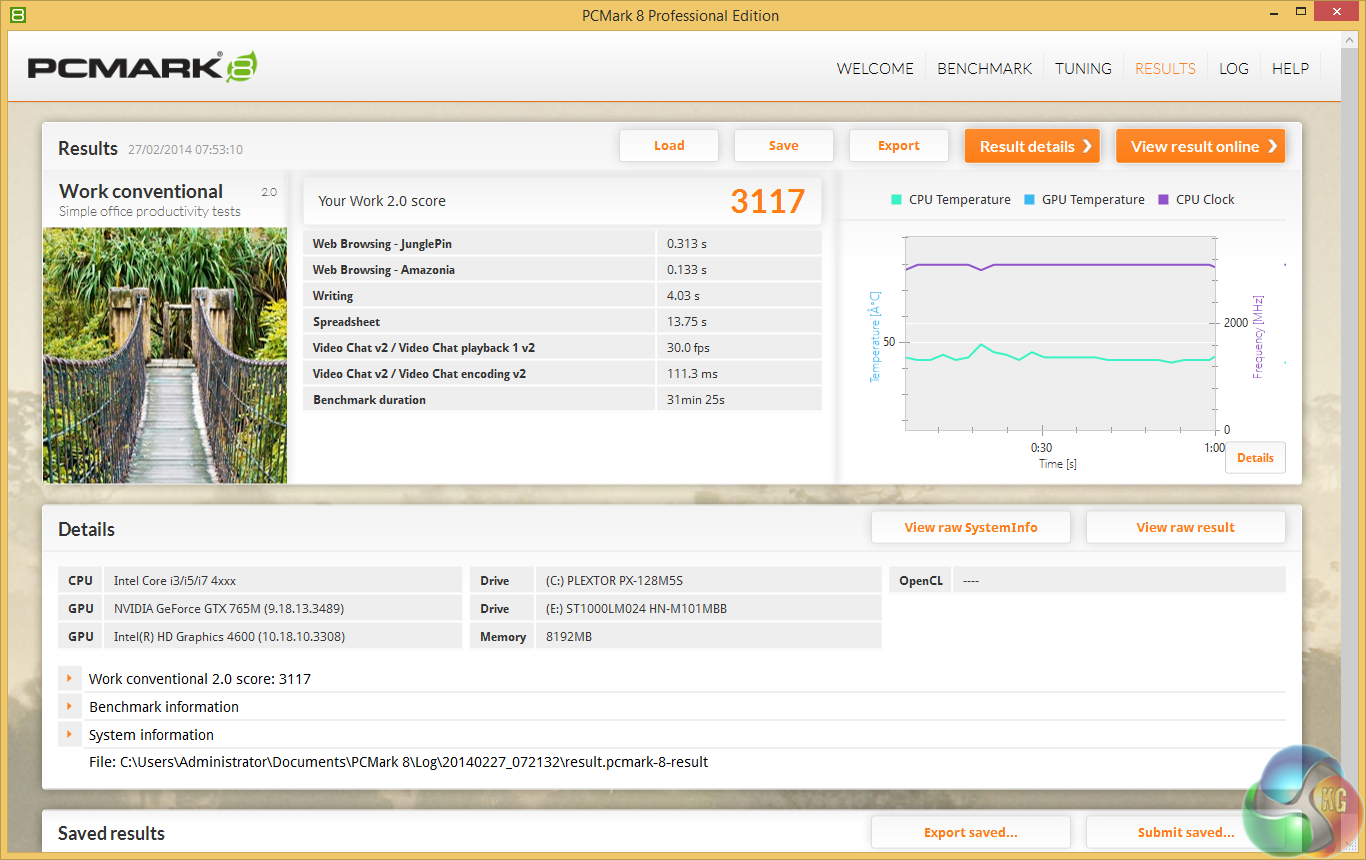
In PC Mark 8 Work the DinoPC scored 3,117 marks which compares rather well to the much more expensive MSI GS70 2OD-Stealth that scored 3,878 marks.
SiSoftware Sandra (the System ANalyser, Diagnostic and Reporting Assistant) is an information & diagnostic utility. It should provide most of the information (including undocumented) you need to know about your hardware, software and other devices whether hardware or software.
Sandra is a (girl’s) name of Greek origin that means “defender”, “helper of mankind”. We think that’s quite fitting.
It works along the lines of other Windows utilities, however it tries to go beyond them and show you more of what’s really going on. Giving the user the ability to draw comparisons at both a high and low-level. You can get information about the CPU, chipset, video adapter, ports, printers, sound card, memory, network, Windows internals, AGP, PCI, PCI-X, PCIe (PCI Express), database, USB, USB2, 1394/Firewire, etc.
Native ports for all major operating systems are available:
- Windows XP, 2003/R2, Vista, 7, 2008/R2 (x86)
- Windows XP, 2003/R2, Vista, 7, 2008/R2 (x64)
- Windows 2003/R2, 2008/R2* (IA64)
- Windows Mobile 5.x (ARM CE 5.01)
- Windows Mobile 6.x (ARM CE 5.02)
All major technologies are supported and taken advantage of:
- SMP – Multi-Processor
- MC – Multi-Core
- SMT/HT – Hyper-Threading
- MMX, SSE, SSE2, SSE3, SSSE3, SSE 4.1, SSE 4.2, AVX, FMA – Multi-Media instructions
- GPGPU, DirectX, OpenGL – Graphics
- NUMA – Non-Uniform Memory Access
- AMD64/EM64T/x64 – 64-bit extensions to x86
- IA64 – Intel* Itanium 64-bit

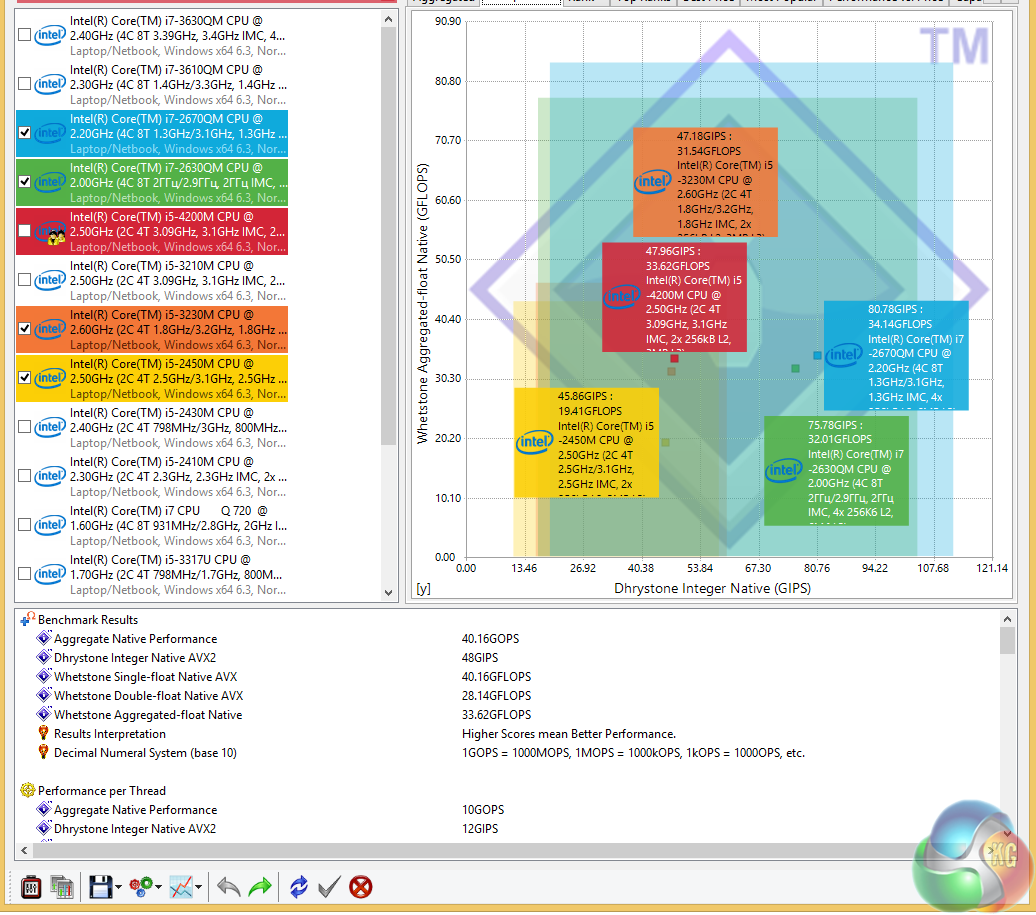
The Core i5 CPU performed exactly as well as you would expect in Sandra although it got monstered by the Core i7 in the MSI GS70 2OD-Stealth. This is a good CPU but not a powerhouse.
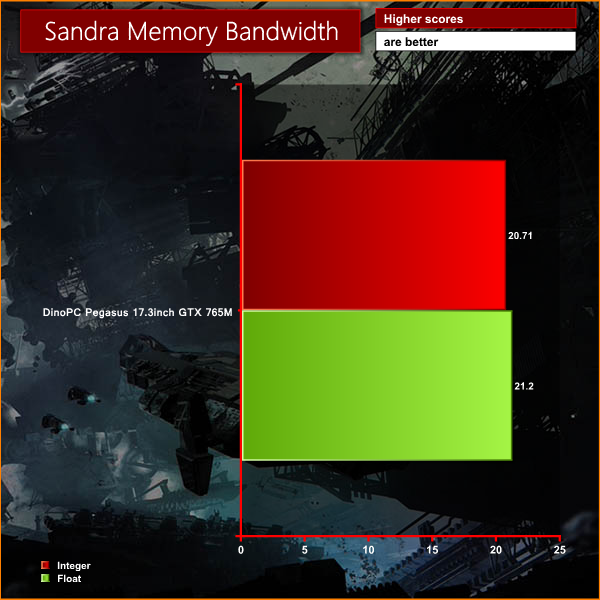
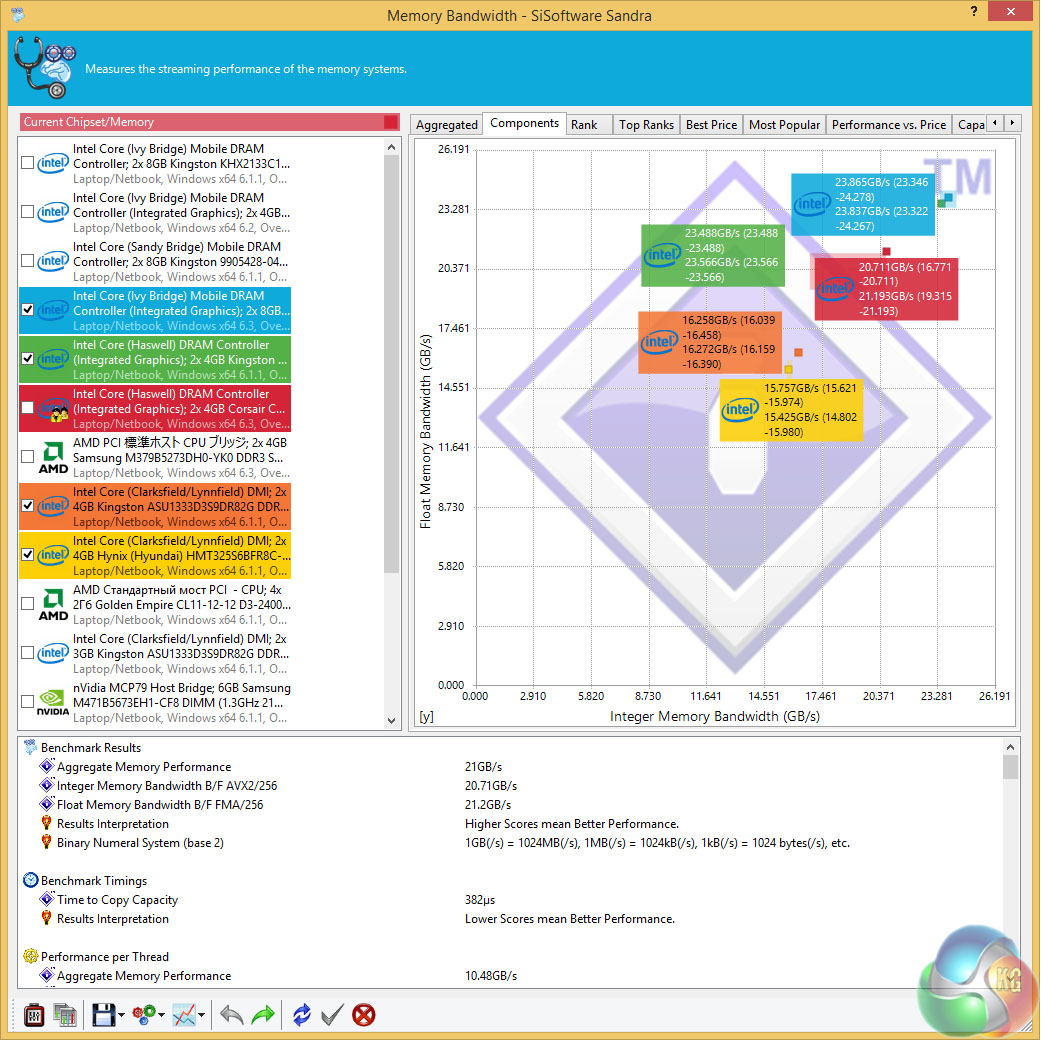
By contrast the 8GB of dual channel DDR3 steamed along and 21GB/sec is all the bandwidth you'll need for most applications. Note, the memory in the review laptop runs at 1866MHz while the spec on DinoPC's website lists 1,600MHz RAM.
Unigine provides an interesting way to test hardware. It can be easily adapted to various projects due to its elaborated software design and flexible toolset. A lot of their customers claim that they have never seen such extremely-effective code, which is so easy to understand. We tested at 1920×1080.
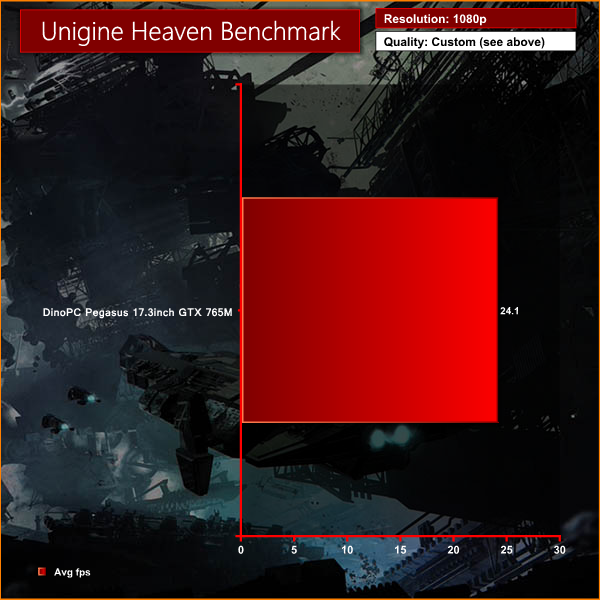
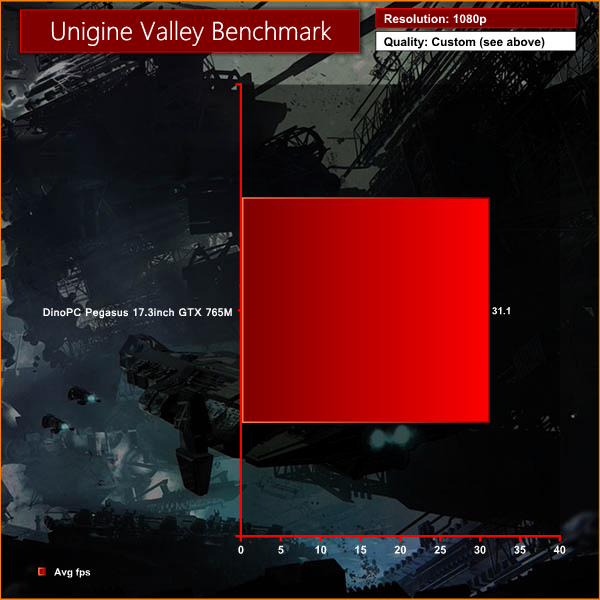
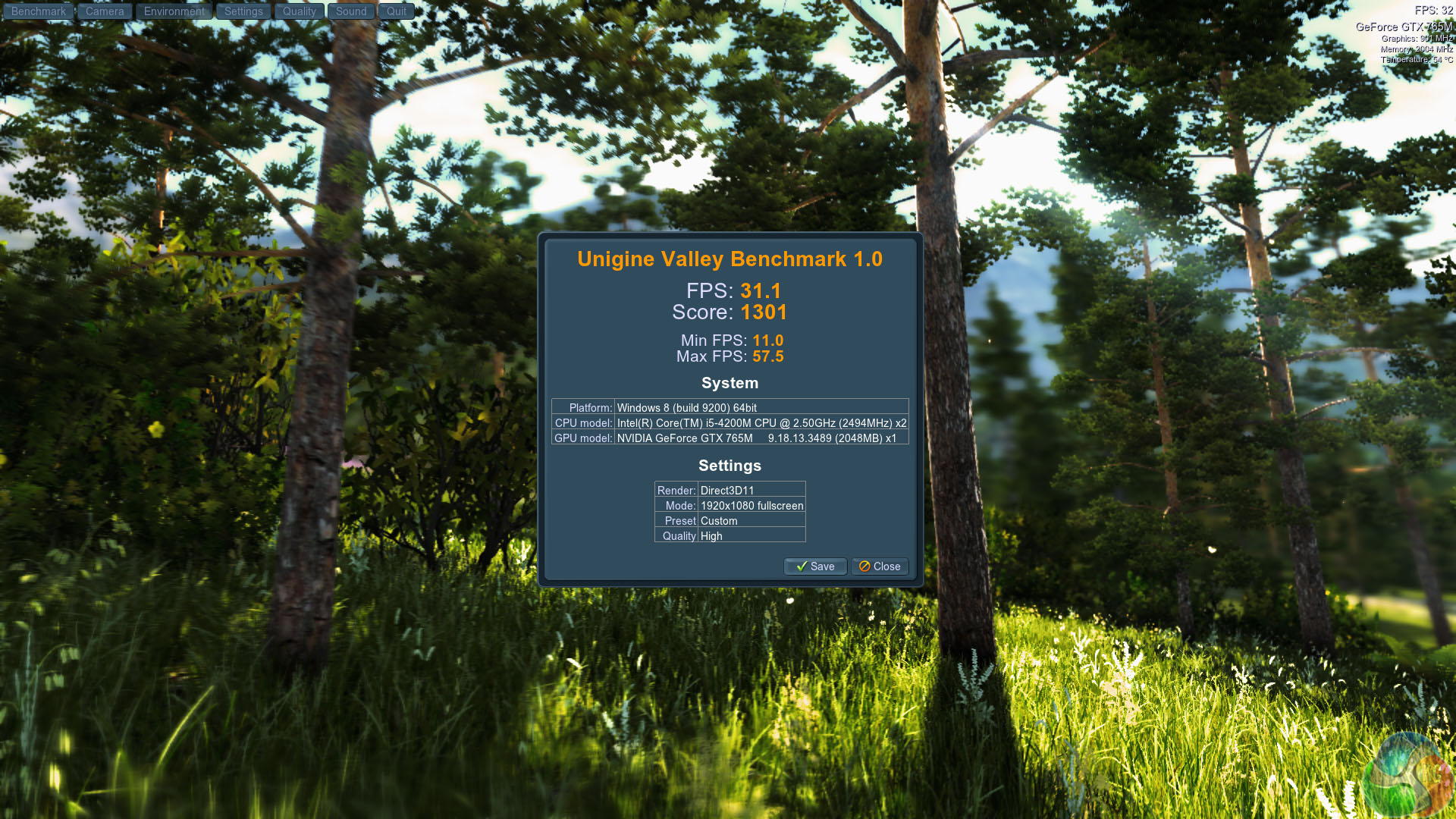
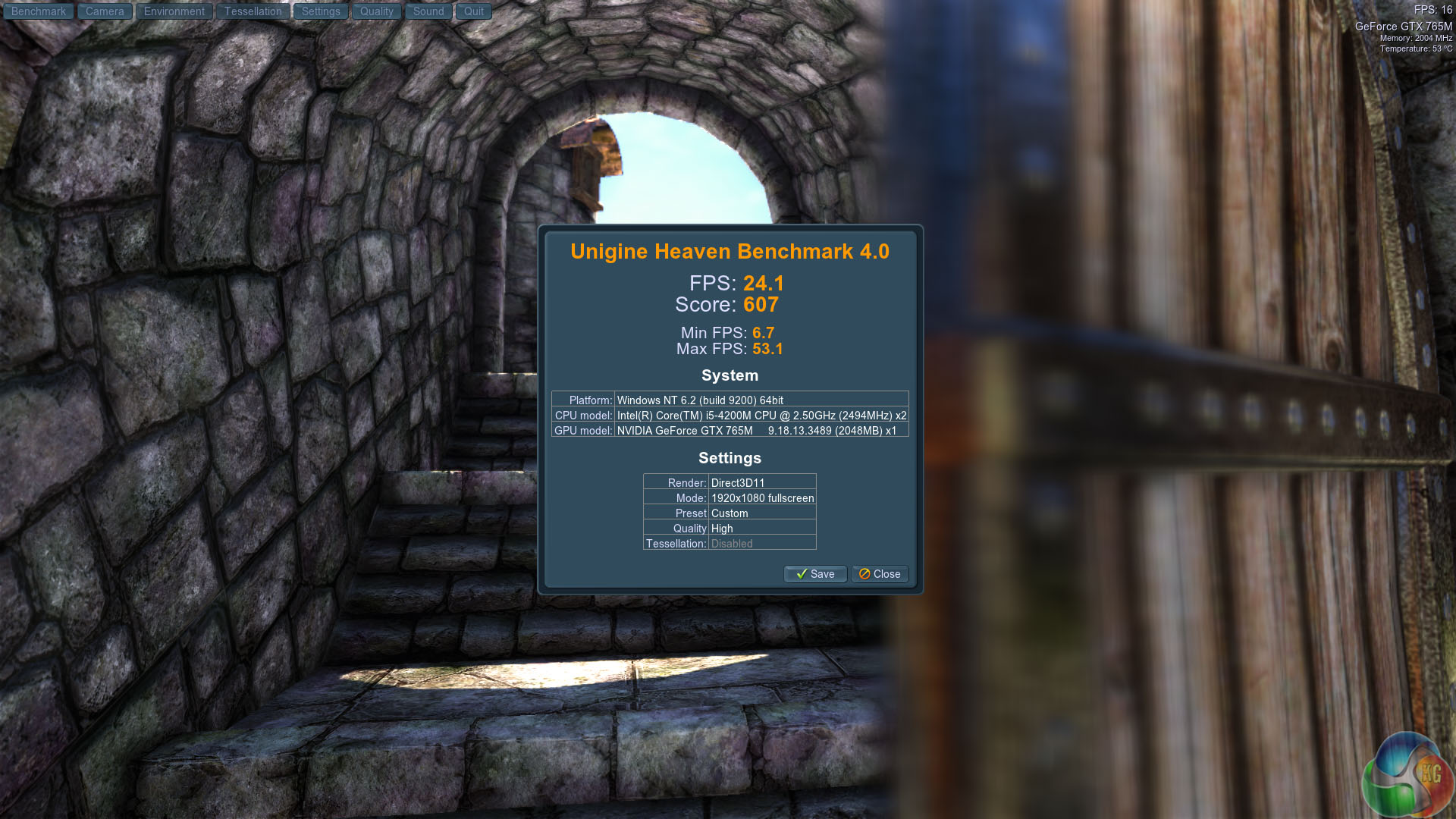
The Nvidia GTX765M is a formidable mobile solution as both results show above.
CINEBENCH R11.5 64 Bit is a real-world cross platform test suite that evaluates your computer’s performance capabilities. CINEBENCH is based on MAXON’s award-winning animation software CINEMA 4D, which is used extensively by studios and production houses worldwide for 3D content creation. MAXON software has been used in blockbuster movies such as Spider-Man, Star Wars, The Chronicles of Narnia and many more. CINEBENCH is the perfect tool to compare CPU and graphics performance across various systems and platforms (Windows and Mac OS X). And best of all: It’s completely free.
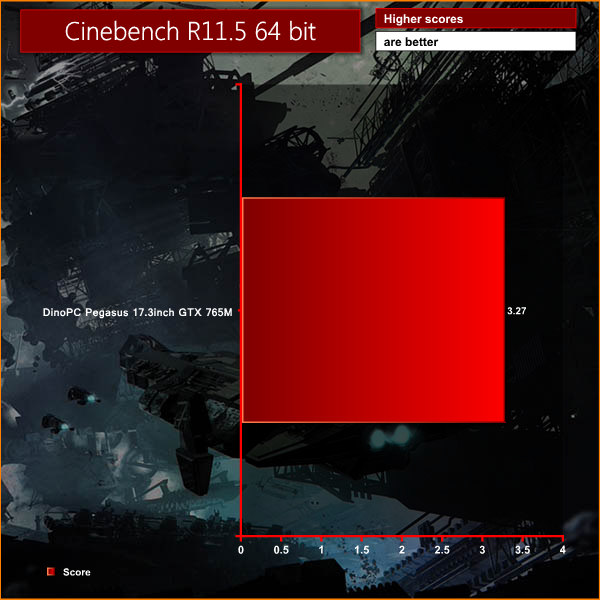
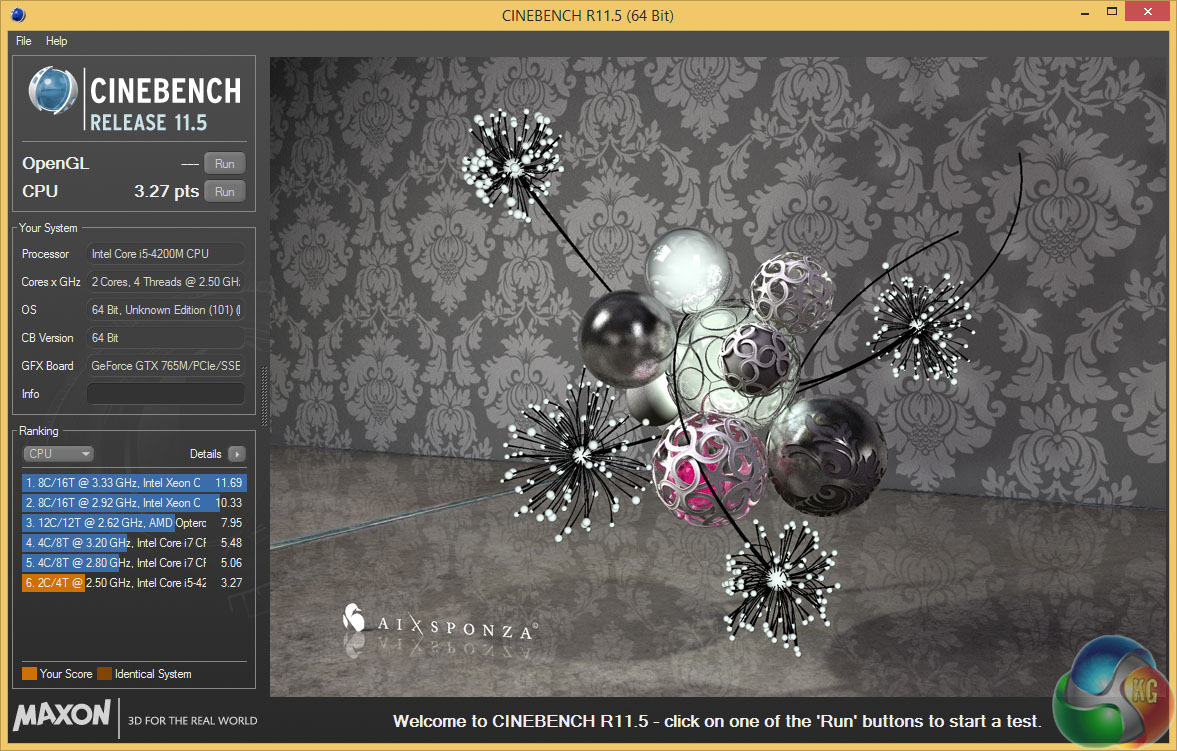
Cinebench R11.5 delivered more predictable results. The MSI GS70 2OD-Stealth Core i7 had scored 6.87 points and the DinoTech came in with got 3.27 points which is slightly less than half and illustrates the nature of the dual core/four thread Core i5 CPU perfectly.
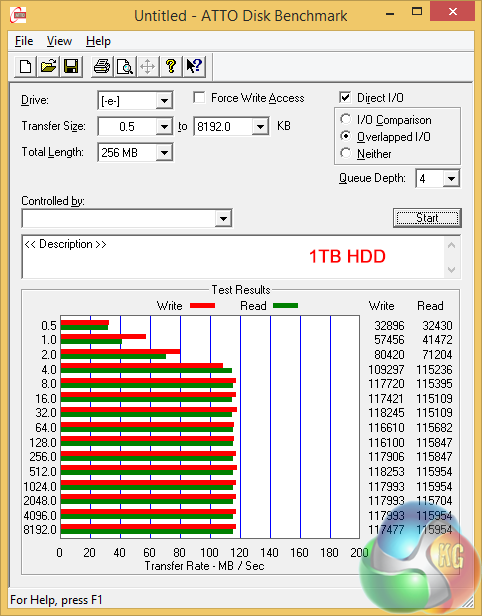
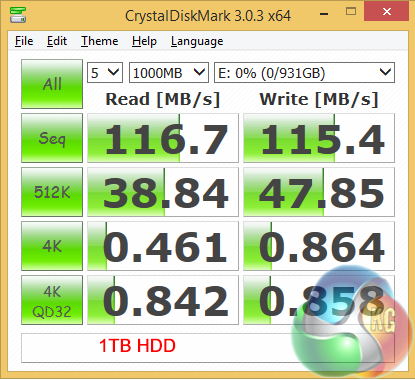
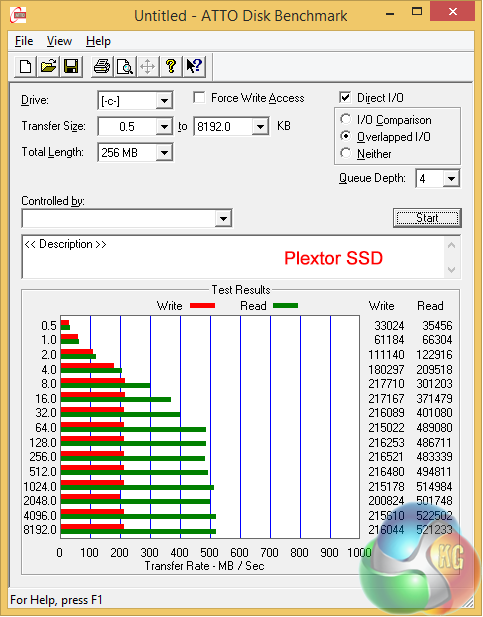
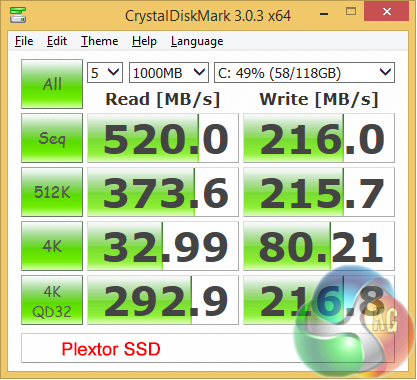
Testing the Plextor SSD and 1TB data drive confirmed what I could feel through my fingertips, which is that the SSD is very fast and the hard drive is no slouch either. Once again I emphasise that retail Pegasus laptops are expected to ship with a Corsair SSD but that shouldn't affect the performance to any great extent.
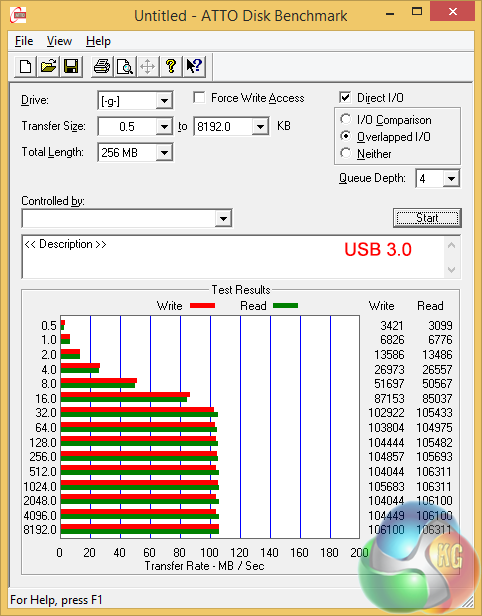
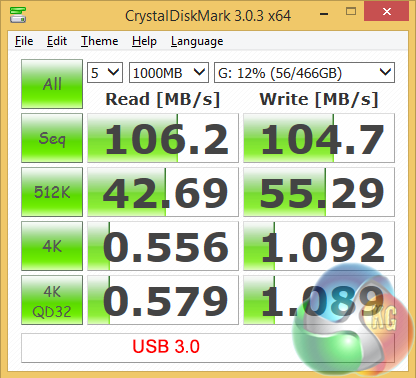
Testing the USB 3.0 sub-system didn't go entirely to plan. My Asus Express Box hard drive pushed performance over 100MB/sec however that is a drop in the ocean for USB 3.0.
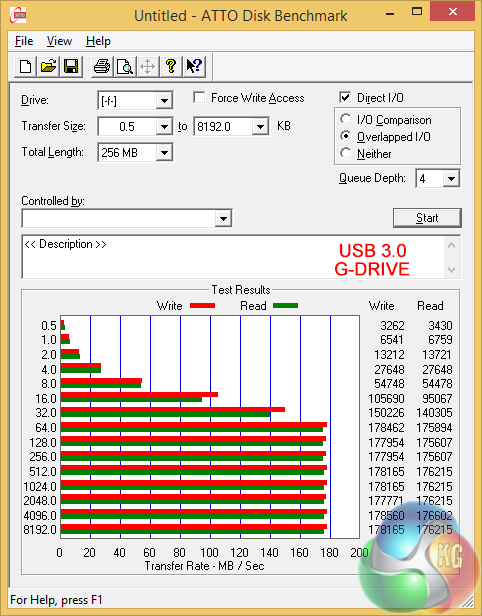
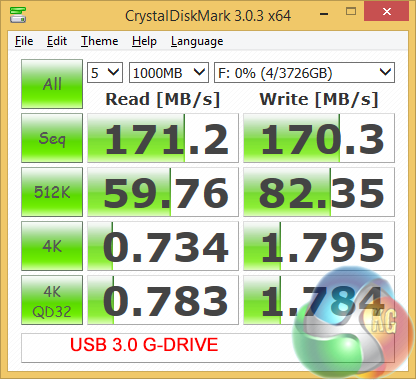
I switched to a 4TB G-Drive (Hitachi desktop drive in a USB 3.0 caddy) and saw the performance increase to 170MB/sec. It is a crying shame I didn't have a USB 3.0 Solid State Drive to hand to see whether I could get above 300MB/sec but on the plus side the barebones installation of Windows 8.1 meant the testing software ran without a hitch.
It was clear from my benchmark testing that the DinoPC Pegasus 17.3” GTX 765M performed exactly as well as the specification suggested.
Dirt Showdown is the latest title in the franchise from Codemasters, based around the famous Colin McRae racing game series, although it no longer uses his name, since he passed away in 2007.


We selected the medium preset at 1920×1080 with 2x MSAA. Higher settings than this at the native panel resolution were unplayable.
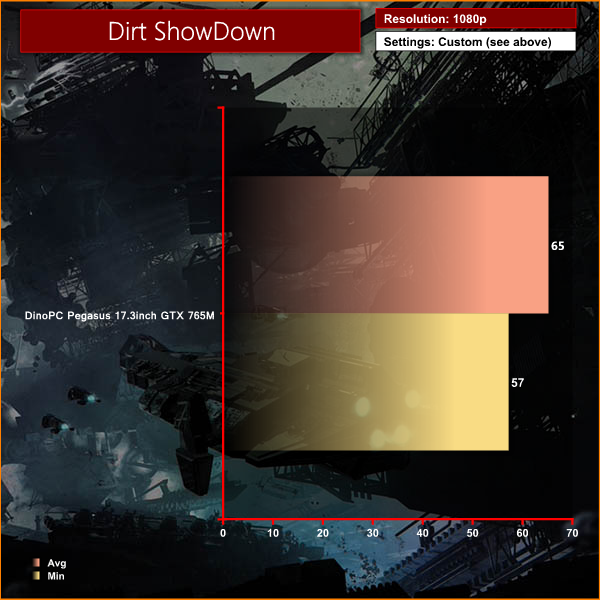
Solid performance throughout, averaging over 60 frames per second.
Total War ROME 2 is the eighth stand alone game in the Total War series, it is the successor to the successful Rome: Total War title. The Warscape Engine powers the visuals of the game and the new unit cameras will allow players to focus on individual soldiers on the battlefield, which in itself may contain thousands of combatants at a time.
Creative Assembly has stated that they wish to bring out the more human side of war this way, with soldiers reacting with horror as their comrades get killed around them and officers inspiring their men with heroic speeches before siege towers hit the walls of the enemy city. This will be realised using facial animations for individual units, adding a feel of horror and realism to the battles.


We selected 1080p resolution with ‘very high’ image quality settings.
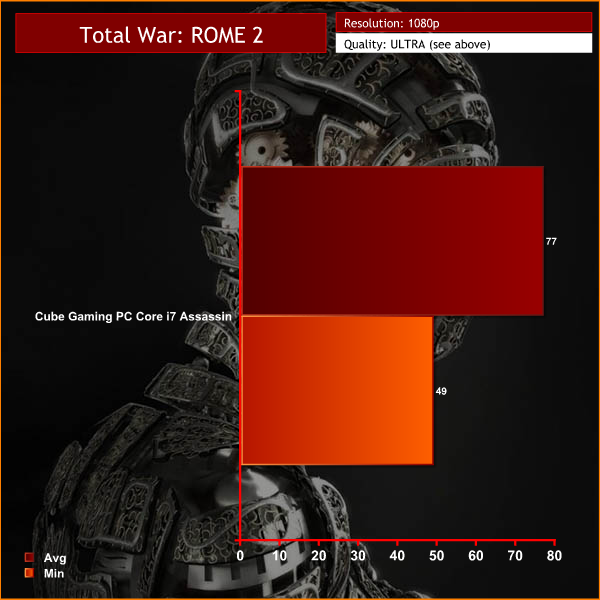
The settings proved a little too demanding, and some image quality reduction would be needed to push the frame rate above the sweet spot of 25.
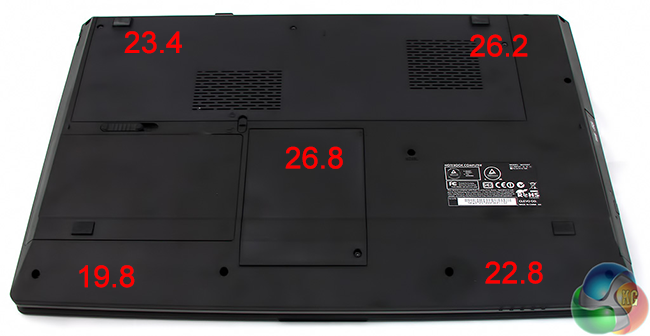
Let's start with idle temperatures after running the desktop for 30 minutes. On the underside of the chassis I measured these temperatures with my infrared Raytek MiniTemp.
Remember, the battery is towards the front of the chassis and all the cooling goes on at the rear.
Once I had a baseline I kicked things up and loaded the system with a combination of Furmark and Cinebench. This raised the temperatures on the underside of the chassis by the tiny amount of two to three degrees.
I wondered whether Clevo might have insulated the chassis to prevent the heat getting out, in which case it would be baking inside.
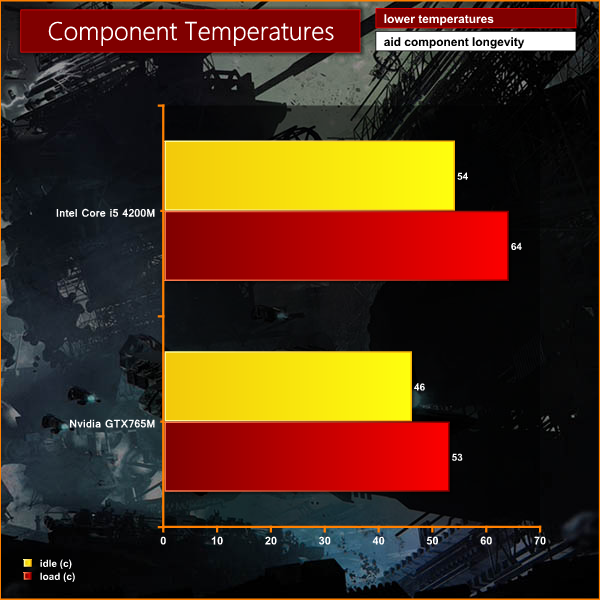
Well no. Internally the nVidia GPU was running at 53 degrees Celsius and the loaded temperature for the CPU was 64 degrees. That is 15-20 degrees cooler than the MSI GS70 2OD-Stealth and while the MSI has a beefy 47W Core i7 the DinoPC isn't far behind with a 37W Core i5.
The only conclusion I can draw is that the Clevo cooling system is stunningly efficient and is doing a really good job of cooling the internals.
Decent cooling can go hand-in-hand with high noise levels as the cooling fan spins at an outrageous speed to expel the hot air from the chassis, however Clevo has avoided this pitfall. I use a different noise meter than the rest of the KitGuru team, so my results today are likely to seem a little different than normal.
When the laptop is idling on the Windows desktop it is effectively silent.
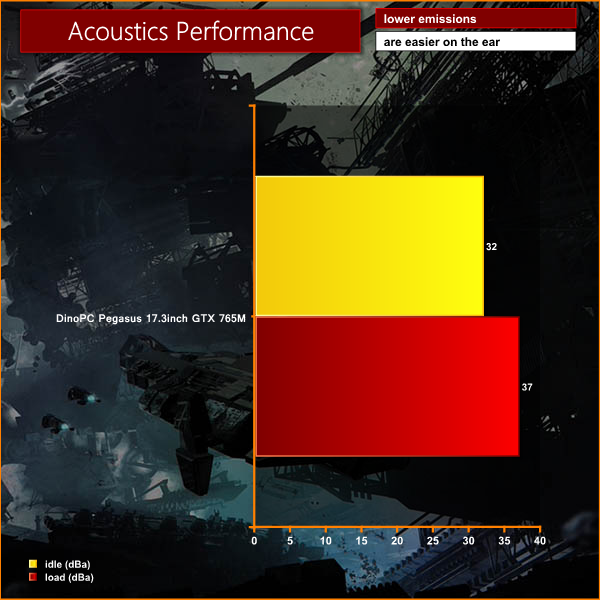
Loading the CPU increases the measured noise level to around 34dBA, which is audible but not too intrusive. The cooling exhaust is at the rear of the chassis so noise is directed away from the user.
You only really hear fan noise when the nVidia graphics are under load. At a distance of one meter the noise level rises to 37dBA. The cooling runs in fits and starts and is effectively minimal, low or full with very little ramping up and down, however the pitch of the fans is not annoying.
It seems to me that locating the battery near the front of the chassis has given Clevo the opportunity to open up the rear of the chassis to make the most of the cooling package.
I tested the battery using the three KitGuru scenarios.
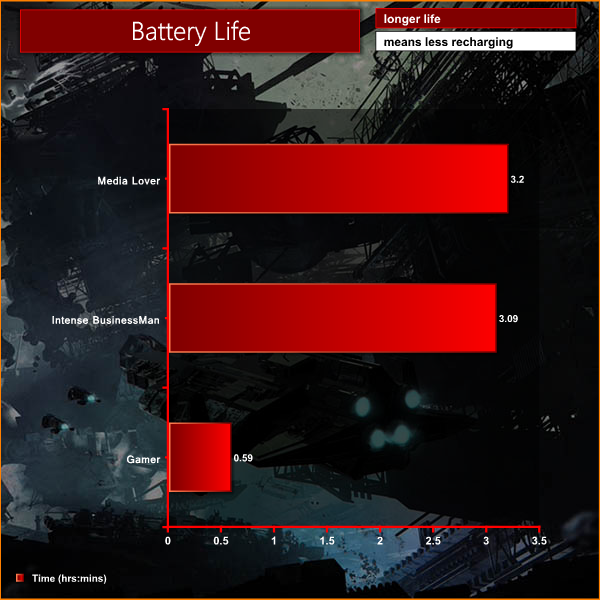
The first is traveler where I watched high definition movies wearing headphones with screen brightness two notches from maximum until the battery died. This was a Lord of the Rings-friendly 3 hours 20 minutes.
For intense non-stop business use the battery lasted 3 hours 9 minutes. It looked like the battery would last four hours however it dived off a cliff once it got to 20 percent remaining and the system effectively shut down at 7 percent. Clearly if you let the system idle and do all the usual things like reading emails and drinking coffee then you will improve battery life.
Gaming is the weakest part as the battery died after 59 minutes. I was impressed the DinoPC delivered a decent gaming experience on battery but clearly you are pretty much obliged to game with the mains power connected.
At first I had my doubts about the DinoPC. I don't much like the size and weight of a 17.3-inch chassis and the plastic casing with its slate grey finish looked like it might be pretending to be brushed aluminum.
After a couple of hours I was firmly won over. The combination of Core i5 CPU, nVidia GTX 765M GPU, Plextor SSD, fast DDR3 RAM and a Full HD matte screen are superb and very effective.
The cooling system makes this laptop an absolute pleasure to use; when you are watching movies or playing games you really don't want a cooling fan that is whirring away in the background.
Two weak points for me are the touch pad and Windows 8.1 – however a mouse cures the one problem and you can learn to live with the other (or ask for Windows 7 to be installed).
The only issue I can see that might cause you to walk away is the battery. My advice is that anyone who needs epic ‘all day' battery can afford to buy this laptop for £799 and splash out another £70 (estimated) on a spare battery.
You can order one from the DINOPC webpage, over here. You can discuss on our Facebook page, over here.
Pros:
- Superb graphics.
- Decent Full HD screen with LED back lights and matte coating.
- Very effective cooling keeps everything under control.
- Excellent SSD performance, combined with 1TB of HDD storage.
- Very good value for money.
- Decent keyboard.
- Plenty of USB 3.0 connectivity.
Cons:
- Annoying touch pad.
- Windows 8.1 is frustrating.
- Battery life is restricted by the layout of the chassis and the size of the battery.
KitGuru says: An obvious candidate for your next gaming laptop.


Good looking system for the price, don’t often get all that for under £800.
The 765M is a good mobile gpu, but it struggles a little with some of the newer games at 1080p, id rather get a gaming laptop with the 770M in it. 780M is too expensive.