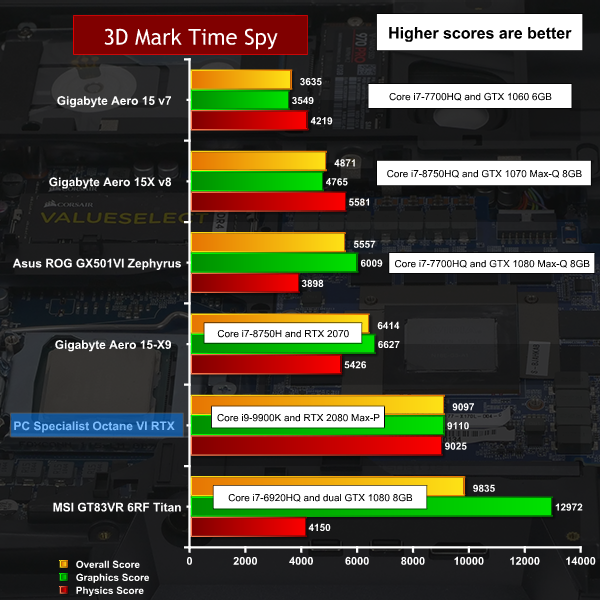
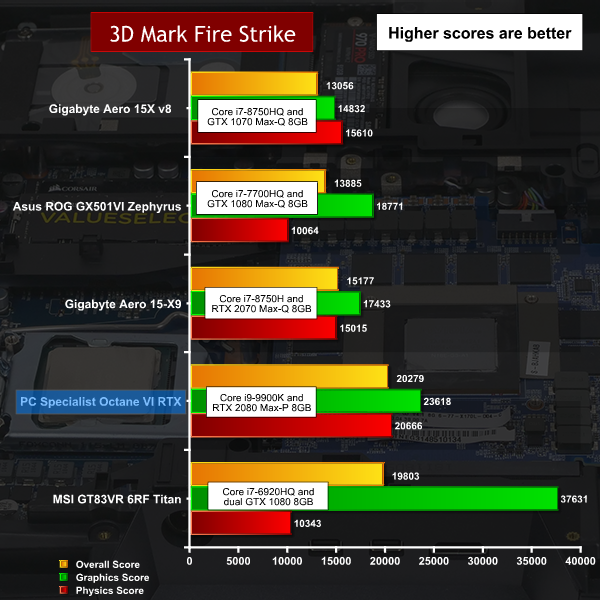
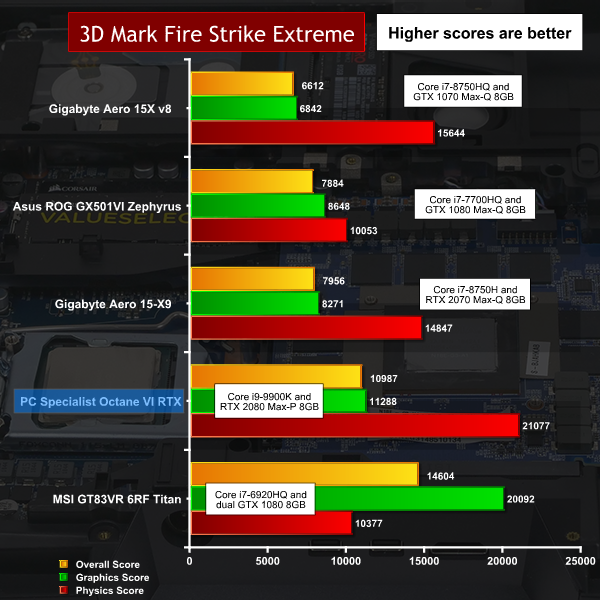
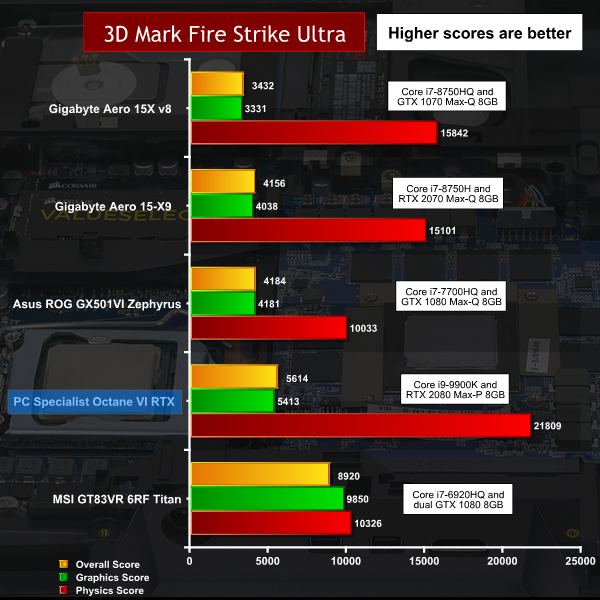
PC Specialist has delivered a laptop named Octane VI RTX that combines a desktop Core i9-9900K CPU with a full-on RTX 2080 Max-P graphics chip. This is a beast of a desktop replacement system with a 17.3-inch G-Sync screen that is clearly targeted at the professional market, but we have no doubt that gamers will also be paying attention. Can it play Crysis? Probably (we don’t actually test with Crysis), but can it play Far Cry 5? Heck yes, and it plays it FAST! https://www.youtube.com/watch?v=nX0lTzn1fqo Key features: Intel Core S-Series CPU GeForce RTX 2060/2070/2080 144Hz FHD Panel (1,920x1,080), 72% NTSC, Nvidia G-Sync Thunderbolt 3 (via USB 3.1) RGB Backlit Keyboard Sound BlasterX Pro-Gaming 360˚ SuperSpeed USB 3.1 Gen 2 Premium Onkyo Speakers Fingerprint Scanner HDMI Output Connection Display Port Connection Note: if the above images are not displaying properly, you may need to disable Ad Block as it is known to interfere with our display code Specification: CPU: Intel Core i9-9900K, 8 cores with HT, 800MHz base clock, All Core Boost 3.6GHz, Max Boost 5.0GHz, 95W TDP, 65W power limit. Screen: 17.3-inch, 1,920x1,080 resolution, 144Hz refresh LED G-Sync Graphics: Nvidia GeForce RTX 2080 8GB GDDR6 Max-P (Max Boost 1,600MHz) Memory: 32GB Corsair DDR4-2133MHz Dual Channel (Max 64GB DDR4-2400MHz) Storage: 512GB Samsung 970 Pro M.2 SSD 1TB Seagate ST1000LM049 SATA HDD (2x 2.5-inch SATA, 2x M.2 slots) Audio: Dual Speakers plus Sub-Woofer. Ethernet: Killer E2500 Gigabit LAN Wi-Fi: Intel Wireless-AC 9260 802.11ac + BT 5.0 I/O ports: 2x USB 3.1 Gen2 Type-C 4x USB 3.1 Gen1Type-A 1x HDMI 2.0 2x Mini DisplayPort 1.4 4x 3.5mm audio jacks 6-in-1 card reader Battery: 8-cell 82Wh/5400mAh Power adapter: 330W Dimensions: 418mm x 295.3mm x 40.9mm Weight: 4.3kg plus 1.5kg for power supply and mains cable We do not expect that anyone will give Clevo an award for the styling of the P775TM1 chassis that is used in this laptop as it is a big, bulky slab of a thing that looks like a throwback from distant times. Balanced against that, the chassis accommodates a cooling system that can handle pretty much any hardware you may choose to throw its way, which is essential as the combination of CPU and GPU sets new standards for modern laptops. The base specification for Octane VI RTX includes a Core i3 and RTX 2060 graphics which would be a bizarre combination in a chassis of this size. Thankfully PC Specialist pushed the hardware in our review sample close to the limit, with a pairing of Core i9-9900K CPU and RTX 2080 graphics. They might have gone one step further by upgrading the 32GB of DDR4-2,133MHz with some 2,400MHz or 2,666MHz RAM and similarly they could have installed a third or fourth SSD or HDD to ramp up the storage even further. Nonetheless the hardware that was chosen was certainly sufficient to demonstrate the performance you can expect to see from this family of laptops. We were in two minds about the choice of screen as PC Specialist opted for a Full HD 1,920x1,080 panel with a 144Hz refresh rate and G-Sync. The panel has a matte coating that does not reflect overhead lighting and looks perfectly OK, but the alternative panel you can choose when you specify your Octane VI RTX is a 4K 3,840x2,160 panel with 60Hz refresh and no G-Sync. That is pretty much the least you can expect from a 4K display and while we would like to see a 4K panel in a laptop with RTX 2080 graphics it would probably need to be a display with a more impressive set of features. Given the choice of the two panels on offer we could honestly toss a coin and settle for either, but if a better 4K 17.3-inch screen was available we are confident that would be our preference unless the cost of the upgrade was prohibitive. Testing and Performance During our testing we paid particular attention to the sustained clock speed of the main components to see how the CPU and GPU performed under load. The Intel Core i9-9900K is a desktop part with a 95W TDP, and in normal circumstances would Turbo to 4.8GHz on all cores. In this instance, the power has been limited to 83W for an initial 28 seconds that permits a Turbo speed of 5.0GHz on a few cores. After that time the CPU is limited to 65W and runs at an all core Turbo speed of 3.4GHz. In the case of the RTX 2080 graphics we have a Max-P part (rather than Max-Q) that runs at full power, however that is not the same as saying the graphics are the same as a desktop RTX 2080. The difference is that desktop GPUs typically draw 230W while the laptop part is limited to 150W. This means the laptop graphics run at a Boost speed of 1,600MHz (in a range 1,575MHz-1,620MHz) while the desktop graphics run at 1,800MHz or more. Performance Overview Octane VI RTX sets new standards in our benchmarks, however for pure graphics performance we still cannot beat the MSI GT83VR Titan with dual GTX 1080 in SLI. Nonetheless, when you look at the combination of eight core i7-9900K and RTX 2080 graphics it is clear we have a new champion on our hands that can power through any software you put in its path. Cooling Performance In total we measured a power draw of 290W passing through the 330W power adapter which is considerably more power than most laptops draw from the wall socket. This highlights the demands of the 65W CPU and 150W GPU and consequently shows the load imposed on the cooling system inside Octane VI RTX. Cooling Performance Overview. On the one hand the Core i9-9900K CPU is much more powerful than a typical mobile CPU, but balanced against that we have an enormous chassis that has the space for a substantial cooling system. We were impressed to see the CPU operated at 80 degrees C under sustained load and that the GPU was only slightly warmer at 82 degrees. Both these figures are well within safe operating limits and the CPU, in particular, is running up to ten degrees cooler than we see in some laptops. Battery Battery Performance Overview The Octane VI RTX includes a battery that lasts for the best part of two hours but honestly, we cannot imagine anyone using this laptop unless it was connected to a wall socket. There is the practical matter of the size of the laptop, but added to that you need mains power to allow the graphics to run at full speed. Yes, the battery life is fairly lousy but no, it doesn’t matter. Octane VI RTX is an impressive desktop replacement laptop that packs a full-fat 8-core CPU and RTX 2080 graphics. Balanced against that it is fairly hopeless as a laptop because the size and weight mean it is far too hefty to carry around with ease. We doubt you would find many places on a train or in a plane where you might fire the beast into life. In addition the requirement for a mains power socket surely mean the Octane VI RTX is destined to spend its life on a table, in wheeled luggage or in the boot of a car. If you take the Octane VI RTX on its own terms as a mobile PC that can be used as a workstation or gaming machine then it is fairly impressive. Clearly you will want to line up serious workloads such as Blender or Adobe Premiere, perhaps with an AAA game or two for the evening hours, which necessarily limits the potential market for this laptop. Once the laptop is sat on your table and ready for action it is easy to use with ports and connectors on both sides, as well as graphics outputs on the rear next to the power connector. There is no denying the huge chassis looks rather rudimentary and the screen bezel is huge. Whatever else you may say about the Octane VI RTX, the word ‘sophisticated’ is unlikely to be your chosen adjective. We consider it something of a shame that PC Specialist only offers a choice of two display panels for this laptop. The 144Hz G-Sync display measures 17.3-inches on the diagonal and simply feels too low-res at 1,920x1,080 resolution. The alternative 4K panel has the resolution we desire but only has a refresh rate of 60Hz and does not include G-Sync. That seems like a move from one extreme to the other. How about a 1440p panel with 100Hz refresh? Would that be too much to ask? The choice of display panels strikes us as confused, and it is a similar story with the RGB lighting. Perhaps Clevo considers that any laptop that is not for pure business use automatically requires RGB but in this instance we have to disagree. The Control Centre 2.0 utility does a perfectly reasonable job but you can barely see the RGB unless the room is dark and even then you will struggle with some of the lighting patterns. Getting bogged down in these details is clearly the route to frustration, so let’s stand back and look at the big picture. PC Specialist has delivered a laptop with epic CPU and graphics power at a reasonable price. We understand most laptop customers want to work on the move and the Octane VI RTX fails to deliver on that front - however, we are confident a fair few people will look at those performance charts and will be simply blown away. You can buy this spec (as reviewed) of the Octane VI RTX from PC Specialist HERE Pros: Desktop CPU with 8-cores and 16 threads. RTX 2080 Max-P graphics set a new standard. Very reasonable price. Cooling system is very effective. Good arrangement of USB ports, including Thunderbolt. Cons: The 1080p screen resolution is too low for a 17.3-inch giant. Weight and size mean this is a desktop replacement, rather than a laptop. Large screen bezel and general styling look elderly. KitGuru says: It's an epic combination of CPU and GPU power in a luggable laptop.