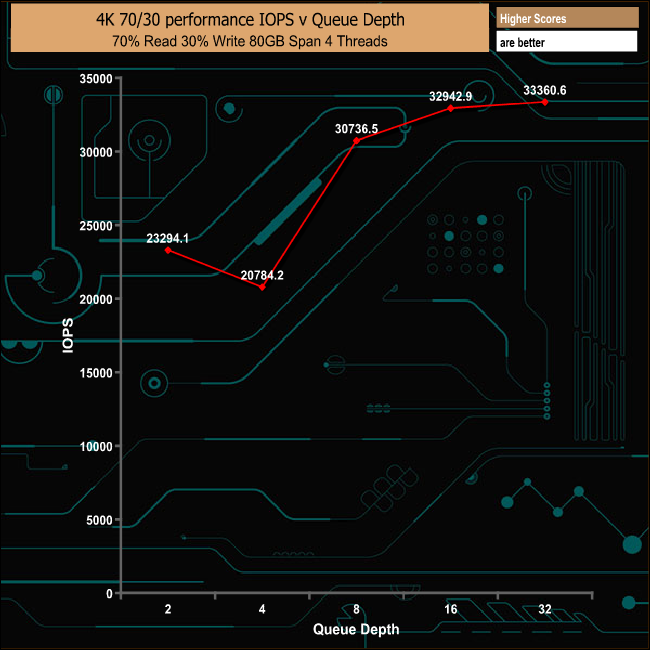
Toshiba's latest addition to its range of consumer NVMe drives is the RC100, aimed at the value end of the NVMe market. It sits between the TR200 SATA SSD and the enthusiast NVMe RD400 in Toshiba's consumer SSD drive line up. The first thing that grabs you about the new drive is just how small it is - built on the M.2 2242 format, it's just 42mm long. To get such a small package Toshiba has used a BGA (Ball Grid Array) design with the controller and the 64-layer TLC BiCS NAND stacked into a single package. The controller is an in-house Toshiba design but details about it are pretty non-existent. While it's their first BGA PCIe SSD for the consumer space, the company has been offering BGA SSD's in the OEM segment for around three years. There are a couple of limitations going down this design route; there's not enough space for any DRAM cache and the interface is limited to PCIe x2. Instead of DRAM cache, the RC100 uses something called Host Memory Buffer (HMB). HMB was part of the NVMe Rev 1.2 specification. It allows a drive to have access to part of the host system's main memory to use as a small scale cache. The new drive comes in three capacities: 120 GB, 240 GB, (the drive that Toshiba kindly provided for review) and the flagship 480 GB. The official sequential performance figures for the 240GB drive are up to 1,600MB/s for reads and up to 1,050MB/s for writes. The 120GB drive is rated at up to 1,350MB/s and 700MB/s for reads and writes respectively, while the 480GB drive read figures is the same as the 240GB with a slight increase in write speed at 1100MB/s. When it comes to random read/write performance, Toshiba quotes figures at a QD of 32. The 120GB drive is rated as up to 80,000 IOPS for reads and up to 95,000 IOPS for writes while the 240GB drive gets an up to 130,000 IOPS rating for reads and the 480GB drive gets 150,000 IOPS. Both drives are rated as up to 110,000 IOPS for writes. Toshiba quotes an endurance figure for the 240GB drive as 120TB TBW which works out at around 110 GB/Sday writes for the length of the 3 year warranty the drive comes with. Physical Specifications: Usable Capacities: 240GB NAND Components: Toshiba 64-layer 3D BiCS TLC NAND Controller: Toshiba Cache: DRAM less design Interface: PCIe Gen 3.1a x2 NVMe command set: 1.2.1 Form Factor: M.2 2242 B-M key Dimensions: 42 x 22 x 0.15mm Drive Weight: 3.1g Firmware Version: ADRA0101 The RC100 comes in a box substantially bigger that the drive itself, with an image of the drive on the front along with a sticker in the top right hand corner displaying its capacity. Beneath the drive and to the left hand side of the box is a label that informs you that the drive is of the M.2 2242 format and under this is logo representing the BiCS Flash the drive uses. The rear of the box has a panel with a few bullet points about the drive and a multilingual list directing you to where you can find more information about the drive. The drive comes in a plastic shell for better protection and the only other thing in the box is a multi-lingual Quick Start Guide. The RC100 is the first NVMe drive we have seen built on a M.2 2242 format. The drive uses a single sided layout and sitting under the Toshiba label on the front is the single BGA (Ball Grid Array) chip containing the 64-layer TLC BiCS NAND and the Toshiba controller in a single package. To look after the RC100, Toshiba OCZ's SSD management software, simply known as the SSD Utility is available as a download from Toshiba. The SSD Utility lets you check on the drive's capacity, how it's being used and how much life is left in the SSD. There's a tuning section in which you can adjust the over-provisioning and there is also an integrated benchmark so you can see how the drive is running. It also allows for easy implementation of firmware updates and there is a comprehensive help section as well. For testing, the drives are all wiped and reset to factory settings by HDDerase V4. We try to use free or easily available programs and some real world testing so you can compare our findings against your own system. This is a good way to measure potential upgrade benefits. Main system: Intel Core i7-7700K with 16GB of DDR4-3200 RAM, Sapphire R9 390 Nitro and an Asus Prime Z270-A motherboard. Other drives Corsair Force MP500 480GB Intel SSD760p 512GB Kingston A1000 480GB Plextor M9Pe(Y) 512GB Plextor M8PeG 512GB PNY CS2030 240GB Samsung SSD970 EVO 2TB Samsung SSD970 PRO 1TB Samsung SSD960 PRO 2TB Samsung SSD960 EVO 1TB Toshiba OCZ RD400 512GB Western Digital Black NVMe 1TB Western Digital Black PCIe 512GB Software: Atto Disk Benchmark. CrystalMark 3.0.3. AS SSD. IOMeter. Futuremark PC Mark 8 All our results were achieved by running each test five times with every configuration this ensures that any glitches are removed from the results. Trim is confirmed as running by typing fsutil behavior query disabledeletenotify into the command line. A response of disabledeletenotify =0 confirms TRIM is active. CrystalDiskMark is a useful benchmark to measure theoretical performance levels of hard drives and SSDs. We are using v6.0. At a Queue Depth of 32 the RC100 sits in last place in our list of CrystalDiskMark tested NVMe drives. However, shallowing the QD to 1 sees the drive move several places up to graph with a slightly better 4K random read figure than WD's Black NVMe drive, although the WD drive has a better write number. It's a wee bit faster than the more elderly Toshiba OCZ RD400 even with that drive using MLC memory. The ATTO Disk Benchmark performance measurement tool is compatible with Microsoft Windows. Measure your storage systems performance with various transfer sizes and test lengths for reads and writes. Several options are available to customize your performance measurement including queue depth, overlapped I/O and even a comparison mode with the option to run continuously. Use ATTO Disk Benchmark to test any manufacturers RAID controllers, storage controllers, host adapters, hard drives and SSD drives and notice that ATTO products will consistently provide the highest level of performance to your storage. The official sequential read/write figures for the 240GB RC100 are up to 1,600MB/s for reads and up to 1,050MB/s for writes, both figures we could confirm with the ATTO benchmark. AS SSD is a great free tool designed just for benching Solid State Drives. It performs an array of sequential read and write tests, as well as random read and write tests with sequential access times over a portion of the drive. AS SSD includes a sub suite of benchmarks with various file pattern algorithms but this is difficult in trying to judge accurate performance figures. Using the more strenuous AS SSD benchmark, the drive sits just below WD's Black PCIe drive with its read score of 822. However its write score of 774 is faster than the WD drive. IOMeter is another open source synthetic benchmarking tool which is able to simulate the various loads placed on hard drive and solid state drive technology. We test 128KB Sequential read and write and random read and write 4k tests, The test setup’s for the tests are listed below. Each is run five times. 128KB Sequential Read / Write. Transfer Request Size: 128KB Span: 8GB Thread(s): 1 Outstanding I/O: 1-32 Test Run: 20 minutes per test 4K Sustained Random Read / Write. Transfer Request Size: 4KB Span: 80GB Thread(s): 4 Outstanding I/O: 1-32 Test Run: 20 minutes per test 4K Random 70 Read / 30 Write mix. Transfer Request Size: 4KB Span: 80GB Reads: 70% Writes: 30% Thread(s): 4 Outstanding I/O: 2 – 32 Test Run: 20 minutes There are many ways to measure the IOPS performance of a Solid State Drive, so our results will sometimes differ from manufacturer’s quoted ratings. We do test all drives in exactly the same way, so the results are directly comparable. In our 128KB sequential read/write tests, the results confirm the official read figure of 1,600MB/s, with the drive producing 1,616MB/s - while writes came in at 1,024MB/s, just shy of the official 1,050MB/s at QD32. There is, however, a huge drop in performance between QDs 8 and 16 before the drive reaches that QD32 figure. Most desktop operations happen in the 1 – 4 queue depth range, so we’ve broken out the test results to see how the drive performs at these queue depths in comparison with other drives, as well as at a queue depth of 32 – although in the desktop environment you’ll seldom, if ever, see a queue depth that high. 128KB Sequential Read Queue Depth results At a QD of 1, the RC100 sits ahead of WD's Black PCIe drive but quite some way behind Kingston's entry level NVMe drive, the A1000. At QD2, the drive loses its advantage over the WD drive. At a QD of 4, the drive loses further contact with the rest of the tested drives. However, at a QD of 32 the RC100 is a fair bit quicker than Kingston's A1000 drive. 128KB Sequential Write Queue Depth results At a QD of 1, the RC100 performs pretty well in the sequential write test. It's faster than Kingston's entry level NVMe drive, the A1000. Just as in QD1, in QD's 2 & 4 the drive still has the advantage over the Kingston A1000. It's only at QD of 32 that the Kingston drive gains the upper hand. At 1,024MB/s the RC100 is definitely in the ballpark of the official maximum 1,050MB/s for sequential writes. The official 4K random read/write figures for the 240GB drive are up to 130,000 IOPS for reads and up to 110.000 IOPS for writes. Unfortunately in our 4K testing we couldn't get anywhere near that read figure, with the drive topping out at 43,185 IOPS. Most desktop operations happen in the 1 – 4 queue depth range, so we’ve broken out the test results to see how the drive performs at these queue depths in comparison with other drives, as well as at a queue depth of 32 – although in the desktop environment you’ll seldom, if ever, see a queue depth that high. 4K Sustained Random Reads Queue Depth results. Having said that we couldn't get anywhere near the official top end IOPS read figure for the drive, the 4K random read performance at QD1 was very impressive at 45,287 IOPS. This is faster than the entry level Kingston (A1000) and Intel (SSD760p) drives. After the good news of the QD1 random performance, the RC100 went downhill afterwards with the drive firmly planted at the bottom of the rest of the graphs. We were even further away from the official random write figure of 110,000 IOPS in our 4K random write tests. This suite of tests pushes drives quite hard especially at deeper queue depths and looking at the very high latency figures even from the start, it appears that the RC100 wasn't very happy dealing with any of the test runs regardless of queue depth. Most desktop operations happen in the 1 – 4 queue depth range, so we’ve broken out the test results to see how the drive performs at these queue depths in comparison with other drives, as well as at a queue depth of 32 – although in the desktop environment you’ll seldom, if ever, see a queue depth that high. 4K Sustained Random Writes Queue Depth results Throughout the queue depth range, our RC100 really struggled with the 4K random write tests as can be seen by the very low IOPS scores. When it came to the mixed 70% read, 30% write test, the RC100 performed reasonably well considering the market segment it is aimed at. In our throughput test, the 240GB RC100 produced a peak average read throughput of 1,406MB/s which occurred right at the end of the test run. Peak write throughput performance came at the 2MB block size with 886.96MB/s. Futuremark’s PCMark 8 is a very good all round system benchmark but it’s Storage Consistency Test takes it to whole new level when testing SSD drives. It runs through four phases; Preconditioning, Degradation, Steady State, Recovery and finally Clean Up. During the Degradation, Steady State and Recovery phases it runs performance tests using the 10 software programs that form the backbone of PCMark 8; Adobe After Effects, Illustrator, InDesign, Photoshop Heavy and Photoshop Light, Microsoft Excel, PowerPoint, Word, Battlefield 3 and World of Warcraft. With some 18 phases of testing, this test can take many hours to run. Preconditioning The drive is written sequentially through up to the reported capacity with random data, write size of 256 × 512 = 131,072 bytes. This is done twice. Degradation Run writes of random size between 8 × 512 and 2048 × 512 bytes on random offsets for 10 minutes. It then runs a performance test. These two actions are then repeated 8 times and on each pass the duration of random writes is increased by 5 minutes. Steady State Run writes of random size between 8 × 512 and 2048 × 512 bytes on random offsets for final duration achieved in degradation phase. A performance test is then run. These actions are then re-run five times. Recovery The drive is idled for 5 minutes. Then a performance test is run. These actions are then repeated five times. Clean Up The drive is written through sequentially up to the reported capacity with zero data, write size of 256 × 512 = 131,072 bytes. PCMark's Consistency test really hammered the RC100 drive throughout the Degradation and SteadyState phases, but to the drive's credit it recovered from the ordeal very well indeed. PCMark 8’s Consistency test provides a huge amount of performance data, so here we’ve looked a little closer at how the Toshiba OCZ RC100 performs in each of the benchmarks test suites. Adobe Creative Cloud The drive really suffers during the Photoshop Heavy & Light test runs as well as the Indesign run, but the drive recovers remarkably well from the trauma. Microsoft Office As with the Adobe CC test suite, the drive is hit hard during the runs of the Microsoft Office traces. But just as before the recovery is excellent. Casual Gaming In both casual gaming test runs, the performance is very erratic during each trace run - but once again the drive recovers well, even if it's not as smooth as it might be. Just like the Consistency test, PCMark 8’s Standard Storage test also saves a large amount of performance data. The default test runs through the test suite of 10 applications three times. Here we show the total bandwidth performance for each of the individual test suites for the third and final benchmark run. In PCMark's standard storage test the drive produces bandwidth figures that are pretty reasonable, including the two tough Adobe Photoshop tests with 634.3MB/s for the Photoshop Light test and 626.8MB/s for the Photoshop Heavy test. For the long term performance stability test, we set the drive up to run a 20-minute 4K random test with a 30% write, 70% read split, at a Queue Depth of 256 over the entire disk. The 240GB Toshiba OCZ RC100 averaged 37,041 IOPS for the test with a performance stability of 73.53%, which is very good for a drive in this market segment. To test real life performance of a drive we use a mix of folder/file types and by using the FastCopy utility (which gives a time as well as MB/s result) we record the performance of drive reading from & writing to a 256GB Samsung SSD850 PRO. To get a measure of how much faster PCIe NVMe drives are than standard SATA SSD's we use the same files but transfer to and from a 512GB Toshiba OCZ RD400. We use the following folder/file types 100GB data file. 60GB ISO image. 60GB Steam folder – 29,521 files. 50GB File folder – 28,523 files. 12GB Movie folder – 24 files (mix of Blu-ray and 4K files). 10GB Photo folder – 621 files (mix of png, raw and jpeg images). 10GB Audio folder – 1,483 files (mix of mp3 and .flac files). 5GB (1.5bn pixel) photo. Samsung 850 Pro Toshiba OCZ RD400 The RC100 dealt with our real life file transfer tests without any problems. It's happier dealing with the larger file sizes rather than the smaller bity files contained in the 50GB File, 60GB Steam and 10GB Audio folders. The RC100 is Toshiba's second NVMe consumer drive, and the company's first drive aimed at the entry level NVMe market. It's a sign of just how fast technology is advancing that we actually have an entry level market segment for this type of drive. Even just a year ago mentioning 'NVMe' and 'entry level' in the same sentence was not realistic. The RC100 is also the first NVMe drive we have seen built on a 2242 format and it will interesting to see if any other manufacturers follow Toshiba's lead by offering small format NVMe SSDs in the entry level market. There are a couple of limitations going down this design route - there's not enough space for any DRAM cache and the interface is limited to PCIe x2. The first of these can be dealt with by something called Host Memory Buffer (HMB). HMB was part of the NVMe Rev 1.2 specifications. It allows a drive to have access to part of the host system's main memory to use as a small scale cache. The second limitation, namely being confined to a PCIe x2 interface, isn't such a problem when the drive is aimed at the entry level market, as even running at PCIe x2 the drive's outright performance will be much faster than a SATA based SSD. Toshiba quotes sequential read/write performance for the 240GB RC100 drive at up to 1,600MB/s for reads and up to 1,050MB/s for writes, which when you consider that you are talking about a drive that's about as big as your thumb (or even smaller) is pretty special. Incidentally, we could confirm both of these figures with the ATTO benchmark. However, we found the 4K random performance of the drive to be a mixed bag. In the single thread Q1 4K CrystalDiskMark test it did very well, beating several more powerful drives, and it performed well at QD1 in our 4K sustained random read test. In our series of 4K random write tests, however, the drive got overwhelmed resulting in very high latency figures with correspondingly low IOPS figures. We couldn't get anywhere near the official 'up to' 130,000 IOPS read or 10,000 IOPS write figures. The drive also did very well in our long term performance stability test and although it only averaged 37,041 IOPS for the test, it did so with a stability of 73.53% which is very good for this market segment. With an active power consumption of 3.2W, Toshiba claims that the RC100 consumes approximately 70 percent of the active power draw of enthusiast NVMe which makes it an ideal drive for ultrabooks. We found the 240GB Toshiba OCZ RC100 on Novatech for £64.44 (inc VAT) HERE. Pros It's tiny. BGA design. Price. Cons 4K performance is disappointing. KitGuru says: It's interesting to see Toshiba take this route for their first entry level, consumer NVMe drive. Its size makes it ideal for very small form factor PCs or ultrabooks where its low power requirement will help with saving battery life.