 KitGuru KitGuru.net – Tech News | Hardware News | Hardware Reviews | IOS | Mobile | Gaming | Graphics Cards


SSD
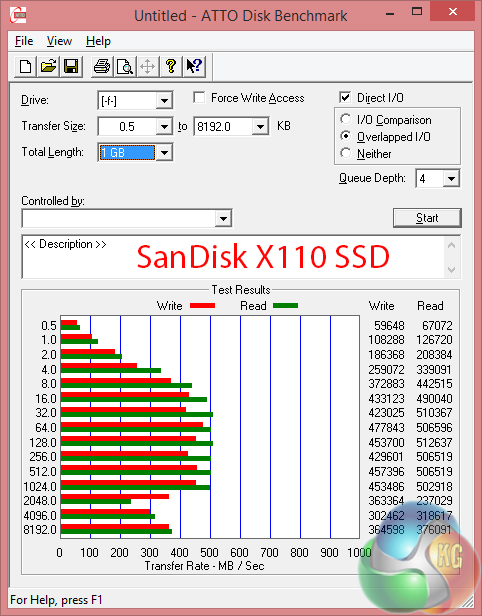
Raw speed of the single SanDisk X110 256GB SSD is slightly underwhelming. Transfer rates do not even put it near the fastest SATA 6Gbps SSDs, never mind the RAID-0 configurations that many competing laptop vendors are employing.
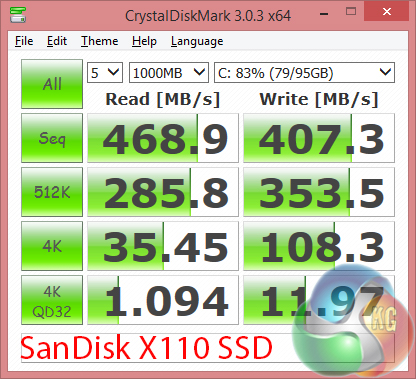
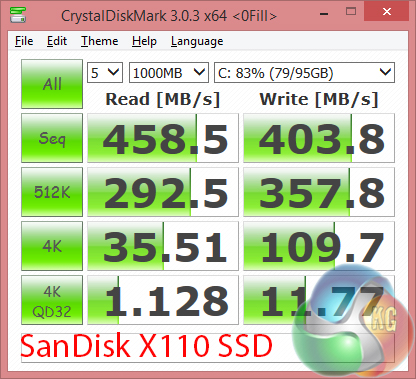
Despite the relatively low transfer rates, it is good to see SanDisk's X110 SSD maintaining its full speed potential whether data is compressible or incompressible. The 4K performance is strong.
Those points are arguably more relevant to real-world performance than peak transfer rates for system usage. But when it comes to transferring large files (such as games), high transfer speeds are beneficial.
HDD
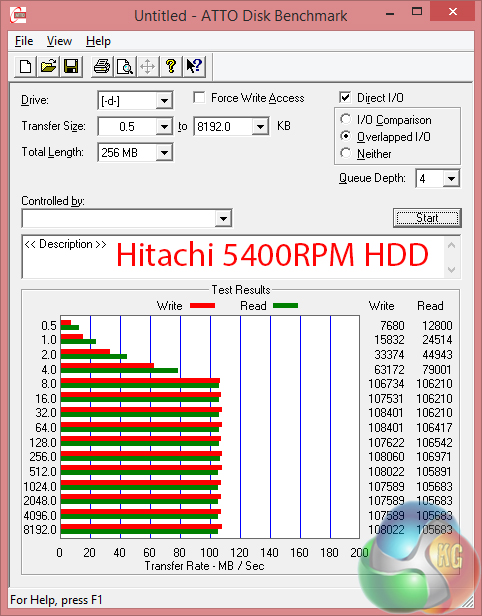
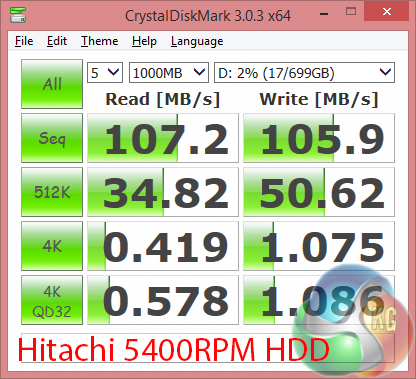
Hitachi's 1.5TB 5400RPM HDD is not going to win any speed contests. It does, however, offer a large storage capacity for a low bill of materials cost. That's not going to please gamers who will rely upon the slow HDD to store many of their games, though.
Combine the slow HDD with a relatively low capacity SSD and a storage conundrum becomes apparent. I would have preferred to see either a larger SSD configuration to make storing more than a handful of games a possibility, without relying upon the 5400RPM HDD. Alternatively, a faster HDD (perhaps a hybrid SSHD) would have made the limited solid state storage capacity more bearable for gamers.
USB 3.0
We tested USB 3.0 performance using the Kingston HyperX 3K SSD connected to a SATA 6Gb/s to USB 3.0 adapter powered by an ASMedia ASM1053 controller.
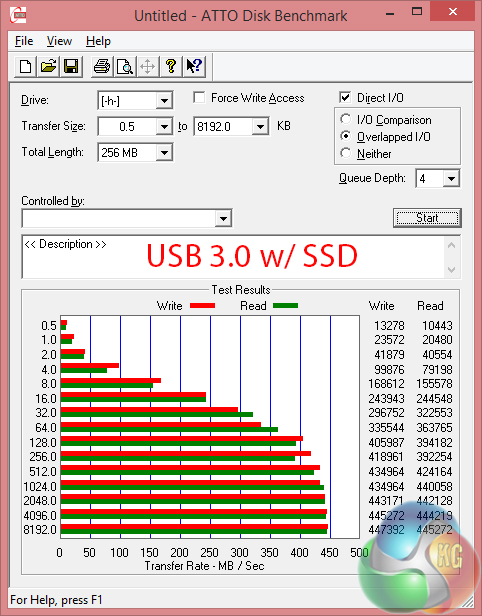
USB 3.0 performance is exactly as we would expect from a system using the Intel HM87 chipset and taking advantage of Windows 8.1's UASP support. Transferring games between systems can be a less time-consuming task.
Wireless
We use Totusoft’s LAN Speed Test software to measure the real-world throughput offered by the Killer Wireless-N 1202 networking solution.
The Linksys EA6900 router was used and there was a small amount of network clutter (mainly on the 2.4GHz frequency band).
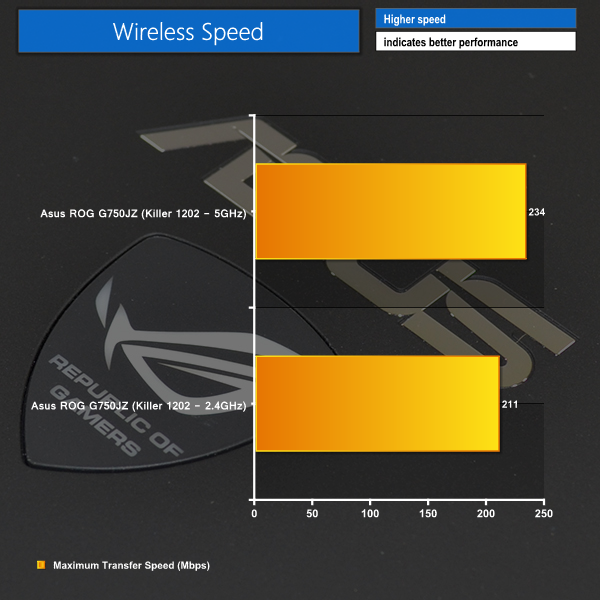
Wireless throughput performance over a home network is sufficient to transfer relatively large files and stream HD media. We registered around 25-30MBps when transferring media from one system to the G750JZ.
A networking solution supporting 802.11ac wireless is likely to be substantially faster than Killer's Wireless-N 1202 WLAN card.
