 KitGuru KitGuru.net – Tech News | Hardware News | Hardware Reviews | IOS | Mobile | Gaming | Graphics Cards


The initial verdict is in for Ryzen 7; AMD's latest and greatest CPU offers superb multi-threaded performance and even proves itself to be a solid option in lightly-threaded applications. Add in the aggressive pricing and our thoughts on the flagship Ryzen 7 – 1800X – CPU are overall very positive, provided you aren't an ultra-high refresh rate gamer.
£500 still a little much for you to drop on an 1800X? Worry not as that's where the Ryzen 7 second-in-command 1700X comes in. Take some less favourable Ryzen 7 silicon, drop the clock frequencies by a couple of hundred Megahertz, put £100 back into your pocket and you are left with a Ryzen 7 1700X. Oh, and you still get the unlocked multiplier that allows you to overclock hassle-free (and close to Ryzen 7 1800X numbers). Where's the catch?
It has been a long-time tradition for AMD to have multiple SKUs in the market competing in different price points, despite being basically the same chip. A quick look at the purchasable Vishera line-up from a few weeks ago shows that SKUs such as the FX-8320, FX-8350, FX-8370, FX-9370, and FX-9590 all exist alongside one another, regardless of them being the same chips with different clock speeds. AMD charges a premium for higher-quality silicon that the binning process positions on a more favourable voltage-frequency curve.
To stock-clocked users or buyers who want to squeeze out every last drop of clock speed, the price premium can be a worthwhile investment. However, savvy enthusiasts have typically gravitated towards the lower-cost options knowing that a few minutes or hours of tweaking in the BIOS will result in similar clock speeds and performance. That's the beauty of unlocked frequency multipliers.
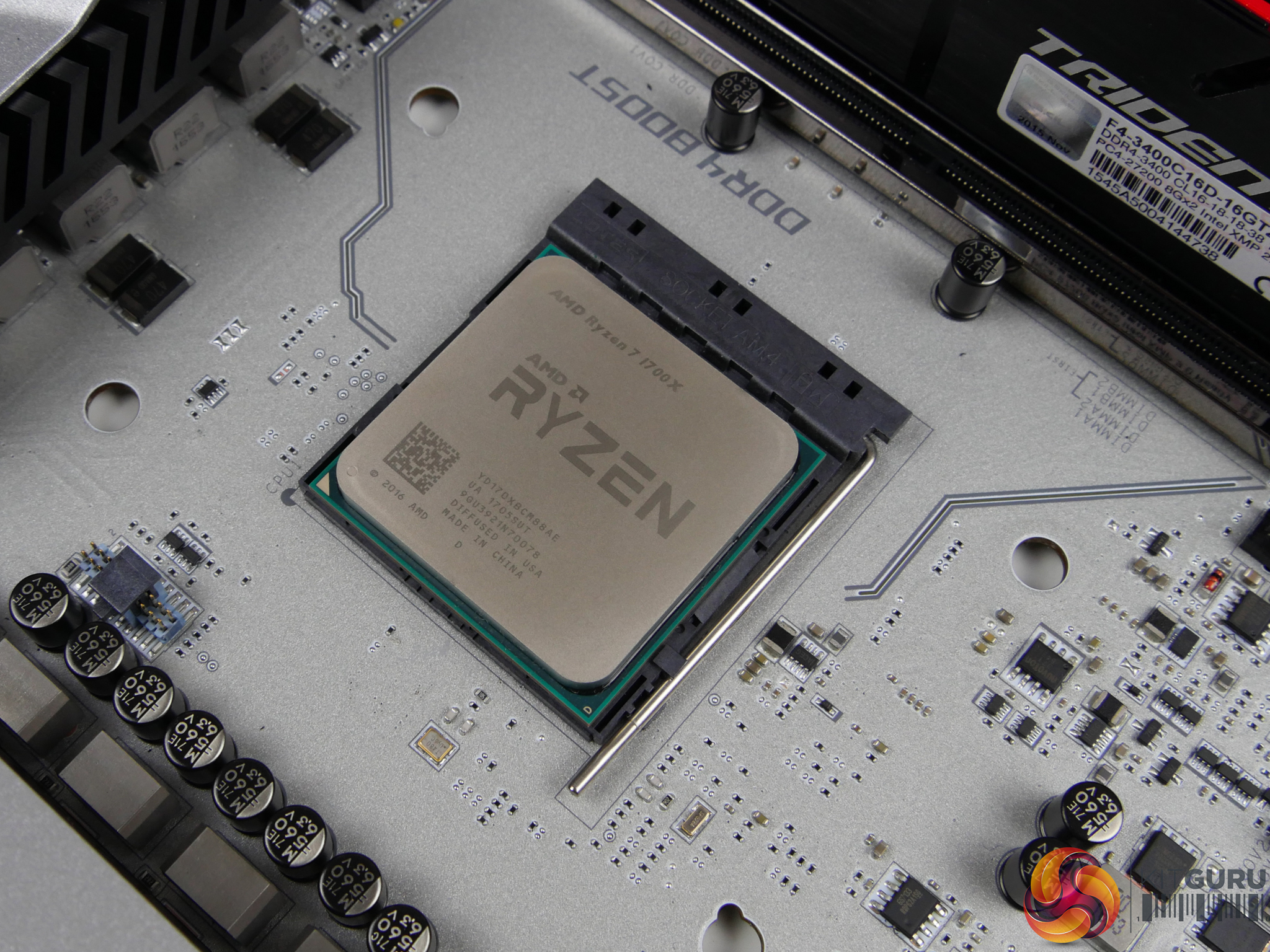
Following in the same vein, AMD's Ryzen 7 1700X is simply a cheaper way of getting an eight-core, 16-thread processor than the £500 1800X. Of course, there's also the cheaper Ryzen 7 1700 (non-X) that's about £70 less than the 1700X. However, the differences for the 1700 are a little more than just speed – the TDP is reduced to 65W by way of frequency reductions, Extended Frequency Range (XFR) headroom is halved, and a Wraith stock cooler is included. That's a topic for another day, though, when our full review is ready for publication.
| CPU | AMD Ryzen 7 1800X | AMD Ryzen 7 1700X | AMD Ryzen 7 1700 | Intel Core i7 6950X | Intel Core i7 6900K | Intel Core i7 6800K | Intel Core i7 7700K |
| CPU Codename | Zen | Zen | Zen | Broadwell-E | Broadwell-E | Broadwell-E | Kaby Lake |
| Core / Threads |
8 / 16 | 8 / 16 | 8 / 16 | 10 / 20 | 8 / 16 | 6 / 12 | 4 / 8 |
| Base Frequency | 3.6GHz | 3.4GHz | 3.0GHz | 3.0GHz | 3.2GHz | 3.4GHz | 4.2GHz |
| Boost Frequency | 4.0GHz | 3.8GHz | 3.7GHz | 3.5GHz | 3.7GHz | 3.6GHz | 4.5GHz |
| Maximum Frequency | 4.1GHz (XFR) | 3.9GHz (XFR) | 3.75GHz (XFR) | 4.0GHz (TBM 3.0) | 4.0GHz (TBM 3.0) | 3.8GHz (TBM 3.0) | n/a |
| Unlocked Core Multiplier | Yes (x0.25 granularity) | Yes (x0.25 granularity) | Yes (x0.25 granularity) | Yes (x1 granularity) | Yes (x1 granularity) | Yes (x1 granularity) | Yes (x1 granularity) |
| Total Cache | 16MB L3 + 4MB L2 | 16MB L3 + 4MB L2 | 16MB L3 + 4MB L2 | 25MB L3 + 2.5MB L2 | 20MB L3 + 2MB L2 | 15MB L3 + 1.5MB L2 | 8MB L3 + 1MB L2 |
| Max. Memory Channels |
2 (DDR4) | 2 (DDR4) | 2 (DDR4) | 4 (DDR4) | 4 (DDR4) | 4 (DDR4) | 2 (DDR4 & DDR3L) |
| Max. Memory Frequency |
1866 to 2667MHz | 1866 to 2667MHz | 1866 to 2667MHz | 2400MHz | 2400MHz | 2400MHz | 2400MHz / 1600MHz |
| PCIe Lanes | 16+4+4 | 16+4+4 | 16+4+4 | 40 | 40 | 28 | 16 |
| CPU Socket | AM4 | AM4 | AM4 | LGA 2011-3 | LGA 2011-3 | LGA 2011-3 | LGA 1151 |
| Manufacturing Process | 14nm | 14nm | 14nm | 14nm | 14nm | 14nm | 14nm |
| TDP | 95W | 95W | 65W | 140W | 140W | 140W | 91W |
| MSRP | $499 | $399 | $329 | $1723-1743 | $1089-1109 | $434-441 | $339-350 |
| UK Street Price | Approx. £500 | Approx. £400 | Approx. £330 | Approx. £1650 | Approx. £1000 | Approx. £400 | Approx. £330 |
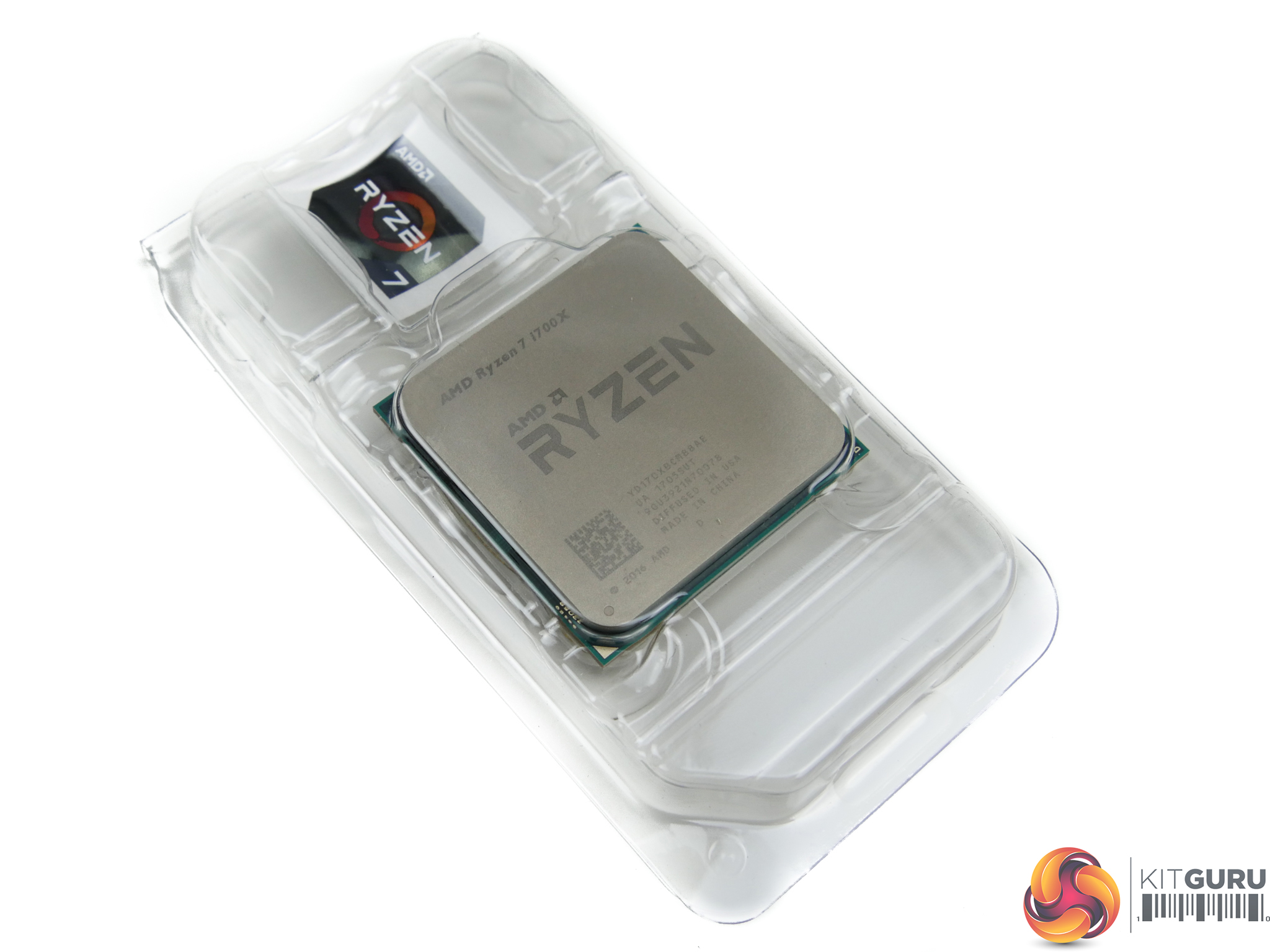
AMD's Ryzen 7 1700X is an 8C16T processor thanks to its support for Simultaneous Multi-Threading (SMT). Base clock speed is 3.4GHz with Precision Boost taking it as high as 3.8GHz under the correct loading conditions (typically two-or-fewer core loading scenarios). Throughout our testing, we saw the chip spend most of its time at its 3.5GHz all-core turbo level when used with a strong Noctua NH-D15 CPU cooler. Another part of AMD's SenseMI technologies – XFR – takes the Ryzen 7 1700X single-core clock speed as high as 3.9GHz, provided sufficient power and thermal headroom is available.
Ryzen 7 1700X's primary price competitor from Team Blue is the ~£400 Core i7-6800K. The Broadwell-E 6C12T chip is likely to show significant disadvantages in multi-threaded applications, though slightly higher overclockability and quad-channel memory could claw back some performance downfall put forward by a lower core count. This looks to be an interesting fight for power users and gamers alike.
For more information regarding Ryzen 7 and the AM4 platform, read our launch review for the Ryzen 7 1800X HERE. You can read our Ryzen 7 1700 review HERE.
Overclocking the Ryzen 7 1700X was a practically identical procedure to that of the 1800X. The main settings worth tweaking for CPU overclocking are the CPU VCore, loadline calibration, and SOC voltage to aid stability especially with higher-speed memory kits. If your motherboard has the option in its UEFI (which ASUS' C6H does not), bumping NB voltage up to around 1.10-1.15V can aid stability.
Default voltage for manual tuning should start at around 1.3625V, according to AMD. Users should be fine pushing to 1.40V with a decent CPU cooler and up to 1.45V with a high-end dual-tower heatsink or dual-fan AIO radiator. At 1.45V, however, AMD suggests that processor longevity could be affected according to their models.
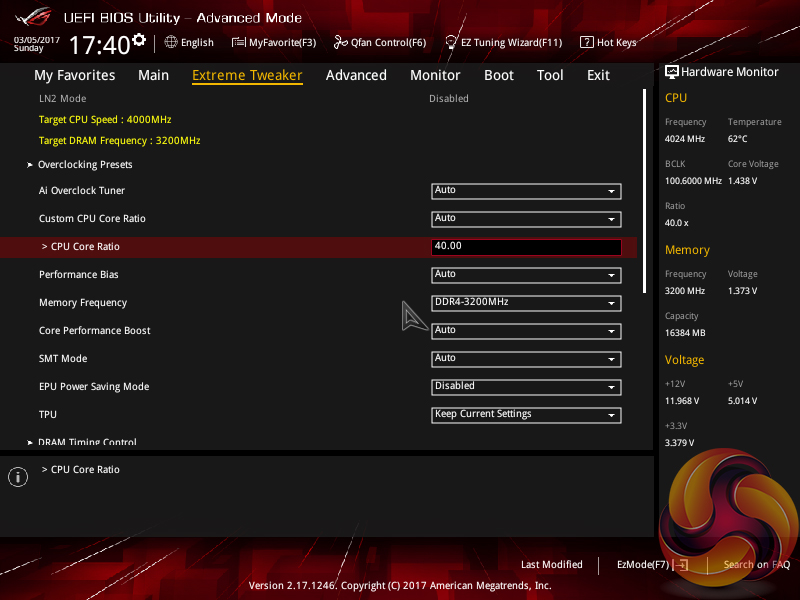

After confirming that our Ryzen 7 1700X chip was not capable of the same 4.1GHz frequency at around 1.44V of our 1800X (our 1700X actually rose to 1.461V using the same voltage and LLC settings, perhaps due to lesser silicon quality compared to the 1800X), we wanted to keep the voltage at load close to 1.4V. We increased the frequency multiplier to its highest level which resulted in a 4000MHz clock speed.
Getting 1.4V with the ASUS motherboard is not easy as the LLC settings cause a large swing in idle and load voltage levels. We settled with an applied VCore of 1.41875V in the UEFI and Level 2 LLC which saw load voltage generally sitting at around 1.395-1.417V depending on the loading intensity. SOC voltage was set to 1.25V and our memory was maintained at 3200MHz 14-14-14-34 with 1.35V.
In short, our final Ryzen 7 1700X overclocking settings using an ASUS Crosshair VI Hero motherboard were:
- 1.41875V CPU VCore.
- 1.25V SOC voltage.
- Level 2 LLC (around 1.395-1.417V load VCore in OS).
- Multiple Cinebench R15 multi-core runs to validate stability, as well as AIDA64 CPU stress test.
- DDR4-3200MHz 14-14-14-34 @ 1.35V.
AMD Ryzen 7 1700X Overclocking – 4.0GHz Stable
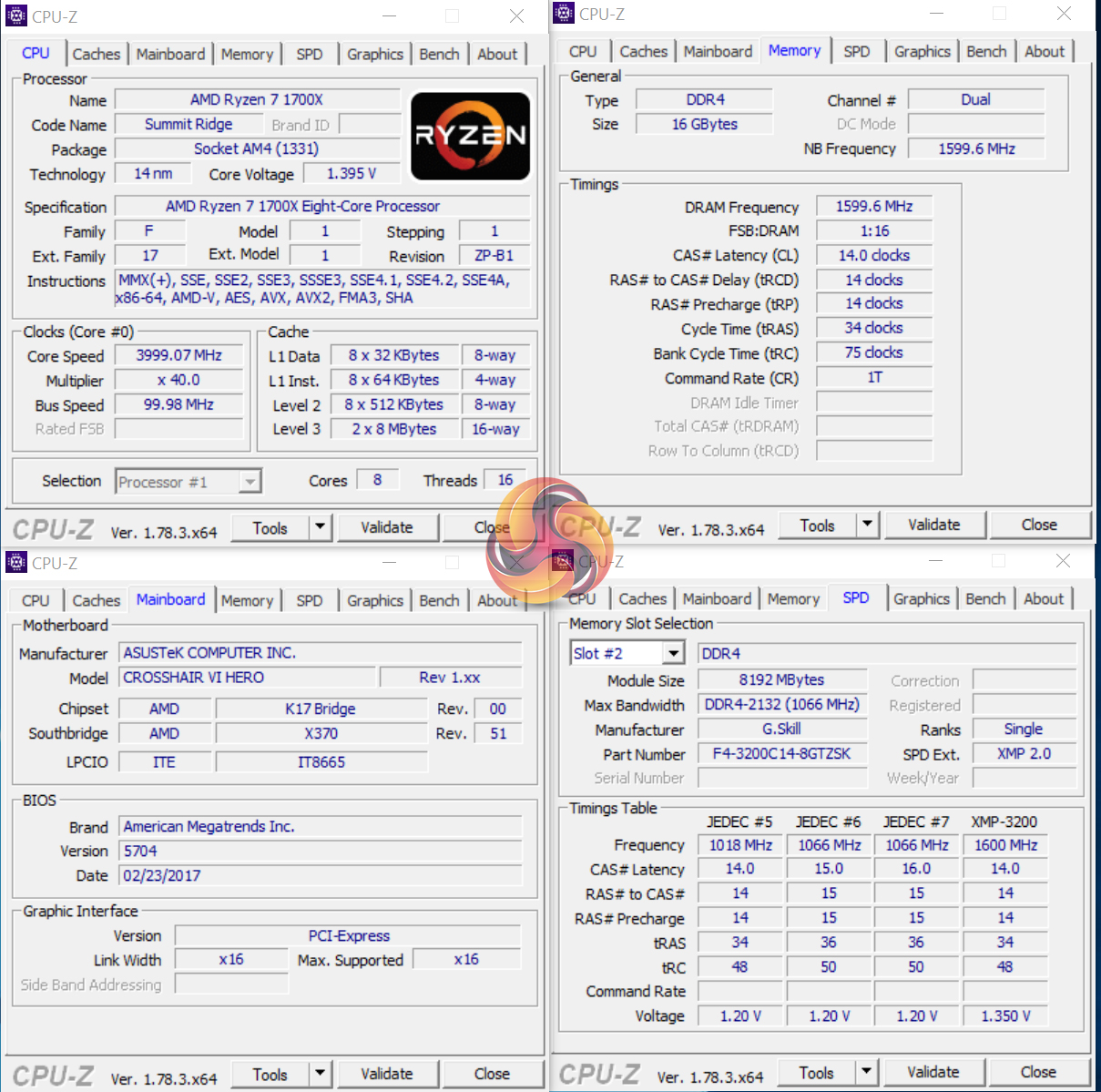
Our Ryzen 7 1700X chip at 4.0GHz with a load voltage between 1.395-1.417V was stable through Cinebench, Handbrake, and a short run of Prime 95. We would be happy running at these levels for 24/7 usage with our particular silicon. We were able to drop the UEFI voltage level to 1.40V, which resulted in a 1.373-1.395V load voltage, but this configuration presented issues with Handbrake (every other test was stable).
We have seen reports of 1700X CPUs generally hitting around 3.9-4.0GHz with sensible voltage levels and our results would add to those suggestions. A stable overclock of around 0.1GHz lower than the more expensive 1800X is a good result for the 1700X that certainly adds to its value aspect for overclockers.
Time spent trying to hit overclock levels that we achieved with the 1800X did not result in success. We fed the 1700X with up to 1.46V (under load) but could not garner stability at 4.1GHz. If you really must have a frequency higher than 4.0GHz on the 1700X, you'll either have to cross your fingers in the silicon lottery, push voltages to potentially lifespan-reducing levels past 1.45V, or start disabling threads and cores on the chip.
We preferred 4.0GHz with all eight cores and SMT enabled and a sensible 24/7 voltage level.
High-speed Memory Support
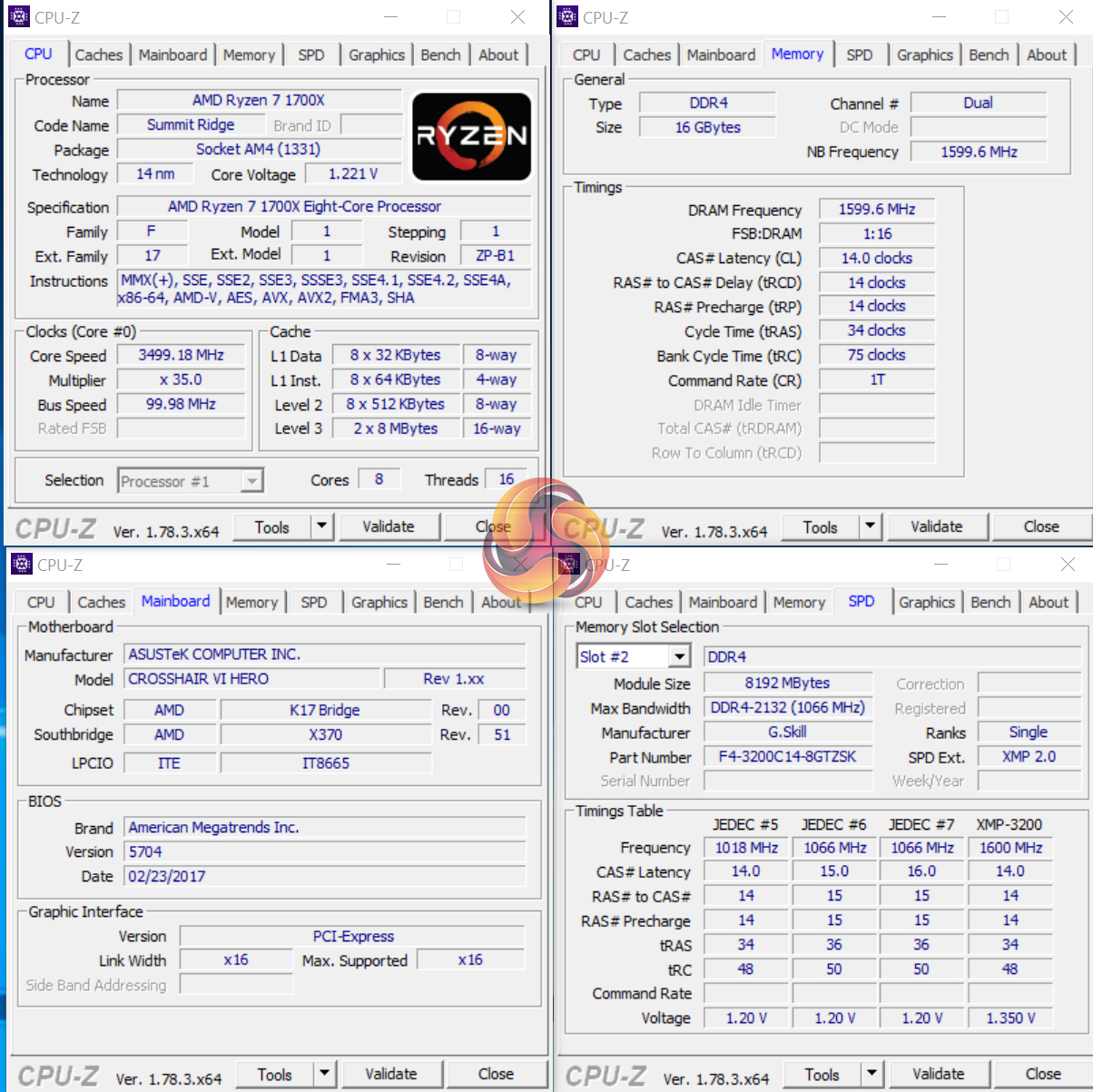
As already highlighted, we were able to use 3200MHz dual-channel DDR4 (2 single-sided DIMMs) with the Ryzen 7 1700X while at stock clocks and when overclocked to 4.0GHz. This was the case using the ASUS Crosshair VI Hero motherboard.
The less-prime silicon forming our 1700X did not seem to have a profound influence on IMC strength, up to our tested level of 3.2GHz CL14, that is.
We will be outlining the Ryzen 7 1700X CPU's performance while using an ASUS Crosshair VI Hero AM4 motherboard.
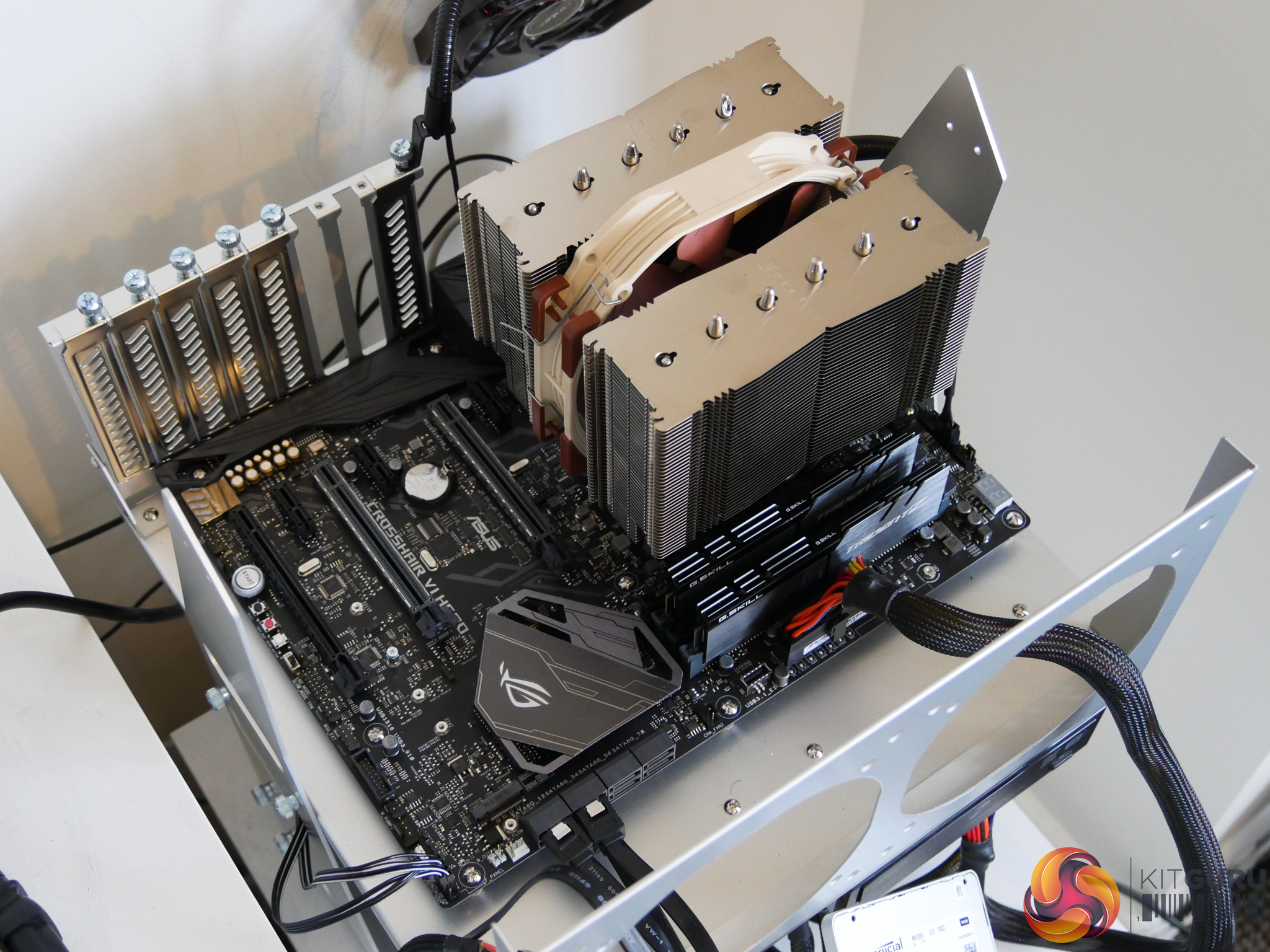
A 16GB (2x8GB) kit of G.Skill's Trident Z DDR4 memory serves our test system. The kit's rated frequency of 3200MHz with CL14 timings should ensure that memory-induced bottlenecks are removed. A strength for the ASUS board is its ability to run this memory at 3200MHz CL14, which is pushing on the limit of memory speed capability for the AM4 platform.
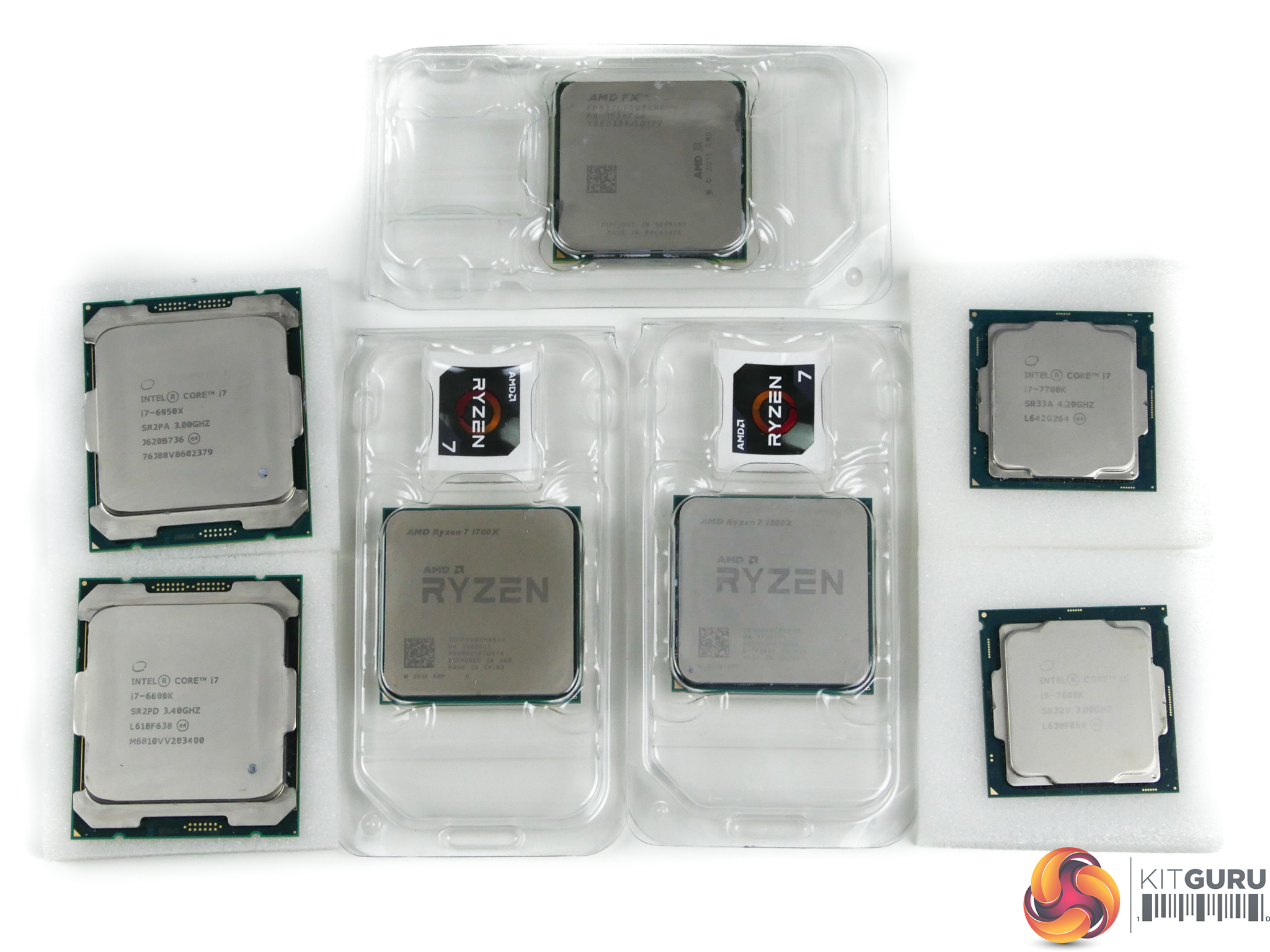
Today's comparison processors come in the form of:
- Piledriver FX-8370.
- Sandy Bridge i7-2700K.
- Ivy Bridge i5-3570K.
- Devil's Canyon i7-4790K (Haswell-based).
- Haswell-E i7-5960X.
- Broadwell-E i7-6800K and i7-6950X.
- Skylake's i5-6600K and i7-6700K.
- Kaby Lake's i3-7350K, i5-7600K, and i7-7700K.
- Ryzen 7 1800X.
These form some of the best and most popular CPUs in their respective pricing ranges and product hierarchies for this generation and past ones. They also give a solid overview of where the Ryzen 7 1700X slots into the current market in terms of performance.
We went out and paid over £1,500 (!) to buy a Core i7-6950X 10C20T CPU in order to compare Ryzen 7 offerings to the current fastest consumer processor on the market. Our trusty old Haswell-E Core i7-5960X serves as the 8C16T competitor for Intel's HEDT platform as we do not have access to the Broadwell-E i7-6900K (which is very similar in performance).
The Ryzen 7 1700X sat comfortably at its 3.5GHz all-core boost frequency throughout testing thanks to our strong Noctua D15 CPU cooler and solid power delivery from the ASUS motherboard. XFR was confirmed as operating at 3.9GHz by running multiple different single-threaded workloads and checking the real-time clock speed.
We test Intel CPUs using the forced turbo (multi-core turbo – MCT) setting that most motherboard vendors now enable by default or when using XMP memory. This feature pins all of the CPU's cores at the maximum turbo boost frequency all of the time. The voltage is bumped up to enhance stability but this results in greater power consumption and higher temperature readings which are important to remember when testing those parameters.
We also tested all CPUs' achievable overclocked frequencies so that you can see how your overclocked chip compares to another stock or overclocked chip.
CPU Test System Common Components:
- Graphics Card: Nvidia GeForce GTX Titan X Pascal (custom fan curve to eliminate thermal throttling).
- CPU Cooler: Noctua NH-D14 / Noctua NH-D15 / Cryorig R1 Ultimate / Corsair H100i v2 / Corsair H110i GT / EKWB Predator 240.
- Games SSD: SK hynix SE3010 SATA 6Gbps 960GB.
- Power Supply: Seasonic Platinum 1000W / Seasonic Platinum 760W.
- Operating System: Windows 10 Pro 64-bit (Anniversary Update).
We use a mixture of high-end air and AIO coolers to gather performance measurements without thermal throttling playing a part. Seasonic's Platinum-rated PSUs provide ample power to really push the CPU overclocks. Nvidia's GTX Titan X Pascal is the fastest gaming GPU on the planet, making it ideal for alleviating GPU-induced bottlenecks and putting the onus on CPU performance.
While we use a mixture of cooling and PSU hardware for general testing, where it is important to keep those items identical (power draw and temperature readings) we ensure that the correct hardware is used to deliver accurate data.
Ryzen AM4 System (Ryzen 7 1800X, Ryzen 7 1700X):
- 1800X CPU: AMD Ryzen 7 1800X ‘Summit Ridge' 8 cores, 16 threads (3.6-4.0GHz stock w/ 4.1GHz XFR & 4.1GHz @ 1.43125V overclocked).
- 1700X CPU: AMD Ryzen 7 1700X ‘Summit Ridge' 8 cores, 16 threads (3.4-3.8GHz stock w/ 3.9GHz XFR & 4.0GHz @ 1.41875V overclocked).
- Motherboard: ASUS Crosshair VI Hero (AM4, X370).
- Memory: 16GB (2x8GB) G.Skill Trident Z 3200MHz 14-14-14-34 DDR4 @ 1.35V.
- System Drive: Crucial MX300 525GB.
Kaby Lake & Skylake LGA 1151 System (7600K, 7700K, 6600K, 6700K):
- 7600K CPU: Intel Core i5-7600K ‘Skylake' (Retail) 4 cores, 4 threads (4.2GHz stock MCT & 4.9GHz @ 1.35V overclocked).
- 7700K CPU: Intel Core i7-7700K ‘Skylake' (Retail) 4 cores, 8 threads (4.5GHz stock MCT & 4.8GHz @ 1.35V overclocked).
- 6600K CPU: Intel Core i5-6600K ‘Skylake' (Retail) 4 cores, 4 threads (3.9GHz stock MCT & 4.5GHz @ 1.35V overclocked).
- 6700K CPU: Intel Core i7-6700K ‘Skylake' (Retail) 4 cores, 8 threads (4.2GHz stock MCT & 4.7GHz @ 1.375V overclocked).
- Motherboard: MSI Z270 Gaming Pro Carbon & Gigabyte Aorus Z270X-Gaming 7 (LGA 1151, Z270).
- Memory: 16GB (2x8GB) G.Skill Trident Z 3200MHz 14-14-14-34 DDR4 @ 1.35V.
- System Drive: Samsung 840 500GB.
Broadwell-E & Haswell-E LGA 2011-3 System (5960X, 6800K, 6950X):
- 5960X CPU: Intel Core i7 5960X ‘Haswell-E' (Engineering Sample) 8 cores, 16 threads (3.5GHz stock MCT & 4.4GHz @ 1.30V overclocked).
- 6800K CPU: Intel Core i7 6800K ‘Broadwell-E' (Retail) 6 cores, 12 threads (3.6GHz stock MCT & 4.2GHz @ 1.275V overclocked).
- 6950X CPU: Intel Core i7 6950X ‘Broadwell-E' (Retail) 10 cores, 20 threads (3.5GHz stock MCT & 4.2GHz @ 1.275V overclocked).
- Motherboard: ASUS X99-Deluxe (LGA 2011-v3, X99).
- Memory: 32GB (4x8GB) G.Skill Trident Z 3200MHz 14-14-14-34 DDR4 @ 1.35V.
- System Drive: SanDisk Ultra Plus 256GB.
Devil's Canyon LGA 1150 System (4790K):
- 4790K CPU: Intel Core i7 4790K ‘Devil's Canyon' (Engineering Sample) 4 cores, 8 threads (4.4GHz stock MCT & 4.7GHz @ 1.30V overclocked).
- Motherboard: ASRock Z97 OC Formula (LGA 1150, Z97).
- Memory: 16GB (2x8GB) G.Skill Trident X 2400MHz 10-12-12-31 DDR3 @ 1.65V.
- System Drive: Kingston SM2280S3/120G 120GB.
Sandy Bridge & Ivy Bridge LGA 1155 System (2700K, 3570K):
- 2700K CPU: Intel Core i7 2700K ‘Sandy Bridge‘ (Retail) 4 cores, 8 threads (3.9GHz stock MCT & 4.6GHz @ 1.325V overclocked).
- 3570K CPU: Intel Core i5 3570K ‘Ivy Bridge' (Retail) 4 cores, 4 threads (3.8GHz stock MCT & 4.6GHz @ 1.30V overclocked).
- Motherboard: ASUS P8Z77-V (LGA 1155, Z77).
- Memory: 16GB (2x8GB) G.Skill Trident X 2400MHz 10-12-12-31 DDR3 @ 1.65V (@2133MHz for 2700K due to CPU IMC limitation).
- System Drive: Kingston HyperX 3K 120GB.
Vishera AM3+ System (FX-8370):
- FX-8370 CPU: AMD FX-8370 ‘Vishera' (Retail) 8 cores, 8 threads (4.0-4.3GHz stock & 4.62GHz @ 1.45V CPU, 2.6GHz @ 1.30V NB overclocked).
- Motherboard: Gigabyte 990FX-Gaming (AM3+, SB950).
- Memory: 16GB (2x8GB) G.Skill Trident X 2133MHz 12-12-12-31 DDR3 @ 1.65V.
- System Drive: Patriot Wildfire 240GB.
Software:
- ASUS Crosshair VI Hero BIOS v5704 (pre-release).
- GeForce 378.49 VGA drivers.
Tests:
Productivity-related:
- Cinebench R15 – All-core & single-core CPU benchmark (CPU)
- HandBrake 0.10.5 – Convert 6.27GB 4K video recording using the Normal Profile setting and MP4 container (CPU)
- Mozilla Kraken – Browser-based JavaScript benchmark (CPU)
- x265 Benchmark – 1080p H.265/HEVC encoding benchmark (CPU)
- WPrime – 1024M test, thread count set to the CPU's maximum number (CPU)
- SiSoft Sandra 2016 SP1 – Processor arithmetic, cryptography, and memory bandwidth (CPU & Memory)
- 7-Zip 16.04 – Built-in 7-Zip benchmark test (CPU & Memory)
Gaming-related:
- 3DMark Fire Strike v1.1 – Fire Strike (1080p) test (Gaming)
- 3DMark Time Spy – Time Spy (DX12) test (Gaming)
- VRMark – Orange room (2264×1348) test (Gaming)
- Ashes of the Singularity – Built-in benchmark tool CPU-Focused test, 1920 x 1080, Extreme quality preset, DX12 version (Gaming)
- Gears of War 4 – Built-in benchmark tool, 1920 x 1080, Ultra quality preset, Async Compute Enabled, DX12 (Gaming)
- Grand Theft Auto V – Built-in benchmark tool, 1920 x 1080, Maximum quality settings, Maximum Advanced Graphics, DX11 (Gaming)
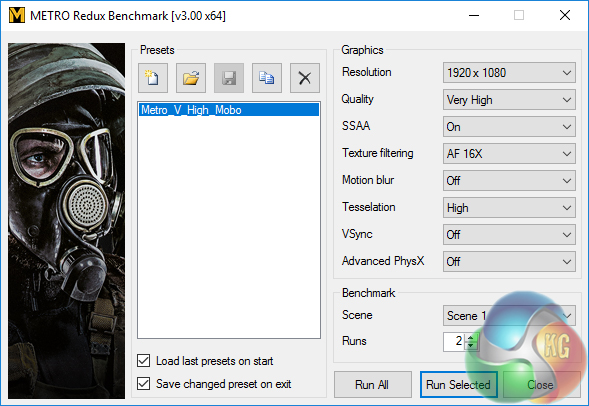
- Metro: Last Light Redux – Built-in benchmark tool, 1920 x 1080, Very High quality settings, SSAA Enabled, AF 16X, High Tessellation, DX11 (Gaming)
- Rise of the Tomb Raider – Built-in benchmark tool, 1920 x 1080, Very High quality preset, SMAA enabled, DX12 version (Gaming)
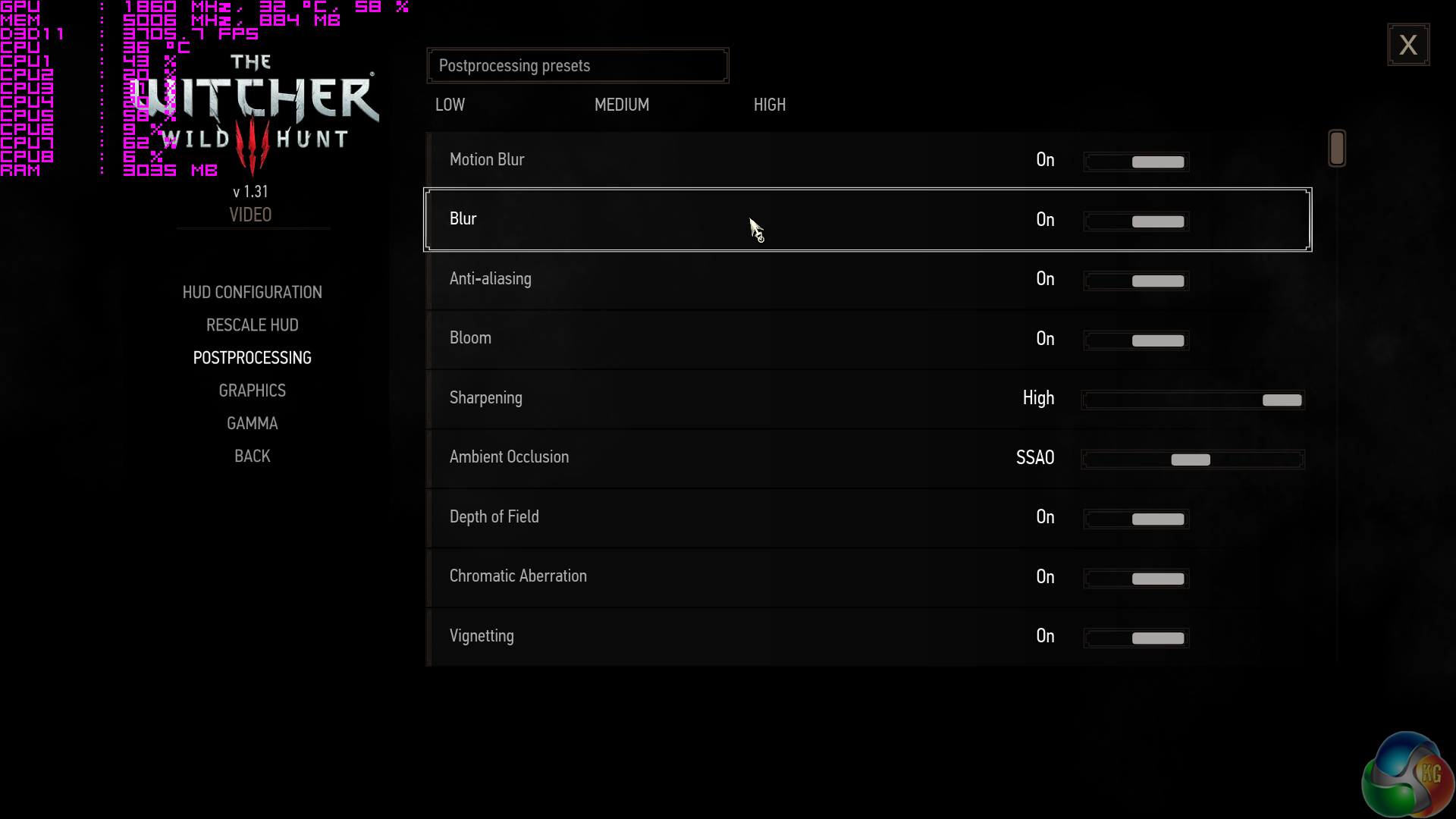
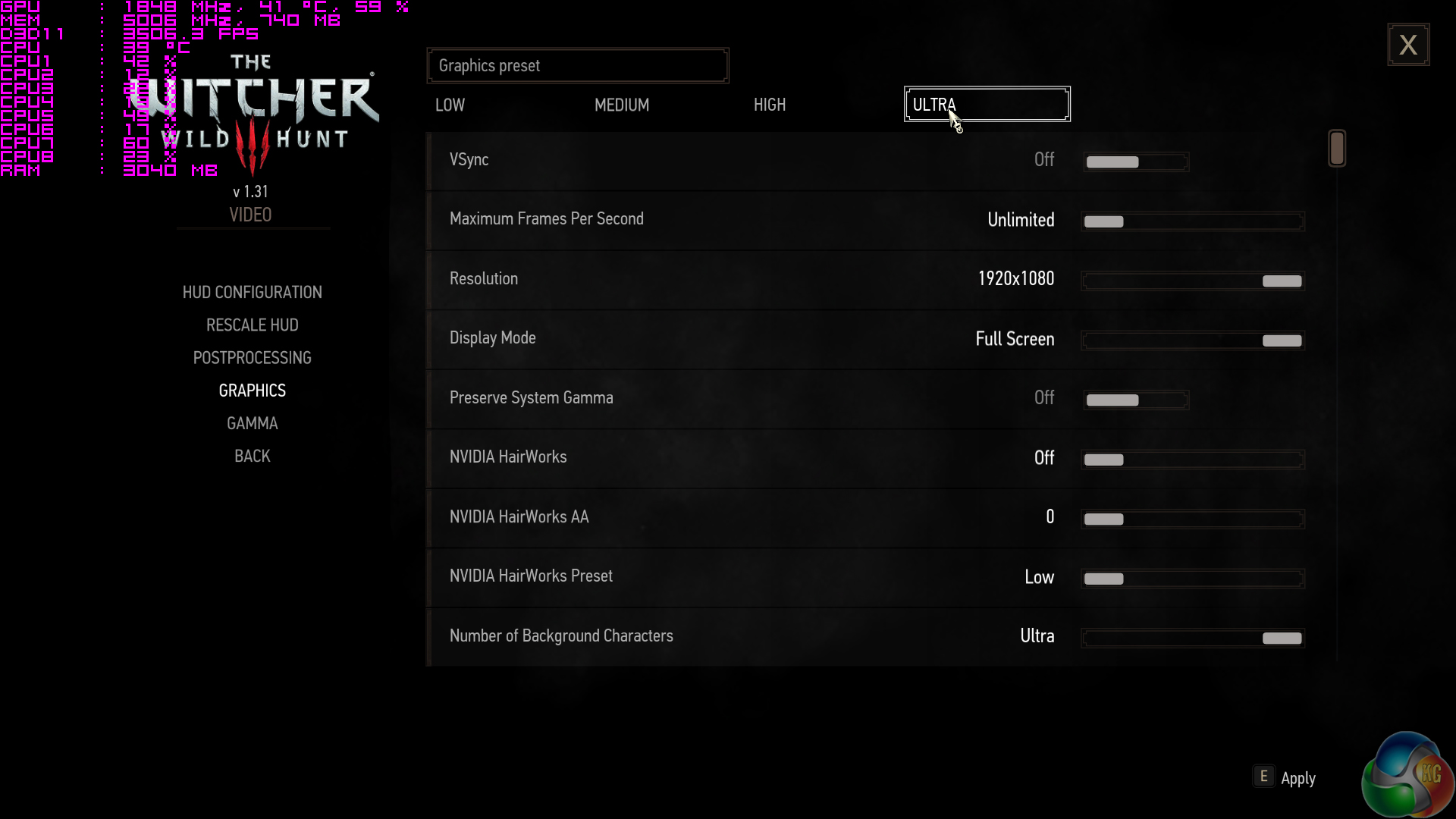
- The Witcher 3: Wild Hunt – Custom benchmark run in a heavily populated town area, 1920 x 1080, Maximum quality settings, Nvidia features disabled, DX11 (Gaming)
- Total War Warhammer – Built-in benchmark tool, 1920 x 1080, Ultra quality preset, DX12 version (Gaming)
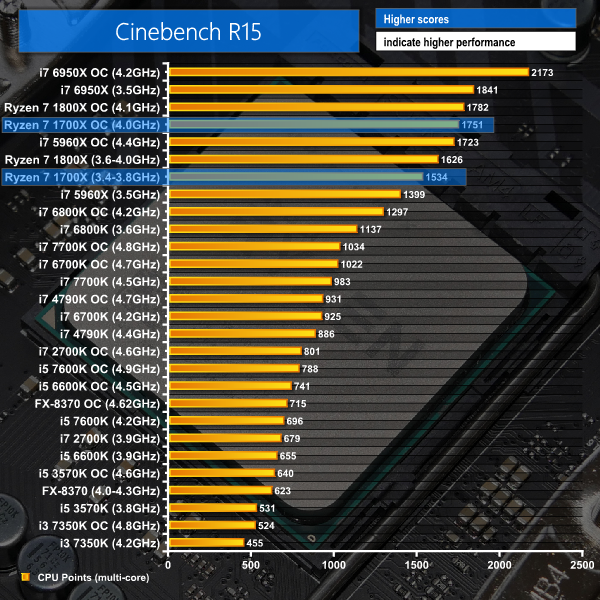
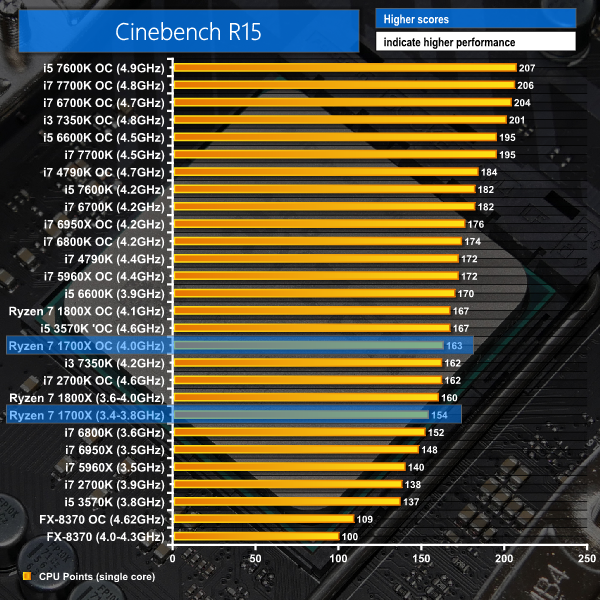
Cinebench
Cinebench is an application which renders a photorealistic 3D scene to benchmark a computer’s rendering performance, on one CPU core, all CPU cores or using the GPU. We run the test using the all-core CPU and single-thread CPU modes.
Handbrake Conversion
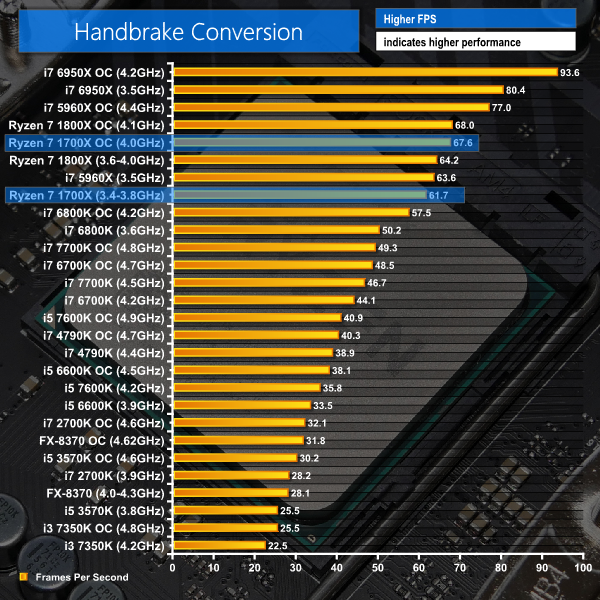
Handbrake is a free and open-source video transcoding tool that can be used to convert video files between different codecs, formats and resolutions. We measured the average frame rate achieved for a task of converting a 6.27GB 4K video using the Normal Profile setting and MP4 container. The test stresses all CPU cores to 100% and shows an affinity for memory bandwidth.
x265 Encoding
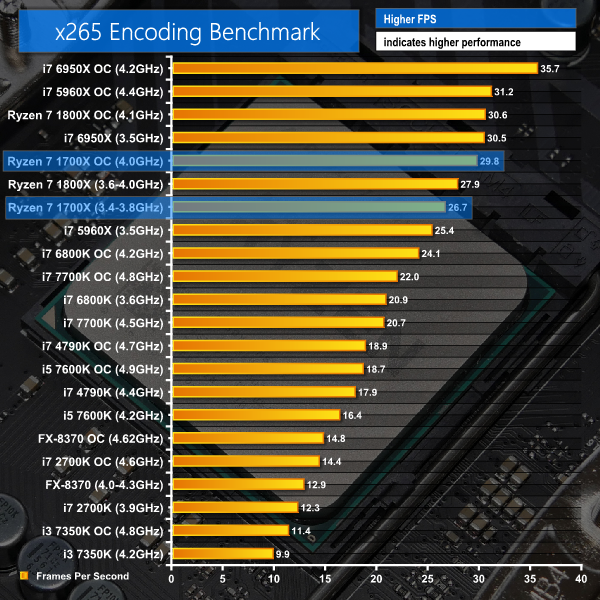
x265 Encoding tests system performance by encoding a 1080p test file using the x265/HEVC format.
CPU-related testing overview:
Its balance of cores, threads, and clock speed put the Ryzen 7 1700X in good positions in these three benchmarks. Cinebench multi-threaded performance puts the stock-clocked 1700X ahead of a Core i7-5960X that cost two-and-a-half times as much when it dominated the market just a couple of years ago. Overclocking the 1700X to 4GHz brings it to within 90 points (5%) of the stock Core i7-6950X which cost more than four times as much.
Handbrake shows solid performance thanks to its ability to saturate the Ryzen 7 1700X's 16 threads while also taking advantage of its clock speed. You get performance close to Intel's 8C16T Haswell-E chip under stock-clocked conditions. Add in an overclock to the 1700X and you can beat Intel's 8C16T contender. However, Handbrake makes good use of the Intel HEDT chips' fat AVX pipelines and quad-channel memory, allowing the 5960X (when overclocked) and 6950X to dominate at the top of the chart. Still, Ryzen 7 1700X looks to be a superb value option if you have a large media library ready for converting and offloading onto a network media server or portable device.
Solid results are also shown in x265 encoding tasks. Throw an overclock to around 4GHz onto the 1700X and you'll get 6950X-level performance for less than a quarter of the cost. Of course, the 6950X can also be overclocked further but that doesn't take away from the significance of achieving such a narrow performance gap while having such a sizeable price difference.
Single-core performance is good and sits somewhere between Haswell-E and Broadwell-E levels. Cinebench sits the Ryzen 7 1700X just above a stock-clocked 6800K in Cinebench's single-core test, although the 1700X is benefiting from enhanced operating frequencies thanks to its 3.8GHz Precision Boost capability and up to 3.9GHz clock speed with XFR.
7-Zip
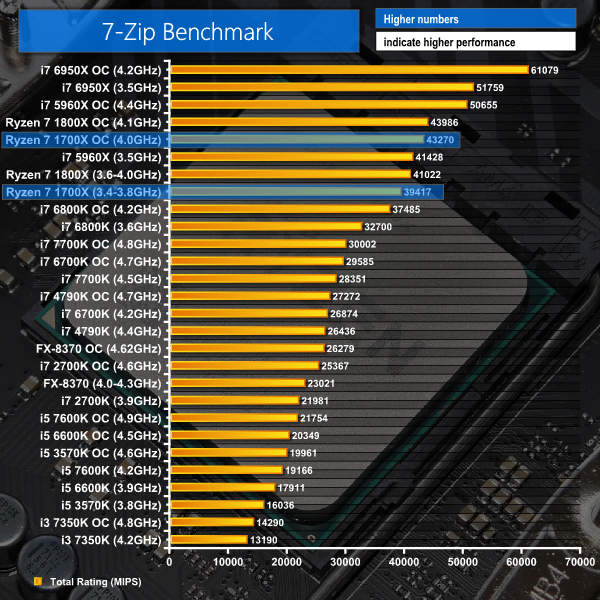
7-Zip is an open source Windows utility for manipulating archives. We measure the Total Rating performance using the built-in benchmark tool. The test stresses all CPU cores to 100% and shows an affinity for memory bandwidth.
Mozilla Kraken
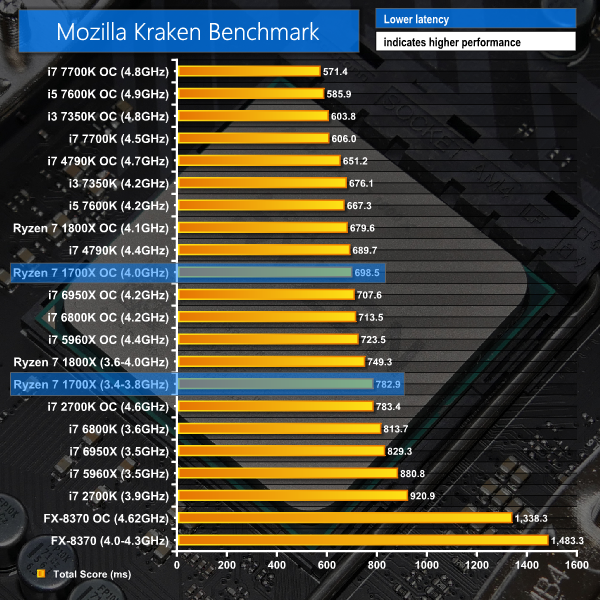
Mozilla Kraken is a browser-based JavaScript benchmark that tests a variety of real-world use cases. We use Chrome as the test browser. The test exhibits very little multi-threading and shows an affinity for CPU clock speed and IPC.
WPrime
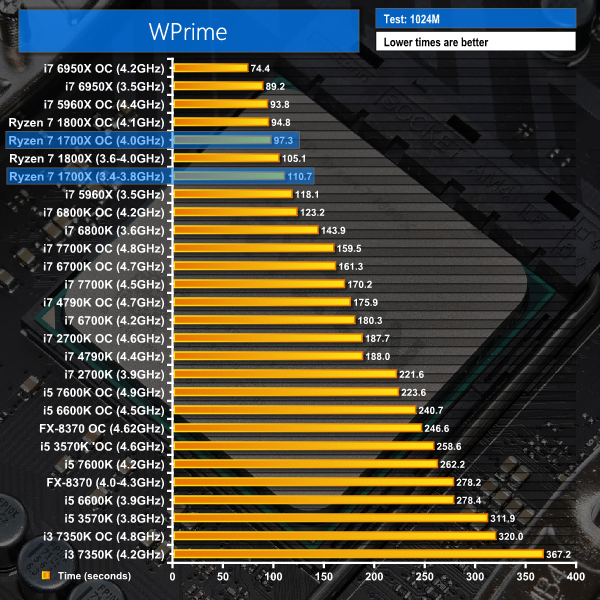
WPrime is a leading multithreaded benchmark for x86 processors that tests your processor performance by calculating square roots with a recursive call of Newton’s method for estimating functions. We use the 1024M test in WPrime to analyse processor calculation performance.
CPU-related testing overview:
7-Zip is well multi-threaded but also likes memory bandwidth. As such, the Ryzen 7 1700X puts in a strong score at stock frequencies but it cannot compete with the Intel HEDT 8-core and 10-core parts thanks to their quad-channel memory (and 32GB versus 16GB in our test systems). That same use of quad-channel memory on the £400 Core i7-6800K allows it to almost eliminate the performance gap, with the aid of a 4.2GHz overclock, to the £400 Ryzen 7 1700X. However, increasing the 1700X's operating speed to 4.0GHz allows it to re-open a performance lead of 17% over the 4.2GHz 6800K. Not bad for a chip that is priced the same.
Mozilla Kraken is single-threaded but it is a good indication of how ‘snappy' browsing will feel. The 1700X performs better than the 6800K when both are at their reference frequencies and it maintains a performance lead when both chips are overclocked. AMD has done a stellar job at bridging the gap to Intel in the IPC department, compared to the company's previous architectures (just look at that Piledriver-based FX-8370 CPU's performance). With that said, there's no beating the fast Skylake architecture in this scenario.
WPrime proves the 1700X to be a stellar number-cruncher with the £400 octa-core putting in performance numbers very close to those set by Intel's HEDT 8C16T i7-5960X. Switching focus to the Broadwell-E 6800K price competitor, the 1700X's additional two cores allow it to open up a noticeable performance lead over Intel's £400 part. With both chips overclocked, AMD's part gets the job done 25.9 seconds (21%) quicker. It's also worth pointing out the 1700X does a good job at showing up the £100 more expensive Ryzen 7 1800X that is barely able to outperform it thanks to a higher overclocked frequency.
Sandra Processor Arithmetic
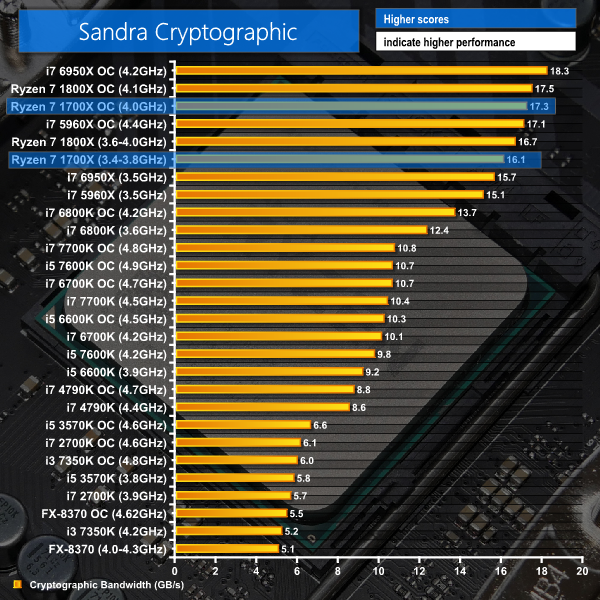
Sandra Cryptographic
Sandra Memory Bandwidth

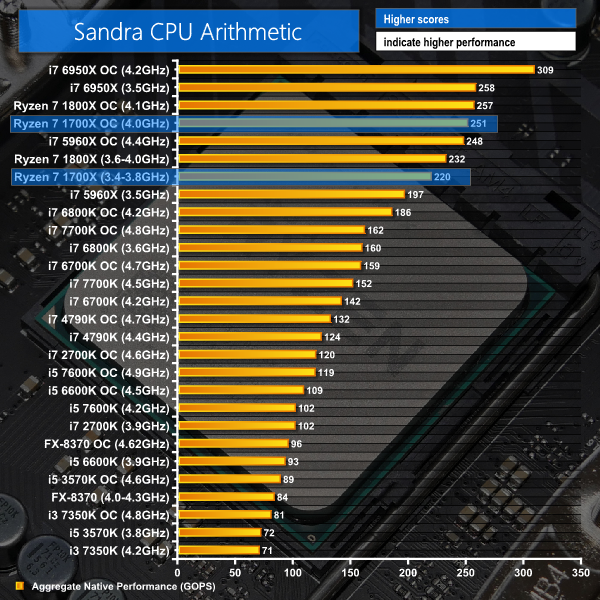
SiSoft Sandra's tests show the Ryzen 7 1700X to be a computationally strong processor. Cryptographic performance is good, which is perhaps thanks to the pair of baked-in AES units.
Memory bandwidth can be considered a downfall for the AM4 platform and Ryzen 7. While more than 35GBps of memory bandwidth with high-speed modules is not an insignificant amount, it pales in comparison to the comfortable 50GBps+ offered by Intel's quad-channel equipped HEDT CPUs. If you have a scientific computing or similar workload that benefits from memory bandwidth, dropping a pair of cores to opt for Intel's similarly-priced Core i7-6800K may be a smarter option than the Ryzen 7 1700X.
3DMark
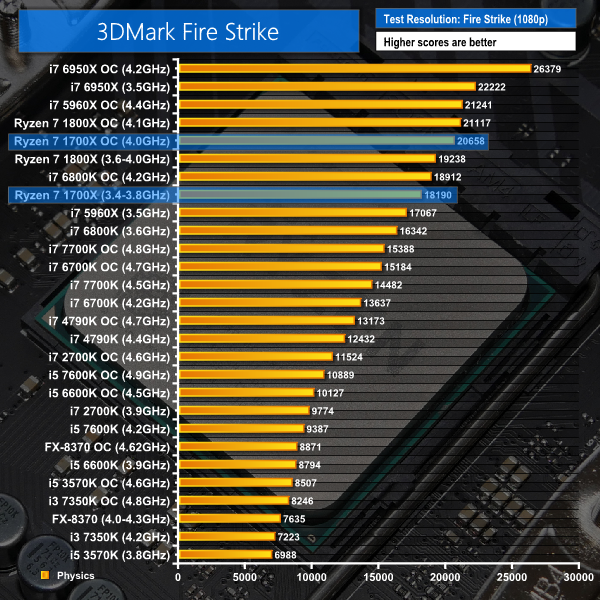
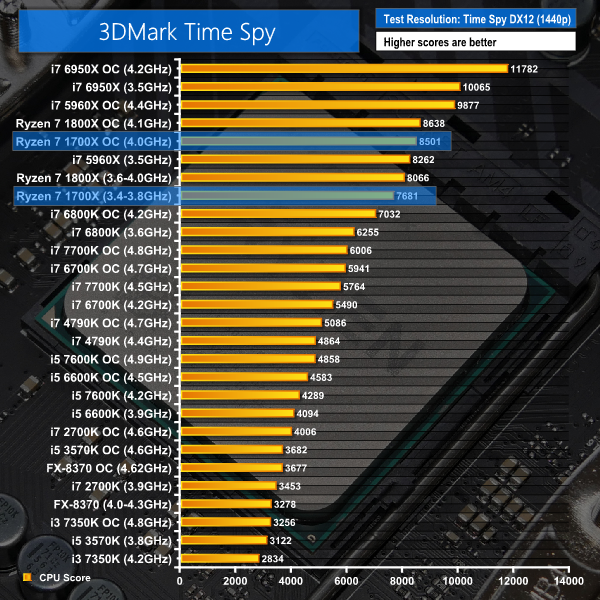
3DMark is a multi-platform hardware benchmark designed to test varying resolutions and detail levels of 3D gaming performance. We run the Windows platform test and in particular the Fire Strike benchmark, which is indicative of high-end 1080p PC Gaming. We also test using the Time Spy benchmark which gives an indication of DirectX 12 performance.
VRMark
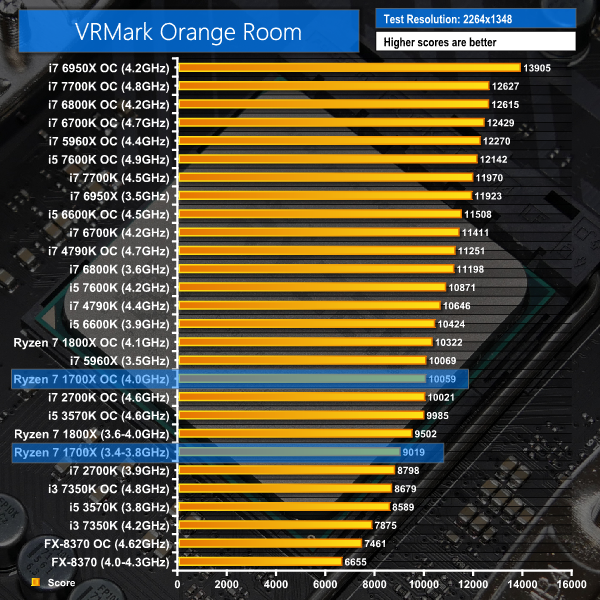
The recently-released VRMark benchmark aims to score systems based on their VR performance potential by using rendering resolutions associated with VR devices of today and the future. We test using the Orange Room benchmark which uses a rendering resolution of 2264×1348 to analyse the capability of hardware with current devices such as the HTC Vive and Oculus Rift.
Scores in FutureMark's 3DMark tests are strong, though the hierarchy does shift somewhat compared to computational performance thanks to the i7-5960X's ability to take easier victories at stock and overclocked frequencies. Pure DX12 performance, as indicated by the Time Spy CPU test, looks to have strong potential for the Ryzen 7 1700X. That's a point that may be worth noting to consumers purchasing a multi-purpose CPU to last a number of years, during which time DX12 will be more prevalent.
VRMark doesn't seem to like the Zen-based architecture in Ryzen 7. Both the 1800X and 1700X show uninspiring scores in this benchmark, which could indicate a potential optimisation issue. We won't put too much stock in the numbers displayed by a synthetic test such as VRMark. However, it is certainly worth bearing in mind.
Grand Theft Auto V
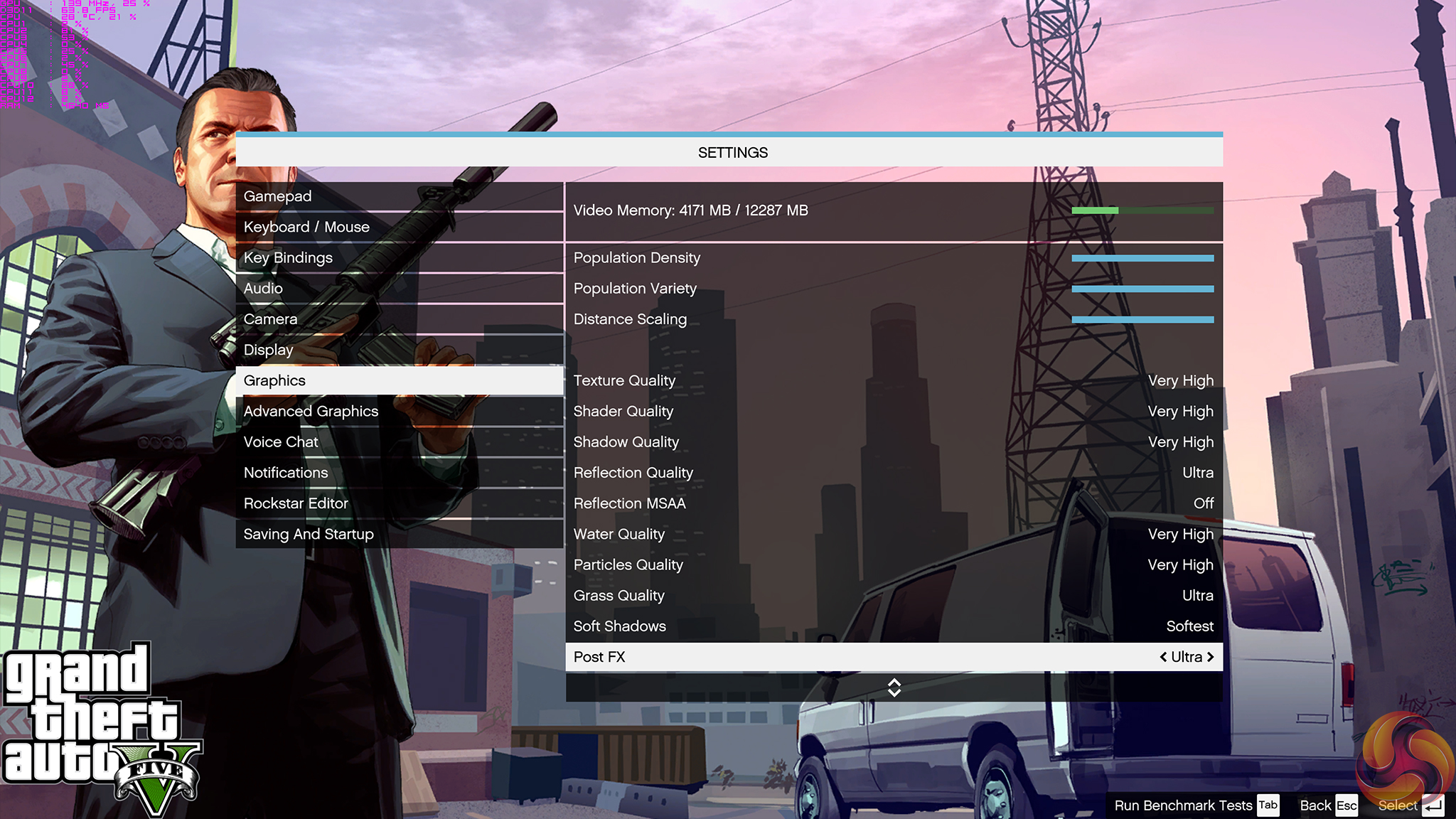
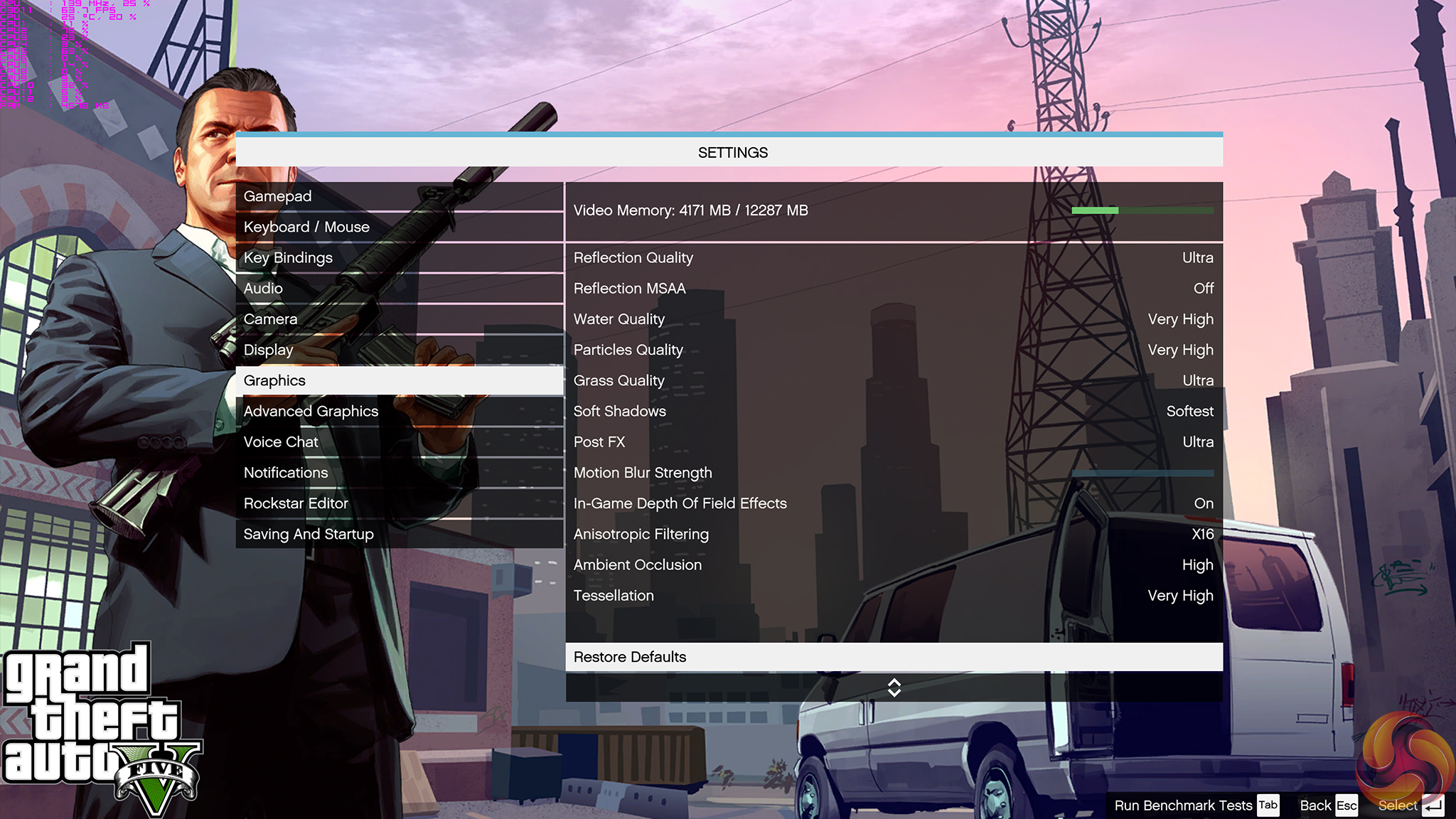
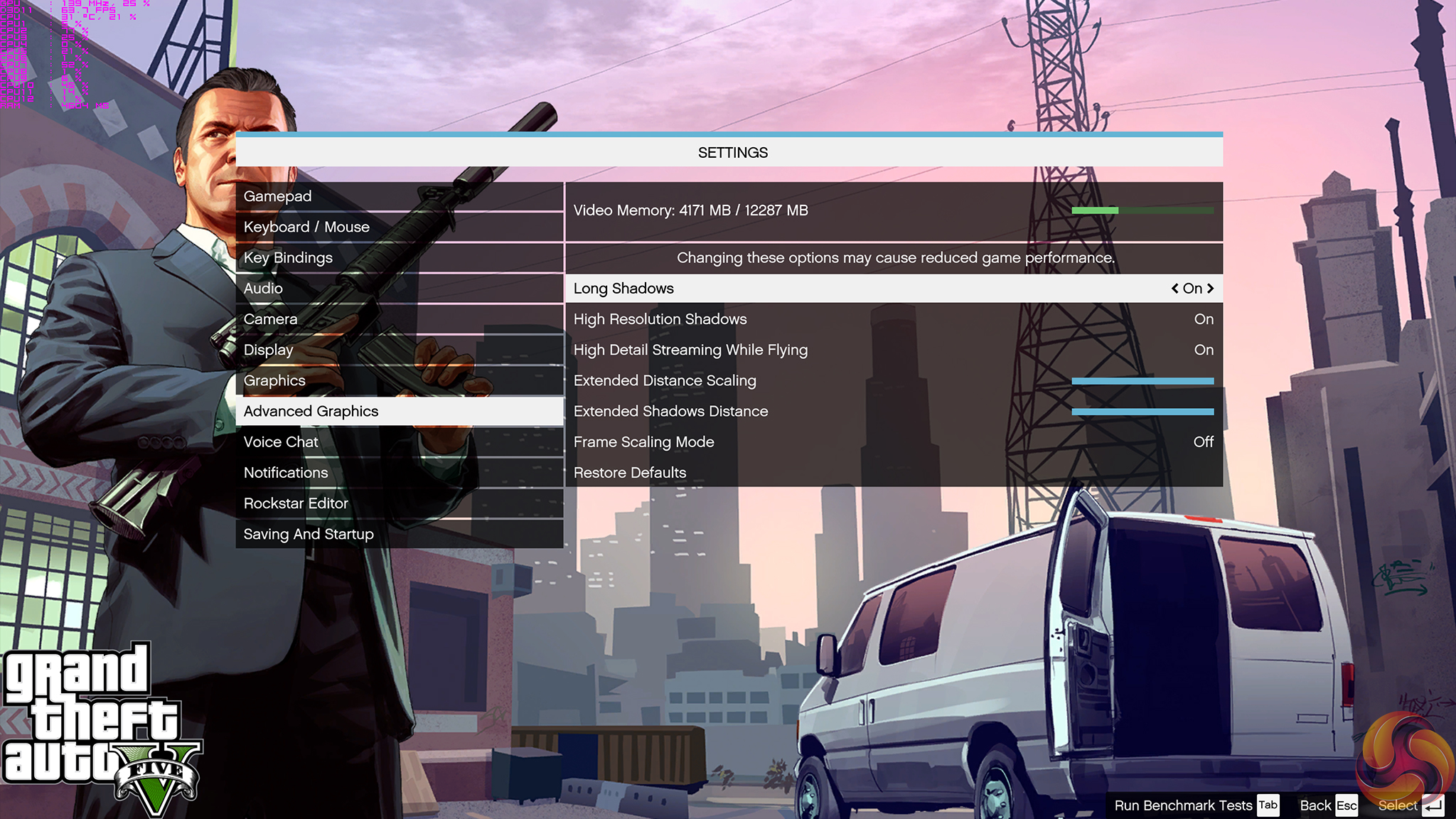
Grand Theft Auto V remains an immensely popular game for PC gamers and as such retains its place in our test suite. The well-designed game engine is capable of providing heavy stress to a number of system components, including the GPU, CPU, and Memory, and can highlight performance differences between motherboards.
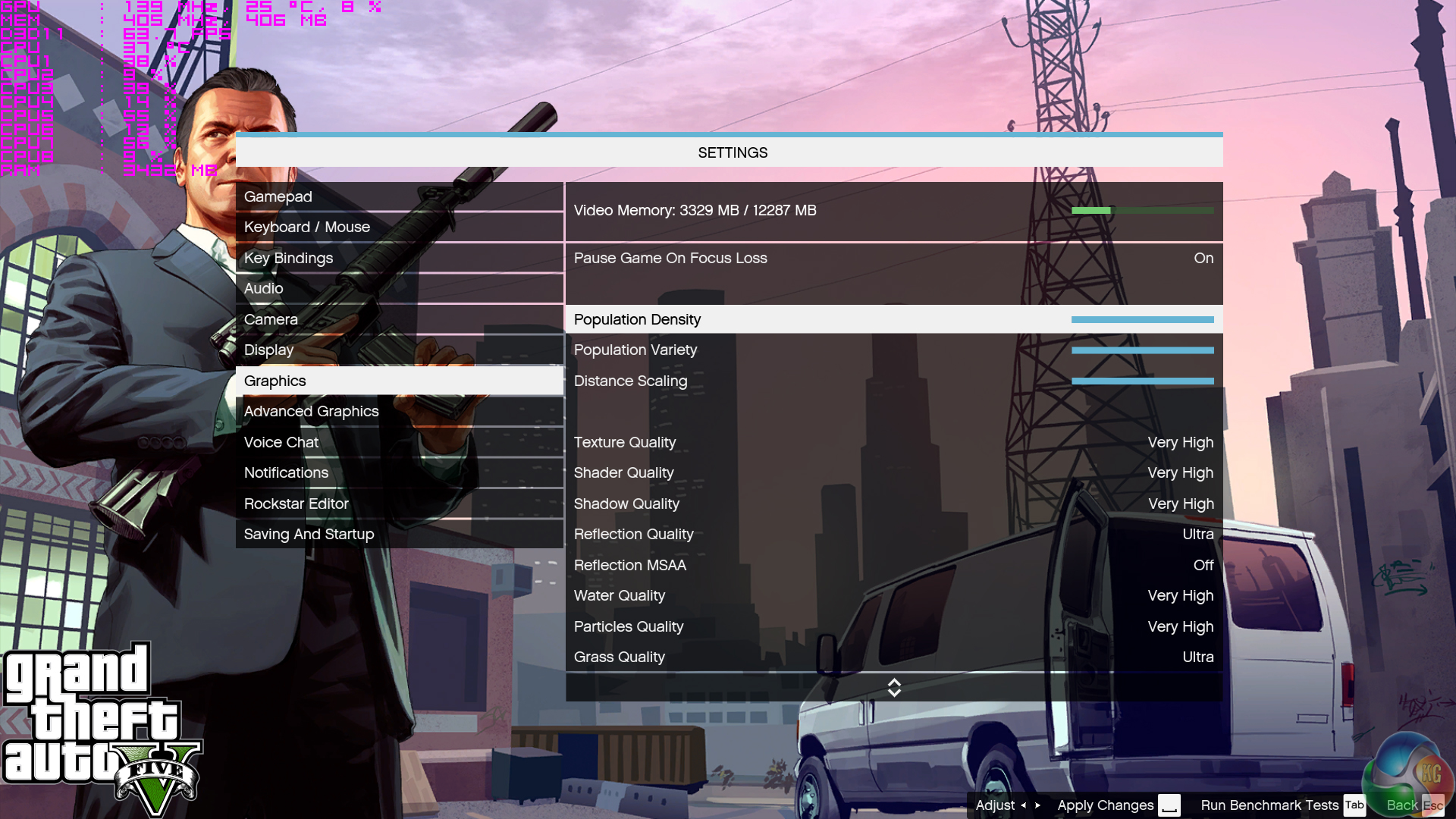
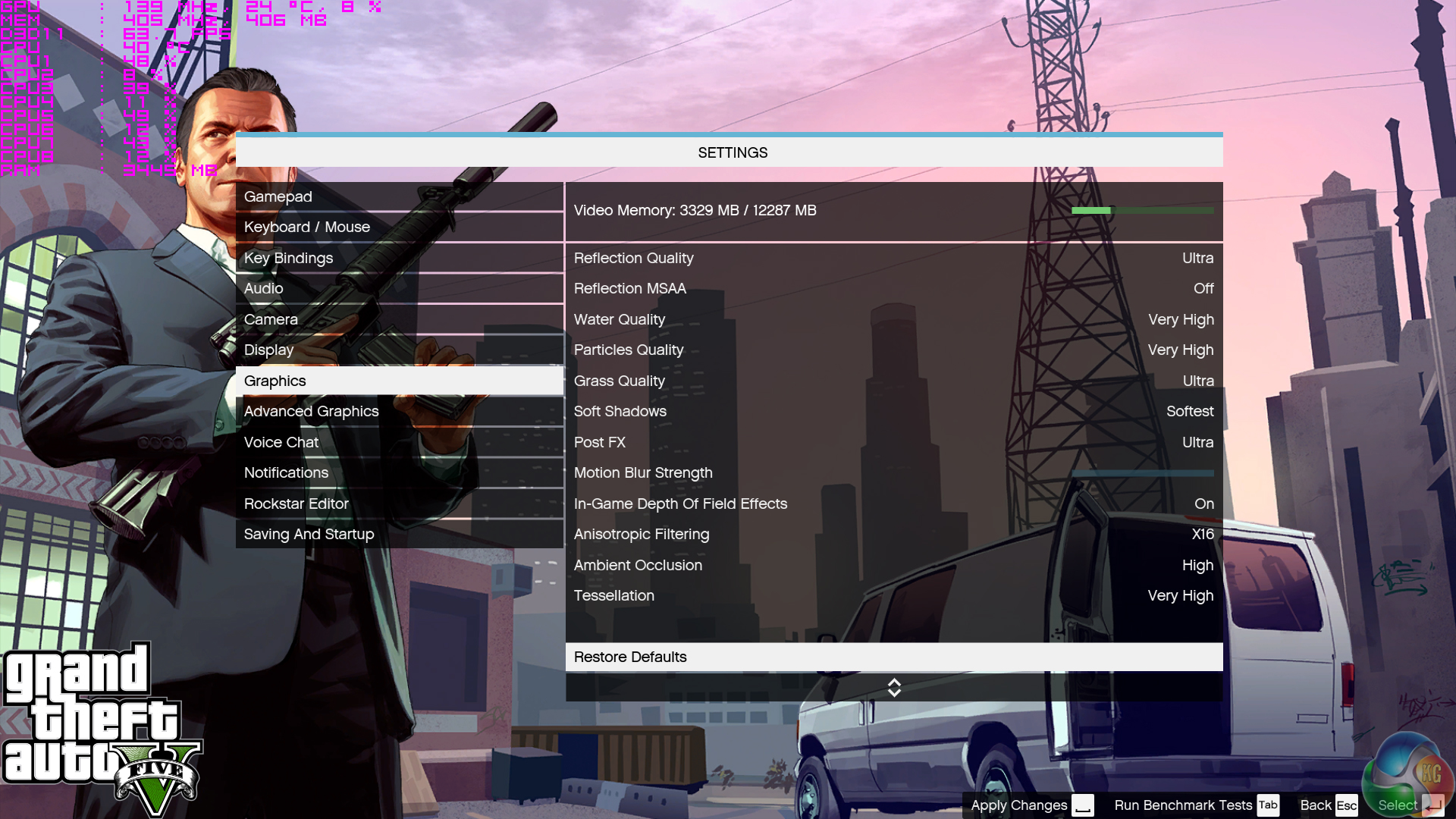
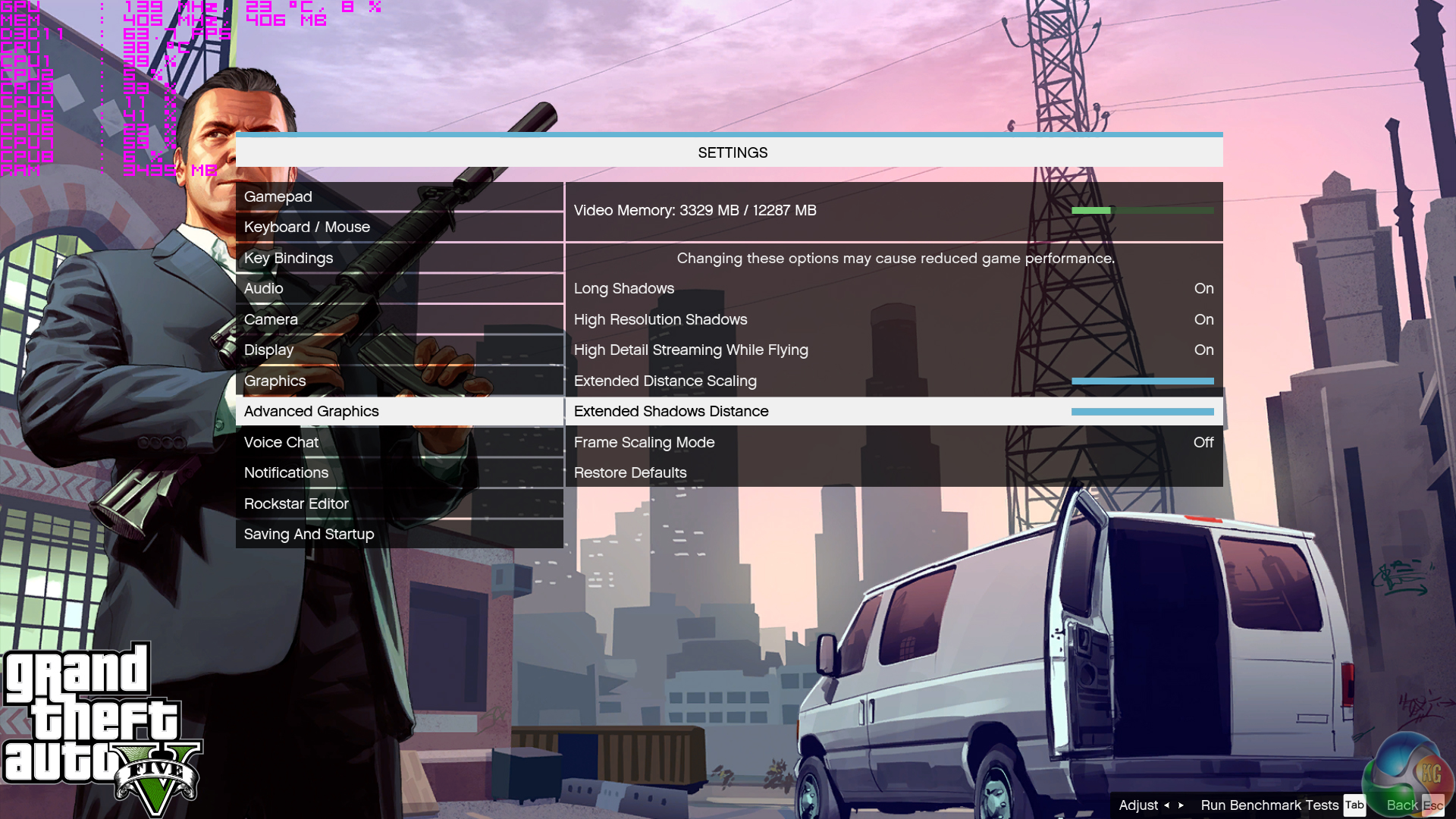
We run the built-in benchmark using a 1080p resolution and generally Maximum quality settings (including Advanced Graphics).

Metro: Last Light Redux
Despite its age, Metro: Last Light Redux remains a punishing title for modern computer hardware. We use the game's built-in benchmark with quality set to Very High, SSAA enabled, AF 16X, and High tessellation.
The Witcher 3: Wild Hunt
The Witcher 3 is a free-roaming game which can feature heavy interaction from NPCs in densely-populated urban areas, making it ideal for testing CPU performance. The well-designed game engine is capable of providing heavy stress to a number of system components and will happily use more than four CPU threads when such hardware is available.
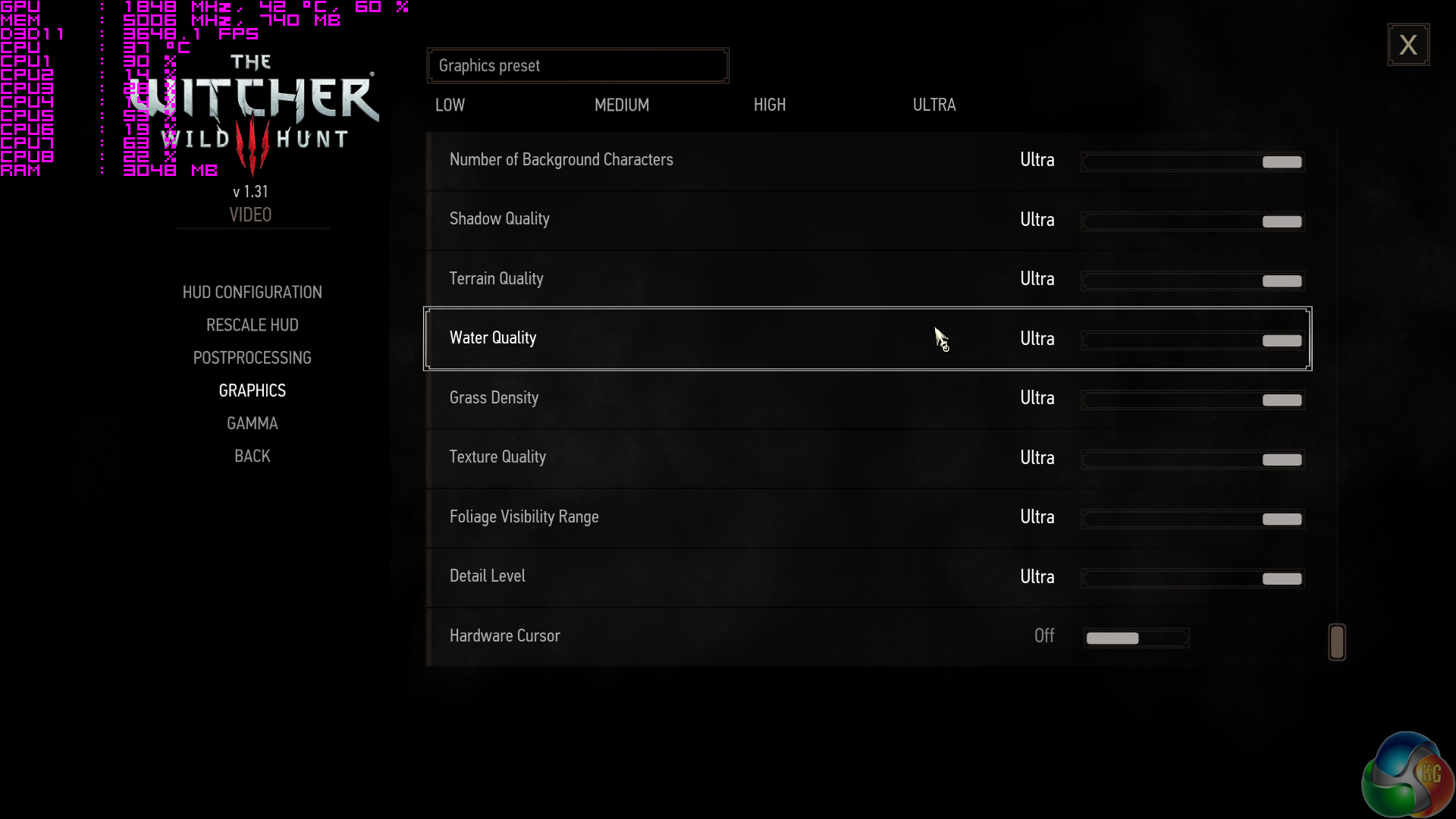
We run a custom benchmark which is located in a heavily populated section of an urban town area. A 1080p resolution and Maximum quality settings are used (Nvidia Hairworks settings are disabled).
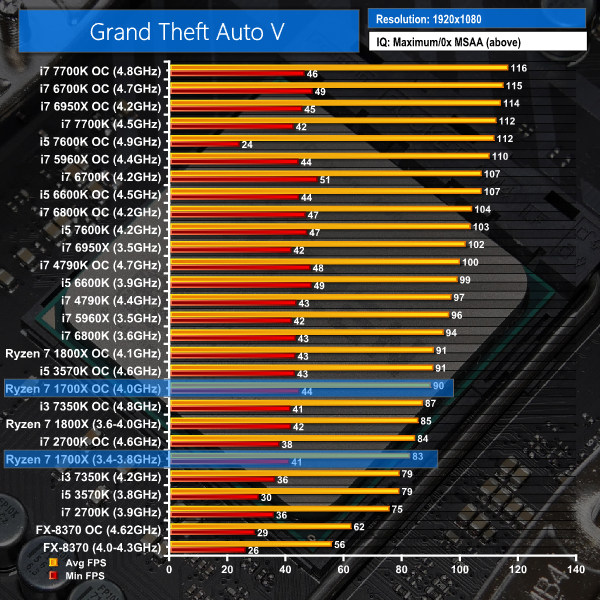
GTA V performance positioning for the 1700X is not great. At 4.0GHz, the 8C16T chip just about manages to match the performance of an overclocked Ivy Bride Core i5-3570K.All of Intel's modern Core i7 CPUs on test are faster on average than the 1700X and they post similar or better m
Minimum FPS numbers (though there is a rather large degree of variance in this data for GTA V). If, like myself, GTA V is your favourite game and you like to play at 100Hz+, your money will be better spent on the Core i7-6800K. Expanding that point, Skylake architecture at high clock frequencies is best for GTA V but this does involve compromise from a core count perspective.
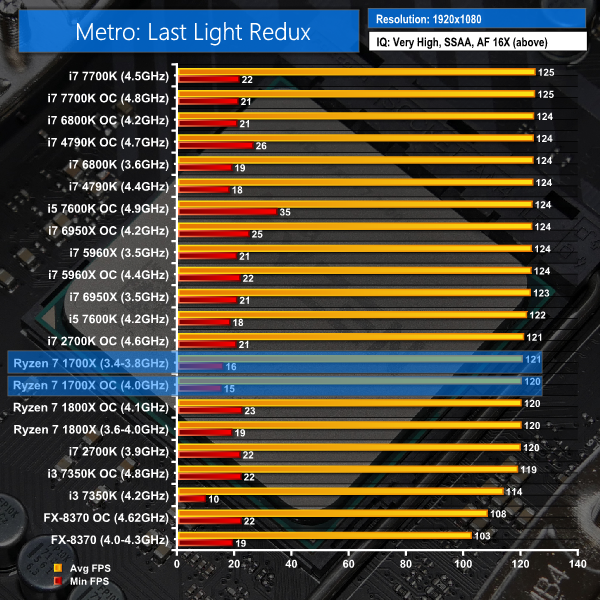
Metro: Last Light Redux doesn't care much for CPU performance once you hit around 120 FPS. Even the old Piledriver-based FX-8370 manages to deliver more than 100 FPS on average in this benchmark. Ryzen 7 1700X is practically as good as any Intel competitor in Metro: Last Light Redux, whether you game at a high refresh rate or not.
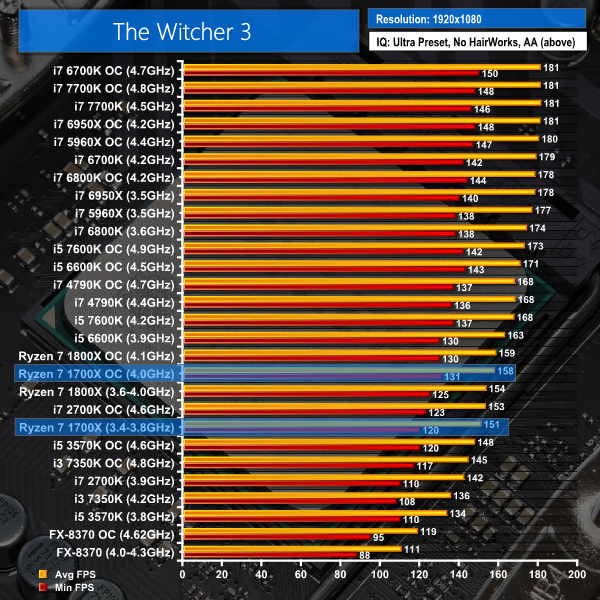
Like many other DX11 titles, The Witcher 3 likes fast cores combined with a strong architecture. However, the game can also leverage a number of threads and effectively balance load across them, hence why the Core i7 chips form a solid group at the top of this chart. Ryzen 7 1700X is able to deliver more than 120 FPS even without an overclock in The Witcher 3.
Yes, this is ‘only‘ around Sandy Bridge- or Ivy Bridge-level performance but with a capability to drive even ultra-high refresh rate monitors at more than 120FPS most of the time, Ryzen 7 1700X is a fine choice for The Witcher 3 gamers. There are plenty of CPU cycles spare on the 8C16T part, too (sometimes as much as 60%).
DX11 Gaming Performance Overview:
To summarise this in a simple manner, if you game on a 60Hz monitor and simply do not care about frame rates above 60 FPS, the Ryzen 7 1700X is a perfectly capable gaming processor. With a 60 FPS limit, performance differences between Ryzen 7 and even a modern Core i7 or Core i5 are likely to be indistinguishable.
However, if you have adopted a new high refresh rate monitor that can tick at 100Hz, 120Hz, or 144Hz+, Ryzen 7 1700X will cause you to make some compromises in certain games. GTA V, for example, cannot hit a 100 FPS average using our game settings with Ryzen 7 1700X yet a similarly-priced i7-6800K can push 104 FPS average when overclocked. The other pair of DX11 titles tested are perfectly fine for high refresh rate gamers, though.
Ashes of the Singularity
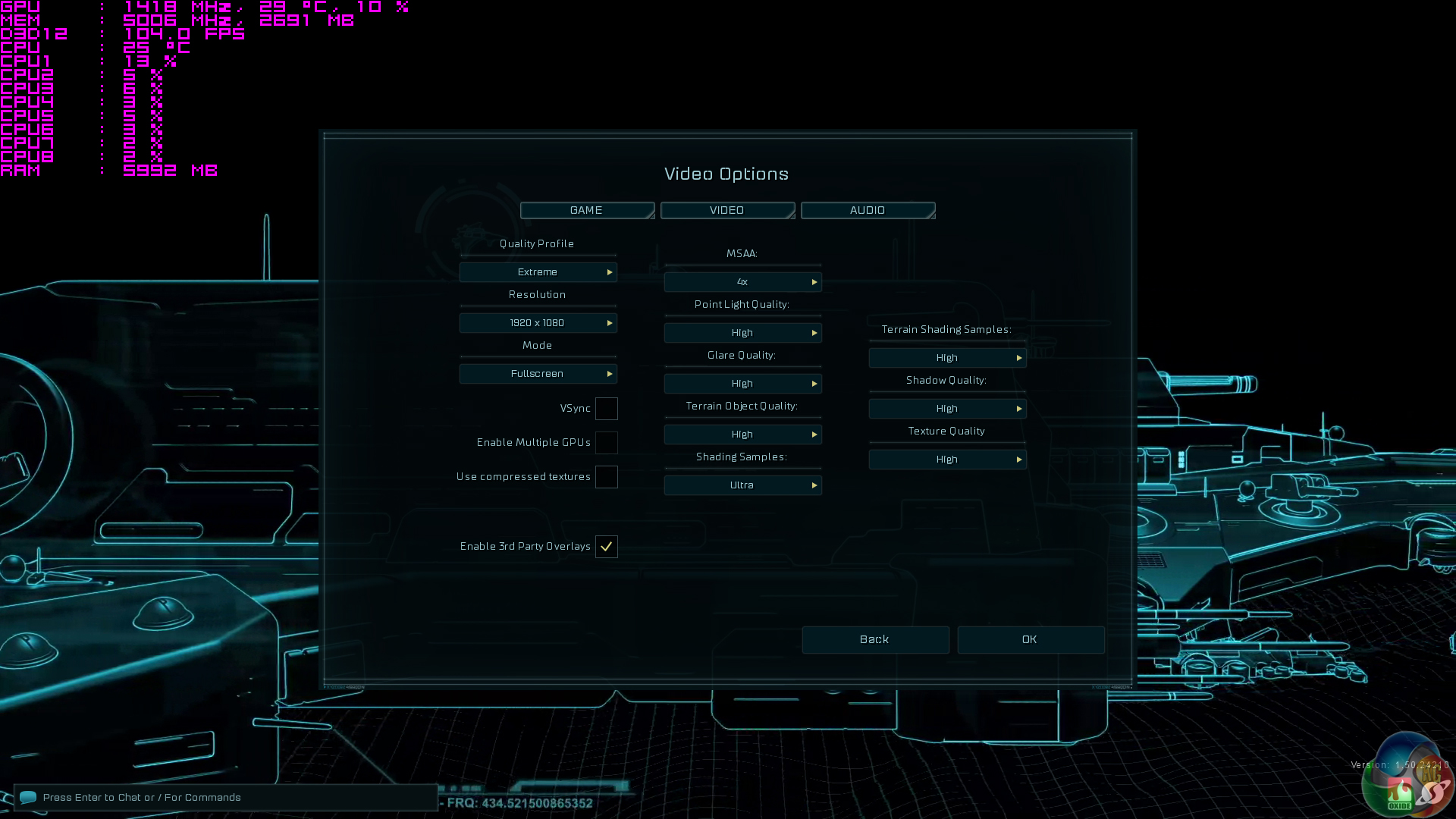
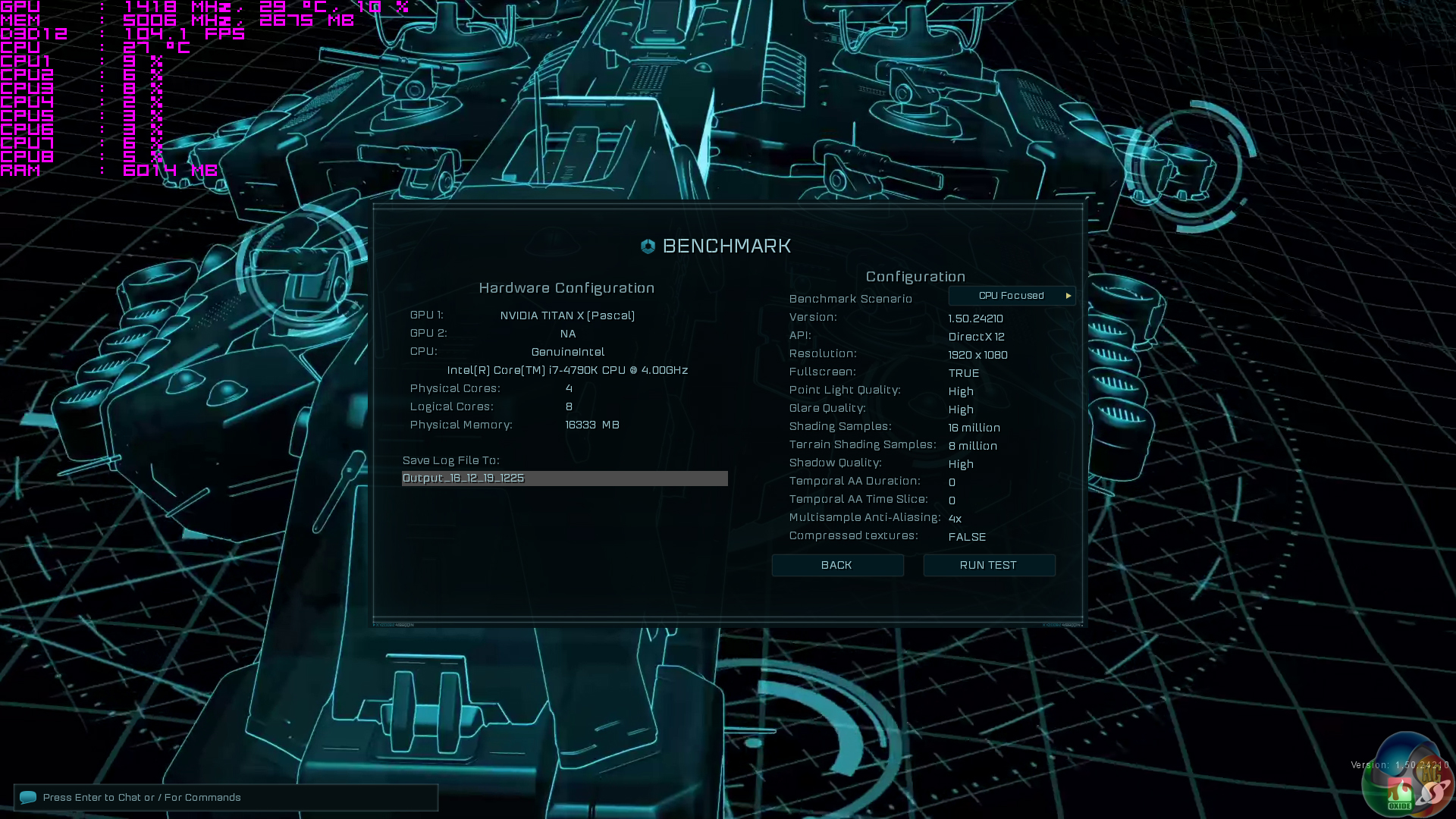
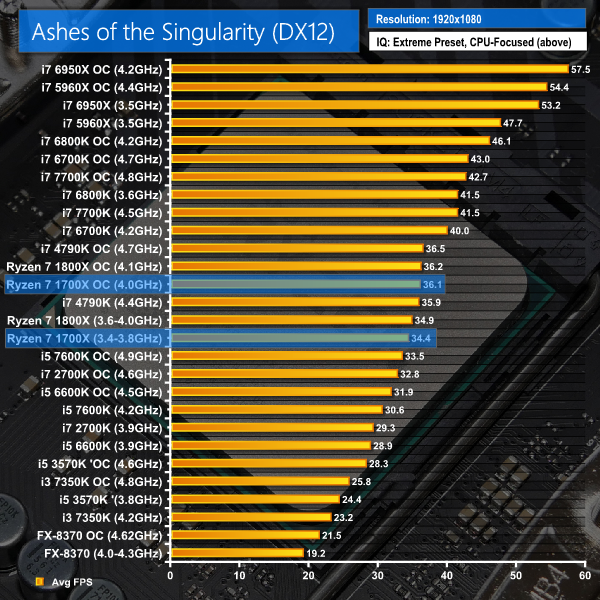
Ashes of the Singularity is a Sci-Fi real-time strategy game built for the PC platform. The game includes a built-in benchmark tool and was one of the first available DirectX 12 benchmarks. We run the CPU-focused benchmark using DirectX 12, a 1080p resolution and the Extreme quality preset.
Gears of War 4
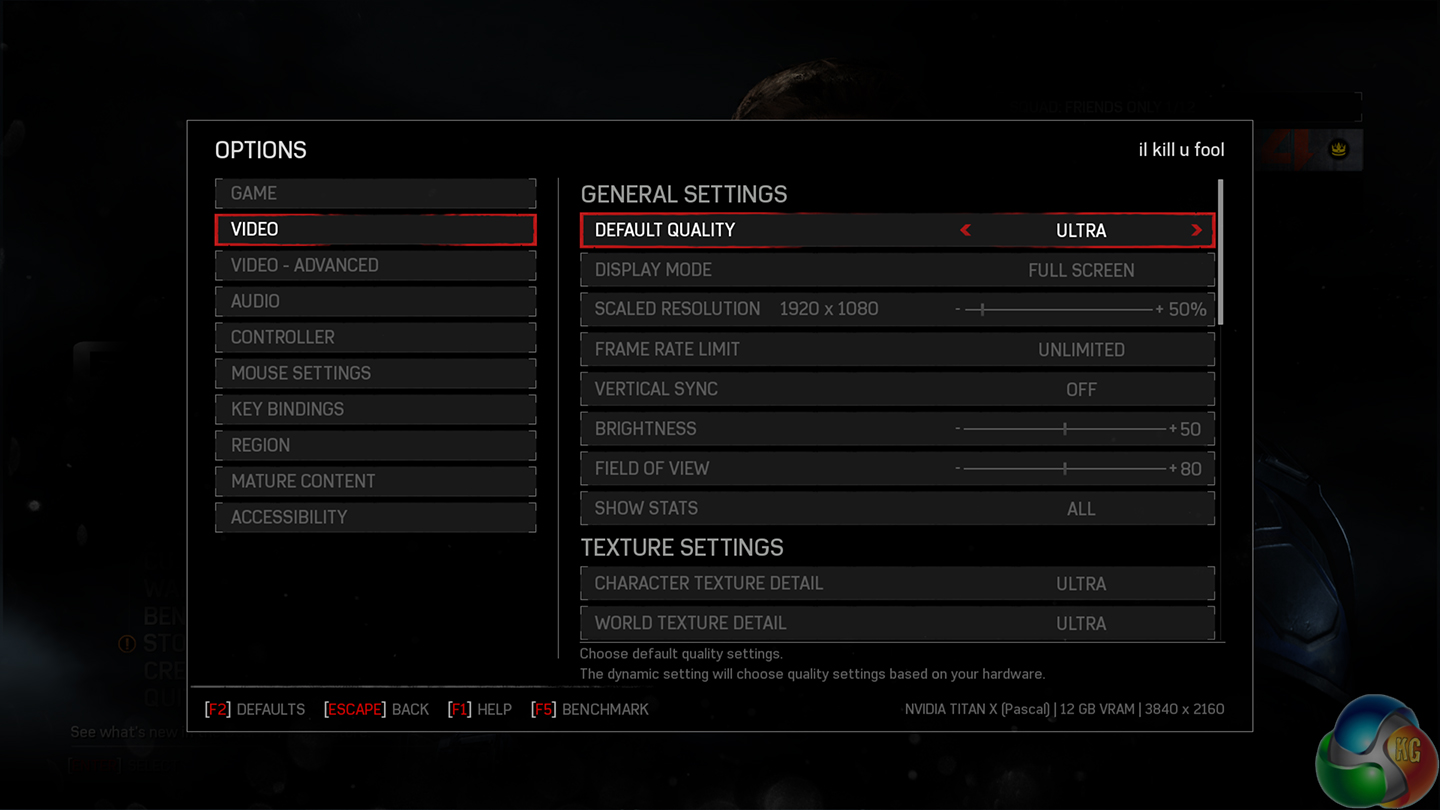
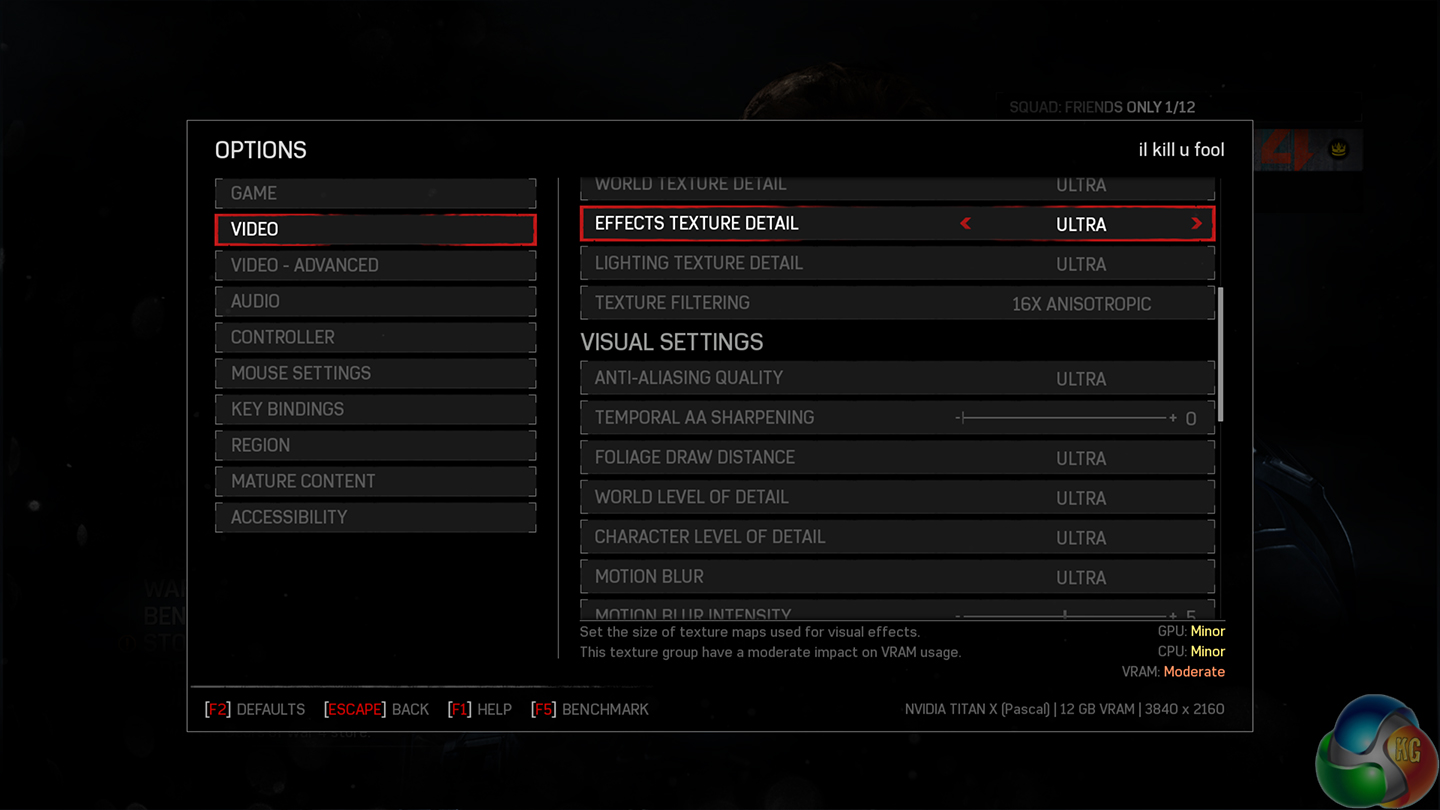
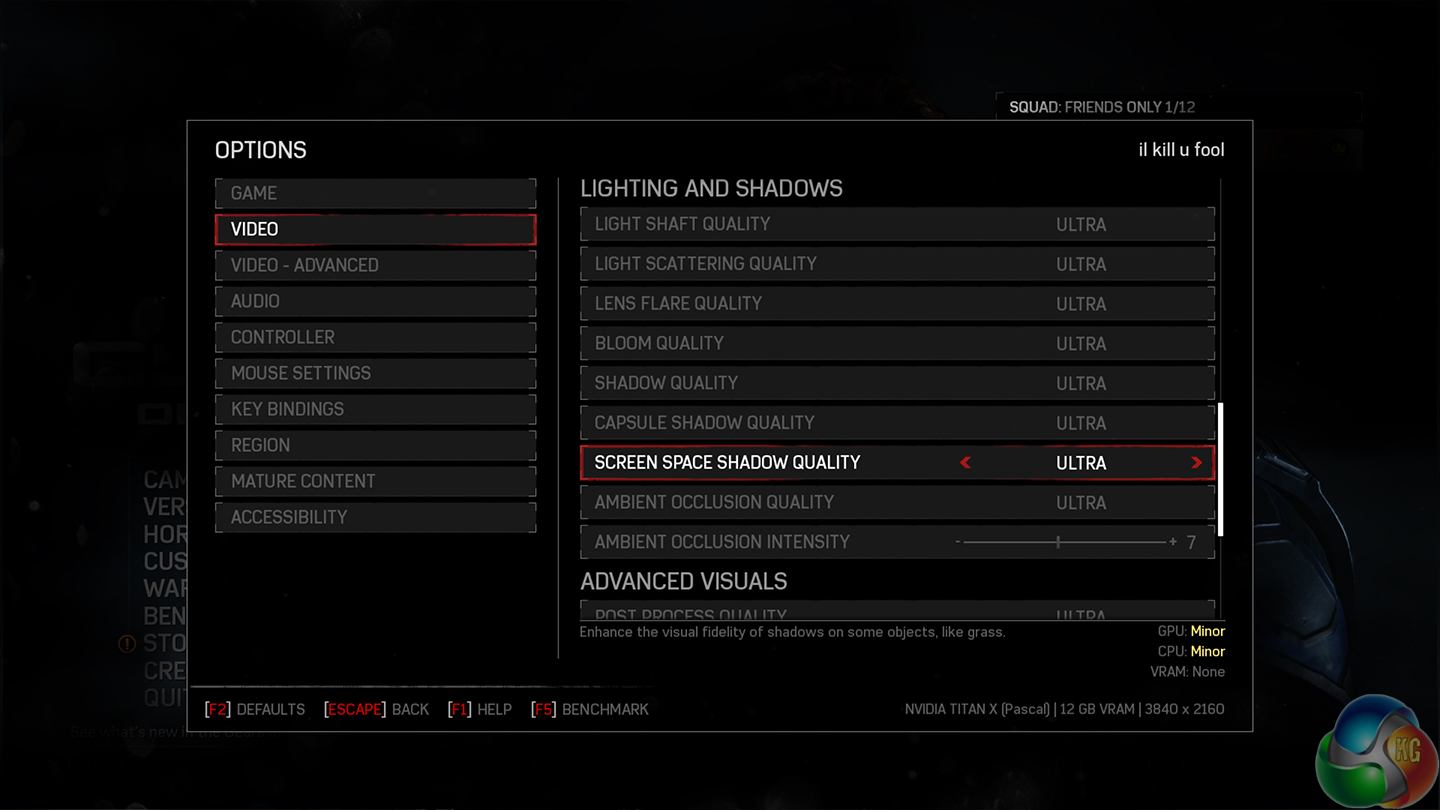
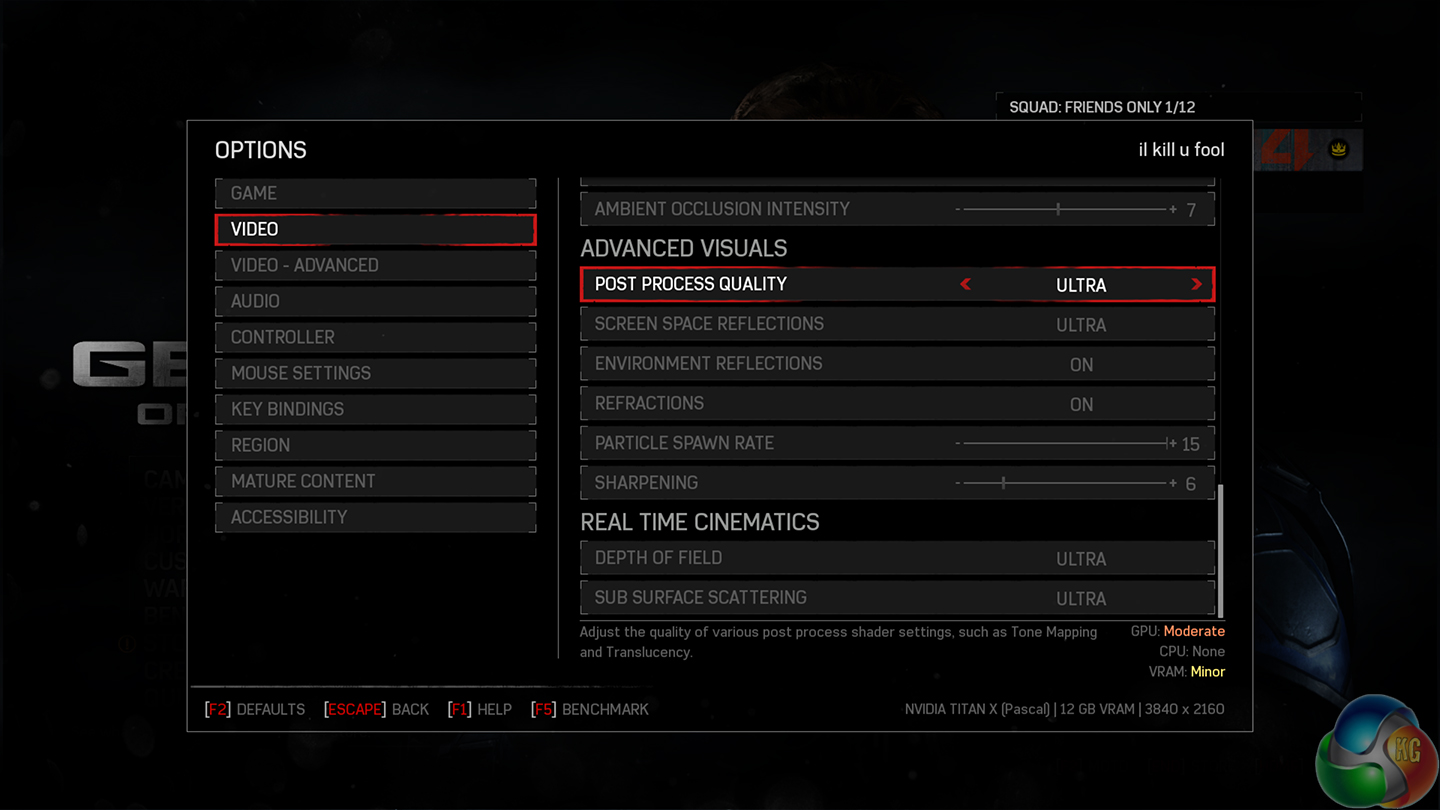
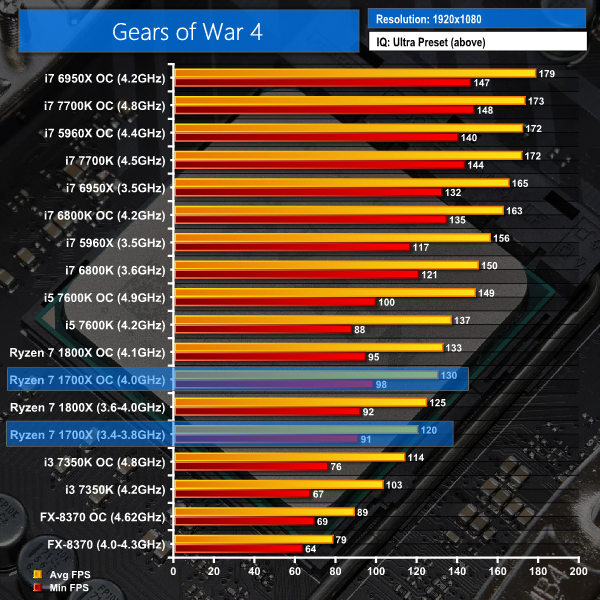
Gears of War 4 is a third-person shooter available on Xbox One and in the form of a well-optimised DX12-only PC port. We run the built-in benchmark using DirectX 12 (the only API supported), a 1080p resolution, the Ultra quality preset, and Async Compute enabled.
Note: The Core i7-2700K, i5-3570K, and i7-4790K are not shown in Gears of War 4 as the game download was too large to install on their system SSD and the clunky Windows Store platform gives errors when moving games installed on a secondary SSD between test systems.
Rise of The Tomb Raider
Rise of The Tomb Raider is a popular title which features both DX11 and DX12 modes. Heavy loading can be placed on the CPU, especially in the Syria and Geothermal Valley sections of the built-in benchmark.
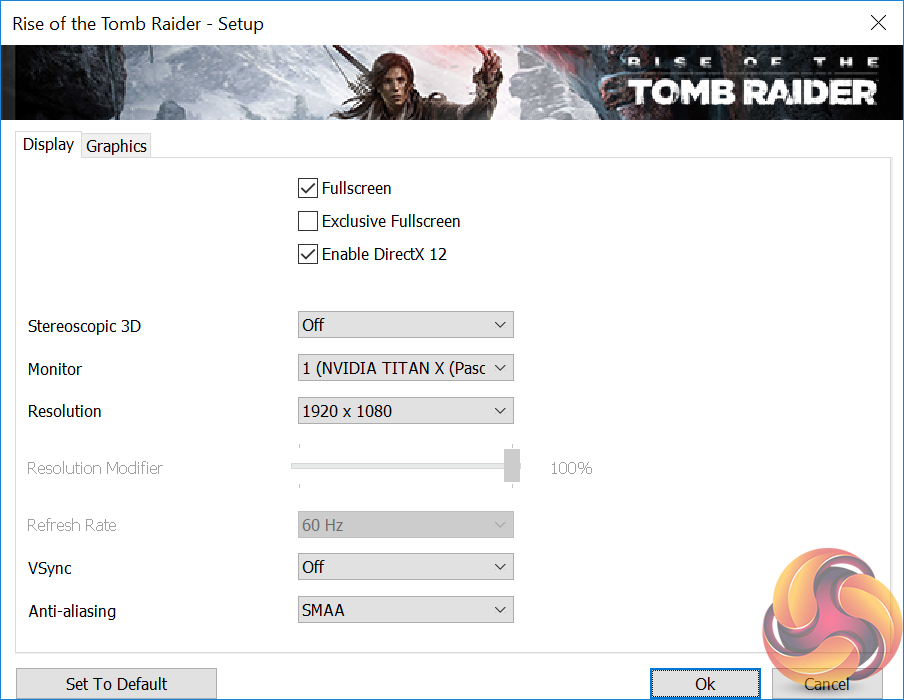
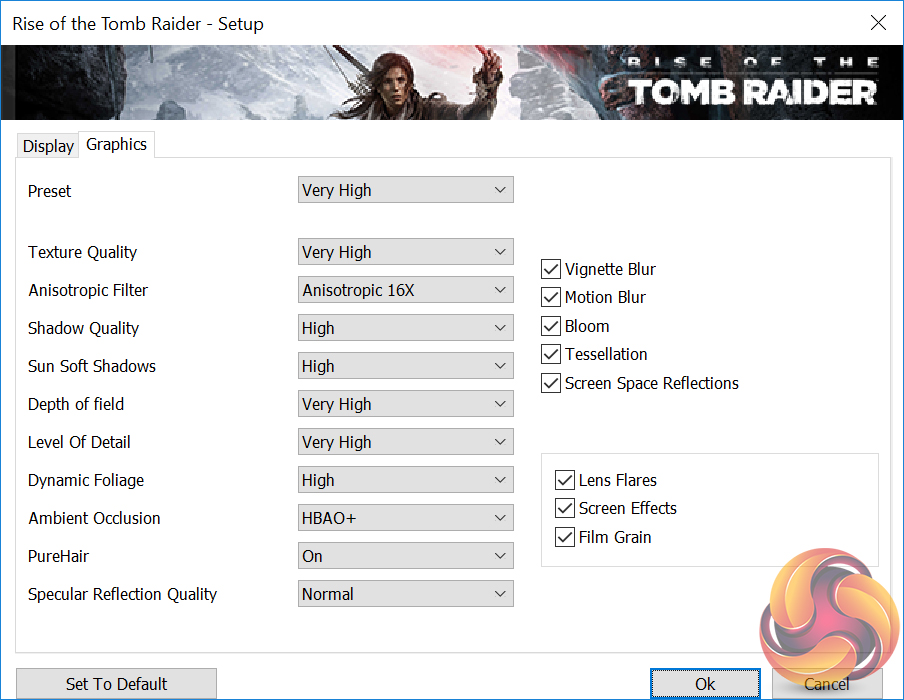
We run the built-in benchmark using the DirectX 12 mode, a 1080p resolution, the Very High quality preset, and SMAA enabled.

Total War: Warhammer
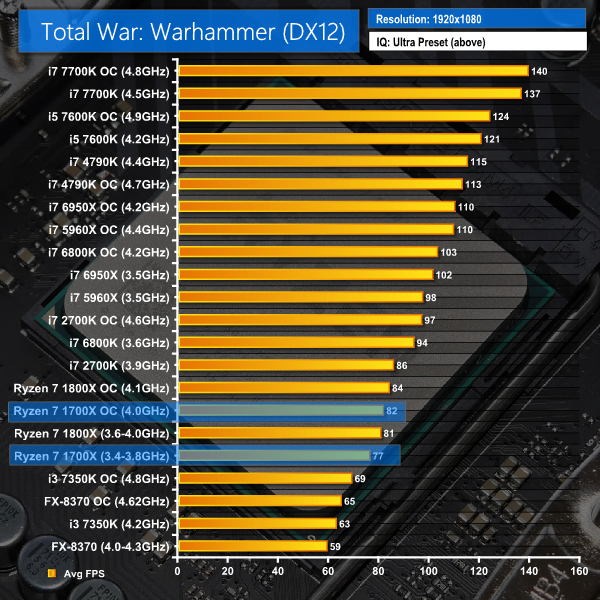
Total War: Warhammer is another title which features both DX11 and DX12 modes. Heavy loading can be placed on the CPU using the built-in benchmark. The DX12 mode is poorly optimised and tries to force data through a low number of CPU threads rather than balance operations across multiple cores. As such, this gives a good look at pure gaming performance of each CPU in titles that aren't well multi-threaded.
We run the built-in benchmark using the DirectX 12 mode, a 1080p resolution, and the Ultra quality preset.


Ashes of the Singularity puts the Ryzen 7 1700X around Haswell Core i7-4790K performance numbers. The 6C12T Broadwell-E 6800K is noticeably faster both at stock frequency and when overclocked.
Gears of War 4 puts Intel's modern 4+ core chips ahead of the Ryzen 7 1700X. Looking at the actual numbers, though, the 1700X was able to deliver an average frame rate of 120 FPS at stock and 130 FPS when overclocked. Minimum FPS numbers were 91 and 98 at stock and overclocked speeds, respectively. Even to high refresh rate gamers, losses for Ryzen 7 in Gears of War 4 are hardly deal-breakers with the AMD chip putting out such functional real-world performance numbers. With that said, if you are a gamer who simply demands that your system has performance to lock your 120Hz monitor at its maximum refresh rate, Ryzen 7 will not do that.
Rise of the Tomb Raider in its DX12 mode is also slower on Ryzen 7 1700X than on many of the modern Core i5 and Core i7 CPUs that we compared it against. With that said, we are talking about average frame rates over 100 FPS for the 1700X, so this performance deficit is likely to be immaterial if you game at 60Hz or even 100Hz.
Clock speed and IPC are critical to Total War: Warhammer performance due to its preference for forcing data through a single thread. Even accounting for those limitations, the 1700X's performance is noticeably lower than that of a 6C12T i7-6800K. You don't need 100+ FPS in this game but if you want to run it at such levels, Ryzen 7 1700X is not a smart choice with settings turned up to Ultra.
DX12 Gaming Performance Overview:
DX12 gaming performance actually paints a more negative picture of Ryzen 7 1700X against Intel's Core chips than DX11 performance does. With that said, both Gears of War 4 and Rise of the Tomb Raider will happily run at 100+ FPS average on Ryzen 7 1700X, while Total War: Warhammer will generally stay above the refresh rate of a 60Hz monitor.
If you game at 60Hz, Ryzen 7 1700X is a fair choice for the DX12 titles that we have tested (ignoring Ashes of the Singularity's CPU-intensive benchmark mode). Even to 100Hz+ gamers, Ryzen 7 1700X is still a solid choice, though there will be some compromises compared to Intel's modern Core i7 CPUs.
It must be emphasised that AMD is suggesting poorer than anticipated gaming performance can be fixed via optimisation work from game developers. This is something that is worth bearing in mind when analysing the pros and cons of a Ryzen 7 purchase. However, we can only pass judgement on the performance numbers that we have gathered, not the ‘promise' of improved results.
The market for people buying an expensive CPU and using it for gaming at 1080p is likely to be very slim. What 1080p does is give a good indication of the CPU's raw gaming performance as GPU power is sufficient to push frame rates to a level where the CPU and memory limitations can be observed.
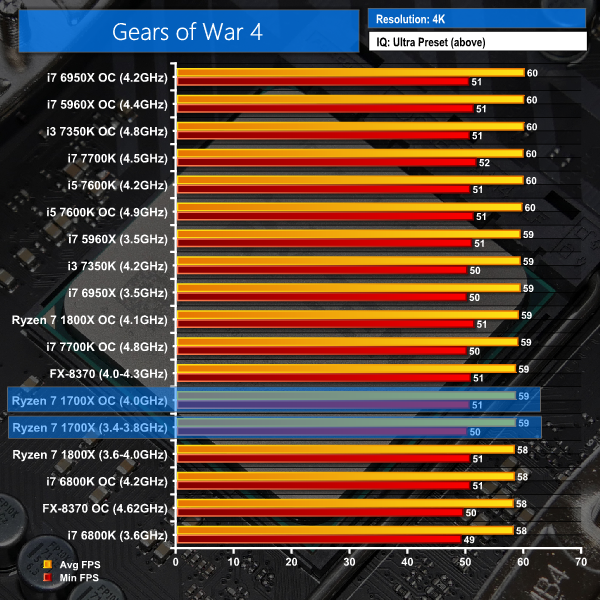
We supplement the 1080p gaming results with a trio of games tested at 4K. That multiple-hundred pound saving against Intel's competing 8C16T CPU could buy a nice 4K monitor, so we will show how Ryzen 7 performs at such a resolution.
Gears of War 4
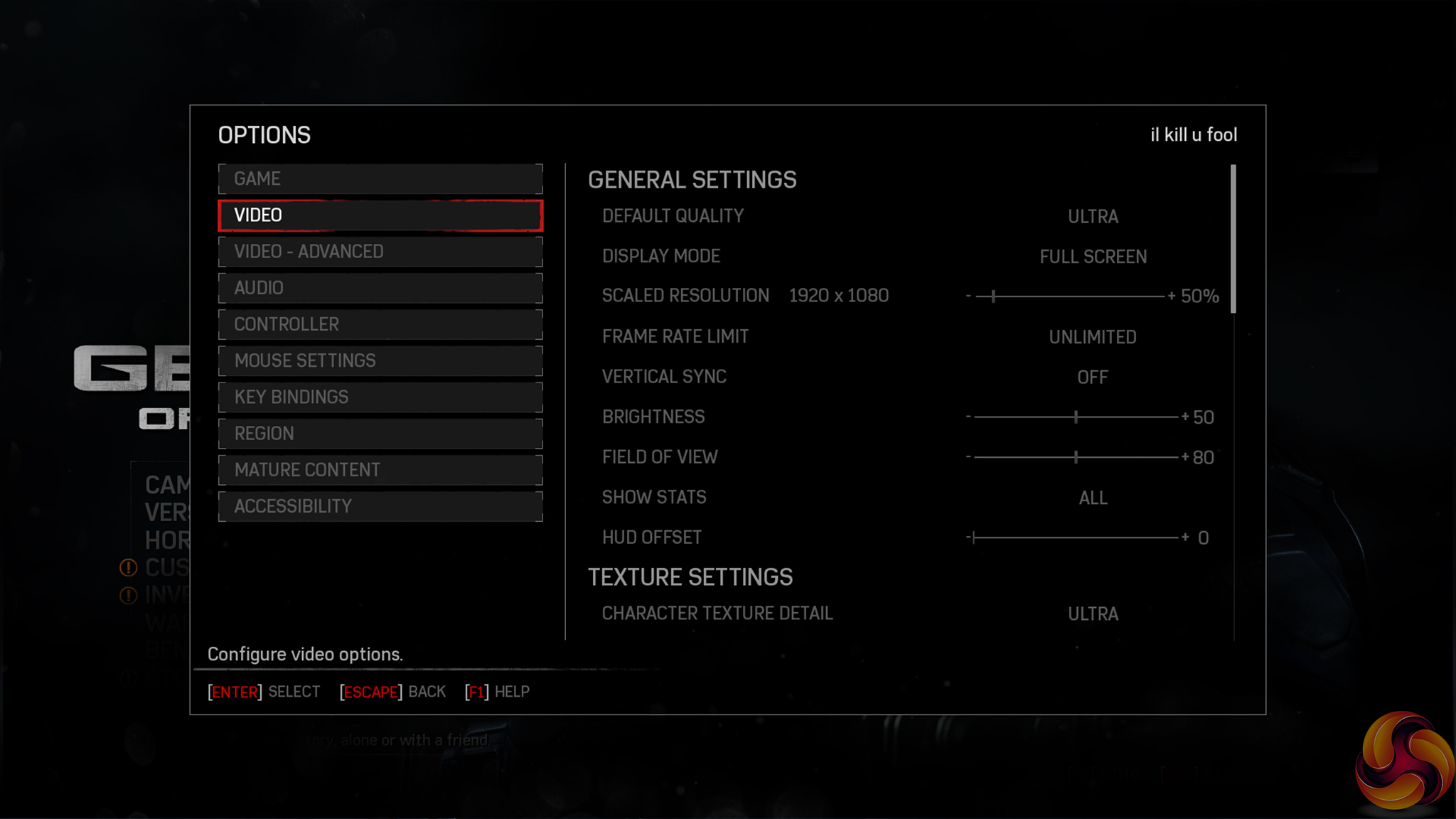
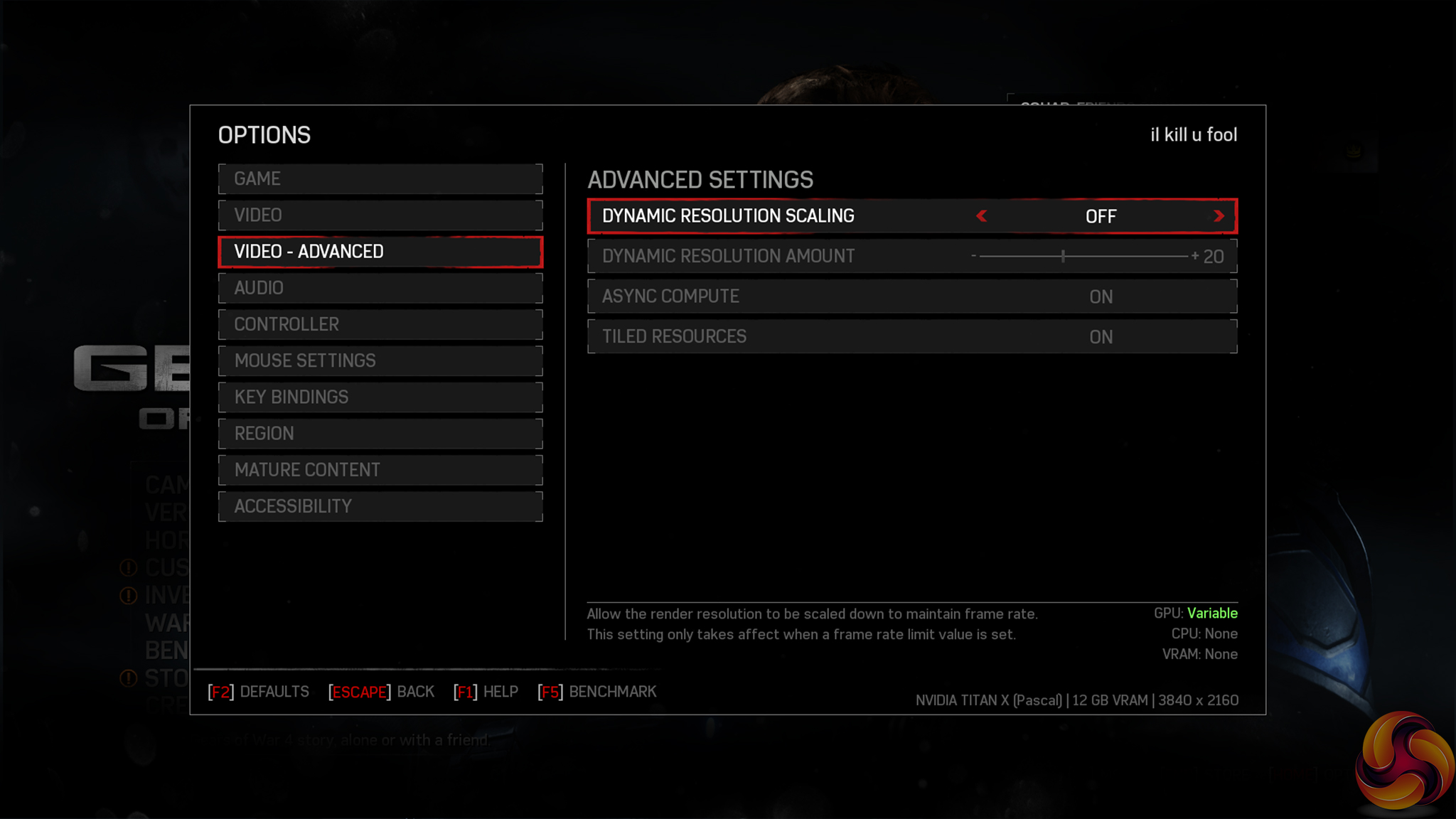
We run the built-in benchmark using a 4K resolution and the same settings as the 1080p test (Ultra quality preset, Async Compute enabled).
Note: The Core i7-2700K and i7-4790K are not shown in Gears of War 4 as the game download was too large to install on their system SSD and the clunky Windows Store platform gives errors when moving games installed on a secondary SSD between test systems.
Grand Theft Auto V
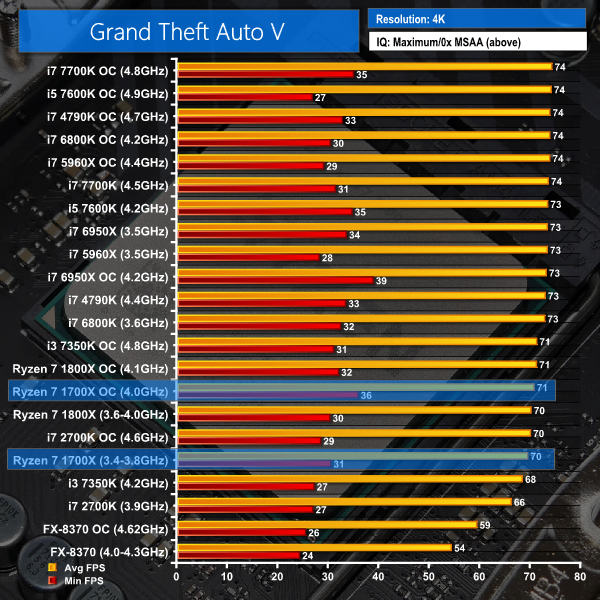
We run the built-in benchmark using a 4K resolution and the same settings as the 1080p test (generally Maximum quality settings including Advanced Graphics).

The Witcher 3 Wild Hunt
We run our custom 107-second benchmark in a densely-populated town area using a 4K resolution and the same settings as the 1080p test (Maximum quality, Nvidia settings disabled).
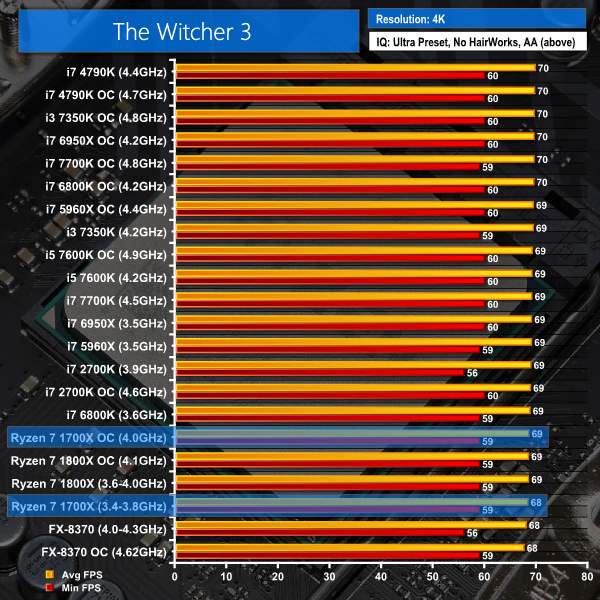
4K Gaming Performance Overview:
Throw Ryzen 7 1700X into a GPU-limited situation where performance above 60 FPS is superficial and it handles itself well. You are unlikely to notice a difference between the 1700X and higher-priced (and lower, for that matter) Intel CPUs except for that fact that Ryzen 7 has significant spare processing power to conduct background operations, such as game streaming.
If you are a content creator who needs processing power for day-to-day tasks but you also want to fire up a 4K game in the evenings, Ryzen 7's 1700X is a competent choice in such a scenario.
We leave the system to idle on the Windows 10 desktop for 5 minutes before taking a power draw reading. For CPU load results we read the power draw while running the Cinebench multi-threaded test as we have found it to push power draw and temperature levels beyond those of AIDA 64 and close to Prime 95 levels. Cinebench has a short run time on high-performance CPUs which influences the validity of the temperature reading, so we run AIDA64 stress test to validate data.
The power consumption of our entire test system (at the wall) is shown in the chart.
The same test parameters were used for temperature readings.
Power Consumption
Power draw readings are accurate to around +/- 5W due to fluctuations in the value even at sustained load. We use a Platinum-rated Seasonic 760W PSU and install a GTX 1070 video card that uses very little power.
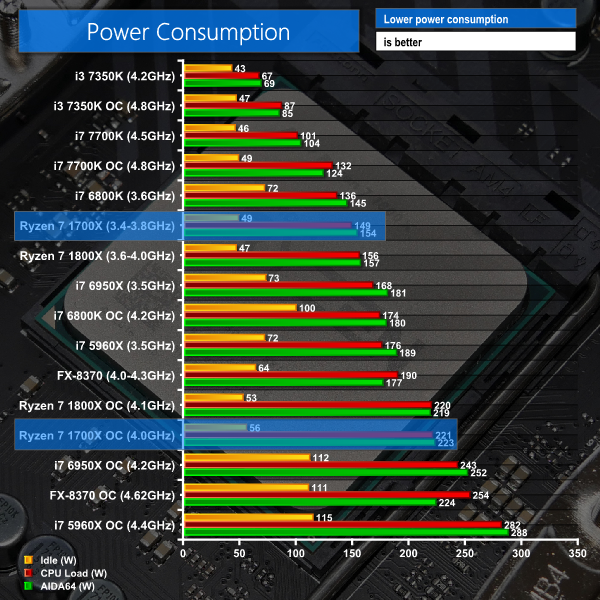
Power consumption for the Ryzen 7 1700X is slightly lower than that of the 1800X at stock clocks. This is due to its 200MHz lower operating frequency.
The picture changes when overclocked, though. While the difference in power draw between the 1700X and 1800X is too small to declare an outright victor, the latter is operating at a greater VCore for its higher clock speed but still manages to draw practically the same power. This gives an indication of the higher quality silicon used for the 1800X that is able to more efficiently transfer electrical power in useful work.
The 1700X draws a little more power than an i7-6800K at stock frequencies but it also offers greater computational performance. When both CPUs are overclocked, the 1700X demands noticeably more power in Cinebench than the 6800K but for that additional electricity usage it returns a 35% higher score.
Temperatures
Temperature recordings were taken using the Noctua NH-D14 for the LGA 1151 test system, Cryorig R1 Ultimate for the LGA 2011-3 system, and Noctua NH-D15 for the AM4 system. We use different coolers for speed purposes. Each CPU cooler's fans were running at full speed. Ambient temperature was maintained at around 20°C.
Due to the use of slightly different CPU coolers, our temperature measurements should only be used as a guideline. Performance differences below around 3°C are small enough to say that cooling results were similar.
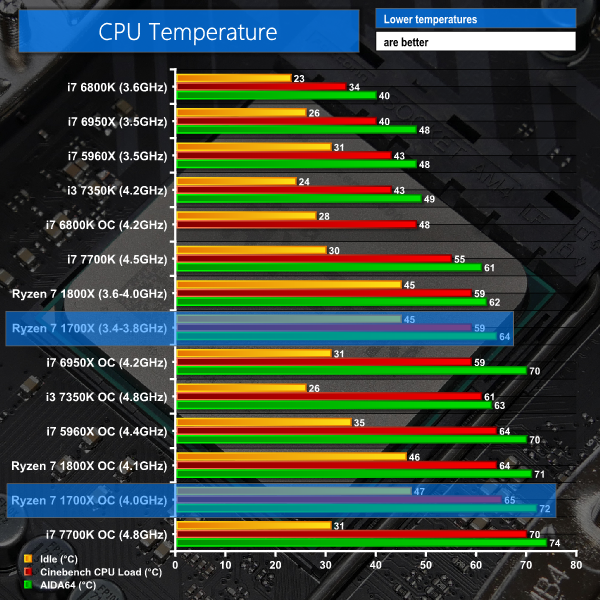
Update 17/03/2017: AMD has announced that Ryzen 7 1800X and 1700X have a +20°C temperature offset on the reading currently displayed by software, over the actual junction temperature. AMD is advising that 20°C can be subtracted from the reported Ryzen 7 1800X and 1700X temperature values to understand the actual junction temperature.
Temperature levels for both Ryzen 7 CPUs are similar. The 1700X tends to be a little hotter using our overclocked settings, despite the 1800X operating at a higher voltage level. This, again, points towards higher quality silicon for the 1800X, though that's to be expected from the more expensive part.
AMD's soldered heatspreader design with liquid-metal TIM does a good job at keeping the CPU well-cooled under load.
AMD's Ryzen 7 1700X continues the trend of superb price-vs-performance especially when competing against Intel's 6+ core HEDT chips. The 8C16T 1700X costs around £400, which is the same as a 6C12T Broadwell-E i7-6800K, but is able to offer performance close to that of a £1000 octa-core from Intel.
Comparing the second-in-command 1700X to the Ryzen 7 flagship again, the lower-cost chip loses a couple of hundred Megahertz at stock and uses silicon that fits less favourably on a voltage-frequency curve. That's where the differences end. You still get a full-fat eight-core chip with SMT doubling the logical threads to 16. The TDP stays at 95W, XFR bumps frequency when operating conditions permit, and the 1700X's unlocked multiplier means that it can be overclocked to surpass 1800X performance levels.
With that said, top-of-the-line overclocking performance is where the cherry-picked silicon forming AMD's Ryzen 7 1800X chips will outperform the cheaper 1700X. While we couldn't take our 1700X sample to the same 4.05-4.1GHz level that our pair of Ryzen 7 1800X processors hit, we did manage a 24/7 stable 4.0GHz overclock using sensible voltage levels. To many enthusiasts, a likely reduction to the headline 24/7 stable overclocked speed by 100-200MHz will be considered a fair compromise for a 20% reduction in purchase price and potentially worse power and temperature numbers.
Gaming performance of the Ryzen 7 1700X still trails the levels set by Intel's modern Core i7 CPUs. If you want to consistently push past 100 FPS on your high refresh rate monitor and fast graphics card, you will be better served by a modern Intel processor such as the high-frequency Core i7-7700K or even a Broadwell-E 6800K – Ryzen 7 1700X's most notable price competitor.
If, however, you are not in a position where GPU horsepower is in excess, be that driven by a GPU weaker than the Titan XP or a monitor resolution significantly higher than 1080P, gaming performance from the Ryzen 7 1700X is perfectly adequate. At 4K, noticeable differences between the frame rates of Ryzen 7 and modern Intel Core i7 CPUs (and the Kaby Lake i5-7600K, for that matter) were simply indistinguishable.
You can interpret that point as an opportunity to buy an even cheaper CPU, such as the Core i7-7700K, and get equally strong (stronger, in fact) gaming performance. Alternatively, you can interpret it as an opportunity to outfit your system with an 8-core CPU that delivers a solid gaming experience and almost always outperforms anything that Intel can offer for less than £1000 in computational tasks.
As far as value goes, Ryzen 7 delivers in spades and the 1700X epitomises that characteristic by slashing an extra £100 off the price of AMD's flagship. Until we have put the lower-cost, 65W-TDP 1700 (non-X) through its paces, the 1700X is the Ryzen 7 chip that I would be recommending to overclocking users who are happy to give up a couple of hundred Megahertz headline speed for an extra £100 in their pocket.

The AMD Ryzen 7 1700X is available for £398.99 (at the time of writing) from Overclockers UK.
Discuss on our Facebook page HERE.
Pros:
- Superb multi-threaded performance.
- Comfortably outperforms the similarly-priced Core i7-6800K in multi-threaded tasks.
- Up to 3.9GHz XFR and 3.8GHz Precision Boost frequencies aid single-threaded performance.
- Can be overclocked close to Ryzen 7 1800X frequencies and performance levels.
- Soldered heatspreader allows for good cooling.
- Unlocked CPU multiplier.
- Overall cost can be low thanks to the AM4 platform scalability.
Cons:
- Gaming performance is not best suited for ultra-high refresh rates and trails Core i7-6800K and i7-7700K levels (outside of GPU-limited scenarios).
- Some memory speed limitations – difficult pushing past 3.2GHz.
- Fewer PCIe lanes and dual-channel memory are compromises against the Core i7-6800K.
KitGuru says: AMD's Ryzen 7 1700X takes the value proposition a step further and outperforms anything Intel offers at this price point in multi-threaded prosumer workloads.


Hey there KitGuru!
Have you talked to other reviewers regarding your RAM speeds? Of all the reviews I’ve read/watched, yours was the only one I saw that reached 3200 Mhz (let alone 3000 Mhz).
Seems like the difference is that you guys are using the Trident Z instead of the provided RAM by AMD. Maybe other review outlets should also test on Trident Z.
Why would they talk to other reviewers? I think they are using a properly certified Trident Z kit so have done their homework. KitGuru always seem to work with G.SKILL which is good, as their memory is generally very very good. Unlike Corsair, which is hit and miss. Don’t even get me started on Kingston.
“Why would they talk to other reviewers?”
I meant if anyone approached them asking about their RAM speeds. It’s also not uncommon for different media outlets to contact one another to verify test data/methodology.
Really? interesting – never knew that. I thought another reviewer would simply just look at the KitGuru review and see the memory they used and just try to get the same memory. Its funny how many times ive actually seen eteknix for instance ‘borrow’ some KitGuru testing/layout/page structure – just a little later.
Hello thanks for this nice review, but is it possible that you add a photoshop test as well?
Thanks
the kind ones do it properly. dunno about eteknix though. i don’t frequent their site.
Photoshop used to be a good benchmark, but i use it a lot and there are very few, if any filters that stress more than 3-4 cores. its not a good test anymore for 8 or 16 threads – it will likely show high clocked cores from Intel to perform the best. Adobe coding lately is shockingly bad – Premiere for instance? what a mess in 2017!
Have you bought a Ryzen sassafras15? whats your views on the 1800x and 1700x ?
Rayzen is super powerful from half to a third price in comparison with Intel’s 8core cpu’s. I was always an Intel person but I think that intel charges too much for the same performance.
From now I am thinking to switch to AMD cause the price performance ratio. Imagine if you build 3 to 5 systems how much money will save.
Also about the gaming performance I believe that if is combined with AMD GPU will perform better as game developer’s on current games have not made optimizations as they have on Intel’s CPU’s. I am sure that in the new games we will see the performance gap closing and for current games some developer’s are making patches.
It need some more time to unlock all the potential. I hope that soon AMD will create the ryzen mobile chips and if they manage to fit a light spec GPU on the same chip they will lick Intel in gr8 nuts for the same time.
I hope also AMD to create a Ryzen architecture alternative for ultra mobile computing with a great GPU to fill the gap of intel atom. That will give many cool devices like GPD win and.GPD Pocket and who knows maybe a surface phone that could run x64 apps natively and not only x32 via emulation on a snapdragon 835.
I am sure that at Intel’s HQ they lost their sleep and that they will start playing dirty by paying reviewer’s to spil mud where ever they can on AMD.
Price difference is huge and also if Intel drop prices on the same level of AMD in a short term will make consumer’s more furious as they were paying a high premium for the same cpu’s.
Very disappointing Intel is still better for games
yeah it is crap and I use affinity photo now, but it is an industry standard and since I can’t completely remove it (yet) from the workflow, I could love to know how the CPUs perform.
don’t have the money yet. but will go full AMD.
my general opinion on the entire R7 lineup is that they’re really good even on gaming. they may not beat out Intel on that category but they don’t run shit on games. just lower fps compared to Intel (specially with the 7700k which is I think stupid to compare to an 8c/16t cpu when making a recommendation).
overclocking range seems to vary though. the maximin (maximum minimum) frequency i’ve seen is 3.9 Ghz while maximax is 4.1 Ghz. would be interesting to see a 4.2+ Ghz though.
over at AMD reddit, users seems to be on a consensus that Ryzen chips suffer less stutters compared to Intel counterparts. I have yet to form an opinion on that until someone makes a proper benchmark on it (maybe showing frame times?) but looking at video reviews with benchmarks, that seems to be the case.
Coming from a neutral perspective, I think it’s inconclusive to say that when Intel has no issues with their platform while AMD is currently having one. In order to make a proper conclusion, both needs to be on equal grounds. By equal grounds, I meant when both don’t have platform issues anymore.
However, if that’s what you really think, then I’ll leave you to it.
Hi.
I haven’t spoken to other reviewers regarding 3200MHz memory but I have seen the hit-or-miss results with the ASUS C6H and other motherboards when trying to run at such speeds. I think this is down to the kit being used, as our G.Skill Trident Z kit worked on the ASUS C6H and also the Gigabyte AX370-Gaming 5 (a higher-capacity variant of the G.Skill kit is on that board’s memory QVL). However, some old 3200MHz 4GB Corsair Vengeance LPX DIMMs would not run at 3200MHz XMP on the Gigabyte board. We got the RAM kit provided by AMD running at 2933MHz (a 3000MHz divider doesn’t exist on this platform without reference clock adjustments) but chose not to use it to maintain comparability against other platforms and CPUs that were partnered with the G.Skill 3200MHz Trident Z.
3200MHz certainly isn’t 100% bug-free. Getting it to work from a cold boot can sometimes require the memory frequency to be cycled up from 2933MHz @ 1.35V rather than going straight to 3200MHz. But without a cold boot or BIOS reset, 3200MHz has worked fine throughout our testing with two different 1800X CPUs and one 1700X CPU.
I really don’t see the point of using a 16-thread processor for gaming (that would be a massive waste of processing power). I’m a gamer but I also run distributed computing apps when I’m not gaming (which is about 22/24 hours) so a Ryzen 7 would be very good for me. And frankly, I view the GPU as the single biggest factor for gaming performance (dropped frames are rarely a CPU issue
If you only do gaming on your PC then the 7700K is ideal. For anyone doing heavy content creation, heavy data crunching or multitasking Ryzen 7 is best. For someone who does a mix of the two (like me) the Ryzen 7 is the better choice overall.
im pretty sure Skylake/Kaby Lake and even older Intel will cream AMD due to the clock speeds – ive a few intel systems in the house and the quad core at 5ghz is much quicker than my octo core at 4.2ghz.
Loads of people use something like a 58xx series or 59xx series for gaming, even my mate who was insane enough to buy the 6950X plays games. He does a lot of other things too and he uses twitch a lot while gaming. Have you ever tried to game on a 7600k and stream at the same time? You can’t. I am pretty sure another publication (maybe Anandtech?) said a 7700k will drop frames doing something similar. We need to see more of this testing.
Ryzen with the extra cores would work well. In fact I think for some serious gamers who are more socially geared – a Ryzen 1800x or Ryzen 1700x would be more versatile and practical than a 7700k. Intel are charging – what £350 for a 7700k and you can get the Ryzen 1700X for £50 more and its got twice the cores? Unless you only want to game on a 1080p panel at 150 frames per second the Ryzen chips look a much better deal.
Dont even get me started on the 5960x or 6950x, thats Intel just price gouging their customers to maximise their profits. As a company they disgust me.
AMD are only having a problem due to years of optimisations for Intel by game developers. Which makes sense as AMD haven’t had a processor anyone wants to buy for years. Piledriver? Bulldozer? yeah, I don’t think so.
Its worth pointing out yet again that this problem isn’t really a problem for most people, unless you game at 1080p and want 144hz refresh rates. 4K and 1440p are much less of a weakness.
I don’t do any fancy prosumer stuff on my computer…but I usually have a few webpages up and perhaps a download going on in the background…not to mention a few memory resident programs in the background.
I don’t want to bother closing this stuff down just to play a game, so how much of an impact could this have on gaming performance on Intel vs Ryzen?
Thank you for another great review. I am glad to see the G Skill 3200 ram was able to run at it’s rated speed it only shows things are gonna get better over time with this platform. I do have a question when running the game tests did you disable SMT for the games I hear it gives pretty good gains in the games. I guess there will be either bios or windows update to fix the SMT problem very soon. I know in a perfect world you would never disable something like SMT but with this platform being a ground up design I guess things are slightly less than perfect. I think most that have bought these CPU’s and are gaming on them most likely will have already disables the SMT until there is a fix released I know I would until then if it gives a 7-10% frame boost.
Thanks for the thorough review! I’ve been looking for a review like this to help me decide between Ryzen (1700X) or Kaby Lake (it-7700K).
I agree that GPU-bottleneck testing doesn’t do much for CPU testing where all processors result in the same performance. But it also shows us that there is no reason to purchase expensive processors if all you do is play GPU-bound gaming. From the graphs shown above, for now, the cheapest processor that still allows the same performance at 4K resolution are the Core i5 and older FX processors. Ryzen 7 isn’t that cheap to produce the results shown above.
This will remain unchanged until Ryzen 3 and 5 models are released, although I recommend the review include Core i3 models.
Amazing review. Any chance you could review streaming performance? They really pitted it as an amazing streaming processor.
Any chance we could see what the FPS is like while running OBS on twitch.tv at 1080p / 60fps? As a person looking to upgrade their setup to stream live or even record I would love to know how Ryzen performs compared to a 7700k.
That’s actually a good point! I haven’t seen anyone do benches with multiple apps running for ages. Might be a good thing to test
‘Very’ disappointing? They are highly competitive!
Games haven’t even been patched and optimized for the new AMD platform yet. OF course there are going to be gremlins.
Nothing wrong with Piledriver, just that DX12 and Vulkan are 5 years too late.
Intel have had the luxury of pretty much shrinking and rebadging the same shit for the last 5 generations, with a higher base clock. ( I do understand there have been slight improvements and extra features)
Lets face it, AMD started as a Intel cloner. They have always had to pretty much redesign the Intel wheel each generation, with no where near the resources.
I think they have done a good job with the new stuff. to be within a few percent of Intel’s current lineup is a massive achievement.
U can observe a sample of gaming and streaming at same time with OBS starting at 20:00min mark and up to 22min mark (or so) between the ryzen cpu and a 7700K kabby.
https://www.youtube.com/watch?v=O0fgy4rKWhk
Correct, also what very few people are actually showing is CPU scaling & performance of older cpus such as 2500K / 2600K or 3770K which even at stock speed (with modern GPUs ex1070 or 1080) are holding their own very well at 1080p/1440p/4K in most well optimized games like Mafia3, Doom, Hitman, Rise of TR or DeusEx for ex. (with exception of poorly optimized games, such as Fallout4 or GTA5).
AdoreTV have a couple of good vids showing this.
But so far I have not seen anyone test how older cpus (oc/stock) such as FX-8350 and
i7-2600K would scale with modern GPUs at frequencies: stock/ same /oc to verify current gaming needs or even frequencies to properly compare IPC.
I believe that anyone who bought a 2600K/3770K or 4770K has no need whatsoever to upgrade to current cpus for gaming (especially when in OC). Better to upgrade the GPU instead, as these cpus will easily get another 2-3y of life from them.
AdoreTV:
https://www.youtube.com/watch?v=O0fgy4rKWhk
I own two gaming systems, one with the 7700K and the other with the 1700X and when gaming I have to admit the 1700X provides a smoother gaming experience. There are several technical hardware studies trying to figure this out without much success at this point other than the 1700X allows for the CPU overhead to provide a lower 0.1% frame rate dip occurrence over time while gaming and doing other activities. Gaming is where the difference is most evident since you are constantly staring at the screen when gaming and any dip in frame rates rendered is almost always immediately noticeable. Now, I have to admit that if you only plan to game and don’t use your PC for anything else that requires multitasking (i.e. multimedia, folding, bitcoin farming, photo editing, streaming, etc.), then I would tell you to buy the 7700K or wait for Intel to release Sky Lake-X and Kaby Lake-E before jumping to buy an Intel CPU as those releases will surely drop the prices on existing Kaby Lake CPUs. If you need a PC that does it all (gaming & multi-task intensive activities), then I would tell you to buy a Ryzen 5 (6-core) or 7 (8-core) as you will get the bang for the buck by saving yourself a couple hundred dollars easily. That money could go toward a more powerful graphics card 😉 I don’t think Ryzen 9 will be affordable from the standpoint of the average PC game as it is expected to be at least 50% to 100% more expensive for a Ryzen 9 vs. Ryzen 7. In the end, I love both of my gaming systems and I can choose which to use depending on my needs for that moment. Anyways, I wish you the best of luck with whatever decision you make!
What almost none of these tests show is just how crazy smooth Ryzen gaming is compared to their Intel counterparts. I’m no fanboy of either AMD and Intel and own two gaming systems; one with a 7700K and the other with a 1700X. I love both systems, but have to admit that the Ryzen gameplay on the average is smoother and has less momentary dips in frame rates. However, would I still recommend someone getting the 1700X over a 7700K? No necessarily. In the end, each consumer/gamer will have to do their homework and make their own decision as to which CPU architecture is best for them.
Now to just buy one. 🙂
For those disappointed about the lack of support for quad channel, “for scientific applications” to quote the article, don’t despair and move to Intel just yet! New 16 cores “Threadripper” processors just announced by AMD support quad.
Wait for 8700K…At 4.7GHz MCT on all 6 cores and 12 Threads it will be a game changer…..