KitGuru KitGuru.net – Tech News | Hardware News | Hardware Reviews | IOS | Mobile | Gaming | Graphics Cards


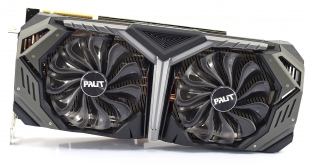
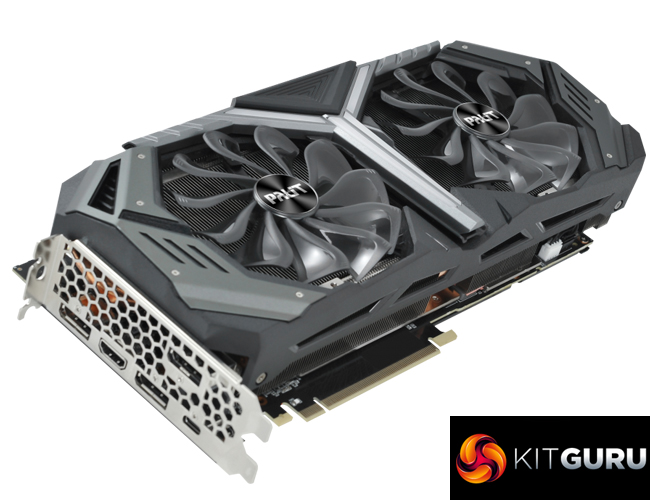
Continuing our look at the range of RTX 2080 partner cards which have just hit the market, today our attention turns to the Palit RTX 2080 GameRock Premium. It's the biggest aftermarket card we've seen so far, measuring almost 30cm in length, while it also has one of the fastest out of the box boost clocks that we've seen. The question is: is it worth the extra cash over the Founders Edition?
Priced at £830 here in the UK, the Palit RTX 2080 GameRock Premium is £80 more expensive than Nvidia's own RTX 2080 Founders Edition card. With a much larger cooler and higher boost clock, though, it could well prove to be worth the extra outlay. Let's see how the card compares.
| GPU | RTX 2080 Ti (FE) | GTX 1080 Ti (FE) | RTX 2080 (FE) | GTX 1080 (FE) |
| SMs | 68 | 28 | 46 | 20 |
| CUDA Cores | 4352 | 3584 | 2944 | 2560 |
| Tensor Cores | 544 | N/A | 368 | N/A |
| Tensor FLOPS | 114 | N/A | 85 | N/A |
| RT Cores | 68 | N/A | 46 | N/A |
| Texture Units | 272 | 224 | 184 | 160 |
| ROPs | 88 | 88 | 64 | 64 |
| Rays Cast | 10 Giga Rays/sec | 1.1 Giga Rays/sec | 8 Giga Rays/sec | 0.877 Giga Rays/sec |
| RTX Performance | 87 Trillion RTX-OPS | 11.3 Trillion RTX-OPS | 60 Trillion RTX-OPS | 8.9 Trillion RTX-OPS |
| GPU Boost Clock | 1635 MHz | 1582 MHz | 1800 MHz | 1733 MHz |
| Memory Clock | 7000 MHz | 5505 MHz | 7000 MHz | 5005 MHz |
| Total Video Memory | 11GB GDDR6 | 11GB GDDR5X | 8GB GDDR6 | 8GB GDDR5X |
| Memory Interface | 352-bit | 352-bit | 256-bit | 256-bit |
| Memory Bandwidth | 616 GB/sec | 484 GB/sec | 448 GB/sec | 320 GB/sec |
| TDP | 260W | 250W | 225W | 180W |
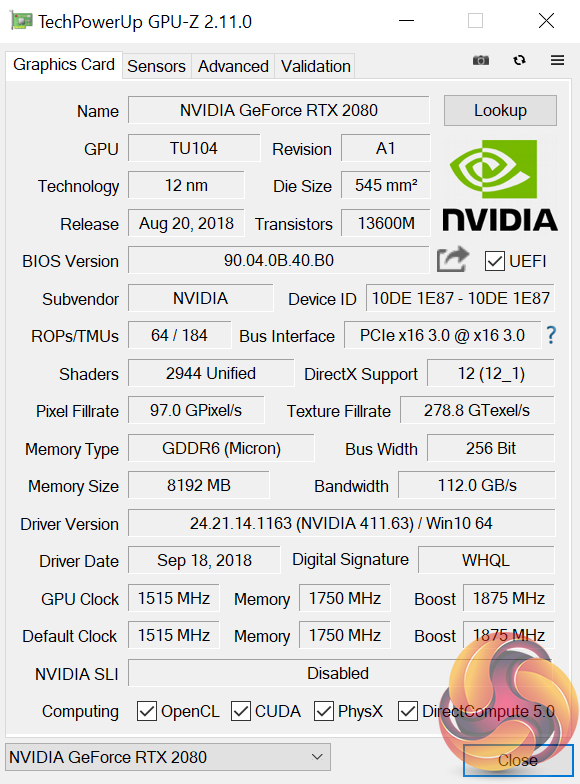
We already know that the TU104 chip used for the RTX 2080 cards sports 2944 CUDA cores, as well as 368 Tensor Cores and 46 RT Cores. Its memory operates over a 256-bit bus with a total bandwidth of 448 GB/s.
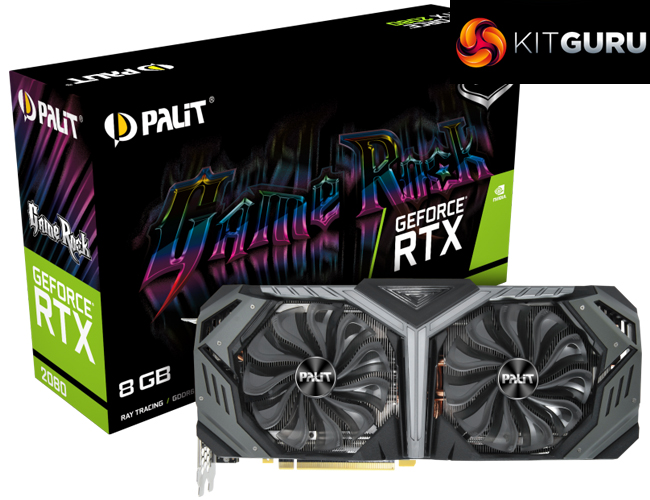
What the Palit RTX 2080 GameRock Premium does is raise the boost clock from 1800MHz (from the Founders Edition) to 1875MHz – one of the higher boost clocks we have seen from an aftermarket RTX 2080. This is the out of the box speed, too – no need to download any software to enable an ‘OC mode' or anything like that.
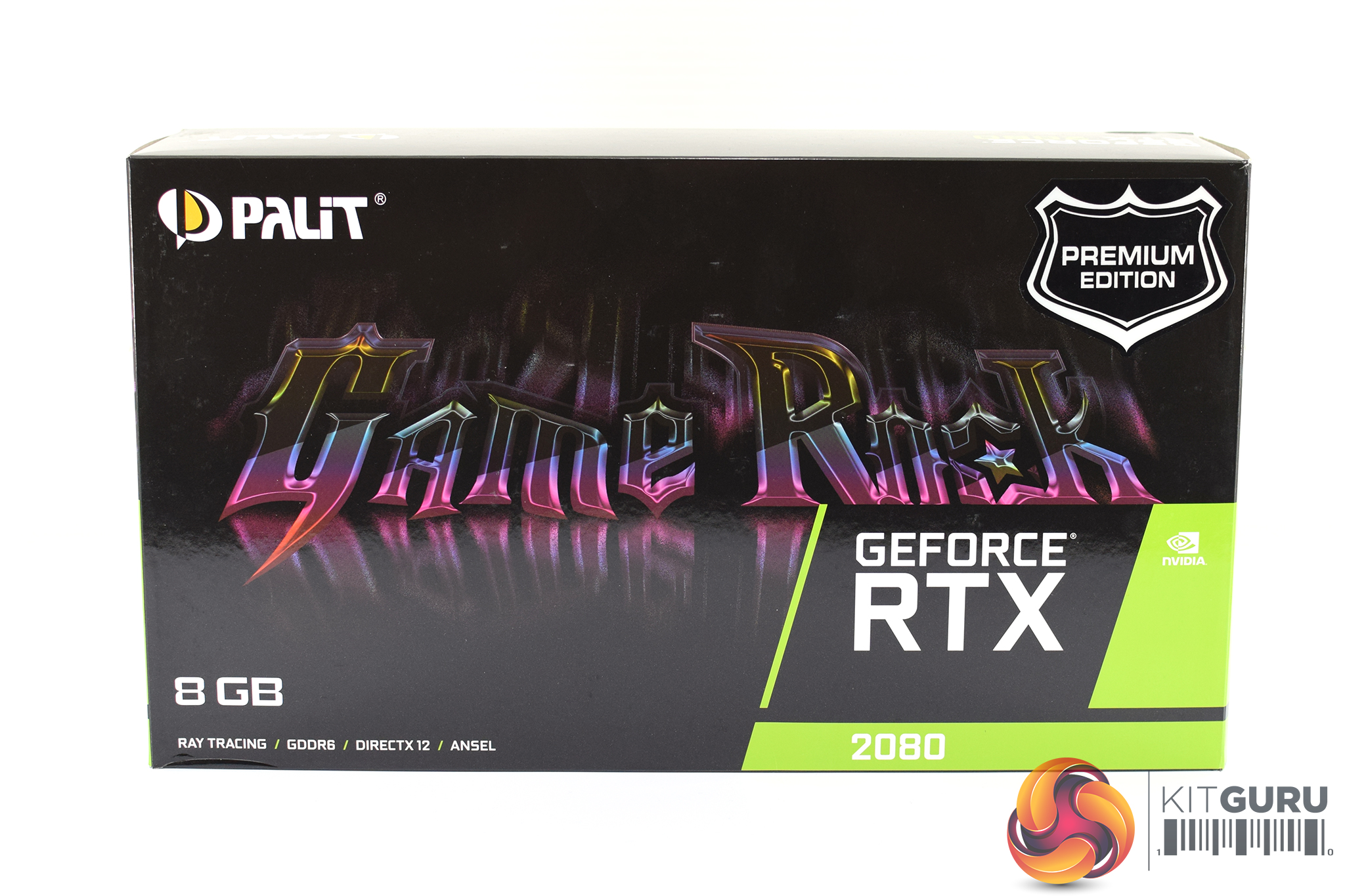
The Palit RTX 2080 GameRock Premium ships in a glossy black box, with the multi-colour GameRock branding taking up almost the entire front of the box. There's also a sticker in the top right-hand corner signifying this is the ‘Premium' edition, which has a 60MHz clock speed advantage over the regular GameRock card.
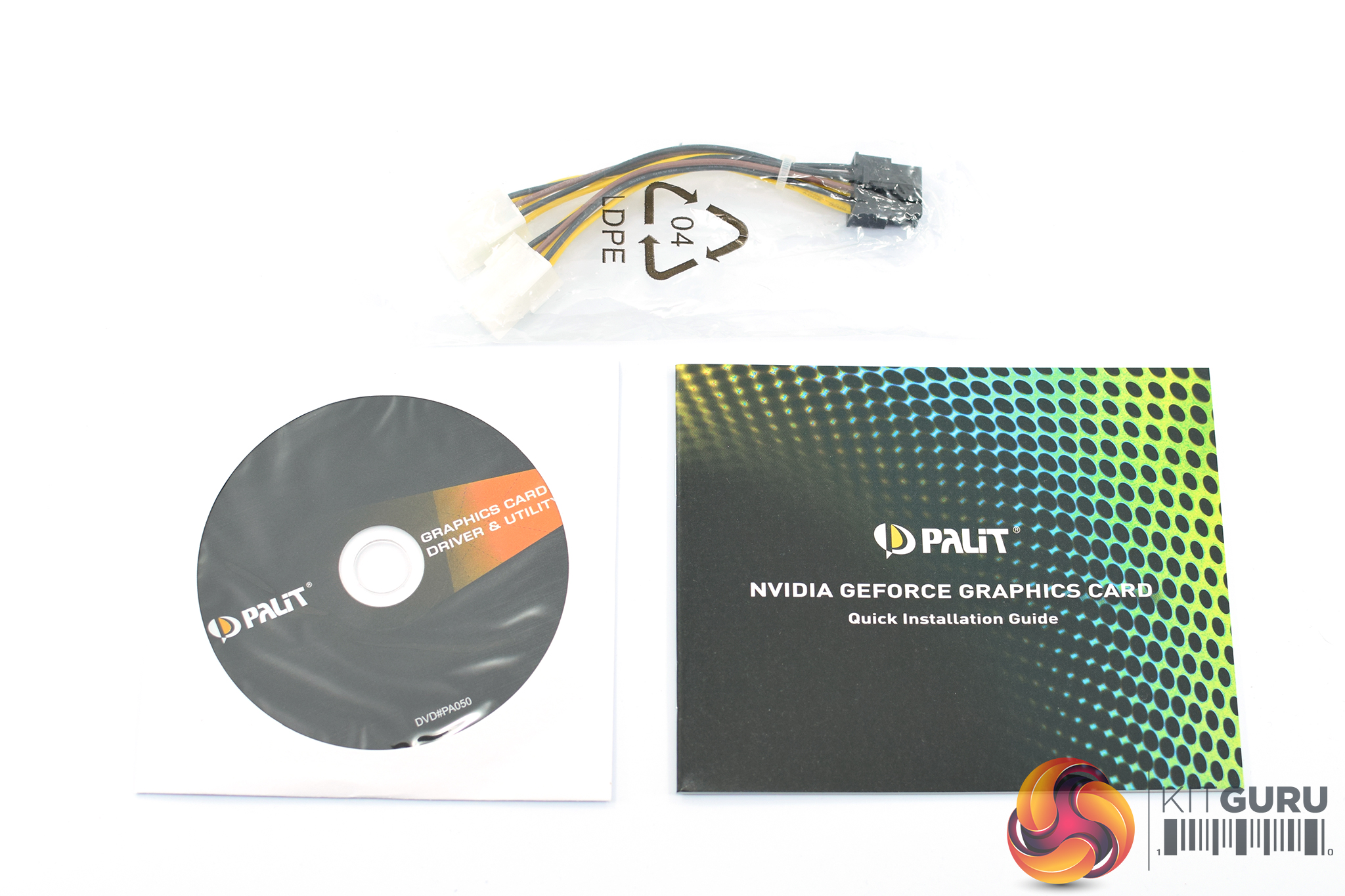
Inside, the included accessories consist of a driver disk, a quick start guide and one 2x 6-pin to 1x 8-pin adapter cable.
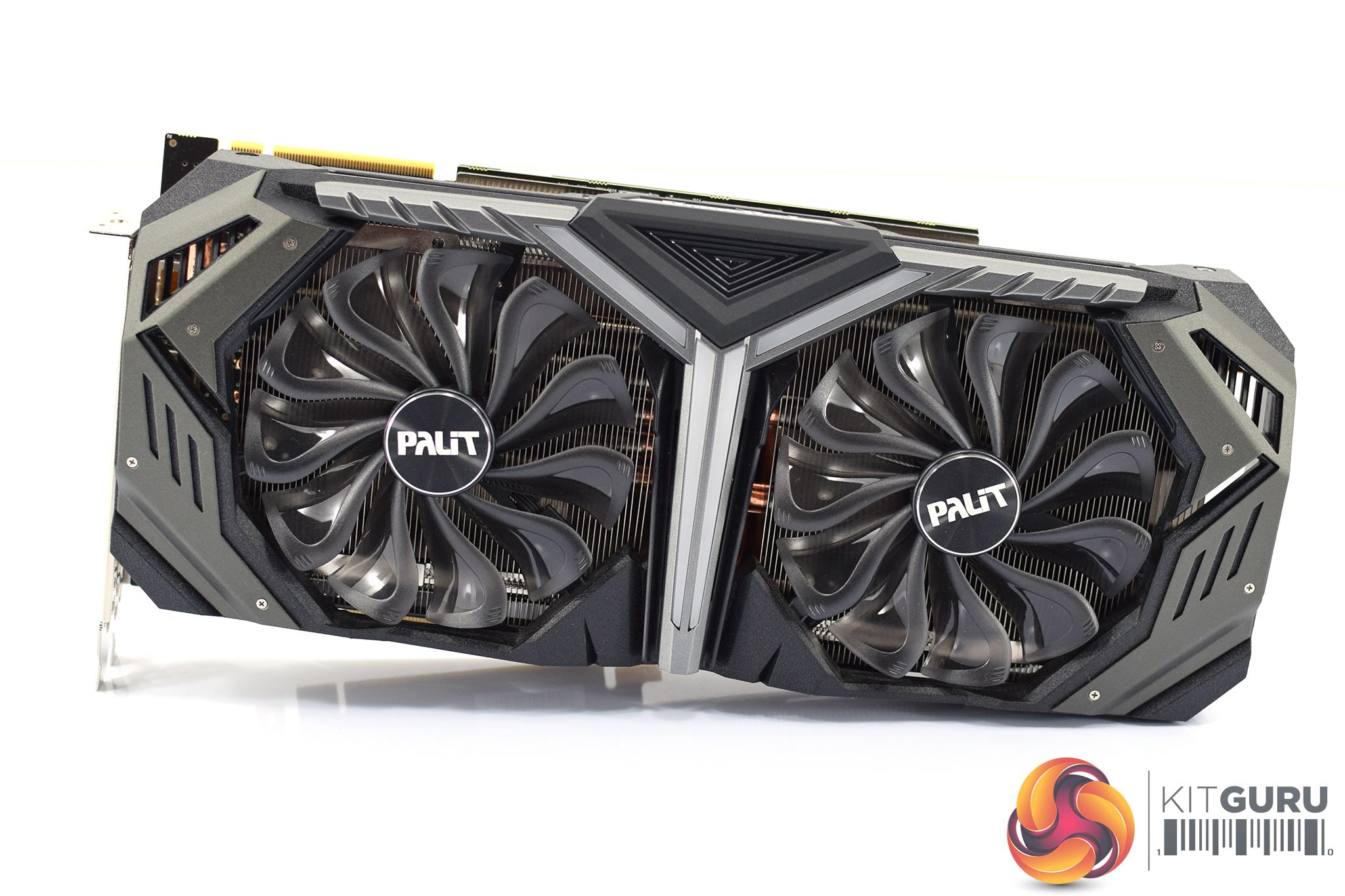
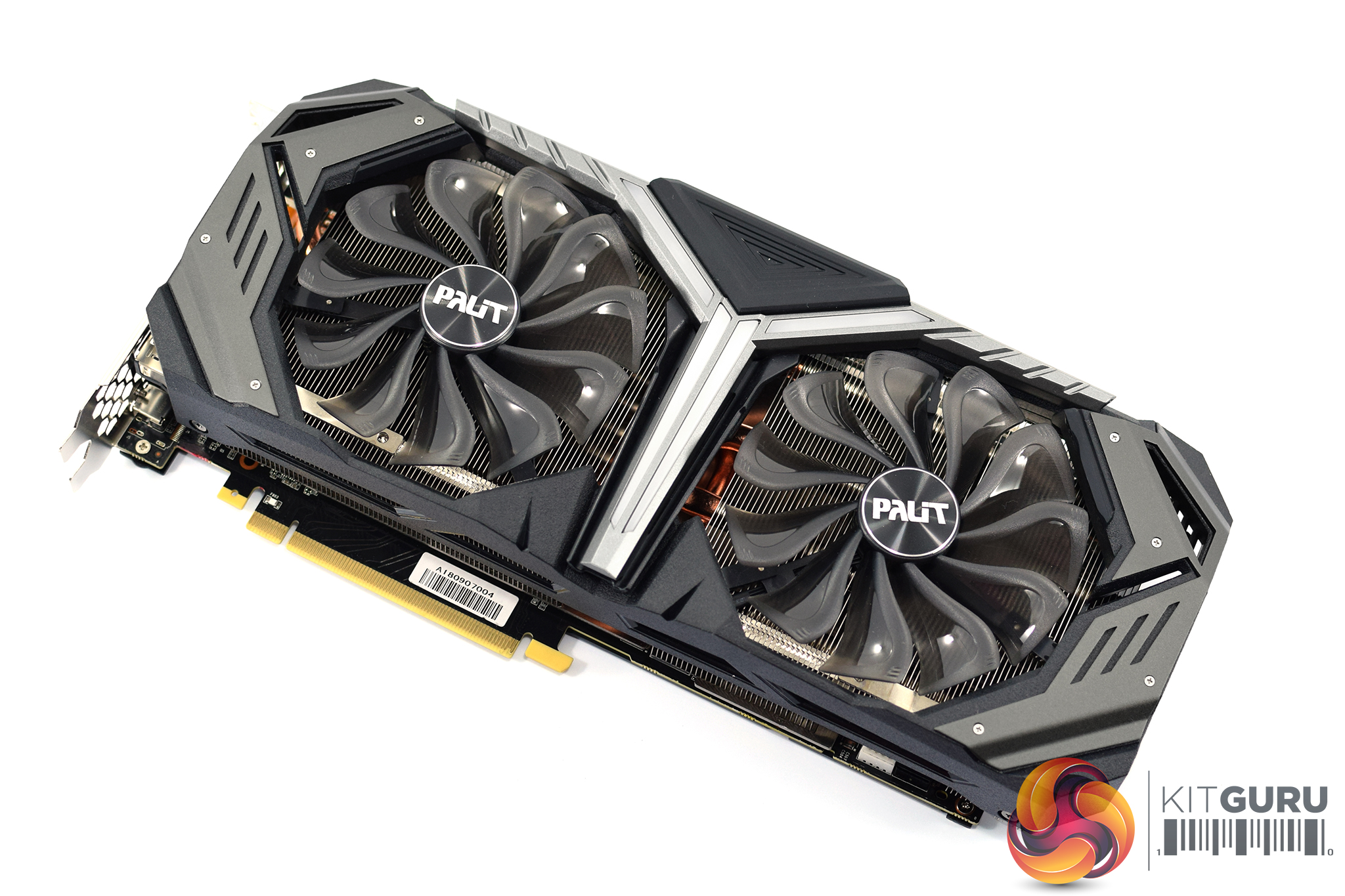
Getting a look at the card itself, we can see Palit has opted for a dual-fan configuration, with each fan measuring 95mm in diameter. These are a translucent grey in colour and that matches with the overall look of the shroud – it is a combination of dark grey, black and metallic silver. The grey sections on the far left and right of the shroud are made from metal, but most of it is made from plastic.
Incidentally, the silver Y-shaped section in the middle of the card is home to four LED strips which is where the RGB lighting shines through. I find this a somewhat strange placement for LEDs, as once the card is positioned in a case these will be facing downwards, so unless you have the card mounted vertically you are unlikely to be able to see the light show going on.
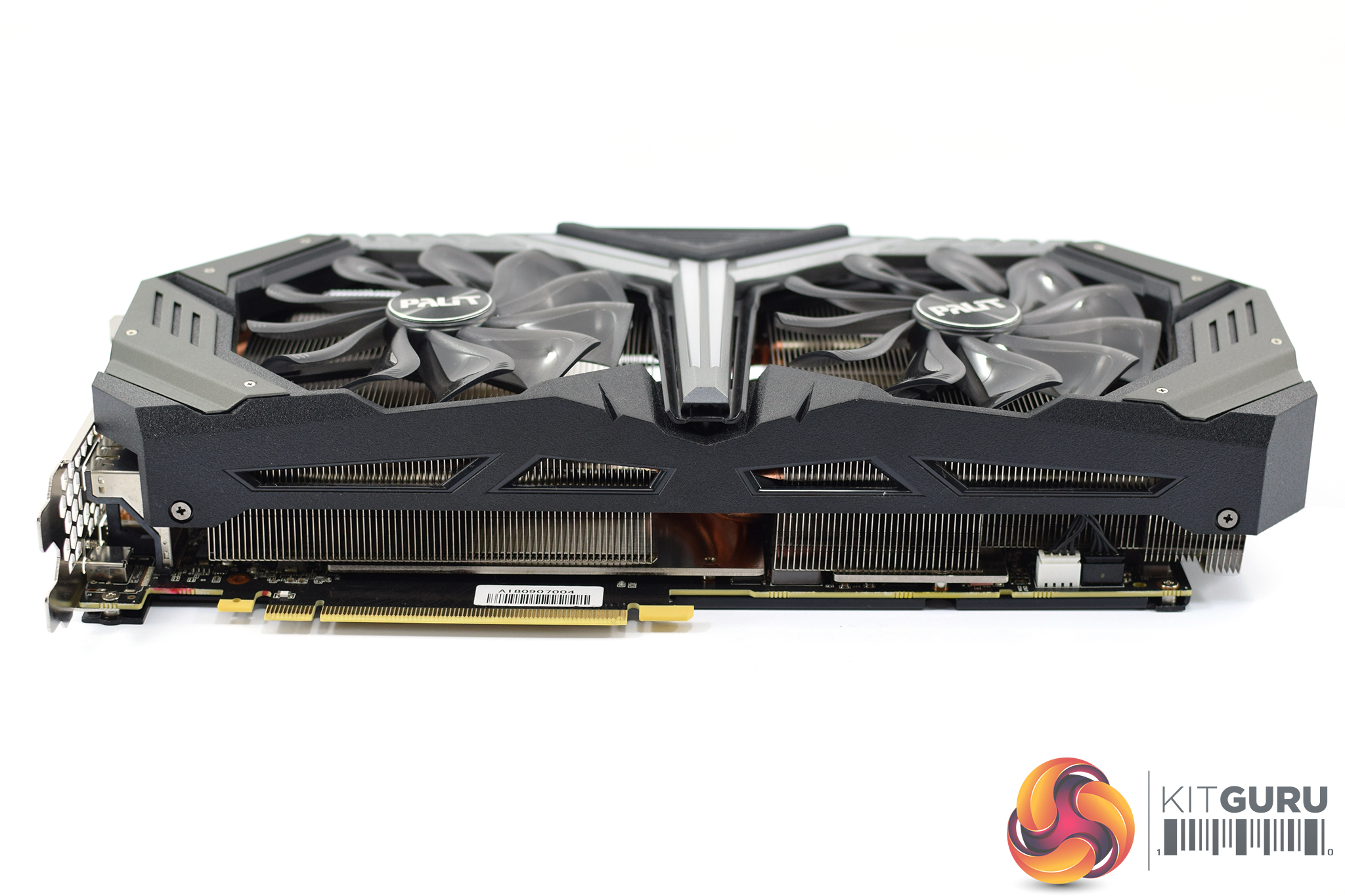
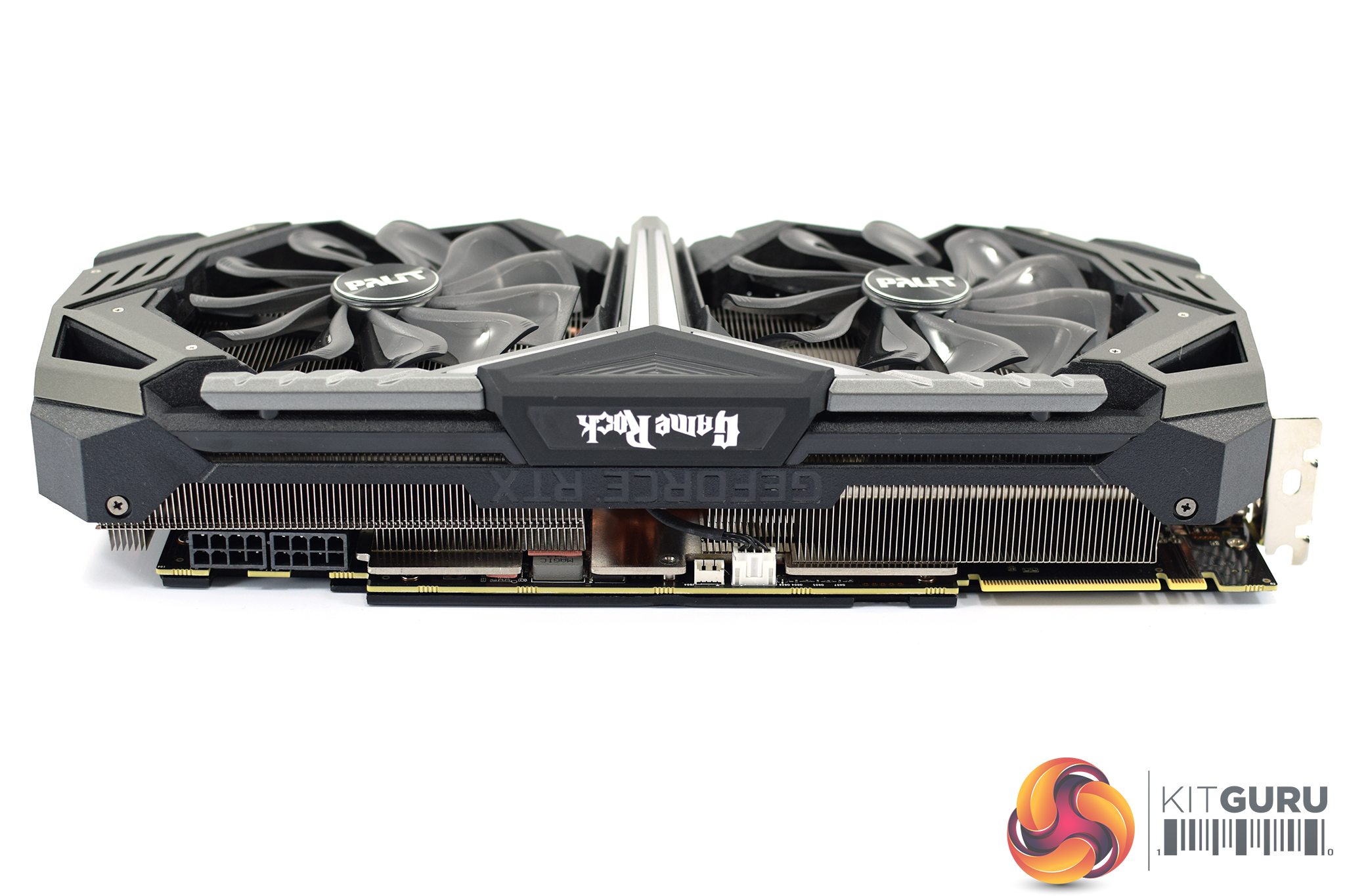
Getting a look at either side of the card, we can see more of the plastic shroud as well as some of the aluminium fin stack.
In terms of the GameRock Premium's dimensions, it is not at all small – it measures 292 x 130 x 59.6mm. That thickness of almost 60mm means it is effectively a triple-slot card – Palit says it is officially a ‘2.7' slot card, but you will need three spare slots free in your case.
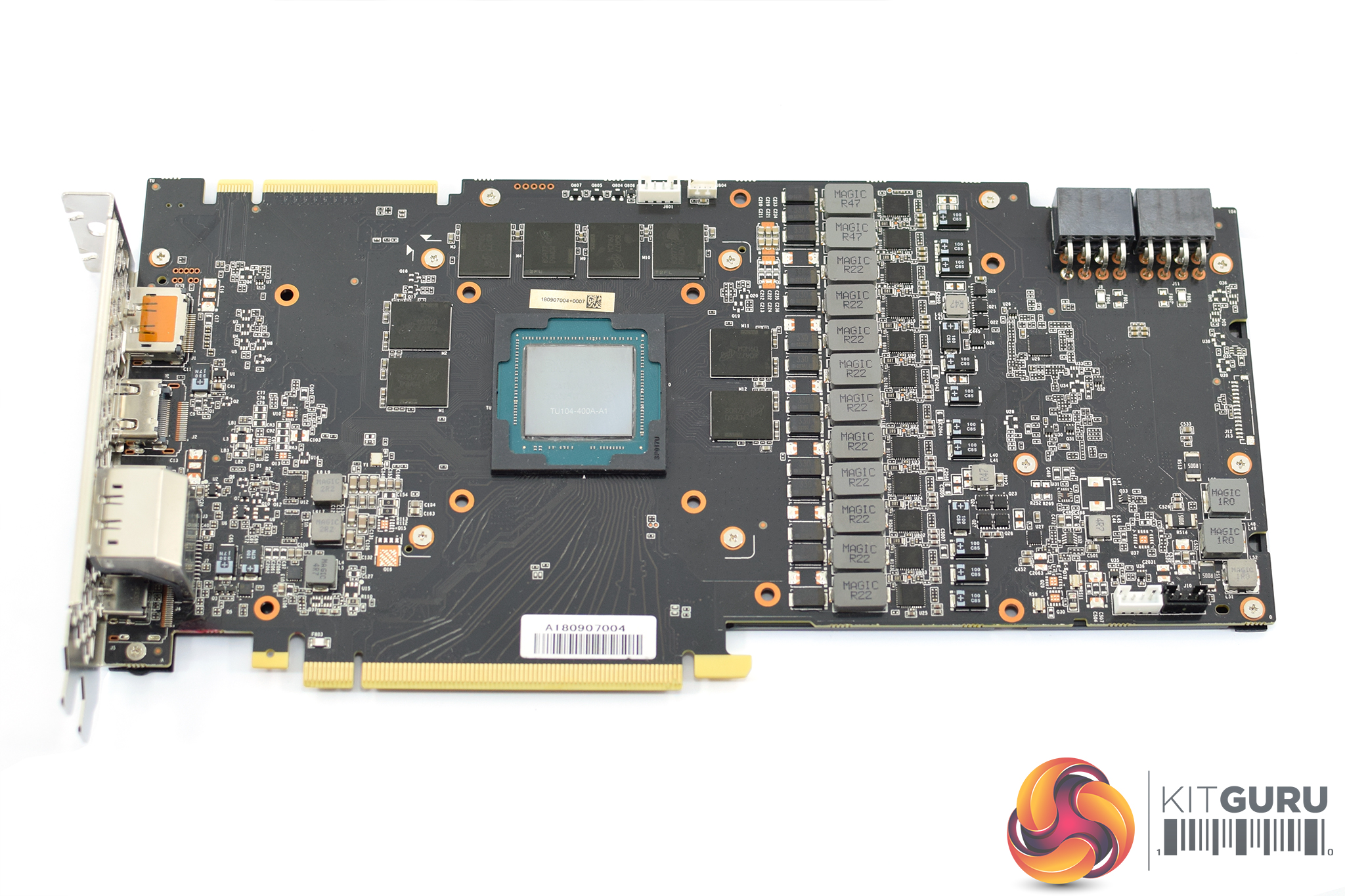
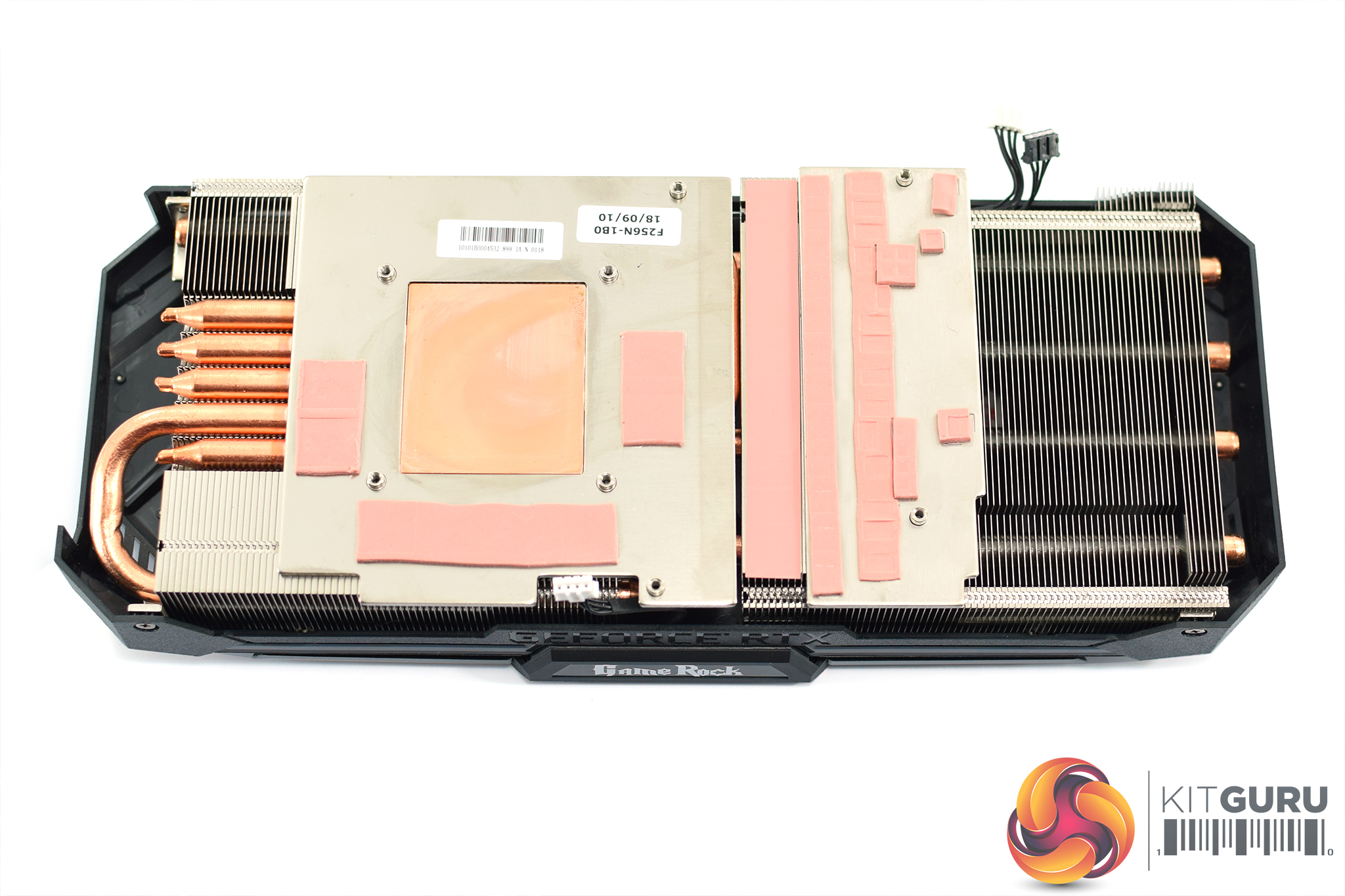
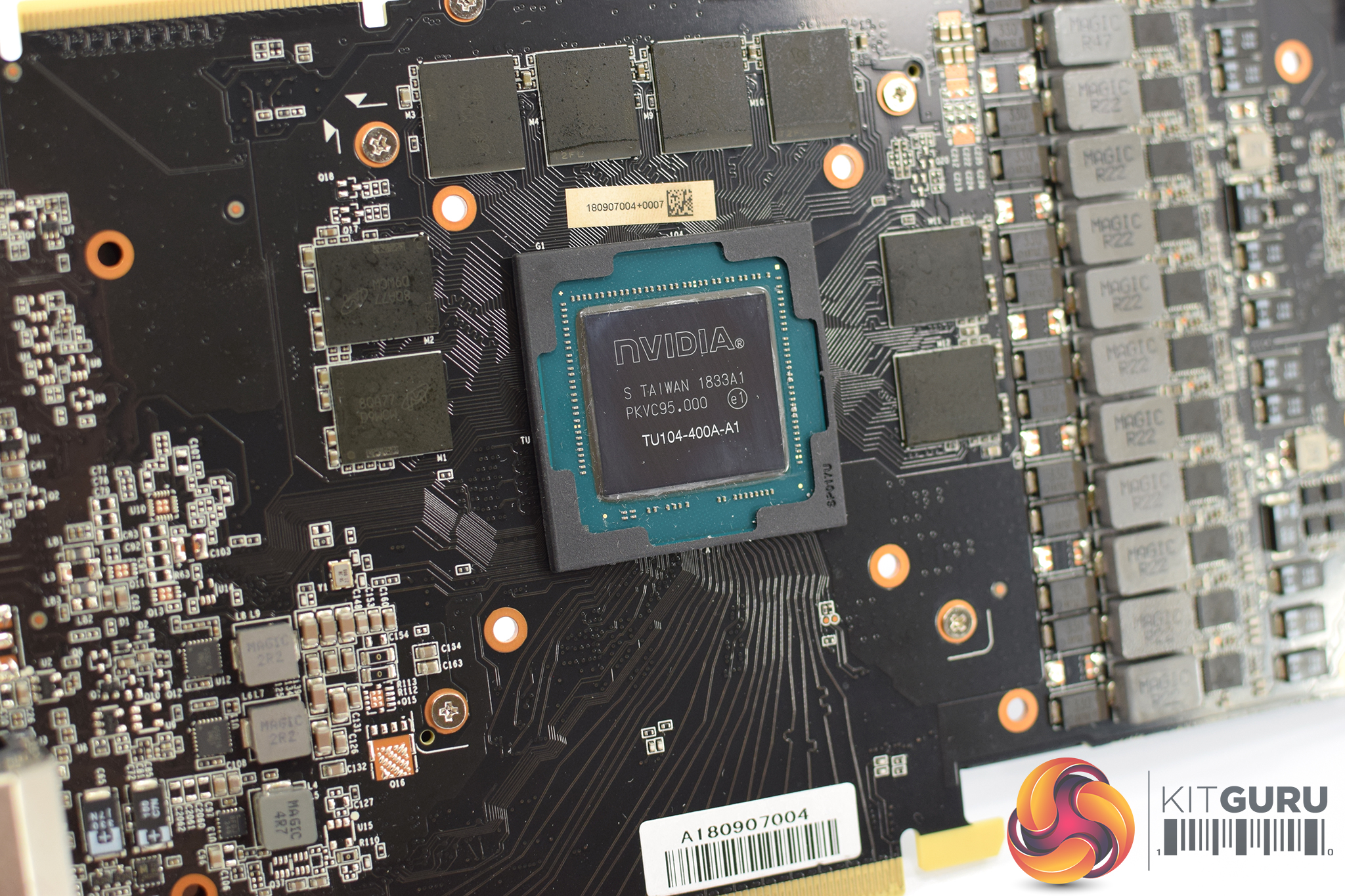
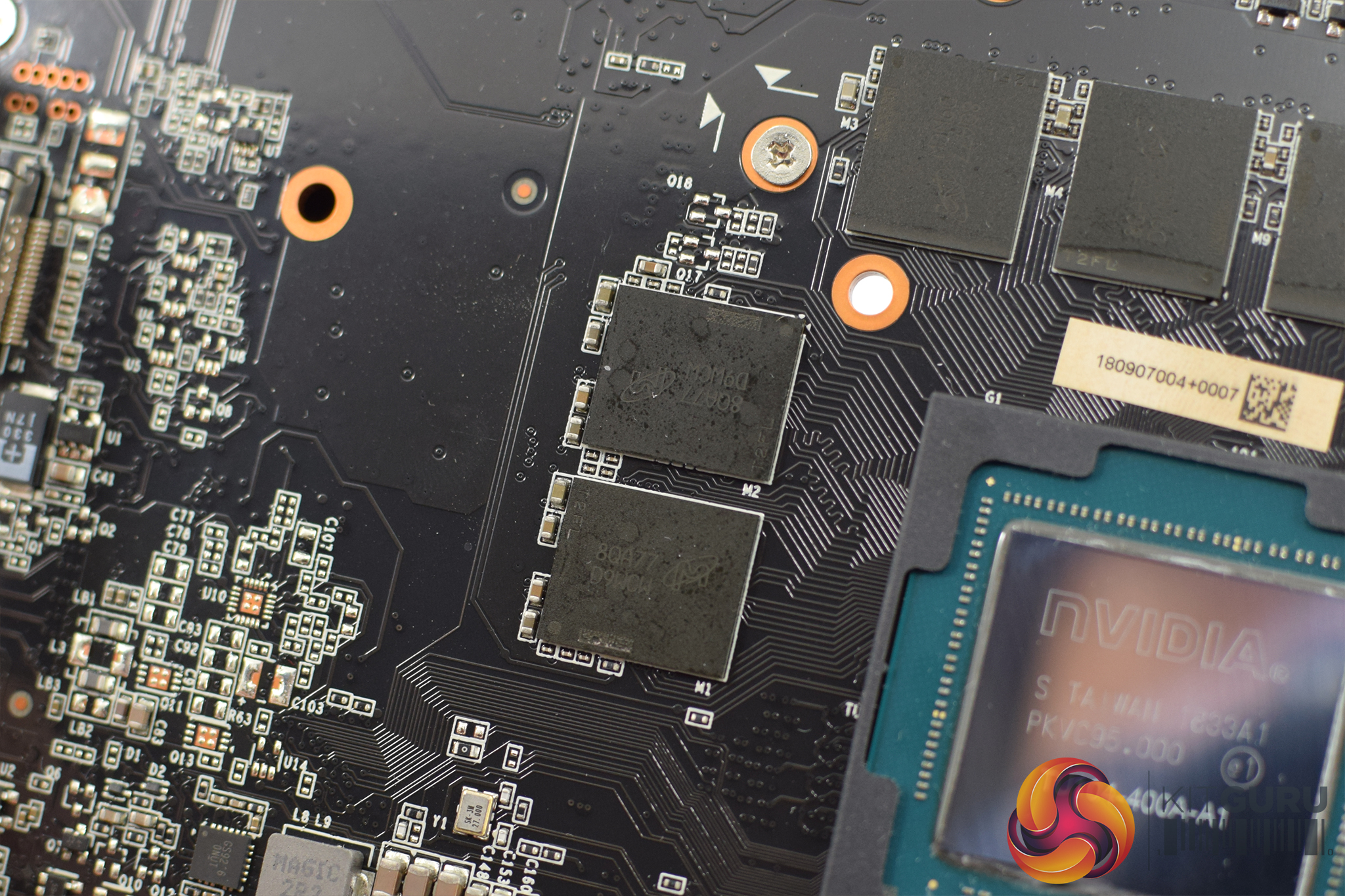
Getting a look at the PCB only requires the user to remove 8 screws from the back of the card. We can see that Palit has made some fairly significant changes to the PCB design when compared to reference – foremost among these being the move to a 10+2 power phase design, instead of the 8+2 power delivery found on the Founders card. The GameRock Premium also requires 2x 8-pin power connectors as we will see below.
Elsewhere, the 8 GDDR6 memory chips are manufactured by Micron, with the model number 8QA77D9WCW. The GPU die is also labelled TU104-400A – with the ‘A' meaning that this is a binned chip suitable for a factory overclock. Non-A chips have to be sold by Nvidia's partners at reference speeds.
In terms of the cooler, this utilises 5 heatpipes which look like they are each 8mm in diameter. The GPU contacts with a copper core, while there are an additional two coldplates – one for the VRAM chips and one for the VRM. There are also all the necessary thermal pads where we would expect to see them.
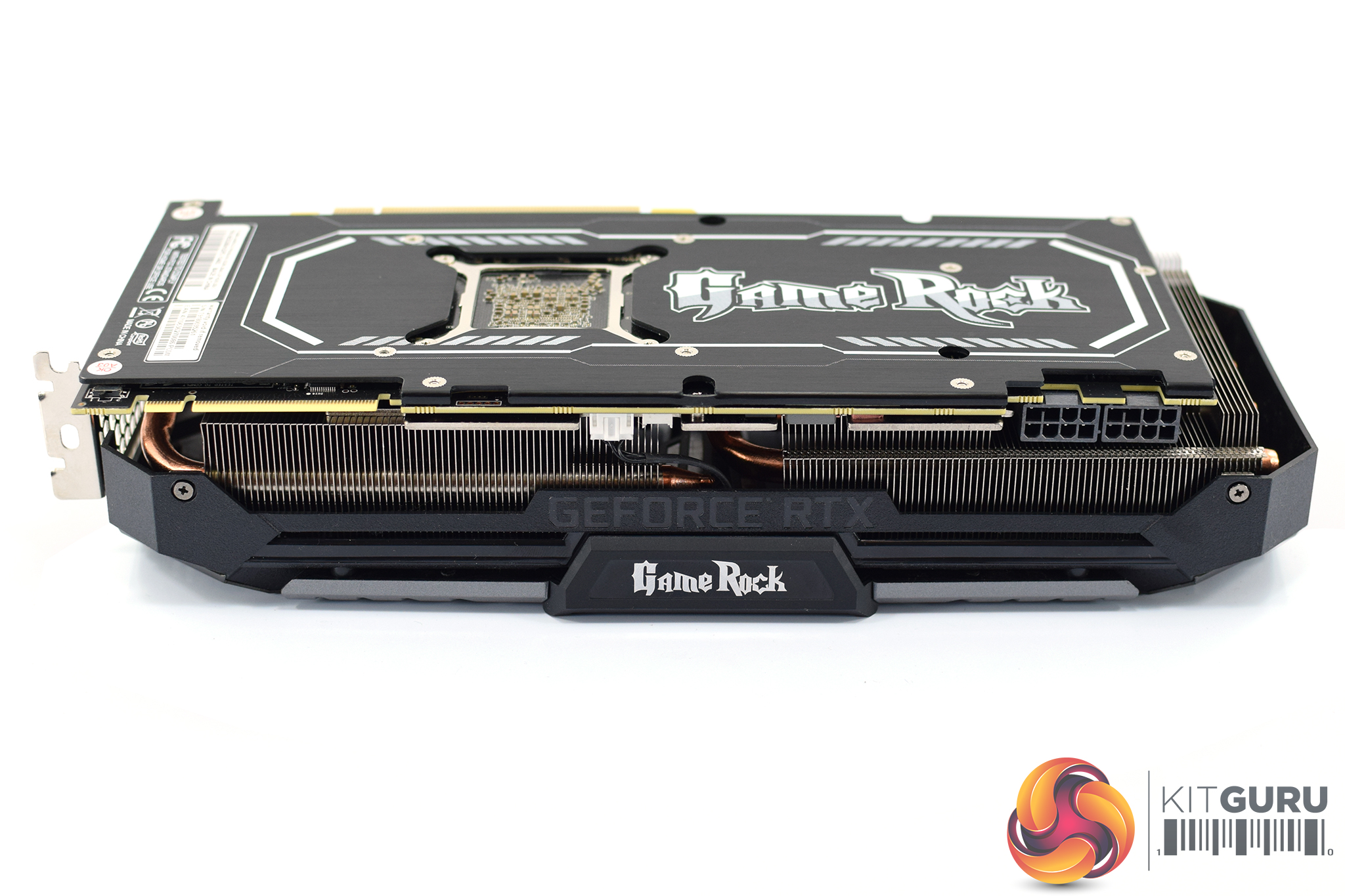
On the front side of the card, just to the left of the NVLink connector, there is a BIOS switch which lets you choose between OC mode (setting 1) or standard mode (setting 2). Out of the box, the switch is set to OC mode, with the 1875MHz boost we mentioned. Standard mode drops the clock speed to reference speeds – 1710MHz boost.
The GameRock logo is also visible in the middle of the card's side, though this is only printed in white and is not illuminated by RGB LEDs.
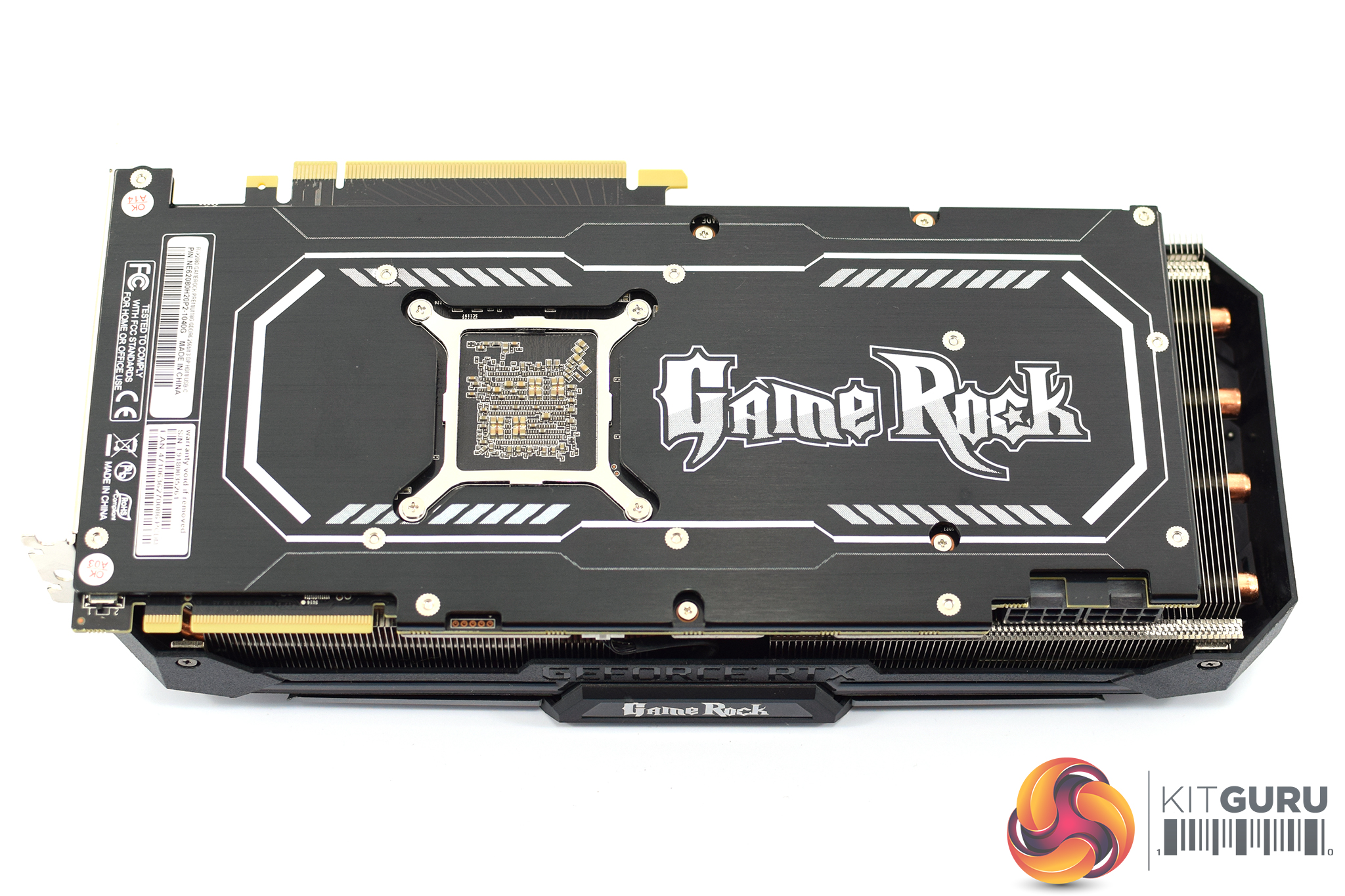
In terms of its backplate, the GameRock Premium's backplate is made of brushed metal, with a cut-out behind the GPU core. Next to that, the ‘GameRock' logo is printed in big, white letters – and the font is very much reminiscent of Guitar Hero. We asked our readers about this on Facebook and we had very mixed responses – it's not for us to say whether you like it or not, but there is no doubt the design is polarising.
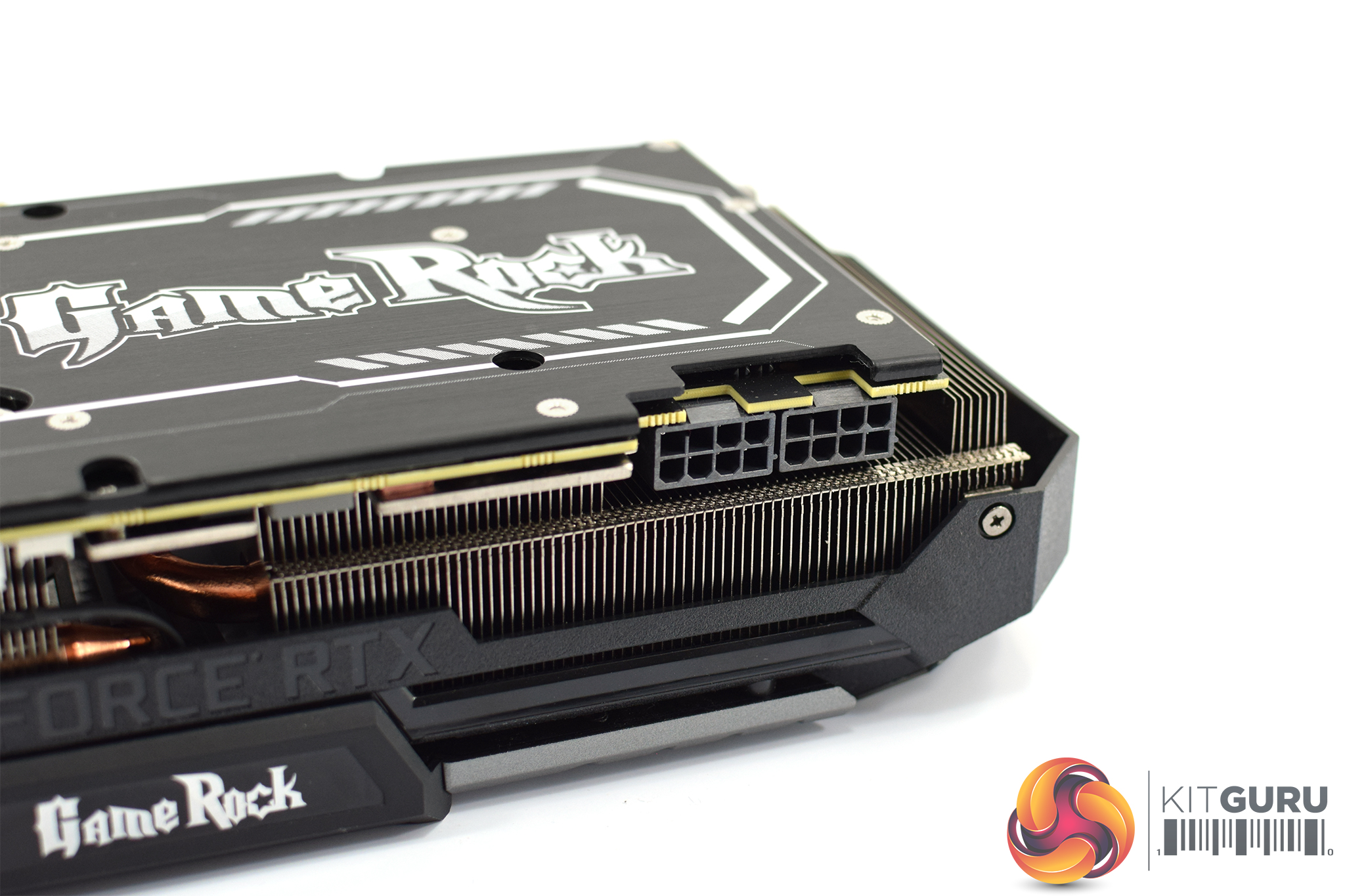
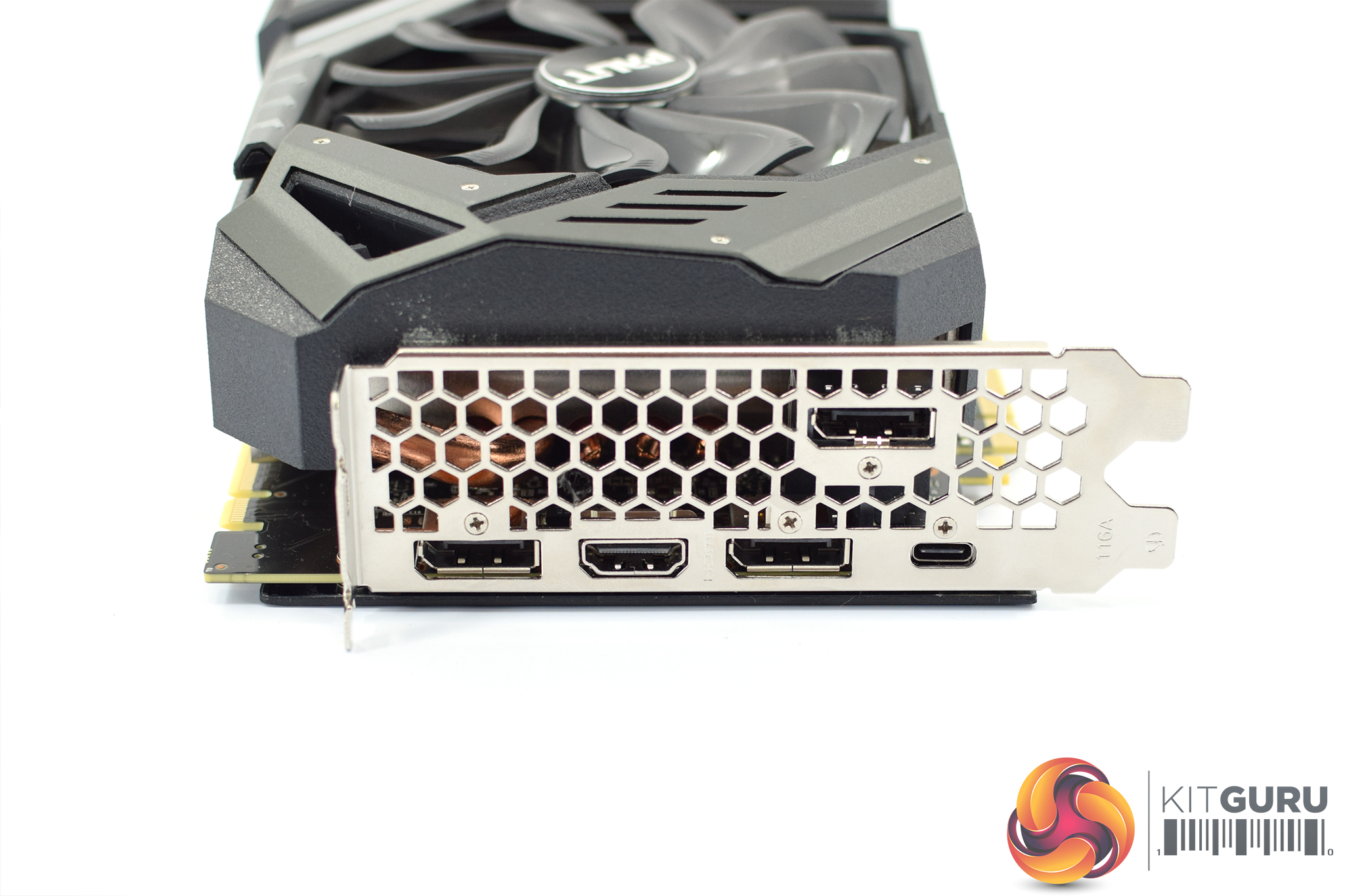
As we already mentioned, the card requires 2x 8-pin PCIe power connectors – up from 1x 8-pin and 1x 6-pin of the Founders Edition.
Display outputs are the same as reference, though, with 3x DisplayPort 1.4, 1x HDMI 2.0b and 1x USB-C (VirtualLink) connectors.
Our newest GPU test procedure has been built with the intention of benchmarking high-end graphics cards. We test at 1920×1080 (1080p), 2560×1440 (1440p), and 3840×2160 (4K UHD) resolutions.
We try to test using the DX12 API if titles offer support. This gives us an interpretation into the graphics card performance hierarchy in the present time and the near future, when DX12 becomes more prevalent. After all, graphics cards of this expense may stay in a gamer’s system for a number of product generations/years before being upgraded.
We tested the RX Vega64 and Vega56 using the ‘Turbo‘ power mode in AMD’s WattMan software. This prioritises all-out performance over power efficiency, noise output, and lower thermals
As mentioned, the GameRock Premium runs at 1875MHz boost clock out of the box. There is no need to download software to get this speed, but make sure the BIOS switch is set to ‘1' – the ‘2' position will run the card at 1710MHz boost, the RTX 2080 reference speed.
Driver Notes
- AMD graphics cards were benchmarked with the Adrenalin 18.9.1 driver.
- Nvidia graphics cards (apart from RTX 20 series cards) were benchmarked with the Nvidia 399.24 driver.
- RTX 20 series cards were benchmarked with the Nvidia 411.63 driver.
Test System
We test using the Overclockers UK Germanium pre-built system. You can read more about it over HERE. It is important to note we have had to re-house the components to an open-air test bench to accommodate our new GPU power testing (more on that later) but the core of the system is unchanged and the performance figures you see presented here are what you can expect from the Germanium.
| CPU |
Intel Core i7-8700K
Overclocked to 4.8GHz |
| Motherboard |
ASUS ROG Strix Z370-F Gaming
|
| Memory |
Team Group Dark Hawk RGB
16GB (2x8GB) @ 3200MHz 16-18-18-38 |
| Graphics Card |
Varies
|
| System Drive |
Patriot Wildfire 240GB
|
| Games Drive | Crucial M4 512GB |
| Chassis | Streacom ST-BC1 Bench |
| CPU Cooler |
OCUK TechLabs 240mm AIO
|
| Power Supply |
SuperFlower Leadex II 850W 80Plus Gold
|
| Operating System |
Windows 10 Professional
|
Comparison Graphics Cards List
- Nvidia RTX 2080 Ti Founders Edition (FE) 11GB
- Nvidia RTX 2080 Founders Edition (FE) 8GB
- Gigabyte RTX 2080 Gaming OC 8GB
- Nvidia GTX 1080 Ti Founders Edition (FE) 11GB
- Gigabyte GTX 1080 G1 Gaming 8GB
- Palit GTX 1070 Ti Super Jetstream 8GB
- Nvidia GTX 1070 Founders Edition (FE) 8GB
- Nvidia GTX 1060 Founders Edition (FE) 6GB
- Gigabyte GTX 980 Ti XTREME Gaming 6GB
- AMD RX Vega 64 Air 8GB
- AMD RX Vega 56 8GB
- Sapphire RX 580 Nitro+ Limited Edition (LE) 8GB
- ASUS RX 570 ROG Strix Gaming OC 4GB
Software and Games List
- 3DMark Fire Strike & Fire Strike Ultra (DX11 Synthetic)
- 3DMark Time Spy (DX12 Synthetic)
- Deus Ex: Mankind Divided (DX12)
- Far Cry 5 (DX11)
- Tom Clancy’s Ghost Recon: Wildlands (DX11)
- Middle Earth: Shadow of War (DX11)
- Shadow of the Tomb Raider (DX12)
We run each benchmark/game three times, and present averages in our graphs.3DMark Fire Strike is a showcase DirectX 11 benchmark designed for today’s high-performance gaming PCs. It is our [FutureMark’s] most ambitious and technical benchmark ever, featuring real-time graphics rendered with detail and complexity far beyond what is found in other benchmarks and games today.
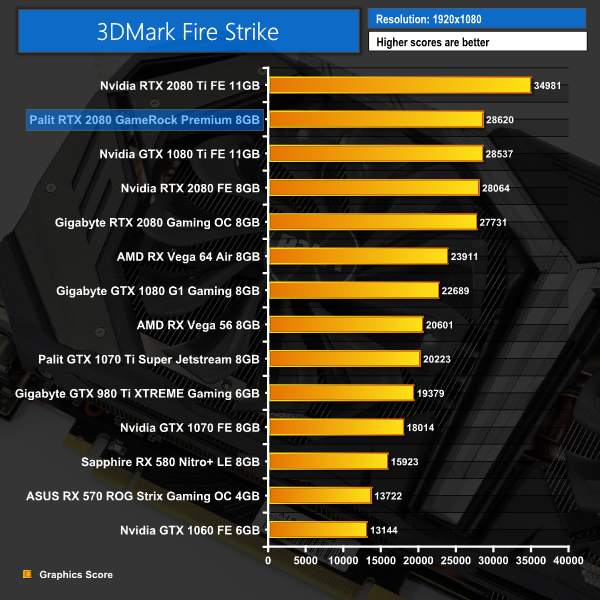
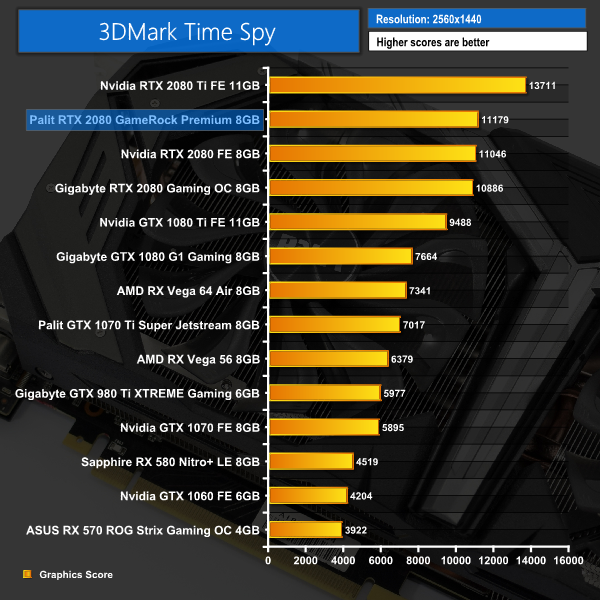
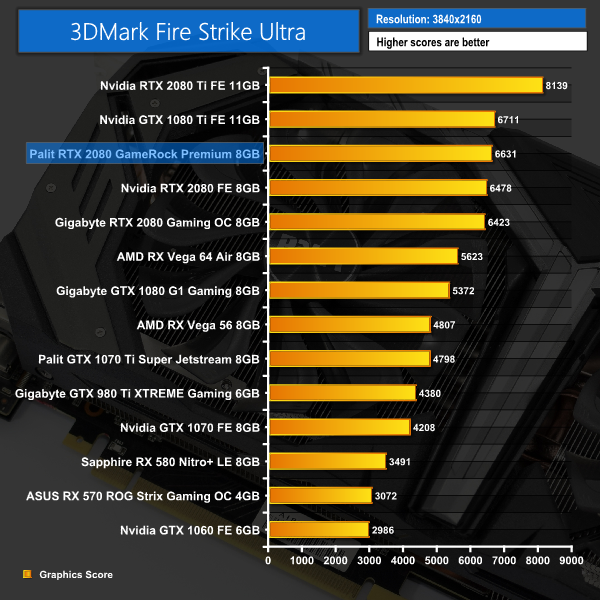
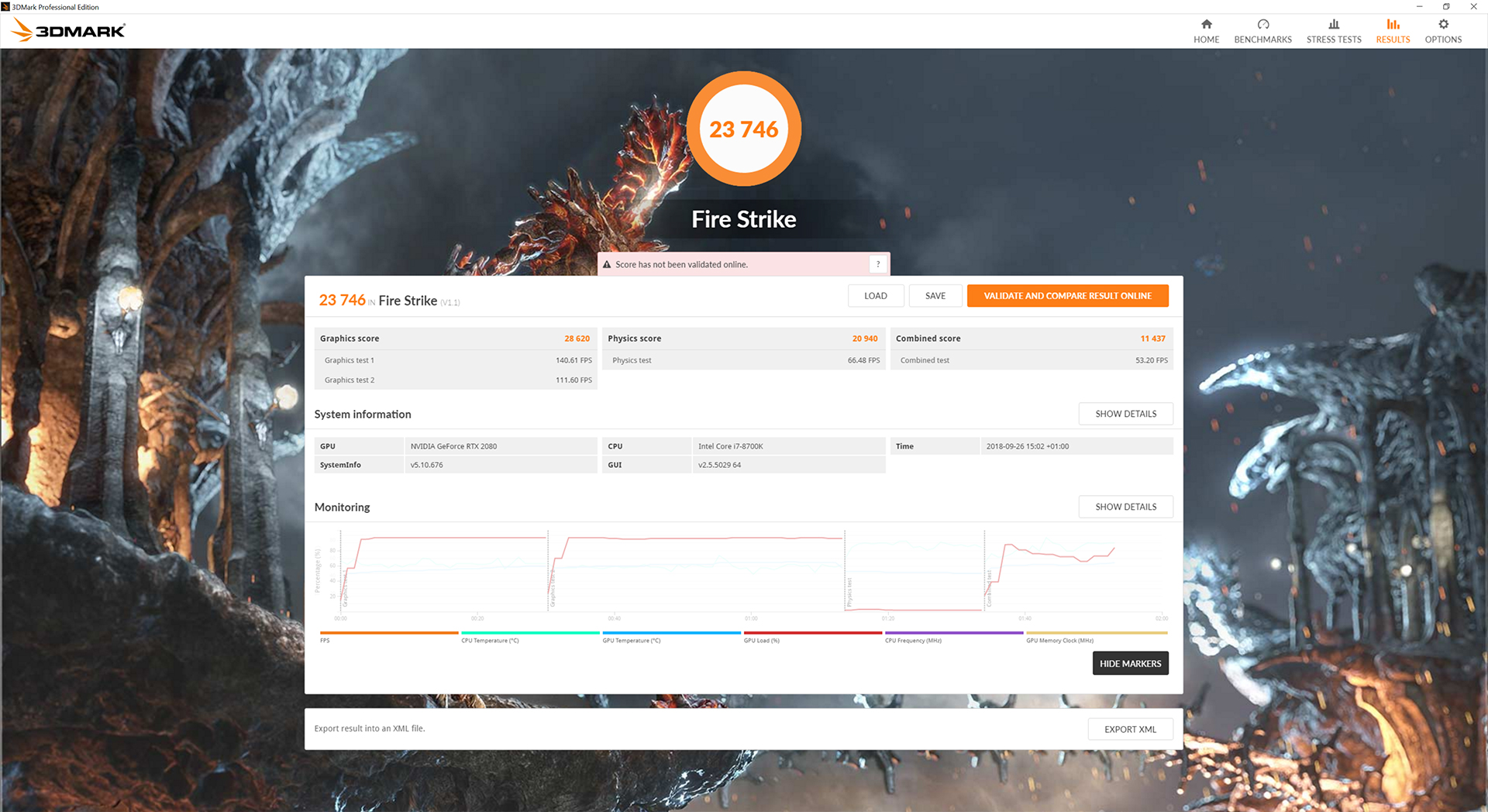
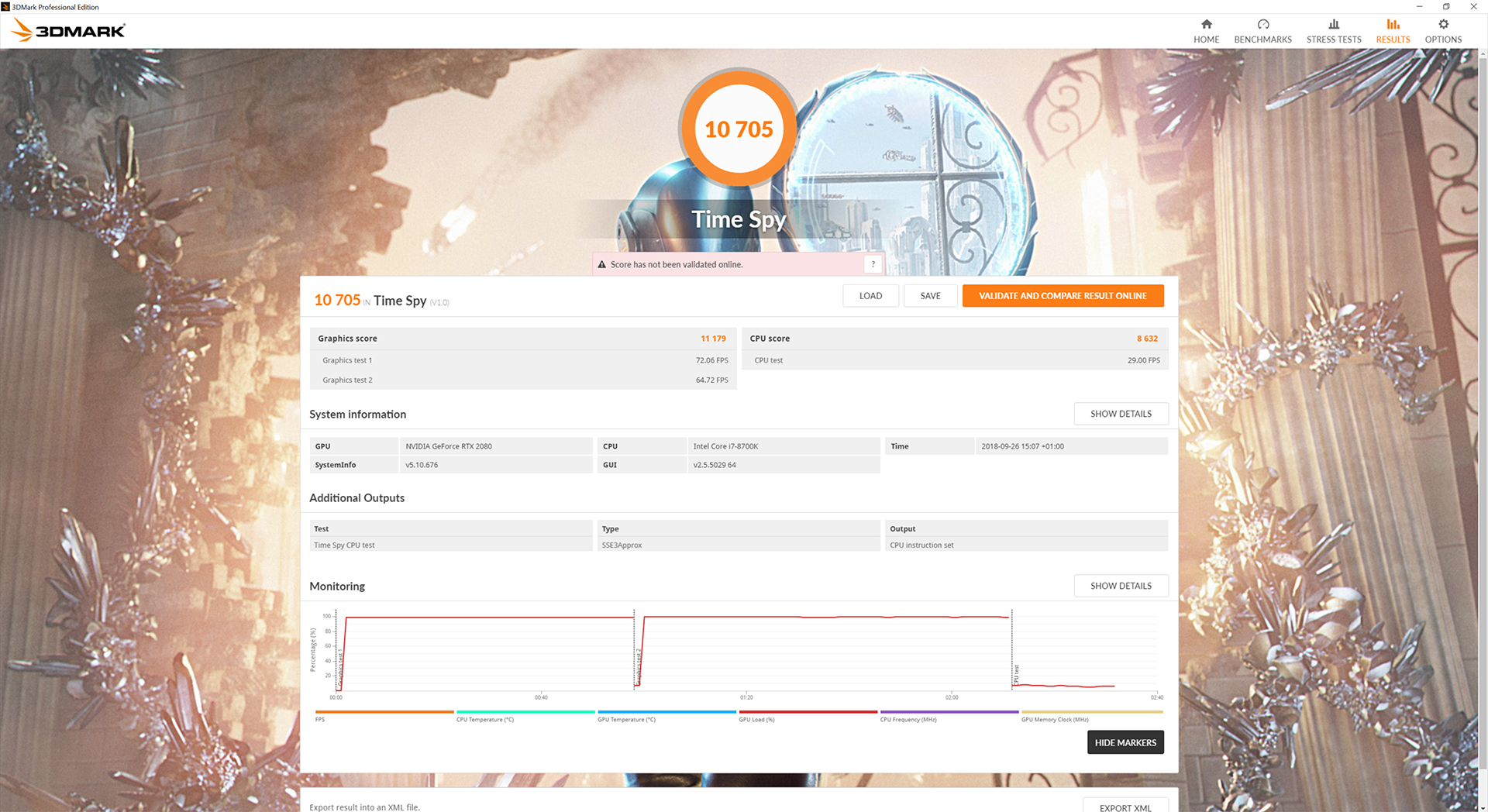
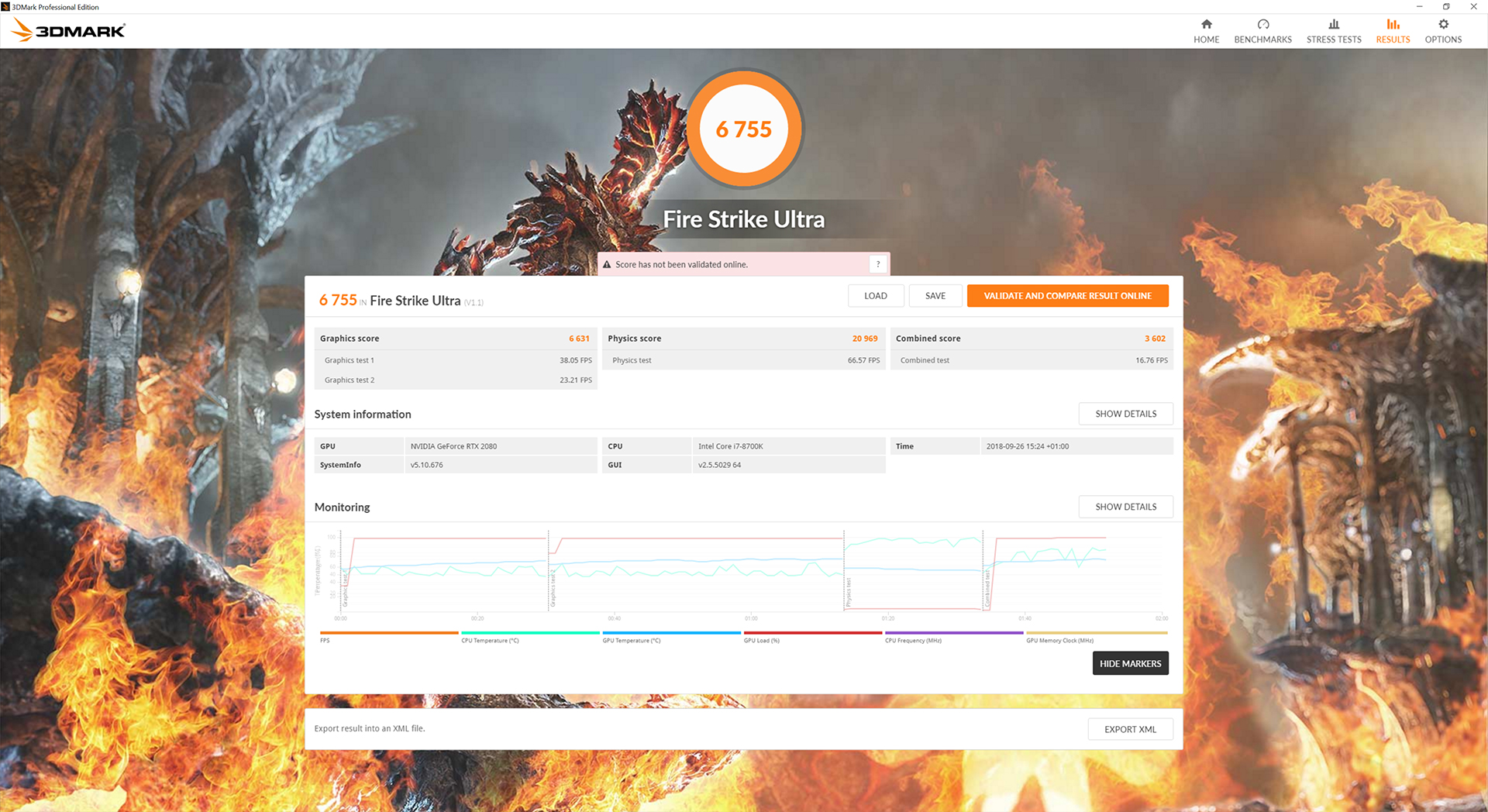
As we'd hope given its fast out of the box clock speed, the GameRock Premium nudges ahead of the other two RTX 2080 cards on our charts across all three 3DMark benchmarks.Deus Ex: Mankind Divided is set in the year 2029, two years after the events of Human Revolution and the “Aug Incident”—an event in which mechanically augmented humans became uncontrollable and lethally violent. Unbeknownst to the public, the affected augmented received implanted technology designed to control them by the shadowy Illuminati, which is abused by a rogue member of the group to discredit augmentations completely. (Wikipedia).
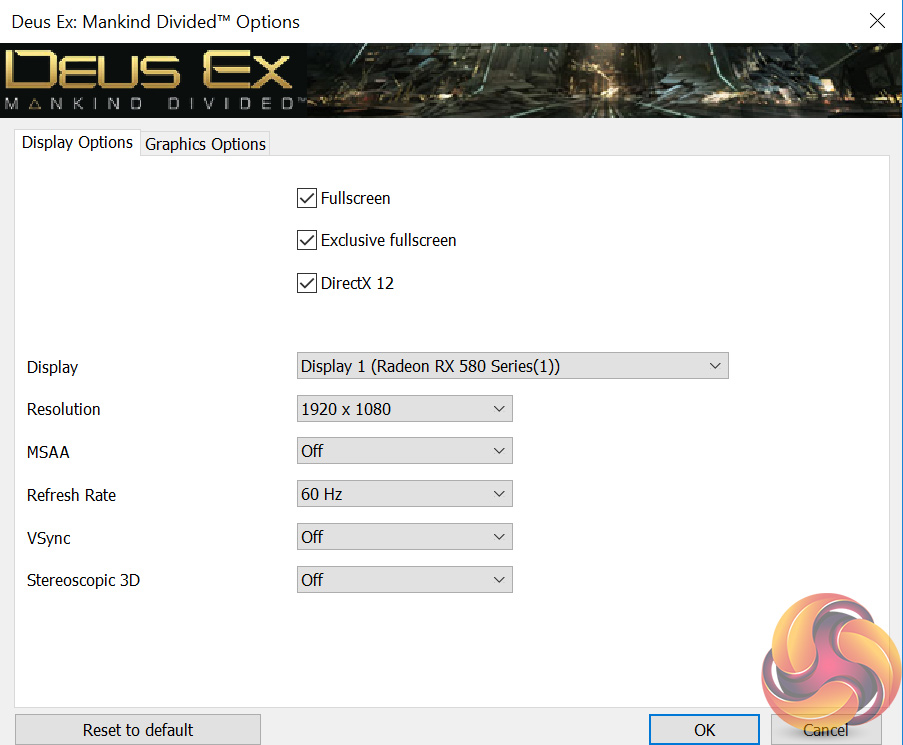
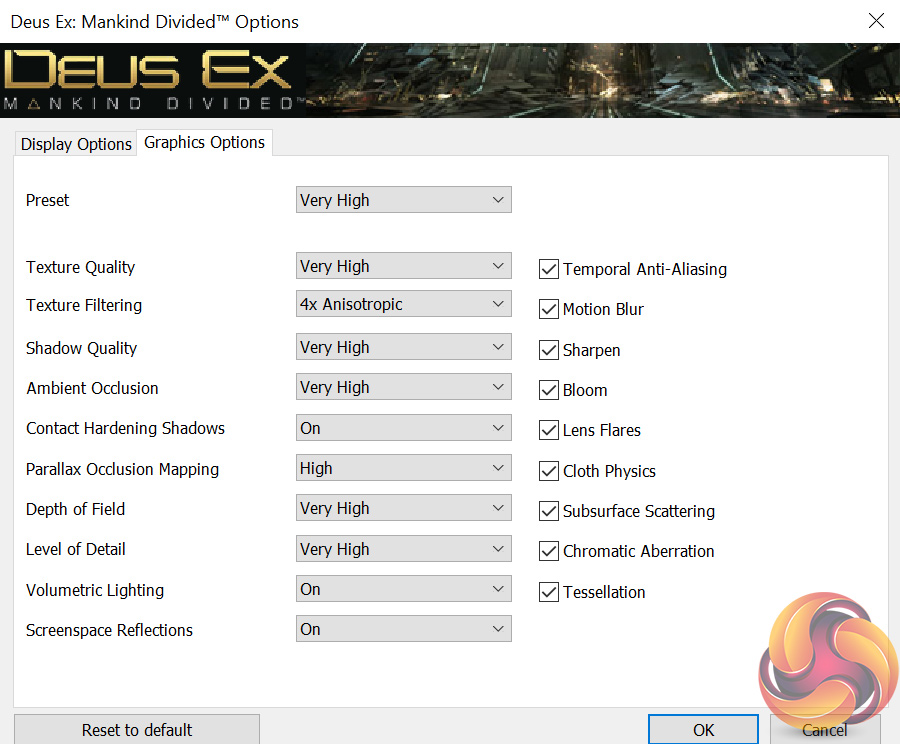
We test using the Very High preset, with MSAA disabled. We use the DirectX 12 API.
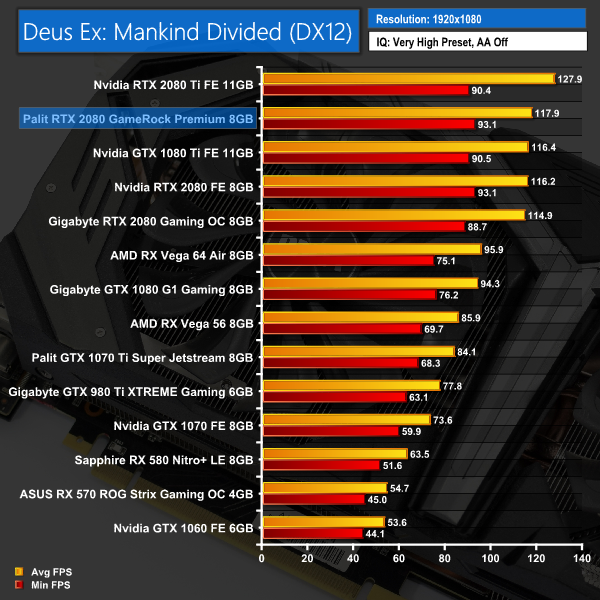
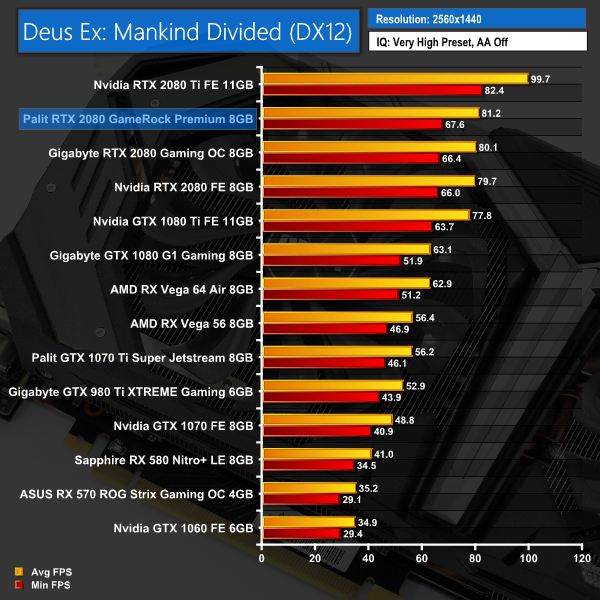
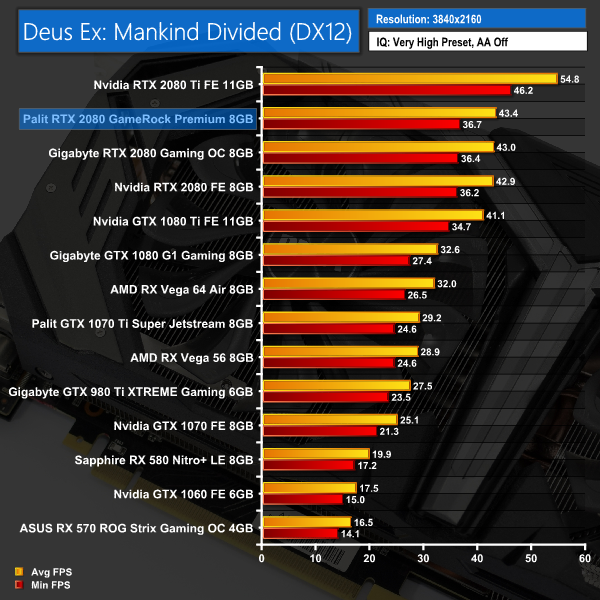
Our first game – Deus Ex: Mankind Divided – shows the Palit card enjoying a lead of between 1-2FPS when compared with the Gigabyte RTX 2080 Gaming OC.Far Cry 5 is an action-adventure first-person shooter game developed by Ubisoft Montreal and Ubisoft Toronto and published by Ubisoft for Microsoft Windows, PlayStation 4 and Xbox One. It is the eleventh entry and the fifth main title in the Far Cry series, and was released on March 27, 2018.
The game takes place in the fictional Hope County, Montana, where charismatic preacher Joseph Seed and his cult Project at Eden’s Gate holds a dictatorial rule over the area. The story follows an unnamed junior deputy sheriff, who becomes trapped in Hope County and works alongside factions of a resistance to liberate the county from Eden’s Gate. (Wikipedia).
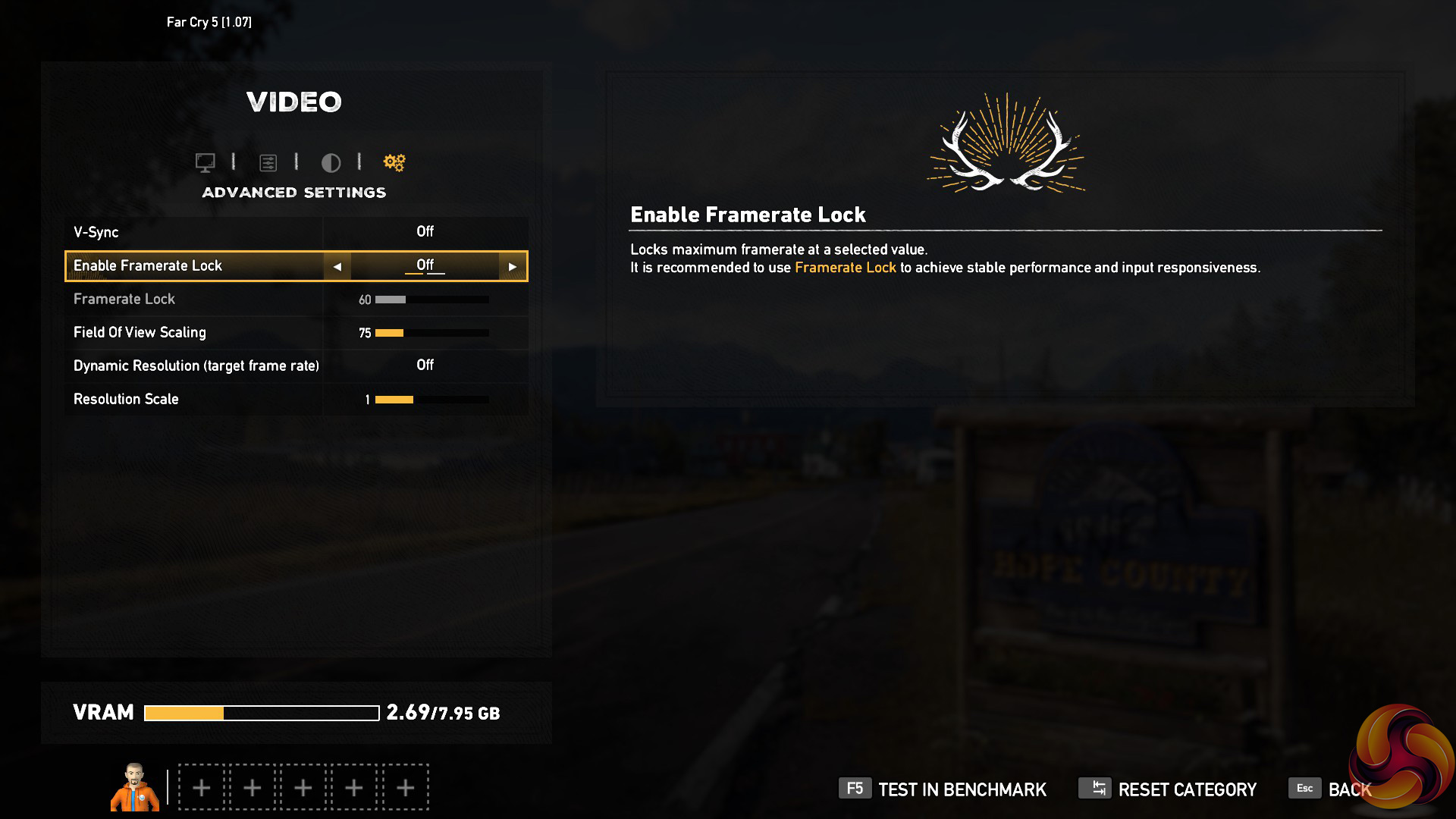
We test using the Ultra preset, with AA and motion blur disabled.
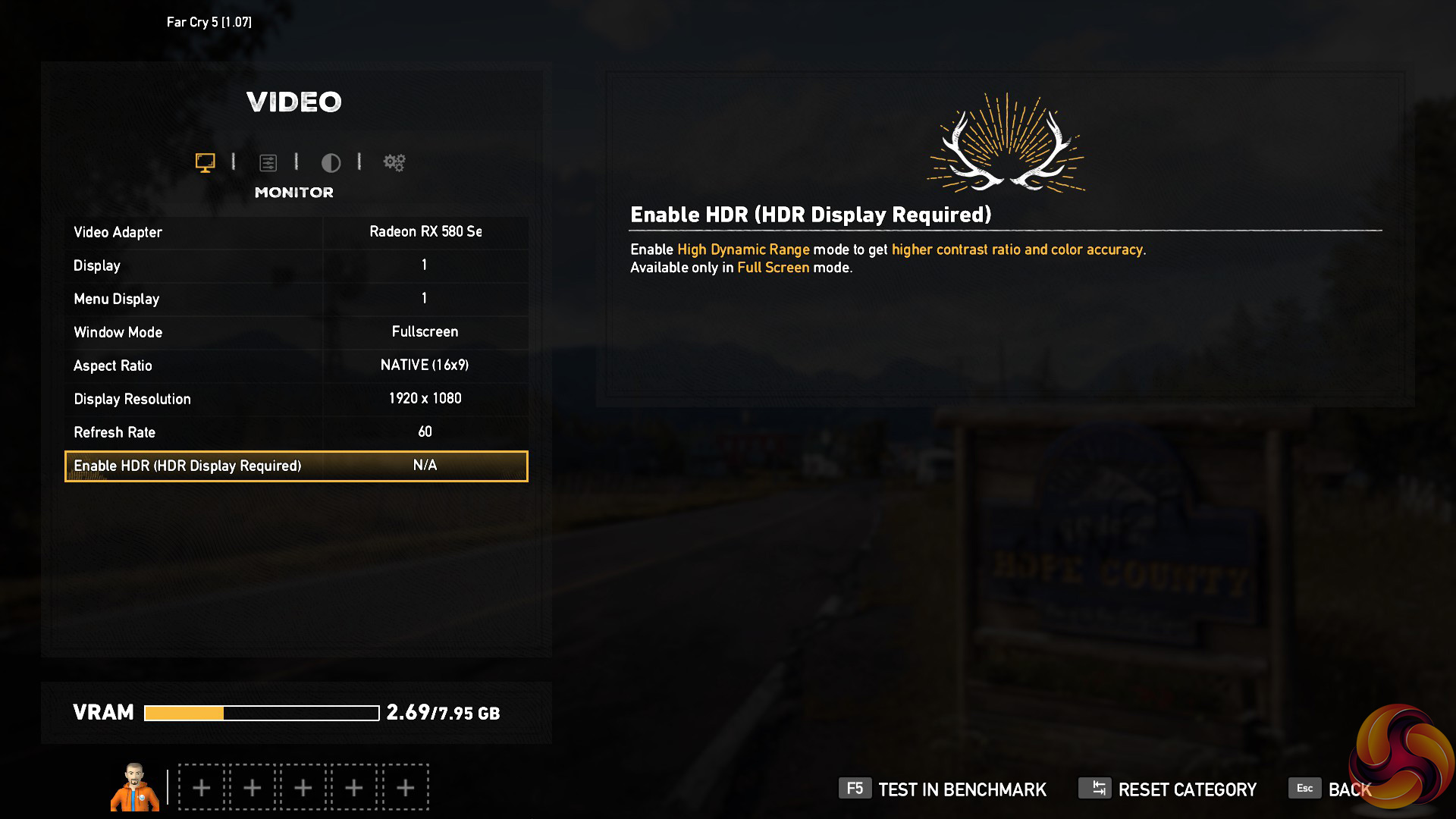
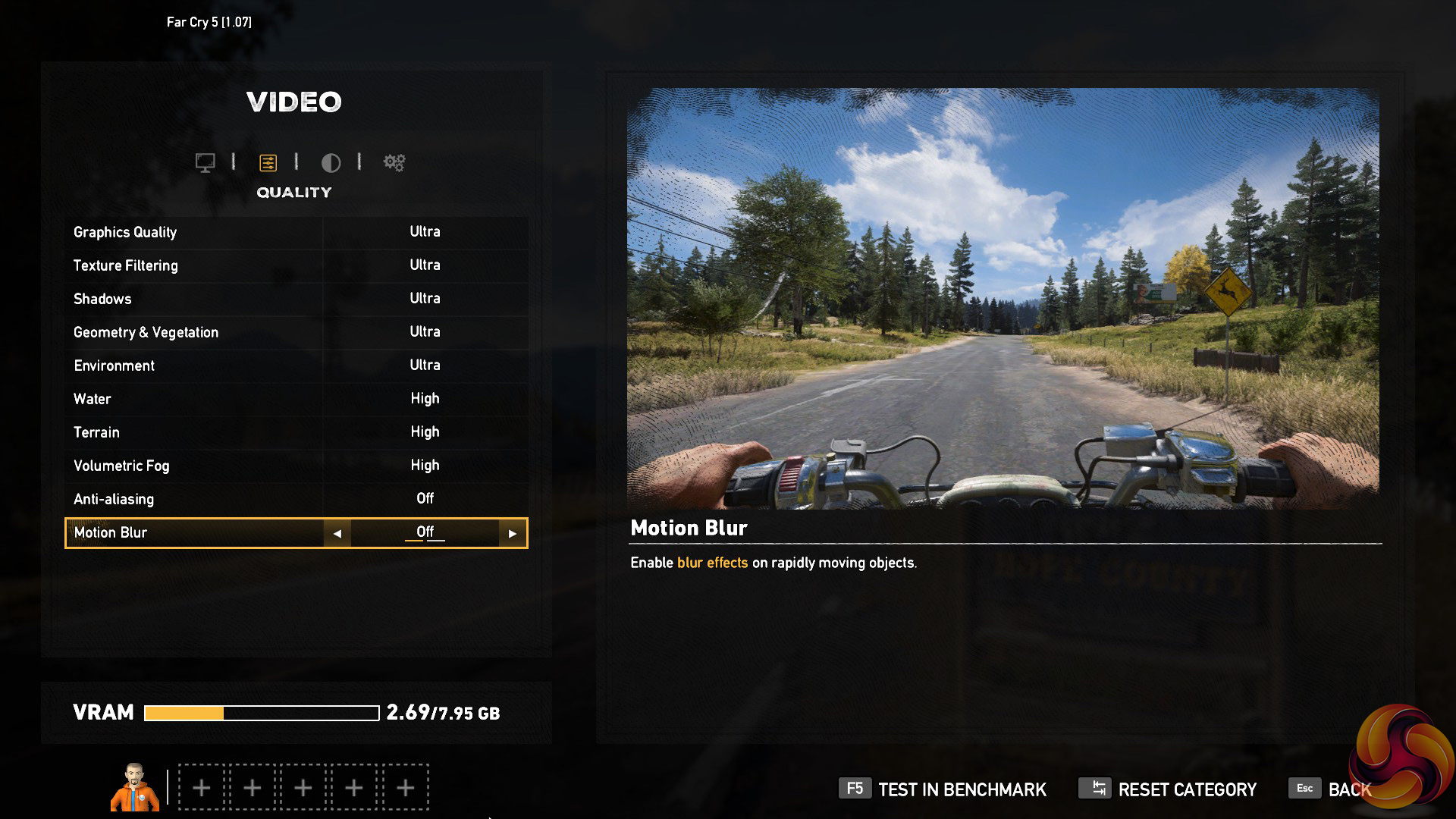
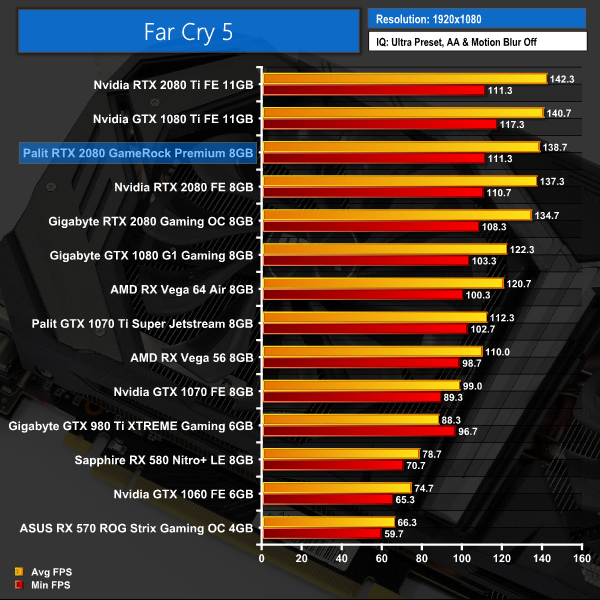
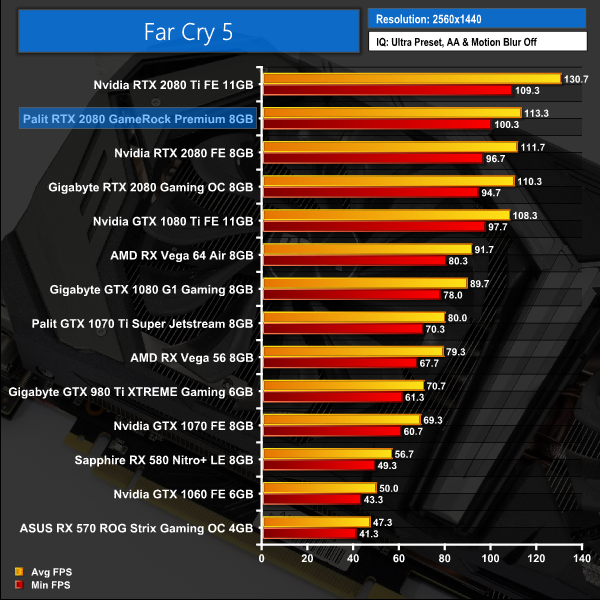
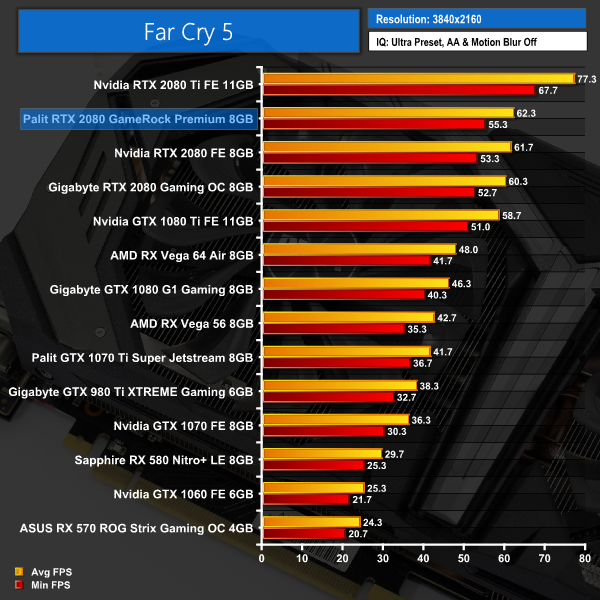
It's essentially the same margin of difference when testing Far Cry 5 – the Palit is the fastest RTX 2080 so far, but the gap between all three RTX 2080 cards is not big.Tom Clancy’s Ghost Recon Wildlands is a tactical shooter video game developed by Ubisoft Paris and published by Ubisoft. It was released worldwide on March 7, 2017, for Microsoft Windows, PlayStation 4 and Xbox One, as the tenth installment in the Tom Clancy’s Ghost Recon franchise and is the first game in the Ghost Recon series to feature an open world environment. (Wikipedia).
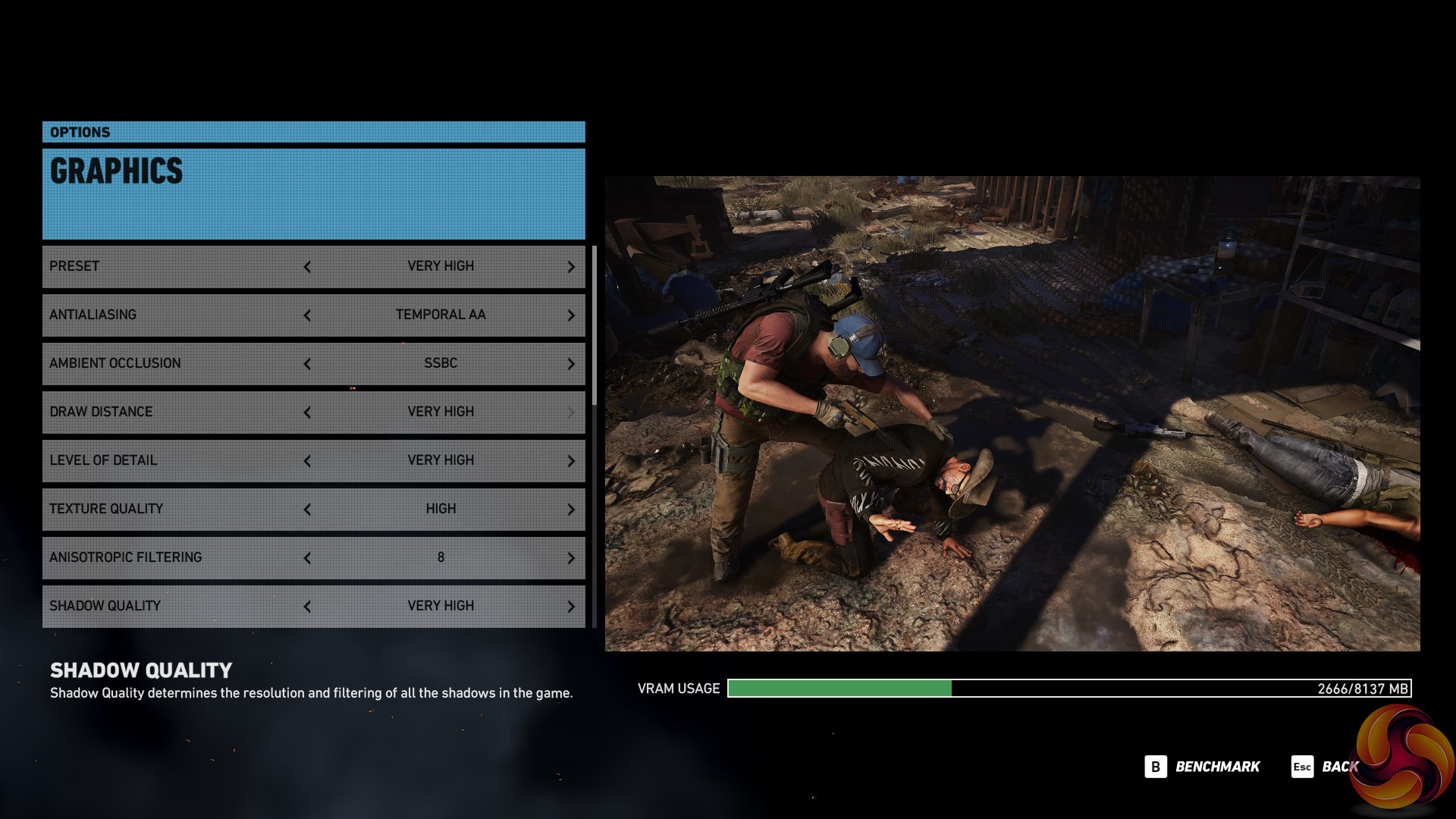
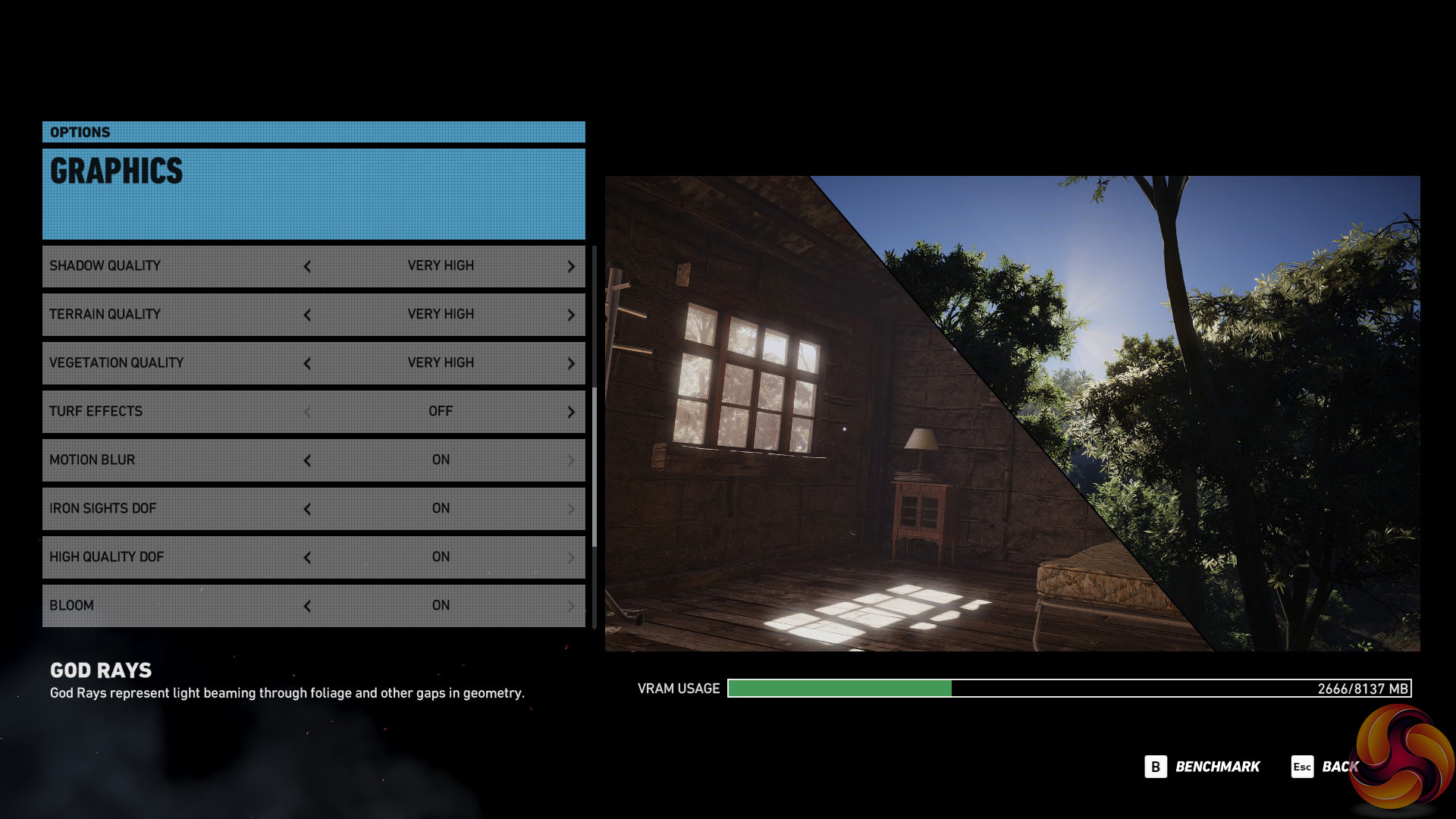
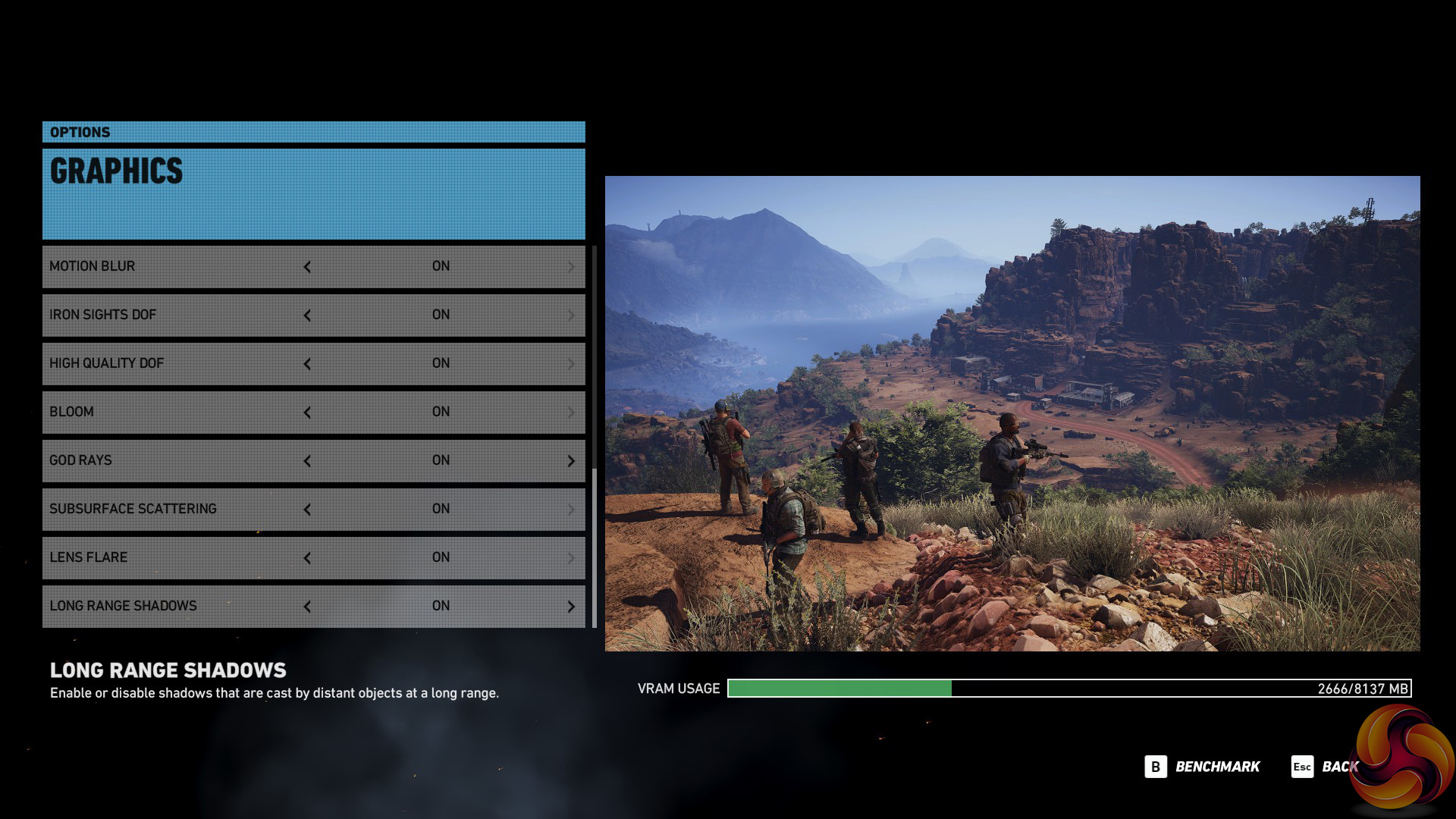
We test using the Very High preset.
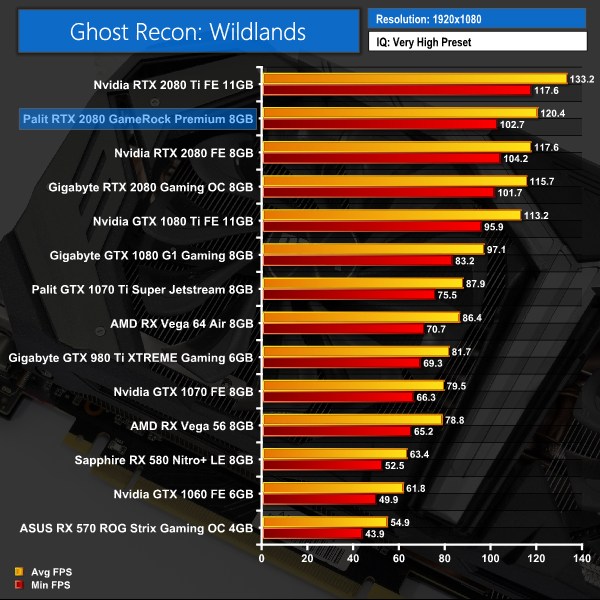
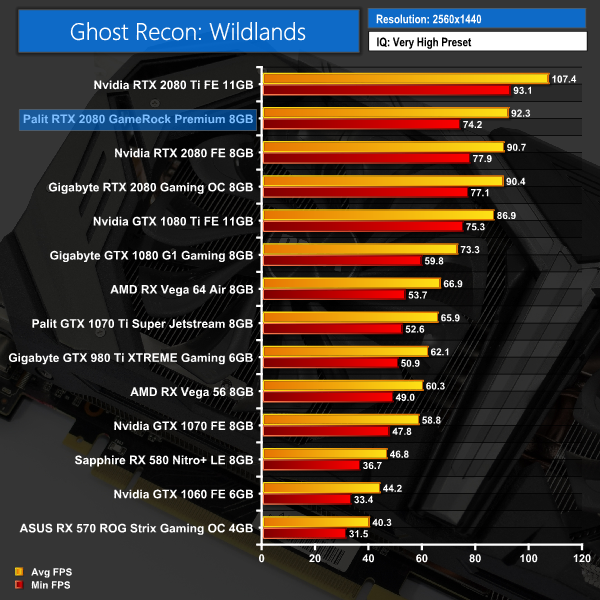
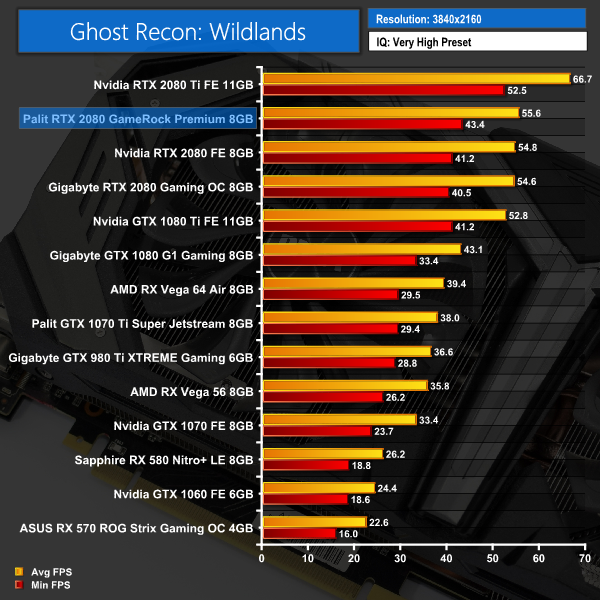
Ghost Recon Wildlands continues this trend – the Palit is 0.8 FPS faster at 4K than Nvidia's Founders Edition RTX 2080, while Gigabyte's RTX 2080 is only 0.2FPS behind that.Middle-earth: Shadow of War is an action role-playing video game developed by Monolith Productions and published by Warner Bros. Interactive Entertainment. It is the sequel to 2014’s Middle-earth: Shadow of Mordor, and was released worldwide for Microsoft Windows, PlayStation 4, and Xbox One on October 10, 2017. (Wikipedia).
We test using the Very High preset.

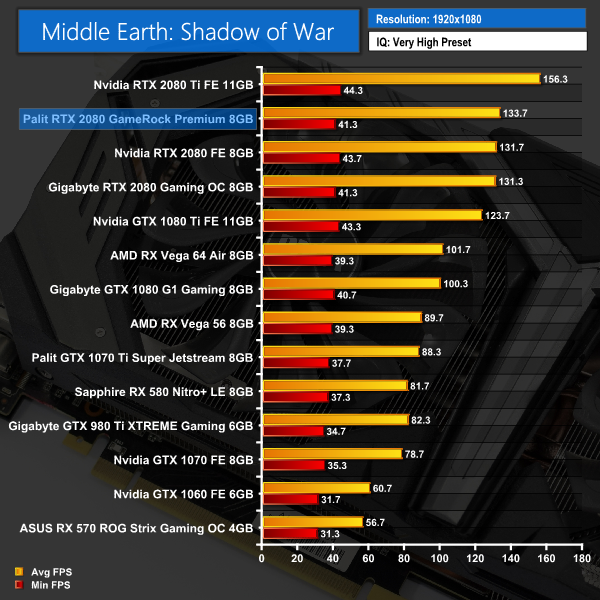
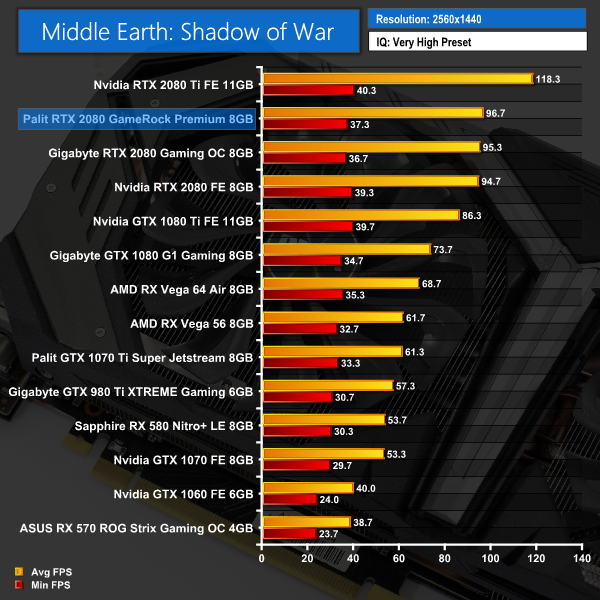
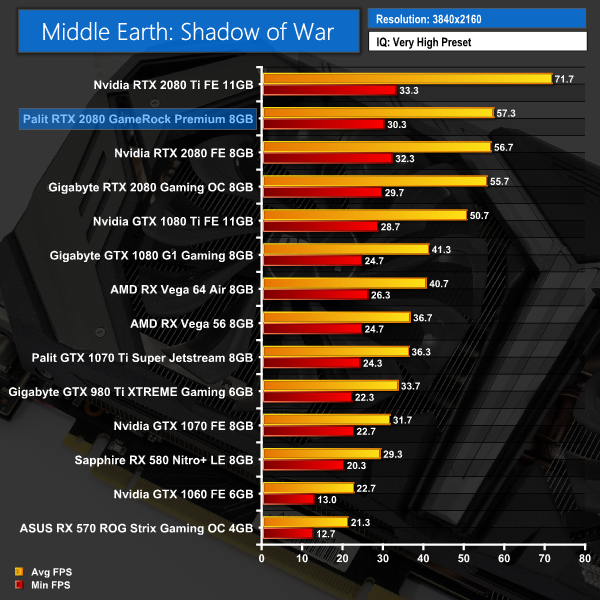
When coming to Middle Earth: Shadow of War, it's only a 0.6FPS gap between the GameRock Premium and the Nvidia Founders Edition at 4K. That's a performance increase of barely 1% in the Palit's favour.Shadow of the Tomb Raider is an action-adventure video game developed by Eidos Montréal in conjunction with Crystal Dynamics and published by Square Enix. It continues the narrative from the 2013 game Tomb Raider and its sequel Rise of the Tomb Raider, and is the twelfth mainline entry in the Tomb Raider series. The game released worldwide on 14 September 2018 for Microsoft Windows, PlayStation 4 and Xbox One. (Wikipedia).
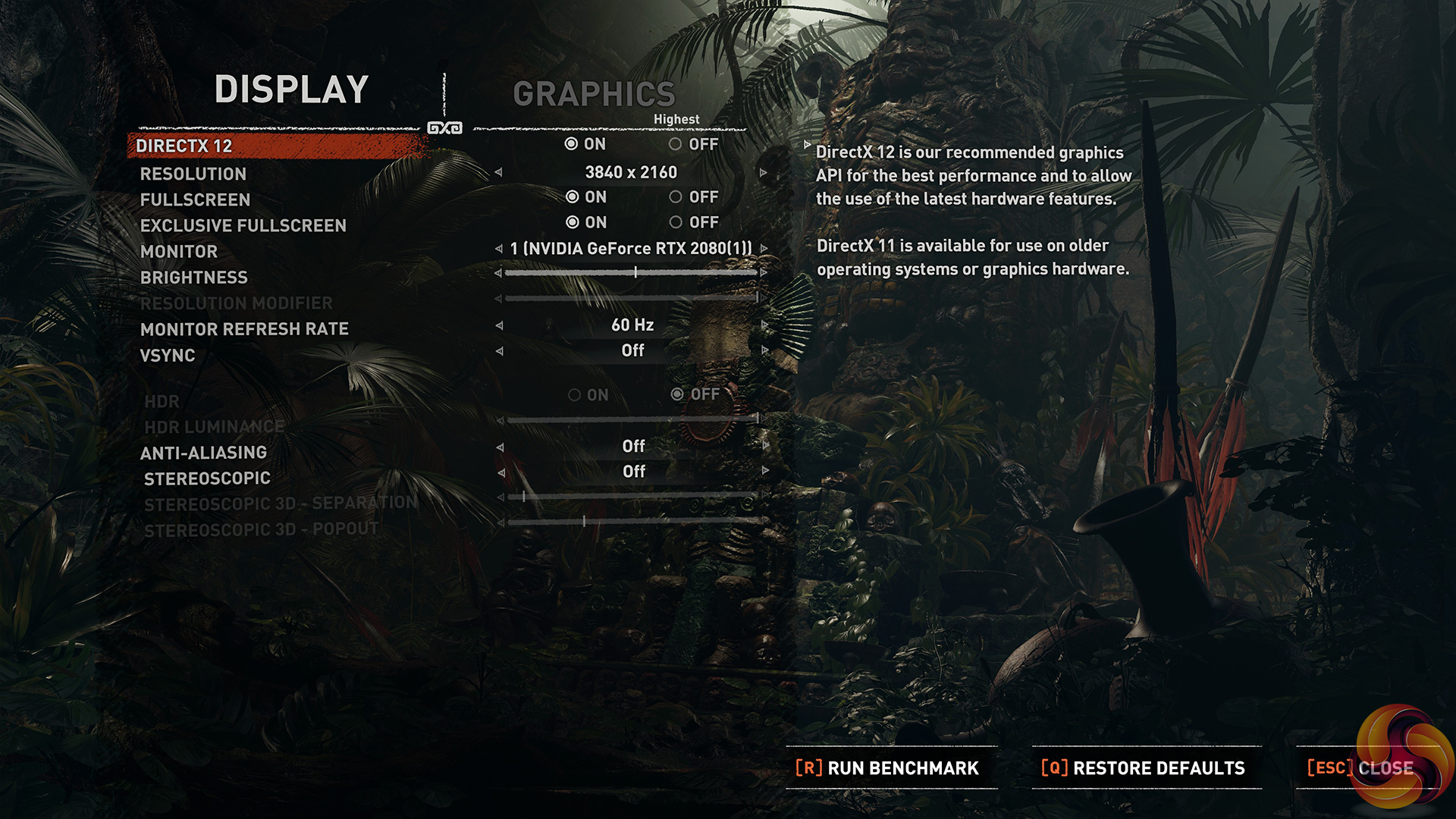
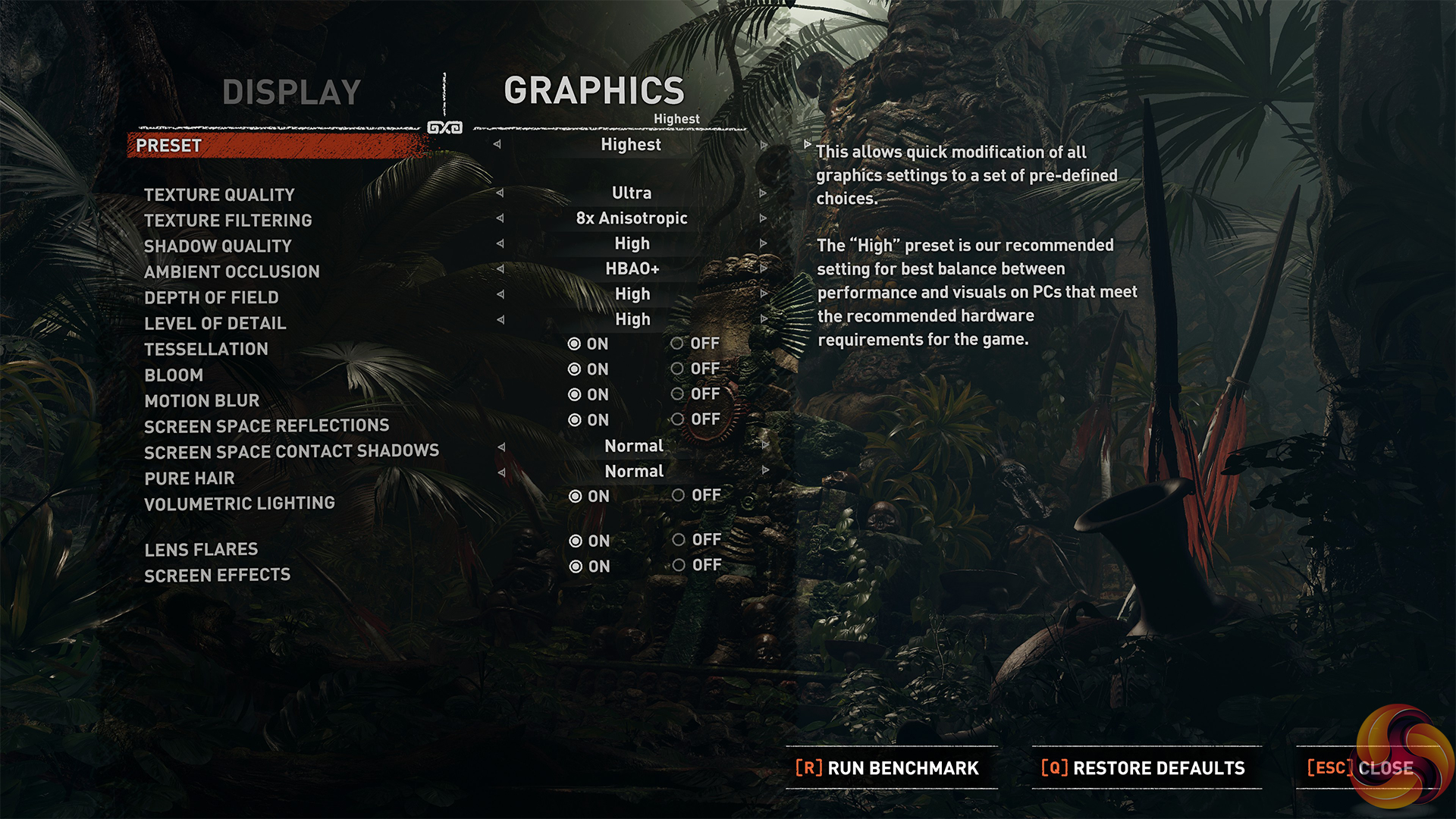
We test using the Highest preset, with AA disabled. We test using the DX12 API.
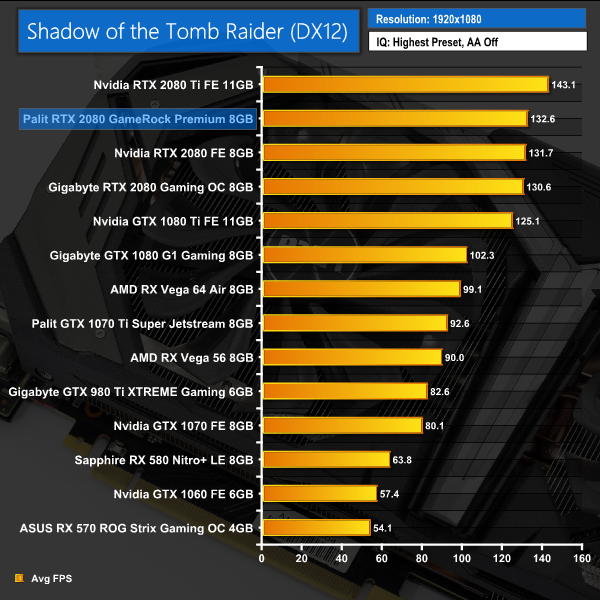
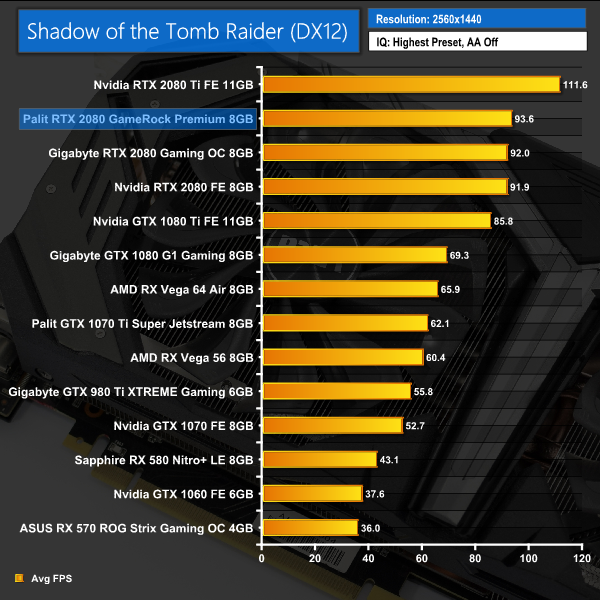
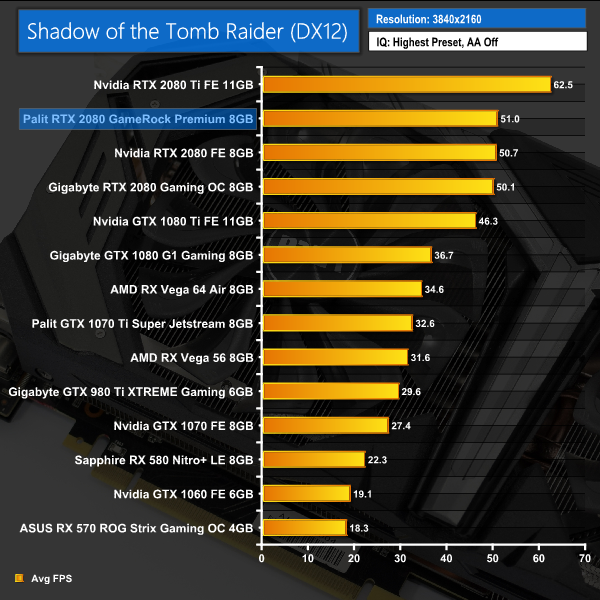
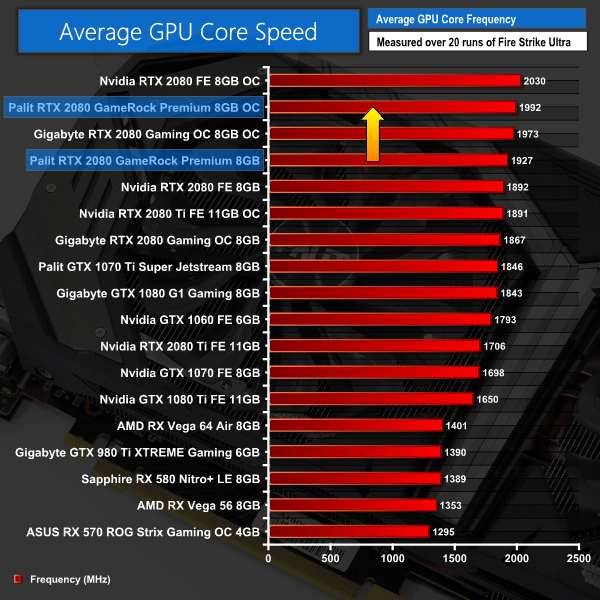
Our last game today, Shadow of the Tomb Raider has all three RTX 2080 cards within 0.9FPS of each other – the performance differences are clearly very small between these cards.Here we present the average clock speed for each graphics card while running the 3DMark Fire Strike Ultra stress test 20 times. We use GPU-Z in tandem with the Powenetics Project (see the previous page) to record the GPU core frequency during the Fire Strike Ultra runs – at the end, we are left with around 4300 data entries.
We calculate the average core frequency during the entire 20-run test to present here.
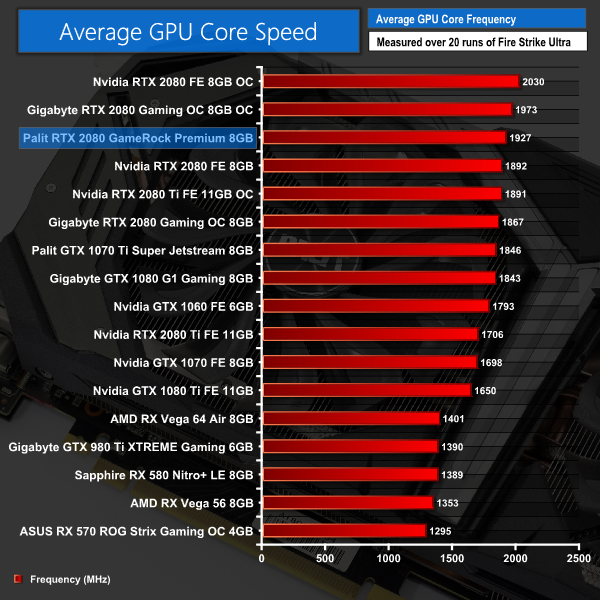
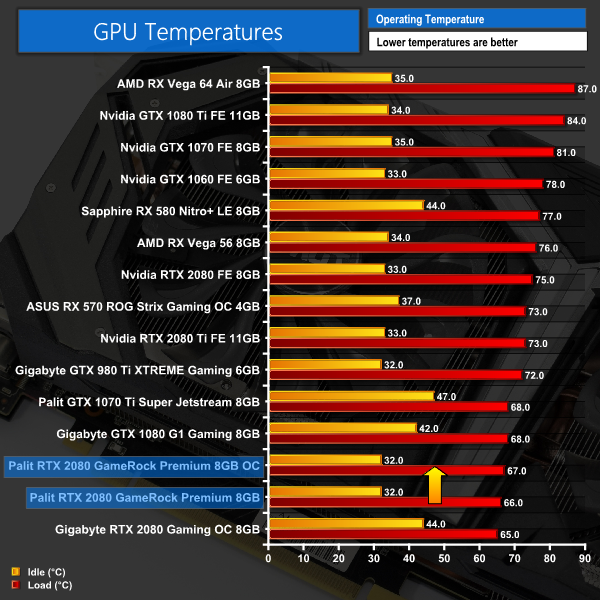
Out of the box, the Palit GameRock Premium has a rated boost clock of 1875MHz, and we saw it run at an average speed of 1927MHz during 3DMark. This puts it 35MHz ahead of the Founders Edition card, and thus explains the marginal performance increase we saw from the Palit card.For our temperature testing, we measure the peak GPU core temperature under load, as well as the GPU temperature with the card idling on the desktop. A reading under load comes from running the 3DMark Fire Strike Ultra stress test 20 times. An idle reading comes after leaving the system on the Windows desktop for 30 minutes.
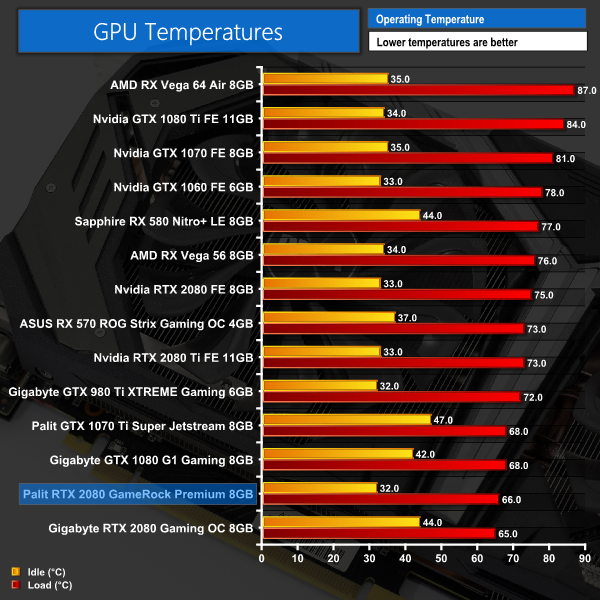
With a peak of 66C on the GPU core, this means the GameRock Premium is running just 1C hotter than the Gigabyte RTX 2080 Gaming OC. This is still a fantastic result and makes it 9C cooler than the Founders card. It is also worth bearing in mind the Palit card does have a clock speed advantage over the Gigabyte card as well – but the Palit's cooling setup can still produce excellent results.
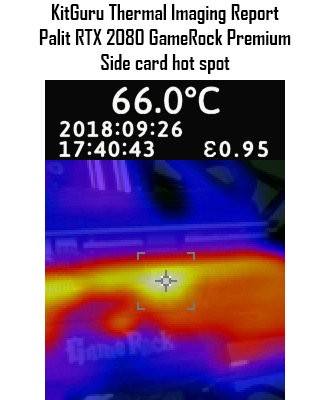
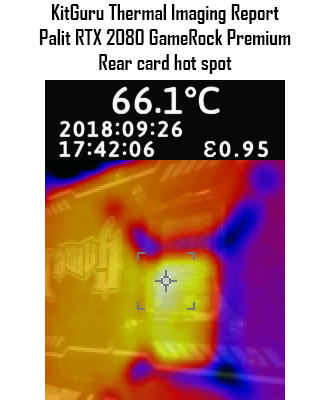
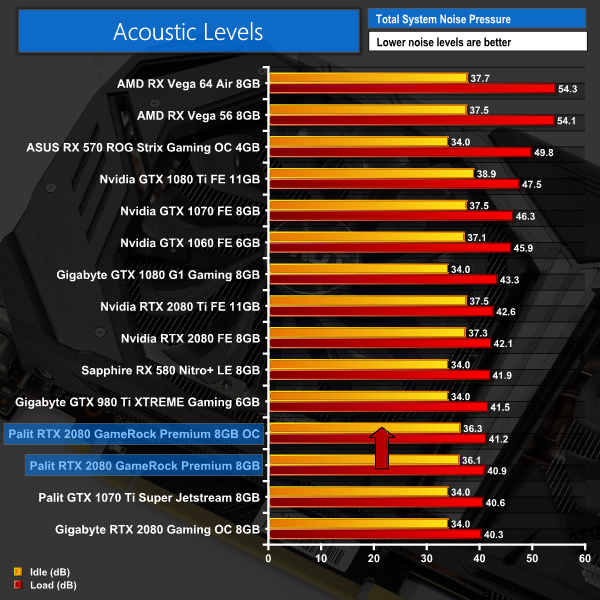
Considering the GPU core only peaked at 66C, it is no surprise to see excellent results from our thermal gun. The side of the card peaked at 66C exactly, and this was on an area of the aluminium fin array just above the GameRock logo. The rear of the card peaked at 66.1C which was unsurprisingly directly behind the GPU core. Both results are fantastic.We take our noise measurements with the sound meter positioned 1 foot from the graphics card. I measured the sound floor to be 34 dBA, thus anything above this level can be attributed to the graphics cards. The power supply is passive for the entire power output range we tested all graphics cards in, while all CPU and system fans were disabled.
A reading under load comes from running the 3DMark Fire Strike Ultra stress test 20 times. An idle reading comes after leaving the system on the Windows desktop for 30 minutes.
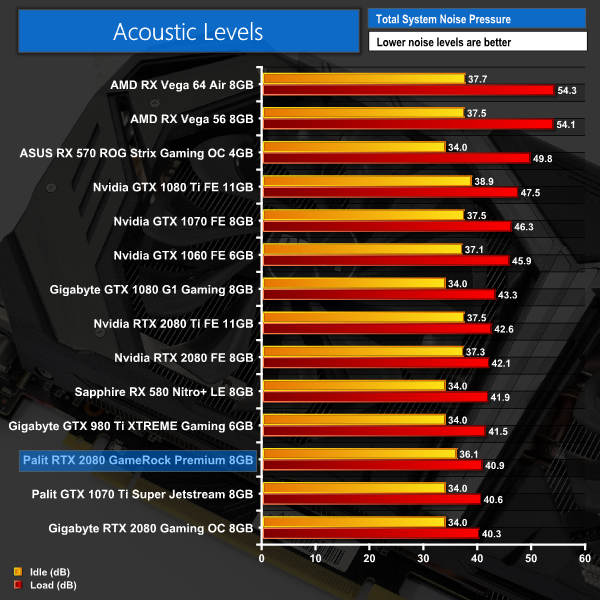
The GameRock Premium is a very quiet card, coming in just marginally louder than the Gigabyte RTX 2080 Gaming OC. In the real world, you would be hard pressed to tell the two apart – both are fantastically quiet.
Interestingly, the fans didn't stop spinning on our card, with the fan speed not dropping below 800RPM with the system idling. This resulted in the card emitting a very slight noise when not under load, when other cards would turn the fans off completely. This was surprising for us, given the the GameRock Premium makes a feature of its ‘0dB mode' on Palit's website.
It turns out that the 0dB mode is only enabled when you are using the card's secondary BIOS – the one that drops the clock speed back to reference levels (1710MHz boost). Using the card with the OC BIOS enabled, with the 1875MHz boost clock, means the fans won't spin slower than 35% (800rpm) speed regardless of the load on the GPU.
Personally I think Palit has missed a trick here – it seems they are just trying to be overly careful that the card doesn't overheat given the factory overclock, but when idling the GPU core will drop its frequency anyway – they could very easily get away with the 0dB mode enabled for the OC BIOS as well.We have recently revamped our GPU power consumption testing. Previously we would measure the total system power draw with each graphics card installed. Given that the rest of the components did not change, this gave us an idea of the relative power consumption of each graphics card, but we could not be more specific than that.
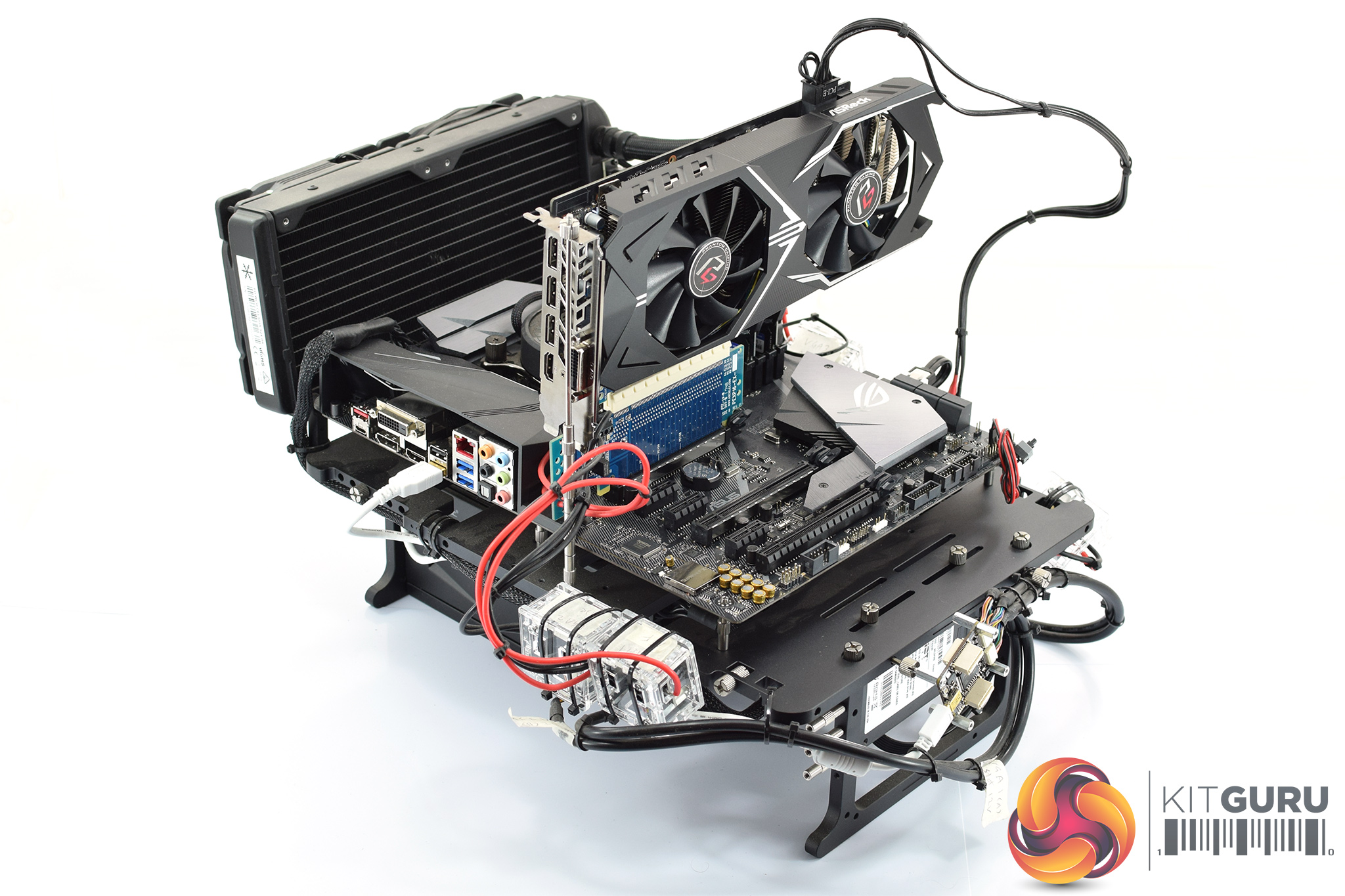
Now, however, thanks to Cybenetics Labs and its Powenetics Project, we are able to measure the power consumption of the graphics card alone, giving much more precise and accurate data. Essentially, this works by installing sensors in the PCIe power cables, as well as the PCIe slot itself thanks to a special riser card. This data is recorded using specialist software provided by Cybenetics Labs and given it polls multiple times a second (between 6 and 8 times a second, based on my observations) we can track the power consumption in incredible detail over any given amount of time.
You can read more about the Powenetics Project over HERE.
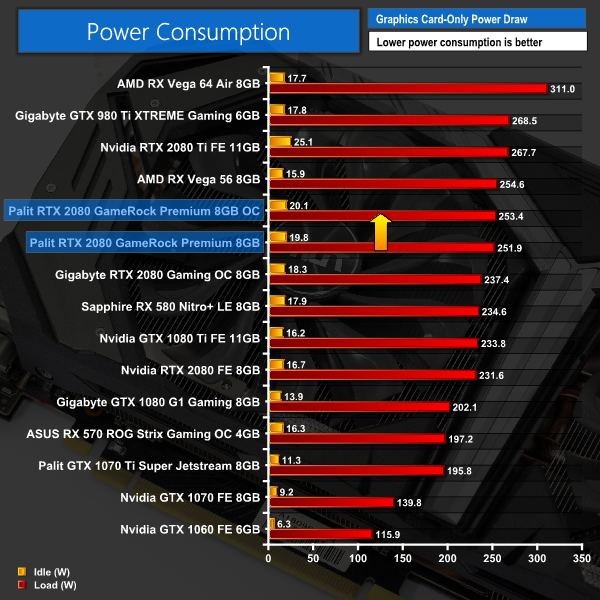
As with previous testing, a reading under load comes from running the 3DMark Fire Strike Ultra stress test 20 times. An idle reading comes after leaving the system on the Windows desktop for 30 minutes. This stress test (20 runs) produces approximately 4300 data entries in the Powenetics software, which we can then export to an Excel file and analyse further. Here we present the average continuous power consumption of each graphics card across the entire 20 run test.
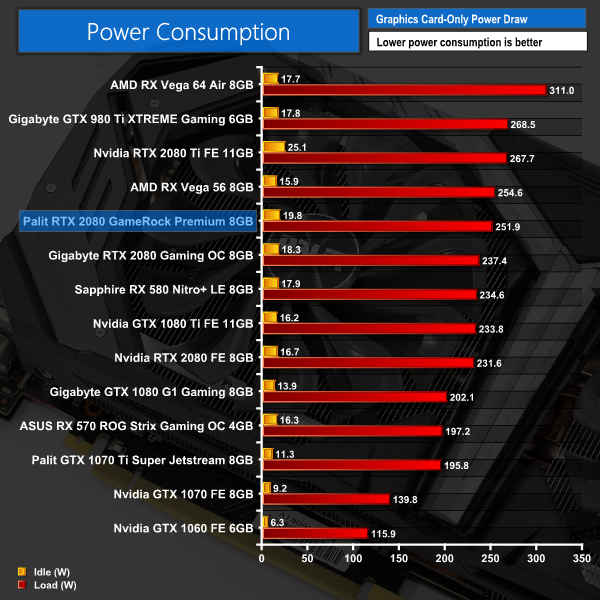
Not surprisingly given its clock speed advantage, the GameRock Premium pulls more power than the Gigabyte RTX 2080 Gaming OC – but an extra 15W or so is going to make very little difference in the real world.
On a side note, you may also have noticed that our Founders Edition card has lower power consumption than before – our initial testing saw it draw 274W in 3DMark, but Nvidia believed this to be a faulty card and replaced it. The new card draws 231W which is much more in line with what we'd expect from a reference RTX 2080.
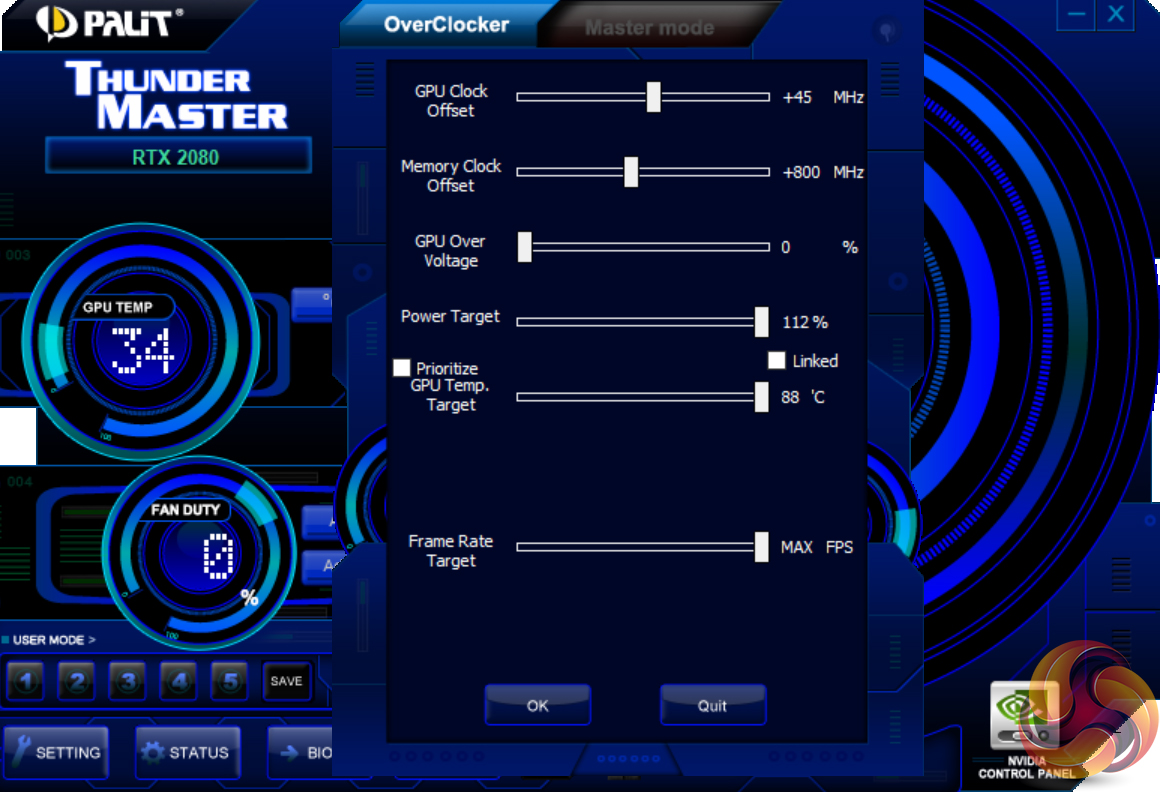
When overclocking the GameRock Premium, we used Thunder Master – Palit's GPU overclocking utility. We maximised the power limit and temperature target sliders before adding +45MHz to the GPU core and +800MHz to the memory.
Obviously +45MHz to the GPU core is not much, but bear in mind the card is already 75MHz faster than the Founders Edition, so manual overclocking headroom is limited. You can think of it as +120MHz faster than Founders.
3DMark and Games Testing
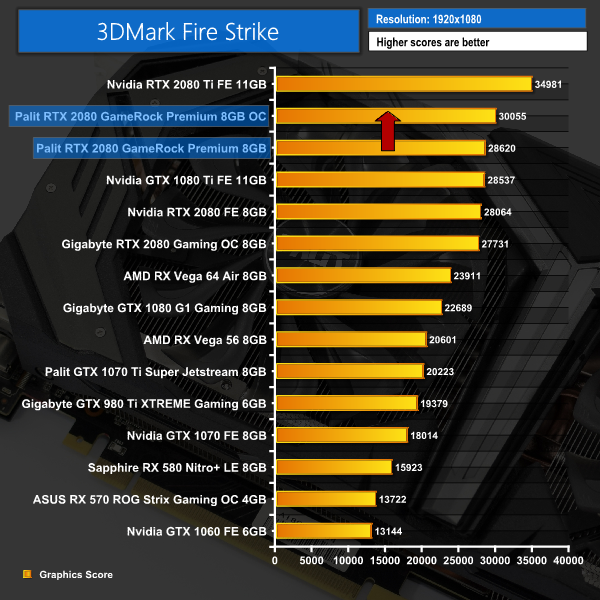

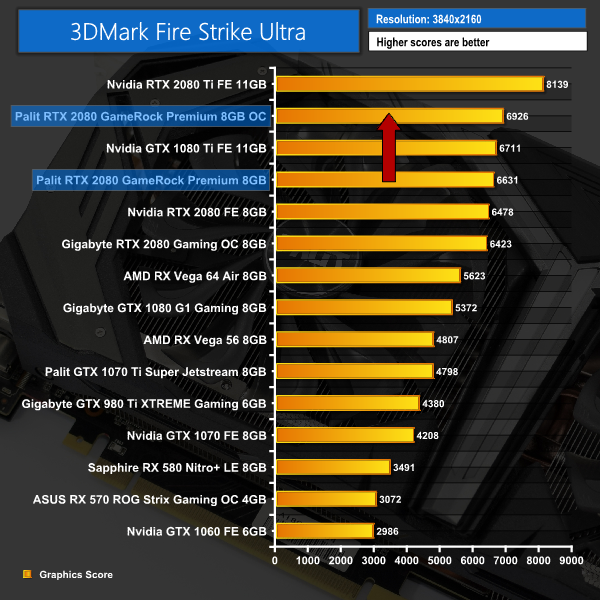
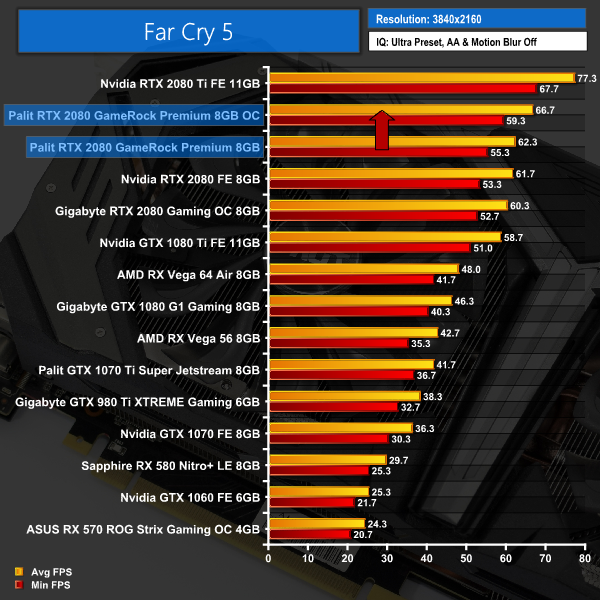
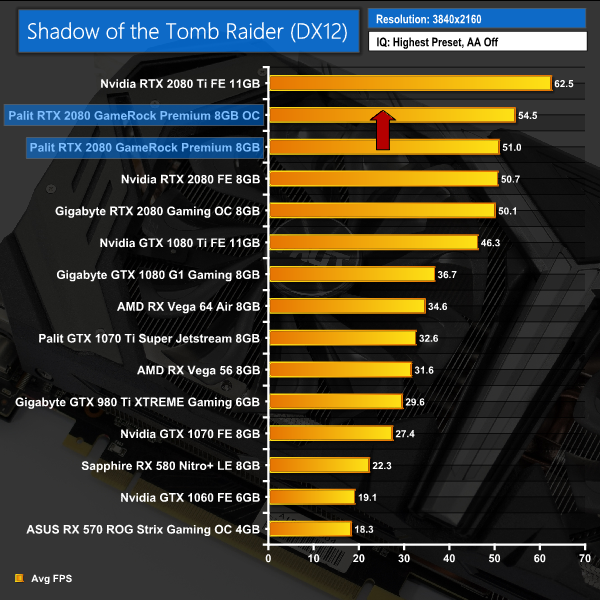
That overclock netted us an extra 5% graphics score in Fire Strike, while we saw frame rates rise between 3-4FPS when playing Far Cry 5 and Shadow of the Tomb Raider at 4K.Here, we take a further look at the impact of our overclock, looking at the increased temperatures, acoustics, power draw, and lastly, the effect had on the average clock speed.
Temperatures
Acoustics
Power consumption
Average clock speed under load
Overview
Starting off with power levels, noise and temperatures – these all rise, but by hardly anything. The GameRock Premium deals with the extra speed very well, with noise levels rising just 0.3dB while power consumption rose by barely 2W. A peak temperature of 67C is again a minor change compared to stock.
In terms of clock speed, the Palit averaged a frequency of 1992MHz – 65MHz faster than its stock speed. This is still slower than what our Founders card hit when overclocked, but it is a better result than the Gigabyte RTX 2080 Gaming OC.With a number of aftermarket RTX 2080 cards now available, today we have assessed the Palit RTX 2080 GameRock Premium.
This is a big card – measuring almost 30cm in length, while it is essentially a triple-slot card as well. Usually we don't comment too much on the overall aesthetics of a graphics card as this is quite subjective – but we do have to say, the backplate design of the GameRock Premium is likely to prove divisive thanks to the large GameRock logo.
Still, the cooler is very effective as we saw the card peak at just 66C – 1C hotter than the Gigabyte RTX 2080 Gaming OC we reviewed recently. The Palit does run faster out of the box, though, by around 60MHz, so that is worth bearing in mind.
It's also a fabulously quiet card – again, it is not quite as quiet as the Gigabyte card, but in the real world, it is very unlikely you would be able to hear the difference, as it comes down to just 0.6dB.
As we mentioned, it does run faster than both the Founders and Gigabyte RTX 2080 cards out of the box, thanks to the daring 1875MHz rated boost clock. In practice, we saw the card's average frequency hit 1927MHz when running Fire Strike Ultra. This does edge the GameRock Premium ahead of the other two RTX 2080 cards – it is faster, but as you can see from the charts, this only translated into an extra 0.8FPS at best when gaming at 4K.
The aggressive factory overclock also eats into manual overclocking headroom, and we could only add +45MHz to the GPU core before encountering hard crashes when running 3DMark, though the memory was able to run +800MHz faster. This overclock saw the GPU core hit 2055MHz before eventually settling down and averaging at 1992MHz. Impressively, the card barely ran any hotter or louder at this frequency, so a manual overclock is well worth it if you do pick up a GameRock Premium.
In terms of pricing, the GameRock Premium will set you back £830. This is £80 more than the Founders Edition, so you do have to ask yourself whether or not the quieter operation and low temperatures are worth that much to you. We've said it before, but Nvidia's excellent Founders card – at what looks to be one of the lower price we'll see for an RTX 2080 – does make things hard for Nvidia's partners.
We can still recommend the Palit RTX 2080 GameRock Premium – it gets a lot right and benefits from its aggressive factory overclock. At the end of the day, however, performance is pretty much the same as the Founders Edition, while the Founders card also offers better bang-for-buck.
Palit told us the GameRock Premium will retail for £830 here in the UK, with availability from the middle of October. We will update this page with a buy link when we have one.
Pros
- Cool and quiet.
- Aggressive factory overclock.
- Hardly got any hotter or louder when overclocked to almost 2GHz.
Cons
- £80 more than the Founders Edition for marginal FPS gains.
- Backplate design is polarising.
- No 0dB mode when using the OC BIOS.
KitGuru says: It is cool, quiet and ships with a hefty factory overclock. For £80 more than Nvidia's Founders Edition, though, it could prove a tough sell.