 KitGuru KitGuru.net – Tech News | Hardware News | Hardware Reviews | IOS | Mobile | Gaming | Graphics Cards


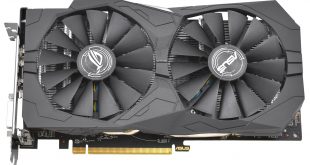
AMD is looking to keep the ball rolling with new GPU releases until the new Vega architecture arrives later this year. One of the methods AMD is doing this by is refreshing its existing GPU range to stay competitive, both the RX 470 and RX 480 are being refreshed to produce the RX 570 and RX 580.
This refresh is nothing AMD hasn't tried before, it executed a similar strategy when it refreshed the R9 290 and 290X GPUs in 2015 to release the R9 390 and 390X. RX 570, the focus of this review, is based upon the RX 470 from the current RX 400 series. At a fundamental level this is still the same graphics processing unit as before, 14nm and based on the Polaris architecture, but with a few tweaks to improve the end product.
These tweaks concern two key areas, standard clock speeds and power consumption. In terms of clock speeds the default clock speed for the RX 570 is now higher with a peak clock speed of 1244MHz compared to 1206MHz and a considerably higher base clock, 1168MHz versus 926MHz. The end result is that on average a stock RX 570 will always be operating at a higher frequency than an equivalent RX 470, though this comes at the expense of an increased TDP which rises from 120- to 150-watts.
The default memory frequency is also now higher, to the tune of 100 MHz actual, 400MHz effective, but the standard memory configuration of 4GB of memory remains unchanged. AMD may still allow board partners to offer 8GB versions of the RX 570, like it did with the RX 470, but for the capability of the RX 570 GPU anything above 4GB is likely excessive.
The second area of change, power consumption, is where AMD has altered power management techniques to increase power efficiency under a number of scenarios including multi-monitor, multimedia playback and system idle.
AMD has been able to achieve this by adding a third intermediate memory state to reduce power consumption, which sits alongside two existing memory states. To over-simplify, the current Polaris GPU effectively has two memory states, low and high, and most GPU activities (including having a second display) alter the memory state from low to high, increasing power consumption in the process. The new third intermediate memory stage now means the refined Polaris GPU has low, medium and high. In many cases a load activity can increase it to medium, before high, thus resulting in lower overall power draw.
AMD is using the RX 500 series launch as a platform to introduce a new feature it's calling Radeon Chill, which effectively reduces the frame-rate when the user is in-game but idle or AFK (away from keyboard) and then increases the frame-rate again when the user becomes active. It also caps “excessively high” frame rates to further reduce power consumption, though how this will be implemented is not clearly specified.
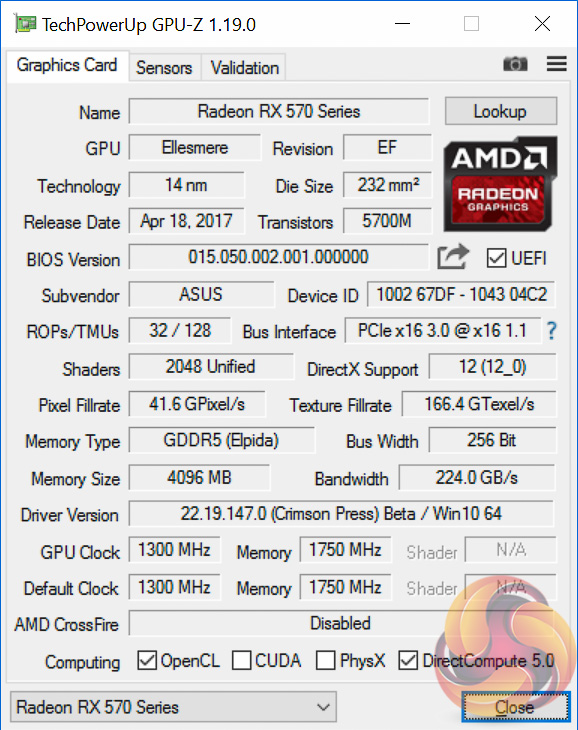
Our RX 570 review sample for today is the ASUS RX 570 Strix Gaming OC 4GB graphics card. This is factory overclocked 56MHz above AMD's stock settings for the RX 570 GPU while the GDDR5 memory remains unchanged at 1750 (7000) MHz. At a specification level the ASUS RX 570 Strix Gaming OC 4GB is virtually identical to the ASUS RX 470 Strix Gaming OC 4GB (see our review of that here) except with an extra 50MHz on the core clock and 100 (400) MHz on the memory.
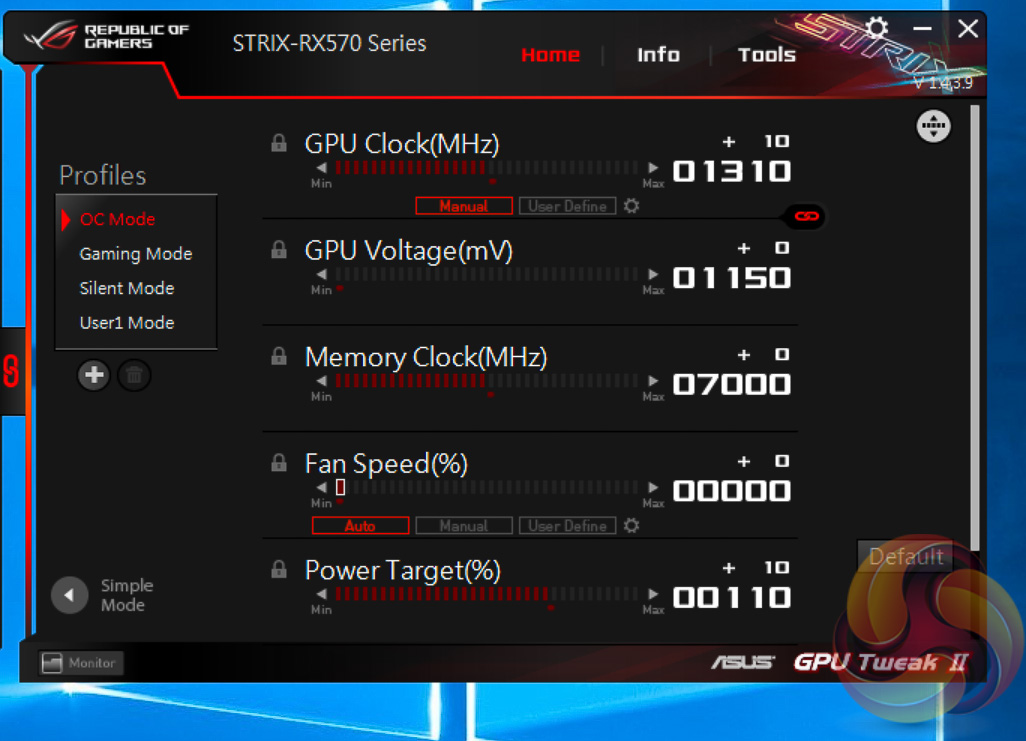
Like its RX 470 predecessor the ASUS RX 570 can toggle an OC Mode if the user installs the ASUS GPU Tweak software. In the case of the RX 470 it bumped the core clock from 1250 to 1270MHz, with the RX 570 it increases it from 1300 to 1310MHz and increases the power target from 100 to 110%. A minor change but an easy one for buyers who lack the confidence to overclock themselves.
| GPU | AMD RX 480 | AMD RX 580 | AMD RX 470 | AMD RX 570 | AMD R9 390 |
Nvidia GTX 1050 Ti | Nvidia GTX 1060 |
| Streaming Multiprocessors / Compute Units |
36 | 36 | 32 | 32 | 40 | 6 | 10 |
| GPU Cores | 2304 | 2304 | 2048 | 2048 | 2560 | 768 | 1280 |
| Texture Units | 144 | 144 | 128 | 128 | 160 | 48 | 80 |
| ROPs | 32 | 32 | 32 | 32 | 64 | 32 | 48 |
| Base Clock | 1120 MHz | 1257 MHz | 926 MHz | 1168 MHz | Up to 1000MHz | 1290 MHz | 1506 MHz |
| GPU Boost Clock | 1266 MHz | 1340 MHz | 1206 MHz | 1244 MHz | Up to 1000MHz | 1392 MHz | 1708 MHz |
| Total Video memory | 4096 or 8192 MB | 4096 or 8192 MB | 4096 or 8192 MB | 4096 MB | 8192 MB | 4096 MB | 6144 MB |
| Memory Clock (Effective) |
1750 (7000) or 2000 (8000) MHz | 2000 (8000) MHz | 1650 (6600) MHz | 1750 (7000) MHz | 1500 (6000) MHz | 1752 (7008) MHz | 2002 (8008) MHz |
| Memory Bandwidth | 224 or 256 GB/s | 256 GB/s | 211 GB/s | 224 GB/s | 384 GB/s | 112 GB/s | 192 GB/s |
| Bus Width | 256-bit | 256-bit | 256-bit | 256-bit | 512-bit | 128-bit | 192-bit |
| Manufacturing Process | 14nm | 14nm | 14nm | 14nm | 28nm | 16nm | 16nm |
| TDP | 150 W | 185 W | 120 W | 150 W | 275 W | 75W | 120 W |
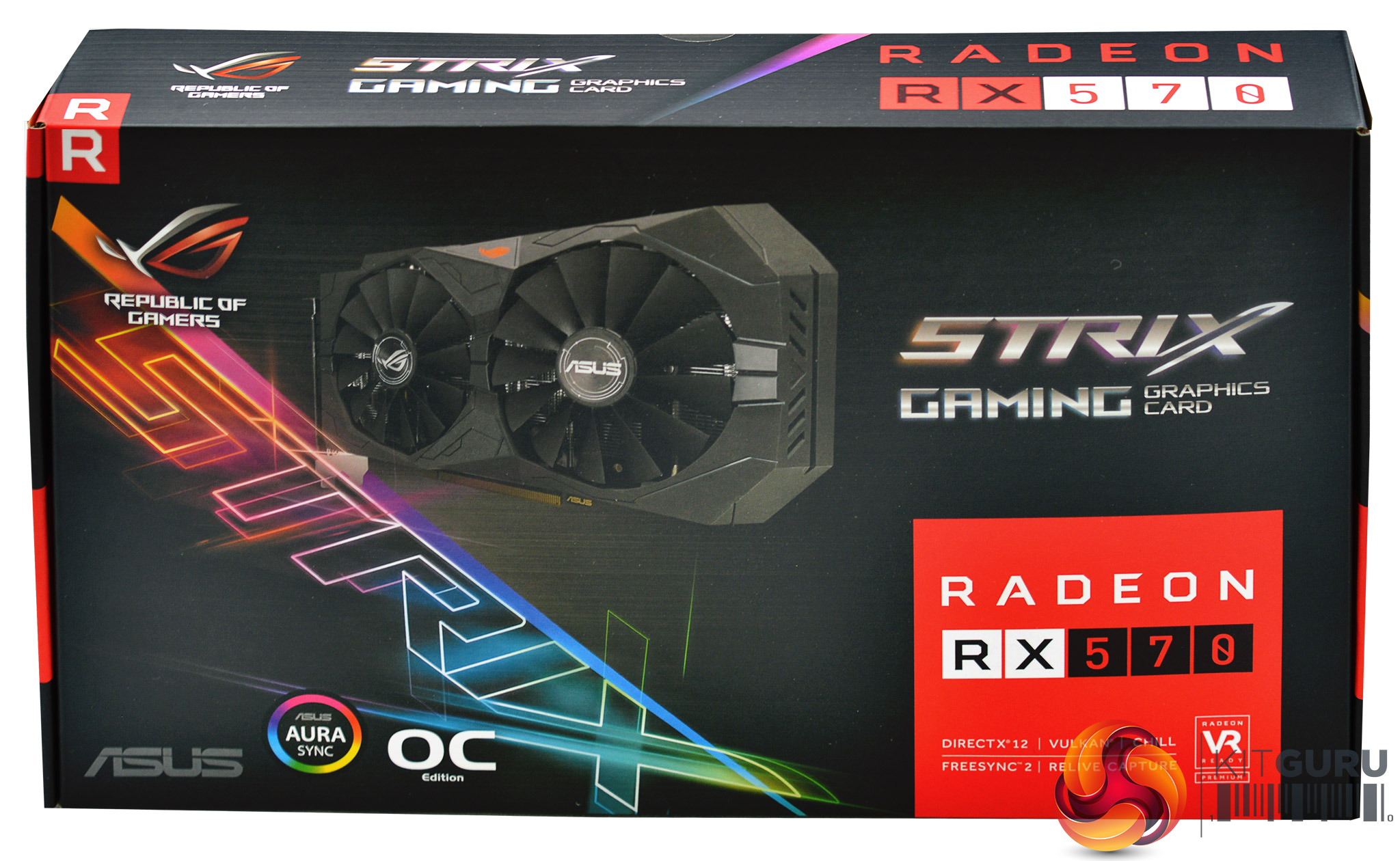
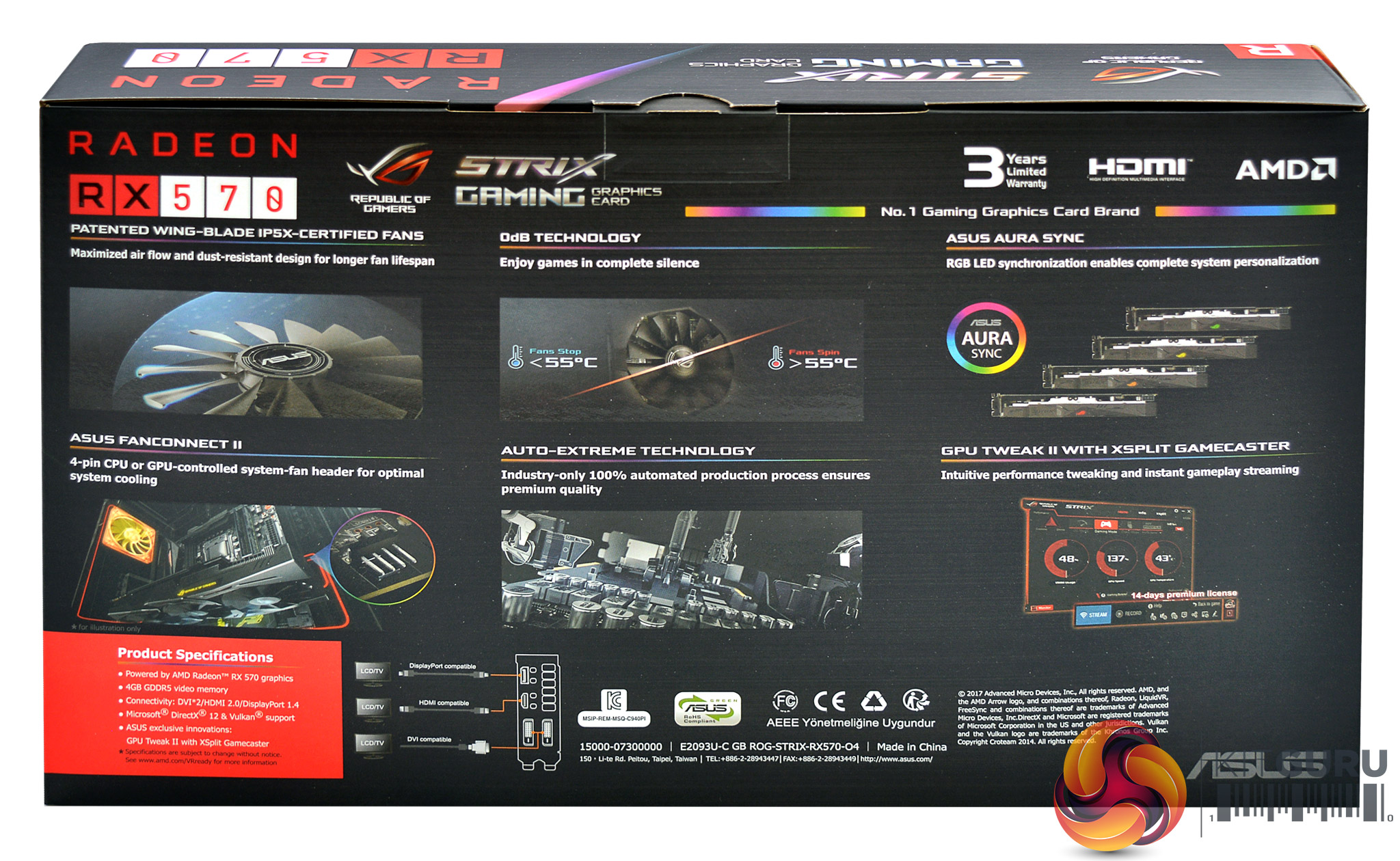
The ASUS RX 570 Strix Gaming OC comes well-presented, the packaging is to-the-point and highlights the key features effectively. These are the AURA RGB lighting, a semi-passive fan mode, a 3 year warranty, ASUS FanConnect II and Auto Extreme.
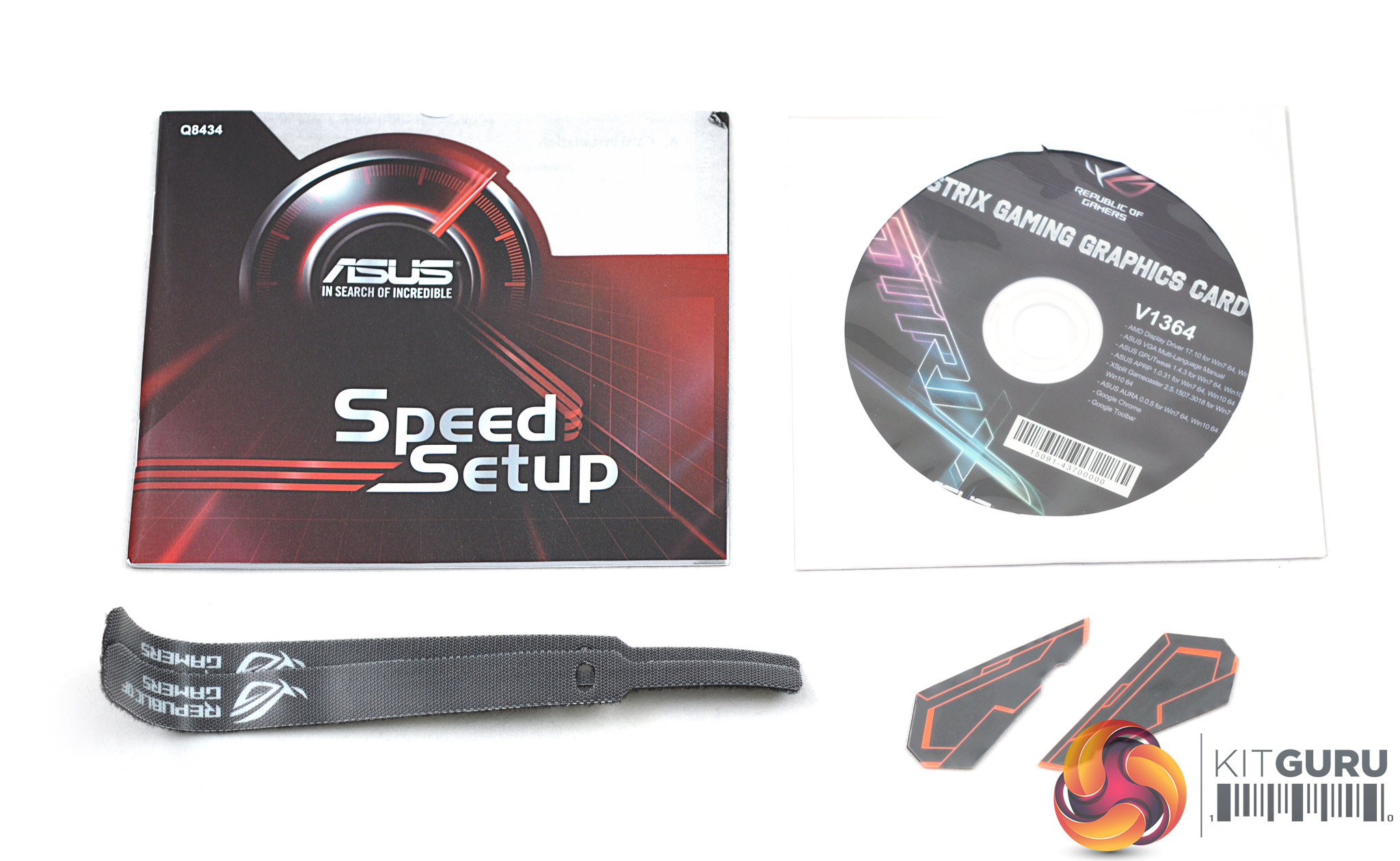
The accessory bundle is limited to a driver CD, speed setup guide, a couple of cable ties and two red stickers that can be affixed to the plastic shroud for additional style.
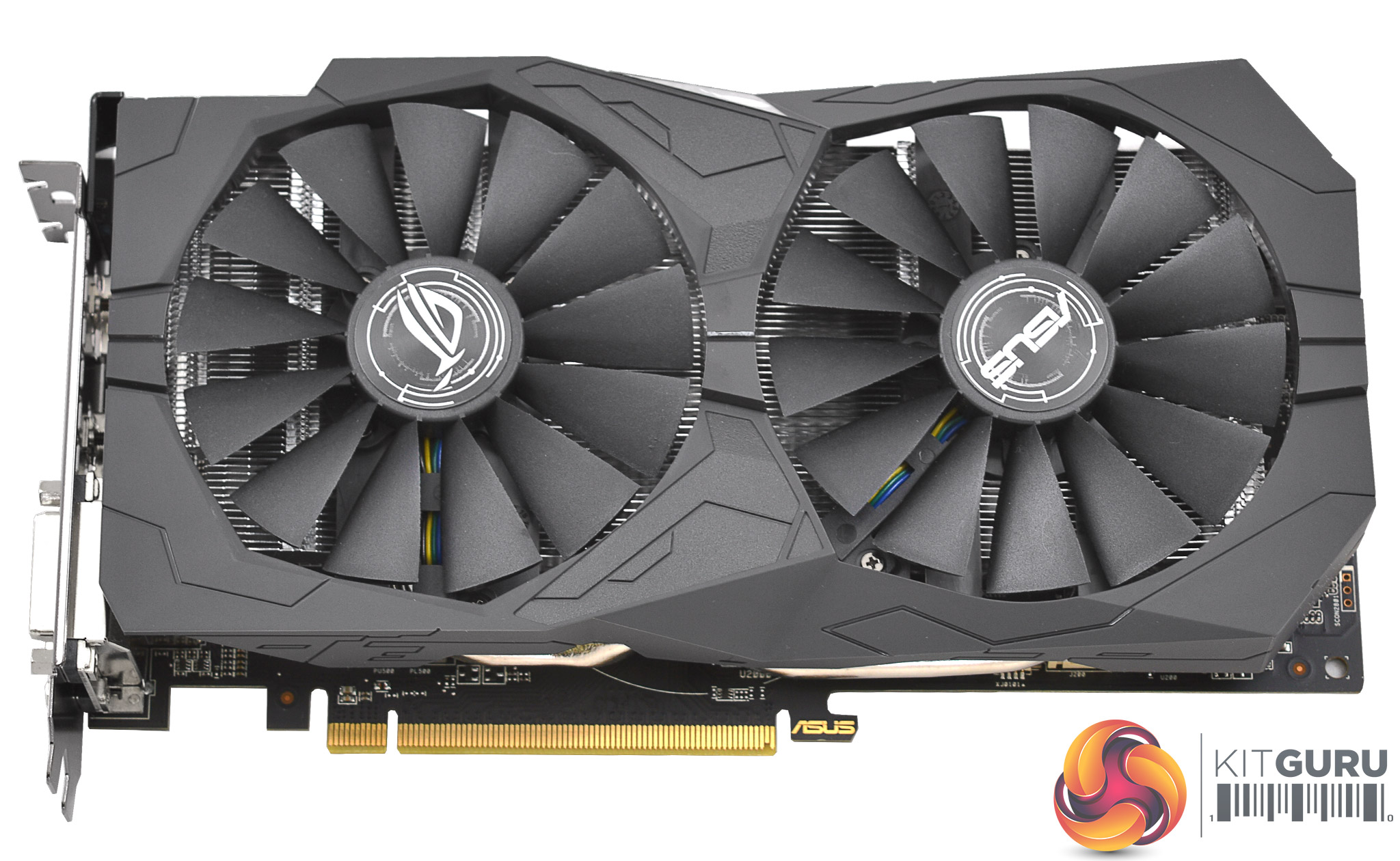
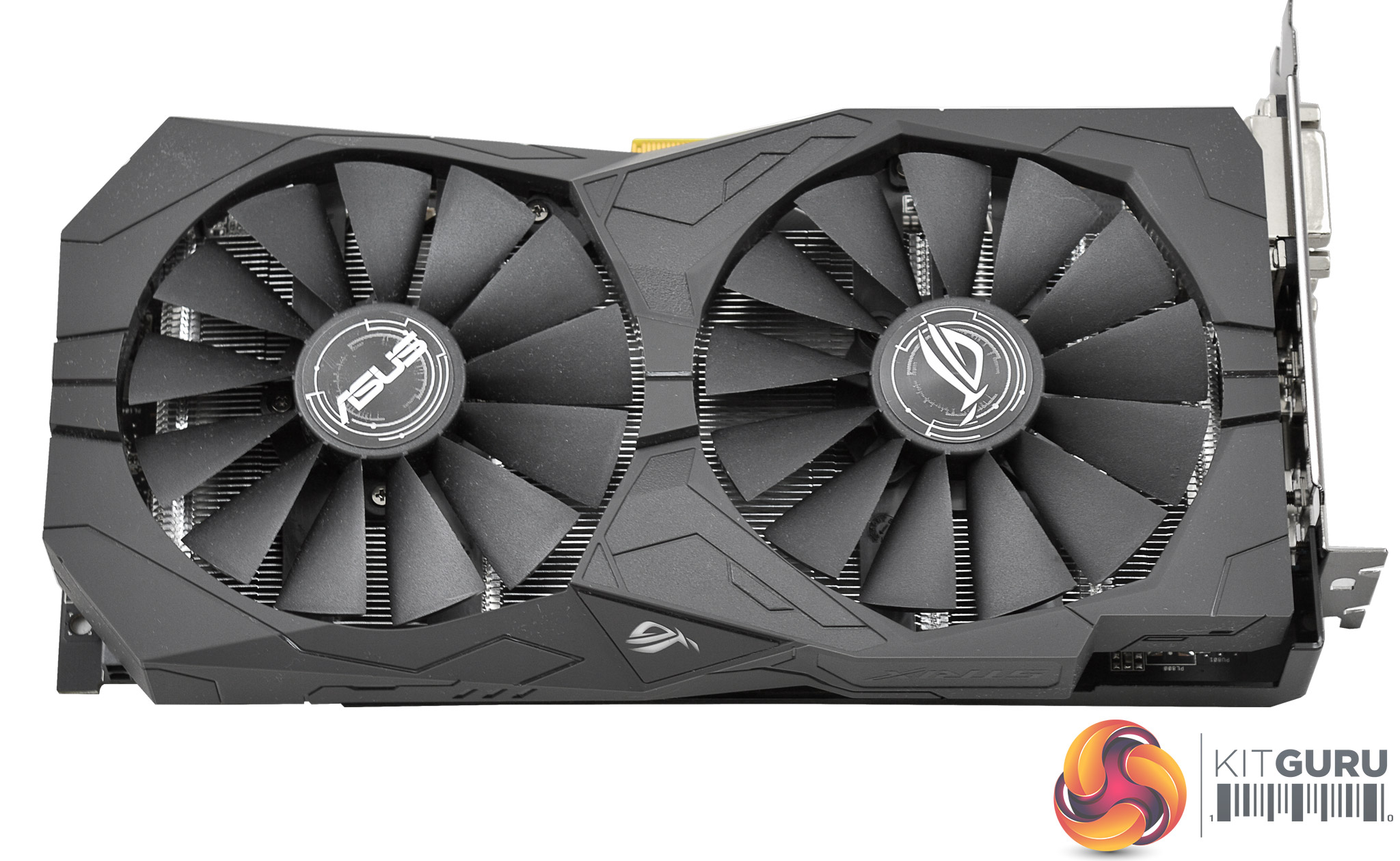
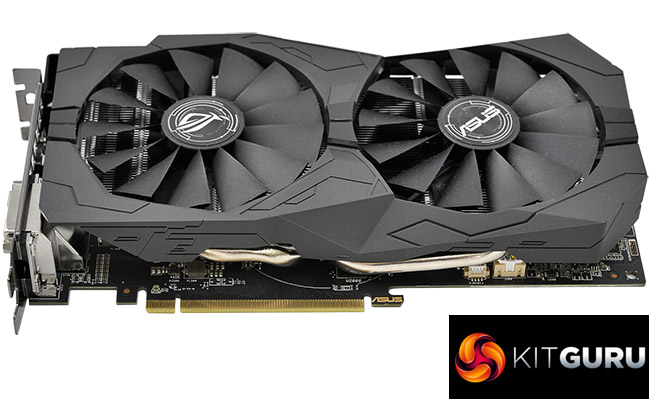
The ASUS RX 570 uses an all-black design with two 100mm 12-spoke fans, the outer shroud is made from plastic. The card measures in at approximately 25cm in length and 14cm in height (including the rear I/O), it keeps to a dual slot form factor.
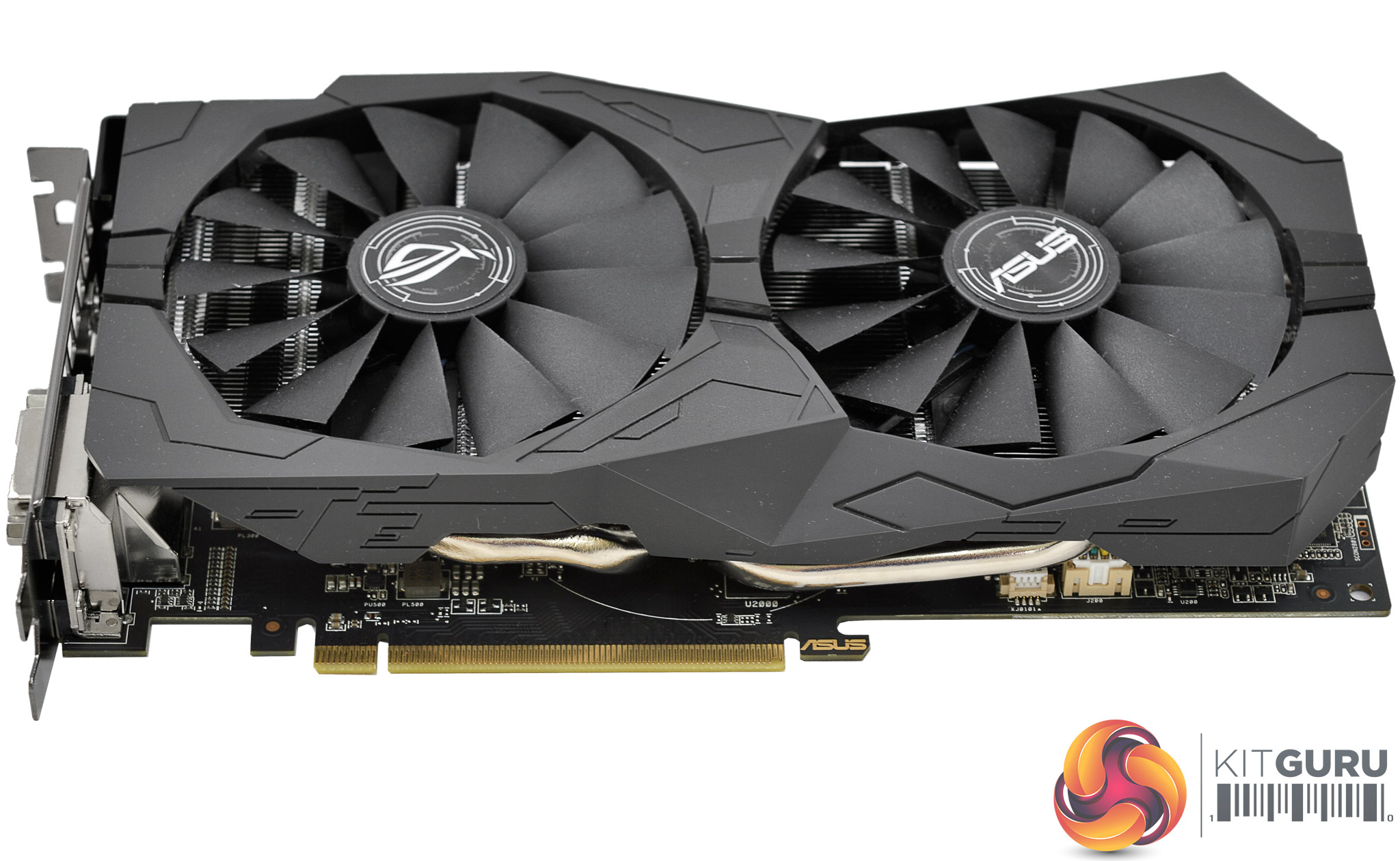
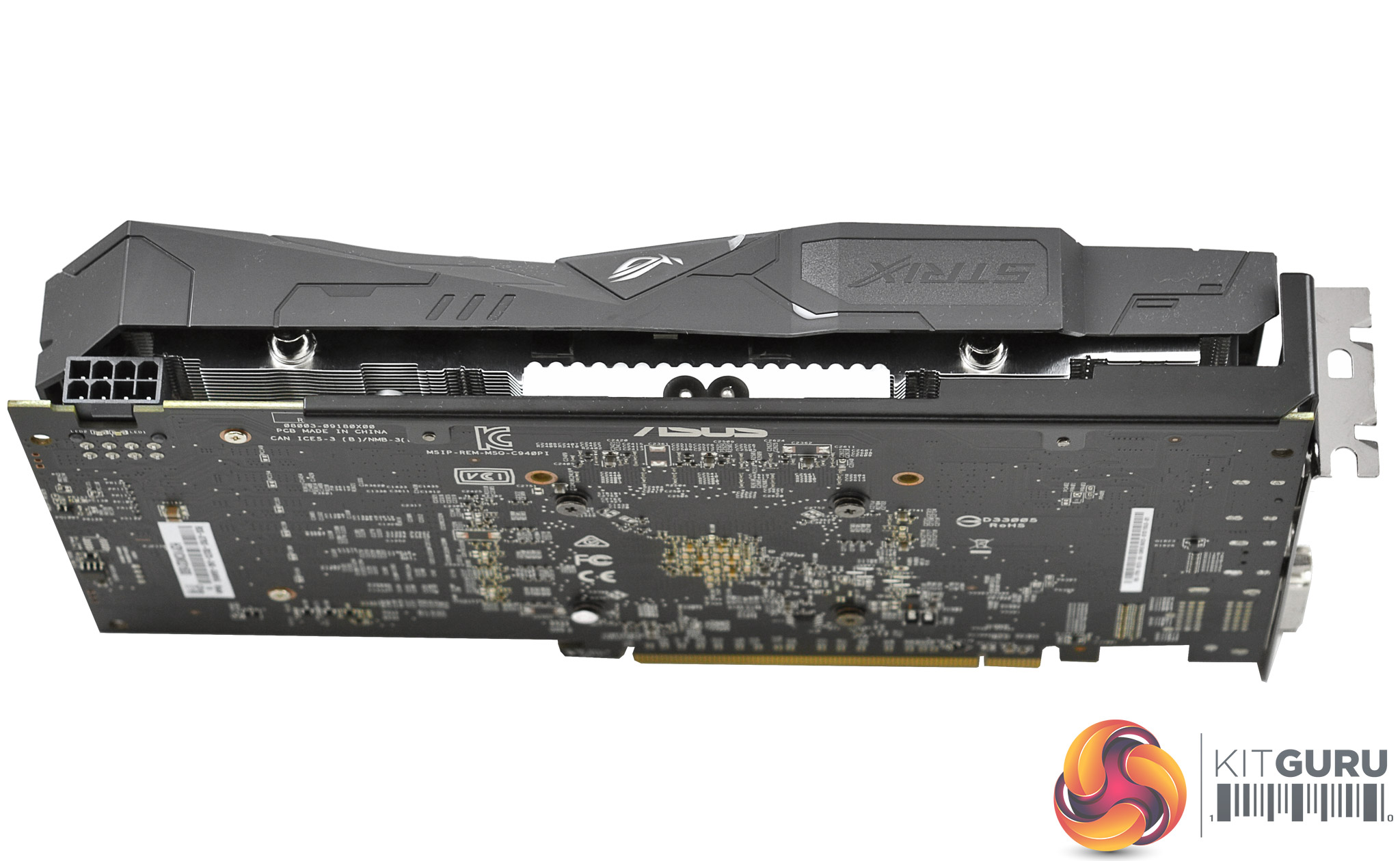
The cooling solution uses two 8mm nickel-plated copper heat pipes with a direct contact copper base for the GPU die. There is no backplate on the rear of the card which is disappointing as many of this product's rivals are offering backplates.
The PCB layout and component choice for this graphics card is identical to its predecessor, the ASUS RX 470 Strix Gaming OC, you can read a disassembly and closer inspection of that card here.
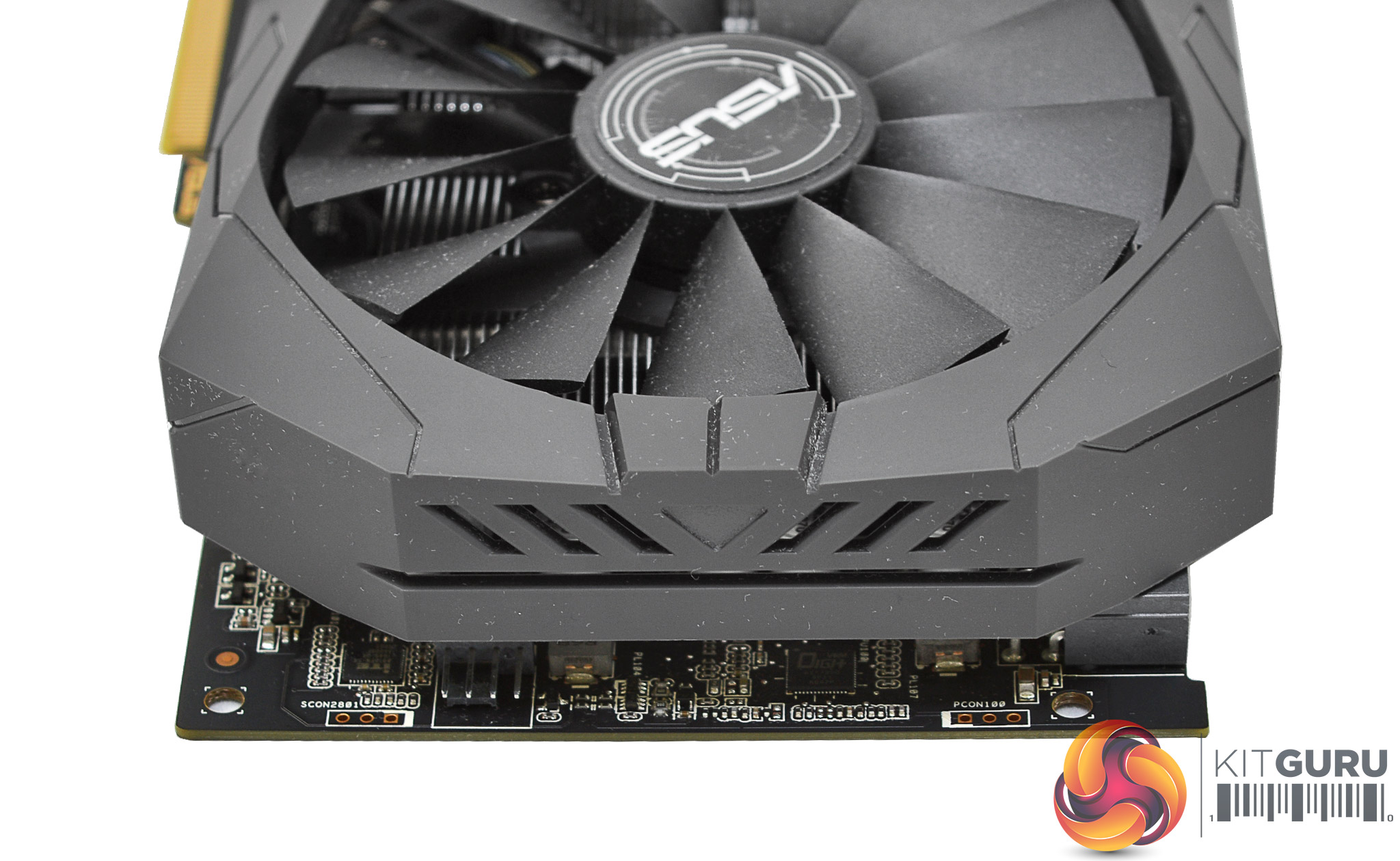
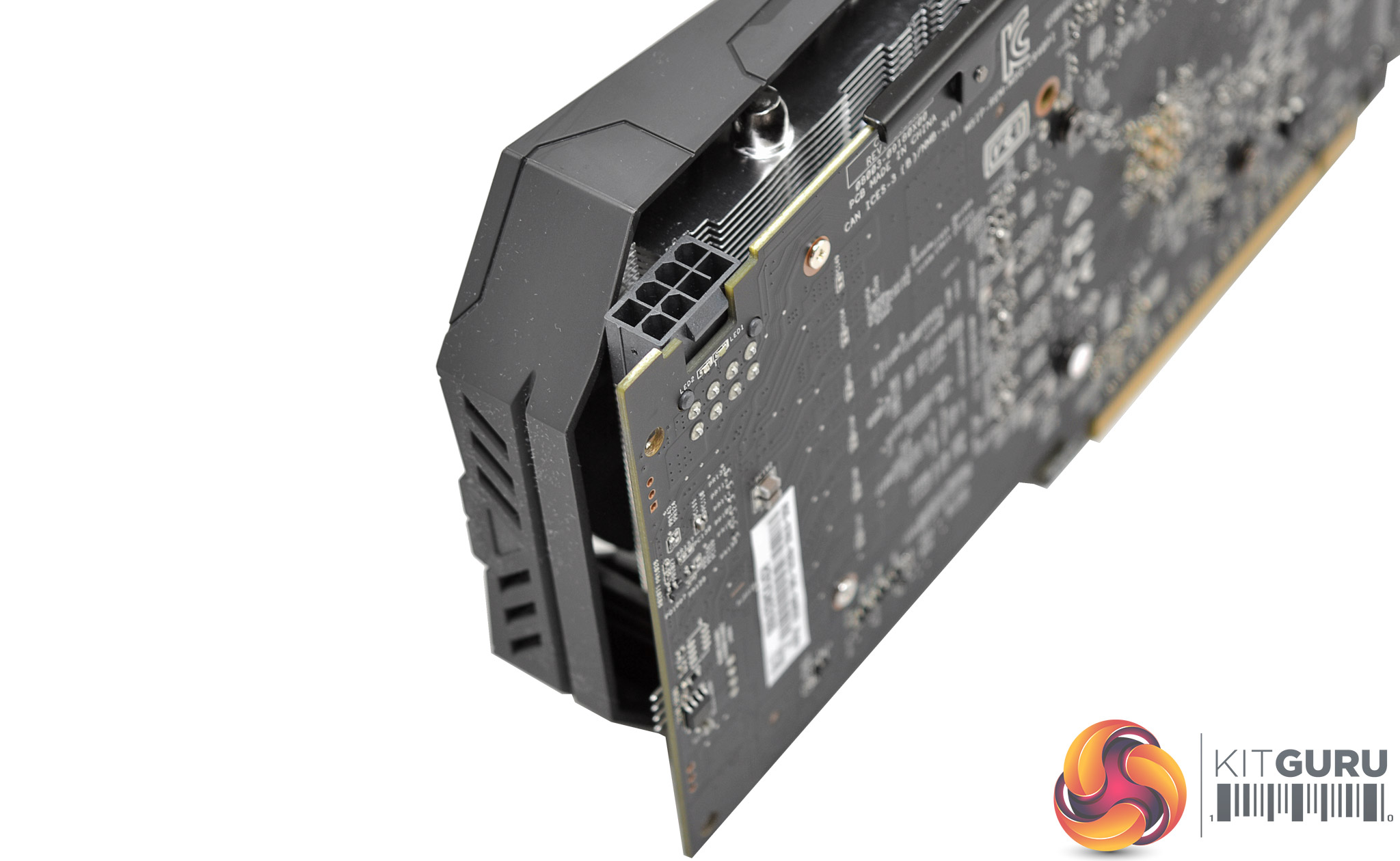
The power requirements for this card are a single 8 pin that has handy LED which remains red until a PCIe cable is inserted, at which point it turns white.
At the end of the card is a single 4 pin fan connector ASUS is calling FanConnect II. The premise is that a system fan can run on the same GPU temperature curve as the GPU fans. This could be, for example, the rear exhaust fan so that it exhausts more hot air from the case as the GPU heats up.
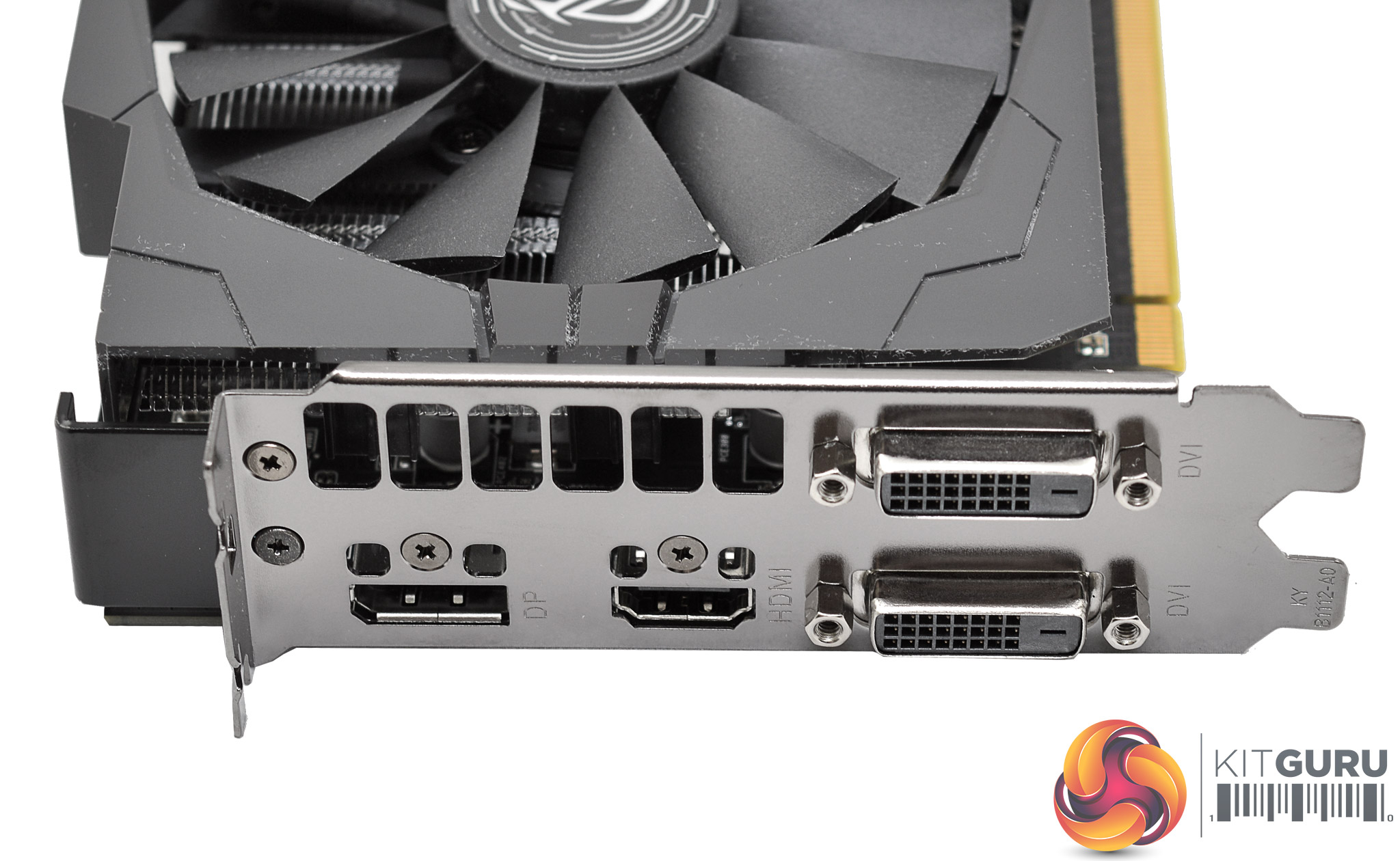
The rear I/O comprises of dual DVI, a single DisplayPort 1.2 and HDMI 2.0b.
Our GPU test system has been built with the intention of benchmarking a variety of graphics cards from mid-range to high-end. Each GPU is tested in a number of 3D applications and games at 1080p, 1440p and 2160p (“4K”) resolutions using Very High or Ultra detail presets.
Test System Components
- Case: Corsair 400Q (two stock case fans replaced with Noctua 120mm rear exhaust and 140mm front intake, speeds UEFI-limited)
- Processor: Intel Core i7-6700K (Stock Intel Turbo behaviour).
- Memory: 16GB (2x8GB) G.Skill Trident Z XMP (3200MHz 16-18-18-38 @ 1.35V).
- Graphics Card: Variable.
- System Drive: Samsung 850 EVO 512GB SSD
- CPU Cooler: Corsair H100i v2 (pump at 12 volts, fan speed UEFI-limited to reduce noise).
- Power Supply: Seasonic Platinum 760W.
- Operating System: Windows 10 Pro 64-bit.
General Test System Notes
- AMD Graphics cards were benchmarked with the AMD (Crimson ReLive Edition) 17.4.2 drivers (17.10.1711 Beta 5) except the RX 570 and RX 580 GPUs which were benchmarked with a special press release driver (17.10.1030 Beta 8).
- Nvidia Graphics cards were benchmarked with the Nvidia (GeForce Game Ready) 381.65 driver.
- To tune the test system appropriately for acoustic measurements the case was stripped of its original fans and fitted with ultra quiet Noctua fans.
- The CPU cooler, the Corsair H100i v2, was set to a fixed low fan speed to further reduce the base noise level while the pump was left to operate at full speed since it produces no significant noise output.
- The CPU was left to default Intel Turbo behaviour, disabling ASUS enhancements such as all-core Turbo to minimise heat output inside the case and non-GPU related power consumption. The CPU voltage was also negatively offset (read: reduced) by a measure of -0.15 to further reduce non-GPU related heat and power consumption and keep CPU temperatures down to accommodate for the ultra silent CPU and System fan profiles.
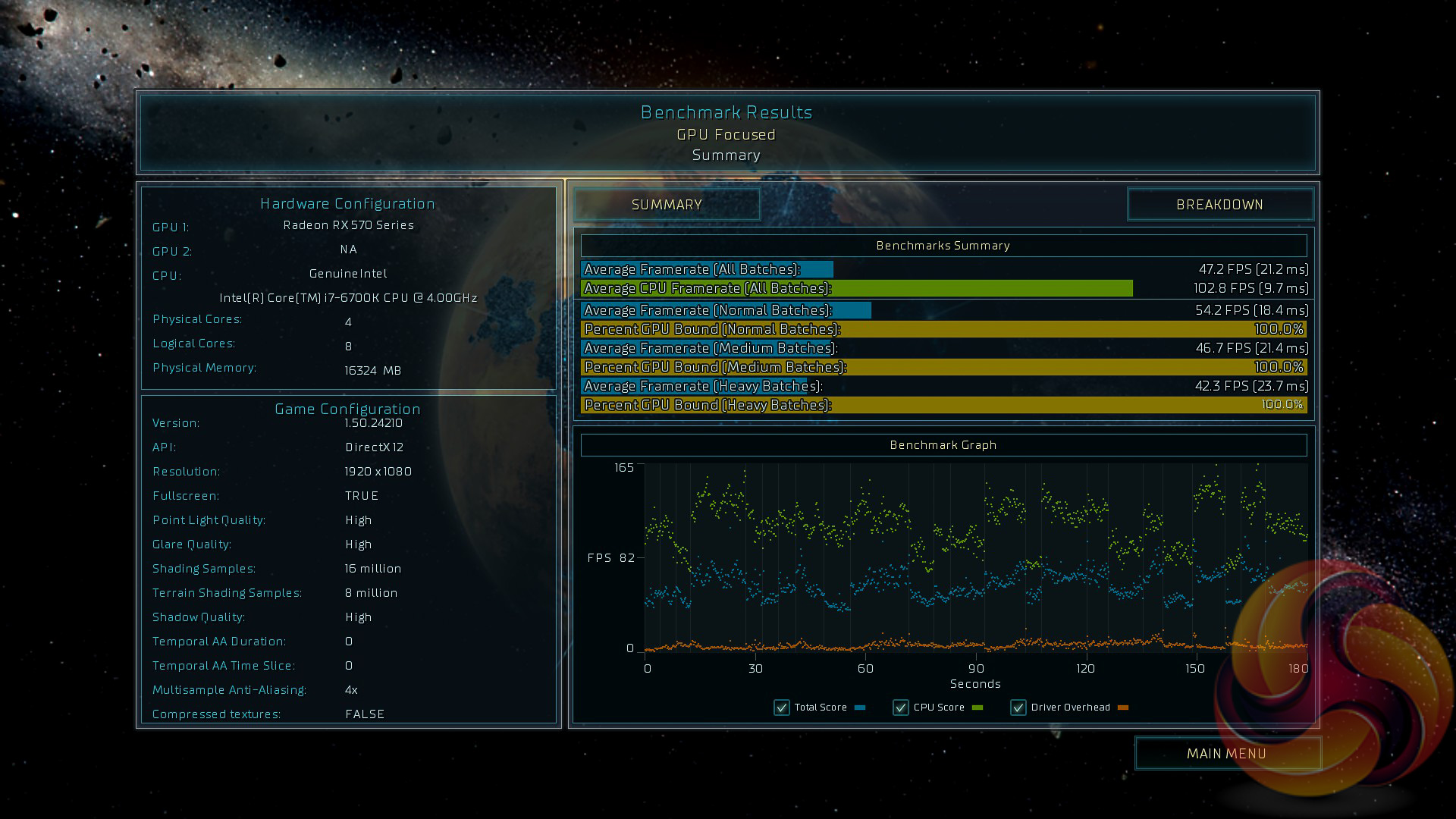
- Each 3D benchmark or game is run 3 times at each resolution with an average result of the three runs taken as the final result for the graphs. Where benchmark screenshots are shown note these may not match the graphed figure since the graph represents the average of three while the screenshot is a single of those three values
Comparison Graphics Cards List
- AMD RX 480 8GB (1266MHz core, 8000MHz memory)
- ASUS RX 570 STRIX Gaming OC 4GB (1300MHz core, 7000MHz memory)
- Gigabyte Aorus GTX 1080 Ti Xtreme Edition 11GB (1607MHz core, 1721MHz boost, 11232MHz memory)
- Gigabyte GTX 1080 G1 Gaming 8GB (1695MHz core, 1835MHz boost, 10010MHz memory)
- Gigabyte GTX 980 Ti Xtreme Gaming Windforce 6GB (1216MHz core, 1317MHz boost, 7200MHz memory)
- MSI R9 390 8GB Gaming (1040MHz core, 6000MHz memory)
- Nvidia GTX 1060 6GB Founders Edition (1506MHz core, 1708MHz boost, 8008MHz memory)
- Nvidia GTX 1080 Ti Founders Edition 11GB (1480MHz core, 1582MHz boost, 11008MHz memory)
- PNY GTX 1070 XLR8 Gaming OC 8GB (1607MHz core, 1797MHz boost, 8008MHz memory)
- Sapphire R9 Fury X 4GB (1050MHz core, 1000MHz memory [HBM])
- Sapphire RX 470 Nitro+ OC 4GB (1260MHz core, 7000MHz memory)
- Sapphire RX 580 Nitro+ Limited Edition 8GB (1450MHz core, 8000MHz memory)
- Zotac GTX 970 4GB (1076MHz core, 1216MHz boost, 7010MHz memory)
Software and Games List
- 3DMark
- Ashes of the Singularity
- Deus Ex: Mankind Divided
- Furmark
- GPU-Z
- Grand Theft Auto V
- Metro Last Light Redux
- MSI Afterburner
- Rise of the Tomb Raider
- Steam
- SteamVR Performance Test
- Unigine Heaven
3DMark is a showcase DirectX 11 benchmark designed for today’s high-performance gaming PCs. It is our [FutureMark’s] most ambitious and technical benchmark ever, featuring real-time graphics rendered with detail and complexity far beyond what is found in other benchmarks and games today.
We run 3DMark Fire Strike (1080p), Fire Strike Extreme (1440p) and Fire Strike Ultra (4K).

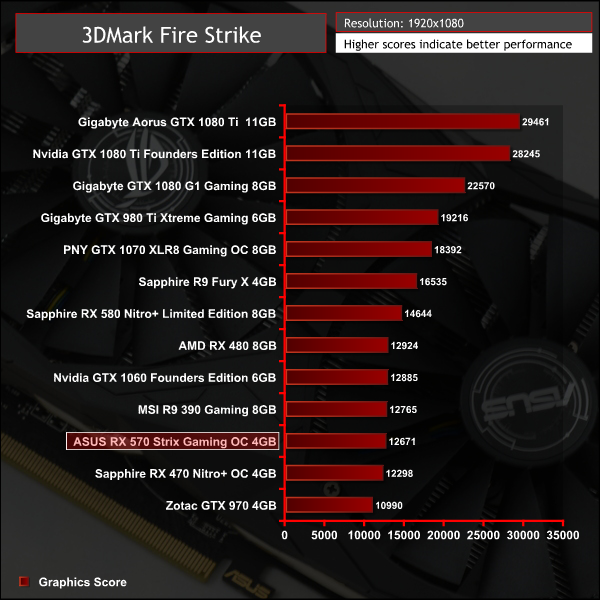
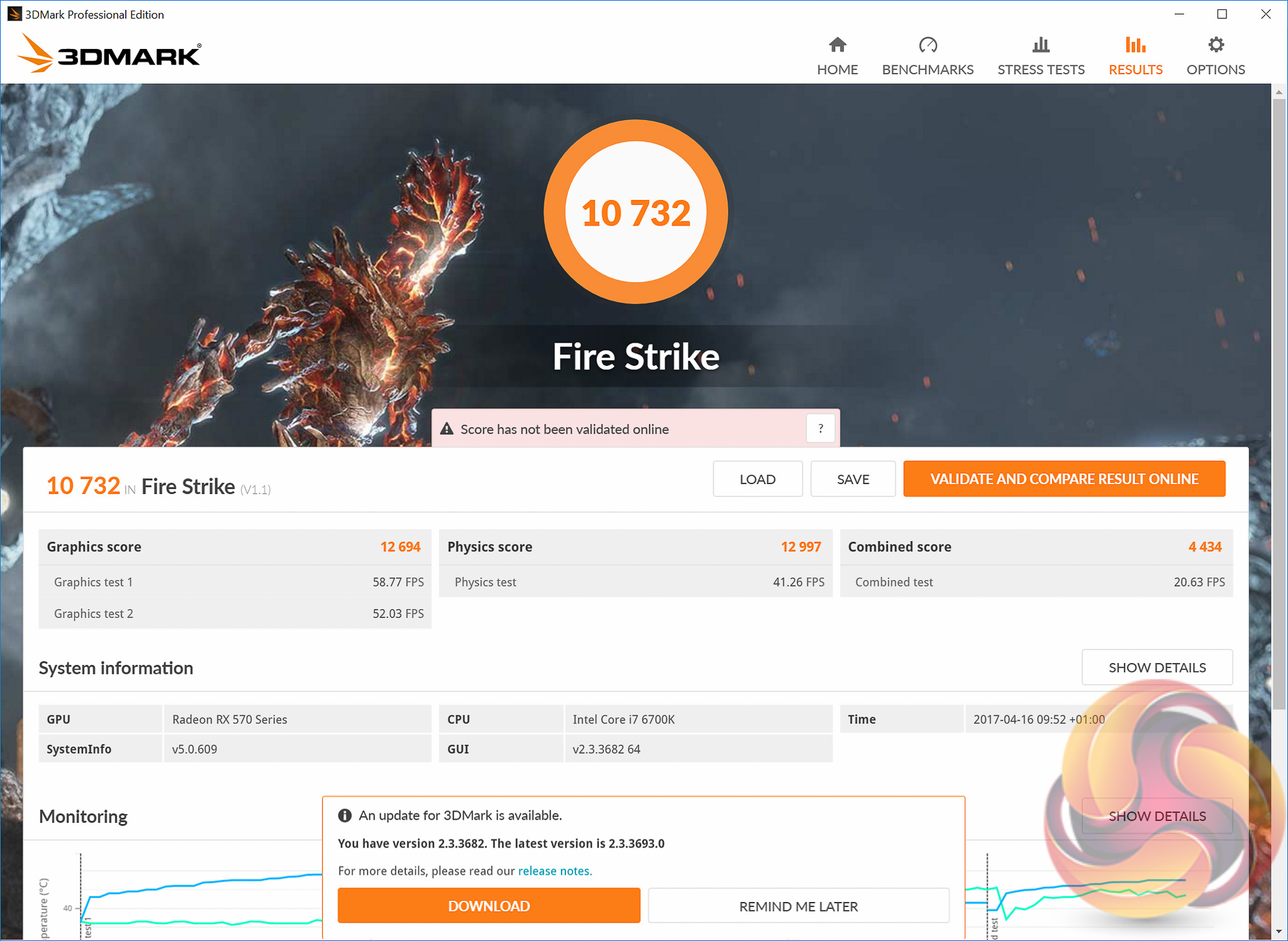
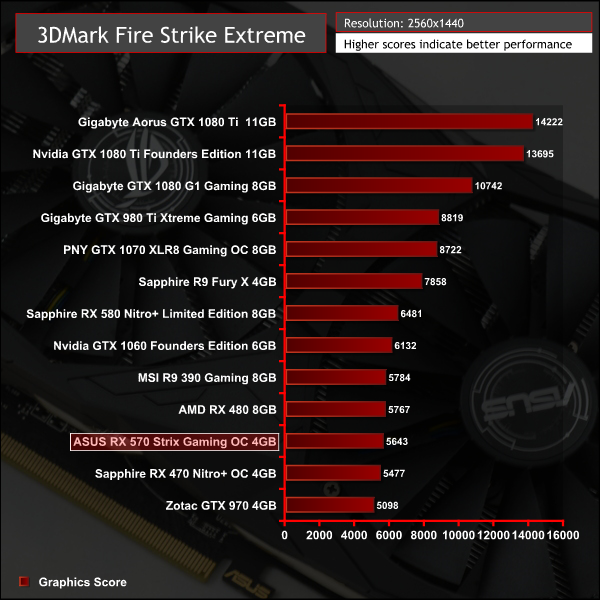
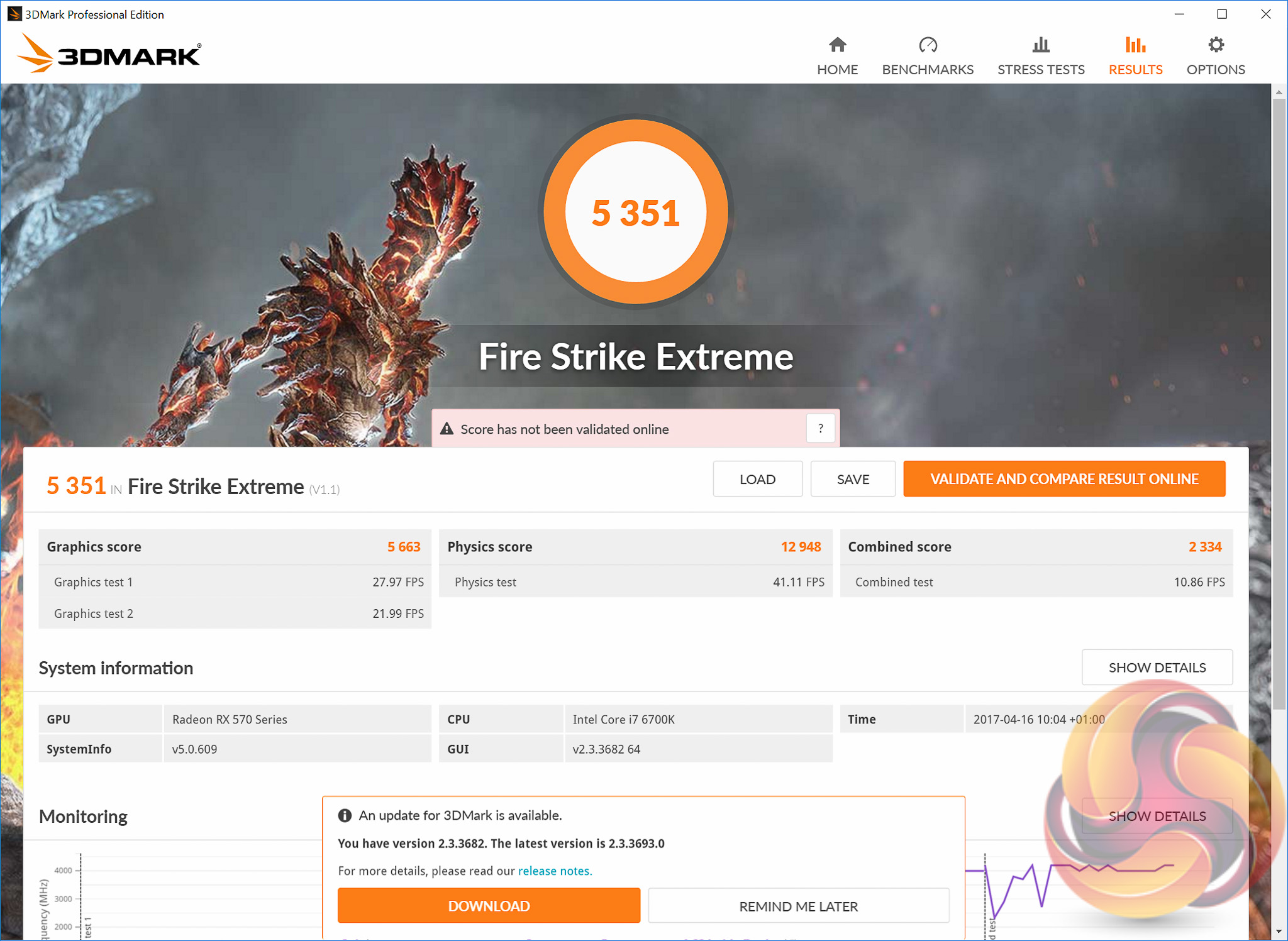
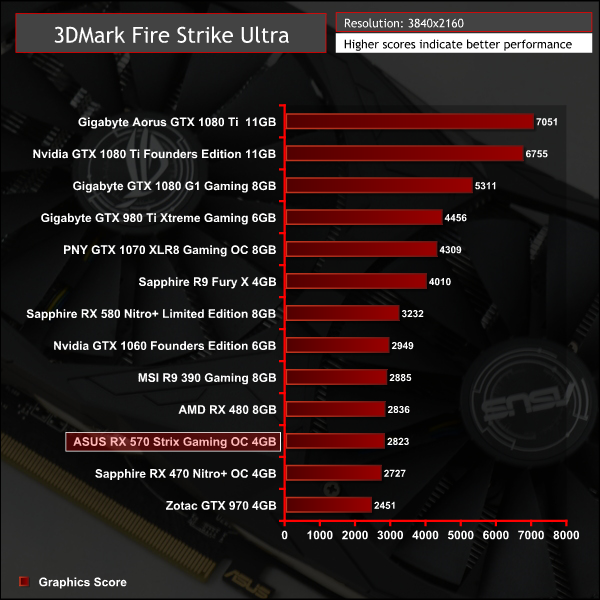
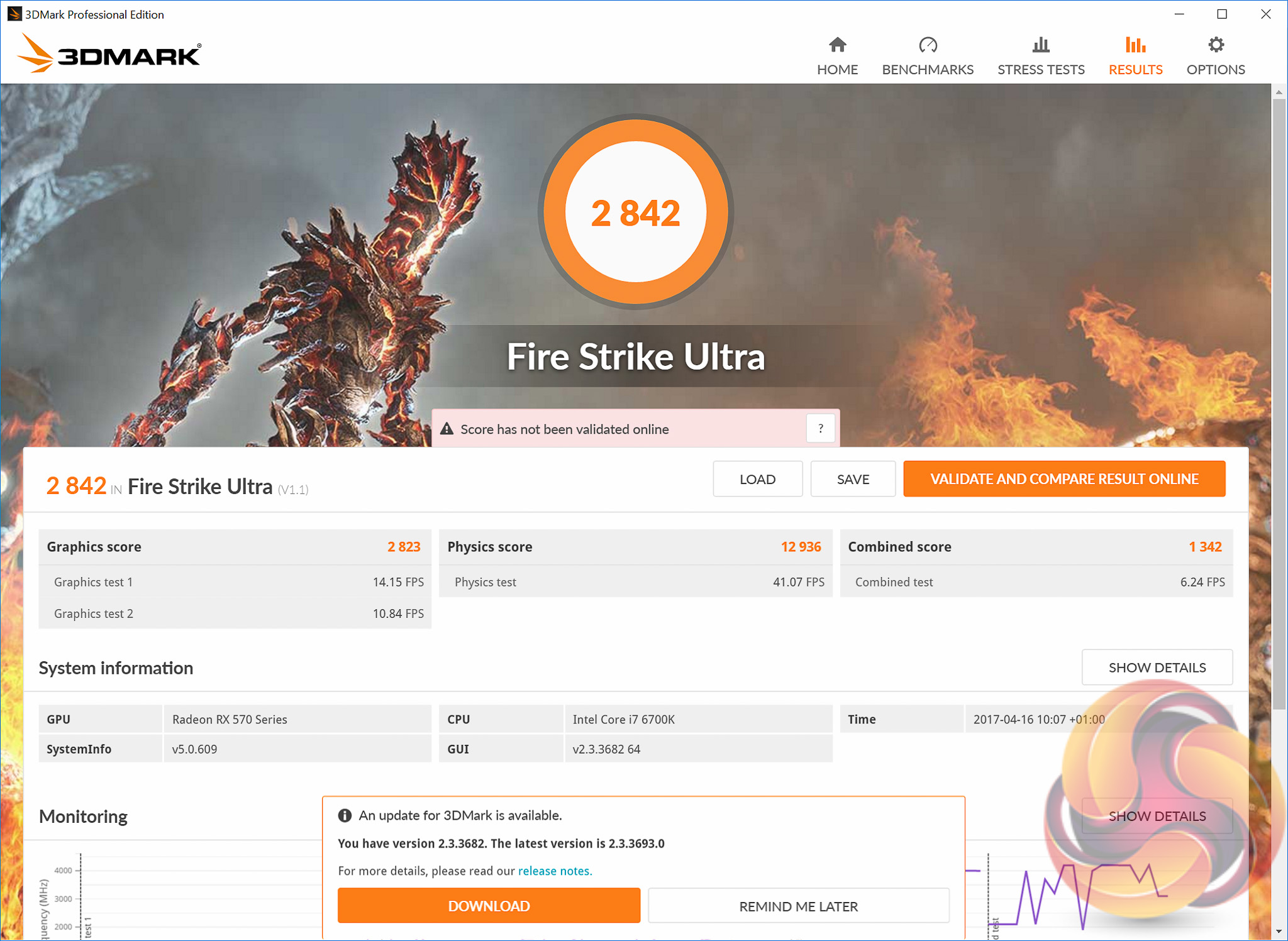
The primary counterpart to the ASUS RX 570 Strix Gaming OC in this testing is the Sapphire RX 470 Nitro+ OC, clocked at 1260MHz compared to 1300MHz for the ASUS product. As such the differences between the two are minimal but the additional frequency does bring the RX 570 very close to the stock AMD RX 480.
The SteamVR Performance Test measures a system's rendering power using a 2-minute sequence from Valves Aperture Robot Repair VR demo. After collecting the data it determines whether a system is capable of running VR content at 90fps and whether VR content can tune the visual fidelity up to the recommended level. For machines that are not VR Ready the tool can help determine whether capabilities are bound by Graphics Card, CPU, or both.
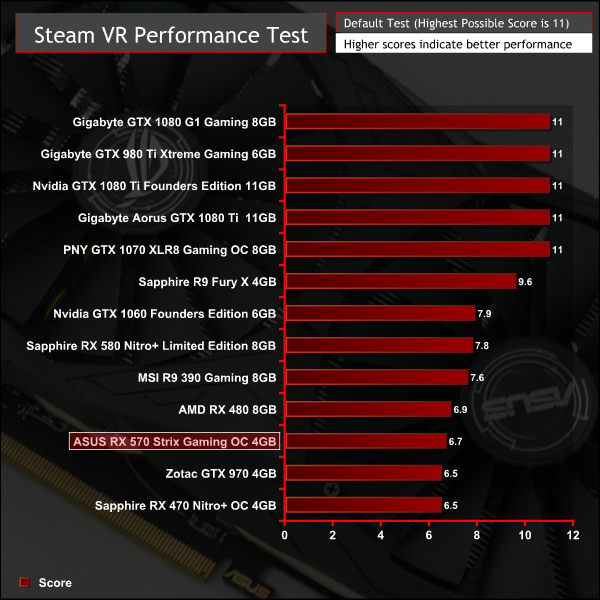
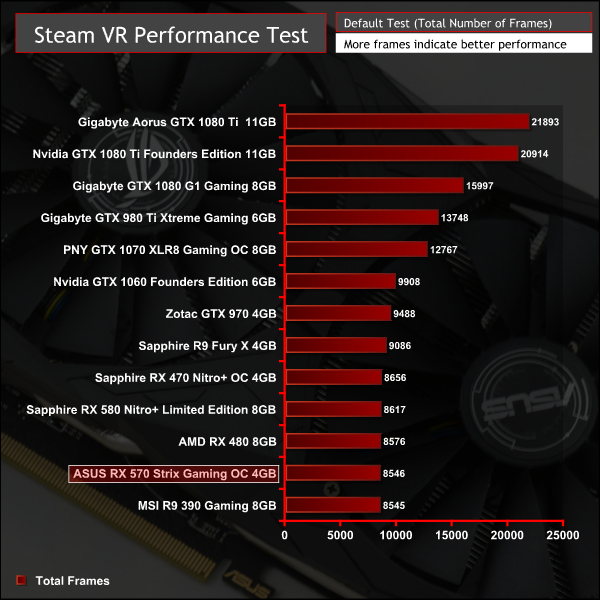
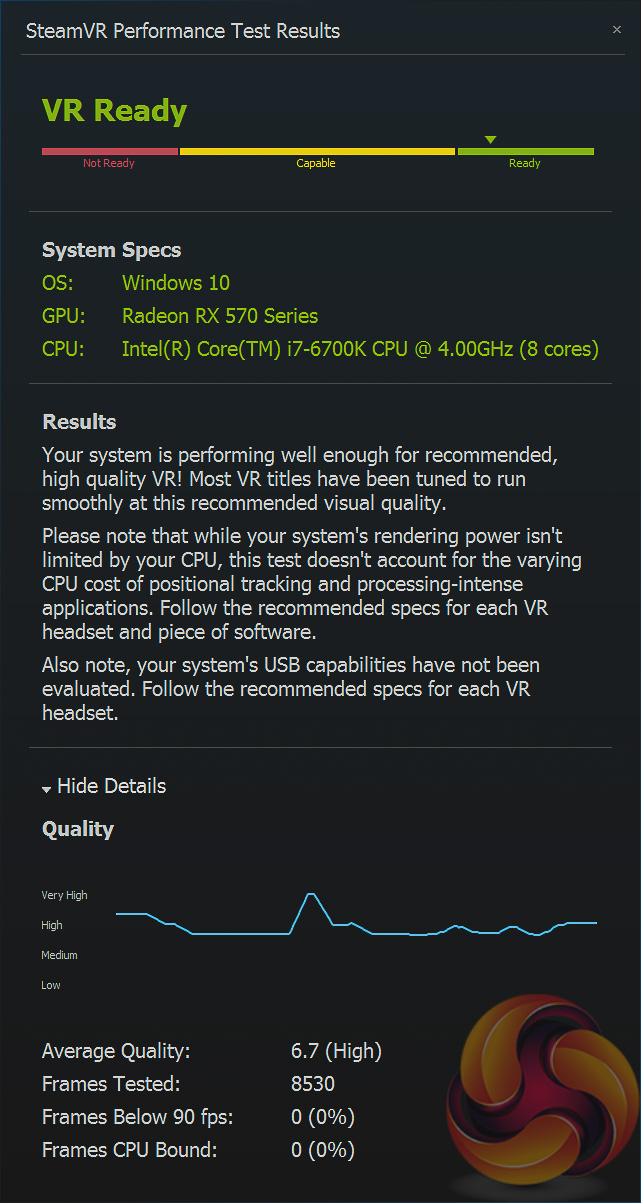
In the Steam VR Test this OC RX 570 is virtually inseparable from the OC RX 470.
Unigine provides an interesting way to test hardware. It can be easily adapted to various projects due to its elaborated software design and flexible toolset. A lot of their customers claim that they have never seen such extremely-effective code, which is so easy to understand.
Heaven Benchmark is a DirectX 11 GPU benchmark based on advanced Unigine engine from Unigine Corp. It reveals the enchanting magic of floating islands with a tiny village hidden in the cloudy skies. Interactive mode provides emerging experience of exploring the intricate world of steampunk. Efficient and well-architected framework makes Unigine highly scalable:
- Multiple API (DirectX 9 / DirectX 10 / DirectX 11 / OpenGL) render
- Cross-platform: MS Windows (XP, Vista, Windows 7) / Linux
- Full support of 32bit and 64bit systems
- Multicore CPU support
- Little / big endian support (ready for game consoles)
- Powerful C++ API
- Comprehensive performance profiling system
- Flexible XML-based data structures
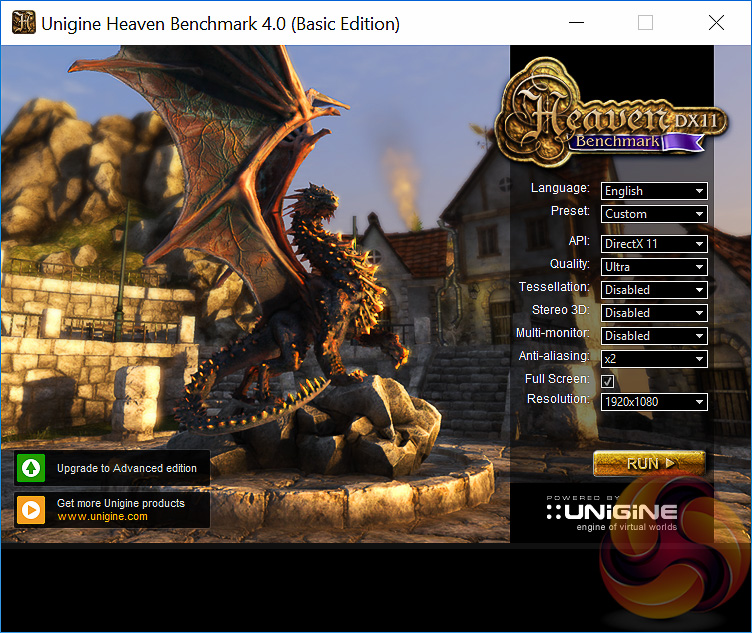
We set Quality to ‘Ultra’, Tessellation to ‘disabled’ and Anti-Aliasing to 2x.
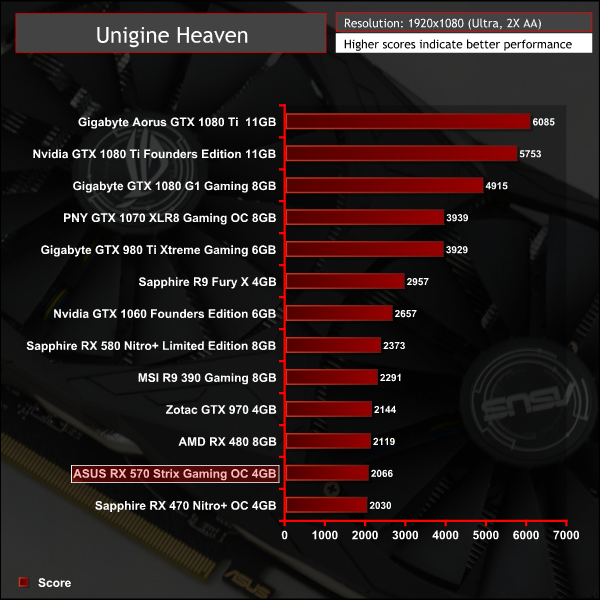
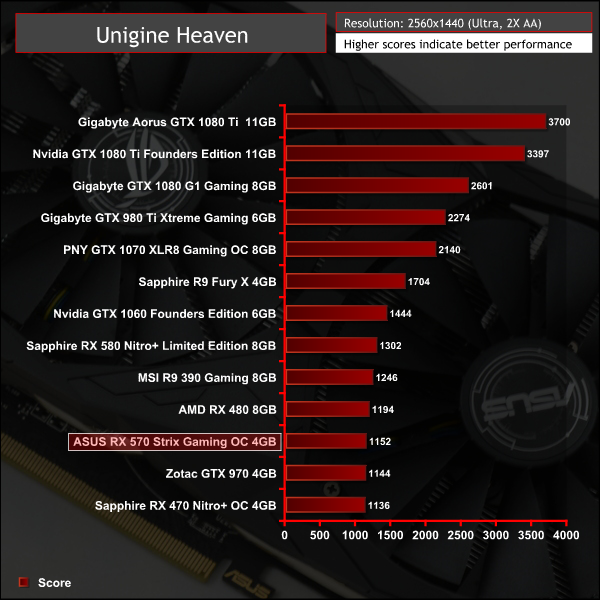
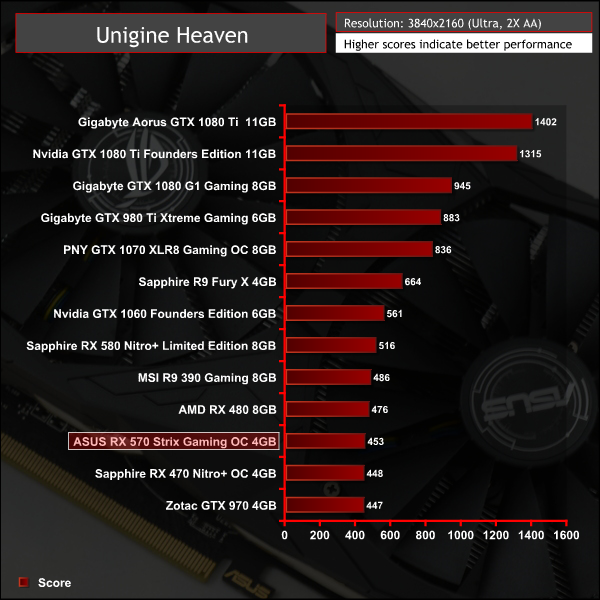
In Unigine Heaven this ASUS RX 570 is roughly equal to a stock GTX 970.
Ashes of the Singularity is a real-time strategy game set in the future where descendants of humans (called Post- Humans) and a powerful artificial intelligence (called the Substrate) fight a war for control of a resource known as Turinium.
Players will engage in massive-scale land/air battles by commanding entire armies of their own design. Each game takes place on one area of a planet, with each player starting with a home base (known as a Nexus) and a single construction unit.
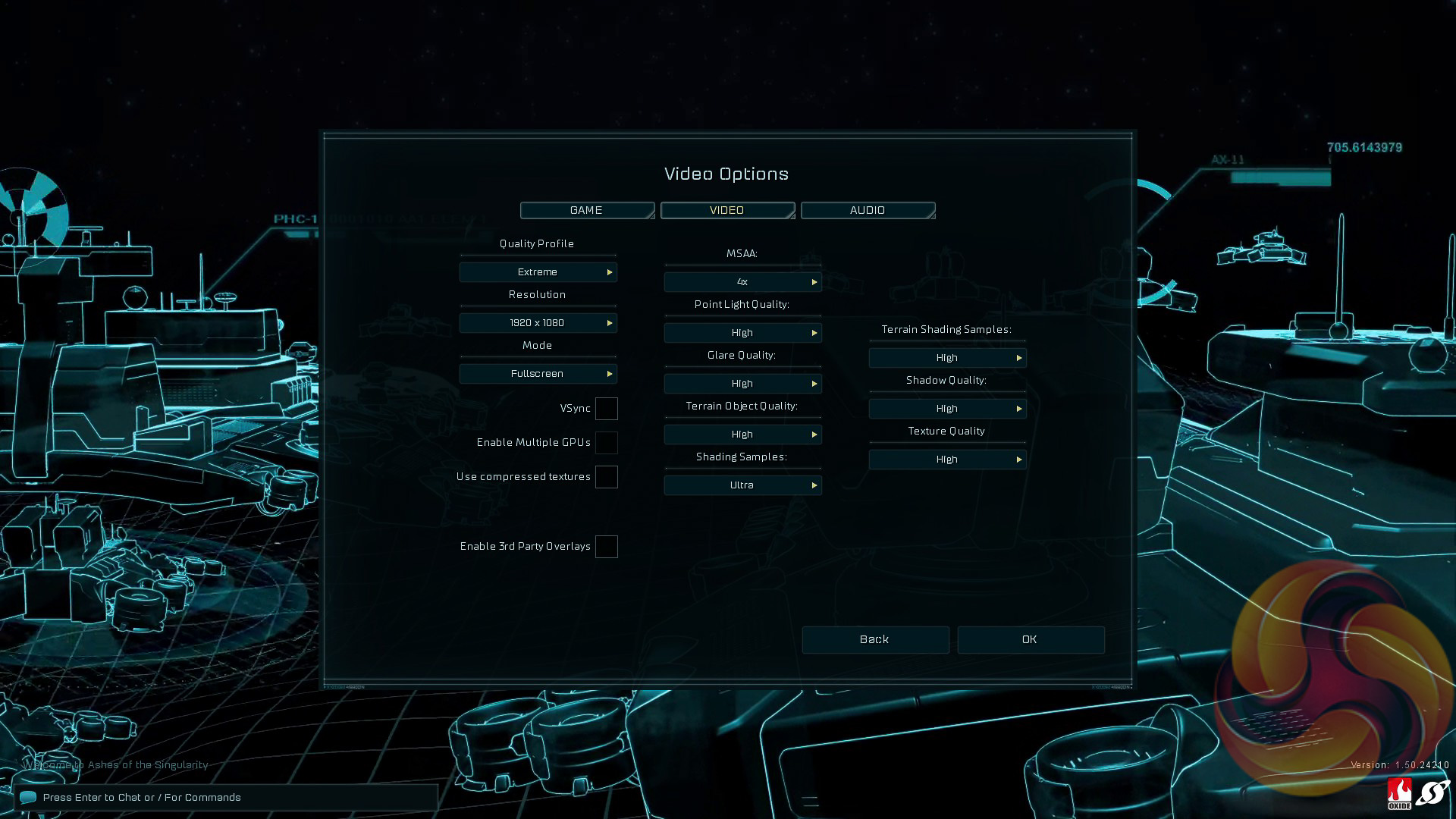
We opt for the Extreme quality profile and run the GPU-Focused test using the DX12 game mode.
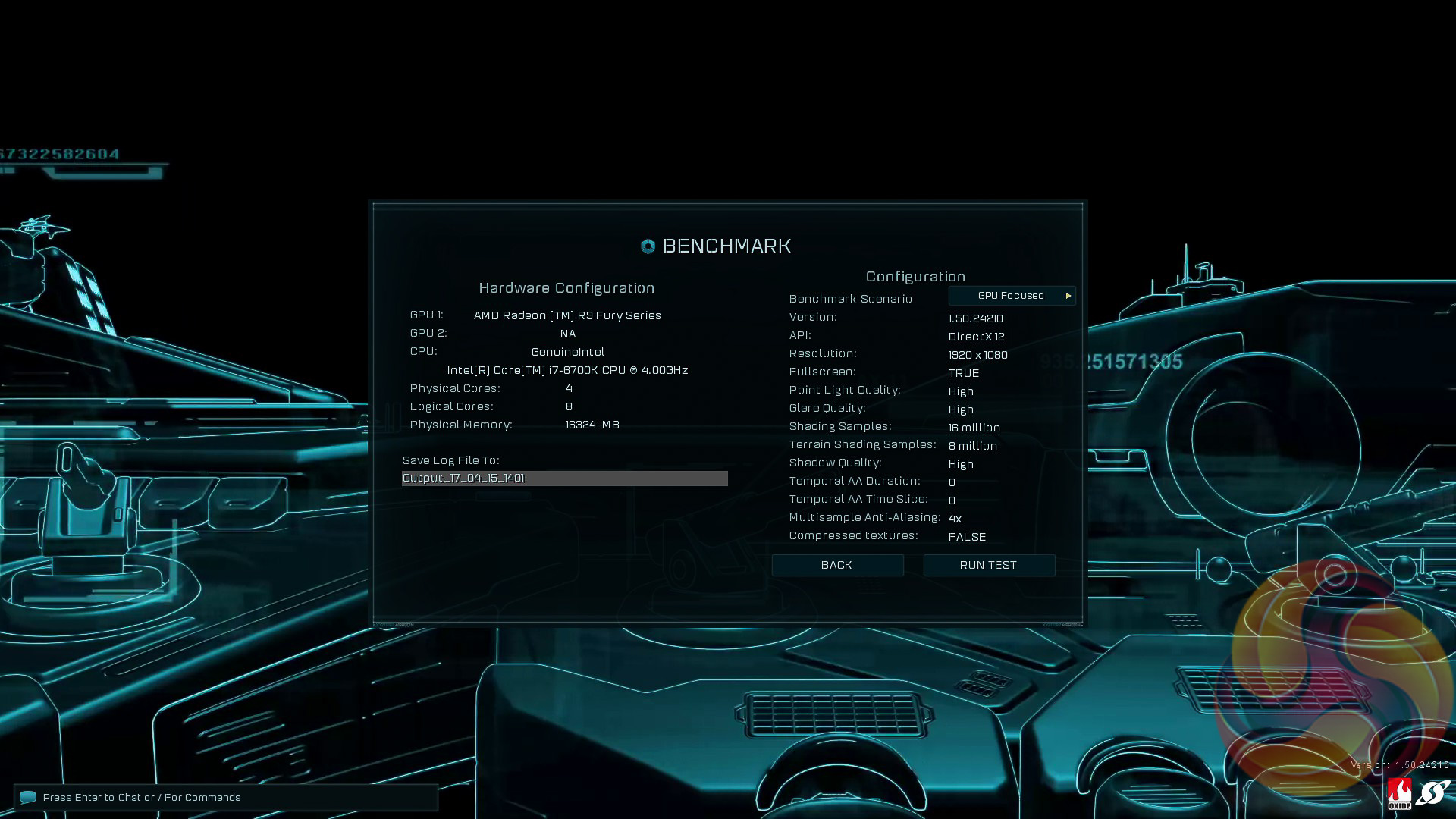
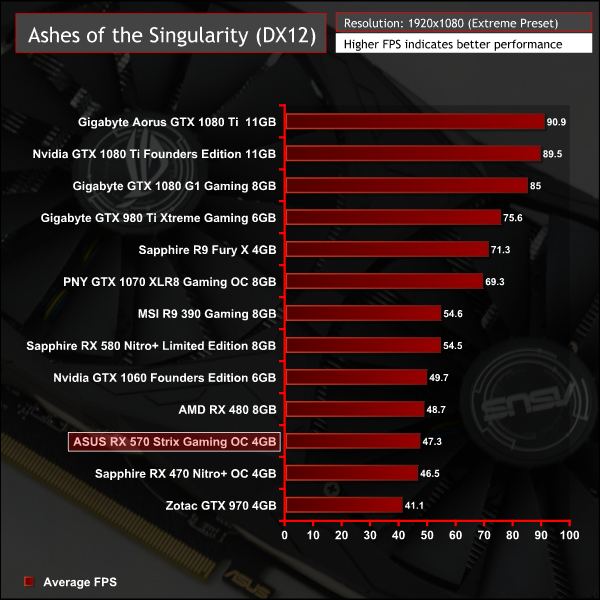
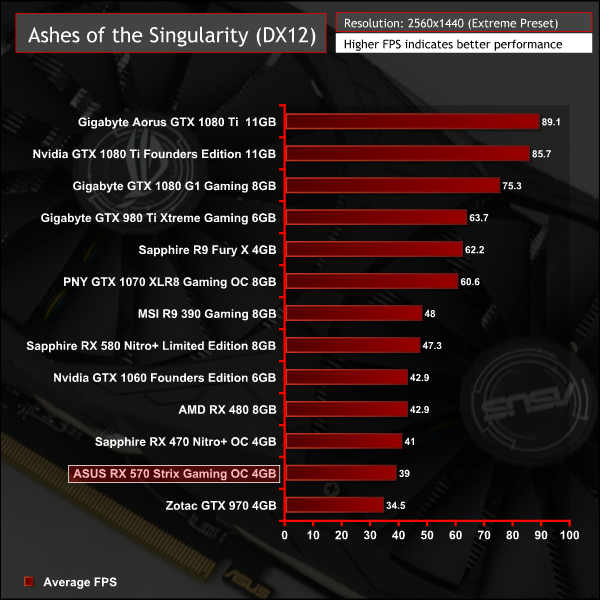
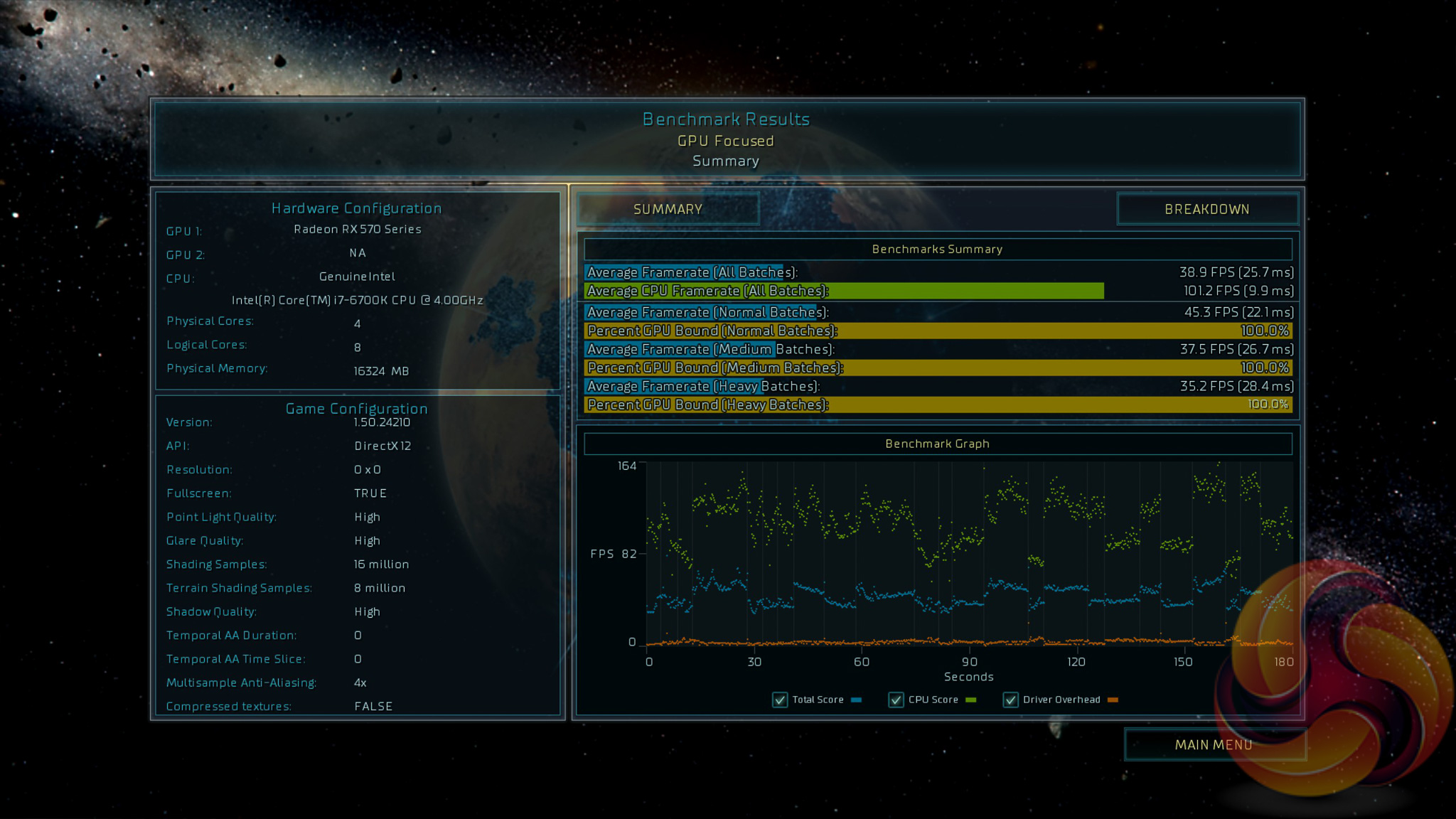
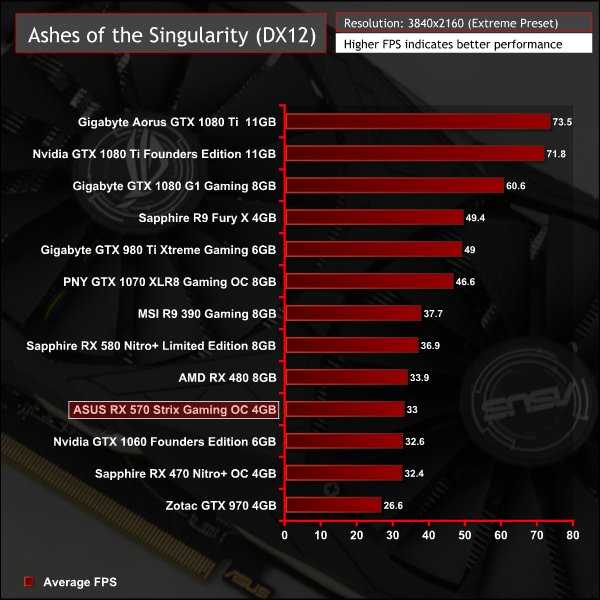
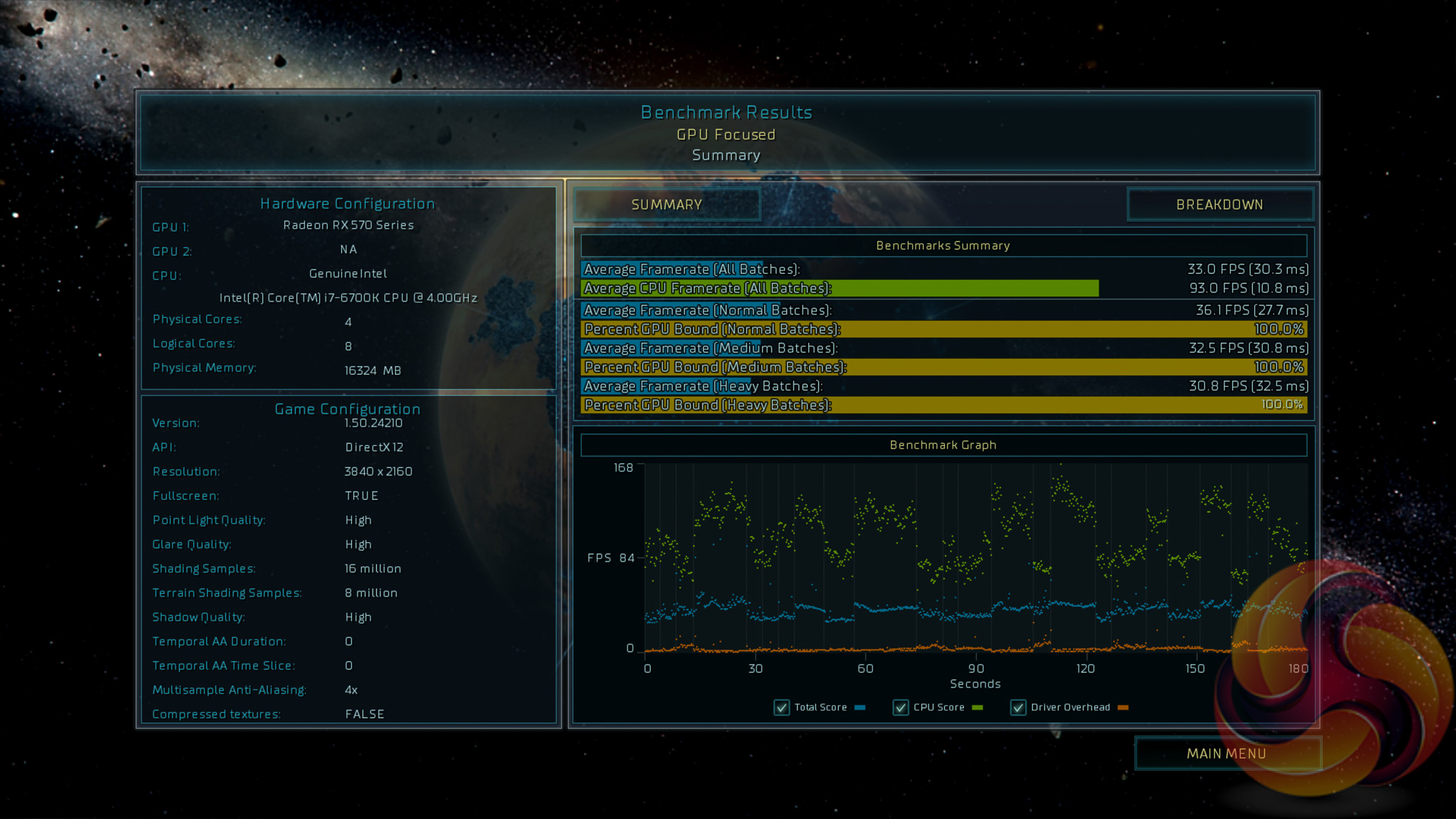
AMD positions the RX 570 as a competitor to the GTX 1050 Ti but in pricing terms the RX 570 sits between the GTX 1050 Ti and GTX 1060, so it's direct competitor is not obvious. However, it is closer to the 3GB GTX 1060 than it is to the GTX 1050 Ti.
Deus Ex: Mankind Divided is set in the year 2029, two years after the events of Human Revolution and the “Aug Incident”—an event in which mechanically augmented humans became uncontrollable and lethally violent.
Unbeknownst to the public, the affected augmented received implanted technology designed to control them by the shadowy Illuminati, which is abused by a rogue member of the group to discredit augmentations completely. (Wikipedia).
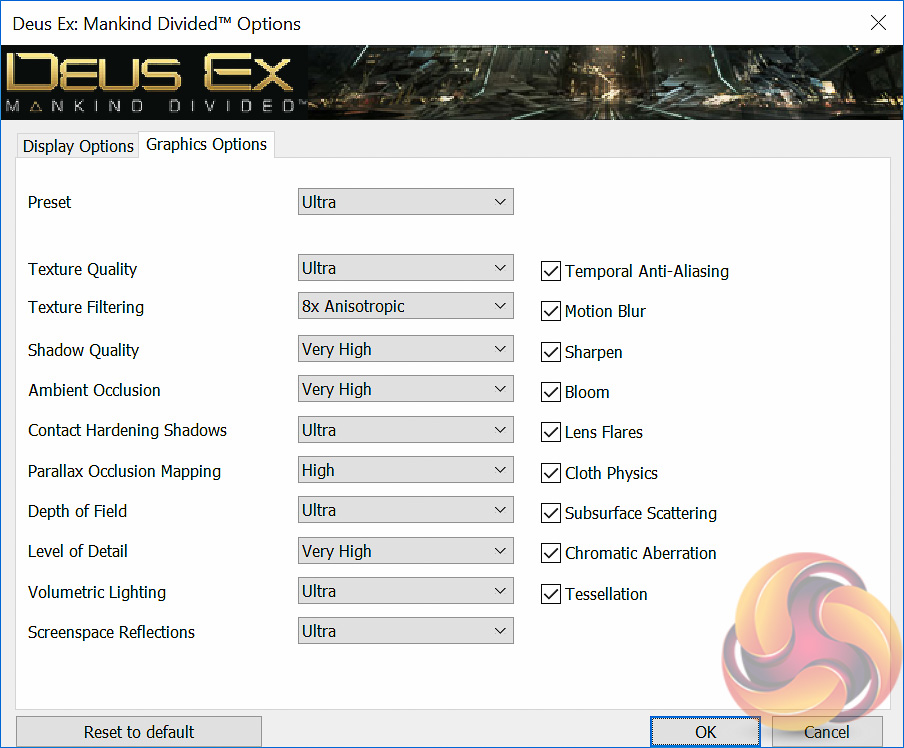
We test using the Ultra quality preset and the DirectX 12 API at all resolutions.
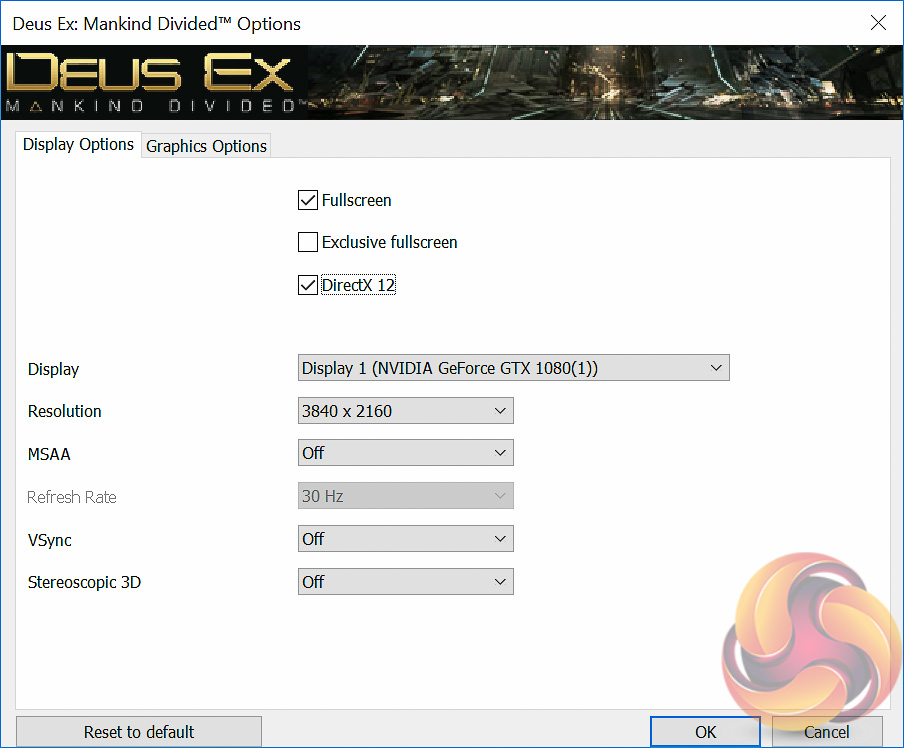
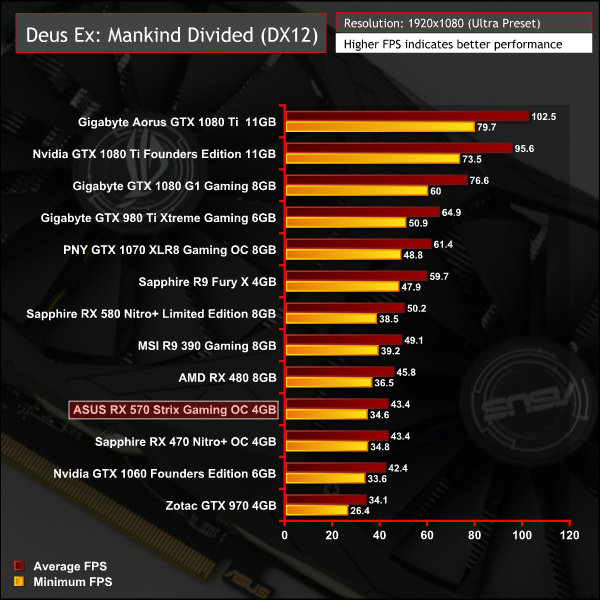
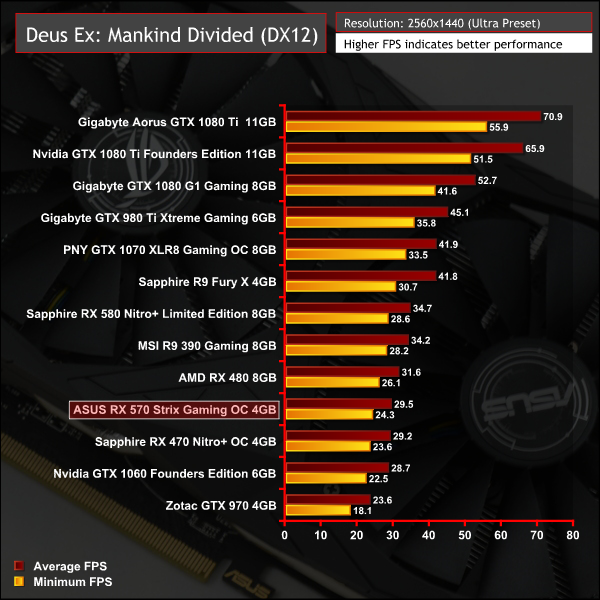
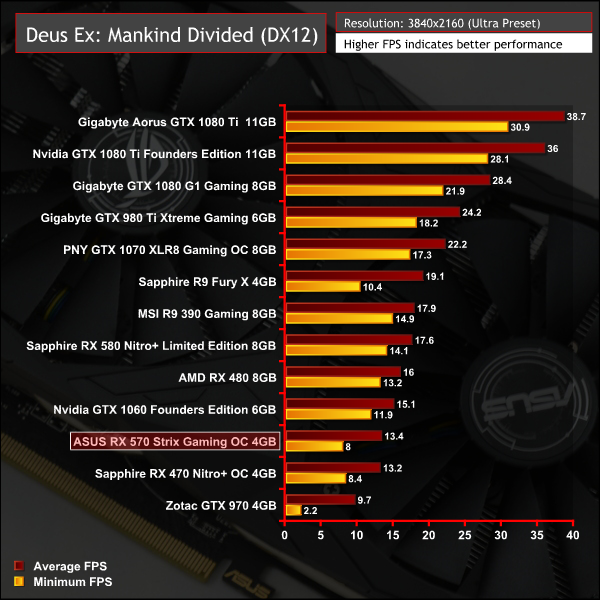
Deus Ex delivers more of the same, the ASUS RX 570 is slightly higher than the Sapphire RX 470 reflecting its clock speed advantage.
Grand Theft Auto V is an action-adventure game played from either a first-person or third-person view. Players complete missions—linear scenarios with set objectives—to progress through the story. Outside of missions, players may freely roam the open world.
Composed of the San Andreas open countryside area and the fictional city of Los Santos, the world is much larger in area than earlier entries in the series. It may be fully explored after the game’s beginning without restriction, although story progress unlocks more gameplay content.
We use the Ultra quality settings (or the highest alternative when Ultra is unavailable), MSAA is set to 2x. The Advanced Graphics options are all set to their maximum levels. Memory usage is calculated as 3469, 3764 and 4733 at 1080, 1440p and 4K, respectively.
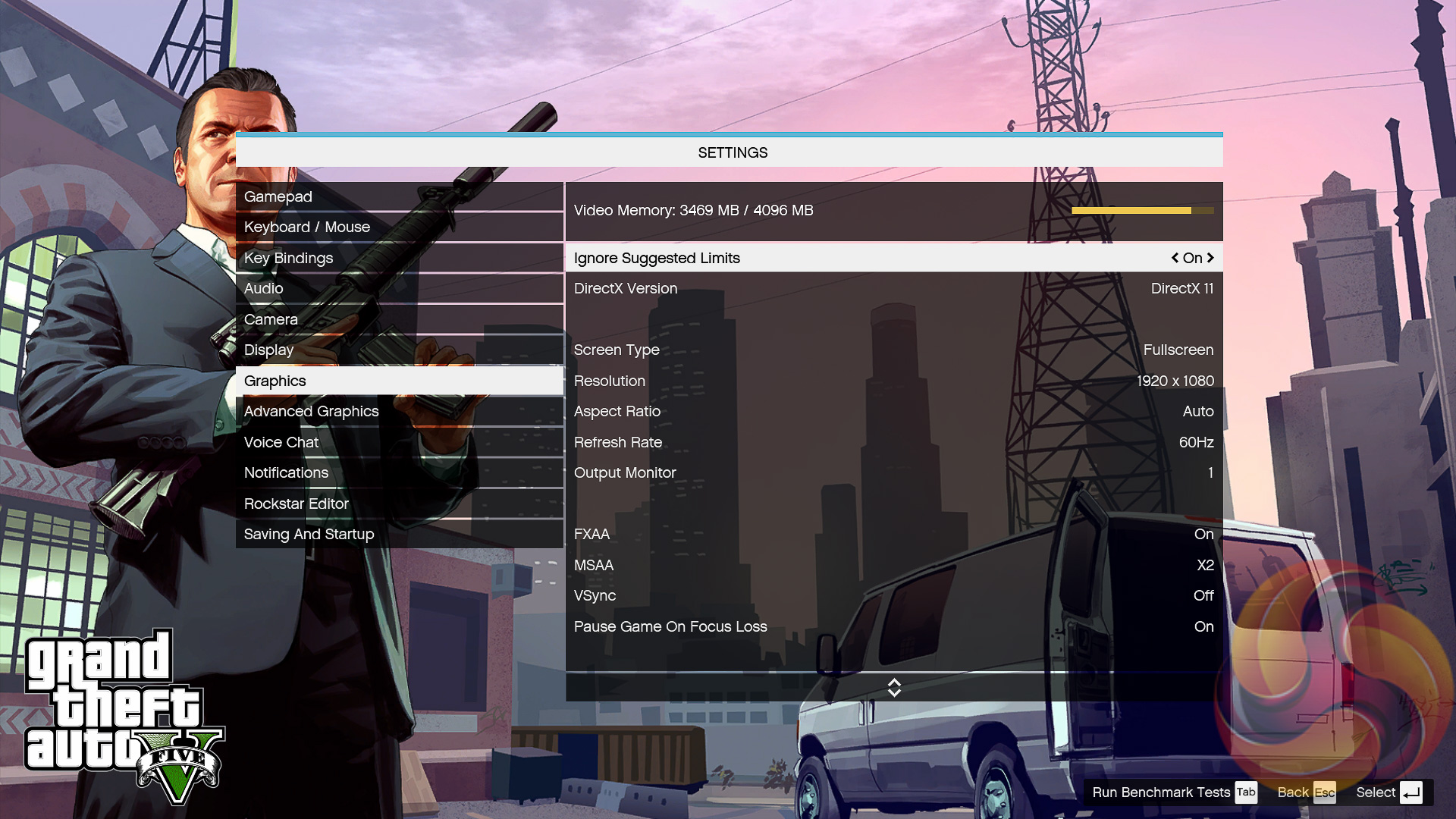
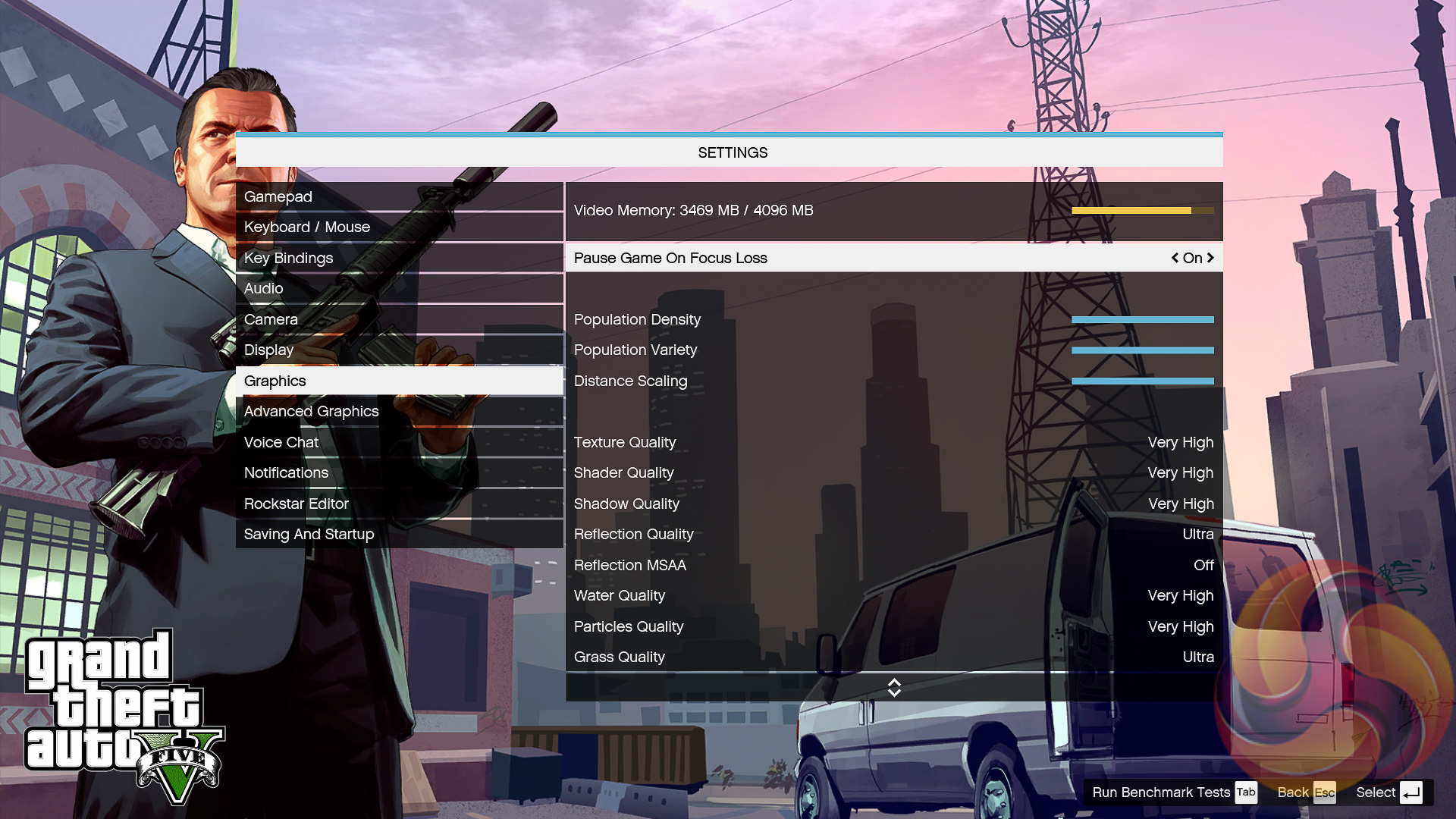
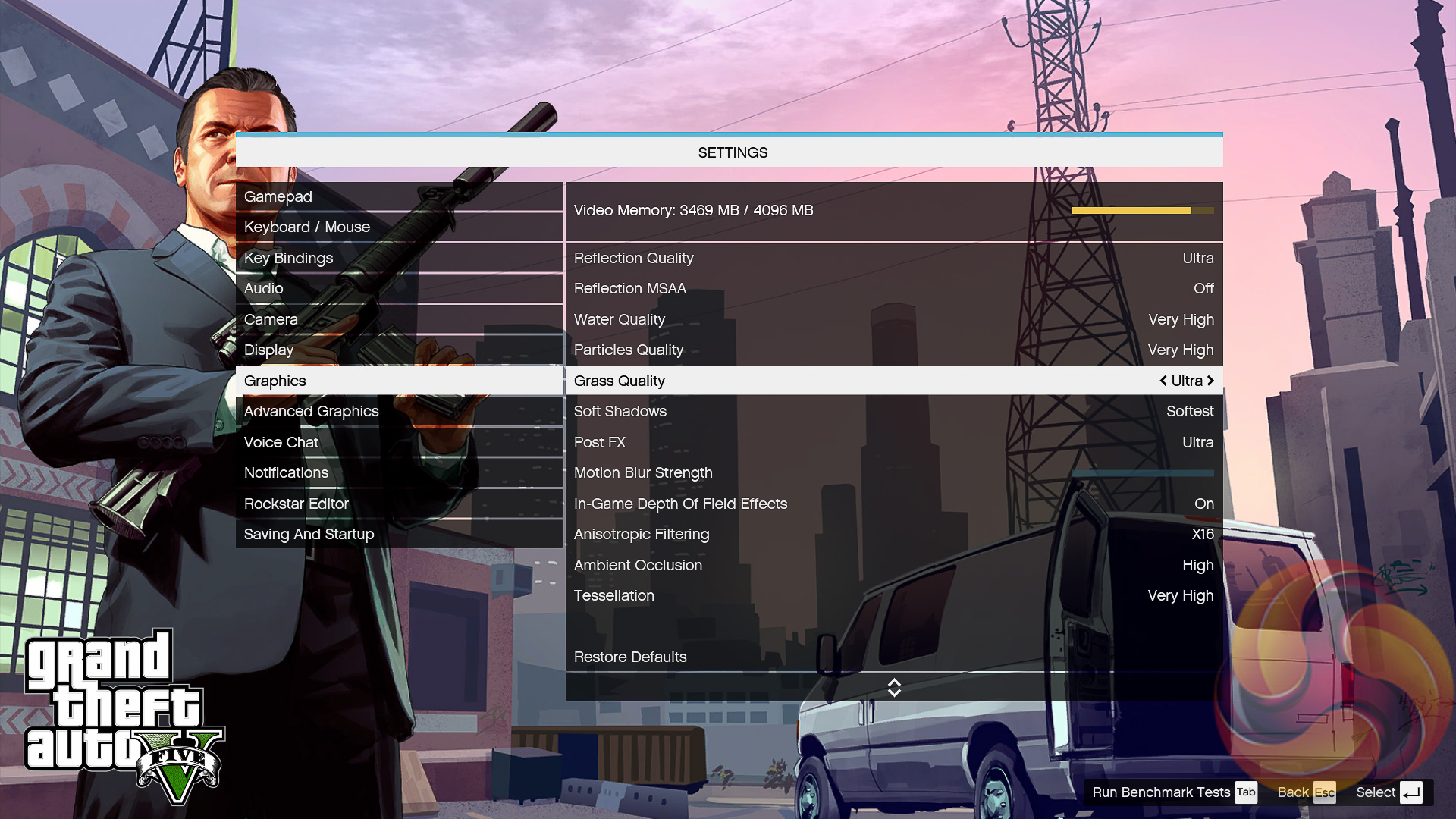
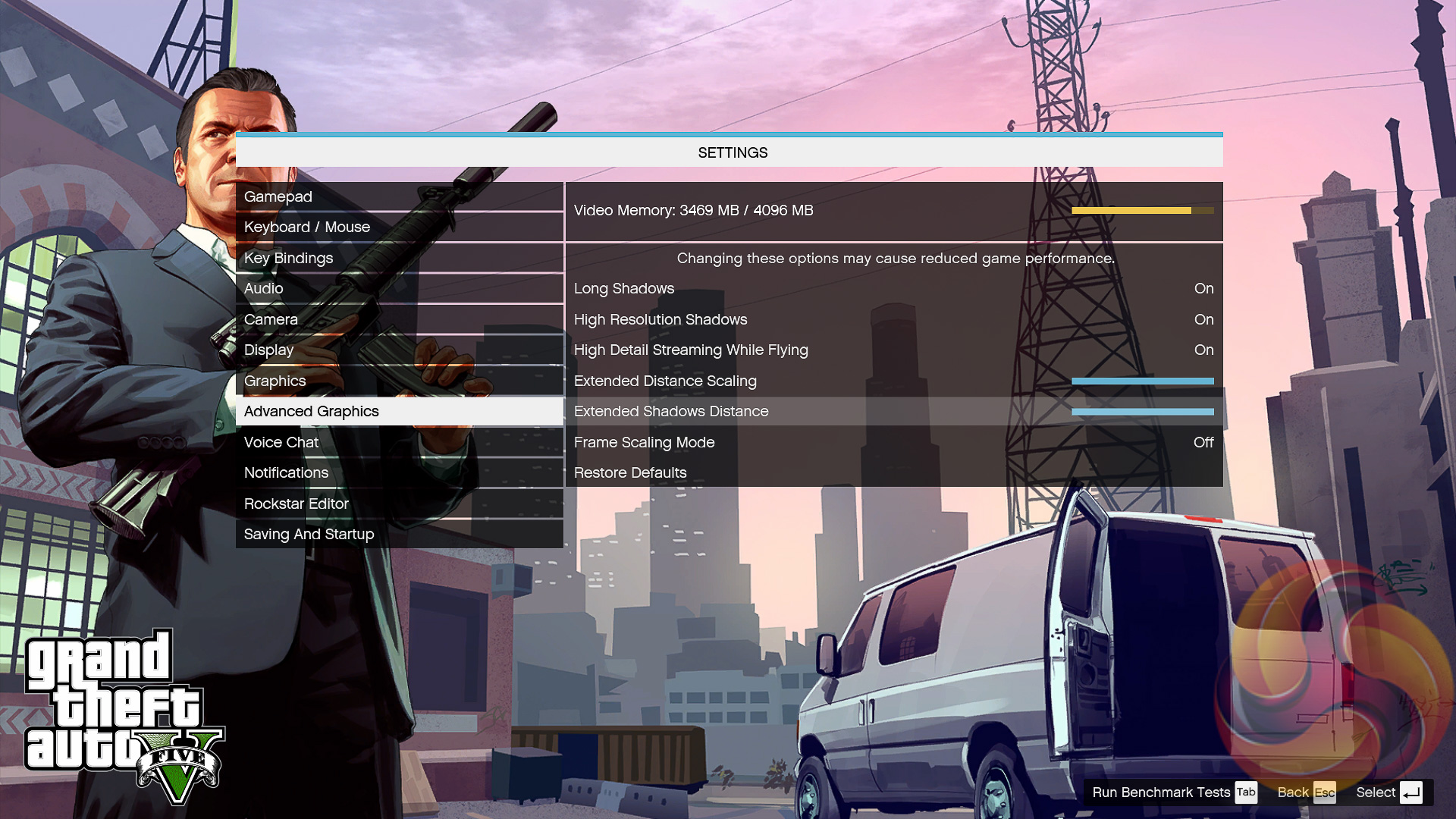
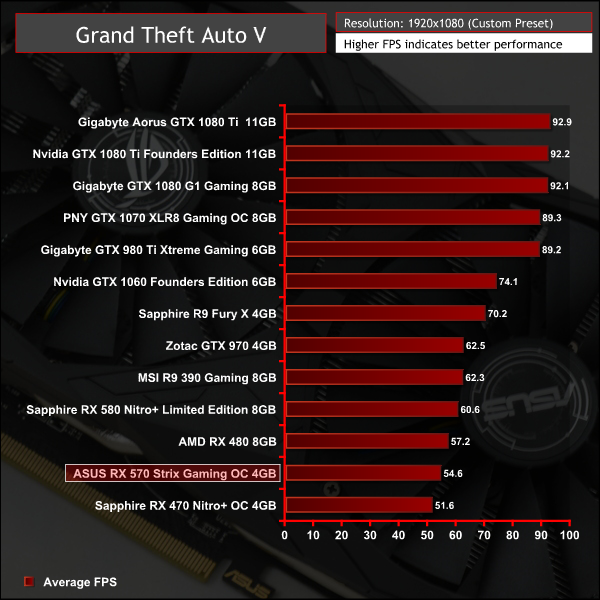
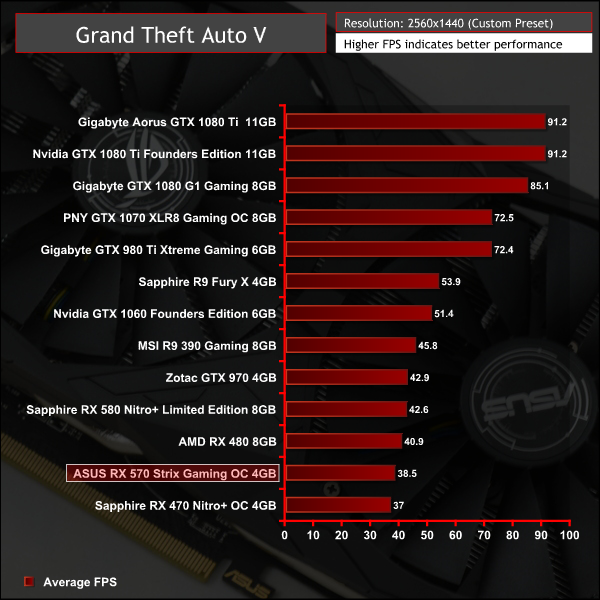
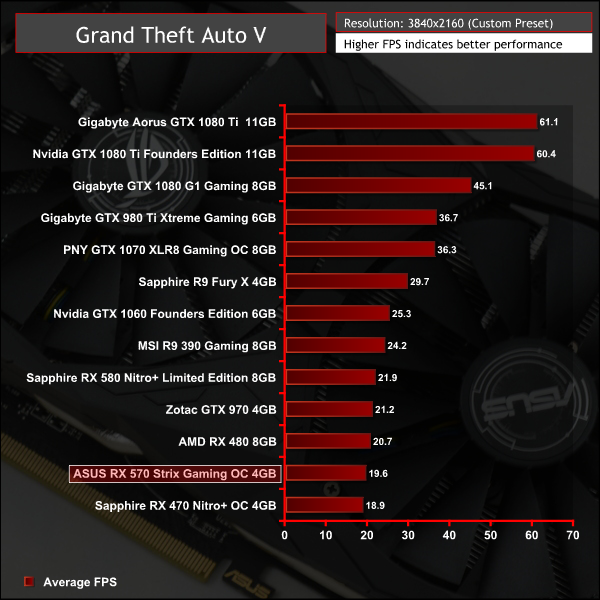
Grand Theft Auto V isn't one of AMD's strengths; the ageing GTX 970 manages to outpace the RX 470, RX 480 and RX 570 here.
Just like the original game Metro 2033, Metro: Last Light is played from the perspective of Artyom, the player-character. The story takes place in post-apocalyptic Moscow, mostly inside the metro system, but occasionally missions bring the player above ground. Metro: Last Light takes place one year after the events of Metro 2033, following the canonical ending in which Artyom chose to proceed with the missile strike against the Dark Ones (this happens regardless of your actions in the first game). Redux adds all the DLC and graphical improvements.
At all resolutions we test using a Very High quality profile with SSAA enabled and Tessellation set to Normal.
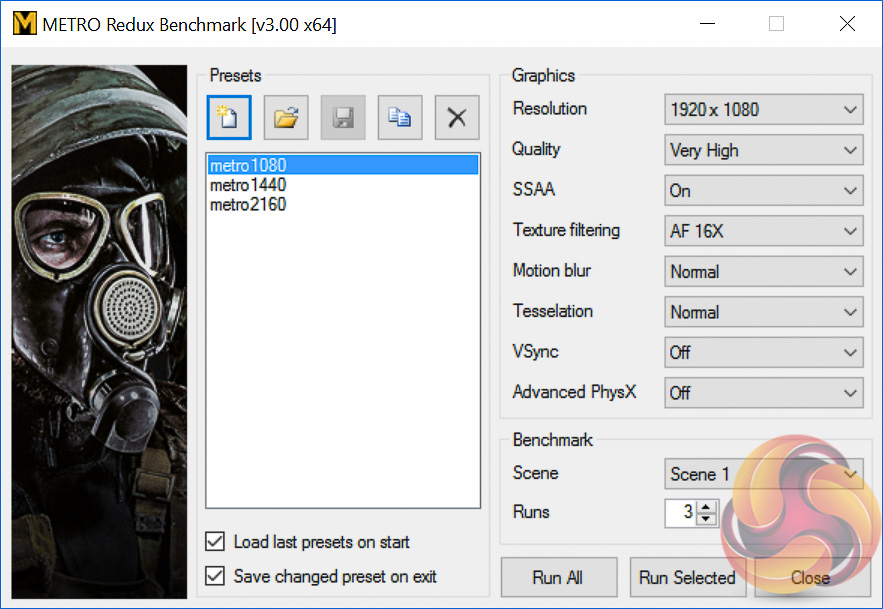
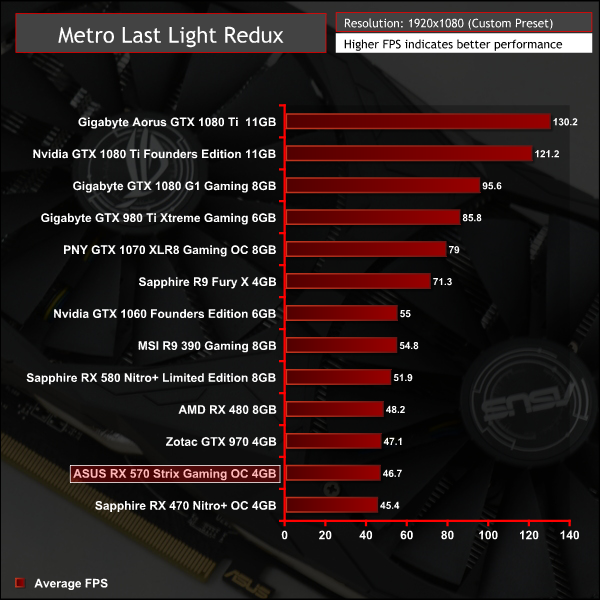
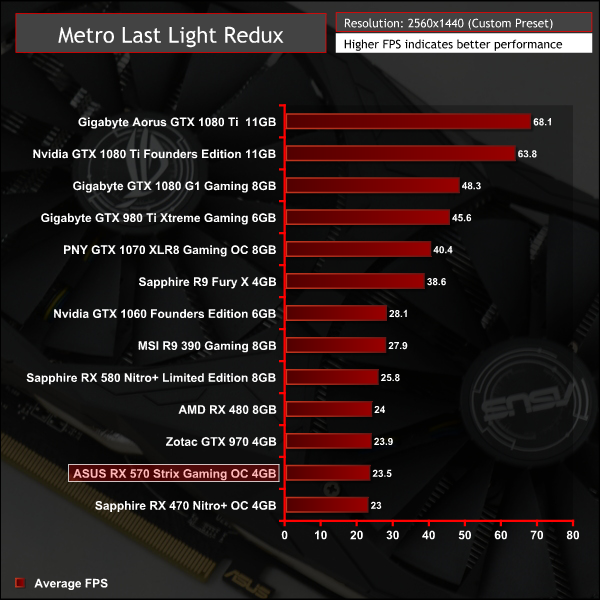
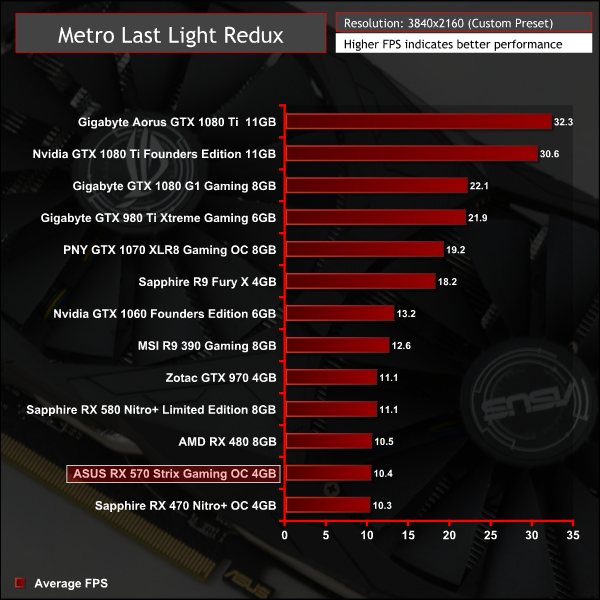
AMD's RX 470 and 570 also lose out the GTX 970 again in Metro Last Light.
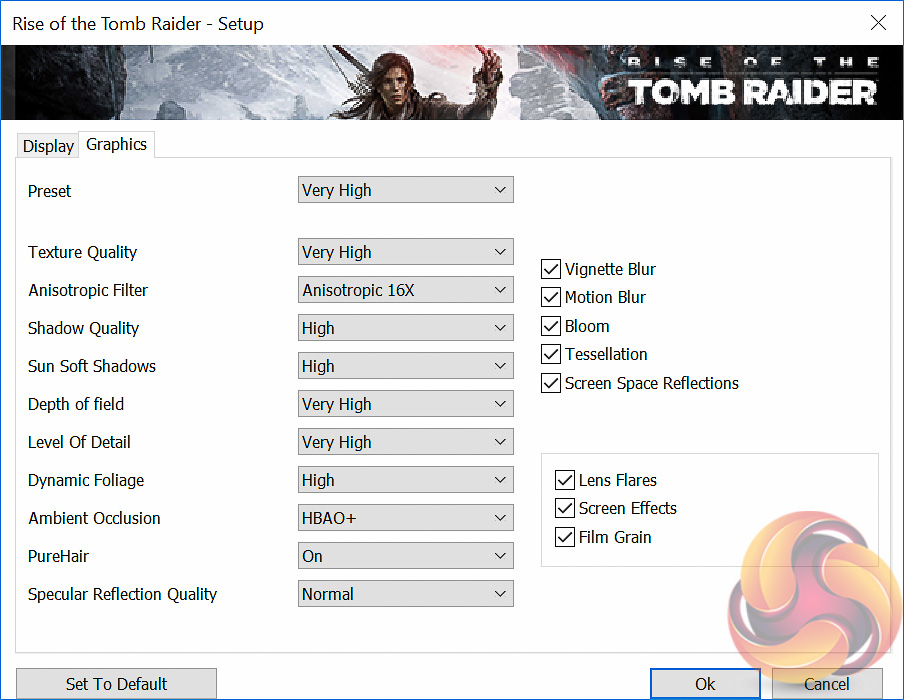
Rise of the Tomb Raider is a third-person action-adventure game that features similar gameplay found in 2013’s Tomb Raider. Players control Lara Croft through various environments, battling enemies, and completing puzzle platforming sections, while using improvised weapons and gadgets in order to progress through the story. It uses a Direct X 12 capable engine.
We use the Very High quality preset and 2x SSAA at all resolutions with Direct X 12 enabled.
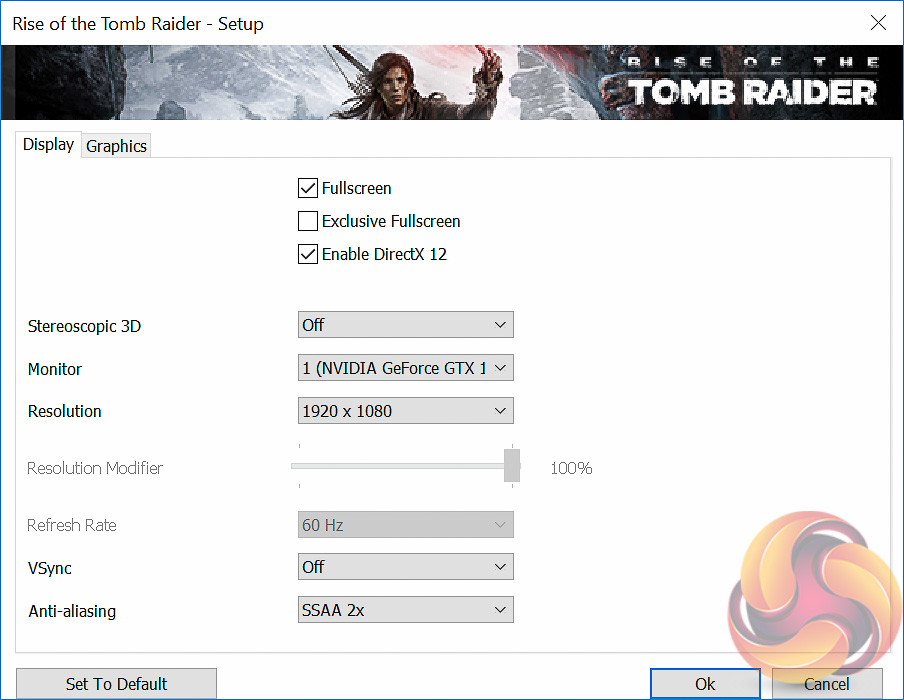
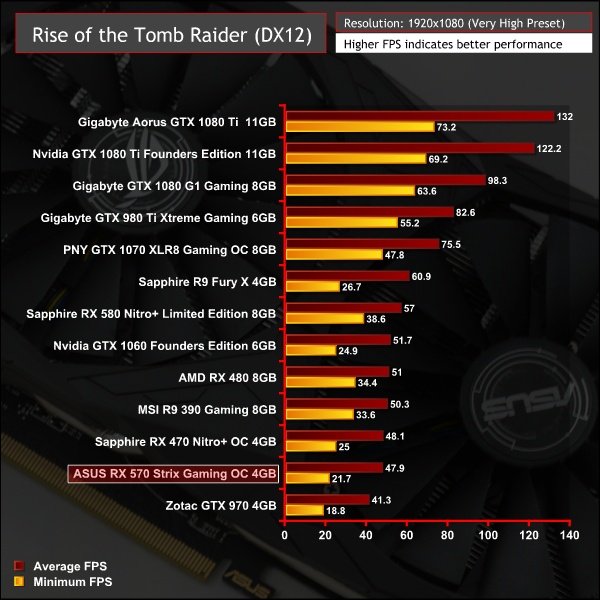
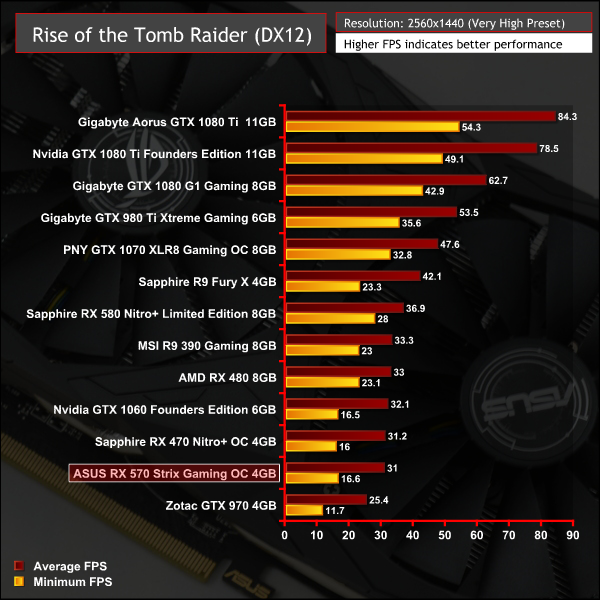
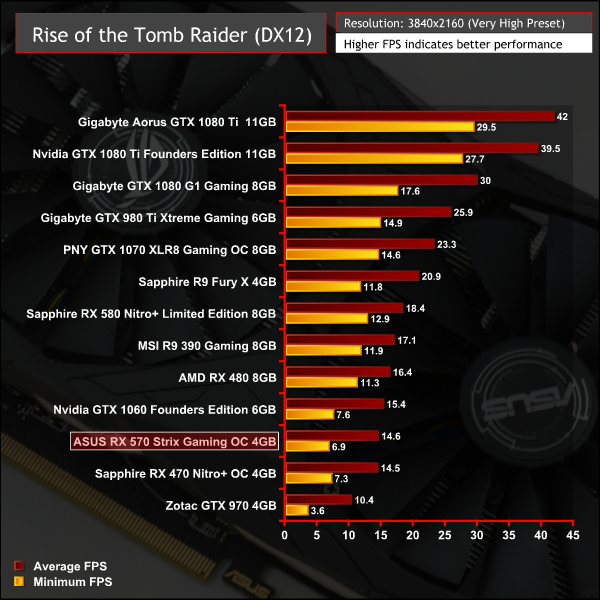
Strangely Sapphire's RX 470 fared better than the ASUS RX 570 in this test, albeit by a margin so small it can be put down to benchmark variability and general margin of error.
Our acoustic measurements are less precise on this mid-range test system, the noise floor of the totally quiet testing room is 34 dBA as measured with a Benetech GM1351 Digital Sound Level Meter.
We take our measurements with the decibel meter on the top and middle section of the case, overhanging the side panel (PSU side, not Motherboard tray side) by exactly 1 inch to avoid any airflow pressure coming from the exhausting H100i V2.
The underlying noise level of the system, emitted by all the non-GPU hardware combined, is 35 dBa thus anything above this level can be attributed to the graphics cards. The PSU is passive for the entire power output range we tested all graphics cards in and all CPU and System fans have a fixed fan speed completely isolating them from any changes in temperature across the system.
Noise levels were measured after 5 minutes of load under three scenario: Furmark, Unigine Heaven and desktop idle in sequential order with 2 minutes downtime in between each test.
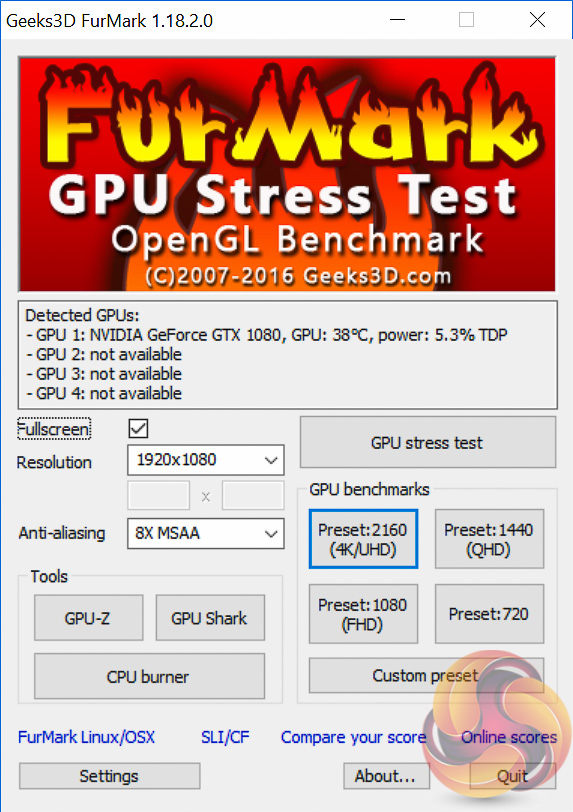
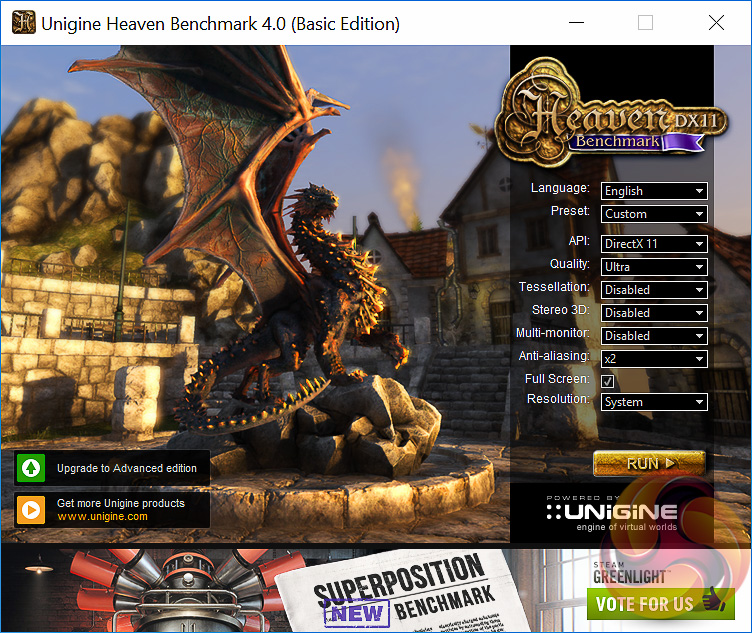
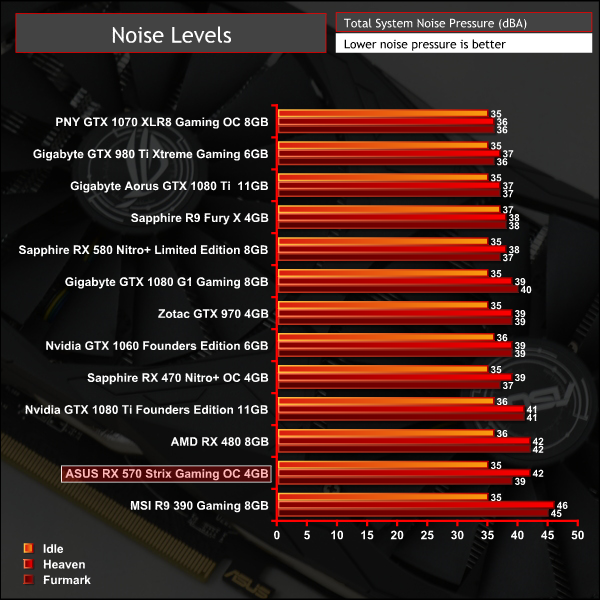
A crucial element of any well designed graphics card is figuring out the optimal trade-off between fan speed and GPU temperatures. The ASUS card has not achieved this balance well as it was the second noisiest graphics card on test reaching 68% fan duty after 10 minutes of 3D Loading (5 minutes of Furmark followed by 5 minutes of Unigine Heaven) for our noise tests.
Interestingly, during the rest of our benchmarking which takes around 4 hours (and doesn't form part of our noise test) the ASUS card reached as high as 84% fan duty which was too loud. ASUS has temperature headroom to spare since we did not observe a temperature any higher than 71 degrees Celsius throughout all our testing, it should increase the temperature target to reduce fan noise.
Temperatures were measured after 5 minutes of load under three scenario: Furmark, Unigine Heaven and desktop idle in sequential order with 2 minutes of downtime in between each test. GPU-Z was used to record the maximum temperature, fan profiles on GPUs were left to their default behaviour.
Delta temperatures are presented below to account for small fluctuations in room temperature, but for all the testing present in this graph the temperature ranged from 21.6 to 23.1 degrees Celsius.
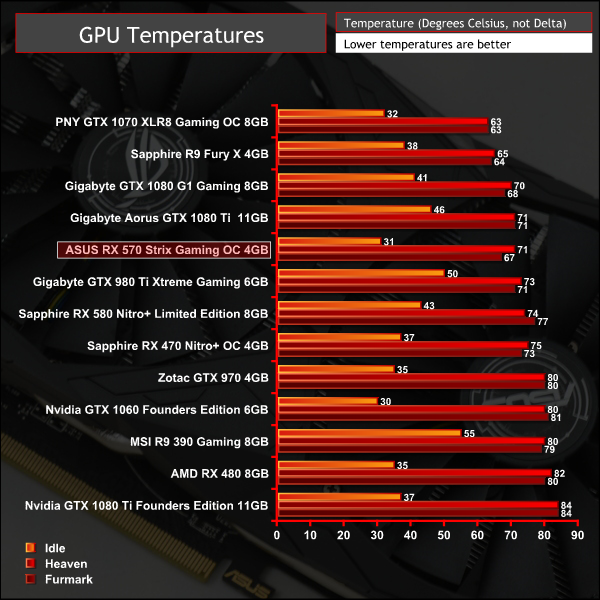
Granted the ASUS RX 570 delivered strong temperature results but as we've already seen this is at the expense of noise. We'd be keen to see ASUS sacrifice an additional 5-10 degrees Celsius for a less aggressive fan profile.
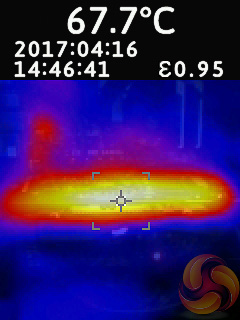
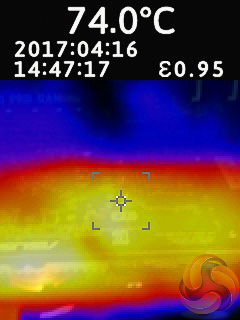
The lack of a backplate saw hotspots in the high 70s on the rear of the PCB, mainly around the VRMs. ASUS should fit a backplate, not only does it look better and add structural rigidity, but it would also bring these hotspots down into the high 50's / low 60's.
Power consumption was measured after 5 minutes of load under three scenario: Furmark, Unigine Heaven and desktop idle in sequential order with 2 minutes of downtime in between each test. The measurement was taking using an Energenie ENER007 power meter and measured for the whole system at the power supply, excluding the monitor.
While Furmark and desktop idle provide stable and consistent power read-outs, Unigine Heaven does not so the power reading is taken as the peak value that occurs in Scene 2 of 26.
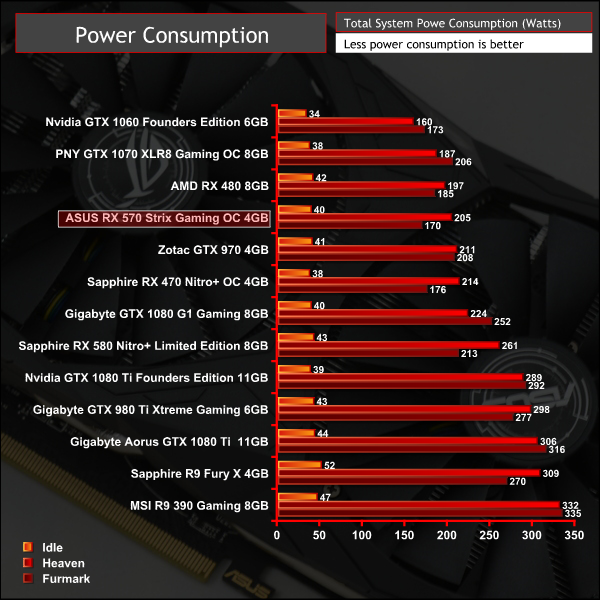
Power consumption was roughly the same as the other RX 570 on test and is higher than a stock RX 480. Overclocked RX 570s are a considerable way off the Nvidia GTX 1060 in terms of performance-per-watt.
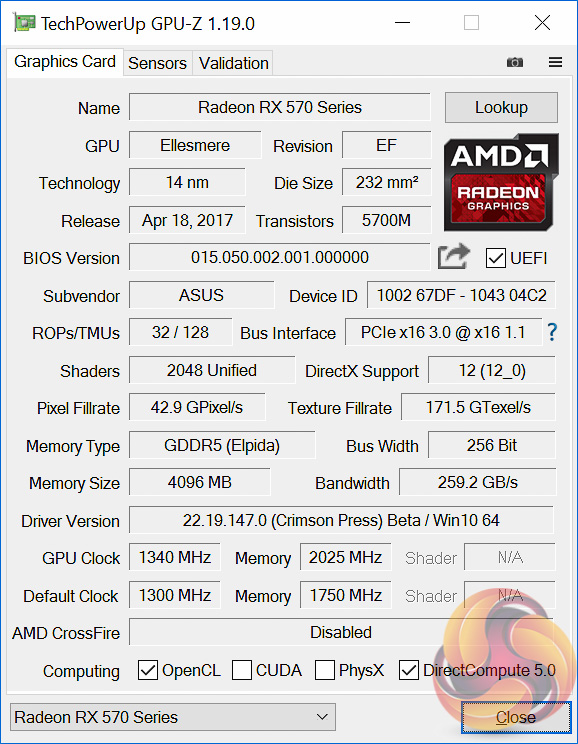
Overclocking headroom hasn't really changed, if anything it is reduced in relative terms since the out of the box frequency is now higher while the final achievable overclock frequency is roughly the same.
In past testing KitGuru achieved 1365MHz core and 1700MHz memory on the ASUS RX 470 Strix Gaming OC but with the RX 570 Strix Gaming OC the final stable clock was only 1340MHz on the core, 25 MHz less, while the memory (now using higher-rated Elpida chips instead of SK Hynix) achieved 2025MHz instead of 1700MHz.
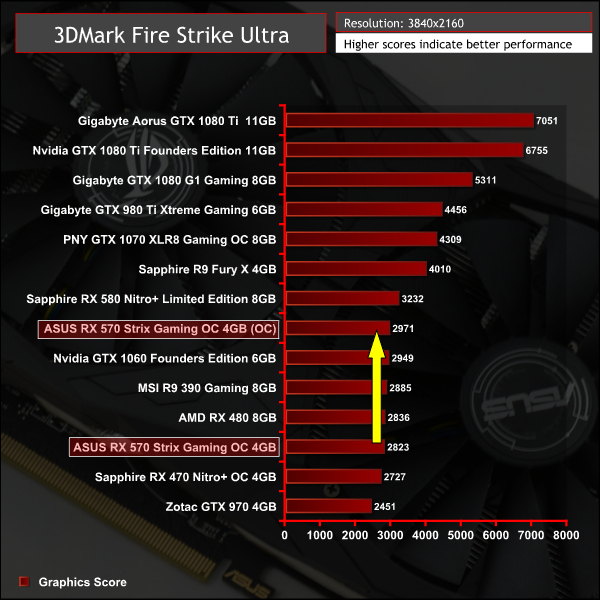
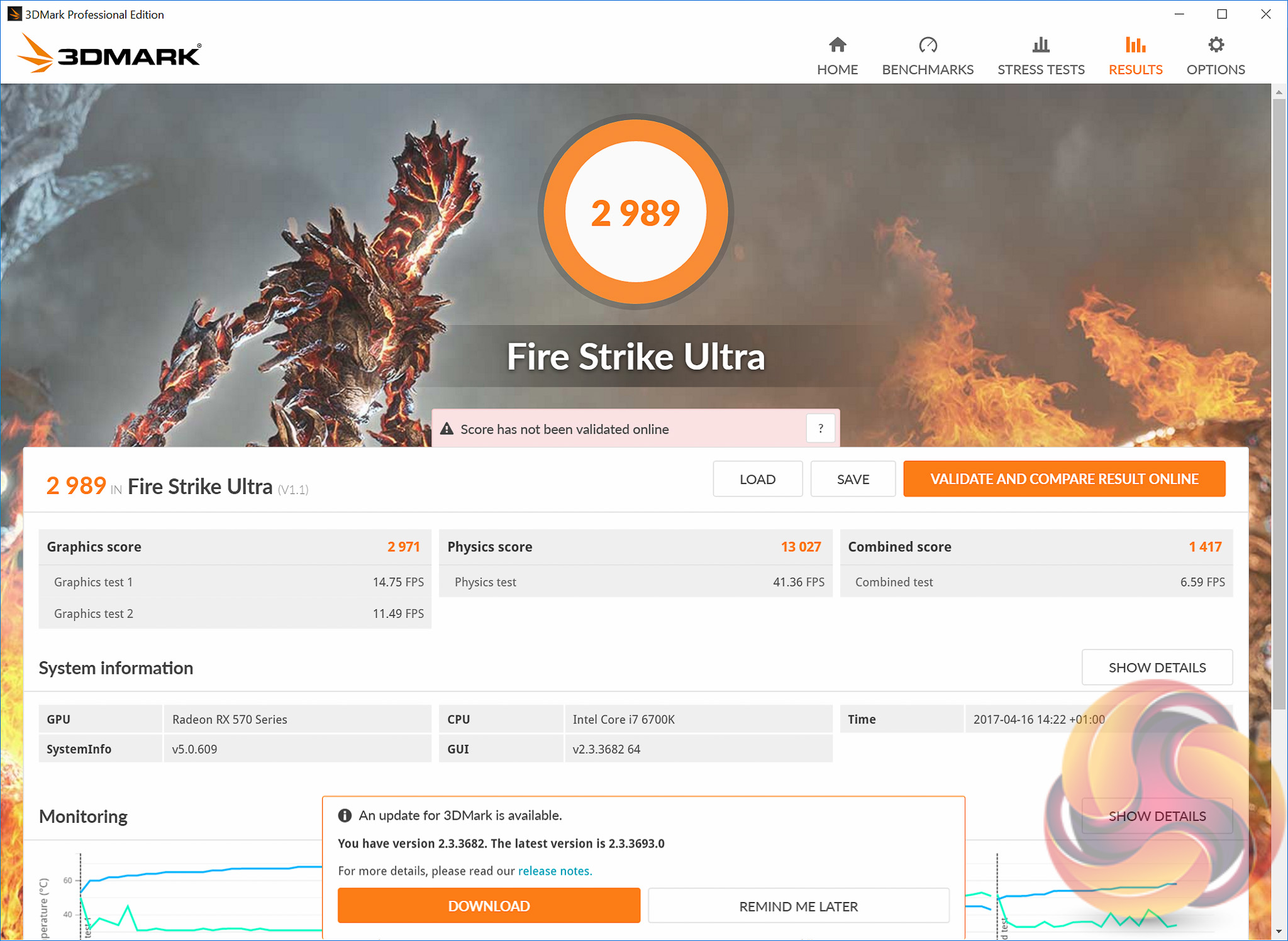
The real gain in 3D performance from overclocking, using 3DMark as a guide, was 5.25%.
Pricing is an incredibly important element of a mid-range GPU so the RX 570, just like the RX 580, will need to be keenly priced to attract buyers over Nvidia equivalents, like the GTX 1060. At present the outgoing ASUS RX 470 Strix Gaming OC 4GB graphics card, that the new RX 570 version replaces, is £169.99, which is competitively priced and falls between the GTX 1050 Ti and GTX 1060.
Whether or not AMD will expect retailers to reduce prices of existing RX 470 inventories to make way for the RX 570 remains to be seen. However, what we do know is that the RX 570 will be more expensive than the RX 470 in whichever form it arrives so we are anticipating, but have not had confirmation, that the ASUS RX 570 Strix Gaming OC should cost around £170 to £180. Any more than that and the price is getting into the realms of irrationality. ASUS offers a standard 3 year warranty with this graphics card.
3 hours before the launch AMD sent Kitguru the official UK price list for its RX 500 series:
- RX 580 8GB: £219.99 inc VAT
- RX 580 4GB: £184.99 inc VAT
- RX 570 4GB: £164.99 in VAT
An hour before the review went live ASUS confirmed the pricing of the RX 570 Strix Gaming 4GB to be £219.99, an inflated price point given the cost of its RX 470 predecessor and AMD's suggested RX 570 4GB pricing. To make the situation tougher for ASUS KitGuru has observed Nvidia GTX 1060 partner cards retailing for as little as £215 (HERE and HERE) online.
In this instance the older ASUS RX 470 Strix Gaming OC 4GB graphics card, currently retailing for £169.99 at OCUK, makes considerably more sense since it is effectively the same graphics card. Prospective buyers should heed this advice until RX 570 pricing falls or RX 470 stock runs out.
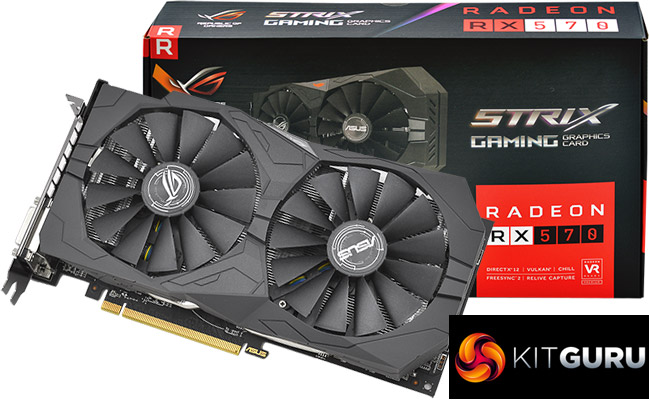
There's very little new about the ASUS RX 570 throughout our testing. Any performance gain over its predecessor stems from a clock speed advantage but that same clock speed advantage also serves to increase heat, power consumption and noise levels.
Overclocking headroom has changed very little and we actually saw a lower final core clock frequency than the RX 470-equivalent, even if the memory had better overclocking potential thanks to ASUS changing to higher frequency memory chips.
The RX 570 offers nothing new for existing RX 400 series owners and should only be considered for system owners on a mid-range budget who haven't upgraded for a good two years or more. Gamers still using crowd-favourites like the R9 390 or GTX 970 will also see no significant reason to upgrade here unless they go further up the GPU stack – RX 580, GTX 1060 or higher.
The audience the RX 570 realistically targets is using considerably older GPUs, think mid to high-end GPUs from Nvidia's GTX 600 series, GTX 700 series or AMD's HD 7000 and R9 200 series. Anyone still rocking a GTX 660, GTX 760, HD 7850/7870 or R9 270(X) would see a nice improvement in performance from AMD's RX 570.
The ASUS implementation of the RX 570 is a mixed bag. On the one hand the cooling solution is effective with impressive temperatures, the overall design is attractive, the build quality is good, particularly the Auto Extreme-assembled PCB, and there a number of nifty extra features like the onboard 4 pin fan controls and RGB lighting for the ROG logo.
Negatively, the fan profile is simply too aggressive and under prolonged heavy usage the graphics card can get unpleasantly loud. Furthermore, the lack of a backplate leaves the product looking and feeling less premium than it should and from a functional perspective it contributed to higher PCB temperatures than on rival products.

Buy from Overclockers UK for £219.99 HERE.
Discuss on our Facebook page over HERE.
Pros
- Good GPU temperatures.
- RGB lighting.
- Premium build quality.
Cons:
- Minimal improvement over RX 470 – more performance is exchanged for more heat and power consumption.
- Pricing may be a concern.
- No backplate.
- Fan profile too zealous.
KitGuru says: ASUS delivers a solid implementation of the RX 570 but it is only worth considering if the price falls closer to RX 570s from rival brands and cheaper RX 470 equivalents aren't available.

Well AMD… https://uploads.disquscdn.com/images/391b049c1e1753b69970b6cfd66cd81ceb1593cec805f6fb20b18af365a9b680.jpg
Hey Ryan, mind sharing the bios for this card? Can be dumped/submitted using gpu-z. Thanks