 KitGuru KitGuru.net – Tech News | Hardware News | Hardware Reviews | IOS | Mobile | Gaming | Graphics Cards


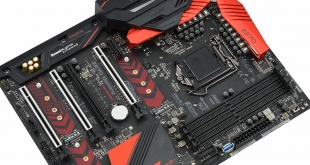
ASRock's Fatal1ty Gaming motherboards likely aren't first to mind for storage and networking connectivity but the new Fata1lty Z270 Professional Gaming i7 is jam packed – three M.2, ten SATA III, three Ethernet ports and AC WiFi .
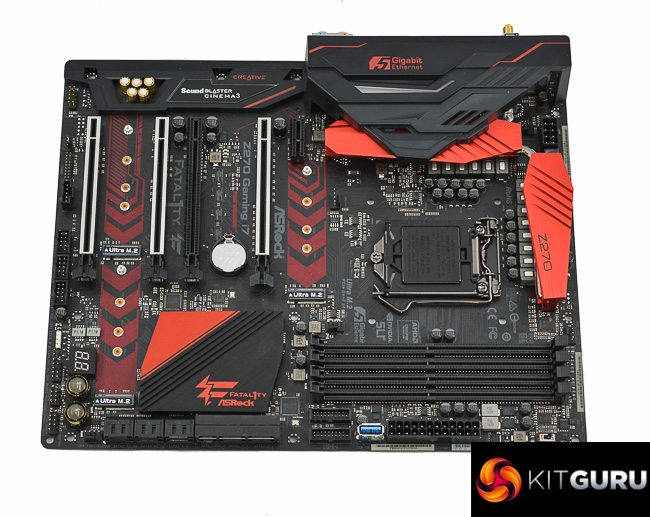
There's been relatively little pioneering of new connectivity standards for Z270 motherboards since the chipset is loaded as standard with the likes of M.2 NVMe, USB 3.0, USB 3.1, SATA III, PCIe 3.0 and DDR4. This presents no major problems either since that default connectivity covers the vast majority of consumers and Intel's user base for just about anything.
However, ASRock has decided to push the boundaries once again, this time in the realm of networking with the implementation of a 5Gbps network interface controller on the Fatal1ty Z270 Professional Gaming i7. ASRock were, incidentally, one of the first motherboard brands to push 10 Gigabit connections with the X99 WS-E/10G.
The 5Gbps controller will be compatible with a new generation of 5Gbps routers, switches and motherboards spawned from an IEEE standard finalised in late-2016. This new standard will enable 2.5Gbps (over up to 100 metres of Cat 5e cabling) and 5Gbps (over up to 100 metres of Cat 6 cabling) but we've yet to see any consumer-oriented devices take advantage of this yet.
Thankfully, the ASRock board isn't a one trick pony and has a number of other unique selling points, 5Gbps Ethernet aside. These include further networking prowess – dual Intel Gigabit LAN and Intel 802.11ac WiFi and a significant serving of storage potential. ASRock provides three M.2 ports capable of up to 32GB/s each and 10 SATA III ports, though there are naturally bandwidth sharing issues to be aware of when using these concurrently.
ASRock's also ticked other key requirements of a high-end motherboard with a number of handy overclocking buttons and features, a very well fleshed out power delivery system and full RGB lighting capability.
| ASRock Fatal1ty Z270 Professional Gaming i7 | |
| Form Factor | ATX, 30.5 cm x 24.4 cm |
| CPU Socket | LGA 1151, 14 Phase (8+4+2) VRM |
| Chipset | Intel Z270 |
| Memory | DDR4, 4 DIMMs, up to 64GB, up to 3733MHz+ with OC, 2 phase |
| Onboard Graphics | Intel HD Graphics (supported CPUs), up to 1024MB of video memory |
| Discrete Graphics | Up to Nvidia 2-way/Quad SLI, AMD 3-way/Quad CrossFireX |
| Expansion Slots | 4 x PCIe 3.0 (16X/4X/8X/4X electrical – x16/x0, x8/x8, x8/x4/x4) 1 x PCIe 3.0 |
| Storage | 10 x SATA III (6 from PCH, 2 from ASM1061) 2 x SATA Express (Shared with SATA ports 0,1,2,3) 3 x M.2 supporting NVMe 32GB/s* *M2_1 shares bandwidth with SATA 0+1, SATA Express 0 M2_2 shares bandwidth with SATA 4+5 M2_3 shares bandwidth with SATA 3, SATA Express 1 |
| USB | 6 x USB 2.0 (6 Front, via PCH) 9x USB 3.0 (4 Rear, 5 Front, 4 Rear and 1 Front vertical via PCH, Front Headers via ASM1074) 2 x USB 3.1 (2 Rear [Type-A and C], via ASM2142) |
| Networking | 1 x Intel I219V Gigabit 1 x Intel I211AT Gigabit 1 x Aquantia AQC108 5-Gigabit 1 x Intel AC 3160 2T2R 802.11ac WiFi and Bluetooth 4.0 Combo |
| Audio | Realtek ALC 1220, 7.1 Channel |
| Fan Headers | 5, all support 3/4pin fans (2 x CPU, 1 x W_PUMP, 2 x CHA) |
| Rear I/O | 2 x WiFi Antenna Ports 1 x PS/2 Mouse/Keyboard Port 1 x HDMI Port 1 x DisplayPort 1.2 1 x Optical SPDIF Out Port 1 x USB 3.1 Type-A Port 1 x USB 3.1 Type-C Port 3 x USB 3.0 Ports 1 x Fatal1ty Mouse Port (USB 3.0) 3 x RJ-45 LAN Ports with LED 1 x Clear CMOS Switch 5 x HD Audio Jacks |
| UEFI | 2 x 128Mb AMI UEFI |
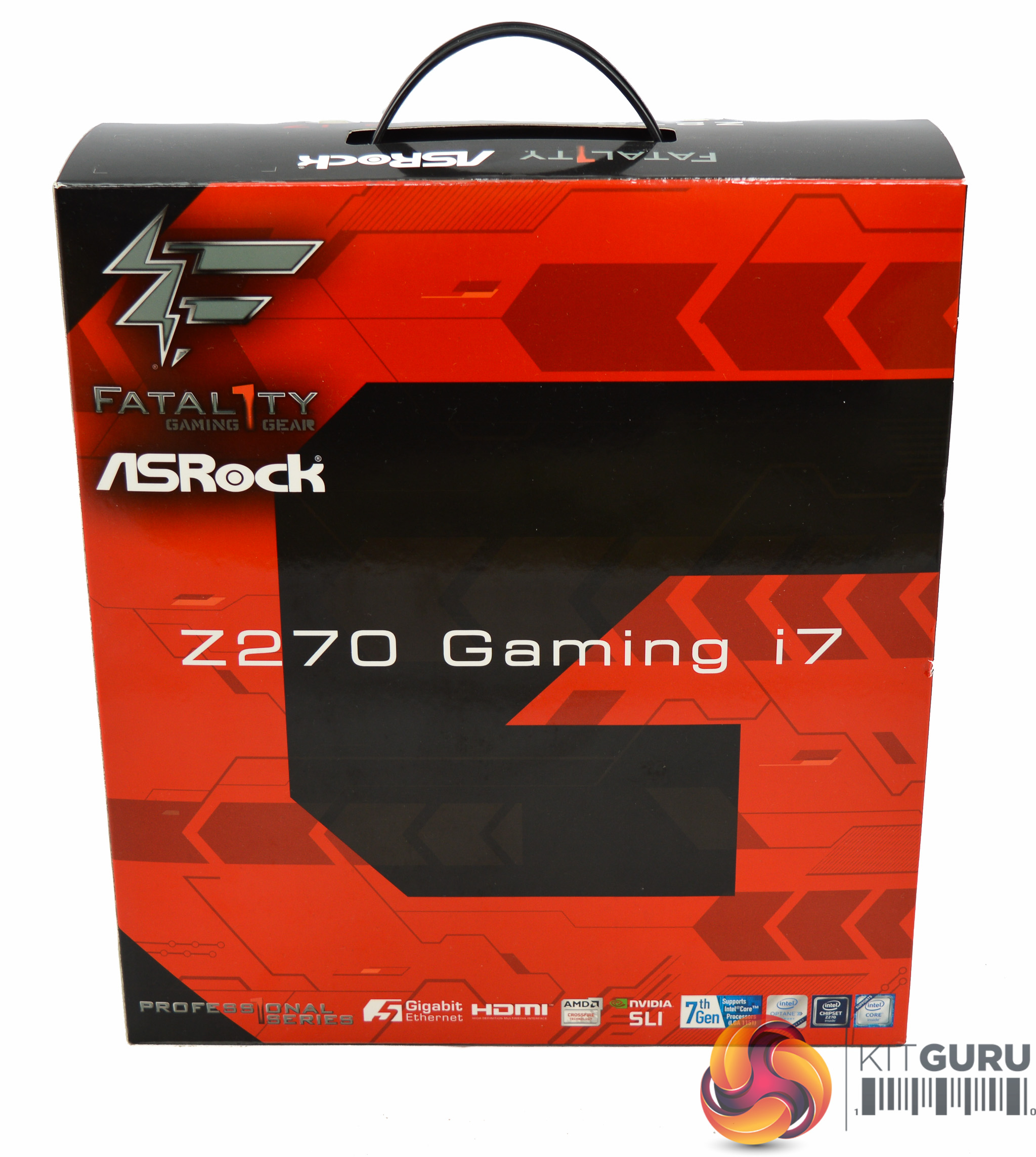
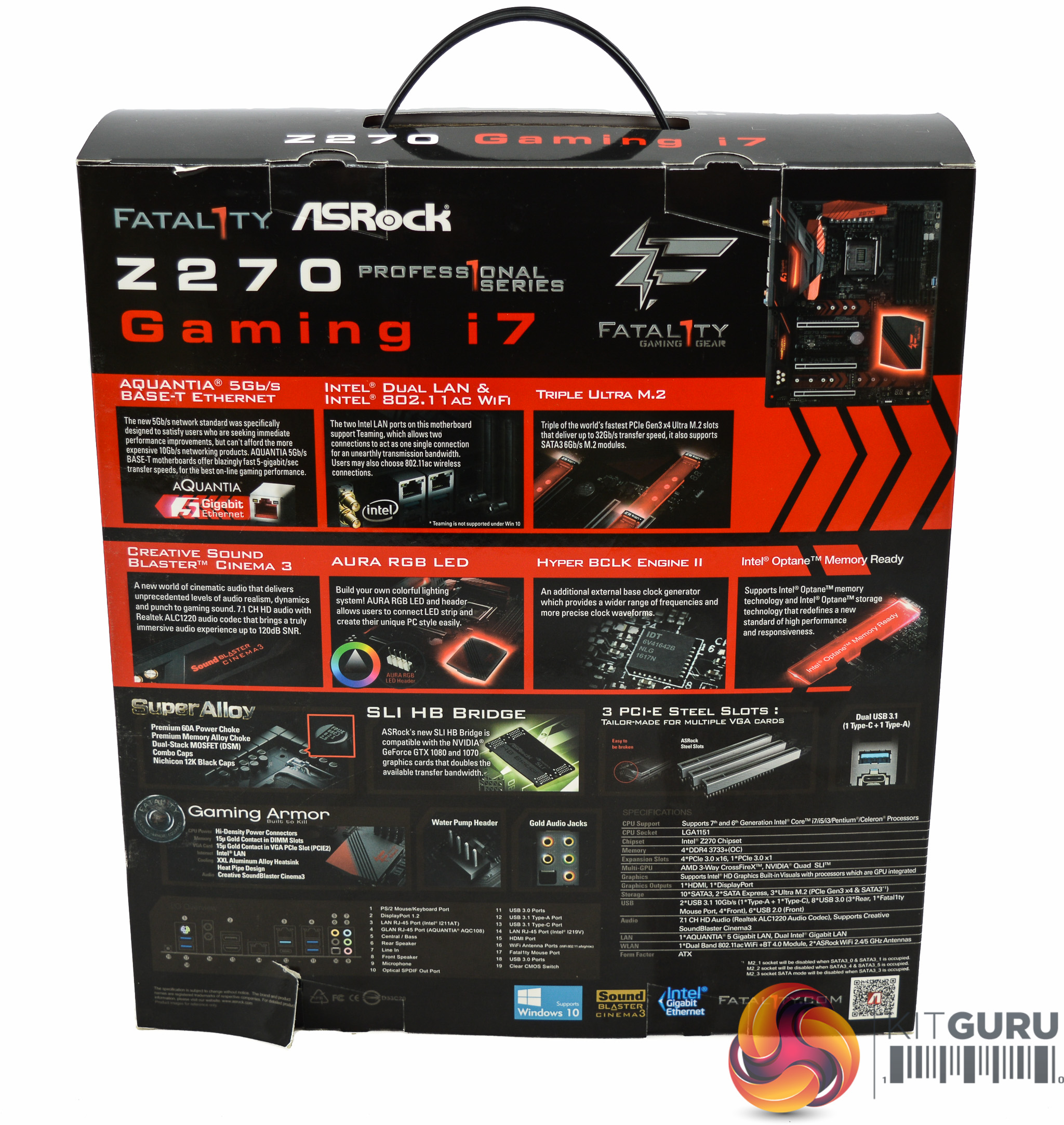
ASRock presents the Fatal1ty Z270 Gaming i7 in a large box with an integrated carry handle. ASRock goes a little marketing crazy on the box pointing out almost everything as a feature, but it's still nice to get a convincing visual presentation of this motherboard's unique selling points.
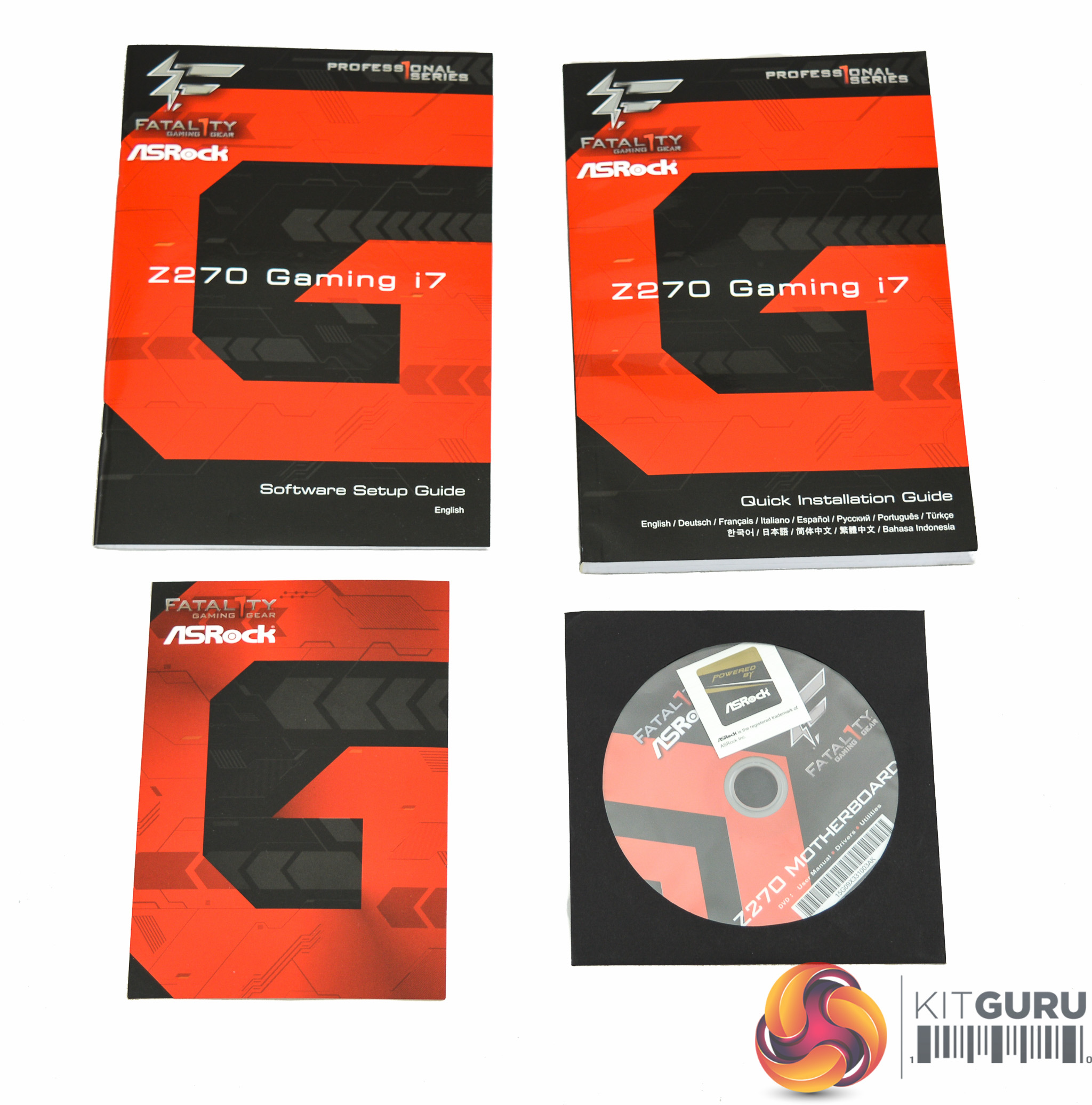

Included with the motherboard is the following:
- Software setup guide
- Quick installation Guide/User Manual
- Fatal1ty Postcard
- Driver and Utility DVD with case sticker
- SLI HB Bridge
- 2-Way SLI bridge
- Three M.2 screws
- Two WiFi Antennae
- Rear I/O Shield
- Four SATA III Cables
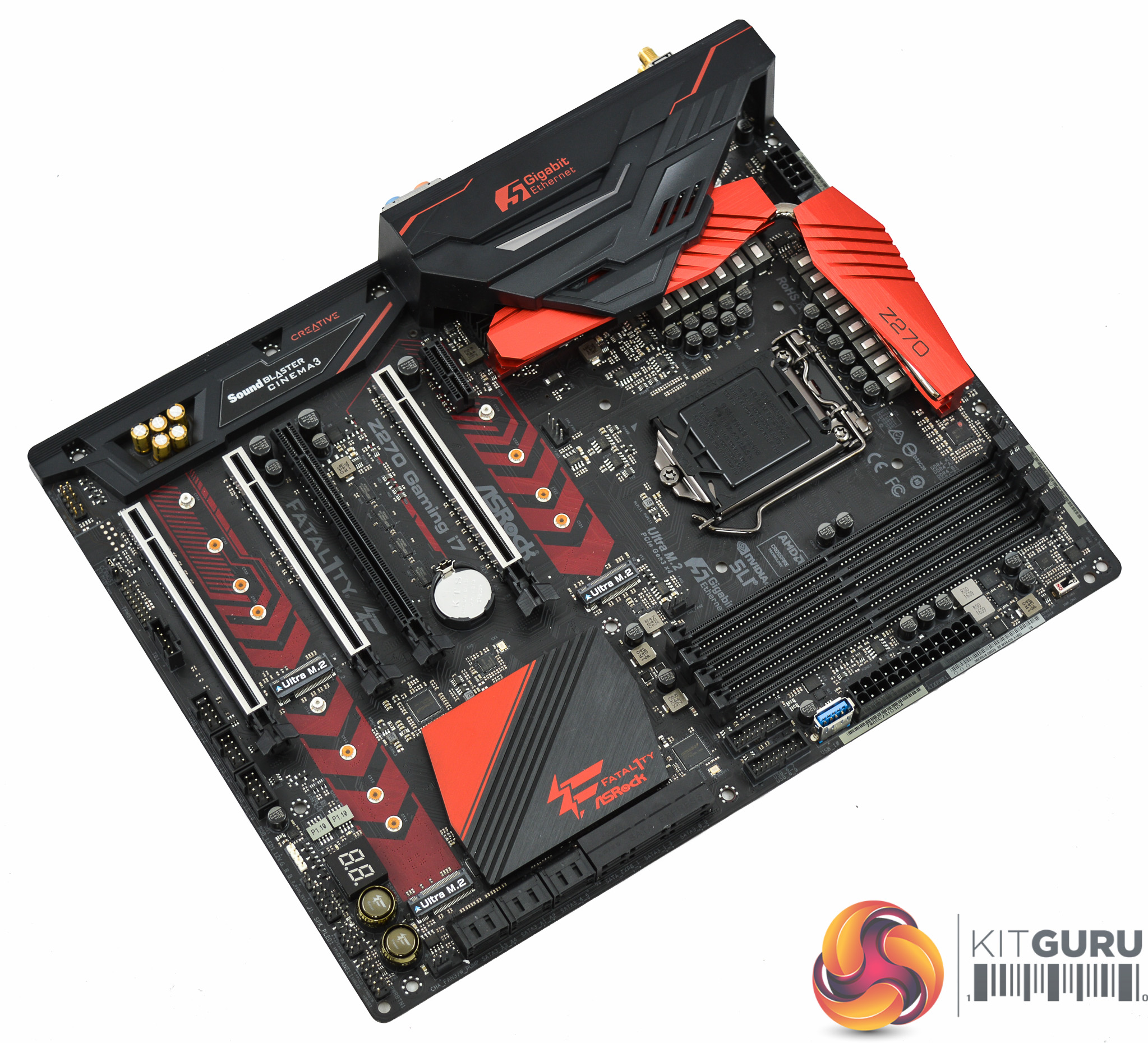
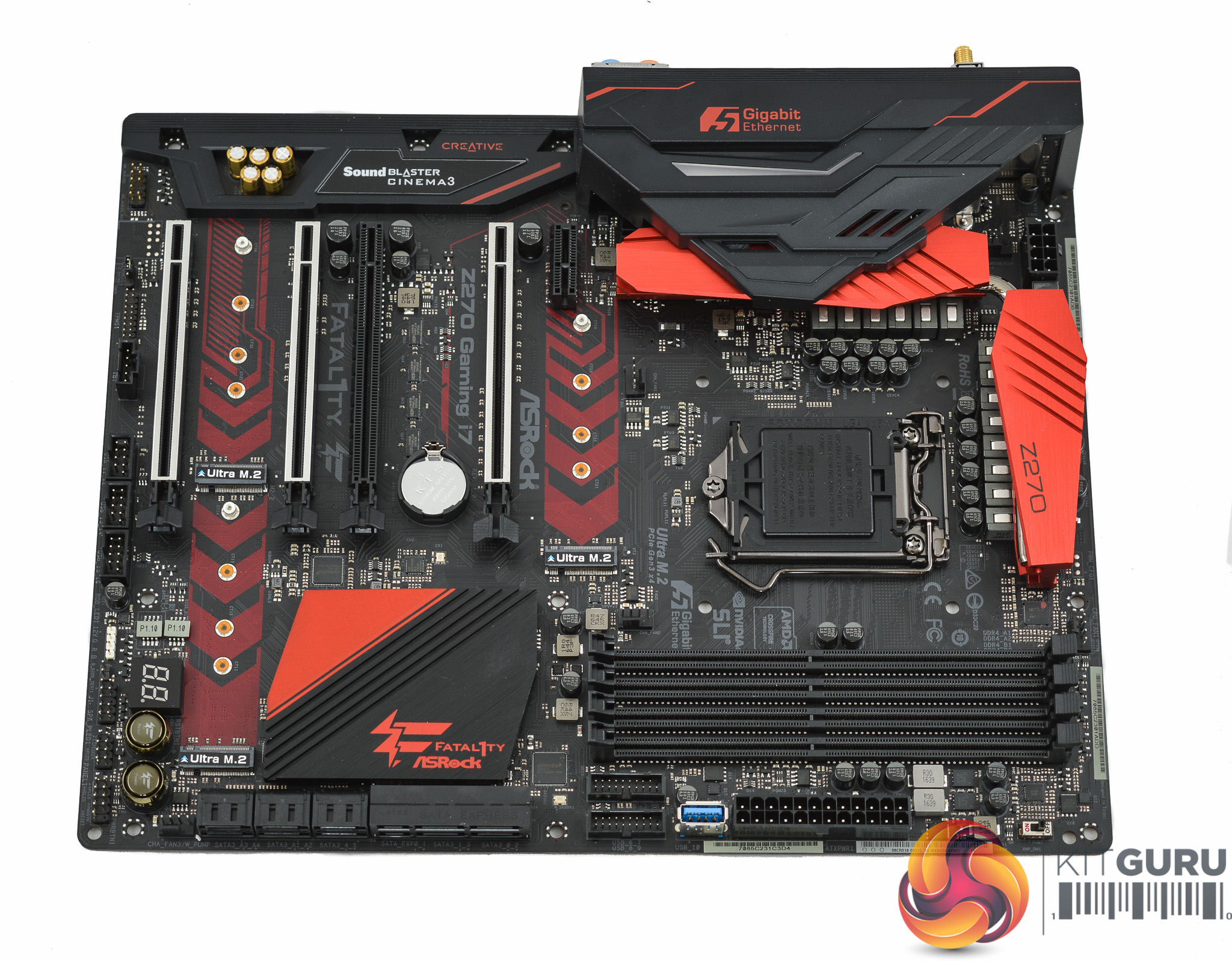
So many motherboard brands have moved away from red and black towards neutral colours for gaming motherboards that the ASRock Fatal1ty Z270 Professional Gaming i7 is almost unique again simply by sticking with it. Red and black has long been the chosen colour of Fatal1ty range so there's certainly nothing wrong with ASRock the theme to maintain its brand identity.
ASRock offers RGB capability through its AURA package which entails three independent lighting zones onboard – the PCH heatsink, audio section and rear I/O shroud. It's also possible to add an RGB strip to the provided 12v G R B header.
Overall the presentation and aesthetic of the Fatal1ty Z270 Gaming i7 is smart and well-executed – we think it's an improvement over ASRock's styling efforts on the Fata1lty X99 Gaming i7.

Running along the side of the motherboard there are ten SATA ports, four of which shared with two SATA Express ports, two USB 3.0 headers and a vertical Type-A USB 3.0 port. ASRock places an XMP switch by the memory lanes which is a tad gimmicky given you can easily enable XMP from within the UEFI.
Strangely the fan header designed CHA_FAN3/W_PUMP is the fan header located furthest away from the CPU socket. ASRock hasn't really thought about the placement since the vast majority of users will have water pumps from AIOs, not custom loops, and thus the pump is close to the CPU socket.
ASRock did a similar thing with the Z270 Extreme4, marking the fan header near the front panel I/O as the W_PUMP one. In practice you can use any fan header for your pump so it's certainly not a deal breaker.
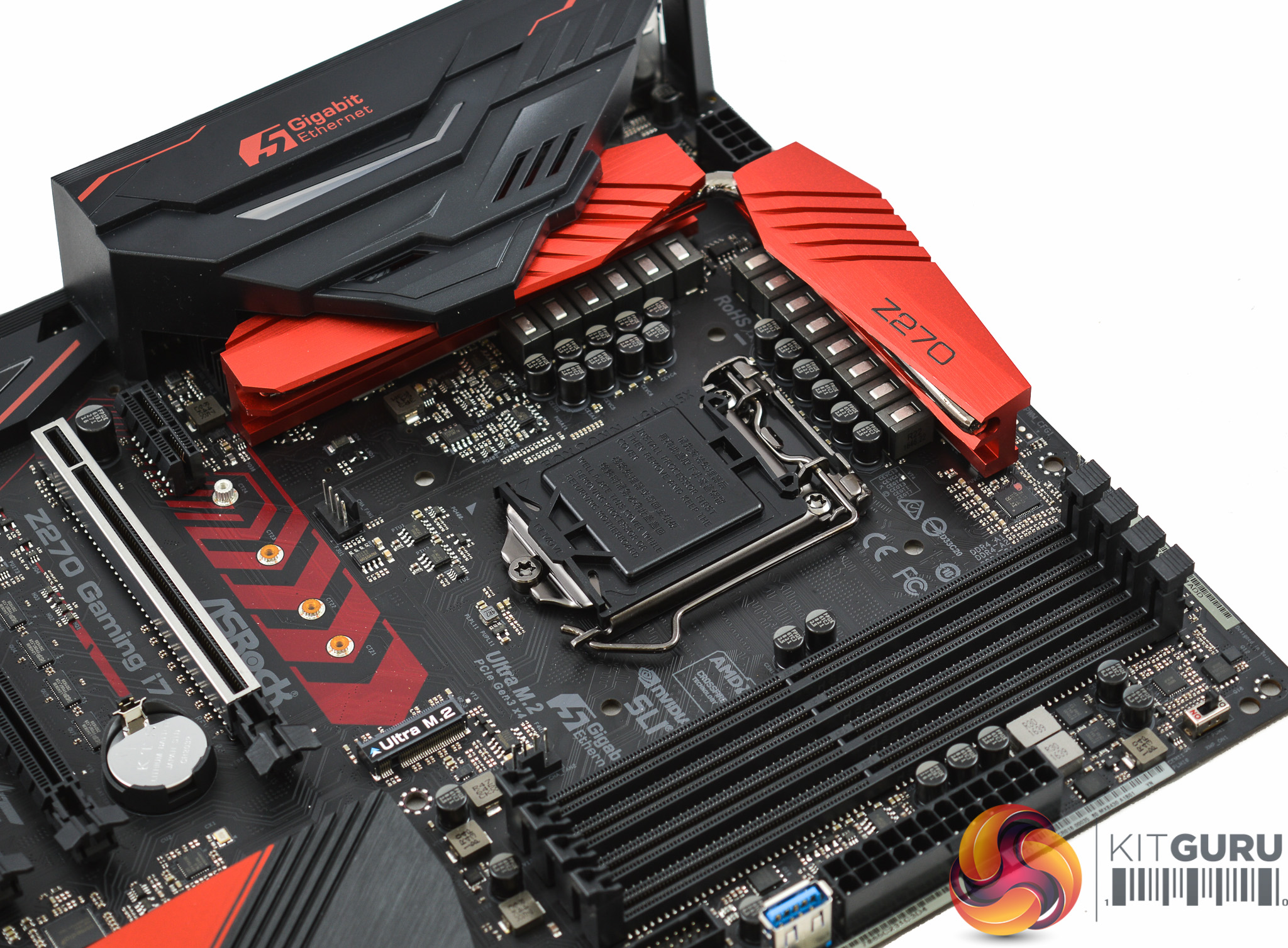

The power delivery system on this board uses an 8+4+2 (CPU+iGPU+VCCSA/VCCIO) phase design for a total of 14 phases. This is a little better equipped than some of the competition, such as the MSI Z270 Gaming M7, and the overall quality of the components is high with the use of 60-amp power chokes (inductors) and Nichicon 12K-rated capacitors.
Overall this is a strong power solution and is well-placed to hold stable those long-term overclocks.
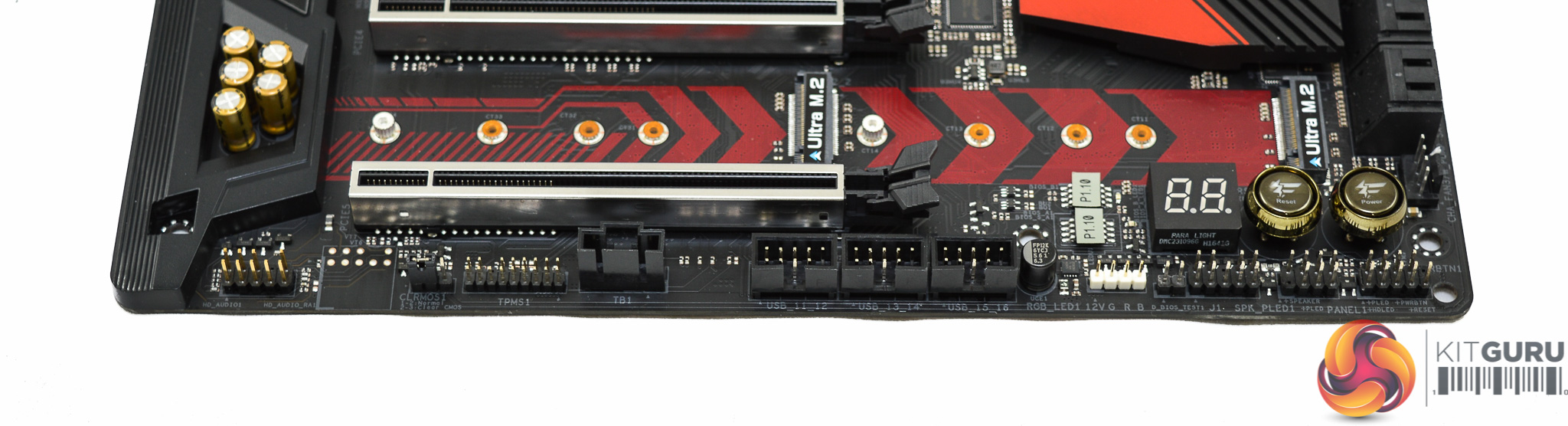
Connectivity at the base of the motherboard includes an ample three USB 2.0 headers, a 12v G R B header for LED strips, power & reset buttons and a debug code reader.
Note that ASRock no longer has swappable UEFI BIOS chips since they are soldered to the board, but there are two so they can be used for recovery and failover.
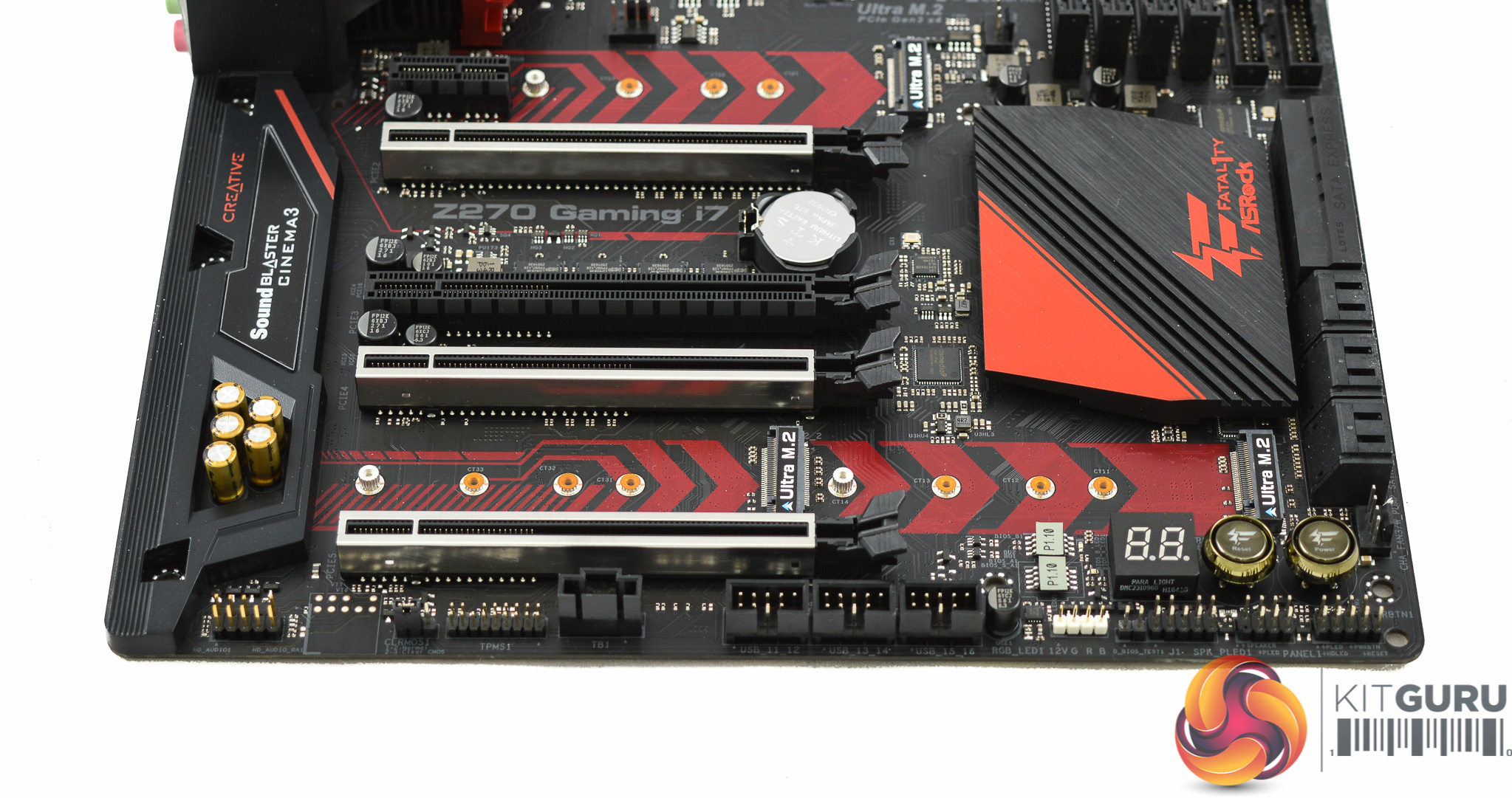

Three of the PCIe x16 lanes are shielded with the intention that graphics cards should be used in these slots. You can populate all three with AMD GPUs for up to 3-way CrossFireX or 16x slots 1 and 3 for up to Nvidia 2-way SLI. As mentioned previously you can get x16/x0/x0, x8/x8/x0 or x8/x4/x4 when using 1, 2 or 3 GPUs in these shielded slots.
The three M.2 slots are well placed in and around the PCIe lanes to the point where no connectivity is obviously lost to make room for these. ASRock has managed to shrink the size of the PCH heatsink to find some of this extra space. All three M.2 slots support the maximum size of 11cm and all will perform up to 32Gbps through NVMe. However, if all three M.2 slots are populated you will end up losing five of the ten total SATA ports of which all of those 5 are the chipset-powered SATA ports. This perhaps explains why ASRock felt compelled to add the ASMedia SATA controller to provide additional SATA ports.
The logic with three M.2 slots, at the expense of any U.2, is also a well-grounded one in that you can convert M.2 into U.2 easily with an adapter, but not the other way around.
The audio solution is a standard Realtek ALC1220 package, which includes a headphone amplifier (Texas Instruments NE5532), implemented on an isolated PCB and married to high quality Nichicon Fine Gold series audio capacitors.

The rear I/O is networking heavy with three Ethernet ports and wireless antennae, this means there's been less space for USB ports. In total you get just four USB 3.0 ports and two USB 3.1, of which one is type-C. ASRock does, however, provide PS/2 for overclockers and general users who have a penchant for old peripherals.
- 2 x WiFi Antenna Ports
- 1 x PS/2 Mouse/Keyboard Port
- 1 x HDMI Port
- 1 x DisplayPort 1.2
- 1 x Optical SPDIF Out Port
- 1 x USB 3.1 Type-A Port
- 1 x USB 3.1 Type-C Port
- 3 x USB 3.0 Ports
- 1 x Fatal1ty Mouse Port (USB 3.0)
- 3 x RJ-45 LAN Ports with LED
- 1 x Clear CMOS Switch
- 5 x HD Audio Jacks

Underneath the motherboard are a selection of Philips-head screws which make for easy disassembly and maintenance of the motherboard for watercooling and overclocking enthusiasts.
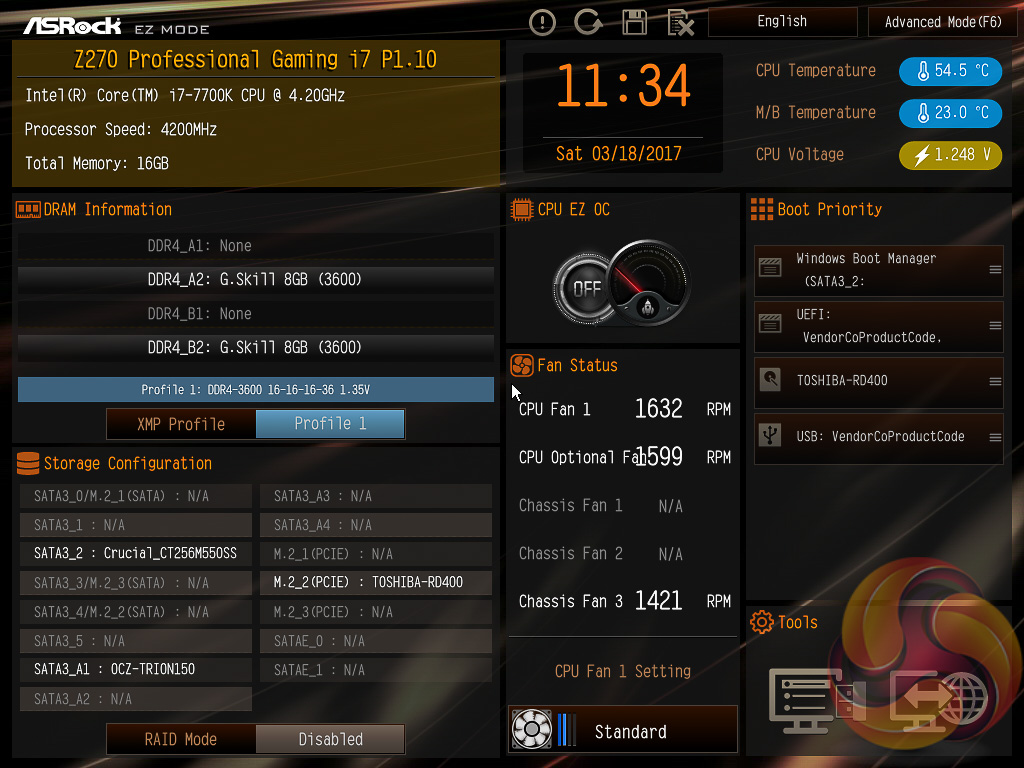
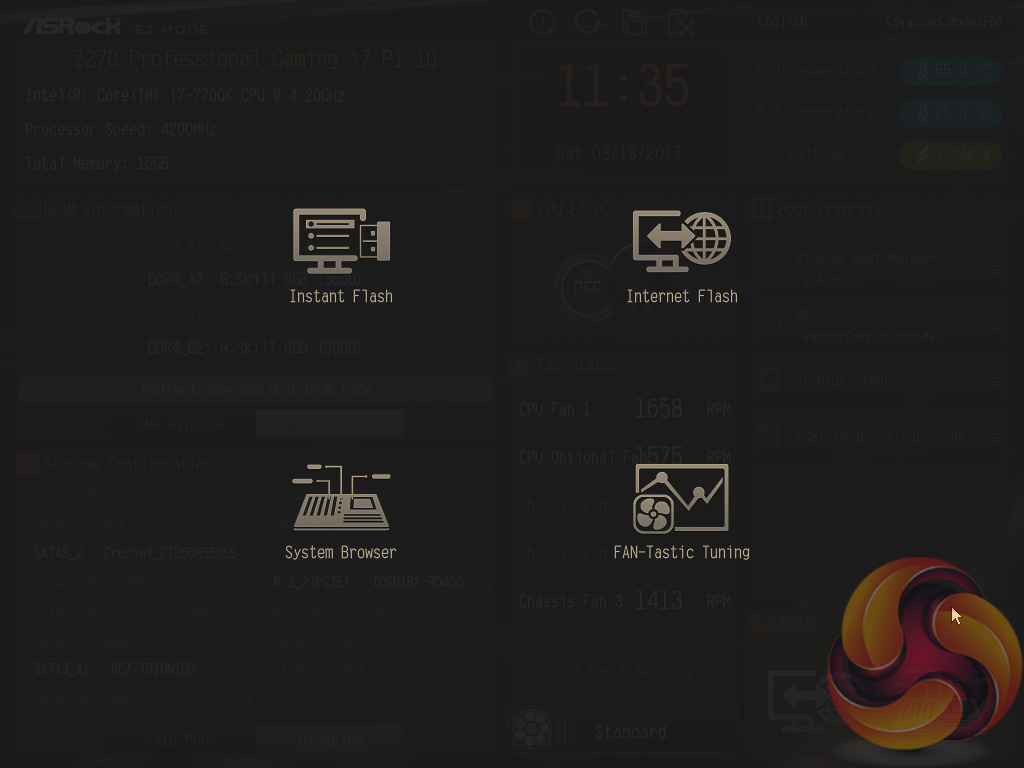
ASRock's UEFI with the Fatal1ty Z270 Professional Gaming i7 is largely identical between all of its Z270 motherboards, except themed-differently to reflect product branding.
The first screen that is viewed upon entering the UEFI is the EZ Mode with commonly used settings like boot order, XMP and fan speeds. There's also a link to the various tools available within the UEFI which includes the instant flash from local storage or the internet, a system browser and the fan tuning utility “FAN-Tastic”.
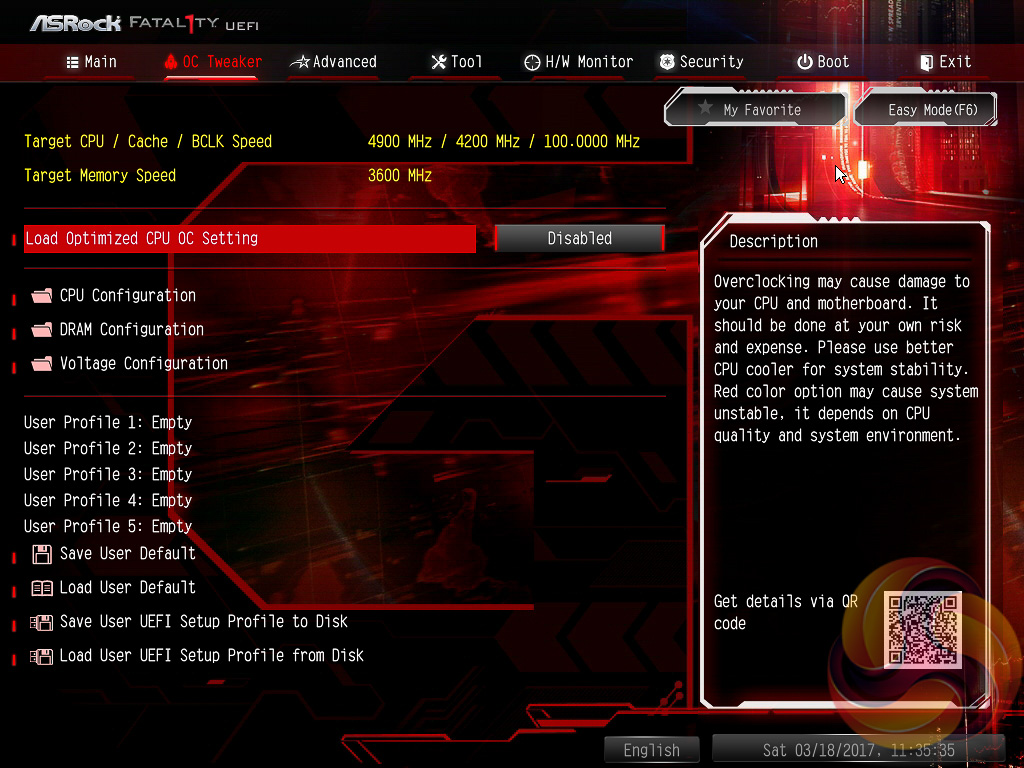
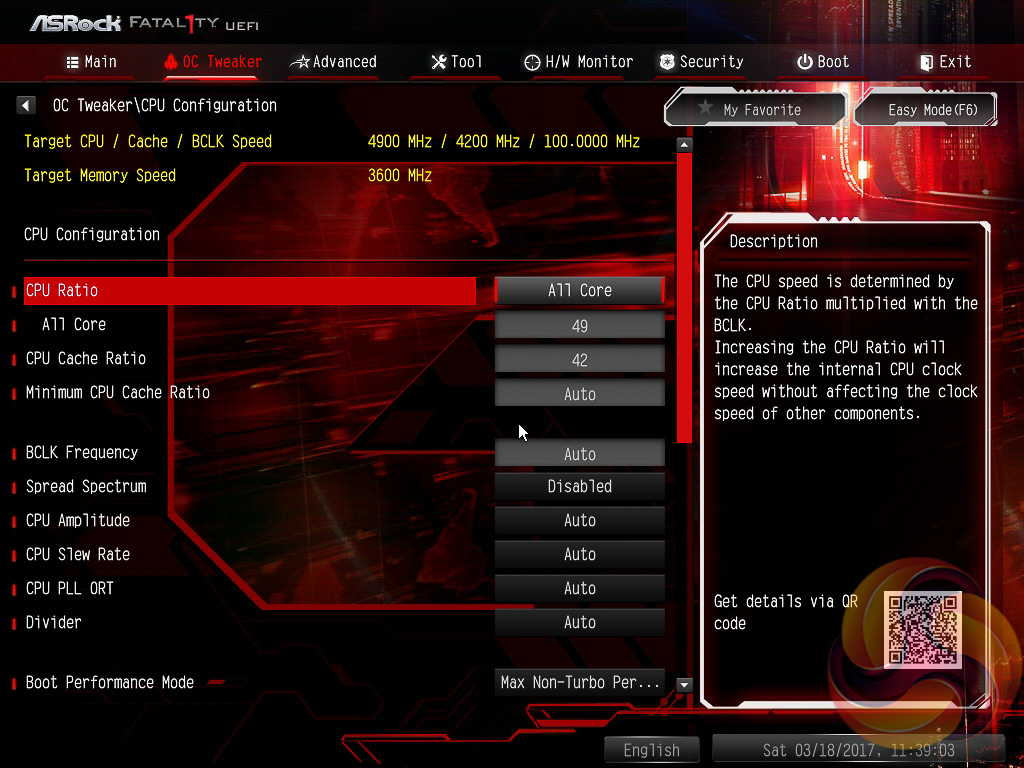
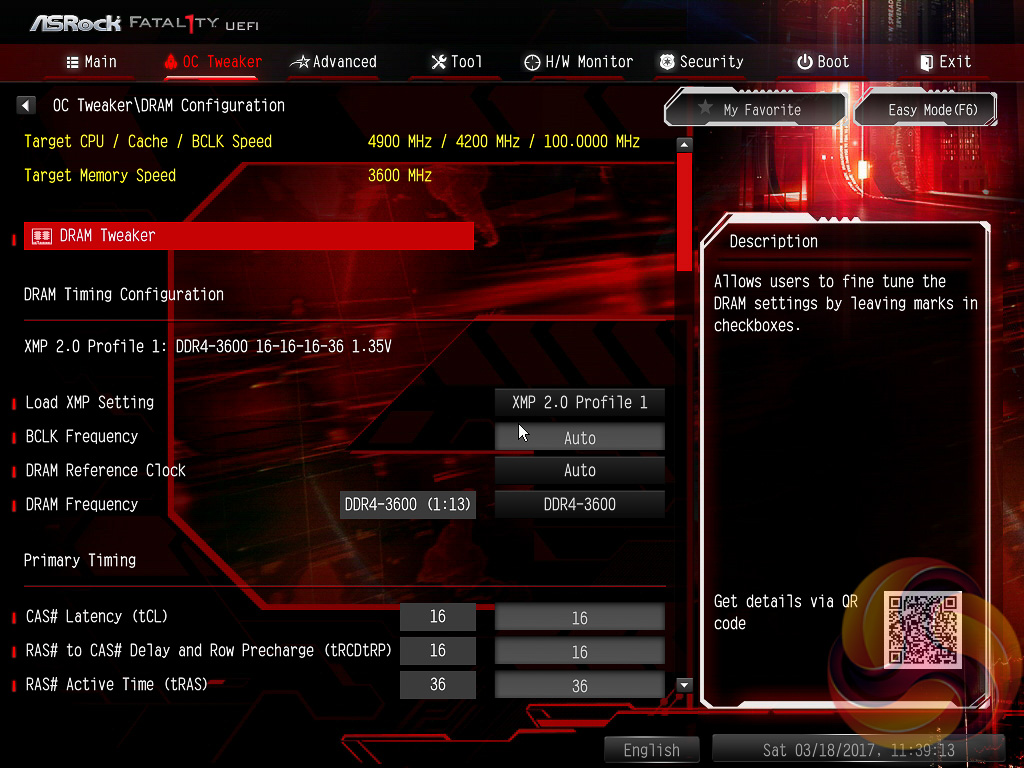
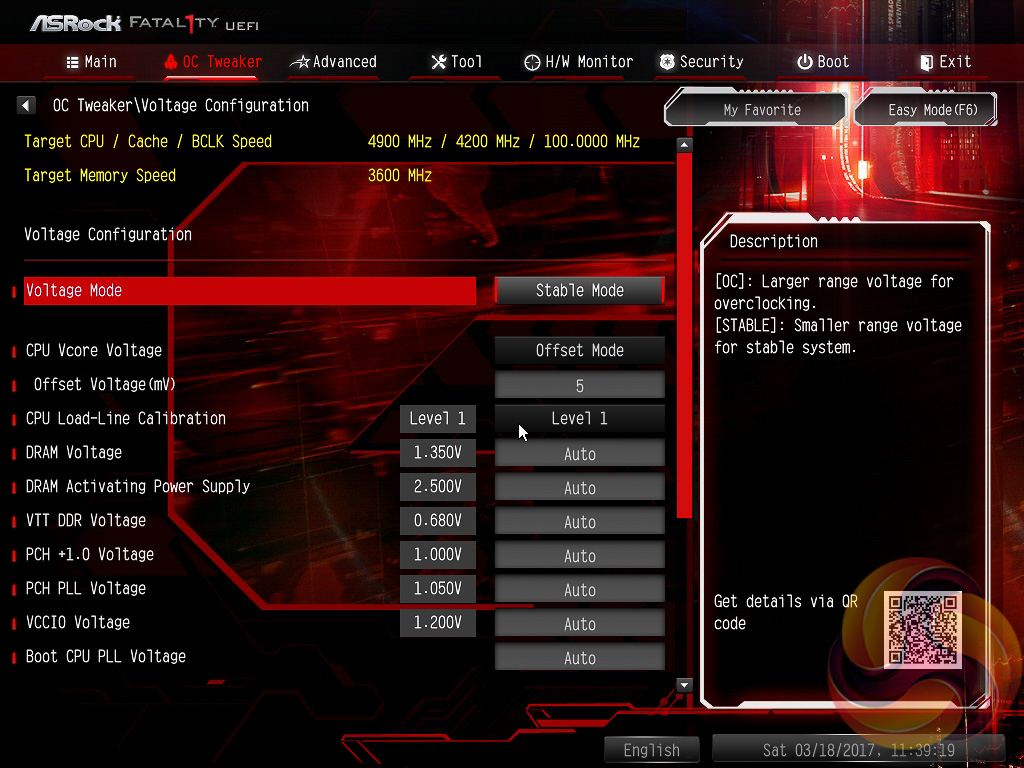
The heart of the performance tuning is the OC Tweaker section within which ASRock splits off the adjustment options into CPU, DRAM and Voltage as well as offering a number of pre-defined OC profiles for certain CPUs.
These profiles were as follows for our i7 7700K:
- 5GHz (50 x 100) – 1.45 volts
- 4.9GHz (49 x 100) – 1.42 volts
- 4.8GHz (48 x 100) – 1.38 volts
- 4.7GHz (47 x 100) – 1.35 volts
- 4.6GHz (46 x 100) – 1.35 volts
As is often the case any tweaking and tuning is best done manually, taking the time to understand what each CPU is capable of within the cooling environment it is placed. Even the 4.6GHz profile, with 1.35 volts, is likely too much voltage for any air-cooled or mid-level AIO-cooled system. Some i7 7700Ks have achieved 4.9 to 5.1 GHz using only 1.3 volts so ASRock's programmed voltages are decidedly high.
The OC Tweaker section is good in terms of the options and granularity the user has to tune their hardware. However, the layout could be more intuitive and having to constantly tab back between CPU Configuration and Voltage Configuration, when many of these options should be on the same screen, is a little tedious. We'd also like to see more CPU voltage operational mode options such as Adaptive, Adaptive + Offset and so on (these are offered by MSI).
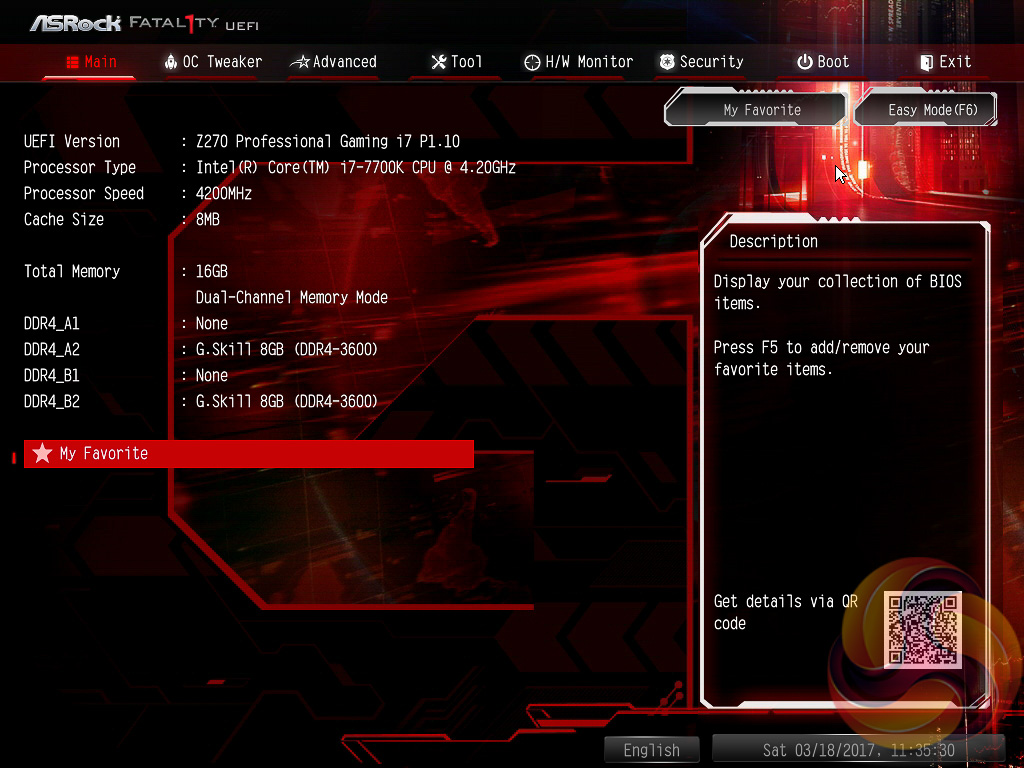


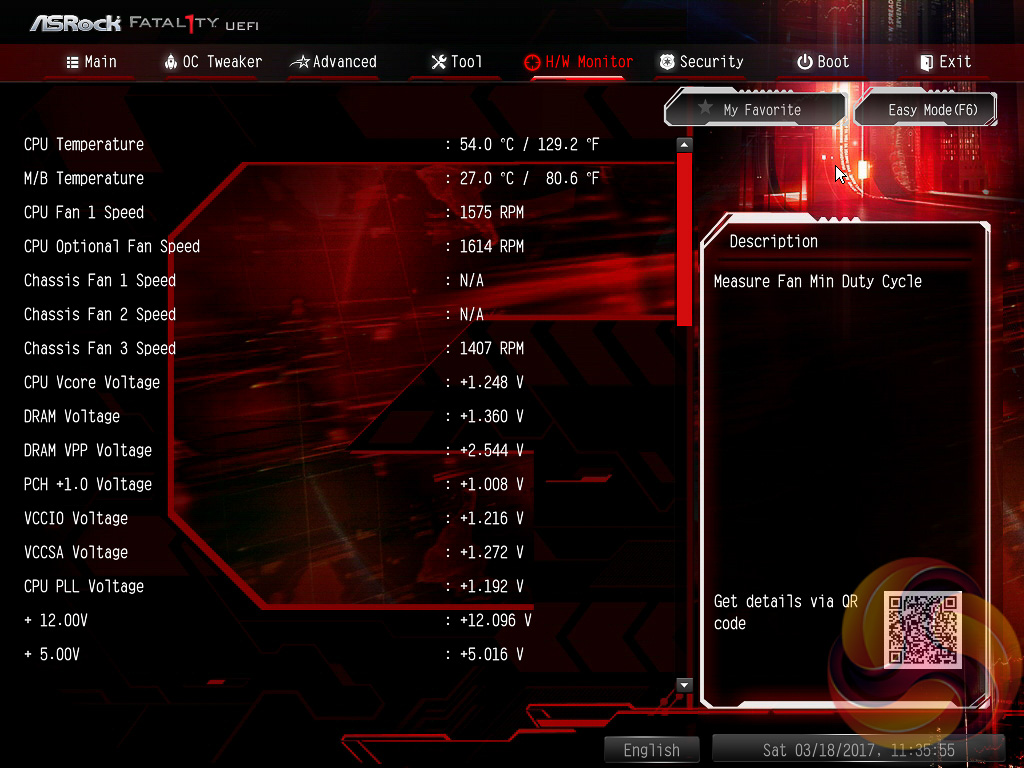
The pick of the settings in the Advanced section include the CPU Power Management Controls, which may come in useful for certain overclocking scenarios, and the graphics configuration options for anyone using the onboard graphics of Intel’s CPUs.
The Tools section holds a number of handy utilities such as for updating the UEFI (including via the internet) and managing the RGB LEDs, among other things.
H/W Monitor contains fan controls and a number of temperature readouts for monitoring. The fan options are plentiful with a variety of fan profiles, temperature input options and hysteresis options (time delays between fan speed changes).


The RGB controls are available through the AURA RGB LED option, and mirrors the software interface, or through the Project AURA tab (enabled by Ctrl+Shift+F4). The AURA RGB LED section is easier to use and visually simpler so most users should use this unless they want to create very specific colours and lighting patterns.
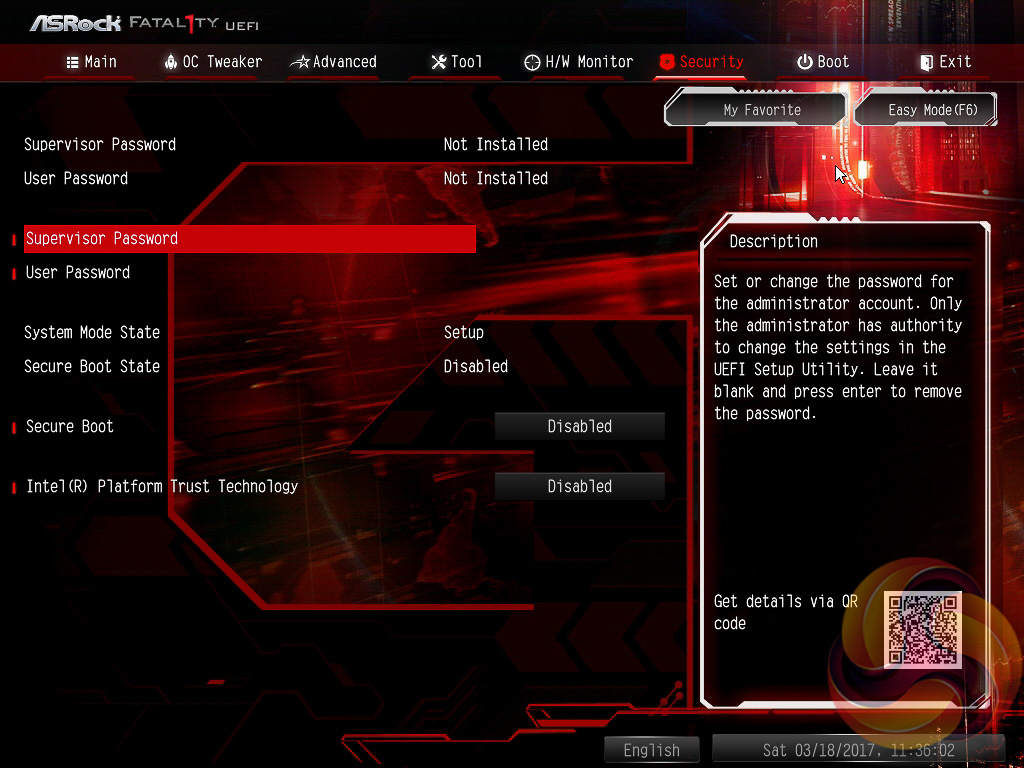
Security, Boot and Exit make up the last three tabs. There aren’t many interesting options within these but the boot tab does contain a number of useful options for boot order and changing how quickly the motherboard proceeds through the POST procedure.
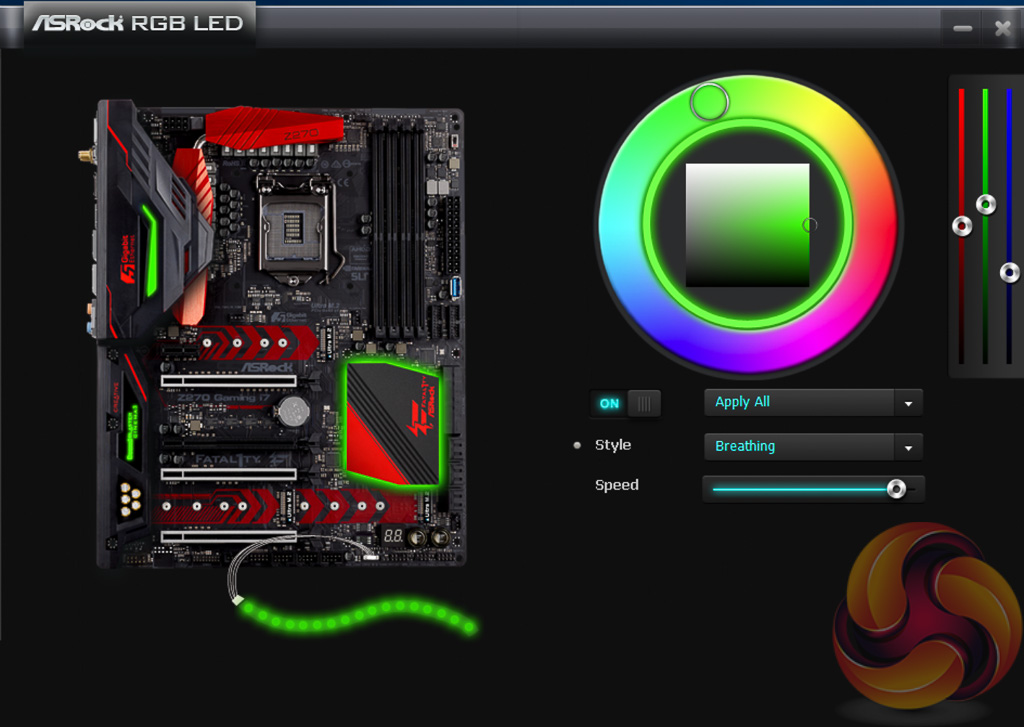
The AURA RGB software is the utility most likely to be installed by owners of this motherboard, though even this is not compulsory since RGB adjustments can be made within the UEFI. The software is simple but effective as you can easily adjust colours and operational modes independently or to all LED zones simultaneously. There's definitely room to add more functionality and features but sometimes the simple implementation is the best.
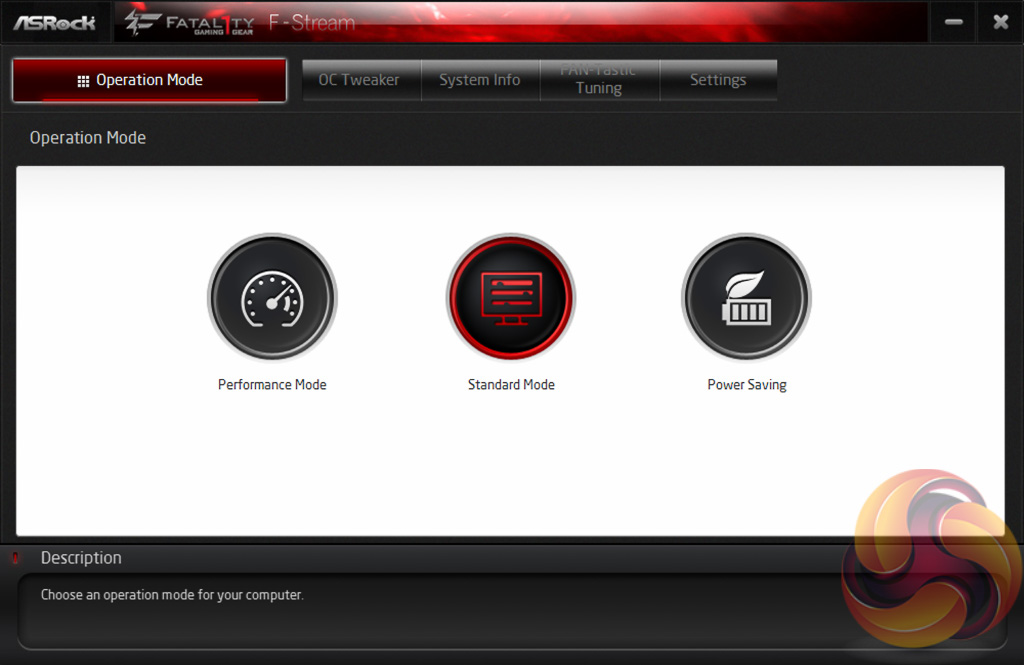
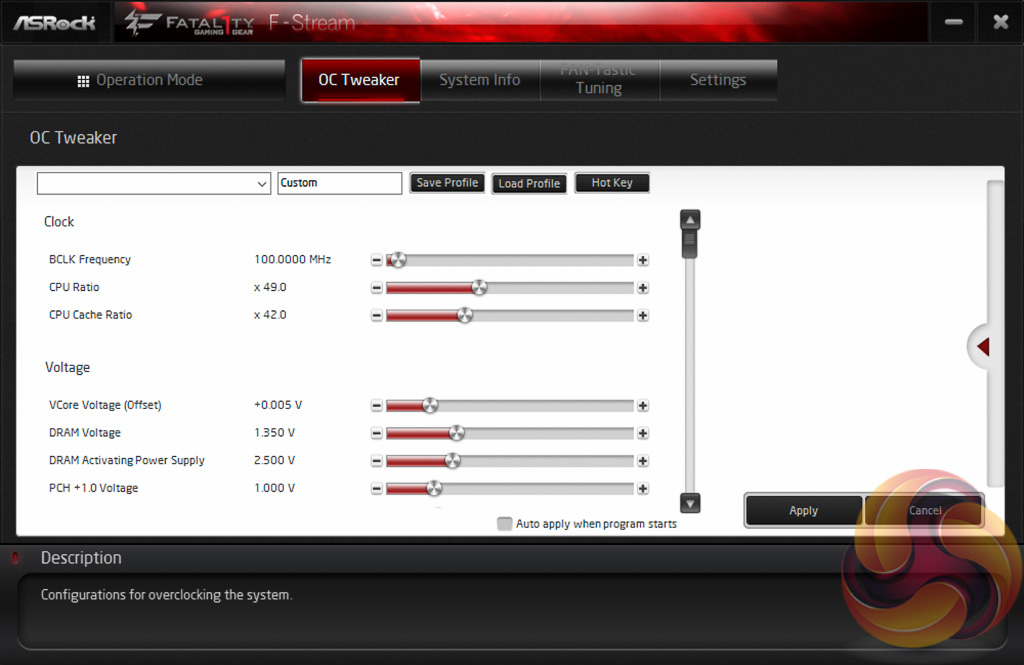
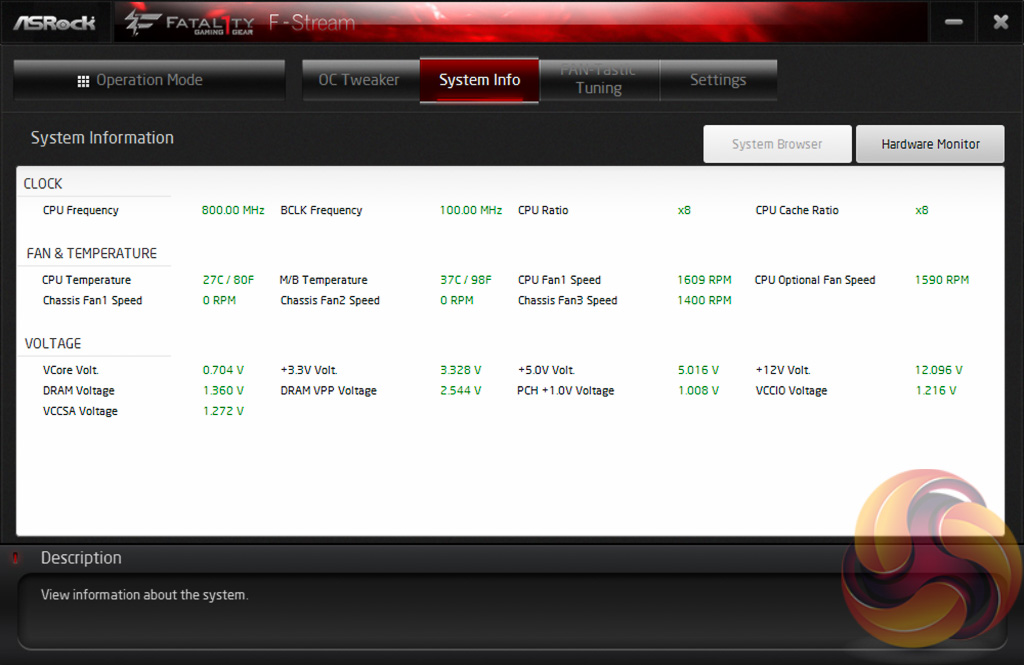
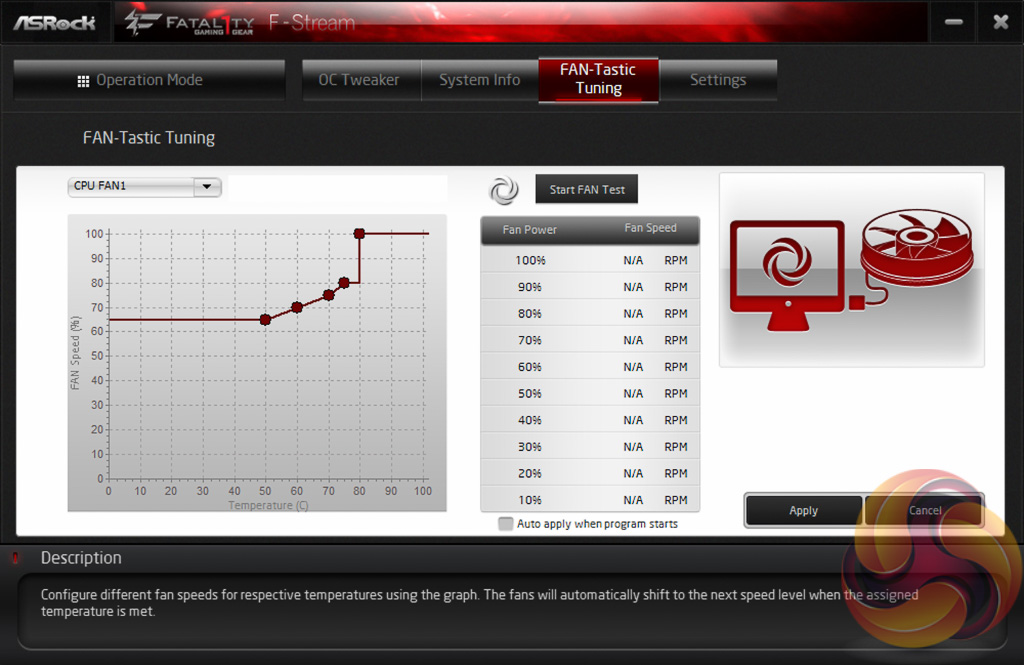
F-Stream, the Fatal1ty-branded A-Tuning, is ASRock’s equivalent to ASUS AI Suite, Gigabyte EasyTune and MSI Command Centre. This software allows you to overclock on the fly (OTF) and tune the fan speeds with the ASRock Fan-Tastic tuning. It’s a reasonably well polished piece of software, is light on system resources and not very intrusive.
In our experience the fan tuning is still better off carried out within the UEFI environment as it has more options and is more granular, the same applies for OTF overclocking, but there's no harm in ASRock offering the software equivalent.
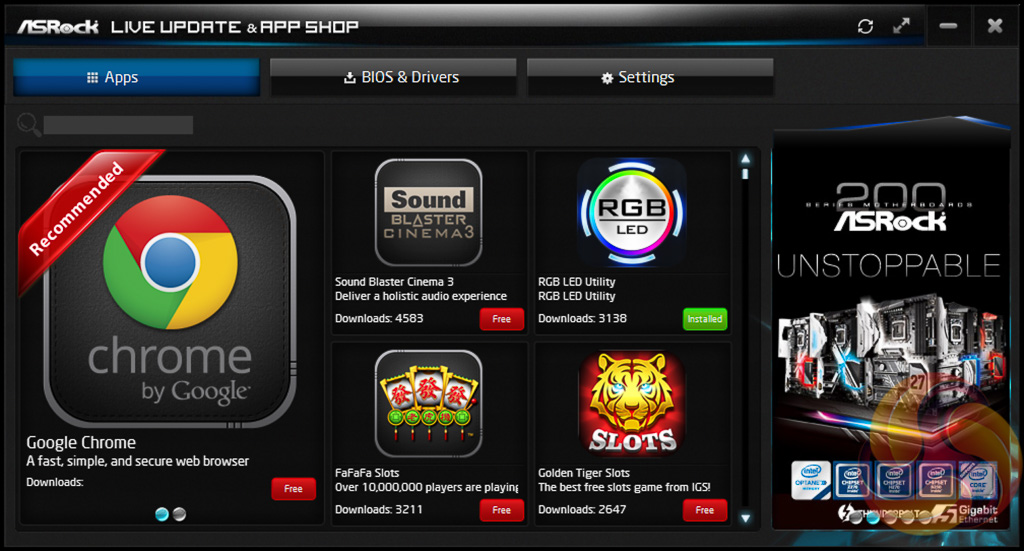
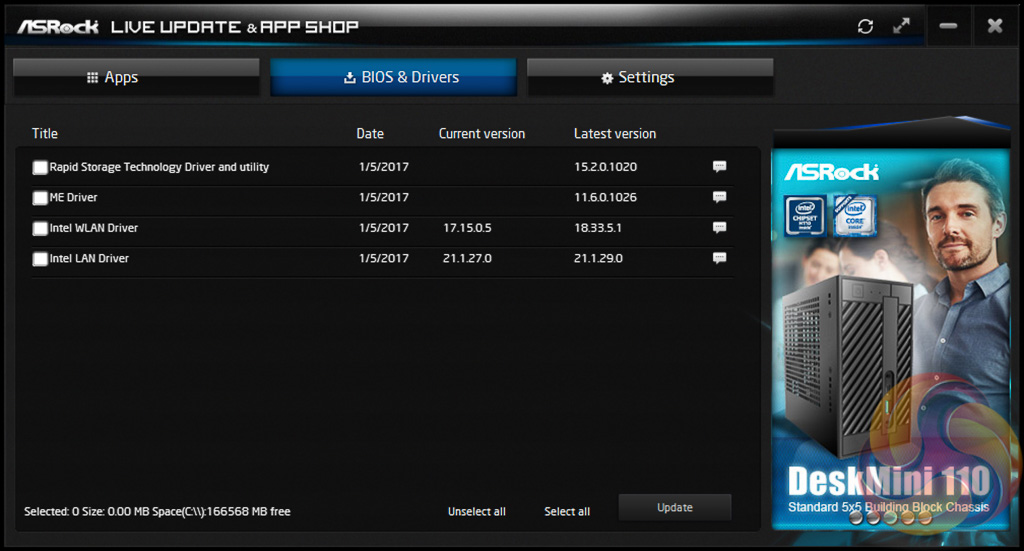
ASRock’s App Shop provides the dual role of serving out ASRock’s own software and approved third party software, but also includes a Live Update-style function which scans for certain BIOS and driver versions and informs the user when a newer version is available. It’s reasonably useful for both of its provided functions and isn’t too intrusive, but does pop up the occasional notification in Windows 10.
We will be outlining the ASRock Fatal1ty Z270 Professional Gaming i7 motherboard's performance with the Core i7 7700K CPU and 32GB of 3200MHz G.Skill Trident Z DDR4 memory.
By default the ASRock Fatal1ty Z270 Professional Gaming i7 motherboard applies a multi-core turbo (MCT) state and forces the 7700K to a constant 4.5GHz when XMP is enabled. Overclocked performance will be outlined later in the review.
Z270 Motherboard Test System:
- Processor: Intel Core i7 7700K (4.5GHz All-Core Turbo).
- Memory: 32GB (4x8GB) G.Skill Trident Z XMP (3200MHz 16-18-18-38 @ 1.35V).
- Graphics Card: Gigabyte GeForce GTX 1080 G1 Gaming.
- System Drive: Crucial M550 256GB SSD.
- CPU Cooler: Corsair H100i V2 with Two ML120 Pro Fans.
- Power Supply: Seasonic Platinum 760W SS-760XP.
- Operating System: Windows 10 Pro 64-bit
Comparison Z270 Motherboards:
- ASRock Fatal1ty Z270 Professional Gaming i7
- ASRock Z270 Extreme4
- ASUS ROG Maximus IX Apex
- ASUS ROG Maximus IX Formula
- Gigabyte Z270X-Ultra Gaming
- MSI Z270 Gaming M7
Drivers and UEFI:
- Intel Chipset 10.1.1.38
- Nvidia GeForce 376.33 VGA drivers.
- ASRock UEFI P1.10 (10/01/2017)
Tests:
- Cinebench R15 – All-core CPU benchmark (CPU)
- HandBrake 1.0.0 – Convert 6.27GB 4K video recording using the Normal Profile setting and MP4 container (CPU)
- SiSoft Sandra 2016 SP1 – Processor Arithmetic Test (CPU) and Memory Bandwidth Test (Memory)
- 7-Zip 16.04 x64 – Built-in 7-Zip benchmark test (CPU)
- AIDA64 Engineer 5.80.4000 – System stress test and cache & memory benchmark (Memory and Power)
- 3DMark Fire Strike v1.1 – Fire Strike (1080p) test (Gaming)
- Ashes of the Singularity – Built-in benchmark tool CPU-Focused test, 1920 x 1080, Extreme quality preset, DX12 version (Gaming)
- Metro: Last Light Redux – Built-in benchmark tool, 1920 x 1080, Very High quality, SSAA, AF 16X, Tessellation: High (Gaming)
- ATTO – M.2, USB 3.0, USB 3.1, and SATA 6Gbps transfer rates (Motherboard)
- RightMark Audio Analyzer – Record and playback test using a line-in to line-out loopback with a 3.5mm audio cable (Motherboard)
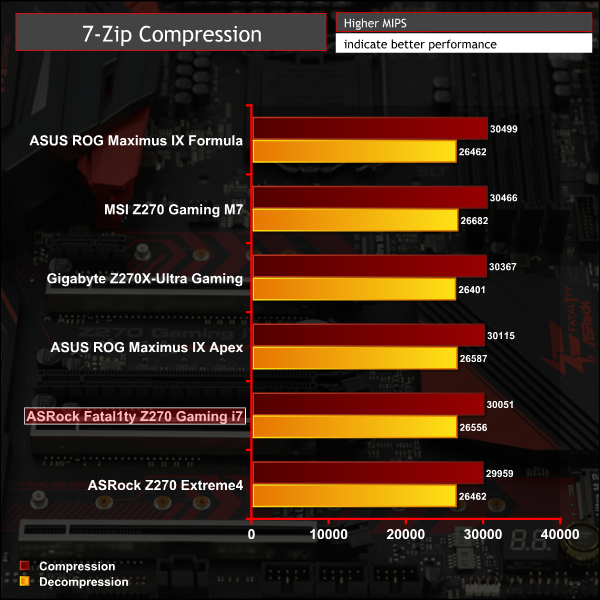
7-Zip
7-Zip is an open source Windows utility for manipulating archives. We measure the Total Rating performance using the built-in benchmark tool. The test stresses all CPU cores to 100% and shows an affinity for memory bandwidth.
Cinebench R15
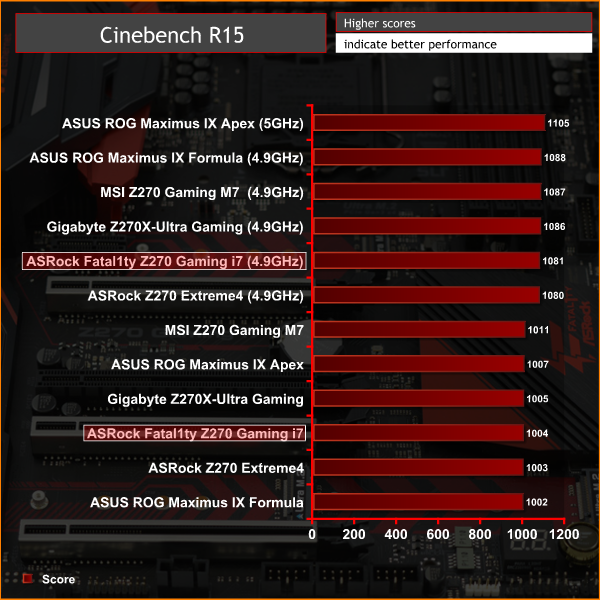
Cinebench is an application which renders a photorealistic 3D scene to benchmark a computer’s rendering performance, on one CPU core, all CPU cores or using the GPU. We run the test using the all core CPU mode.

Handbrake Conversion
Handbrake is a free and open-source video transcoding tool that can be used to convert video files between different codecs, formats and resolutions. We measured the average frame rate achieved for a task of converting a 6.27GB 4K video using the Normal Profile setting and MP4 container. The test stresses all CPU cores to 100% and shows an affinity for memory bandwidth.

Sandra Processor Arithmetic
SiSoft Sandra 2016 is a multi-function utility program that supports remote analysis, benchmarking and diagnostic features for PCs, servers, mobile devices and networks. We run the application’s processor arithmetic test to gauge the CPU performance on each tested motherboard.
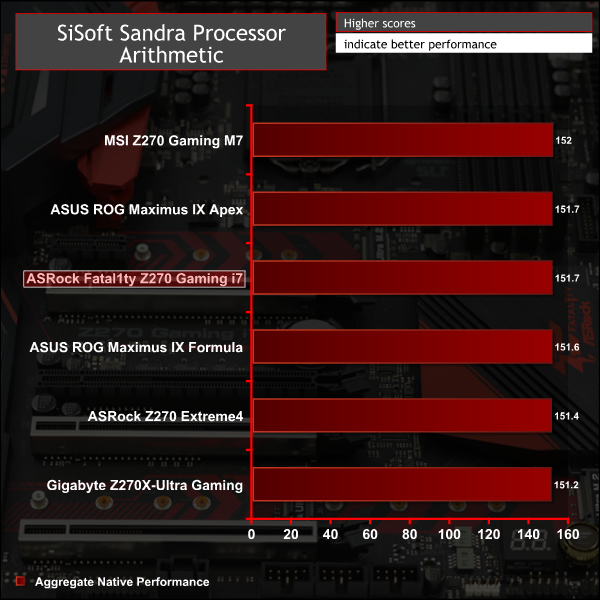
CPU performance uncovered no anomalies, performance is in-line with expectations.
AIDA64 Engineer
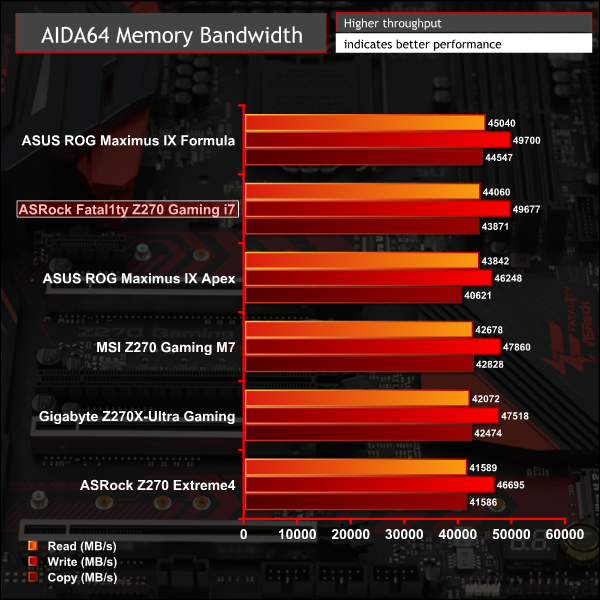
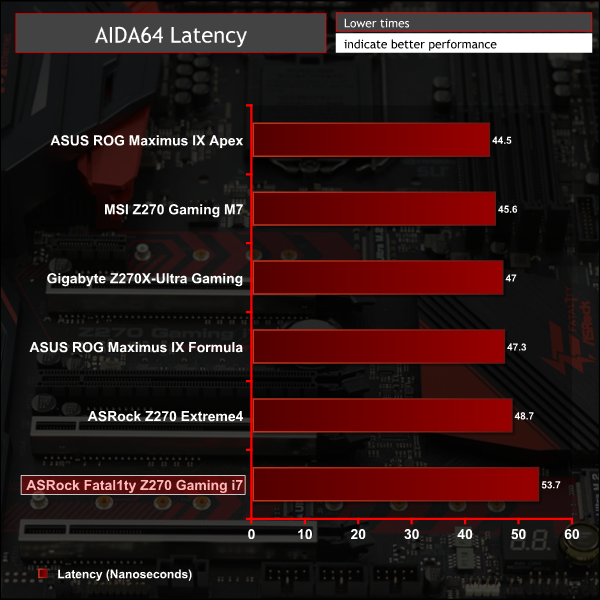
AIDA64 Engineer is a multi-featured software suite for diagnostics, stress testing, benchmarking, software auditing and various other measurement parameters. We use AIDA64 Engineer to benchmark memory throughput and latency.
Sandra Memory Bandwidth
SiSoft Sandra 2016 is a multi-function utility program that supports remote analysis, benchmarking and diagnostic features for PCs, servers, mobile devices and networks. We use the SiSoft Sandra memory bandwidth test to provide a set of memory bandwidth results.
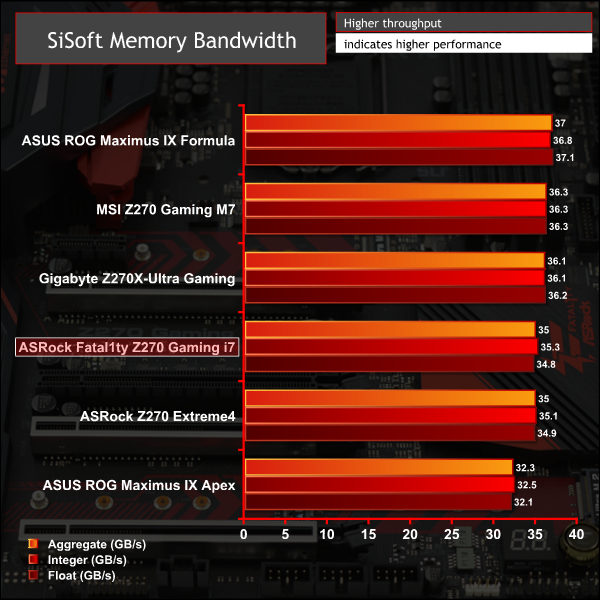
In the SiSoft bandwidth test the Fatal1ty Gaming i7 matched the Extreme 4 very closely but in AIDA64 bandwidth numbers were considerably better, though at the expense of latency.
3DMark
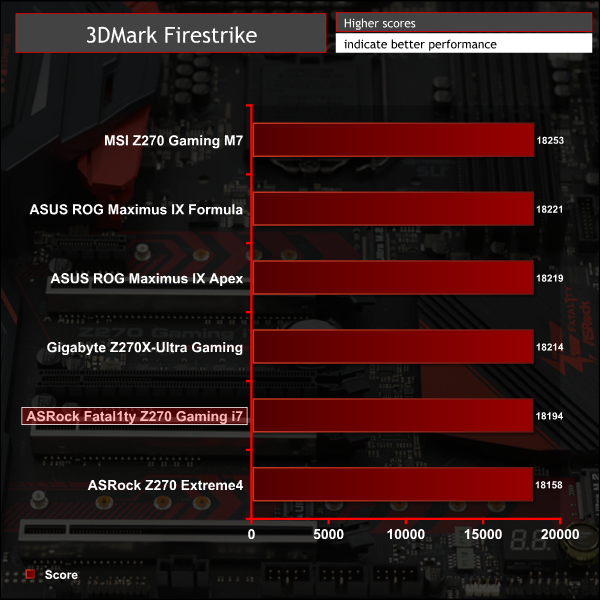
3DMark is a multi-platform hardware benchmark designed to test varying resolutions and detail levels of 3D gaming performance. We run the Windows platform test and in particular the Fire Strike benchmark, which is indicative of high-end 1080p PC Gaming.
Ashes of the Singularity
Ashes of the Singularity is a Sci-Fi real-time strategy game built for the PC platform. The game includes a built-in benchmark tool and was one of the first available DirectX 12 benchmarks. We run the CPU-focused benchmark using DirectX 12, a 1080p resolution and the Extreme quality preset.

Metro: Last Light Redux
Despite its age, Metro: Last Light Redux remains a punishing title for modern computer hardware. We use the game's built-in benchmark with quality set to Very High, SSAA enabled, AF 16X, and High tessellation.
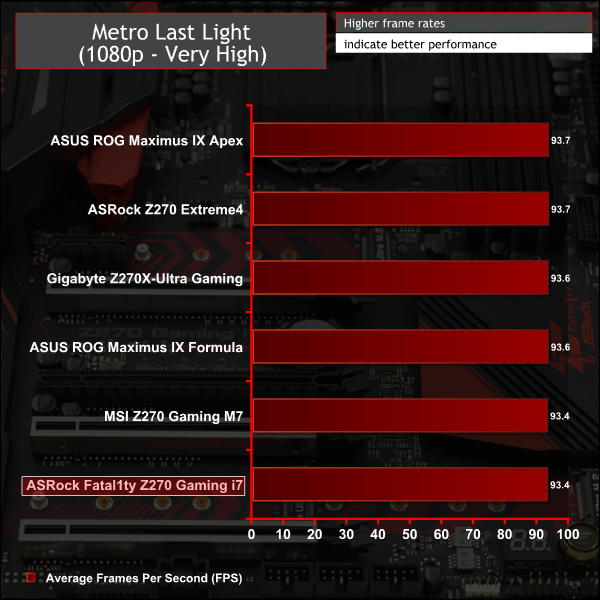
GPU performance was broadly the same as all other Z270 motherboards.
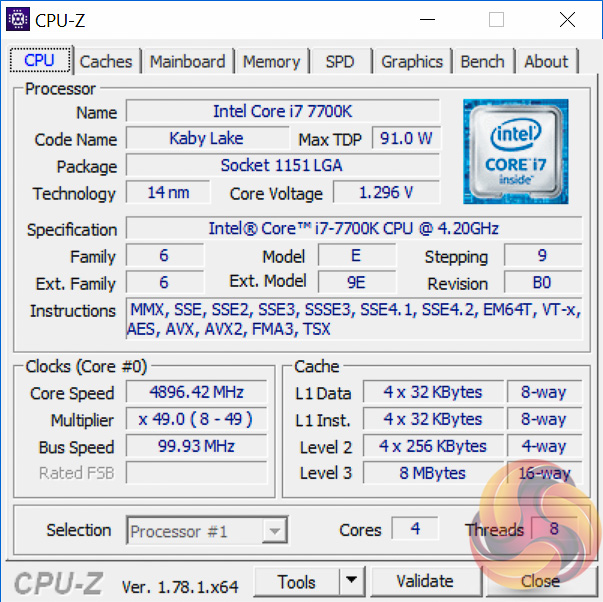
Overclocking proved more troublesome than normal with the Fata1lty Z270. The first issue encountered was the sychronisation of the Cache ratio to the CPU ratio when left to Auto. It's harder to get the Cache to overclock as far as the CPU multiplier. When dialling in a 4.9GHz CPU overclock the cache would jump to 4.9GHz too, which wasn't stable.
After disabling this and fixing the cache to 4.2GHz, we then encountered further issues with voltages. Based on our sample and our testing, with both available BIOS versions on the ASRock website, there is considerable voltage overshoot when setting a fixed voltage for the CPU VCore in the UEFI. We achieved the following voltage outcomes for 4.9GHz CPU, 4.2GHz cache:
- 1.36 fixed volts for the CPU VCore in the UEFI was 1.4 volts in reality under load
- 1.35 was 1.39
- 1.33 was 1.37
- 1.30 was 1.34
While it's possible the VCore readouts could be wrong, aligning the voltages with load power consumption and thermals, leads us to believe the CPU-Z VCore readings are correct.
We tried a similar amount of voltage testing with the offset VCore method since this offered lower power consumption at idle and we achieved the following results:
- 5mv (+0.005v) offset voltage for the CPU VCore in the UEFI was 1.3 volts in reality under load
- 25mv (+0.02v) was 1.31
- 50mv (+0.05v) was 1.33
- 70mv (+0.075v) was 1.36
- 100mv (+0.1v) was 1.39
For the fixed voltages we believe ASRock may need to issue an update to resolve the overshoot of 0.04v. However, setting aside the voltage overshoot from the designated UEFI value the stability of the load voltage was superb using the Level 1 Auto LLC. Furthermore, we found that we were able to get 4.9GHz stable with just a 5mv offset, effectively 1.3 volts, which is a very strong result. Though we were not able to achieve 5GHz without encountering stability issues.
3600MHz XMP Memory:
We test the motherboard's ability to run G.Skill's high-speed 16GB DDR4 Trident Z kit at a 3600MHz XMP setting. High-speed XMP settings can prove a challenge for motherboard designers when optimising the settings for stability at the intended DRAM frequency.
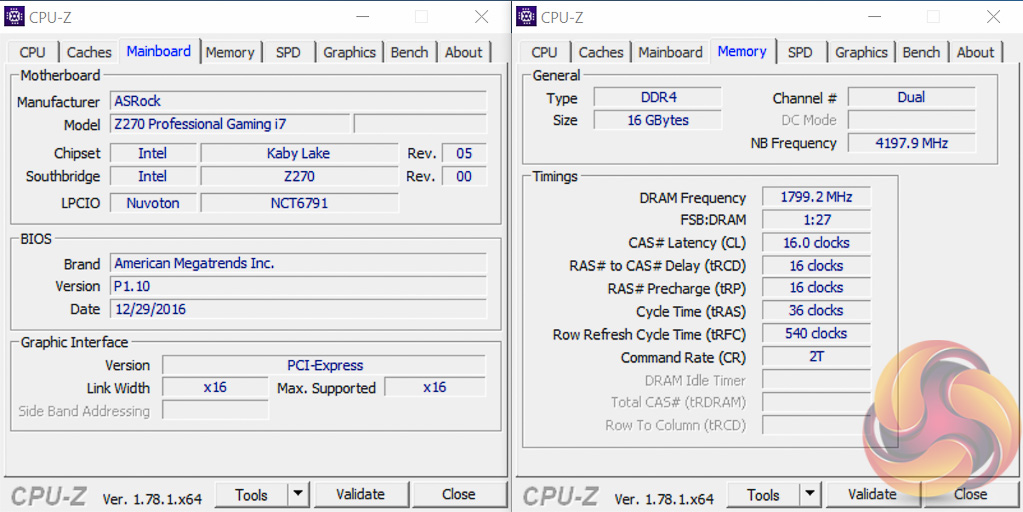
ASRock's Fatal1ty Z270 Professional Gaming i7 executed the XMP 3600MHz profile of our G.Skill Trident Z 16GB (2 x 8GB) memory kit with no hesitation.
Overclocked Performance
As a performance comparison, we have included the results from five other Z270 motherboards. The maximum overclocked configuration achieved with each other board was a 5000MHz (50 x 100MHz) processor frequency whilst using 3200MHz CL16 memory.
Power
We leave the system to idle on the Windows 10 desktop for 5 minutes before taking a reading. For CPU load results we run AIDA64 CPU, FPU, and Cache stress tests and take a reading. The power consumption of our entire test system (at the wall) is shown in the chart.
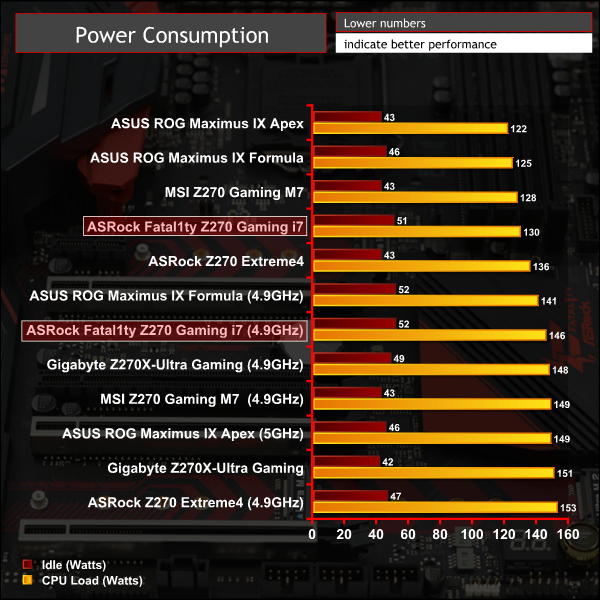
Our overclocked power consumption figures are for the 1.3 volt load VCore voltage, from the 5mv offset, hence why they are lower than the equivalent clock speed of the ASRock Z270 Extreme4.
ATTO Disk Benchmark
The ATTO disk benchmark is a Windows-based utility for testing storage performance of any storage drive or controller. We use the default benchmark setup.
M.2 PCIe Performance
For M.2 testing we use a Toshiba OCZ RD400 256GB M.2 PCIe NVMe SSD.


USB Performance
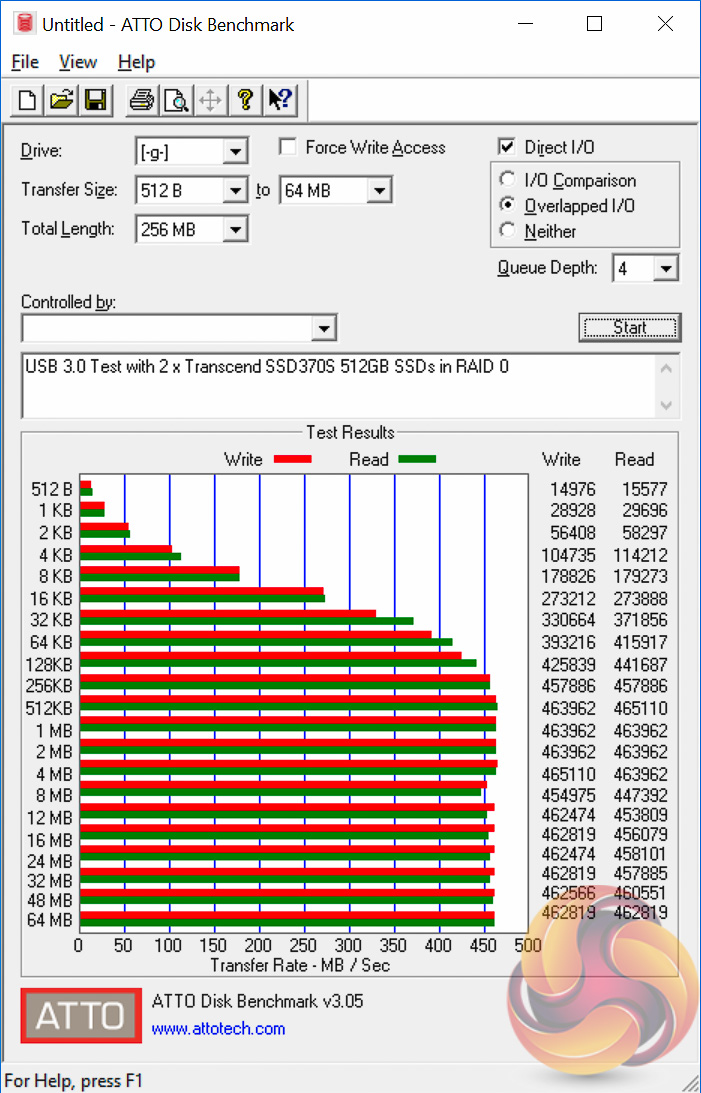
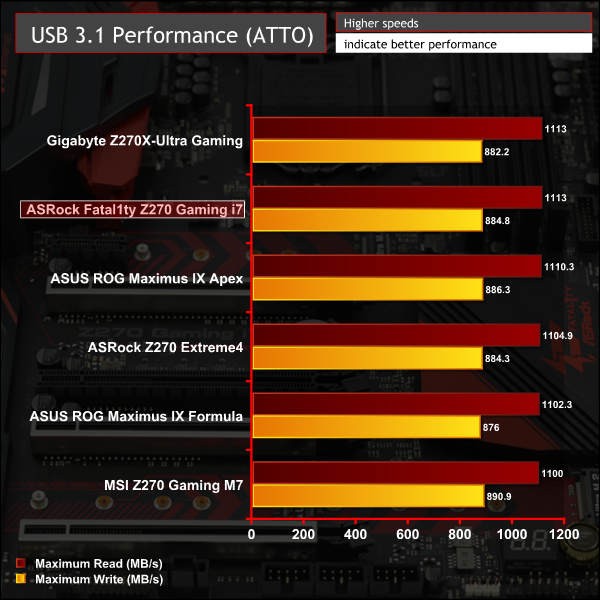
We test USB 3.0 and 3.1 performance using a pair of Transcend SSD370S 512GB SSDs in RAID 0 connected to an Icy Box RD2253-U31 2-bay USB 3.1 enclosure powered by an ASMedia ASM1352R controller.



SATA 6Gbps Performance
For SATA 6Gbps testing we use an OCZ Trion 150 480GB SSD.
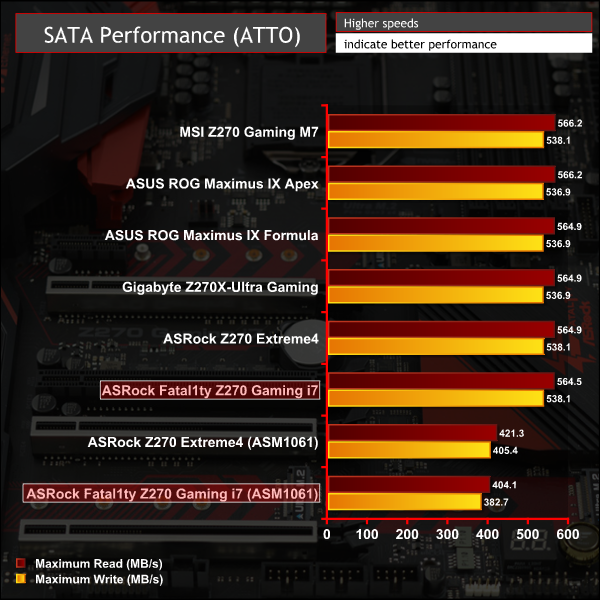
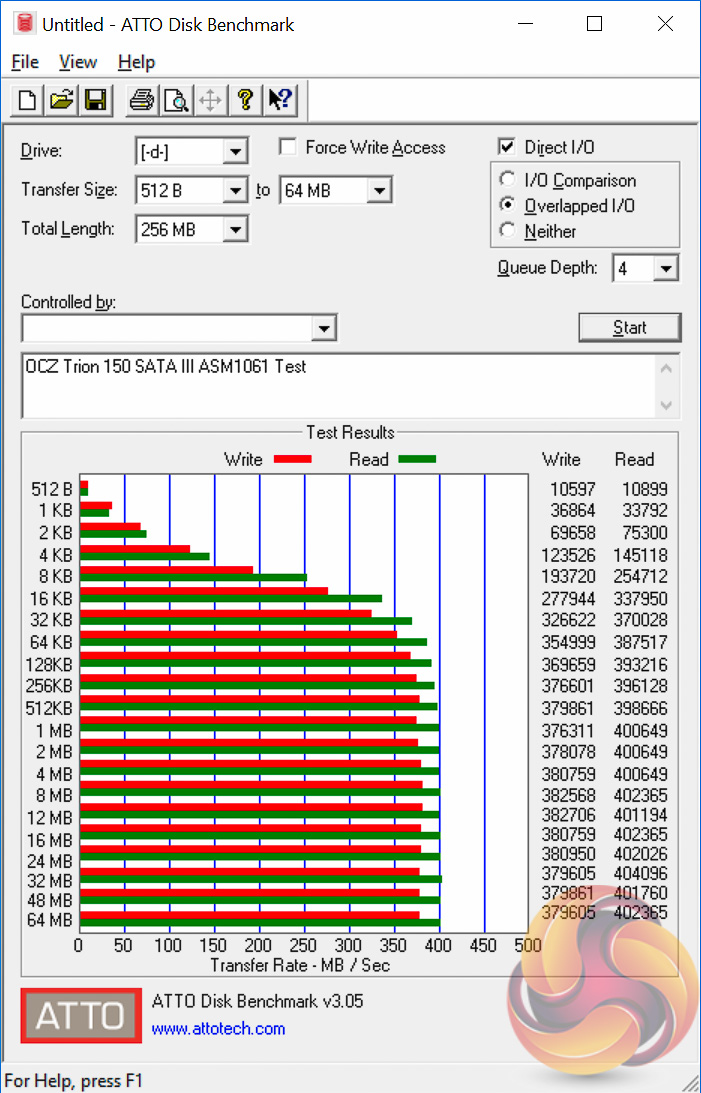
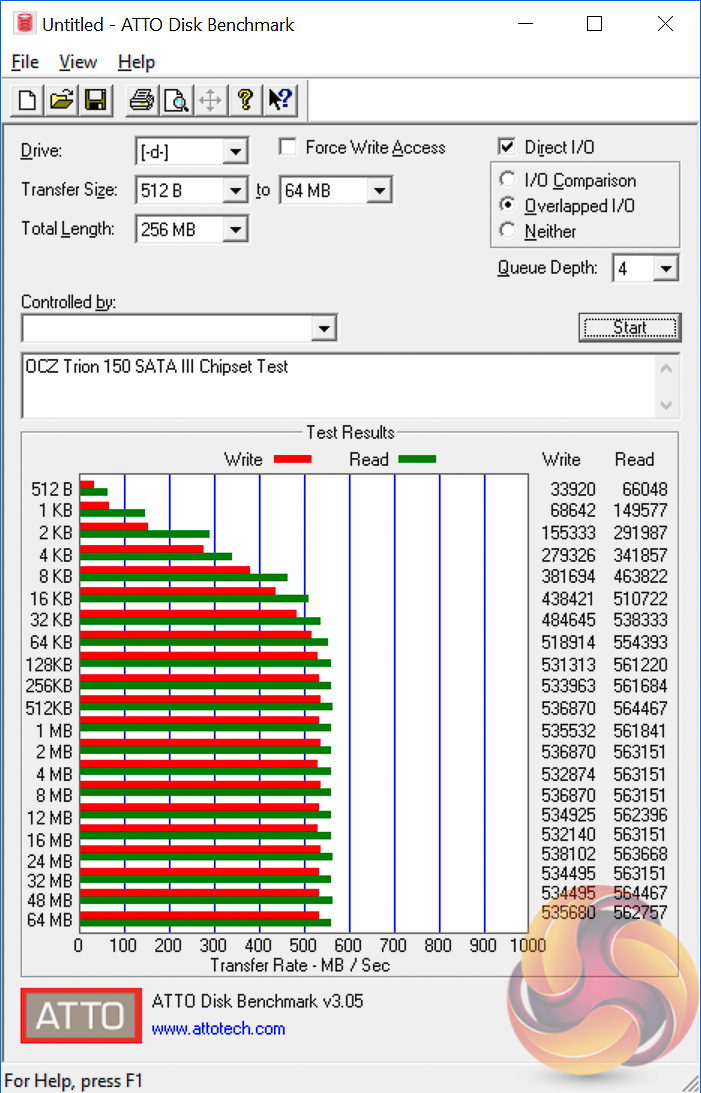
M.2, SATA and USB performance is standard for the hardware used.
Audio
Rightmark Audio Analyser is a freeware benchmarking utility designed to objectively test the performance characteristics of audio solutions. We setup a line-in line-out loop and execute the record/playback test before generating the results report you see below. A sampling mode of 24-bit, 192 kHz was tested.


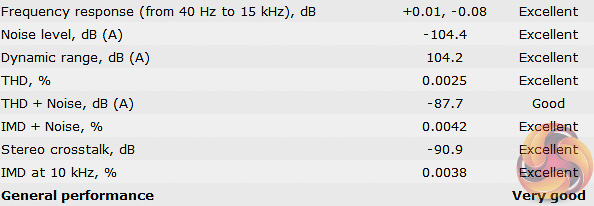
ASRock's Fatal1ty Z270 Professional Gaming i7 scored Excellent in 7 out of 8 categories and Good in the eight category for an overall rating of Very Good. Only the two ASUS motherboards performed better than it in all categories while the Gaming i7 traded places in the rankings with the Gigabyte, MSI and ASRock boards across the various tests.
It has become increasingly difficult for motherboard vendors to differentiate premium models not only from other products in their own range but also from products from rival companies. A large part of the reason for this is that so much previously high-end or exclusive connectivity is now integrated into Intel's chipset as standard. When virtually every Z270 motherboard from the entry-level, bar a few exceptions, has USB 3.1, USB Type-C and M.2 NVMe as well as USB 3.0, SATA III and DDR4 it's challenging to persuade consumers to part with more money for premium models.
ASRock's approach to differentiation with the Fatal1ty Z270 Professional Gaming i7 has been to focus on storage and networking connectivity. That's a different strategy to that which ASUS took with it's similar-priced Maximus IX Apex or that MSI took with its similarly positioned Z270 Gaming M7.
The result of ASRock's unique decisions is that the Fatal1ty Z270 Gaming i7 does differentiate itself from the competition as it offers many unique things including ten SATA ports, three M.2 ports and three Ethernet connections – two Gigabit, one five-gigabit. Even though we've not been able to test the 5Gbe controller, since consumer availability of 5Gbe devices is basically non-existent, ASRock's design choice is unique and does future proof the board's connectivity.
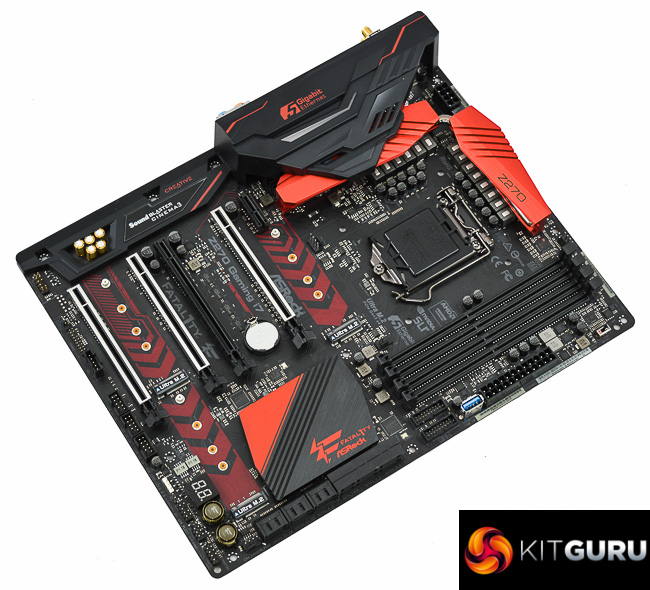
The Fatal1ty Z270 Gaming i7 is an interesting and well-rounded motherboard, even if it's positioning as a gaming motherboard is somewhat dubious. Not only does it hold sway with its unique storage and networking capabilities but it's also a solid motherboard for overclocking with onboard buttons and debug tools as well as a premium power delivery system. The UEFI does need some work in terms of voltage operation modes and the translation of UEFI VCore values into actual VCore values, but this is easily fixed via a UEFI update.
There are a number of minor flaws elsewhere that need to be taken into consideration though. While there is an abundance of connectivity, especially for storage, there are complex bandwidth sharing rules that mean when certain connections are being used others are disabled. ASRock does communicate these in its specifications but a wiring diagram would go a long way to clear up any potential confusion among customers.
Furthermore, the focus on providing best-in-class networking connectivity on the rear I/O has inevitably resulted in fewer USB ports being available. There are ample front headers to make up for this but most PC cases will struggle to find use for three USB 2.0 headers and two USB 3.0 headers, so there is still a slight USB deficit in practice.
ASRock should also have better utilised space on the motherboard to add more fan headers, 5 fan headers is a little stingy for a motherboard of this calibre, the ASUS Maximus IX Apex has 10 and the MSI Z270 Gaming M7 has 6. The location of the water pump fan header, all the way at the bottom of the motherboard next to the SATA ports, left us a bit baffled too.
On the whole the Fatal1ty Z270 Gaming i7 is a worthy contender in the premium motherboard market for consumers with a keen interest in storage and networking. It's on the expensive side but that expense is understandable and justified given how much hardware ASRock has invested into the design.
The ASRock Fatal1ty Z270 Professional Gaming i7 is available at Scan for £273.98. ASRock’s standard warranty duration for this product is 2 years.
Discuss on our Facebook page, over HERE.
Pros:
- Impressive networking connectivity – dual 1 gigabit, 5 gigabit and 802.11ac WiFi with Bluetooth 4.0
- Ample storage connectivity – three M.2 and ten SATA III
- Strong power delivery system
- Onboard buttons, debug LED and reinforced PCIe lanes
- Pleasant aesthetic with easy to use RGB LED system
Cons:
- Quirk with fixed VCore values and some voltage operational modes not available
- Complex bandwidth sharing caveats for users to figure out
- Low on rear USB ports because of networking connections
- Needs more fan headers, water pump header location is questionable
KitGuru says: The ASRock Fatal1ty Z270 Gaming i7 is a strong contender in the premium motherboard market thanks to its unique networking and storage capabilities.


Might just grab this one, and Im thinking to get the next 580 Red Devil, will be a very good devilish looking match 😀
It’s damn beautiful mobo, just got time last wk.. you cannot go wrong.
Regarding the questionable fan/water pump header location. There is one right under the power 8pin connector. The one at the bottom could be used for another water cooling circuit (GPU).