KitGuru KitGuru.net – Tech News | Hardware News | Hardware Reviews | IOS | Mobile | Gaming | Graphics Cards


Nvidia’s RTX 3080 is hot on the shelves, well if you can find any shelves with it on, and PCSpecialist has updated one of their key gaming systems to include the new powerhouse graphics card. If you’re in the market for a high-end gaming pre-built, should the Core i7-10700K and RTX 3080-equipped PCSpecialist Gladius i7 be on your shopping list?
Specifications:
-
- Processor: Intel Core i7-10700K
- Motherboard: ASUS ROG STRIX Z490-F Gaming
- Memory: 16GB Corsair Vengeance RGB PRO 3200MHz C16 DDR4
- Graphics Card: 10GB Nvidia GeForce RTX 3080
- System Drive: 1TB Samsung 970 EVO Plus PCIe NVMe SSD
- Storage Drive: 1TB Seagate Barracuda 7200 RPM 3.5” HDD
- CPU Cooler: PCS FrostFlow 240 Series RGB AIO Cooler
- Power Supply: Corsair RM750x 750W 80Plus Gold Fully Modular PSU
- Case: NZXT H511 (Black)
- Extra Case Fans: 3x Corsair LL120 RGB LED Fans + Controller Kit
- Network Card: 802.11n 300Mbps PCIe WiFi Card
- Operating System: Windows 10 Home
Price: £1999 inc. VAT as reviewed.
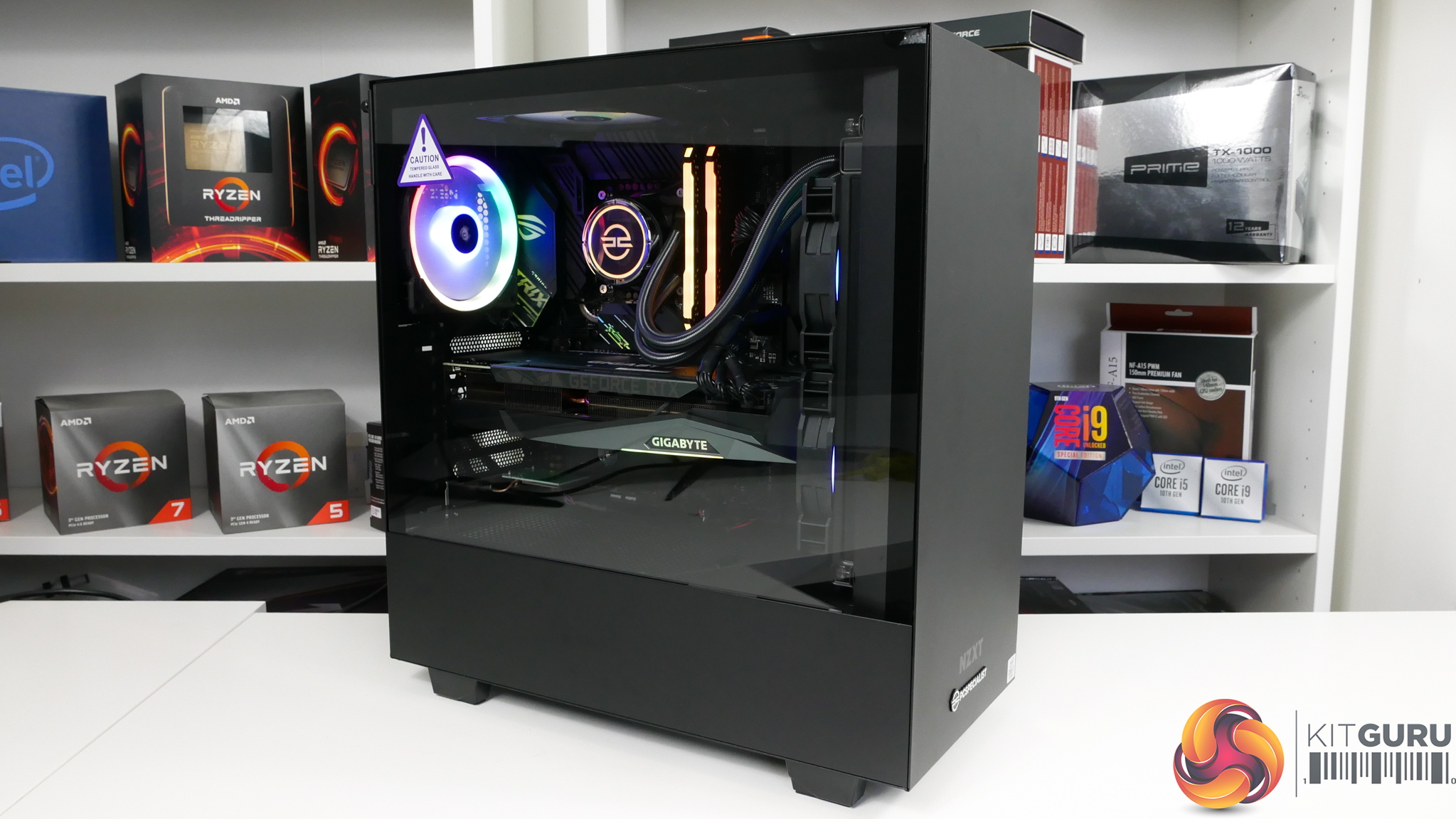
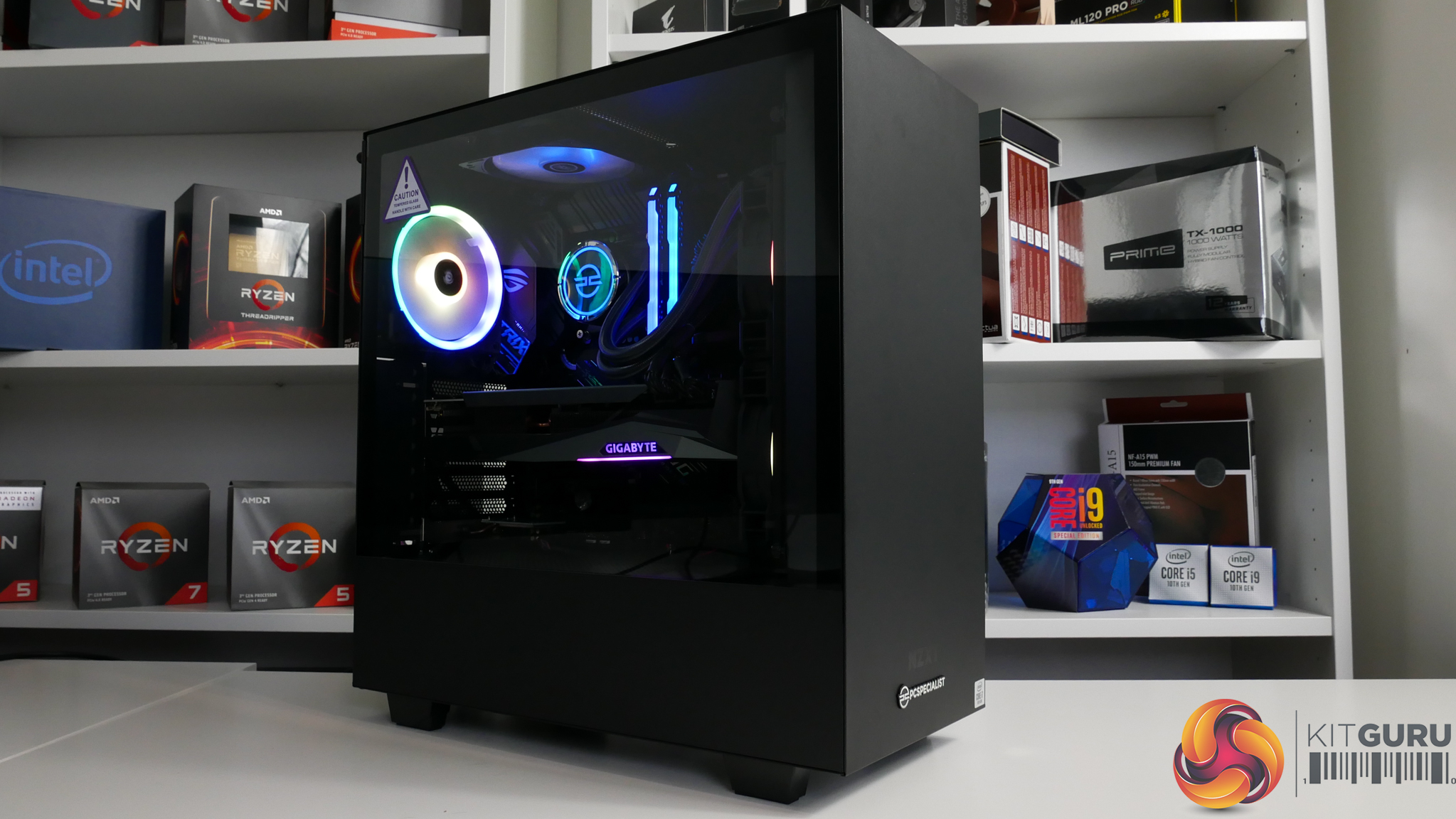
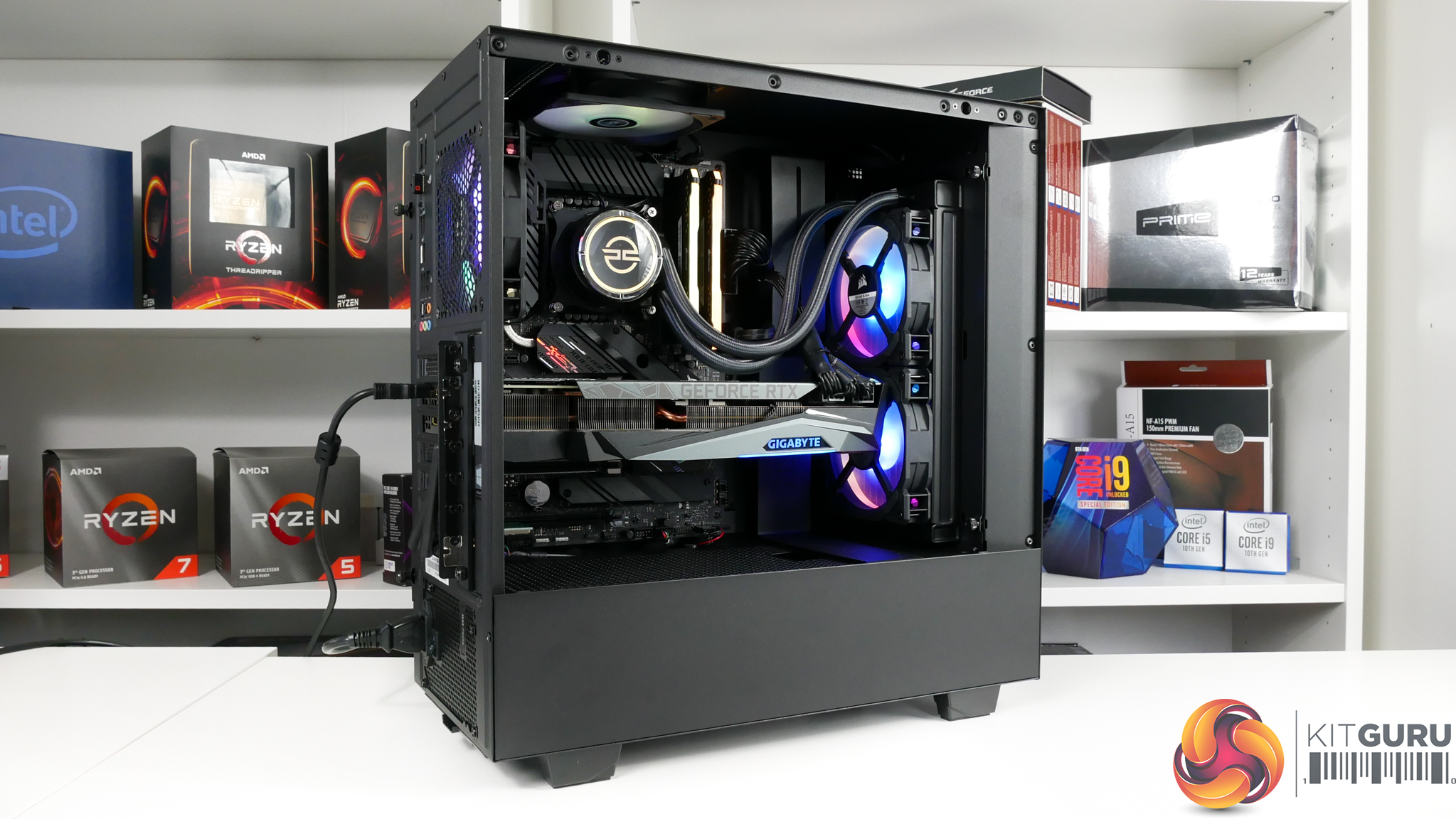
Coming in at a tempting £1999 price point, the PCSpecialist Gladius i7 is clearly gunning for core gaming performance with minimal spend on parts that do not boost frame rates. That point is highlighted perfectly by the main pairing of Nvidia’s RTX 3080 graphics card with the Intel Core i7-10700K processor. Those two components are the system’s main drivers, and the other parts are focussed on value gaming performance.
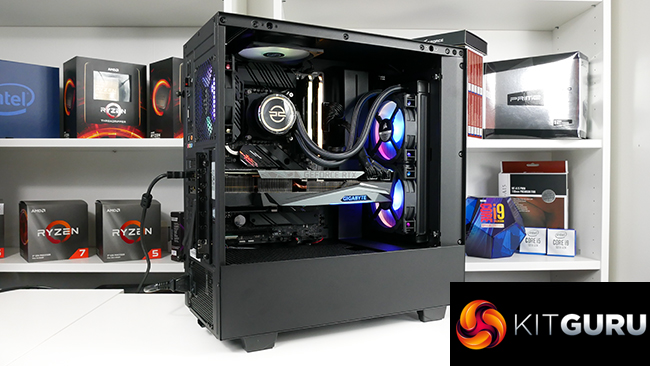
As such, you get 16GB of Corsair Vengeance RGB Pro DDR4, an ASUS Z490-F Gaming motherboard, a 1TB Samsung NVMe SSD, and another 1TB of HDD storage. Cooling the processor is a 240mm AIO, power comes from a 750W Corsair PSU, and housing everything is the cost-effective NZXT H511 chassis – which is a system integrator version of the popular H510.
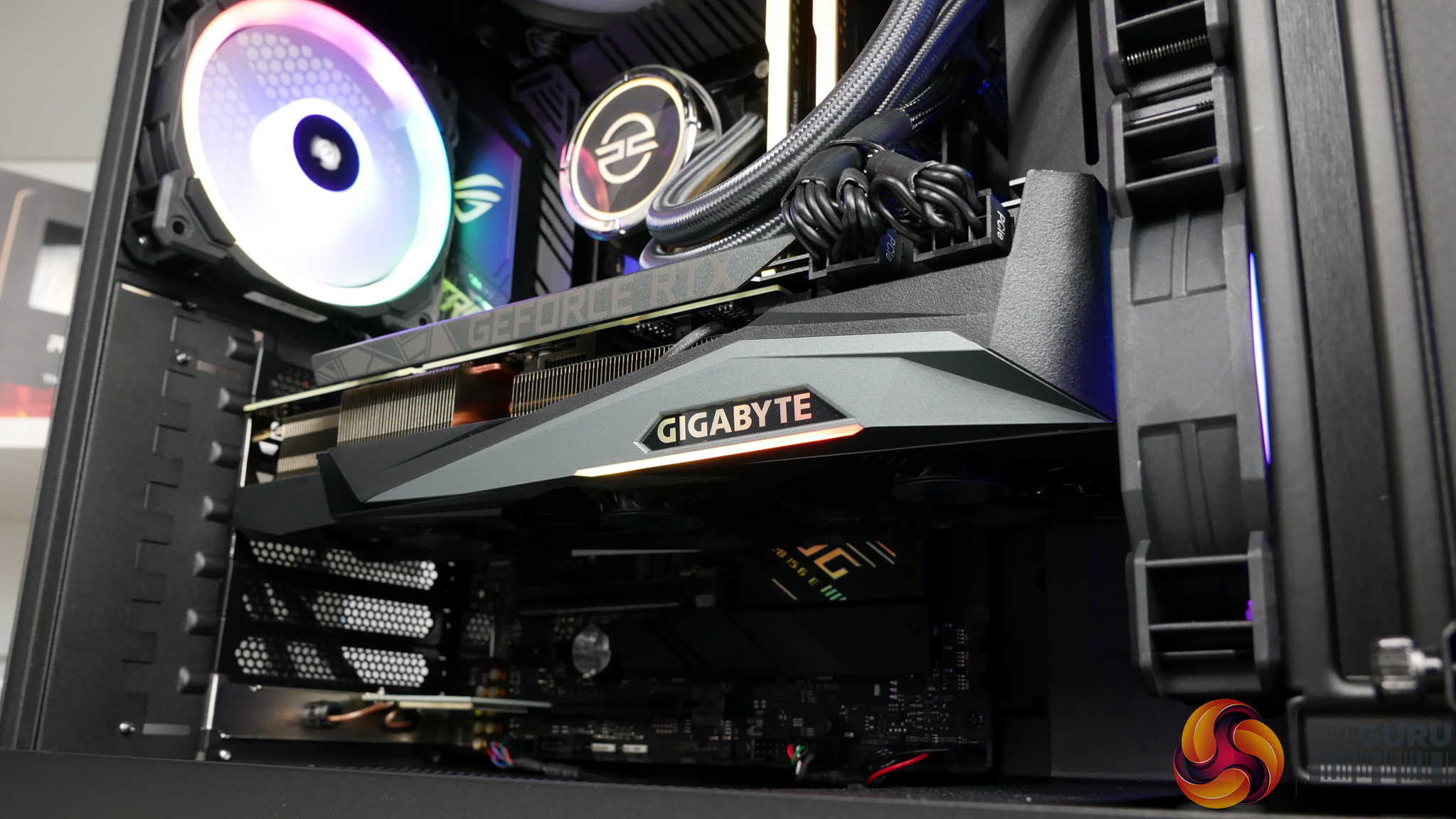
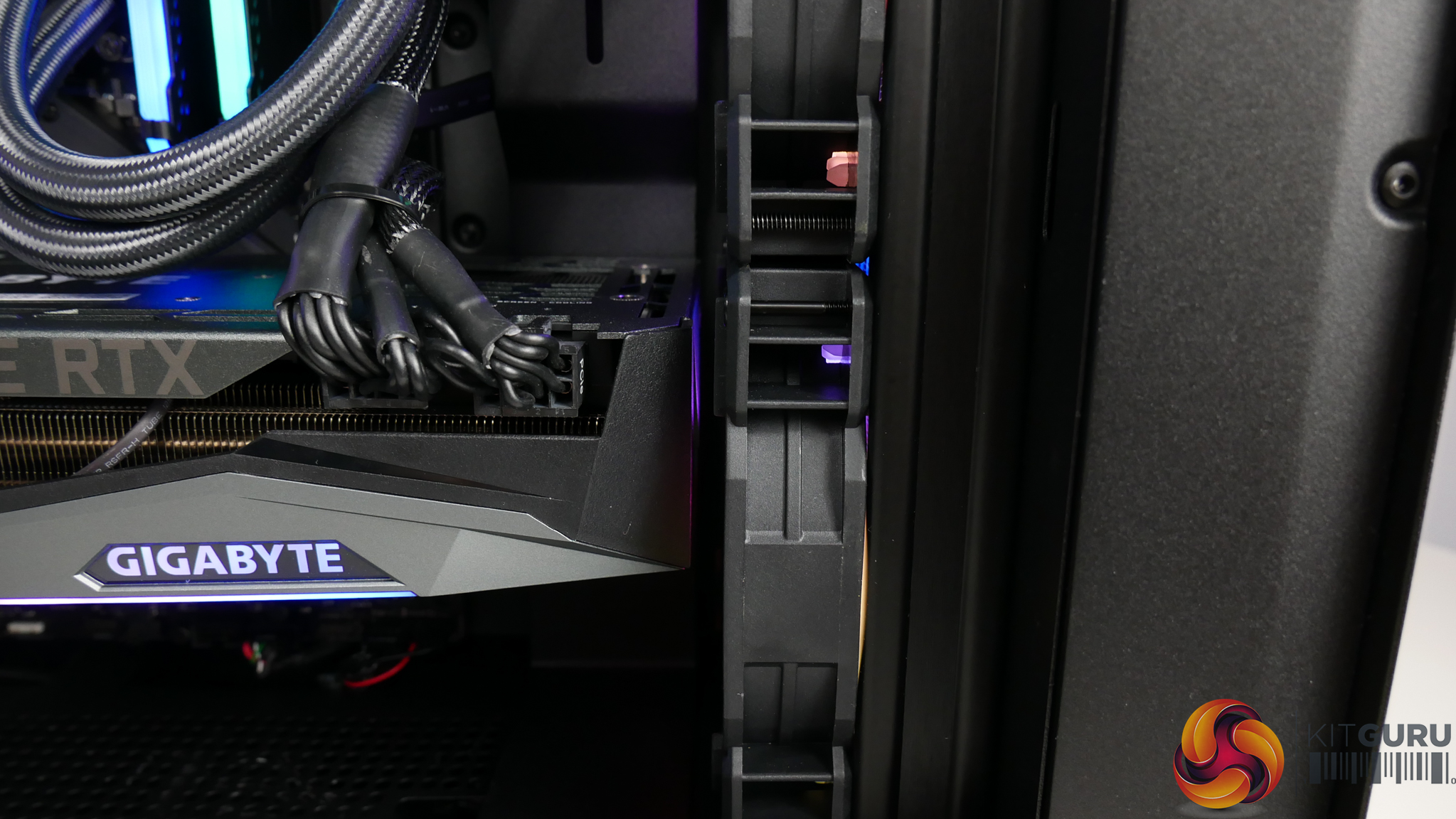
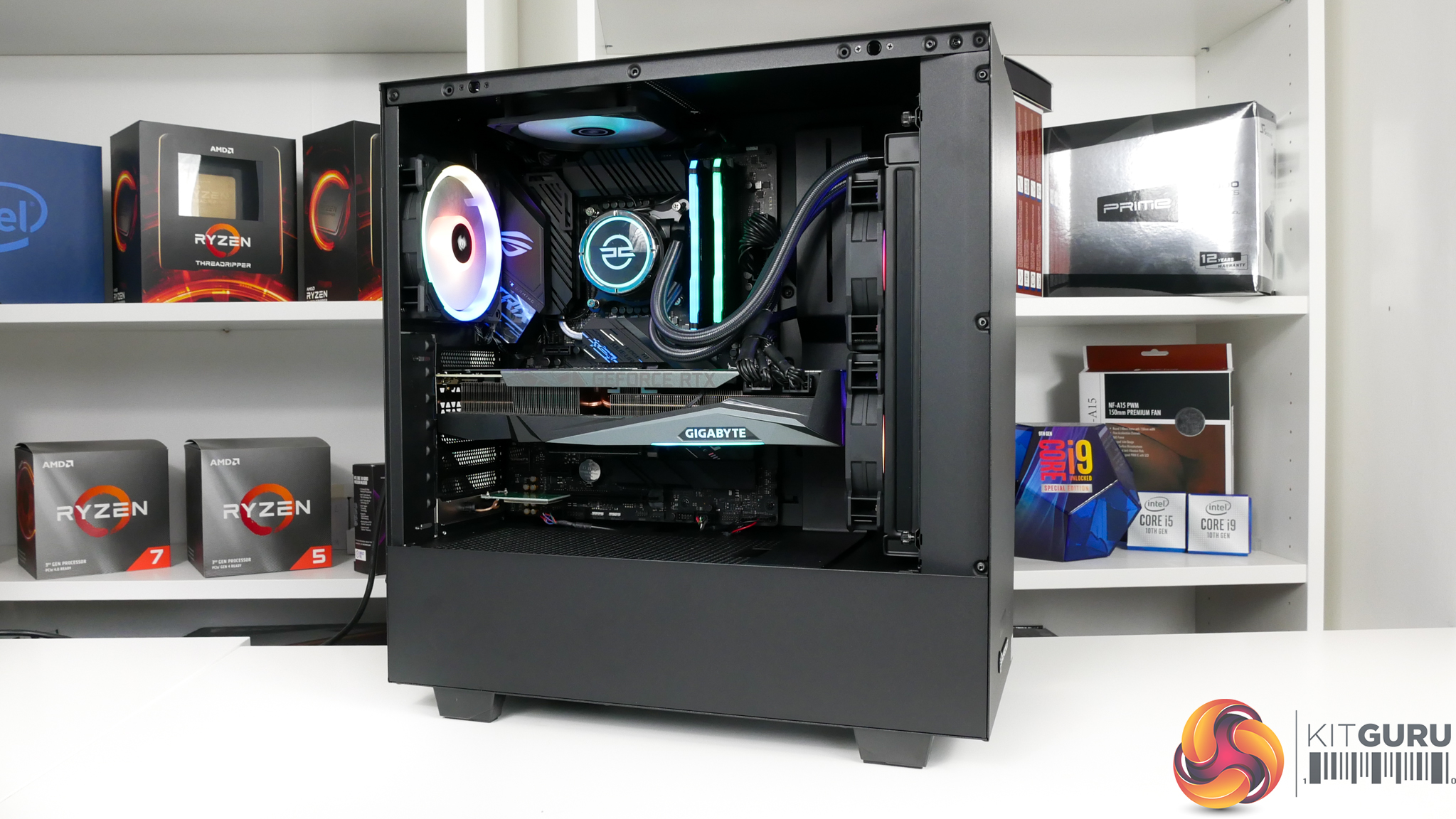
Clearly the star of the show is that Nvidia RTX 3080 graphics card. PCSpecialist opts for the triple-fan, two-and-a-half slot Gigabyte OC model of the 10 Gig Ampere brute. And it’s not just star of the show in terms of gaming might; the twelve-and-a-half-inch monster dominates the majority of the internal build area and pushes up closely to the front mounted AIO cooler.
A good-looking, black metal backplate is mounted on the card for cooling assistance and aesthetics. Power is delivered via dual 8-pin PCIe connectors which are routed in a fairly clean way by PCSpecialist but clearly not as attractive as braided cables. Rear IO video outputs are three DisplayPort and two HDMI.
It is pertinent to address the elephant in the room when discussing the RTX 3080 – availability. We spoke to PCSpecialist and they highlighted that this RTX 3080-equipped system can be pre-ordered by customers thanks to their weekly deliveries, but the lead times will be longer than usual. As stock arrives, customers will be allocated the card in their build based on their position in the queue.
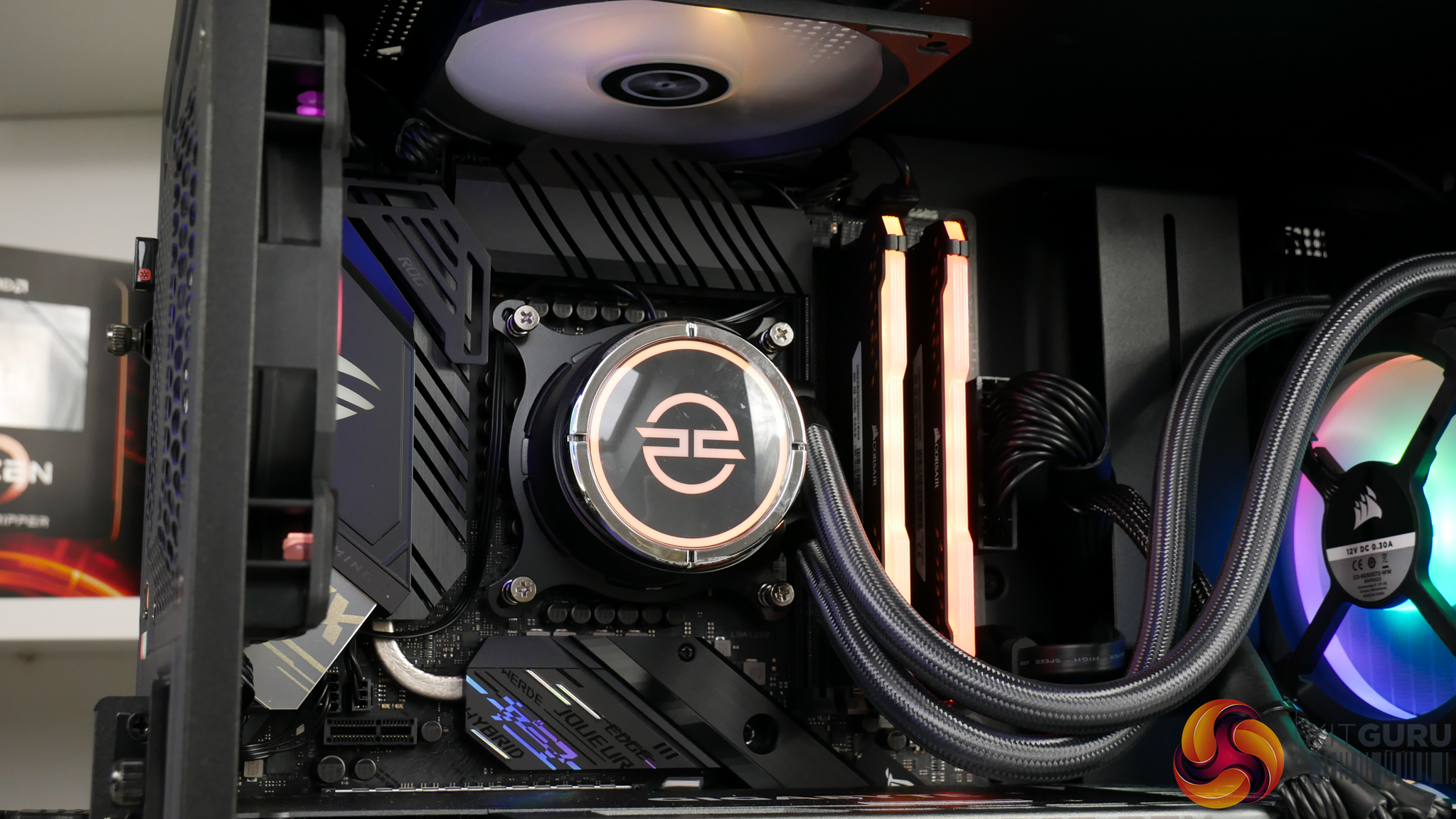
The choice of Core i7-10700K processor is a smart one in my opinion. This eight core, sixteen thread chip is a gaming performance winner alongside its 10600K and 10900K siblings (plus 9900K predecessor). PCSpecialist applies the stock clock speeds of 3.8GHz base and 5.1GHz maximum boost frequency and also uses the Intel default power limits.
As such, you get 4.7GHz all-core frequency at 140W TDP for short duration workloads and then after a few seconds of full processor loading, the chip drops to 4.5-4.6GHz all core at 125W sustained power draw. I actually respect this decision to not push with an overclock.
Sure, the chip could have been pushed around 300-500MHz higher for an all-core overclock, but this would have come at the expense of heat, power consumption, and cooler noise output. That’s without factoring in the potential for instability. Of course, if you want to tinker and overclock the processor yourself, the standard UEFI on the ASUS ROG STRIX Z490-F Gaming motherboard allows you to do so comprehensively.
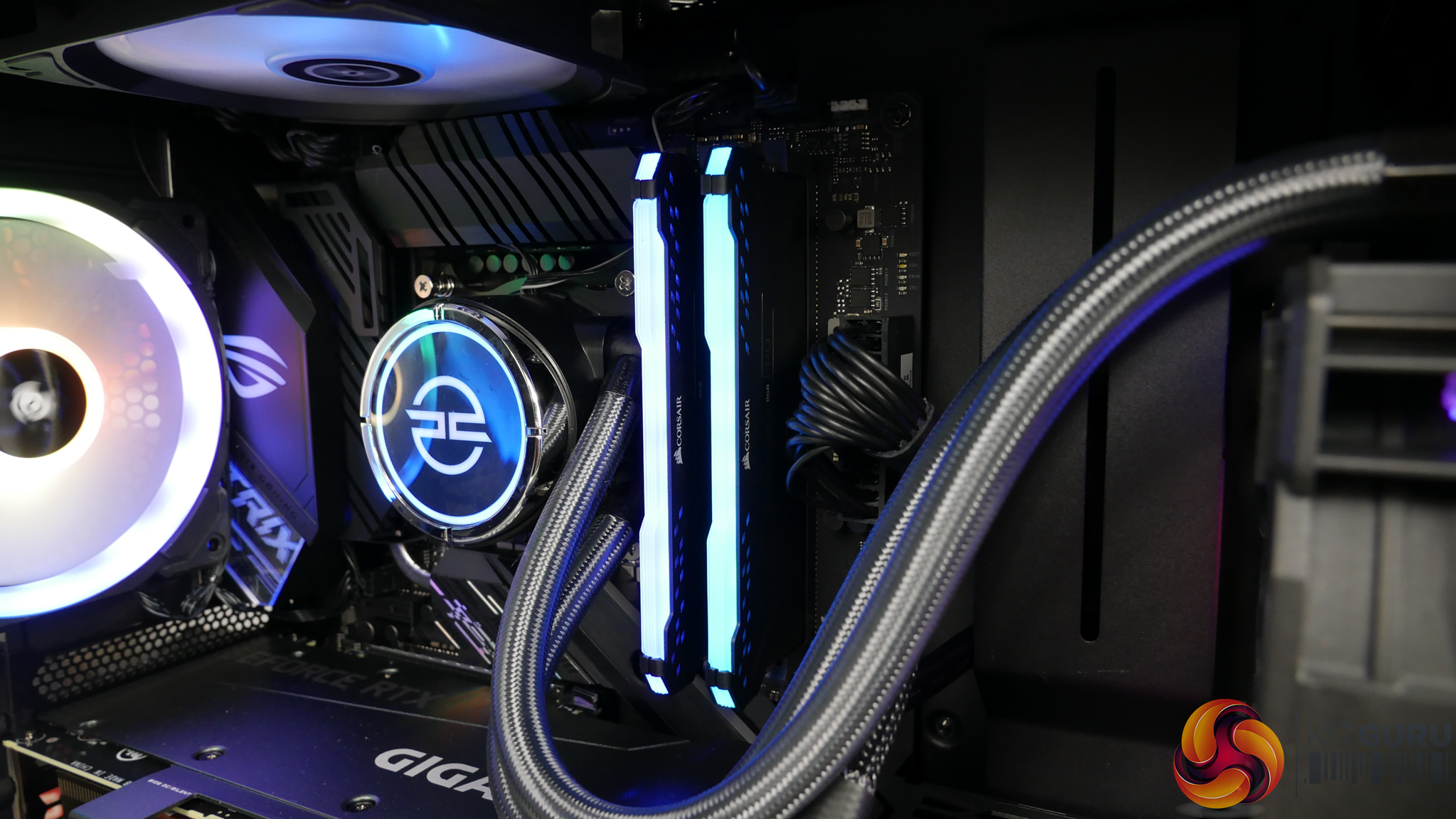
We have 16GB of Corsair Vengeance RGB PRO DDR4 memory clocked at 3200MHz C16. This is an OK kit for a system of this calibre, especially if you’re a fan of RGB and Corsair’s iCUE ecosystem. But it is certainly ‘budget’ in terms of frequency and timings for today’s market.
Given the aggressive price target set by PCSpecialist, this set of memory is perhaps a worthwhile compromise to hit the £2K limit.
One area where PCSpecialist certainly did not skimp is on the SSD choice. Samsung’s 1TB 970 EVO Plus M.2 NVMe SSD is chosen as the main OS drive. This is a high-performance, enthusiast calibre SSD at a capacity level appropriate for also storing even a few big games. It is good to see a high-quality drive supplied rather than an El-Cheapo bargain basement DRAM-less SSD to shave off a few pounds of cost. Well done, PCSpecialist.
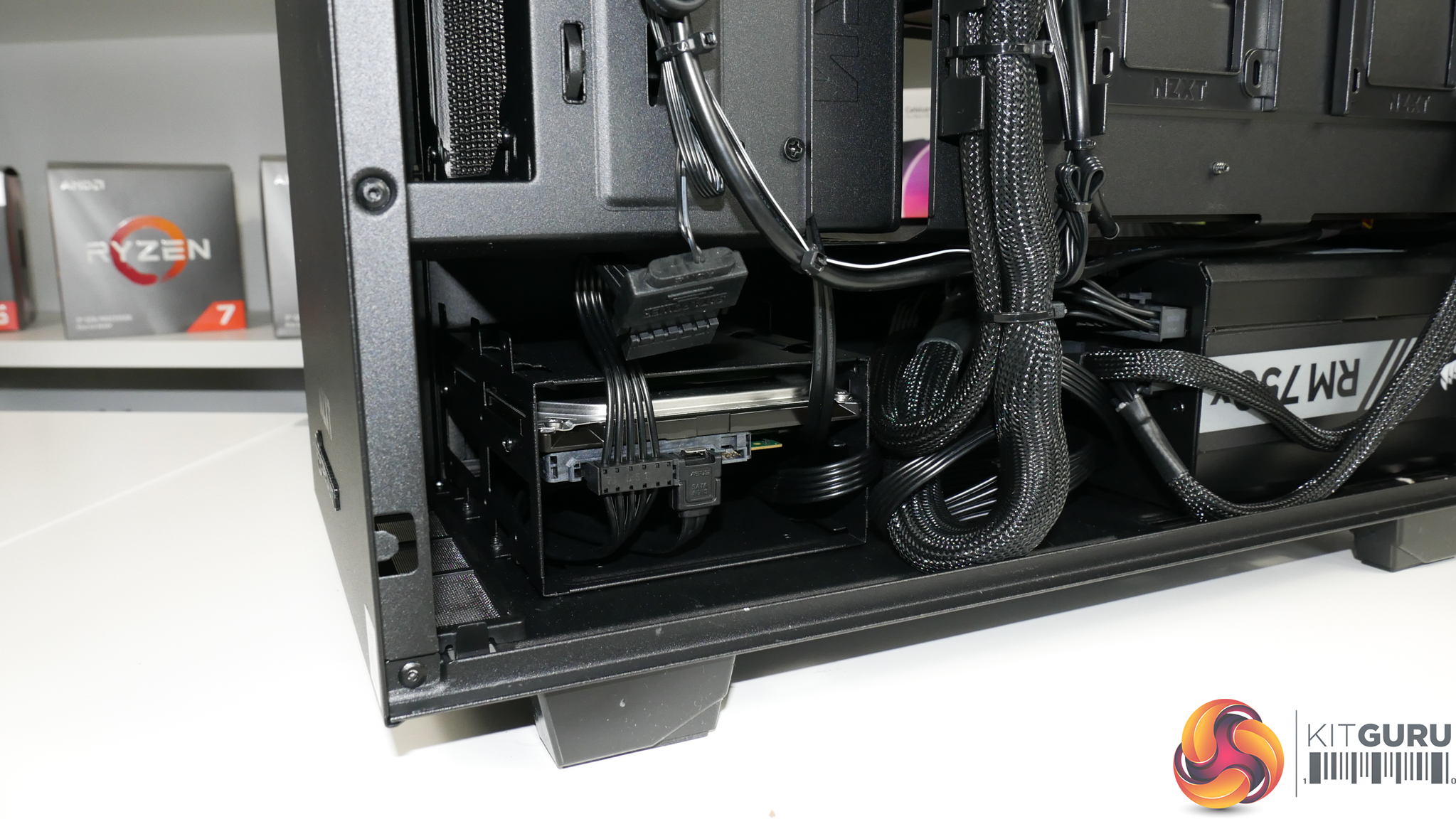
Added storage comes in the form of a 1TB Seagate Barracuda HDD, which is a preferably budget option to something like a cheap 1TB QVO SSD in my opinion. Perhaps a 2TB HDD could have been squeezed into the system given the minor price difference between one thousand Gigabytes and two thousand. But there is room to upgrade if you need more storage.
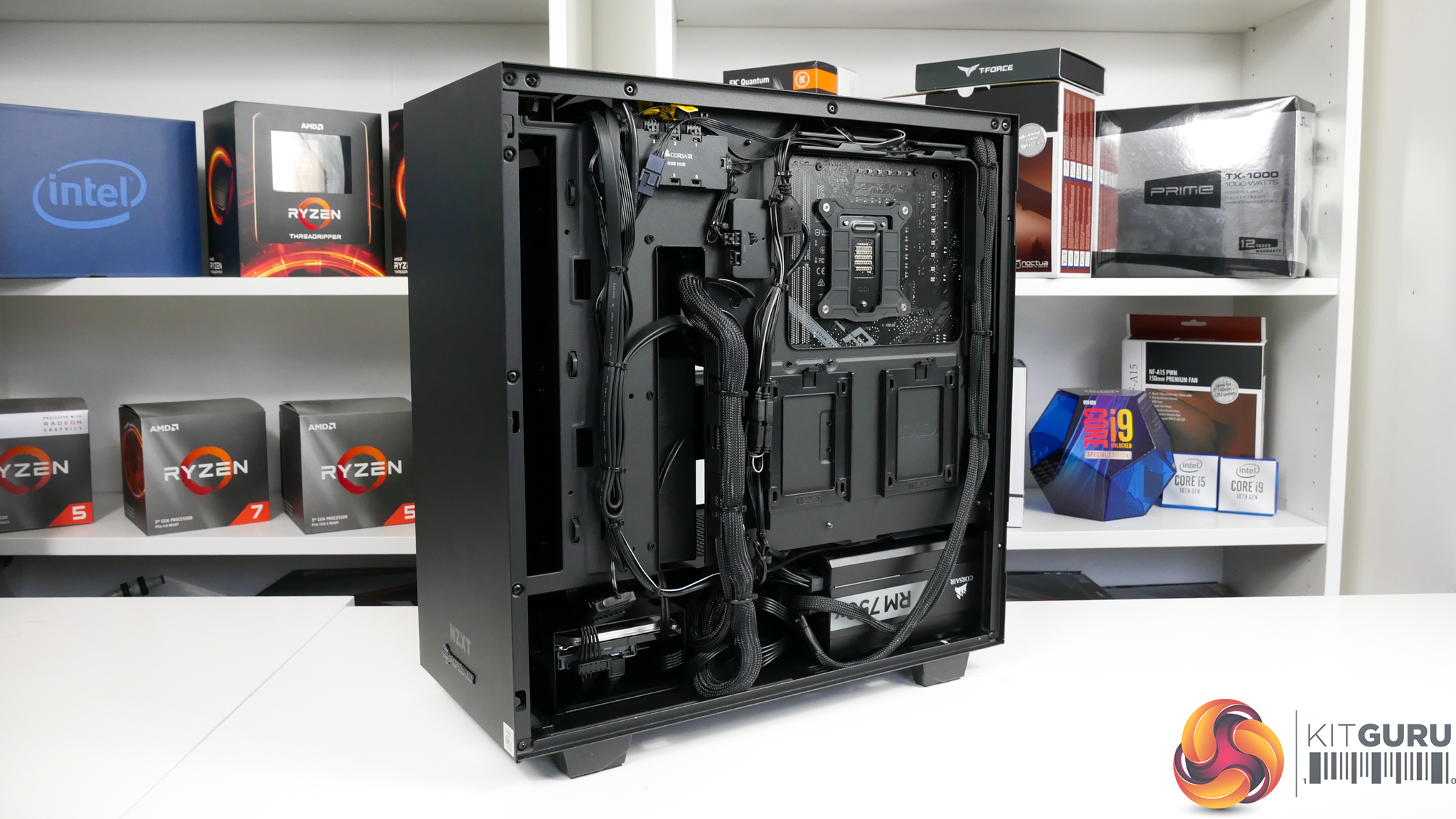
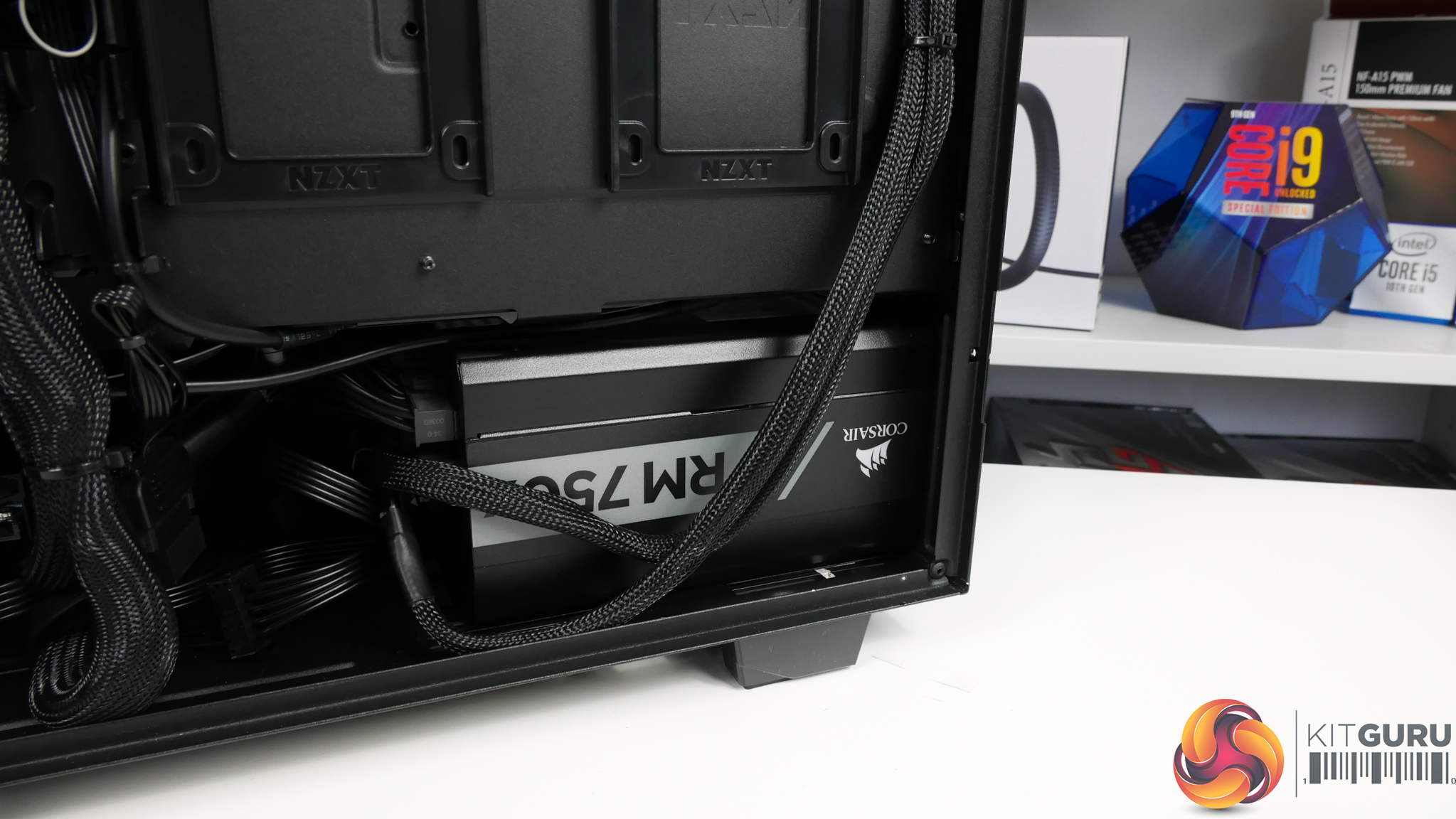
Power for the system is handled by a Corsair 750W RMx series PSU. I have no complaints whatsoever with this solid quality, 80 Plus Gold, fully modular power supply. I was also happy to see the unit having a zero RPM fan mode to further reduce noise levels.
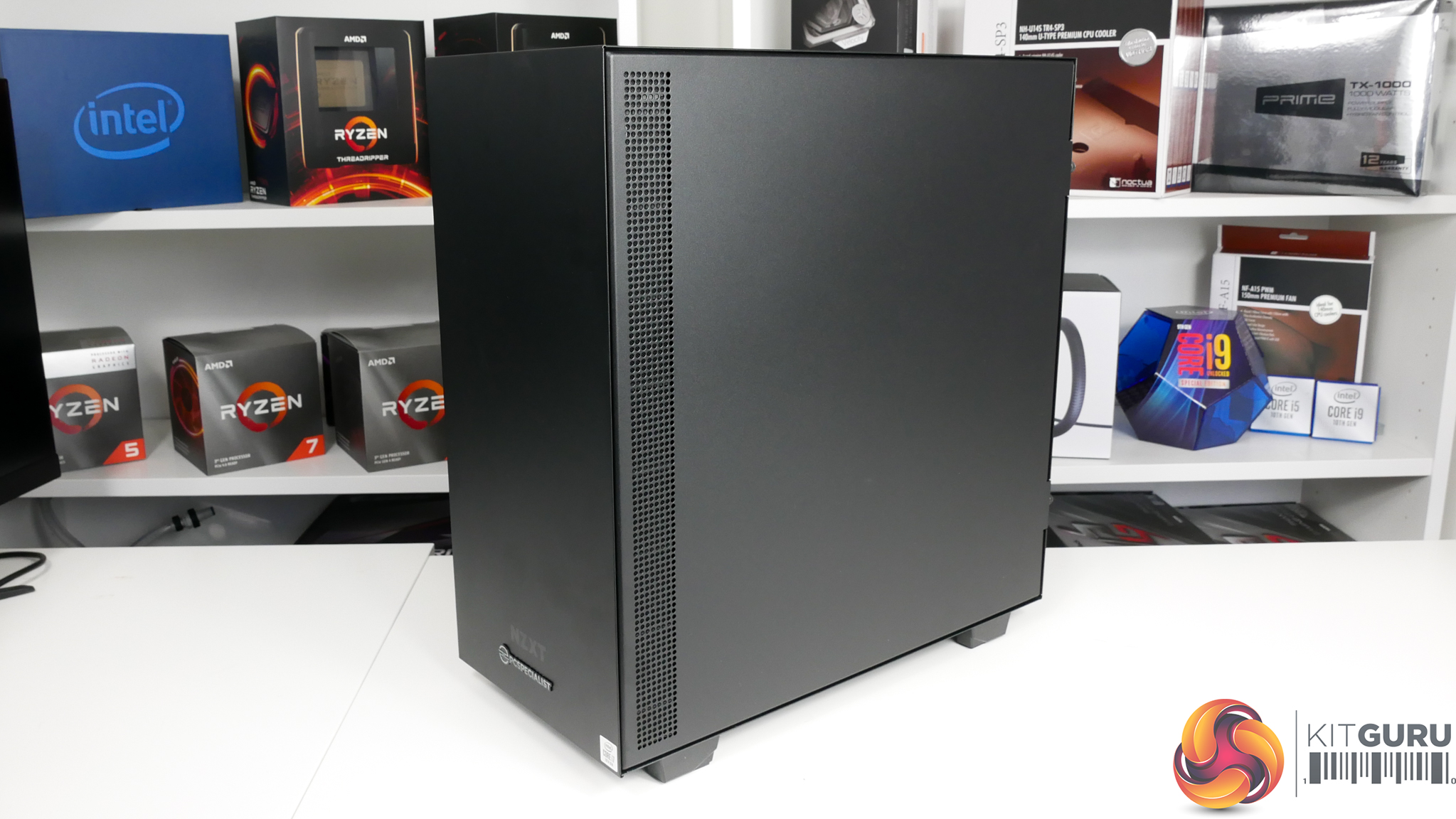
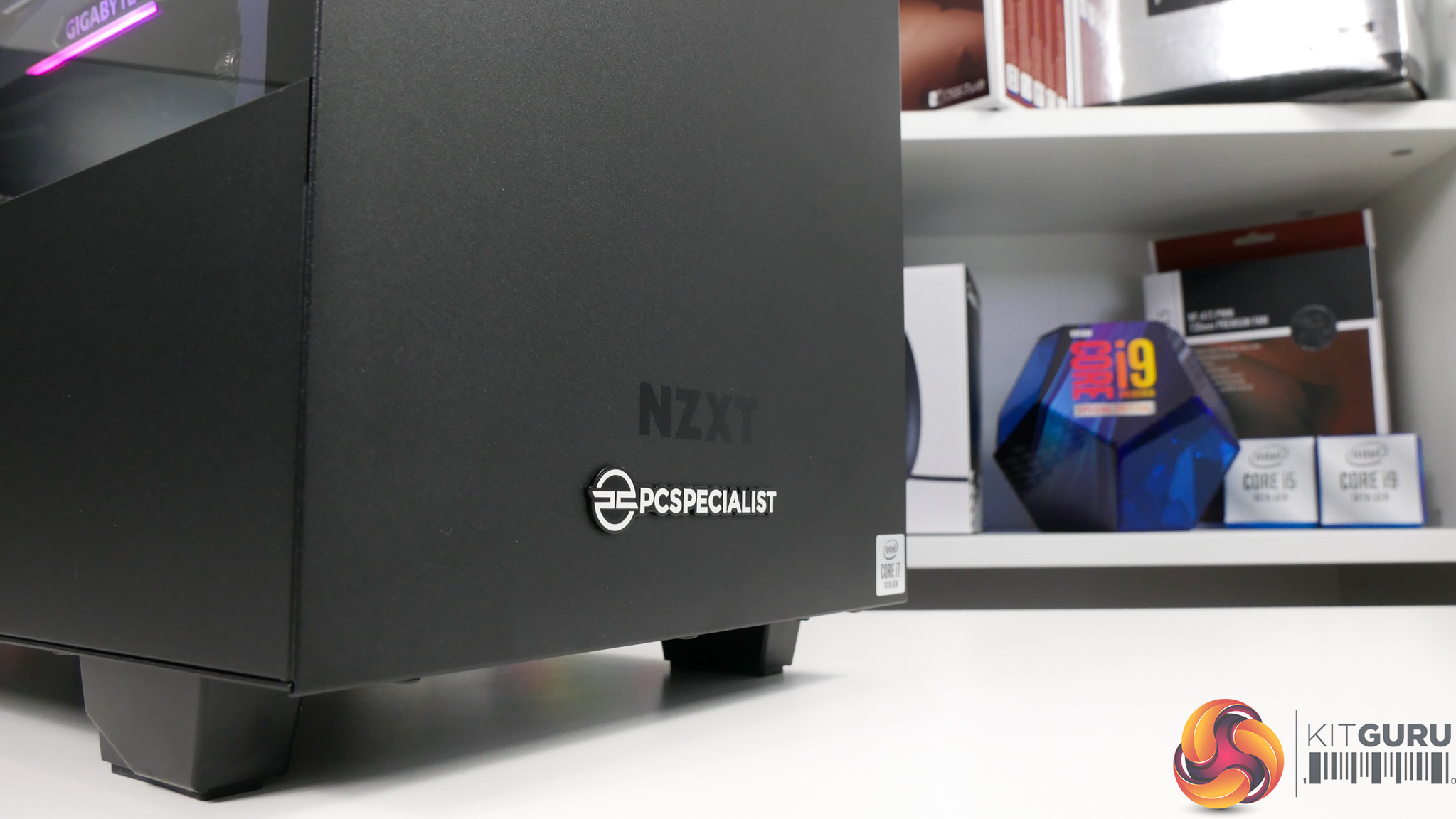
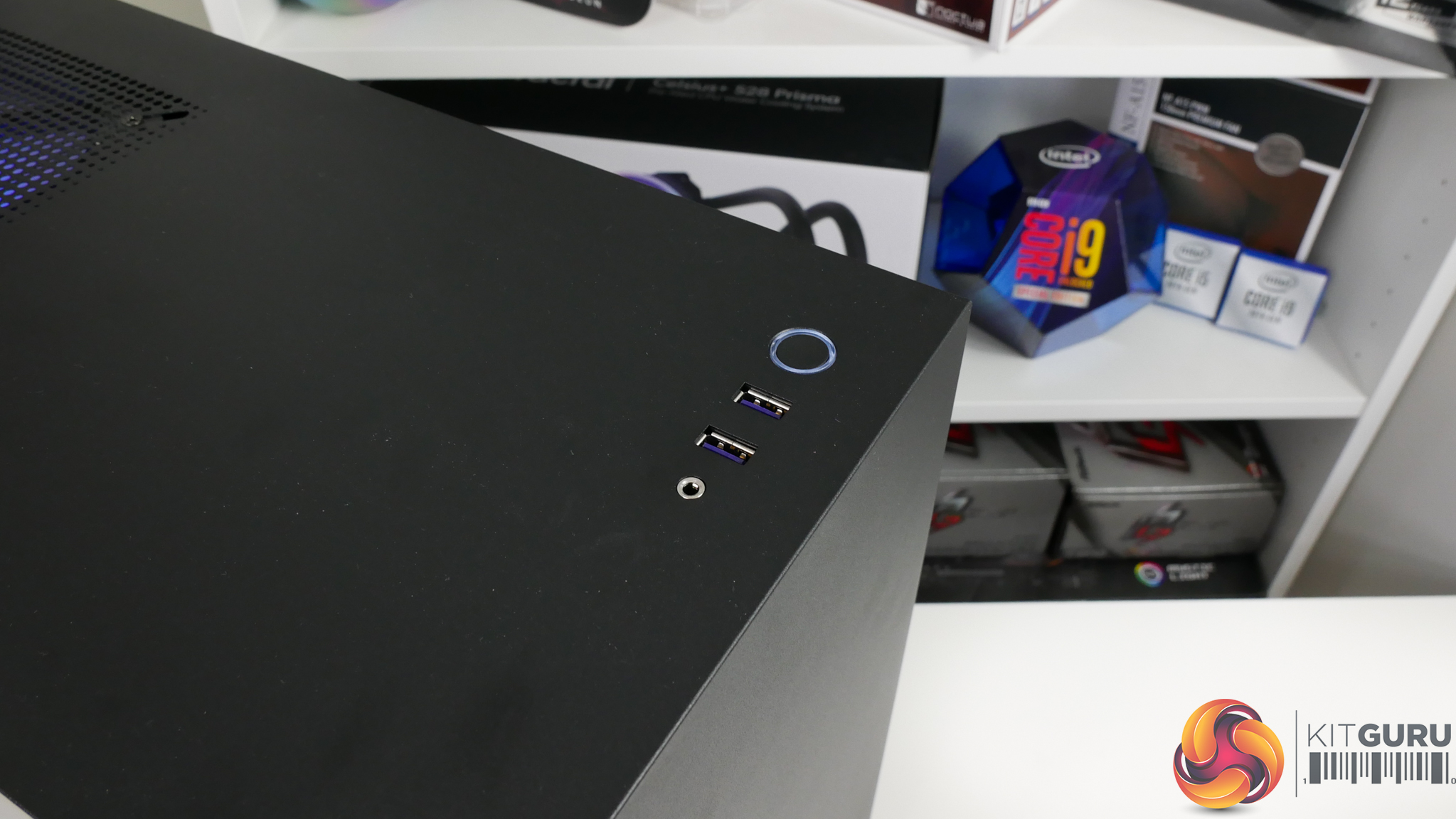
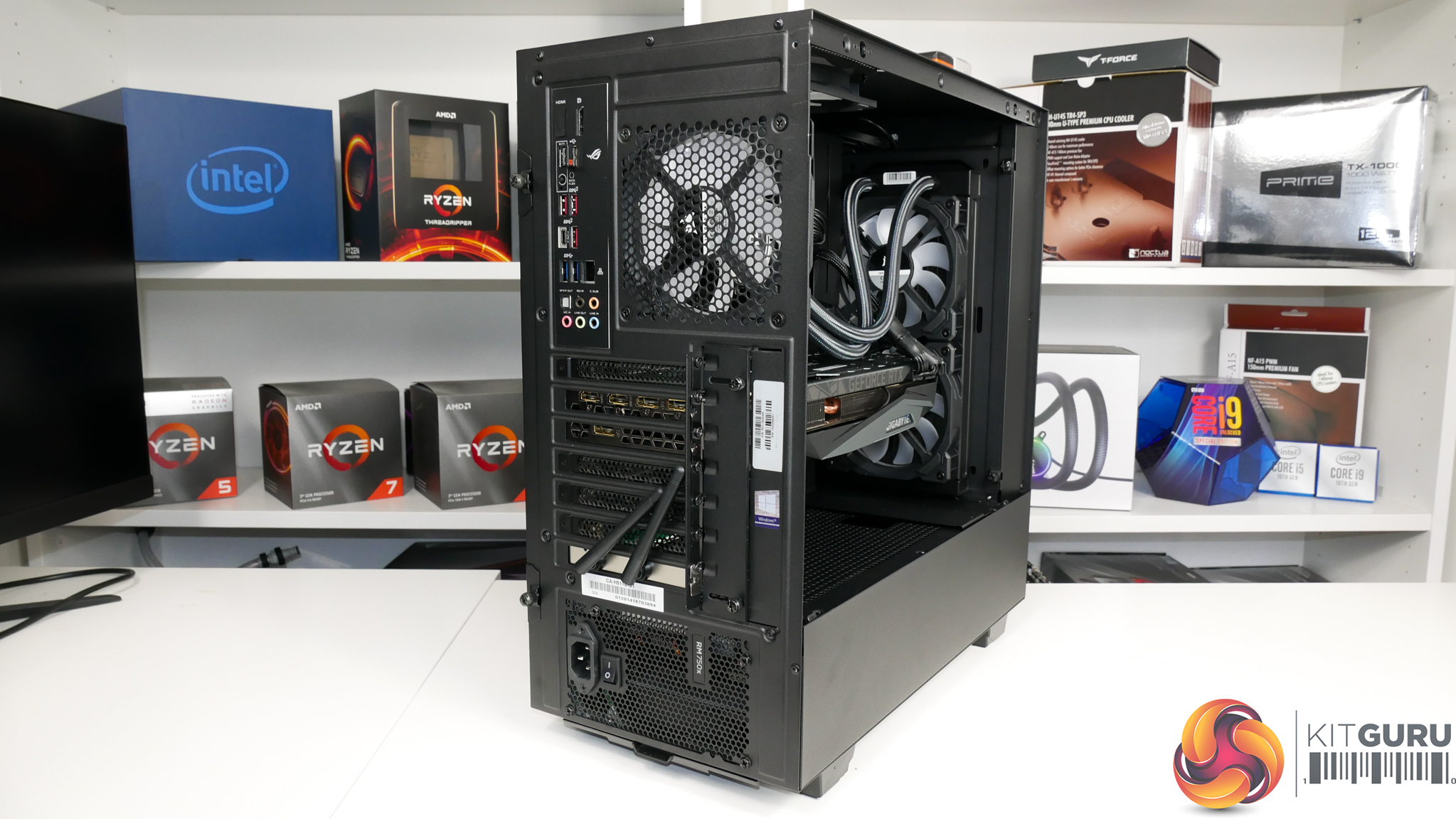
The NZXT H511 chassis is certainly on the lower-end of the budget or mid-range spectrum for a build of this calibre. But it offers good aesthetics, a glass side panel, and enough internal room, so there is somewhat little to complain about. I guess a lack of a front panel Type-C USB port is a disappointing adjustment for the H511 from its retail H510 sibling.
No major complaints for the chassis but I personally would have preferred something a little more premium and more fitting of a £2K, power-hungry build.
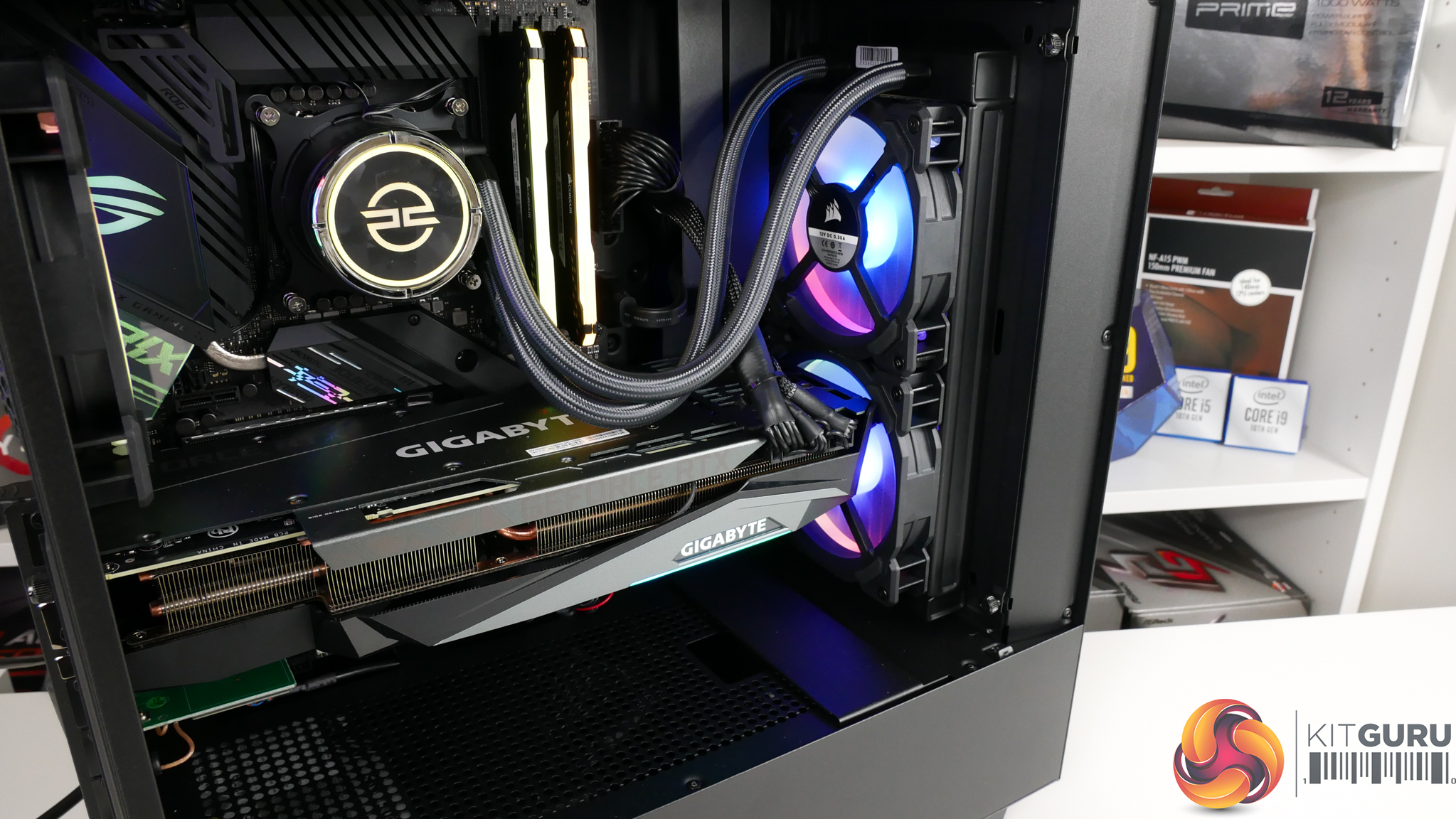
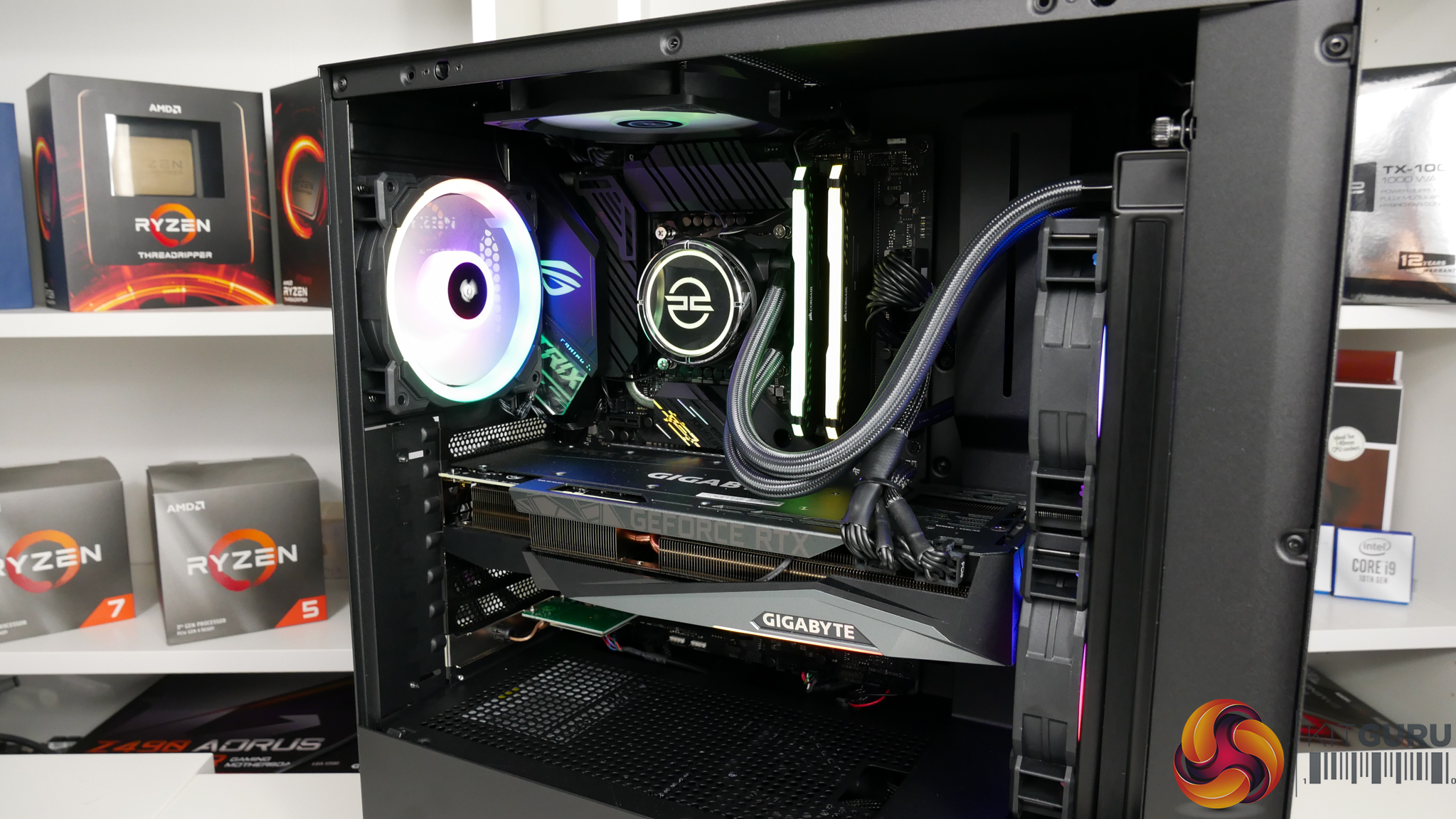
Cooling is handled by a 240mm PCSpecialist FrostFlow 240 series RGB AIO liquid cooler. The dual 120mm intake fans have been switched out to Corsair LL120 RGB models mounted to pull air through the radiator. A 240mm AIO is a perfectly logical partner for the Core i7-10700K, especially when running at its default power modes.
One area that is disappointing is the mounting orientation of the AIO cooler. The tube entry/exit points and reservoir are positioned at the highest point in the loop. This is better than having the pump at the highest point in the loop, which it is not. However, it is not ideal for noise and longevity, as highlighted by some excellent work done by Gamers Nexus.
Realistically, though, this is the only mounting orientation that is possible in the NZXT H511 chassis with the RTX 3080 installed. This again references my earlier point of a higher end chassis being more fitting for a build of this calibre. Something a little more premium and with more cooling flexibility, such as the ability to take a roof-mounted 240mm AIO, would have been a better option.
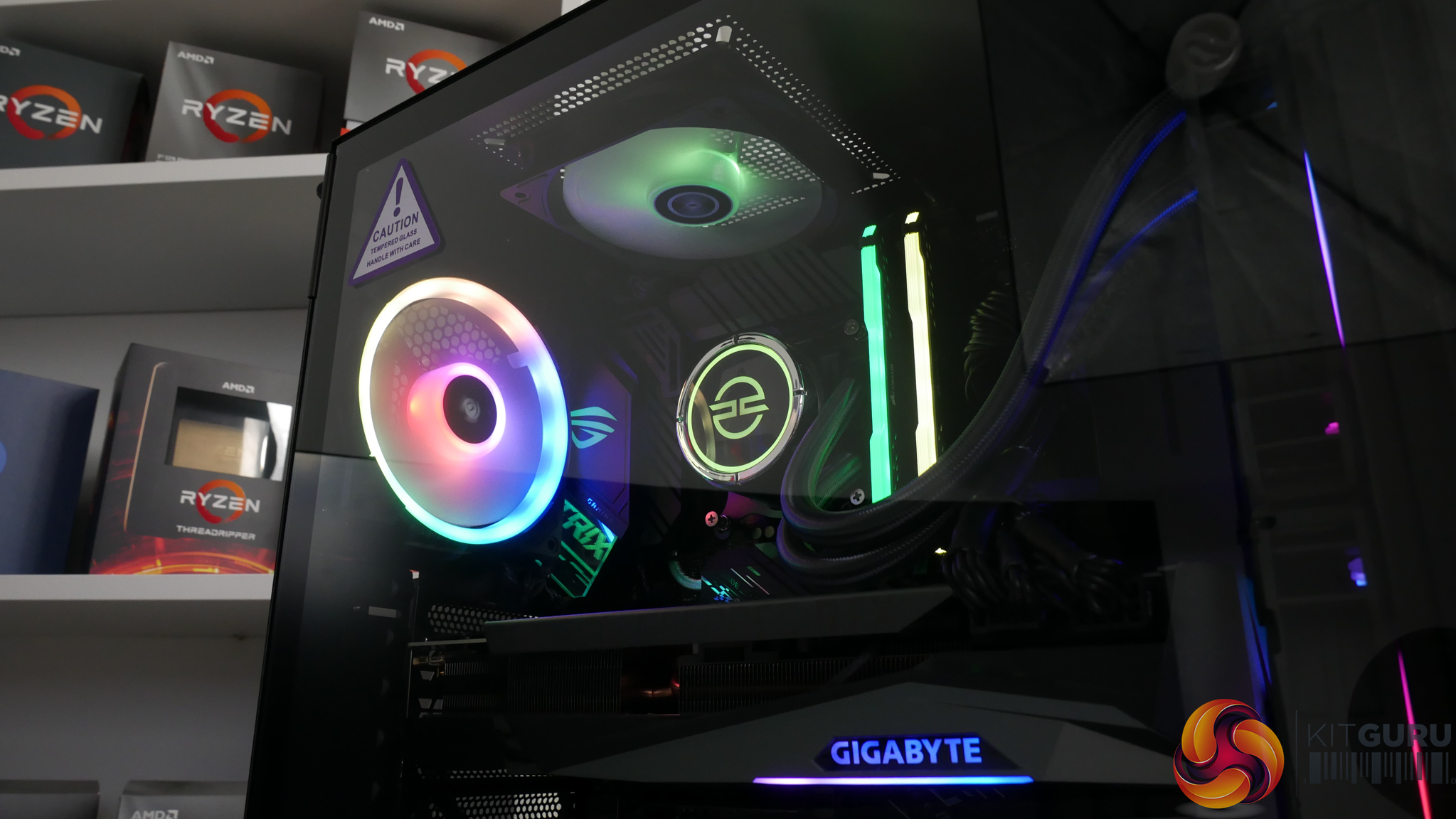
In terms of overall chassis cooling, we have the dual 120mm intakes on the front radiator, we have another Corsair LL120 RGB fan as exhaust in the rear position, and we have one PCSpecialist 120mm RGB fan as roof exhaust. The chassis is basically maxed out in terms of fan installations, other than switching the top exhaust to a 140mm option, so it will be interesting to see the balance of cooling and thermals.
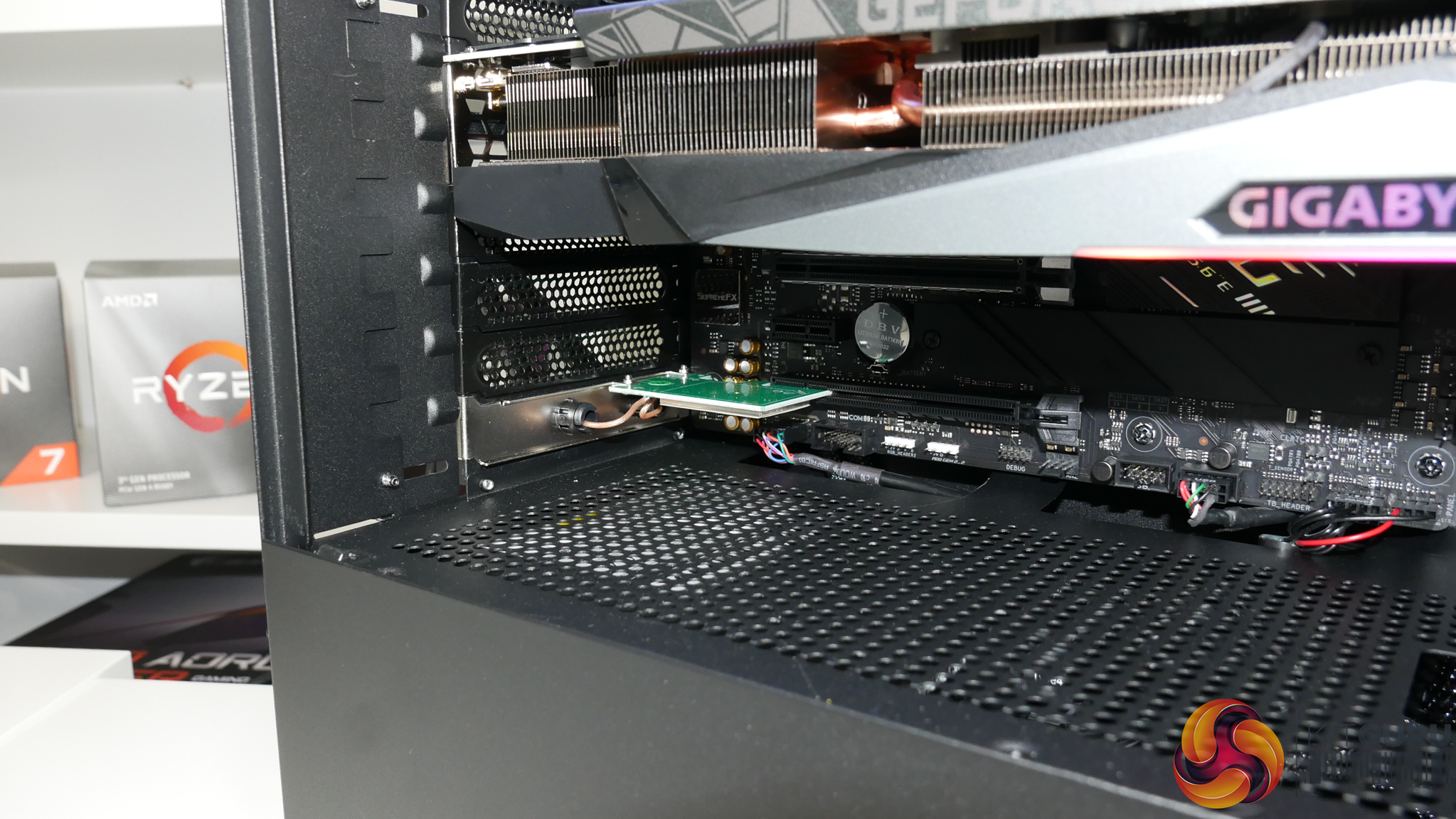
Rounding out the bundle is an 802.11n 300Mbps WiFi card in a PCI-e slot that will no doubt be a lifeline to some users and completely pointless to others. And the system runs Windows 10 Home, which is absolutely fine for a gaming machine even though I personally prefer Pro for all of my own systems.
Overall build quality for the PCSpecialist Gladius i7 system is what I would describe as very good. You also get good RGB lighting and easy control through Corsair iCUE software or ASUS AURA which links the different hardware components very well. The colour scheme of the components is generally dark black and white or grey, so very neutral for use of RGB differentiation.
Combined with the glass side panel window on the NZXT chassis, I am happy with the overall build that PCSpecialist has presented.
Cable management inside the NZXT chassis is clean, despite the use of the Corsair PSU’s default cables that are not braided or eye-catching. There are a couple of cables on the IO ports at the bottom of the motherboard that deviate from the black shrink-wrap styling, but these are relatively minor points.
One styling complaint is that the green PCB on the WiFi card is ugly and looks out of place. But aside from those minor niggles, I am happy with the cable management and overall build styling when combined with the RGB lighting.
We are examining the PCSpecialist Gladius i7 gaming system for use as a 1440p and 4K gaming machine, as well as a compute workstation.
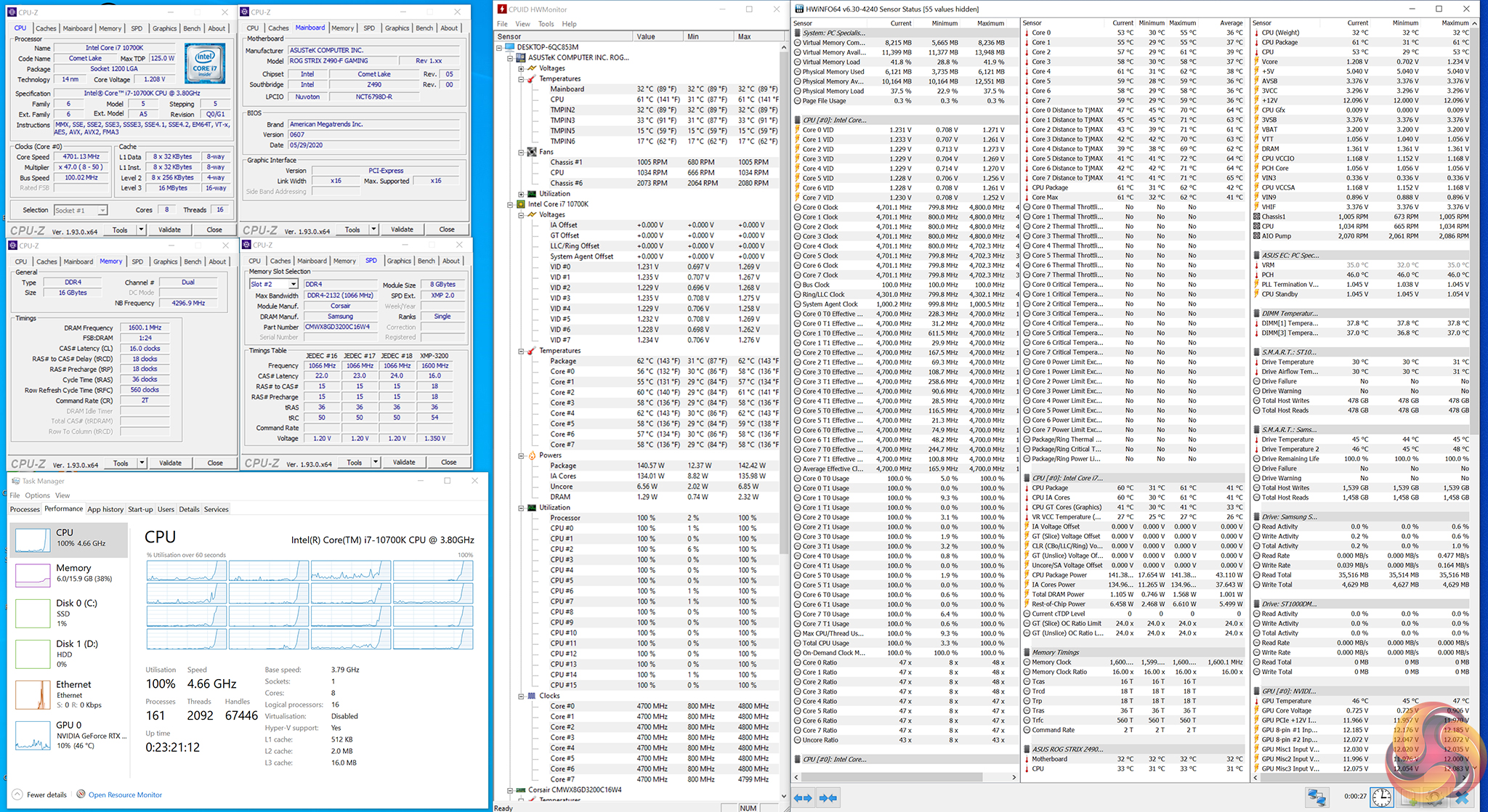
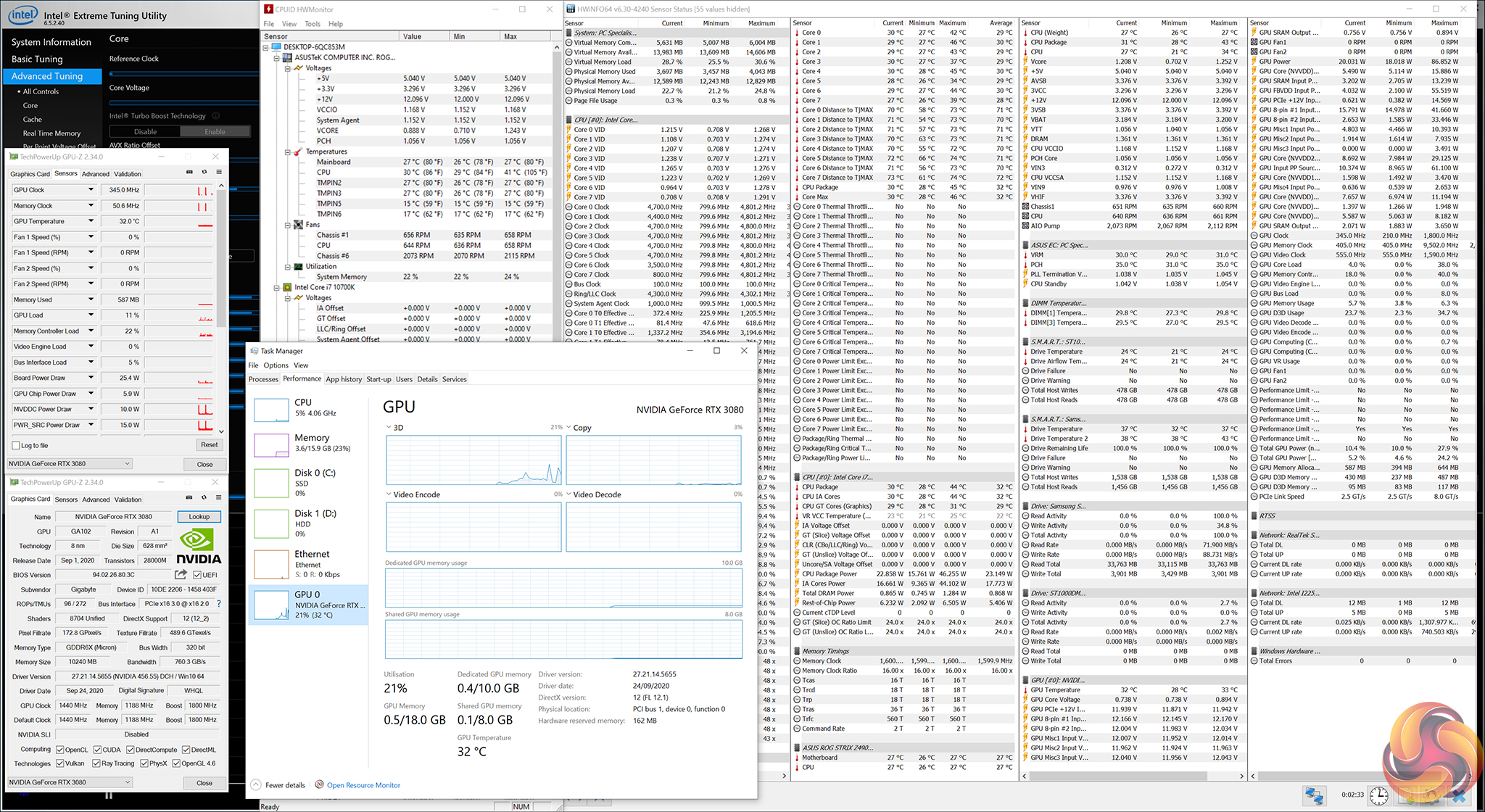
PCSpecialist Gladius i7 Test Configuration:
- Processor: Intel Core i7-10700K
- Motherboard: ASUS ROG STRIX Z490-F Gaming
- Memory: 16GB Corsair Vengeance RGB PRO 3200MHz C16 DDR4
- Graphics Card: 10GB Nvidia GeForce RTX 3080
- System Drive: 1TB Samsung 970 EVO Plus PCIe NVMe SSD
- Storage Drive: 1TB Seagate Barracuda 7200 RPM 3.5” HDD
- CPU Cooler: PCS FrostFlow 240 Series RGB AIO Cooler
- Power Supply: Corsair RM750x 750W 80Plus Gold Fully Modular PSU
- Case: NZXT H511 (Black)
- Extra Case Fans: 3x Corsair LL120 RGB LED Fans + Controller Kit
- Network Card: 802.11n 300Mbps PCIe WiFi Card
- Operating System: Windows 10 Home
Comparison Systems:
Tests
- Cinebench R20 – All-core & single-core CPU benchmark (CPU Compute), Stress test (Temperatures & Power Consumption)
- Blender 2.90 – All-core rendering of the BMW (CPU Compute), Stress test (Temperatures & Power Consumption)
- V-Ray – CUDA GPU rendering (GPU Compute)
- SiSoft Sandra – Memory bandwidth (Memory)
- AIDA64 – Memory bandwidth, memory latency (Memory)
- 3DMark – Fire Strike (1080p) test, Time Spy (1440p) test (Gaming)
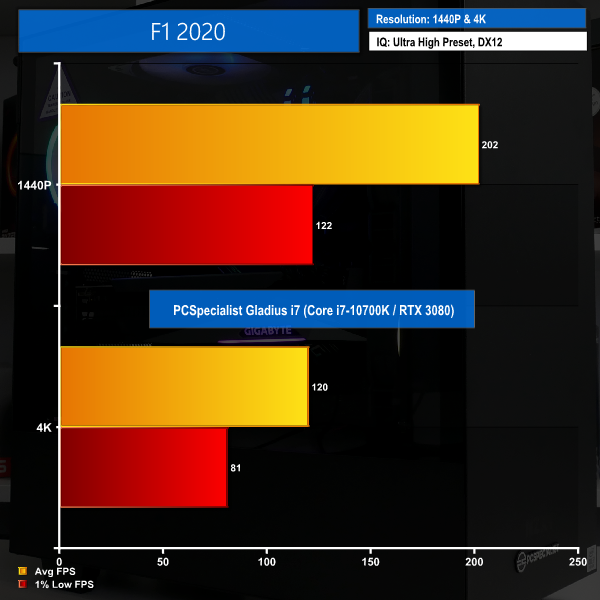
- F1 2020 – 2560×1440 & 4K Ultra High quality preset, DX12 (Gaming)
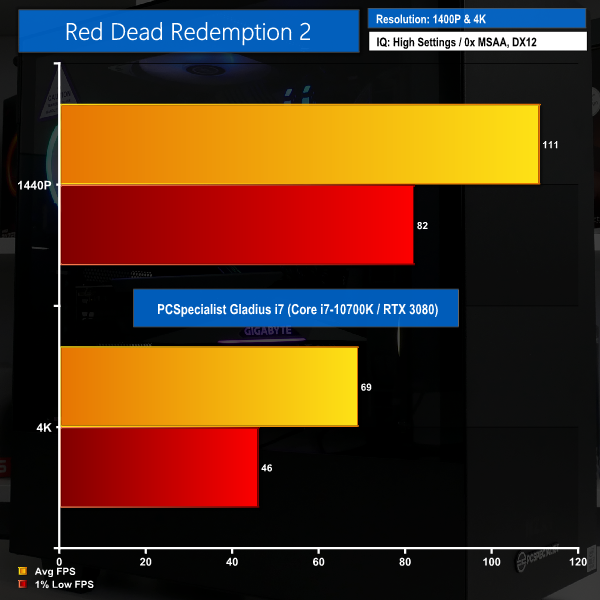
- Red Dead Redemption 2 – 2560×1440 & 4K High settings manually applied, DX12 (Gaming)
- Shadow of the Tomb Raider – 2560×1440 & 4K Highest quality preset, no AA, DX12 version (Gaming)
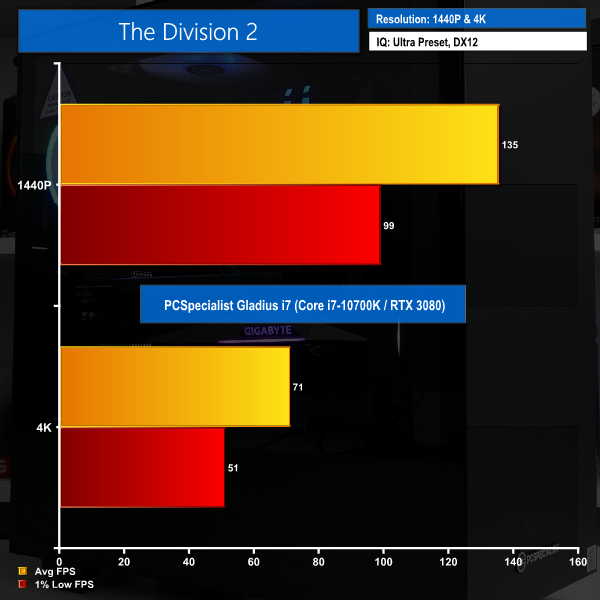
- The Division 2 – 2560×1440 & 4K Ultra quality preset, no AA, DX12 version (Gaming)
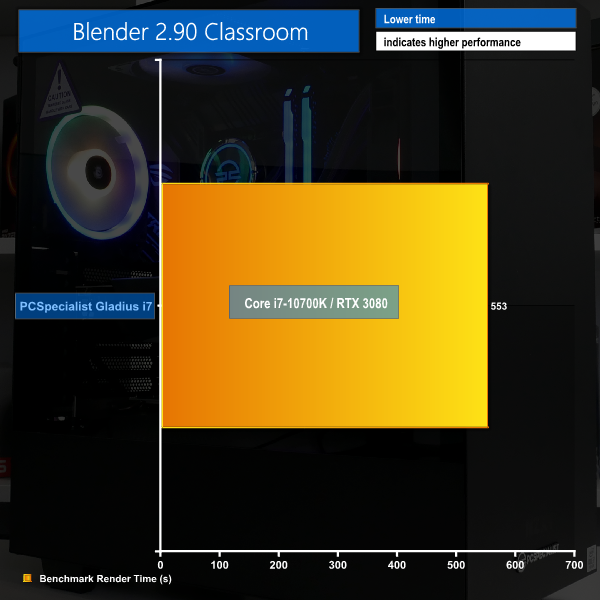
Blender BMW Benchmark
Cinebench R20
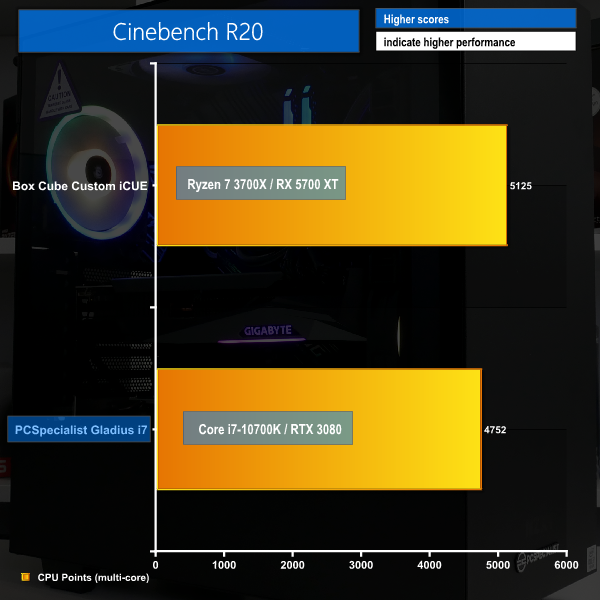
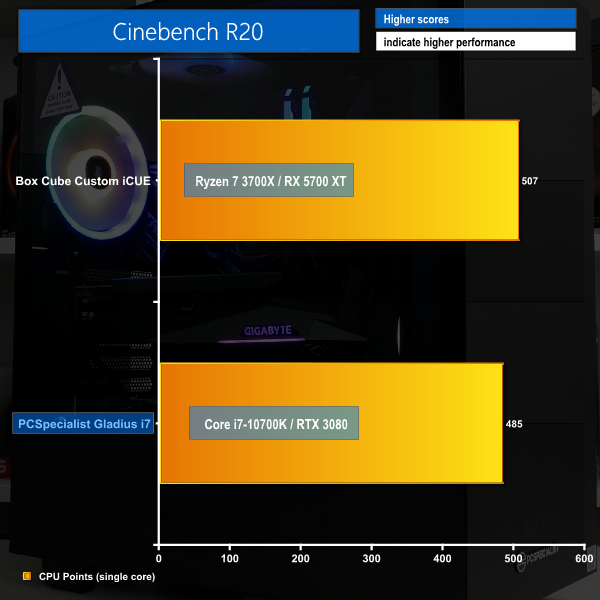
Performance in CPU heavy tasks is as we would expect from a combination of the 8-core 10th Gen Intel processor and 16 Gigs of 3200MHz C16 DDR4.
There is plenty of grunt available from the PCSpecialist Gladius i7 to handle productivity tasks such as Blender and Cinebench rendering.
In terms of clock speeds, the 10700K runs at 4.7GHz and around 140W package power for the initial all-core loading period. This then drops to 4.5-4.6GHz sustained all-core frequency at 125W after the short duration turbo limit time period is surpassed.
Cinebench R20 Back-to-Back
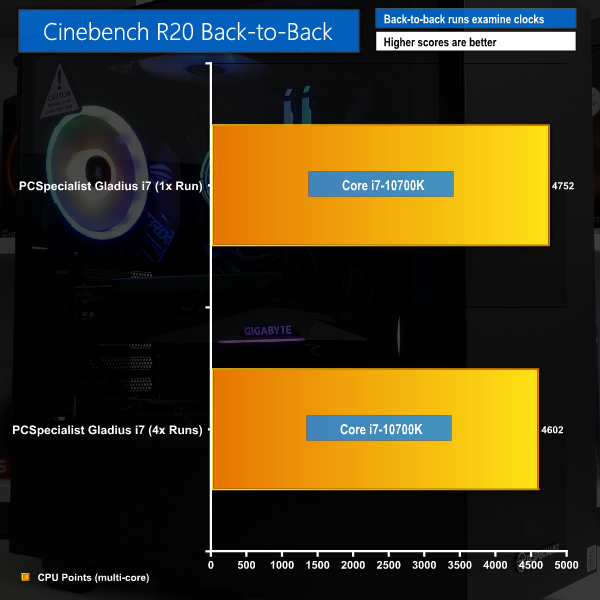
With the 100-200MHz drop in all-core clock speed from the initial Cinebench nT loading period to the later runs during the sustained clock speed operation, only a small performance reduction is observed. This is backed up with a small reduction in thermal numbers and power draw.
V-Ray GPU
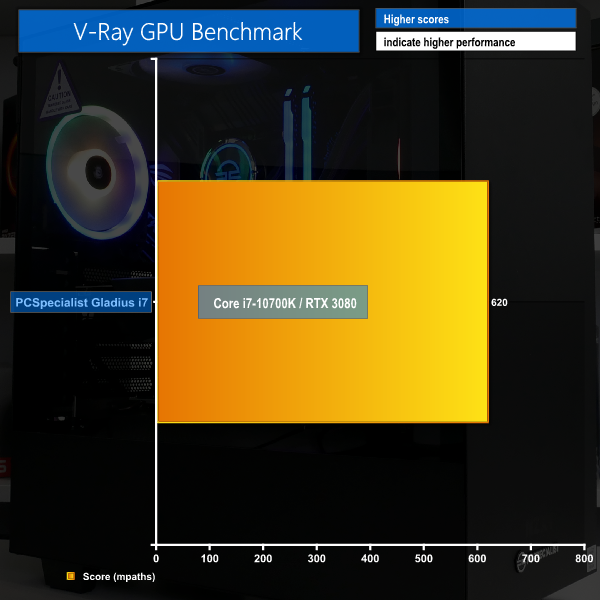
If you want to use the might of the RTX 3080 for compute tasks, V-Ray highlights excellent performance with its score.
AIDA64 Engineer
Sandra Memory Bandwidth
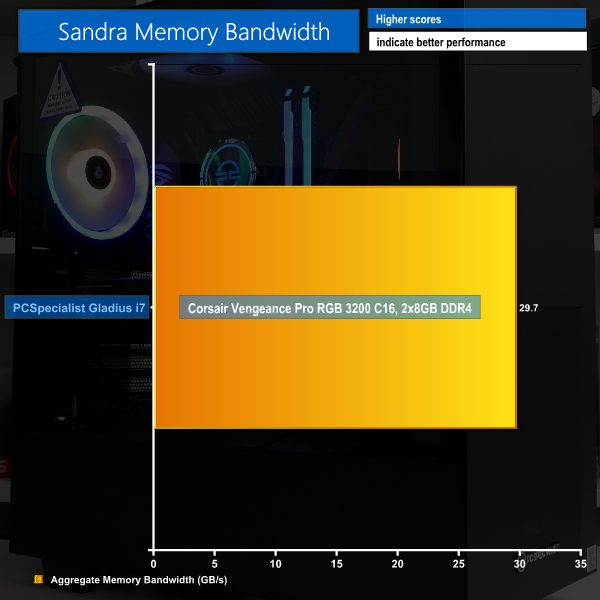
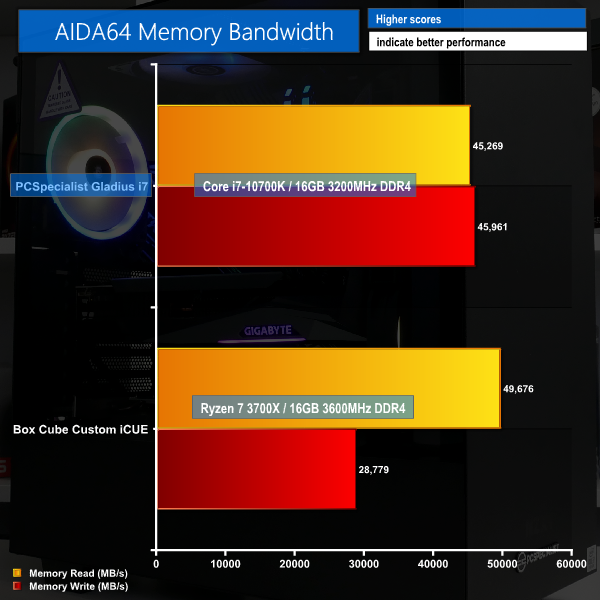
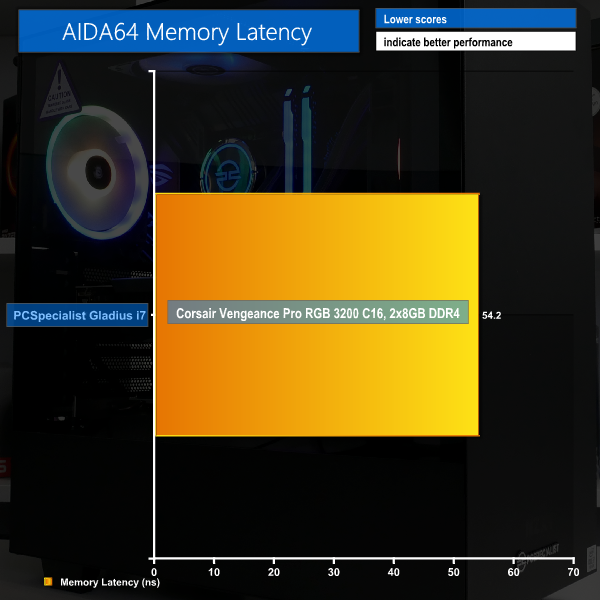
Memory bandwidth and latency numbers for the system are OK, but not spectacular. The 2x8GB 3200MHz 16-18-18 kit is perfectly adequate given PCSpecialist’s push for the target price. Plus, the Corsair RGB modules are very aesthetically appealing.
3DMark
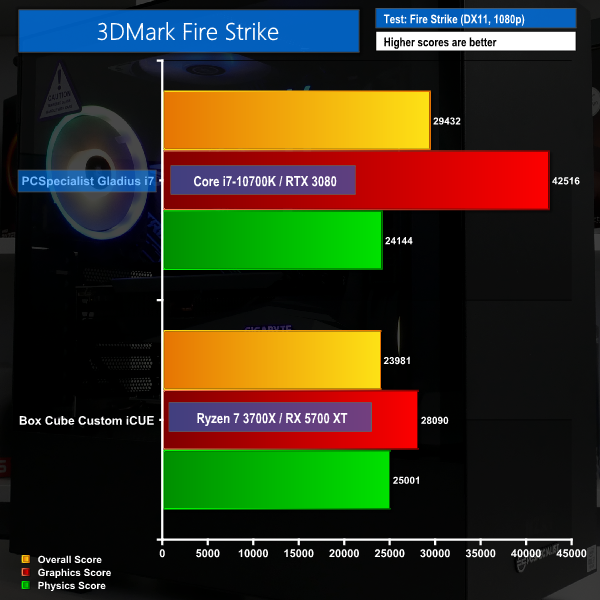
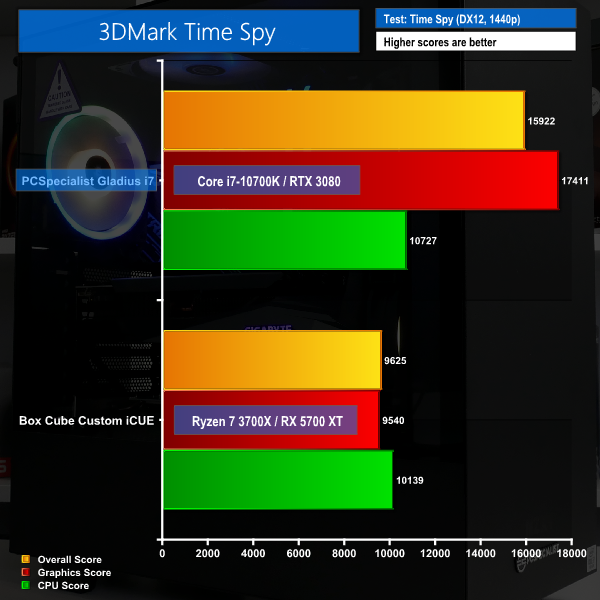
3DMark scoring highlights strong performance from both the CPU and GPU. Neither component looks particularly overpowered compared to the other and this implies strong balance from PCSpecialist’s choice of parts.
F1 2020
We run the game quality set to Ultra High.
Red Dead Redemption 2
We run the game with image settings manually set to High and the DirectX 12 mode enabled.
The Division 2
We run the game with quality set to Ultra, VSync disabled, and DX12 mode.
Shadow of the Tomb Raider
We use the DirectX 12 mode, anti-aliasing disabled, and the Highest quality preset.
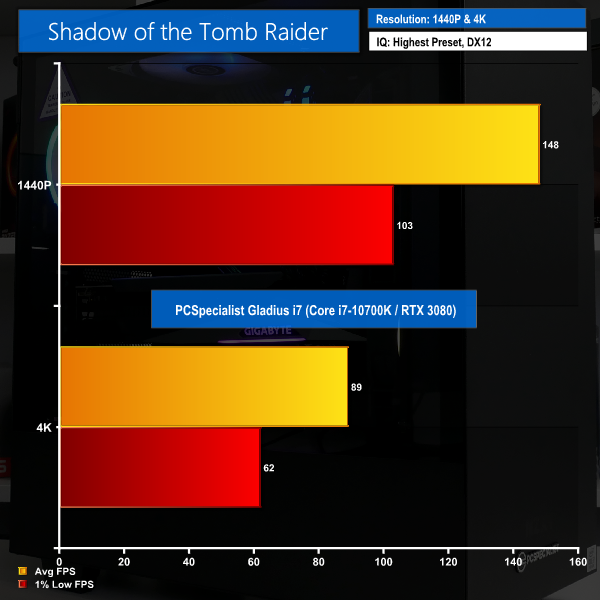
Intel’s Core i7-10700K is a superb gaming processor thanks to its Skylake-based architecture and high turbo clock speeds. This allows the performant RTX 3080 graphics card to flex its might extremely proficiently at both 1440p and 4K.
4K60 looks perfectly achievable in all four of our tested gaming titles with the PCSpecialist Gladius i7 system. And if you’re a 1440p high-refresh rate gamer, the FPS numbers look to be very alluring.
M.2 PCIe Performance
We test performance of the Samsung 970 EVO Plus 1TB PCIe NVMe SSD.
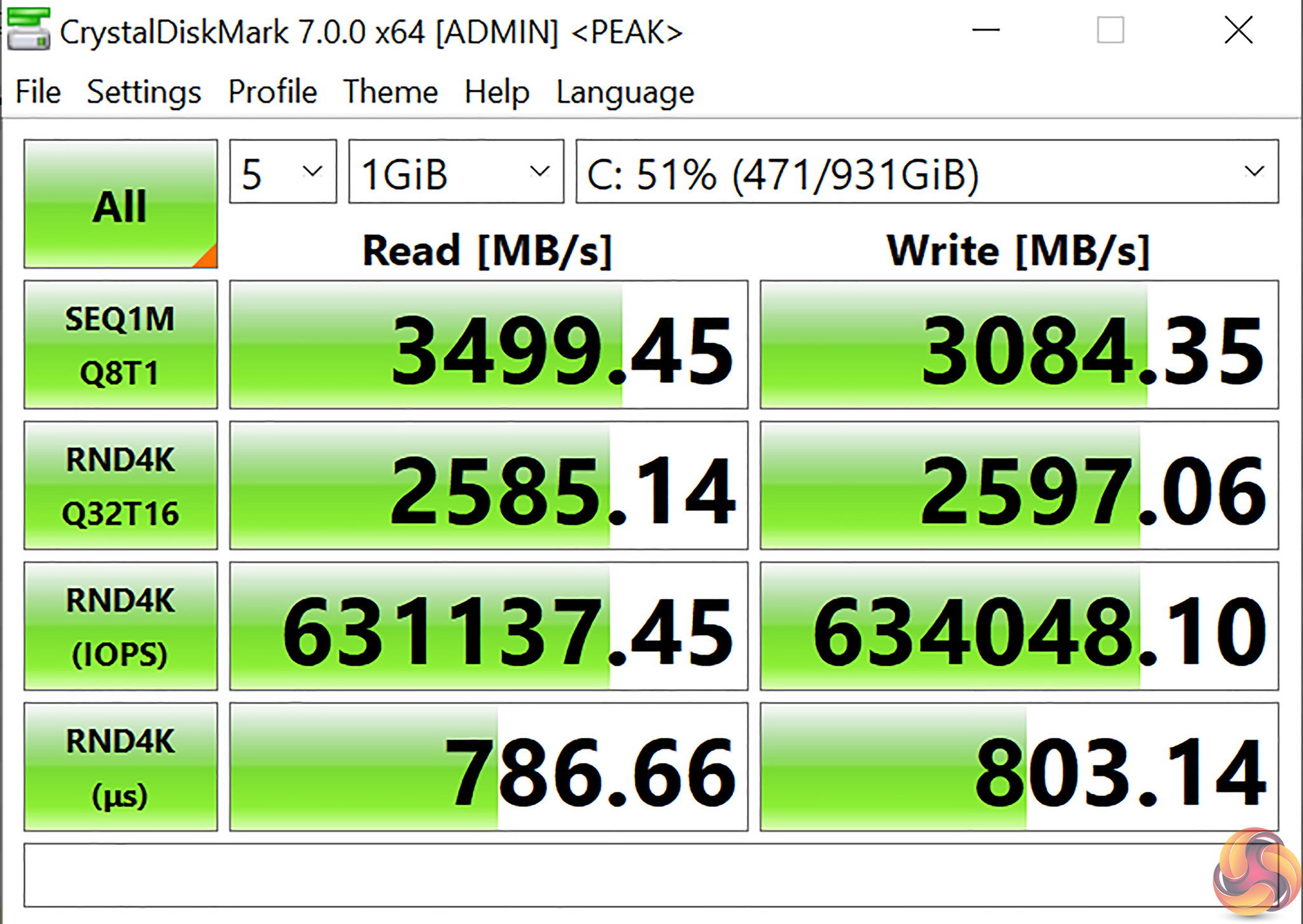
Raw speed performance from the Samsung 970 EVO Plus NVMe SSD is superb. Coupled with the usable 1TB capacity, PCSpecialist's choice of main system drive is an excellent one.
HDD Performance
We test performance of the Seagate 1TB HDD.
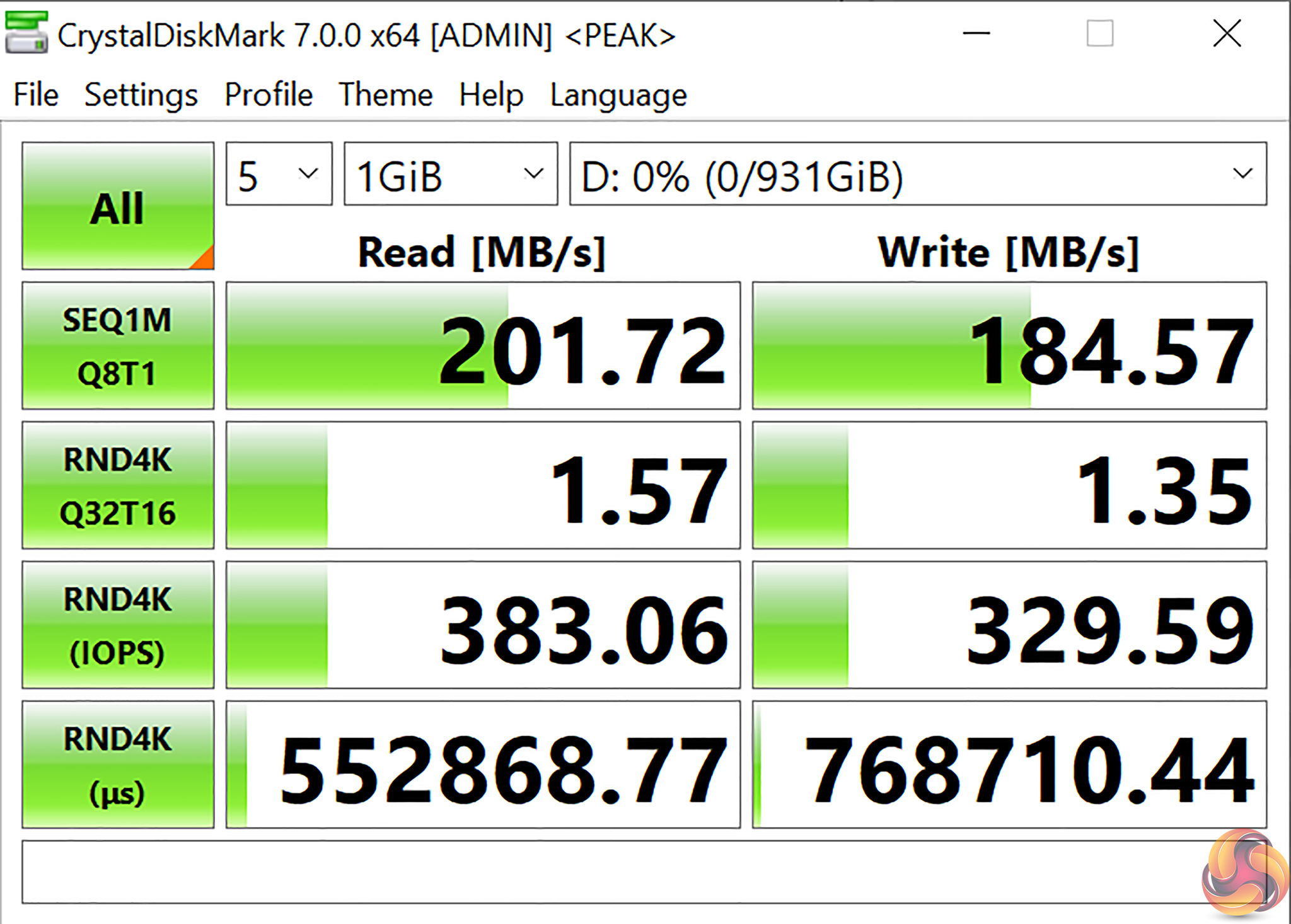
The 1TB Seagate Barracuda HDD will do its job for media storage with reasonable read/write speeds for a spinning disk.
System Power Consumption
For CPU plus GPU load results, we run Cinebench R20 nT and 3DMark Time Spy stress tests for an extended time period and take readings. Gaming readings are taken when running F1 2020 at 1440p.
The power consumption of our entire test system (at the wall) is shown in the chart.
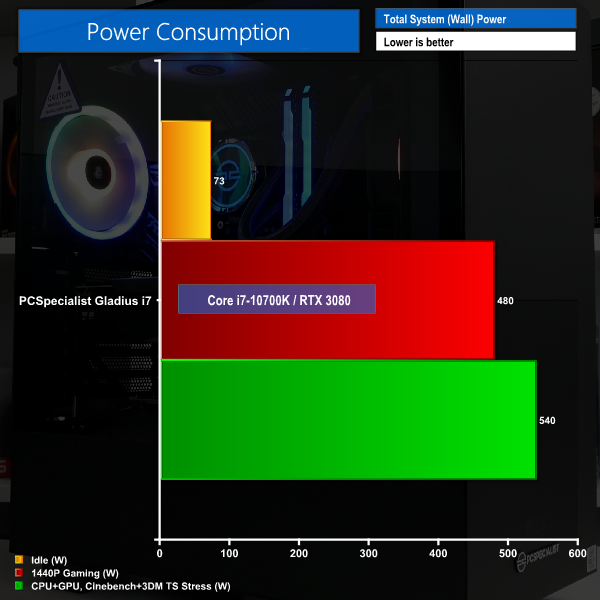
Crank up the load on the system with 1440p high refresh rate gaming and you’ll soon enough see the wall power draw nearing half-a-kilowatt in some titles such as F1 2020. Stress out both the GPU and CPU in its all-core long duration loading state and you can expect to see power draw numbers peak at around 540W from the wall.
PCSpecialist’s choice of the Corsair RM750x 750W 80Plus Gold PSU is a smart one, as proven by the wall power numbers. The unit leaves sufficient headroom for long-term stable operation, reasonable CPU and GPU overclocking headroom, and even future component upgrades.
System Temperatures
We use the same test procedure to record system temperatures. Ambient temperature during the readings was around 24°C.
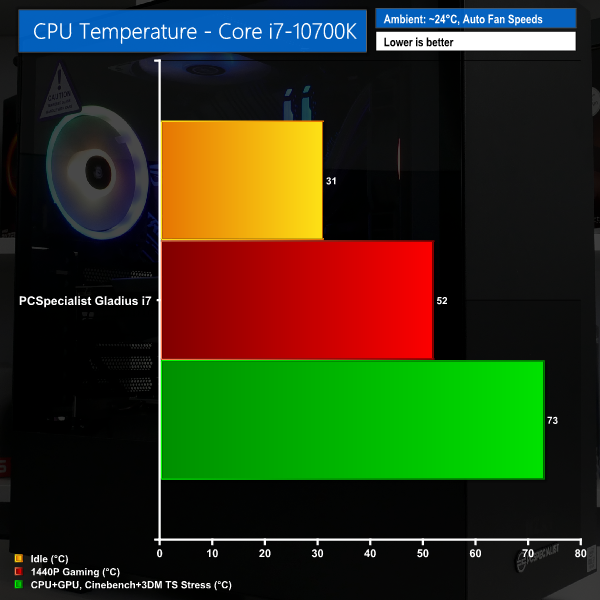
CPU temperatures are kept in check very well by the front-mounted 240mm AIO and dual Corsair LL120 fans. The Core i7-10700K typically stays below 75C in its long-duration 125W operating state, even with the heat of the graphics card added into the internal system. Plus, the ASUS motherboard VRM temperatures were in the mid-50s, which is absolutely fine.
Again, PCSpecialist’s choice of hardware proves smart with the CPU cooler and quality motherboard.
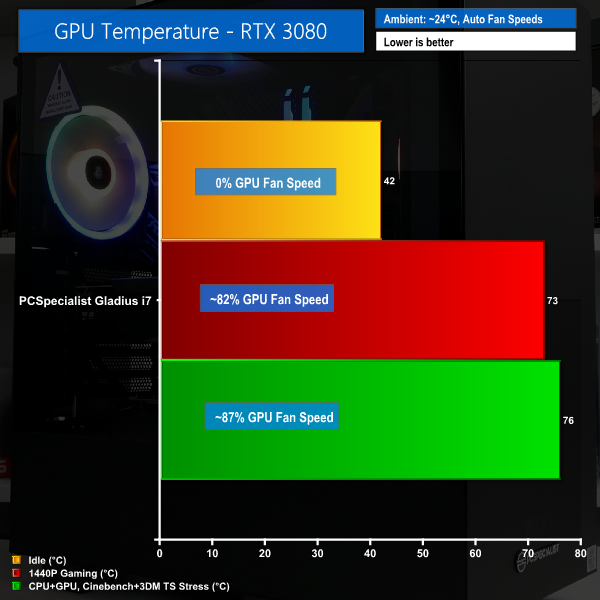
Strong cooling performance is also shown by the triple-fan Gigabyte RTX 3080 OC graphics card. The zero RPM fan mode worked fine, and load temperatures were kept below 80C even for extended periods of gaming stress.
This is very good for maintaining proficient GPU Boost clocks whilst also ensuring that the fans still have headroom to push additional cooling capacity as required. The boost core clock on the graphics card was typically in the order of 1965MHz whilst gaming, or around 1930MHz averaged after an hour of 3DMark Time Spy stress testing.
System Noise
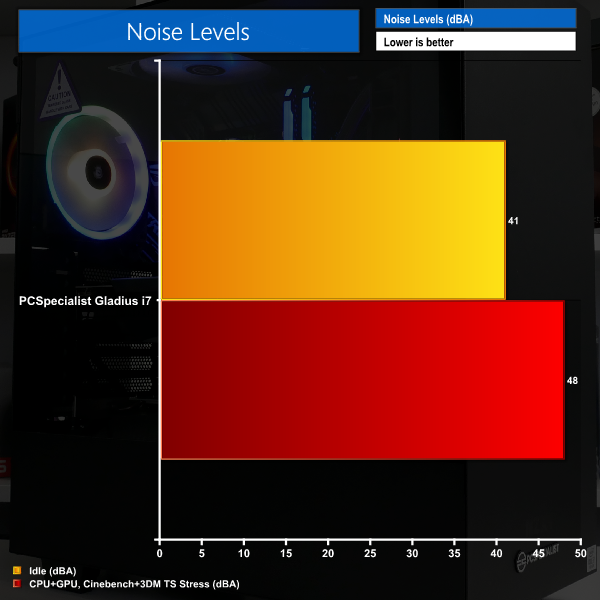
Noise levels are impressively low at idle or when just the CPU cooler is being worked. The graphics card does a superb job at keeping temperatures in check to allow the fans to spin up slowly to their long-duration, steady-state level.
Even with the Gigabyte RTX 3080 OC triple-fan cooler humming away at 80-90%, the noise levels were very tolerable to the point that the system did not distract me whilst playing GTA V without headphones.
Noise performance is one of the key areas of strength for the PCSpecialist Gladius i7.
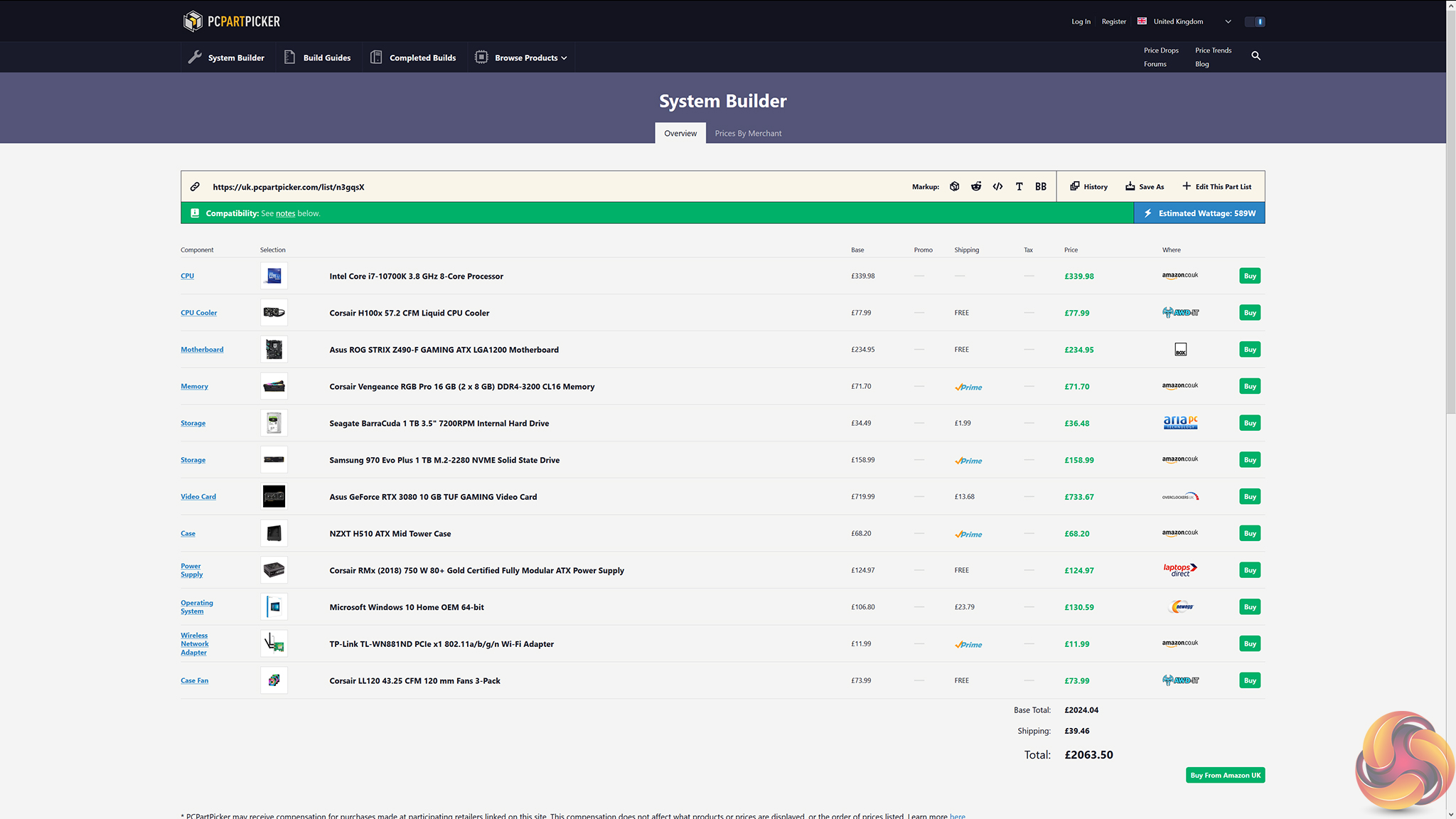
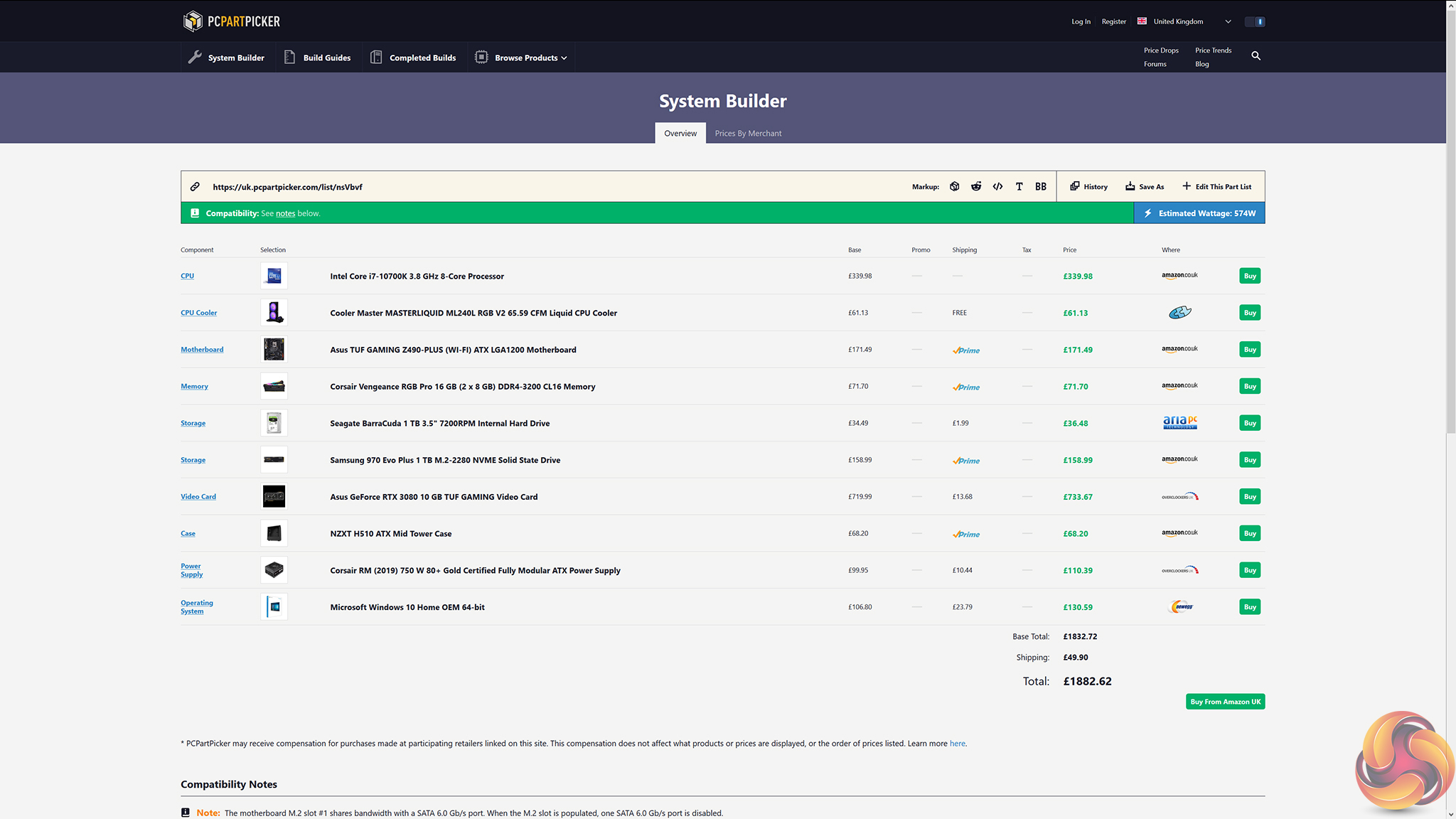
Coming at £1999, the PCSpecialist Gladius i7 is surprisingly aggressive in terms of its pricing. Building the same system with almost identical parts selected through PCPartPicker actually results in a total price of a little over £2000, making it more expensive than the PCSpecialist offering.
Even if we cut-down to a cheaper motherboard, cheaper AIO cooler, and removed the quality Corsair LL120 fans, we are only a little cheaper than the PCSpecialist system but obviously do not have the luxury of the system being built for us with warranty.

A comparable, RTX 3080-powered build from Scan was more expensive by around £200 when we checked week commencing 13th October.
PCSpecialist really are offering good pricing with the Gladius i7 gaming system, especially given the perfectly logical and sensible selection of parts.
Overall, my experience with the PCSpecialist Gladius i7 gaming system has been positive. The RTX 3080 and Core i7-10700K combination delivered very strong performance overall, making this an excellent system for 4K60 or even 1440P high refresh rate gaming.
You get a well-balanced choice of core components, and the right corners have been cut elsewhere such as the RAM and lack of braided cables, despite the inclusion of a market leading NVMe SSD in the Samsung 970 EVO Plus.
Overall build quality is very good, and aesthetics are as appealing as we could expect from a system with Corsair RGB lighting and standard PSU cables. The WiFi card is ugly, though, thanks to its green PCB. That will undoubtedly annoy some users, but it is a small compromise for this system.
I was impressed by the perfectly capable cooling and low noise operation from the Gigabyte graphics card cooler, 240mm PCS AIO, and NZXT H511 chassis. Of course, the lack of overclocking on the Core i7-10700K CPU aids the system's cooling and noise performance, but I respect PCSpecialist's decision to run the fast eight-core chip at its already performant stock frequencies. If you want higher clock speeds, the ASUS ROG STRIX motherboard and its strong VRM and straightforward UEFI are open for access.
Despite its solid performance, the chassis did feel out of place for a build of this calibre; I would have preferred a more premium offering with a Type-C front panel port and better AIO cooler mounting options.
With strong overall performance, a well-balanced selection of hardware, and very competitive pricing, the PCSpecialist Gladius i7 delivers an impressive high-end gaming experience with very few compromises.
You can buy this system as reviewed directly from PCSpecialist for £1999 HERE.
Discuss on our Facebook page HERE.
Pros:
- Strong gaming performance from the Core i7-10700K and RTX 3080.
- Well balanced component selection – minimal wasted budget.
- Good low noise operation.
- Solid cooling performance.
- Impressive build quality, despite the lack of braided cables.
- Appealing RGB lighting options.
- Very fast Samsung SSD.
Cons:
- Chassis feels a little out of its depth for this calibre of hardware.
- AIO mounting orientation is not ideal due to chassis limitations.
- Some buyers may have valued some overclocking on the CPU.
KitGuru says: At a slither under £2000, the PCSpecialist Gladius i7 offers excellent gaming performance in a well-balanced system.