 KitGuru KitGuru.net – Tech News | Hardware News | Hardware Reviews | IOS | Mobile | Gaming | Graphics Cards


Blender is a free and open source 3D creation suite. It supports the entirety of the 3D pipeline—modeling, rigging, animation, simulation, rendering, compositing and motion tracking, even video editing and game creation. The latest version at the time of writing, 2.79, supports rendering on the GPU as well as the CPU. In GPU mode, it will render using OpenCL with AMD graphics cards, and CUDA with NVIDIA graphics cards. For this test, we used the Gooseberry Production Benchmark. Project Gooseberry is the code name for the Blender Institute’s 6th open movie, Cosmos Laundromat — a 10-minute short, the pilot for the planned first-ever free/open source animated feature film. The benchmark renders a single frame from this film in intermediate quality.
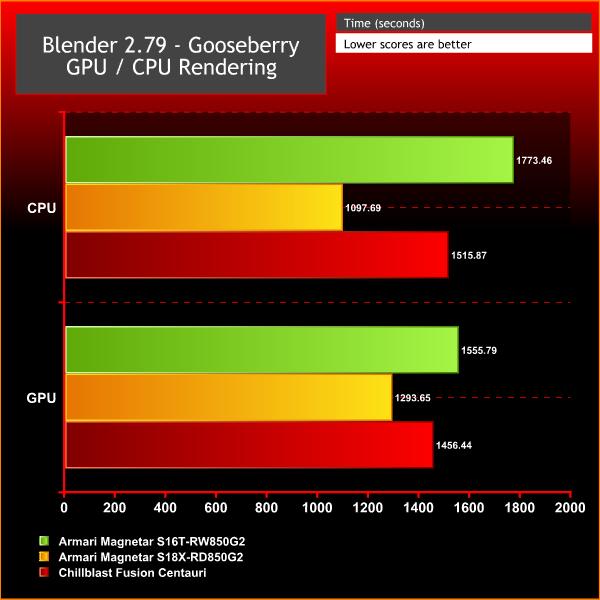
The Chillblast completed Blender’s CPU-based benchmark in 1,515 seconds. That’s quicker than the Armari Threadripper machine, but slower than the Core i9 rig. That’s a surprise, and it indicates that in this application the Threadripper’s clock speed doesn’t make much difference. It also proves that Intel’s chip is faster than both AMD machines when it comes to rendering in Blender.
It’s the same story in the GPU test. The Chillblast’s completion time of 1,456 seconds is quicker than the Armari Threadripper machine, which used an AMD Radeon Vega Frontier Edition card, but it’s still slower than the Intel rig, which has a couple of extra cores and better clock speed thanks to Armari’s tweaking.
Once again, then, the Chillblast is not slow here – but the Intel-based Armari machine is often better.
Like 3D rendering, video encoding is a task that now takes very good advantage of multi-core processors. Although a lot of reviews focus on Open Source encoders such as Handbrake, this is a review of professional applications, so we have chosen Adobe Media Encoder CC 2017 (AME) for our test bed instead. You can download a trial of this software from Adobe. For an encoding source, we used the 4K UHD (3,840 x 2,160) version of the Blender Mango Project Tears of Steel movie.
We encoded with the Vimeo 1080p HD preset in AME. This is a MP4 H.264 preset, using High Profile and Level 4.2. There are two modes available for the AME rendering engine (called the Mercury Playback Engine, presumably because it’s smooth and, erm, shiny). One uses software only, so will just employ the CPU. But you can also call in CUDA on NVIDIA graphics and OpenCL on AMD graphics. We tried both GPU-accelerated and CPU-only options on both systems.
We were pleasantly surprised by the Chillblast’s Adobe encoding performance. With the CPU and both GPUs deployed with Adobe’s Mercury engine our test took 369 seconds to complete.
That’s only ten seconds behind Armari’s Threadripper machine, which had the overclocked processor and Vega professional-tier graphics card. It’s also a solid distance ahead of the Intel Core i9 system. f you’re editing on Adobe, then, it looks like AMD is the way to go.
