 KitGuru KitGuru.net – Tech News | Hardware News | Hardware Reviews | IOS | Mobile | Gaming | Graphics Cards


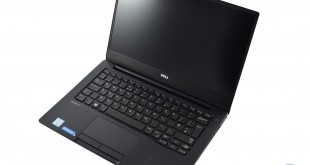
Traditionally, Ultrabooks command a high premium. After all, you are getting a high-performance laptop, crammed with the latest features, with typically slim and lightweight bodies. Let's not forget, too, that Intel has to certify a laptop as an Ultrabook before it can be sold using the Ultrabook name – so you are paying for bragging rights, too. As such, it cannot be much of a surprise that pricing for the Dell Latitude 13 7370 starts at £1179.
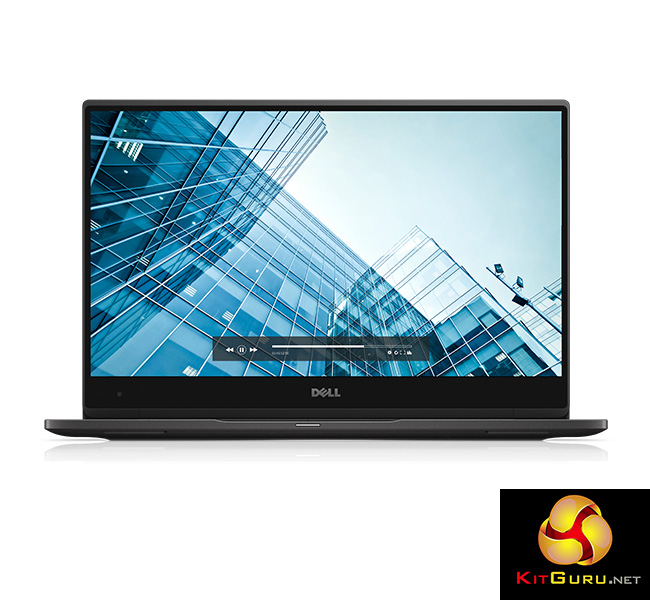
Aimed primarily at business users, the Dell Latitude 13 7370 is certainly a good-looking piece of kit. Boasting a passively cooled Core m5-6Y57 CPU, PCIe SSD and InfinityEdge display, it looks to back up its appearance with decent hardware.
However, specifications on paper are one thing, and real-world performance is another. We put the Latitude 7370 through its paces to see if it is worth buying.
Specification
- Intel® Core™ m5-6Y57 (Dual Core, 1.10 GHz, 4MB cache)
- Windows 10 Pro
- 8GB LPDDR3 1866MHz Memory
- 256GB Solid State Drive M2 2280 PCIe
- 33.8cm (13.3”) FHD (1920 x 1080) InfinityEdge display
- 1 USB 3.0 (Type A)
- 2 Thunderbolt™
- 1 Micro HDMI
- Universal Jack
- 3 M.2 Expansion Slots: 1 SSD 1 WWAN and 1 WLAN/WiGig
- Lock Slot
- Optional SmartCard Reader and Touch Fingerprint Reader
- Micro SIM Card Slot
- Micro SD 4.0 Memory Card Reader
- Height: 14.32 mm (0.56″) x Width: 304.8 mm (12″) x Depth: 210.5 mm (8.3″)
- Weight: 1.12 kg (2.47 lbs)
- Intel® Dual Band Wireless-AC 8260 802.11ac + Bluetooth® 4.2 LE Wireless Card
- Primary 4-Cell (34Wh) battery
- E5 45w Type C Adapter
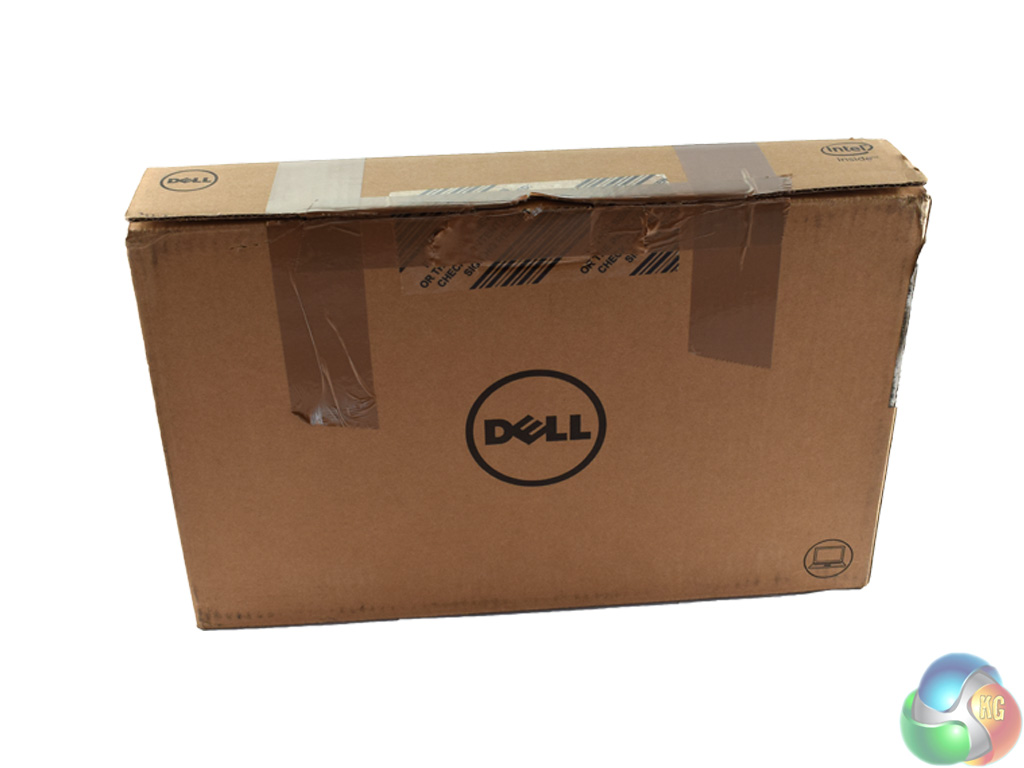
The Latitude 13 7370 ships in a fairly plain box with the Dell logo visible.
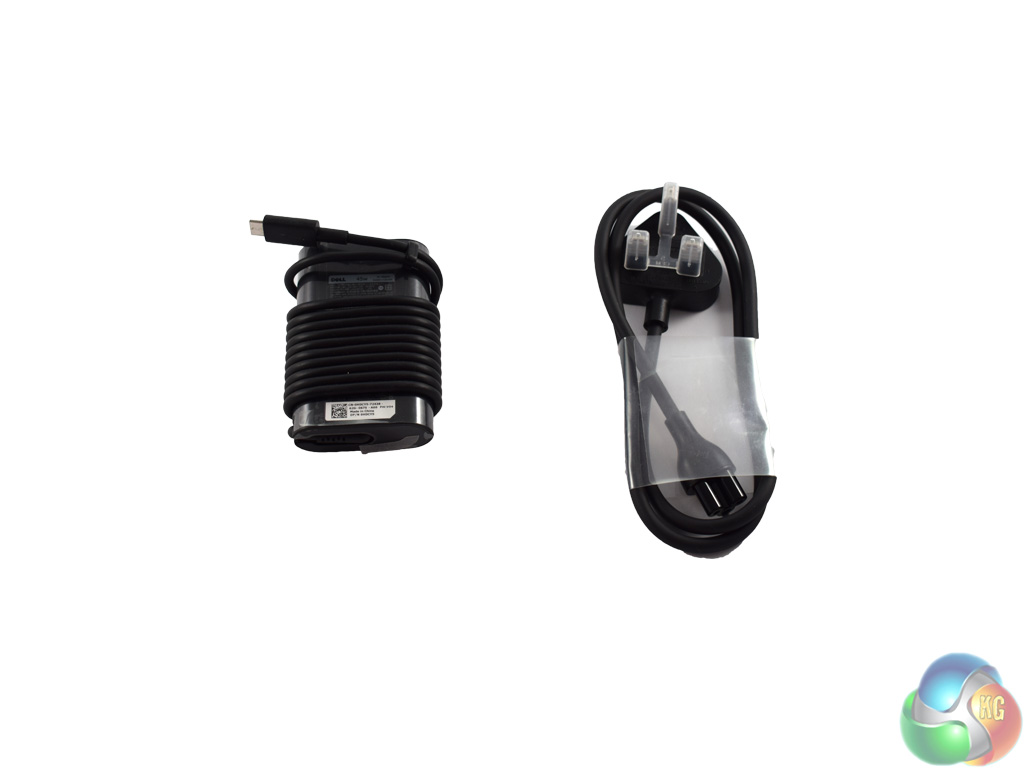
Aside from the laptop itself, there is the power brick, rated at 45W. It uses a Thunderbolt Type-C connector to charge the laptop.
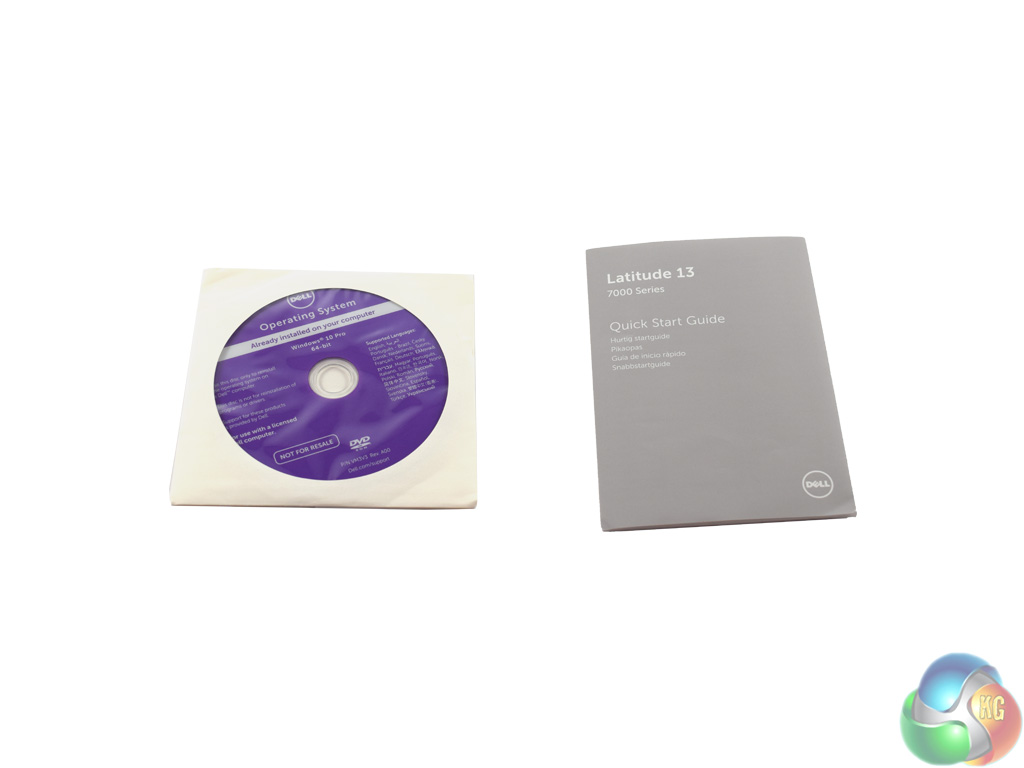
Dell also bundle a Windows installation DVD (though the Latitude lacks an optical disk drive, making it fairly redundant) and quick start guide with the Latitude 7370.
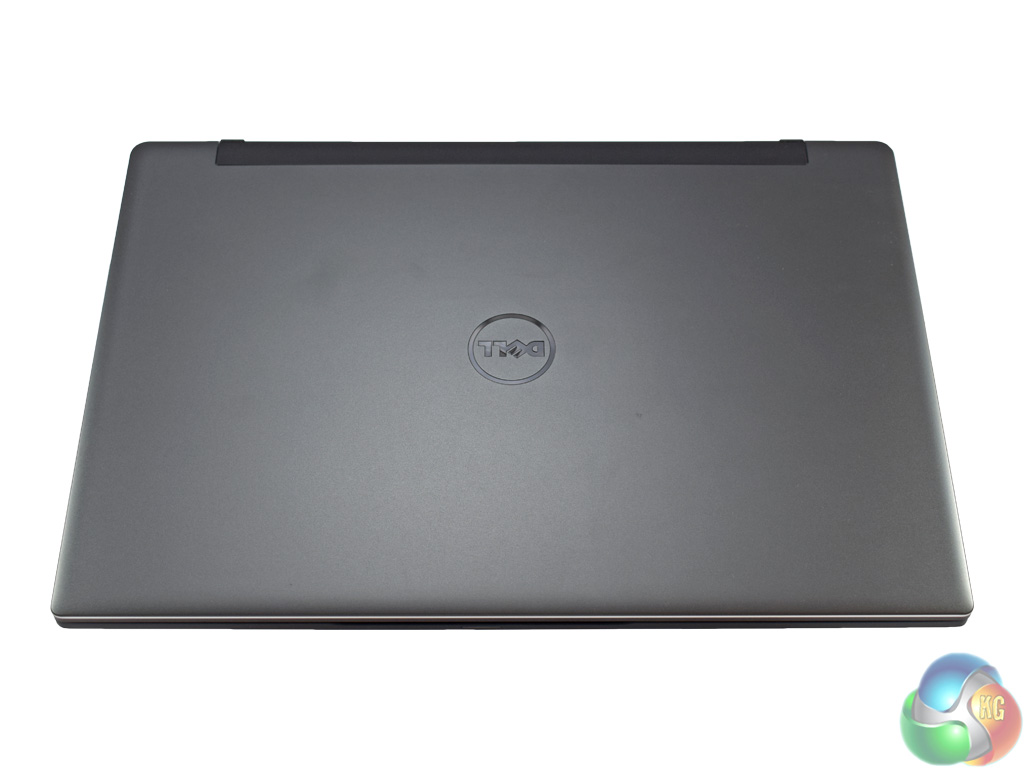

There is no denying that the Latitude 7370 is a very sleek laptop. Starting with the carbon-fibre lid and base, it oozes class and sophistication.
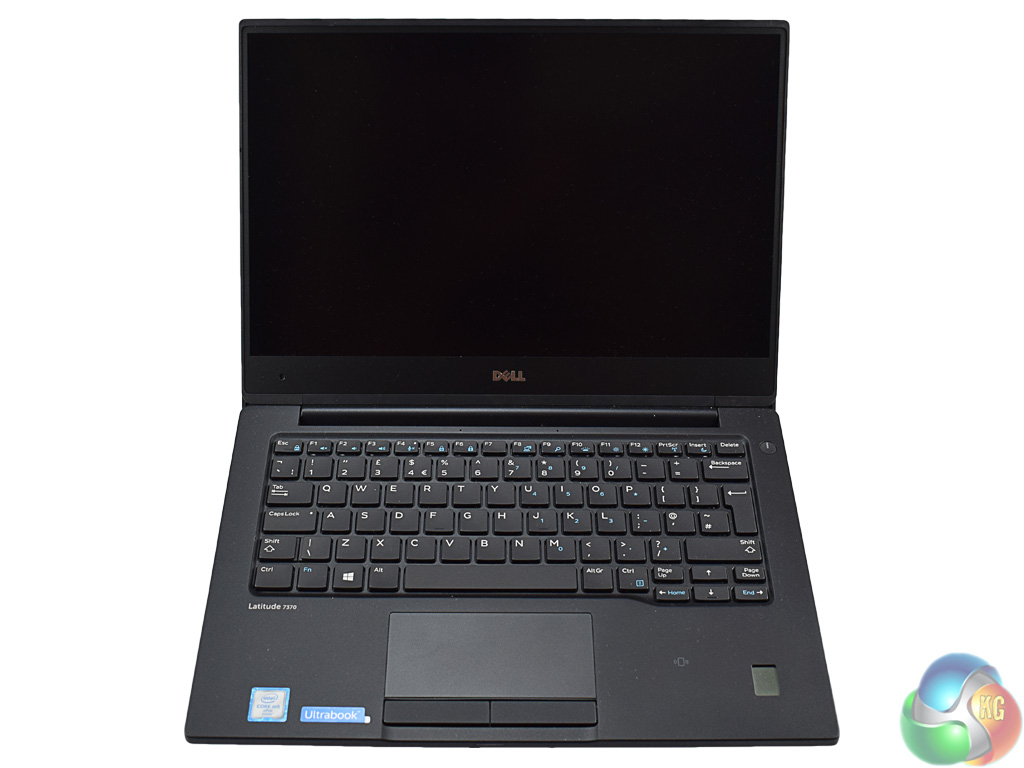
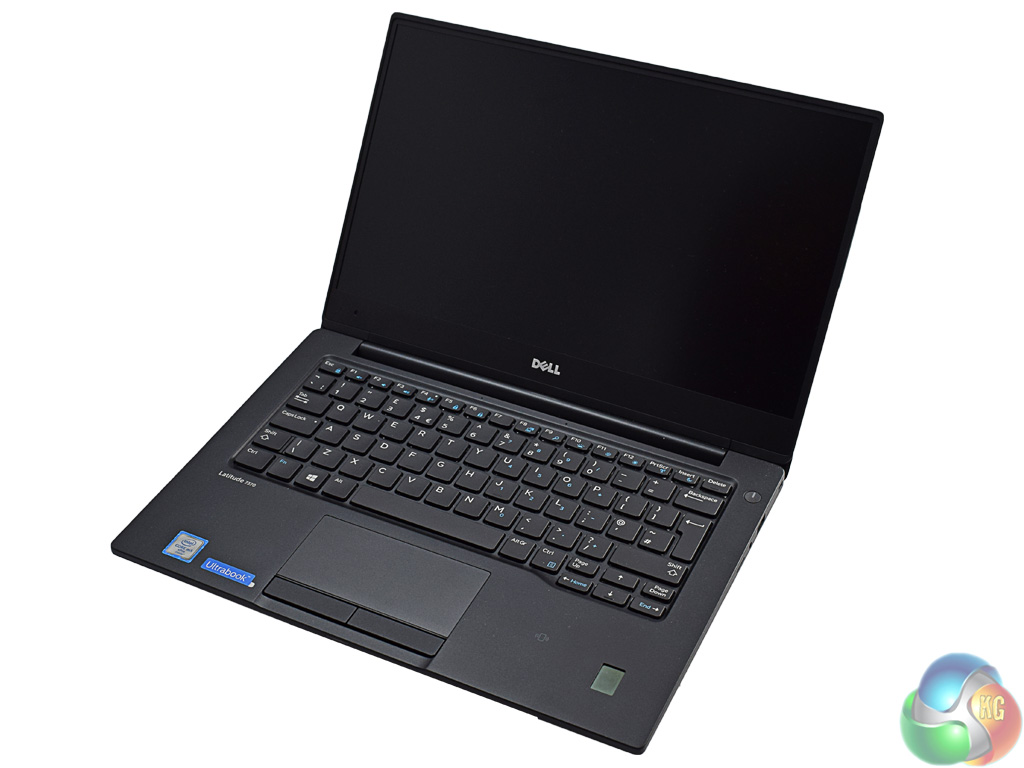
Once the lid has been opened, you get a good look at the display and keyboard. One feature to note here is the so-called ‘InfinityEdge' display. In layman's terms, this means Dell has fitted an incredibly small bezel around the outside of the LCD panel. I must say this reminds me somewhat of the Dell Venue 8 7840 tablet I reviewed in May last year – and that is certainly a good thing, as I praised its premium look and feel.
The panel itself is a 1920×1080 anti-glare unit, with a high pixel density (166 PPI) due to the smaller screen size. While some may say a laptop costing over £1000 should have at least a 2K display, if not higher, I disagree. It is really not necessary to have such a high resolution on a small, 13.3inch laptop such as this. It would just mean the battery does not last as long, and would undoubtedly cause scaling-related issues with third party programmes. As it is, the 1080p panel does a great job.
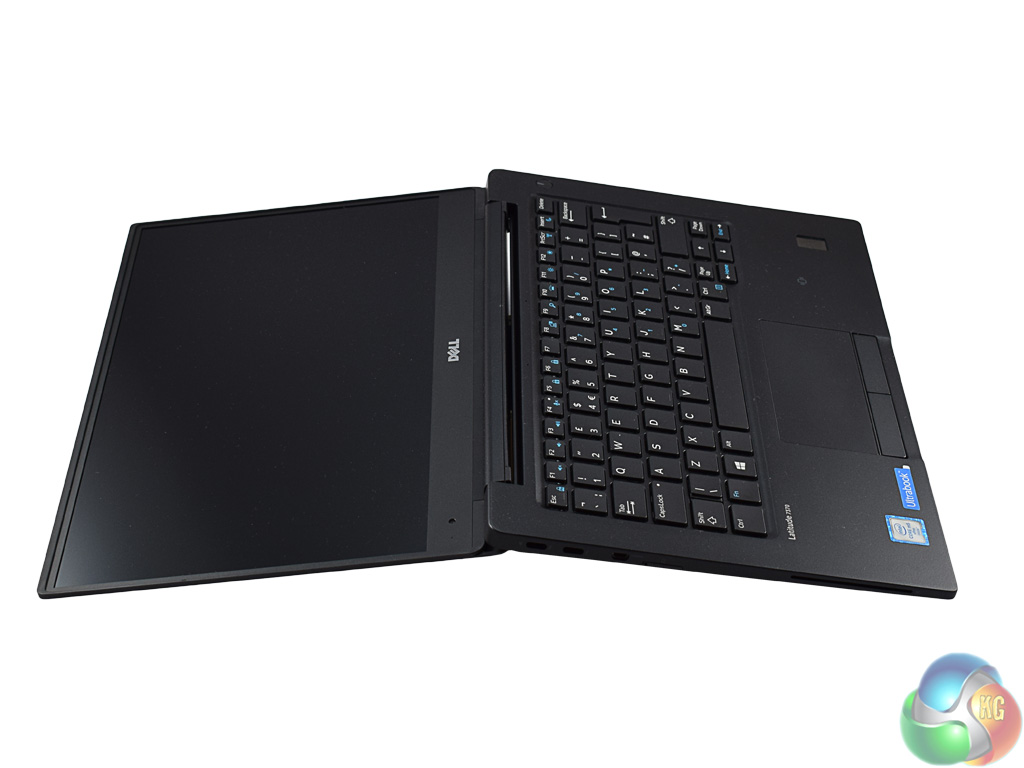
Interestingly, the Latitude 7370 is capable of a great amount of screen tilt – beyond 180 degrees. I'm not sure why you would want to tilt the display so far back, but it is certainly better than having the screen not tilting far enough back.
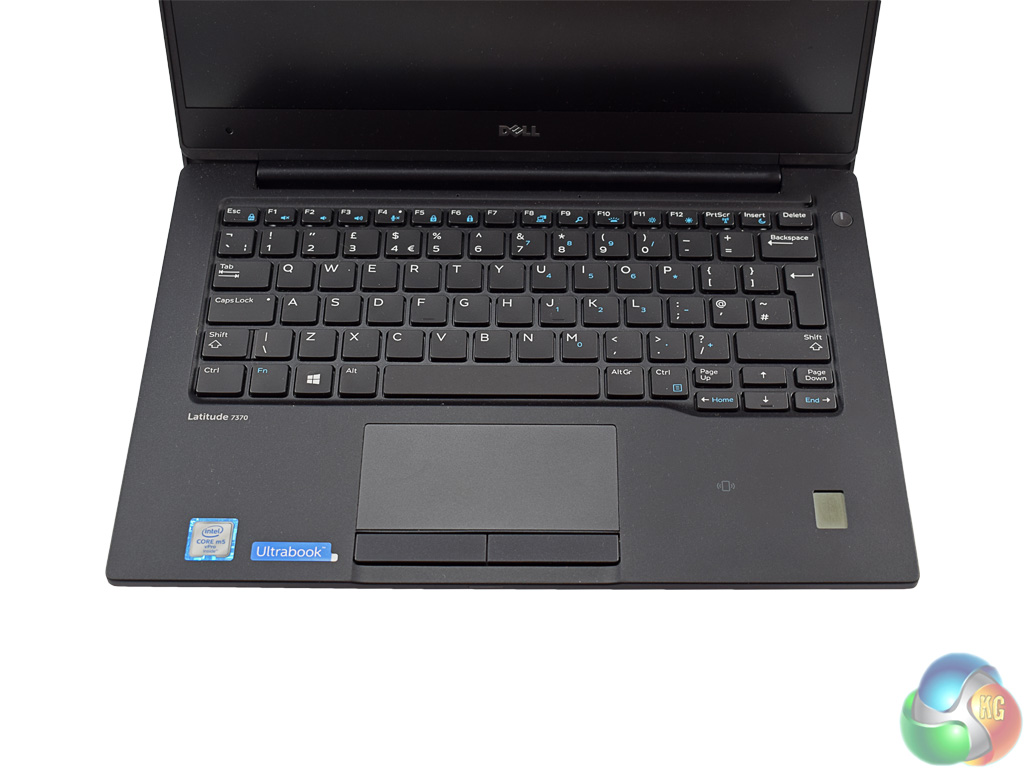
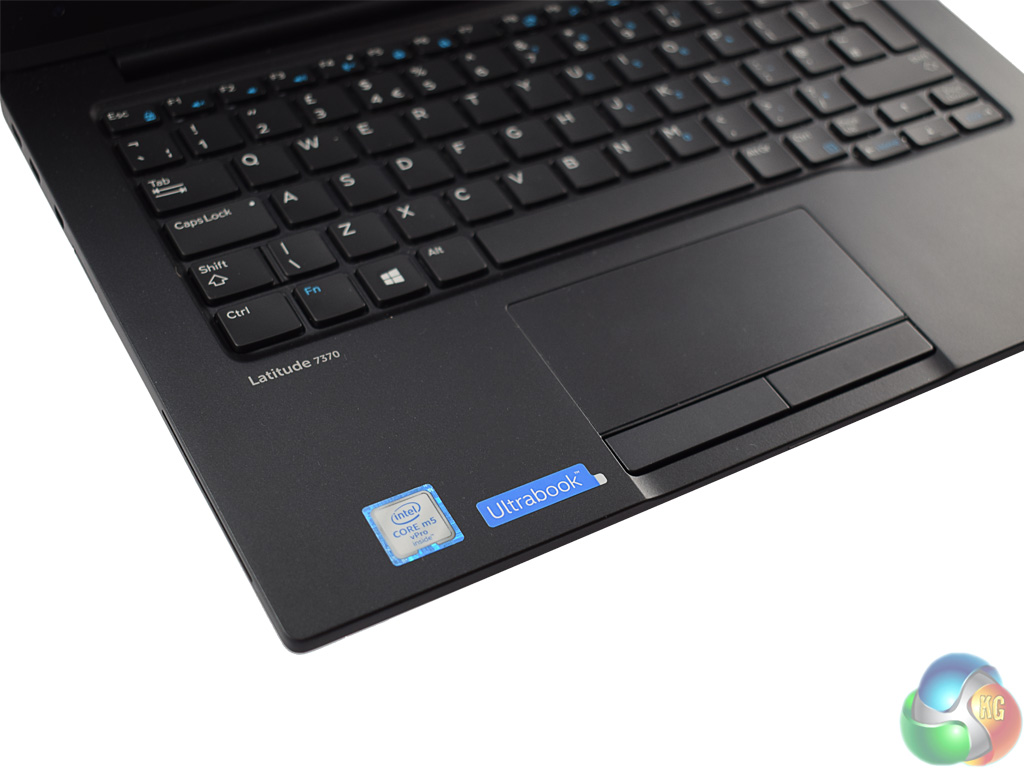
The base of the Latitude 7370 houses the keyboard – a fairly standard affair with low-profile keys which utilise scissor-switches. Coming from a mechanical desktop keyboard to a laptop keyboard with minimal key travel is always a slight shock to the system but you quickly adjust. There are also two levels of backlight brightness – but the backlight itself is white only.
Beside the trackpad, which uses standalone buttons rather than integrated ones, there is a small Ultrabook sticker. This simply confirms to you that Intel have indeed certified the Latitude 7370 as a fully-fledged Ultrabook. In the right-hand corner of the laptop there is also a discrete fingerprint scanner for those who want the added security. Personally, I still find typing a 4-digit PIN code is faster, but the option is there for those who want it.
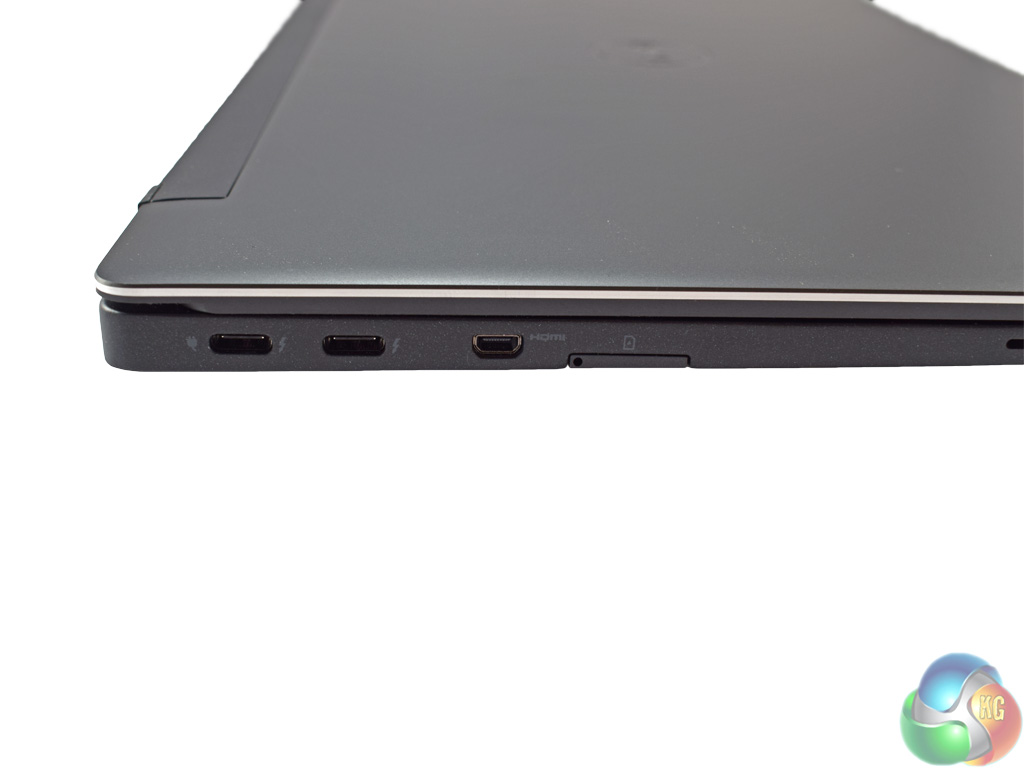

Here we get a look at the connectivity ports on the Latitude 7370. The left-side edge features two Thunderbolt (Type C) ports, with one designated as the charging port. Next to the Thunderbolt ports is one micro HDMI port and a micro SIM card slot for 3G connectivity on-the-go.
On the right edge of the Latitude 7370 is a Kensington lock, the sole USB 3.0 (Type A), a combo audio jack and a micro SD card slot. While just a single Type A USB could cause problems for some, there are Type C to Type A adaptors on the market which would allow you to take full advantage of the two Thunderbolt ports' extra speed.
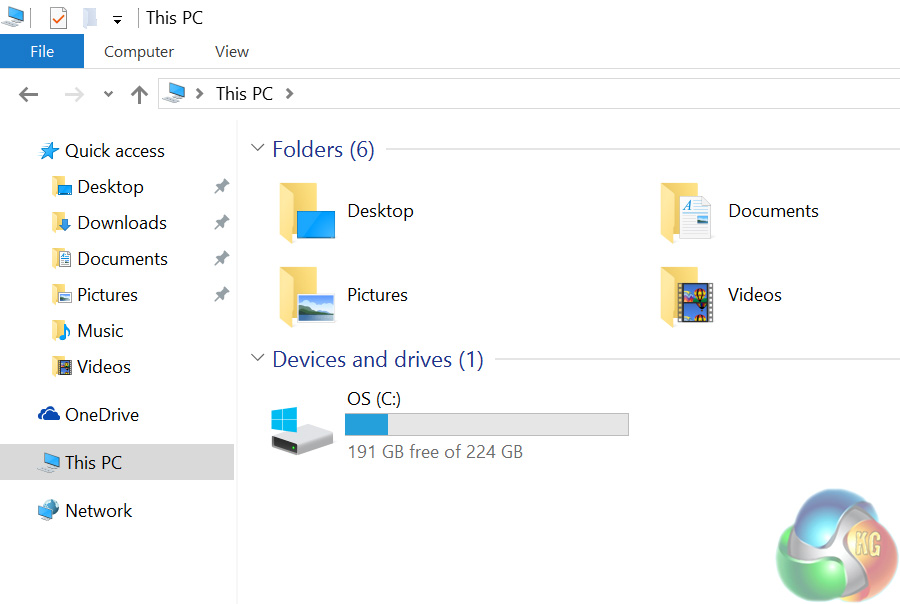
As the Latitude 7370 I received has a 256GB PCIe SSD (cheaper variants of the laptop have smaller, SATA SSDs), there was approximately 191GB of free space after a fresh install of Windows 10 Pro.
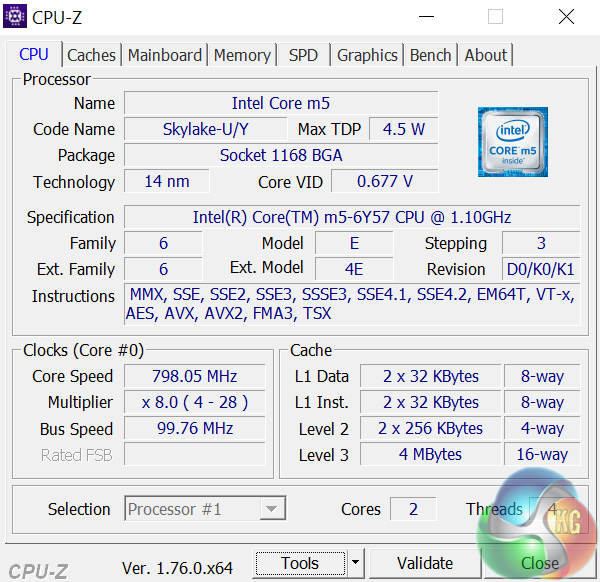
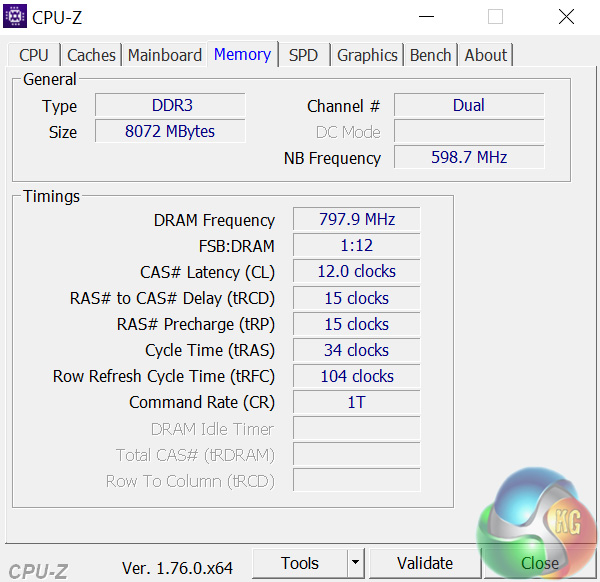
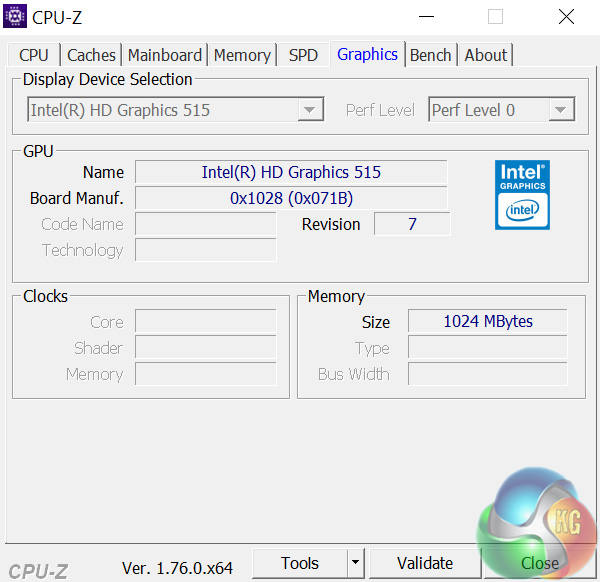
Above you can see an overview of the Core m5-6Y57 courtesy of CPU-Z. The chip is clocked at 1.1GHz which boosts as high as 2.8GHz, although I found the CPU rarely reached this figure. Under load, the CPU speed typically sat around the 1.6-1.8GHz mark. The system has 8GB of DDR3 RAM at 1866MHz. Graphics duties are handled by Intel HD Graphics 515 – integrated within the Core m CPU.
Comparison systems
For the review today, where applicable, I compare the following systems to the Latitude 7370:
- Dell Inspirion 15 7559
- ECS LIVA X
- ECS LIVA X2
- PCSpecialist Lafité
- My personal desktop with a Core i3-4160, 8GB DDR3 and a GTX 960.
Test software
I test using the following software applications:
- Cinebench R15
- Handbrake
- 3DMark
- CrystalDiskMark
- ATTO Disk Benchmark
- Prime 95 (version 26.6)
- CPUID HWMonitor
- PCMark 8
I also test with Tomb Raider (2013) to assess the graphical capabilities of the Latitude 7370.Cinebench R15
To get an idea of the Core m5-6Y57's performance, I first ran Cinebench R15.
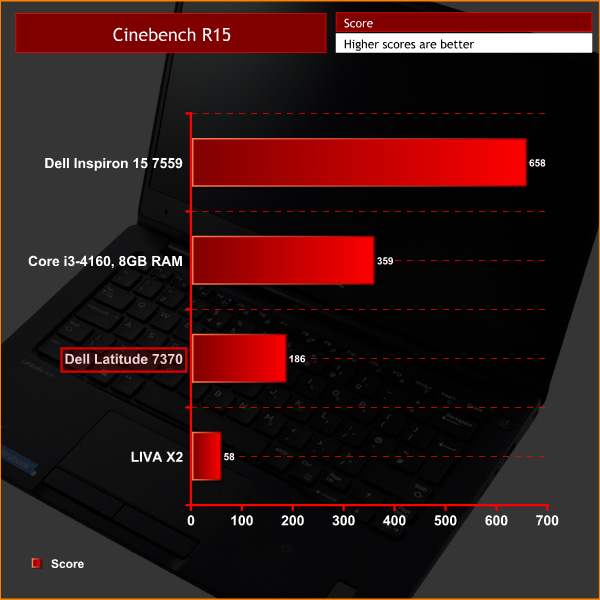
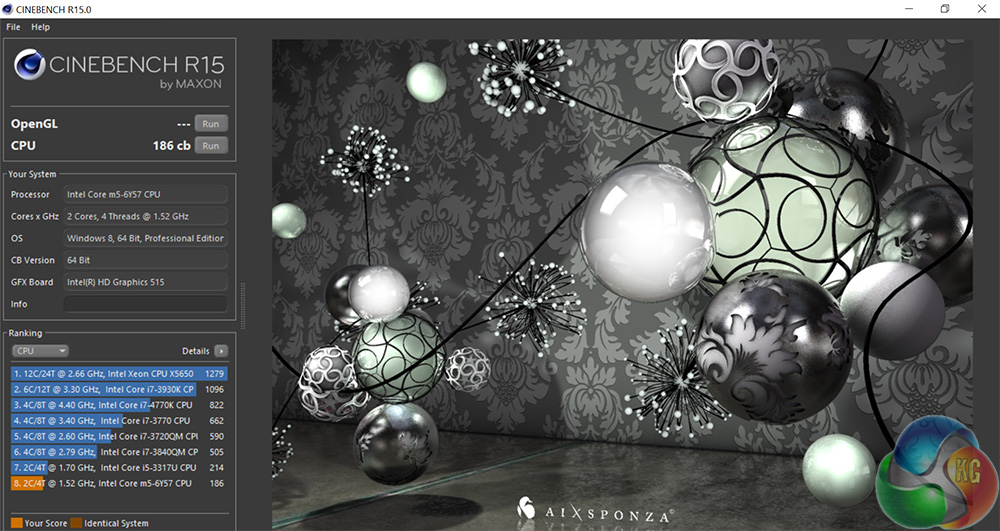
While it is faster than the dual-core Celeron N3050 in the ECS LIVA X2, the Core m5-6Y57 is still someway behind even a desktop i3. Obviously you are not going to be using this laptop for rendering duties.
Handbrake
Moving on, then, to my Handbrake test, where I ask the CPU to encode a 1.8GB full-HD video file, outputting it to the specifications as determined by the in-built ‘iPhone preset'.
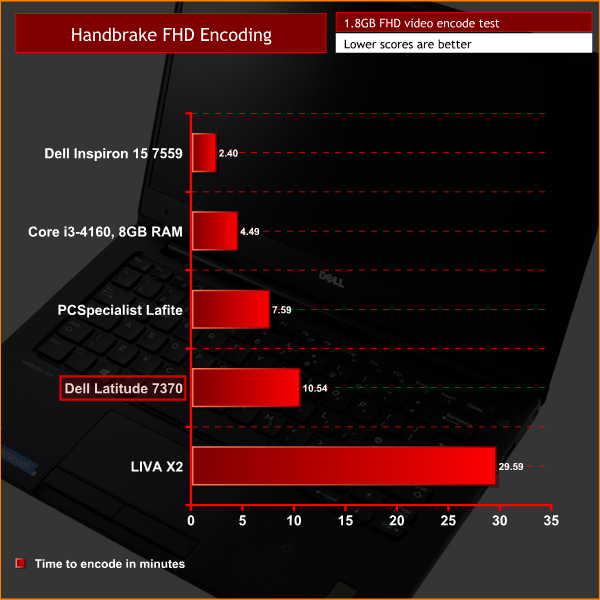
It is a similar situation here. The Latitude 7370 comes in well above the LIVA X2, but even the Broadwell-U Core i3 found in PCSpecialist's Lafite is nearly 3 minutes faster. The Core m5-6Y57 is clearly no powerhouse – but I think we already knew that.3DMark
To test the Intel HD Graphics 515 that are integrated into the Core m5-6Y57, I first ran 3DMark Fire Strike.
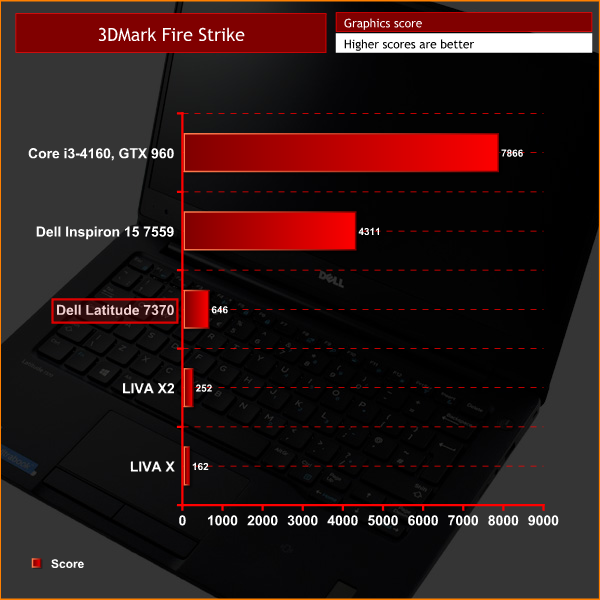
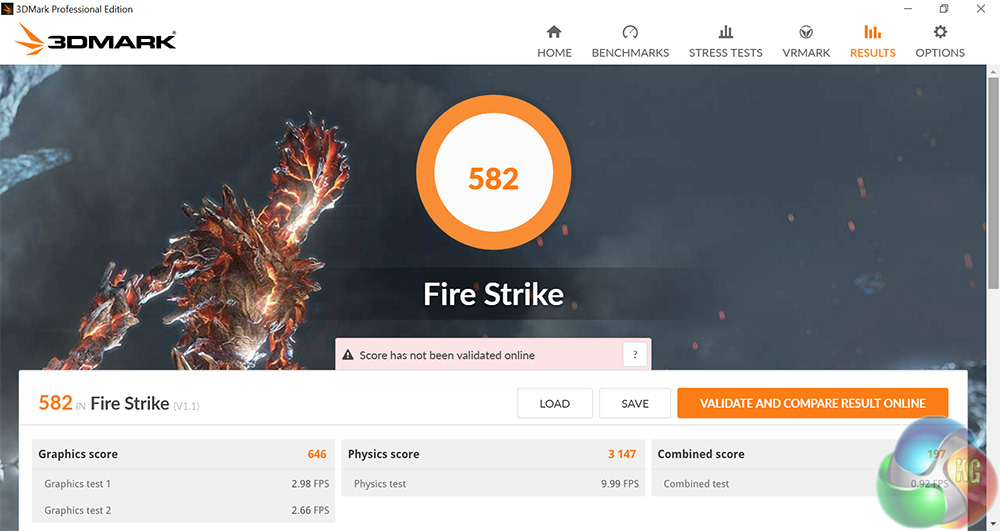
While the Latitude 7370's iGPU is significantly faster, relatively speaking, than the ECS LIVA and LIVA X2, it is still very weak in comparison to a discrete GPU.
Tomb Raider
Finally, I tested Tomb Raider using the ‘low’ settings preset. Tomb Raider is not the most demanding of games at these image quality settings, so I wanted to see how the iGPU got on with it.
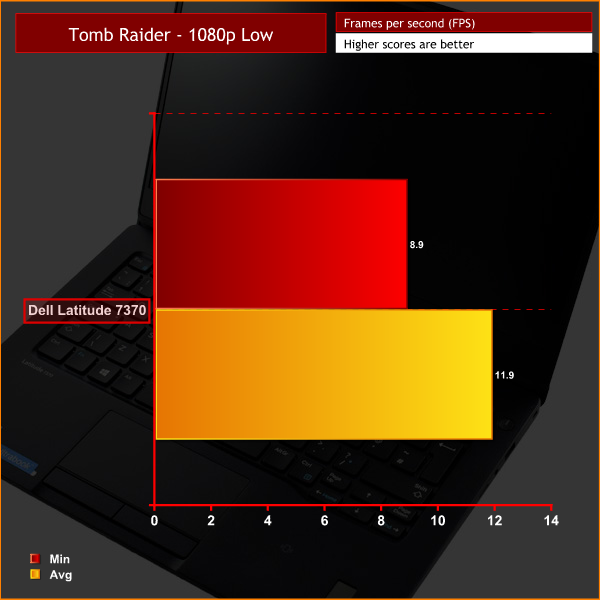

Clearly, any sort of gaming is out of the question with the Latitude 7370.
However, for general-use purposes it is more than good enough – watching movies or YouTube and the like is no problem for the integrated graphics chip. After all, this Ultrabook is not marketed towards gamers in the first place.Storage
To test the speed of the Latitude 7370's PCIe SSD, I first ran CrystalDiskMark, followed by ATTO Disk Benchmark to confirm the results.
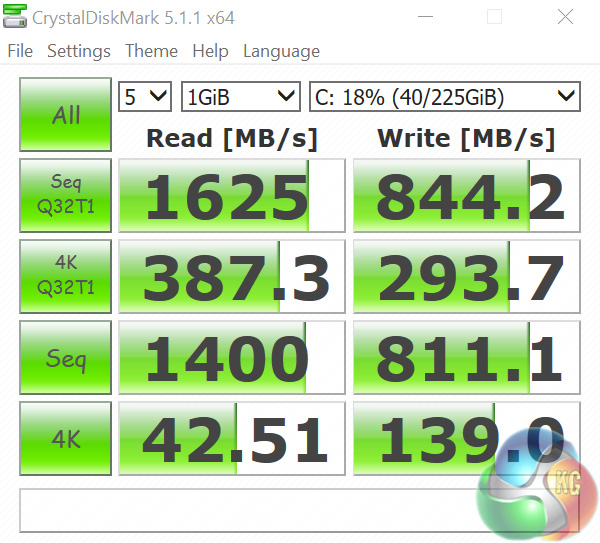
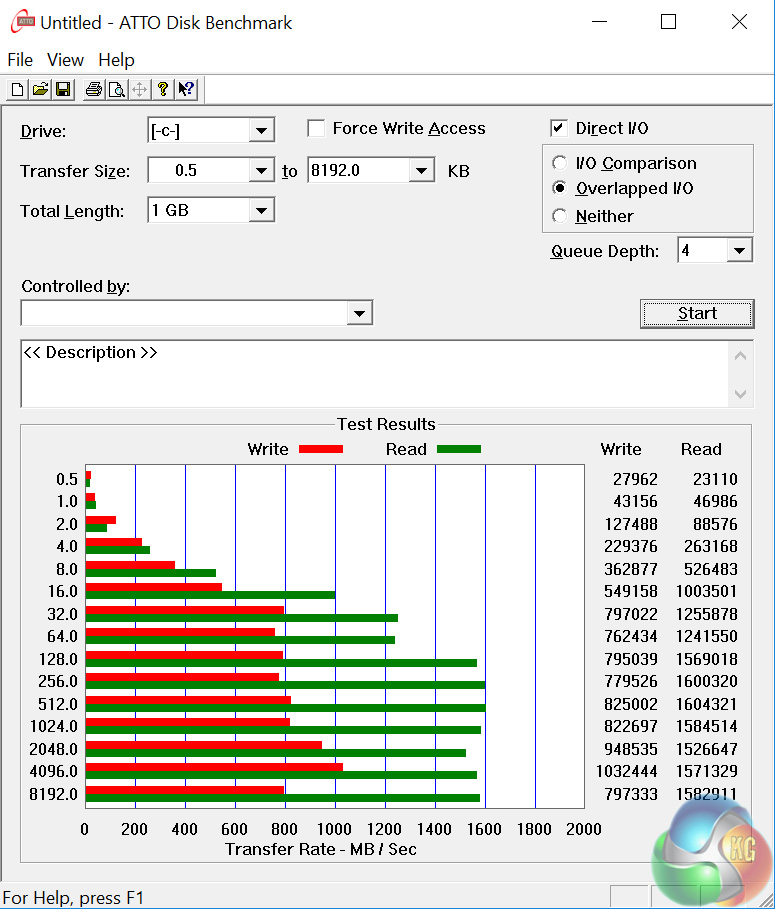
As you can see, the drive is staggeringly fast. Up until now I had never seen PCIe SSD technology in a mainstream laptop, but it does a fantastic job. While 256GB is not a lot, the Latitude 7370 is aimed at the business environment – where documents and emails are king – so it is likely to be enough.
USB 3.0
To test the USB 3.0 Type A port, I plugged in an OCZ Trion 150 SSD via a SATA-to-USB 3.0 5Gbps adapter, which uses the ASMedia ASM1053 controller. We reviewed the SSD HERE, finding it delivers good speed at a budget price. Most importantly, it is capable of saturating the USB 3.0 bus, allowing us to test the speeds the sole USB 3.0 port delivers. To test this, I ran both CrystalDiskMark and ATTO Disk Benchmark on the Trion 150 drive.
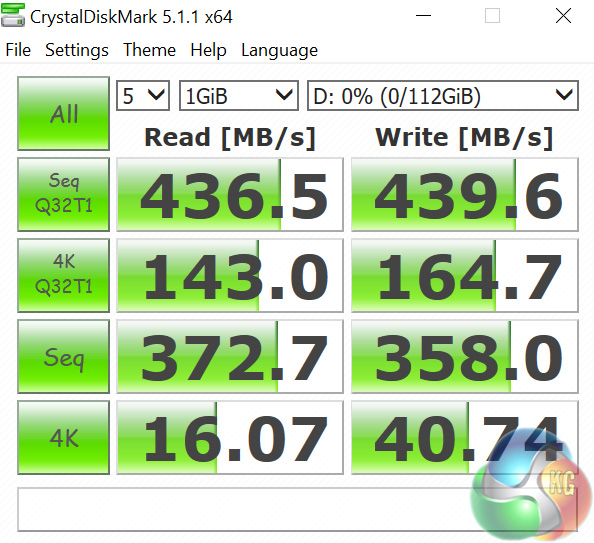
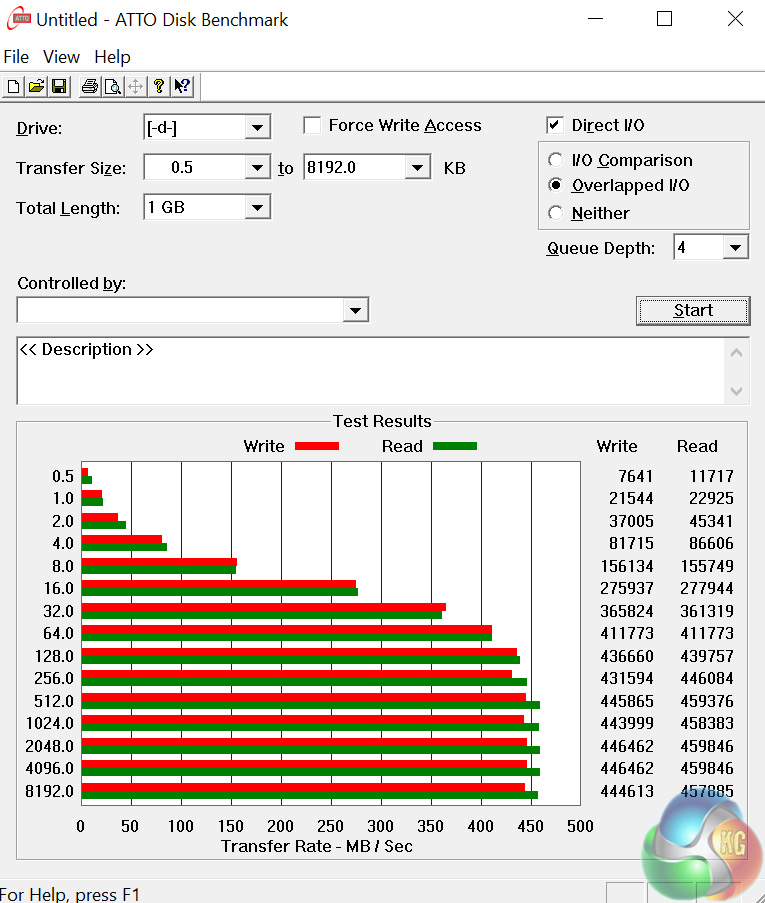
The USB 3.0 port performs very well, with speeds well over 400MBps coming close to the ceiling of the USB interface. Unfortunately I had nothing on-hand capable of saturating the Thunderbolt bus, so could not put that aspect of the Latitude 7370 through its paces.Thermal dynamics
To find the Latitude 7370's idle temperature, I left Windows on the desktop for 30 minutes. The ‘load’ temperature reading comes from running Prime95.
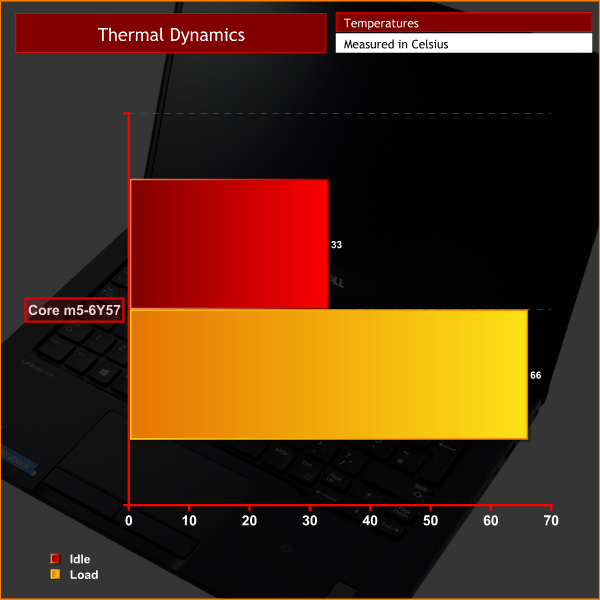
While these figures are perfectly respectable the very slim nature of the Latitude 7370 means you quickly feel any heat if the Ultrabook is sitting on your lap. On a desk, as I would imagine it would be most of the time in a business environment, it is no problem at all – but on your lap it can get a bit toasty. In terms of the components, though, these temperatures will do them no harm whatsoever. Indeed, as the Core m5-6Y57 is passively cooled, the Latitude 7370 even has the advantage of being completely silent.
Power consumption
To get the ‘idle’ power draw for the Latitude 7370, I left Windows on the desktop for 30 minutes. The ‘load’ power draw reading comes from running Fire Strike Ultra.
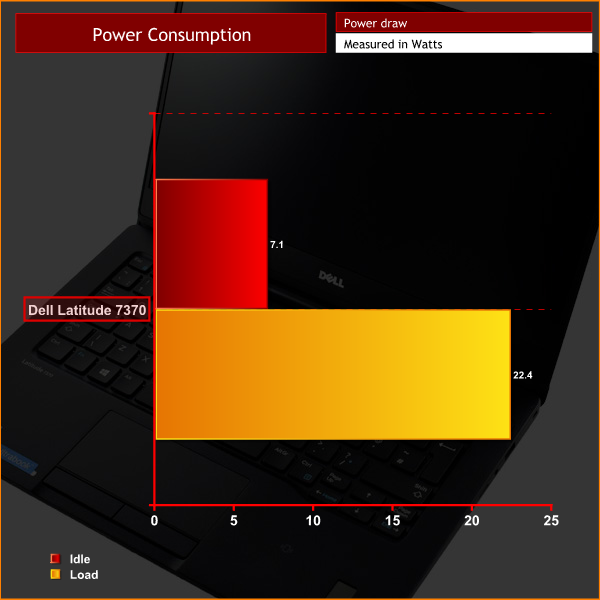
These incredibly low power consumption figures are a testament to the very efficient nature of the Core m family. Power draw is certainly not something to be worrying about with the Latitude 7370.To test the battery life of a laptop, we use PCMark 8's in-built battery benchmark – which loops its ‘Home' benchmark until the battery fails. We do this with the screen brightness set at 50%.
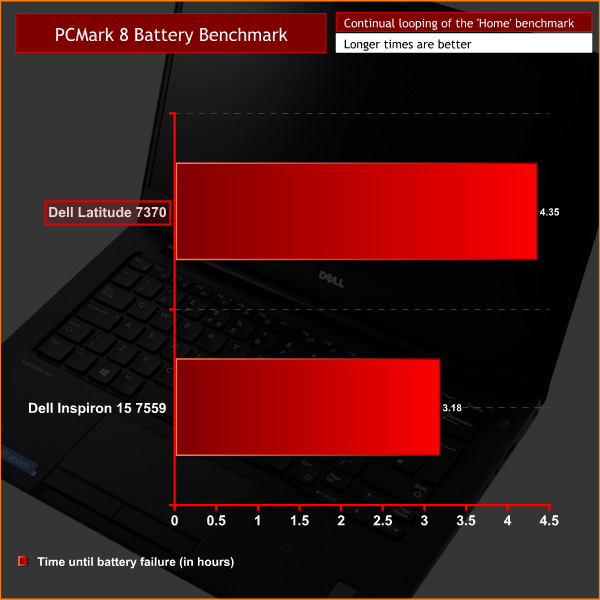
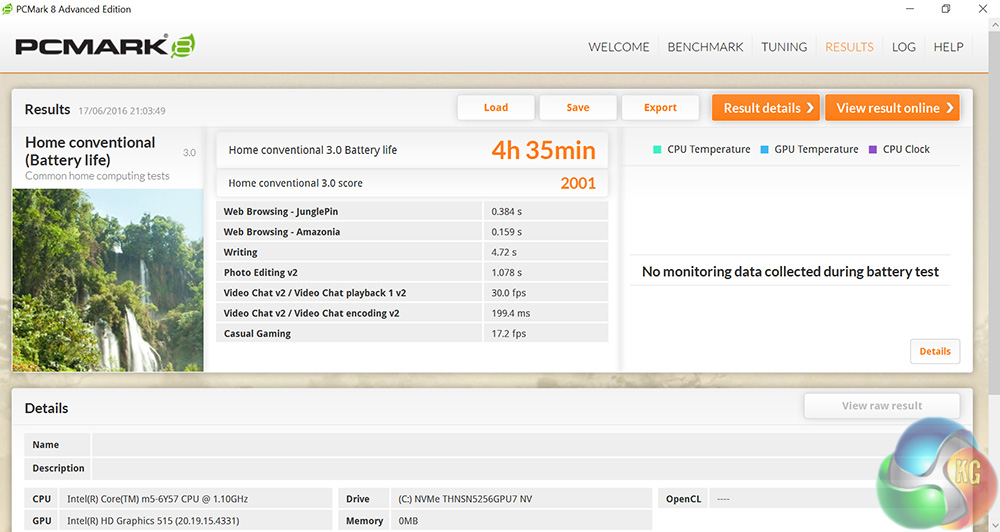
A time of well over 4 hours is a great result for any laptop, so the Latitude 7370 is doing well in that respect. Typically you can double the result of the battery benchmark for a real-world estimate of battery life. This is because the benchmark is a continual assault on the laptop's battery, when in the real-world you are highly unlikely to be using the laptop so intensively for so long.In terms of raw figures, the Dell Latitude 13 7370 is a mixed bag.
It has a blisteringly-fast PCIe SSD, but the Core m5-6Y57 is slow compared to even a Broadwell-U Core i3. Its integrated graphics, too, are capable only of simple web browsing and movie playback.
However, to conclude accordingly that the Latitude 7370 is not worth the money would be to misunderstand the market segment it is aimed at. The business users who would buy the Latitude are not looking for a laptop capable of playing the latest AAA games, nor are they after a device able to render complex images.
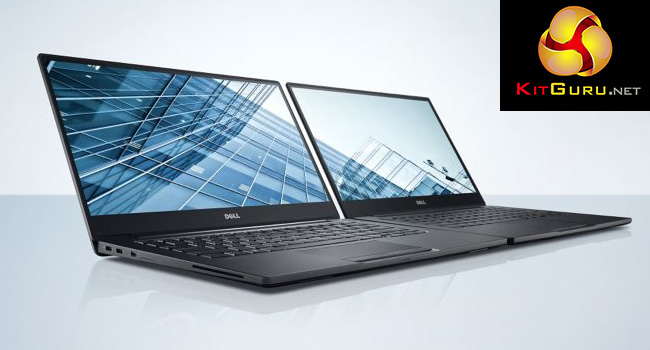
Rather, the Latitude aims to give solid all-round performance for lighter tasks, such as word processing and email, in a very attractive package – and that is where it excels.
It is incredibly well designed, with a beautifully slim carbon fibre body, measuring barely 14mm thick. The display is also stunningly sharp, while the laptop's bezel is very, very thin.
As an Ultrabook, the Latitude 7370 also crams in many of the latest features you would expect – 2 Thunderbolt Type C ports, for instance, as well as the speedy PCIe SSD. The Core m5-6Y57 is also passively cooled, which means the laptop is completely silent at all times, something which I value highly.
However, all of this does carry a hefty price tag, which is one of the few problems the Latitude 7370 has. With a base price of £1179, you pay an extra £80 to bump up the storage to a PCIe-based SSD, bringing this particular model up to a whopping £1259.
Still, if you are after the latest features in a small, lightweight and sexy laptop, the Dell Latitude 13 7370 is hard to beat. It is just this feature-set which means it carries a a high price.
You can buy one directly from Dell HERE.
Discuss on our Facebook page, over HERE.
Pros
- Very well designed.
- Sharp, anti-glare display.
- PCIe SSD is very fast.
- Two Thunderbolt Type C ports.
- Silent.
Cons
- Expensive.
- Gets warm in your lap.
- Just one USB Type A port.
KitGuru says: The Latitude 13 7370 is certainly an Ultrabook worthy of the name. It has all the features you would hope to see in 2016, but this does mean it carries a lofty price tag.

Why would someone get this over an XPS 13?