KitGuru KitGuru.net – Tech News | Hardware News | Hardware Reviews | IOS | Mobile | Gaming | Graphics Cards


MSI has been keenly expanding its range of X99 motherboards, particularly gaming-oriented varieties, in reaction to Intel's Broadwell-E CPUs for LGA 2011-3. Prospective X99 buyers now have a formidable number of options to choose from in the wider X99 marketplace, as well as from within MSI's own range.
One of the latest motherboards to be released into MSI's X99 Arsenal Gaming portfolio is the X99A Tomahawk. MSI has designated the Tomahawk moniker on motherboards in the past, the most recent of which is the Z170A Tomahawk, but it seems that the positioning of the product has been altered since then.
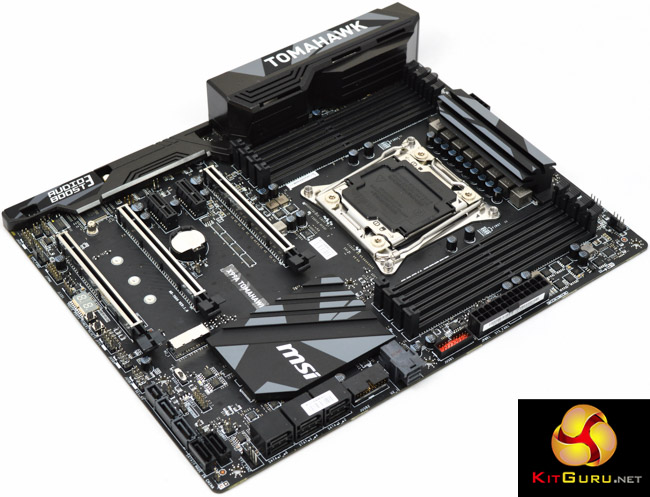
Far from being the budget and entry-level gaming option for the platform, like the Z170A Tomahawk was, the X99A Tomahawk is now fairly well equipped as a middle-of-the-road X99 motherboard that vies with the ASRock X99 Taichi and Gigabyte X99 Ultra Gaming. The nearest comparable ASUS option, the ROG STRIX X99 Gaming, is notably more expensive and essentially falls into the next price segment above.
The general features and hardware made available with the X99A Tomahawk are strong for the price point. There's native M.2, U.2, SATA Express and USB 3.1, dual Intel Gigabit LAN, power and reset buttons, shielded PCIe slots and a neutral black and grey colour scheme with support for an RGB strip header.
Some typical features of X99 motherboards are absent, though you wouldn't expect everything to be included for a motherboard at this price point. There's no onboard WiFi and Bluetooth, “only” 3 PCIe 16X slots, no onboard RGB LEDs to play with and a lack of heat-pipes in the VRM or chipset cooling assemblies. However, when these are the only prominent features to be left out, the board seems very well equipped for most X99 buyers.
| MSI X99A Tomahawk |
|
| Form Factor |
ATX, 30.5 x 24.4 cm |
| CPU Socket |
LGA 2011-V3, 8 Phase VRM |
| Chipset | Intel X99 |
| Memory | DDR4, 8 DIMMs, up to 3333+ MHz (OC) and 128GB |
| Onboard Graphics |
None |
| Discrete Graphics | Nvidia 3-Way SLI or Quad-SLI, AMD 3-Way CrossFireX or Quad CrossFireX |
| Expansion Slots | 3 x PCIe 3.0 x16 slots (Support x16, x16/x16, x8/x16/x8 with the CPU that supports 40 PCIe lanes. Support x16, x16/x8, x8/x8/x8 with the CPU that supports 28 PCIe lanes.) 2 x PCIe 2.0 x1 slots |
| Storage | 10 x SATA III 1 x SATA Express (shared with two SATA ports)* 1 x M.2* 1 x U.2* *SATA Express unavailable when U.2 and M.2 are populated with 28 lane CPU |
| USB | 2 x USB 3.1 (2 Rear, Type A and C, via ASM1142) 8 x USB 3.0 (4 Rear via ASM1074, 4 Front via X99) 8 x USB 2.0 (4 Rear, 4 Front, via X99) |
| Networking | 1 x I218LM Gigabit* 1 x I210AT Gigabit* *Supports Teaming |
| Audio | Realtek ALC 1150 codec, 7.1 channel output with dual headphone amplifiers, PCB isolation, chemi-con audio capacitors and gold plated audio jacks. |
| Fan Headers | 5 x 4 Pin (3 SYS Fan, 1 CPU, 1 W_PUMP) |
| Rear I/O | 1 x PS/2 keyboard/ mouse combo port 4 x USB 2.0 ports 1 x Clear CMOS button 1 x USB 3.1 Gen2 port 1 x USB 3.1 Gen2 Type-C port 4 x USB 3.1 Gen1 ports 2 x LAN (RJ45) ports 1 x Optical S/PDIF OUT connector 5 x OFC audio jacks |
| UEFI/BIOS | UEFI AMI Dual BIOS with selector switch |
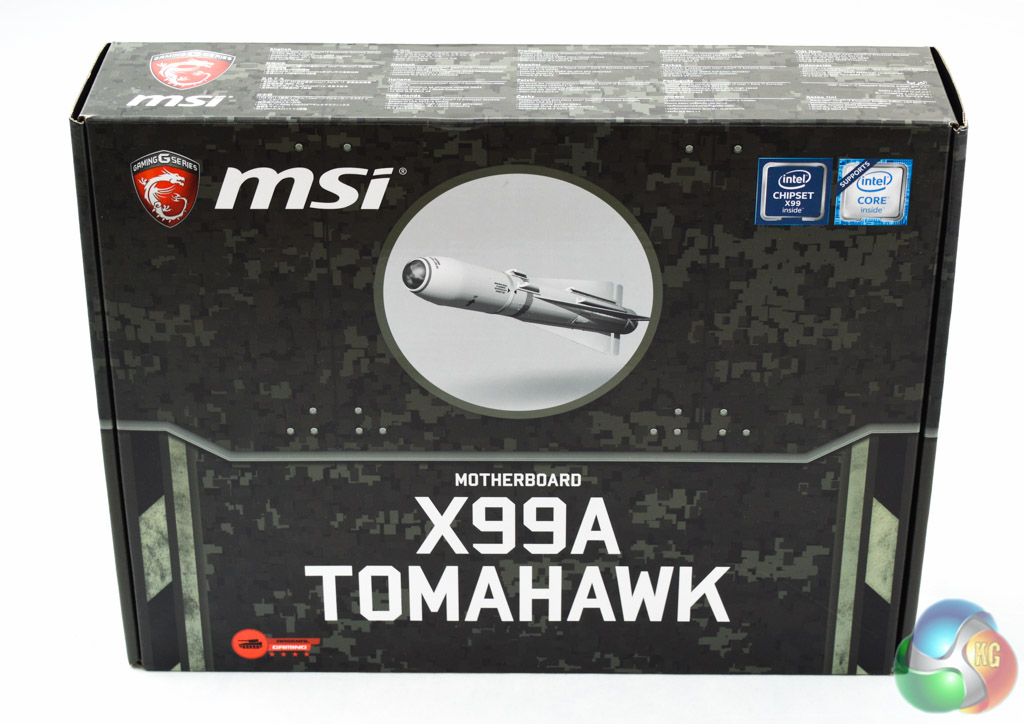
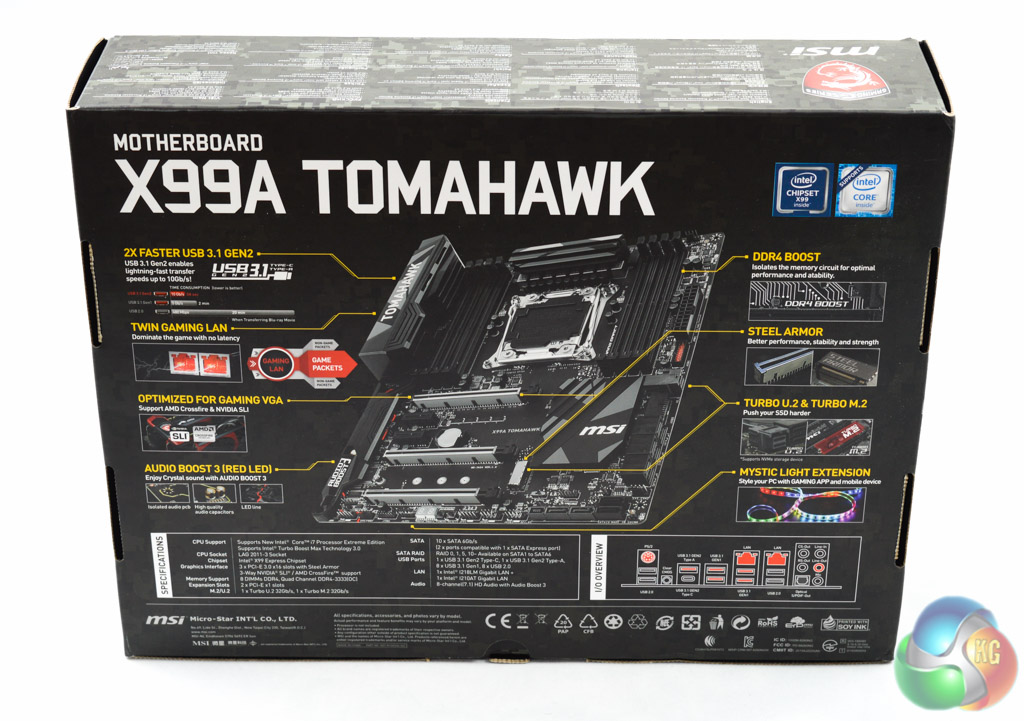
Being part of the Arsenal Gaming series the theme of the packaging is dominated by MSI's Gaming marketing. The Tomahawk name is representative of the military Tomahawk cruise missile which carries along the whole military theme for MSI's Gaming series.
As is usually the case with most X99 motherboards connectivity options dominate the feature set – dual LAN, USB 3.1, U.2 & M.2 and so on.
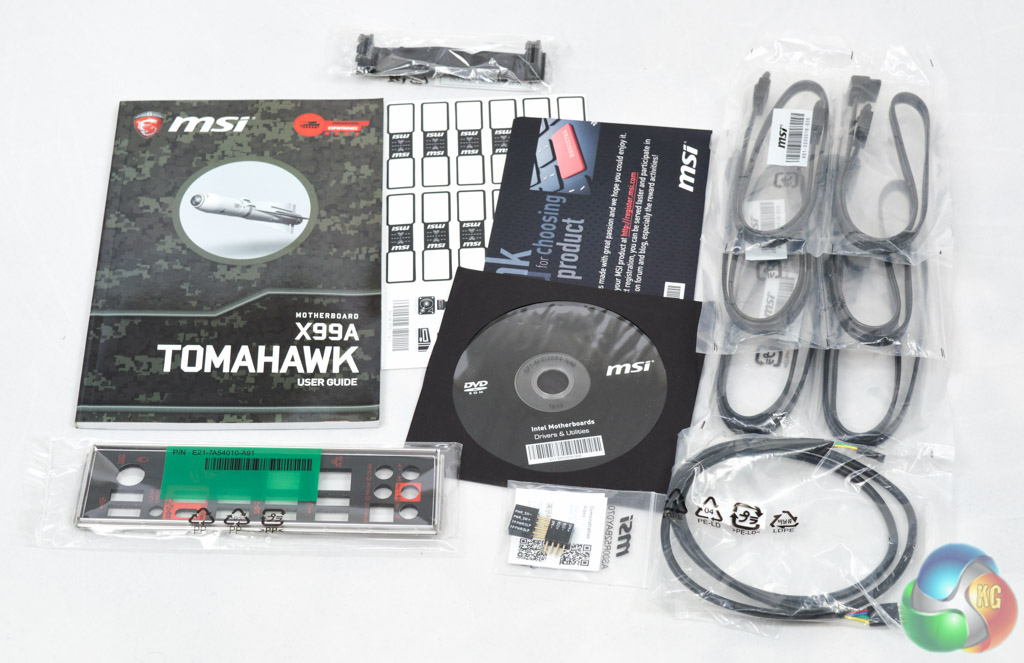
The accessory bundle is sufficient for the motherboard's calibre as many of the usual X99 motherboard accessories are not needed (M.2 to U.2 adapter for example) or not relevant (WiFi antennae):
- 6 x SATA Cables
- 1 x User manual
- 1 x Sheet of cable labels
- 2 x M-Connectors for front panel cables
- 1 x RGB LED Extension cable (80cm)
- 1 x Driver and utility DVD
- 1 x Registration Document
- 1 x 2-Way SLI bridge connector
No 3-way SLI bridge is a minor annoyance for a motherboard that supports the feature.
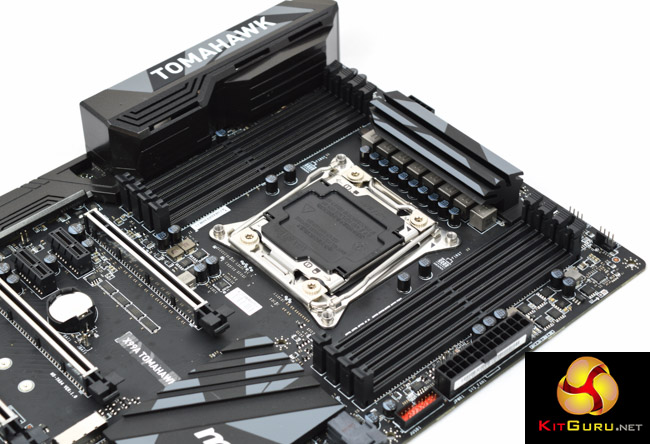
MSI's X99A Tomahawk is a surprisingly stylish motherboard and MSI plays to its strengths with a neutral colour scheme that breaks the tiresome red-and-black mould for gaming-branded motherboards. The only thing that really prevents this motherboard from being an MSI “Carbon” series product is the omission of Carbon Fibre wrap on the heatsinks.
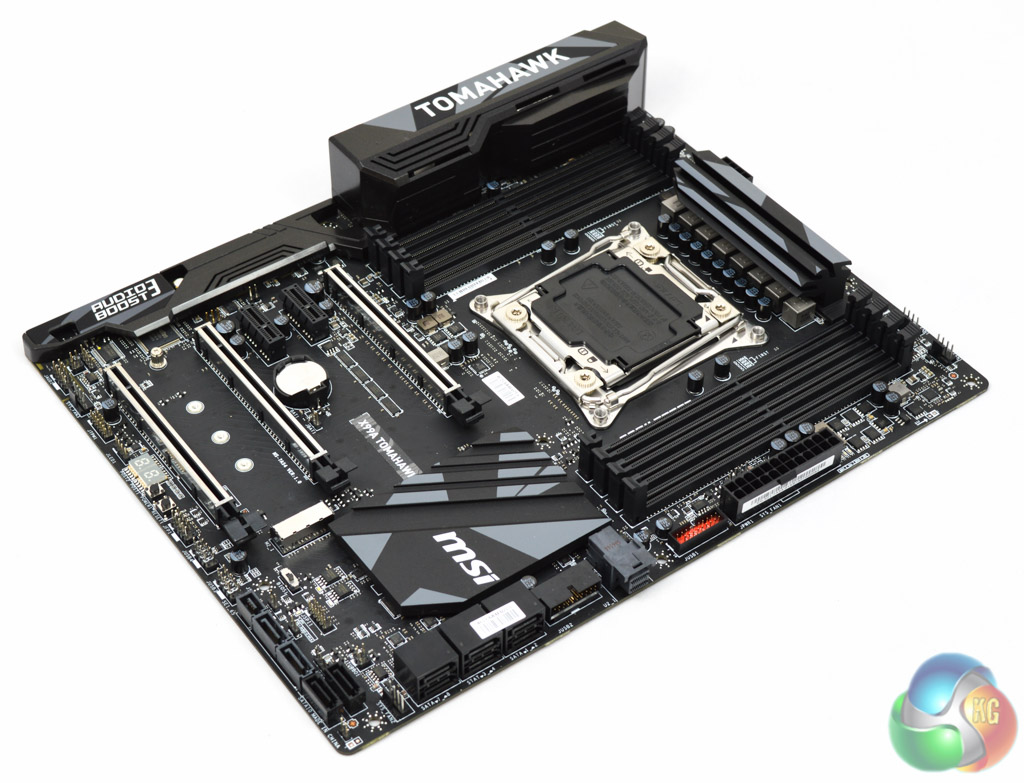
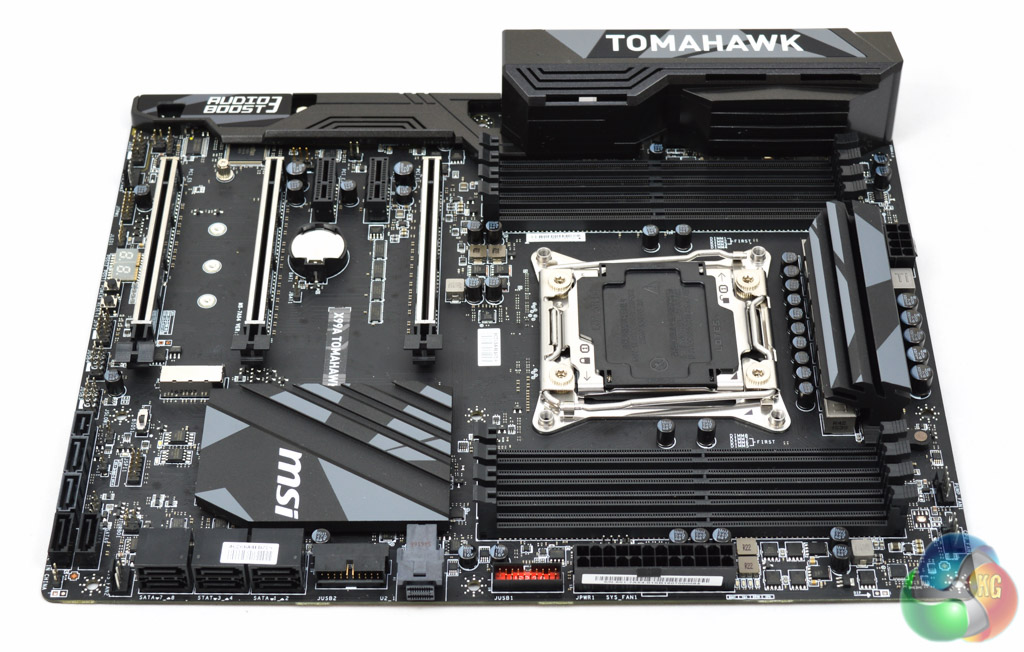
There are always trade-offs to be made when designing motherboards for different price points and segmentations. With the X99A Tomahawk MSI has decided that 4 PCIe 16X slots isn't neccessary – instead using the space for other connectivity standards.
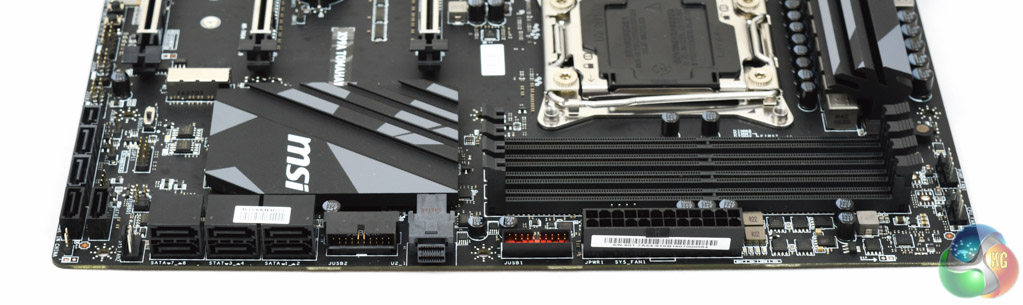
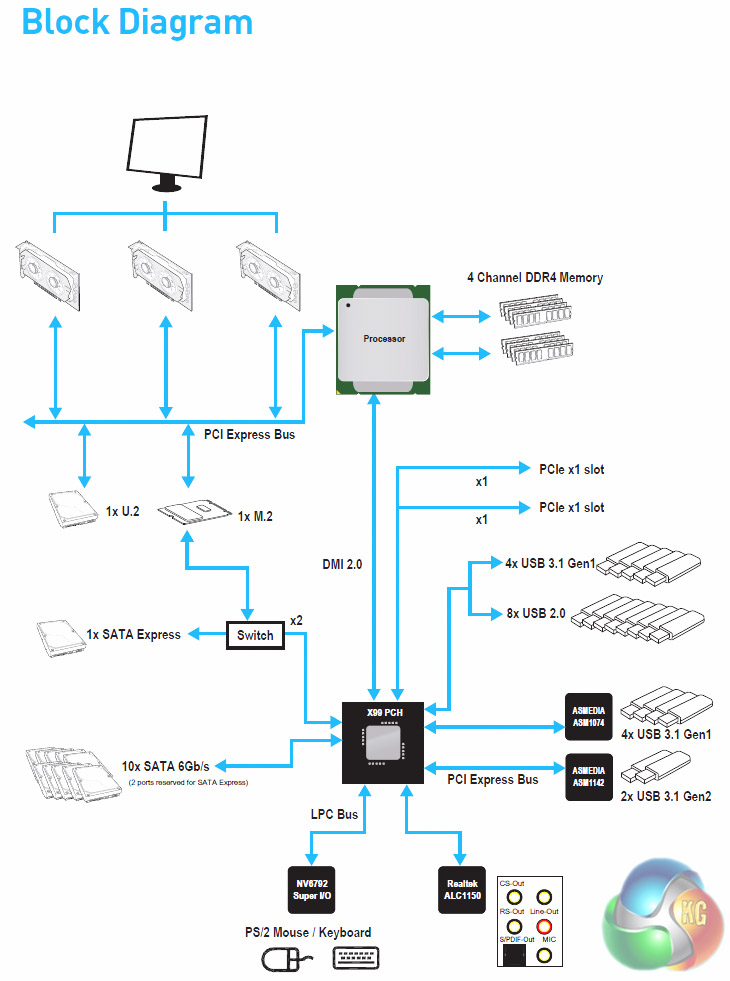
The standard level of storage connectivity is generous with the X99 chipset regardless of vendor decisions, but end users are spoilt for choice in this instance with U.2, M.2, SATA Express and SATA III.
The wiring layout is also such that, with a 40 lane CPU, you can utilise U.2, M.2, SATA Express and the other 8 SATA ports at the same time (depending on the utilisation of the PCI Express slots).
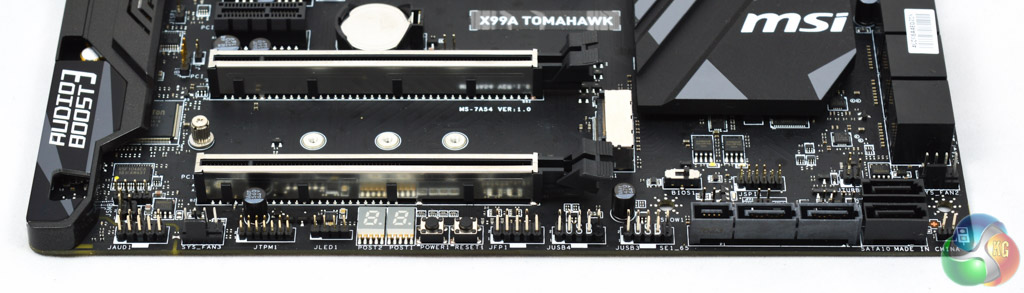
Along the base of the board there are a healthy number of options including dual BIOS chips with a selector switch, a debug code reader and power/reset buttons. M Connectors are provided to help you connect up the front panel connectors in the lower segment of the motherboard, which is useful as the board is rather congested.
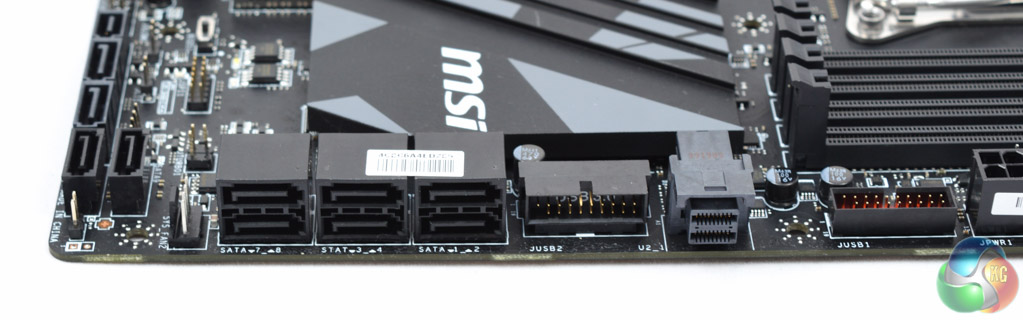
Perhaps the only grating part of the X99A Tomahawks layout is the switching between vertically and horizontally mounted ports. There are two USB 3.0 headers on the right side of the board, one is horizontal (right-angled) the other vertical, a similar thing unfolds with the SATA ports.
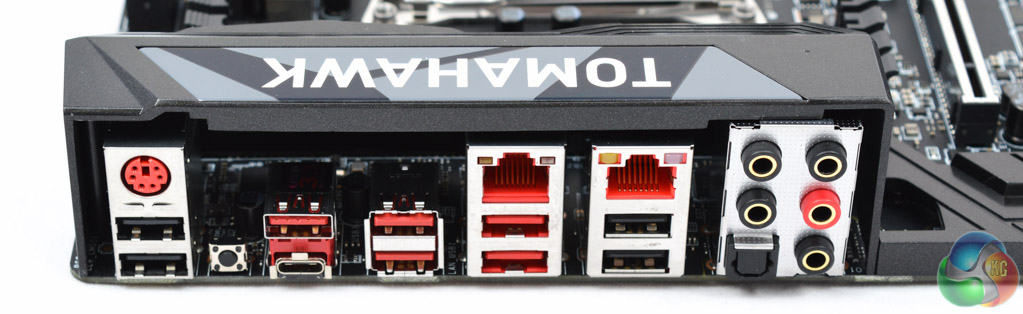
Around the rear I/O area is a strong number of USB ports, 10 in total with dual LAN, six audio connections, legacy PS/2 combo and a clear CMOS button. Two of the USB ports are 10Gbps 3.1 Gen 2 with one in Type-A format and one physically available as Type-C. These operate from an ASMedia ASM1142 chipset.
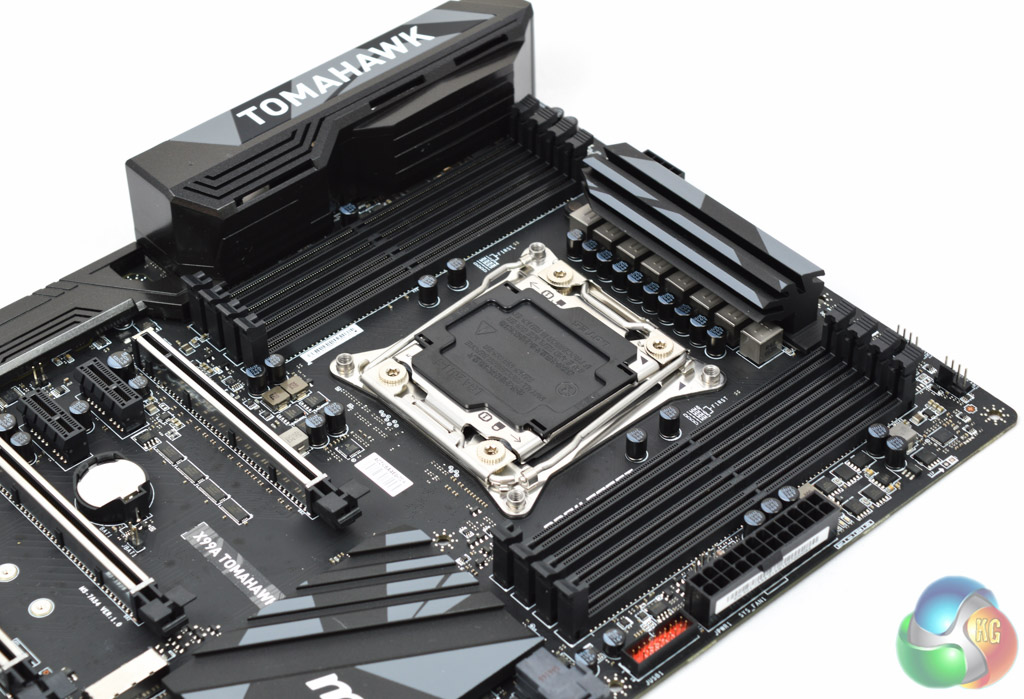
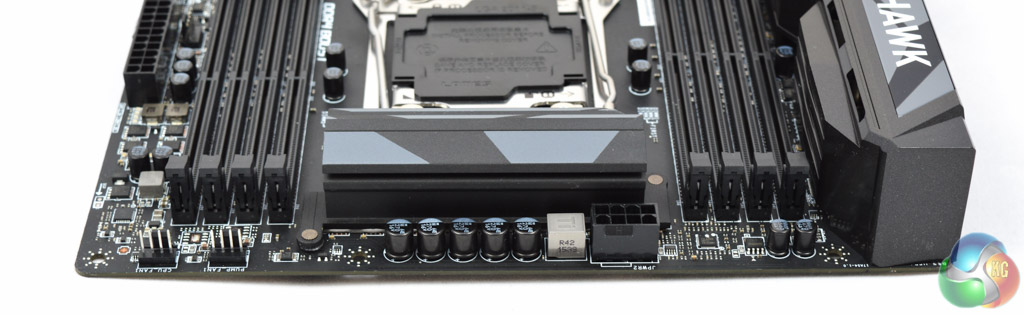
The CPU socket houses an 8 phase VRM which, on phase count alone, is fairly average but includes MSI's military class 5 components of Titanium chokes and low ESR dark capacitors. As most motherboard vendors will tell you, it's not about the number of the phases but the quality of components and the implementation.
MSI's placement of the CPU 8 pin and fan connections is well thought out; the 8 pin is easy to insert and remove as the clip faces away from the heatsink while the CPU fan headers are easily accessible and not blocked by the CPU heatsink either.
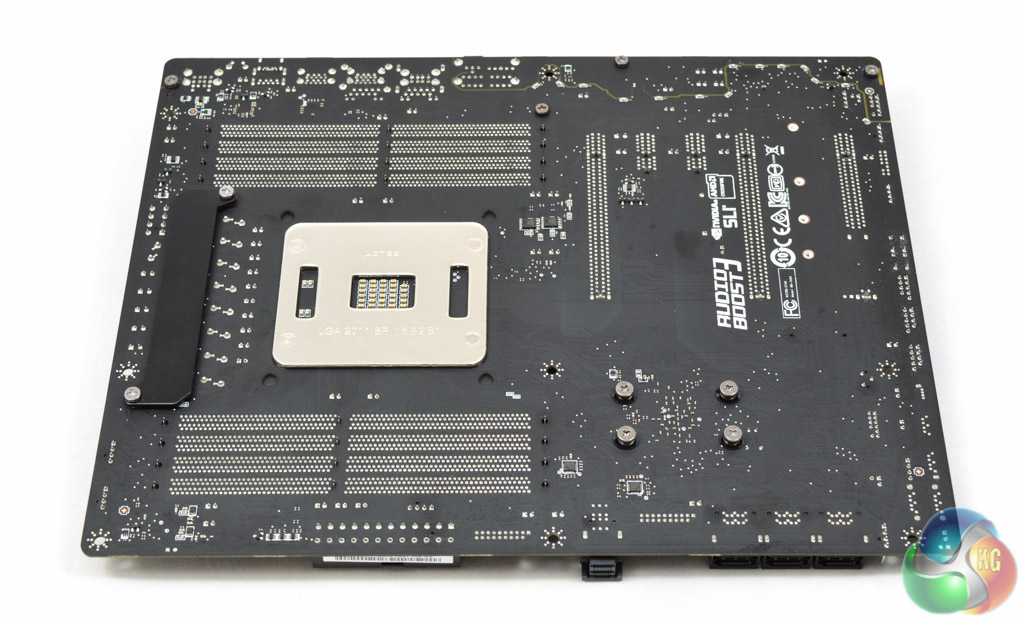
Underneath the X99A reveals Philips-head screws for all the connected heatsinks – disassembling, modification and maintenance should be straightforward.
Given the congested nature of the top of the motherboard some components have been mounted underneath the motherboard including two of the numerous Nikos PK632BA MOSFET chips and two ASM1464 chips that form part of the overall USB 3.0 (USB 3.1 Gen 1) package.
The UEFI with the X99A Tomahawk is virtually identical to the X99A Godlike Gaming Carbon we reviewed earlier this year. The colour scheme and design is slightly different, reflecting the fact this is an Arsenal series motherboard and Tomahawk themed. However, the core structure and available options remain similar aside from a few minor hardware and controller differences.
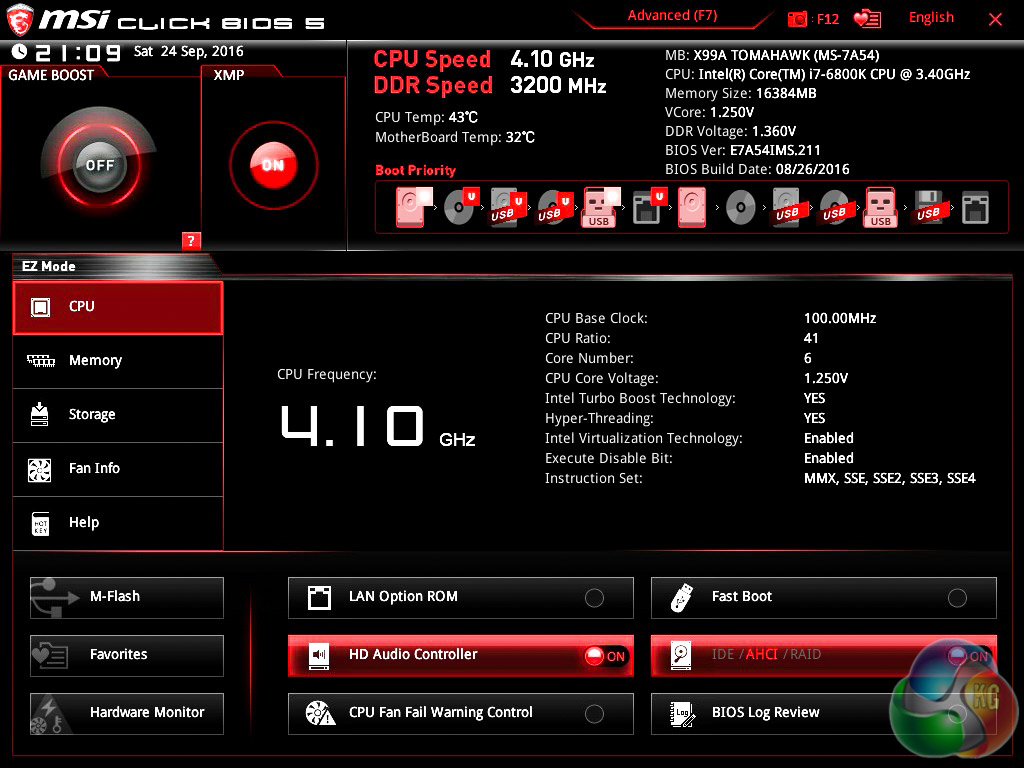
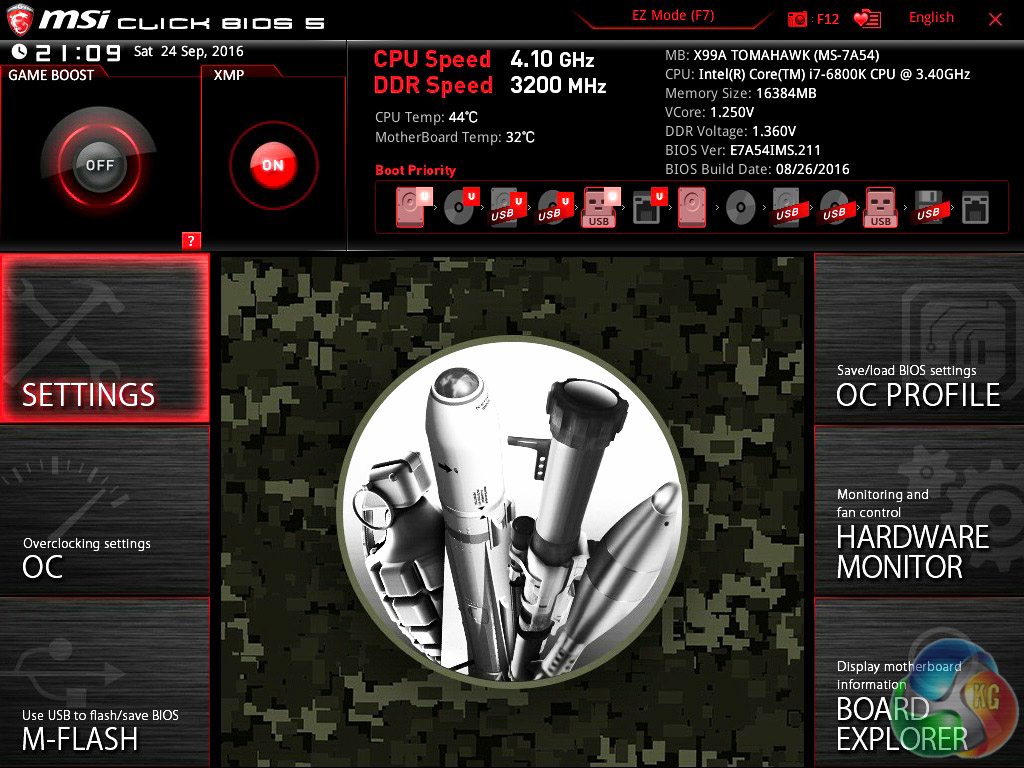
Click Bios 5 is presented in either the “EZ mode” or an advanced mode. The EZ mode is a single landing page which offers common functions like boot priority, XMP, OC Profiles (OC Genie 4) and numerous other things.
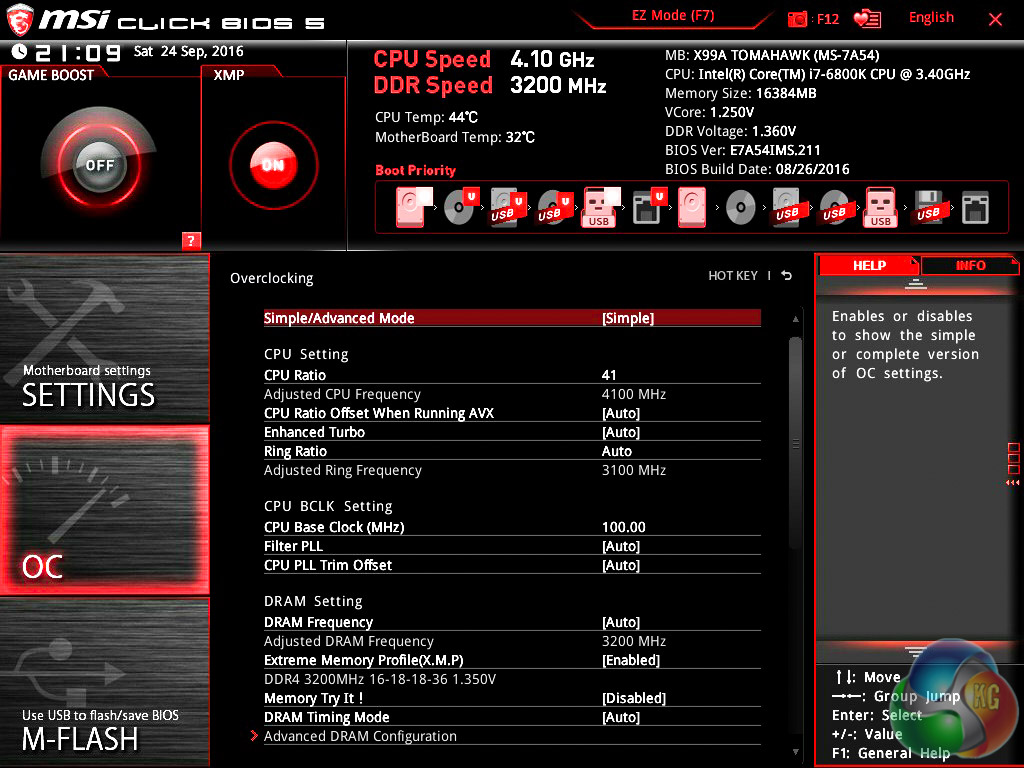
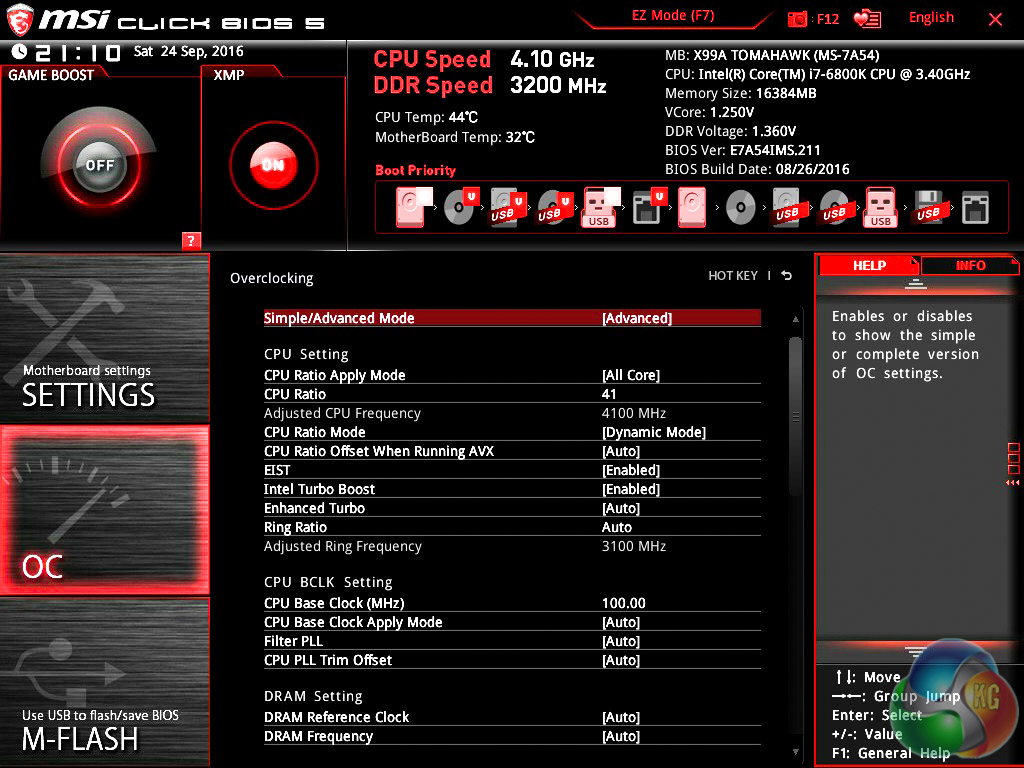
Once in the main tab for performance tuning, the OC tab, there is further “difficulty filtering” with a choice of Simple or Advanced option displays. In short, the simple mode hides many of the lesser-used frequencies, voltages, timings and operational behaviours, while still retaining key options like base clock, multiplier, vCore voltage and so on.
The end result is users with the knowledge to perform basic CPU or memory overclocking can do so without having to concern themselves with the somewhat overwhelming range of other options.
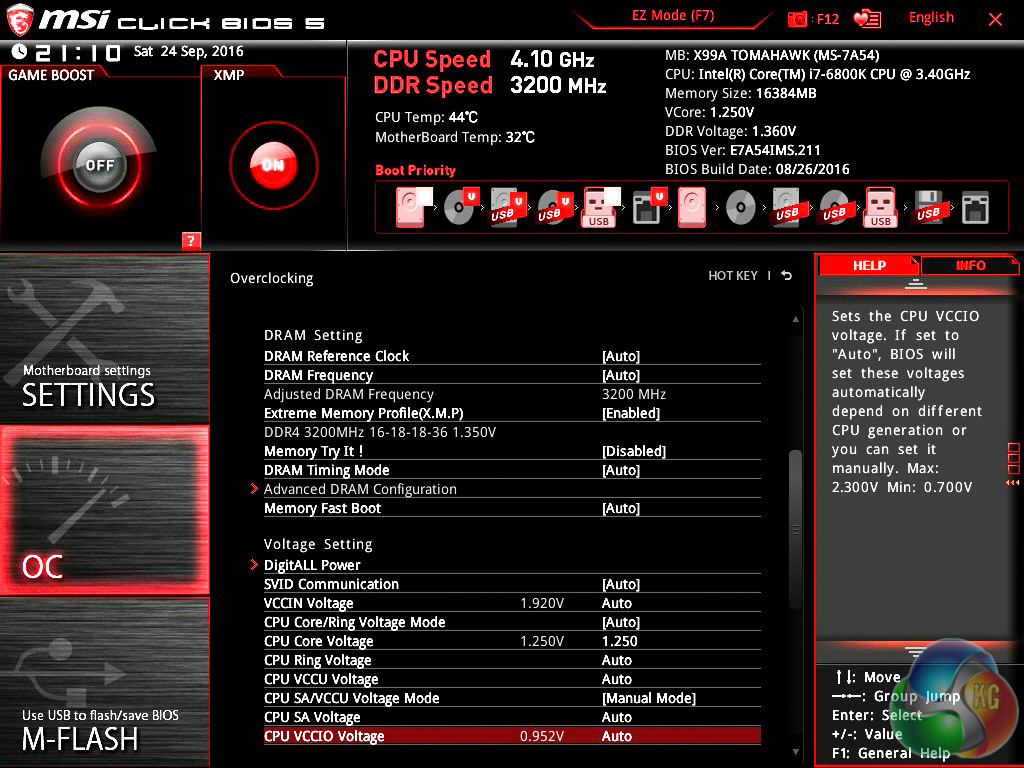
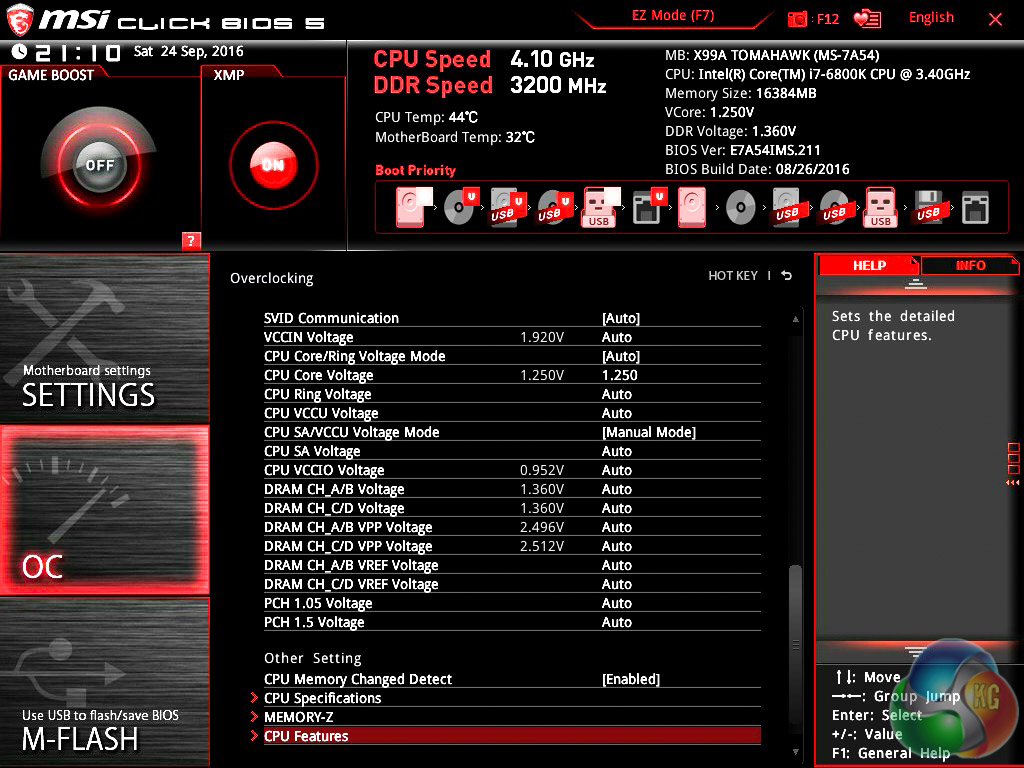
The rest of the overclocking options (simple and advanced) for the memory, CPU and PCH can be seen above.
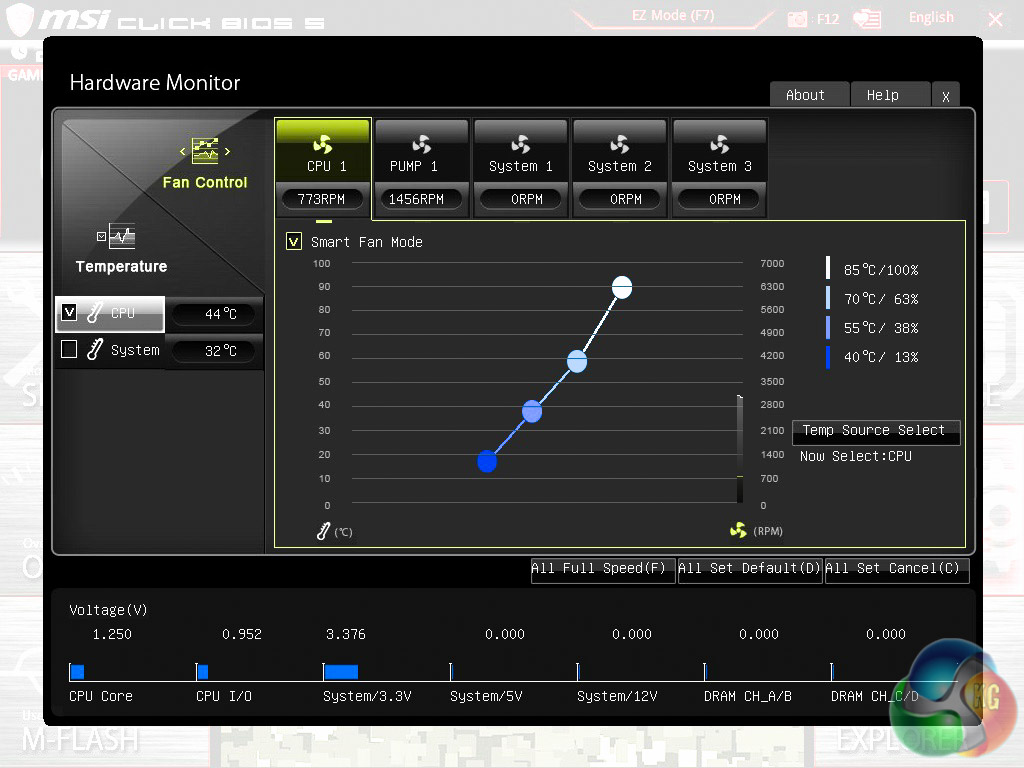
MSI offers fan tuning and controls within the UEFI environment through a graphical interface. All five fan headers can be changed using either a pre-defined curve or manually adjusted using the mouse, plus the source temperature for the fan behaviour can be modified between a number of different sensor inputs. Despite the “pump” terminology for the second fan header it should be noted you can use standard fans with this header.
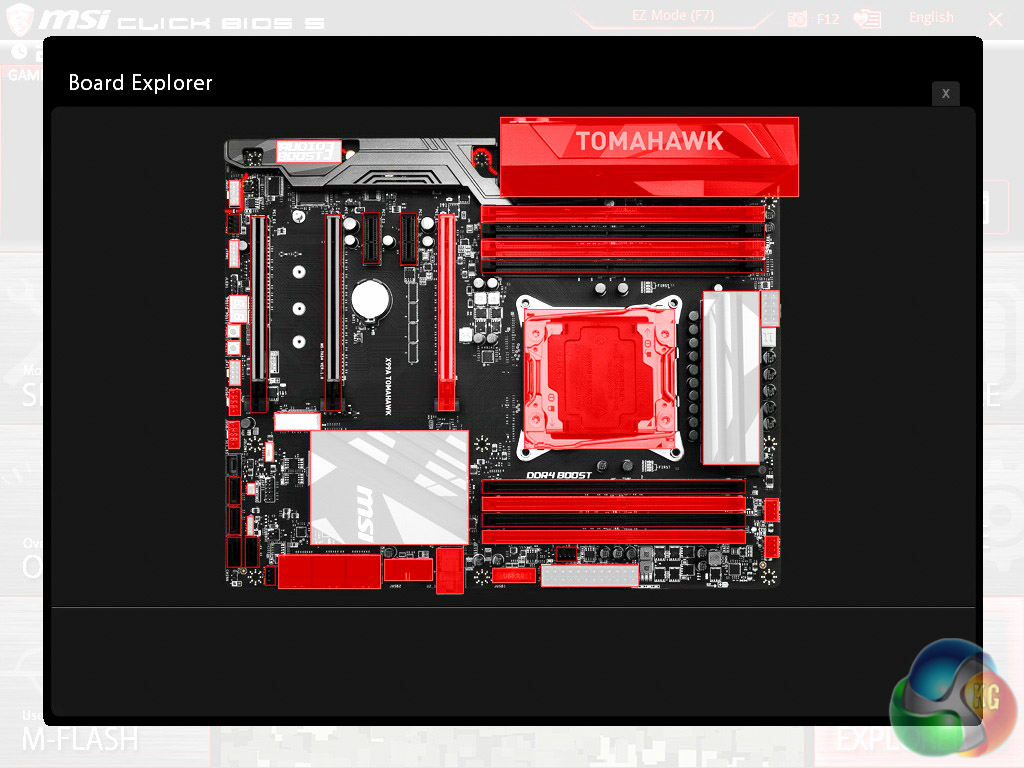
Board explorer is the second of the graphical interfaces that presents to you a labelled and interactive diagram of the motherboard and the associated options for each physical feature. It's a little bit gimmicky but for users unfamiliar with which component is where and does what, it can be useful.
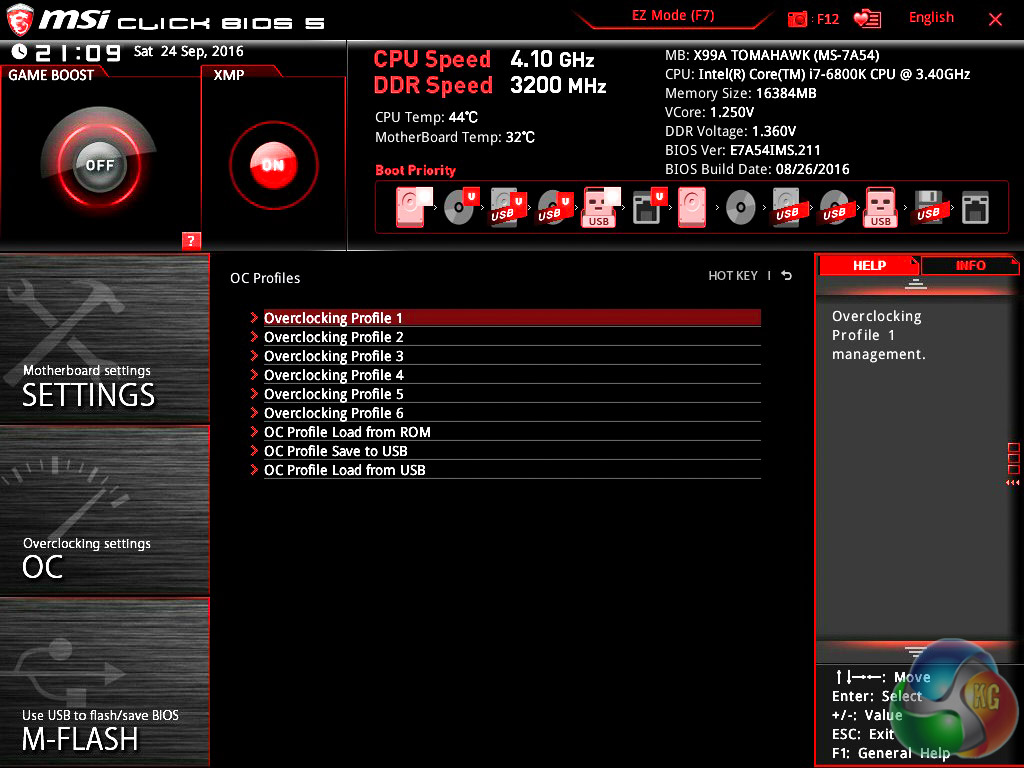
One of the handier features of modern UEFI environments, MSI's included, is the ability to save, load and export BIOS profiles which make system management a lot easier. Even for single PC owners the ability to switch between a high performance profile and a power saving profile is a useful function to have so that you don't waste electricity when using your PC in a mundane way (Word Processing, Web Browsing, etc.) but have more processing power on-tap when it is needed (Gaming, Rendering, etc.).
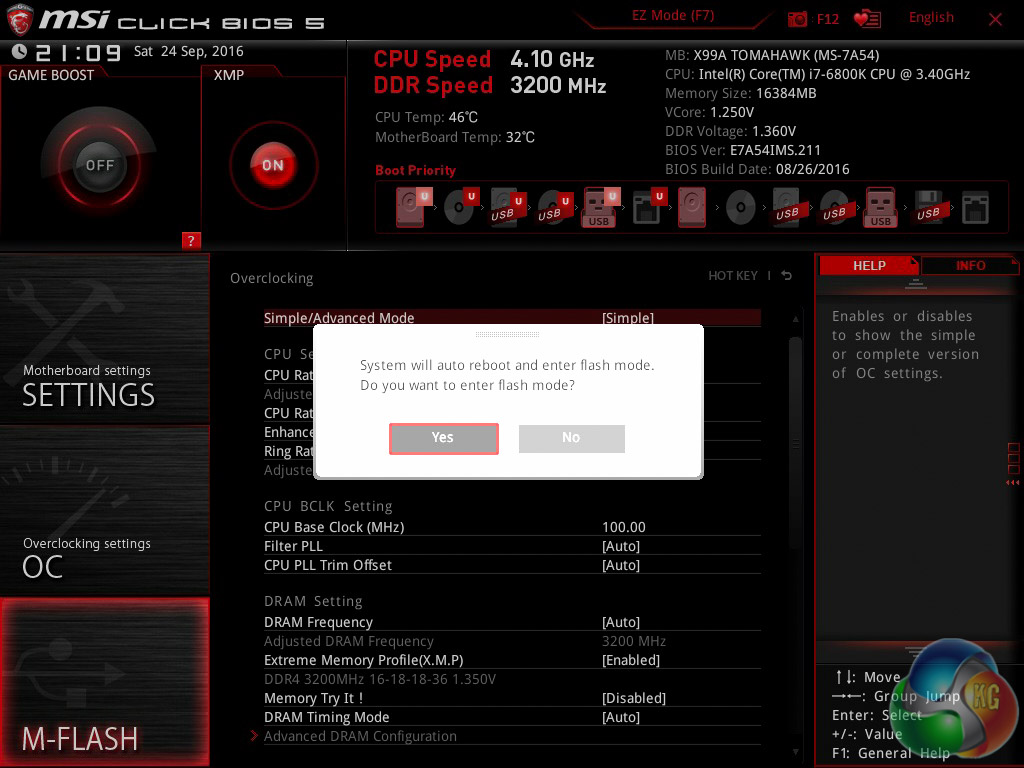
Finally, the MSI M-Flash utility allows you to update the UEFI to the latest version by having a USB stick, formatted in FAT or NTFS, with a UEFI file in the root directory. It's not as advanced as other BIOS update tools, including ASRock's which updates straight from the internet, as you can only update from USB and the file has to be in the root directory. Nonetheless, it's quick and it still does the job required.
While you don't have to use any software to properly make use of MSI's X99A Tomahawk, there are a range of software utilities offered that MSI hopes enriches the overall experience and functionality on offer.
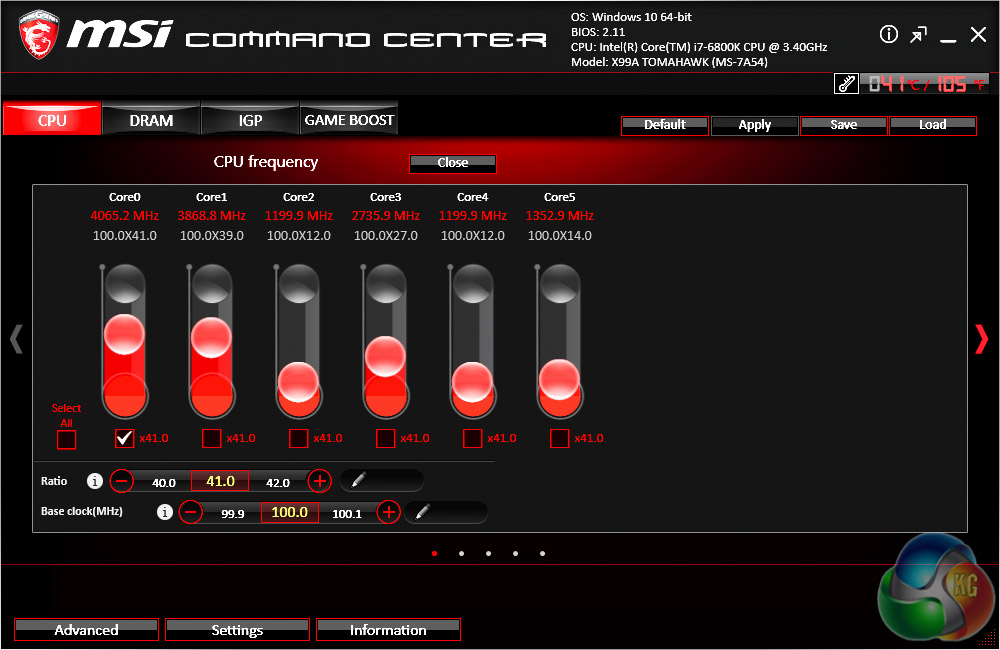
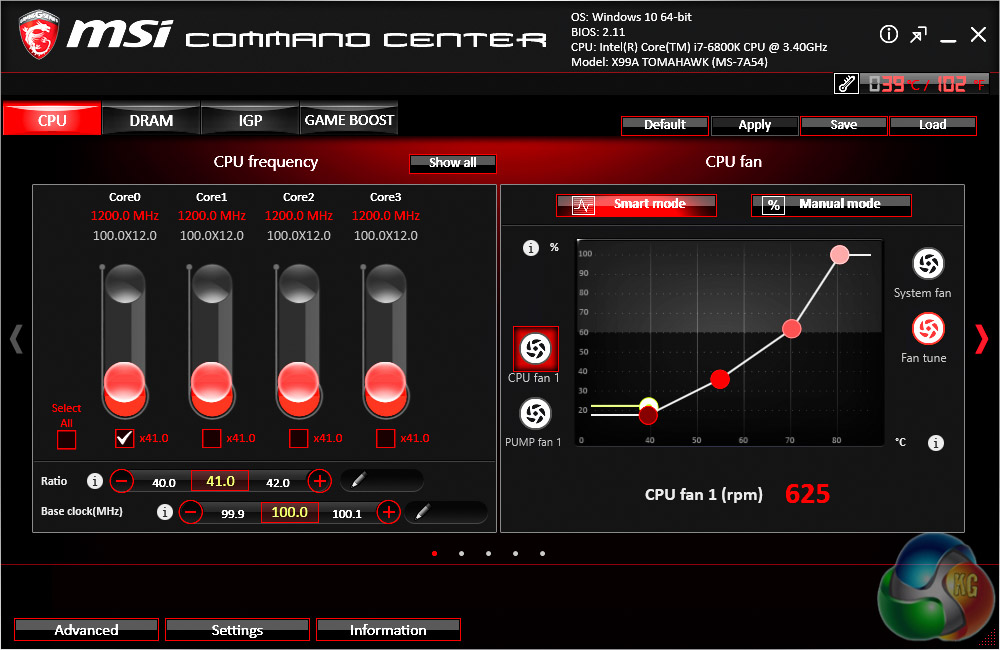
The centrepiece is Command Center which allows you to overclock the CPU and DRAM and also has an automated overclocking utility in Game Boost (OC Genie under another name). The fan controls that are found within the UEFI can also be adjusted from within this software if you so desire.
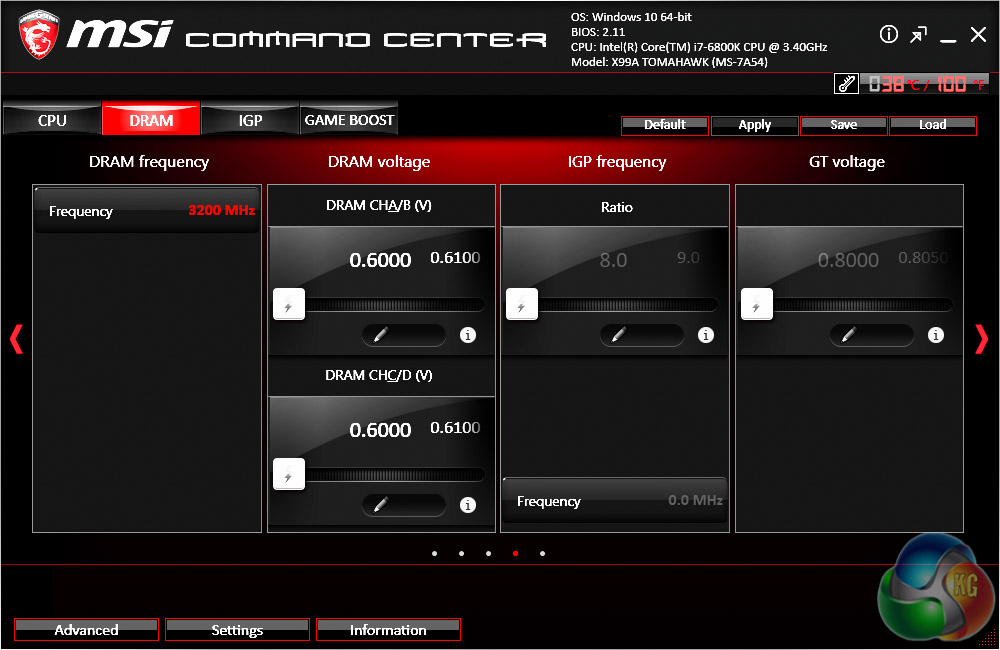
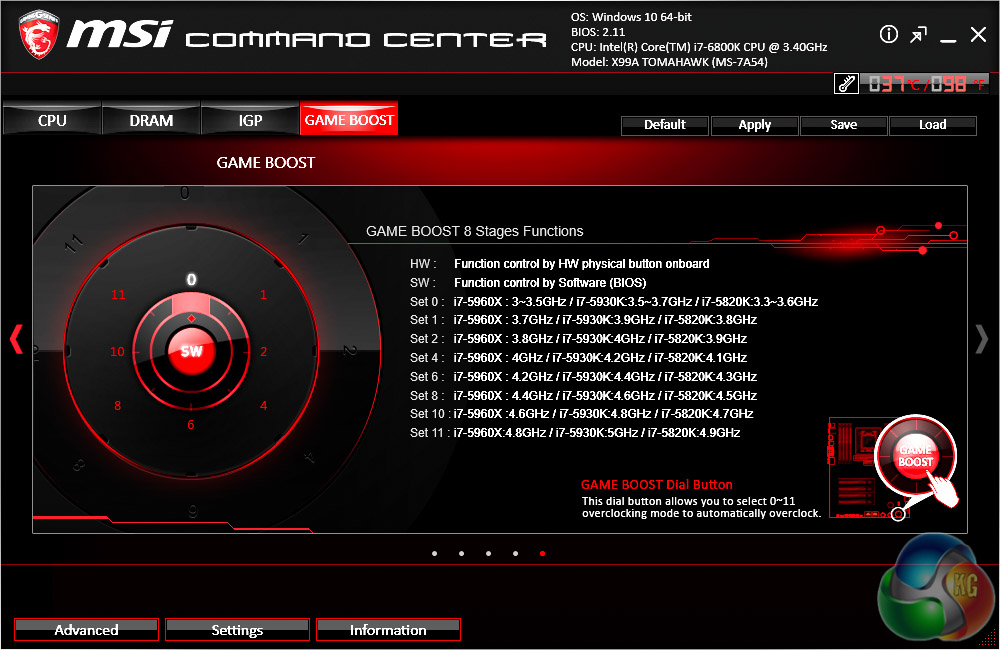
Strangely the Game Boost function had no profiles listed for our i7 6800K or other Broadwell-E CPUs. We imagine MSI has yet to update this part of the software to account for this, nonetheless the i7 6800K is quite similar to the i7 5820K so you could still use these profiles interchangeably.
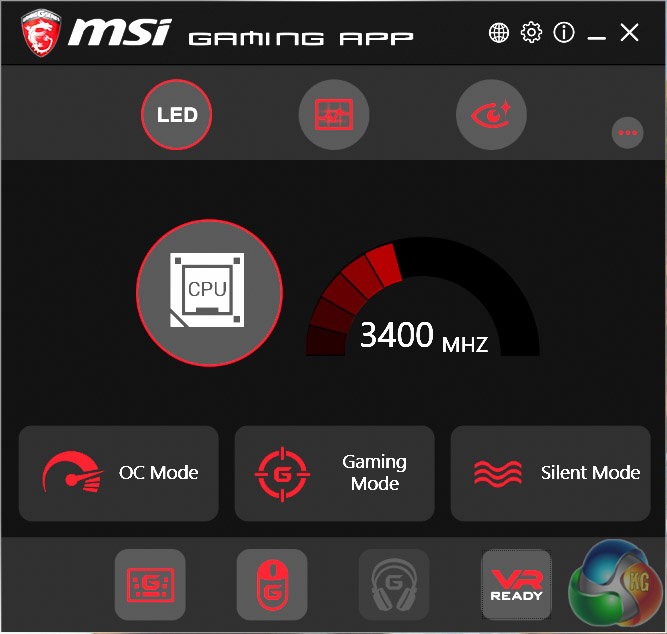
MSI's Gaming app hosts the RGB controls for the 4 pin RGB LED lighting port, though this doesn't work until a strip is actually connected and none are included by default. You'll also find some OC presets and other miscellaneous software functions in the Gaming App.
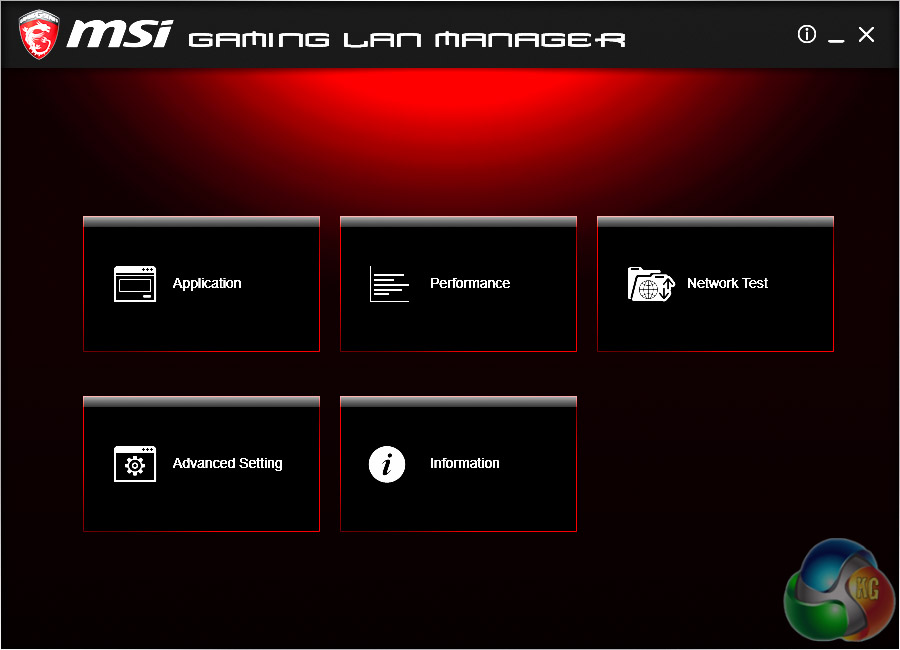
MSI Gaming LAN manager is MSI's packet prioritisation software for the onboard Intel LAN controllers. Every motherboard vendors seems to have one of these applications but the science is still out as to whether or not it actually makes any difference in PC Gaming.
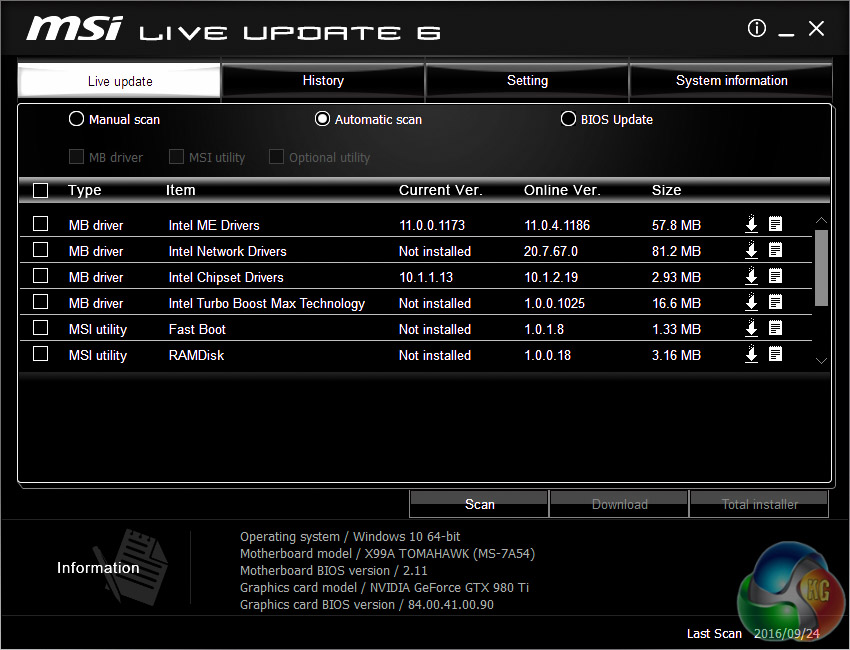
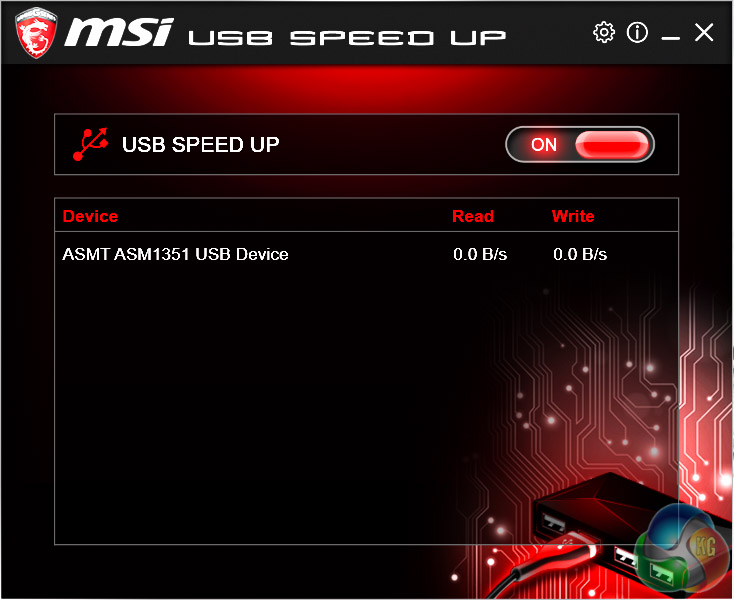
Live Update 6 is arguably the second-most useful utility after Command Center and definitely worth an install if you're looking to keep your drivers and MSI-supported applications up to date. USB Speed Up is there to help with either UASP or BOT modes to speed up USB device transfer rates. In practice most USB devices and hardware controllers seem to exercise this function, in Windows 10 at least, without the need for any third party software above and beyond the correct drivers.
X99 Motherboard Test System:
- Processor: Intel Core i7-6800K (3.6GHz all-core turbo).
- Memory: 16GB (4x4GB) Corsair Special Edition Dominator Platinum, 3200MHz 16-18-18-36 DDR4 @ 1.35V.
- Graphics Card: Nvidia GTX 980 Ti Reference.
- System Drive: Mushkin Chronos 120GB
- Storage Test Drive: OCZ Trion 150 480GB (with a USB 3.0 to SATA adapter for USB 3.0 testing.)
- CPU Cooler: Antec Kuhler H20 1200
- Power Supply: Seasonic Platinum 760W.
- Test Bench: Lian Li PC-T60B.
- Operating System: Windows 10 Pro 64-bit.
Comparison X99 Motherboards:
Software:
- MSI UEFI v211 (26th August 2016)
- Nvidia GeForce 364.72 WHQL Driver
Tests:
- Cinebench R15 – all core CPU test and CPU power consumption figures.
- Handbrake – converting a short 720p movie file into a smartphone suitable format using the Android preset.
- SiSoft Sandra – processor arithmetic and memory bandwidth test sequences.
- AIDA 64 Engineer – memory and cache test.
- 3DMark – Firestrike (1080p) test.
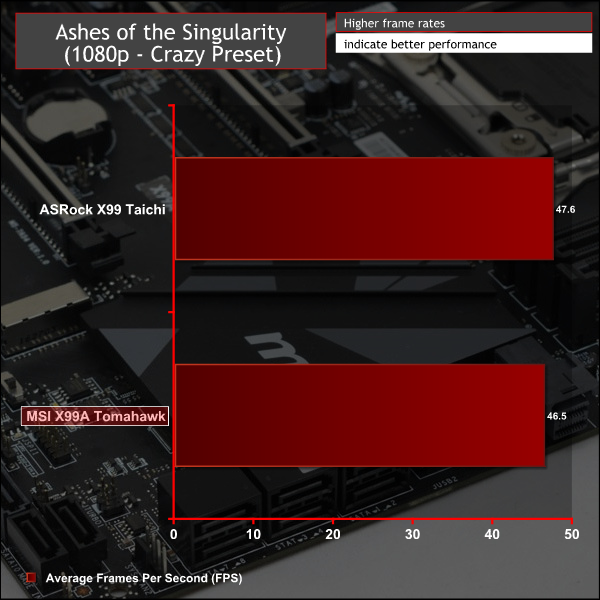
- Ashes of the Singularity – built-in benchmark tool @ 1080p using the Crazy preset.
- Unigine Valley – built-in benchmark using the Extreme HD preset.
- Rightmark Audio Analyser – record and playback test using a line-in to line-out loopback on a high quality gold-plated 3.5mm cable.
- ATTO – default disk benchmark for SATA and USB testing
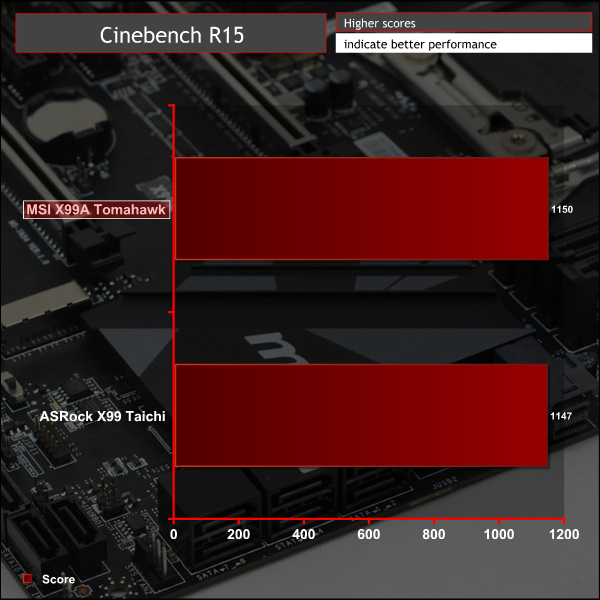
Cinebench R15
Cinebench is an application which renders a photorealistic 3D scene to benchmark a computer's rendering performance, on one CPU core, all CPU cores or using the GPU. We run the test using the all core CPU mode.
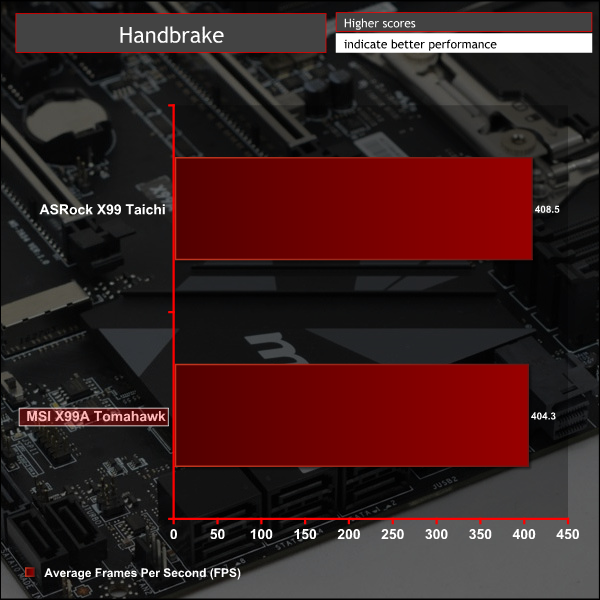
Handbrake
Handbrake is a free and open-source video transcoding tool that can be used to convert video files between different codecs, formats and resolutions. We use Handbrake to convert a short 720p video into the Android preset built into the application.
SiSoft Sandra
SiSoft Sandra 2016 is a multi-function utility program that supports remote analysis, benchmarking and diagnostic features for PCs, servers, mobile devices and networks. We run the application's processor arithmetic test to gauge the CPU performance on each tested motherboard.
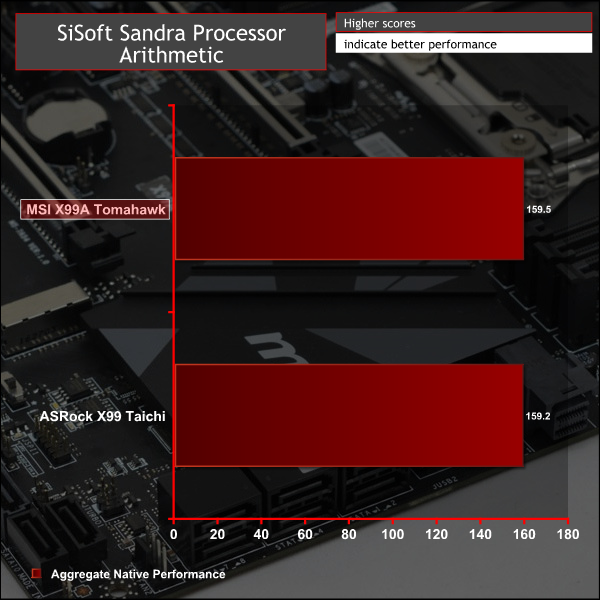
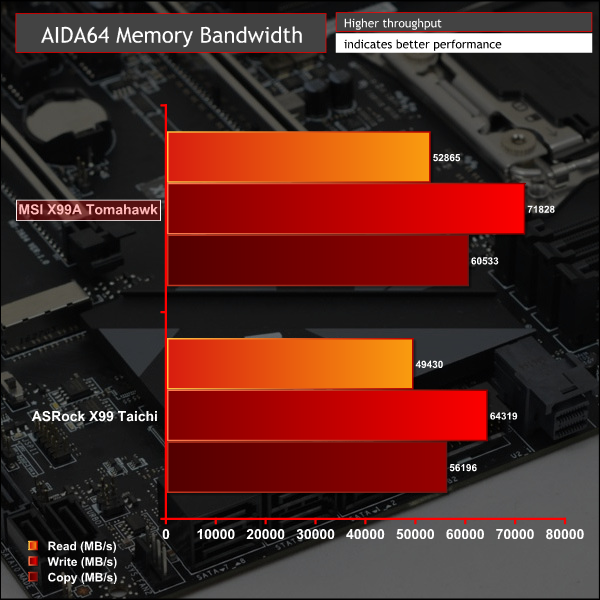
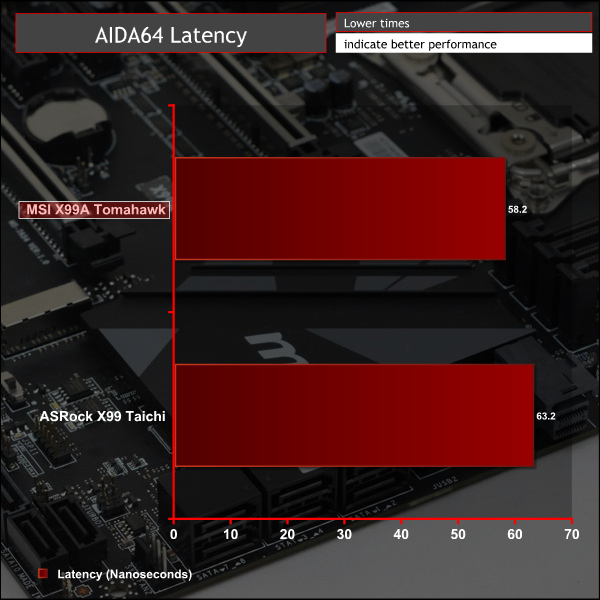
CPU performance between our two test X99 motherboards using the same XMP memory kit and i7 6800K is unsurprisingly similar. The higher auto cache ratio of the MSI motherboard (3.1GHz vs. 2.8GHz set by ASRock) doesn't have much impact in our CPU-centric tests but should come into play with memory.
AIDA64 Engineer
AIDA64 Engineer is a multi-featured software suite for diagnostics, stress testing, benchmarking, software auditing and various other measurement parameters. We use AIDA64 Engineer to benchmark memory throughput and latency.
SiSoft Sandra
SiSoft Sandra 2016 is a multi-function utility program that supports remote analysis, benchmarking and diagnostic features for PCs, servers, mobile devices and networks. We use the SiSoft Sandra memory bandwidth test to give us an extra set of memory bandwidth results.
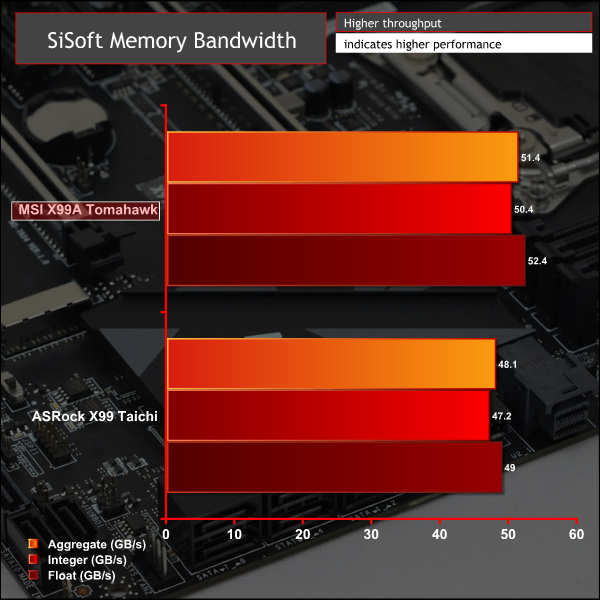
As expected MSI's X99A Tomahawk does better than ASRock's X99 Taichi by way of the more aggressive CPU cache ratio applied when an XMP profile is enabled. ASUS and MSI both go for more aggressive profiles than ASRock which seems to play out in their favour in certain benchmarks.
3DMark
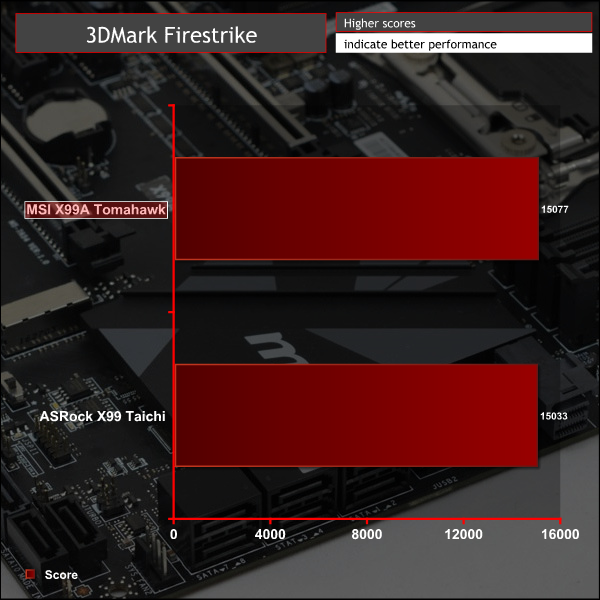
3DMark is a multi-platform hardware benchmark designed to test varying resolutions and detail levels of 3D gaming performance. We run the Windows platform test and in particular the Firestrike benchmark, which is indicative of high-end 1080p PC Gaming.
Ashes of the Singularity
Ashes of the Singularity is a Sci-Fi real-time strategy game built for the PC platform. The game includes a built-in benchmark tool and was one of the first available DirectX 12 benchmarks. We run our tests using DirectX 11, a 1080p resolution and the Crazy preset.
Unigine Valley
Unigine Valley is a GPU stress testing and benchmarking tool that succeeds its predecessor, Unigine Heaven. Valley makes use of dynamic lighting, depth of field, ambient occlusion and dynamic weather patterns. We utililise the built-in benchmarking tool with the Extreme HD preset.
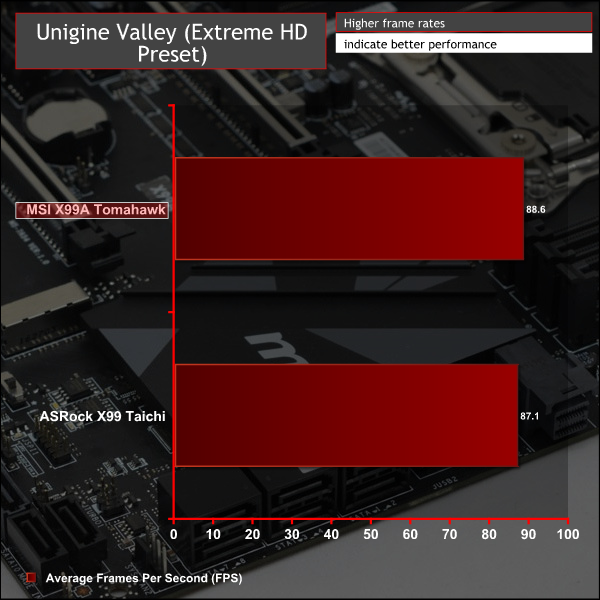
GPU performance only seems to vary by margin of error, which is also thermally influenced on our reference Nvidia GTX 980 Ti, so there's nothing untoward to report here.
ATTO Disk Benchmark
The ATTO disk benchmark is a Windows-based utility for testing storage performance of any storage drive or controller. We use the default benchmark setup and run this on an OCZ Trion 150 SSD directly connected to the SATA ports and then again over a USB 3.0 port using a USB 3.0 to SATA III adapter.
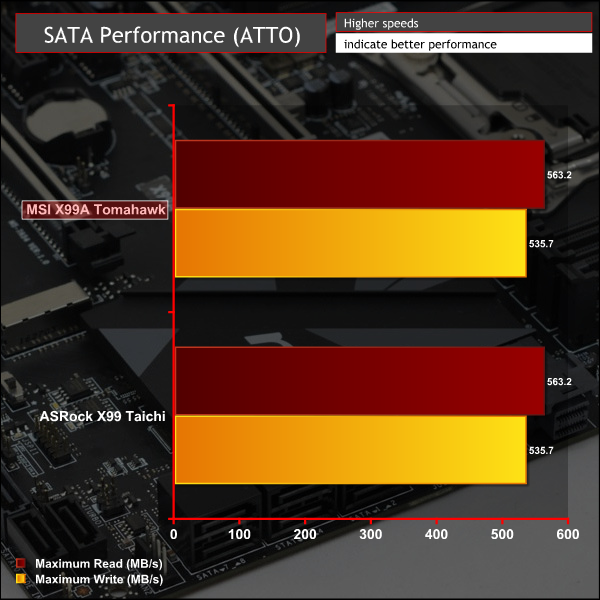
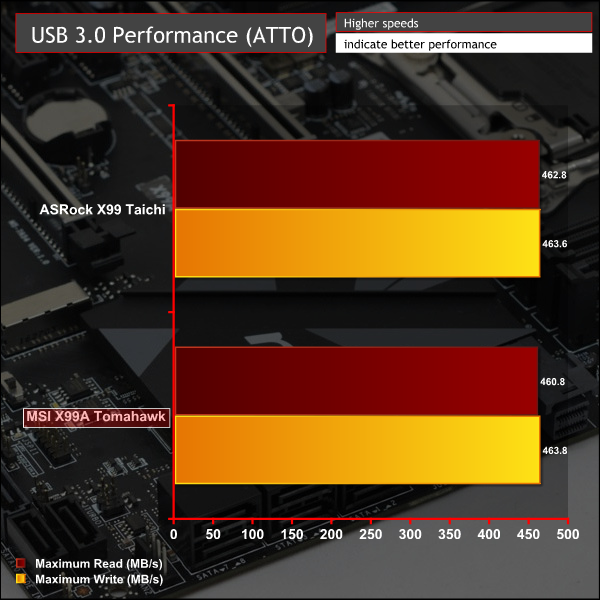
USB and SATA performance off the X99 chipset is primarily a check-box exercise; both motherboards pass the test here.
Rightmark Audio Analyser
Rightmark Audio Analyser is a freeware benchmarking utility designed to objectively test the performance characteristics of audio solutions. We setup a line-in line-out loop and execute the record/playback test before generating the results report you see below. This test was run at 16bit audio depth and 192KHz frequency.
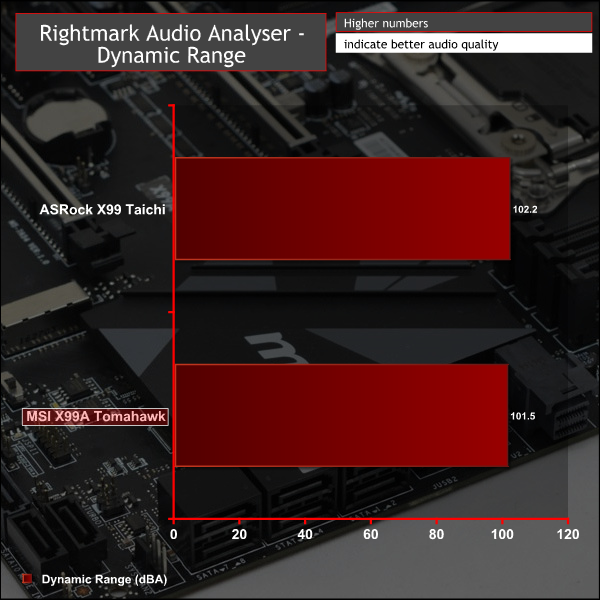
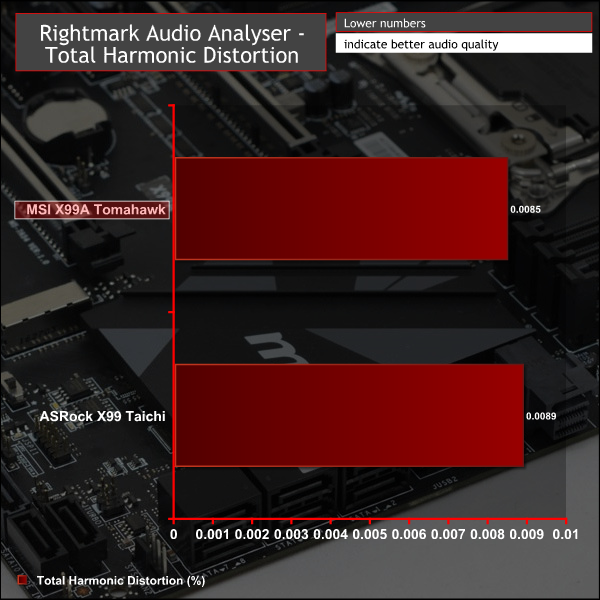
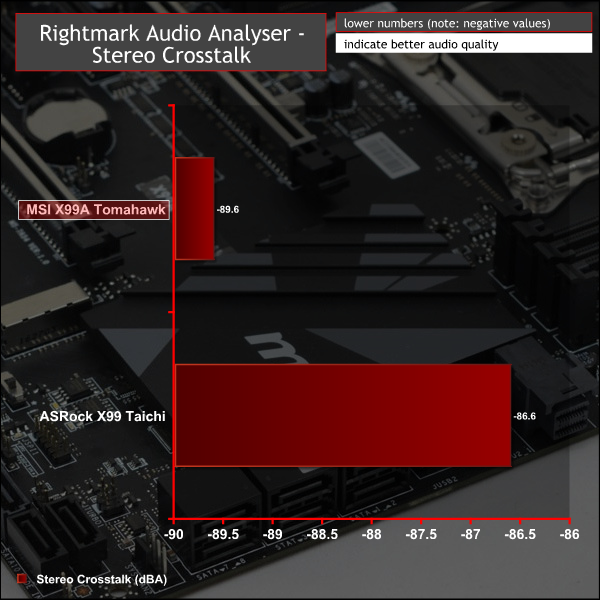
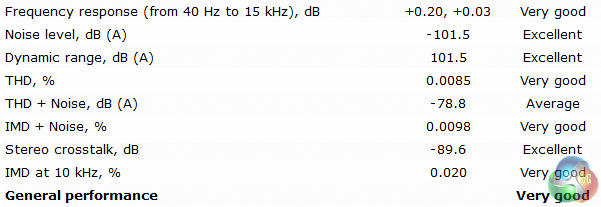
With almost all X99 motherboards using the ALC1150 codec and at least one headphone amplifier, performance is converging quite strongly between all vendors. There are a few subtle variations in performance influenced by the choice of capacitors, amplifiers and isolation methods, but in this test both boards are equally as capable.
Power Consumption
We leave the system to idle on the Windows 10 desktop for 5 minutes before taking a reading, for CPU load results we run Cinebench and take a reading in the middle of the render progress.
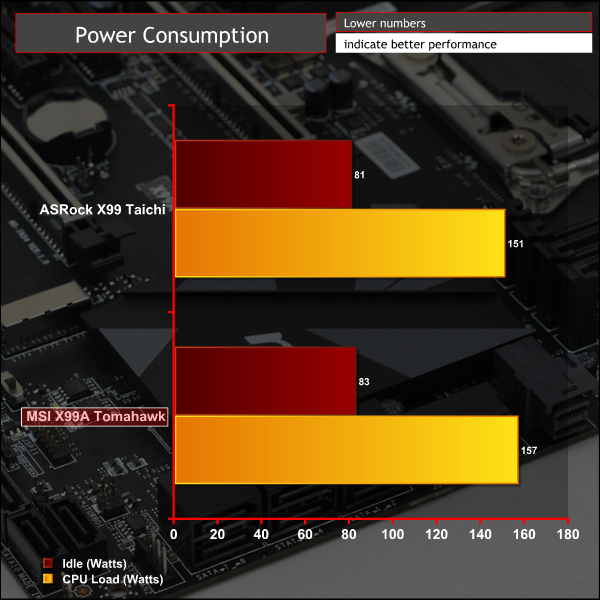
MSI's default power consumption was ever so slightly higher at idle and load, though not significantly different enough to make any reliable conclusions about VRM efficiency or voltage stability.
Overclocking
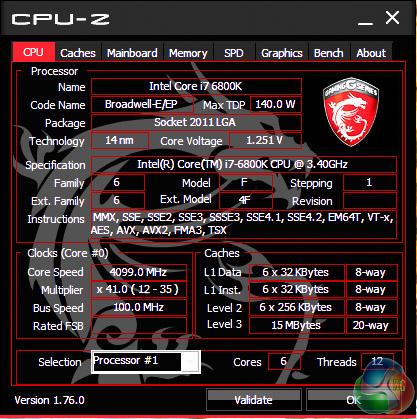
For this round of X99 testing we made use of a retail Core i7 6800K and based on testing with a number of motherboards it is a particularly weak overclocker, considering the high expectations we had for this CPU.
With the MSI motherboard we managed to get 4.1GHz stable with 1.25 volts and 4.2GHz would post with 1.25~1.3 volts but was sometimes unstable when running load tests. Hesitant to push the voltage further than 1.3 volts due to thermal constraints for a 240mm AIO, we settled on 4.1GHz as the final overclock.
For comparison the ASRock X99 Taichi managed to hold the 4.2GHz overclock stable with 1.275 volts but we reckon you'd be able to get 4.2GHz on this MSI board with enough patience and setting tweaking.
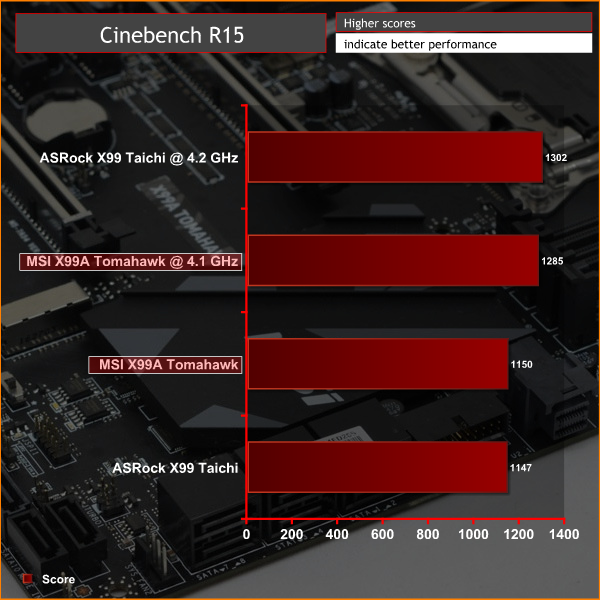
Overclocked CPU performance seems close (1.3% difference) given the frequency difference (2.5%) though the improvement over stock behaviour is still decent enough, circa 12%.
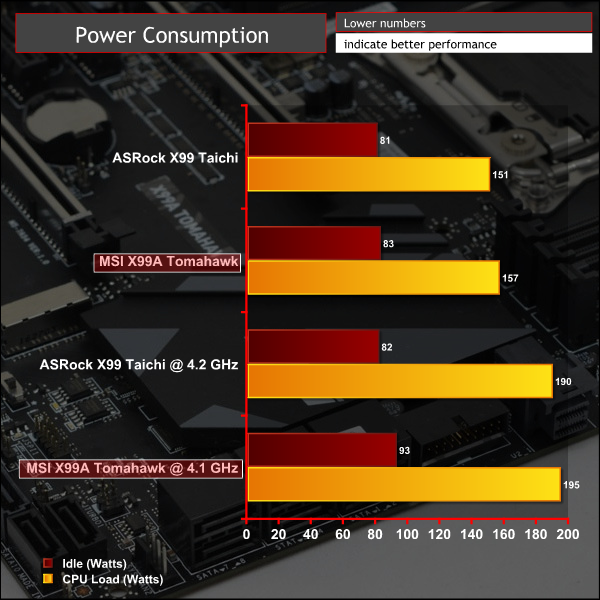
MSI's power consumption is higher at load despite running a lower voltage than ASRock's X99 Taichi (1.25 vs 1.275), likewise the idle power consumption was elevated. Higher power consumption isn't out of the ordinary for overclocked systems but we prefer when idle power saving behaviour is aggressive, as is the case with the ASRock motherboard.
To anyone but the well-informed techie, MSI's X99 portfolio is extensive and potentially overwhelming, thus making sense of which board is most suitable can be tough. MSI's X99 range contains no less than 21 SKUs (!).
The MSI X99A Tomahawk fits somewhere in the middle of MSI's range and within the middle of the X99 market as a whole with its typical retail price of £230 / $270. In the UK MSI's offering is priced almost identically to the ASRock X99 Taichi (£225 / $225), though ASRock definitely wins the value for money battle in North America.
MSI's standard warranty duration for this product is 3 years from most reputable retailers.
The distinction between “Gaming” and “non-Gaming” motherboards is becoming less useful as time goes on, particularly for X99 where the additional cost of the motherboards, CPUs and quad-channel memory kits normally dictate that the system is going to be built for more than just gaming.
Therefore, the X99A Tomahawk has a wider remit than just targeting PC gamers and thanks to MSI refining the styling to a neutral colour scheme and bolstering all-round connectivity, it's a motherboard suitable for all types of users.
It's hard to envision a user whose needs wouldn't be fulfilled by the X99A Tomahawk, unless 4 16X PCIe lanes, Thunderbolt or some other missing feature were an absolute necessity. The lack of WiFi is easily correctable with a PCIe or USB solution and the absence of RGB LEDs is simply fixed by making use of the 4 pin LED strip connection.
However, despite the MSI X99A Tomahawk being versatile enough to meet the needs of almost any X99 user, MSI will need to be wary that in the lower-mid range section of the X99 market, demand is price sensitive and can sometimes trump brand loyalty, styling or other considerations. As such the ASRock X99 Taichi is a serious rival.
Discuss on our Facebook page HERE.
Pros:
- Clean aesthetics & neutral colour scheme
- Excellent array of connectivity
- Competitive pricing
- Dual Intel Gigabit NICs
- Armoured PCIe 16X slots
- Onboard power/reset buttons, debug LEDs and dual BIOS switch
Cons:
- No onboard RGB lighting or WiFi
KitGuru says: A highly-spec'd and versatile all-rounder for Intel's X99 platform, MSI's X99A Tomahawk is an excellent choice in its price segment.