KitGuru KitGuru.net – Tech News | Hardware News | Hardware Reviews | IOS | Mobile | Gaming | Graphics Cards


Combining the market's current bang-for-the-buck kings, Chillblast builds its Fusion Barbarian gaming system around the Devil's Canyon Core i5 4690K processor and Gigabyte's G1 Gaming GTX 970 graphics card.
Backing up the powerful frame-rate generators are 16GB of DDR3 memory and a 120GB Samsung 850 EVO SSD. How does the Chillblast Fusion Barbarian gaming system perform outside of its specification sheet?
Chillblast calls upon Gigabyte's mid-range Z97X-Gaming 5 motherboard to control the system's components. A gaming-calibre audio system, Killer networking chipset, and multi-GPU support are some of the motherboard's core features.
Storage beyond the 120GB SSD comes by way of a 2TB Seagate HDD, while there's also an optical drive for good measure (they're little more than £10 these days). A trio of Corsair components – the SPEC-03 chassis, H75 CPU cooler, and CX750 PSU – house, cool, and power the system's components.
What sort of frame rates can be achieved from the Chillblast Fusion Barbarian, and can the system offer an intrusion-free usage environment while pushing those pixels?
System Configuration:
- Corsair SPEC-03 Case
- Intel Core i5 4690K overclocked to 4.2GHz
- H75 Water Cooler
- Gigabyte G1 Gaming GTX 970 4GB Video Card
- Gigabyte Z97X-Gaming 5 Motherboard
- 16GB 1600 DDR3 Memory
- 120GB Samsung 850 EVO SSD
- 2000 GB 7200rpm HDD
- Corsair CX 750W PSU
- 24 x DVD RW
- Windows 8.1 64 bit
- 5 Year Warranty with 2 Years Collect and Return
- Price for this system (at the time of writing): £1133.80 (inc. VAT)
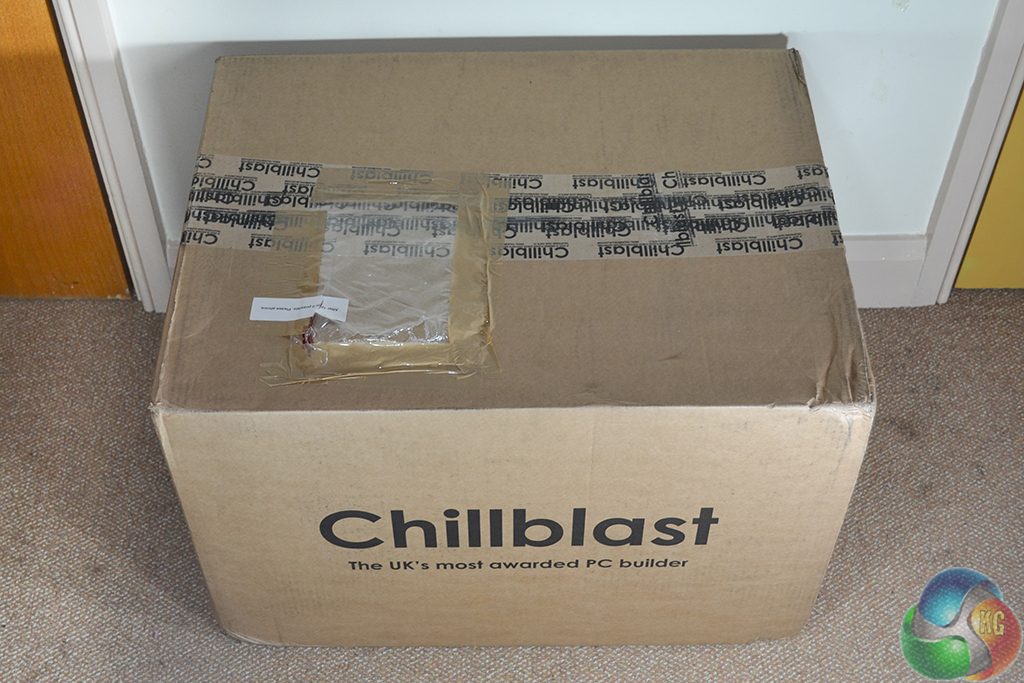
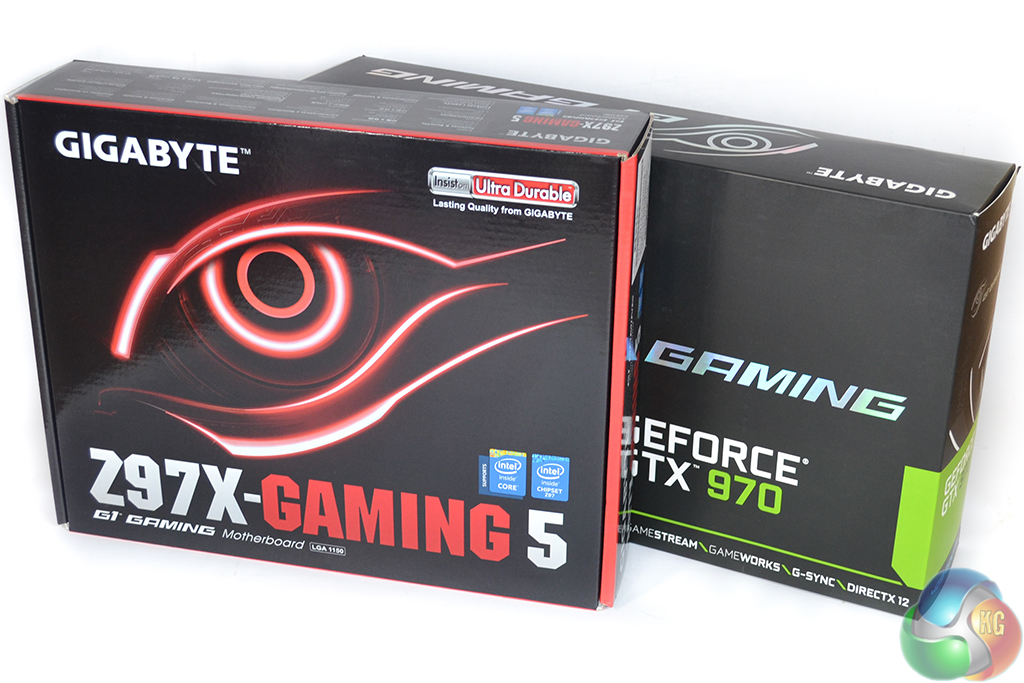
Chillblast ships the Fusion Barbarian package inside a large box that offers an extra layer of protection.
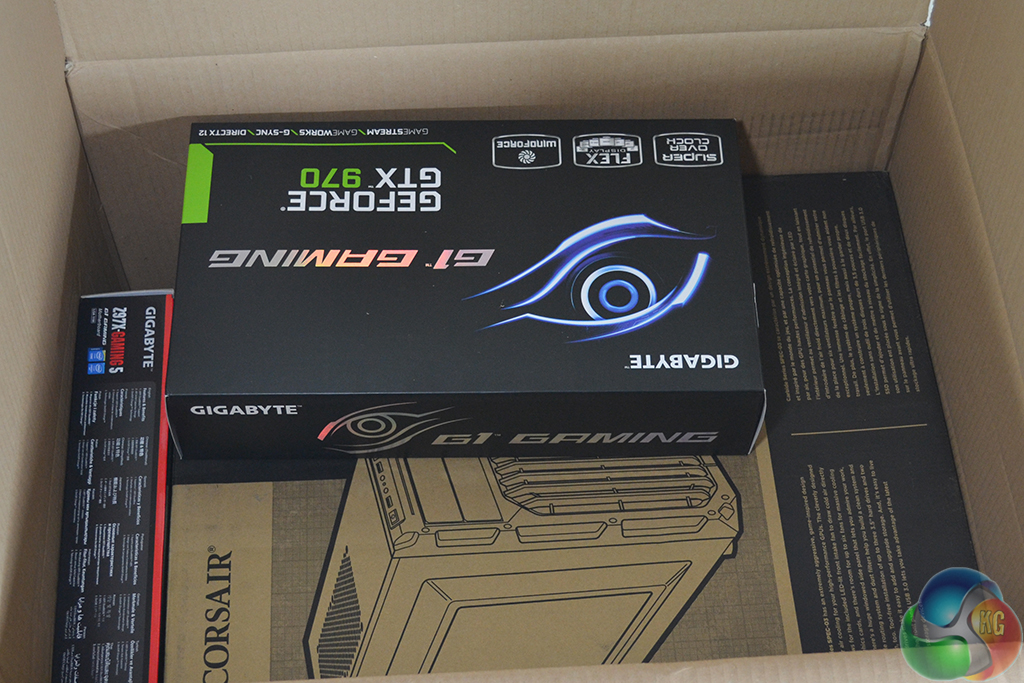
The sizeable exterior box also serves as a medium for holding the individual component boxes that Chillblast thoughtfully supplies.
I like the move to include individual component boxes for the motherboard and GPU – selling components after a future upgrade will made an easier process.
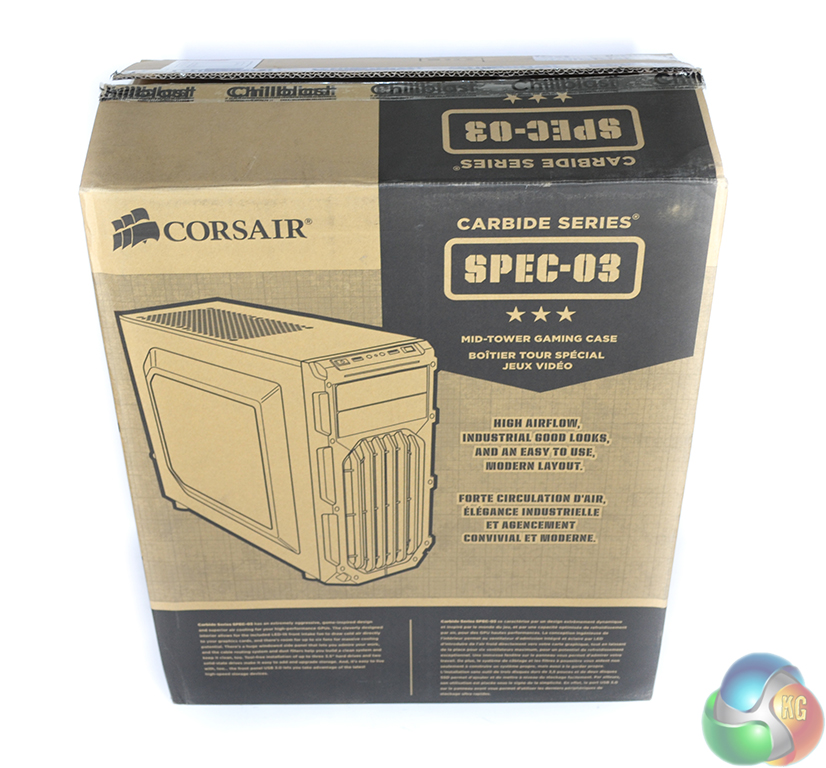
The system itself is housed inside the box of its case – Corsair's SPEC-03 mid tower chassis. Using the chassis box is an effective way of ensuring that the fully laden system is given minimal movement during shipping.
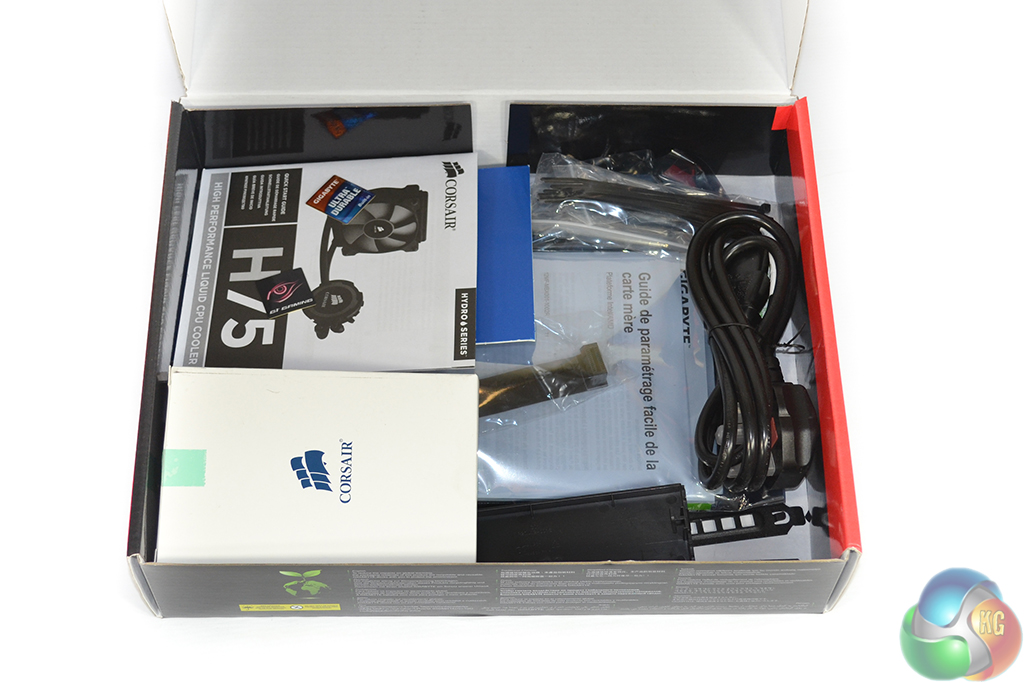
Accessories from the individual components are bundled together in the motherboard box, along with the relevant documentation.
Including the individual components' accessories is another move that I like to see – users can add more drives, for example, using the supplied chassis screws. I am, however, disappointed to see that the cooler's remaining (AMD and LGA 2011) mounting hardware was not supplied.

A double-sided sheet provides users with installation and troubleshooting guidance.
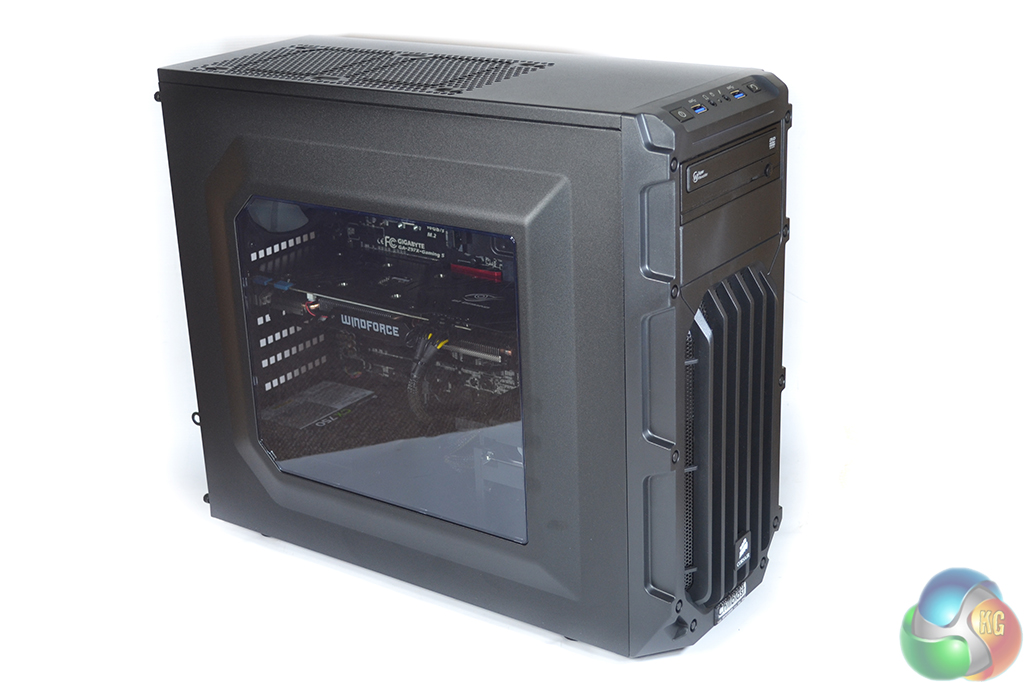
Corsair's Carbide series SPEC-03 mid-tower chassis is used to house the Chillblast Fusion Barbarian system. The SPEC-03 case's primarily steel construction gives it a feel of quality, while its retail price makes it a cost-effective solution.
The large side-panel window gives a look inside at the gaming hardware being utilised. Light from the red LED system seeps through the window to create an eye-catching, gaming-orientated glow.
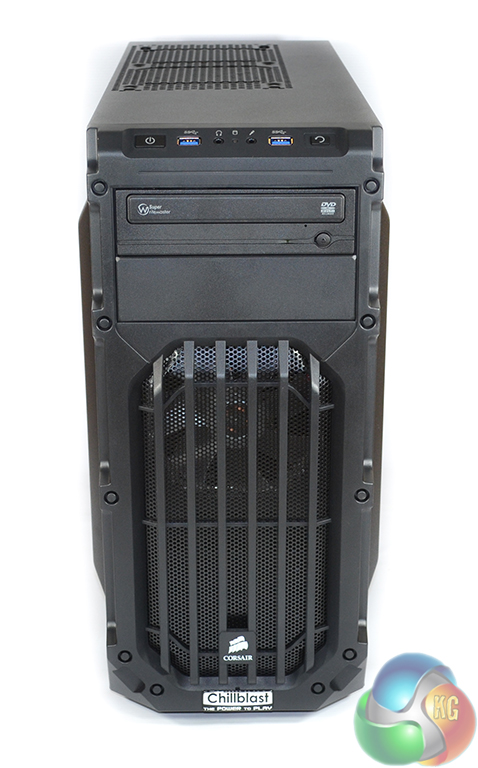
Around the front of the chassis, Chillblast applies its own “The Power to Play” company badge below the Corsair logo. The front filtered section can be used to house two fans, although Chillblast opts to use only the stock red LED 120mm fan.
Front panel connections consist of two USB 3.0 ports, headphone and microphone jacks, power and reset buttons, and an activity LED. Beneath the front IO is a 24x Samsung SH-224DB 24x DVD re-writer.
Many people will be quick to complain about the provision of an optical drive in 2015, although some users may see its value. Chillblast gives the option to remove the DVD drive for a £5 cost reduction.
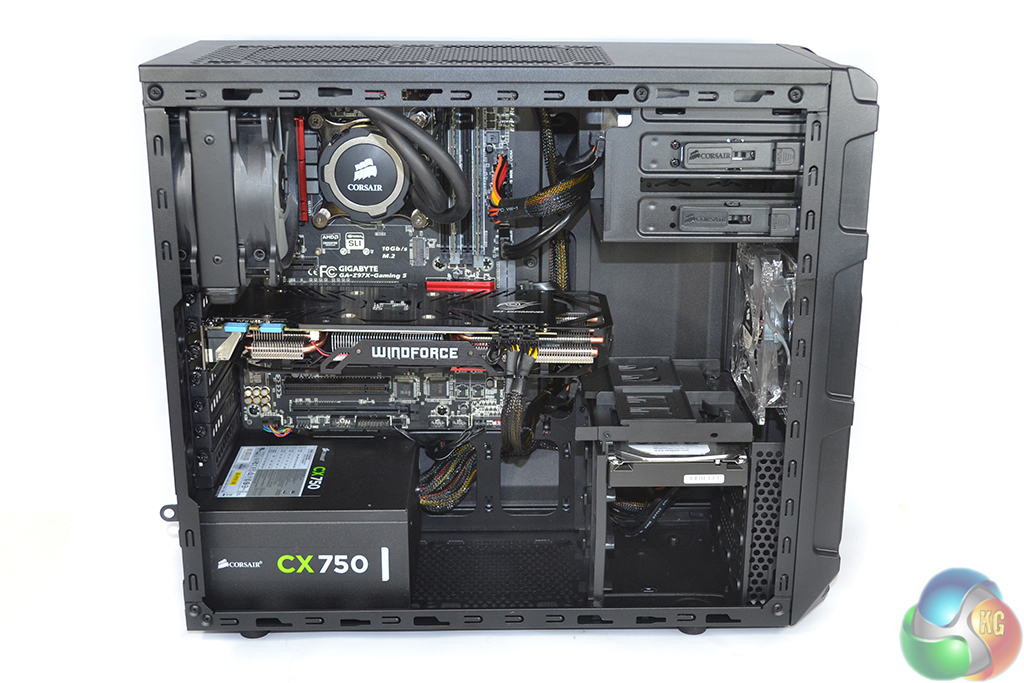
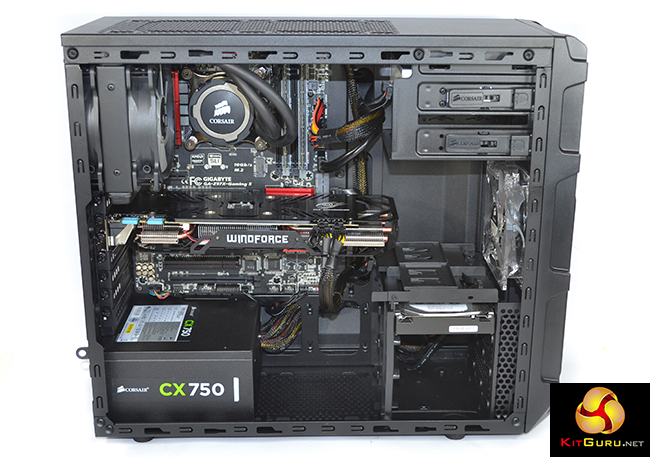
Removing the side panel gives a first look at the spacious interior of Corsair's SPEC-03 chassis. Clearance for Gigabyte's lengthy Windforce-cooled GTX 970 is not a concern, although adding an identical card for SLI will not be possible with the HDD cage.
Cable management efforts by Chillblast are solid, although they could be slightly better. The company charges an extra £24.99 for “Elite Chillblast Cable Management” but simple methods, such as routing the CPU power cable behind the motherboard tray should be included by default. That said, the case is not the easiest to work with, with limited space behind the motherboard tray.
The rear-mounted H75 All-In-One (AIO) liquid cooler is used to tame the 4.2GHz 4690K CPU's thermal load. Chillblast removed the included rear chassis fan to mount the CPU cooler, but did not install it elsewhere or provide it in the accessory bundle. Adding it to the intake configuration would have benefited the system's pressure profile with respect to dust build-up.
Two 8GB sticks of Crucial CT102464BA160B 1600MHz CL11 DDR3 memory were shipped in our system. I have no complaints about the use of cost-effective DDR3 memory, although I do question 16GB for a gaming machine when 8GB is currently deemed sufficient.
Clearly Chillblast is expecting users to stick with this set of RAM for an extended number of years, whereby 16GB of memory may be beneficial for gaming. Game streamers may also benefit from extra system memory for their multi-tasking exercises.
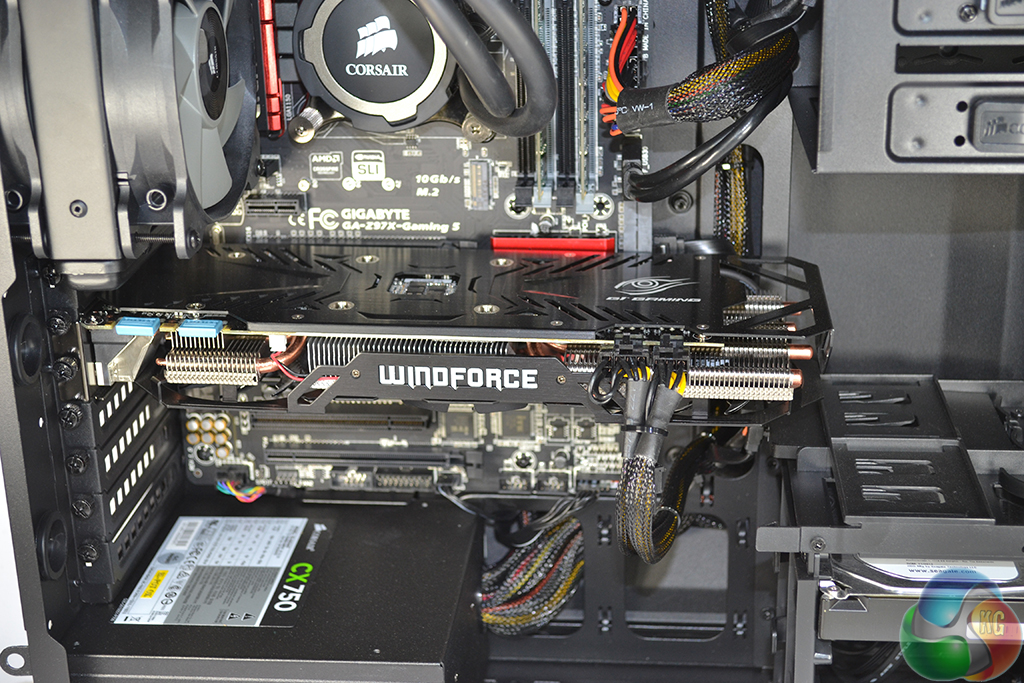
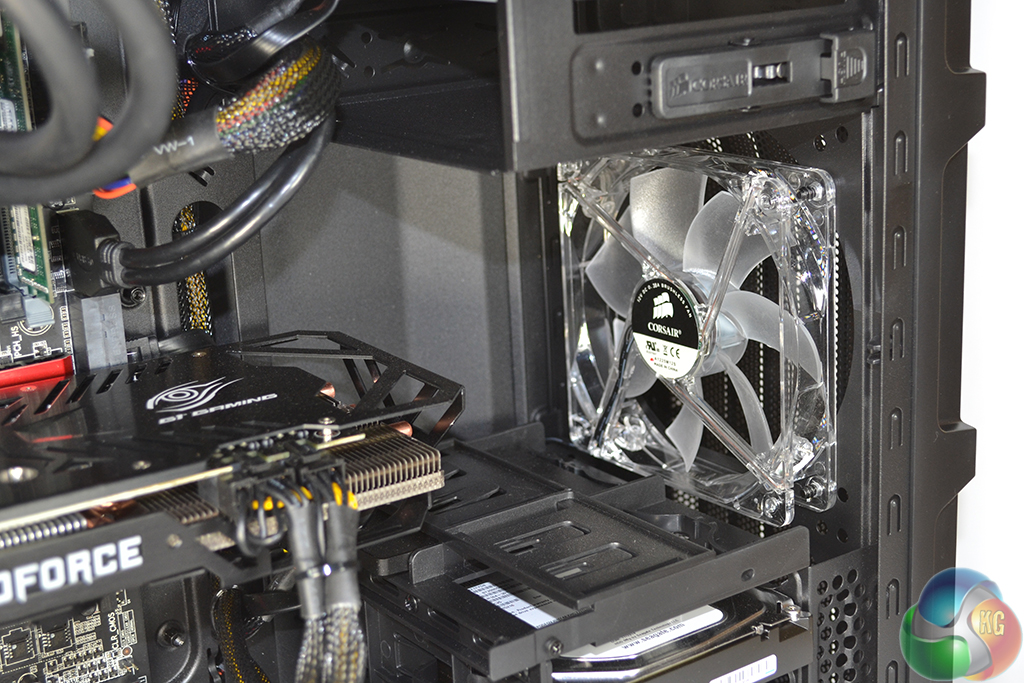
There is plenty of space around the Gigabyte G1 Gaming GTX 970 video card in order for it to stay sufficiently cooled. The graphics card is factory overclocked by Gigabyte, and features a base clock of 1178MHz, boost clock of 1329MHz (realistically 1392MHz throughout testing), and memory clock of 7Gbps (Nvidia reference is 1050MHz, 1178MHz, 7Gbps).
A future upgrade to two-card SLI is possible with this motherboard and power supply combo, although the chosen card will have to be physically shorter than the Gigabyte variant and its overhanging-cooler.
The front 120mm fan blows cool directly onto the GPU, without any interference from drives cages and storage devices. If another card is added, I would recommend also installing an additional fan in the lower front intake position (as Chillblast should have done by default with the supplementary chassis fan that was removed).
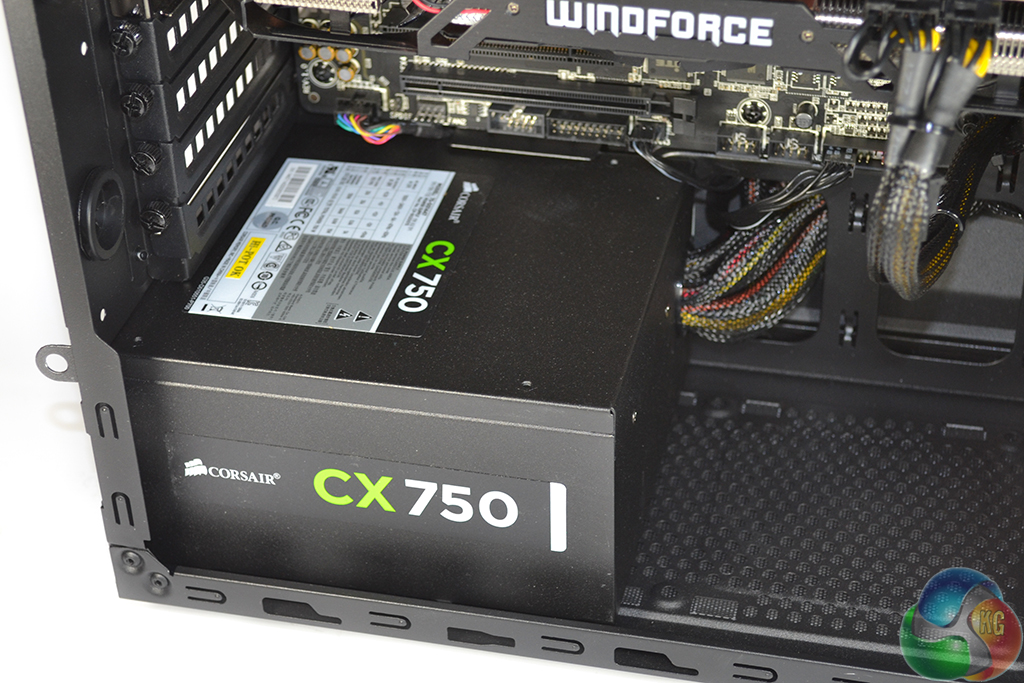
Feedback from our review of Chillblast's Fusion Raptor system indicated that the choice of a non-modular power supply was not welcomed. That wasn't such an issue with a 600W unit inside Phanteks' Enthoo Evolv chassis and its excellent cable management characteristics.
But a 750W non-modular PSU inside the Corsair SPEC-03 chassis seems like a questionable decision. Corsair's own semi-modular CX750M unit retails for about £5-10 more than the non-modular CX750, and should have been chosen. As we will see later, finding places inside the SPEC-03 chassis to hide the plethora of unused cables is a difficult task.
Criticism of the non-modular unit out of the way, it is good to see that Chillblast opts for a high-quality power supply unit from a reputable brand. The decision to go with a 750W unit leaves plenty of room for future upgrades on the GPU and CPU front – an extra GTX 970 in SLI should run fine in this system with the CX750.

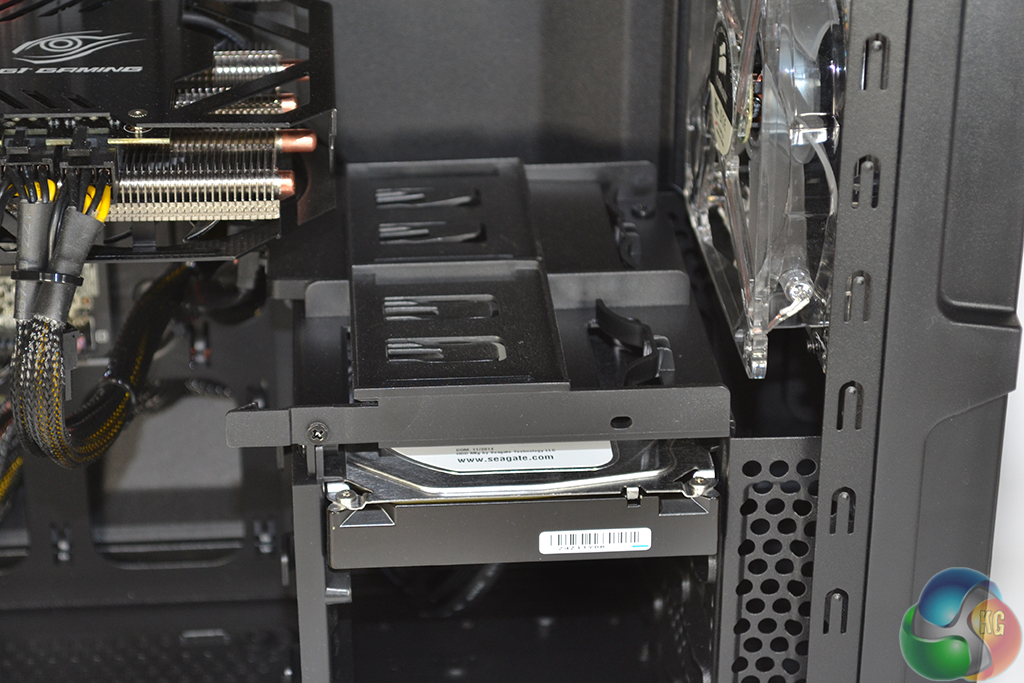
Samsung's 120GB 850 EVO SSD sits in one of the case's 2.5″ mounting spots, while the 2TB Seagate ST2000DM001 HDD is mounted in the three-drive 3.5″ bay. With this system being heavily weighted towards gaming, the argument for using a smaller HDD and investing the money that is saved into a bigger SSD is worthy of debate. A Seagate 1TB SSHD Hybrid drive can be selected for no additional cost.
The SSD is camouflaged against its mounting location and is very difficult to see. This is good for users who like to hide their SSD, although those who like to show it off may be less impressed.
Corsair's side-panel window extends as far as the drive area, so ensuring that cable management is neat in this location is important. Thankfully, Chillblast does a good job at stealthily routing cables to the two drives.
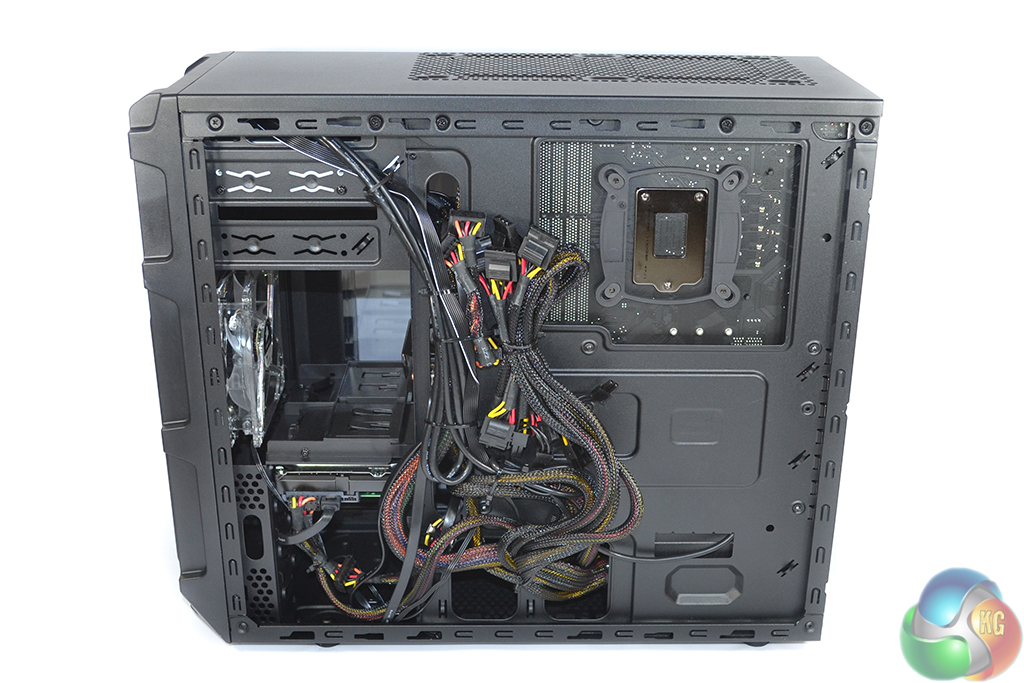
That point about the non-modular power supply rears its ugly head when the right side panel is removed. Chillblast has little option other than to bundle a large set of cables behind the motherboard tray.
They're just tied there. And their position cannot be changed due to the tight clearance in Corsair's chassis – it is allocated a slim cable management section apart from the central area where its side panel bulges.
Clear access to the drive bays and motherboard cut-out is maintained, but connecting power cables to additional components will require significant cable management efforts.
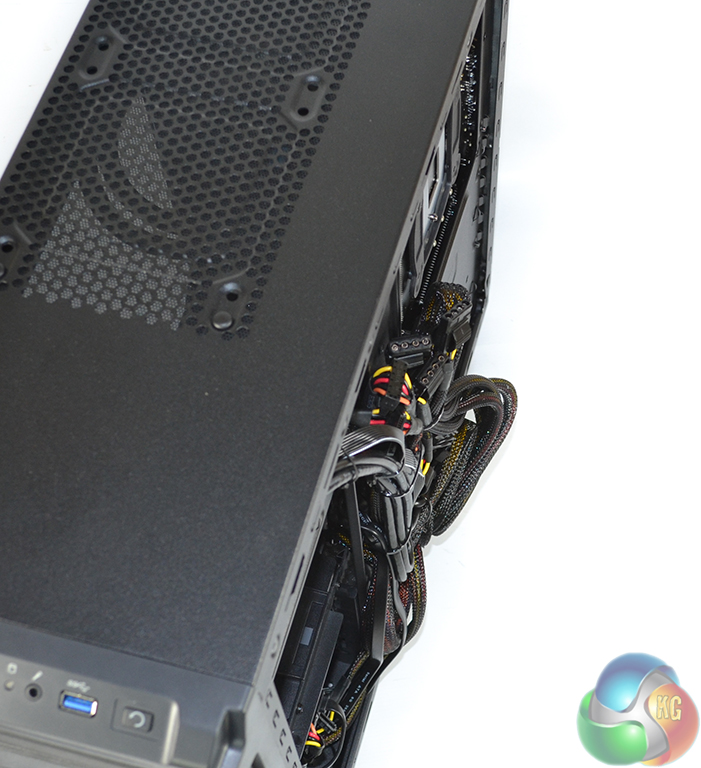
A top-down view emphasises the size of the cable bundle and its overhang.
Even with the extruding design, attaching the right side panel requires a great deal of pressure to squash the power cables into position.
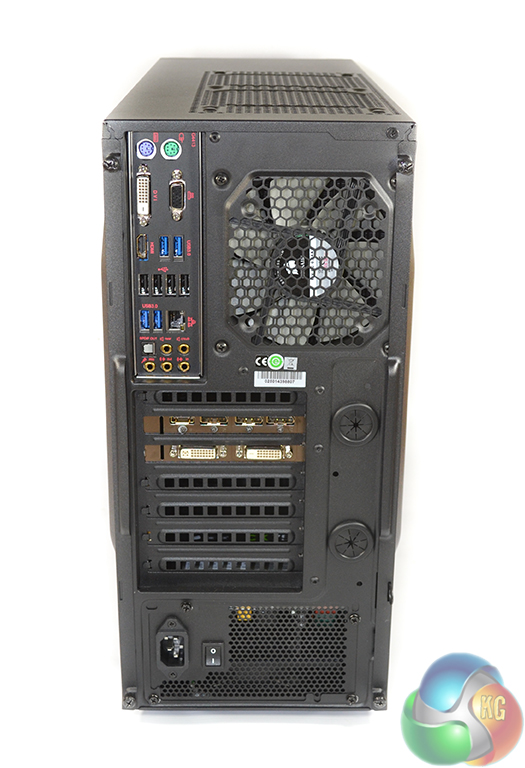
IO connectivity on the system's rear side is plentiful. The motherboard sports four USB 3.0 and four USB 2.0 ports, as well as gold-plated audio jacks driven by a dedicated operational amplifier. Gigabit Ethernet is provided by a Killer E2200 series NIC, while PS/2 keyboard and mouse ports are provided for legacy support.
There's no sticker covering the onboard video connections, although I'd like to think that users of a GTX 970 will know to connect video cables to the graphics card's ports.
Gigabyte's G1 Gaming GTX 970 features two DVI connections, three DisplayPort 1.2 links, and an HDMI 2.0 output. The card can be used to drive up to four monitors via a combination of the connections.
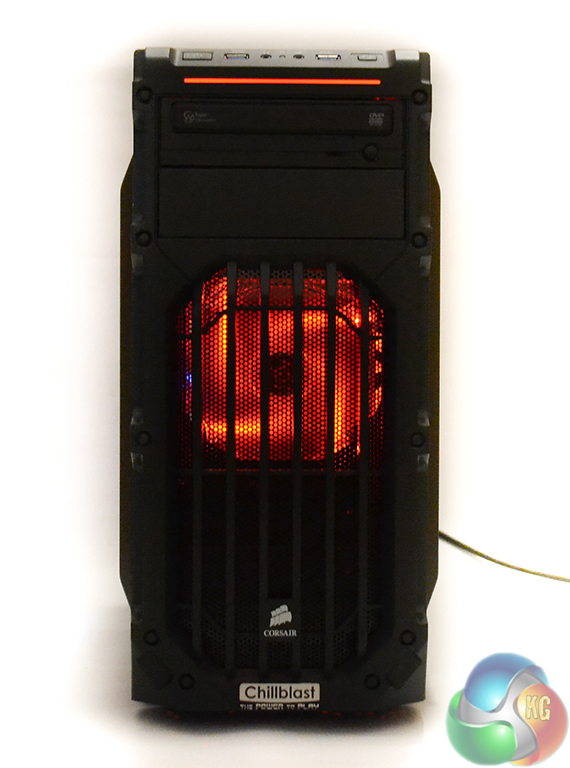
In addition to the front fan's LEDs, a red strip above the DVD drive is also illuminated.

The deep red penetrates the entire chassis and is aided by a red PCB track for Gigabyte's Z97X-Gaming 5 motherboard. Personally, I like the subtle hint of contrast that the blue light from Gigabyte's graphics card gives the system.
Although very difficult to capture in a photograph, the lighting system is well-balanced and by no means overpowering or intrusive.
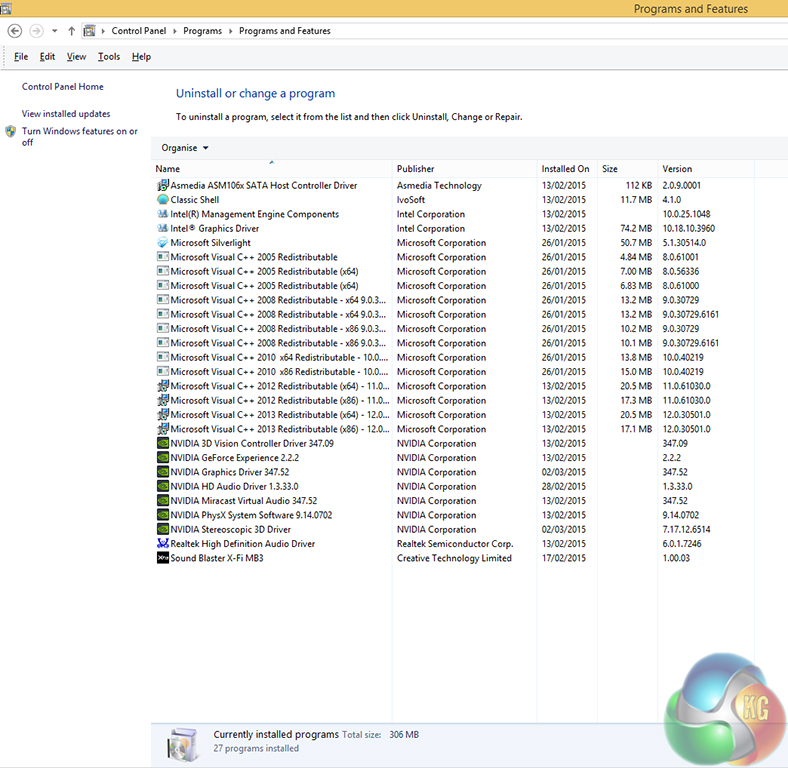
The Windows 8.1 install that Chillblast provides is almost fully bare. Other than motherboard-related software, the only addition is Classic Shell which provides an old-style Windows start bar.
Windows 7 Home Premium can be selected instead of Windows 8.1 for no additional cost.
After installing Windows updates, there is around 75GB of free space on the SSD. The 2TB Seagate HDD is completely empty and formatted for instant use.
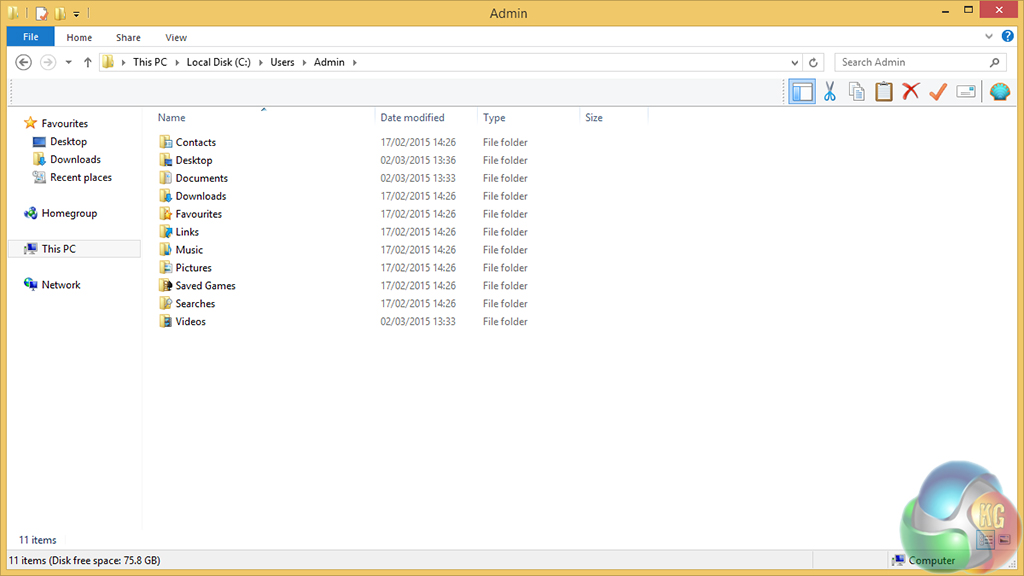
With the Seagate HDD being empty, that means that the default save locations are on the SSD. This is one of my pet hates for the majority of pre-built PCs – moving default save locations for items which do not require high speed storage is a five minute task (right click on the item, select properties, click location, and move to the desired path).
I would have preferred to see Chillblast position the default save directories for at least Videos, Music, and Downloads on the 2TB HDD. A user who doesn’t notice the SSD save location is going to be disappointed when their drive storage runs out quickly, with the 2TB HDD being left untouched. Hopefully most PC gamers will be knowledgeable enough to spot the locations.
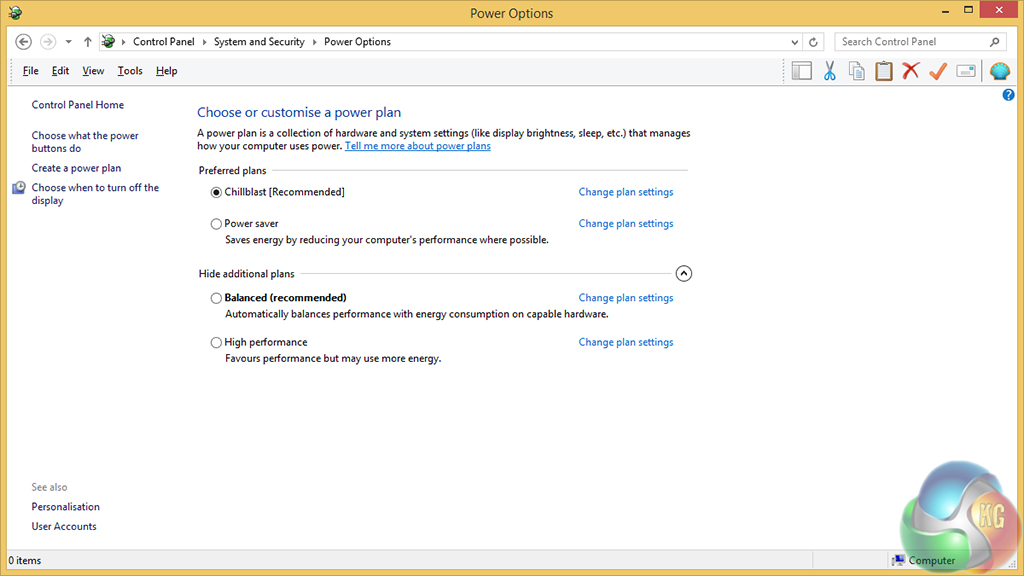
There are four power options on the system – the usual three from Windows, and one made by Chillblast.
We run the Chillblast profile throughout testing.
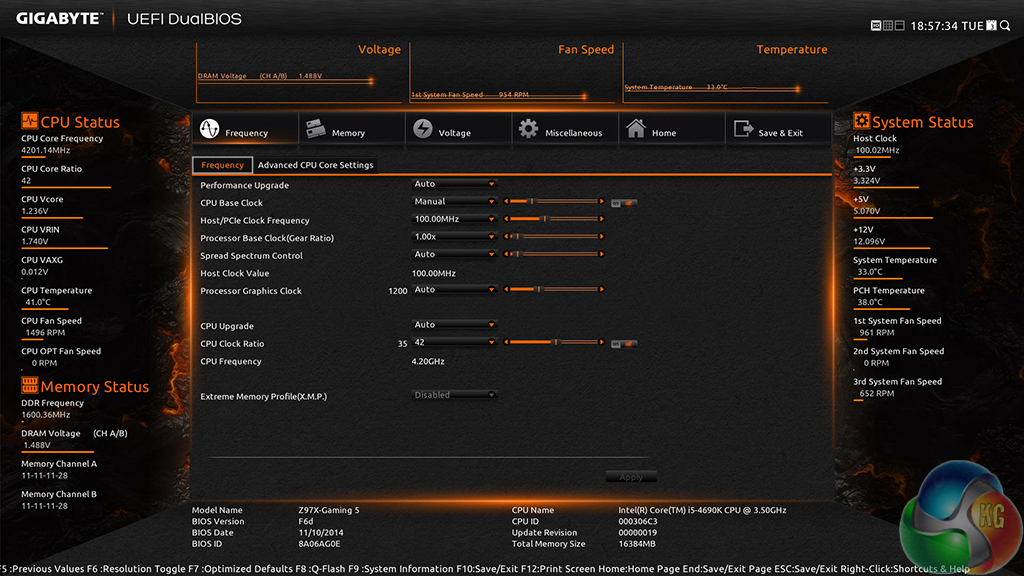
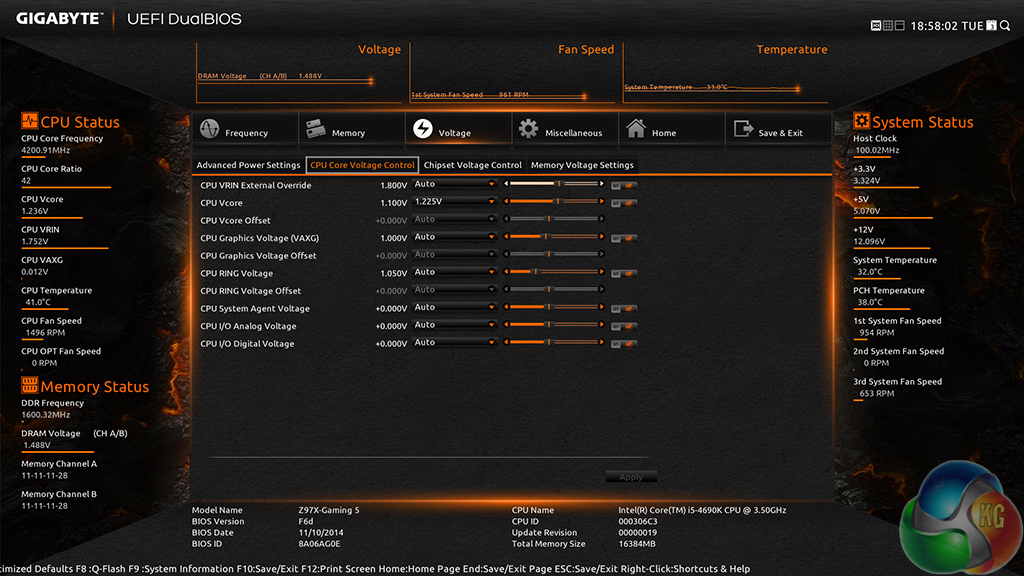
Chillblast applies a 1.225V CPU Core voltage in order to reach the 4.2GHz overclocked speed (300MHz increase over the 4690K's default boost frequency).
A voltage level of 1.225V is sensible for prolonged use and should be easily handled by the H75 CPU cooler.
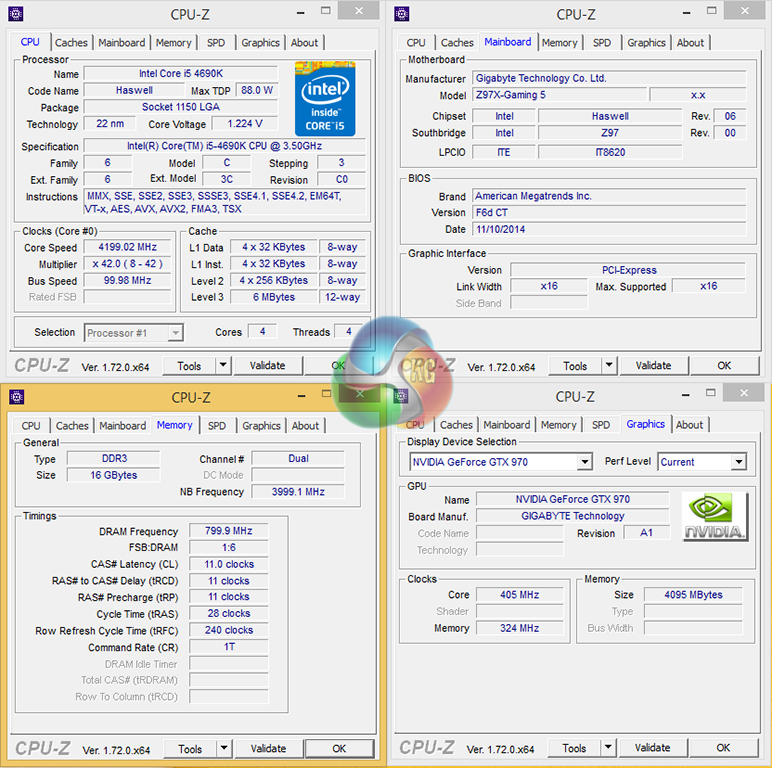
The 4.2GHz clock speed is applied to all cores when they are under heavy load. During times of lower load, the CPU automatically drops its clock speed and voltage in order to conserve power and reduce heat output.
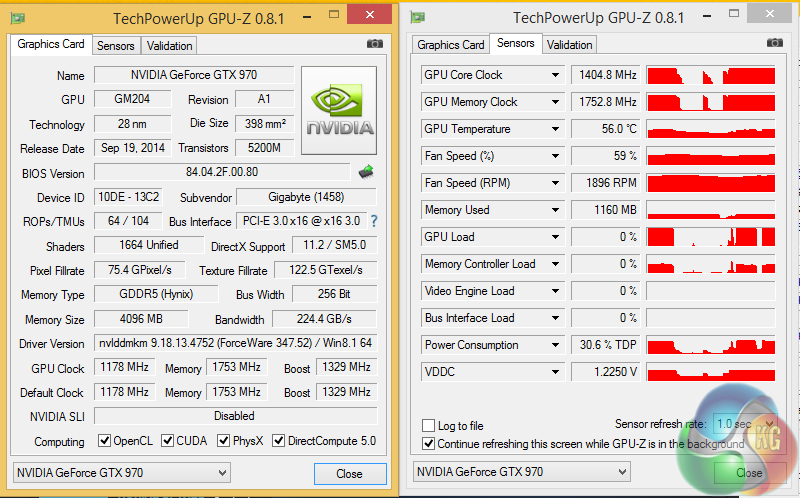
Gigabyte's factory-overclocked G1 Gaming GTX 970 is set to run at a core clock of 1178MHz with a boost speed of up to 1329MHz. We actually recorded an even higher boost clock throughout testing – 1392MHz was consistent, and 1405MHz was the absolute, short-period peak.
We will be outlining the Chillblast Fusion Barbarian against the similarly priced Fusion Raptor and our Z97 test system.
Chillblast Fusion Barbarian
- Corsair SPEC-03 Case
- Intel Core i5 4690K overclocked to 4.2GHz
- H75 Water Cooler
- Gigabyte G1 Gaming GTX 970 4GB Video Card
- Gigabyte Z97X-Gaming 5 Motherboard
- 16GB 1600 DDR3 Memory
- 120GB Samsung 850 EVO SSD
- 2000 GB 7200rpm HDD
- Corsair CX 750W PSU
- 24 x DVD RW
- Windows 8.1 64 bit
Chillblast Fusion Raptor
- Phanteks Enthoo Evolv Micro ATX Case.
- Intel Core i7 4790K Processor overclocked to 4.4GHz.
- Corsair H75 Liquid Cooler.
- Asus Z97M-Plus Motherboard.
- MSI Nvidia GeForce GTX 960 2GB Graphics Card.
- 16GB 1600MHz DDR3 Memory.
- 120GB Samsung EVO 850 Series Solid State Drive.
- 2000GB SATA 7200rpm Hard Disk.
- Corsair CX600 Power supply.
- Onboard High Definition Audio.
- Windows 8.1 64-bit.
Z97 Comparison Test System:
- Processor: Intel Core i7 4790K ES (4.4GHz forced turbo).
- Motherboard: Asus Maximus VII Impact.
- Memory: 16GB (2x 8GB) Corsair Vengeance Pro 2400MHz CL10.
- Graphics Card: Asus R9 280X Matrix Platinum 3GB.
- System Drive: 240GB SanDisk Extreme II SSD.
- CPU Cooler: Corsair H100i.
- Case: NZXT Phantom 630.
- Power Supply: Seasonic Platinum 1000W.
- Operating System: Windows 7 Professional with SP1 64-bit.
Tests:
- 3DMark 1.3.708 – Fire Strike (System)
- SiSoft Sandra 2014 SP2 – Processor arithmetic, memory bandwidth (System)
- Cinebench R15 – All-core CPU benchmark (CPU)
- HandBrake 0.9.9 – Convert 4.36GB 720P MKV to MP4 (CPU)
- ATTO – SATA 6Gbps and USB 3.0 transfer rates (Motherboard)
- Bioshock Infinite – 1920 x 1080, ultra quality (Gaming)
- Metro: Last Light – 1920 x 1080, high quality (Gaming)
- Tomb Raider – 1920 x 1080, ultimate quality (Gaming)
3DMark
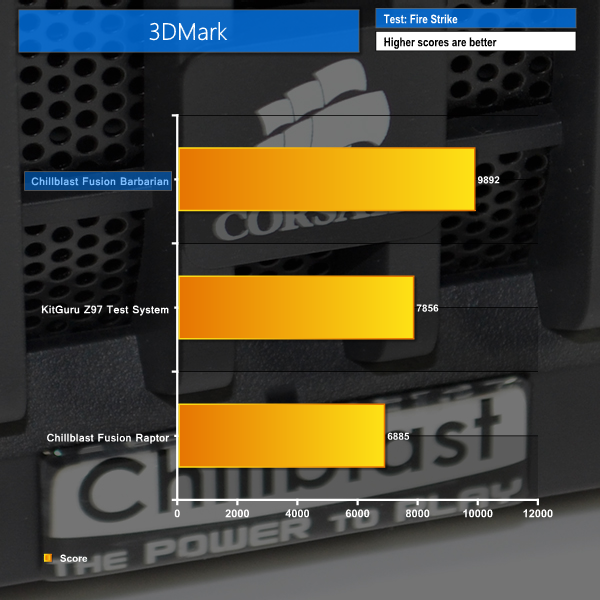
We used 3DMark‘s ‘Fire Strike’ benchmark which is designed to be used on gaming PCs. We opted for the Normal setting, NOT the Extreme mode.
Sandra Processor Arithmetic
Sandra Memory Bandwidth
The GPU might of Nvidia's Maxwell-based GTX 970 gives the Fusion Barbarian a convincing lead in the graphics-heavy 3DMark workload. Both competing solutions simply cannot match the might of the GTX 970.
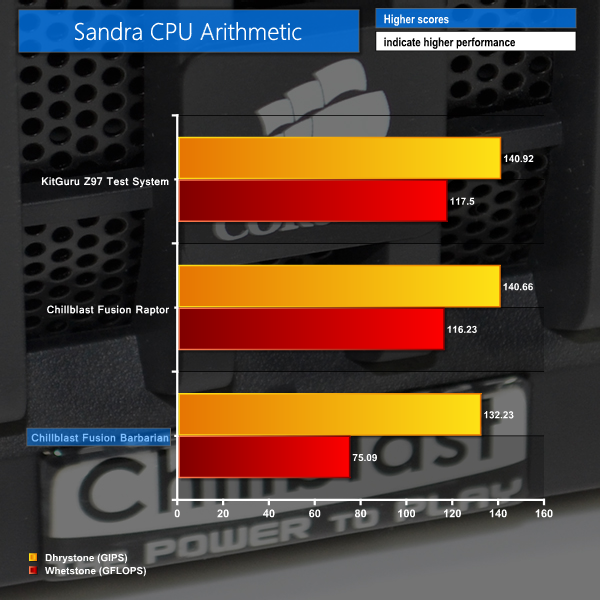
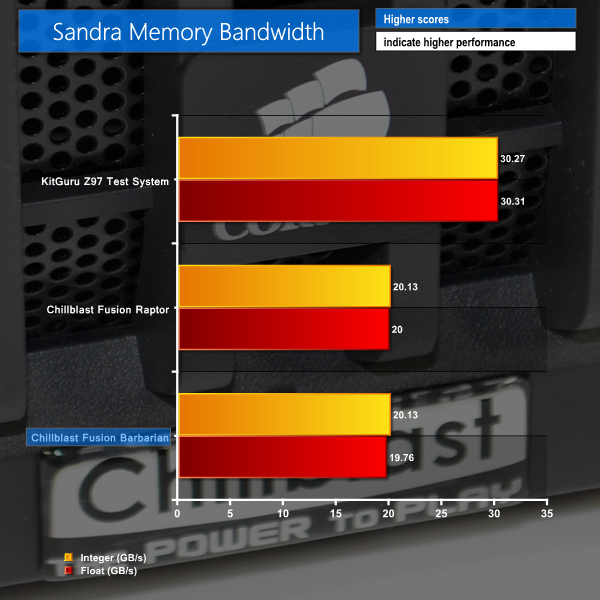
Switching over to a CPU-intensive system workload sees the tables turn, with the overclocked 4690K struggling to keep pace with higher-clocked i7 4790K systems. Memory bandwidth numbers are similar to the Fusion Raptor's – both systems use 1600MHz CL11 memory. Memory speed has little impact on gaming performance.
Cinebench
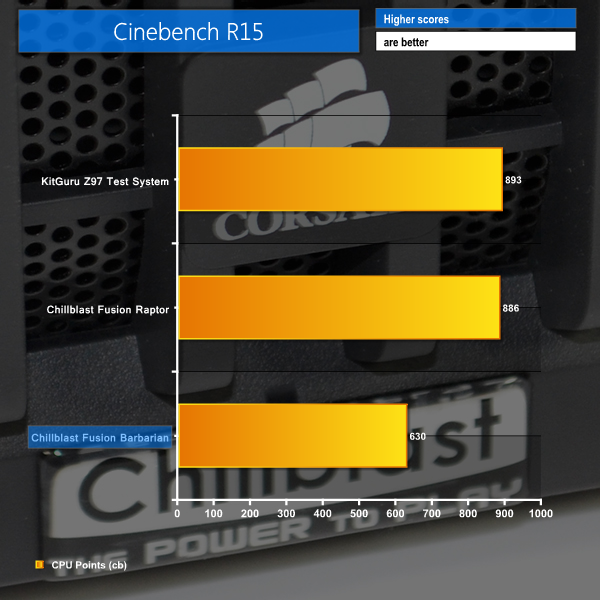
We used the ‘CPU’ test built into Cinebench R15 .
Handbrake Conversion
We measured the average frame rate achieved for a task of converting a 4.36GB 720P H.264 movie (in the MKV container) to one in the MP4 container.
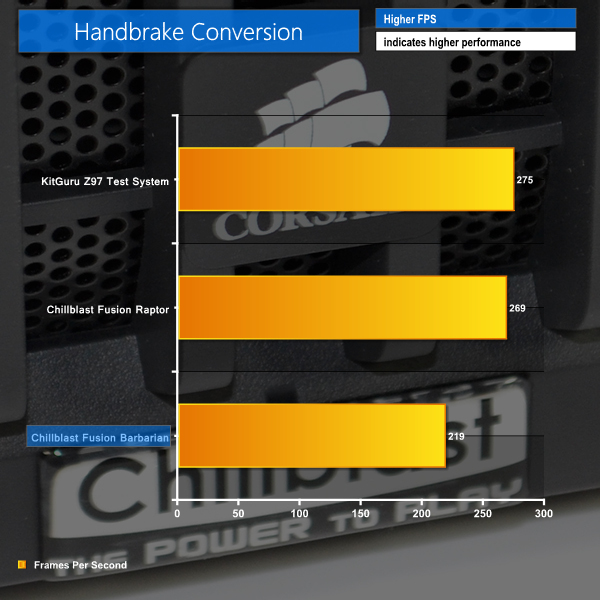
The CPU-leveraging Cinebench and Handbrake video conversion benchmarks show that the 4690K cannot compete with the Hyper-threaded i7 4790K. That said, the i5 chip's performance is still respectable given its significantly lower retail price.
Bioshock Infinite
We used the Bioshock Infinite demanding ‘Ultra’ setting and a 1920 x 1080 resolution to push today’s gaming hardware. Our data was recorded using a section of the game, not the built-in benchmark.


Metro: Last Light
We used a 1920 x 1080 resolution and the Metro: Last Light built-in benchmark set to ‘High’ quality to offer an intense challenge for the gaming hardware while also making playable frame rates a possibility.


Tomb Raider
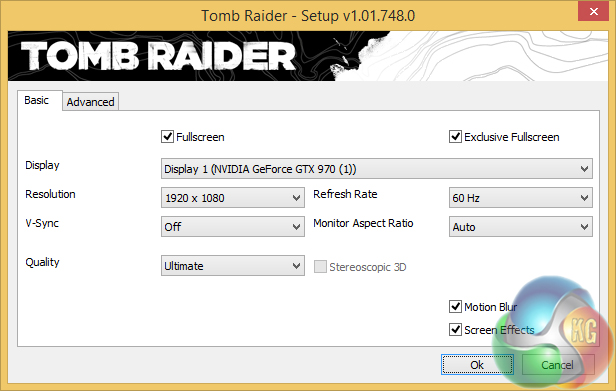
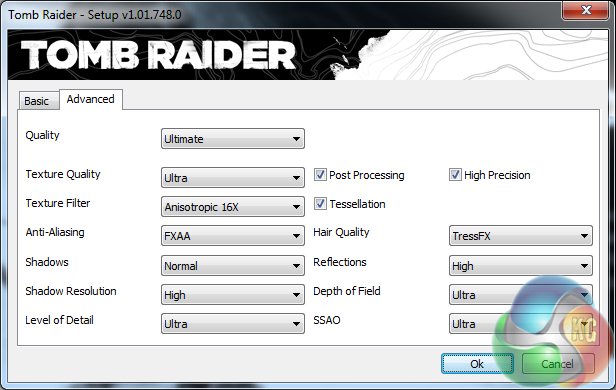
We used a 1920 x 1080 resolution and the Tomb Raider built-in benchmark set to ‘Ultimate’ quality.

Punching pixels through the mighty GTX 970, gaming performance is where the Fusion Barbarian truly comes to life.
The GTX 970 simply breezes through our set of gaming benchmarks – registering 40-50% better performance than the contenders in Bioshock Infinite and Tomb Raider. Metro: Last Light frame rates were increased by 36% compared to the next fastest system configuration.
1920×1080 is no match for the GTX 970, especially when Gigabyte's factory-overclock is taken into account. With Chillblast's Fusion Barbarian sporting a GPU with this much power, the system looks to be perfectly capable of running titles at 1920×1080 with high – 120Hz and 144Hz – refresh rates, or an increased pixel count of 2560×1440.
SSD Performance
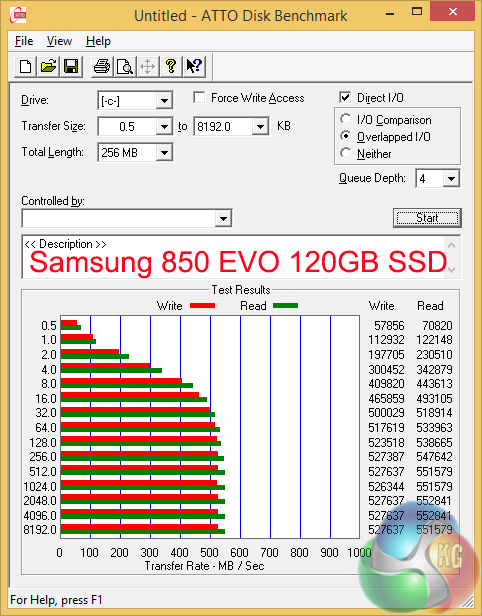
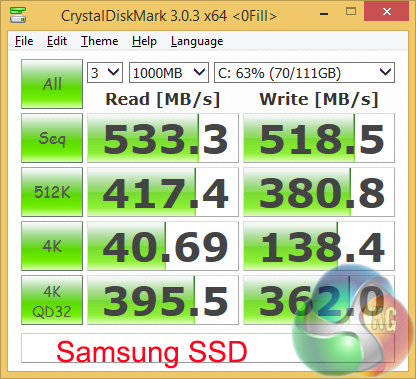
Samsung's 850 EVO SSD delivers excellent read and write numbers, irrelevant of whether or not the data is compressible. The sequential throughput shown by the 850 EVO is about as high as it gets for a SATA 6Gbps SSD – anything higher would demand a PCIe-based (including M.2) solution.
Unlike the Fusion Raptor, Chillblast does not enable Samsung's RAM-accessing RAPID mode on the Fusion Barbarian. Higher transfer rates aren't typically needed for gamers, so the decision clearly outlines the Fusion Barbarian's gaming requirements, as opposed to the gaming and computational usage aims of the Fusion Raptor.
HDD Performance
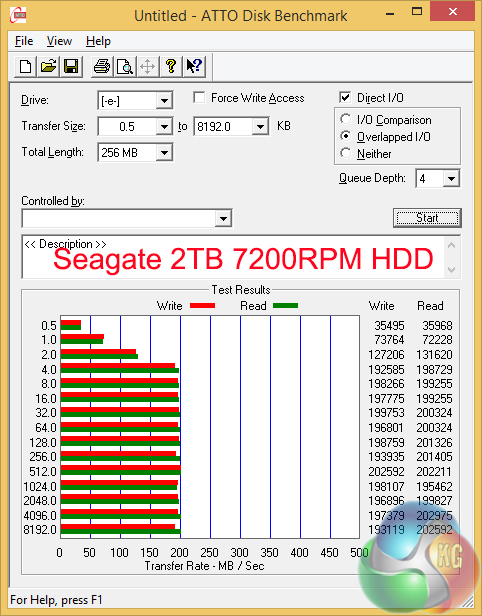
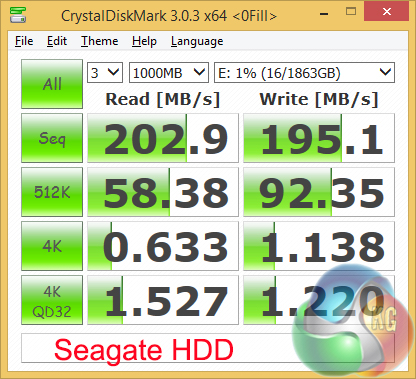
High sequential transfer rates are delivered by the Seagate ST2000DM001 2TB HDD with its 7200rpm rotational speed. This is good for gamers who want to record high-resolution footage of their gameplay.
USB 3.0
We tested USB 3.0 performance using the Kingston HyperX 3K SSD connected to a SATA 6Gb/s to USB 3.0 adapter powered by an ASMedia ASM1053 controller.
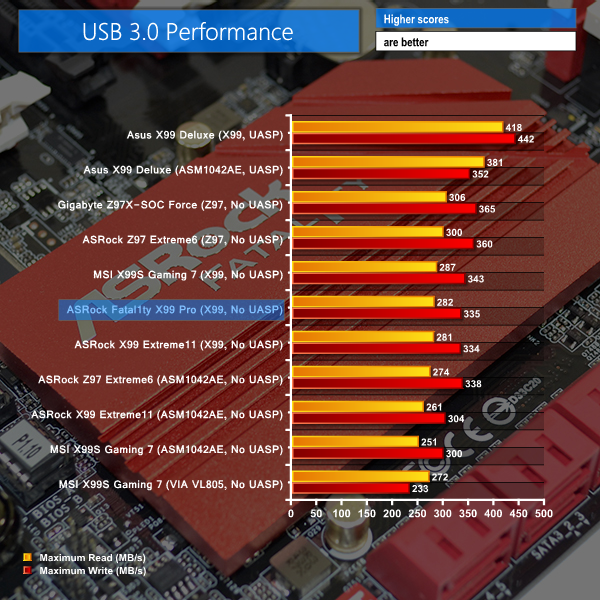
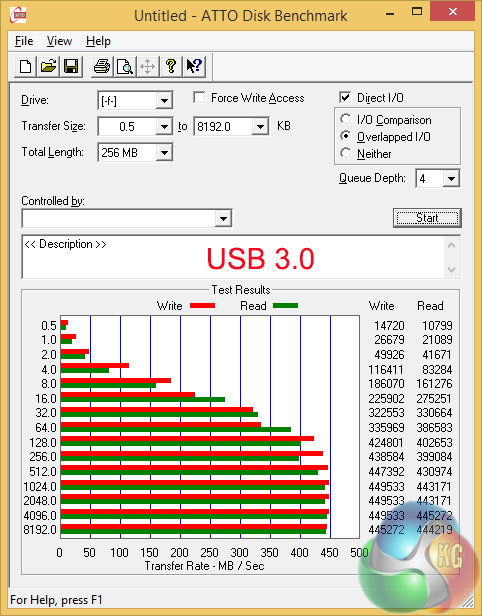
USB 3.0 transfer rates in the region of 440MBps are about as fast as it gets for the SuperSpeed interface. These levels are achieved thanks to Windows 8.1's built-in support for the UASP USB 3.0 driver.
Windows 7 users will be looking at numbers closer to a maximum of 360MBps.
Idle recordings are taken while the system sits at the desktop under minimum load. For the general usage test, we browse the internet while streaming 1080P videos on YouTube and running a background virus scan. Our gaming test uses Metro: Last Light – a DX11 title that taxes the CPU and GPU.
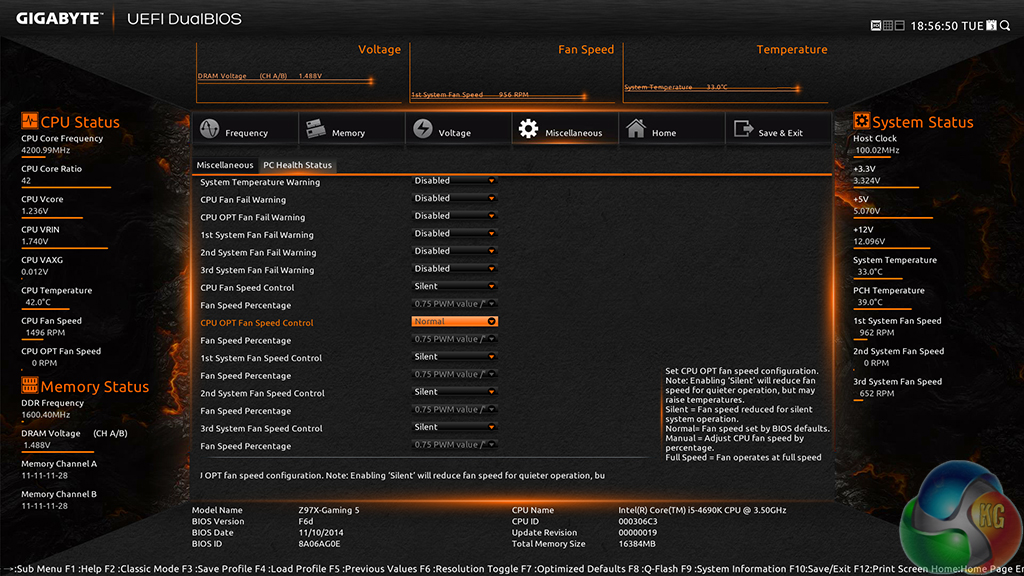
Chillblast applies speed profiles for the two CPU cooler fans and the front chassis fan. The CPU fan profiles were static throughout usage – we didn't see the fan speeds adjust by much more than a few percent between the highest and lowest loads.
Thermal Performance
Ambient temperature was maintained at 21°C throughout testing. All fan settings were left on the Chillblast defaults shown in the UEFI screenshot above.
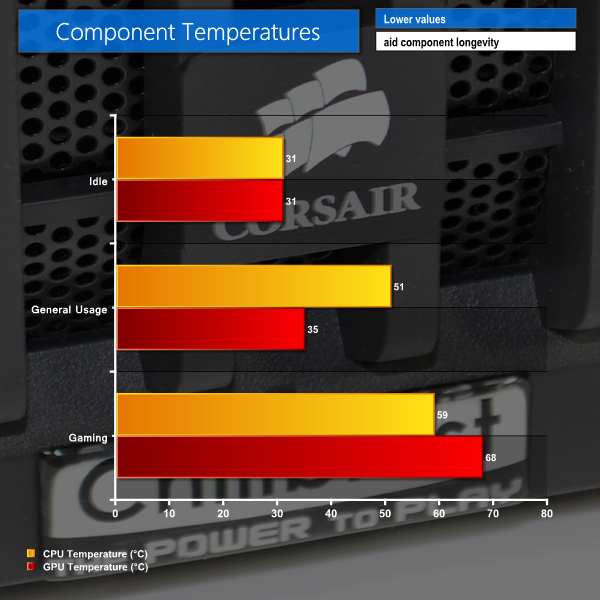
With the highest temperature level that we recorded being less than 70°C, there certainly aren't any worries of components overheating. Seagate's 2TB HDD sat around the 30°C mark, while the Samsung SSD peaked at 34°C while being subjected to the virus scan in our general usage workload.
Corsair's H75 CPU cooler and the pair of 2000rpm, 120mm fans do an excellent job at cooling the 1.225V overclocked 4690K processor. Gigabyte's excellent triple-fan Windforce cooler is equally worthy of credit, managing to maintain a load temperature of less than 70°C for the GTX 970 GPU.
Acoustic Performance
With the case positioned on the floor, our sound level meter is placed where a user’s ears are likely to be located – around 50cm above the system and 100cm in front of it.
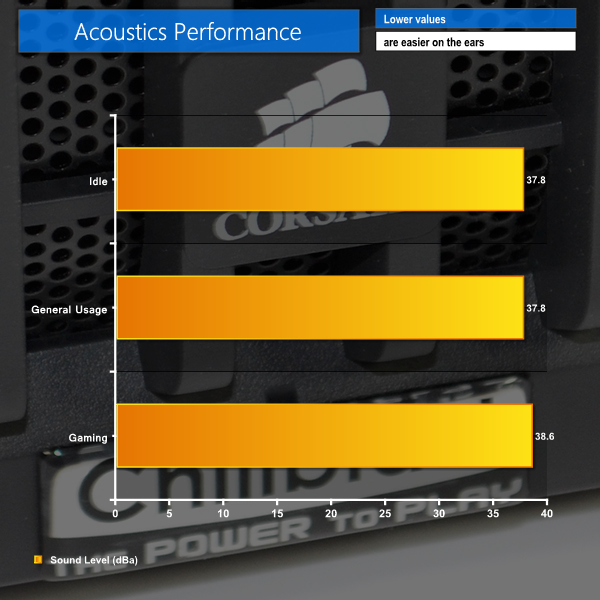
Despite Gigabyte's triple-fan cooler not supporting a 0dB idle mode where the fans remain static, noise output of the system was far from intrusive.
The levels did not increase significantly, either, with only the GPU cooler's fans ramping up under gaming load – the CPU cooler's fans remained at a constant 1500rpm. And by ramping up, I mean increasing to a somewhat discernible maximum of just over 2000rpm.
I would not call the machine's acoustic output unnoticeable – there was the constant low-pitched hum of fan and HDD vibrations being transmitted throughout the steel chassis. But the noise levels were far from annoying, even under a full gaming load. I would still prefer a load-based PWM profile for the CPU cooler's fans, though; why not slow them down at idle if they can manage the heat?
Power Consumption
Power consumption is measured at the wall, representing the energy drawn by the system.
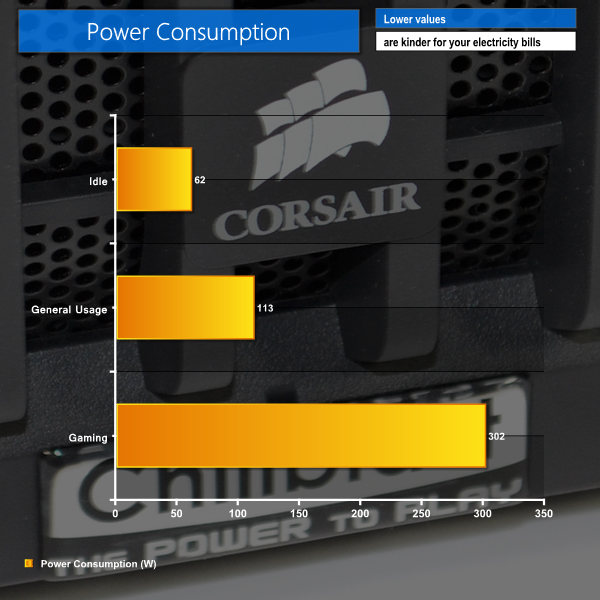
Light bulb-level power consumption numbers are great for users who leave their system idling while away from their desk. The increased load of general usage tasks pushes energy usage up to a still-respectable 113W. Increased load on the overclocked CPU contributes heavily to the growth in power consumption.
A full gaming load sees the system drawing just over 300W. Taking almost 3.5 hours to pull a kilowatt from the wall is worthy of compliment with the level of gaming performance on offer.
The numbers, especially those for our gaming test, show that Chillblast's choice of PSU was justified. 300W load on a 750W unit puts it close to the level of maximum efficiency (about 30-35% of rated load, after efficiency conversions). And there's still plenty of headroom for another GTX 970 while staying in the PSU's most efficient load zone.
The Chillblast Fusion Barbarian deploys an overclocked Core i5 4690K processor and the factory-overclocked Gigabyte G1 Gaming GTX 970 graphics card in order to deliver excellent gaming performance.
Intel's Core i5 4690K and the Nvidia GTX 970 graphics card are, as far as price-to-performance ratio goes, the best combination of high-end gaming hardware currently available. Gigabyte's triple-fan cooler takes the GTX 970 GPU's potential one step further by boosting the core speed up to almost 1400MHz when gaming.
Samsung SSDs have received plenty of praise for their reliability, and the 850 EVO offers excellent performance alongside the brand's trusted reputation. At 120GB, the SSD is only large enough for a small collection of games, but thankfully the high-capacity Seagate 2TB HDD offers solid speed results. there's the option to switch to a 1TB SSHD for no additional cost.
Putting 16GB of memory into a gaming system is a move that will split gamers' opinions. Many people will say that 8GB is enough (and cheaper), while others will argue that 16GB is more ‘future-proof'. While those points are both valid, additional memory capacity will undoubtedly help multi-tasking gamers, such as those who stream or edit their gameplay footage.
Thermal results prove that the overclocked system is adequately cooled, although the acoustic levels could be improved by using a PWM profile for the CPU fans. Gigabyte's triple-fan cooler on the GTX 970 does not operate under a 0rpm silent mode, although the set of fans deserve praise for their unobtrusive noise emissions.
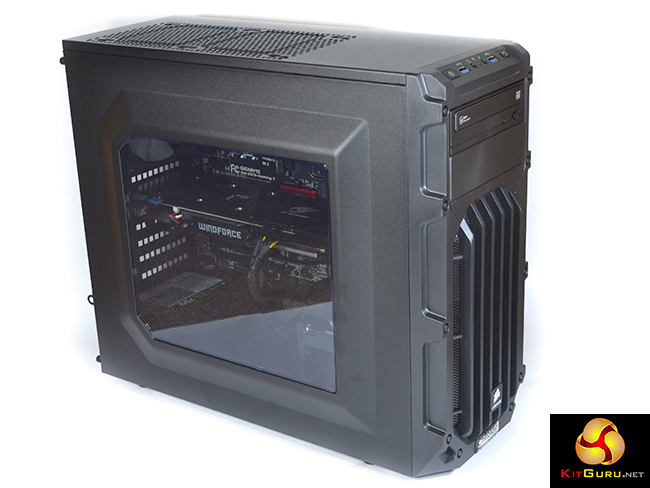
One of my biggest complaints comes via the power supply. While the Corsair unit is of trusted quality and 750W is sensible for future upgrades, I do not like the decision to opt for a non-modular unit. A plethora of unused cables are lumped behind the motherboard tray. This makes even simple upgrades less straightforward because the mess of cables has to be hidden and the side panel forced back into place.
While Corsair's Carbide SPEC-03 is a solid chassis in its own right, the £50 implementation feels a little out-of-place when partnered with more than a grand of hardware. Styling is subjective, but the case's cable management options are limited and Chillblast could at least provide an extra intake fan to create higher pressure (the one that has been removed from the rear mount).
That said, there aren't any complaints in regard to the case's sturdiness and expansion potential. And Chillblast gives plenty of cost-effective chassis choices (such as the NZXT Source 340 for £5 extra) through its system customising page.
The Fusion Barbarian is available starting at £1,099 directly from Chillblast. Upgrading to Gigabyte's factory-overclocked G1 Gaming GTX 970 costs £29 extra and is worth it for the higher clock speeds and excellent triple-fan Windforce cooler. There's also the value of a 5 year warranty for the system, with 2 years collect and return.
Buying the parts separately costs about £30 less than Chillblast's price, although the components do not necessarily have the same level of warranty coverage. Especially when the warranty-covered CPU overclock and good cable management efforts are factored in, the Chillblast Fusion Barbarian is a well-priced system for gamers who want it to be churning out pixels for a number of years.
Discuss on our Facebook page, over HERE.
Pros:
- Core i5 4690K and factory-overclocked Gigabyte G1 Gaming GTX 970 are an excellent pair for gaming.
- Smart choice for the core components – Gigabyte Z97X-Gaming 5 motherboard's gaming features are worthwhile.
- Competitively priced, especially with the 5 year warranty.
- Effective system-wide cooling, and unobtrusive noise levels.
- Good balance between storage and speed from the SSD and (fast) HDD.
- Plenty of capacity for upgrades (strong PSU, SLI-capable motherboard, additional drive mounts).
Cons:
- Modular power supply would have been preferable.
- Case has limited cable management capabilities – difficult to tidy cables if you add any hardware.
- The 120mm fan removed from the case's rear mount should be installed in the front.
KitGuru says: In addition to the excellent Core i5 4690K and Gigabyte G1 Gaming GTX 970 pairing, a set of well-balanced partnering components combine to create a competitively-priced gaming machine with plenty of future potential.