 KitGuru KitGuru.net – Tech News | Hardware News | Hardware Reviews | IOS | Mobile | Gaming | Graphics Cards


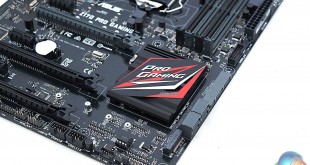
There are an extraordinary number of Z170 motherboards currently available to buy, of which a substantial proportion of these directly target the growing PC Gaming market. While it is true that Gaming motherboards tend to be more expensive than non-Gaming counterparts, due to the extra design work and features implemented on them, Gaming motherboards are still available at surprisingly aggressive price points.
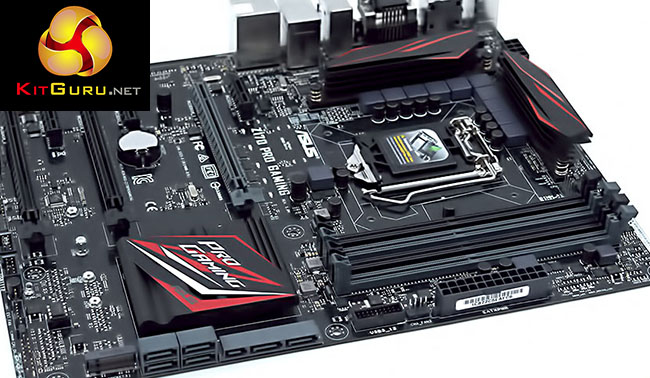
The point in case is the current generation of Z170 motherboards which have ASUS, ASRock, Gigabyte and MSI all offering a Z170 Gaming motherboards in the “around £100” sweet spot. ASUS, proclaiming itself (in no uncertain terms) as “the best motherboard brand”, delivers it's entry-level Z170 gaming motherboard at the highest price of all the major motherboard vendors.
The ASUS entry-level Gaming Z170 motherboard is the Z170 Pro Gaming, retailing for around £125 in the UK and $160 over in the USA. By ASUS standards this is a very aggressive price point given that prior to the Z97 generation of motherboards the only ASUS motherboards to carry any Gaming branding were part of the Republic of Gamers range and carried a lofty price premium.
In the present market, ASRock, Gigabyte and MSI all offer Z170 Gaming motherboards in the £95-105 price bracket, making ASUS the most expensive option. Even so, there is currently something close to a price war going on between the motherboard vendors to continuously bring the price of gaming motherboards down, resulting in an extremely healthy number of options for consumers.
The traits required for a good “Gaming” motherboard, aside from a competitive price, are still largely recognised as being strong audio, networking, performance and an aggressive styling – though the overall concept of a gaming motherboard is somewhat difficult to grasp since any motherboard can be used to power a gaming machine.
ASUS has made sensible design choices to target gamers with the Z170 Pro Gaming, deploying Realtek ALC1150-based audio which is currently one of the best audio codecs available, a high-quality Intel I219V Gigabit network controller and a traditional red & black “gaming” theme. Performance is covered by offering all the latest connectivity standards of the Z170 platform including M.2, DDR4, USB 3.1, SATA Express and support for Intel Skylake CPUs with full overclocking capabilities.
Features:
- LGA1151 socket for 6th Gen Intel® Core™ Desktop Processors
- Dual DDR4 3400 (OC) support
- PRO Clock technology, 5-Way Optimization and 2nd-generation T-Topology: Easy and stable overclocking
- SupremeFX: Flawless audio that makes you part of the game
- Intel Gigabit Ethernet, LANGuard & GameFirst III: Top-speed protected networking
- RAMCache: Speed up your game loads
- USB 3.1 Type A/C & M.2: Ultra-speedy transfers for faster gaming
- Gamer's Guardian: Highly-durable components and smart DIY features
- Sonic Radar ll: Scan and detect your enemies to dominate
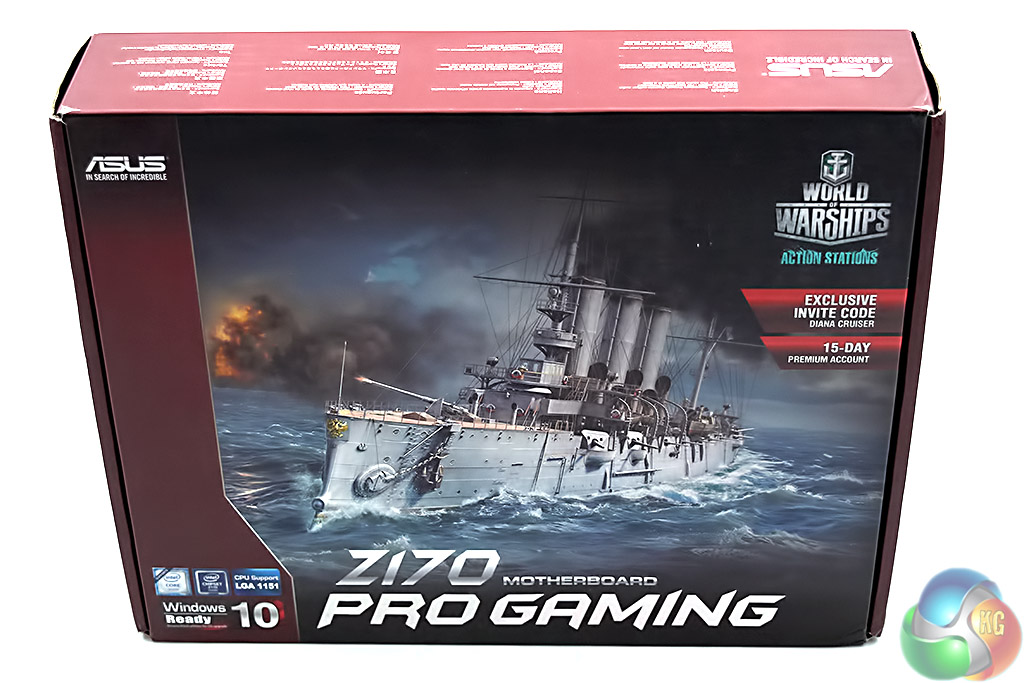
The packaging of the ASUS Z170 Pro Gaming motherboard clearly reiterates the gaming theme with a large image about World of Warships. With eligible purchases ASUS offers a 15 day code for a premium World of Warships account and some other exclusive content packs.
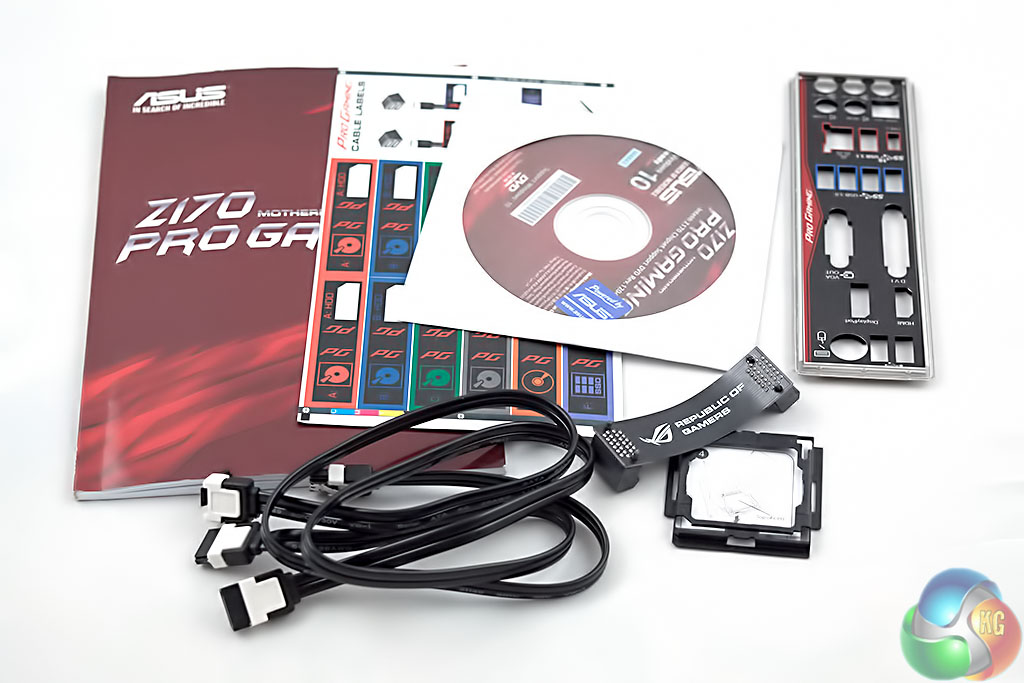
The accessory package is somewhat limited but perfectly sufficient for a motherboard of this price point. ASUS includes:
- A user manual
- Cable labels
- A driver DVD with a case sticker
- A padded, colour coded and labelled rear I/O shield
- A Republic of Gamers branded SLI bridge (despite this not being an ASUS ROG motherboard)
- Two black SATA III cables, one with a right-angled connection
- ASUS' CPU installation tool
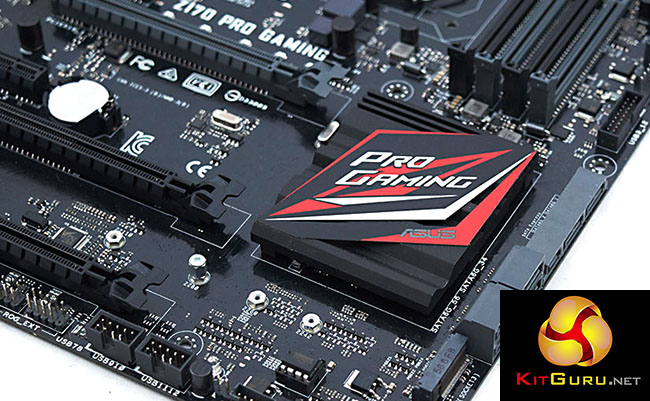
ASUS doesn't attempt anything extraordinary with the Z170 Pro Gaming – the red and black colour scheme is tried and trusted in the PC DIY market. The design is relatively pleasing thanks to the predominantly black colour scheme with only slight hints of red, but it's clear from a quick glance that this isn't a Republic of Gamers board.
Subjectively, the board looks nice to us but it lacks the eye-catching finesse and sophistication of more expensive Republic of Gamers Z170 motherboards. Part of this could be due to the omission of a shroud near the rear I/O which is likely a cost saving measure, but when every penny counts it's not something price-sensitive buyers will likely miss.
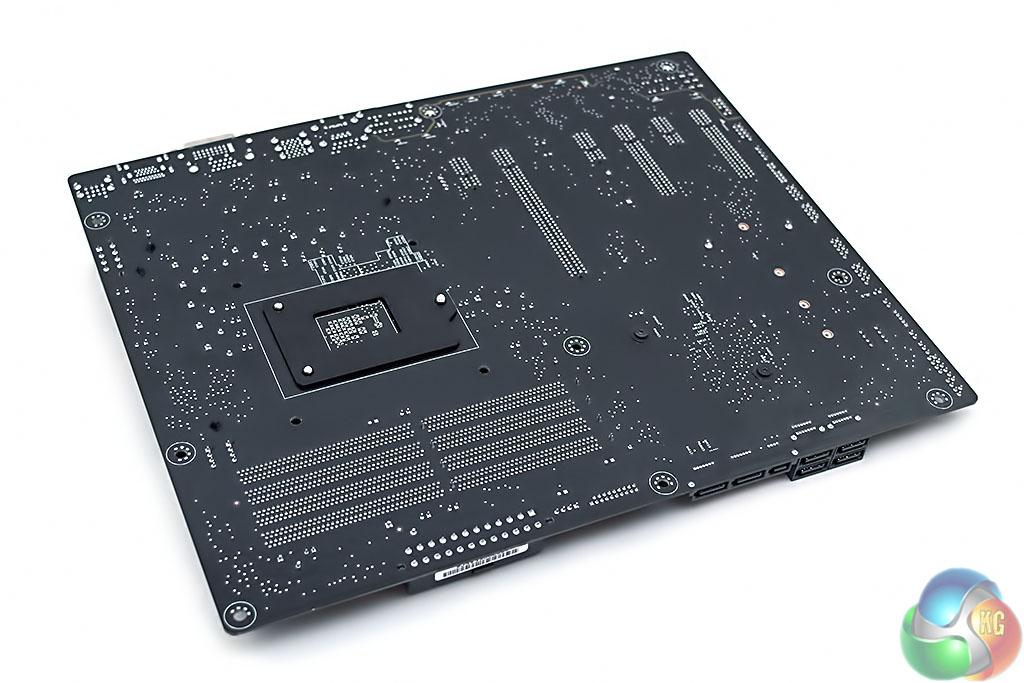
A quick glance under the motherboard reveals some of the additional cost-saving measures in use, the CPU heatsinks make use of a pushpin design rather than being screwed in and there are no reinforcing metal plates like are found on the Maximus VIII Hero and upwards. The chipset heatsink is screwed in but, in all fairness, the CPU heatsinks are well secured despite the pushpin design, build quality is surprisingly good given the price point.
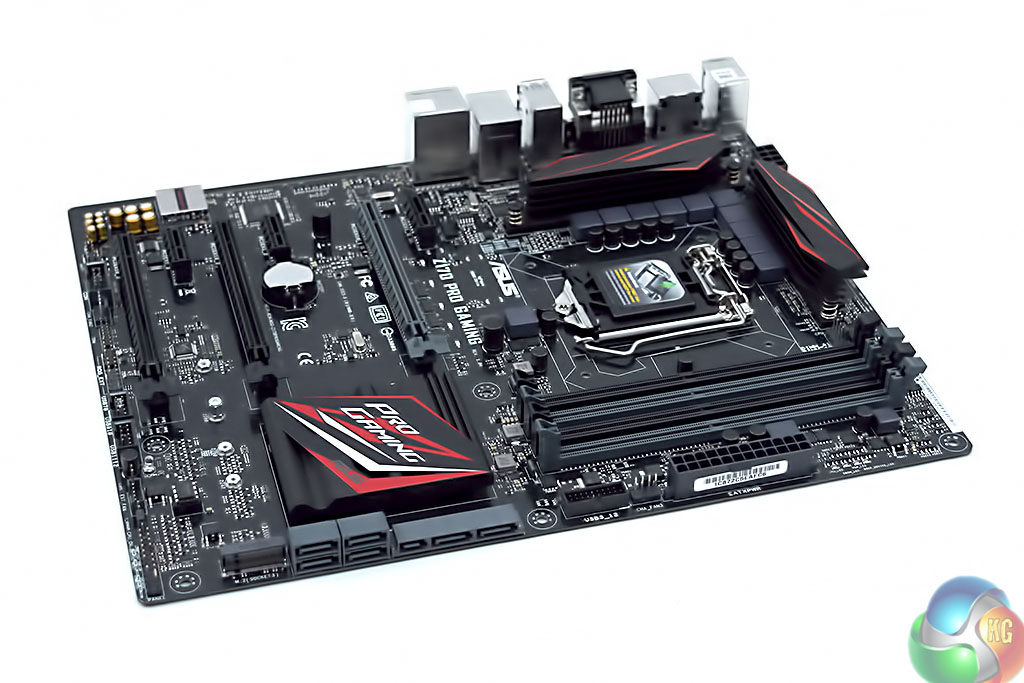
Taking a tour around the motherboard there are a few notable omissions in the top right, such as power buttons and an error code reader, but these are totally acceptable for the price point. ASUS still provides a debug LED system to help determine where the POST process is being interrupted from – at the CPU, RAM, GPU or storage devices. In terms of memory support ASUS quotes up to 64GB up to 3400MHz though faster kits will probably work if the CPU's integrated memory controller is capable of handling it.
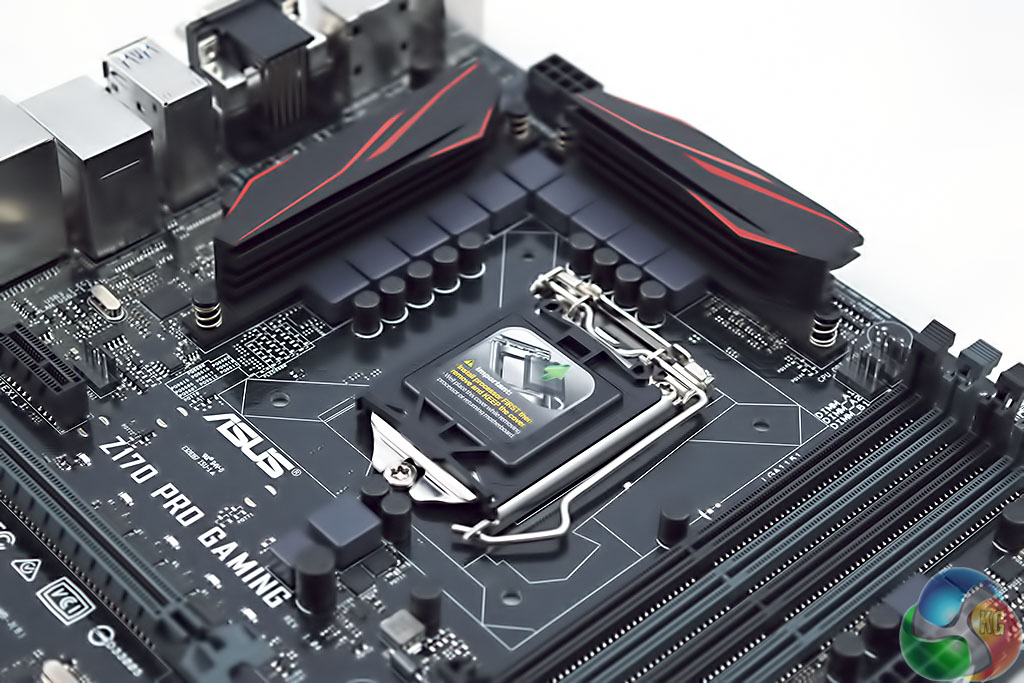
Around the CPU socket you will find a 10+1 phase Digital VRM for handling the CPU and iGPU, if used. All the notable VRM components are housed underneath the two CPU heatsinks that provide some heat dissipation capabilities, particularly useful if you're likely to run a long-term overclock.
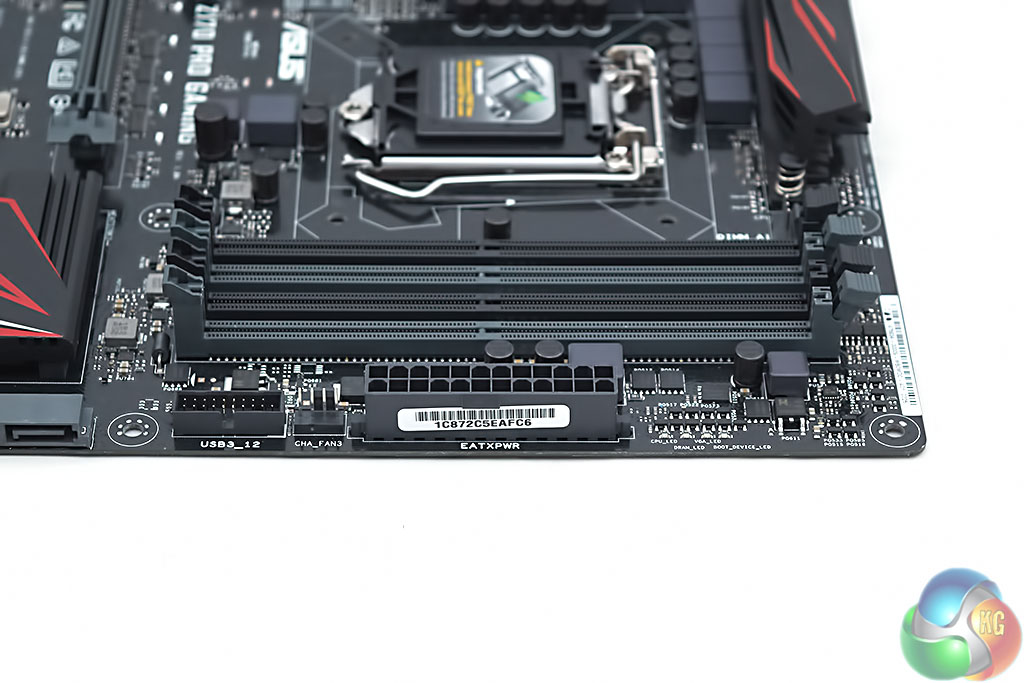
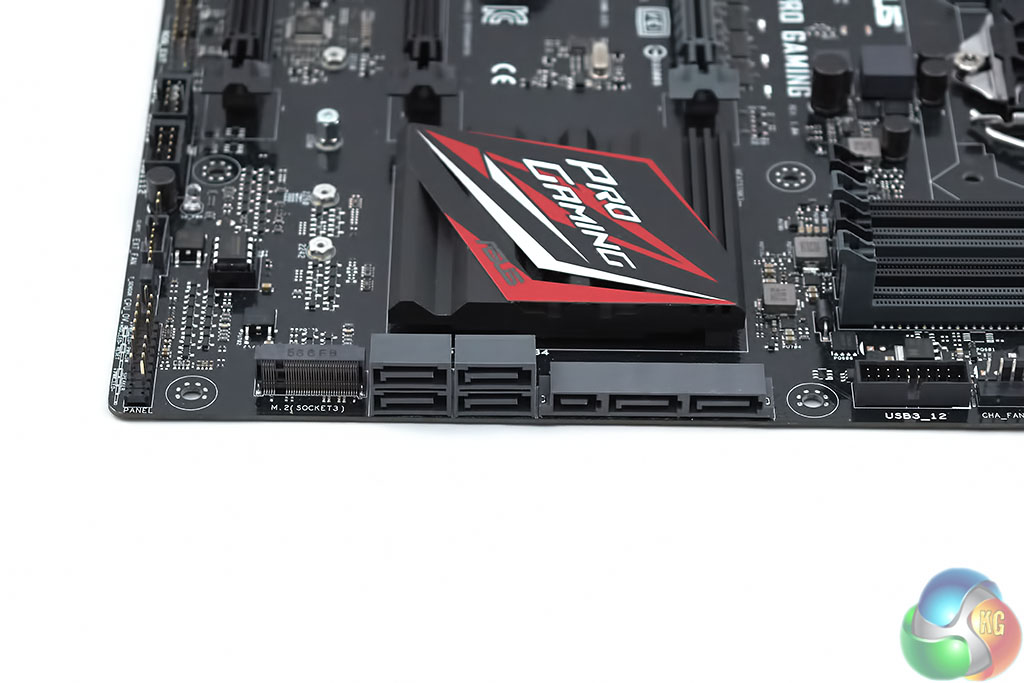
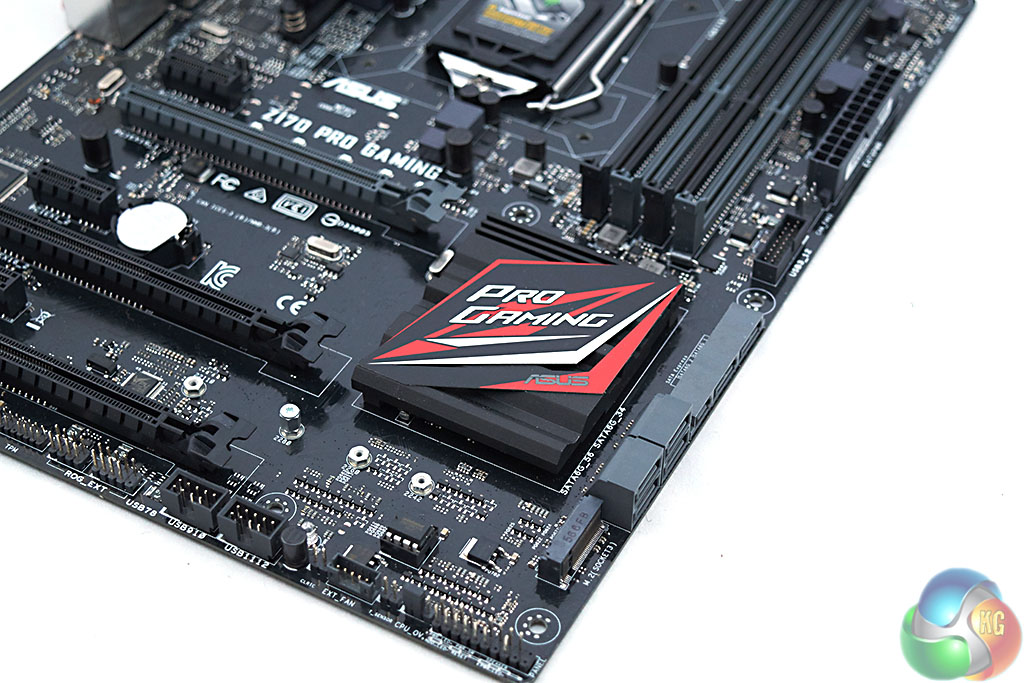
Along the lower section of the motherboard is where ASUS has chosen to fit the M.2 port, and M.2 drives up to 110mm are supported. The placement is optimal as it shouldn't interfere with any PCIe devices neither does it displace anything else that would normally be expected in this section of the motherboard. User's should note that when used in SATA mode, the M.2 port will deactivate SATA port 1.
The guts of the audio system, the Realtek ALC1150 codec, is installed on an isolated section of PCB and appropriately shielded in a SupremeFX branded casing. ASUS pairs the Realtek codec with Nichicon-brand capacitors and a 300 ohm headphone amplifier, which is impressive. Shrewd buyers should note that similarly priced motherboards from Gigabyte, like the Z170X-Gaming 3, do come with additional audio features such as swappable operational amplifiers and gain boost selector switches.
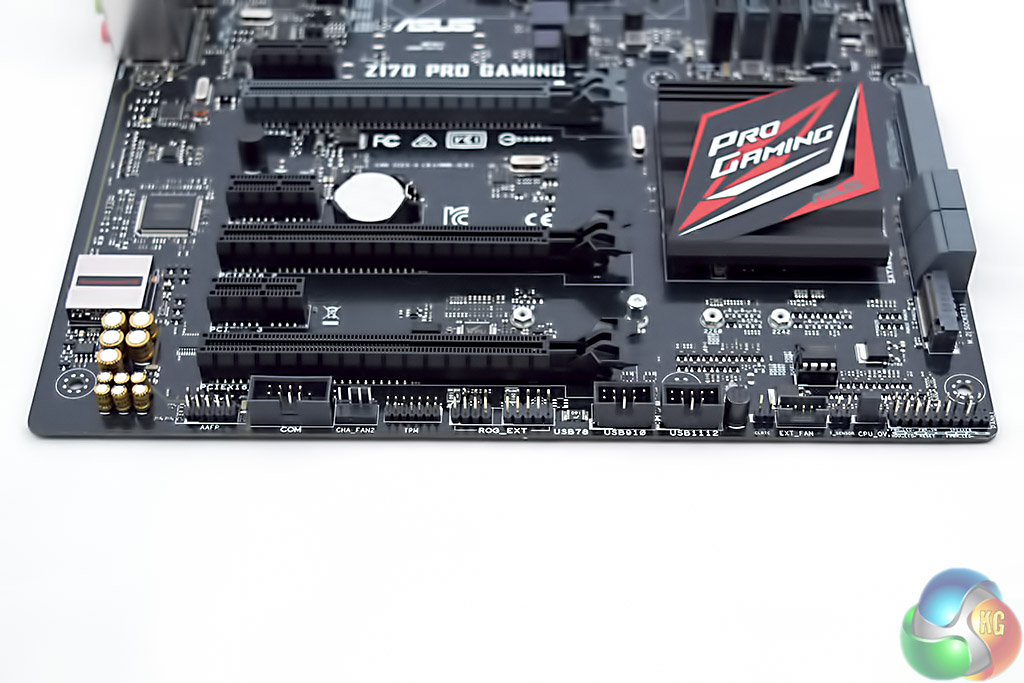

In terms of storage options the Z170 Pro Gaming is imbued with the default arrangement of the Z170 chipset. You'll find six SATA III 6Gbps ports, of which two are shared with a SATA Express port, that's in addition to the previously mentioned M.2 port.
Around the rear I/O is where the Z170 Pro Gaming does slightly better than entry-level gaming motherboards from other vendors.
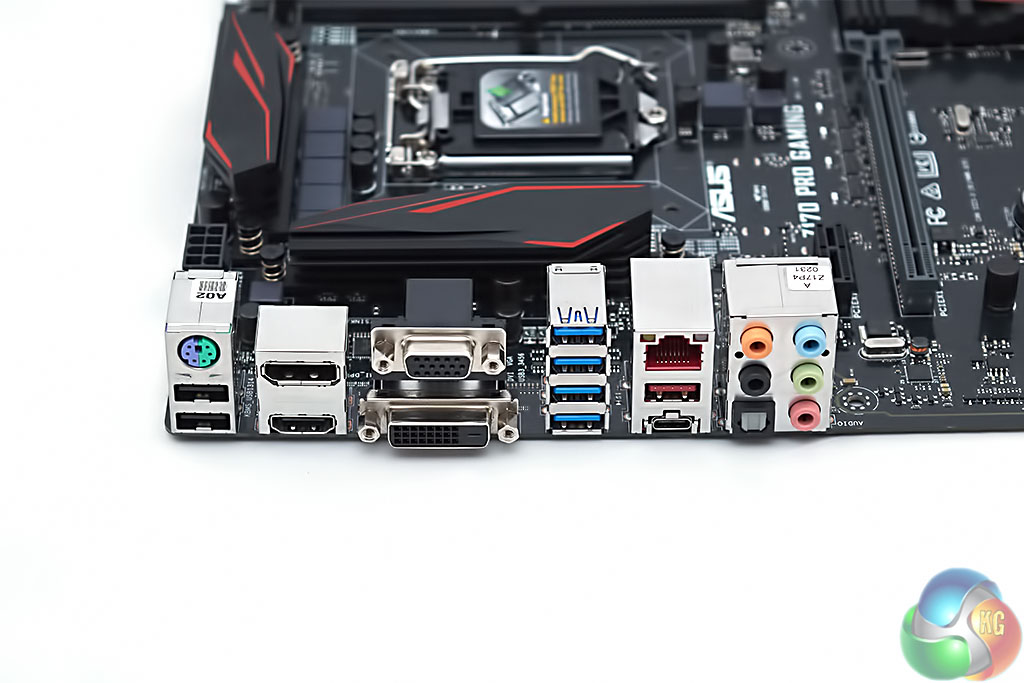

ASUS offers a plentiful stack including 4 USB 3.0 ports, 2 USB 2.0 ports, 2 USB 3.1 ports (one which is type C) and four display outputs of which the DisplayPort will be able to drive a 4K display using a Skylake iGPU. The legacy PS/2 combo port is also a nice touch for users who don't want to let go of their old-school mouse or keyboard.
Similar to other vendors the ASUS UEFI launches into its “EZ Mode” which has a simplified dashboard containing the most common settings and information basic users would be likely to use. These things include enabling of an XMP profile, Intel Rapid Storage, the automated System Tuning utility, changing the boot order, as well as some fan speed and temperature information.
Using the ASUS UEFI we experienced no issues with a number of keyboards, mice and wireless peripherals, as well as a multitude of flash drives for reading BIOS files off and saving screenshots to. Compatibility problems with UEFI BIOSes seem to be an issue of the past.
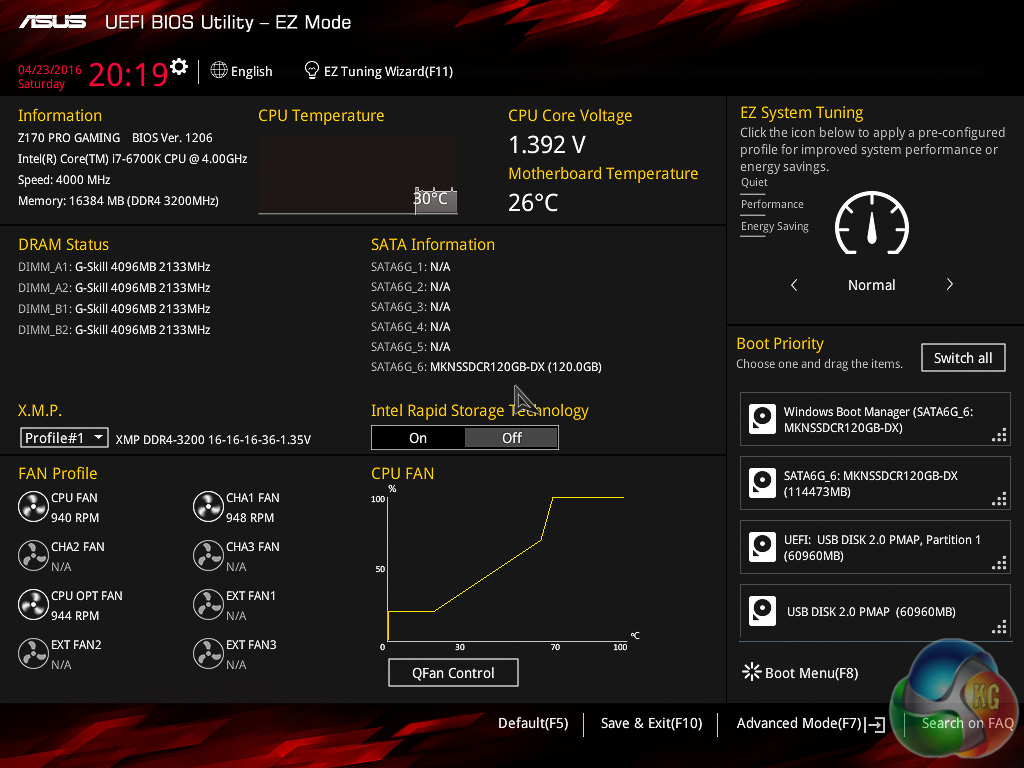
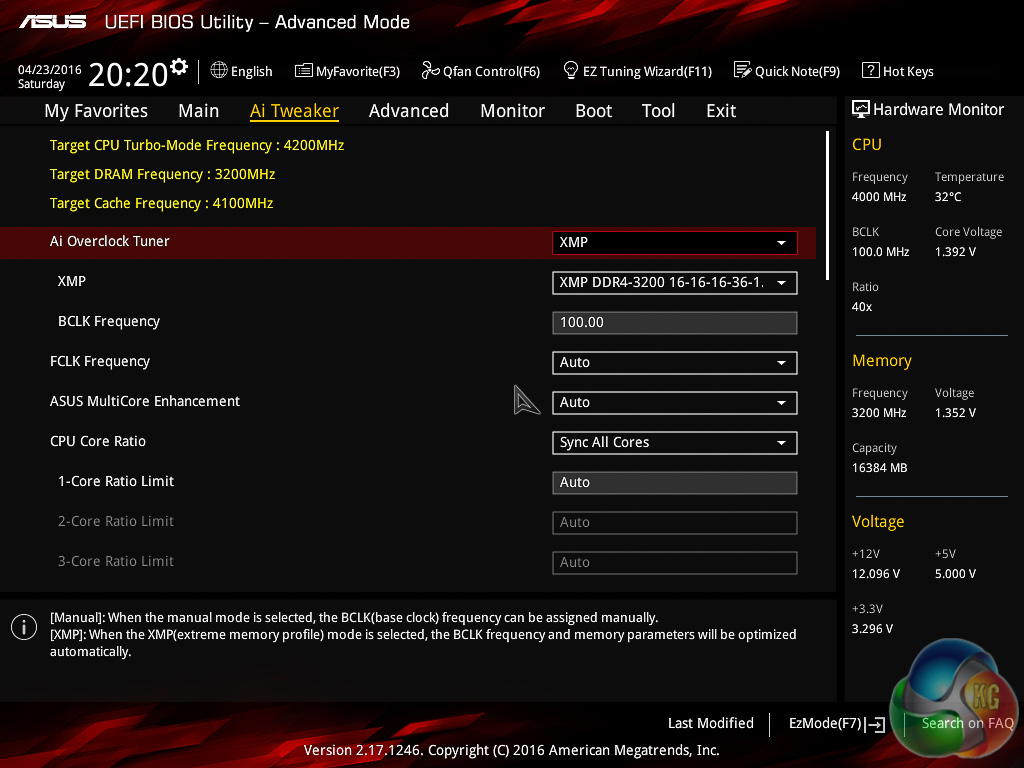
Pressing F7 takes the user into the advanced section which is the full unrestricted ASUS UEFI. Seasoned overclockers and tweakers will feel much more at home here with a full array of CPU, memory and general motherboard tweaking options.
The most common CPU and memory options such as voltages, frequencies and the like, are found under the AI Tweaker tab. Keen overclockers will be pleased to know that there are seven different levels of load line calibration to choose from with Level 1 being the least aggressive and Level 7 the most.
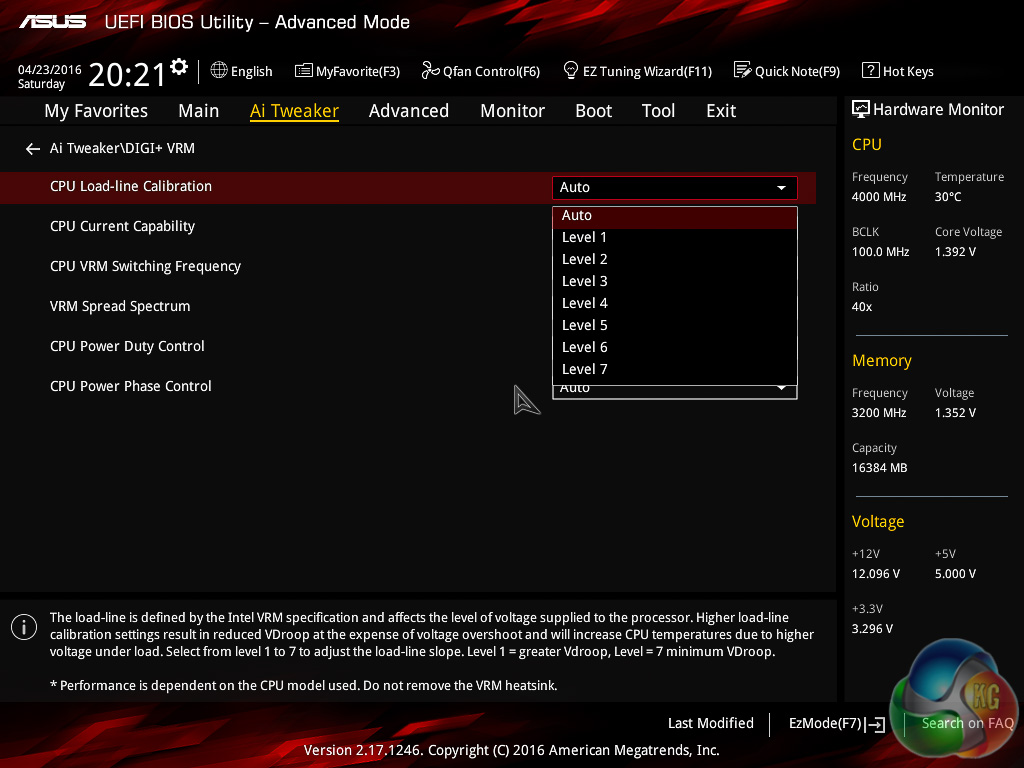
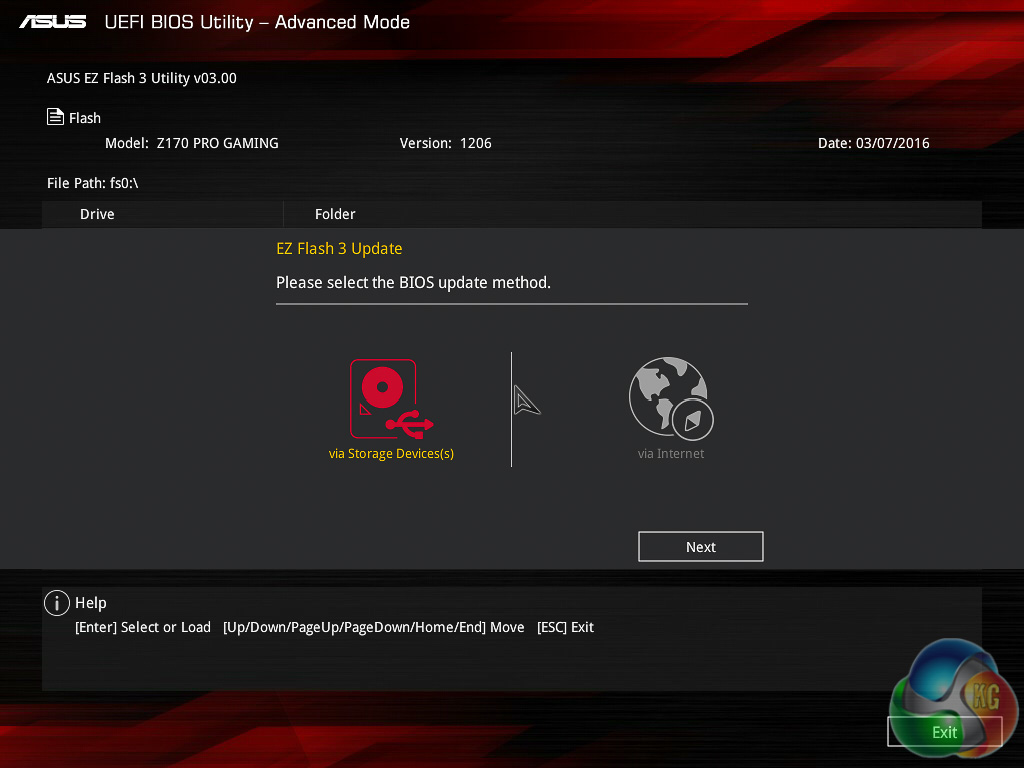
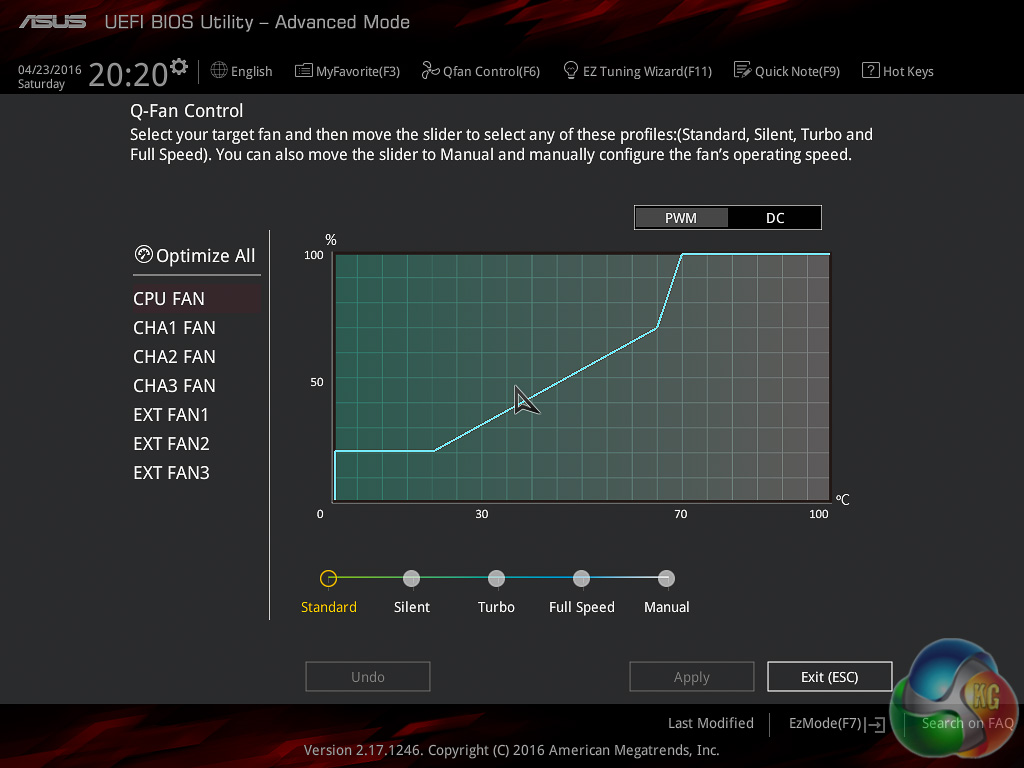
There are a number of utilities that launch in pop-up windows over the UEFI environment and these include the Q-Fan tuning utility and the EZ Flash update tool which will allow you to update the UEFI to the latest version through a downloaded file stored on a storage drive (USB or SATA) or through direct internet connection from the UEFI to the ASUS download server.
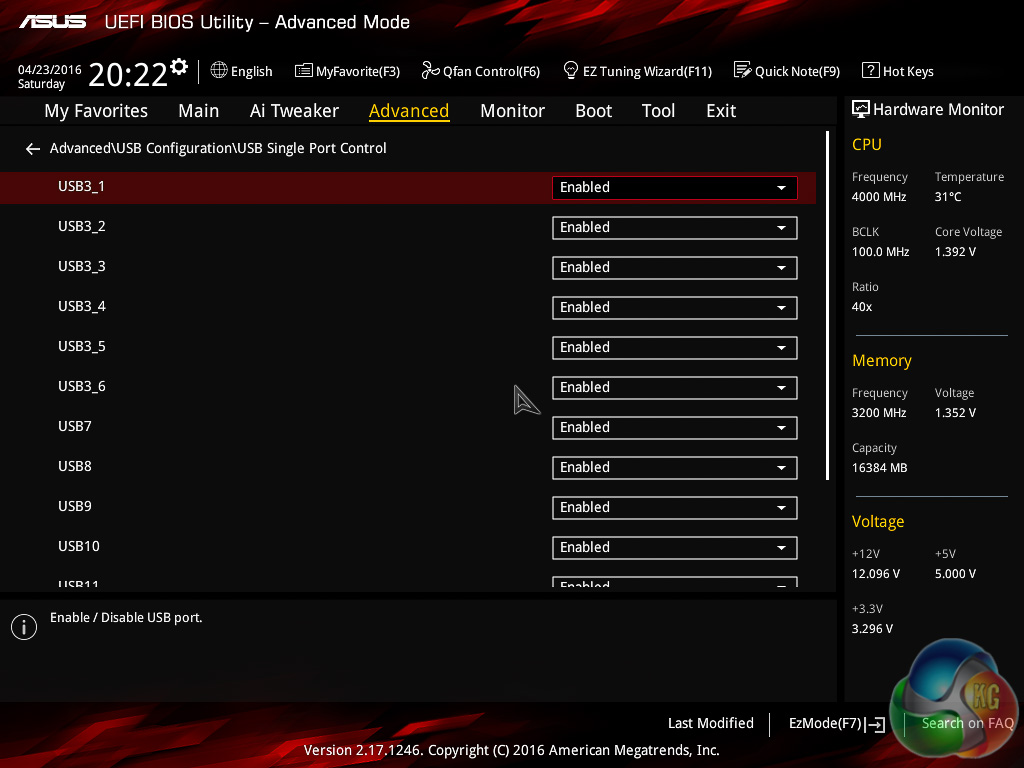
The level of granularity offered by the ASUS UEFI is impressive, especially since very little (if anything at all) has been cut out compared to higher-end Republic of Gamer's offerings. To illustrate this point, there's a section that lets you exercise individual USB port control, disabling USB ports you don't intend to use.
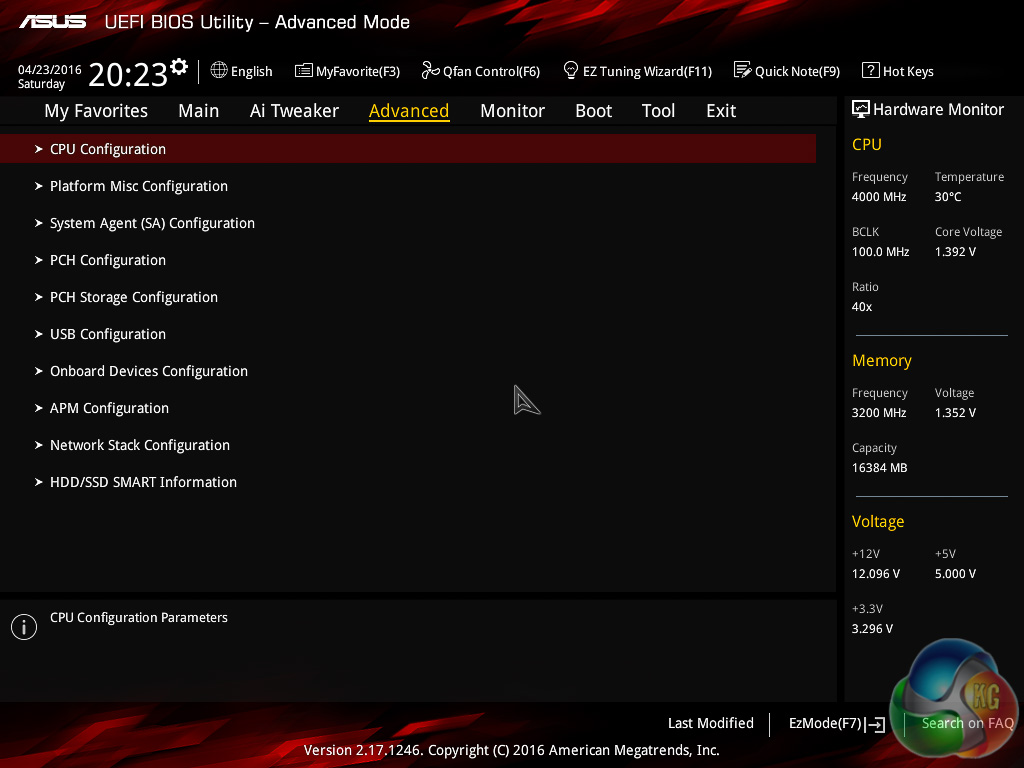
The advanced tab has all the other advanced tweaking and tuning options that aren't CPU or memory related, anything related to the USB, networking or other storage controllers is likely to be found here. The monitoring tab is where you can see all temperatures and fan speeds, as well as set fan speeds and profiles.
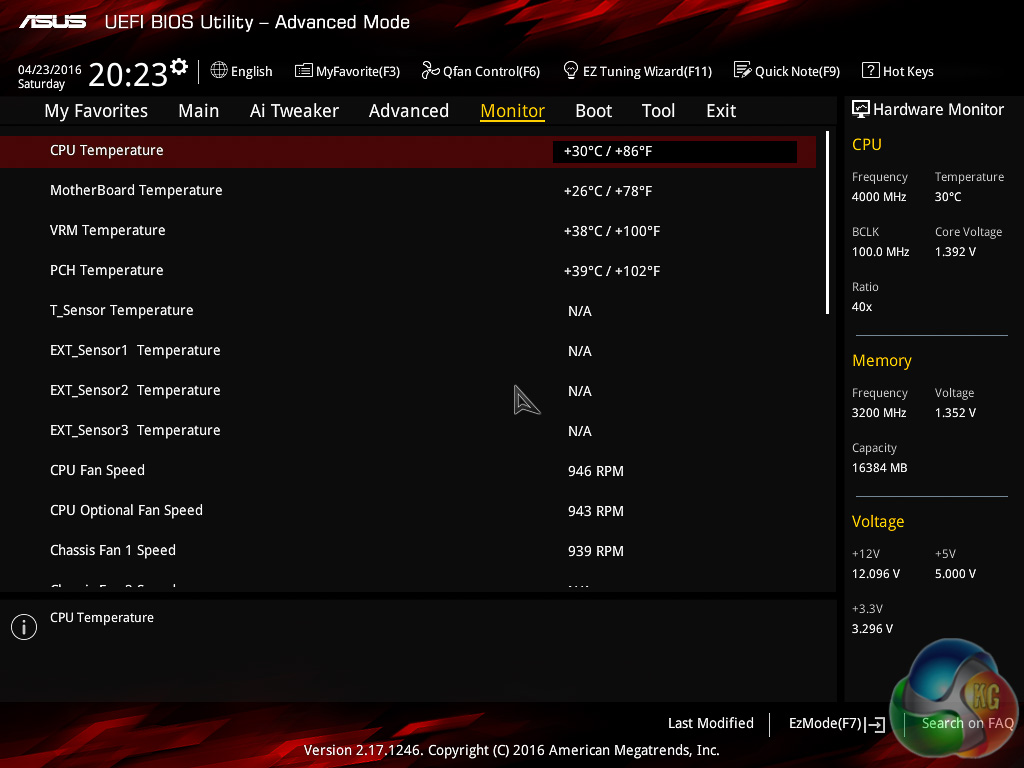
Interestingly, there is an optional temperature sensor header on the motherboard for any user who wants to take temperature readings at a location inside their system.
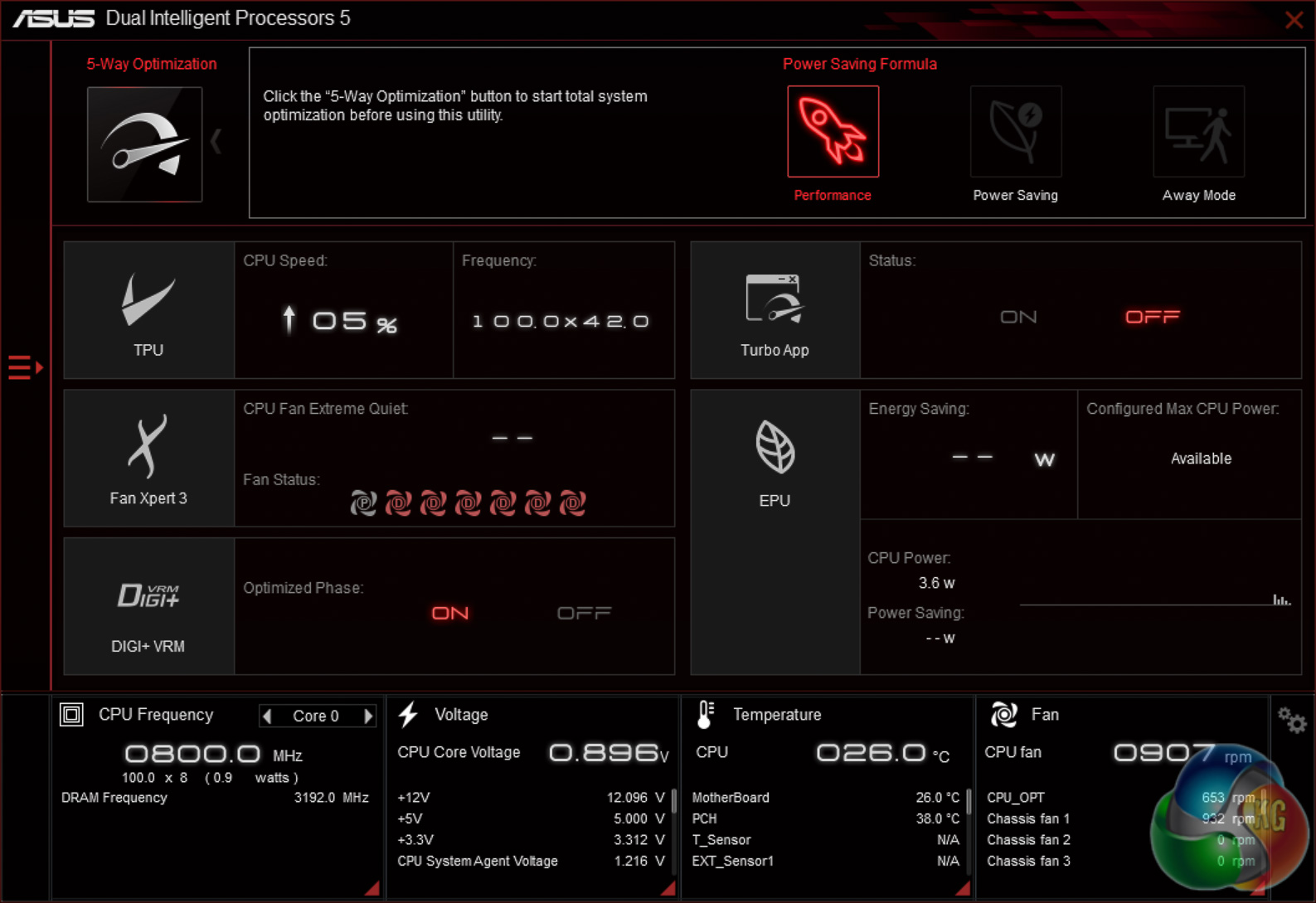
The centrepiece of the ASUS Z170 software package is AI Suite III which includes most of the key ASUS utilities. At the time of installation the latest version of AI Suite III it included the following utilities and modules:
- Dual Intelligent Processors 5
- TPU
- Turbo App
- Fan Xpert 3
- DIGI+ VRM
- PC Cleaner
- Ai Charger+
- USB 3.1 Boost
- EZ Update
- System Information
- Mobo Connect
- Push Notice
- LED Control
- Version
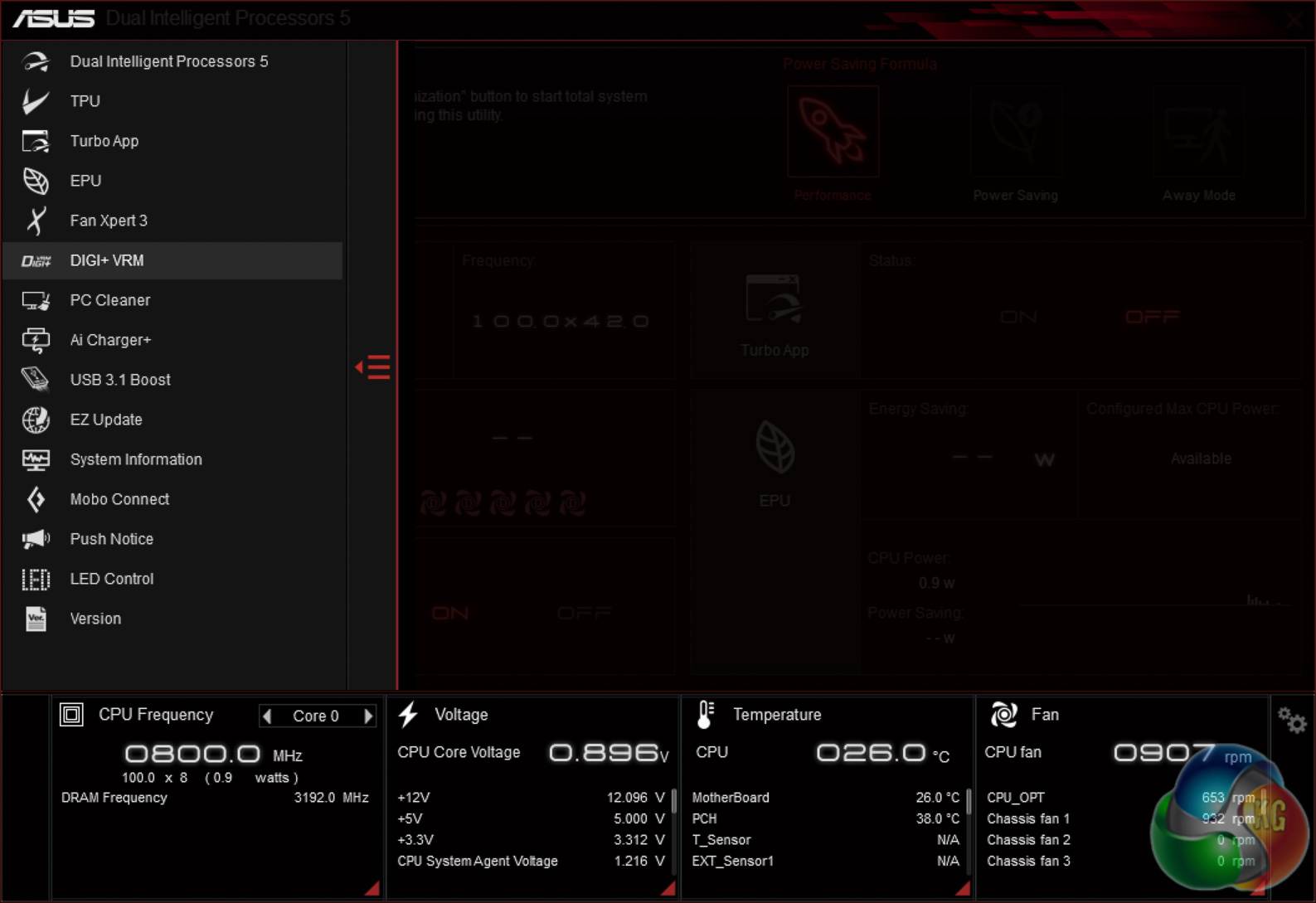
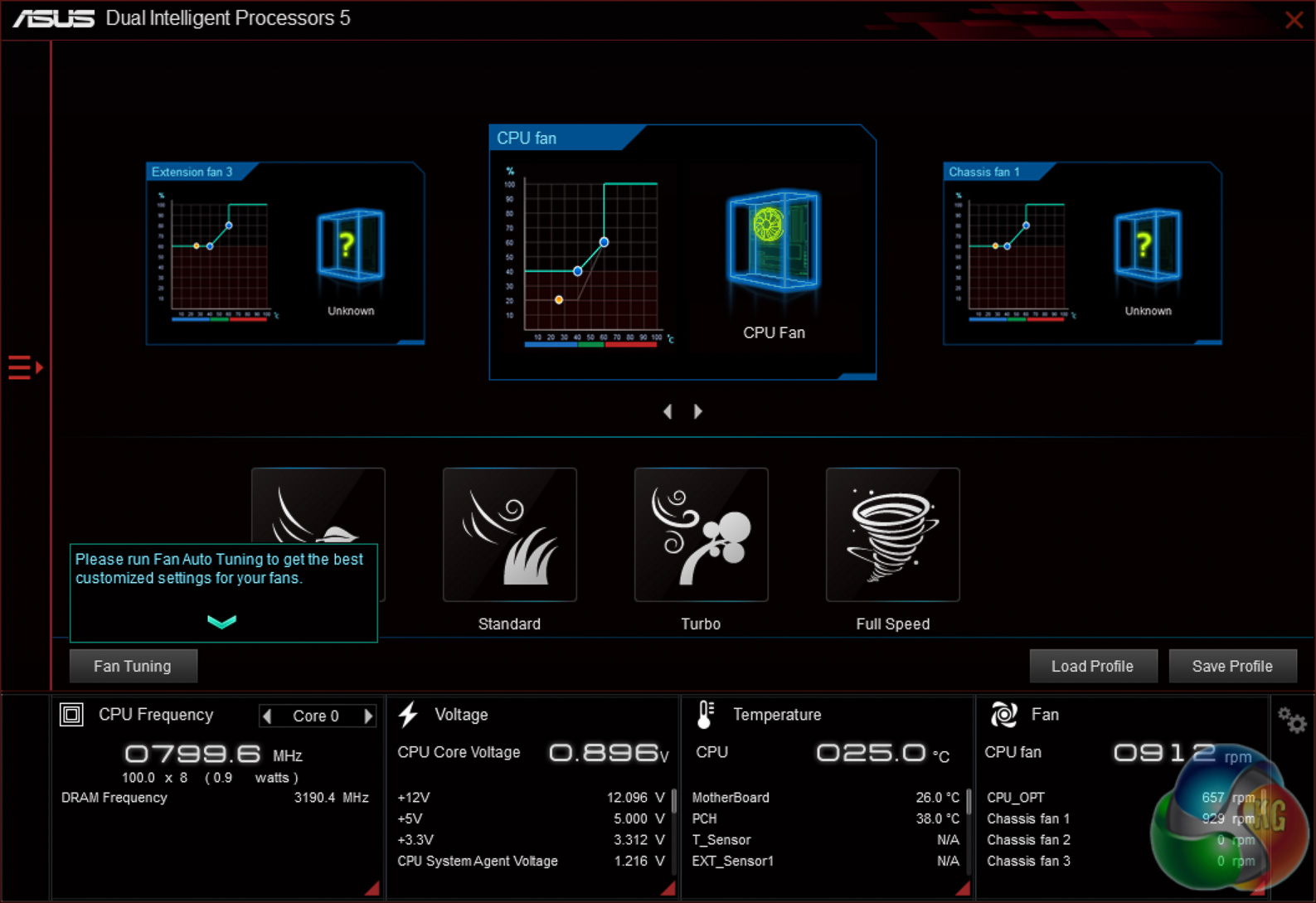
Yikes, that's a lot of software but thankfully you can choose which components you want to install. Some of the utilities are a must have such as the USB 3.1 Boost which will enhance any USB 3.0 or 3.1 devices through either BOT (Bulk Only Transfers) or UASP (USB Attached SCSI) operating modes to increase throughput, or Fan Xpert 3 which will map out the full RPM range of each connected fan and set a fully custom fan profile for it.
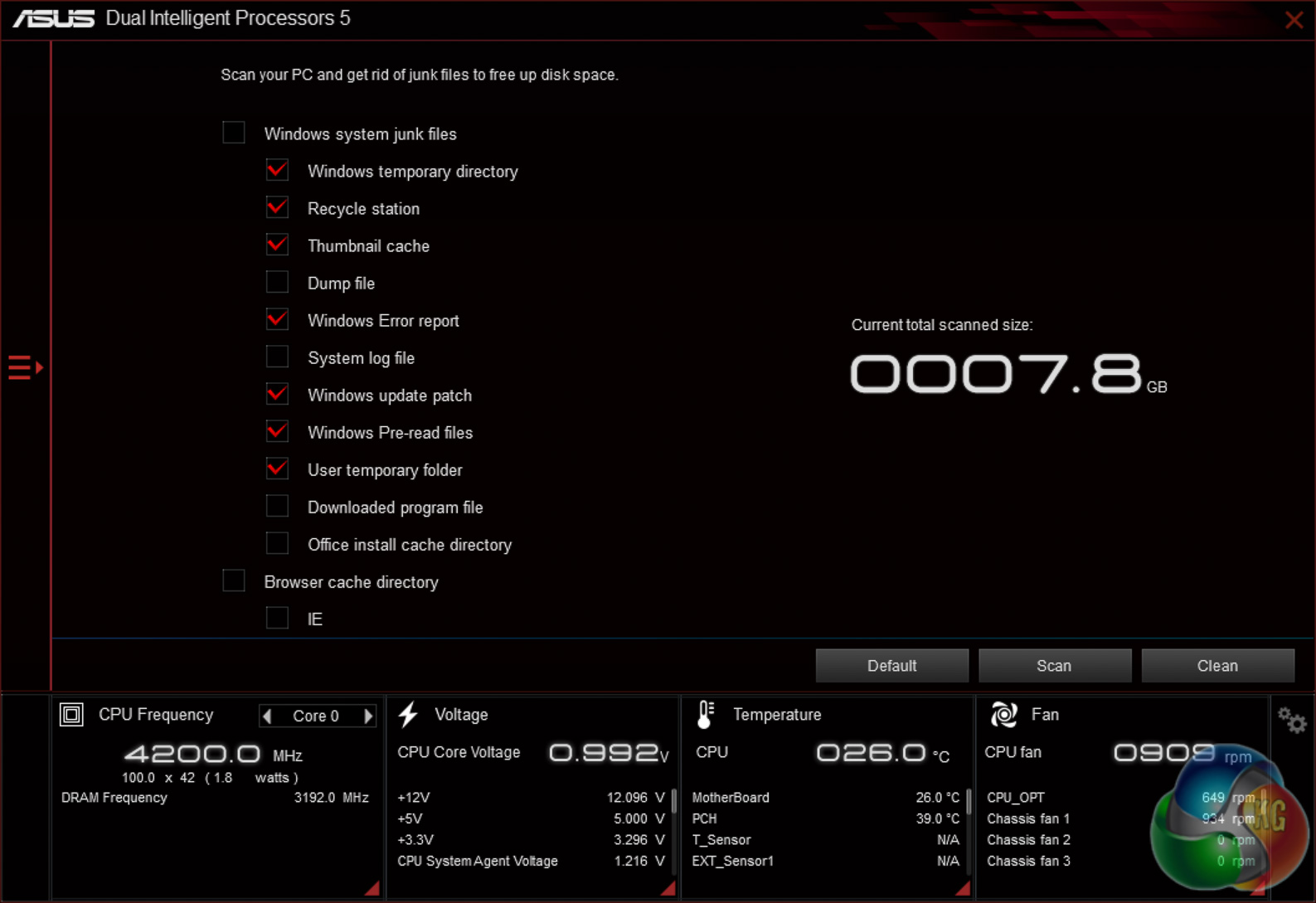
Some of the other apps are a little less useful, such as PC Cleaner which is effectively a much more basic version of CCleaner. It's nice to see ASUS offering such a diverse range of software but the company is perhaps endanger of becoming a jack of all trades, master of none.
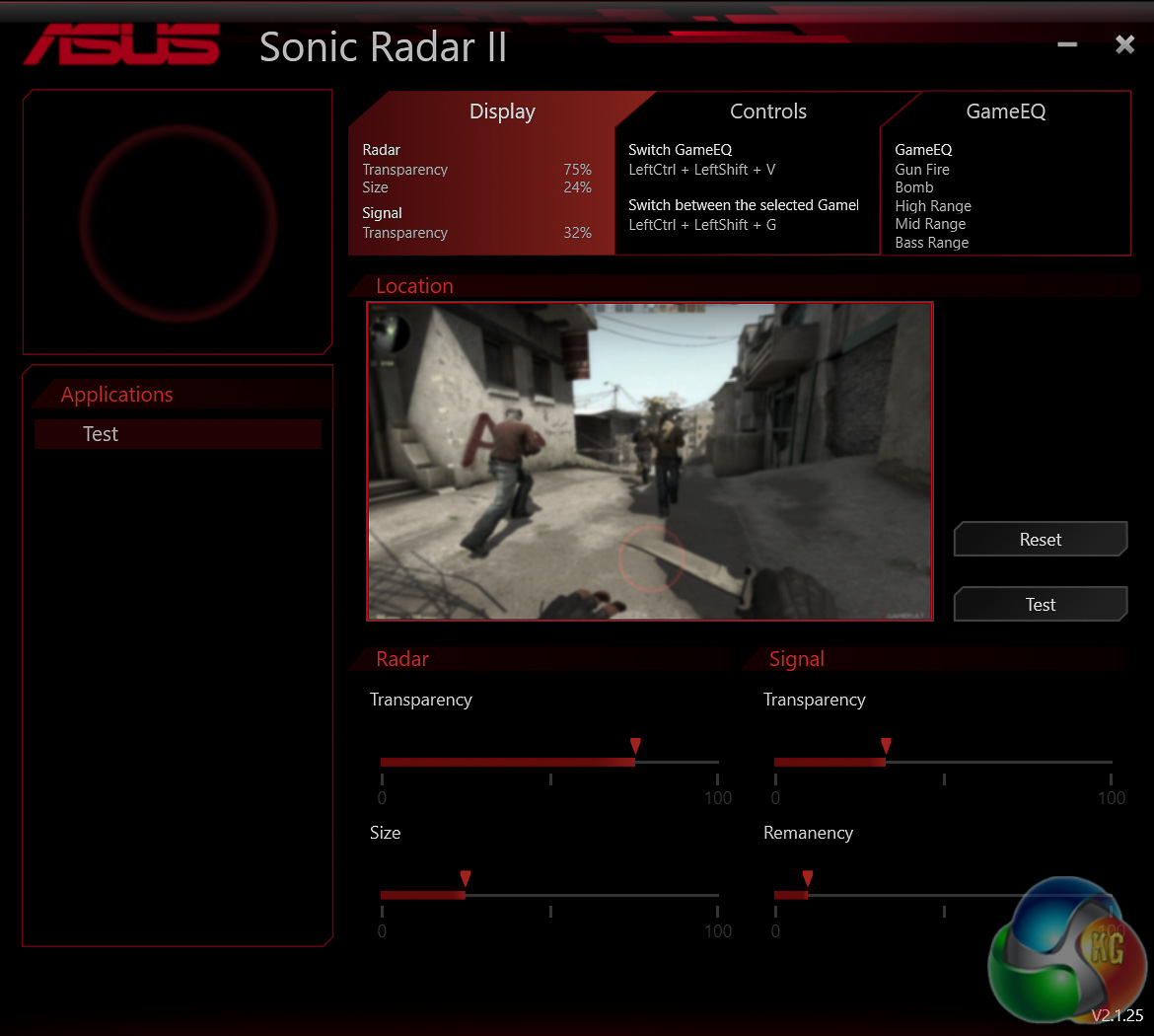
In the audio department the company is still persisting with its controversial Sonic Radar II software which gives approximate positional information by interpreting the sound produce in a number of supported game engines.
ASUS first introduced Sonic Radar II with the Z87 generation but it hasn't received many significant upgrades since then.
Just recently, March 2016, ASUS released the first beta version of GameFirst IV for the Z170 Pro Gaming, the latest iteration of the company's in-house network packet prioritisation software.
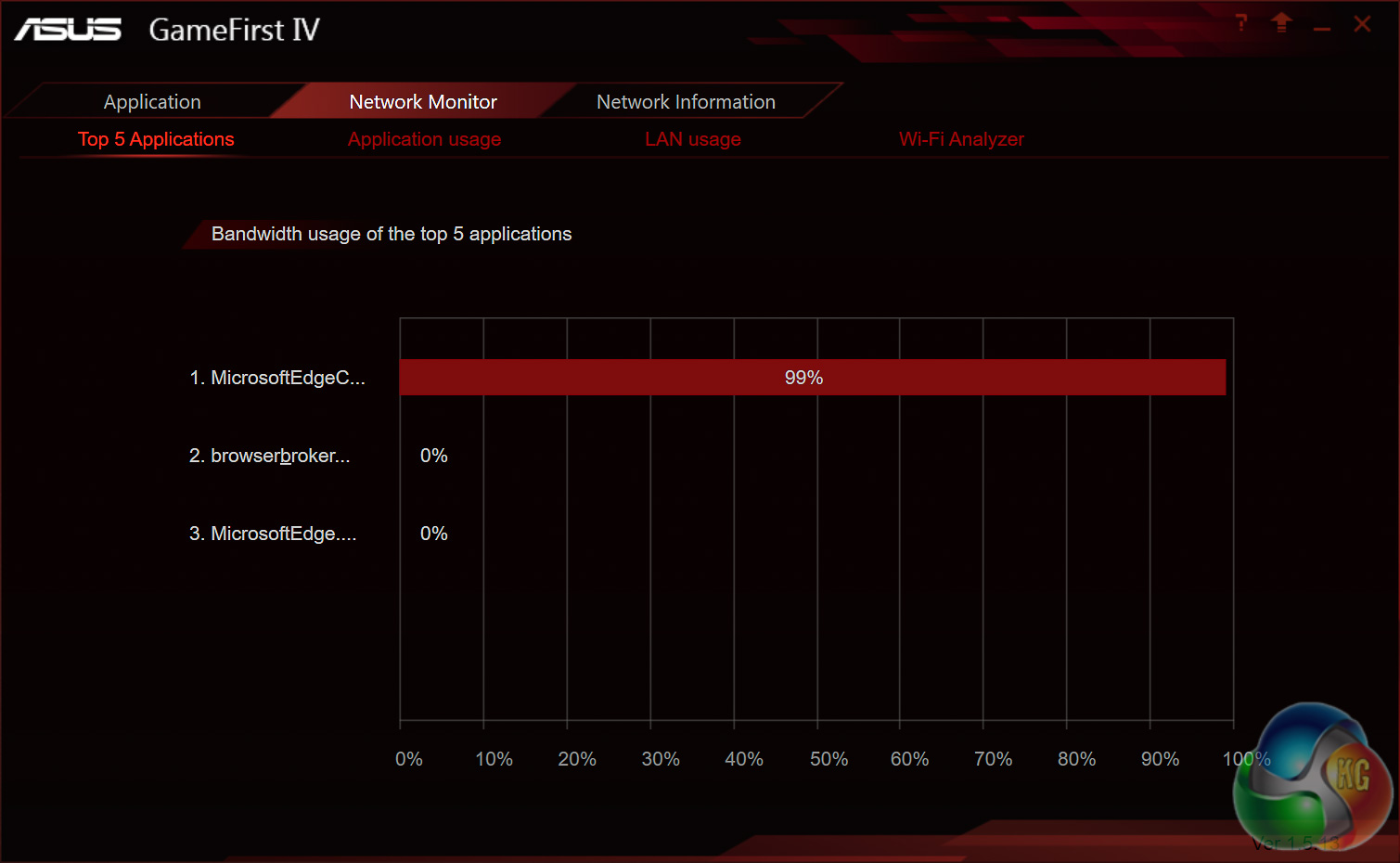
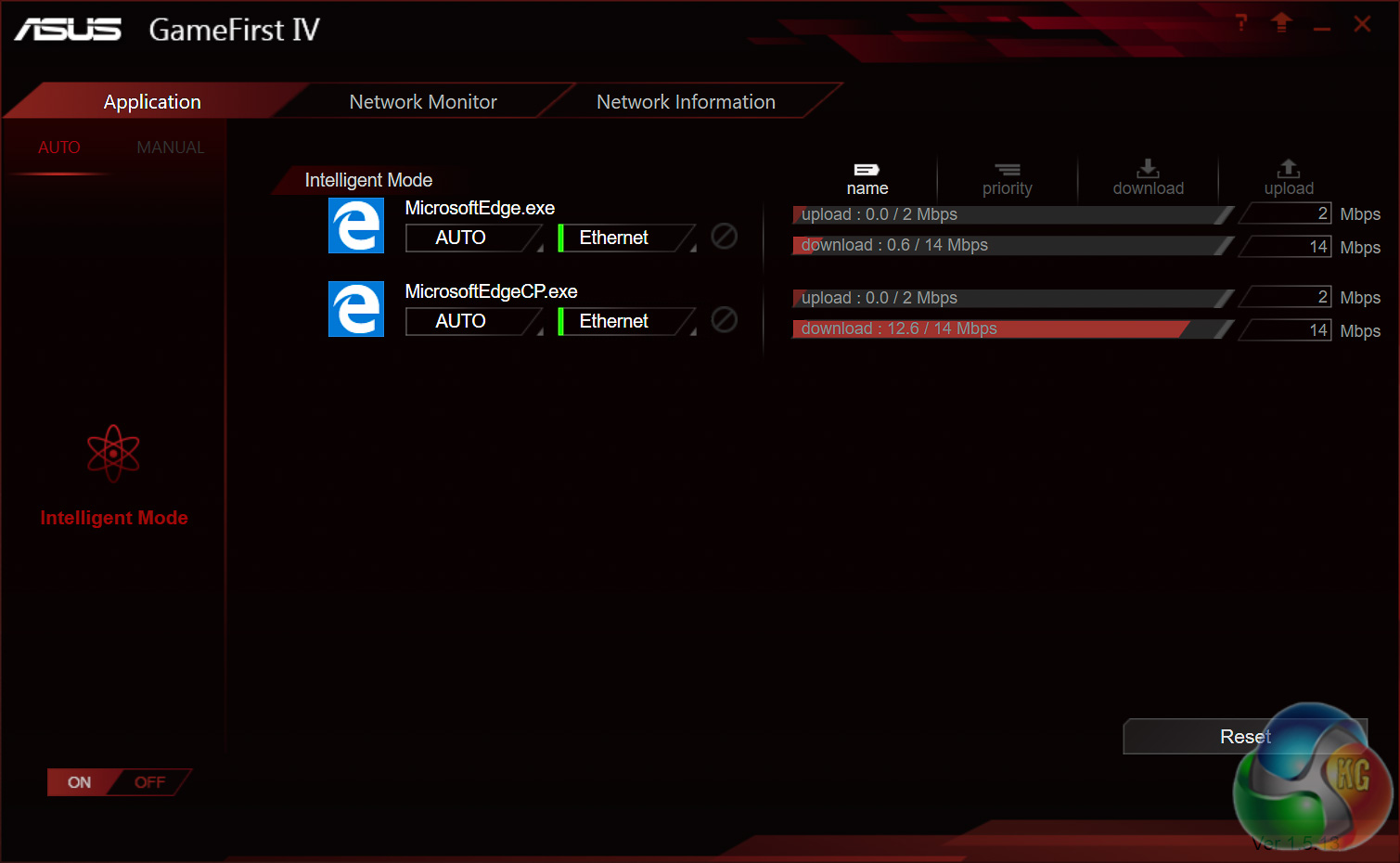
The principle of the software is similar to other comparative offerings by the likes of Realtek, Killer (Rivet Networks) and CFOS, which is that the program can detects different application types and prioritise network availability to certain applications based on user-defined rules.
Intel’s Skylake processors are just the latest Intel CPU architecture to see many of the critical system operations handled by the processor. As such, benchmarking a motherboard becomes more of a test to certify that the part operates correctly and meets the anticipated performance levels.
Z170 Motherboard Test System:
- Processor: Intel Core i7-6700K (4.2GHz all-core turbo).
- Memory: 16GB (4x4GB) G.Skill Ripjaws V 3200MHz 16-16-16-36 DDR4 @ 1.35V.
- Graphics Card: Nvidia GTX 980 Ti.
- System Drive: Mushkin Chronos 120GB
- Storage Test Drive: OCZ Trion 150 480GB (with a USB 3.0 to SATA adapter for USB 3.0 testing.)
- CPU Cooler: Antec Kuhler H20 1200
- Power Supply: Seasonic Platinum 760W.
- Operating System: Windows 10 Pro 64-bit.
Comparison Z170 Motherboards:
Software:
- ASUS BIOS 1206 (Release Date 09/03/2016)
- Nvidia GeForce 364.72 WHQL Driver
Tests:
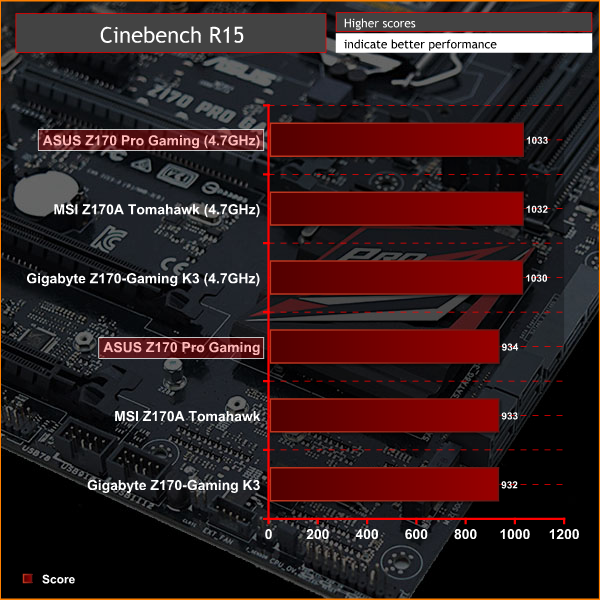
- Cinebench R15 – all core CPU test and CPU power consumption figures.
- Handbrake – converting a short 720p movie file into a smartphone suitable format using the Android preset.
- SiSoft Sandra – processor arithmetic and memory bandwidth test sequences.
- AIDA 64 Engineer – memory and cache test.
- 3DMark – Firestrike (1080p) test.
- Ashes of the Singularity – built-in benchmark tool @ 1080p using the Crazy preset.
- Unigine Valley – built-in benchmark using the Extreme HD preset.
- Rightmark Audio Analyser – record and playback test using a line-in to line-out loopback on a high quality gold-plated 3.5mm cable.
- ATTO – default disk benchmark for SATA and USB testing
Cinebench R15
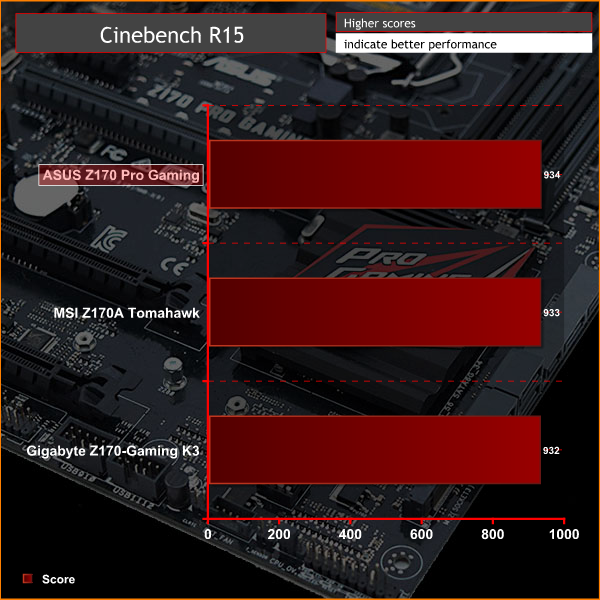
Cinebench is an application which renders a photorealistic 3D scene to benchmark a computer's rendering performance, on one CPU core, all CPU cores or using the GPU. We run the test using the all core CPU mode.
Handbrake
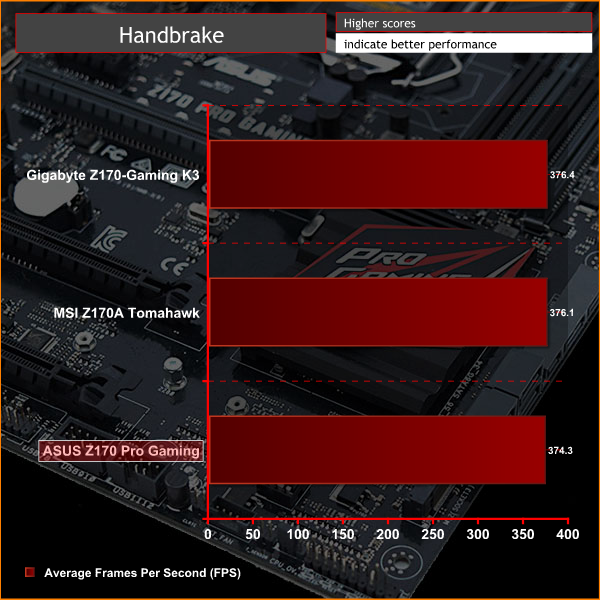
Handbrake is a free and open-source video transcoding tool that can be used to convert video files between different codecs, formats and resolutions. We use Handbrake to convert a short 720p into the Android preset built into the application.
SiSoft Sandra
SiSoft Sandra 2016 is a multi-function utility program that supports remote analysis, benchmarking and diagnostic features for PCs, servers, mobile devices and networks. We run the application's processor arithmetic test to gauge the CPU performance on each tested motherboard.
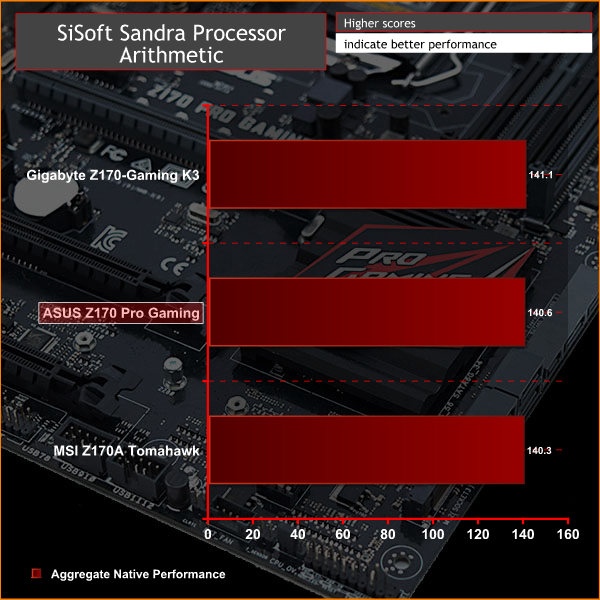
CPU performance, as might well be expected, is indistinguishable across all tested motherboards. In some cases CPU performance can vary depending on a motherboard's default Turbo policies but we account for this by ensuring all motherboards use the same enhanced all-core turbo along with the memory's default XMP profile.
AIDA64 Engineer
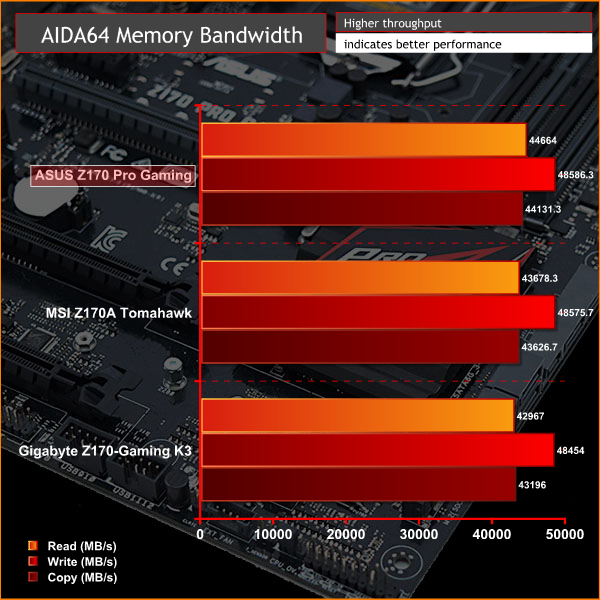
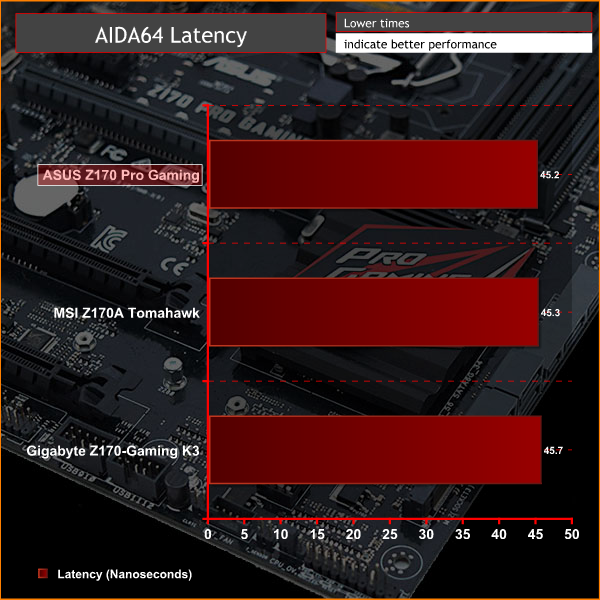
AIDA64 Engineer is a multi-featured software suite for diagnostics, stress testing, benchmarking, software auditing and various other measurement parameters. We use AIDA64 Engineer to benchmark memory throughput and latency.
SiSoft Sandra
SiSoft Sandra 2016 is a multi-function utility program that supports remote analysis, benchmarking and diagnostic features for PCs, servers, mobile devices and networks. We use the SiSoft Sandra memory bandwidth test to give us an extra set of memory bandwidth results.
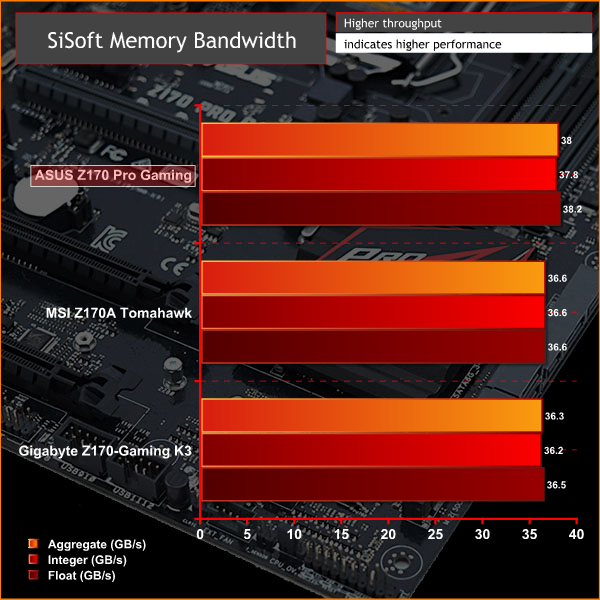
Memory is strangely one of the areas where some Z170 motherboards differ despite the fact we benchmark all three motherboards with the same memory kit using the same XMP profile. ASUS manages to eek out a slight advantage in all three tests and while it might be convenient to call margin of error, ASUS have typical topped all our memory bandwidth charts in the past.
There's definitely an inherent performance advantage for ASUS motherboards in synthetic memory benchmarks, in the real world, however, this doesn't really amount to much.
3DMark
3DMark is a multi-platform hardware benchmark designed to test varying resolutions and detail levels of 3D gaming performance. We run the Windows platform test and in particular the Firestrike benchmark, which is indicative of high-end 1080p PC Gaming.

Ashes of the Singularity
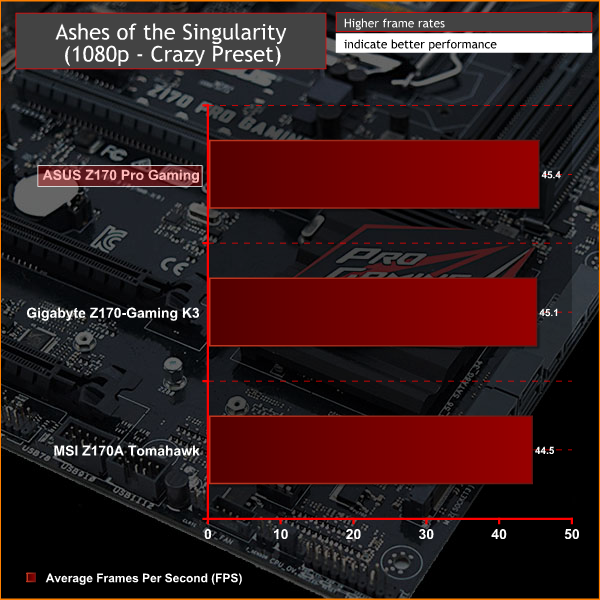
Ashes of the Singularity is a Sci-Fi real-time strategy game built for the PC platform. The game includes a built-in benchmark tool and was one of the first available DirectX 12 benchmarks. We run our tests using DirectX 11, a 1080p resolution and the Crazy preset.
Unigine Valley
Unigine Valley is a GPU stress testing and benchmarking tool that succeeds its predecessor, Unigine Heaven. Valley makes use of dynamic lighting, depth of field, ambient occlusion and dynamic weather patterns. We utililise the built-in benchmarking tool with the Extreme HD preset.
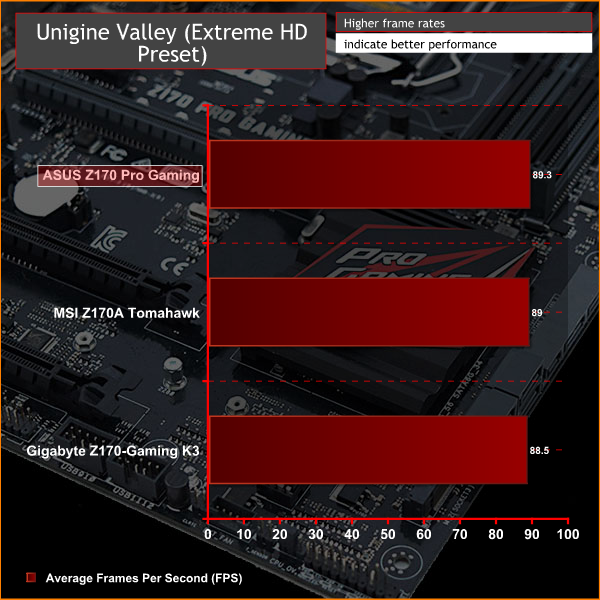
Like CPU performance there is virtually no variation between all motherboards when it comes to GPU-heavy workloads, an expected result.
Any variation that did occur is likely due to fluctuations in frequency from Nvidia's GPU Boost algorithm on our GTX 980 Ti which makes use of a reference cooling solution.
ATTO Disk Benchmark
The ATTO disk benchmark is a Windows-based utility for testing storage performance of any storage drive or controller. We use the default benchmark setup and run this on an OCZ Trion 150 SSD directly connected to the SATA ports and then again over a USB 3.0 port using a USB 3.0 to SATA III adapter.
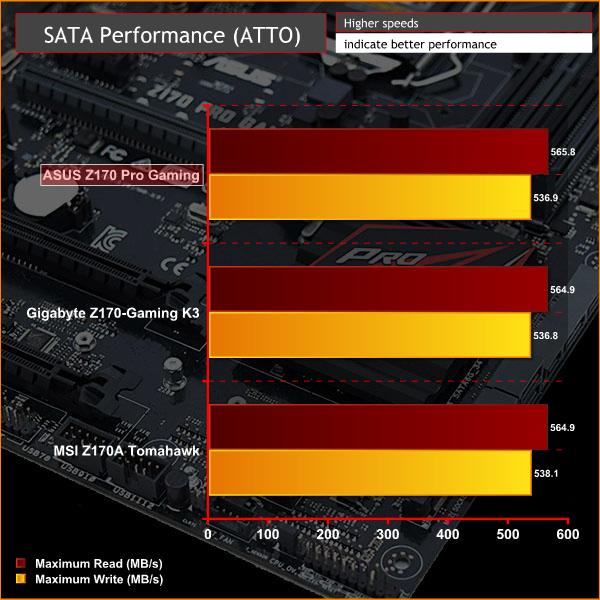
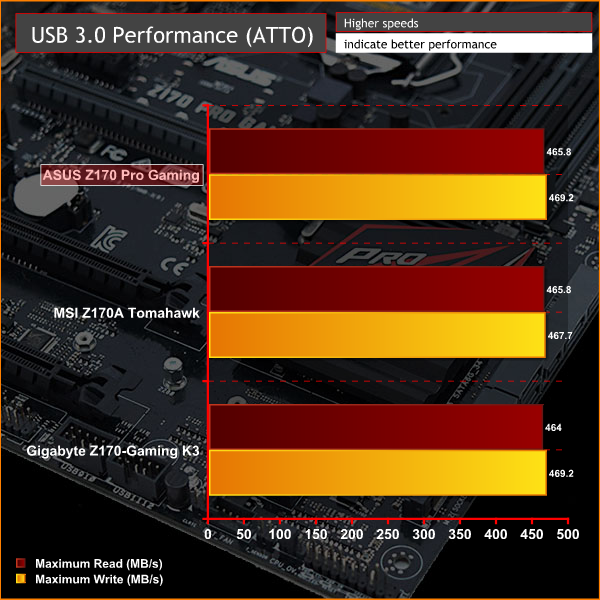
Storage performance was uniform across all motherboards which makes sense as they all use the same USB 3.0 controllers and SATA controllers provided by the Intel Z170 Express chipset.
Rightmark Audio Analyser
Rightmark Audio Analyser is a freeware benchmarking utility designed to objectively test the performance characteristics of audio solutions. We setup a line-in line-out loop and execute the record/playback test before generating the results report you see below. This test was run at 24bit audio depth and 192KHz frequency.
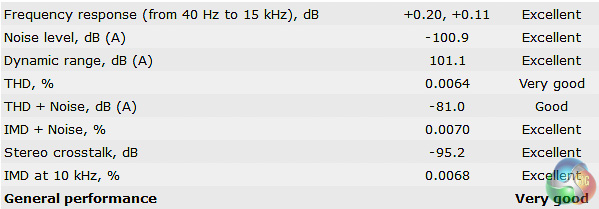
The results on the ASUS Z170 Pro Gaming are excellent for the price point and the inclusion of a headphone amplifier is another bonus too. While there are better audio solutions available, the performance offered here will be enough to satisfy most PC gamers.
Power Consumption
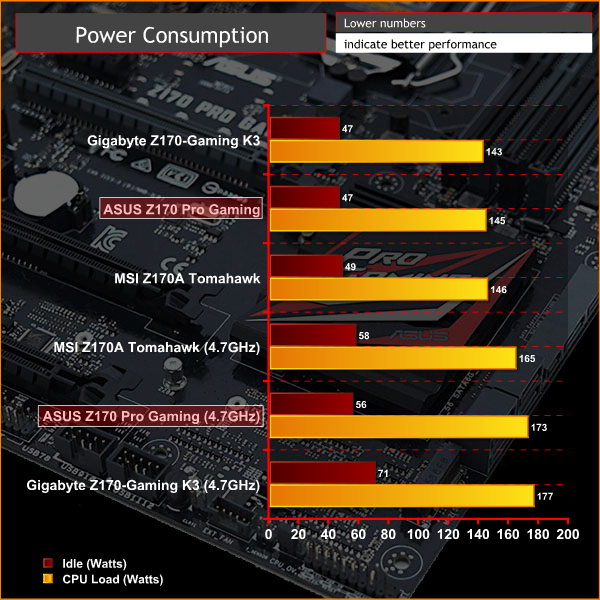
We leave the system to idle on the Windows 10 desktop for 5 minutes before taking a reading, for CPU load results we run Cinebench and take a reading in the middle of the render progress.
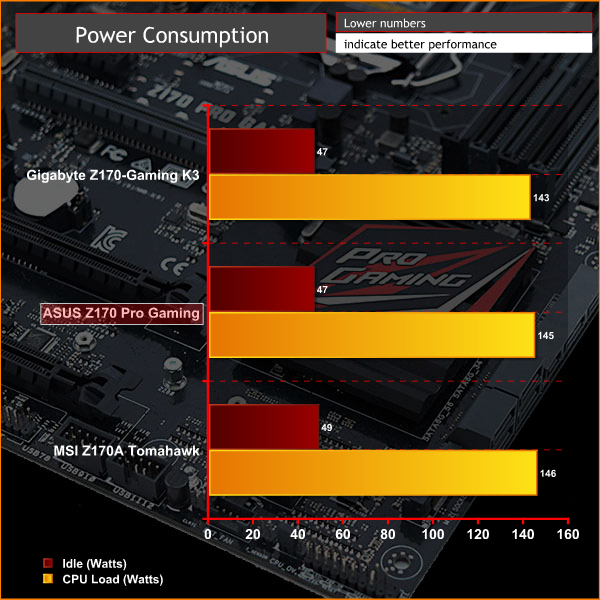
Power consumption is similarly uniform across all tested motherboards since the hardware is fundamentally similar, only on higher-end motherboards with lots of additional controllers, processing chips and hardware may you see slightly increased power consumption.
Overclocking
We use a manually set voltage of 1.4 volts on the CPU VCore and see how far we can push the CPU by adjusting the multiplier 1X at a time. In general we found that our maximum overclock of 4.7GHz was consistent across a number of motherboards suggesting it to be a CPU limitation that relates to the quality of the silicon.
On the ASUS Z170 Pro Gaming we tried a number of different Load Line Calibration (LLC) levels and cache ratios but were unable to push beyond 4.7GHz without encountering stability issues, or thermal issues when adding more voltage. According to CPU-Z voltage reporting the CPU was being supplied 1.408 volts at load, there was some minor fluctuation between 1.390 and 1.410 but nothing that should be of any concern to users.
For all intents and purposes the voltage supplied is stable and reliable, even when left to the Auto settings.
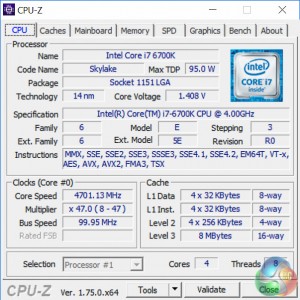
As overclocking on Z170 is largely a CPU-dependant, not motherboard-dependant, process we observed identical gains in performance across all tested motherboards that correlate to the frequency achieved. There is likely scope to push beyond 4.7GHz with additional voltage tweaking and setting manipulation, something the ASUS Z170 Pro Gaming makes very easy with its comprehensive UEFI, but for the most part users should be happy with 4.7GHz.
The Asus Z170 Pro Gaming motherboard is a conservative and subdued motherboard by the usual standards of ASUS gaming motherboards – there aren't any extravagant features or boundary-breaking design elements normally associated with its Republic of Gamers products. Nonetheless, the Z170 Pro Gaming is still likely to have widespread appeal thanks to its well-rounded feature set and keen pricing.
ASUS may not be offering the most affordable Z170 Gaming motherboard but they are setting the bar slightly higher than some other vendors in terms of the components used, though the price does reflect this.
The Realtek ALC1150 audio solution and Intel I219V NIC are arguably the best of their kind and you will find the same network controller on ASUS motherboards as high up as the Maximus VIII Extreme, while the ALC1150 codec is the basis of most premium motherboard audio solutions from ASUS, ASRock, Gigabyte and MSI, even if other components like capacitors and amplifiers will vary.
In that regard the price point of £125 / $160 that ASUS have settled on is not unreasonable, especially when you consider ASUS are officially certifying and supporting Nvidia SLI while the two rival motherboards we've tested the ASUS motherboard against both lack SLI support.
ASUS does well in areas that typically go unappreciated such as the quality of the UEFI, which is usable for novice users while simultaneously being comprehensive enough for experienced users. The software package is also good, even if some of the utilities feel a little bit obsolete or superficial and the sheer number of utilities is somewhat overwhelming.
One of the highlights with the ASUS motherboard is the fan controls which are provided in both the UEFI and AI Suite III software, the granularity of control across all five headers for DC and PWM fans is excellent and it really is an under-rated feature. Sure it might not quite be a gaming feature but not having to fork out for a fan controller and having a quiet PC is always desirable.
Being a Skylake series motherboard the ASUS Z170 Pro Gaming will have any prospective buyer reasonably well future-proofed thanks to the inclusion of DDR4, USB 3.1 Type-A and C, SLI support and an M.2 slot supporting NVMe drives, like the new Samsung 950 Pro. The only area that we can see being an issue for some prospective buyers is with regards to aesthetics, which is undoubtedly a subjective thing.
We feel that there are a number of other boards from rival vendors in the same price bracket that deliver a more bold, exciting and vibrant design for a gaming system, some even have RGB lighting at the same price point.
Pros:
- Sensible choice of components and controllers.
- Excellent future-proofing and connectivity options – USB 3.1 Type-A and C, M.2 with NVMe, DDR4 and SLI.
- A well fleshed rear I/O
- Competitively priced given the hardware on offer
Cons:
- Somewhat plain aesthetics
- Slightly bloated software package
KitGuru says: A well-rounded and competent Z170 Gaming motherboard, the ASUS Z170 Pro Gaming warrants inclusion on the shortlist of anyone looking to build a Skylake gaming system on a tight budget.

Any comments on the persistent reports of people bricking the Z170 Pro Gaming when upgrading the BIOS?
Thanks