KitGuru KitGuru.net – Tech News | Hardware News | Hardware Reviews | IOS | Mobile | Gaming | Graphics Cards


Built around the Skylake Core i5-6200U processor, the Shuttle XPC Nano NC02U5 is perhaps most interesting because it supports a 2.5in disk drive. Whereas most barebones kits typically have just a single spare M.2 connector, the XPC Nano NC02U5 allows users to install any 2.5in drive of their choice – potentially greatly increasing the available storage space.
Over the past few months, we have reviewed a number of mini-PCs. First there was the Gigabyte BRIX Gaming (review HERE), then the latest BRIX with a Kaby Lake CPU (HERE), and most recently a dinky Chromebox from ASUS (HERE). Today, however, we are look at a different option – the Shuttle XPC Nano NC02U5.
In this review, we put the XPC Nano NC02U5 through its paces, assessing build quality, performance and practicality before giving a final verdict.
Specification:
Chassis
- Dimensions: 142 x 142 x 42 mm (LWH) = 835 ml
- Weight: 0.4 kg net, 1.2 kg gross
- Includes vertical stand and 75 / 100 mm VESA mount
Processor
- Model: Intel Core i5-6200U (ULV)
- Clock rate: 2.3~2.8 GHz
- L1/L2/L3 Cache: 128 kB / 512 kB / 3072 kB
- Memory controller: DDR3L-1600 Dual Channel (1.35 V)
- TDP wattage: 15 W maximum
- Intel HD graphics 520 (Intel HD Gen. 9)
- Supports simultaneous dual-display output
Power Adapter
- External 65 W power adapter (fanless)
- Input: 100~240 V AC, 50/60 Hz, max. 1.6 A
- Output: 19 V DC, max. 3.42 A, max. 65 W
Memory support
- 2x 204-pin SO-DIMM slot
- Supports DDR3L-1600 (PC3-12800) SDRAM at 1.35 V
- Maximum of 16GB per SO-DIMM, total of 32GB maximum memory supported
Connectivity
- Supports one Serial ATA hard disk or one SATA SSD drive in 6.35 cm / 2.5″ format
- Integrated SD card reader
- M.2 Slot for SSDs (PCIe or SATA) (type 2242, 2260, 2280).
- Gigabit LAN
- Built-in M.2-2230-A/E WLAN card and internal antenna
- Front panel connectors: USB 3.0 type A, USB 3.0 type C, SD card reader (supports SD, SDHC, SDXC)
- Back Panel connectors: DisplayPort 1.2, HDMI 1.4b, 2x USB 2.0, Gigabit LAN (RJ45), combo audio jack, DC input, 2x perforation for optional external WLAN antennas
- Left Side connectors: Serial RS232 COM port (D-Sub, 9-pin)
RRP: £398.40 inc. VAT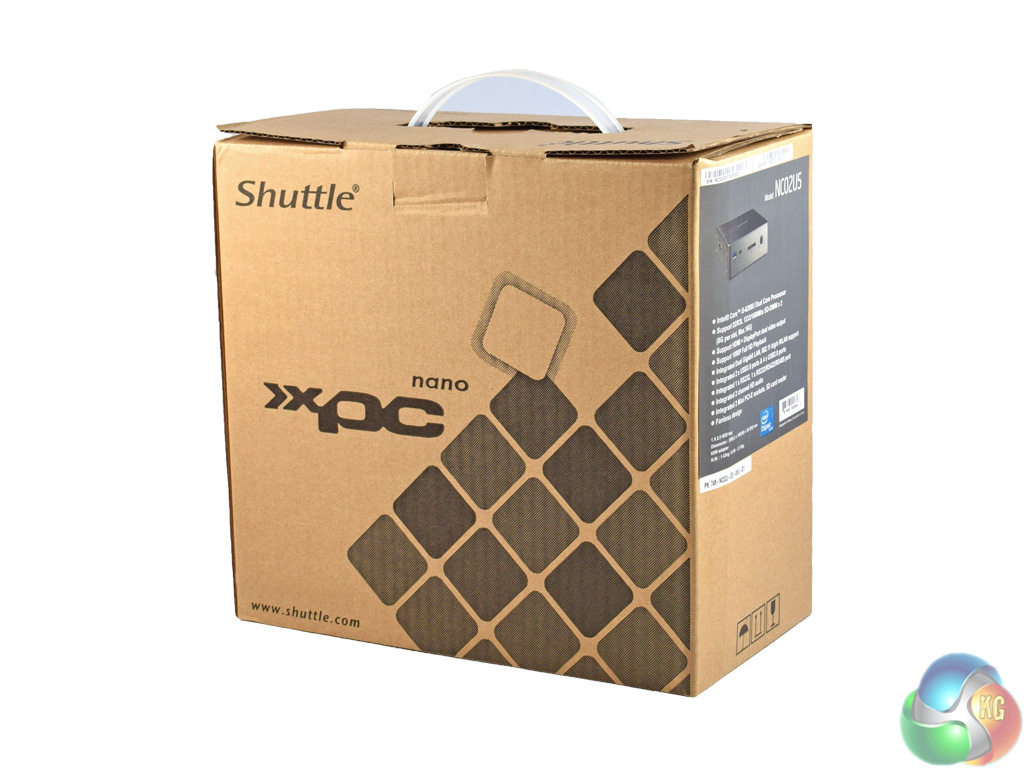
The Shuttle XPC Nano NC02U5 ships in a fairly plain brown box – there is just some branding on the front, without a product image.
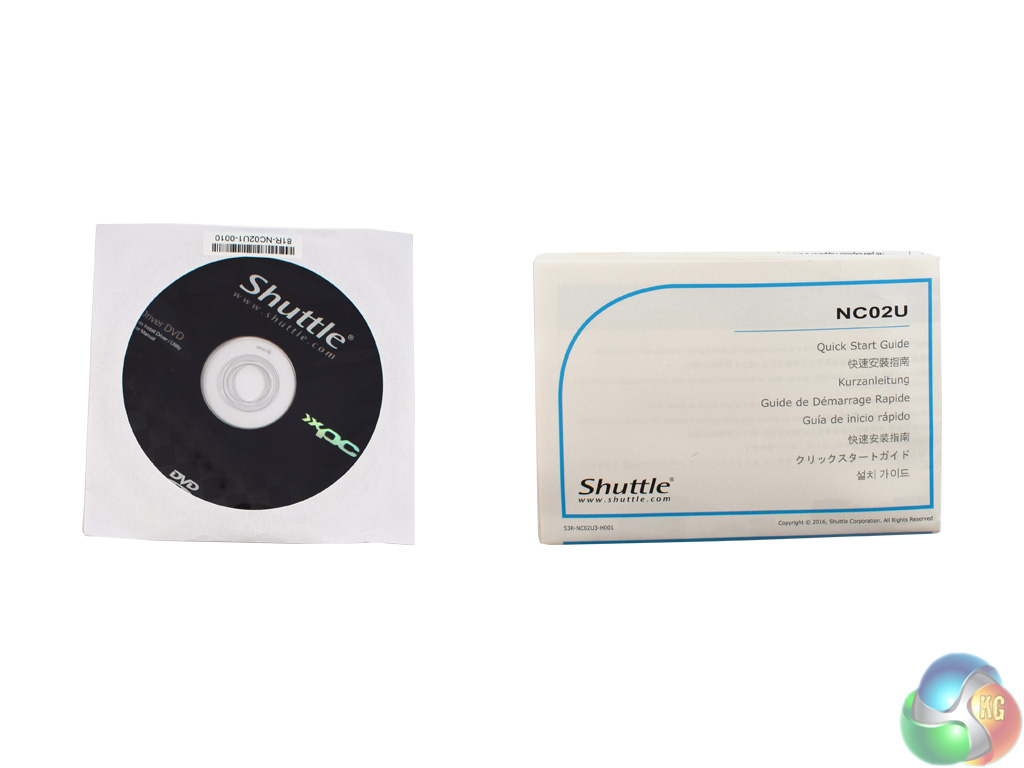
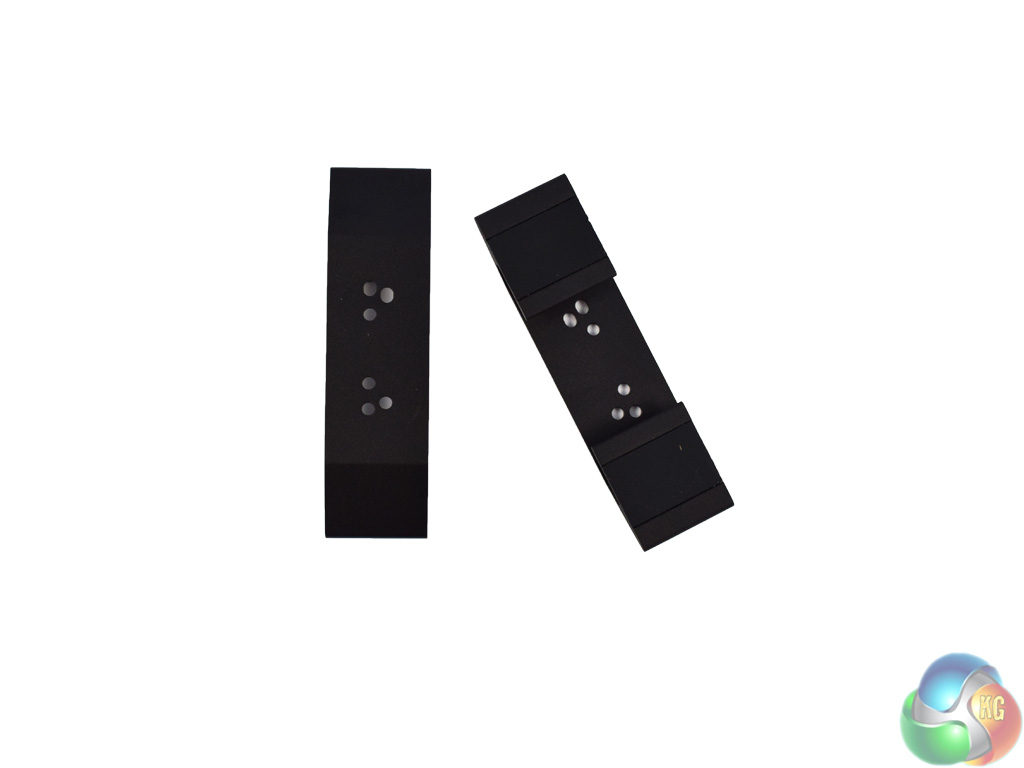
As for included accessories, inside the box we find a driver disc CD, as well as a quick-start manual. Also included is a pair of feet for the NC02U5 – these feet allow it to stand vertically, rather than the default horizontal configuration.
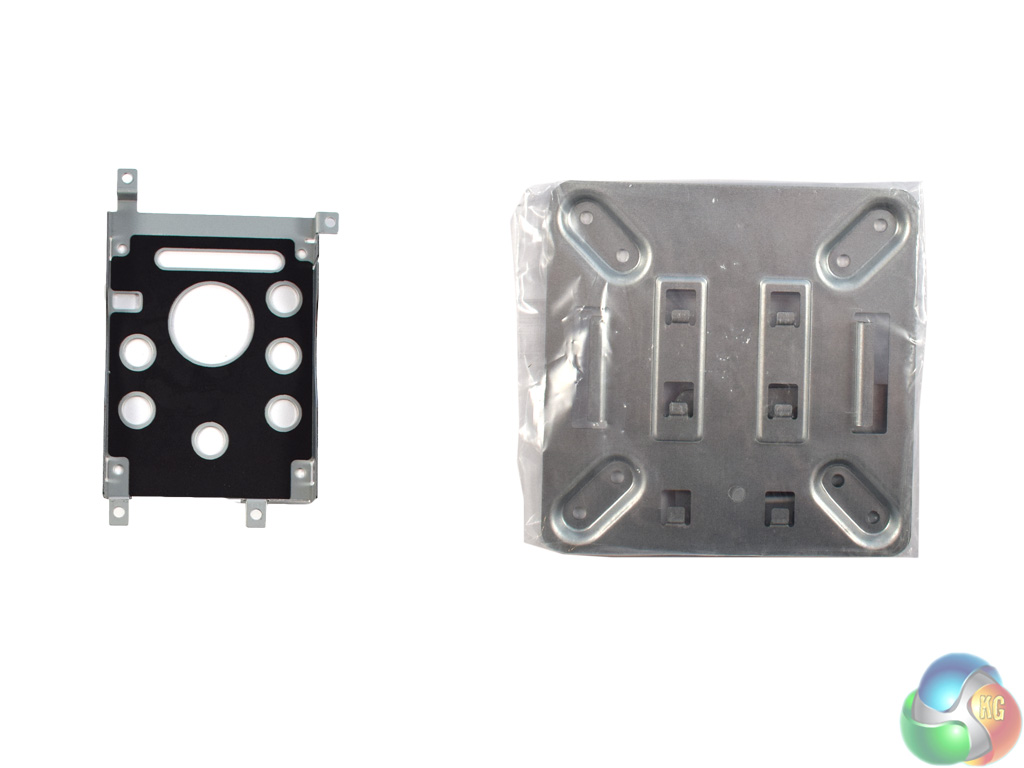
Above, we can see the included drive caddy for a 2.5in drive (far left). On the next page, we will look at how this works in practice.
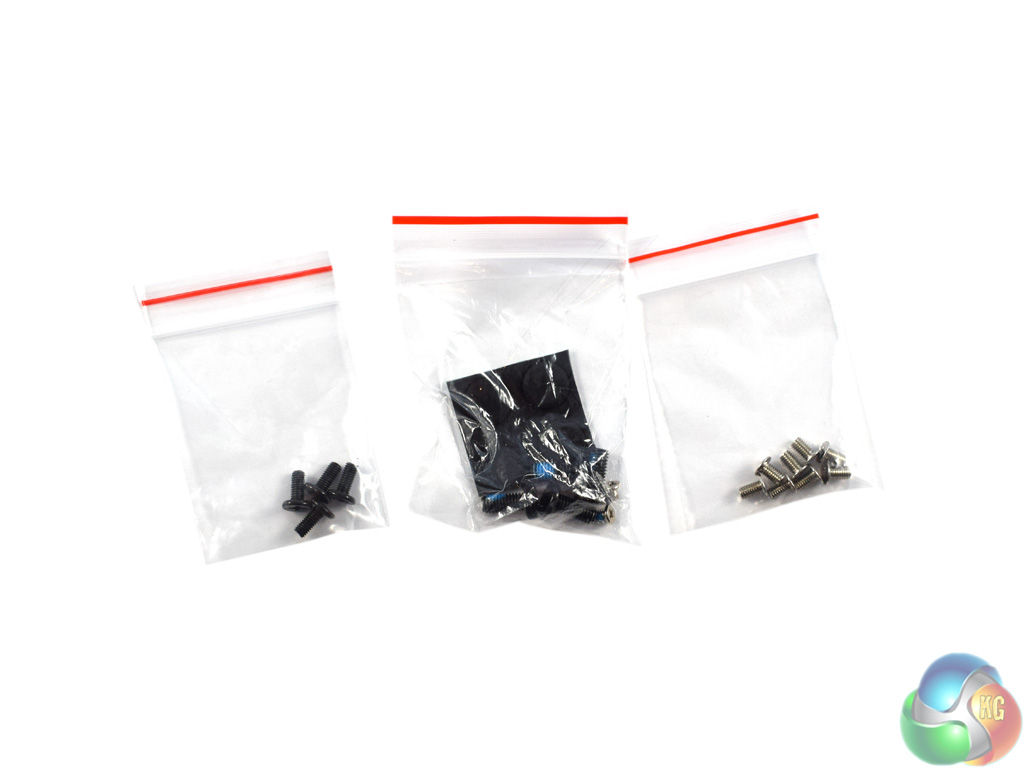
There is also a VESA mount included, supporting 75mmx75mm or 100mmx100mm mounting configurations. Lastly, screws are included for the mounting feet, the 2.5in caddy and the VESA mounting plate.
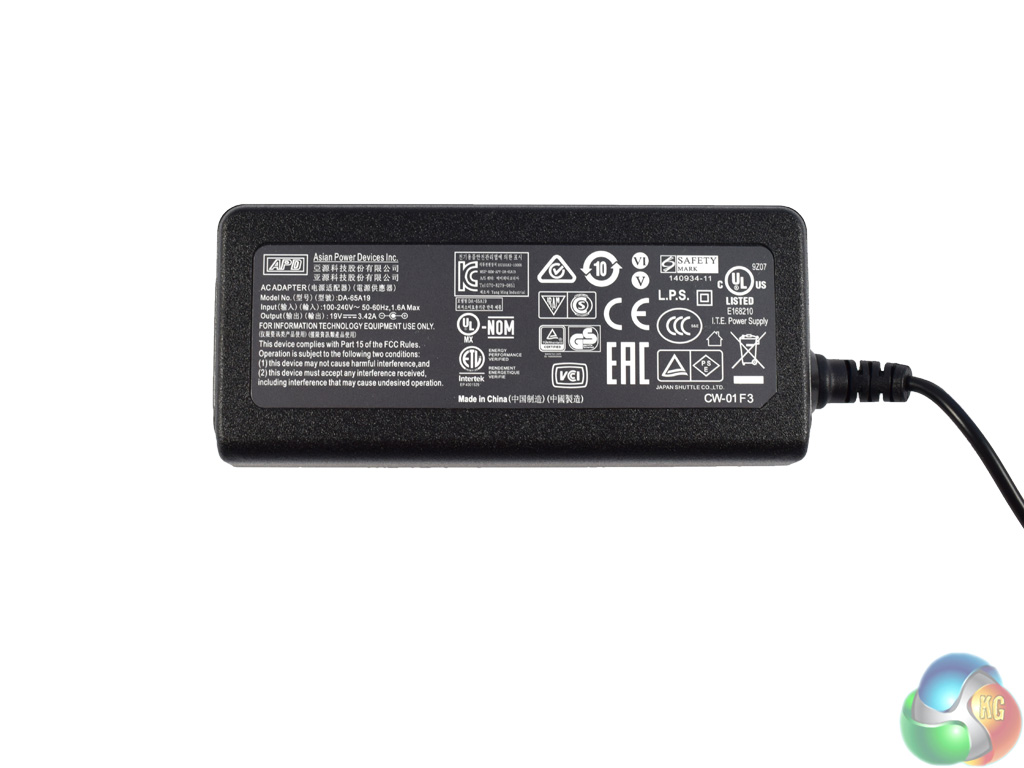
Before moving on, here is a look at the relatively small power brick. Due to Skylake's efficiency and the low-power i5-6200U CPU used here, the power brick is only rated at 65W which should be plenty.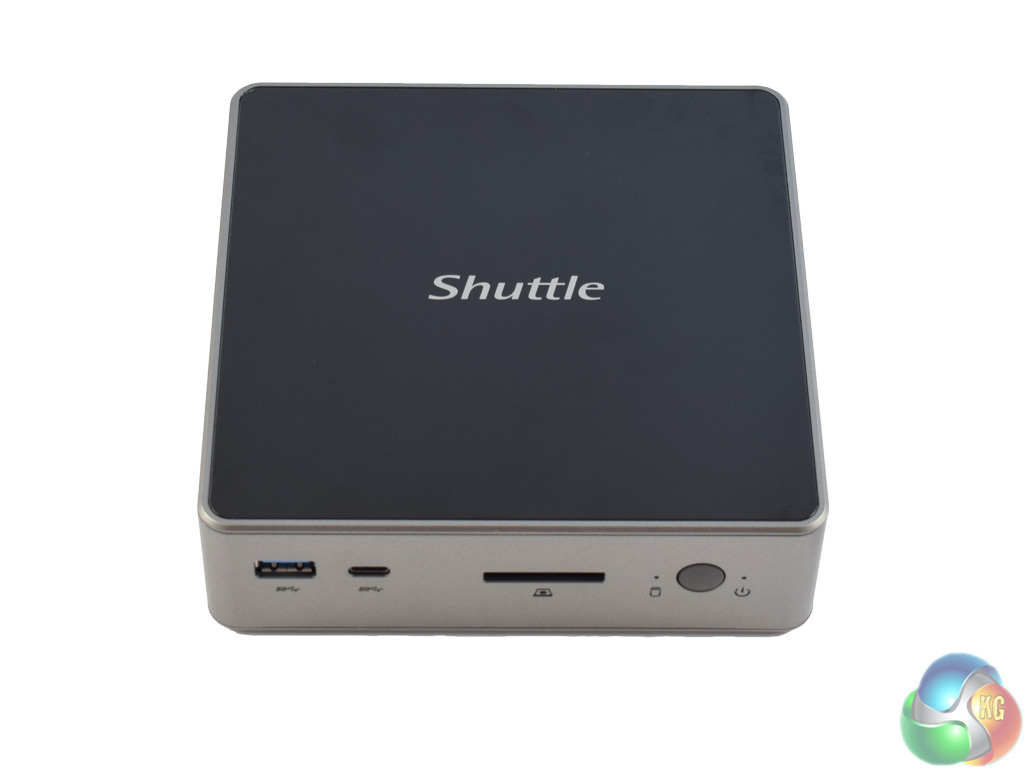
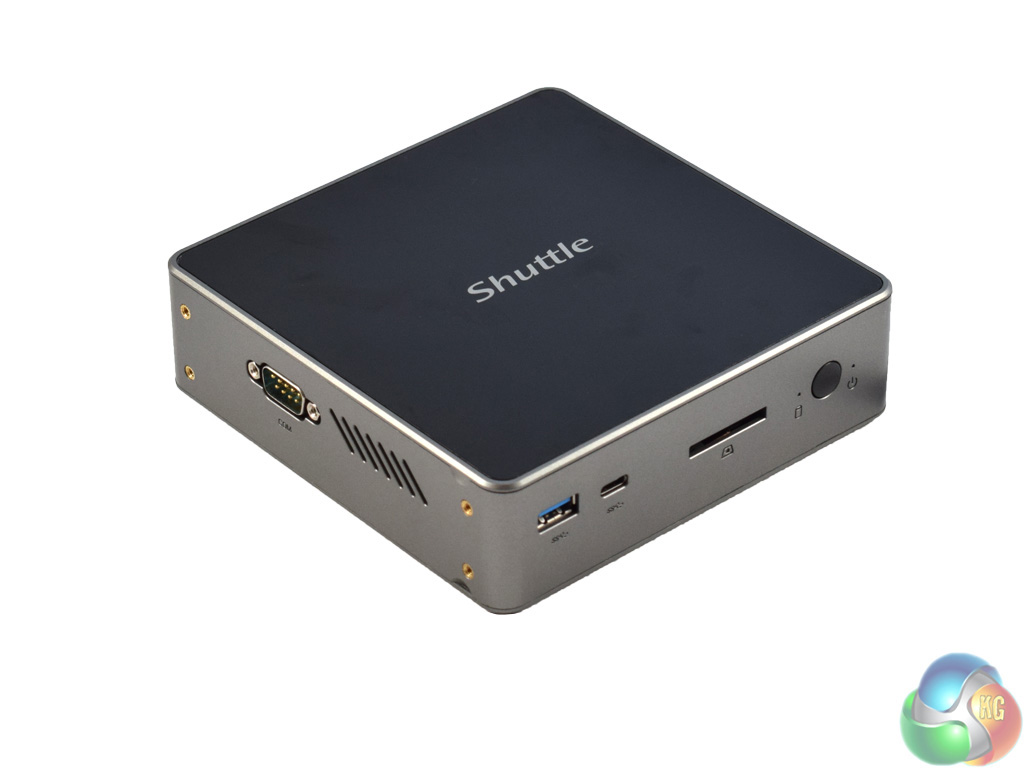
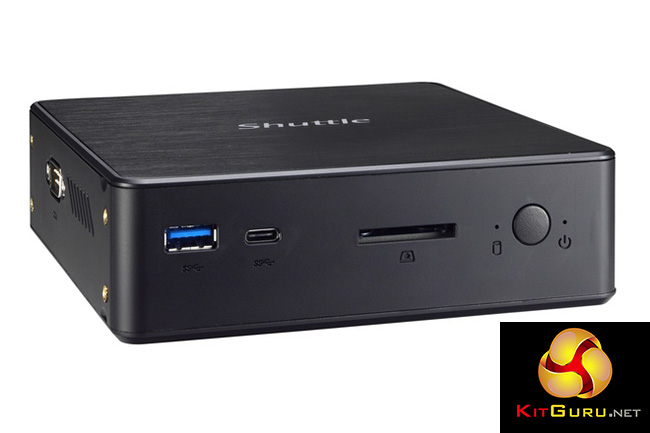
Here we get our first look at the Shuttle NC02U5 barebones itself.
While the product photos from Shuttle depict an all-black device, my sample has a glossy black top panel – but the side panels are what I would call ‘anthracite grey.'
While I think it is a clean and good-looking barebones PC, when handling the device it does become clear that the build quality is not great. The plastic shell feels fairly cheap, and I would not want to drop it as I would imagine the panels would break fairly easily. Compared to the Gigabyte BRIX i7A-7500, with its brushed aluminium panels, this is definitely a cut below in terms of build quality.
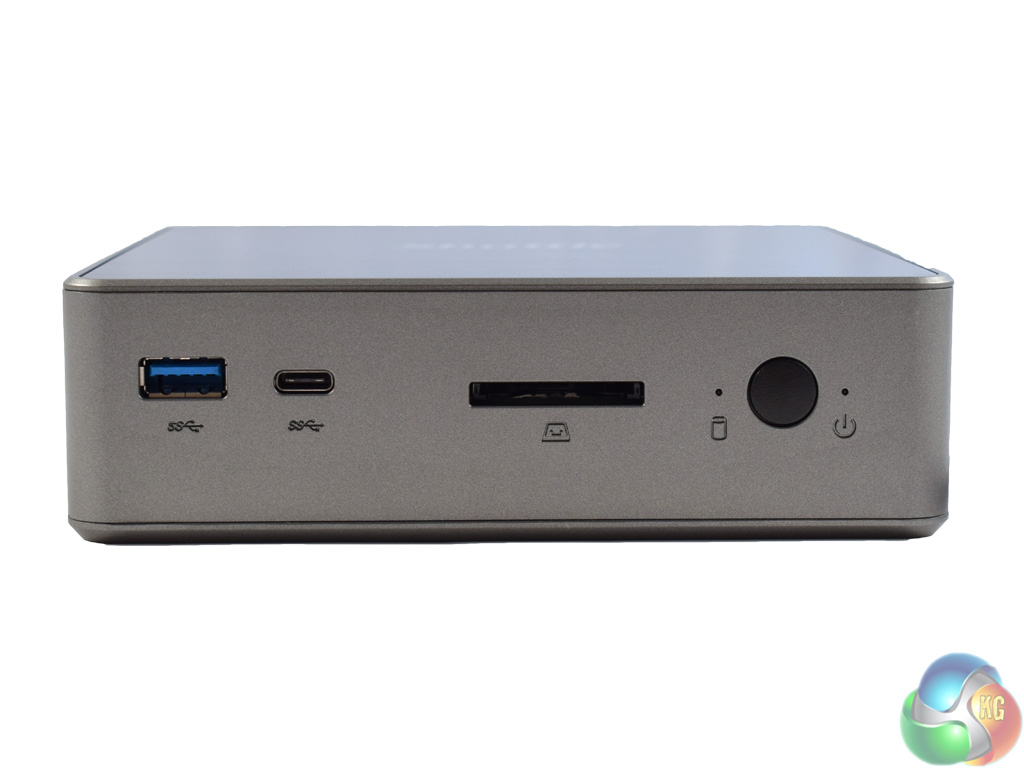
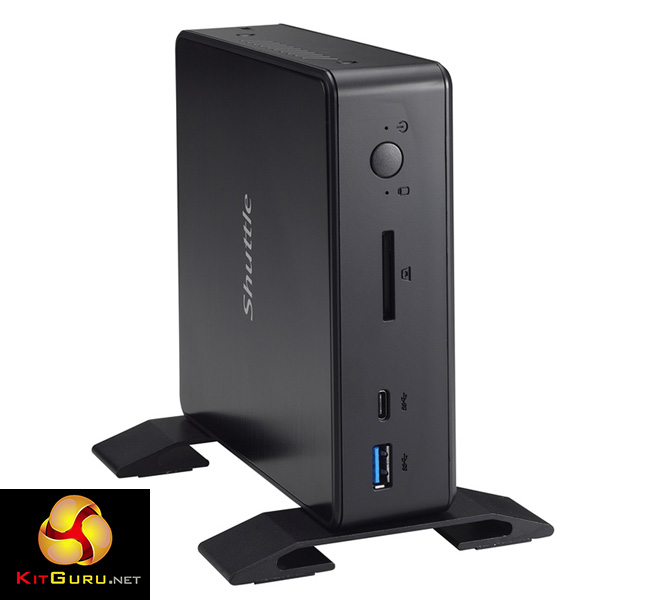
Taking a look at the I/O, then, we start with the front of the device. Here are 2x USB 3.0 connectors – one Type-A, another Type-C – along with an SD-card reader and the power button.
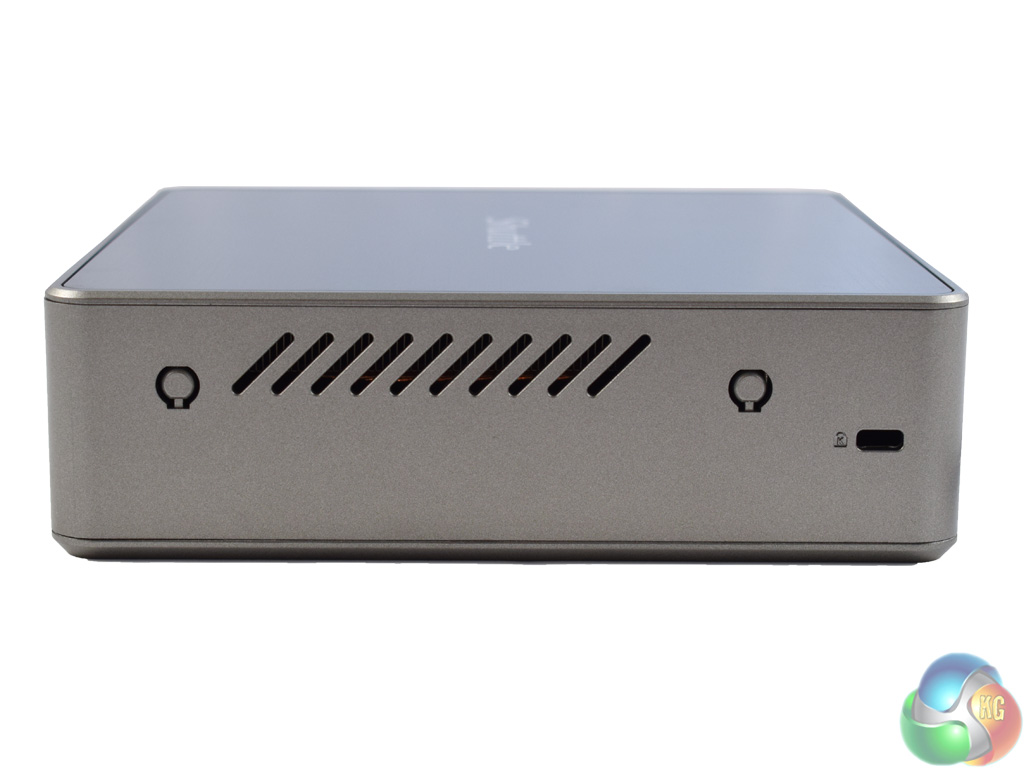
The right side of the device features some ventilation as well as a Kensington lock.
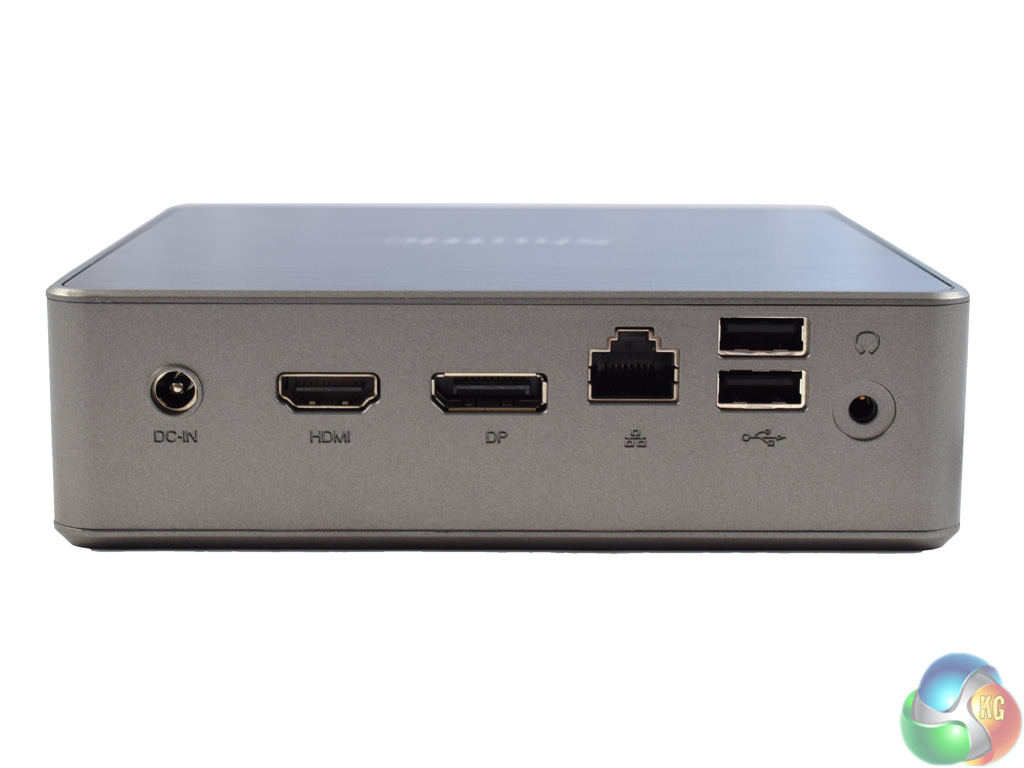
At the back of the device, there is the DC input connector, as well as both HDMI and DisplayPort connectors – allowing for a dual-display setup. Alongside these connectors we find a Gigabit Ethernet port, 2x USB 2.0 ports and a combo audio jack.
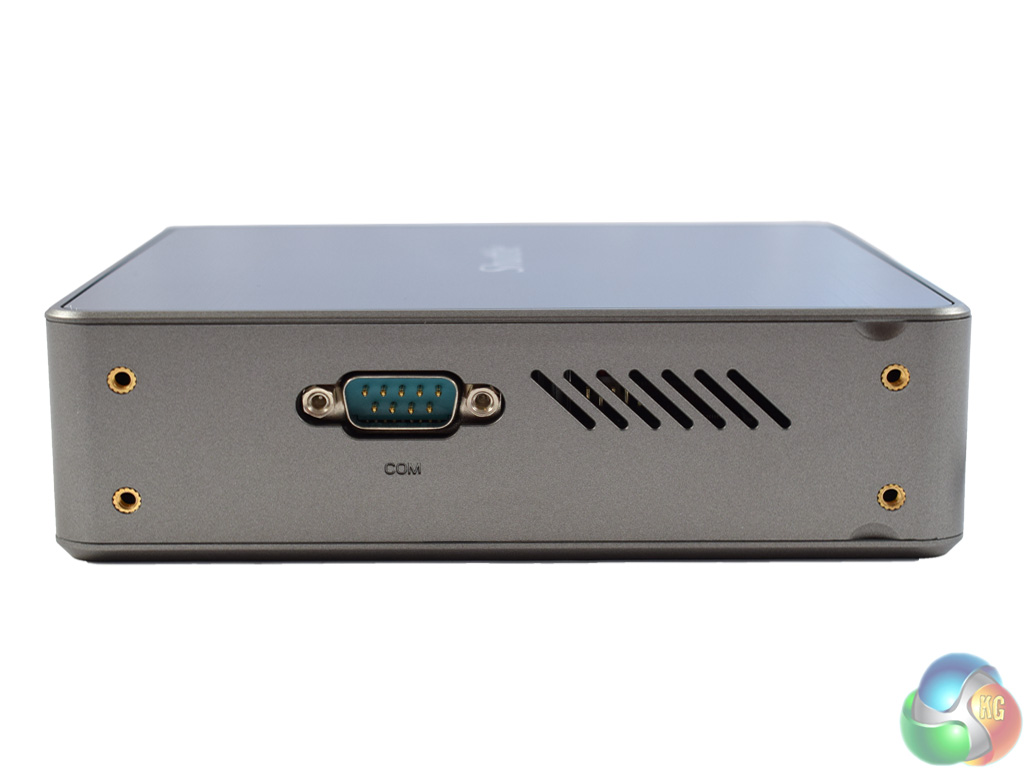
Lastly, the left side of the NC02U5 features more ventilation and a VGA output.
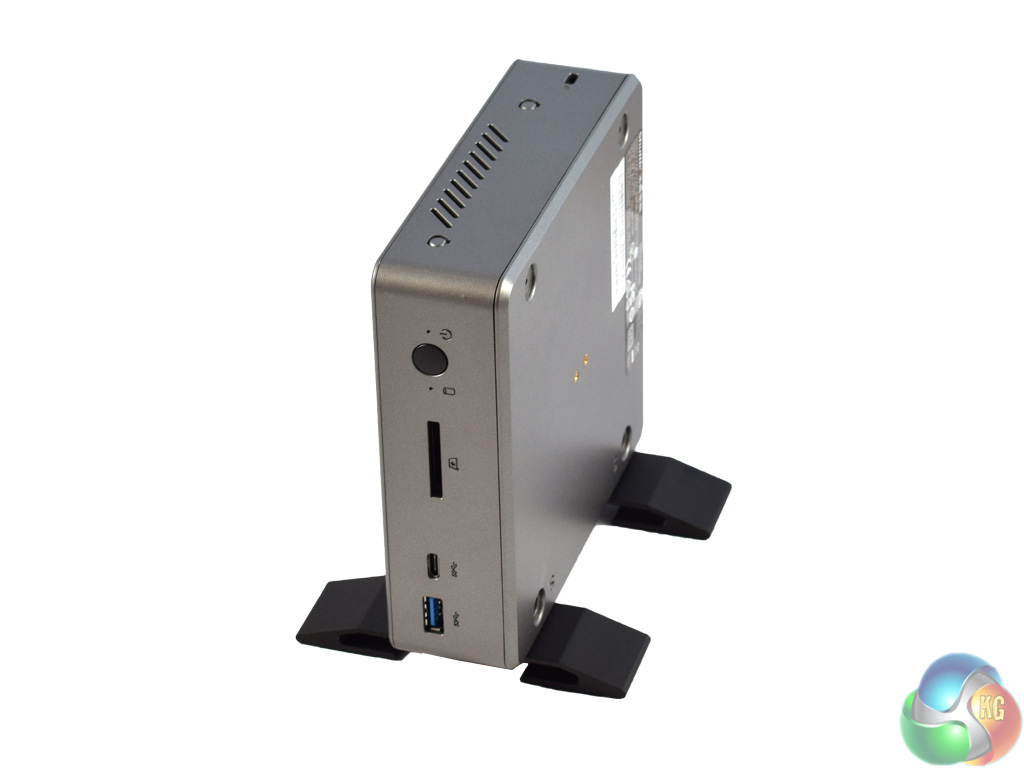
Before taking a look inside the NC02U5, I attached the pair of feet to demonstrate what it looks like. The four screws required are included in the box.
Personally, I would rather lay the device flat although it is good to have the option. It is worth noting that the VGA connection becomes inaccessible if you do attach the two feet, but I cannot see this being an issue for many people – VGA connectors are very dated now, and the vast majority of modern displays will support HDMI or DisplayPort inputs.
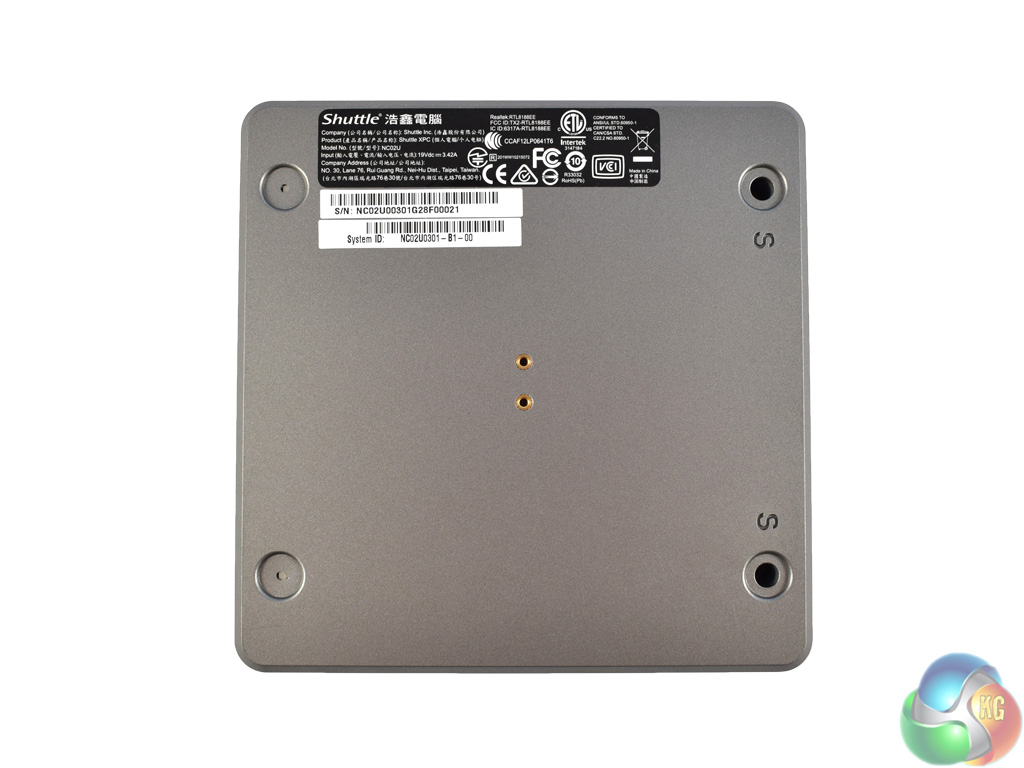
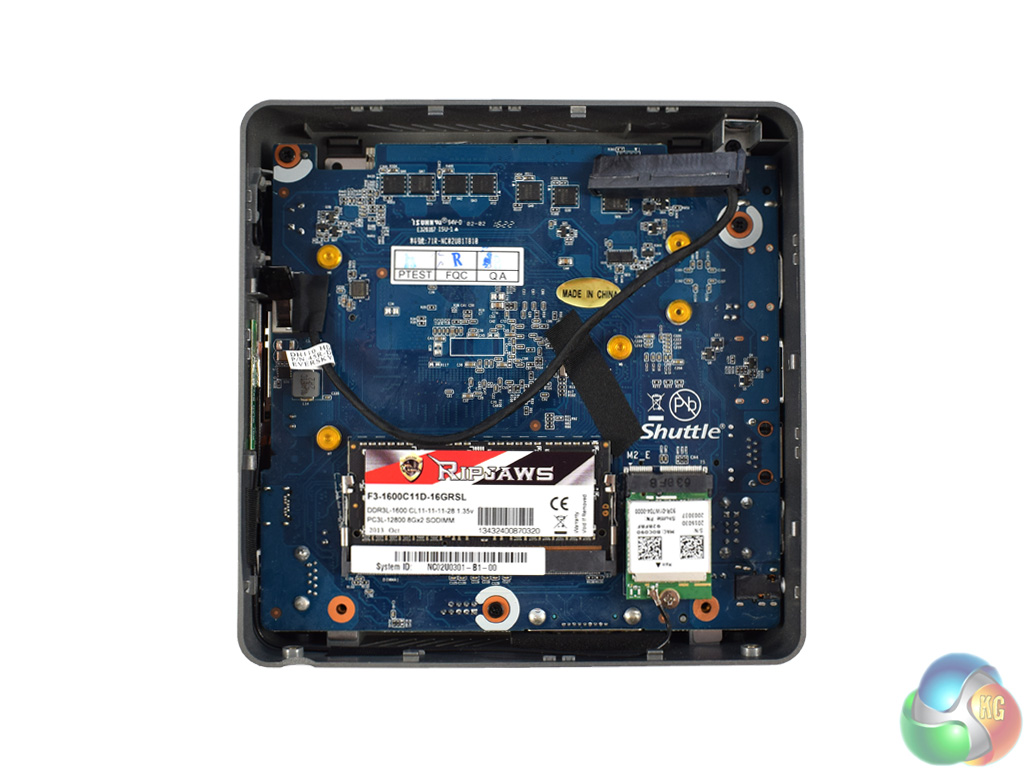
The image on the left shows the underside panel of the device. To gain access to the mainboard, only two screws need to be removed. Conveniently, they are a labelled with a small ‘s' – although it would be hard to miss them anyway.
Once you have popped off the panel, the underside of the mainboard is accessible. On this side, there is a single SODIMM slot and a small M.2 port which is occupied by the WiFi card. Also visible is a short SATA connector – this is for a 2.5in drive if you choose to install one.
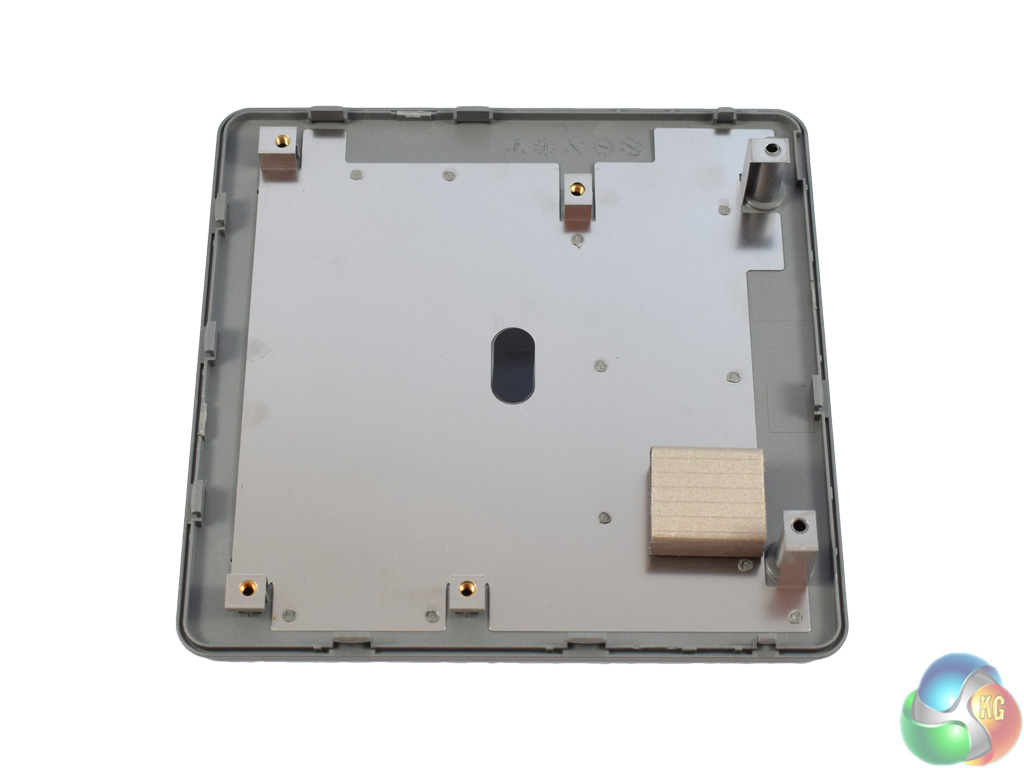
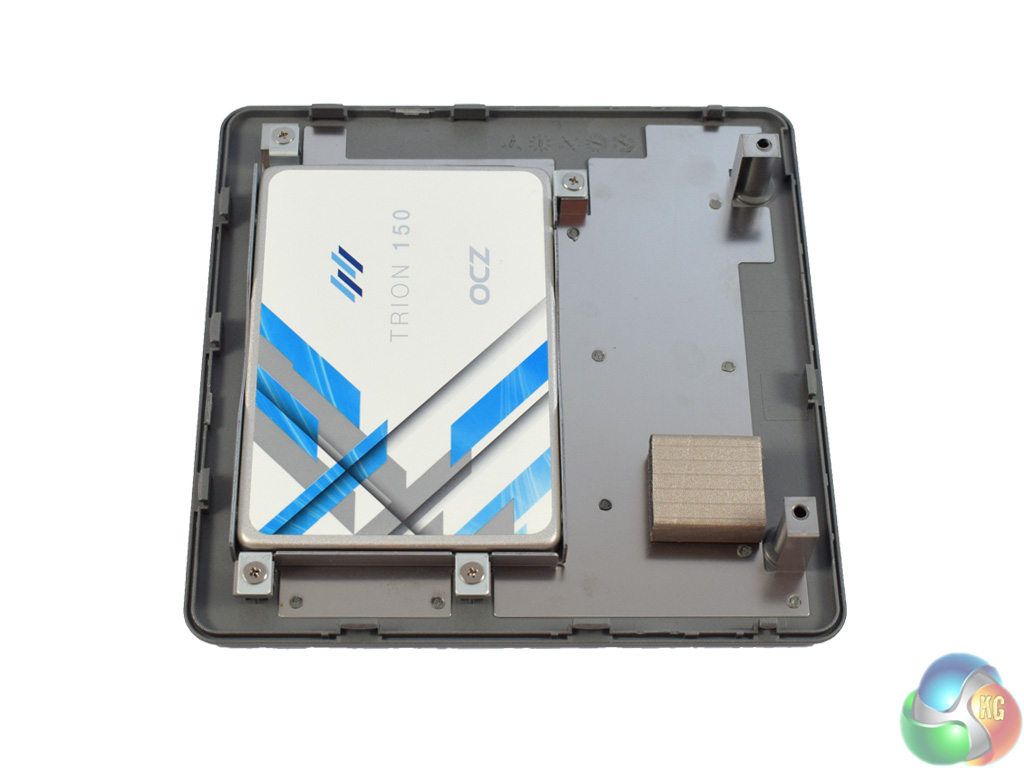
Before coming to the top-side of the mainboard, it is worth looking at how to mount a 2.5in drive to the NC02U5.
The underside panel has four screw holes which align with the included 2.5in caddy. First, secure your drive to the caddy using the four supplied screws. Next, the caddy itself can be mounted to the underside panel – from there, just connect the SATA cable.
This is a simple and convenient way of allowing more storage – 2.5in drives are typically cheaper and come in larger capacities than M.2 SSDs, so this could appeal if you want a large HDD but in a tiny form-factor.
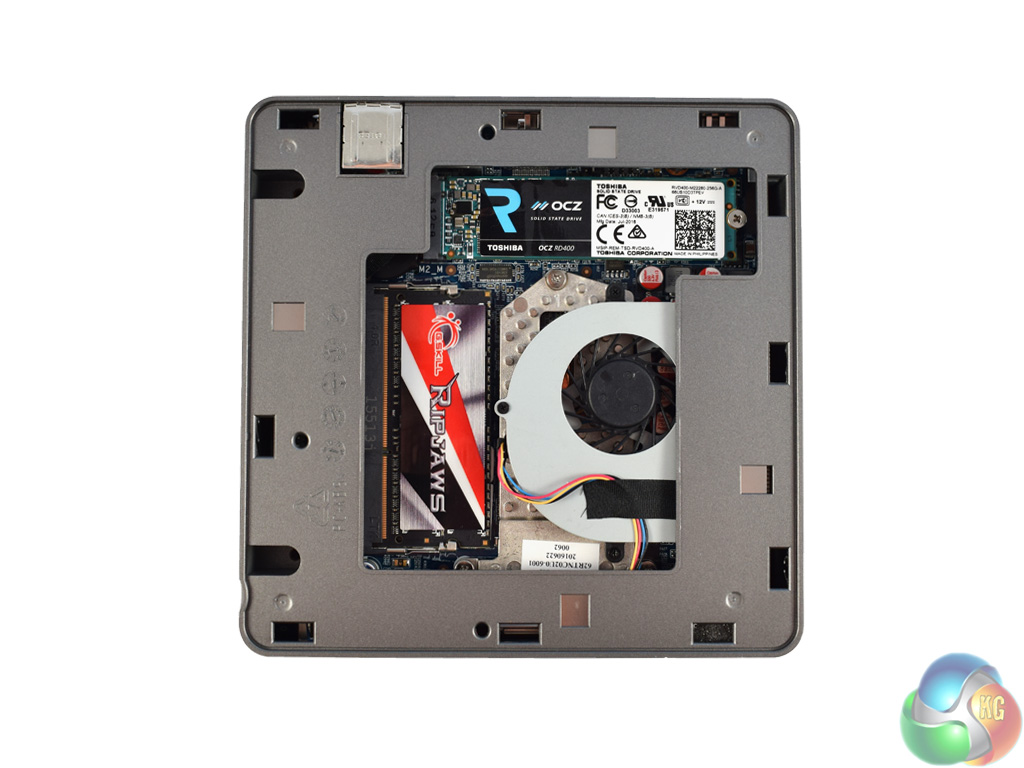
Lastly, the top panel can be removed (but only after the bottom panel has been unscrewed.) On top, there is the dedicated M.2 drive for storage, as well as the last SODIMM slot.
As this is a barebones kit, memory and storage is not included – the images above were taken after I populated the memory and M.2 slots. For the memory, I used a 16GB G.Skill Ripjaws kit, 1600MHz DDR3L. For my SSD, I installed a Toshiba OCZ RD400 drive – the review of which you can read over HERE.
It is also worth noting Shuttle do not provide any extra cooling for the M.2 slot. Gigabyte's BRIX i7A-7500, for example, includes a meaty thermal pad positioned just above the M.2 connector to avoid any thermal throttling. Later in this review we see if this exclusion of extra M.2 cooling results in any thermal throttling from our SSD.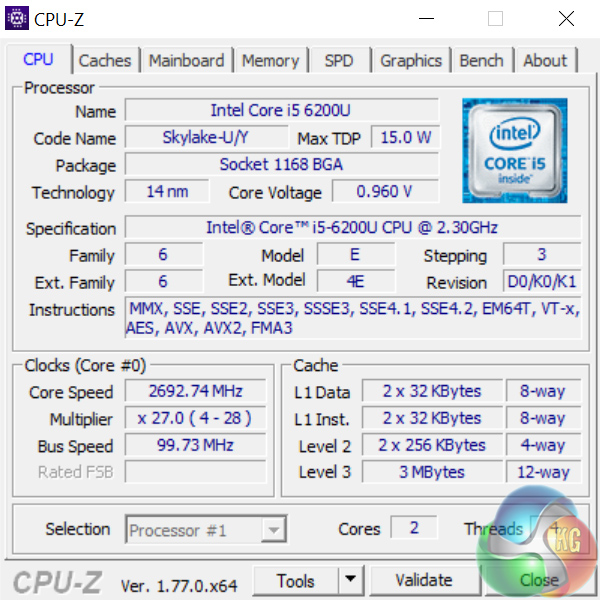
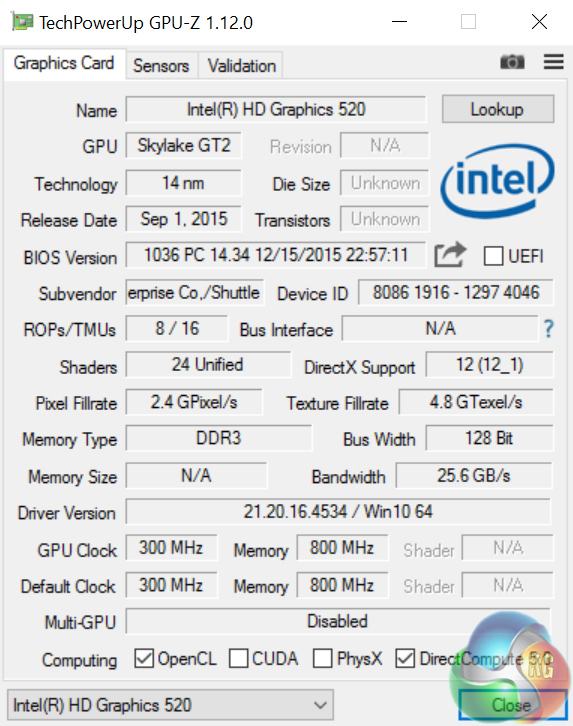
Above we can see an overview of the CPU and GPU (integrated graphics in this case) thanks to CPU-Z and GPU-Z respectively.
The i5-6500U is a Skylake processor – rather than Kaby Lake, which has started to hit the market in notebook form. It is dual-core, with a base clock of 2.3GHz which boosts to 2.8GHz. Given it is a ‘U'-series processor, denoting ‘ultra-low power', it has a TDP of just 15W.
Integrated within that chip is the Intel HD Graphics 520 technology. This has a low base clock of 300MHz, though it can boost as high as 1GHz.
Comparison systems
Today I will be comparing the XPC Nano NC02U5 with the following systems:
- Intel Core i7-6700HQ
- Nvidia GTX 960M
- 16GB Dual-Channel 1600MHz DDR3 RAM
- 128GB SSD + 1TB HDD
- Intel Bay Trail-M Celeron N2808 SoC
- Intel HD Graphics
- 4GB DDR3L RAM
- 64GB eMMc storage
- Intel Braswell N3050 SoC
- Intel HD Graphics
- 2GB DDR3L RAM
- 32GB eMMC storage
- Intel Core i3 i3-5010U
- Intel HD Graphics 5500
- 8GB Kingston SODIMM DDR3 1600MHz (1 x 8GB)
- 240GB Kingston V300 SSD
- Intel Core™ m5-6Y57
- Intel HD Graphics 515
- 8GB LPDDR3 1866MHz Memory
- 256GB Solid State Drive M2 2280 PCIe
- Intel Core i5-6500
- Asus Turbo GTX 960
- 8GB Corsair Vengeance LPX 2400MHz DDR4 RAM
- 500GB Samsung 850 EVO SSD
- Intel Core i7-6820HK
- Nvidia GTX 980 (desktop)
- 32GB DDR4 2400MHz RAM
- 2x 256GB Samsung SM951 PCIe SSDs in RAID0
- AMD FX-8320
- AMD RX-480
- 16GB DDR3 2133MHz RAM
- 240GB Adata Premier SP550
PCSpecialist Defiance III 17.3
- Intel i7-6700HQ
- Nvidia GTX 1060
- 16GB HyperX DDR4 2133MHz RAM
- 512GB SanDisk X400 M.2 SATA SSD
- Intel i7-6700HQ
- Nvidia GTX 950
- 16GB Crucial DDR4 2133MHz RAM
- 512GB Samsung Pro M.2 SSD
- Intel i7-7500U
- Intel HD Graphics 620
- 16GB G.Skill DDR4 2133MHz RAM
- 256GB Toshiba OCZ RD400 M.2 SSD
- Intel i7-6700K
- Nvidia GTX 1070
- 16GB Corsair Vengeance 3000MHz RAM
- 500GB Samsung 750 EVO SSD
- Intel i5-6402P
- Nvidia GTX 1060
- 16GB Corsair Vengeance LED 3000MHz RAM
- 256GB Intel 600p M.2 SSD
And lastly my personal desktop with a Core i3-4160, 8GB 1866MHz DDR3 and a GTX 960.
Test software
- SiSoft Sandra
- Cinebench R15
- Handbrake
- CrystalDiskMark
- ATTO Disk Benchmark
- 3DMark
- Prime 95 (version 26.6)
- CPUID HWMonitor
- AIDA64 Engineer
- PCMark 8
Finally, I also test with Tomb Raider (2013) to assess the graphical capabilities of the XPC Nano.Cinebench R15
To first test the i5-6200U processor, I ran Cinebench R15.
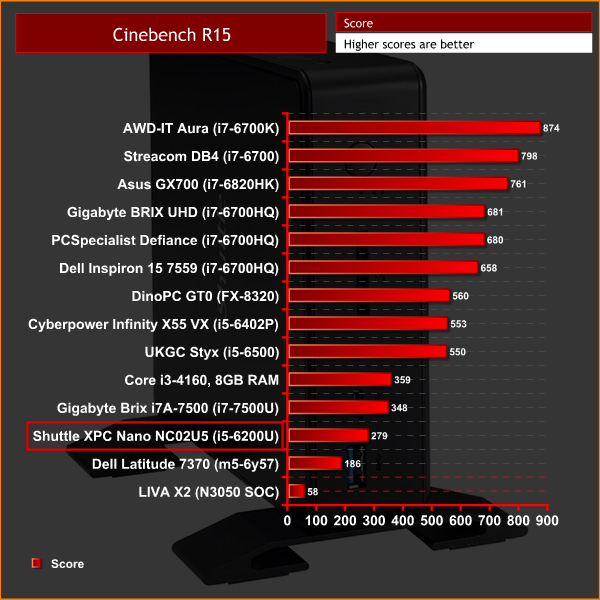
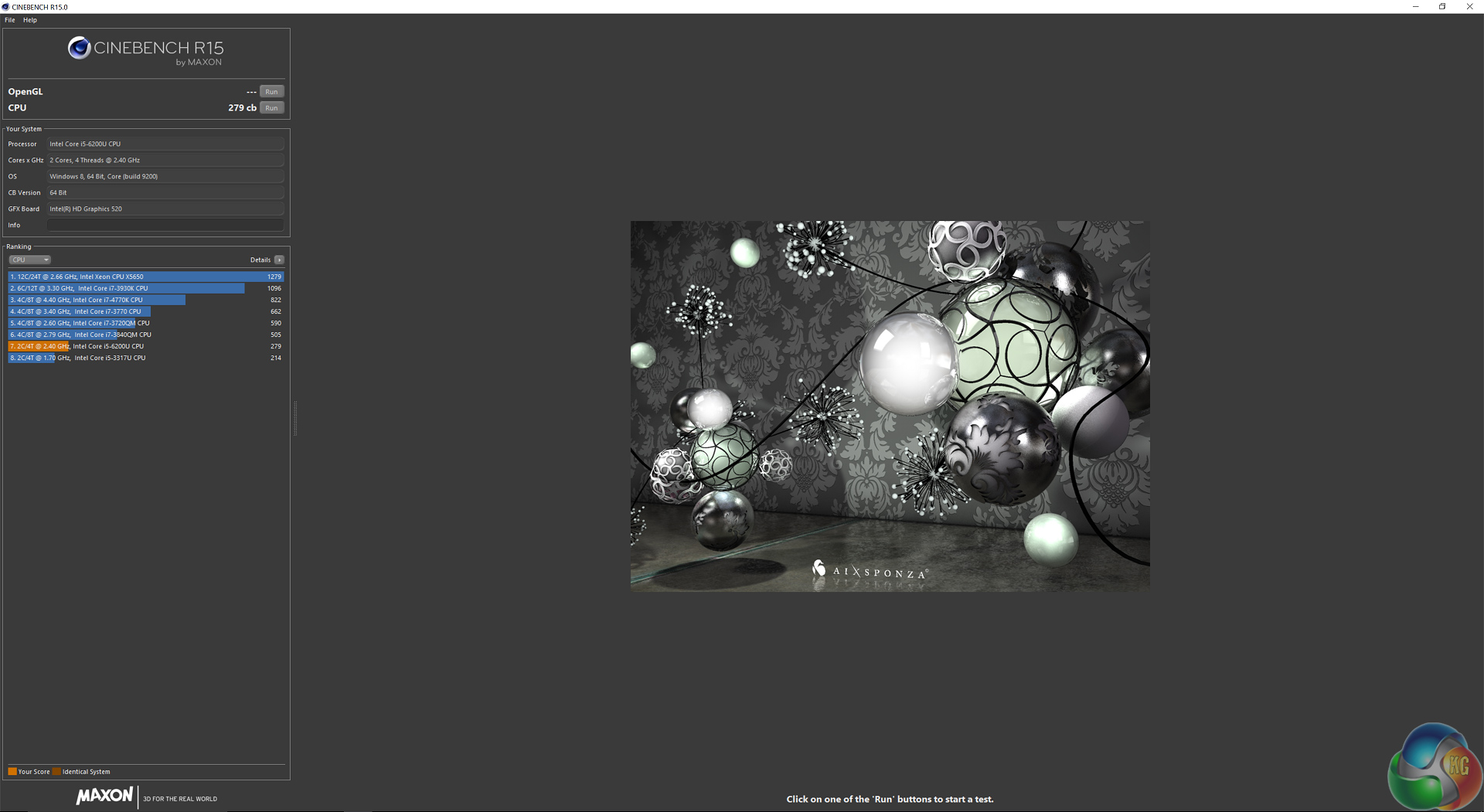
Interestingly, the Skylake i5 used here in the XPC Nano NC02U5 operates at about 80% of the speed of the latest i7-7500U – in Cinebench R15, at least.
Handbrake
Next, I ran Handbrake, where I ask the CPU to encode a 1.8GB full-HD video file, outputting it to the specifications as determined by the in-built ‘iPhone preset’.
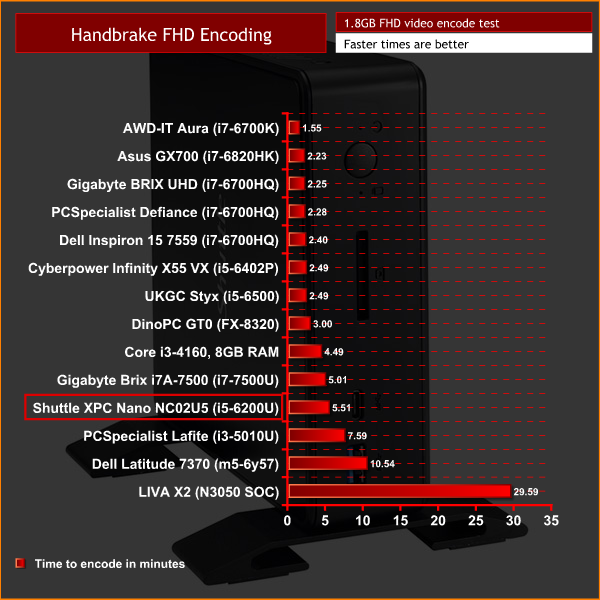
In Handbrake, the i5-6200U is also not too far off the newer i7-7500U. A total encode time of 5:51 is not breathtakingly fast, but it is decent for such a small device.
SiSoft Sandra arithmetic
The last test for the CPU, I ran Sisoft Sandra’s arithmetic test – a synthetic benchmark.
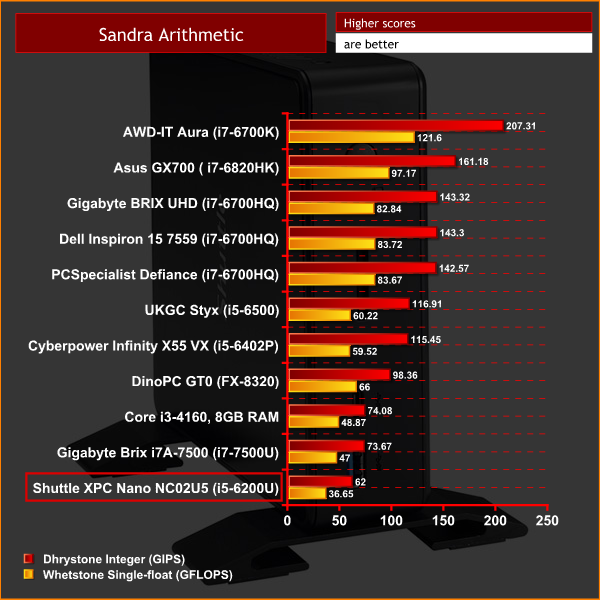
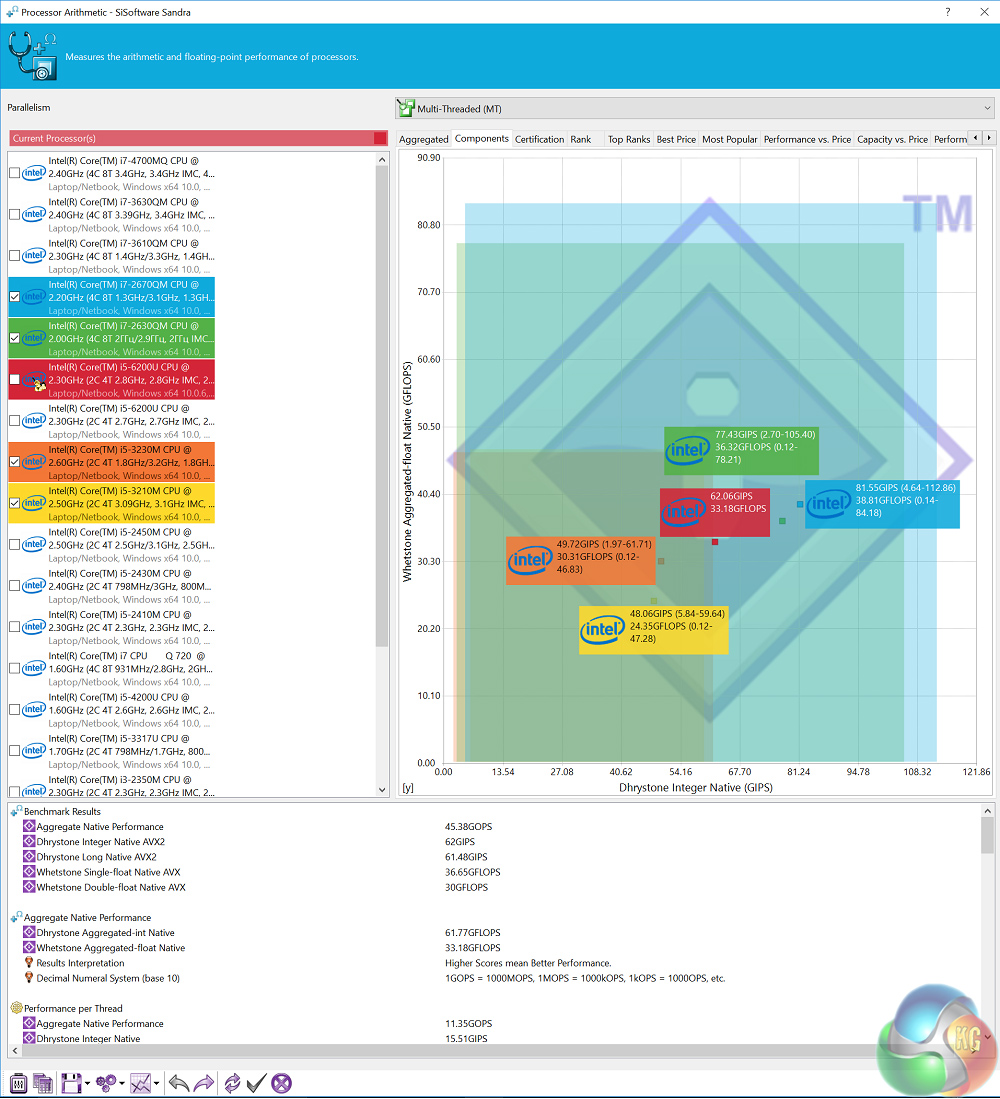
Lastly, Sandra Arithmetic follows the same trend we have already seen. The i7-7500U is obviously faster – but as both chips are dual-core with HyperThreading, the main difference in the results is due to the lesser clock speed of the i5 CPU.3DMark Fire Strike
To first test the integrated Intel HD Graphics 520, I ran 3DMark Fire Strike.
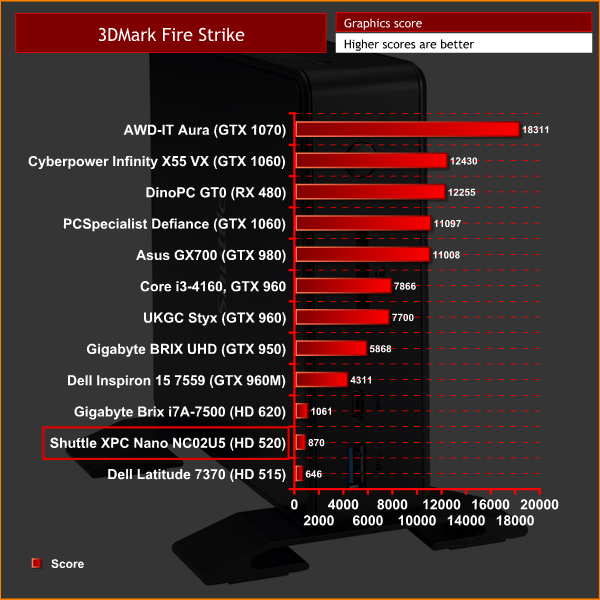
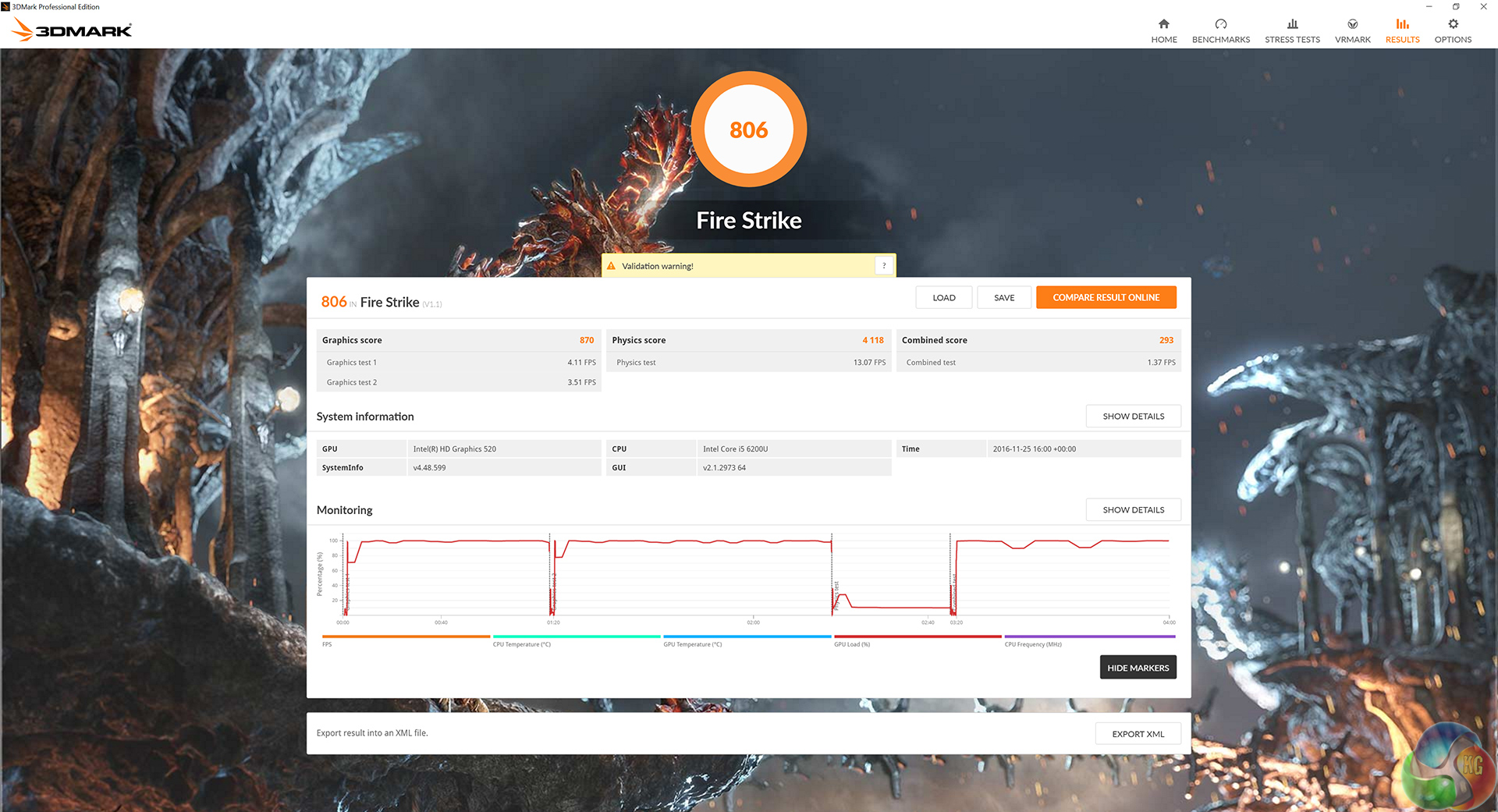
While only a couple hundred points behind the newer BRIX i7A-7500, in reality both scores are pretty low. Intel's integrated graphics have certainly improved over the years, but they are still a long way off from rivalling a discrete graphics card.
Tomb Raider
Lastly, to see how the NC02U5 got on with a less-demanding game, I ran Tomb Raider (2013), at 1080p using the ‘low’ image-quality preset.
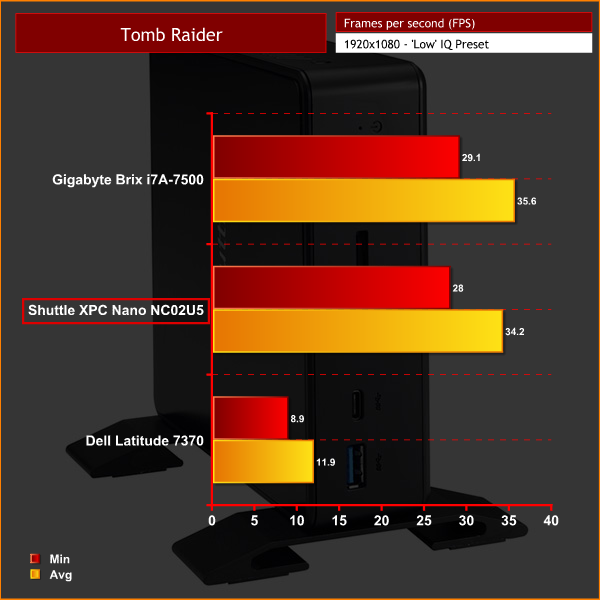
As with the Gigabyte BRIX, the results from Tomb Raider are semi-decent. I say ‘semi-decent' as the minimum of 28 FPS at low settings is still not very good. However, if you play Minecraft, for example, and are happy to tweak the settings, it is possible that the NC02U5 could do a job. That being said, we must stress that the XPC Nano NC02U5 is certainly not meant to be a gaming machine.PCMark 8
To give a general, overall score of the NC02U5's performance, I ran PCMark 8’s ‘Home Conventional’ test.
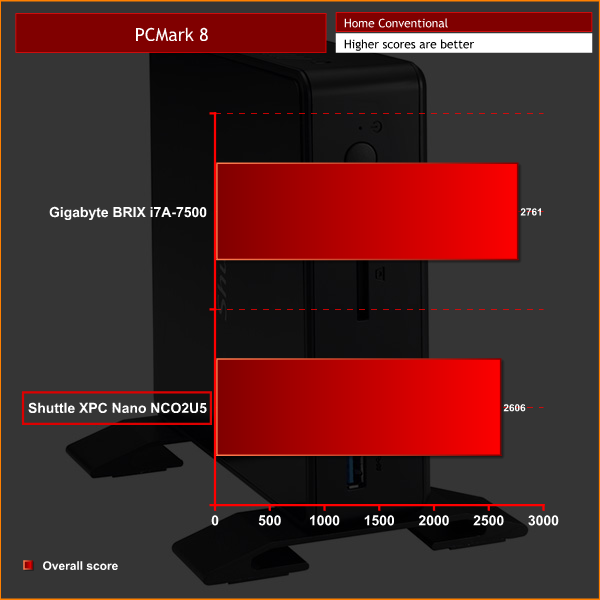
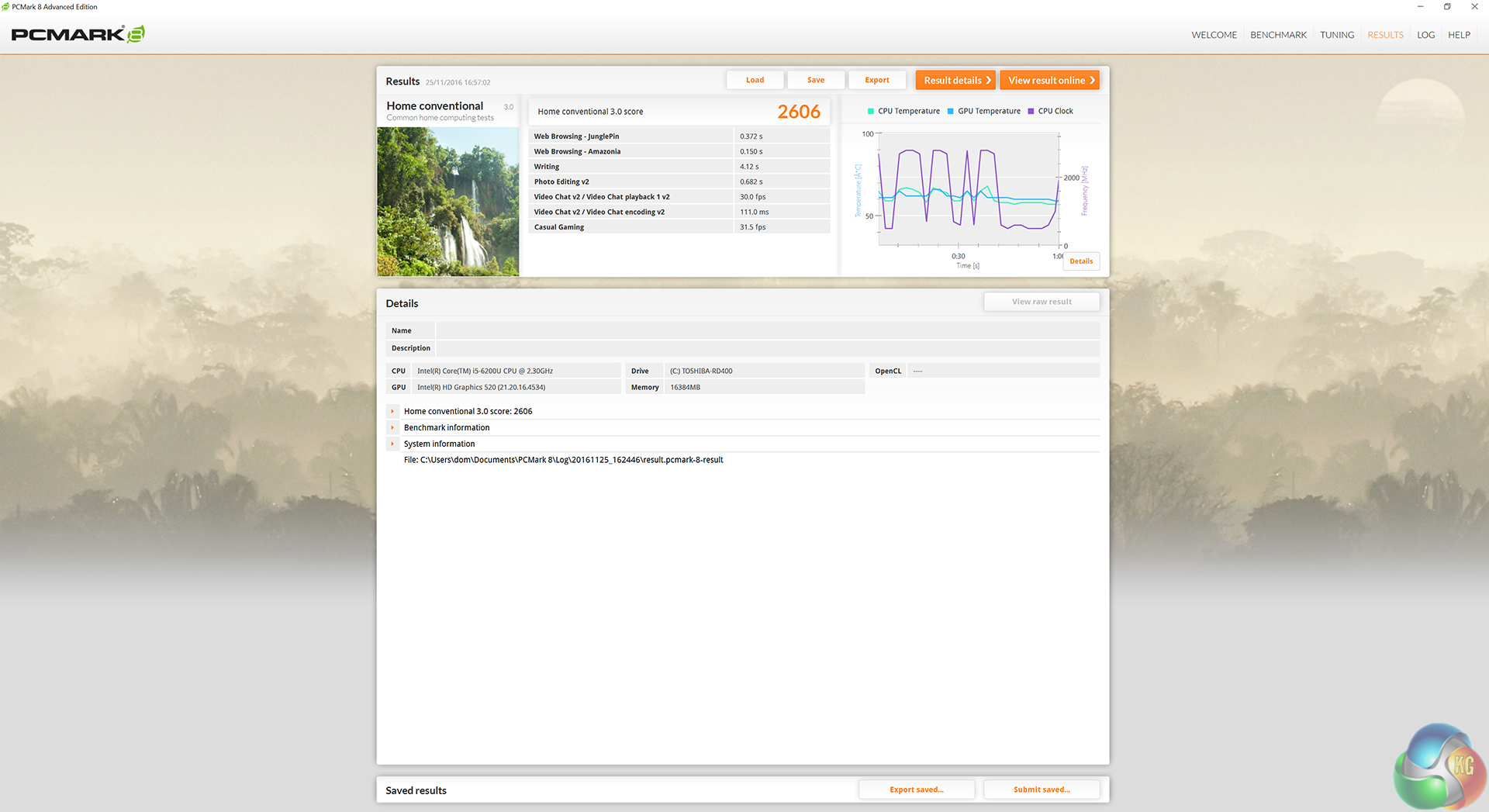
While I only have comparison data for the NC02U5 and the BRIX i7A-7500, we can see that both scores are very close. For general office tasks, the NC02U5 could be a decent option.
Memory bandwidth
As users have to supply memory for the NC02U5, I am not testing the speed of our G.Skill DDR3 kit. Rather, I am testing the memory bandwidth to ensure the 2x SODIMM slots on the NC02U5 are functioning properly.
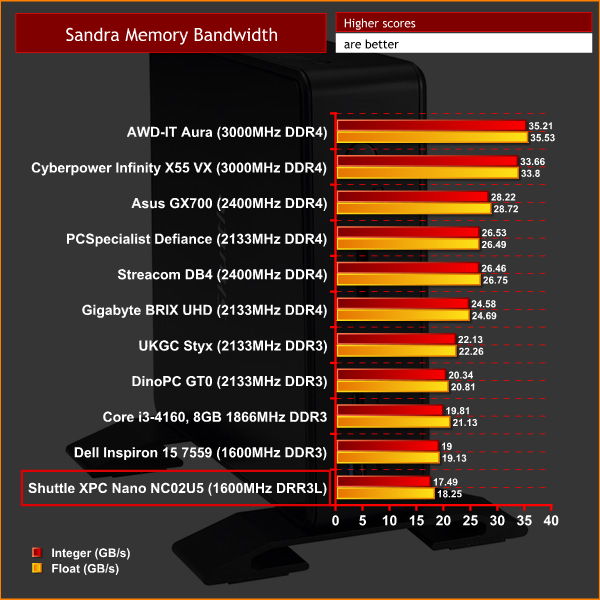
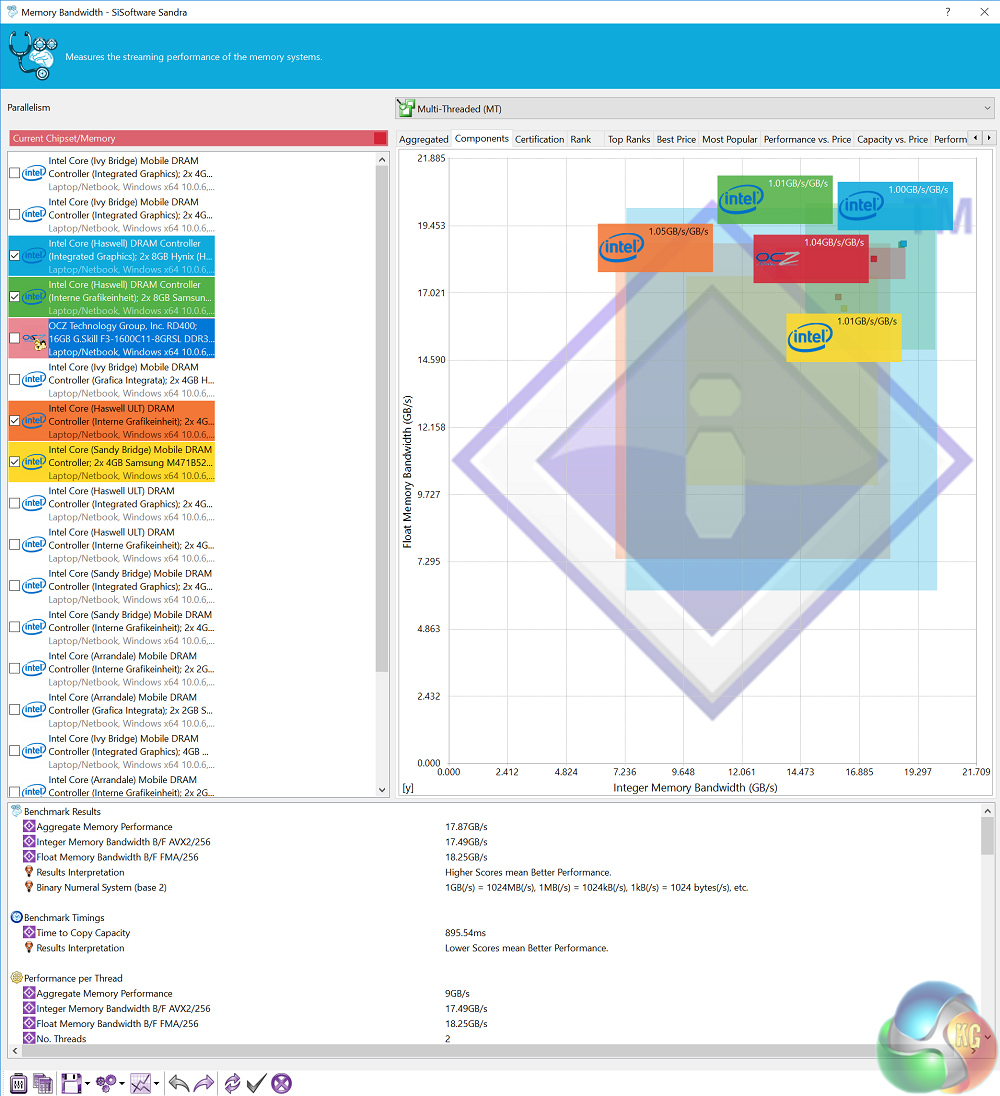
While the speeds are fairly low, this is to be expected from 1600MHz DDR3L memory. Nonetheless, both SODIMMs were correctly recognised and performed as expected.M.2 interface
As users need to supply an M.2 SSD (PCIe or SATA are supported), we are not testing the speeds of the Toshiba OCZ RD400 we installed ourselves. This test is to ensure the M.2 interface is functioning at its maximum speeds.
To test this, we benchmarked our PCIe, NVMe Toshiba OCZ RD400 using CrystalDiskMark and ATTO Disk Benchmark.

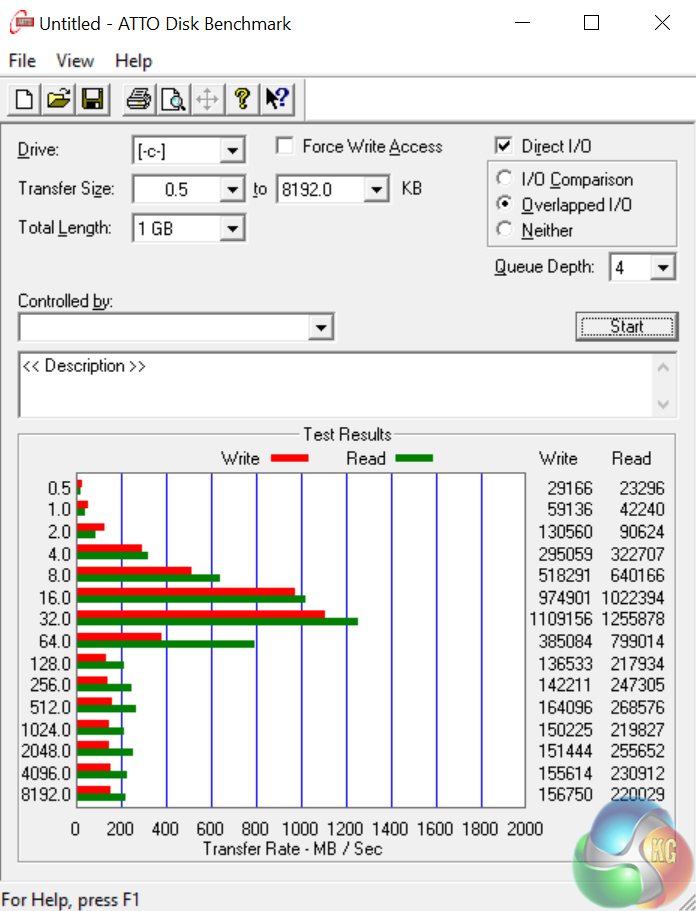
Unfortunately, using a PCIe M.2 SSD with the NC02U5 is problematic. This is because there is no additional cooling for the M.2 slot – and subsequently, thermal throttling occurred. This is made clear by looking at the results from ATTO Disk Benchmark – the results were clearly on an upwards trajectory until the SSD hit a certain thermal ceiling and the speeds quickly petered out.
This is very unfortunate, as it makes using the latest NVMe SSDs, for example, almost pointless in the NCO2U5.
USB 3.0
To test the NC02U5's USB 3.0 Type-A ports, I plugged in an OCZ Trion 150 SSD via a SATA-to-USB 3.0 5Gbps adapter, which uses the ASMedia ASM1053 controller. We reviewed the SSD HERE, finding it delivers good speed at a budget price. Most importantly, it is capable of saturating the USB 3.0 bus, allowing us to test the speeds the two USB 3.0 ports delivers. To test this, I ran both CrystalDiskMark and ATTO Disk Benchmark on the Trion 150 drive.
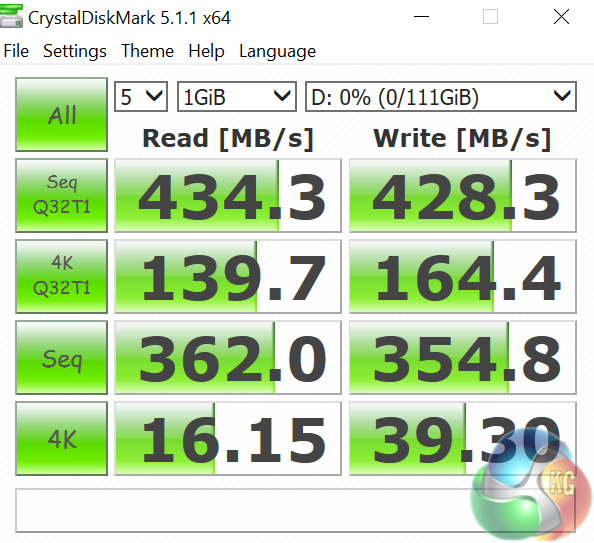
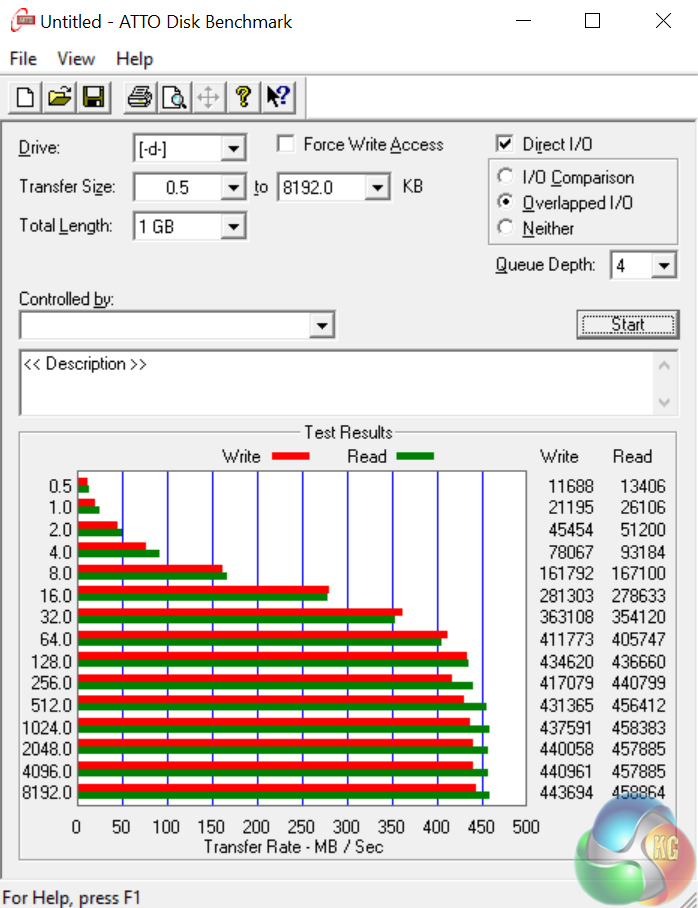
As you can see, the USB 3.0 ports have no problem operating right at the 5Gbps USB interface ceiling.Thermal dynamics
To find the NCO2U5’s idle temperature, I left Windows on the desktop for 30 minutes. The ‘load’ temperature reading comes from running Prime95 and 3DMark Fire Strike simultaneously.
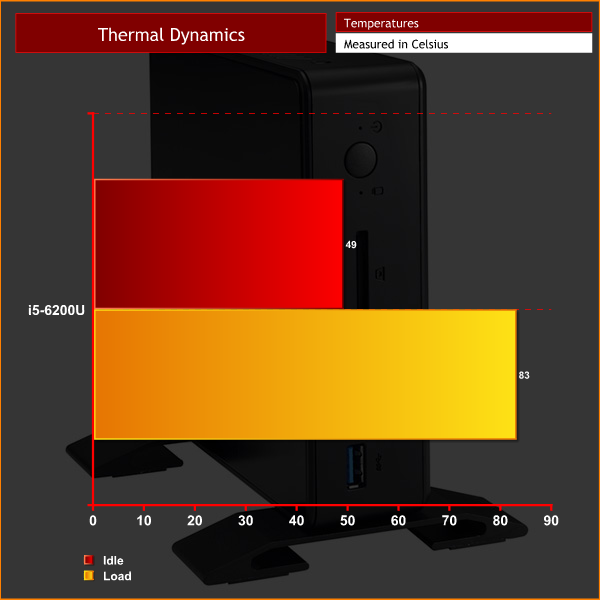
While the idle reading is a bit high for my liking, neither temperatures are dangerously high – which is about as good as it gets considering the tiny form-factor.
Acoustics
The high idle temperature is most likely due to the fact that the CPU fan does not spin very fast at all, and as such, it is very quiet. In fact, in the majority of situations, I could not hear the NCO2U5 over any background noise. It was only until I stressed the CPU to 100% using Prime95 that I heard the fan ramp up and it began to sound like a laptop getting too hot.
For most people, though, it is unlikely that the CPU will be stressed to that level – so you can expect a very quiet system.
Power consumption
To get the ‘idle’ power draw for the NC02U5, I left Windows on the desktop for 30 minutes. The ‘load’ power draw reading comes from running Prime 95 and Fire Strike simultaneously.
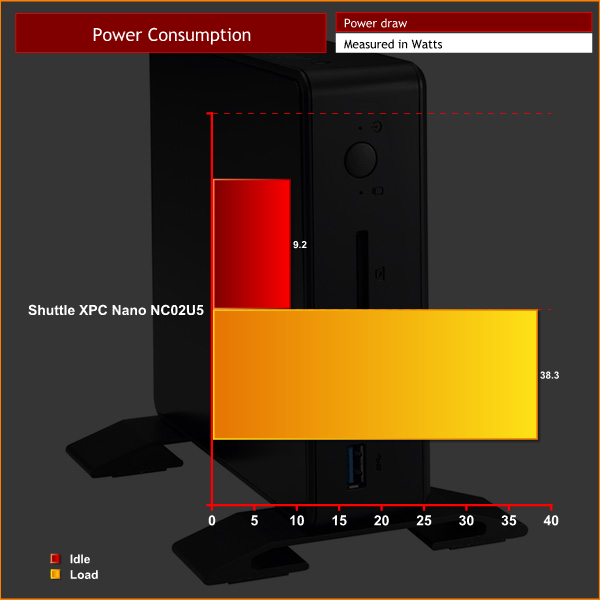
On their website, Shuttle list the maximum power draw one can expect from the NCO2U5 to be 36.4W when stressing the CPU and integrated graphics. Our testing essentially confirms this, as I measured a load reading of 38.3W.
This difference is certainly within the margin of error, and could also be accounted for by the fact that we used different testing methods. Either way, power consumption is very low and certainly nothing to be worried about.The Shuttle XPC Nano NCO2U5 is the fourth mini-PC I have reviewed in recent months.
What is most interesting about the NC02U5 is its support for 2.5in disk drives. Most barebones systems – including the brand-new Gigabyte BRIX i7A-7500 which we reviewed HERE – just support M.2 drives. Allow users to add in a large hard drive, for example, is a good way of creating a barebones system with a lot of available storage space.
That being said, the device itself feels a bit cheap. It is made entirely from plastic, whereas the BRIX i7A-7500 has a lovely brushed aluminium body. I have little confidence the NC02U5 could withstand a couple of drops, so if you do buy one, be careful with it.
Furthermore, our testing revealed a major issue with the device – it provides no extra cooling for M.2 SSDs, meaning our Toshia OCZ RD400 throttled once it reached speeds of around 1200MB/s. While this is partly due to SSD manufacturers not providing adequate cooling solutions for the drives out-of-the-box, it is common knowledge that the fastest NVMe drives throttle when they reach tops speeds. As such, Shuttle must accept some blame for failing to provide additional cooling. Gigabyte's BRIX i7A-7500, for example, includes a hefty thermal pad for M.2 SSDs.
Essentially, that comparison is one which keeps cropping up. The BRIX is smaller, subjectively better looking, definitely made of stronger materials, uses the latest Kaby Lake (instead of Skylake) CPUs and provides cooling for its M.2 slot.
As such, it is hard to recommend the NC02U5 over the BRIX i7A-7500. You may point out that the NC02U5 is around £350, while the BRIX I reviewed costs around £520. That being said, you can pick up a BRIX with an i5-7200U, instead of a i7-7500U, for around £400 (HERE) – which makes it a much better deal.
UK availability is currently scarce, but you can pick up the NC02U5 for £350.75 inc. VAT from Lambda-Tek HERE. The RRP is is £398.40 inc. VAT.
Discuss on our Facebook page, over HERE.
Pros
- Supports 2.5in drives.
- There is the option of mounting it vertically with included feet.
- Essentially silent at all times, except when under 100% load.
Cons
- No extra M.2 cooling means fast SSDs throttle.
- Construction is quite plasticky.
- Gigabytes' latest BRIX i5 is an all-round better option at a similar price.
KitGuru says: If you really want a 2.5in drive in a barebones system, then the Shuttle XPC Nano NC02U5 can do a job. However, at a similar price, the latest Gigabyte BRIX i5 is a better option thanks to its superior build quality, smaller size and extra M.2 cooling.