KitGuru KitGuru.net – Tech News | Hardware News | Hardware Reviews | IOS | Mobile | Gaming | Graphics Cards


We’ve seen Razer Blade laptops before, but nothing like the Blade Pro. This updated machine is designed to appeal to gamers and professionals in equal measure – and it does that by mixing superb design with high-end components. With the model in question being the slightly cheaper GTX 1060 variant, can the Blade Pro do enough in terms of price-to-performance? Let's find out.
The slick looks and powerful silicon is paired with a selection of tasty extras, too, including Killer-branded networking, a 120Hz IPS screen and an innovative repositioning of the keyboard and trackpad – but you’ll have to pay more than £2,000 for this slim, powerful machine. Can it possibly be worth it?

Specifications:
- OS: Windows 10 64-bit
- CPU: Intel core i7 7700HQ (2.8Ghz – 3.8GHz)
- Display: 17.3” 120Hz Full HD LCD in LED backlight 1920×1080 16:9
- Memory Supplied: 2 x 8GB
- Memory Type: DDR4
- Memory Speed: 2,400
- Max Memory Support: 32GB
- Graphics Chipset: nVidia GeForce GTX 1060
- Graphics Memory: 6GB GDDR5
- Storage: 256GB M.2 SSD
- Keyboard Type: Chiclet
- 1 Ports: 4
- HDMI Port(s): 1
- Microphone/headphone Jack(s): 1
- Card Reader: SD (XC/HC)
- Audio: 2.0 sound by Realtek
- Wireless LAN – Intel 2×2 802.11ac
- Bluetooth: V4.2
- Webcam: Full HD type (30fps@1080p)
- Warranty: 1yr RTB
Total cost £2,099 inc vat.
Razer’s latest machine is aiming to appeal to both workers and gamers, and the dual approach starts with the Blade Pro’s physical design.
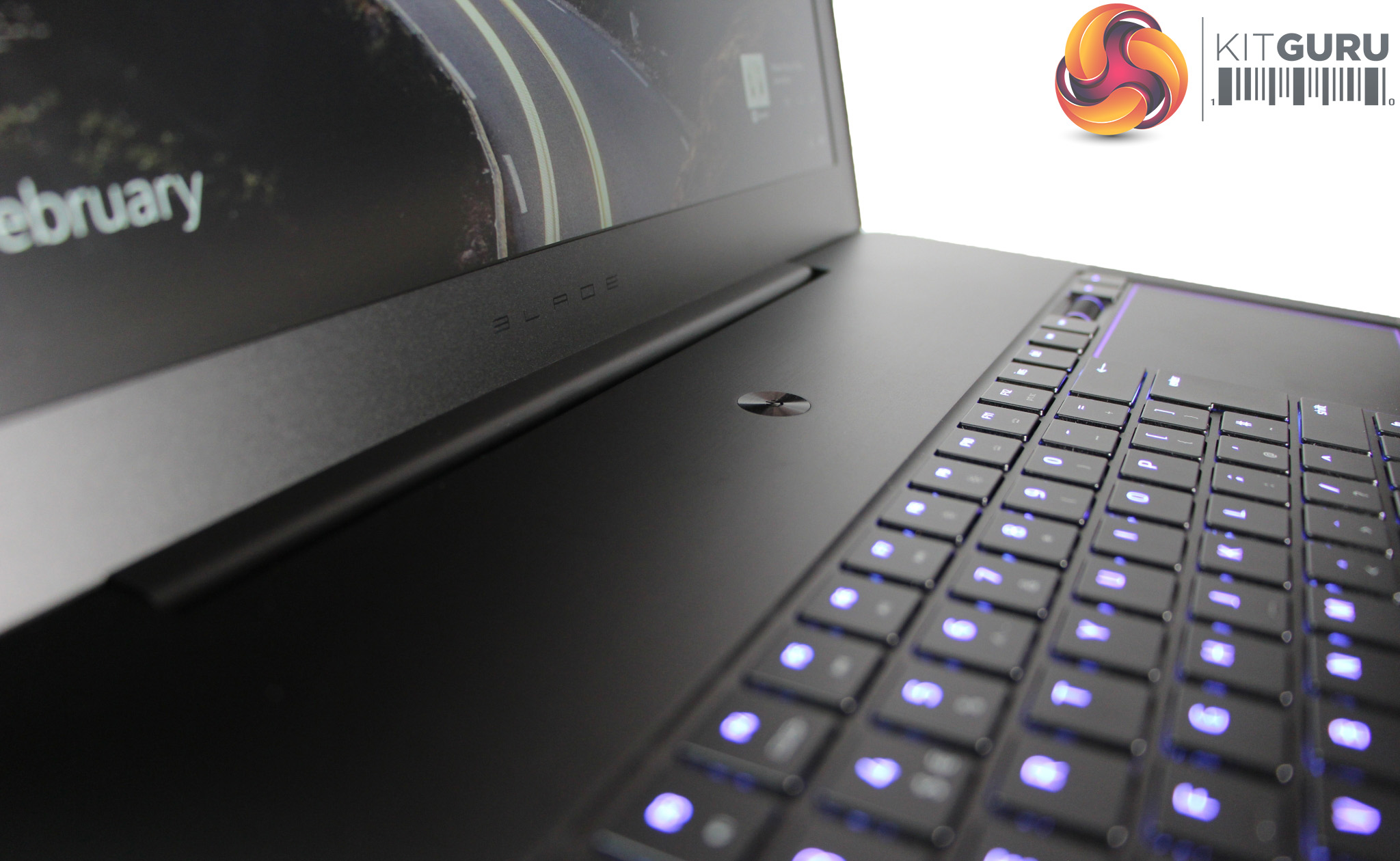
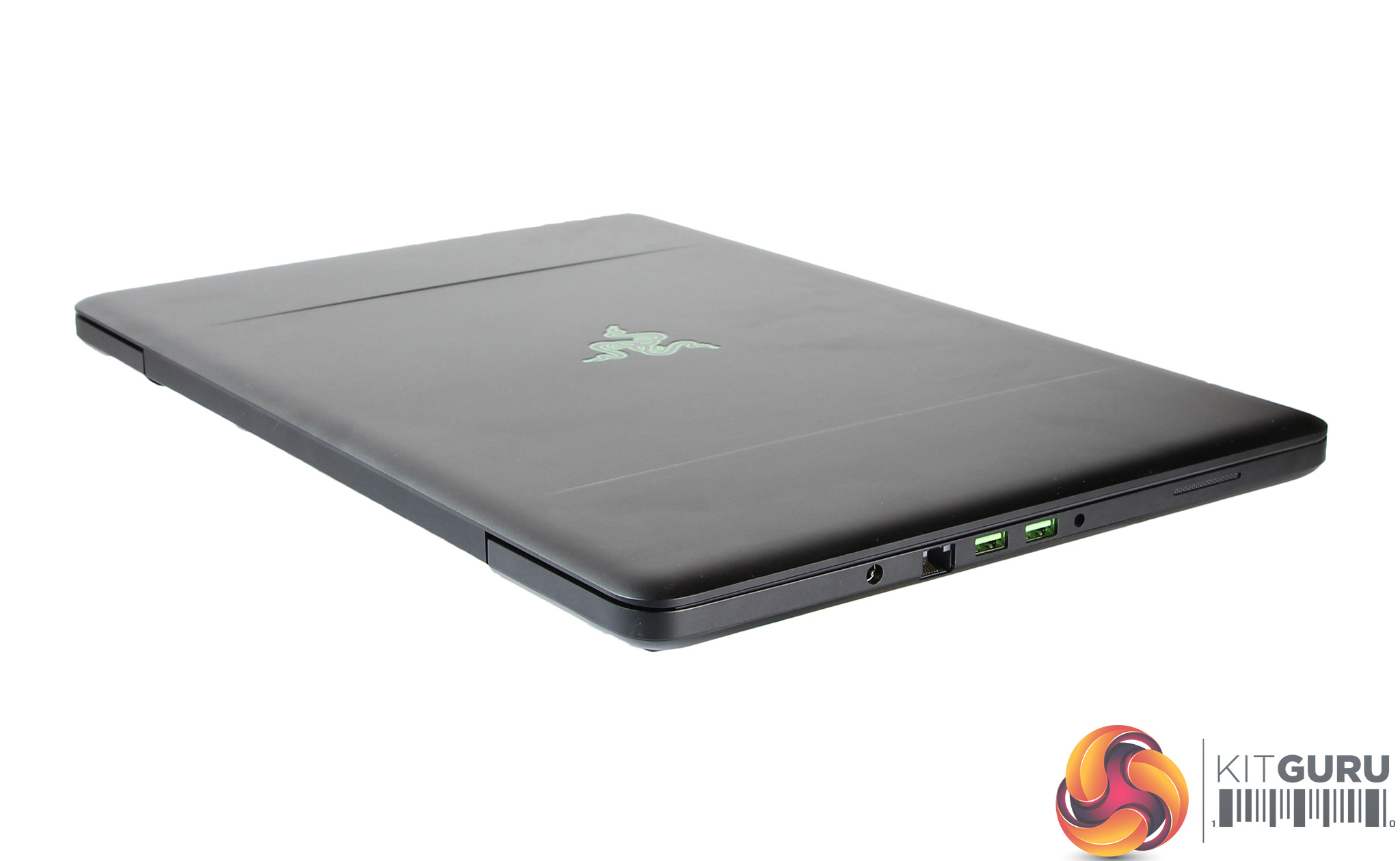
This machine has a sleek body that’s equally at home at a LAN party or an office. The Blade Pro is made from machined aluminium that’s got a smart, understated matte black finish. There’s not much ornamentation – you get the familiar green Razer logo and some subtle Blade text on the screen bezel, but that’s it.
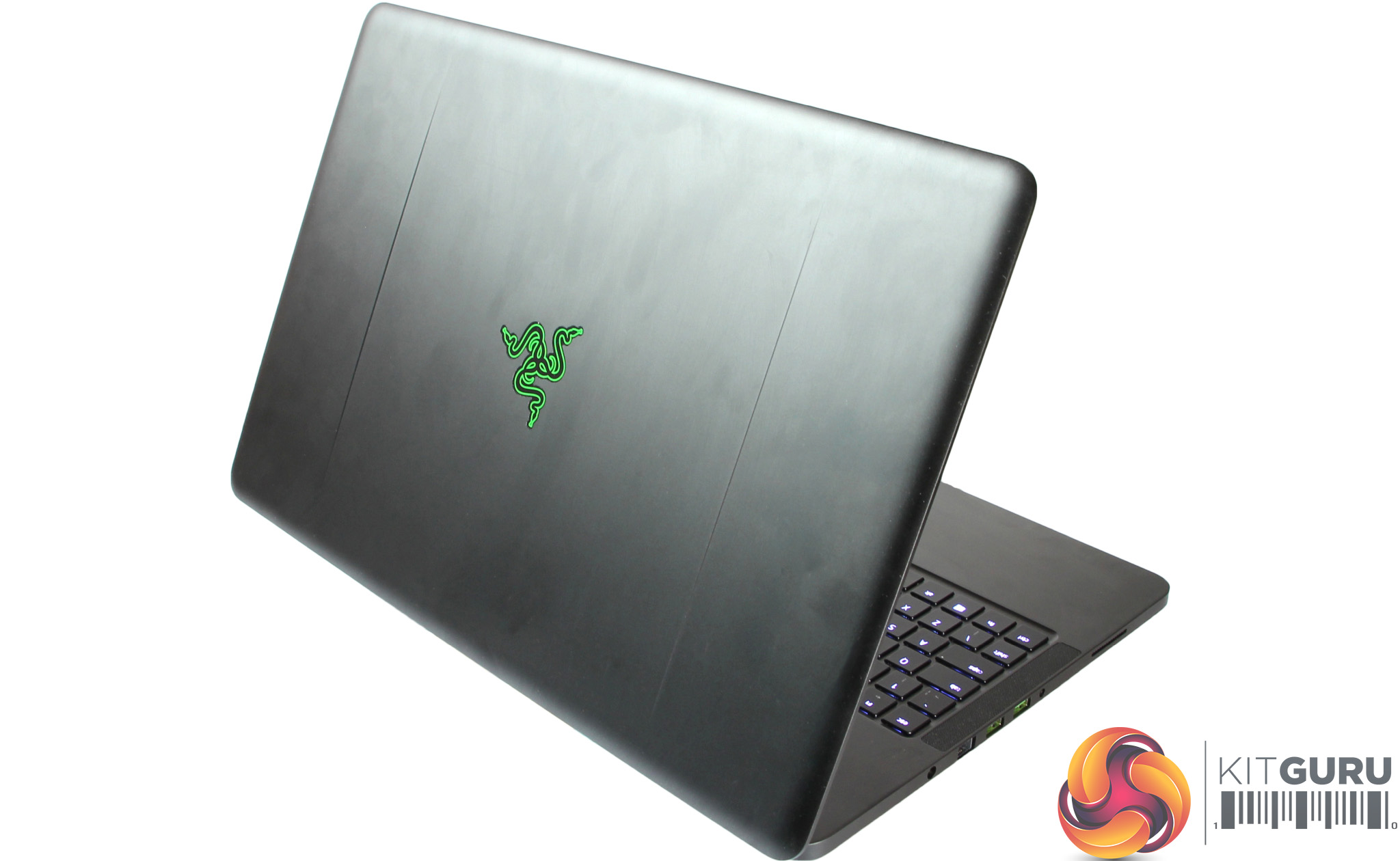
The Blade Pro has solid dimensions to pair with its good looks. It weighs 3.07kg, which is reasonable for a 17.3in machine, and it’s only 23mm thick – an excellent figure. That makes it a couple hundred grams heavier than the Asus ROG Strix Scar, the Razer’s main rival, though it is is a couple of millimetres slimmer.
So, when it comes to high-end 17.3in gaming laptops, the Razer Blade Pro has decent dimensions alongside a smart and subtle design. It competes with the Scar, and it’s also slimmer and lighter than other machines like the PC Specialist Defiance IV or Asus ROG GL702ZC.
The Blade Pro’s high-quality feel continues once we get to using the machine. The lid opens up smoothly on its well-balanced hinge, and build quality is excellent: there’s no give in any of this machine’s metal surfaces, and the screen is sturdy.
We’d still use a sleeve or a case to avoid any scuffs or scratches on the pristine metal, but the Blade Pro remains one of the strongest machines on the market.
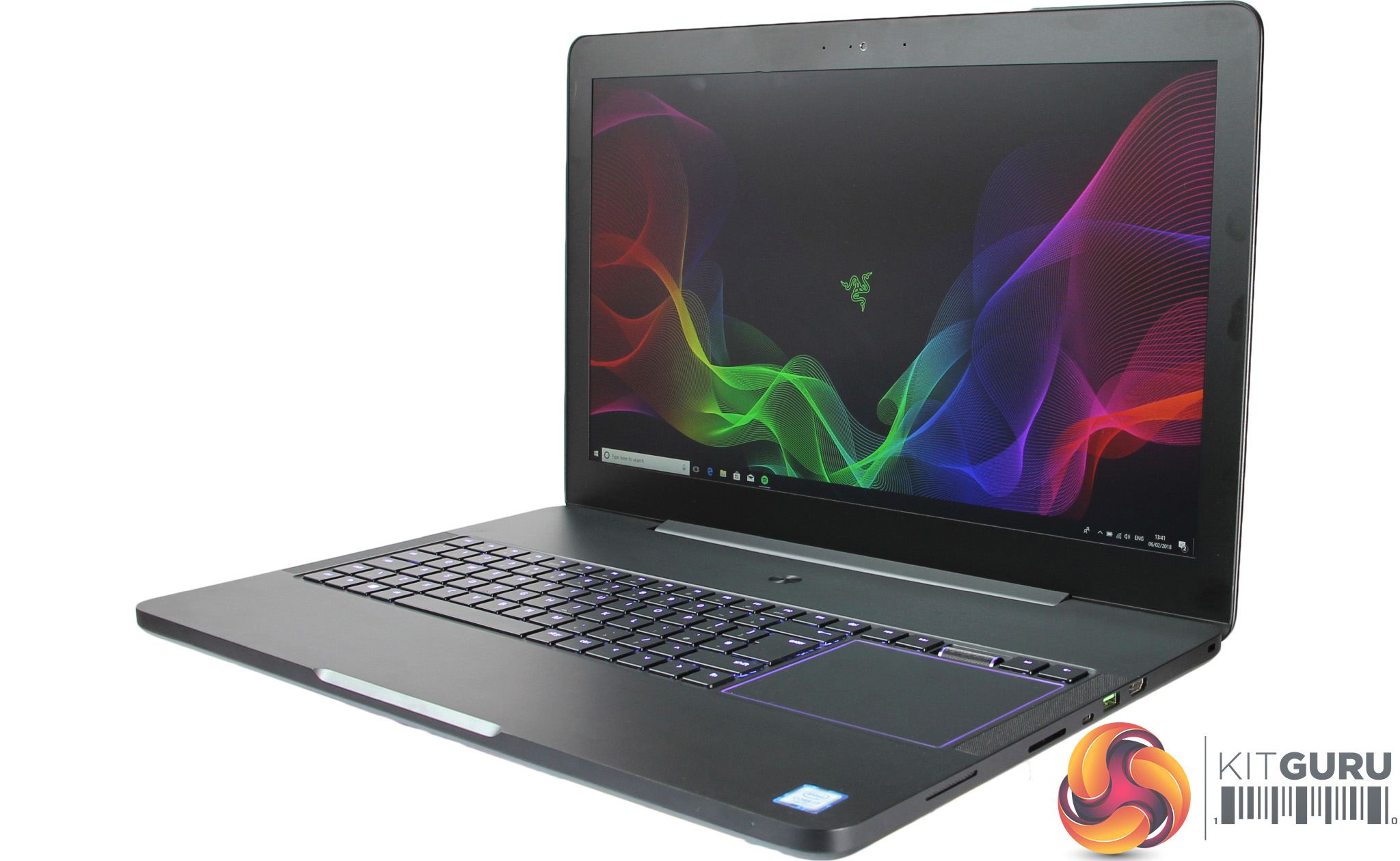
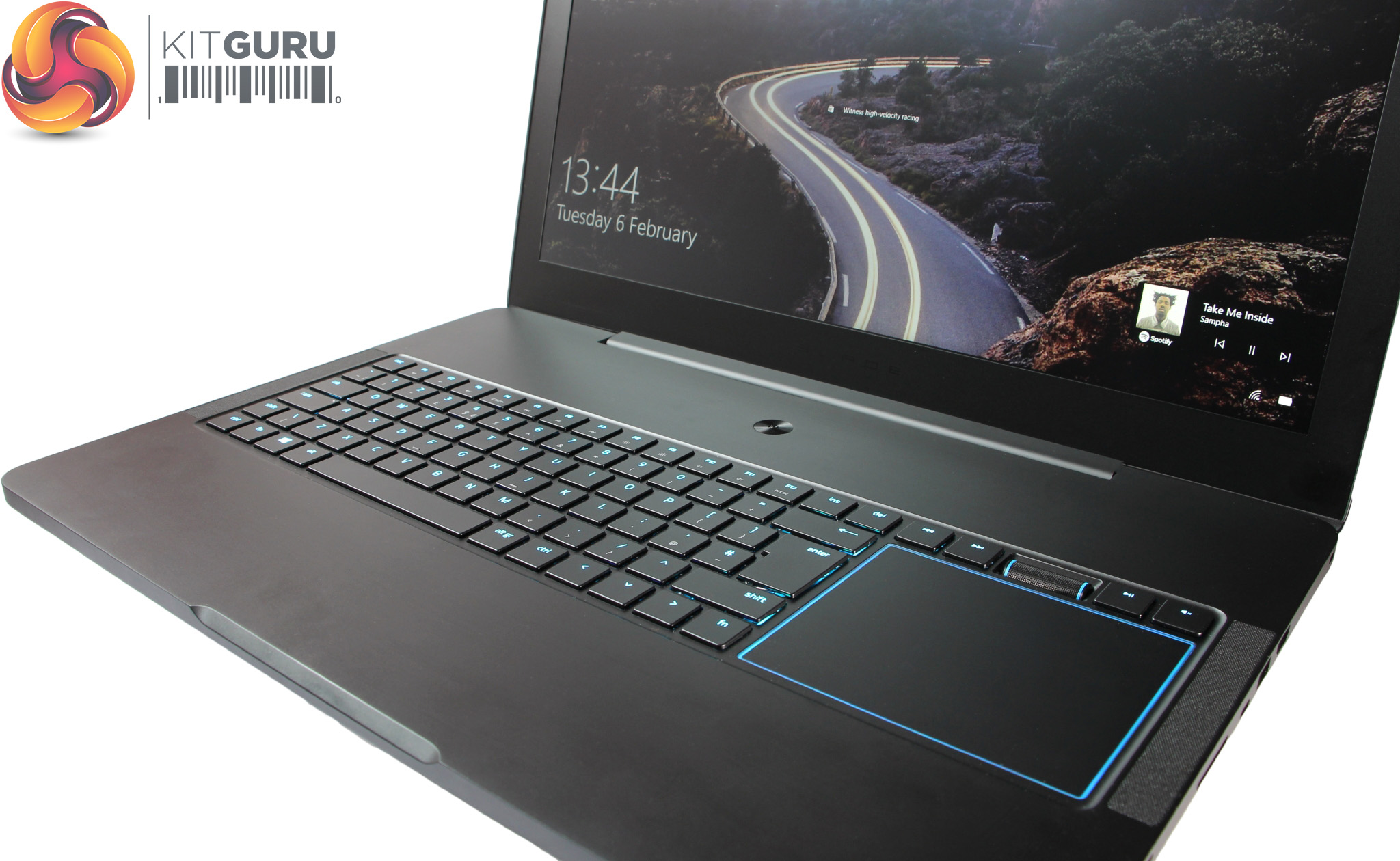
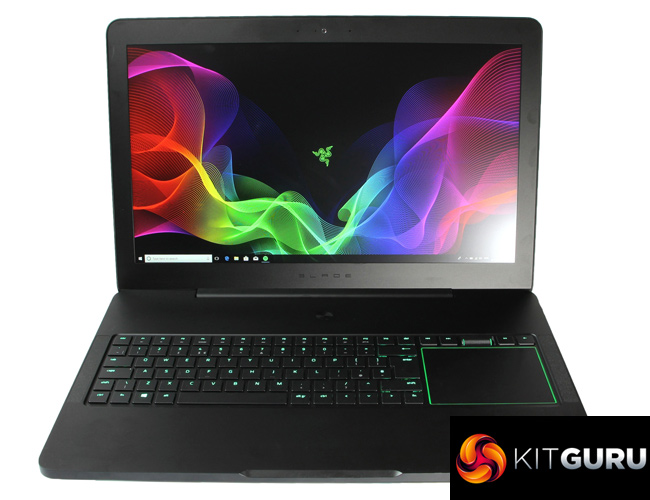
Open up the lid and you’ll see the Blade Pro’s big change. Instead of positioning the trackpad below the keyboard, Razer has slotted the pad on the right-hand side of the keyboard in order to mimic the way people work and play games when they’re sat at a desk.
The keyboard still takes up most of the base, of course, and there’s no room for a numpad. The trackpad is large, and surrounded by a ring of subtle RGB illumination, and at the top there’s a grippy scroll-wheel and four media buttons.
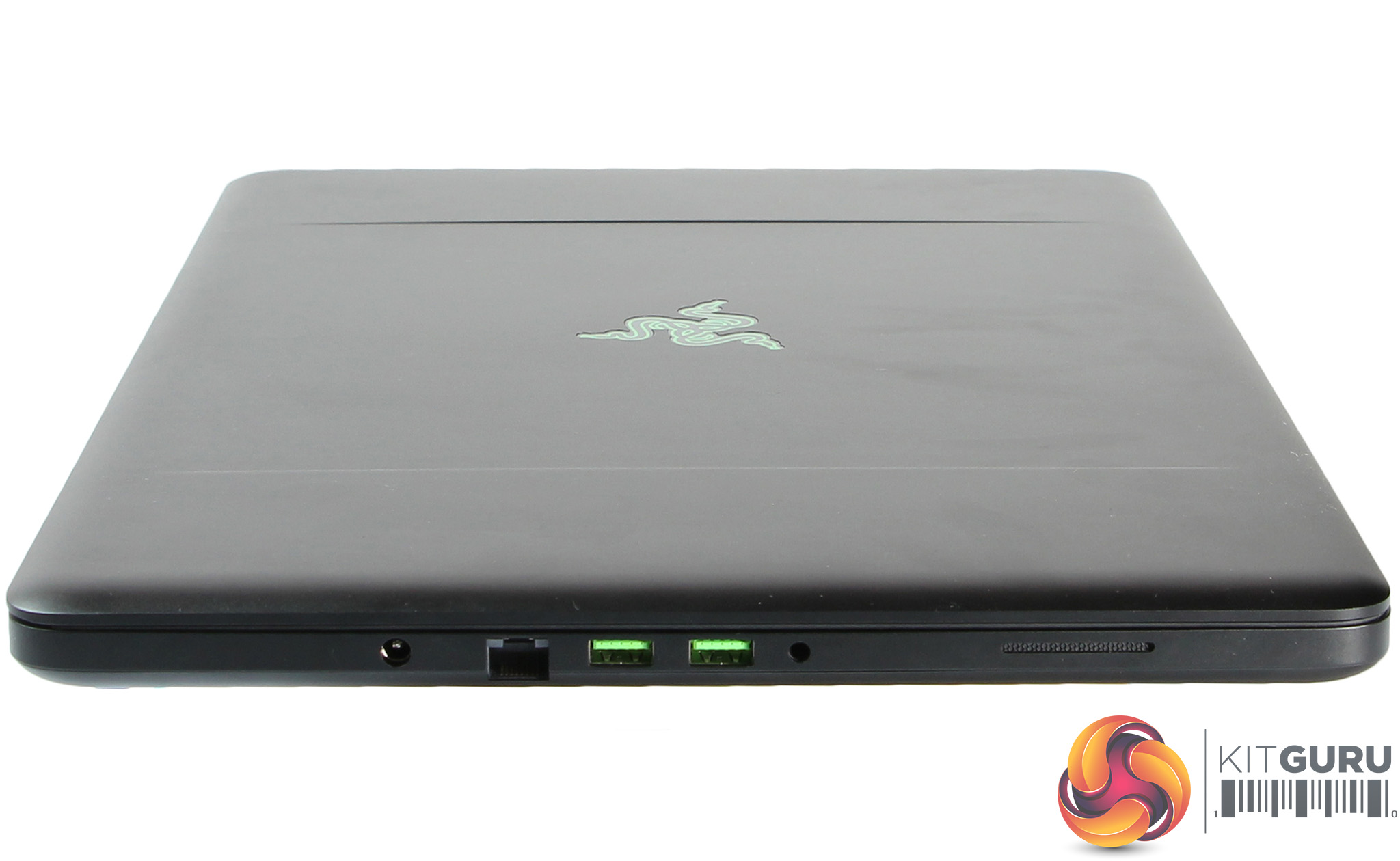
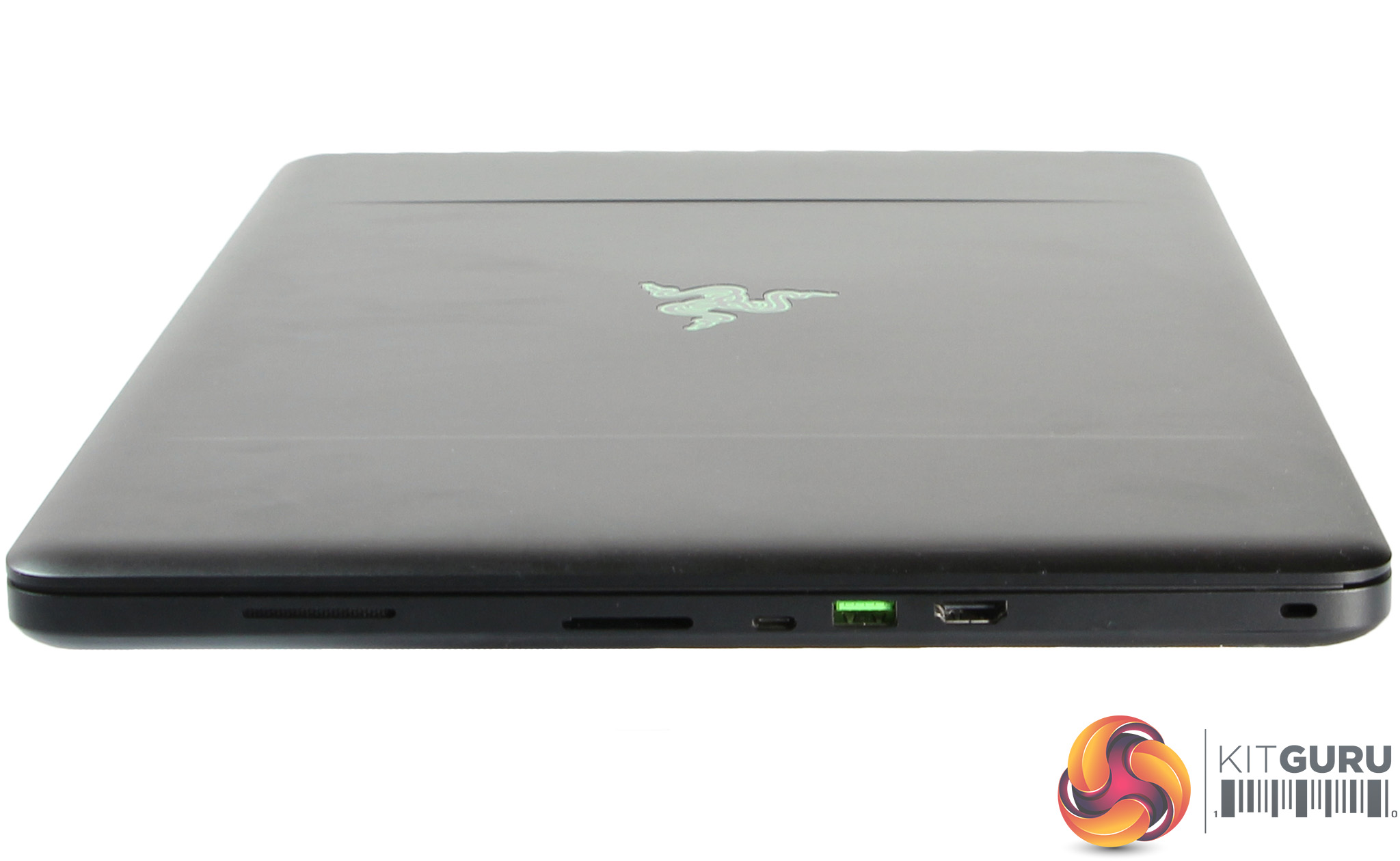
In terms of I/O, Razer’s machine serves up three USB 3.0 connectors, a card reader, one audio jack and an HDMI output. It’s also got one Thunderbolt 3 (Type-C) port. That’s OK, but the PC Specialist machine had a fourth USB port, two mini-DisplayPort outputs and three audio jacks in addition to what we’ve already mentioned here.
The Razer also loses out when it comes to internal access. It’s virtually impossible to open this machine up and there isn’t any expansion room. The PC Specialist, conversely, offered access to all of its internals for upgrades and cleaning.
That’s to be expected from a machine that’s slim, light and stylish, however. Razer’s system has the aesthetic design and the build quality to beat virtually everything else in the market right now, even if you’ll have to pay more for the privilege.
The GTX 1060 is one of Nvidia’s best mid-range chipsets. It’s clocked to 1,404MHz and can reach a boost frequency of 1,670MHz, while its 1,280 stream processors use the Pascal architecture. We’re also pleased that Razer has equipped the Blade Pro with the more powerful 6GB variant of the card – it’ll be quicker right now than the cheaper 3GB version, and it’s more future-proofed.
It’s a great chip for 1080p gaming, and it’s also found in the Asus ROG Strix Scar laptop. However, the Razer Blade Pro is much more expensive than the Asus, and its £2,099 price is also undercut by the PC Specialist notebook – even though that laptop has a GTX 1070 GPU instead of the GTX 1060 found in the Blade Pro.
The i7-7700HQ is a familiar chip that’s also found inside the Asus Scar and PC Specialist laptops. It’s no wonder that it keeps getting picked for powerful portables, as it’s got four Hyper-Threaded cores and a stock speed of 2.8GHz that boosts to 3.8GHz.
It’s not Coffee Lake, but that hardly matters in a larger laptop like this. The Core i7 chip will still have ample speed, and battery life probably won’t be great anyway, especially when the Blade Pro makes do with just a 70Wh power pack.
Razer has paired the processor with 16GB of 2,400MHz DDR4 memory, a 256GB Samsung PM951 SSD and a 2TB hard disk. We have no complaints there: the storage is plentiful and its dual-channel memory arrangement will be quicker than the single-channel memory included in the PC Specialist and the AMD-powered Asus machine.
Connectivity is fine, too, with dual-band 802.11ac wireless and Gigabit Ethernet provided by gaming experts Killer.
One other thing to note is that the Blade Pro is a big-brand, mainstream system, so it doesn’t have the wealth of customisation options that PC Specialist can offer. That’s an issue if you’d like to fine-tune your machine’s specification.
However, Razer does sell one alternative version of the Blade Pro. The beefed-up model has a 4K screen with 100% Adobe RGB reproduction and multi-touch, and the sharper panel is powered by a GTX 1080 graphics core and an overclocked Core i7-7820HK processor. It’s also got 32GB of memory and larger storage options. You’ll have to pay for it though: that model costs a mighty £3,800.
And that, really, is one of the larger issues with the Blade Pro. We have no qualms with the Core i7 processor and GTX 1060 graphics core for 1080p gaming and the vast majority of work tasks, but most machines that include this kind of hardware are much cheaper than the Blade Pro.
Some of them have better warranties, too. Razer's laptop is protected by a one-year deal, while PC Specialist equips its laptops with a superior three-year deal.
The Razer’s keyboard and trackpad arrangement is initially disarming. We spent a good amount of time dragging our fingers down to where the trackpad is usually found, beneath the keyboard, and the arrangement means the keyboard shifts a little to the left – so we initially missed quite a few keystrokes, too.
Once you’ve acclimatised, there’s a lot to like about the Blade Pro’s revised design. The trackpad’s right-hand position mirrors how right-handed people use a computer, and the keyboard’s buttons are still full-size, with a double-height Return key and dedicated media buttons.
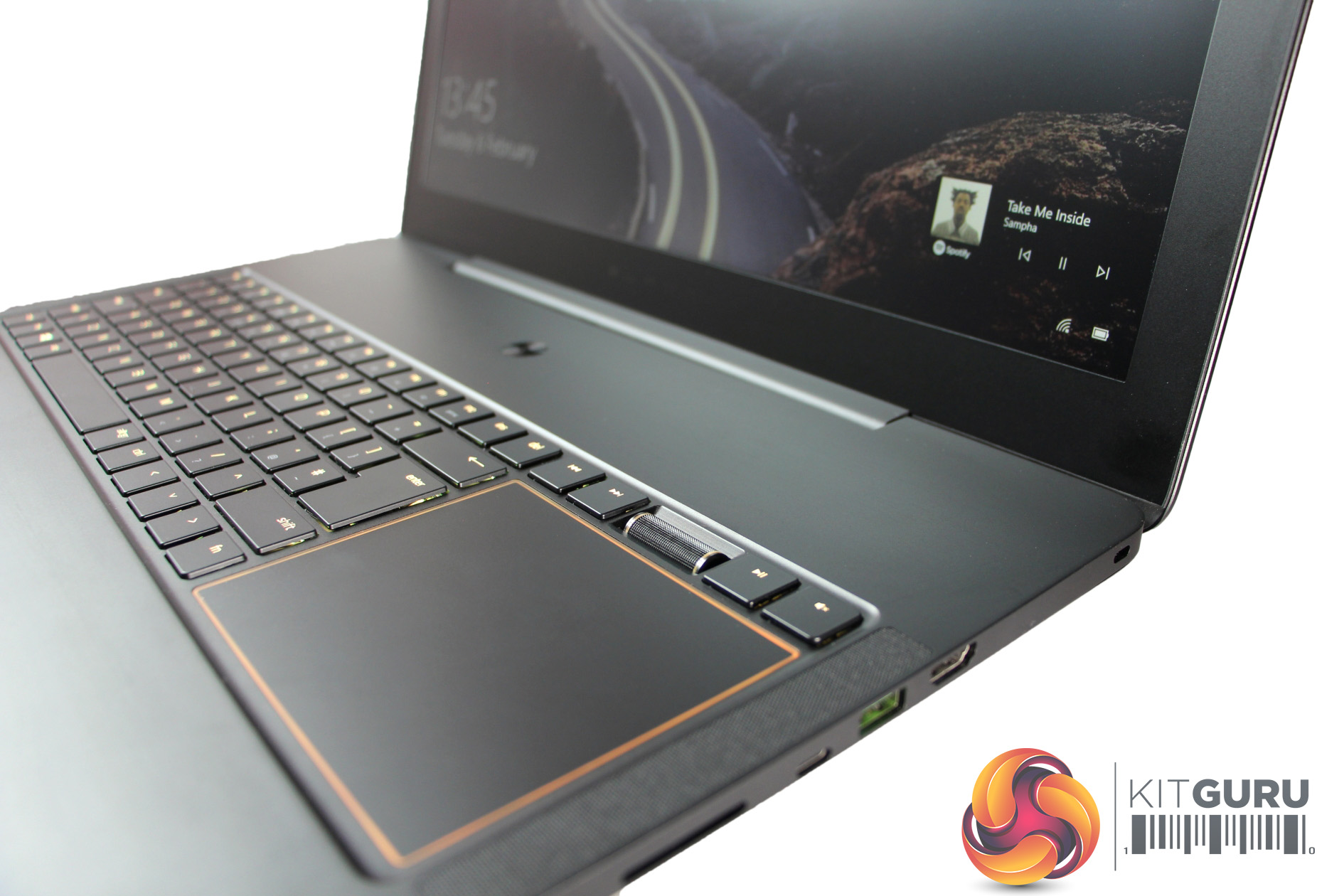
The keyboard itself is a typical chiclet unit, with keys that are consistent and comfortable. They’re reasonably quiet, and their satisfying action is paired with individual RGB LEDs that can be customised in software.
The keyboard is fast and consistent, but it suffers from the usual chiclet problems – the same issues that afflicted the PC Specialist and the Asus Scar. While the keys have attributes that are superb in the office and when fast typing is required, the relative lack of travel and the softer, quieter typing action mean that the keyboard does fall short in particularly frantic games.
That’s not a problem unique to the Blade Pro – almost every gaming laptop on the market suffers similarly. And, pleasingly, the trackpad is excellent, with a large, smooth surface and in-built buttons that are fast and shallow enough for most games. Only the keenest of competitive gamers will want to connect a USB mouse.
There’s also plenty to like about the Razer’s screen. Its Full HD resolution is paired with an IPS panel underneath, and it has a matte finish plus a 120Hz refresh rate. Those are all good attributes, but we are a little disappointed that there’s no sign of Nvidia G-Sync. It’s a little unusual for a prestige portable like this, and it means that games will not be as smooth as they could have been with GPU frames and screen refresh rates synchronised.
It’s a similar situation to the Asus Scar and PC Specialist machines, which both have 120Hz refresh rates but no synchronising technology. On these machines you’ll get smooth gaming if you use V-Sync and have games running at nearer to 120fps, but you’ll still experience a little tearing.
Still, the screen has a good specification, and it’s bolstered by solid benchmark results. The Razer’s brightness level of 372cd/m2 is huge, and almost 100cd/m2 higher than the PC Specialist – so there’s enough backlight power to handle bright lights and even the great outdoors.
The excellent brightness level is joined by a good black point of 0.24cd/m2, which is almost as solid as the PC Specialist’s figure. That means that dark areas in games will be suitably deep, which bodes well for moody games and films.
The contrast ratio of 1,550:1 is stonking and helps create plenty of vibrancy and detail across the entire sRGB spectrum.
The Blade Pro returned more ordinary scores in colour tests. While its colour temperature figure of 6,763K is reasonable, the Delta E of 4.7 and Gamma of 2.12 are average. The screen also only rendered 86.2% of the sRGB colour gamut.
Those aren’t disastrous results, though, and they only mean that the Blade Pro won’t handle the most colour-sensitive tasks. For the vast majority of work applications, and for games, it’s easily good enough.
The good screen is joined by solid speakers. The Blade Pro produces reasonable bass despite its lack of subwoofer, and there’s a clear mid-range and a well-defined high-end that is never too tinny or distorted. A headset will be better, of course, but this audio gear is definitely good enough for games and movies.
To test the Razer Blade Pro, we have pushed it through our standard array of benchmarks and tests. We have tested CPU performance, GPU performance, drive performance, thermals, power usage and battery life to give a comprehensive view of the laptop.
Here are the benchmarks you can expect to find in this review:
- Cinebench R15
- CrystalDiskMark
- 3DMark Fire Strike
- 3DMark Fire Strike Extreme
- 3DMark Time Spy
Given that this laptop does have a discrete GPU inside, we also tried some 1080p gaming at high settings on:
- Deus Ex Mankind Divided
- Rise of the Tomb Raider
Here are the machines we’ve used for comparisons against the Razer Blade Pro:
CINEBENCH R15 is a cross-platform testing suite that measures hardware performance and is the de facto standard benchmarking tool for leading companies and trade journals for conducting real-world hardware performance tests. With the new Release 15, systems with up to 256 threads can be tested.
CINEBENCH is available for both Windows and OS X and is used by almost all hardware manufacturers and trade journals for comparing CPUs and graphics cards.
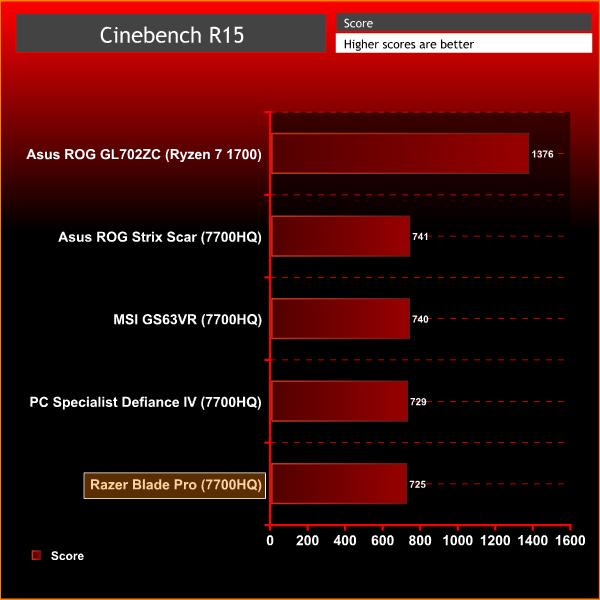
We have no surprises or quibbles with the Razer’s Cinebench performance. Its CPU score of 725cb is virtually identical to the PC Specialist machine and the Asus Scar system, both of which used the same processor. The dual-channel memory in the Blade Pro clearly hasn’t made much of a difference.
The only recent machine to outpace the i7-7700HQ in Cinebench was the Asus ROG GL702ZC, but that’s no shock – its AMD Ryzen 7 7100 is an eight-core desktop chip.
Nevertheless, don’t worry about the Razer’s performance. It’s not going to bottleneck any games and it’ll scythe through most work applications and multi-tasking scenarios.
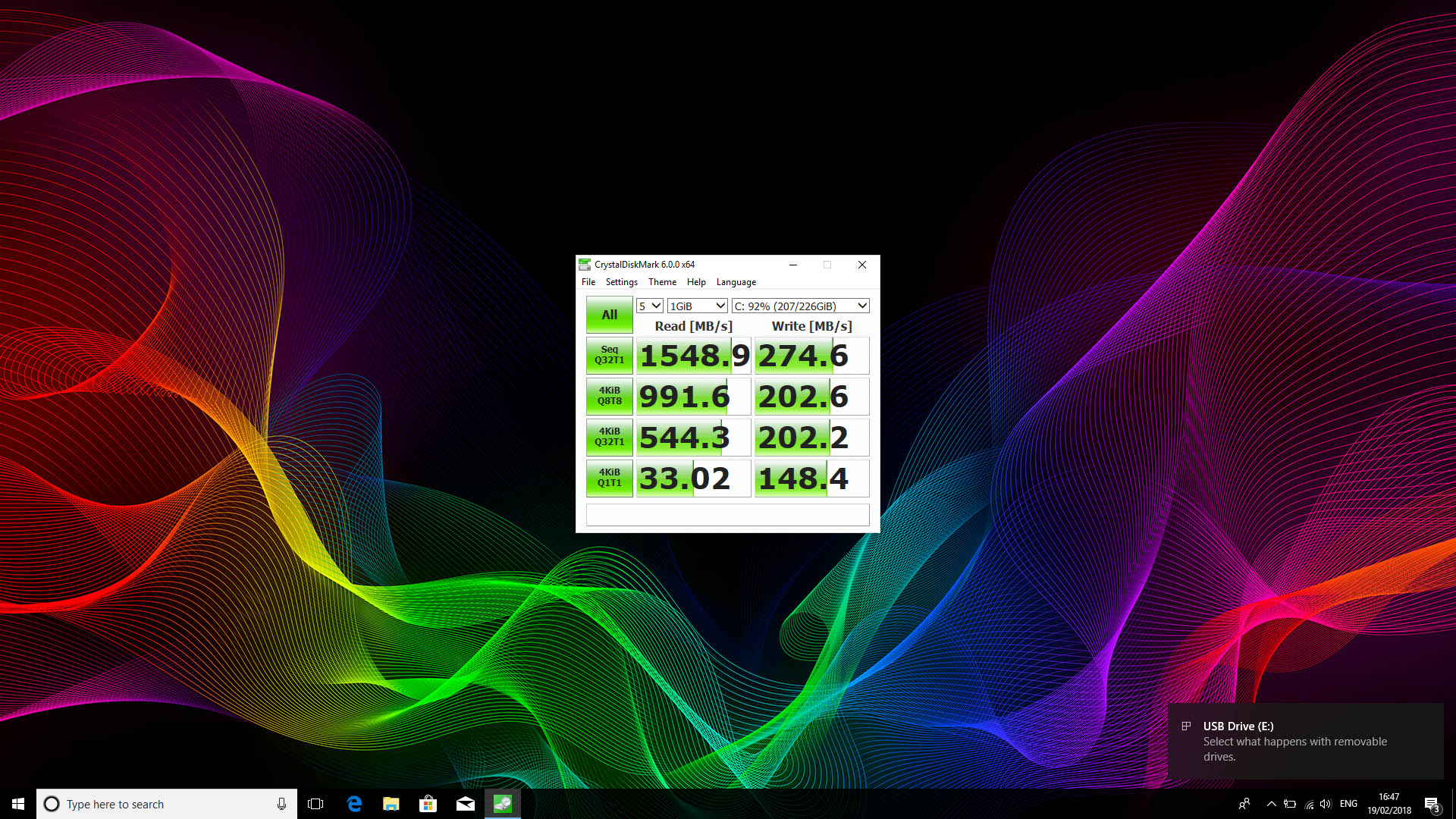
Here we test the Razer Blade Pro‘s storage performance, using CrystalDiskMark 5.1.1.
The SSD returned reasonable read pace that’ll easily beat any hard disk or SATA-based drive – it scored read speeds of 1,549MB/s. Its write pace of 275MB/s is disappointing, but we certainly had no issues with using this laptop – it was never sluggish in any scenario. That read speed is vital, too, and it'll help with application loading times and system boot speeds.
However, the PM951 is now a slightly older drive – which may explain the write result. The PC Specialist machine used a PM961 figure that was around twice as quick in read tests, giving read and write speeds of 3277MB/s 1214MB/s respectively.
For this test, we ran the Razer Blade Pro through Time Spy, Fire Strike and Fire Strike Extreme. We have listed results for the overall score, the CPU only score, the GPU-only score and physics.
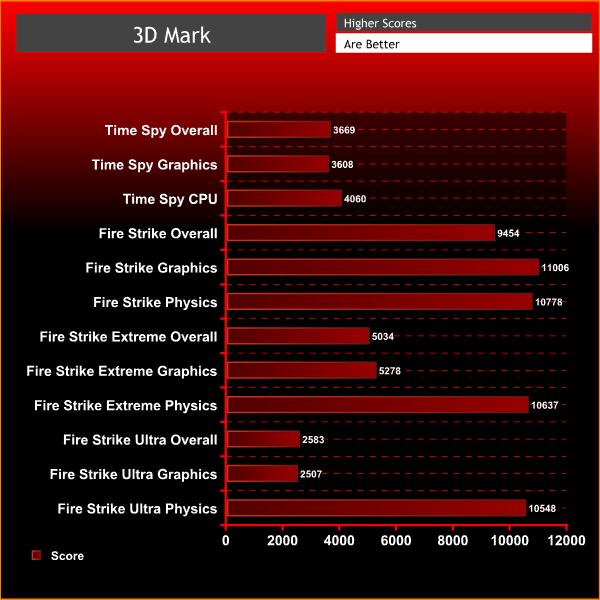
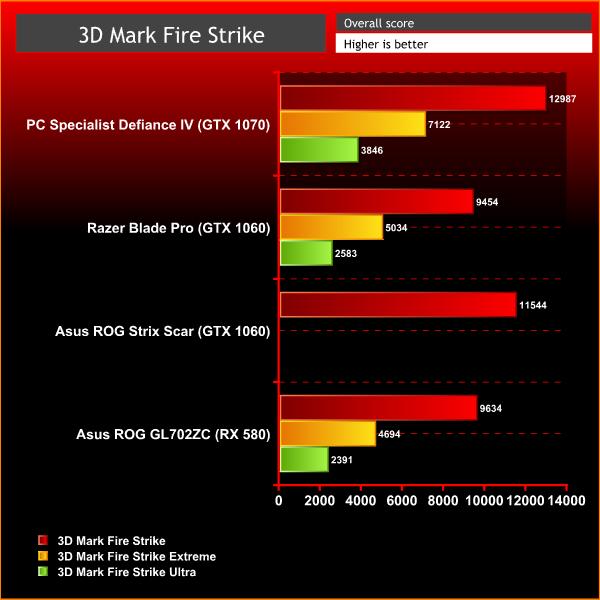
We have no qualms with the Razer’s 3DMark scores. Its Fire Strike Graphics result of 11,006 points is only a few hundred points behind the Asus Scar laptop, and all of the Blade Pro’s graphics results are better than the graphics scores from the Asus GL702ZC, which has a Radeon RX 580 graphics core.
Those results mean that this laptop will run any current game at 1080p. It won’t struggle with graphically heavy work, either.
There’s a spanner in the works, though: that PC Specialist Defiance IV. It’s much cheaper than the Razer, but it’s got a GTX 1070 graphics core. That helped it score 12,987 in the Fire Strike test – more than 3,000 points ahead of the Blade Pro. That’ll make a big difference to the frame rate of your favourite games, and it’ll also help with outputting to higher resolutions screens or powering VR headsets.
The Razer Blade Pro comes with a discrete graphics chip in the form of Nvidia’s GTX 1060. For our tests today, we have ran Deus Ex: Mankind Divided and Rise of the Tomb Raider on this laptop. We used 1080p resolution both times and used the highest available graphics settings while running each game’s in-built benchmark.
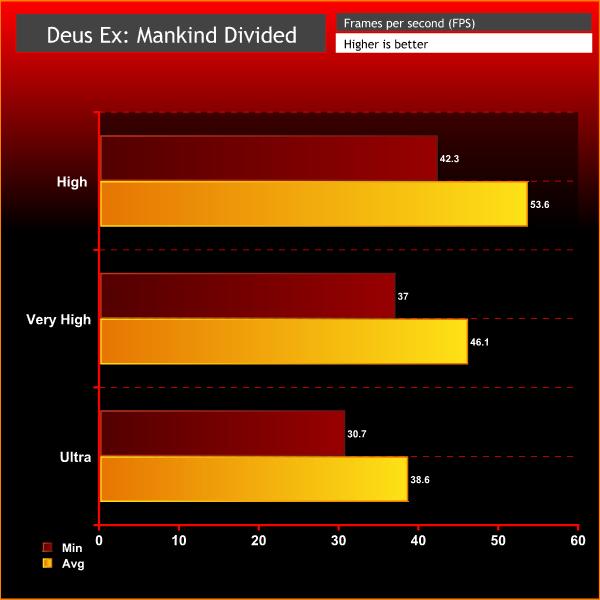
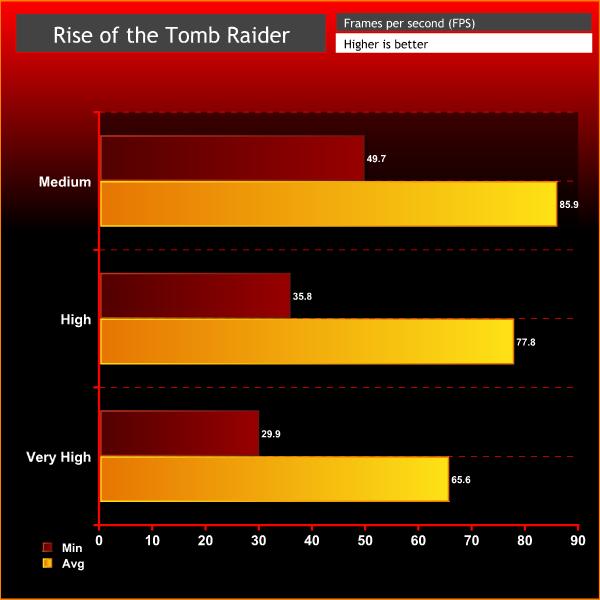
The Razer’s GTX 1060 won’t have trouble playing any current games. Deus Ex: Mankind Divided is one of the toughest titles around right now and with Ultra settings selected the Blade Pro delivered an average of 38.6fps. It was even faster in Rise of the Tomb Raider.
Those are good results that frequently trade blows with the Strix Scar, which also has a GTX 1060. However, the RX 580 inside the other Asus machine returned quicker average frame rates in most of our gaming tests, albeit by relatively slim margins. The PC Specialist’s GTX 1070 was the undoubted star here: it was comfortably faster than the Razer in every gaming test, with a lead of almost 10fps in Deus Ex.
The Razer Blade Pro has great gaming pace, then, and it will never feel sluggish – but the PC Specialist is still the winner for raw graphical power.
There’s a caveat to all of these machines, too: their 120Hz screens. The Blade Pro will look at its best when it’s gaming at nearer to 120fps, and the GTX 1060 won’t manage it unless you drop graphical settings by some distance. We’re not sure that it’s worth losing lots of graphical fidelity in order to get smoother playback, but your mileage may vary.
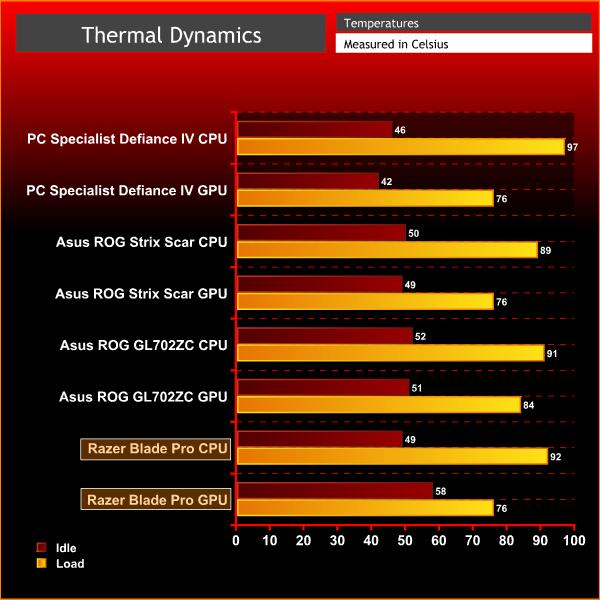
To measure idle temperatures, a reading was taken after having Windows open on the desktop for 30 minutes. A reading under load was taken with Prime 95’s SmallFFt test running alongside 3DMark Fire Strike.
The Razer was virtually silent when idling and when running less intensive applications. It was reasonably quiet when gaming, too – it produced a low rumble, but that was it. When every component was stressed the noise did rise, but it was still easily manageable and still much quieter than the PC Specialist machine.
The Razer’s exterior remained reasonable cool, too, which is more than can be said for the PC Specialist – that system because very hot in certain parts.
In terms of actual figures, the Blade Pro's peak CPU temperature of 92°C is a tad high, but that figure is still cooler than the PC Specialist. We also have to remember that these results come from the CPU being stressed at 100% for a prolonged length of time – something that isn't too common in real-world scenarios.
Elsewhere, the GTX 1060 didn’t provide any problems with a fine peak temperature of 76°C, which was level with the Asus Scar’s GPU temperature and the PC Specialist’s GTX 1070.
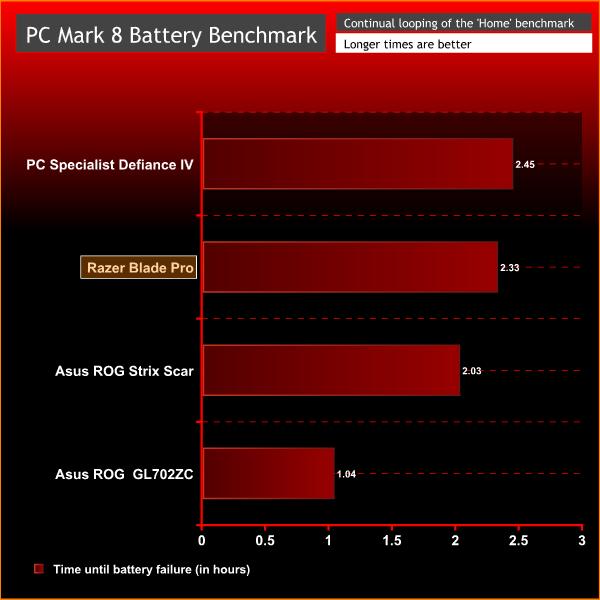
The Razer’s battery lasted for just over two and a half hours in the PC Mark 8 Home test. That’s a middling result for a gaming laptop, and almost on par with the PC Specialist. It’s better than the Strix Scar laptop, at least, but there’s no way that the Razer will last for a full day away from the mains – it’s definitely meant to be plugged in and left at a desk.
Battery life is even worse while playing games, as we found the Blade Pro lasted for just over an hour playing some 1080p titles. If you’re going to a LAN party, don’t forget your AC adapter.
All in all, there’s a lot to like about the Razer Blade Pro. It looks superb and will fit into both corporate and gaming scenarios, while its slick design is paired with a slim body, plenty of classy aluminium and excellent build quality.
It’s great under the hood, too. The GTX 1060 is fast enough for 1080p gaming, the processor is reliably quick, and there are also solid memory, storage and networking loadouts. The screen is also better than the panels found on most gaming laptops thanks to its stonking contrast and decent colours.
And, finally, Razer’s ergonomic changes make sense. The trackpad falls comfortably beneath the right hand and it just feels good, while the scroll wheel helps for work. The keyboard is a good example of chiclet design, too.
However, we do have quibbles. That keyboard is still a chiclet unit that struggles with fast-paced games, while the GTX 1060 isn't ideal for getting the most out of the 120Hz display. And, no surprises, battery life isn’t good.
Our biggest issue, though, is the price. The Razer Blade Pro is an excellent bit of kit in almost every respect, but at £2099 it's just very expensive: machines with similar components are often hundreds of pounds cheaper, and it’s also possible to get laptops with beefier graphics chips while spending a lot less cash.
Of course, those more affordable machines tend to be heavier, chunkier and with less quality throughout. That’s where choices have to be made: if you’re willing to compromise in those areas to save money and maybe get more graphical grunt, alternatives are worthwhile. But if you want plenty of power alongside exceptional design, the Razer’s high price will be worth paying.
The Blade Pro with GTX 1060 is available from Razer for £2,099 HERE.
Discuss on our Facebook page HERE.
Pros
- GTX 1060 is a reliable gaming GPU.
- Rest of the specification is fast and solid.
- Slim, light, sturdy and good-looking design.
- Keyboard and trackpad are innovative and have good quality.
- Screen is better than on most gaming notebooks.
Cons
- Expensive considering the overall spec.
- Chiclet keyboards still aren’t great for gaming.
- Battery life is underwhelming.
- GTX 1060 can’t fully exploit 120Hz screen.
KitGuru says: The Razer Blade Pro makes a barnstorming start with its excellent aesthetic and build quality, while it also has a good screen and innovative, high-quality ergonomics. However, it’s very expensive and battery life isn’t great. If you want a laptop that looks as good as it runs, the price will be worth paying – but alternatives offer similar power for much less cash.