KitGuru KitGuru.net – Tech News | Hardware News | Hardware Reviews | IOS | Mobile | Gaming | Graphics Cards


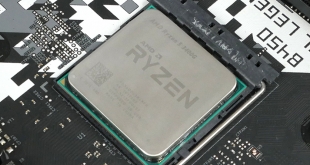
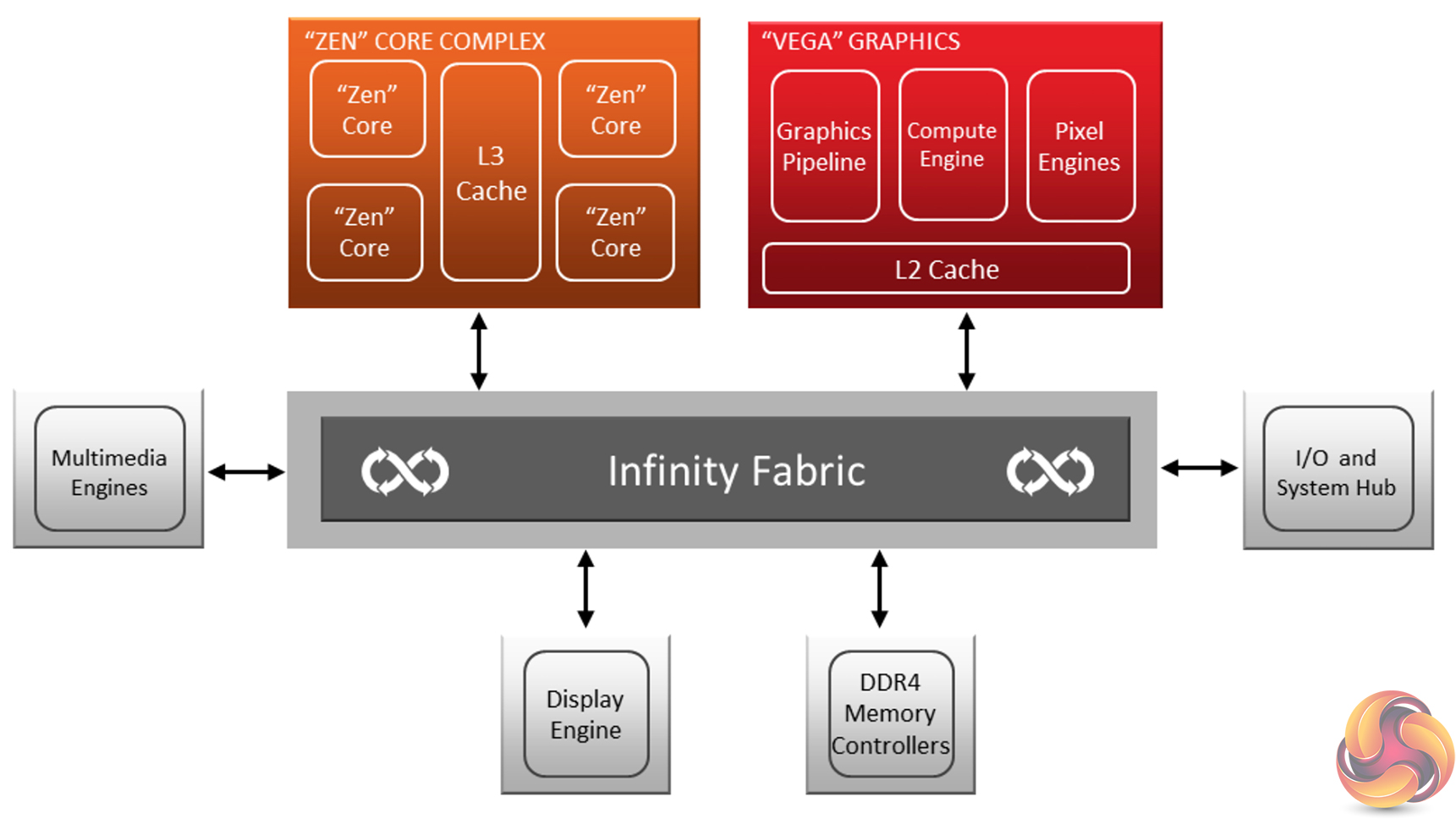
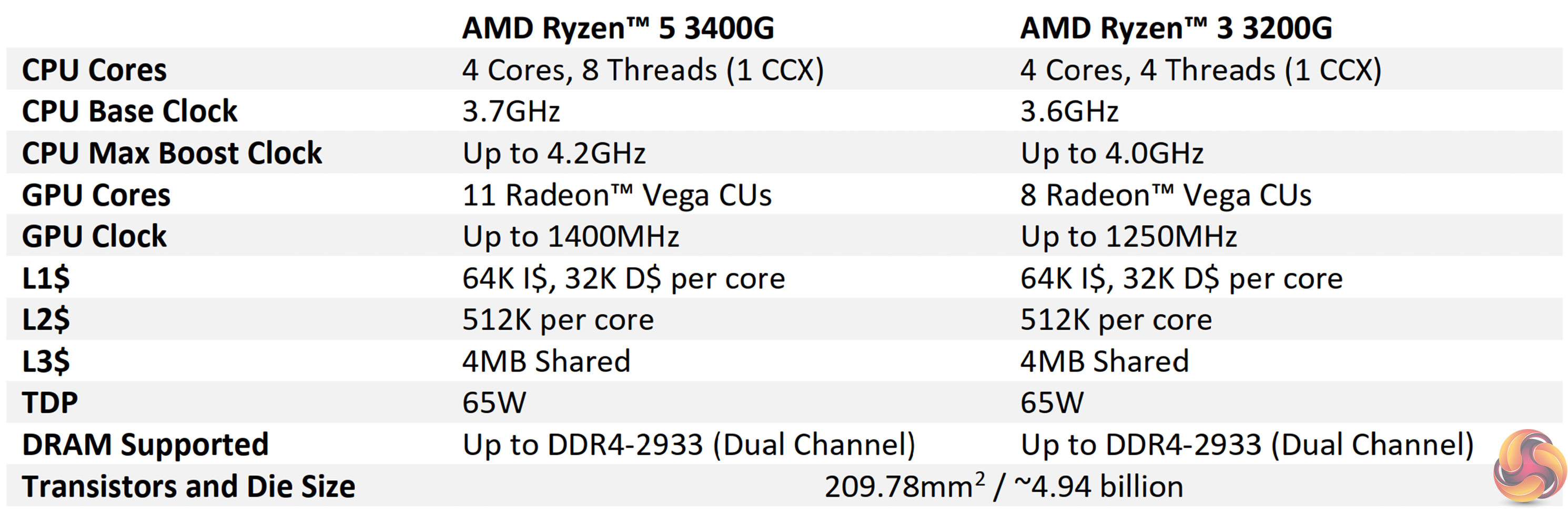
Codenamed Picasso and combining a four-core, eight-thread Zen+ CPU with an 11 CU slice of Vega graphics, AMD’s £140 Ryzen 5 3400G is an evolution from the Ryzen 5 2400G of last year. Boosting up to 4.2GHz on the single-CCX CPU component and 1400MHz for the Vega 11 GPU, clock speed increases are the most noteworthy change from last year’s Ryzen 5 2400G. Another important adjustment is the reduction in MSRP by $20, making the Ryzen 5 3400G slightly more affordable.
Despite the Ryzen 3000 naming scheme, it is important to remember that the current APUs are not Zen 2 architecture and are fabbed using a 12nm Global Foundries process, not the 7nm TSMC FinFET technology of their CPU brothers.
Is £140 for a four-core Zen+ CPU with simultaneous multi-threading, an on-chip Vega 11 GPU, plus the 95W-rated Wraith Spire cooler a solid deal for budget buyers and HTPC gamers?
Most of the information from our review of the Ryzen 5 2400G from last year still holds true with the Ryzen 5 3400G. As this update from Zen to Zen+ is more of a die-shrink with minor adjustments than the evolution to Zen 2 (which will perhaps arrive in 2020), the differences will be minor. Check out that review for additional details HERE.
It is important to understand the position of an APU in today’s market. Last year, the high GPU prices and supply issues driven by the cryptocurrency mining boom meant that even low-end GPUs were either severely overpriced or hard to come by. This year, however, those issues are non-existent (for now) and the APU regains its position as an entry-level option to cash-strapped gamers.
Another key market for APUs is for those who are looking for a stop-gap gaming machine before upgrading to a discrete GPU in the future. Of course, HTPC usage is also an ideal environment for APUs, thanks to the on-chip GPU’s media decoding capabilities.
AMD is clearly targeting 1080P gamers on a budget with the Ryzen 5 3400G. I don’t think it’s reasonable to expect 60 FPS at 1080P in modern AAA titles. However, less-demanding games, older AAA titles, and those that simply aren’t too graphically intensive should all run fine. That’s more than can be said for the iGPU capabilities of competing Intel chips at this price point. The word ‘competing’ there is perhaps slightly misused as there is realistically no Intel competition for these APUs.
For £140, the six-thread Intel Coffee Lake Core i5-9400F should net you higher CPU performance but lower GPU performance that translates into largely unplayable gaming experiences. If you want a balance between a decent level of CPU performance and an integrated GPU that allows for gaming, the AMD APUs are the only real option without going down the discrete GPU route.
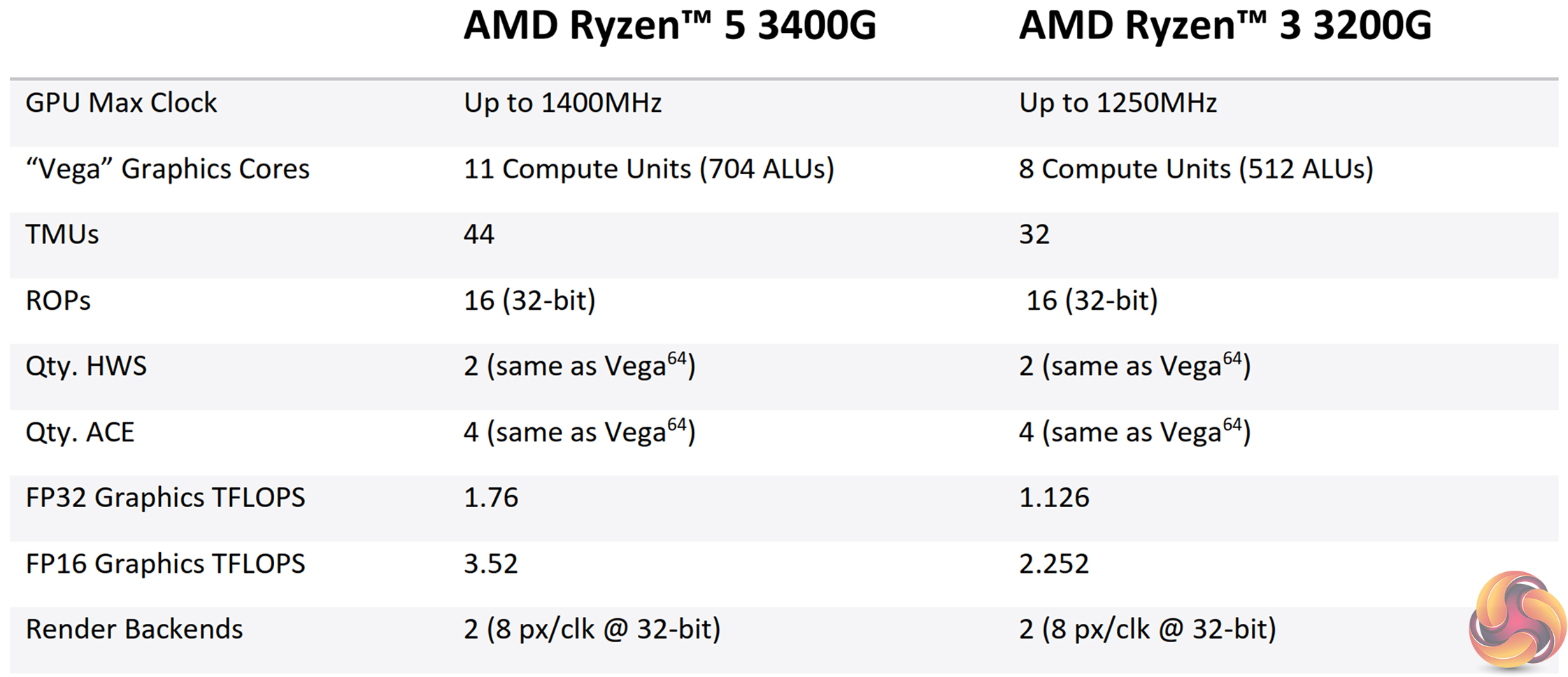
According to AMD, video encode and decode is handled by the Video Core Next, or VCN for short, silicon present in the Vega GPU. Video decode of common resolutions and media formats, such as 4K60 MPEG2, 4K60 H.265, and 4K60 HEVC are all supported.
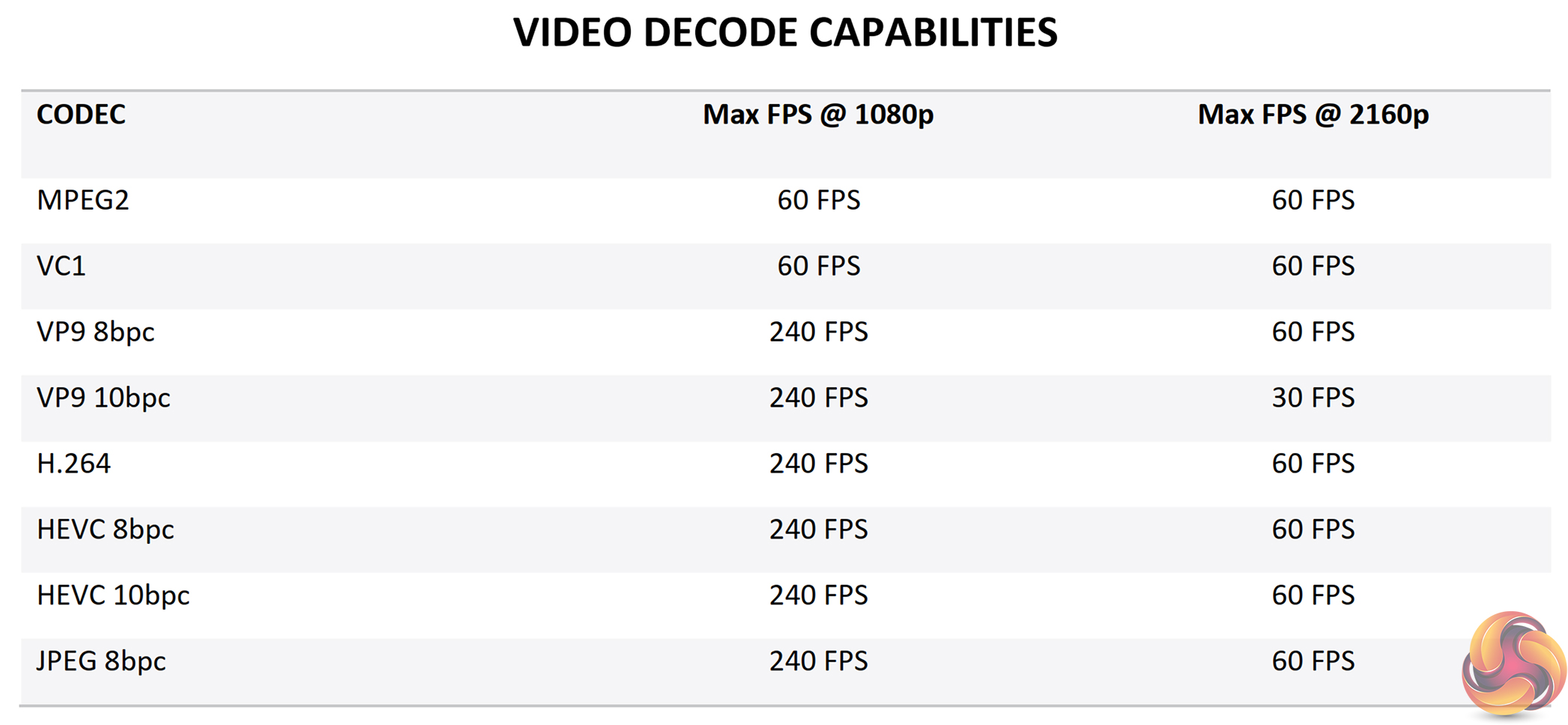
AMD’s table highlights that VP9 8 bits per channel and VP9 10 bits per channel are both supported at up to 4K60. HDCP 2.2 is supported by the APU, though keep an eye on this specification when choosing a motherboard with built-in video outputs.
We tested video content relating to these formats, resolutions, and frame rates and found media playback to be perfectly fine in general. Our 4K30 100Mbps H264 content played without hiccups through VLC media play on Windows 10. The same can be said for 1440P60 50Mbps H264 media and also 4K60 80Mbps H265 footage taken from a GoPro Hero 6.
Testing with YouTube, 1080p60 and 1440p60 ran smoothly. 4K30 was also perfectly fine using Google Chrome and 4K60 had dropped frames here and there but they were generally induced by me messing about with the monitoring software at the same time.
8K footage on YouTube was not smoothly playable. That is perhaps something to bear in mind for those hoping to keep this APU for a long time. By comparison, the Intel UHD iGPU generally handles 8K30 and 8K60 YouTube footage fine, based on our testing with a Whiskey Lake-equipped Dell XPS 13 and the Intel UHD 630 on a Core i5-8600K.
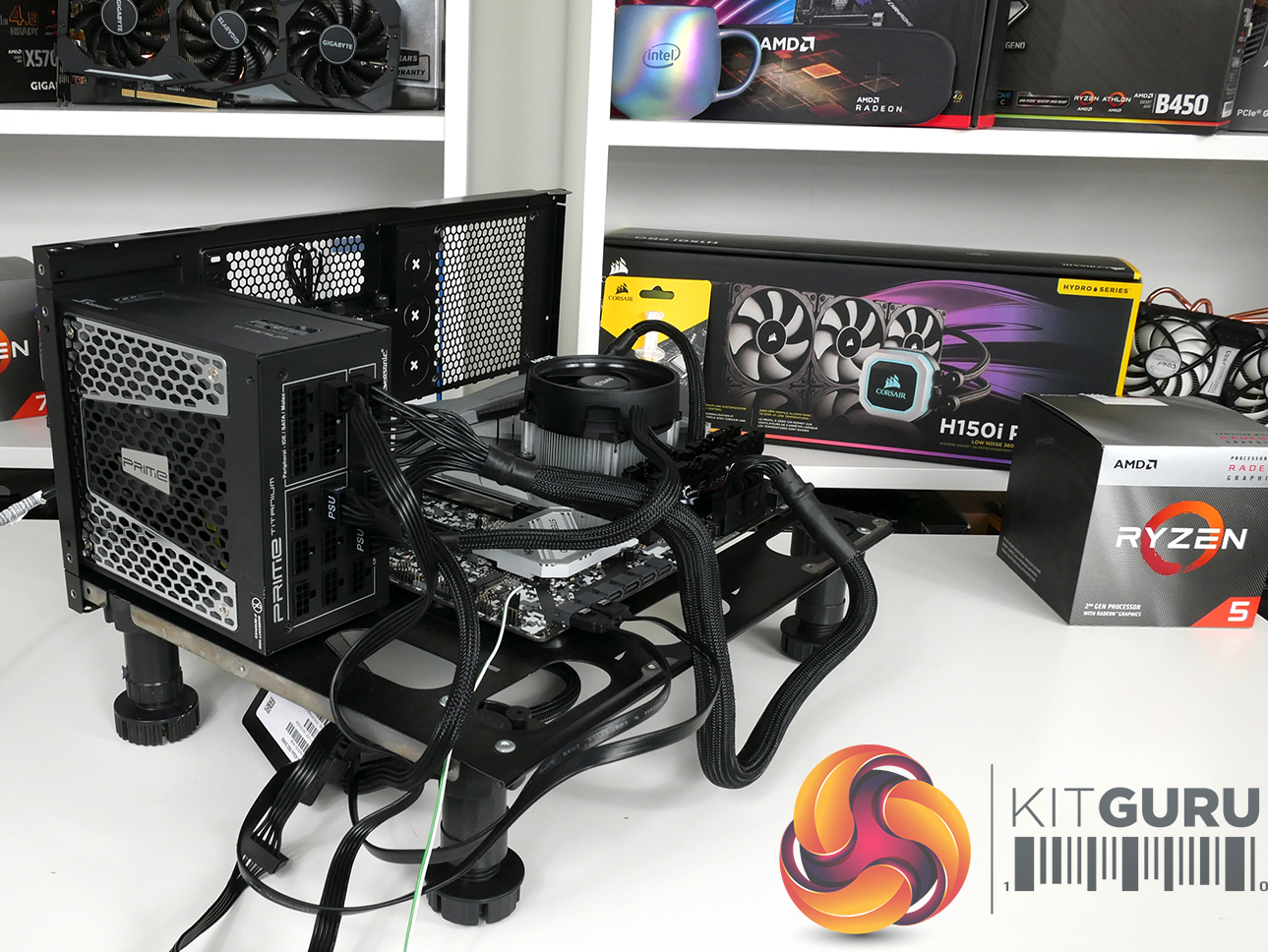
We will be outlining the Ryzen 5 3400G APU's performance while using the ASRock B450 Steel Legend socket AM4 B450 motherboard. The latest BIOS revision is used with AGESA code 1.0.0.3. A 16GB (2x8GB) kit of 3200MHz CL14 DDR4 memory serves our test system, as does the bundled Wraith Spire CPU cooler.
Today's comparison processors come in the form of:
- Coffee Lake i5-8600K (6C6T), i7-9700K (8C8T).
- Matisse Ryzen 7 3700X (8C16T).
- Pinnacle Ridge Ryzen 7 2700X (8C16T) and Ryzen 5 2600X (6C12T).
- Summit Ridge Ryzen 7 1800X (8C16T).
Each processor is tested at its default out-of-the-box settings. We also include reasonable overclocking performance data where relevant. For the Intel Coffee Lake CPUs, multi-core turbo is disabled but testing is not conducted with the processors locked to their default TDP values. All-core load frequencies for the tested chips are as follows:
- Ryzen 5 3400G = 3.95-4.0GHz.
- Ryzen 5 3600X = 4.125GHz.
- Ryzen 7 3700X = 3.95-4.1GHz.
- Core i7-9700K = 4.6GHz.
- Core i5-8600K = 4.1GHz.
- Ryzen 7 2700X = Around 3.95GHz.
- Ryzen 5 2600X = Around 3.975-4.0GHz.
- Ryzen 7 1800X = 3.65GHz.
For more information relating to our test systems, see the details HERE.
Software:
- AMD Chipset Drivers v1.07.07.0725.
Tests:
Productivity-related:
- Cinebench R15 – All-core & single-core CPU benchmark (CPU)
- Cinebench R20 – All-core & single-core CPU benchmark (CPU)
- Blender 2.79b – All-core rendering of the BMW benchmark (CPU)
- HandBrake x264 – Convert 1440p60 H264 video to 1080p60 H264 using the YouTube HQ 1080p60 preset (CPU)
- 7-Zip – Built-in 7-Zip benchmark test (CPU & Memory)
- SiSoft Sandra – Memory bandwidth (Memory)
- AIDA64 – Memory bandwidth, memory latency, memory & cache latency (Memory)
Gaming-related:
- Deus Ex: Mankind Divided – Built-in benchmark tool, 1920 x 1080, 1600×900, 1280×720, Lowest quality preset, no AA, DX12 version (Gaming)
- Far Cry 5 – Built-in benchmark tool, 1920 x 1080, 1600×900, 1280×720, Lowest quality preset, DX12 (Gaming)
- Ghost Recon: Wildlands – Built-in benchmark tool, 1920 x 1080, 1600×900, 1280×720, Lowest quality preset, DX12 (Gaming)
- Grand Theft Auto V – Built-in benchmark tool, 1920 x 1080, Varying quality settings, Minimum Advanced Graphics, DX11 (Gaming)
- Shadow of the Tomb Raider – Built-in benchmark tool, 1920 x 1080, 1600×900, 1280×720, Lowest quality preset, no AA, DX12 version (Gaming)
Cinebench R15
Cinebench R20
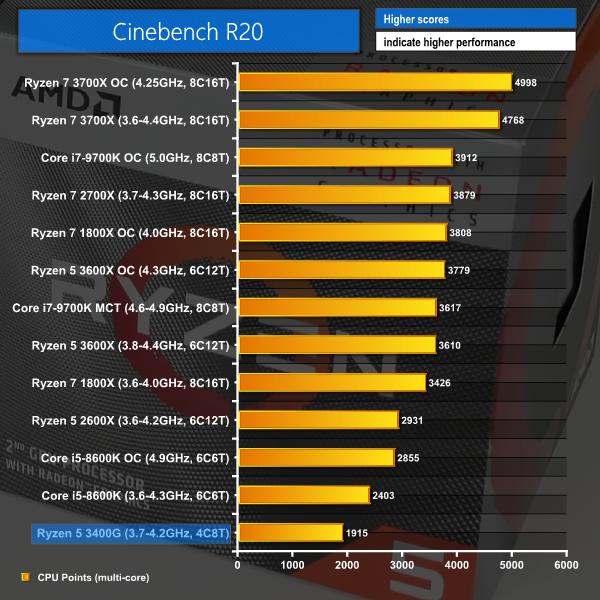
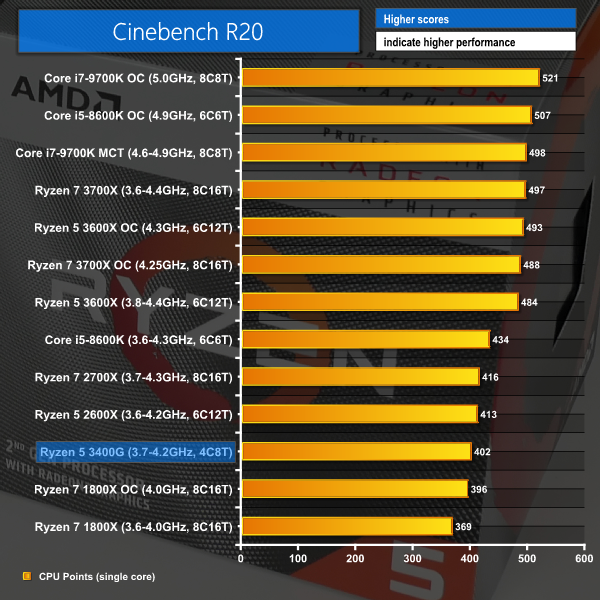
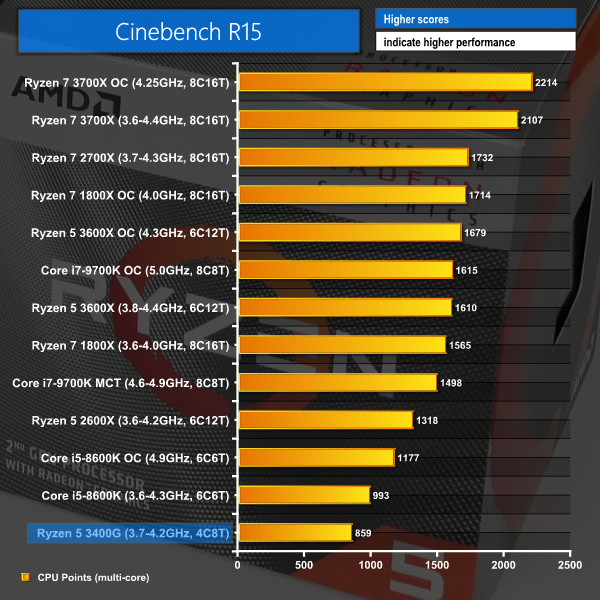
Right off the bat, productivity performance in Cinebench looks pretty decent from the four-core, eight-thread chip. Ryzen 5 3400G isn’t too far behind the higher-clocked, more expensive Coffee Lake Core i5 in terms of multi-threaded performance. That’s not bad for an APU to which demanding tasks such as multi-core rendering is only of secondary importance.
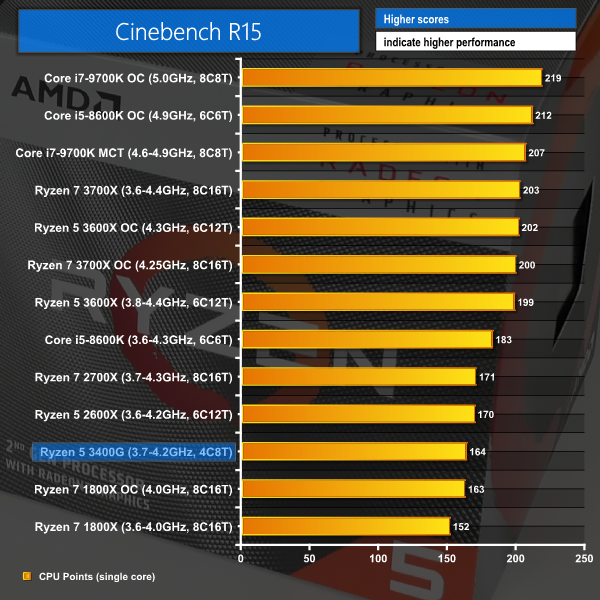
Single-thread performance is an area where Intel continues to dominate. This Zen+ APU does not feature the architectural improvements of Zen 2-based Ryzen 3000 CPUs, and therefore cannot match their single-thread performance, either. Unsurprisingly, the Ryzen 5 3400G is similar to the Zen Ryzen 7 1800X and Zen+ Ryzen 5 2600X and Ryzen 7 2700X in single-thread performance.
Blender BMW Benchmark
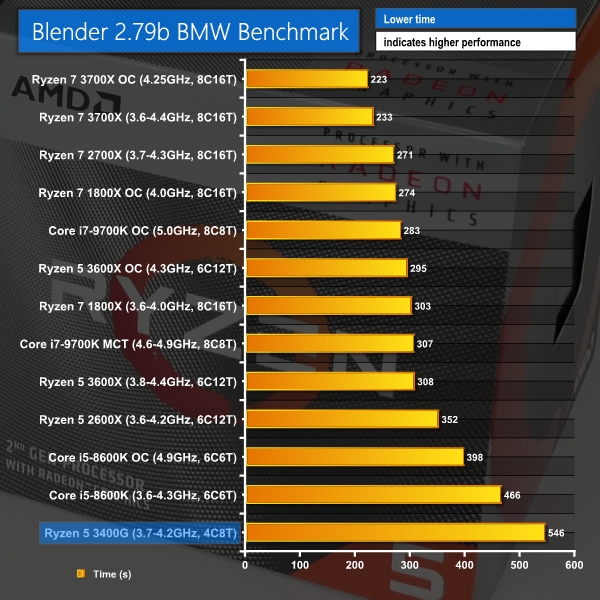
Blender chugs along to a render time of just over 9 minutes. That’s not too shabby a result for an entry-level APU, and it is fairly competitive against the more expensive, but notably faster, Coffee Lake Core i5 six-core.
There’s no reason why you can’t use the APU to run the odd multi-core render here and there.
7-Zip
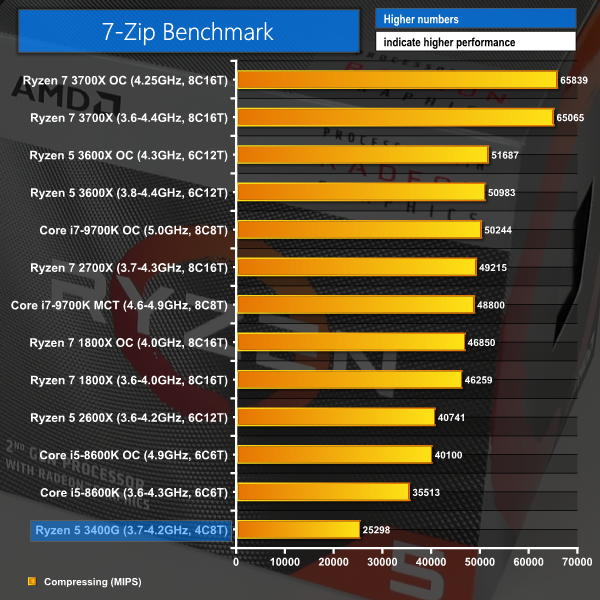
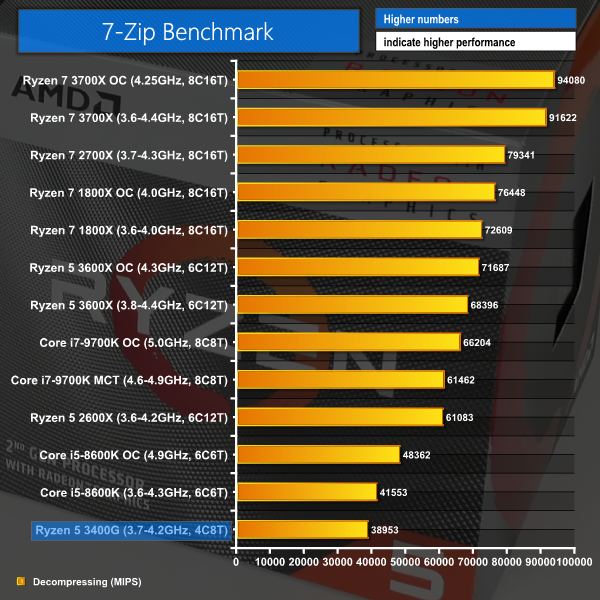
7-Zip performance is decent enough, especially on the arguably more important for this market segment, decompression side of the test. The odd heavy compression and decompression here and there certainly won’t have you pulling your hair out with this level of performance being offered up.
Handbrake
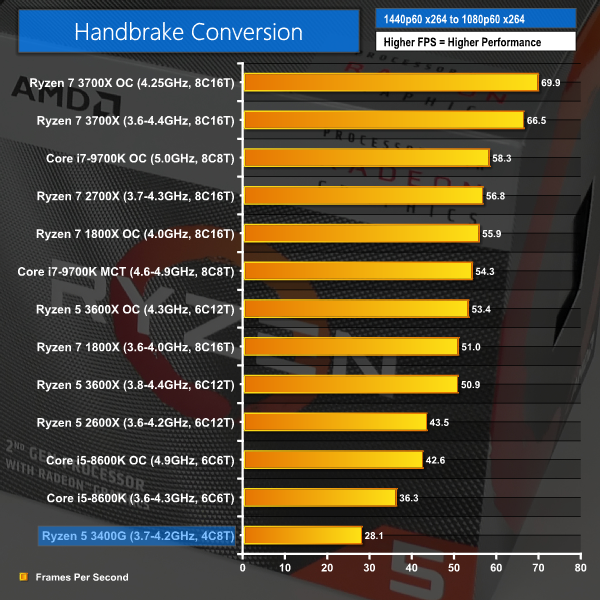
Handbrake shows that the Ryzen 5 3400G APU does a decent job at handling our x264 conversion test. You don’t get the AVX-based improvements of Zen 2 with this Zen+ based APU, but a conversion rate close to 30 FPS isn’t too bad given the asking price.
Sandra Memory Bandwidth
AIDA64 Memory Performance
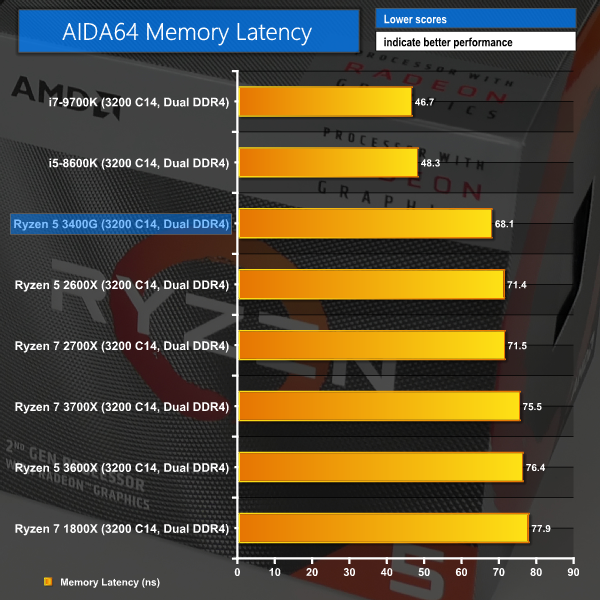
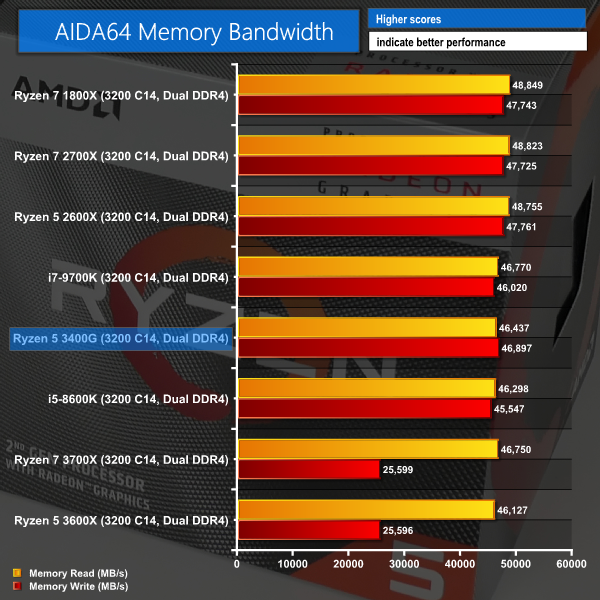
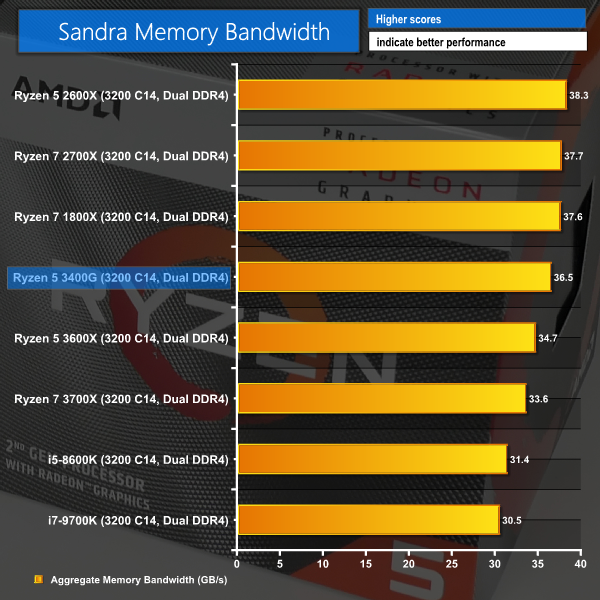
Memory bandwidth and latency are where we'd expect for Zen+ with 3200MHz CL14 memory. RAM speed and bandwidth is important for this APU as the GPU component carves off 2GB of capacity for use as its own dedicated VRAM.
3DMark
Deus Ex: Mankind Divided
Despite its age, Deus Ex: Mankind Divided remains a demanding title even for modern hardware. We use the game's built-in benchmark with quality set to Low, MSAA disabled, and DX12 mode.
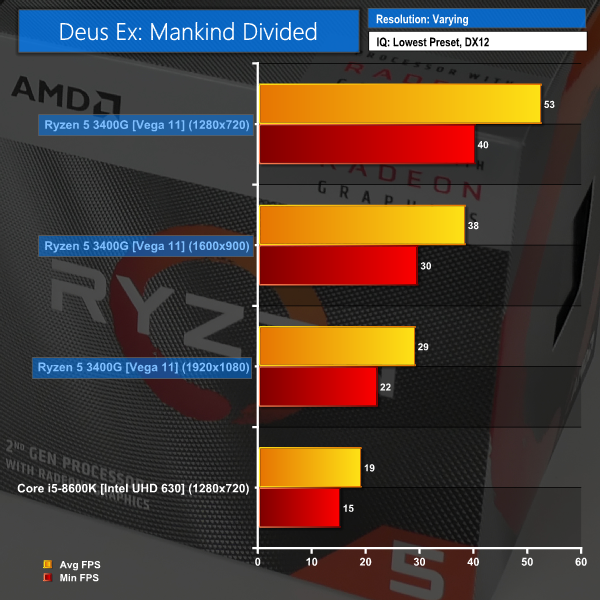
Running at the lowest settings level with MSAA off and the DX12 API, Deus Ex Mankind Divided is barely playable at 1080p with an average frame rate just shy of 30 FPS.
Cranking the resolution down to 1600×900 – a 30% reduction in display pixels – sees the average FPS number increase to 38, with the minimum just shy of 30. This is perhaps playable at a push, but it isn’t a great experience.
Reducing the resolution again to 1280×720 – a pixel count less than half that of 1080P – sees a perfectly playable 53 FPS on the average, with lows in the region of 40 FPS. This level of performance would be playable in a demanding title like Deus Ex Mankind Divided.
Far Cry 5
We use the Far Cry 5 built-in benchmark with quality set to Low.
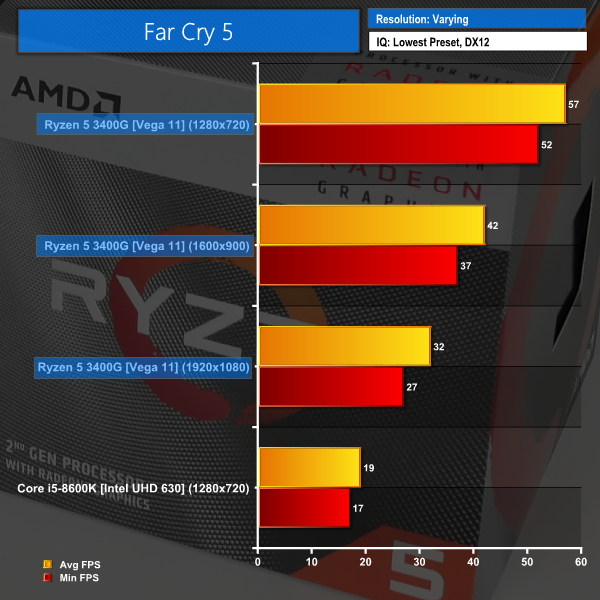
Far Cry 5 on its low preset is playable at 1920×1080 but the experience won’t be particularly smooth or enjoyable with an average barely above 30 FPS.
Reduced down to 1600×900 and the frame rates climb to a more palatable low-40 FPS average with minimums in the high-30s. Still not ideal for PC gamers, but not bad for such an entry-level CPU+GPU combination.
1280×720 allows an average frame rate just shy of 60 FPS. The minimums are also pushed past 50 FPS, here, so the experience is certainly more than playable and would run nicely on a FreeSync monitor.
Grand Theft Auto V
Grand Theft Auto V remains an immensely popular game for PC gamers and as such retains its place in our test suite. The DX11-built game engine is capable of providing heavy stress to a number of system components, including the GPU, CPU, and Memory.
We run the built-in benchmark using a 1080p resolution and generally Lowest/Normal/High quality settings (including Advanced Graphics).
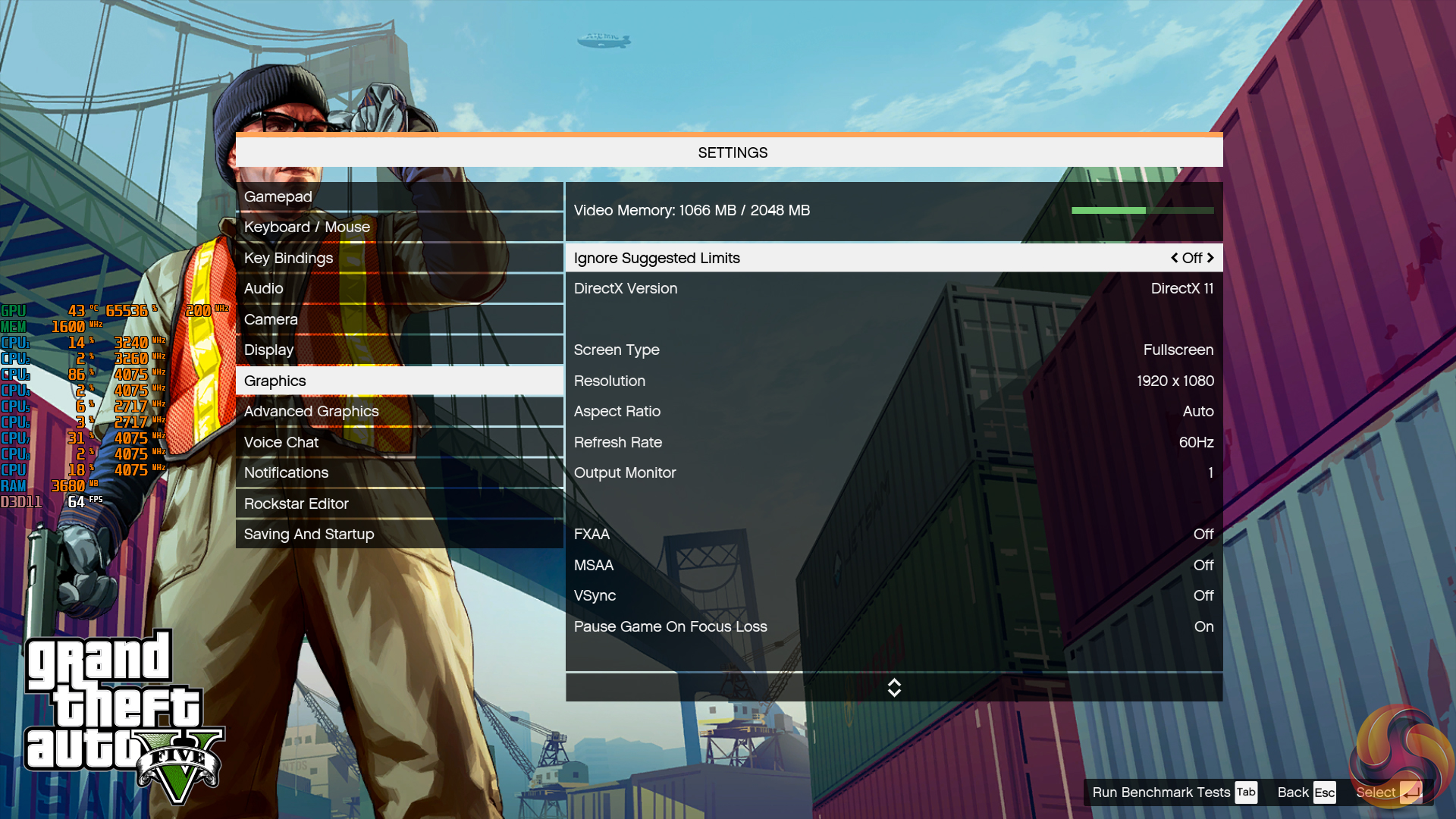
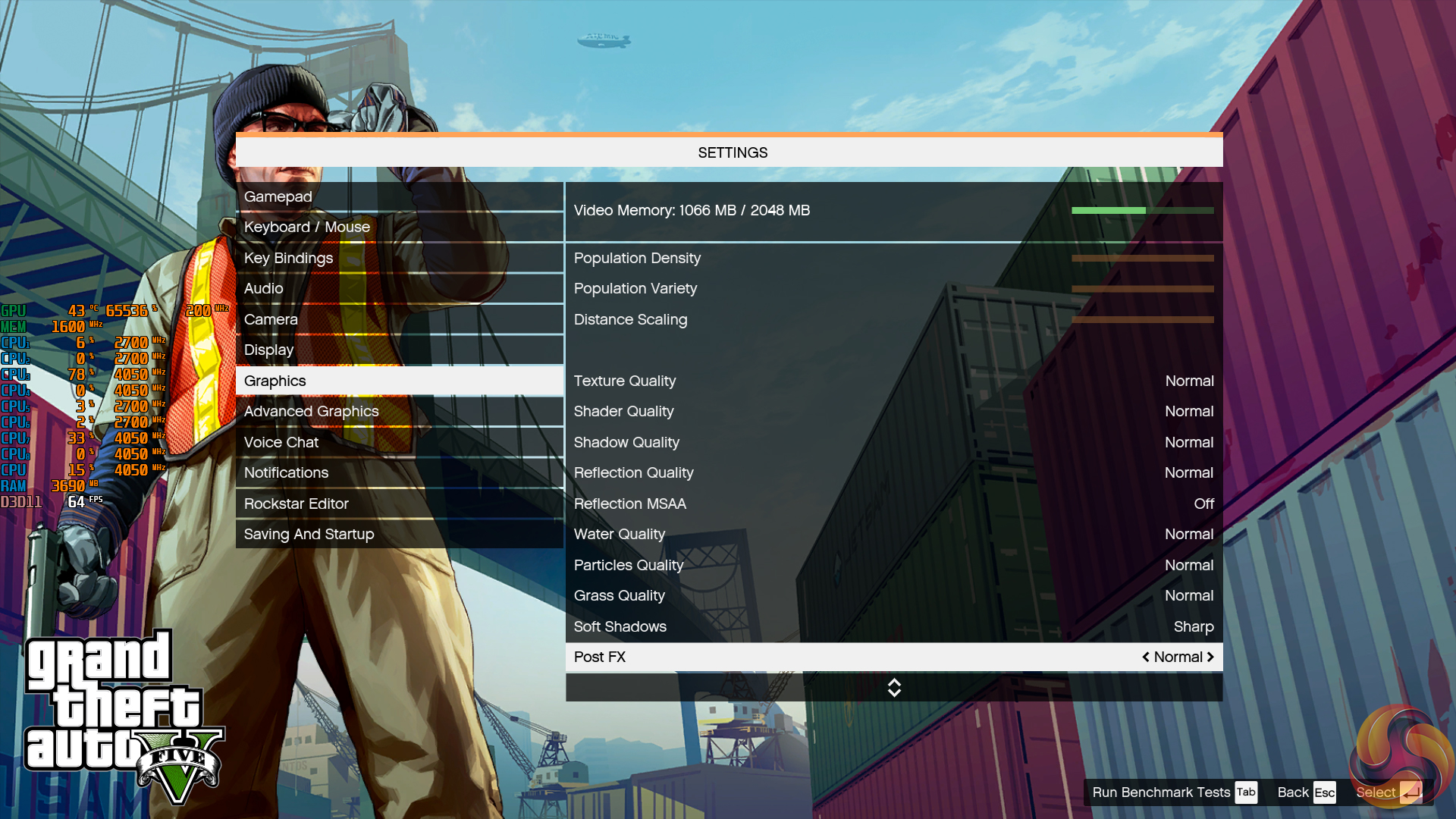
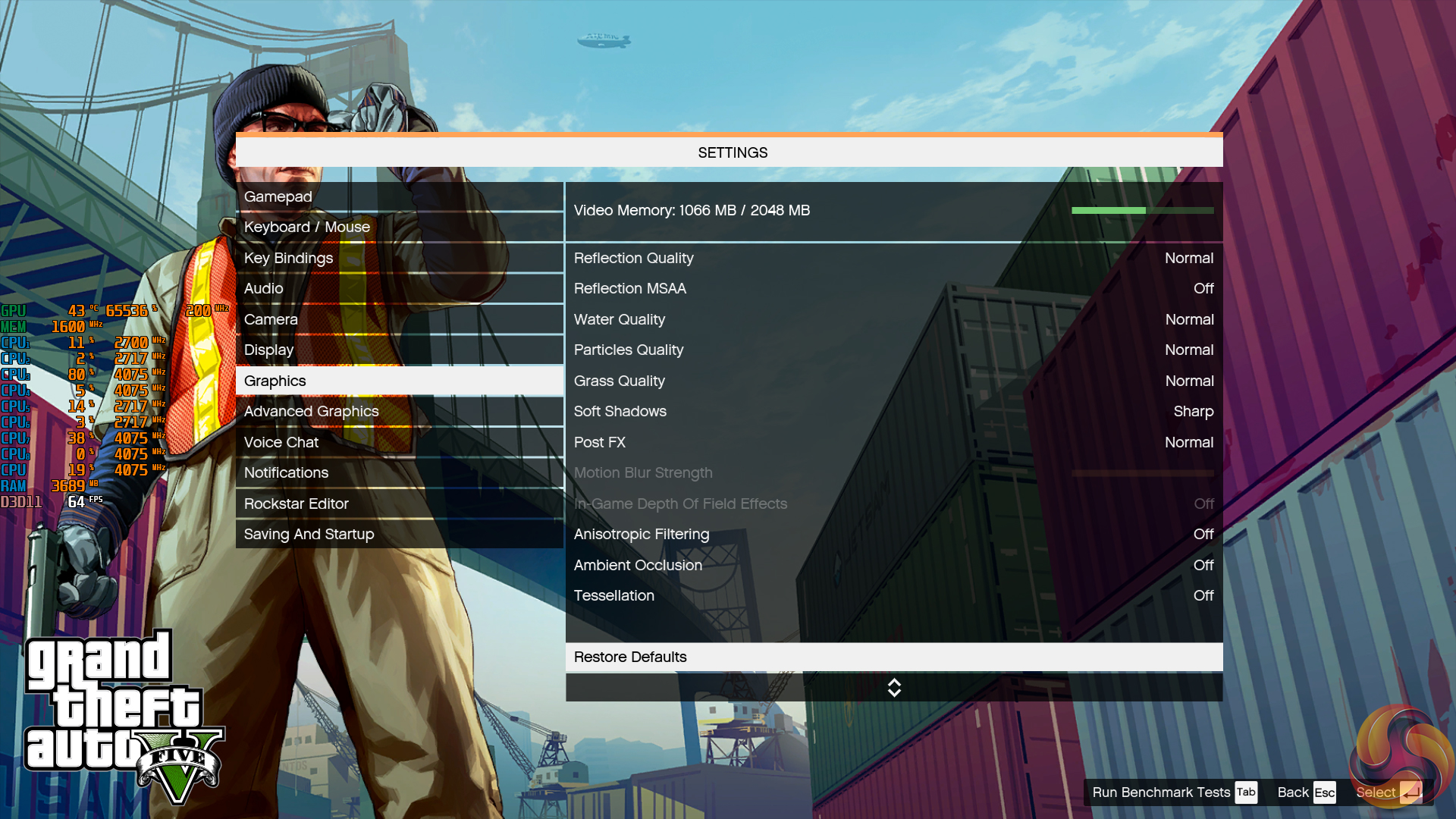
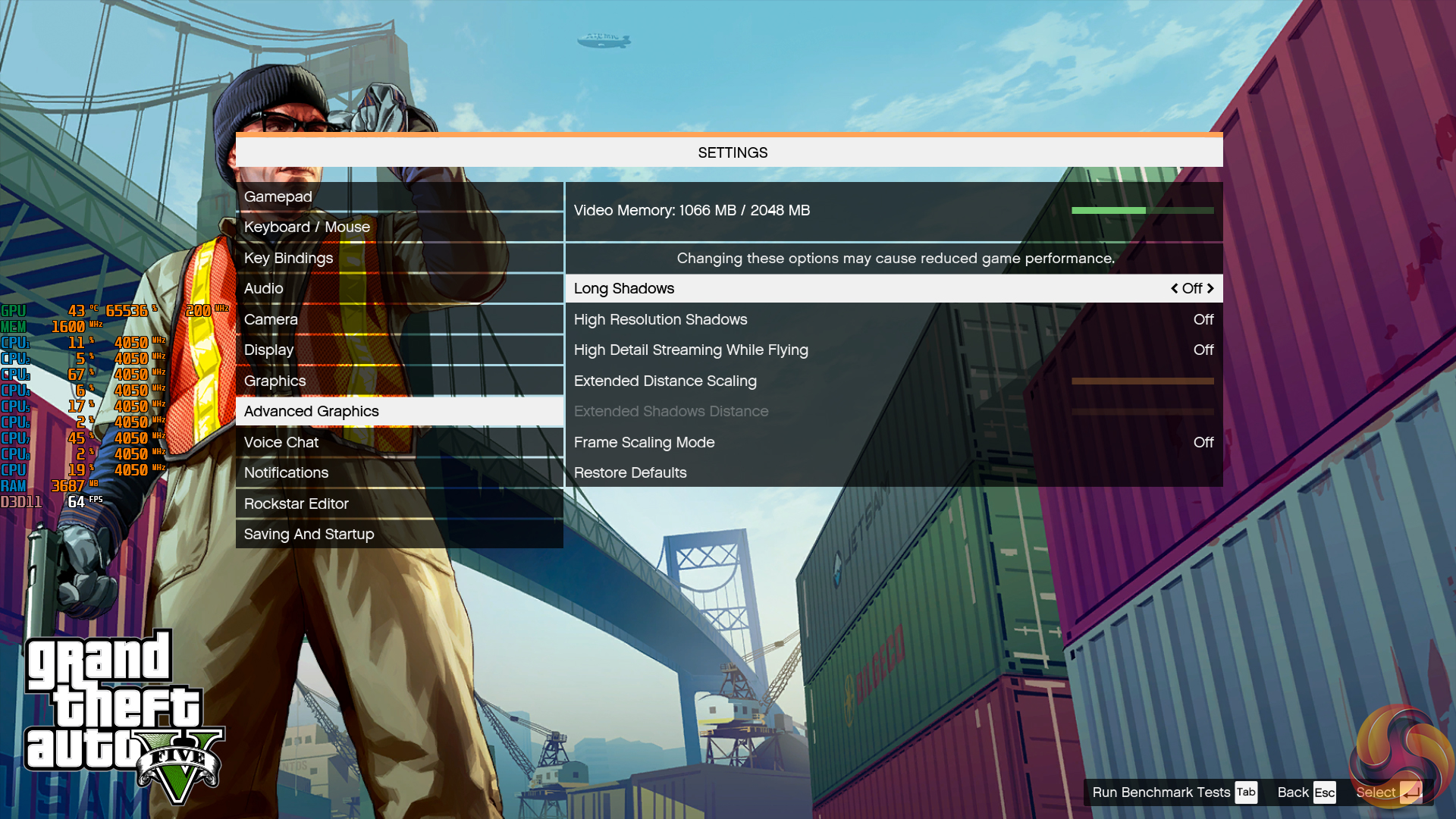
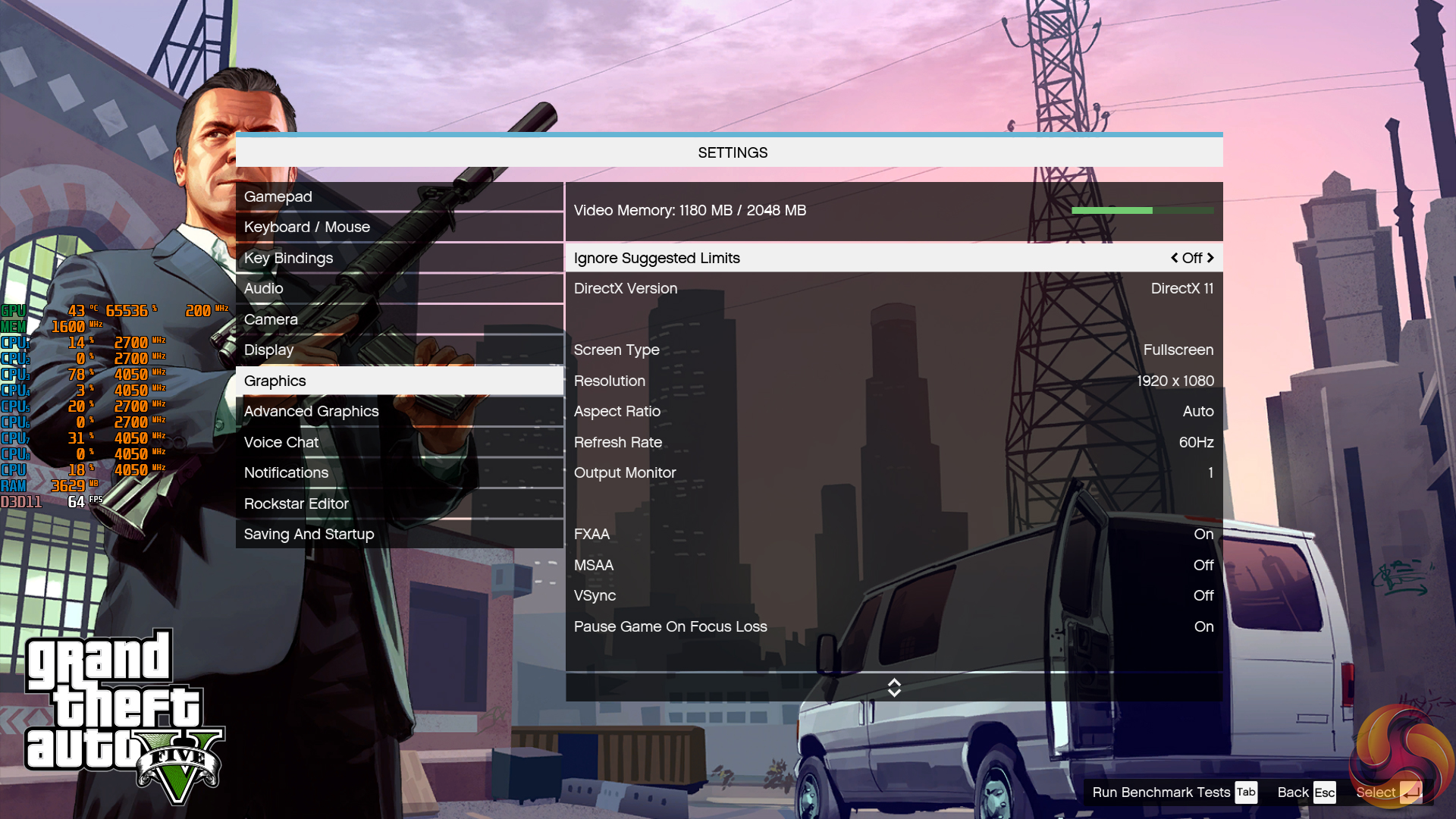
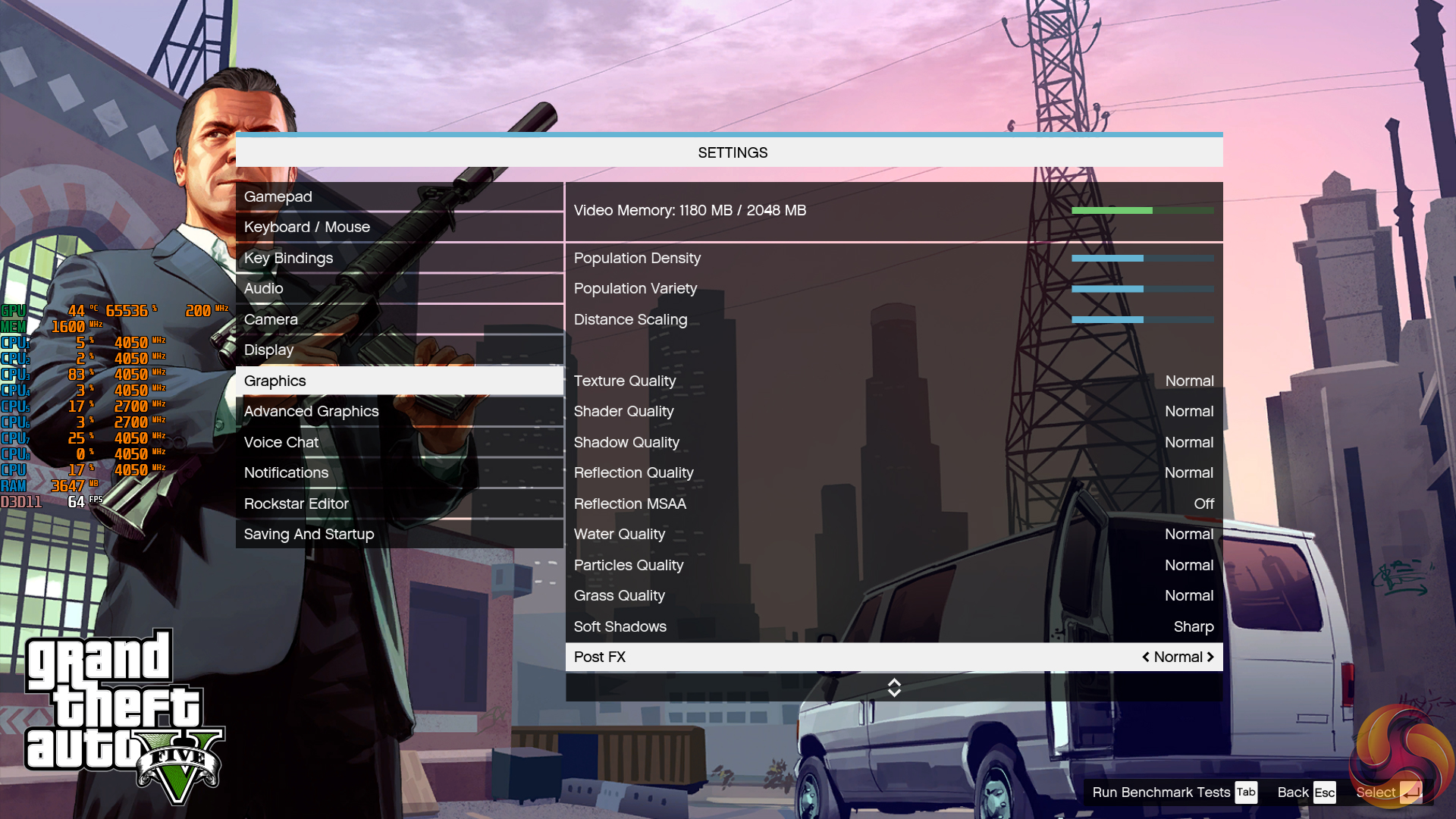
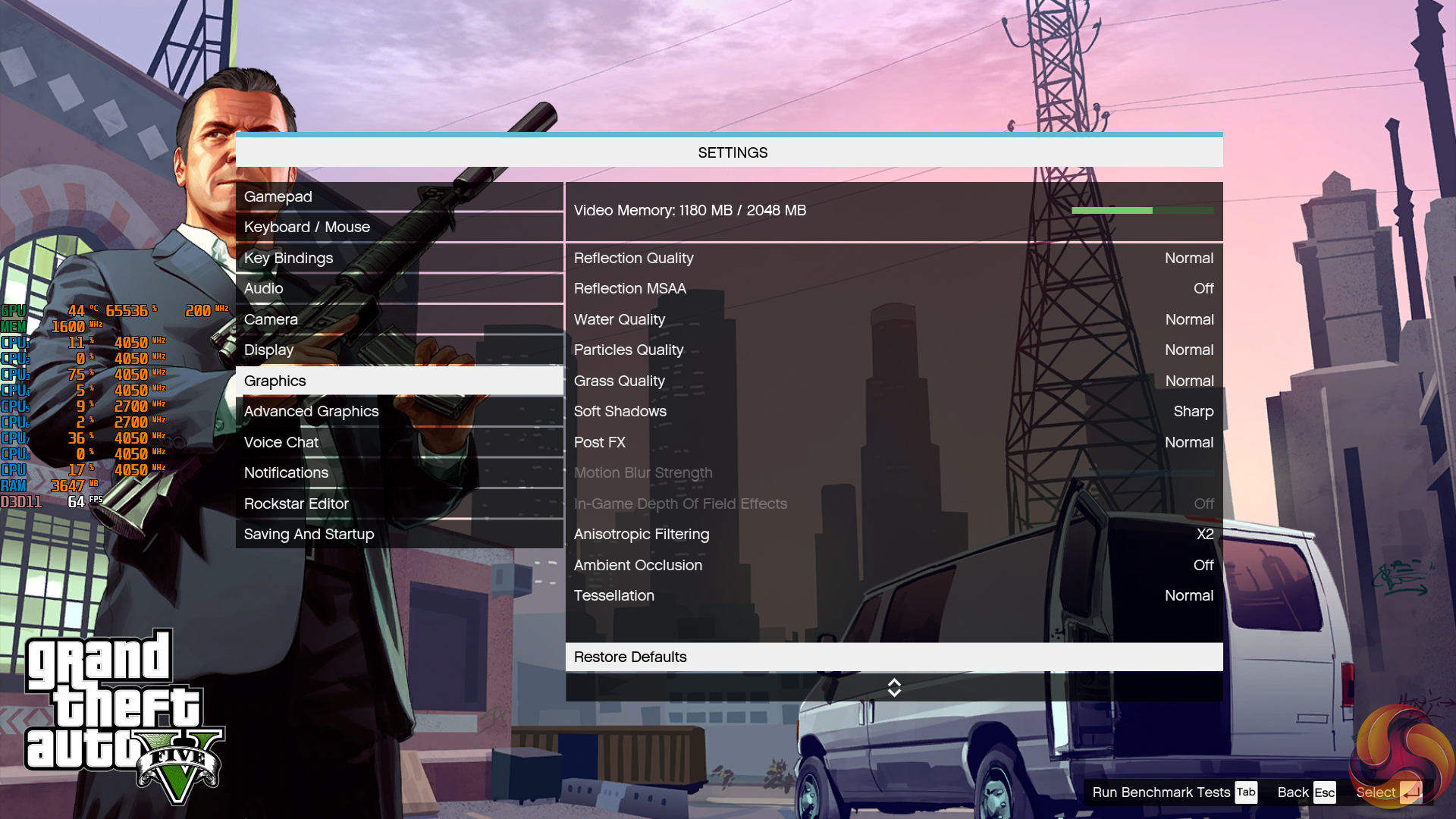
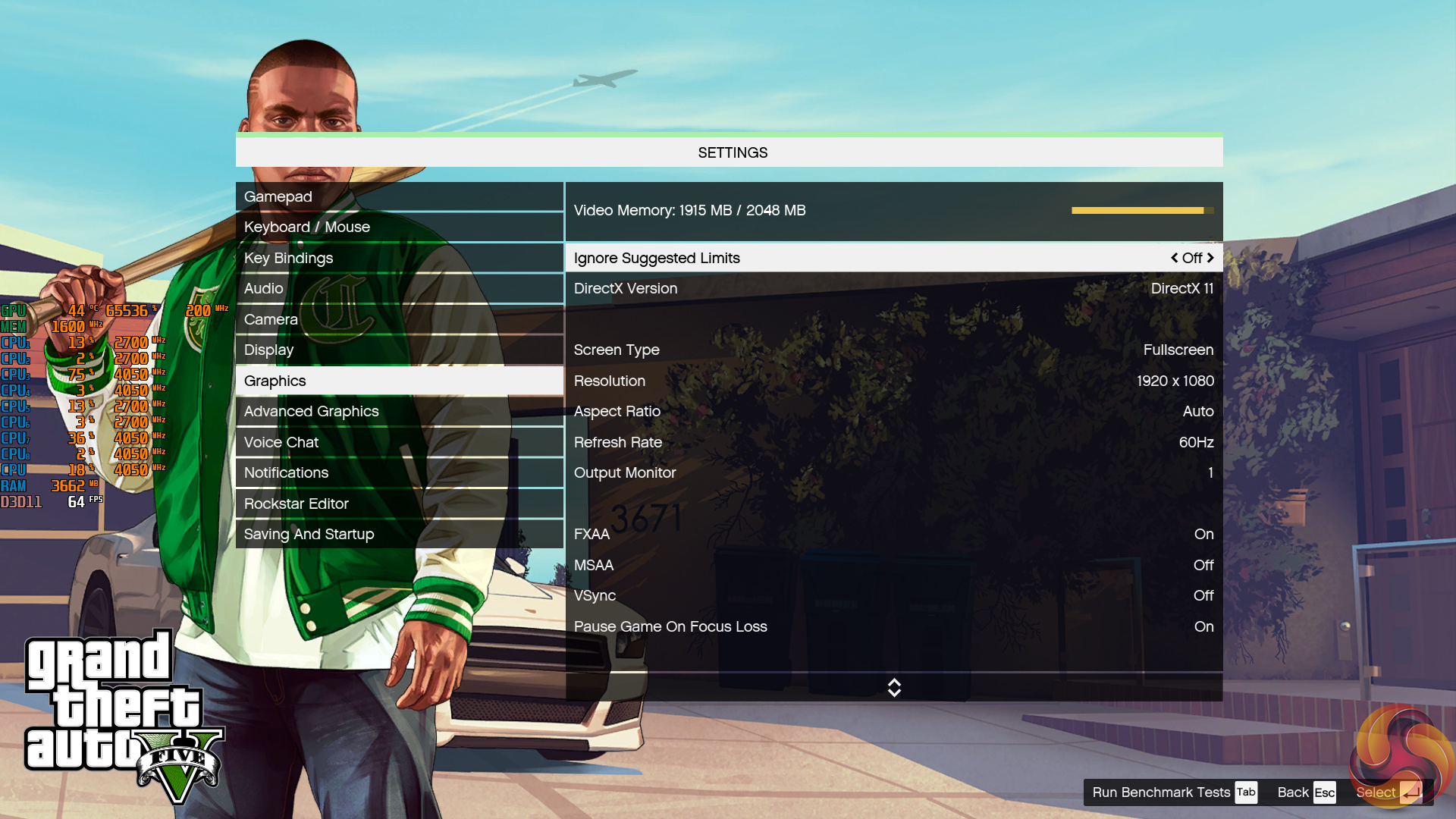
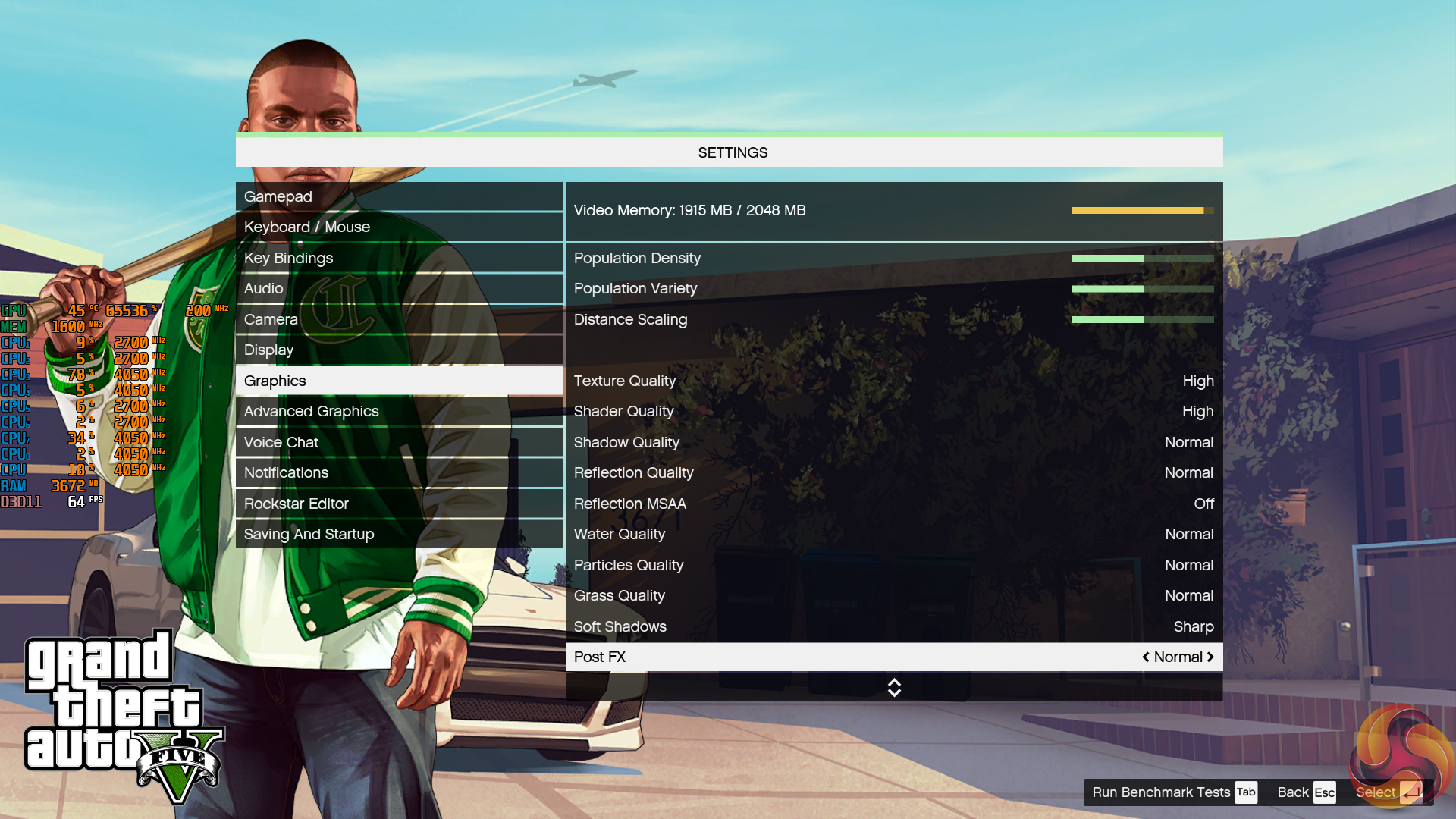
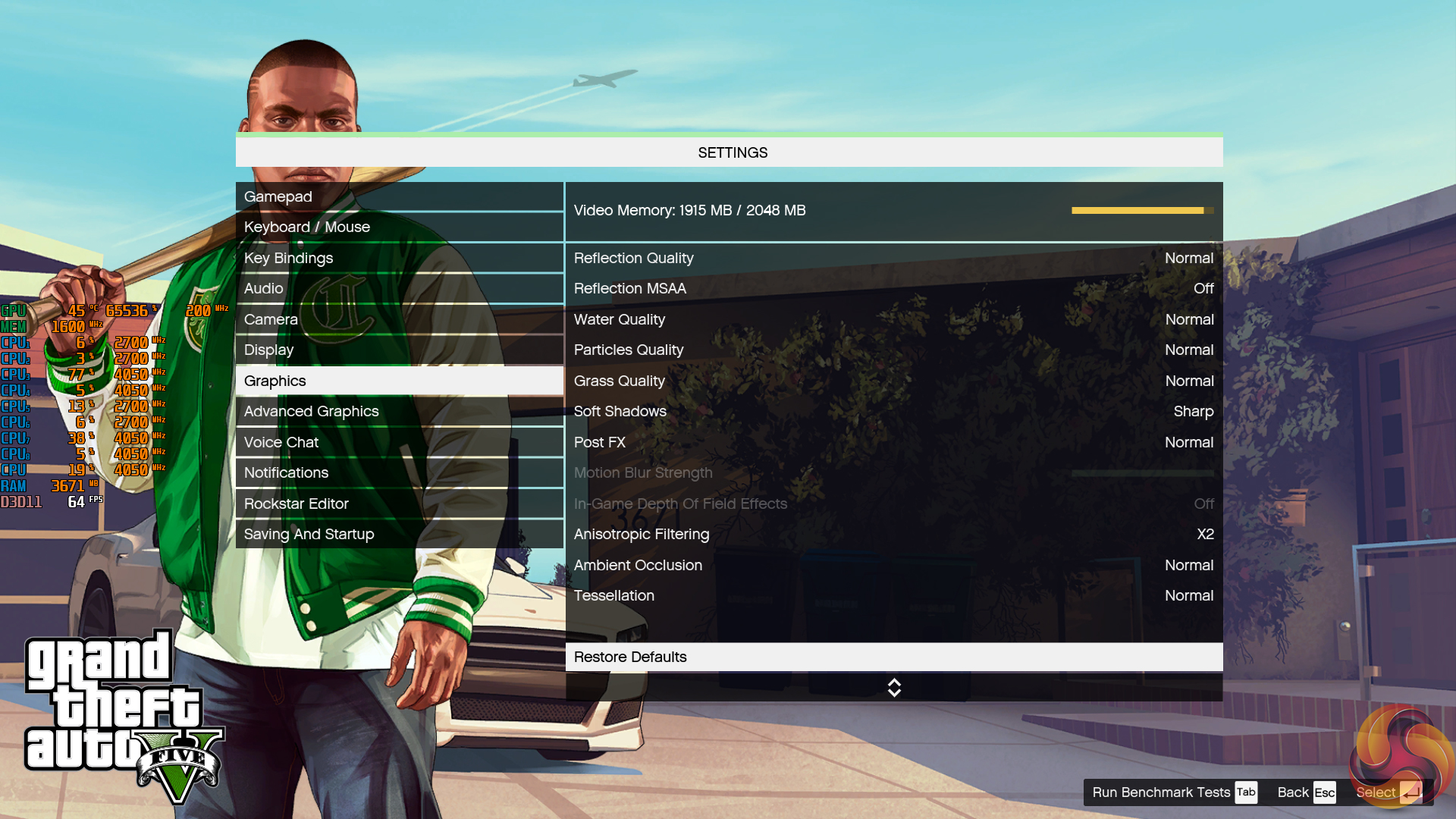
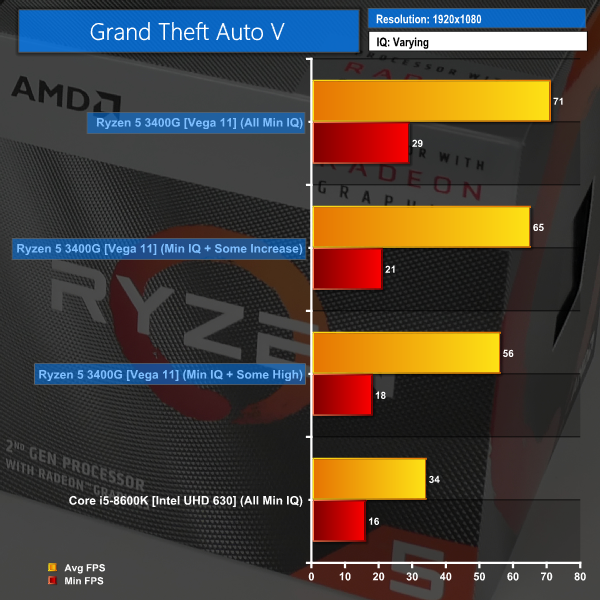
According to our benchmark numbers, GTA V ran happily at 1920×1080 with the lowest image quality settings. The average frame rate of just over 70 FPS was higher than we anticipated, so we took the opportunity to increase some IQ settings.
Turning on FXAA, increasing population density, variety, and distance scaling to 50%, turning on Tessellation to Normal, and increasing AF to 2x were our initial increased settings. These resulted in an average frame rate of 65 FPS through the built-in benchmark when at 1080P. This was more than playable, and enjoyable, so we pushed up the IQ settings again.
This time, the previous settings were maintained and we increased Texture Quality to High, Shader Quality to High, and Ambient Occlusion to Normal. This resulted in a suggested VRAM usage of 1915MB from GTA V’s built-in estimator. Average frame rates were now 56 FPS which, again, we were perfectly happy with.
Ghost Recon Wildlands
We run the built-in benchmark using the Lowest quality preset.
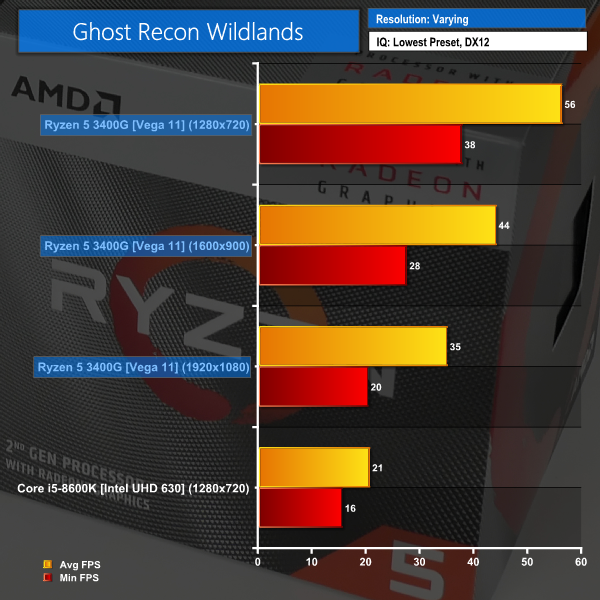
With Ghost Recon Wildlands on its lowest settings, 1920×1080 is, as we have seen from other games, playable but not a particularly smooth experience. The mid-30s average frame rate and lows around the 20 mark aren’t ideal but they are solid enough performance for an integrated GPU.
1600×900 pushes the frame rate up to the mid-40s on average, with low sitting around the mid-20s level. This is more playable and may be preferable to the higher frame rate but lower resolution of 720p.
1280×720 is where we see enjoyable frame rates with an average of 56 FPS and minimums of 38. Image quality isn’t great at this level, but the gaming experience is perfectly adequate for such a low-cost offering.
Shadow of the Tomb Raider
We run the built-in benchmark using the DirectX 12 mode, anti-aliasing disabled, and the Lowest quality preset.
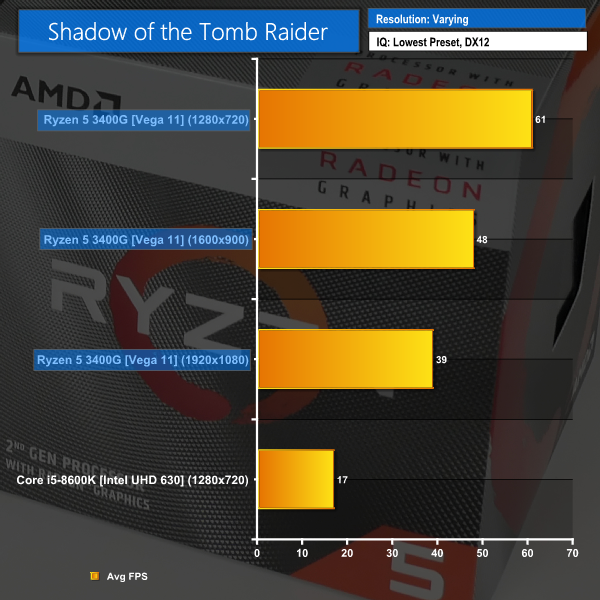
This game continues the same trend that we have seen previously, with average frame rates at 1080P being a playable but certainly less-than-ideal 39 FPS.
Switching to 1600×900 pushed the frame rate up to 48 FPS on average, and this is territory where the gaming experience starts to become more enjoyable.
1280×720 delivered 61 FPS on average and this was a decently smooth gaming experience, even if we did see drops down to around the 50 FPS mark. This is a good range for use with a FreeSync monitor.
Be sure to check out our YouTube video for further gaming performance running APEX Legends, Rocket League, CS:GO, and GTA V.
We leave the system to idle on the Windows 10 desktop for 10 minutes before taking a power draw reading (and averaging the result, if necessary due to Ryzen's sensor drift). For CPU load results, we read the power draw while producing approximately 5 minutes worth of runs of the Cinebench R20 multi-threaded test. We also run 10 minutes of AIDA64 stress test.
Both Cinebench and AIDA64 are used as some CPUs – most notably Intel's Core processors when operating under default turbo conditions – will heavily reduce their clock speed with the AIDA64 workload, thus giving an unrepresentative reading.
The power consumption of our entire test system (at the wall) is shown in the chart. The same test parameters were used for temperature readings.
Power Consumption
Power draw readings are accurate to around +/-5W under heavy load due to instantaneous fluctuations in the value. We use a Titanium-rated Seasonic 1000W Prime PSU (with 8-pin plus 4-pin or 8-pin plus 8-pin power connectors where possible).
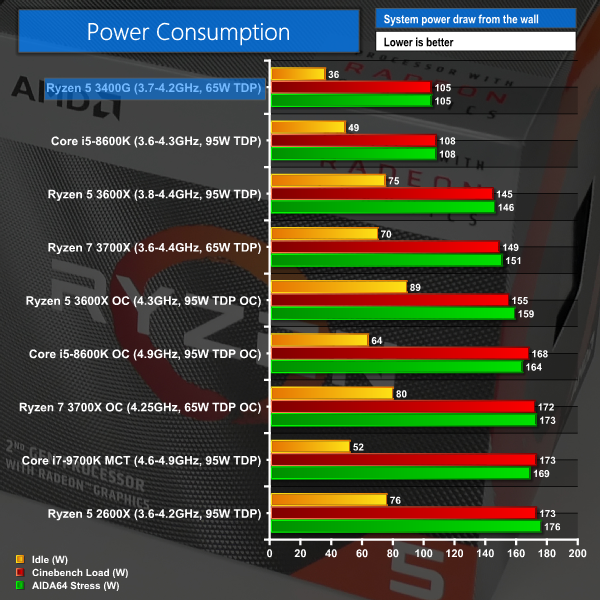
Power consumption is at a level where even the most budget of PSUs could handle the Ryzen 5 3400G without sweat. Just over 100W from a Cinebench CPU-only load is the same as we saw in AIDA64 CPU stress testing.
It’s worth highlighting the low idle power that we observed when using our ASRock B450 Steel Legend motherboard. This is a positive, especially for those interesting in running the APU in their always-on HTPC or Plex Media server.
A run through the Shadow of the Tomb Raider benchmark registered 100W power usage from the wall. This is because the GPU was all fired up while the CPU was not particularly heavily loaded with the moderato frame rates being registered.
Manually setting a CPU+GPU load using Blender and Unigine Valley saw power consumption top out at 125-135W from the wall. Again, this isn’t going to cause sweat for most ATX or SFF PSUs.
Temperatures
Temperature recordings were taken using the Wraith Spire CPU cooler with its fan running at the 3300 RPM maximum. Ambient temperatures were around 25-27°C in the hot UK summer weather (and normalised to 25°C where there were slight fluctuations).
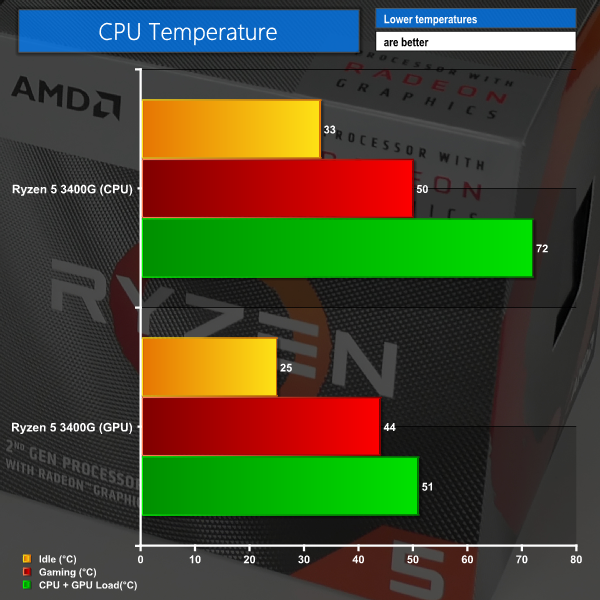
Temperatures with the bundled Wraith Spire CPU cooler were reasonable in our testing. Running at 100% fan speed, which is 3300 RPM, we saw maximum CPU temperature values just above 70°C. The GPU peaked just over 50°C in our CPU+GPU load test.
Unless you’re concerned about the noise output from the Wraith Spire cooler, which does get a bit irritating at full load, there’s no reason to upgrade the bundled unit from a temperature perspective.
Ryzen 5 3400G Frequencies:
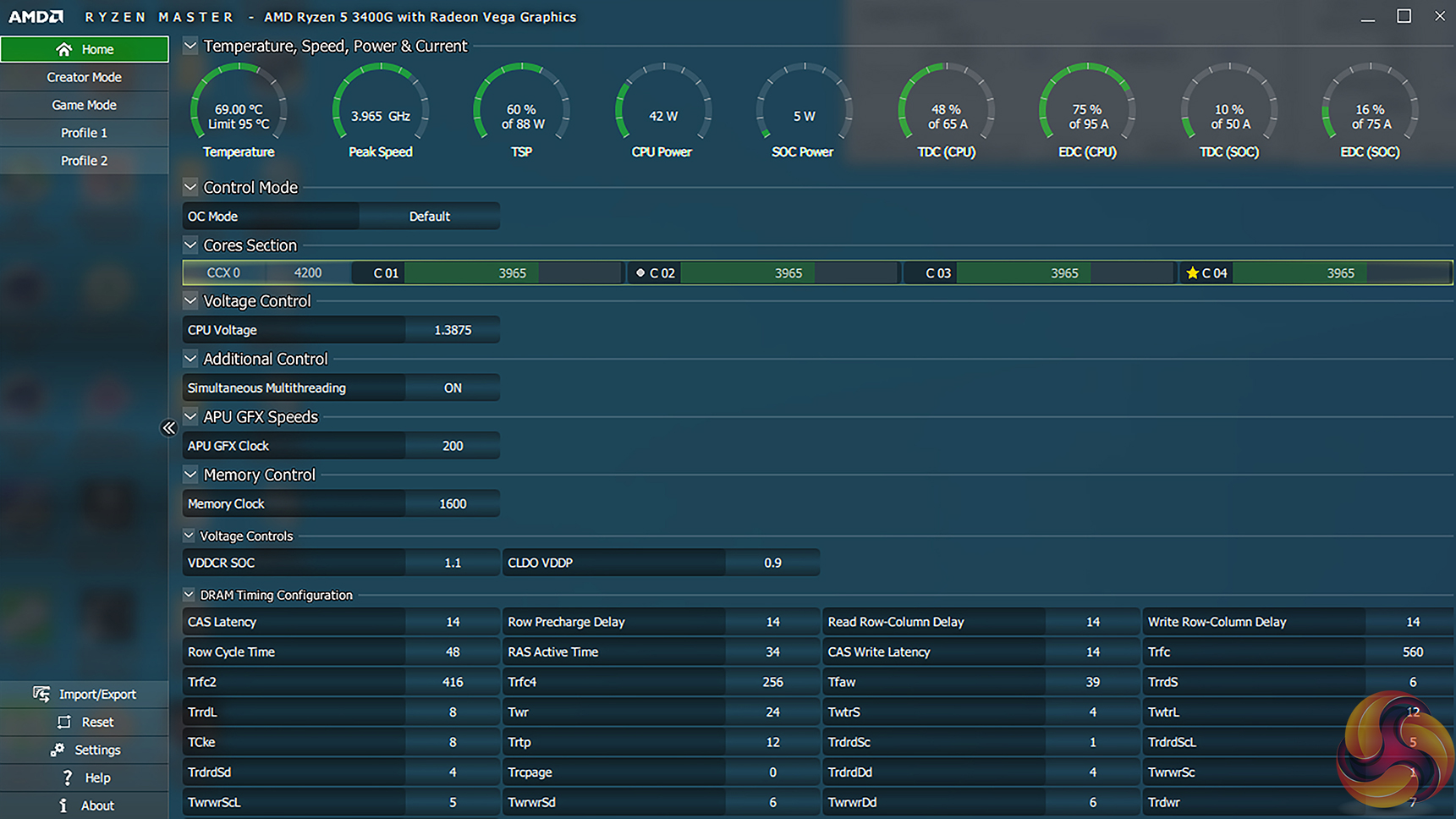
With respect to clock speeds through Precision Boost 2, we observed a general all-core frequency of around 3950MHz using the Wraith Spire cooler. Single-core frequencies climbed up to 4075MHz in our Cinebench 1T test, but we never observed the maximum boost frequency of 4200MHz in our HWInfo-recorded data.
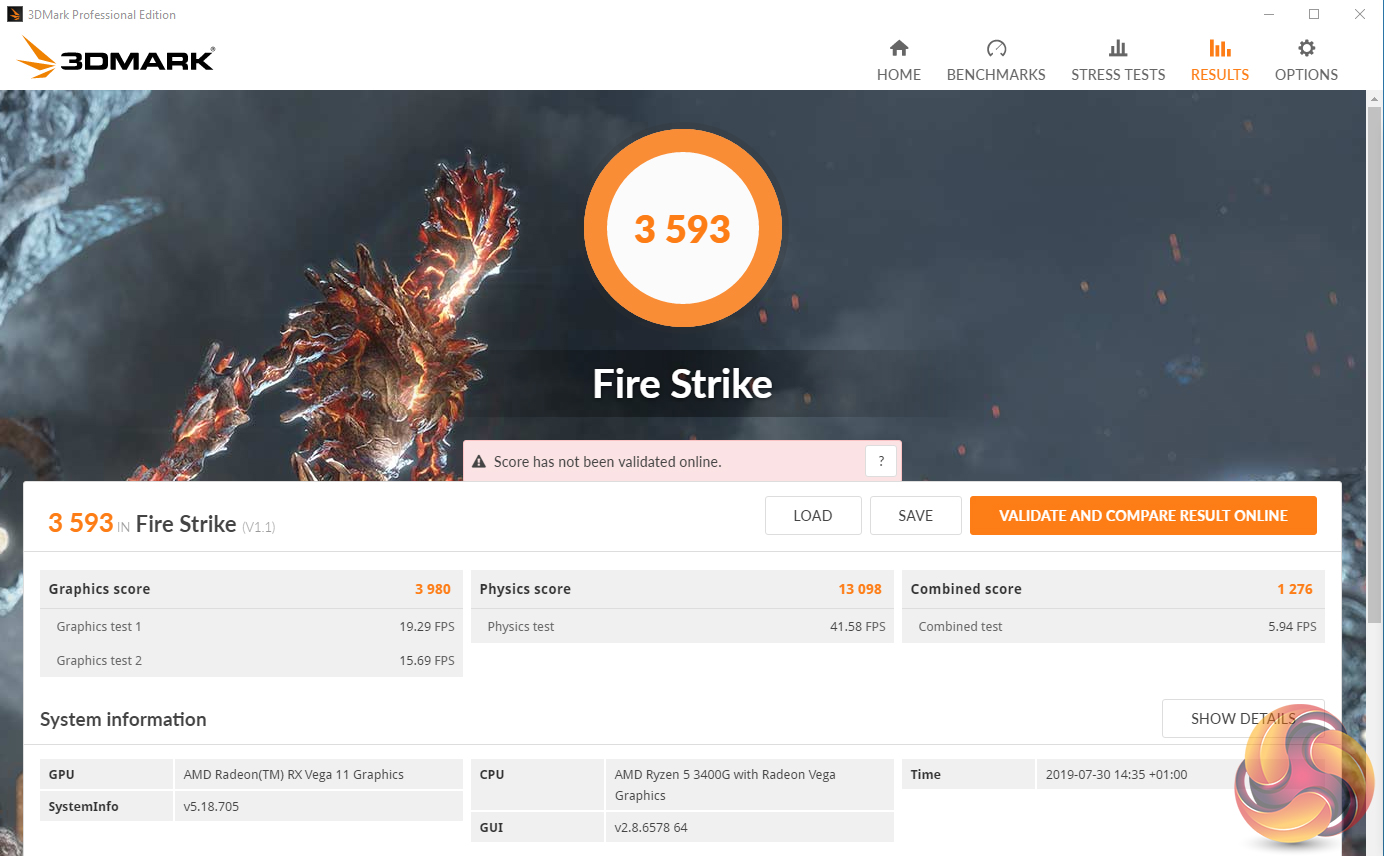
We did, however, observe occasional spikes up to 4200MHz in our 3DMark testing but these short-term jumps were few and far between.
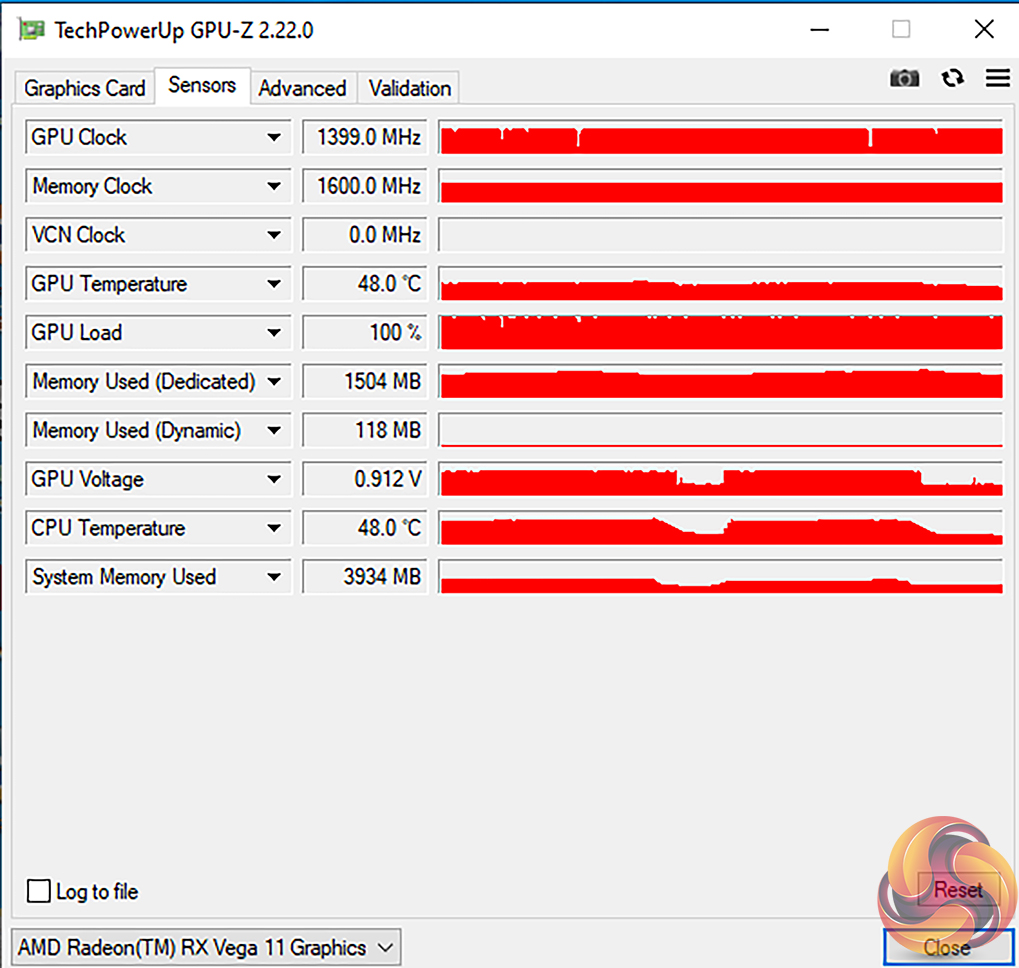
Throughout the vast majority of our game testing, the GPU was pinned at its maximum clock speed of 1400MHz. We did not observe any occasions where the clocks throttled down below 1400MHz during gaming.
PBO + Auto OC Overclocking comments:
Automatic Overclocking settings in Ryzen Master were limited on our test system. The maximum package power (PPT) value that we could set stayed at 88W and the EDC current was only able to go as high as 75 Amps. This limited our success with the Auto OC function.
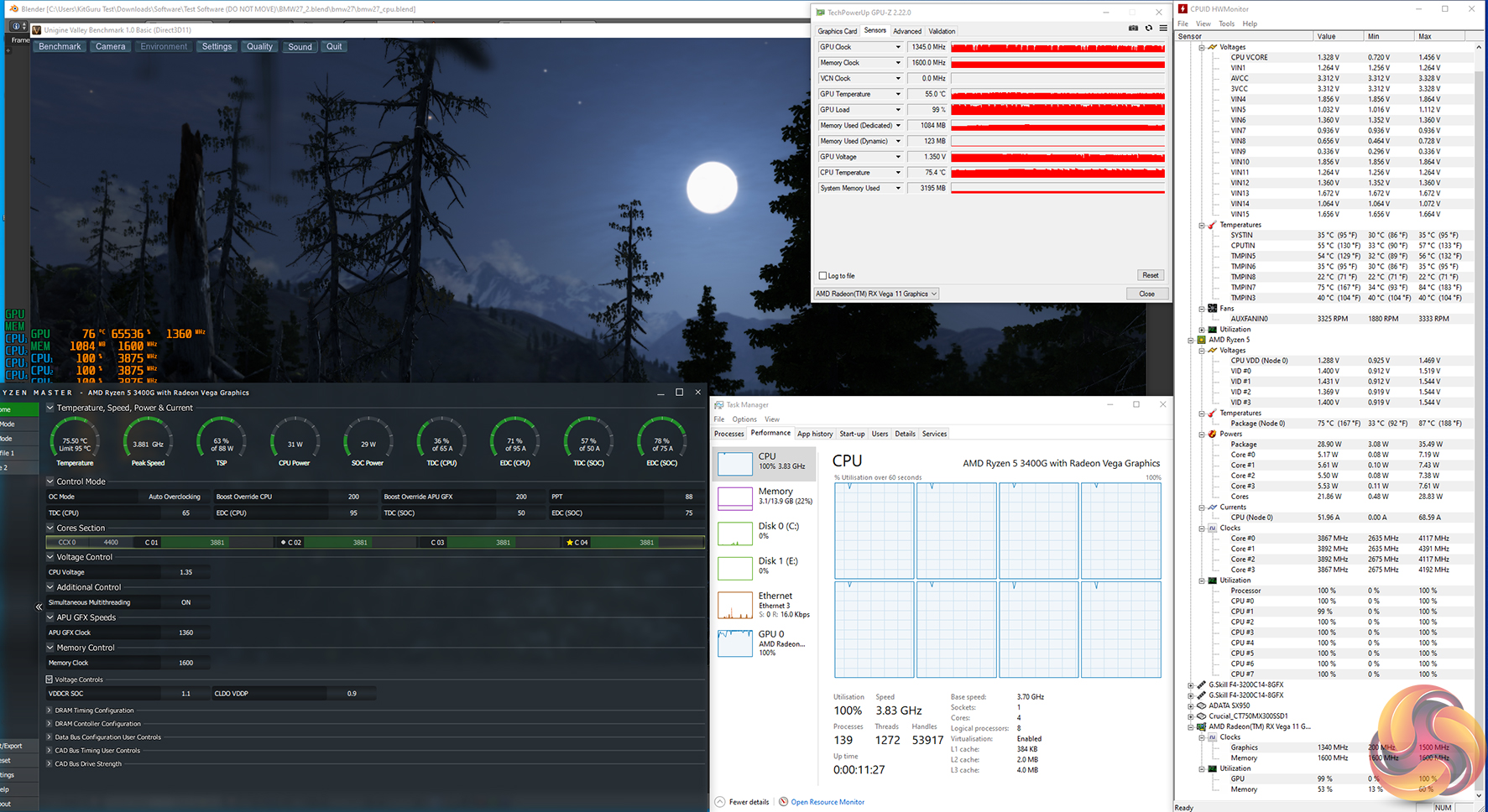
We did, however, push all of the settings to their maximum values, including aiming for plus 200MHz on the CPU and GPU frequencies. This proved to be of minor success on the CPU front – allowing us to maintain an all-core boost clock in Cinebench R20 for a few extra seconds before settling down to 3950-3975MHz.
The GPU gained a little more in our testing and was able to run at around 1470-1499MHz in our Unigine Valley testing while also hammering the CPU fully with Blender. The GPU frequency eventually dropped towards 1400MHz after a few minutes of sustained loading, primarily due to the motherboard and Precision Boost resources being hogged by the CPU. Loading the GPU on its own in Unigine Valley saw its frequency hit 1499MHz and stay there for sustained periods.
We tried out PBO on its own, which focuses on removing the shackles of the Precision Boost algorithm, thus allowing the CPU and GPU to flex its muscle. Increasing the values to their maximum levels delivered no improvement to performance in our CPU testing. The same can be said for the GPU. Ryzen Master's PBO implementation is not well designed to handle the GPU as the default clock was maintained at 1400MHz and therefore the Vega 11 GPU did not try to boost higher, despite additional power budget being made available.
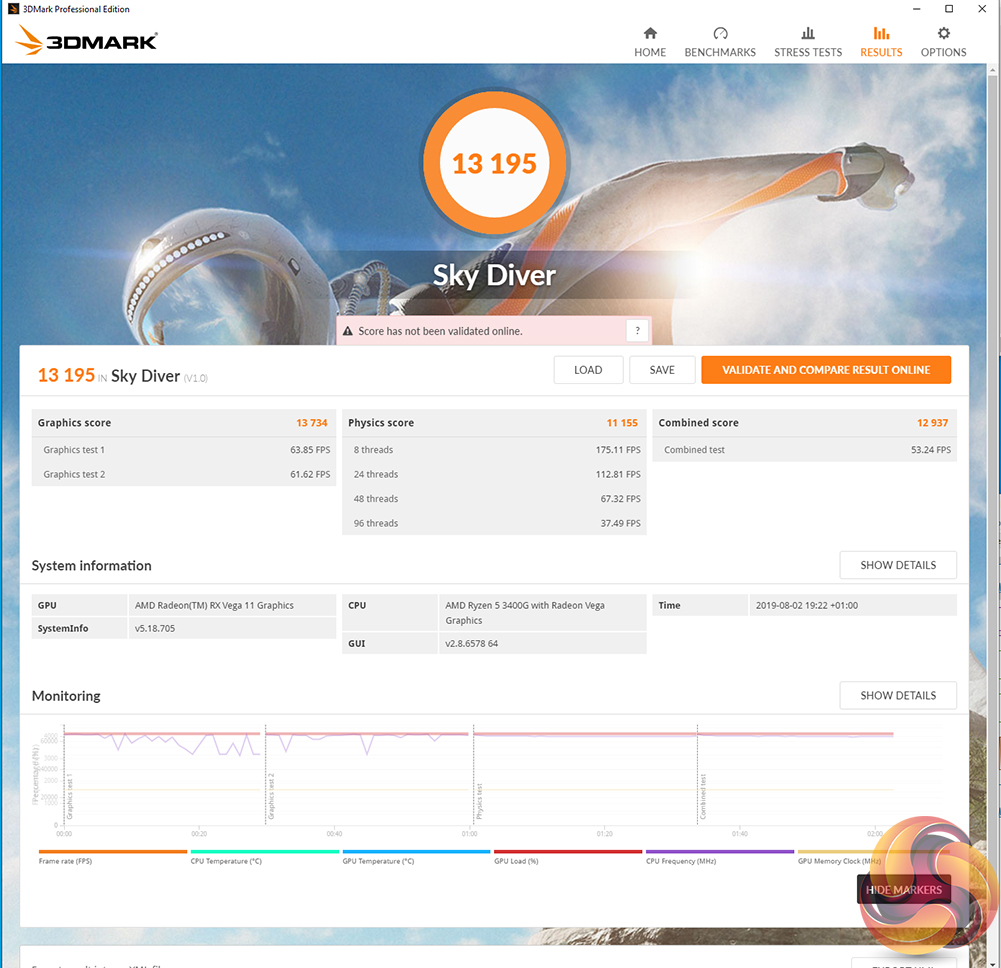
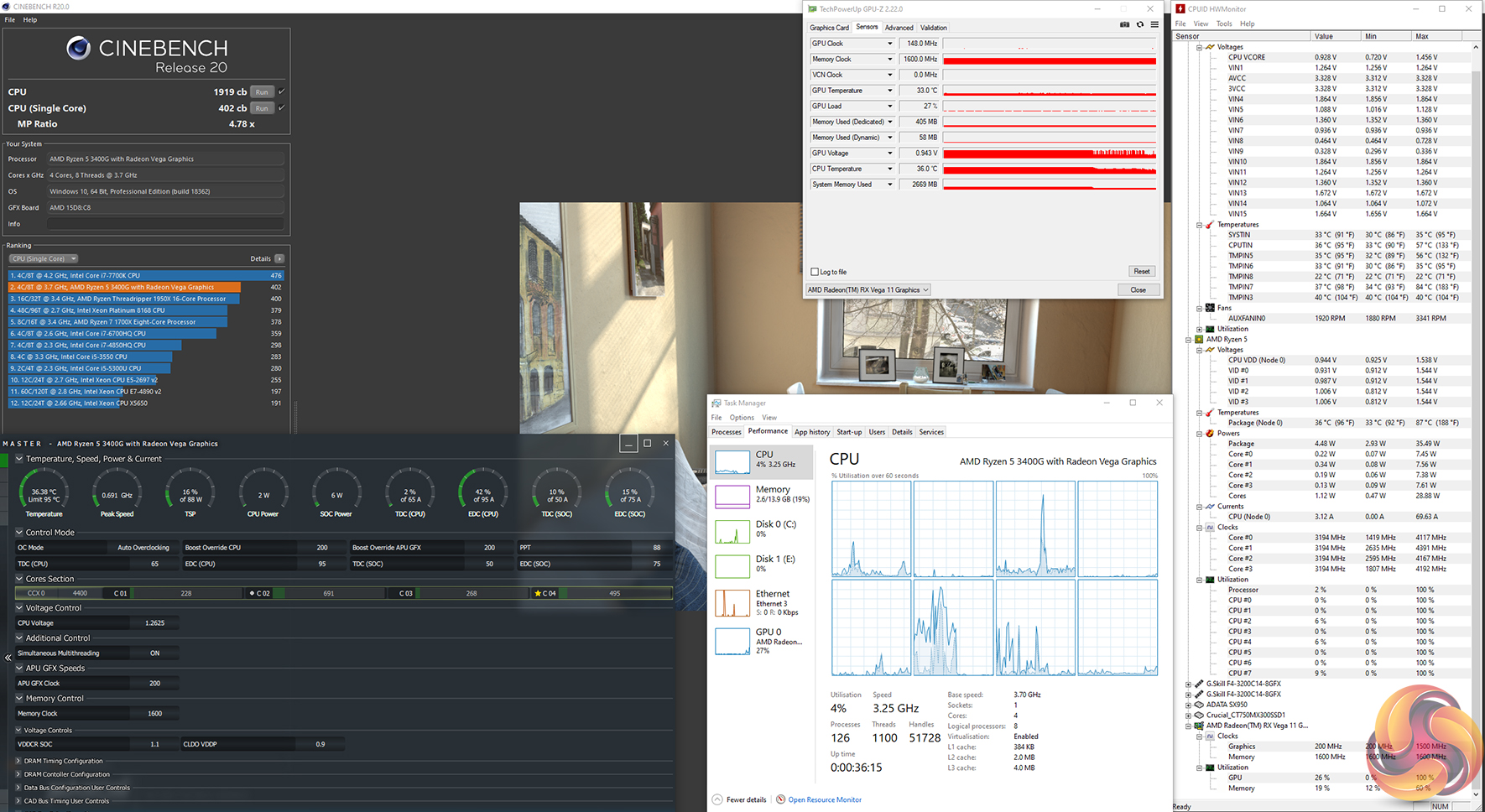
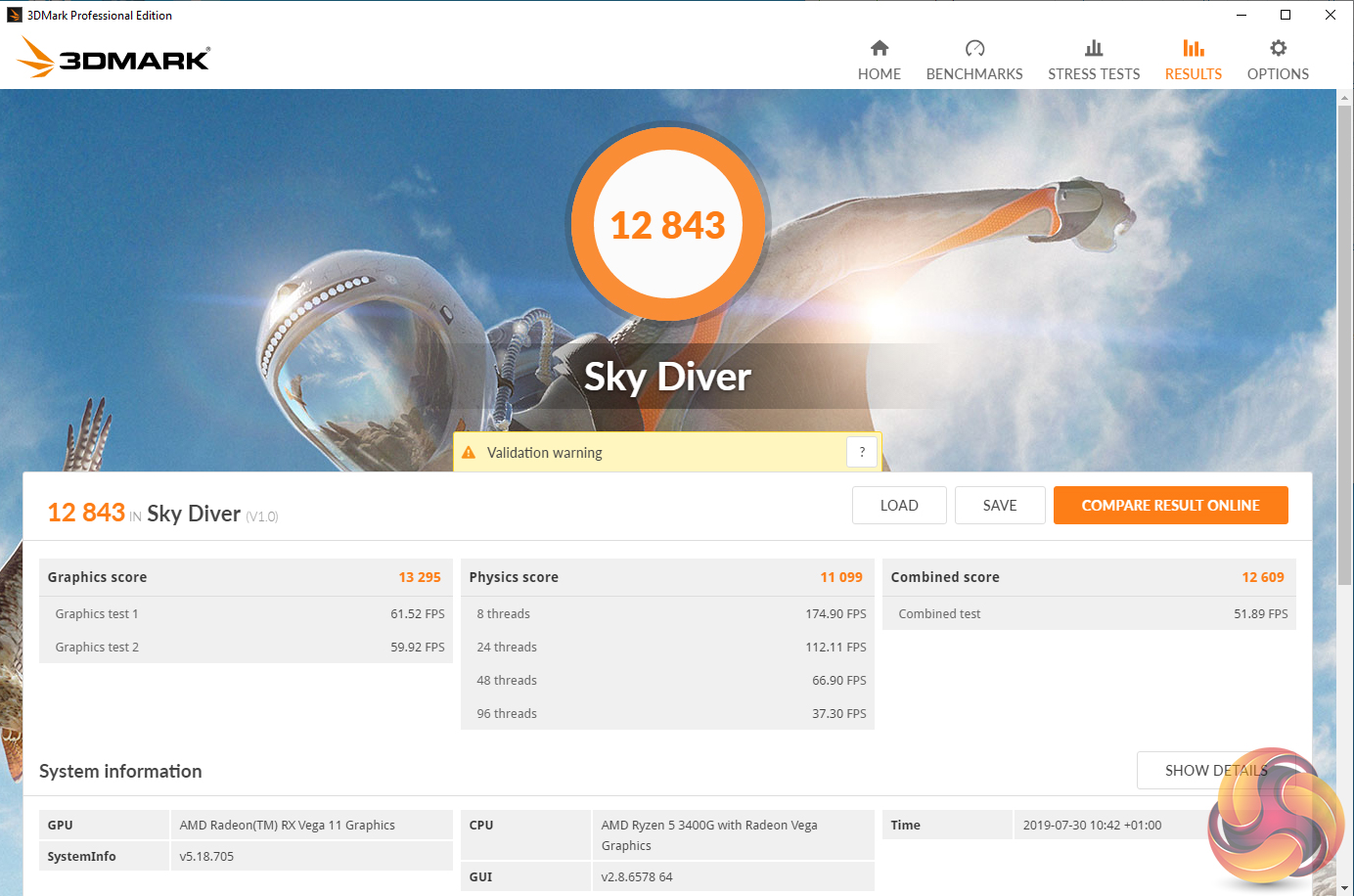
A small improvement to the 3DMark Sky Diver result was registered, thanks in large to the increased GPU frequency. Cinebench R20 performance stayed roughly the same.
AMD’s intentions to make non-discrete GPU gaming a possibility for those on strict budgets were proven possible last year with the Raven Ridge Ryzen 5 2400G. That APU finally offered solid CPU performance thanks to the use of its Zen architecture. And the Vega-based GPU component allowed playable frame rates to be extracted from even AAA titles, provided you’re happy to drop below 1080P in many instances.
AMD’s new Zen+, 12nm-based Ryzen 5 3400G delivers more of the same. The Picasso 3400G is more of an incremental upgrade from the 2400G it replaces rather than the significant overhaul we’re expecting from AMD’s yet-to-be-released Zen 2-based Renoir APU.
If you’re on a strict budget and simply want to play some games at reasonable FPS values and resolutions, the Ryzen 5 3400G allows you to do that. This year, however, the purchasing decision is made more difficult as we have ended the era of ballooned GPU prices from last year’s cryptocurrency boom, making discrete GPUs affordable again.
Of course, the alternative route to this £140 APU would be to buy a dedicated CPU alongside a dedicated GPU. With a budget of £140 and looking only at the brand-new market, the go-to option would be a 4C4T Zen-based Ryzen 3 1200 that can currently be had for around £55. That leaves £85 for the graphics card, sitting us firmly in Nvidia GT 1030 territory (with a few pounds change). That’s hardly a mouth-watering prospect as you’re left with a slower CPU based on older architecture and with half the threads.
On the GPU front, the discrete GT 1030 is reasonable when used in such a scenario and it is likely to slightly outperform the 1400MHz Vega 11 in general. But this approach introduces some of the potential headaches that an APU alleviates – such as space inside an SFF system and additional noise output from a graphics card’s cooler.
Of these two potential system routes, I’d personally be tempted by the faster Zen+-based CPU in the Ryzen 5 3400G which will offer higher performance than the Ryzen 3 1200 when both are paired with a discrete GPU (bottlenecking aside). The £140 Ryzen 5 3400G allows gamers on a budget to play games right now, with a CPU that offers reasonable productivity performance given its price. Funds can then be topped up to allow for a discrete GPU to be purchased in the future.
Of course, if you’re happy to go down the second-hand route, the entire value perspective adjusts. £140 on a popular auction site will just about get you a four-core, eight-thread Ryzen 5 1500X and an RX 570, giving you a better gaming experience. With that said, brand new to second hand is hardly a fair comparison, but it’s worth mentioning.
As another note, I don’t see any real reason to upgrade from the Raven Ridge Ryzen 5 2400G to this Picasso APU. The likely minor performance gains will be largely frequency driven as there are no major architectural changes from Zen to Zen+. And at maybe £20 cheaper for the Ryzen 5 2400G at the moment, there is no reason to opt for that slower APU and its lesser cooler than the Ryzen 5 3400G if buying brand new.
Overall, the Ryzen 5 3400G is a solid option that makes even 1080P gaming a possibility without a discrete GPU. We'd say that this APU is a reasonable option for cash-strapped buyers, even if the market makes it less of a clear win than the 2400G was with last year’s inflated prices. Just as we saw with the Raven Ridge APUs last year, I think HTPC enthusiasts and perhaps even users building their own NAS systems or Plex media servers will be pretty interested in this one.

The Ryzen 5 3400G APU can be found on Overclockers UK for £139.99 HERE.
Pros:
- Solid gaming performance without a discrete GPU.
- Decent level of CPU productivity performance.
- Wraith Spire cooler performs well.
- Good media playback compatibility.
- AM4 platform gives flexibility and upgradability.
- Far superior gaming performance versus Intel CPUs with UHD 630 graphics at the same price.
Cons:
- Demands high-speed DDR4 for improved graphics performance, which can be costly.
- Slim overclocking potential and PBO proves of little benefit.
- Intel's UHD 630 iGPU looks to offer better media playback performance, especially with VP9 on YouTube.
KitGuru says: Well-balanced and affordable, AMD's Ryzen 5 3400G APU delivers decent CPU performance alongside an integrated Vega 11 GPU that is capable of delivering an enjoyable 1080p gaming experience.