KitGuru KitGuru.net – Tech News | Hardware News | Hardware Reviews | IOS | Mobile | Gaming | Graphics Cards


With PC component prices hitting historic highs over the last two years, building performant but also good value systems has been almost impossible until very recently. The Cyberpower Infinity X123 Pro is one such prebuilt, priced at £899. But does the choice of an Intel i3 processor, paired with Nvidia's RTX 3060, make sense for gaming – or will the system be CPU bottlenecked? Let's put it to the test.
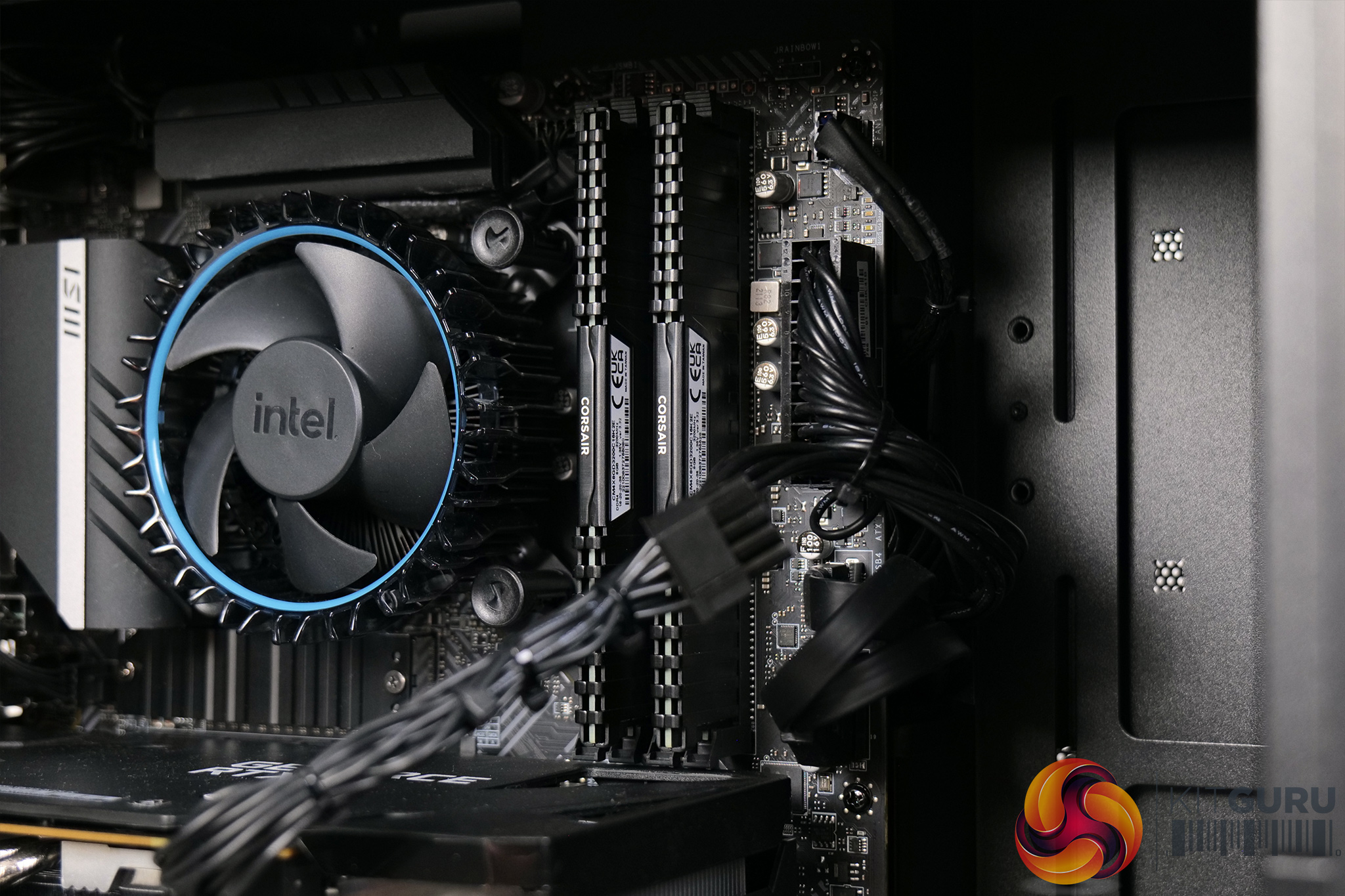
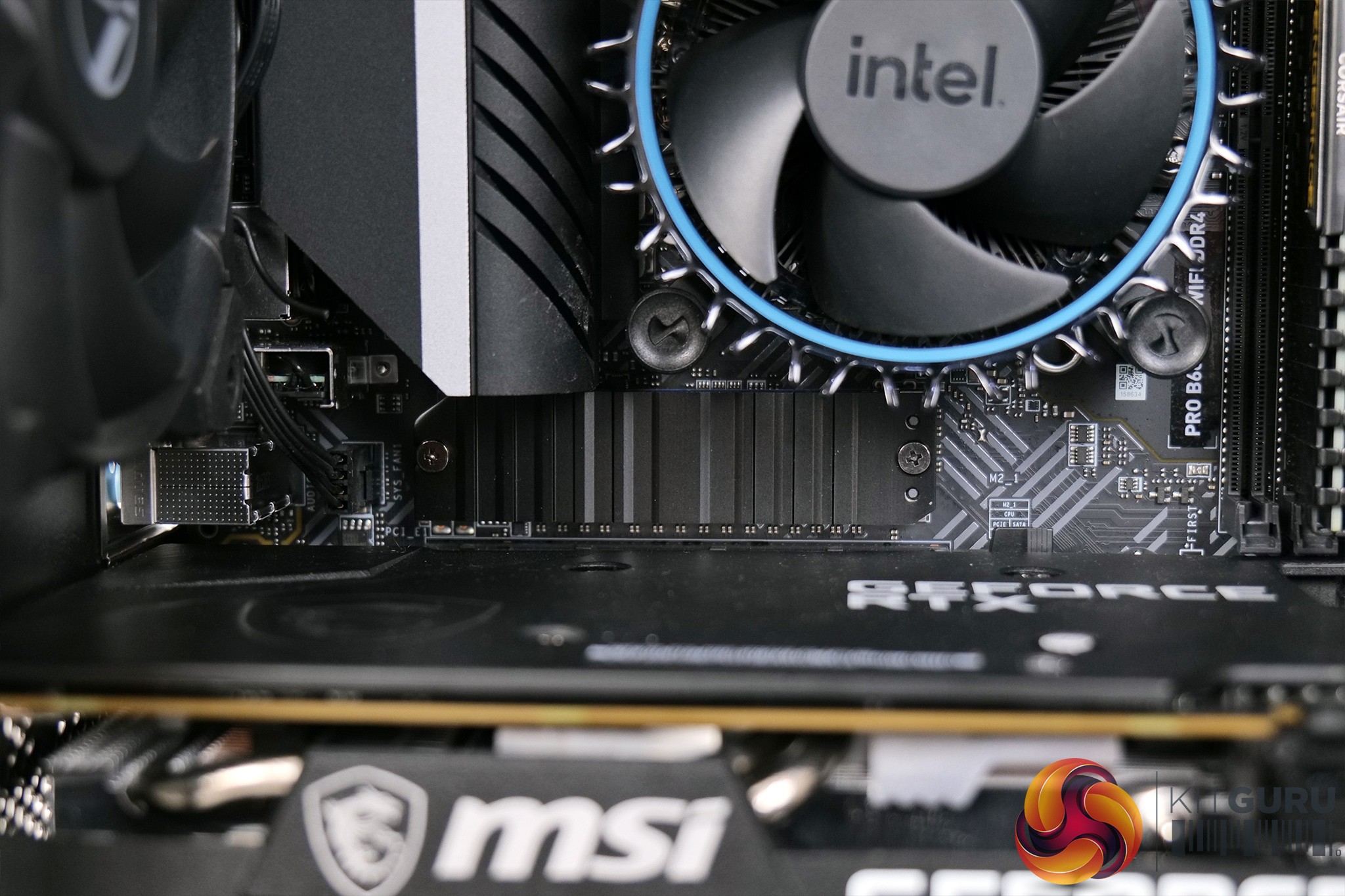
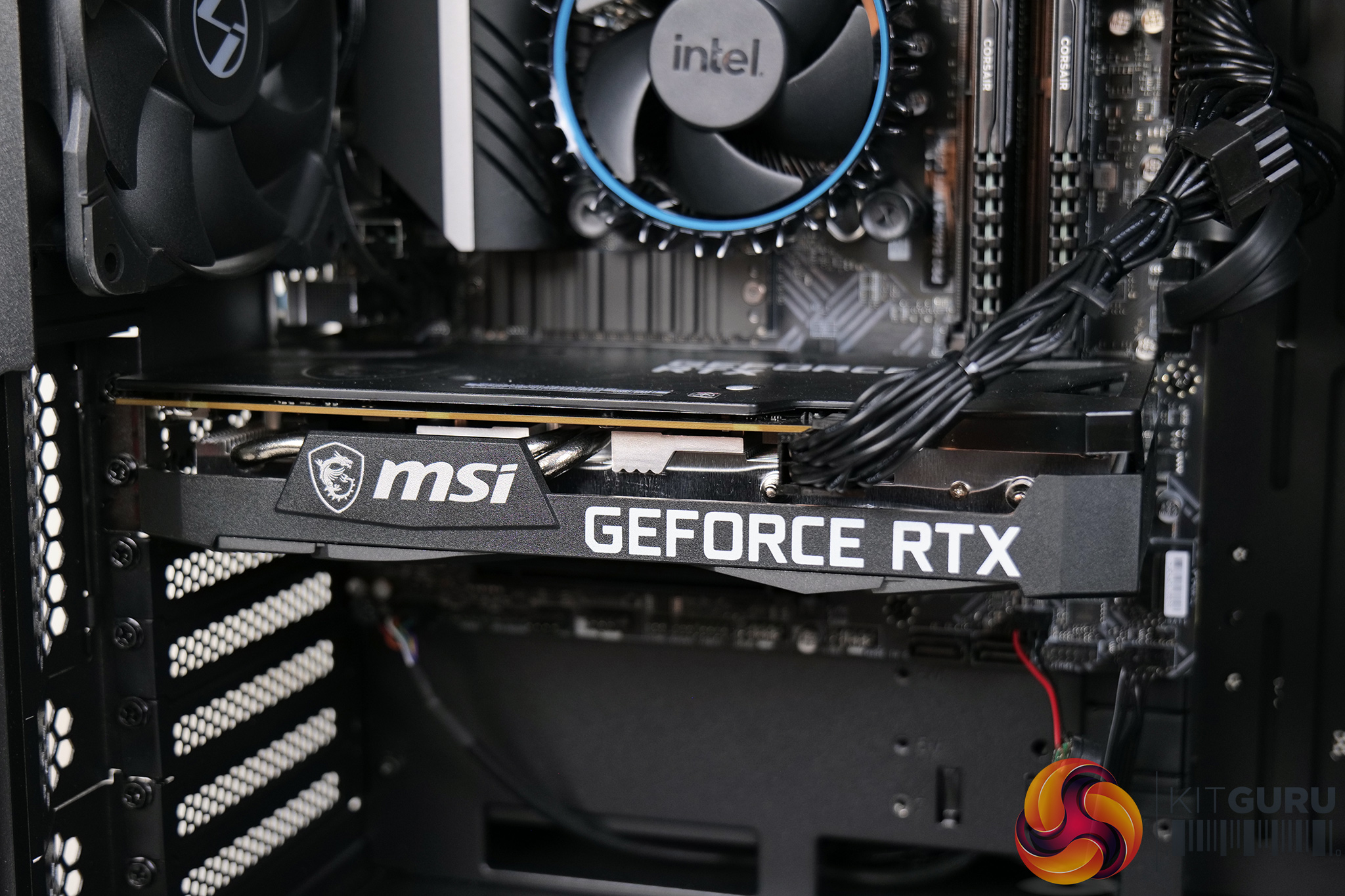
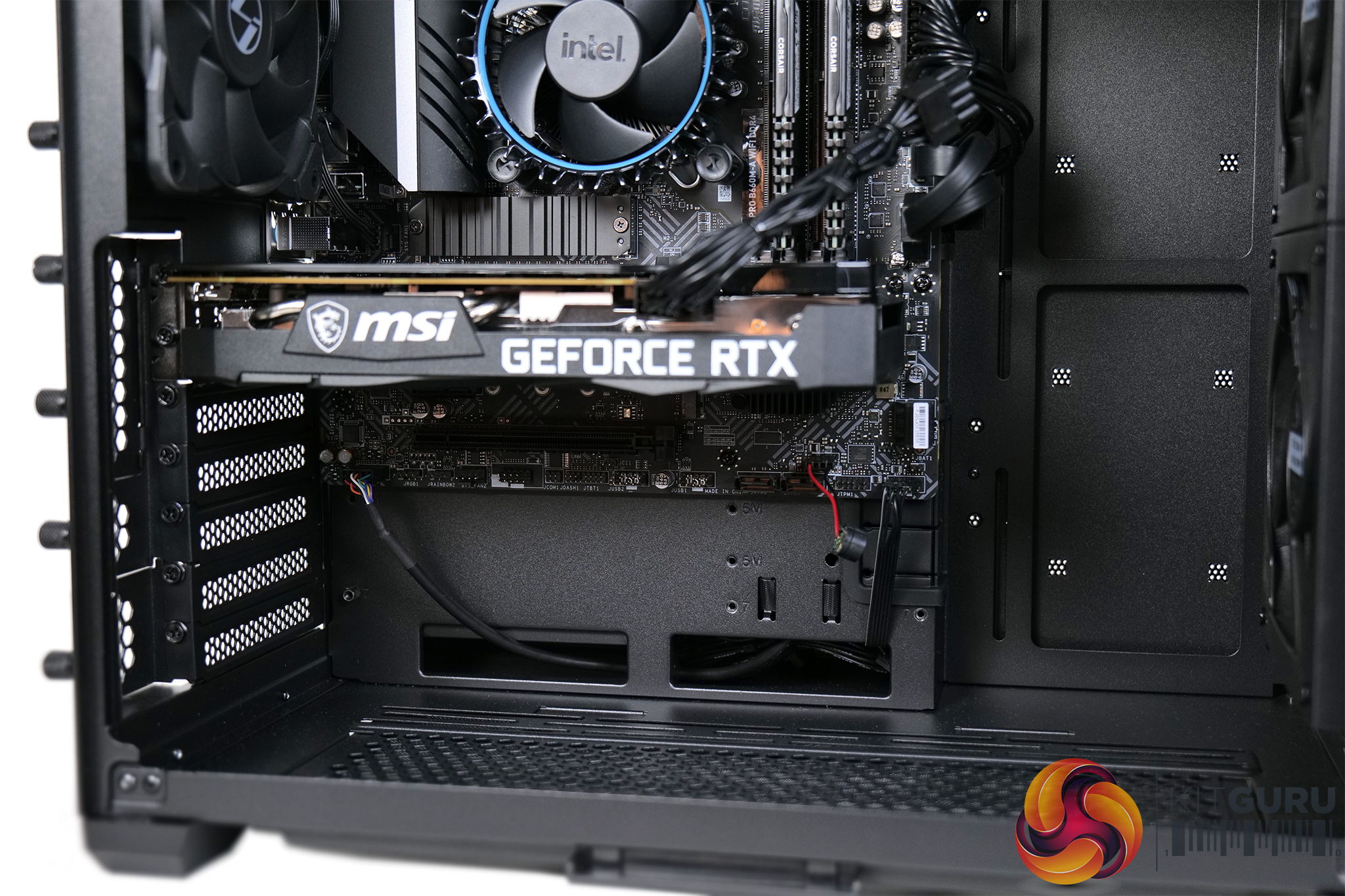
Specification
- Case: Lian Li O11 Air Mini High Airflow Black Gaming Case (Black Colour)
- CPU (Processor): Intel® Corei3-12100F
- Graphics Card (GPU): MSI GeForce® RTX 3060 12GB
- CPU Cooling: INTEL 12th Gen Standard CPU Cooler
- Motherboard: MSI B660M-A WIFI DDR4: mATX w/ WiFi, USB 3.2, 1x M.2
- Memory (RAM): 16GB (2x8GB) DDR4/3200MHz Dual Channel Memory
- PSU (Power Supply): InWin A65 650W 80+ Certified Gaming Power Supply
- M.2 SSD Drive: 500GB (1x500GB) MSI Spatium M390 M.2 PCIe NVMe SSD
- Operating System: Windows 11 Home
- Warranty Service: DESKTOP STANDARD WARRANTY: 5 Years' Labour, 2 Years' Parts, 6 Months' Collect and Return plus Life-Time Technical Support
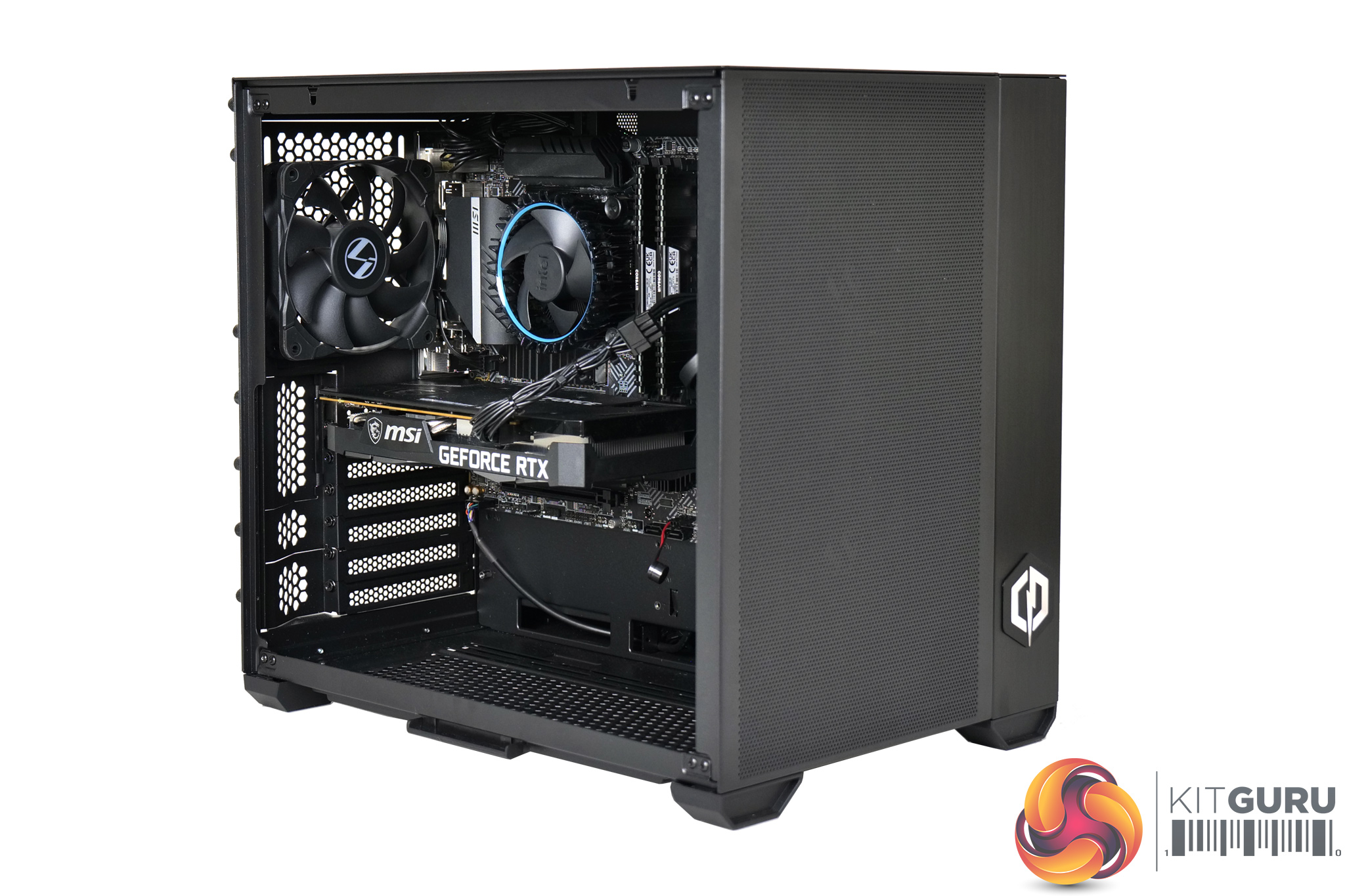
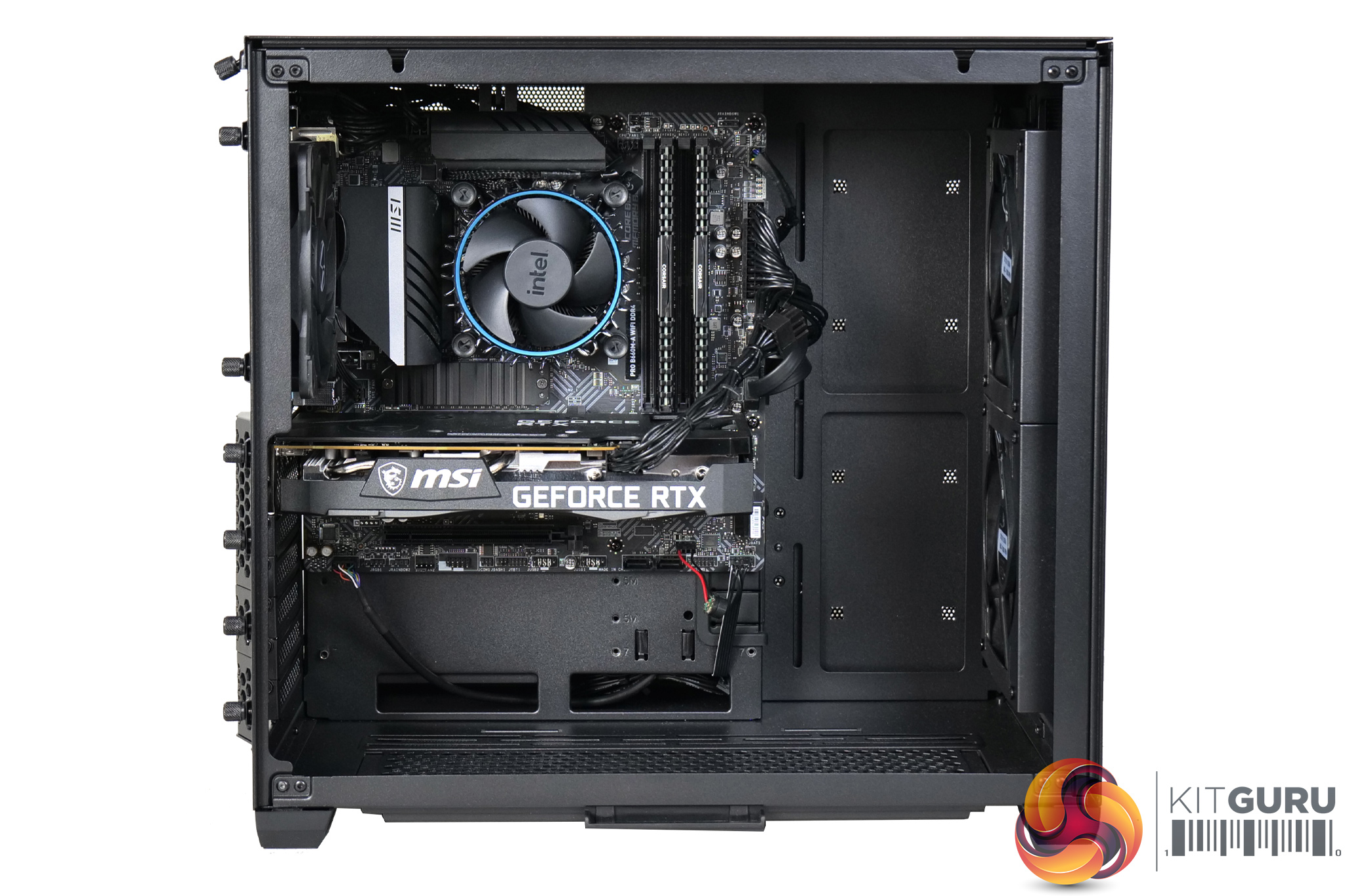
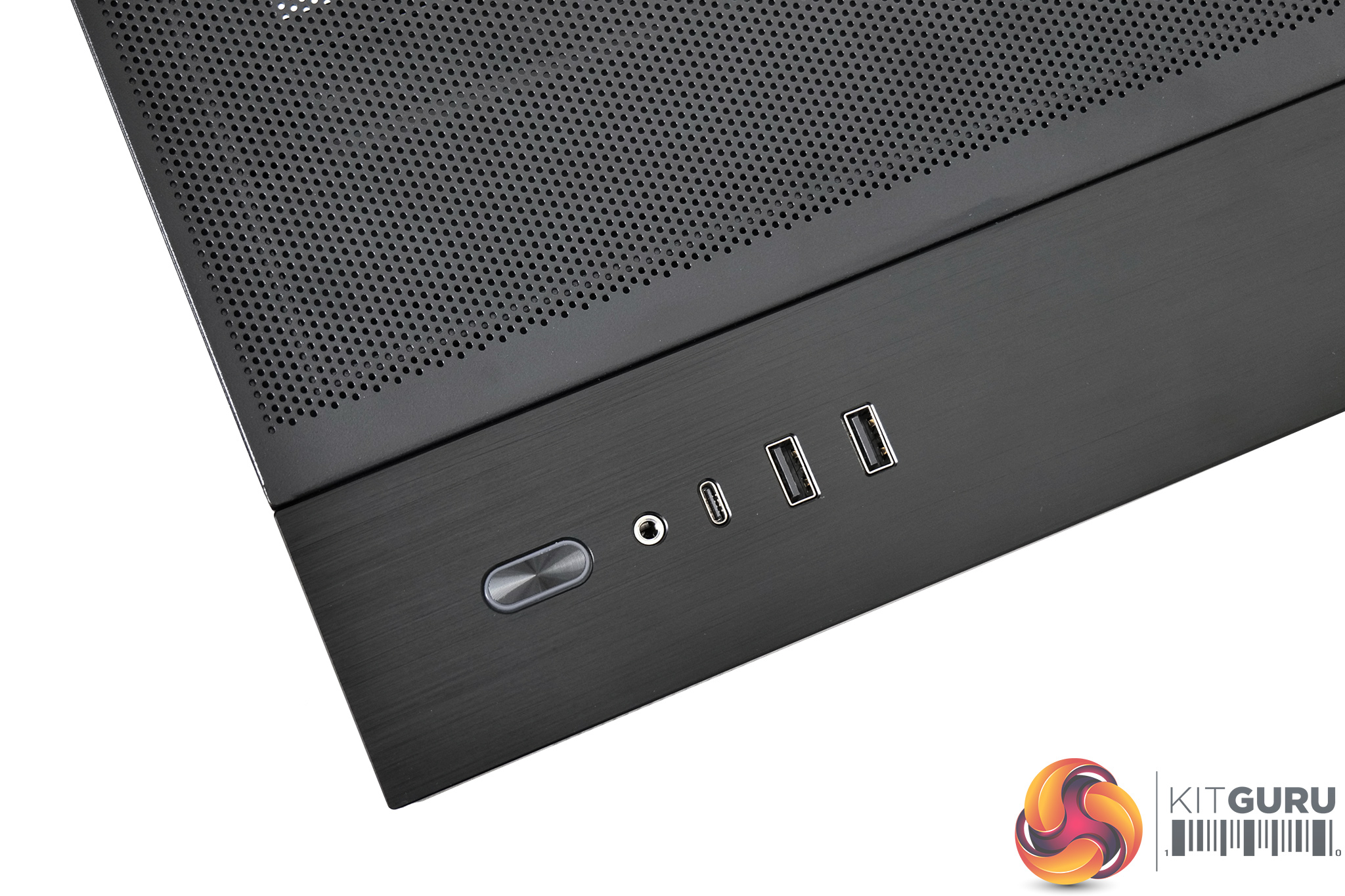
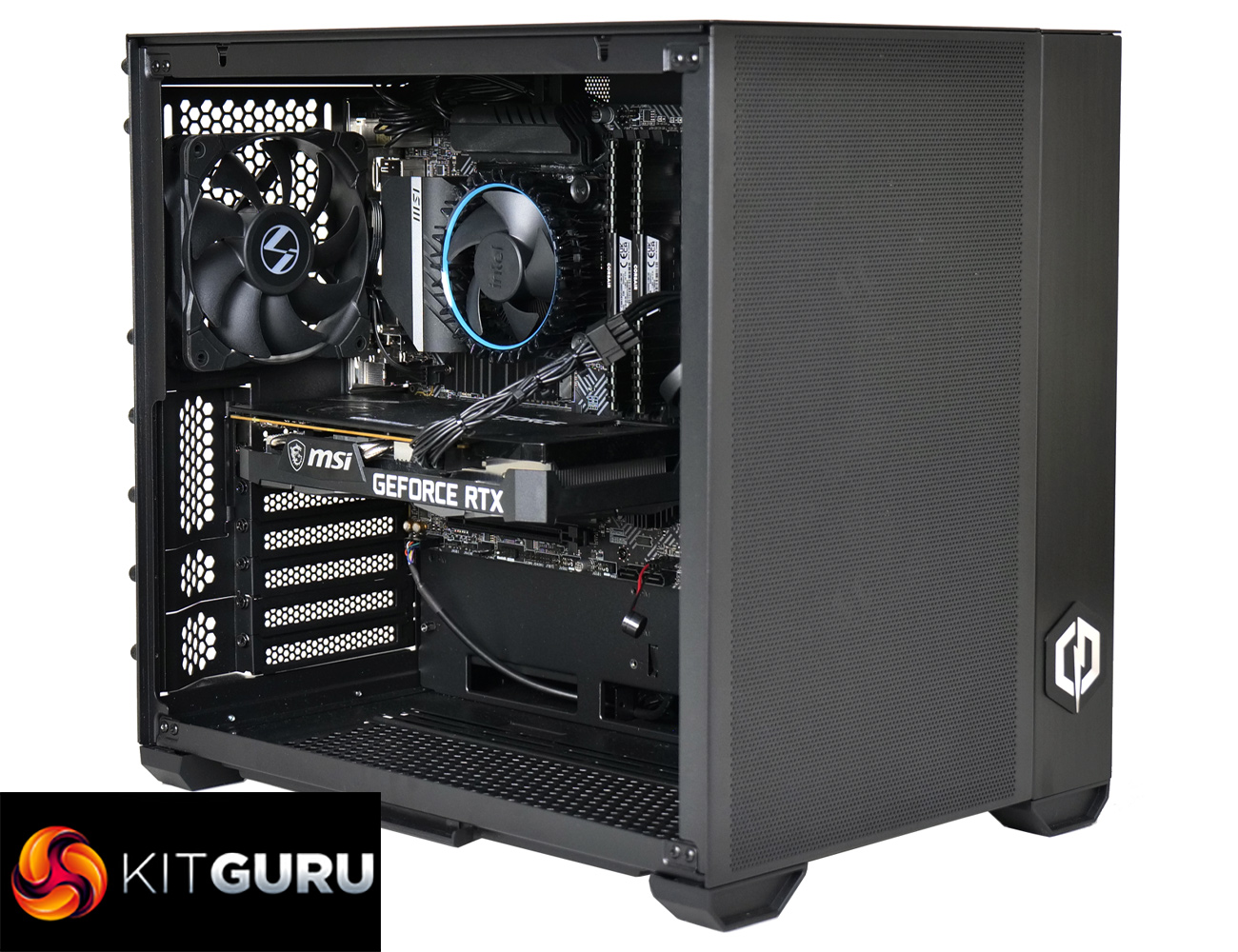
We’ll kick off with a tour of the system, looking at the components and the overall build. This starts with the case, where Cyberpower has opted for the Lian Li O11 Mini. I really like this case – it’s still an ATX chassis but it’s very compact, build quality is solid and you get excellent airflow from the perforated front panel, with two 140mm intake fans at the front, and one 120mm exhaust at rear.
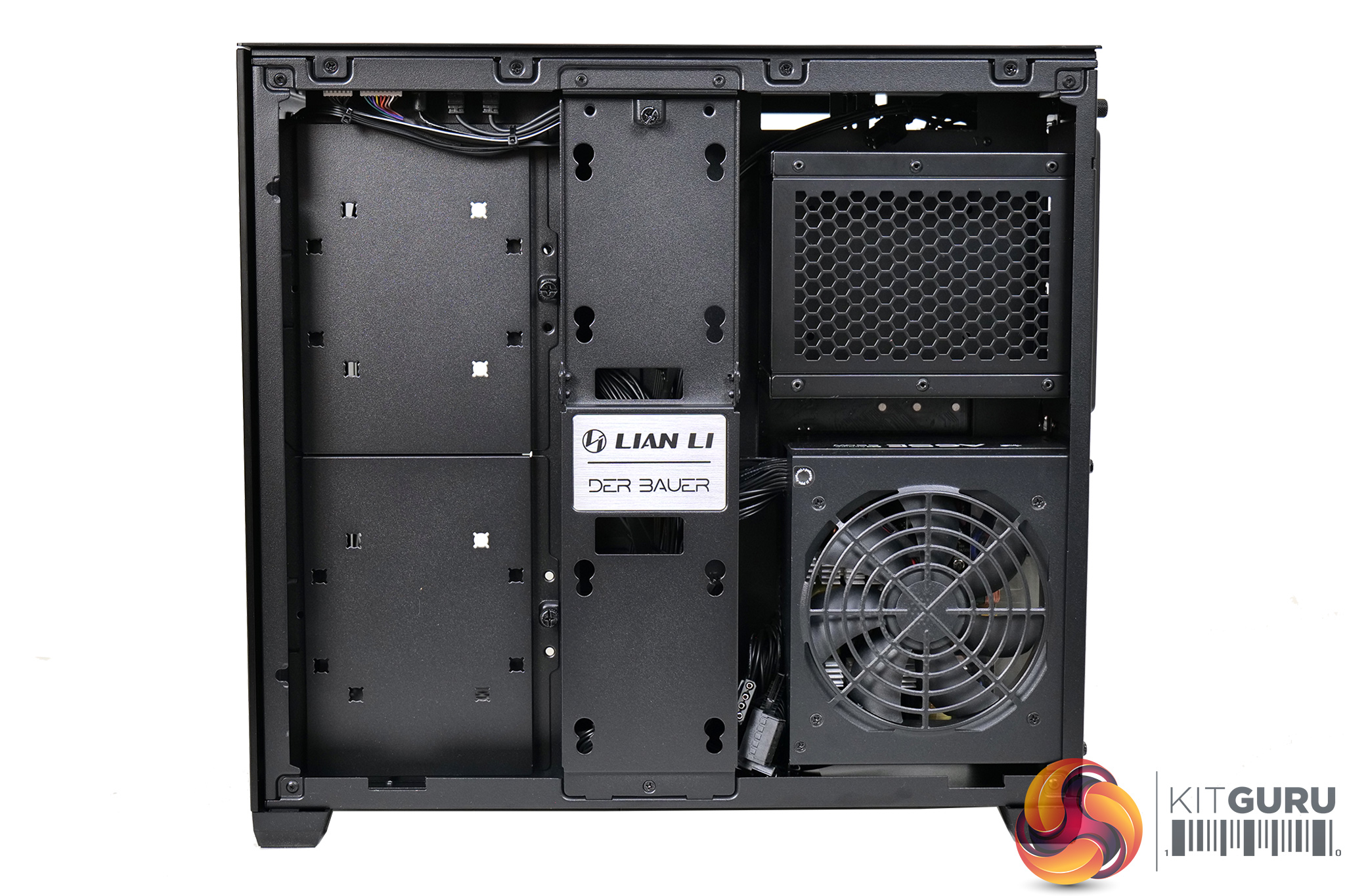
But, and hear me out, I actually think this case is too good for the Infinity Pro system. That’s because the O11 Air Mini retails for about £100, so it’s quite pricey considering the whole system is £899. Personally, and feel free to disagree with me here, but I don’t think the core spec of this system needs a case as good as this. I would rather save about £50 and go for something like the DeepCool Macube 110, and put that money towards a bigger SSD.
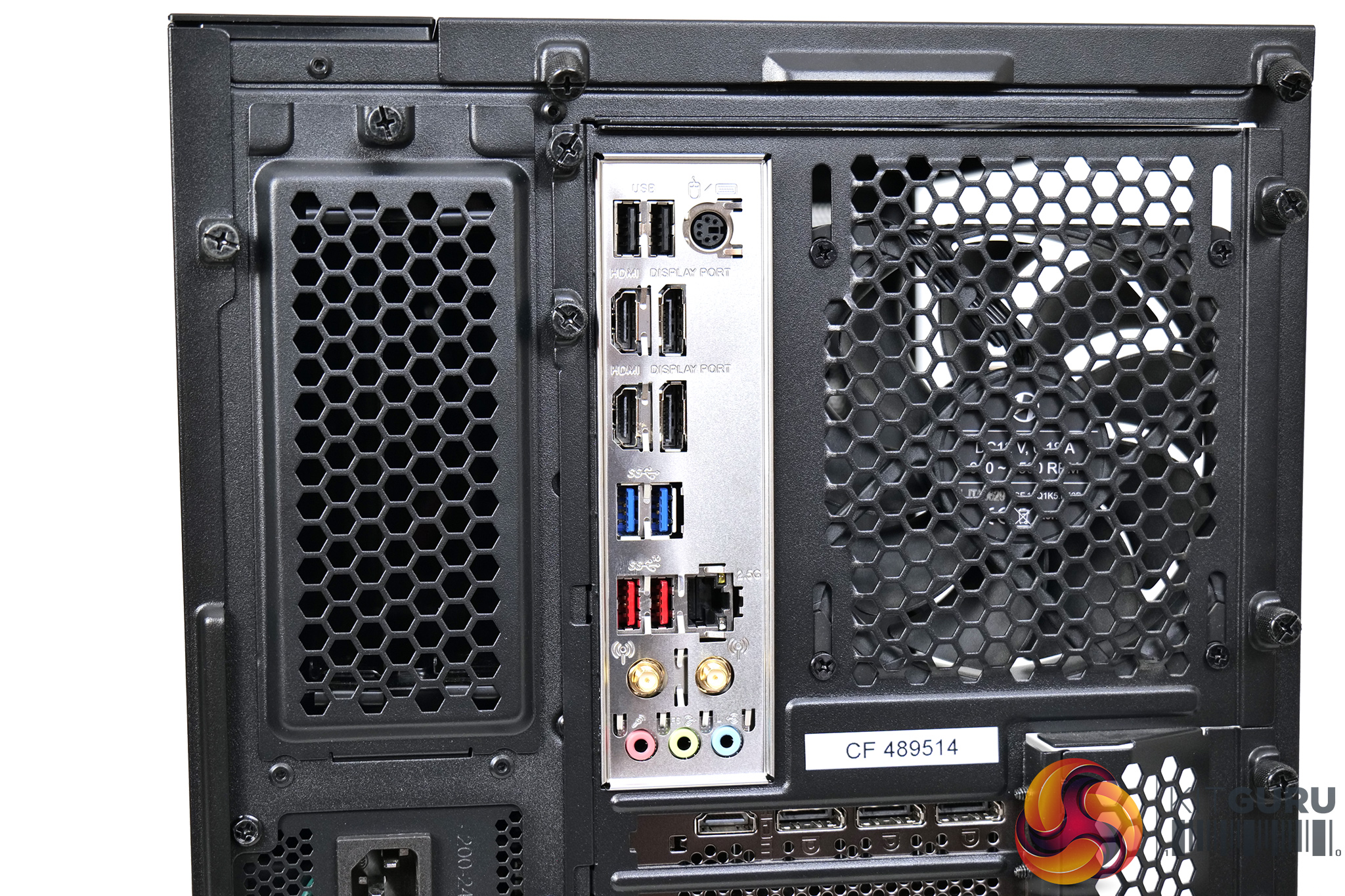
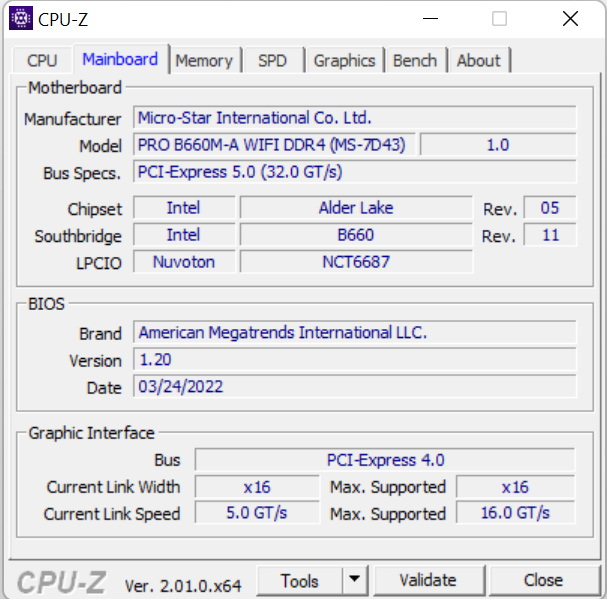
We also have to bring in the motherboard to the discussion – MSI’s Pro B660M-A WiFi. This is a very solid board B660, it didn’t give me any problems during my testing and is more than a match for the i3-12100F. It is, however, a microATX motherboard, while the O11 Air Mini can support full-size ATX boards. That means there is quite a lot of empty space at the bottom of the case, which would otherwise be occupied by an ATX motherboard, while there’s a fair bit of empty space at the front of the chassis too.
I don’t want to be too critical as the components do all work very well, and, objectively, the O11 Air Mini is a quality case. I’m just not sure it’s money well spent in a system designed to offer maximum value, especially when paired with a microATX motherboard.
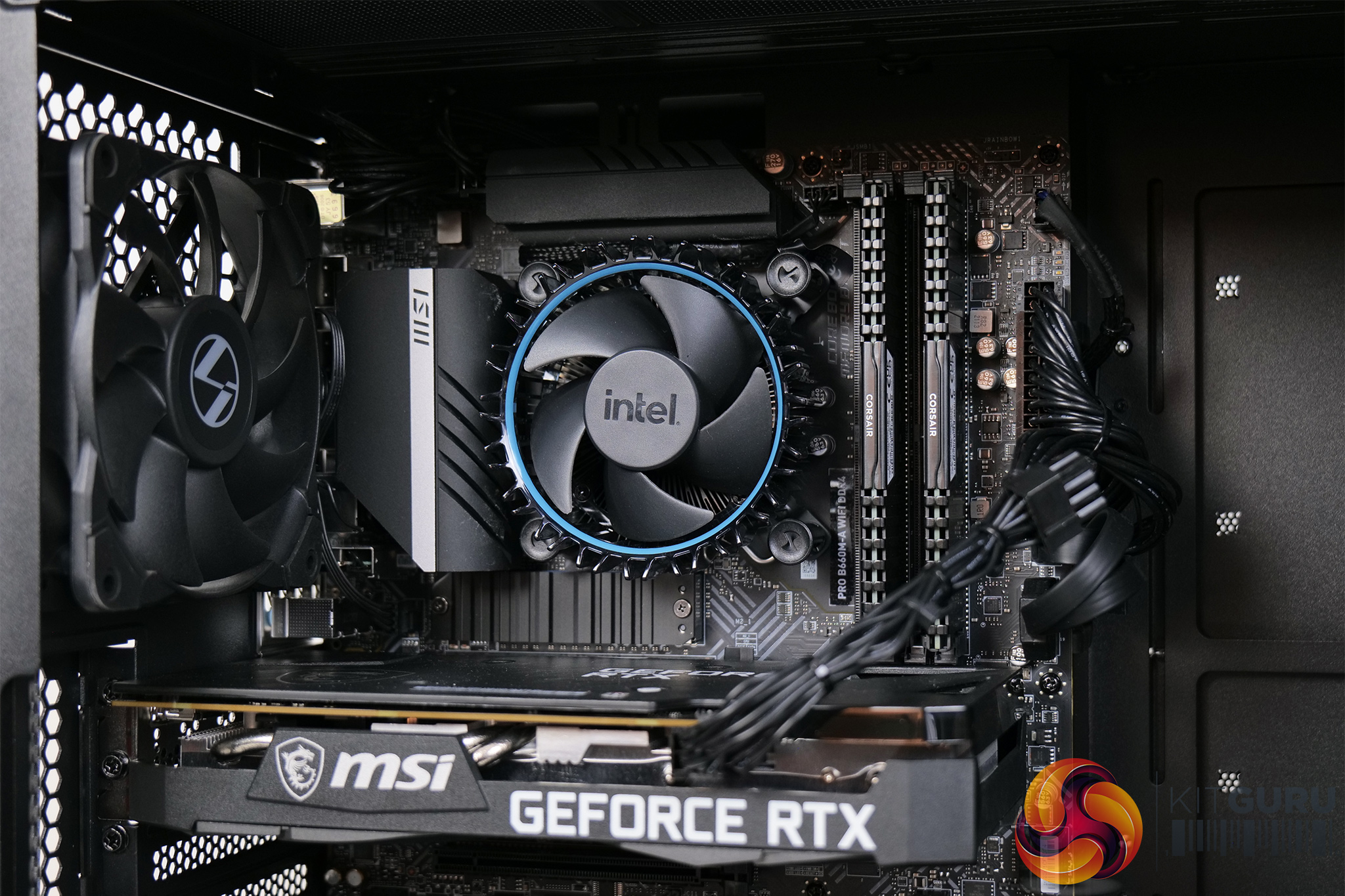
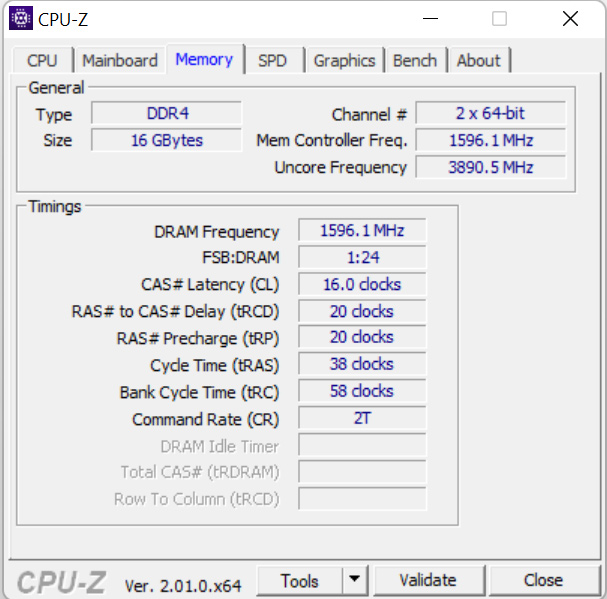
Moving on though, I can’t complain about the choice of memory – two 8GB sticks of Corsair Vengeance DDR4, clocked at 3200MHz. It offers 16-20-20-36 timings, so they're not super tight, but for a system of this spec it is absolutely fine.
As for storage, we can’t actually see the SSD in the photos above as it is hidden under a heatsink just below the CPU cooler, but this is an MSI Spatium M390. It’s only a PCIe Gen3 drive, rated at 3300MB/s reads and 2300MB/s writes, so it is not particularly fast by modern standards, but for a gaming PC like this it is more than fast enough.
It is however, only 500GB in size, and there’s no other storage drives in the system – so you can see why I feel saving a bit of cash on the case, but getting a larger SSD, might have been a good idea, especially with the size of modern games. There is a second M.2 slot underneath the graphics card so you could easily add in another drive down the line, but 500GB is going to fill up almost instantly.
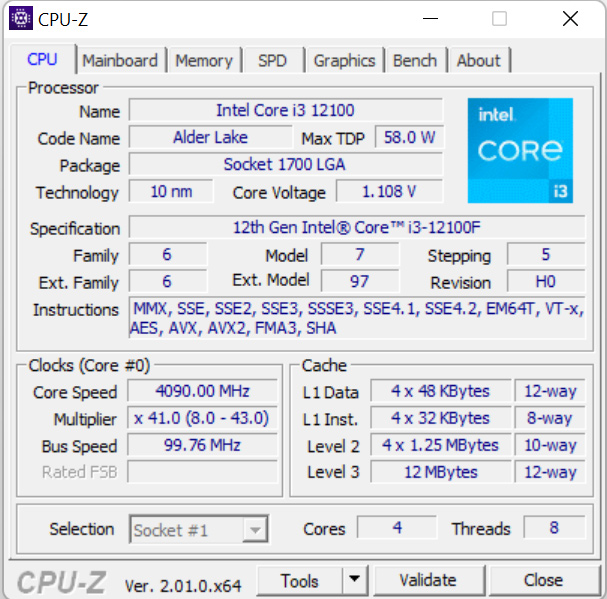
And then we come to the CPU. This is Intel’s i3-12100F, a quad-core Alder Lake CPU with HyperThreading, offering an all-core turbo speed of 4.1GHz. Quad-cores are slowly but surely becoming a thing of the past, so it will be fascinating to see how this manages with the RTX 3060. Before moving onto the GPU though, it is worth mentioning that Cyberpower has stuck with the Intel stock cooler here – it looks pretty basic but the i3 only has a TDP of 58W, so it should be fine, but we will look at thermals later in this review.
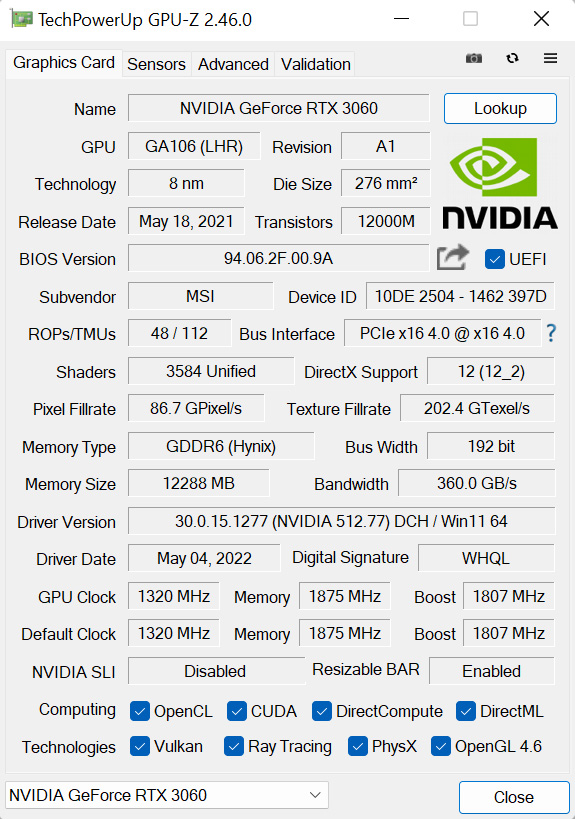
As for the RTX 3060, this is the MSI Ventus 2X variant, with an 1807MHz boost clock. It’s a pretty compact dual-fan model, but it looks fine and this system definitely doesn’t need to spend any extra cash on a top of the range factory overclocked model, so it should do the job nicely.
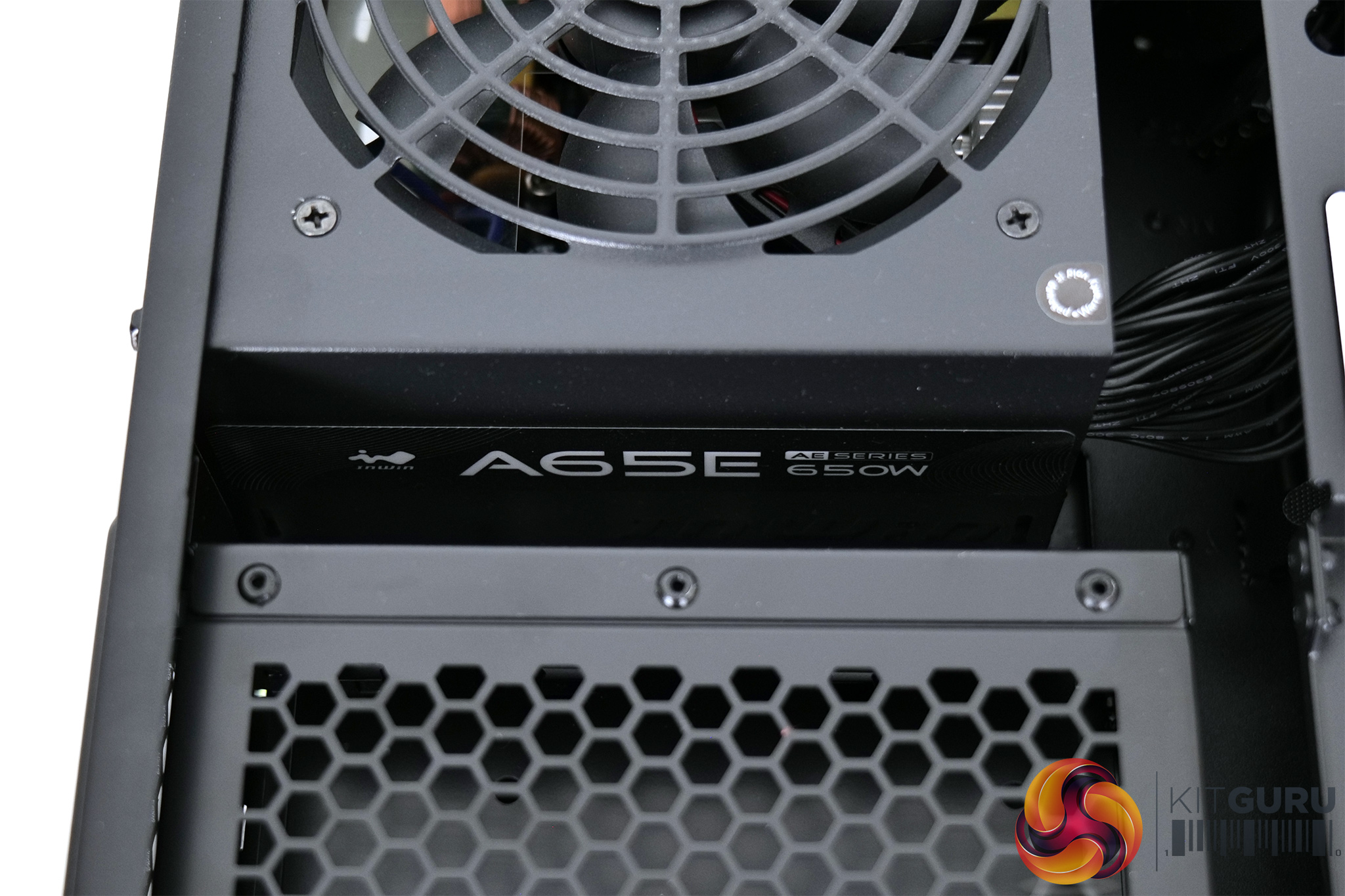
Powering the system is a 650W A65 PSU from InWin. This is only 80+ rated, so not even 80+ Bronze, and I wouldn’t exactly say that InWin is known for its PSUs. It is obviously a budget minded choice, but I would have liked to see have seen at least an 80+ Bronze unit here. The good news is Cyberpower offers a 2 year warranty on parts and 5 years for labour, so you will be covered for any issues in that time frame.
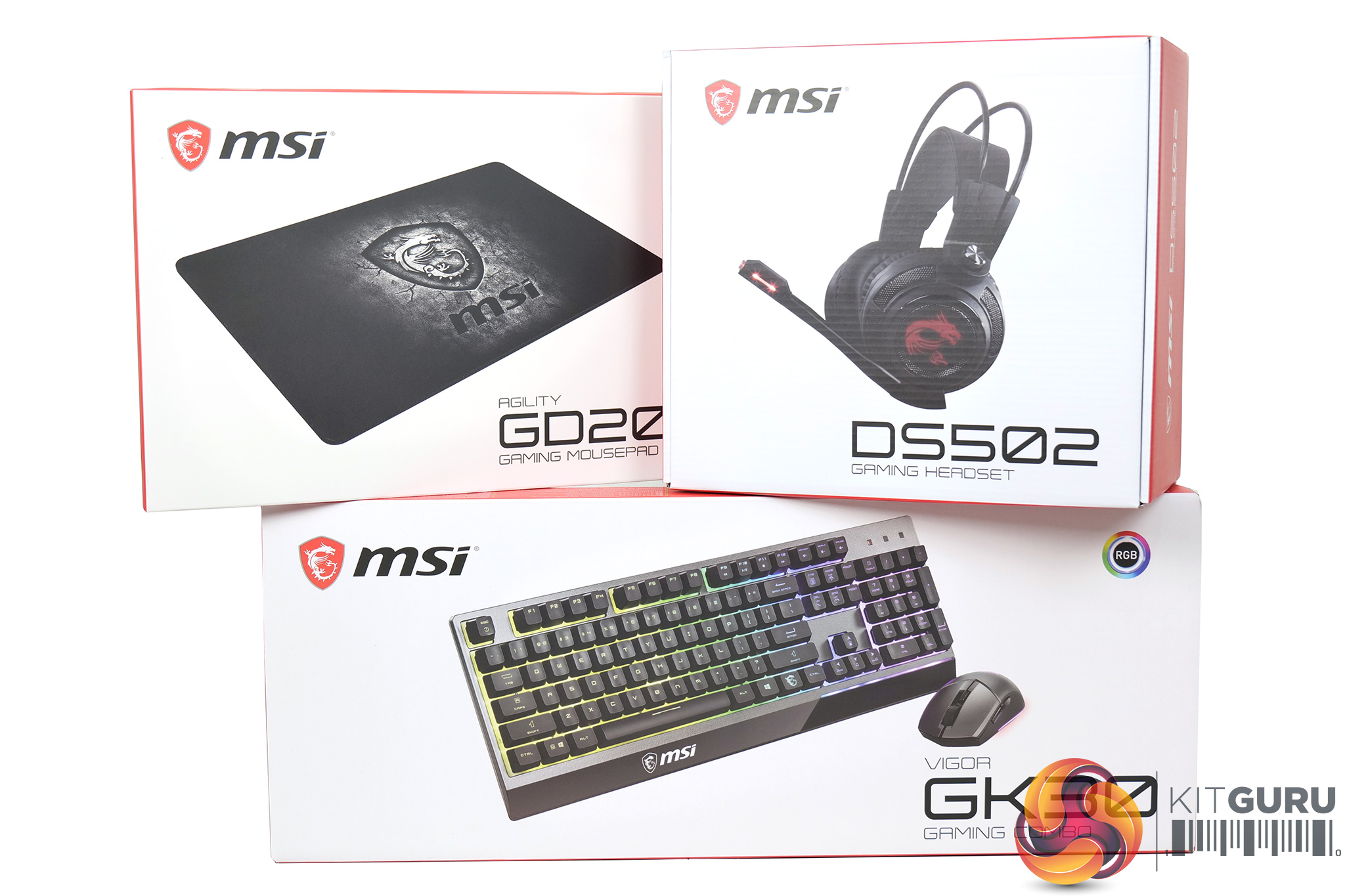
We do also have to mention that Cyberpower is currently bundling in a free set of MSI peripherals with the Infinity X123 Pro. This includes the GD20 mousemat, the DS502 headset, and the Vigor GK30 keyboard/mouse combo. It's not super high-end stuff, but it will get you gaming and no can complain when the price is free.
Software and Games
To test the Cyberpower Infinity X123 Pro, we used the following software/games:
- 3DMark Time Spy
- AIDA64 Engineer
- Cinebench R23
- CrystalDiskMark
- PCMark 10
- Cyberpunk 2077 (DX12)
- Dying Light 2 (DX12)
- F1 2021 (DX12)
- Far Cry 6 (DX12)
- Forza Horizon 5 (DX12)
- Grand Theft Auto V (DX11)
- Kena: Bridge of Spirits (DX12)
- Rainbow Six Siege (Vulkan)
- Shadow of the Tomb Raider (DX12)
- Total War: Warhammer III (DX11)
We used the Nvidia 512.77 driver, which was the latest as the time of testing.
Comparison Systems
Not every system below is compared against the Infinity X123 Pro in every benchmark, but where applicable we have used the following systems as a point of reference:
- PCS P209 ARGB MID TOWER CASE
- Intel® Core™ i5 Six Core Processor i5-12400F (2.5GHz)
- ASUS® PRIME B660-PLUS D4 (DDR4, USB 3.2, 6Gb/s)
- 16GB Corsair VENGEANCE DDR4 3200MHz (2 x 8GB)
- 8GB AMD RADEON™ RX 6600 – HDMI, DP – DX12
- 1TB PCS PCIe M.2 SSD (2200 MB/R, 1500 MB/W)
- CORSAIR 550W TXm SERIES™ SEMI-MODULAR 80 PLUS® GOLD
- PCS FrostFlow 100 RGB V3 Series High Performance CPU Cooler
- 1x 120mm Black Case Fan
- WIRELESS INTEL® Wi-Fi 6 AX200 2,400Mbps/5GHz, 300Mbps/2.4GHz PCI-E CARD + BT 5.0
- Windows 11 Home 64 Bit
- Corsair 5000X Case
- AMD Ryzen 9 5900X
- Corsair H150i Elite Capellix RGB 360mm AIO Cooler
- MSI MAG X570 Tomahawk WIFI Motherboard
- Corsair RGB Pro SL 32GB 3200MHz DDR4 RAM
- Corsair 1TB MP600 NVMe Gen 4 M.2 SSD
- Seagate 1TB HDD
- MSI RTX 3080 TI Gaming X Trio 12GB
- Corsair RM850w PSU
- Corsair SP120 RGB Elite 120mm Fans
- Cyberpower Auron Mid-Tower OEM Case with ARGB fans and an external RGB remote
- AMD Ryzen 3 3200G – 4-Core 3.6Ghz, 4Ghz turbo
- AMD Ryzen Wraith CPU cooler
- Palit GeForce GTX 1650 GP 4GB
- MSI B450 Tomahawk Max II
- Corsair Vengeance LPX 2x8GB 3200Mhz RAM
- WD SN550 1TB NVME
- InWin A45 450W 80+ PSU
- N300 Wireless adapter
- Windows 10
- Fractal Design Meshify C ATX Gaming Mid-Tower w/ Tempered Glass Side Panel
- AMD Ryzen 9 3900 – 12-Core 3.10GHz,
- Corsair Hydro Series H100i RGB Pro XT
- ASUS TUF X570-Plus Gaming
- 500GB (1x500GB) Seagate Firecuda 520 M.2 PCIe 4.0 NVMe SSD
- 2TB Seagate BarraCuda SATA-III 6.0Gb/s 7200RPM Hard Drive 1 Drive
- 32GB (4x8GB) DDR4/3200mhz Dual Channel Memory Corsair Vengeance LPX w/Heat Spreader
- MSI GeForce® RTX 2080 Super 8GB – Ray Tracing Technology, DX12®, VR Ready, HDMI, DP – 4 Monitor Support Single Card
- Corsair RM750x 750W 80+ Gold Modular Gaming Power Supply
- Intel® Wireless 3168 Wi-Fi 802.11ac Dual Band (2.4 GHz & 5GHz) up to 433Mbps w/ PCI-E Adapter & Dual Antennas
- ASUS TUF Gaming B560-PLUS WiFi motherboard
- Intel Core i5-11400F six-core Processor
- 4GB AMD Radeon RX 5500 XT GPU
- 16GB Corsair Vengeance DDR4 3200MHz, 2x 8GB sticks
- 512GB PCS-branded PCIe M.2 SSD
- 1TB Seagate Barracuda 7200RPM HDD
- Corsair 750W TXm semi-modular 80 Plus Gold PSU
- PCS FrostFlow 100 RGB V3 CPU cooler
- 3 PCS ARGB LED fans + controller kit
- Windows 10 Home 64 Bit
- PCS Prism X RGB mid tower case
We also use some data from Leo's Alder Lake reviews, using his test bench setup:
- Intel Core i7-12700K and i5-12600K
- Corsair H150i Elite LCD
- MSI Z690 Unify
- 32GB Corsair Vengeance DDR5-5200
- Palit RTX 3080 Gaming Pro 10GB
- Seasonic Prime Titanium 850W
- 500GB Sabrent Rocket 4.0 M.2 NVMe
- Windows 11
And some of my own data from our GPU reviews has also been used, with the following hardware configuration:
- Intel Core i9-10900K
- ASUS ROG Maximus XII Hero Wi-Fi
- Corsair Vengeance DDR4 3600MHz (4 X 8GB) CL 18-22-22-42
- AMD RX 5600 XT, AMD RX 6600 XT and Nvidia RTX 3060
- 500GB Samsung 970 Evo Plus M.2
- 2TB Samsung 860 QVO 2.5″ SSD
- Fractal Meshify S2 Blackout Tempered Glass
- Corsair H115i RGB Platinum Hydro Series
- Corsair 1200W HX Series Modular 80 Plus Platinum
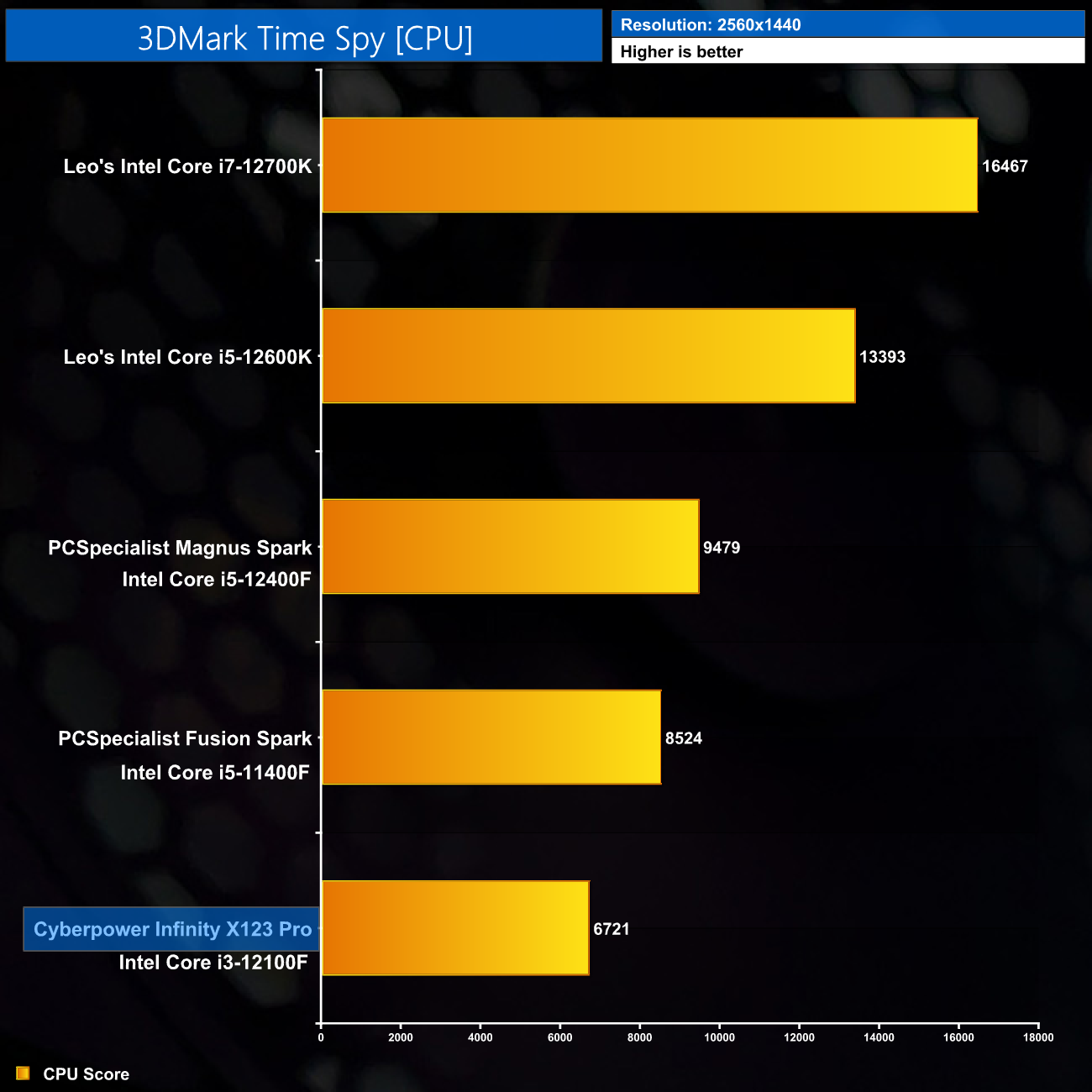
Kicking off with 3DMark Time Spy, looking at the CPU score. The i3-12100F is only a quad-core unit but still scores relatively well, though compared to the i5-12400F, it is obviously slower. Still, against the last generation i5-11400F, it is only 21% slower despite having 33% fewer cores, which is impressive.
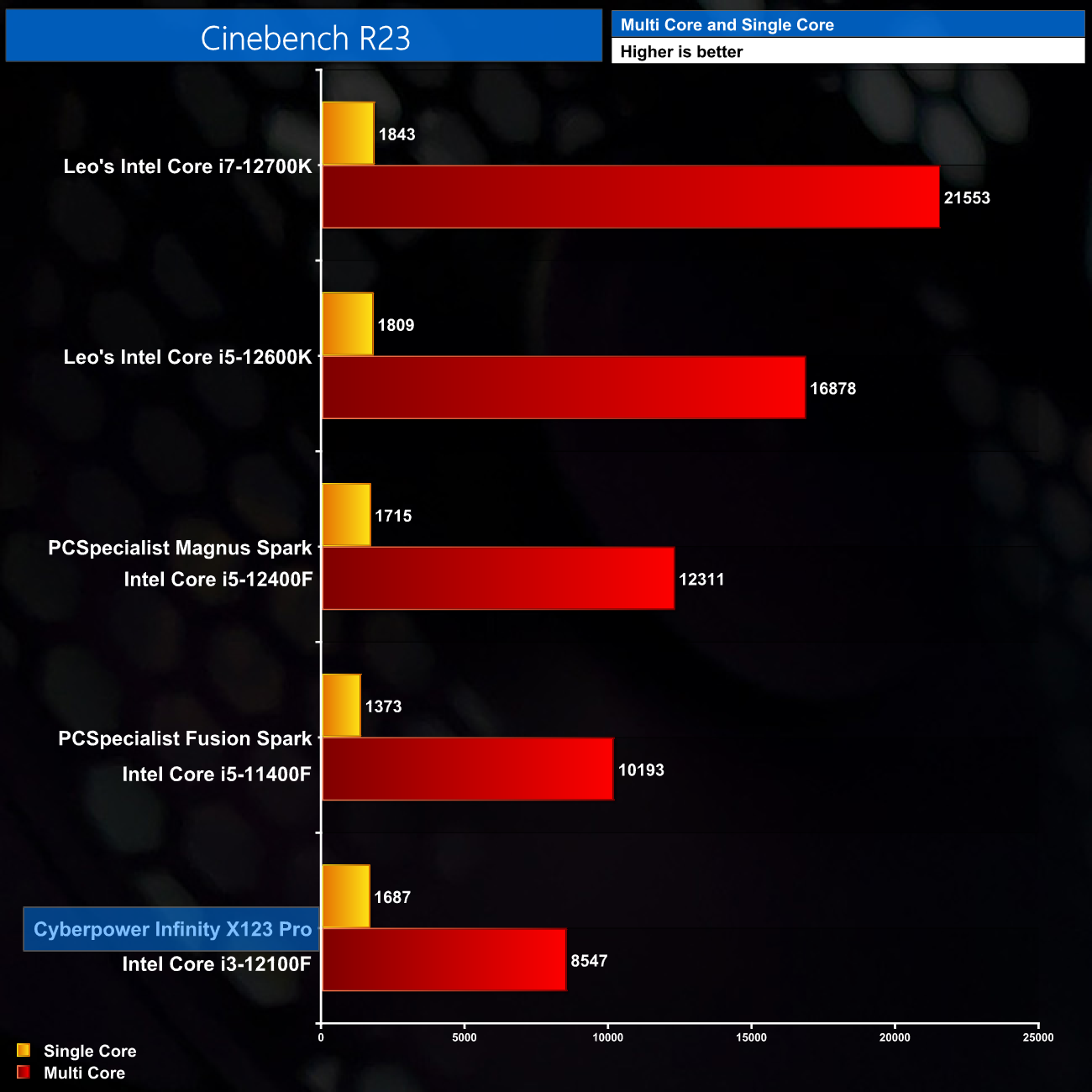
Relatively speaking, the i3-12100F does even better in Cinebench R23, where it is only 16% slower than the 11400F in the multi-threaded test, which is really pretty impressive considering the i5 has two extra cores. The single-core result is only marginally behind the i5-12400F as well, while it is miles clear of the 11400F thanks to the newer Alder Lake architecture.
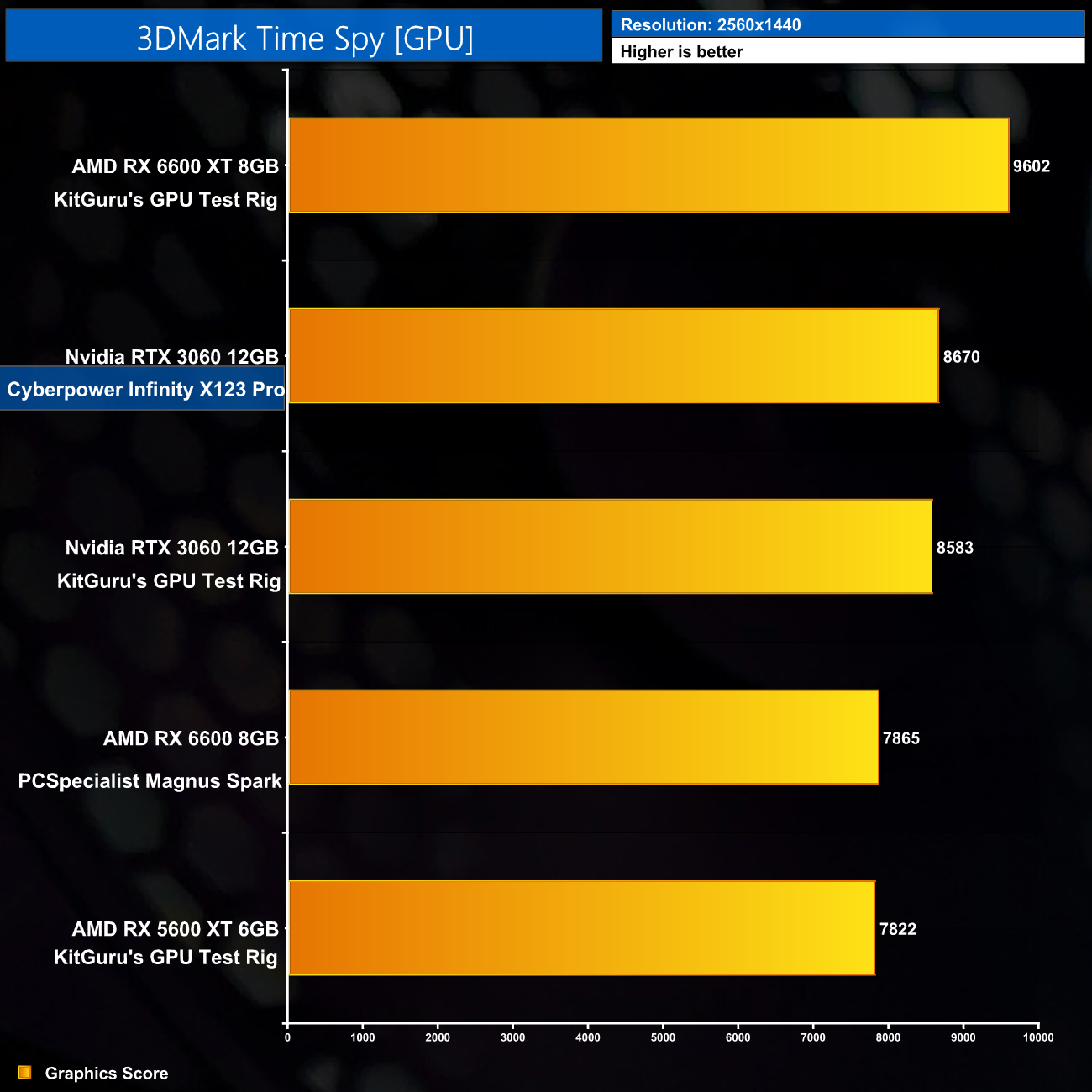
As for the GPU score in 3DMark Time Spy, the MSI Ventus 2X RTX 3060 proved exactly as fast as we’d expect, closely matching the RTX 3060 that I use in my GPU reviews, and easily outscoring the RX 6600, so that bodes well for our game benchmarks.
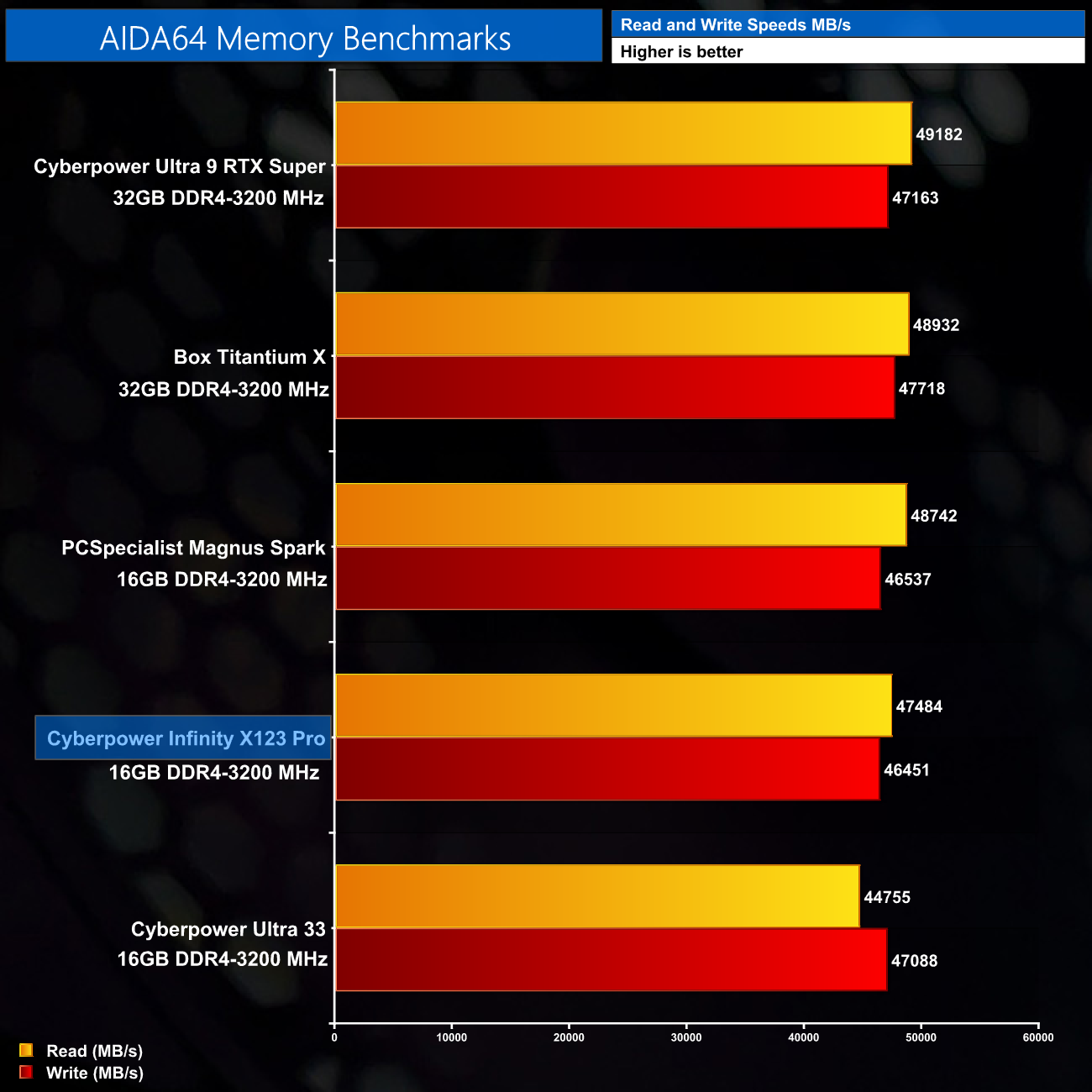
AIDA64's memory benchmark also shows the results exactly we'd expect, with speeds of 47000MB/s read and 46000MB/s writes. Other DDR4 kits can run a touch faster at the same frequency thanks to their tighter timings, but this kit is fine for a system of this spec.
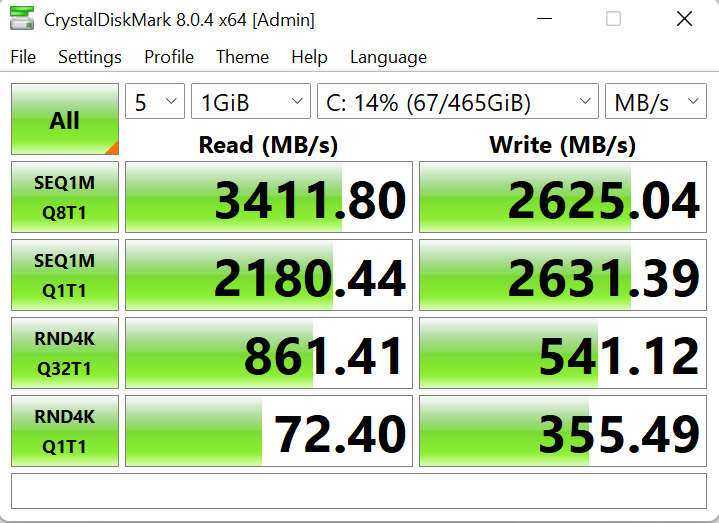
We also ran CrystalDiskMark on the Spatium M390 SSD and confirmed the quoted speeds, as we hit 3411MB/s reads and 2625MB/s writes. It’s more than enough for this system in terms of its speed, but it really is the capacity of the SSD which, for me, is a bigger problem.
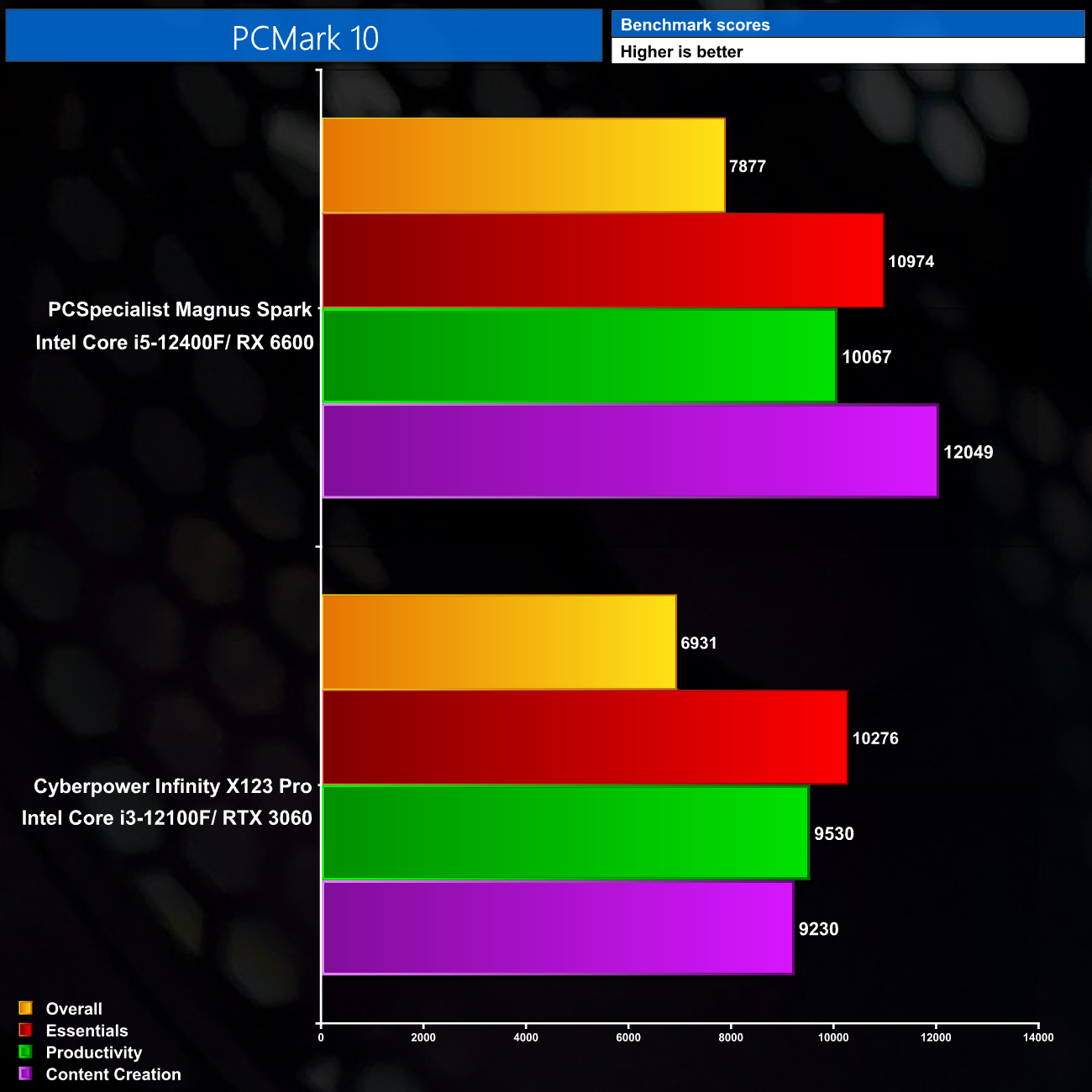
Lastly, here we compare the Cyberpower system to the PCSpecialist Magnus Spark in PCMark 10. The Infinity Pro is not quite as fast, mainly due to the fact the PCSpecialist system has an extra two cores, but it comes close, particularly in the Essentials and Productivity benchmarks.
Gaming benchmarks
As mentioned on the first page, when testing this system I was really curious to see how well an i3 would handle being paired with an RTX 3060. We know the Alder Lake architecture is impressive – but would we see any CPU bottlenecking?
To try and find out, I did some extra testing as part of this review. Firstly I benchmarked the system with the i3 and RTX 3060 over 10 games, at 1080p and 1440p. Then ,however, I physically swapped out the i3 for an i5-12400, which has two more cores and a slightly higher turbo clock. I then re-ran all my benchmarks, so we can see exactly what difference would be made upgrading to a higher core-count CPU.
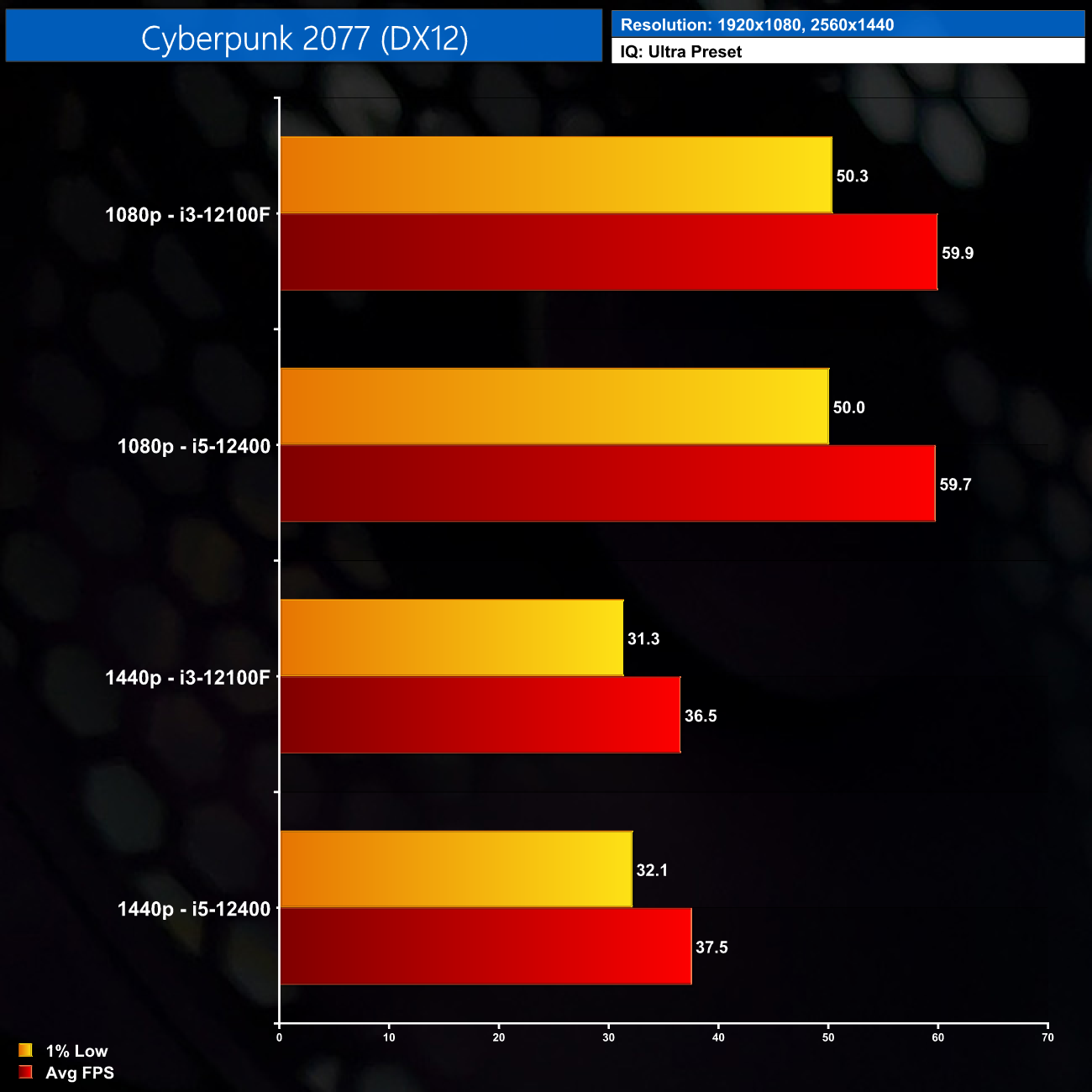
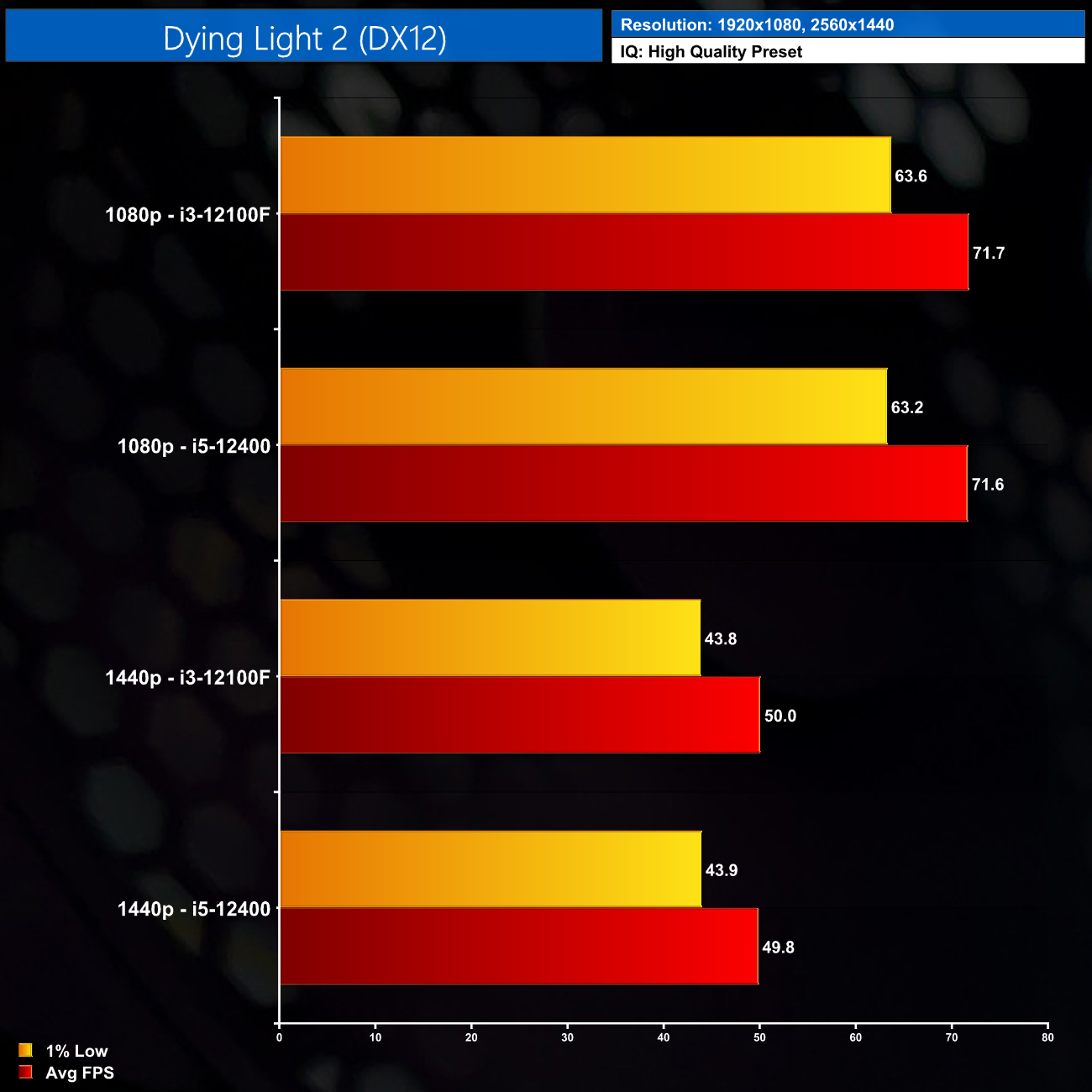
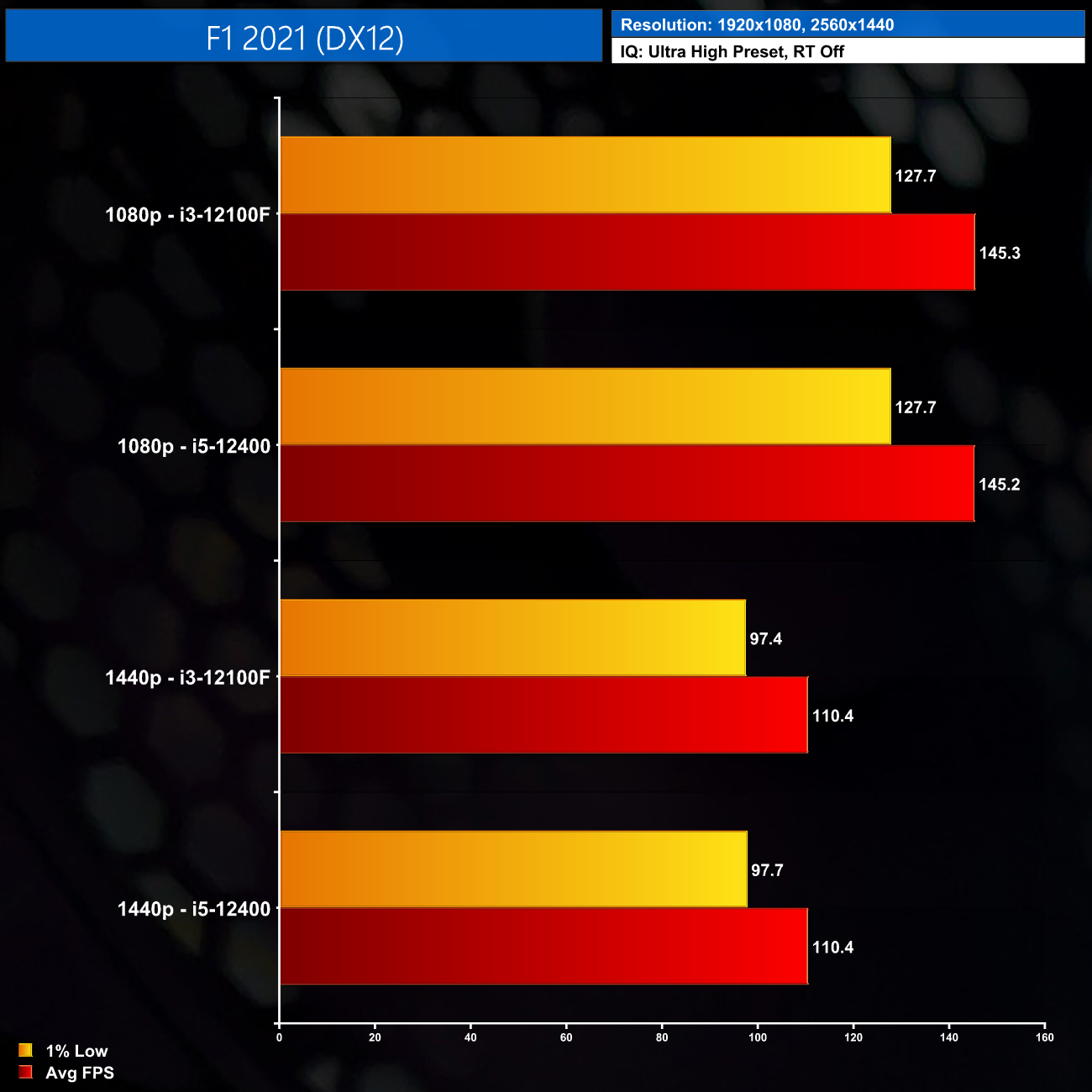
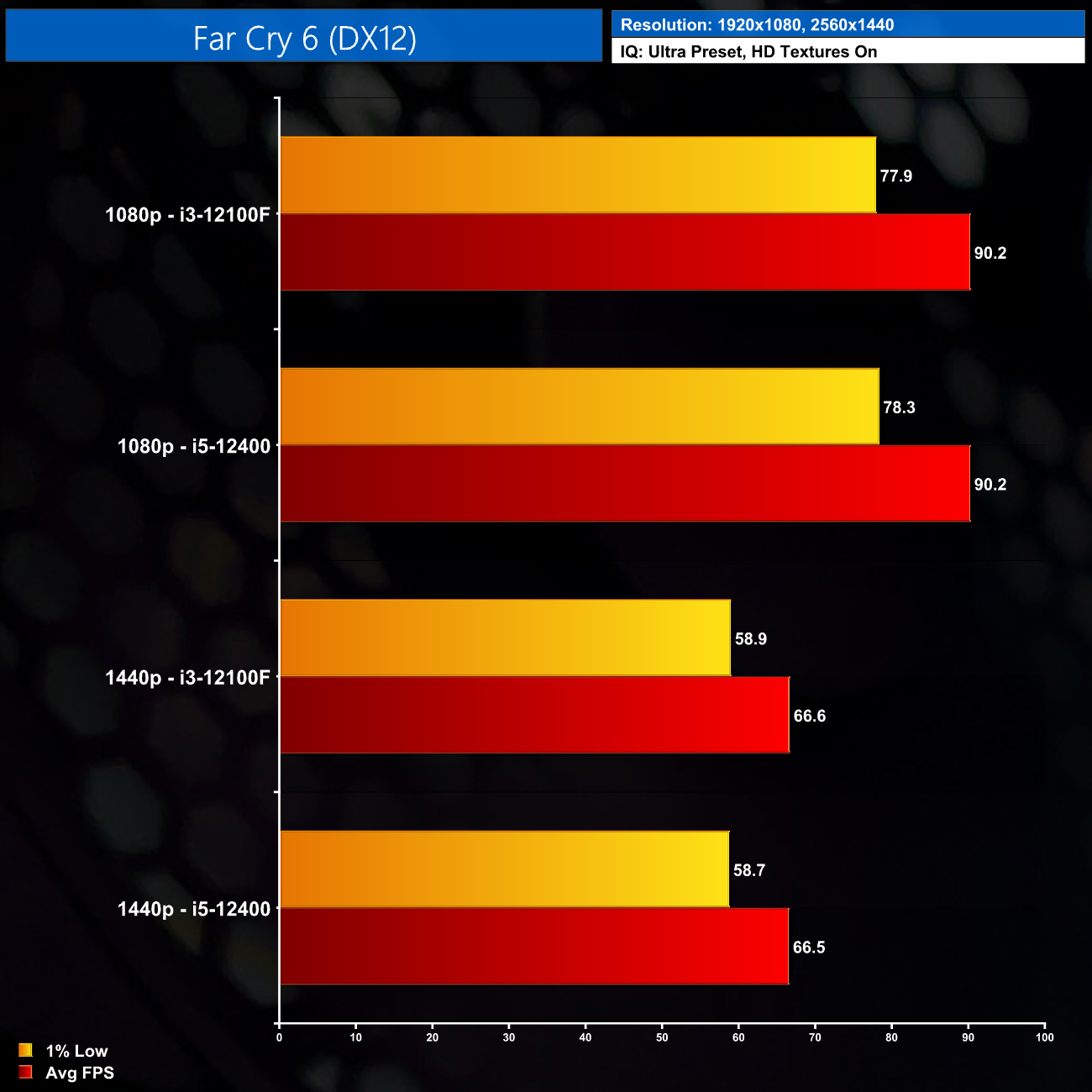
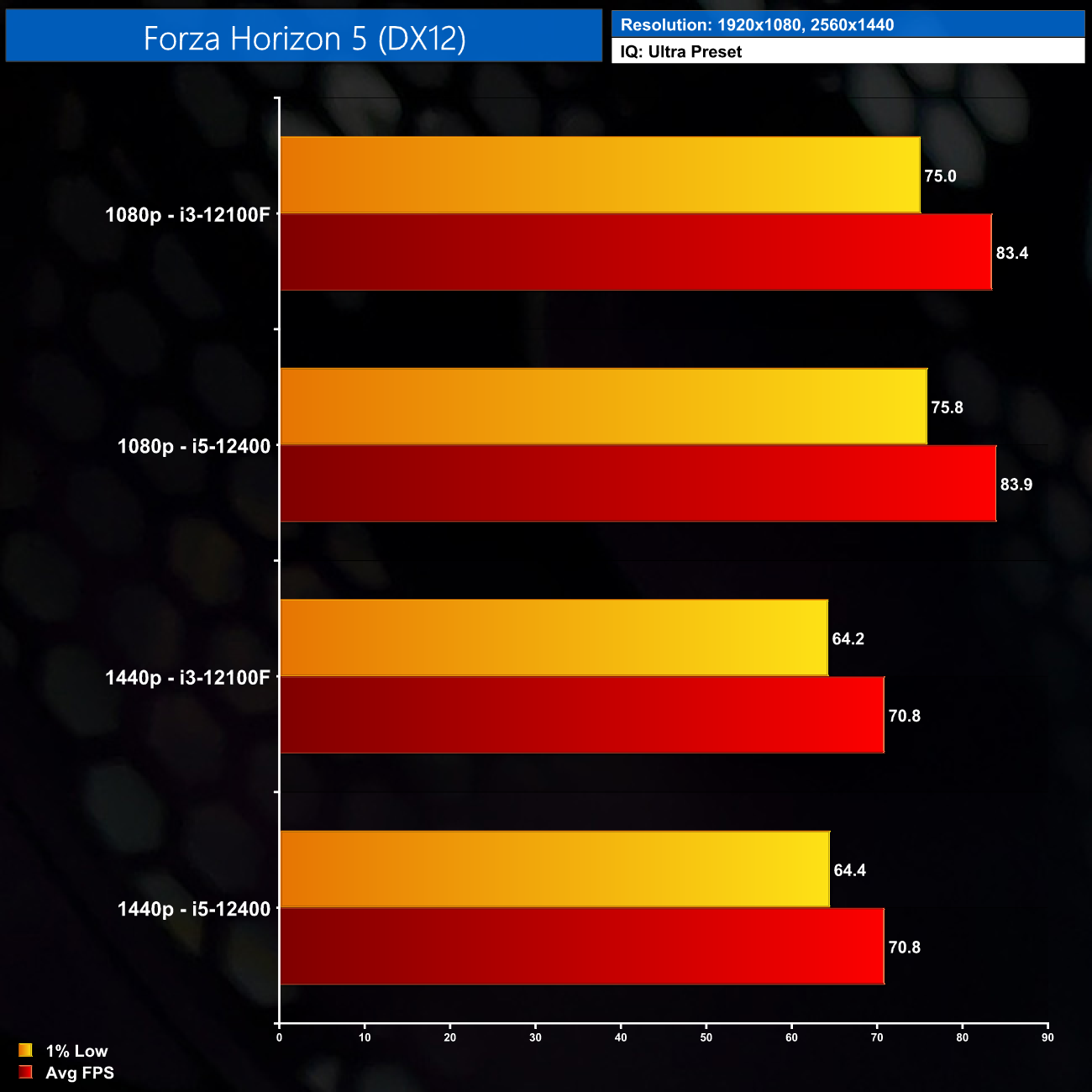
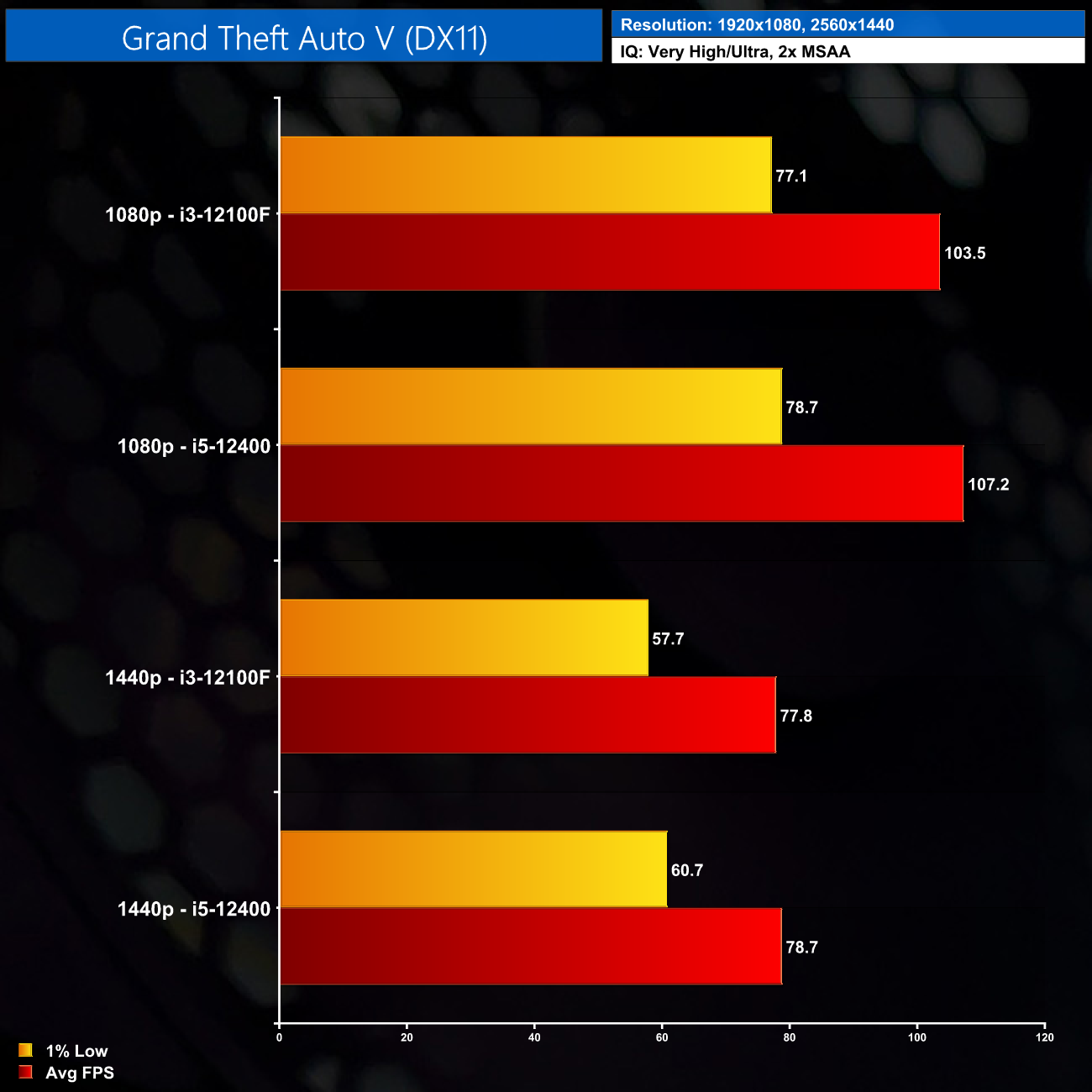
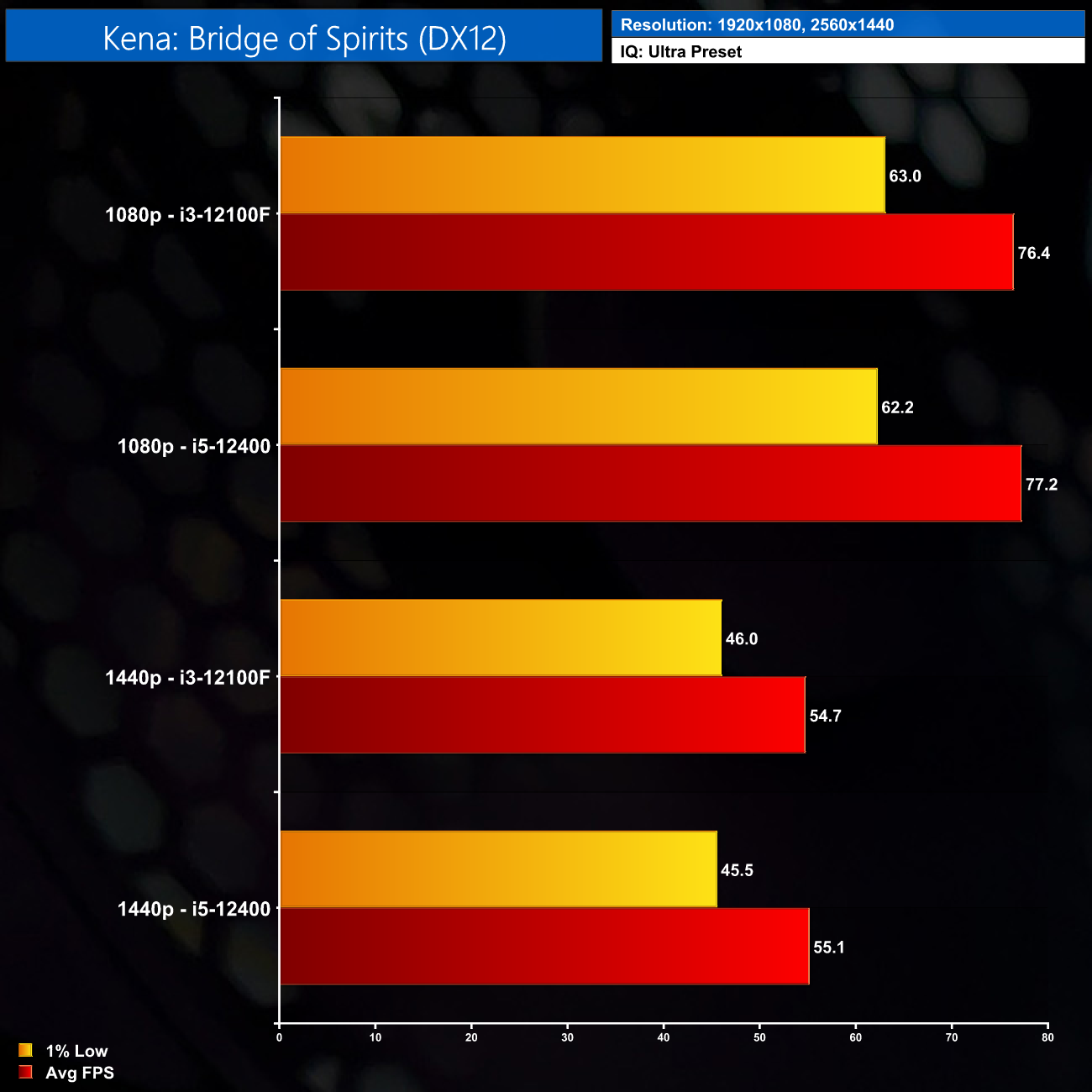
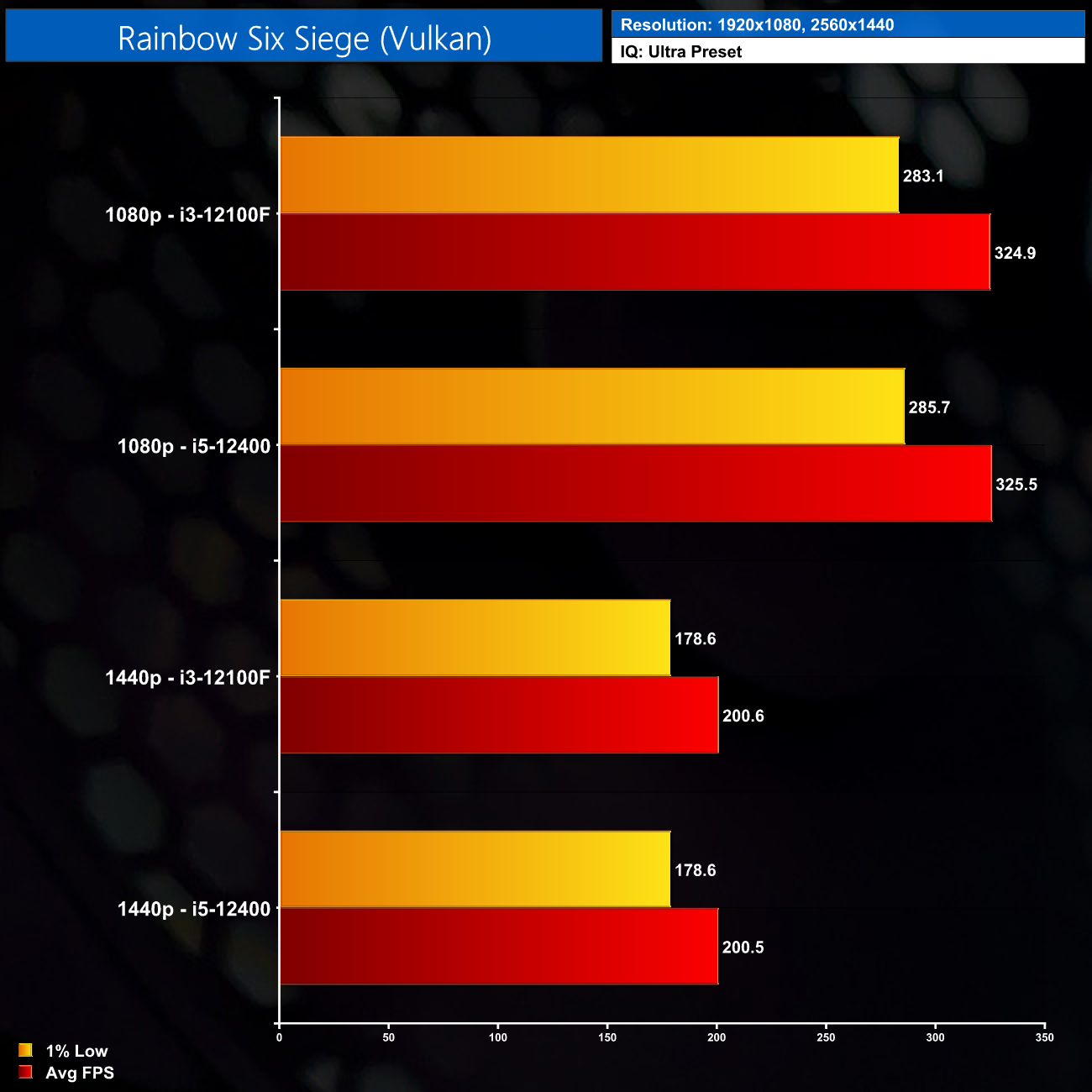
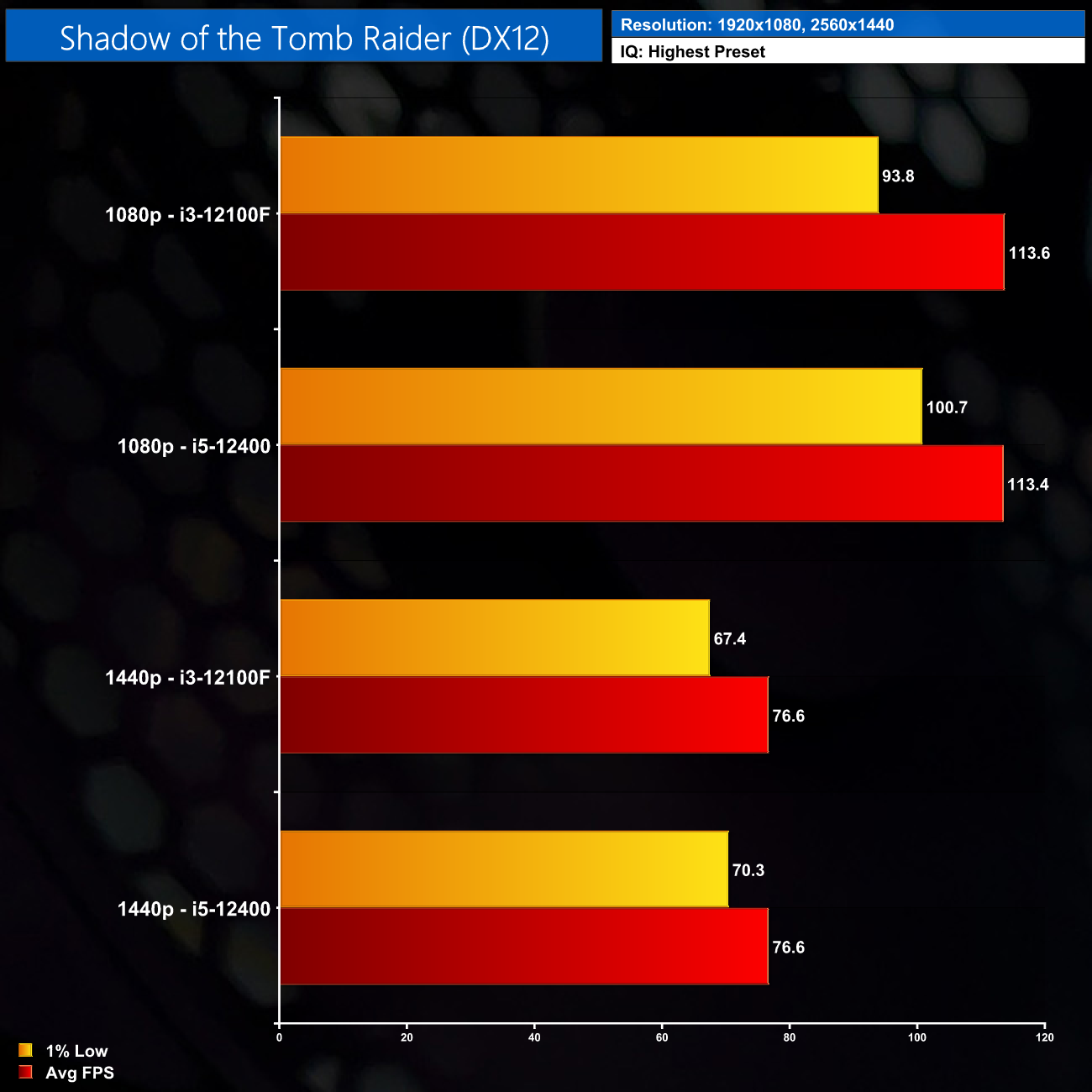
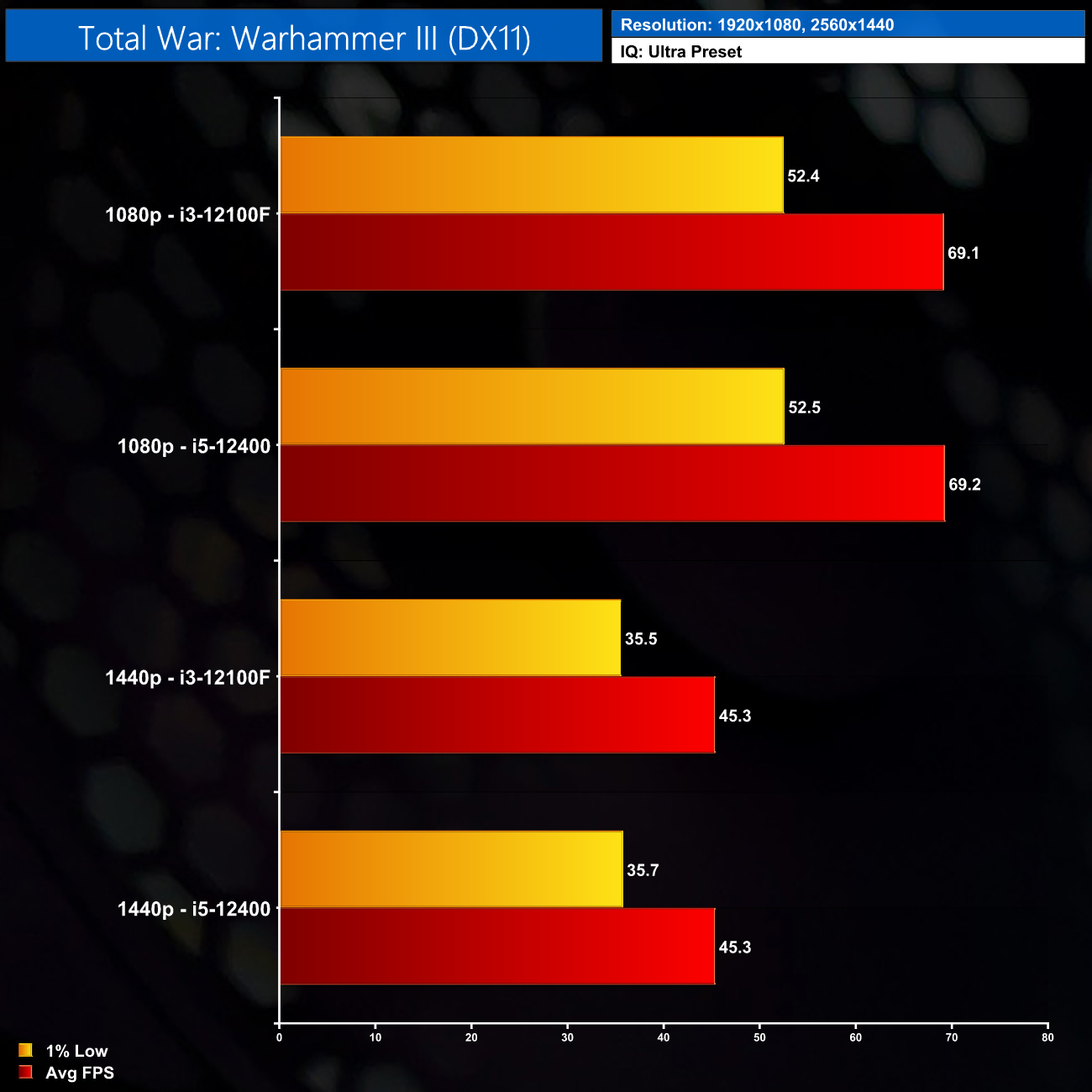
Looking at these results, it quickly becomes obvious that the i3-12100F is more than a match for the RTX 3060 for both 1080p and 1440p gaming. In basically every game I tested, we just saw no difference in performance, with only marginal changes to the numbers based on run-to-run variance – so we are within margin for error almost all of the time.
I say ‘almost’ all the time as there are just two examples where we saw a slight improvement to the 1% lows when using the i5 CPU – those examples being GTA V at 1440p, and then Shadow of the Tomb Raider, but even in those cases the i3 was still perfectly playable.
Performance summary
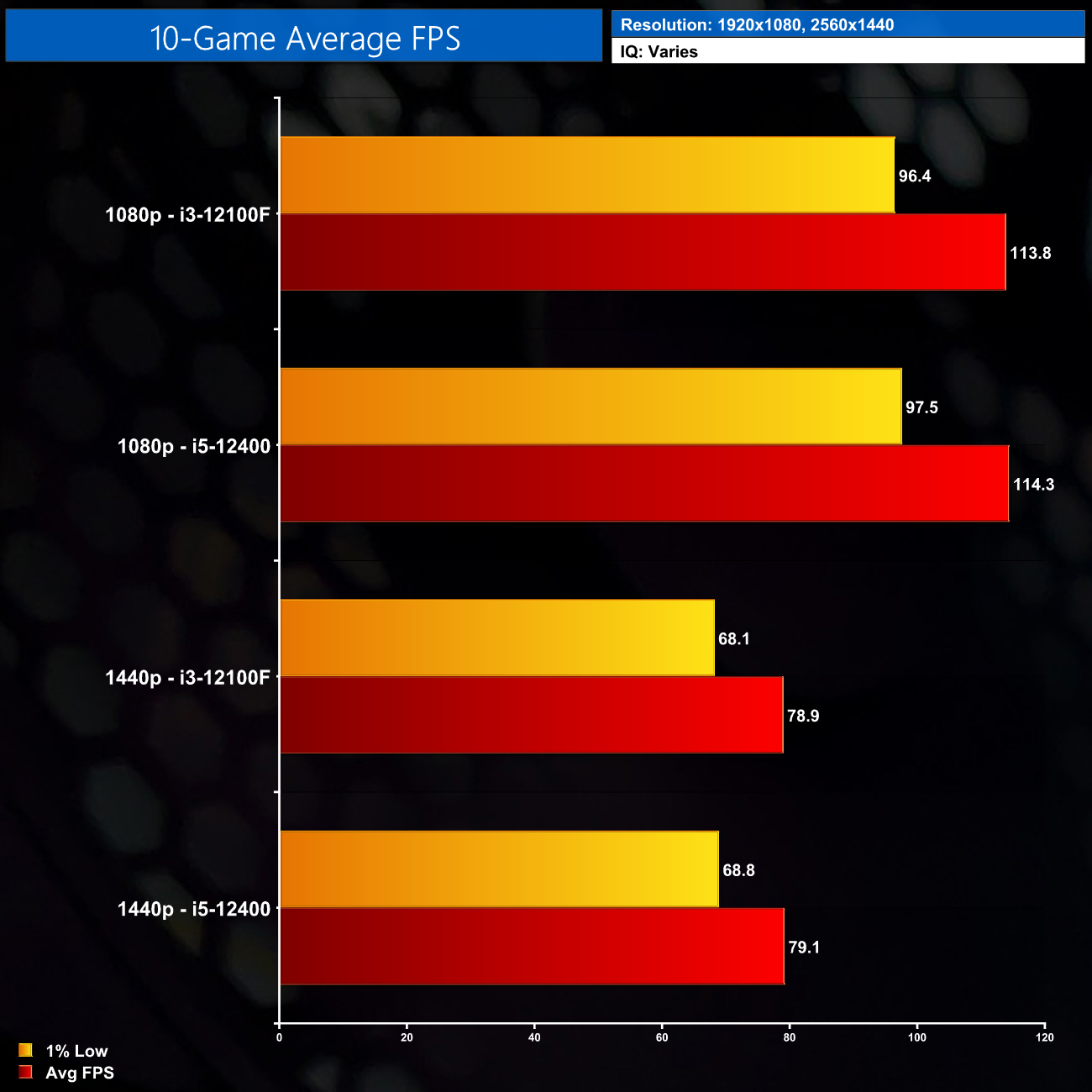
Overall, for the ten games we tested, you can see just how little of a difference upgrading the CPU made; we see just a 1% average change to the 1% lows, and an even smaller difference for the average frame rate.
Of course, these numbers can only take into account what gaming performance is like today – it is hard to say with any certainty how much will change in a couple of years, and if the i3 will struggle a bit more down the line. Right now, however, for those looking to extract maximum value, the 12100F has shown itself to be a cracking quad-core CPU for gaming.
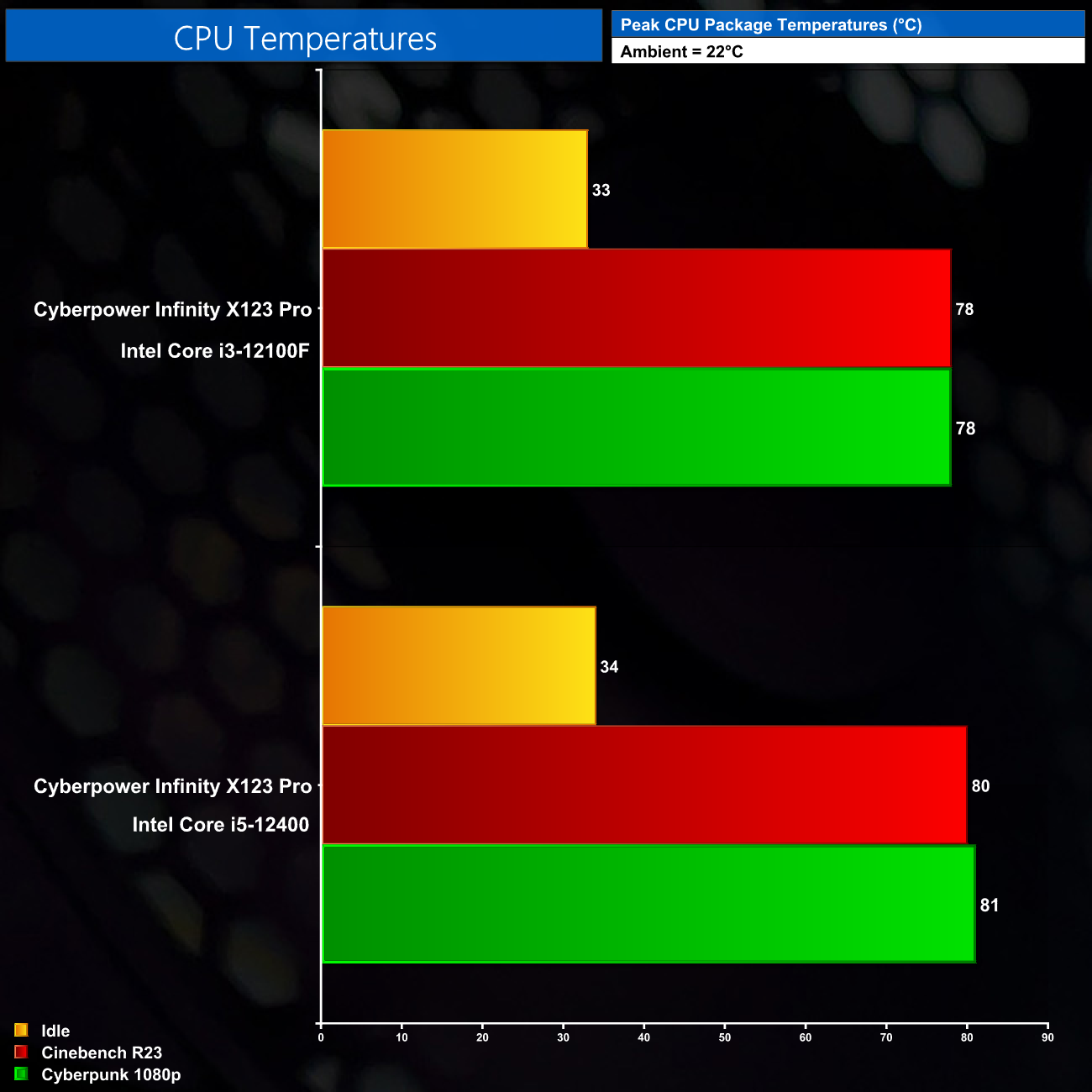
Looking at thermal performance, here I also tested both the i3 and i5, just to show you what things would be like if you did decide to upgrade the processor. Both CPUs do actually use the same Intel stock cooler, despite the i5 having a slightly higher TDP. As expected, that means the i5 did run a little hotter, but not by much, and I have to say the stock cooler on the i3 did very well, keeping peak package temperatures below 80C, whether than was gaming or in Cinebench.
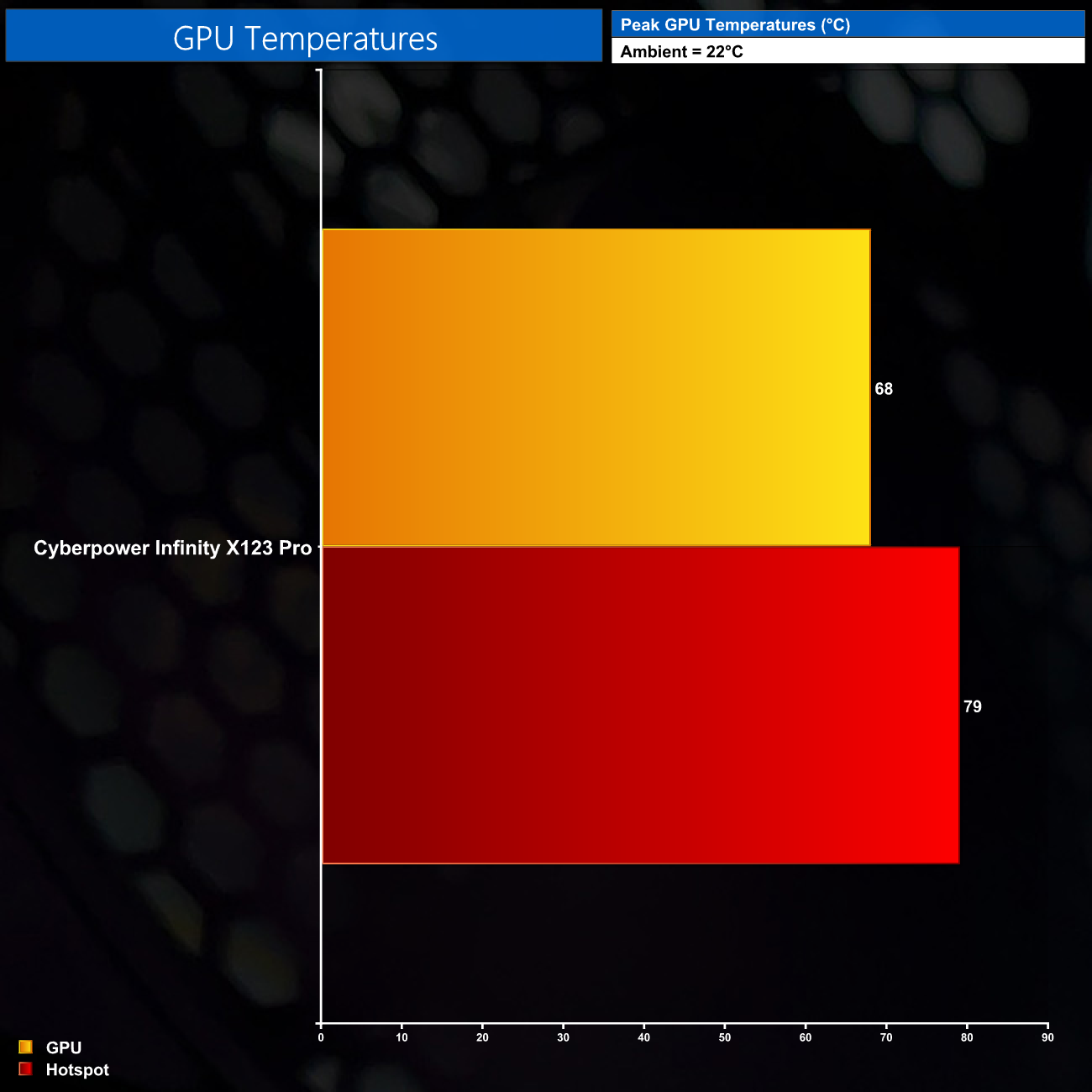
Likewise, the MSI Ventus 2X RTX 3060 is no problem at all, hitting 68C for the GPU and 79C for the hotspot, which are both very respectable results.
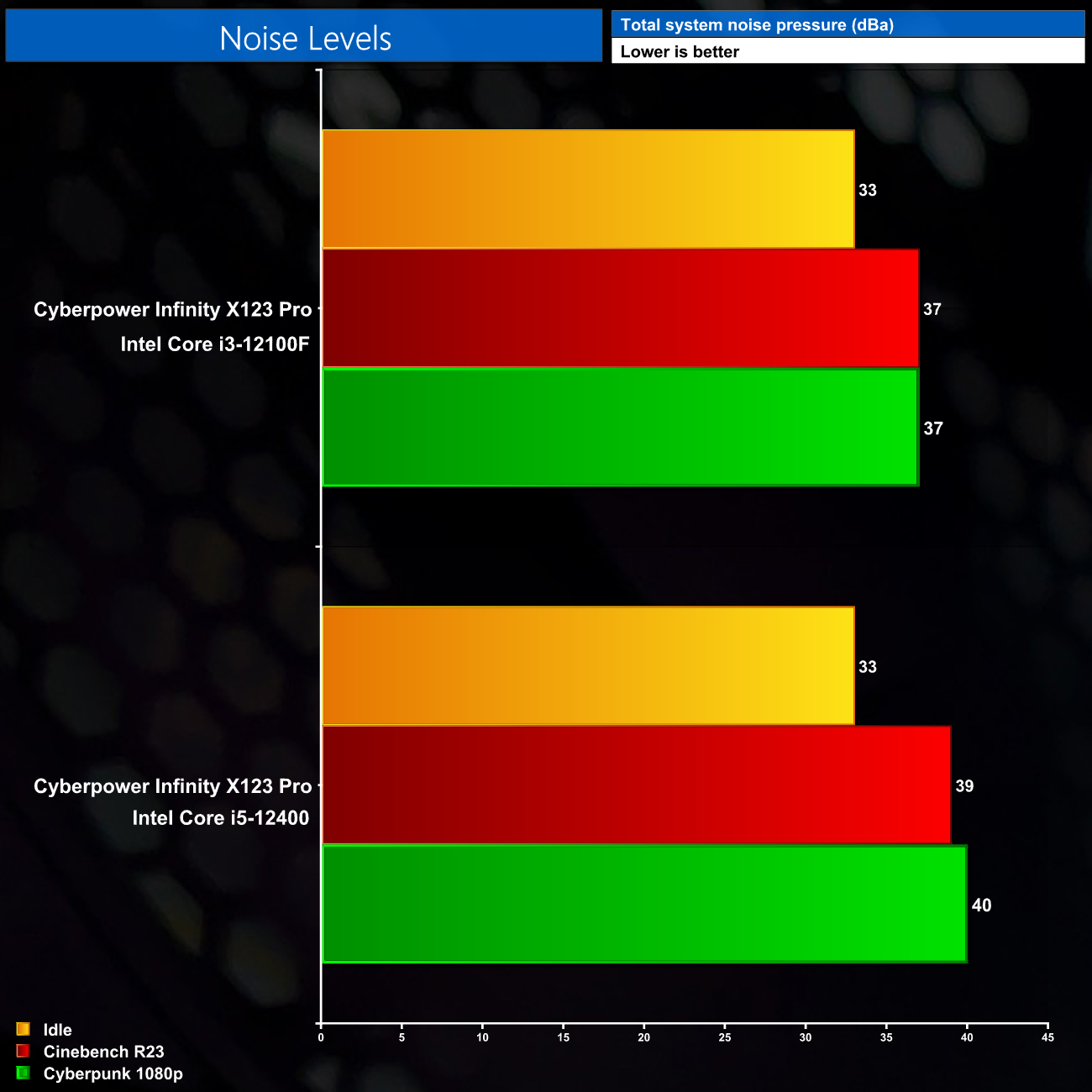
Noise levels also proved very innocuous, hitting 37dBa when using the i3. When switching to the i5, I did notice the stock cooler had to ramp up its fan a bit more aggressively, resulting in more noise of up to 40dBa during gaming – but even that is not too bad at all and is easily drowned out with a gaming headset.
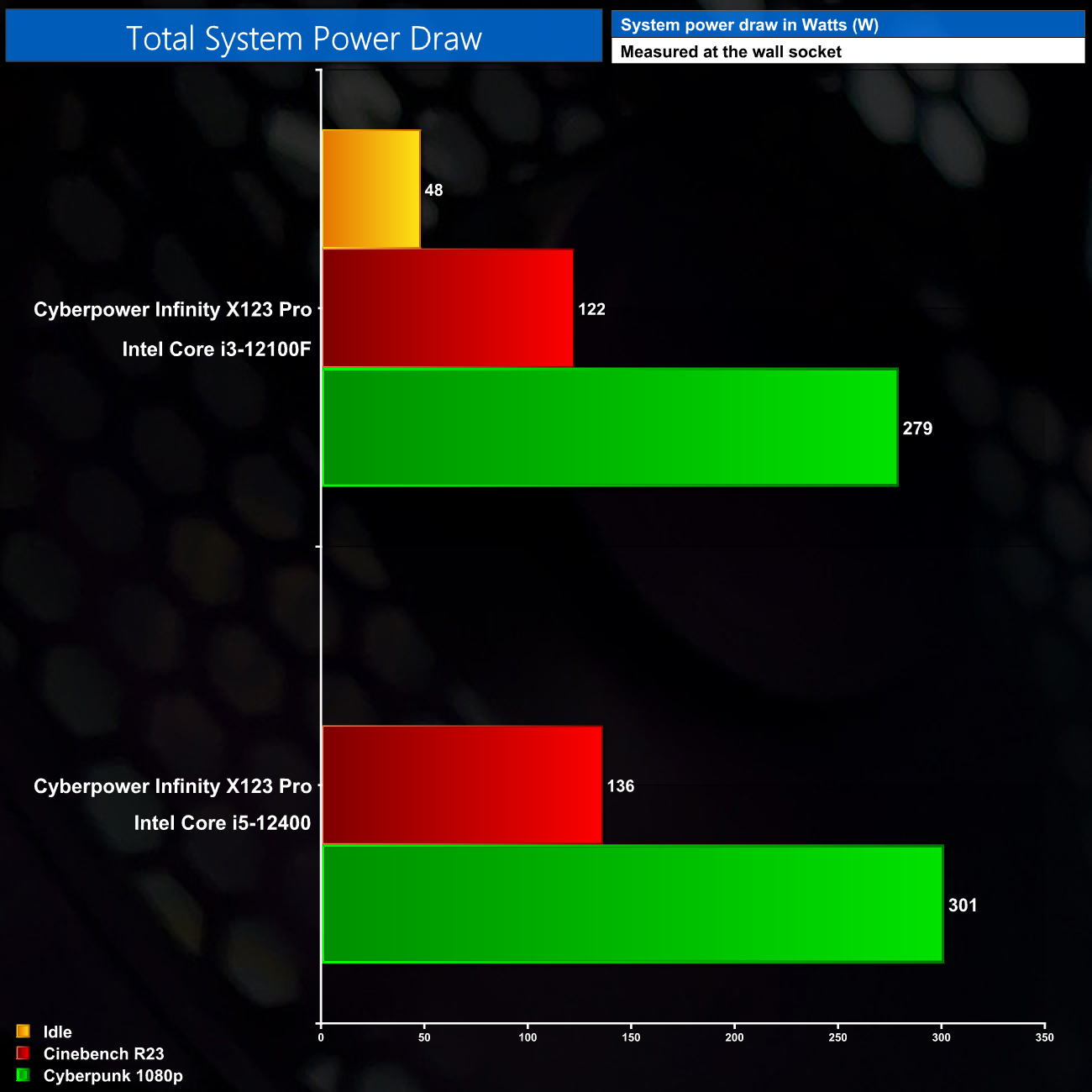
Lastly, power draw is nice and low, hitting about 280W while gaming with the i3 installed, and this increased by 20W when we switched over to the i5. That leaves a load of headroom with the 650W InWin PSU, so there’s definitely scope for a GPU upgrade down the line as well.
The Cyberpower Infinity X123 Pro has been a very interesting system to review over the last couple of weeks. Hitting the market at £899, it clearly designed to extract the maximum amount of gaming performance at that price-point – something that quickly becomes clear when looking at the RTX 3060, which alone takes up almost half the budget of the entire system.
In that regard, the system is certainly successful as it is indeed highly capable for 1080p and 1440p gaming. I have to be honest, I thought the i3 would prove a bit of a limitation for this GPU, but our testing today has clearly shown otherwise. You could argue that paying extra for an i5 is going to be more ‘futureproof' – which is likely going to be true – but it is hard to say when the quad-core i3-12100F just won’t be up to snuff. Right now anyway, it is the clear value choice and does not hold back the RTX 3060 at all.
The thing I would say on that however, is if you do want to upgrade the system, keep a close eye on the price list. To switch from an i3-12100F to an i5-12400F on Cyberpower’s website will currently set you back £214 – which is absolutely ridiculous considering the real-world price difference between the two CPUs is only about £65. Cyberpower is charging three times that on their configurator, which really is quite outrageous.
My other criticism of this system comes down to the SSD and the case. A 500GB SSD is just not big enough in 2022, and I ran out of space after installing just four games. I do think that could have been avoided however, as in my opinion, the Lian Li O11 Air Mini is too expensive for this system. A cheaper case could shave £50 off the cost, putting that extra budget towards a 1TB SSD.
That aside however, the bang for the buck here really is excellent, and the i3 and RTX 3060 can motor through the latest games. It’s not quite perfect, but it is cracking value at £899.
You can buy the Infinity X123 Pro directly from Cyberpower for £899 HERE.
Discuss on our Facebook page HERE.
Pros
- Excellent for 1080p and 1440p gaming.
- Intel i3-12100F is a great value gaming CPU.
- Runs cool and quiet.
- Low power draw.
- Free peripheral bundle included.
Cons
- Only 500GB storage space.
- O11 Mini takes up a fair chunk of budget that could be put towards a bigger SSD.
- MicroATX motherboard leaves a lot of empty space in the chassis.
- Upgrading to an i5 using Cyberpower's website is ridiculously expensive.
KitGuru says: For £899, it's hard to deny the value on offer here for 1080p and 1440p gaming. That said, a few tweaks could have resulted in an even more balanced system.