KitGuru KitGuru.net – Tech News | Hardware News | Hardware Reviews | IOS | Mobile | Gaming | Graphics Cards


We've all seen how the price of PC components, particularly GPUs, skyrocketed over the last 18 months, making it almost impossible to build a solid gaming PC on any sort of a budget. Things have been improving recently however, and PCSpecialist is attempting to capitalise on this with the Magnus Spark prebuilt system. Offering an entire PC for £999, this prebuilt packs Intel's hexa-core i5-12400F, an RX 6600 GPU, 16GB DDR4 memory and a 1TB SSD. It sounds good on paper, but what's it like to use in the real world?
Specification
- PCS P209 ARGB MID TOWER CASE
- Intel® Core™ i5 Six Core Processor i5-12400F (2.5GHz)
- ASUS® PRIME B660-PLUS D4 (DDR4, USB 3.2, 6Gb/s)
- 16GB Corsair VENGEANCE DDR4 3200MHz (2 x 8GB)
- 8GB AMD RADEON™ RX 6600 – HDMI, DP – DX12
- 1TB PCS PCIe M.2 SSD (2200 MB/R, 1500 MB/W)
- CORSAIR 550W TXm SERIES™ SEMI-MODULAR 80 PLUS® GOLD
- PCS FrostFlow 100 RGB V3 Series High Performance CPU Cooler
- 1x 120mm Black Case Fan
- WIRELESS INTEL® Wi-Fi 6 AX200 2,400Mbps/5GHz, 300Mbps/2.4GHz PCI-E CARD + BT 5.0
- Windows 11 Home 64 Bit
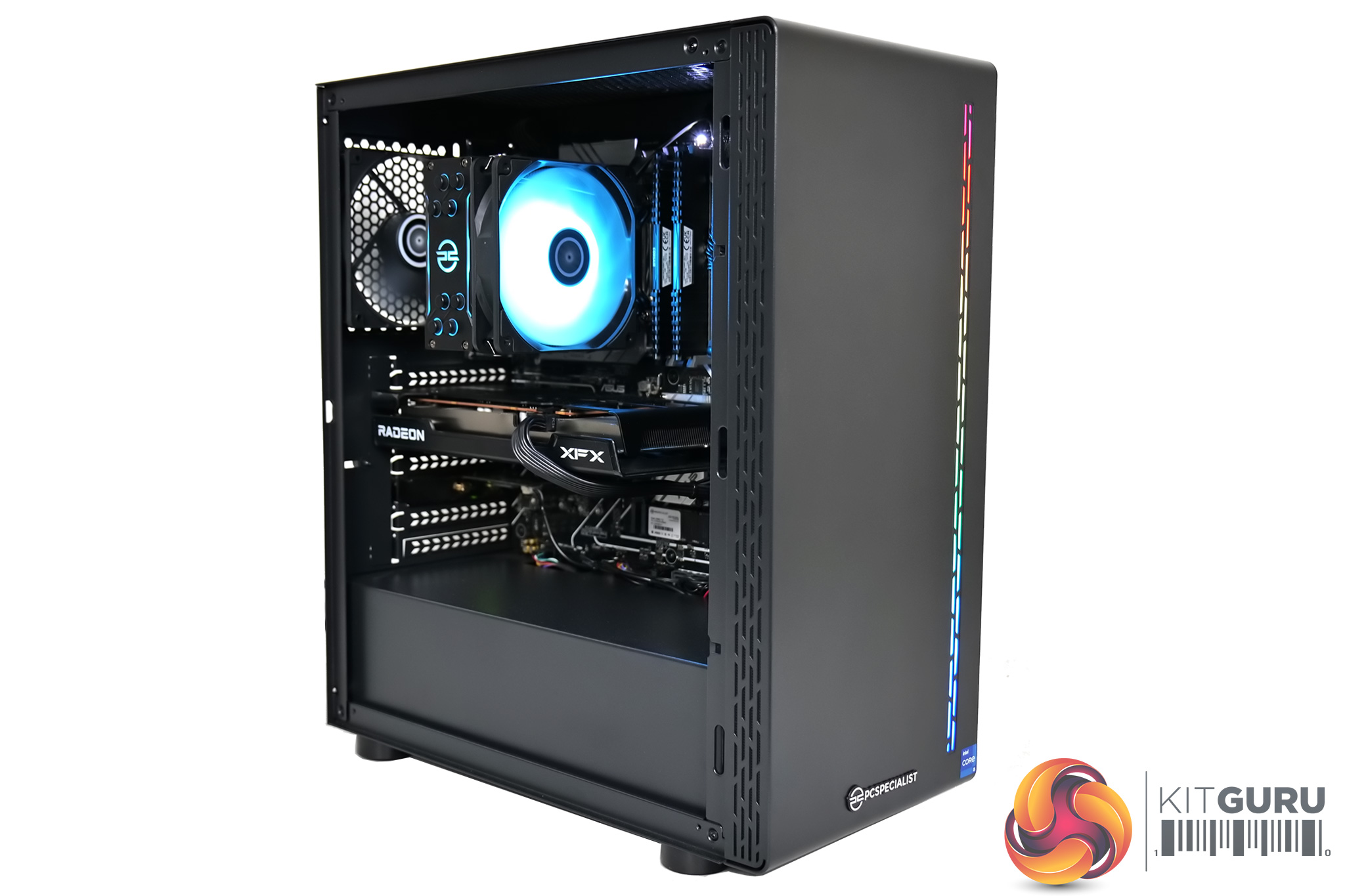
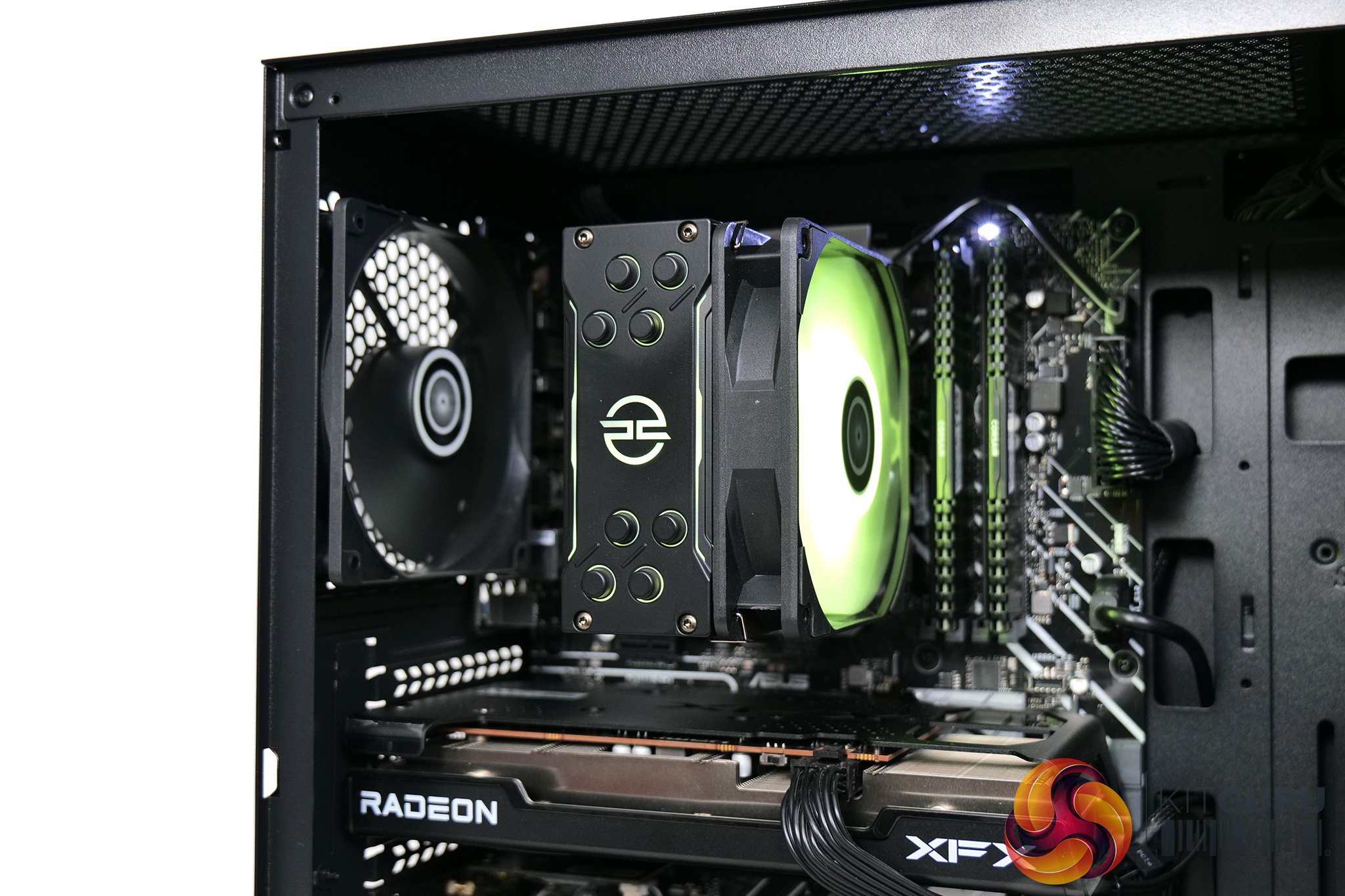
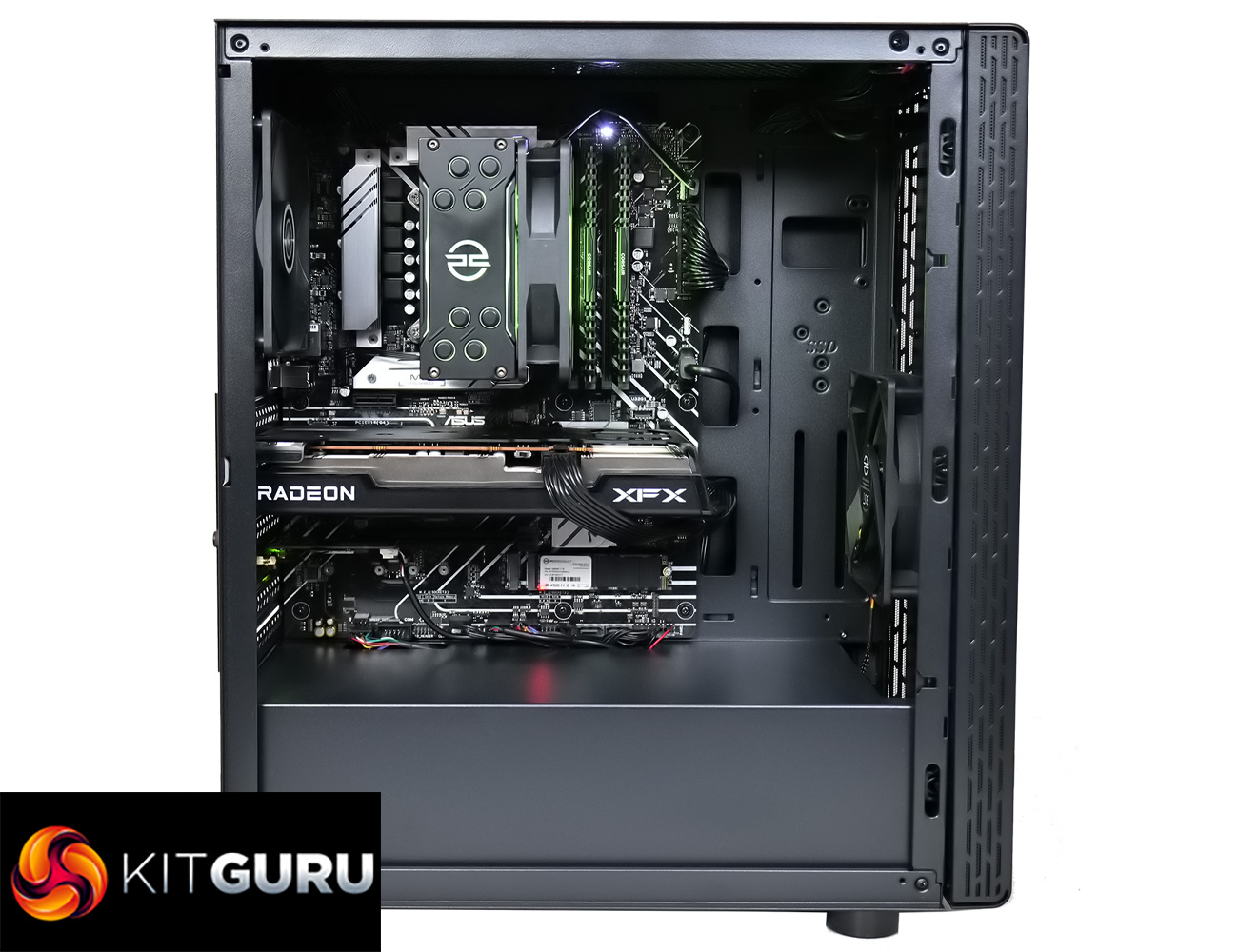
Starting with the case used for the system, this is an own-brand chassis from PCSpecialist, dubbed the PCS 209 ARGB. It's a compact mid-tower, and you can definitely tell it has been built to a price, with fairly thin and cheep-feeling steel used throughout. It's not really the end of the world as most people will simply put this on the floor or on their desk and only ever touch the power button, but it's safe to say the case is one area where PCSpecialist has cut back on cost.
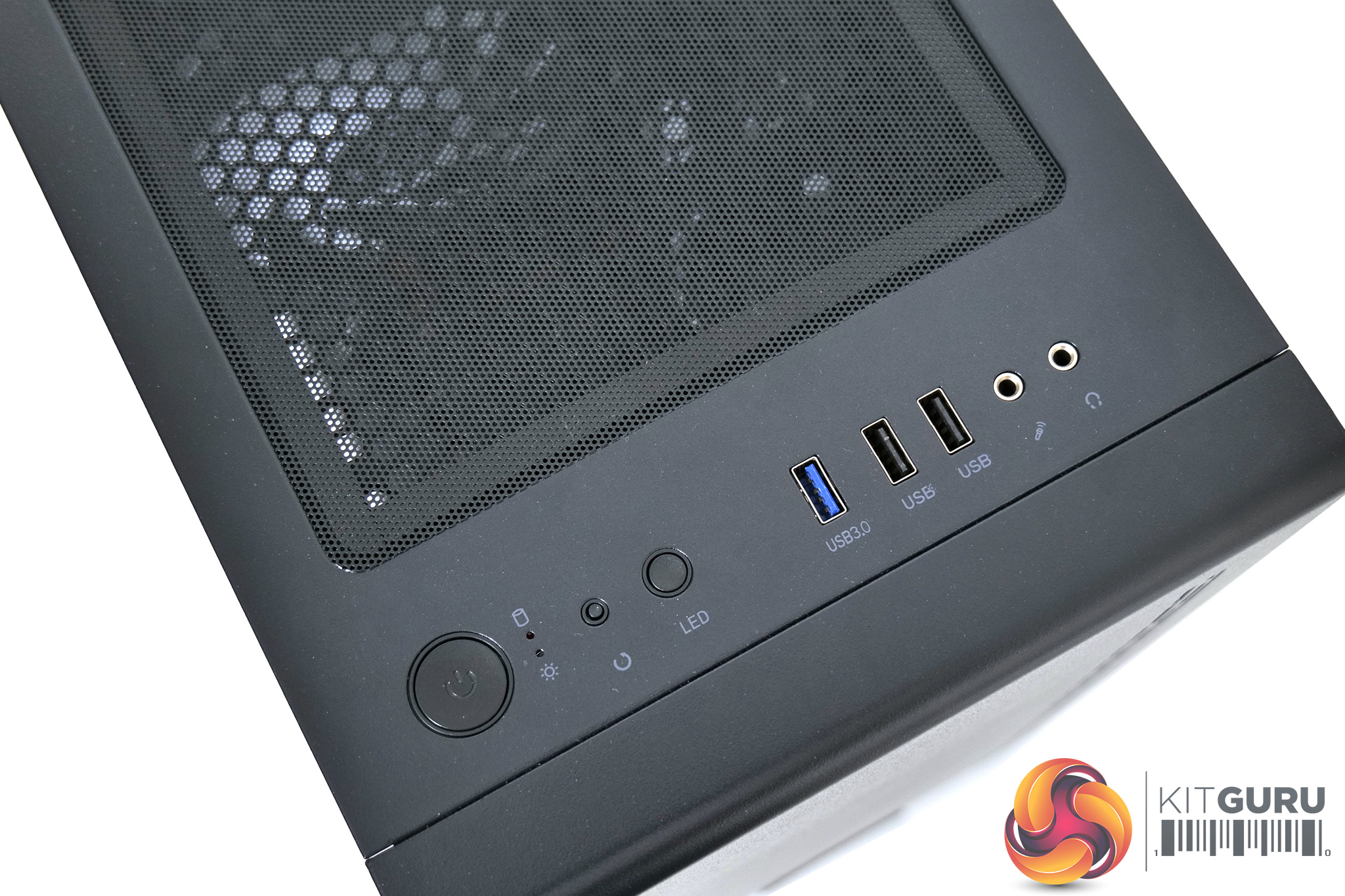
There is a tempered glass side panel though, but slightly more worrying for me is the fact that front panel is completely solid, with just small perforated sections on the sides to allow airflow into the chassis. We'll look at thermal performance of the PC later in this review.
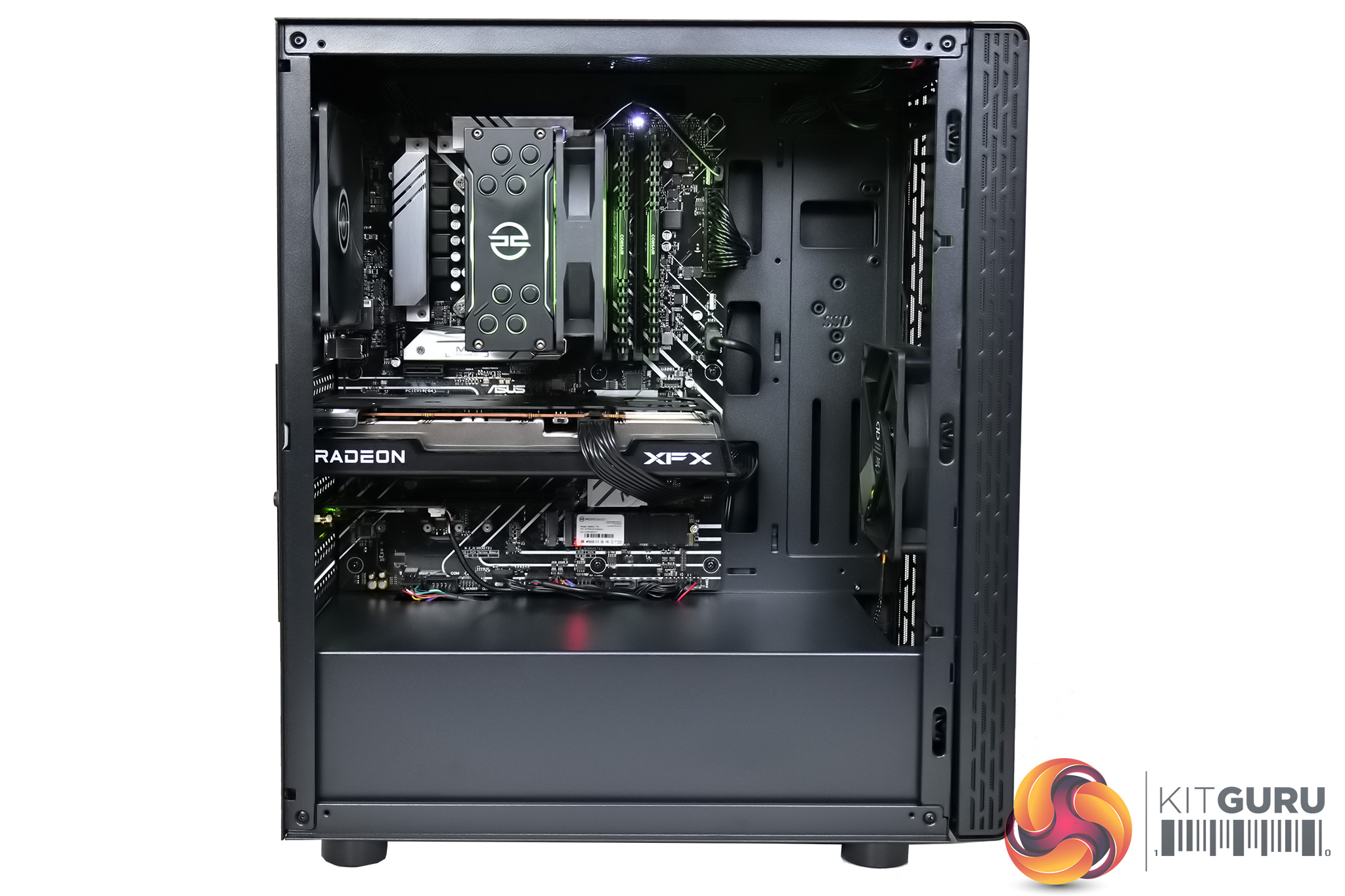
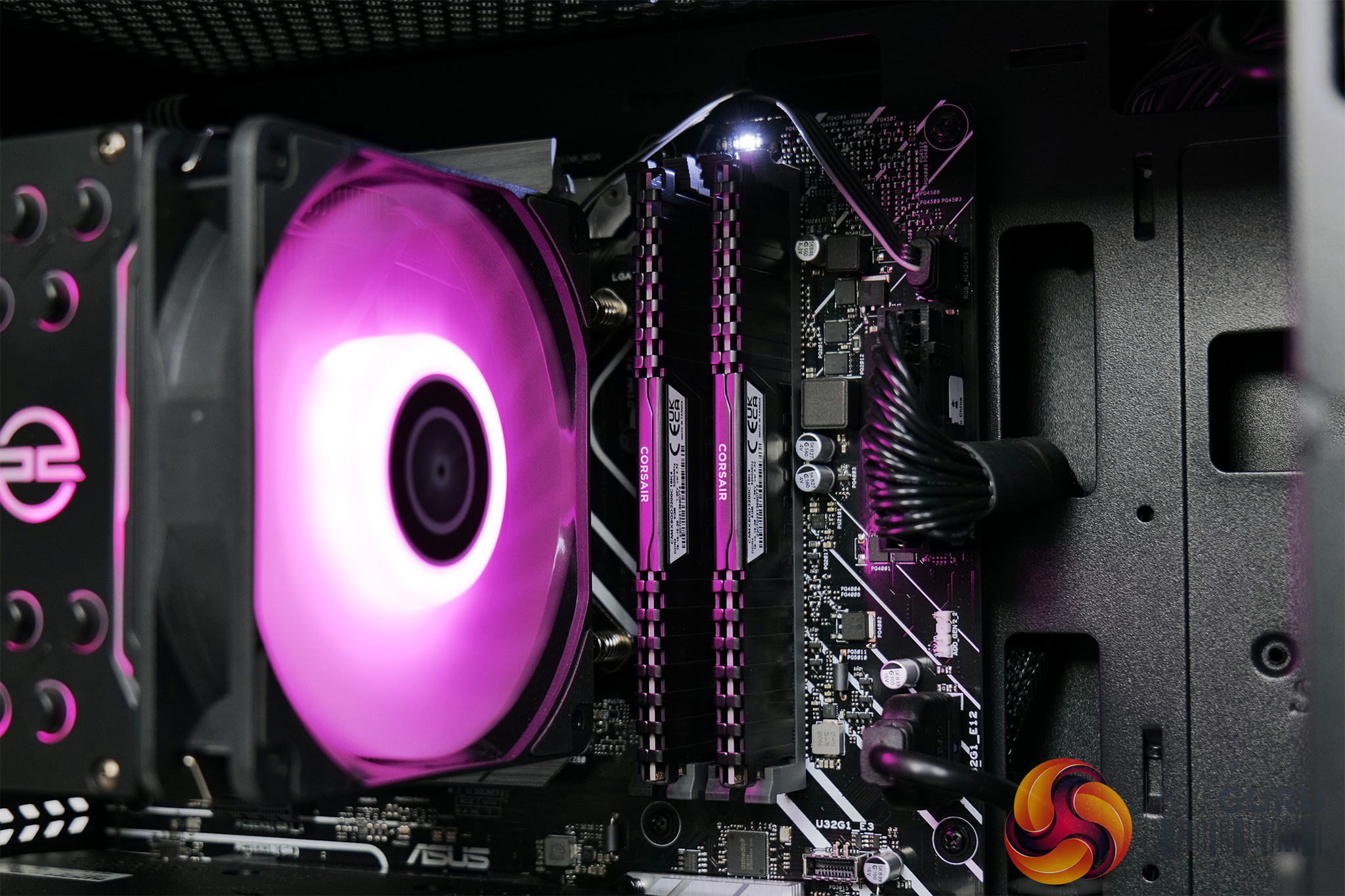
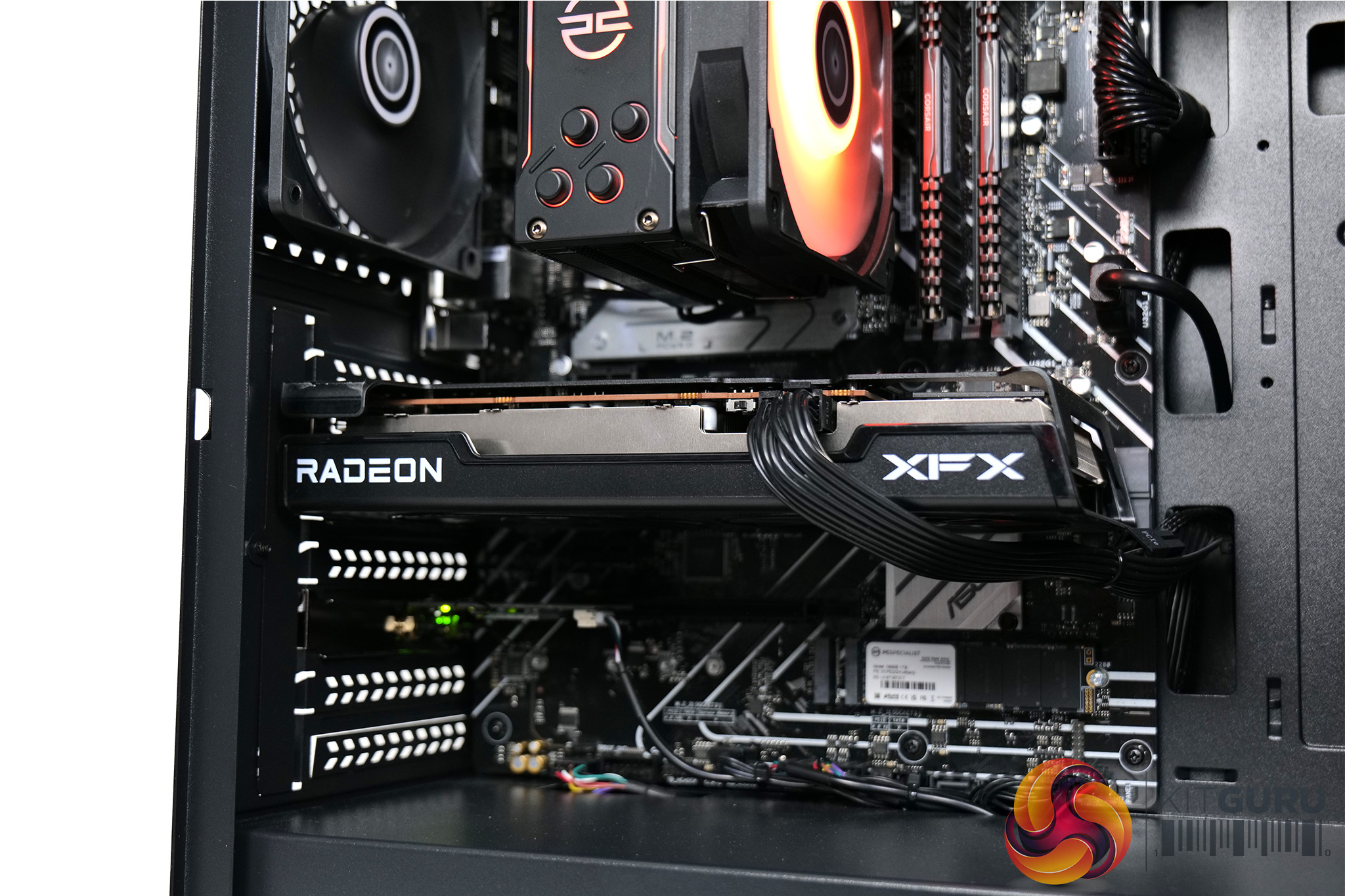
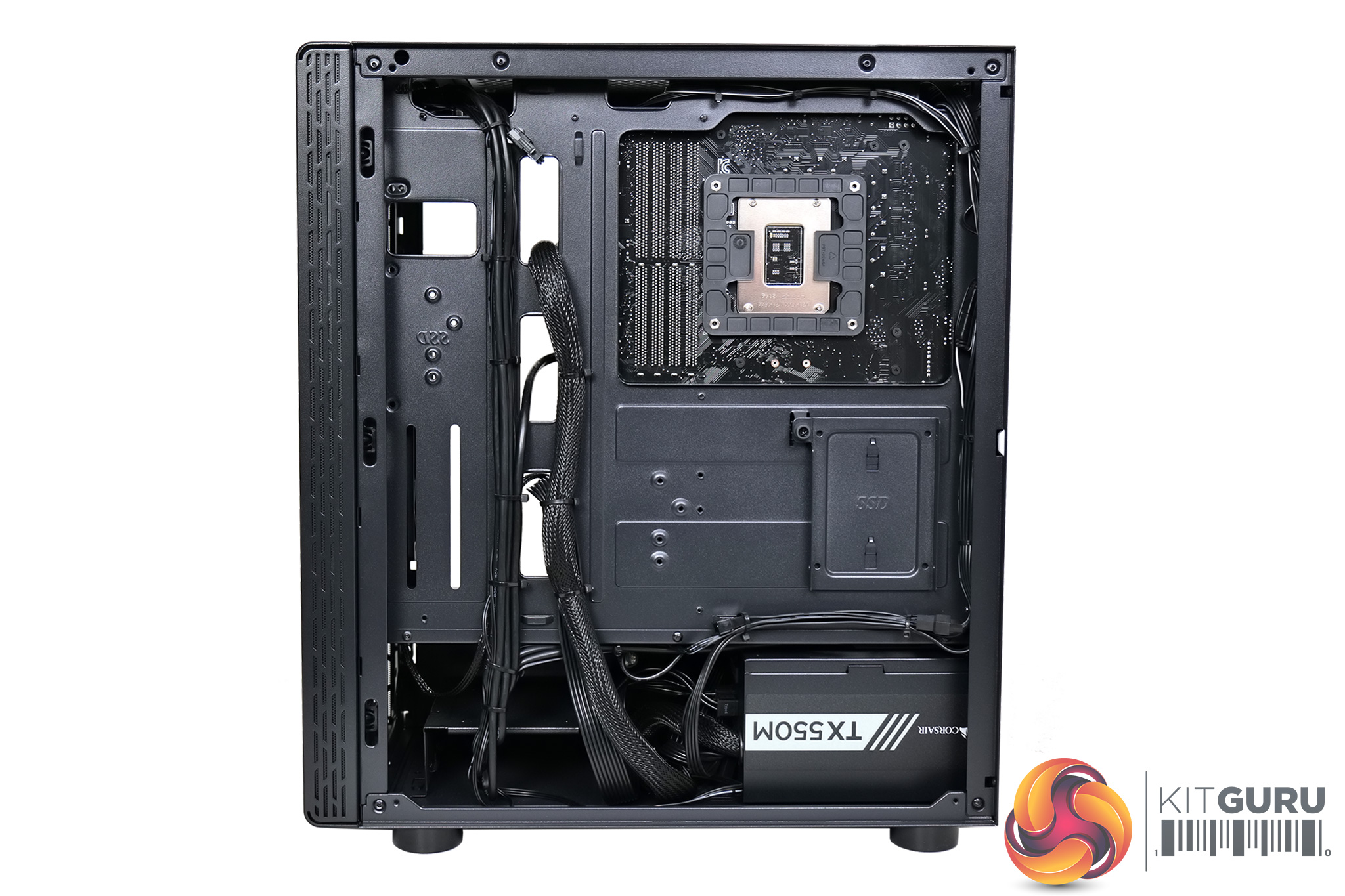
The overall build in the chassis is well done though, with excellent cable management throughout, and there's also plenty of space towards the front of the case to allow for a bigger GPU if you wanted to upgrade down the line. Everything is very stealthy in appearance too, with no hints of colour until the system is powered on, where we see the CPU cooler does light up with RGB LEDs, while there's an LED strip on the front of the case too.
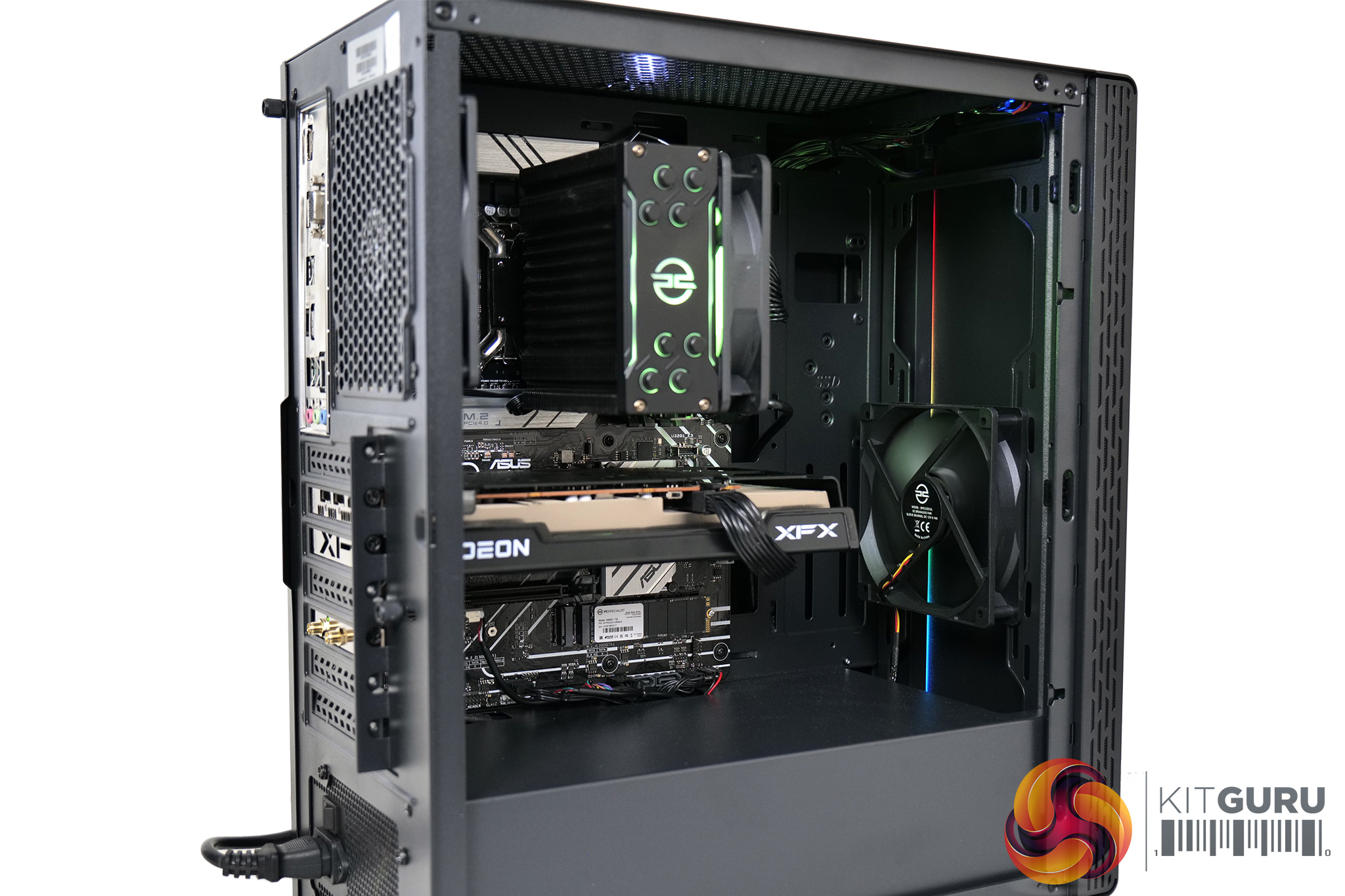
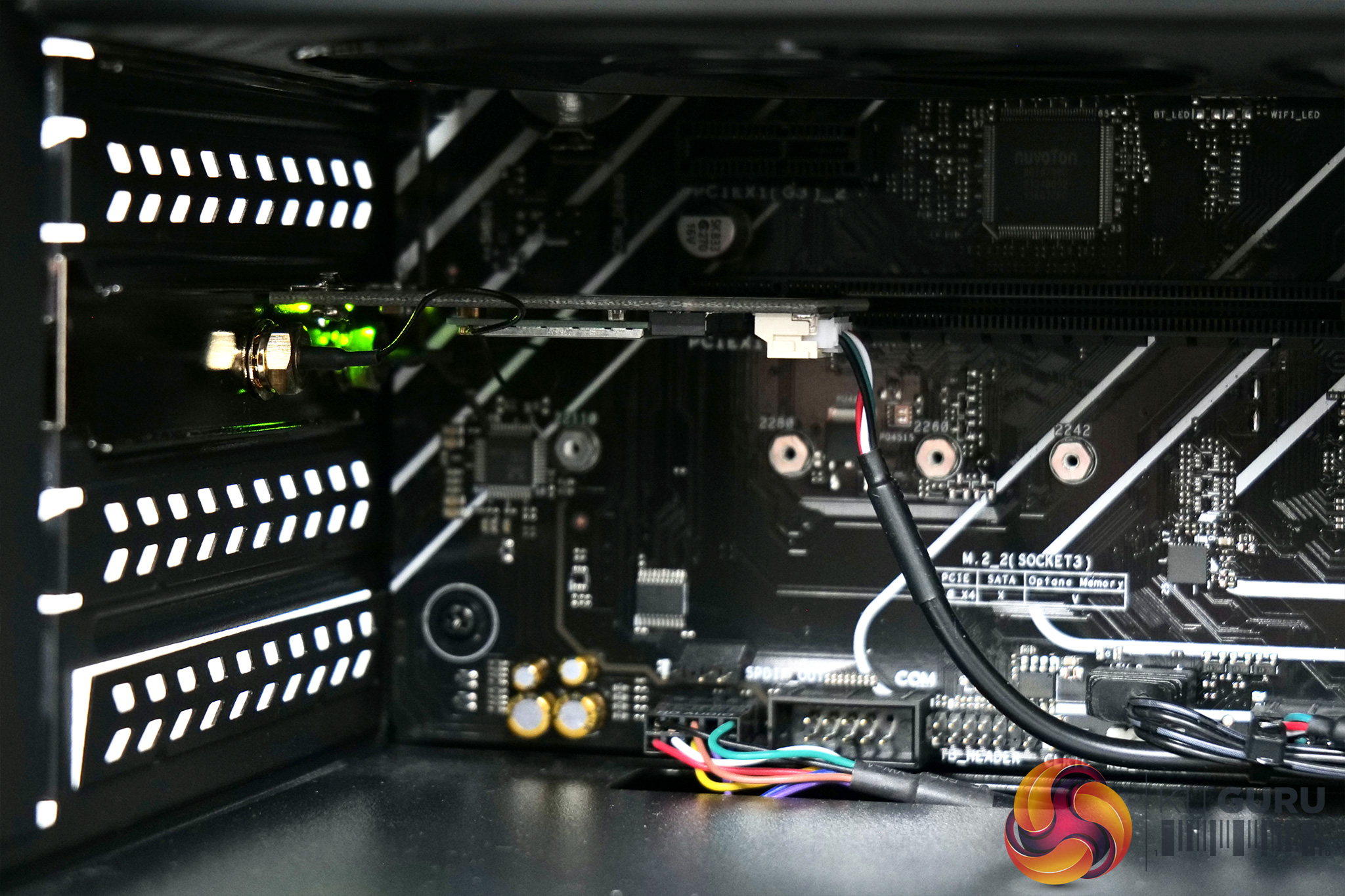
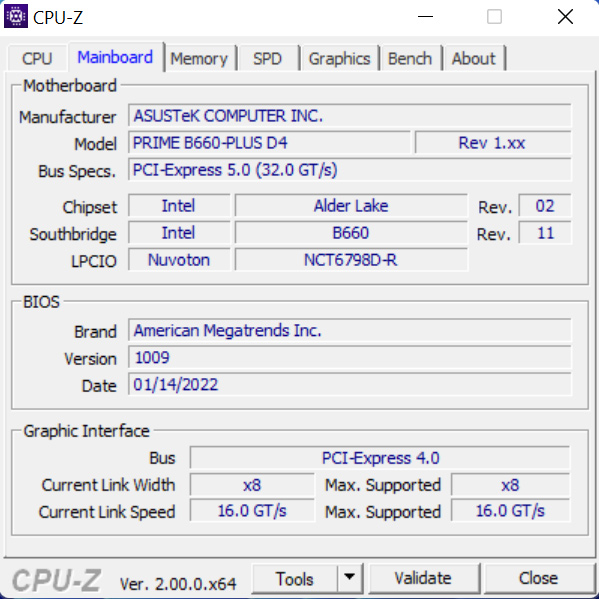
Getting into the components then, we'll start with the motherboard. PCSpecialist has gone with the ASUS Prime B660-PLUS D4, with the ‘D4' denoting the fact that this uses DDR4 memory. It's not a board that will blow you away with its VRM or featureset, but it's proven absolutely rock solid during my testing and I have no real complaints. The only potential negative is the fact that it doesn't have integrated WiFi, so PCSpecialist is using a PCIe add-in card, and this has been placed in the second x16 slot. For most people this is unlikely to be an issue, but say you are one of the few who wants to use a secondary PCIe device, like a capture card, this could prove problematic.
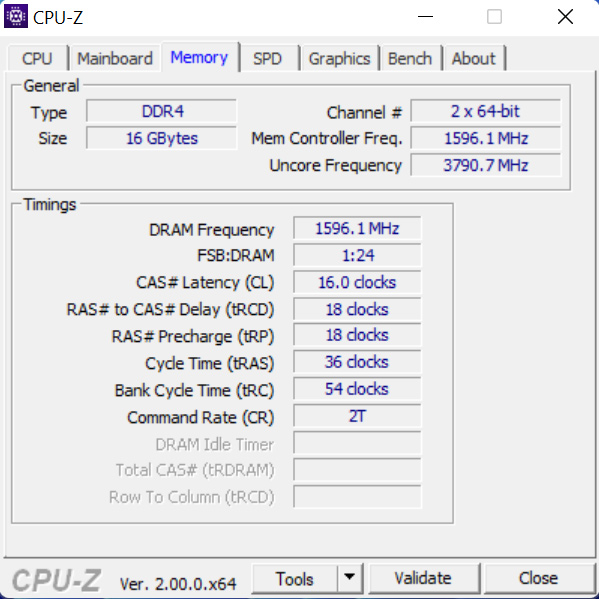
We've also got 16GB of Corsair Vengeance DDR4 memory, clocked in at 3200MHz, with 16-18-18-36 timings. It's a very solid memory kit in my opinion, there's absolutely no need for DDR5 at this price-point and 16GB is going to be plenty for the everyday gamer or user.
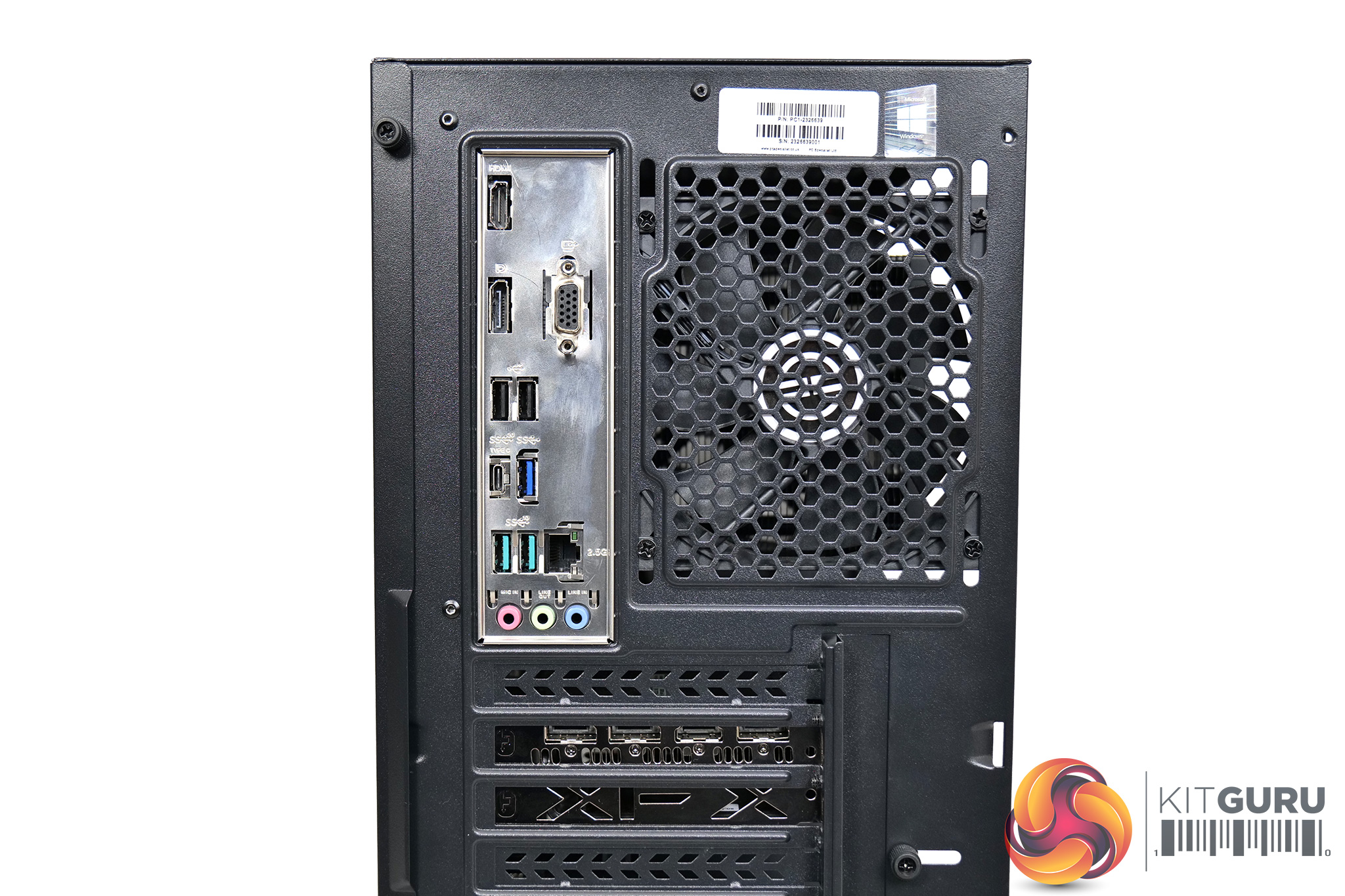
Next to that sits a compact air-cooler which is another PCSpecialist-branded part, called the FrostFlow 100 RGB V3. It's a typical tower air cooler in the style of the Hyper 212, with four heatpipes and a single 120mm RGB fan, which should be absolutely fine for the i5-12400F. On the topic of cooling as well, we can note a single 120mm intake fan at the front, with another 120mm exhaust in the back of the case.
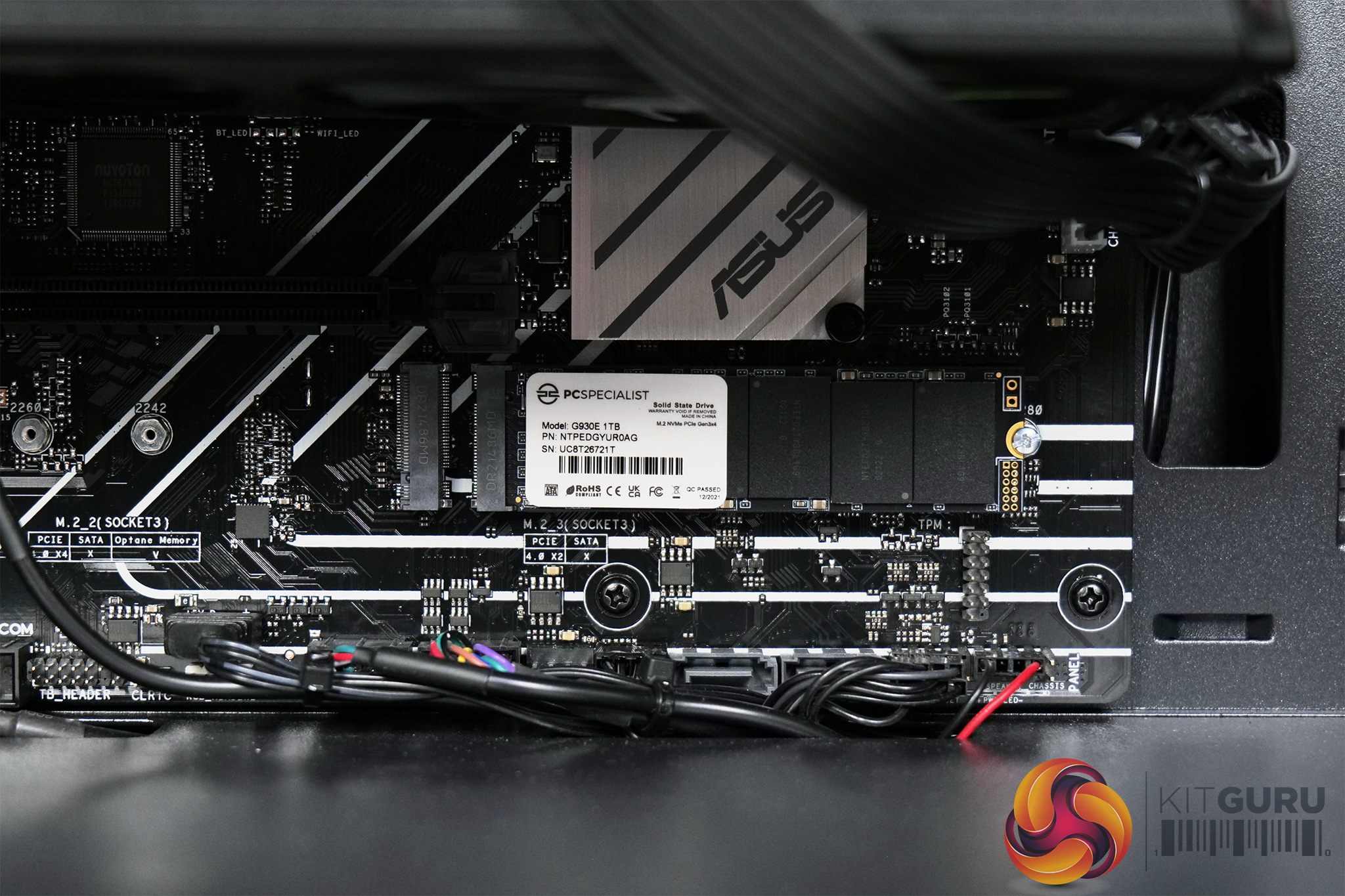
Storage is provided by a 1TB PCS-branded PCIe SSD, and a quick Google suggests Netac is the OEM. It's only a PCIe 3.0 x4 SSD, rated for 2200MB/s reads and 1500MB/s writes, but do note the placement of the SSD in the bottom right of the motherboard – we will discuss this further later in the review.
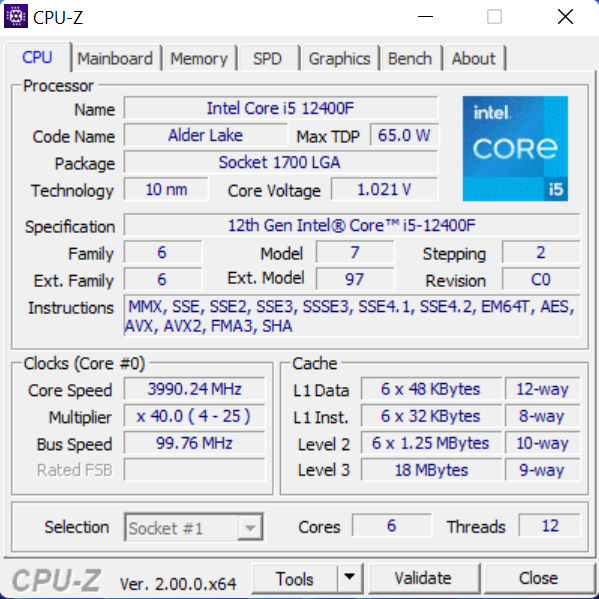
For the grunt of this PC then, we've already mentioned the i5-12400F, a six-core Alder Lake CPU with all of its cores being of the Performance variety, so there's no Efficient cores here. It's still a very solid processor though, and the Prime B660-Plus D4 motherboard had no issues maintaining it's 4GHz all-core boost during Cinebench's prolonged stress test. Obviously as it is not a K-SKU though, it is not overclockable.
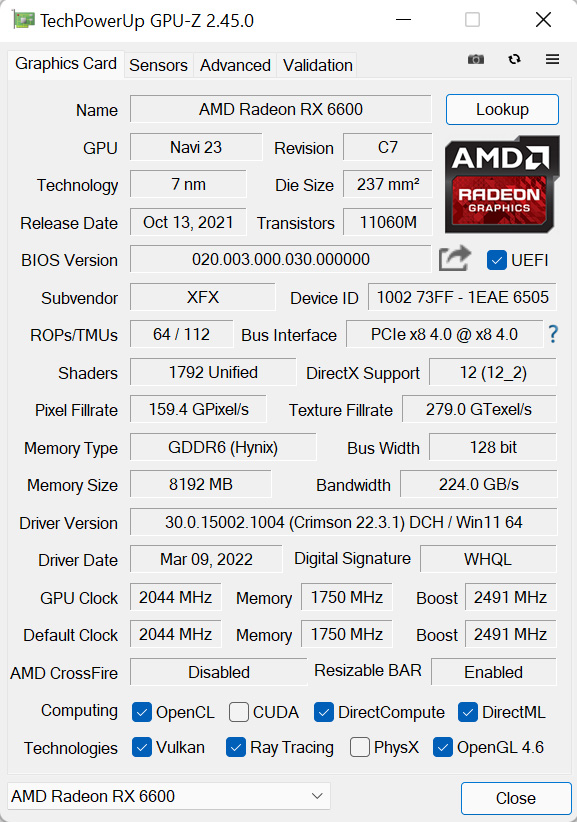
Then for the GPU, we have the AMD RX 6600, specifically the XFX Swift model, which uses a dual-fan cooler with a metal backplate. I did a full review of the RX 6600 and while it's certainly not going to set the world alight, based on current prices I'd say it is the best value card on the market right now, and it is still absolutely fine for 1080p and even some 1440p gaming, as we will get to later.
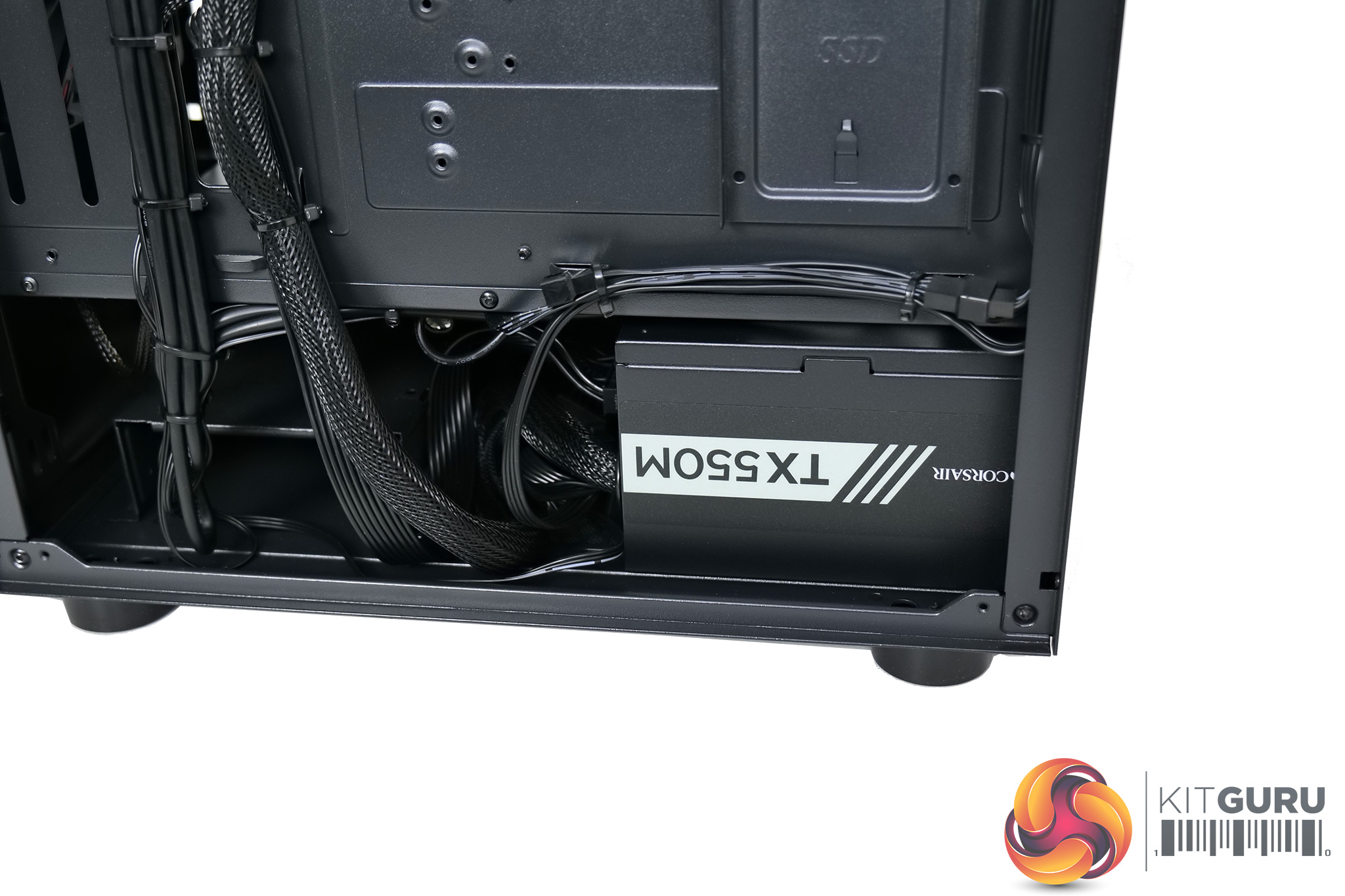
Powering the whole system is a 550W Corsair TXm PSU, of the semi-modular variety. This is an 80 Plus Gold unit which is great to see, no corners have been cut here with a cheapo 80 Plus Bronze unit, so that is always reassuring. Also, we do have to give PCSpecialist immense credit for the superb cable management at the back of the chassis too, maybe KitGuru modder James Dawson could do an equally stellar job, but I know for sure that I couldn't!
Software and Games
To test the PCSpecialist Magnus Supreme, we used the following software/games:
- 3DMark Time Spy
- AIDA64 Engineer
- Cinebench R23
- CrystalDiskMark
- PCMark 10
- Cyberpunk 2077 (DX12)
- Dying Light 2 (DX12)
- F1 2021 (DX12)
- Far Cry 6 (DX12)
- Forza Horizon 5 (DX12)
- Kena: Bridge of Spirits (DX12)
- Rainbow Six Siege (Vulkan)
We used the AMD Adrenalin 22.3.1 driver, which was the latest as the time of testing.
Comparison Systems
Not every system below is compared against the Magnus Spark in every benchmark, but where applicable we have used the following systems as a point of reference:
- Corsair 5000X Case
- AMD Ryzen 9 5900X
- Corsair H150i Elite Capellix RGB 360mm AIO Cooler
- MSI MAG X570 Tomahawk WIFI Motherboard
- Corsair RGB PRO SL 32GB 3200MHz DDR4 RAM
- Corsair 1TB MP600 NVMe Gen 4 M.2 SSD
- Seagate 1TB HDD
- MSI RTX 3080 TI Gaming X Trio 12GB
- Corsair RM850w PSU
- Corsair SP120 RGB Elite 120mm Fans
- Cyberpower Auron Mid-Tower OEM Case with ARGB fans and an external RGB remote
- AMD Ryzen 3 3200G – 4-Core 3.6Ghz, 4Ghz turbo
- AMD Ryzen Wraith CPU cooler
- Palit GeForce GTX 1650 GP 4GB
- MSI B450 Tomahawk Max II
- Corsair Vengeance LPX 2x8GB 3200Mhz RAM
- WD SN550 1TB NVME
- InWin A45 450W 80+ PSU
- N300 Wireless adapter
- Windows 10
- Fractal Design Meshify C ATX Gaming Mid-Tower w/ Tempered Glass Side Panel
- AMD Ryzen 9 3900 – 12-Core 3.10GHz,
- Corsair Hydro Series H100i RGB Pro XT
- ASUS TUF X570-Plus Gaming
- 500GB (1x500GB) Seagate Firecuda 520 M.2 PCIe 4.0 NVMe SSD
- 2TB Seagate BarraCuda SATA-III 6.0Gb/s 7200RPM Hard Drive 1 Drive
- 32GB (4x8GB) DDR4/3200mhz Dual Channel Memory Corsair Vengeance LPX w/Heat Spreader
- MSI GeForce® RTX 2080 Super 8GB – Ray Tracing Technology, DX12®, VR Ready, HDMI, DP – 4 Monitor Support Single Card
- Corsair RM750x 750W 80+ Gold Modular Gaming Power Supply
- Intel® Wireless 3168 Wi-Fi 802.11ac Dual Band (2.4 GHz & 5GHz) up to 433Mbps w/ PCI-E Adapter & Dual Antennas
- ASUS TUF Gaming B560-PLUS WiFi motherboard
- Intel Core i5-11400F six-core processor
- 4GB AMD Radeon RX 5500 XT GPU
- 16GB Corsair Vengeance DDR4 3200MHz, 2x 8GB sticks
- 512GB PCS-branded PCIe M.2 SSD
- 1TB Seagate Barracuda 7200RPM HDD
- Corsair 750W TXm semi-modular 80 Plus Gold PSU
- PCS FrostFlow 100 RGB V3 CPU cooler
- 3 PCS ARGB LED fans + controller kit
- Windows 10 Home 64 Bit
- PCS Prism X RGB mid tower case
We also use some data from Leo's Alder Lake reviews, using his test bench setup:
- Intel Core i7-12700K and i5-12600K
- Corsair H150i Elite LCD
- MSI Z690 Unify
- 32GB Corsair Vengeance DDR5-5200
- Palit RTX 3080 Gaming Pro 10GB
- Seasonic Prime Titanium 850W
- 500GB Sabrent Rocket 4.0 M.2 NVMe
- Windows 11
And some of my own data from our GPU reviews has also been used, with the following hardware configuration:
- Intel Core i9-10900K
- ASUS ROG Maximus XII Hero Wi-Fi
- Corsair Vengeance DDR4 3600MHz (4 X 8GB) CL 18-22-22-42
- AMD RX 5600 XT, AMD RX 6600 XT and Nvidia RTX 3060
- 500GB Samsung 970 Evo Plus M.2
- 2TB Samsung 860 QVO 2.5″ SSD
- Fractal Meshify S2 Blackout Tempered Glass
- Corsair H115i RGB Platinum Hydro Series
- Corsair 1200W HX Series Modular 80 Plus Platinum
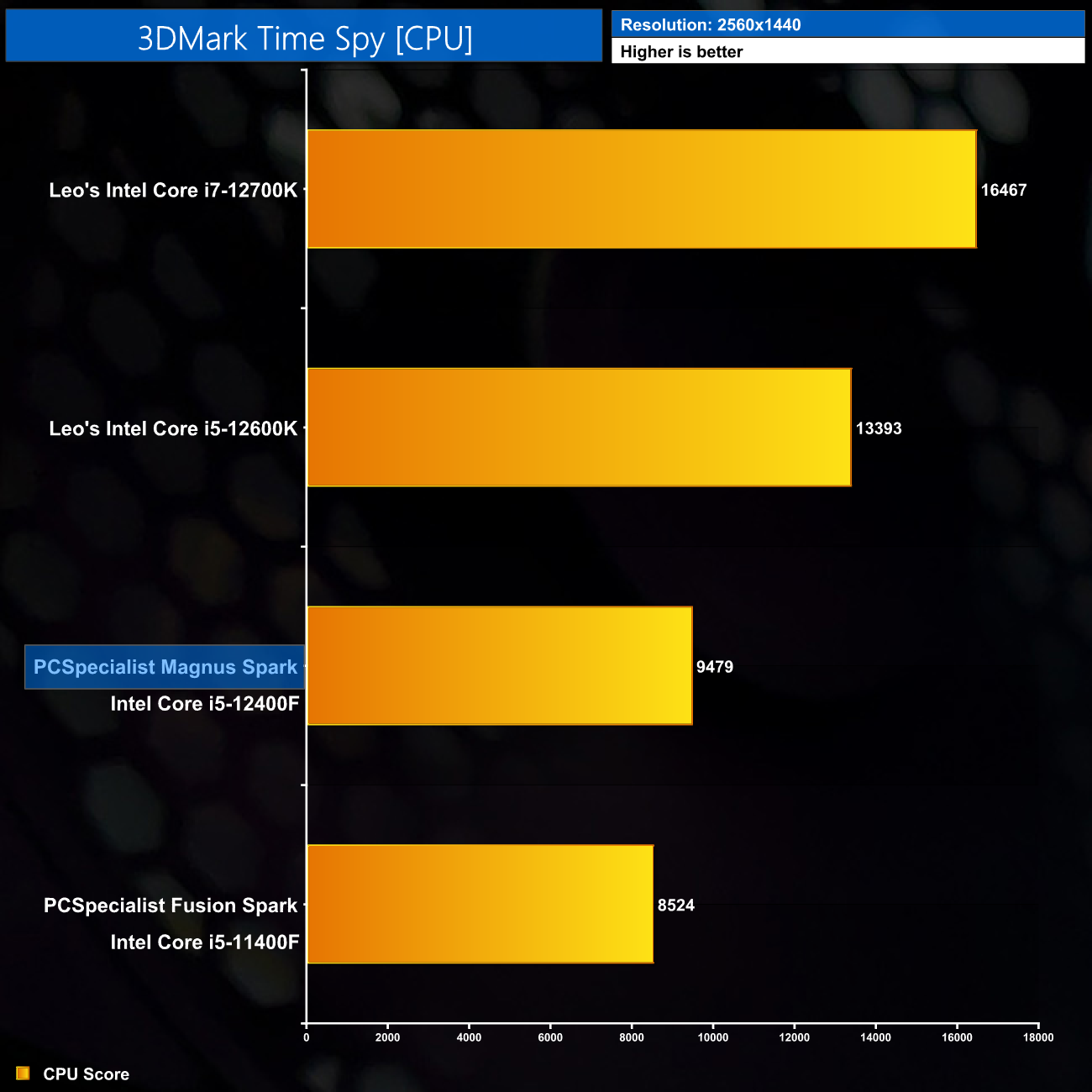
Starting with 3DMark Time Spy, for the CPU score we can see the i5-12400F in the Magnus Spark scores almost 1000 points higher than its direct predecessor, the i5-11400F, as used in the PCSpecialist Fusion Spark. Understandably it lags behind the i5-12600K as that CPU offers an extra 4 Efficient cores, as well as higher clock speeds.
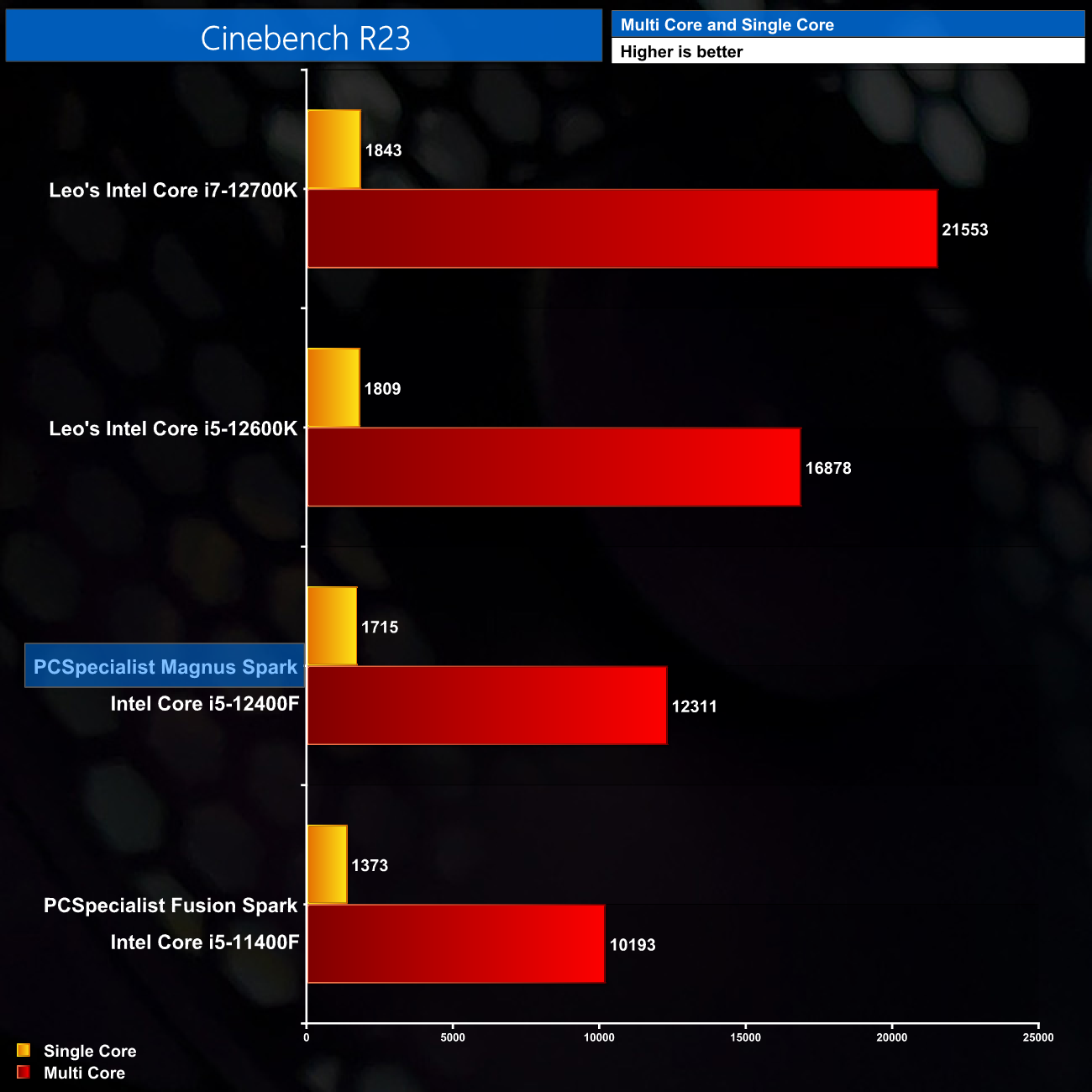
In Cinebench R23, a similar pattern can be observed – the extra performance on offer from six Alder Lake cores versus six Rocket Lake cores is noticeable, both in the single-core and multi-core tests.

Time Spy's GPU score is also just what'd we would expect here – the RX 6600 is only fractionally faster than the RX 5600 XT in this benchmark, while it scores about 8% lower than an RTX 3060.
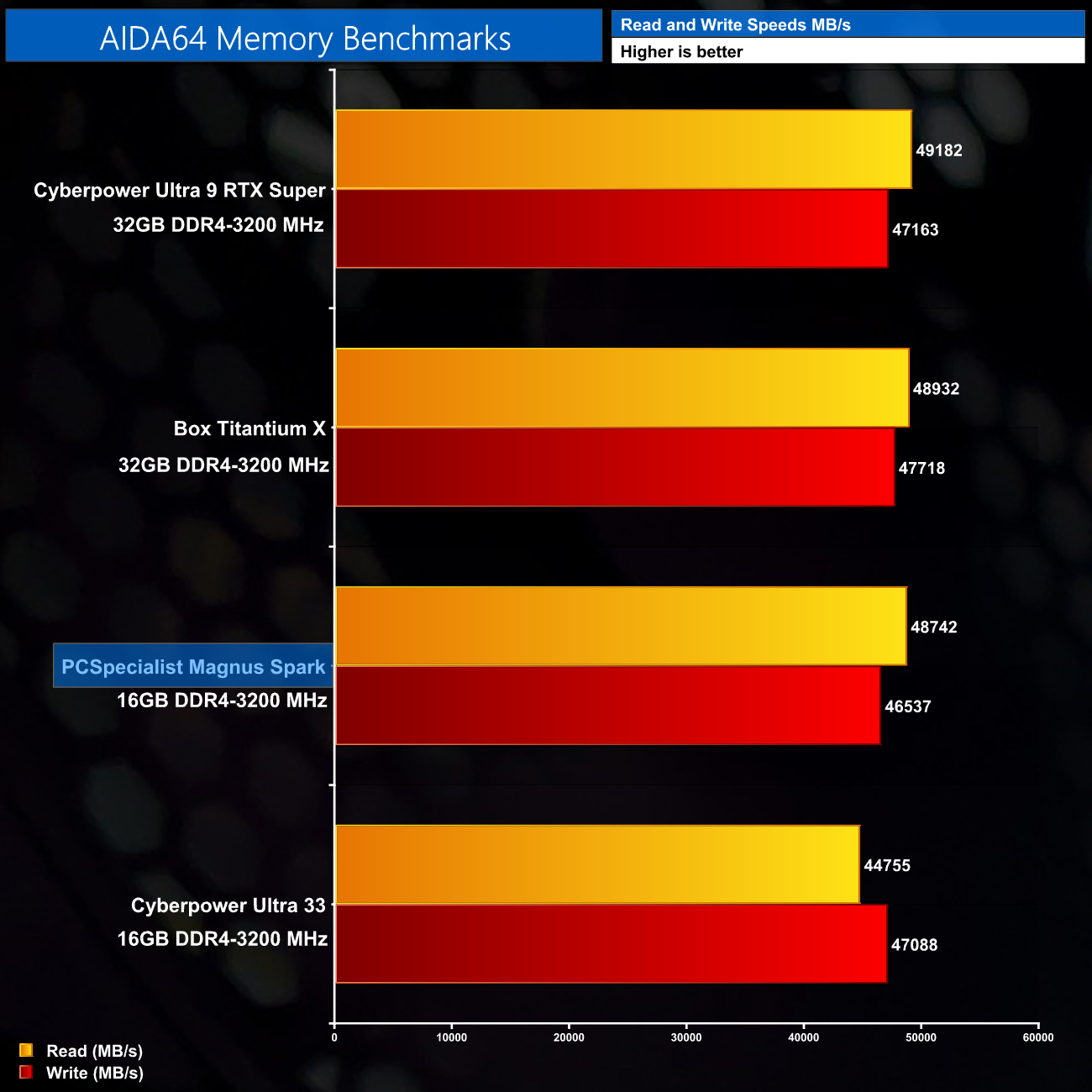
Memory speeds were tested with AIDA64 Engineer, and for 16GB of DDR4 memory things are exactly where they should be, with reads just shy of 49000MB/s, and writes around 46500MB/s.
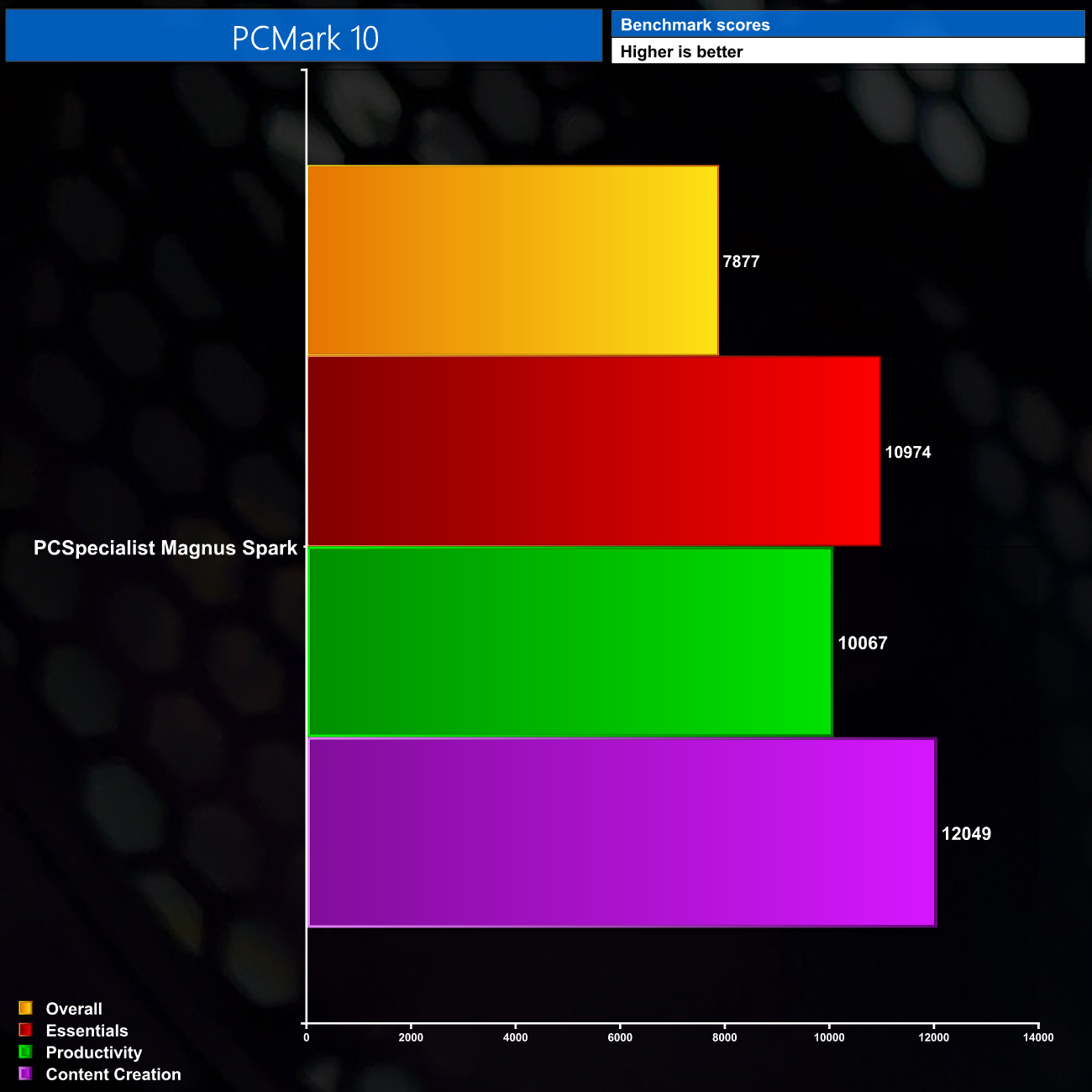
We don't include any direct comparisons for PCMark 10, but this should allow a good point of reference if you want to test your own PC and see how it compares against the Magnus Spark.
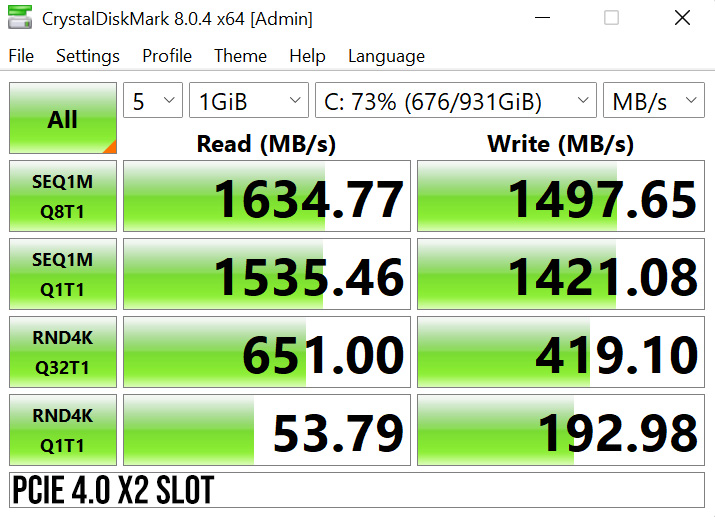
I mentioned on the first page that we would discuss the M.2 SSD placement in greater depth, as it turns out that PCSpecialist's decision to use the M.2 slot on the motherboard that they did, results in lost performance.
Initially, I just thought it looked a bit odd to shunt the SSD far down the motherboard, in the bottom right corner. Upon checking the B660-Plus D4's manual, we can see that this slot is labelled M.2_3 (I've highlighted it with a pink rectangle):

Click to enlarge
The manual goes on to specify that slot M.2_3 is a PCIe 4.0 x2 slot, unlike the other two slots on the board that are both PCIe 4.0 x4, as you can see here:

A PCIe 4.0 x2 interface still provides almost 4GB/s of bandwidth, which far exceeds the speeds that the PCS SSD is rated for. However, it is of course a PCIe 3.0 SSD, meaning by being placed in slot M.2_3, it receives just two PCIe 3.0 lanes – halving the bandwidth to just under 2GB/s.
To test what difference this will make to SSD performance, I first ran CrystalDiskMark 8.0.4 with the drive in its original, M.2_3 slot:
However, I also physically moved the SSD to slot M.2_2 – which is directly adjacent to slot M.2_3, but operates with four PCIe 4.0 lanes:
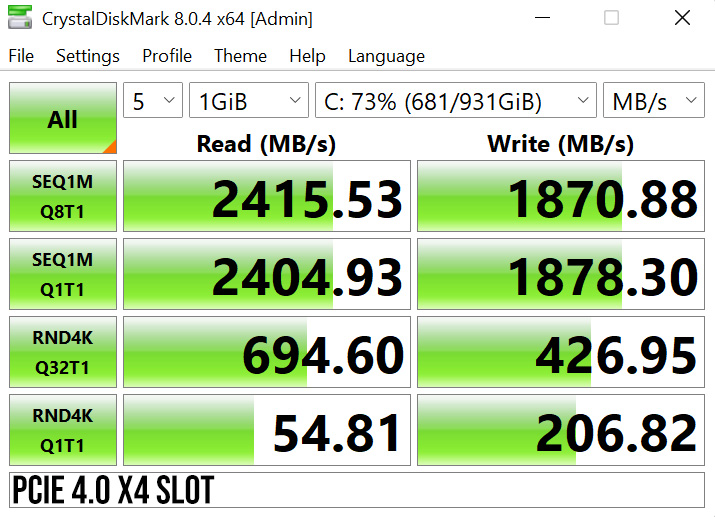
As we can see, SSD speeds across the board are hindered by the use of slot M.2_3. Sequential reads improved by almost 800MB/s by moving it to the next slot over, while sequential writes improved by almost 400MB/s.
For me, how you look at this can go one of two ways. On the one hand, the 1TB SSD isn't the fastest to begin with and I'm not sure anyone buying this system would necessarily notice. On the other hand, the principle that the SSD isn't going to run as fast as it could, simply because it is installed in the wrong M.2 slot, does bother me somewhat.
It's clearly not the end of the world, but there's also no excuse for this when the M.2 slot directly next to the one that was used can offer better all-round SSD speeds.
Game benchmarks:
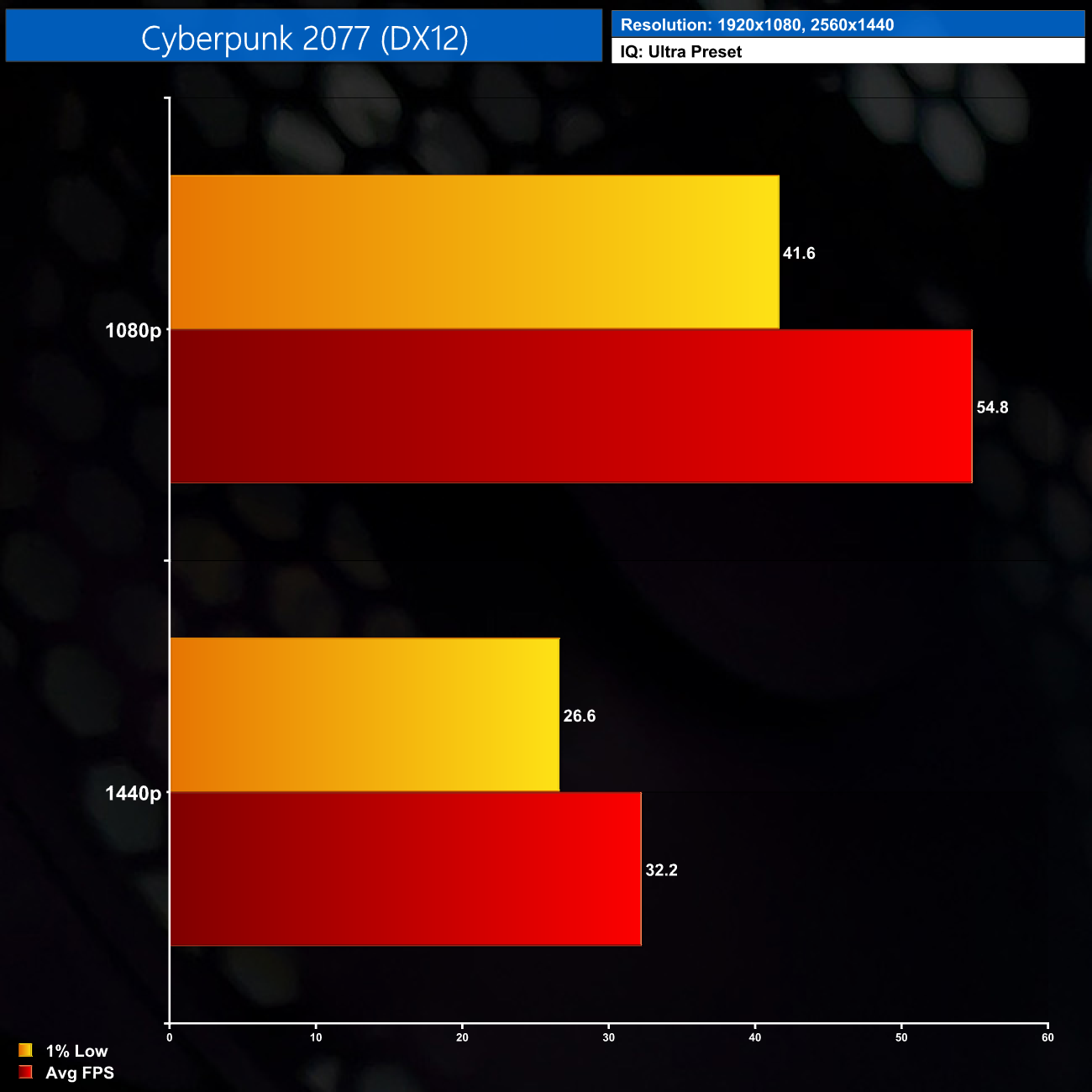
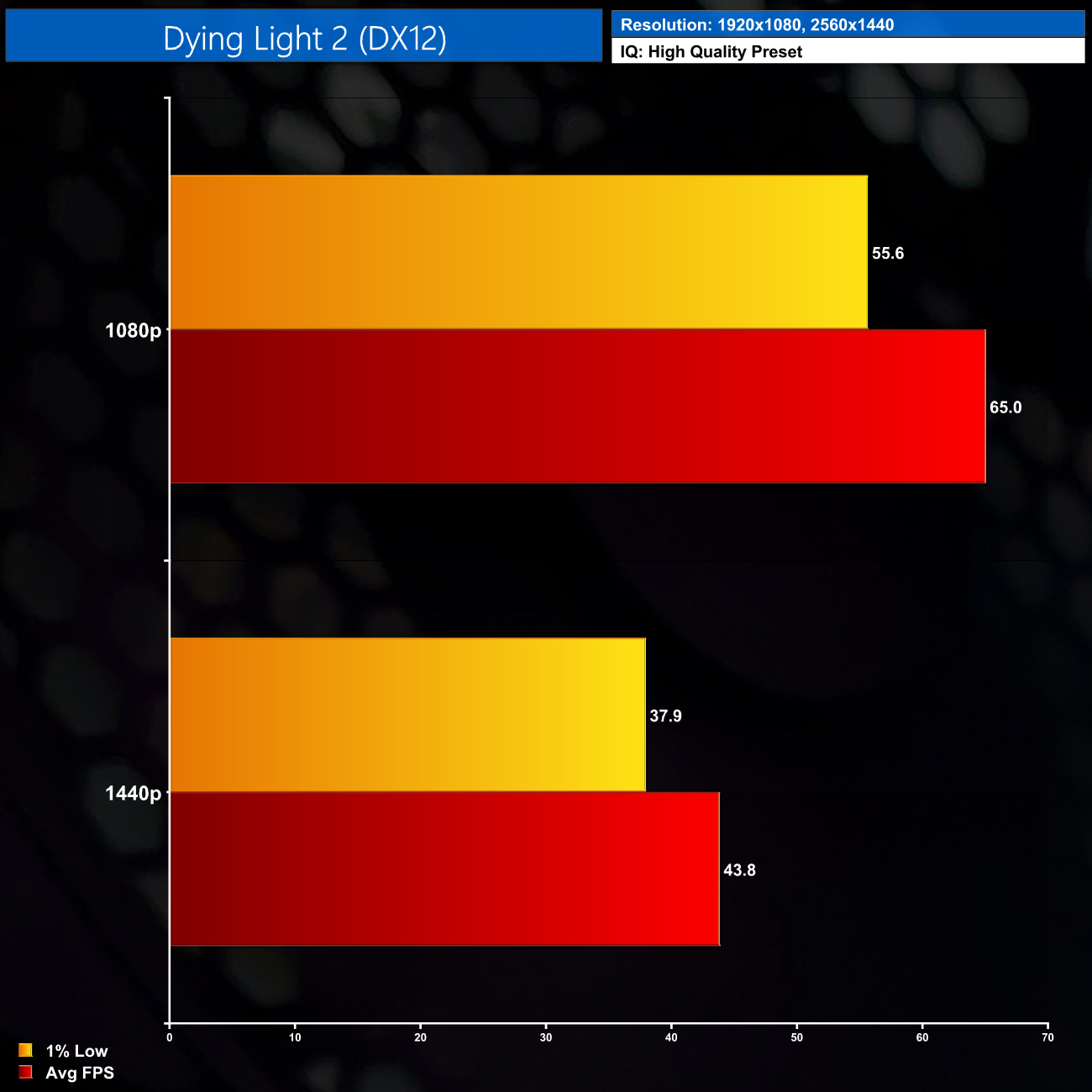
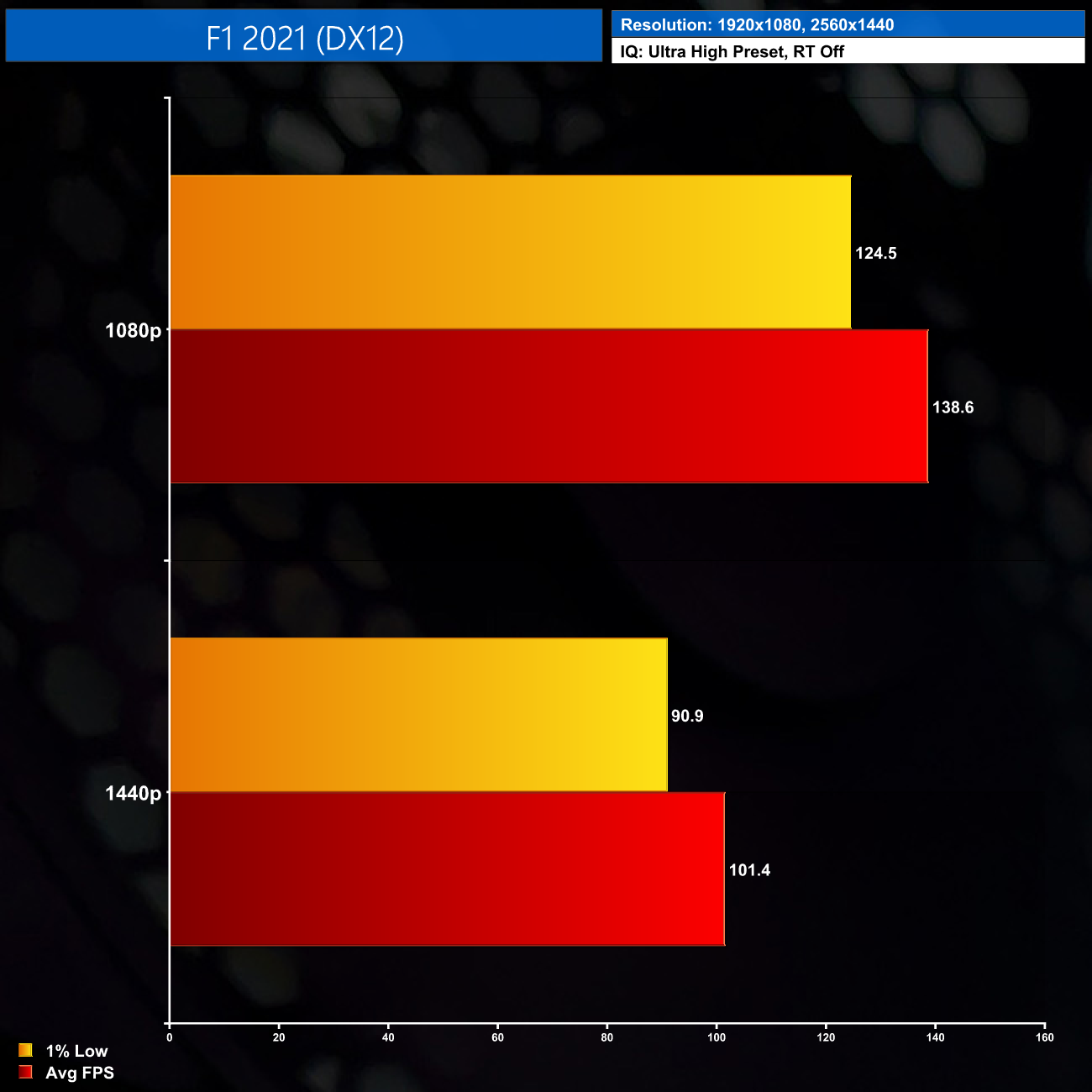
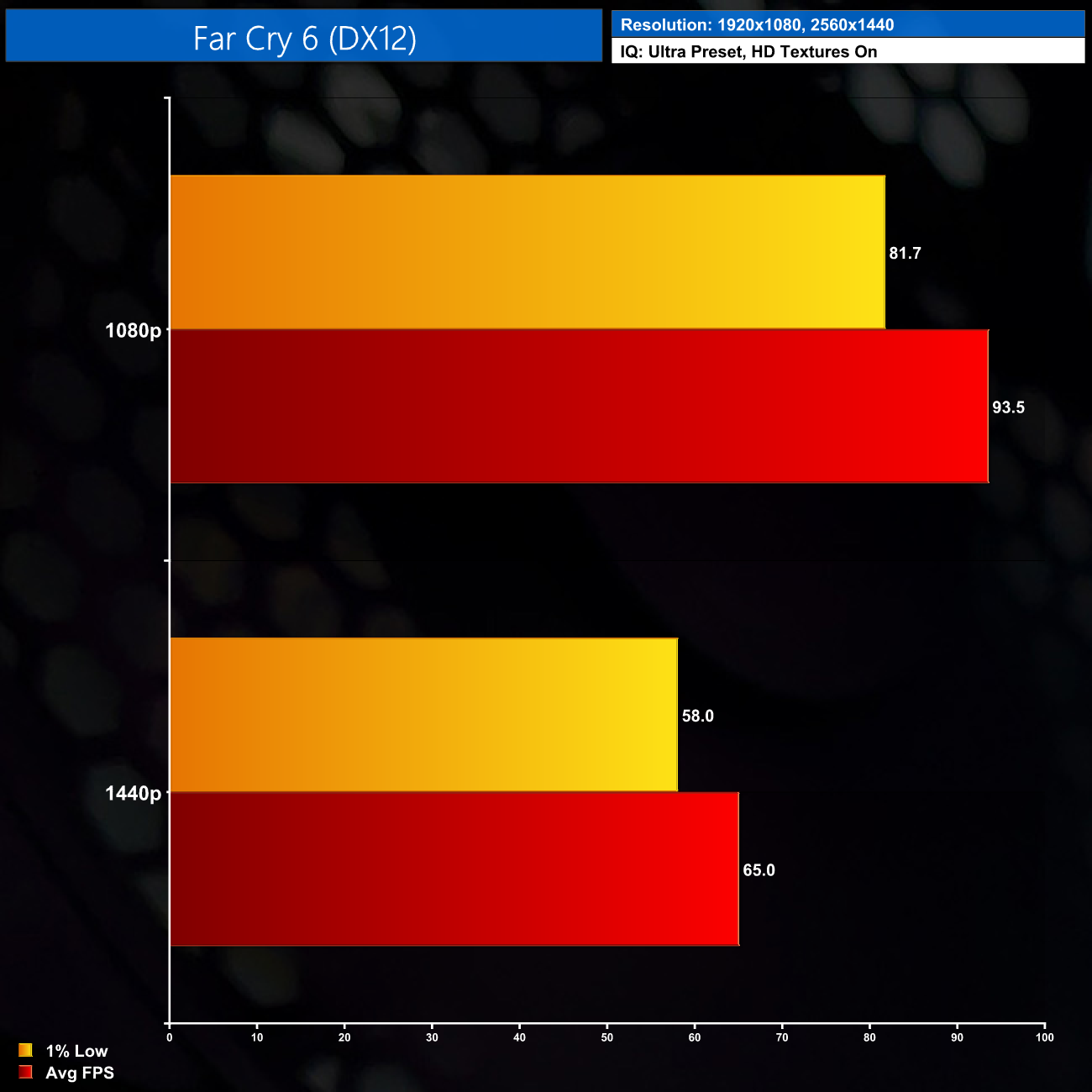
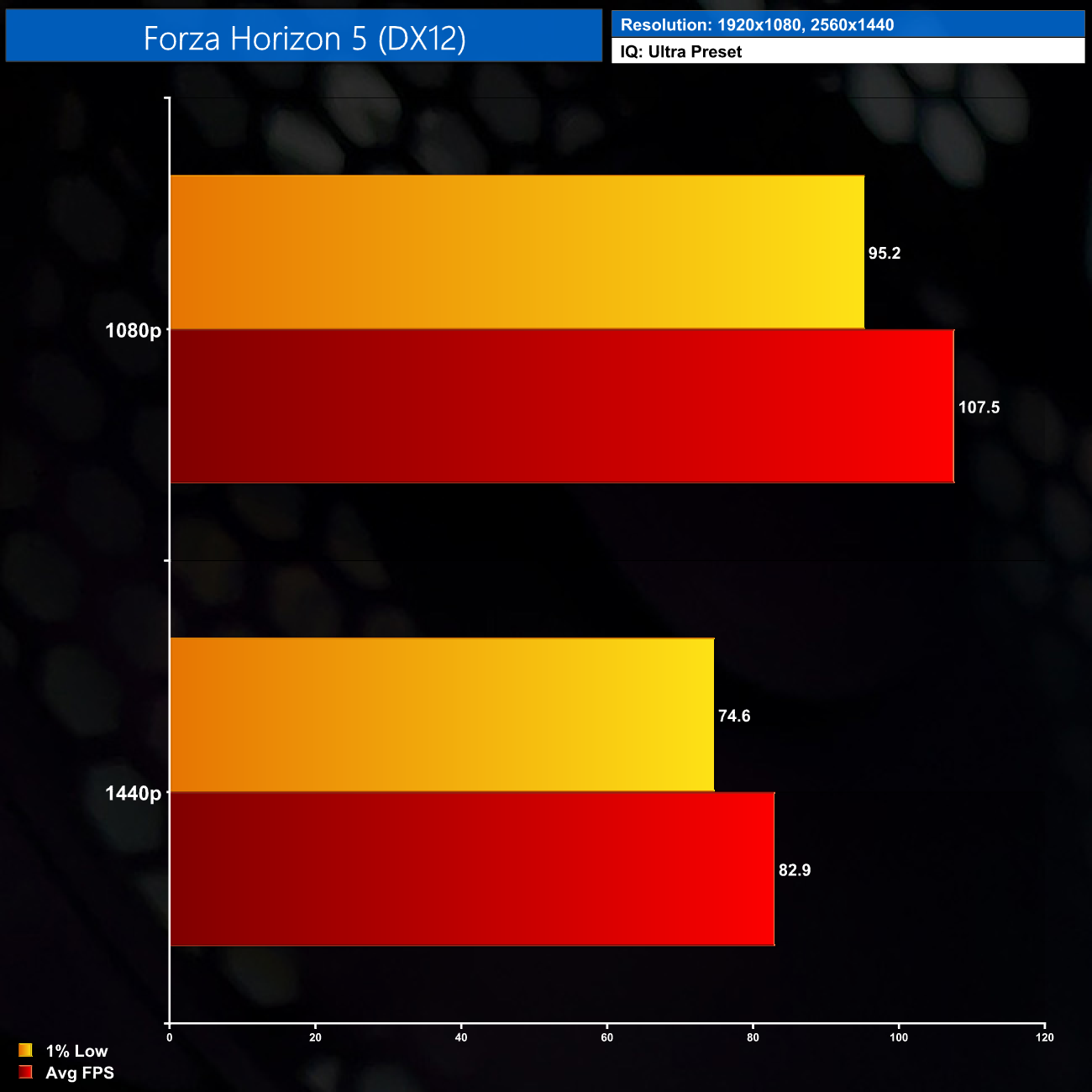
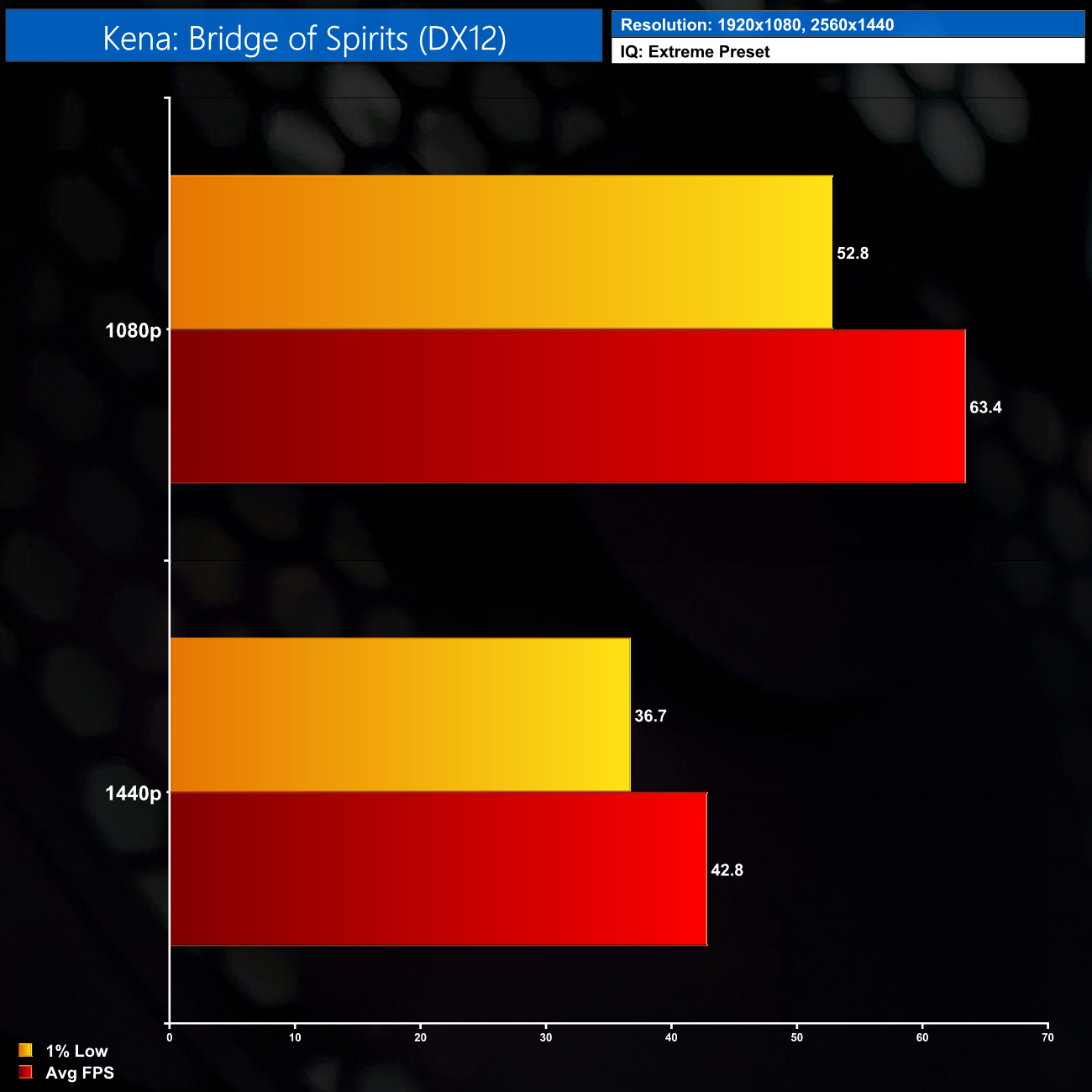

For our game benchmarks, we tested seven different titles, all benchmarked using the Ultra, or equivalent, presets. The combination of i5-12400F and RX 6600 is very solid overall. Certain games like Cyberpunk 2077, with the image quality maxed out, can prove too much to hit 60FPS at 1080p, but everything else I tested blew through Ultra settings at 1080p, including Dying Light 2 and Far Cry 6.
1440p gaming is not off the table either, though you may need to dial the image quality settings back a little bit. Still, Forza Horizon 5 played great at 1440p using the Ultra preset, and if you're only interested in esports titles like Rainbow Six Siege, you are going to get fantastic frame rates no matter what with this system.
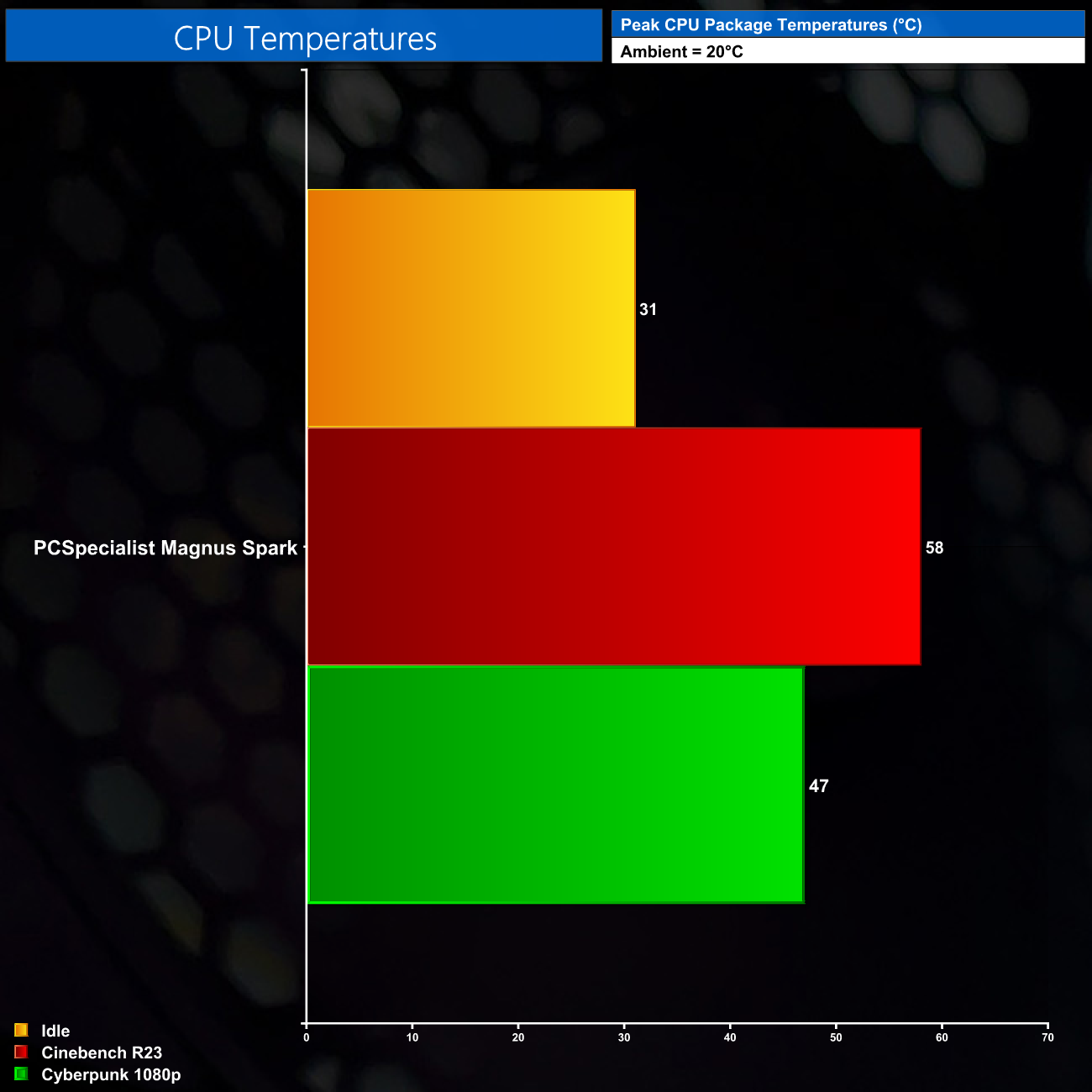
After getting my first look at the seemingly sealed-off case front panel used for the Magnus Spark, I was definitely a bit apprehensive about thermal performance of the core components. As it turns out, I needn't have worried, as the CPU ran no hotter than 58C on the package when hit with a 30-minute Cinebench R23 stress test, and it ran about 10C cooler while gaming too.
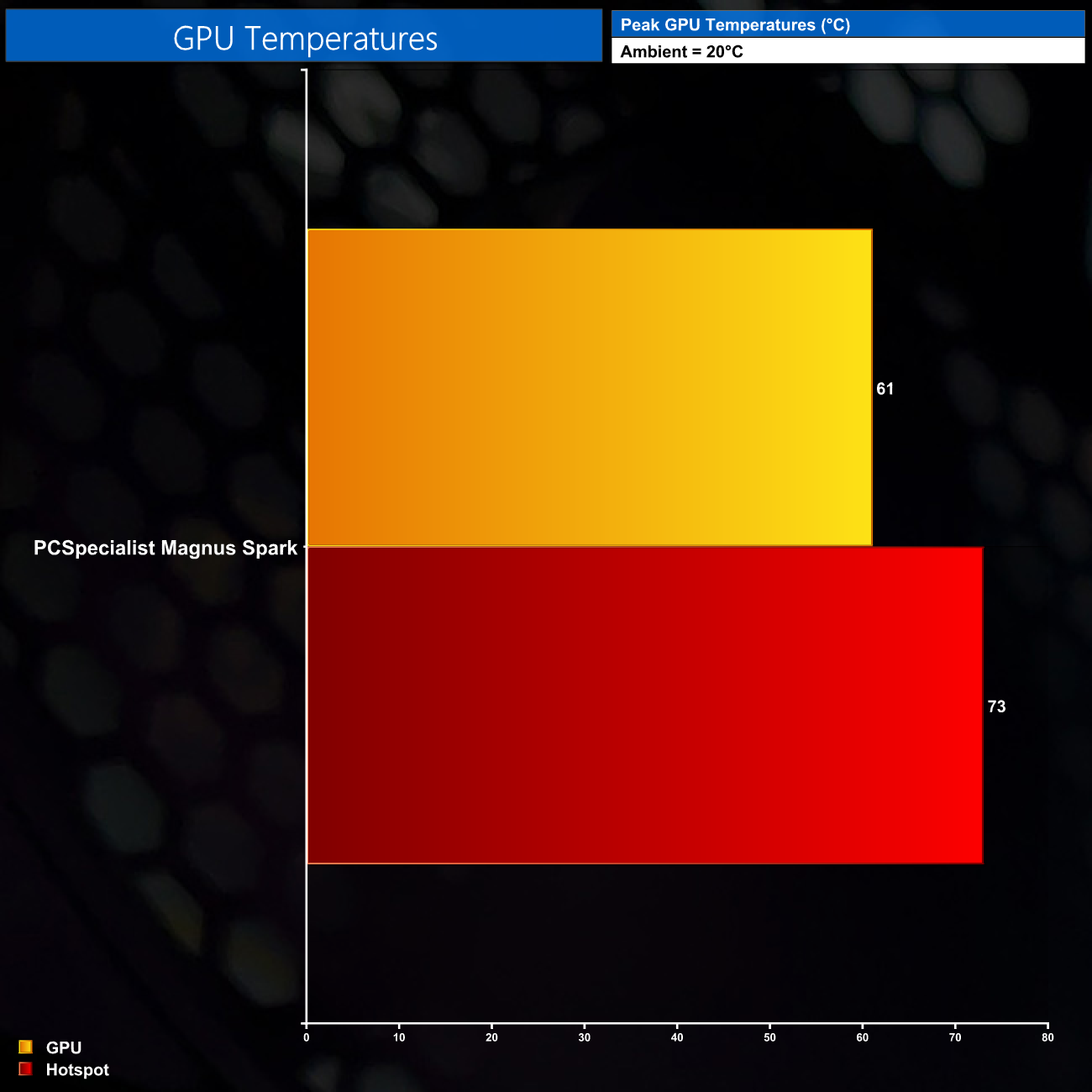
The RX 6600 is also perfectly fine, with the GPU temperature peaking at 61C, while the hotspot only hit 73C, so there's absolutely nothing to worry about there. I still wouldn't say airflow is going to be ideal with this case, but considering that PCSpecialist has used two of the most power efficient products released over the last 12 months, they can get away with it.

Fan speed is also very innocuous. The system emits a very quiet hum when idling, but it doesn't get much louder when under load. You could comfortably drown out the fan noise with a small pair of speakers, and you definitely wouldn't hear a thing if using a gaming headset.
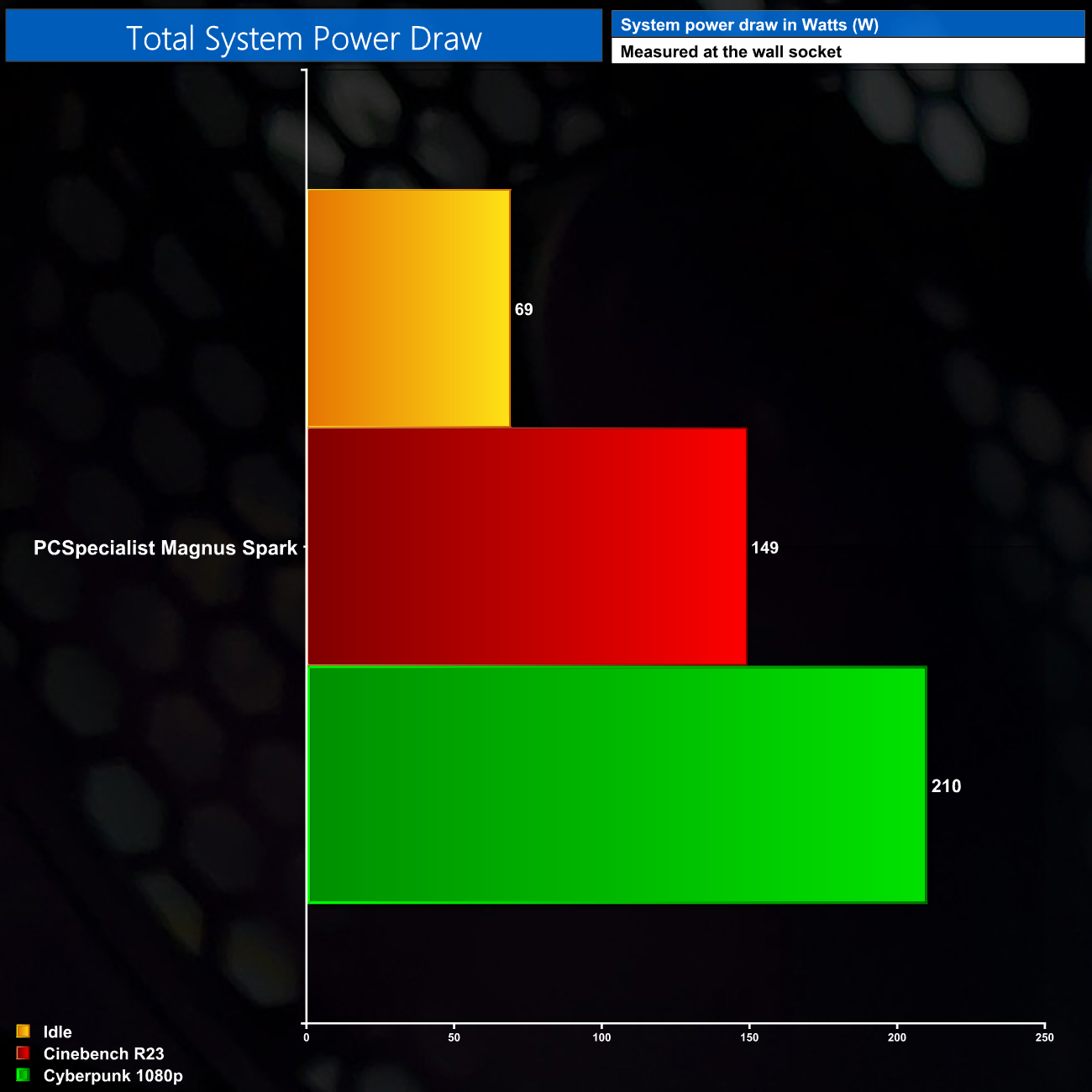
Lastly, power draw is nice and low for the Magnus Spark, hitting just 210W while playing Cyberpunk at 1080p. This figure could rise slightly depending on how CPU-heavy the games you play are, but Cyberpunk isn't light on the CPU and power draw is still very low. This leaves plenty of headroom to swap out the GPU down the line, with the likes of an RX 6700 XT or RTX 3070 being potential drop-in upgrade candidates.
After reviewing the absurdly expensive and frankly awful value RTX 3090 Ti, it's been great to get hands on with the PCSpecialist Magnus Spark – an entire gaming PC that can still pack a punch, but comes in at half the price of a single RTX 3090 Ti…
Granted, dropping a grand on a gaming PC is still a hefty investment for most people, but PCSpecialist has done a very good job to ensure you are getting a well-balanced package for your money. The core spec is just very sensible – Intel's hexa-core i5-12400F performs like a champ, while the RX 6600 is, in my view, the best value graphics card on the market right now, offering excellent gaming performance at 1080p, while 1440p gaming isn't out of the question either.
16GB of DDR4 memory is also optimal for a system like this, as DDR5 would be a waste of budget considering the currently meagre benefit it brings over DDR4.
At the same time, I also don't get the impression that PCSpecialist has tried to skimp and cut every corner possible to hit the £999 price point. Yes, the case is a little bit cheap-feeling, but it still gets the job done, we still have a 1TB PCIe SSD, and the ASUS B660-Plus D4 motherboard proved rock-solid during my testing.
Speaking of the SSD however, this is my one real issue with the Magnus Spark. As outlined earlier in the review, the SSD was simply installed in the wrong M.2 slot, limiting it to just two PCIe lanes, instead of four, resulting in reduced performance. To be clear, this won't make the PC unusable, or anything close to it, but it is still a needless error as the SSD is being held back from its top performance for no reason.
The only other potential niggle worth mentioning is the fact that the B660-Plus D4 motherboard does not have integrated WiFi. This means PCSpecialist has used a PCIe add-in card in the second x16 slot, so if you are one of the few people who wants to use a second PCIe device, you are going to be running to problems. But, I do stress, for most people I can't see this being an issue.
We have to factor in the sheer value on offer from the Magnus Spark though, as I specced-out as similar a system as I could using PCPartPicker, with DIY pricing giving a total of £1050-1100. Granted, I wasn't able to get an exact match for the spec, and the actual cost to PCSpecialist will of course be lower than that figure – but even so, the fact that it's cheaper to have PCSpecialist build this system for you, ship it to you and cover it with a warranty, than it would be to build it yourself, is quite something.
You will be able to buy the PCSpecialist Magnus Spark for £999 from PCSpecialist HERE.
Discuss on our Facebook page HERE.
Pros
- Excellent value.
- Sensible component choices with no clear corners cut.
- Smart cable management and clean aesthetic.
- Very solid option for 1080p gaming, while 1440p is possible too.
- Cheaper to buy from PCSpecialist than building it yourself.
- Low power draw with headroom to upgrade down the line.
Cons
- SSD is installed in the wrong slot, reducing performance.
- Secondary x16 slot is occupied by the WiFi card, as the motherboard does not have built-in WiFi.
- Case is a bit cheap-feeling.
KitGuru says: If you're in the market for a solid gaming PC that can play pretty much anything you throw at it, the Magnus Spark is a very compelling option. Hopefully PCSpecialist can just move the SSD over to the next M.2 slot.