KitGuru KitGuru.net – Tech News | Hardware News | Hardware Reviews | IOS | Mobile | Gaming | Graphics Cards


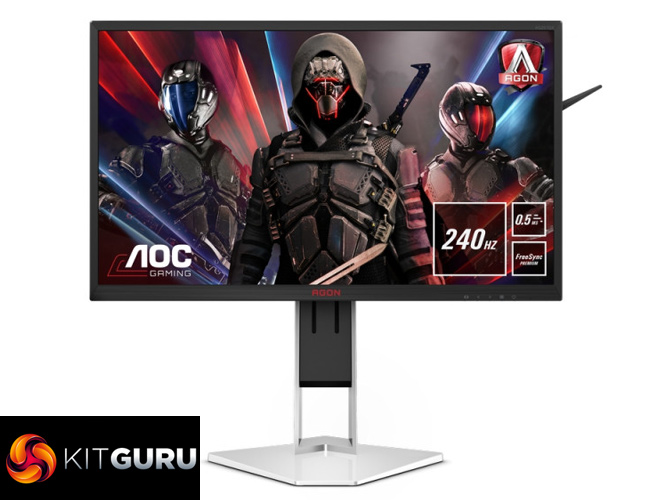
While the lastest graphics cards are capable of pushing high frame rates at 4K resolution, Steam's Hardware Survey still shows that the vast majority of gamers use 1080p displays. So if most aren't increasing the resolution of their monitor, what about the refresh rate? That's where this AOC AG251FZ2E comes in. Sporting a 24.5inch TN panel, this display offers a 240Hz refresh rate and a claimed 0.5ms MPRT. Priced at just over £300 here in the UK, is this display worth buying?
While we are now starting to see 360Hz displays from the likes of ASUS, Alienware, Acer and MSI, opting for a 240Hz panel is still going to offer a smoother experience over a 60Hz or even 144Hz display. The high pricing of those 360Hz screens is also going to be a factor as to why you may want a 240Hz model, too, as the AOC AG251FZ2E comes in at £309 here in the UK, less than half the price the ASUS ROG PG259QN.
This screen also comes equipped with FreeSync Premium, and while it isn't on Nvidia's official list of G-Sync compatible panel, I had no problems using G-Sync during my testing. On top of that, a rated typical brightness of 400 nits is decent, while AOC also claims 102% sRGB coverage. Let's see just how good this screen really is.
Specification
- Monitor colour: Black/Red
- Screen size (inch): 24.5 inch
- Resolution: 1920×1080
- Refresh rate: 240Hz
- Response Time (MPRT): 0.5 ms
- Panel Type: TN
- Sync Range: 48 – 240
- Sync Technology: FreeSync Premium
- Backlight: WLED
- sRGB Coverage (%): 102
- Aspect ratio: 16:9
- Brightness (typical): 400
- Contrast (dynamic): 80M:1
- Contrast (static): 1000:1
- Pixel Pitch: 0.31125
- Active Screen Area (HxW): 543.744 (H) mm x 302.616 (V) mm
- Viewing angle (CR10): 170/160 º
- Display Colours: 16.7 Million
- Bezel Type: Narrow
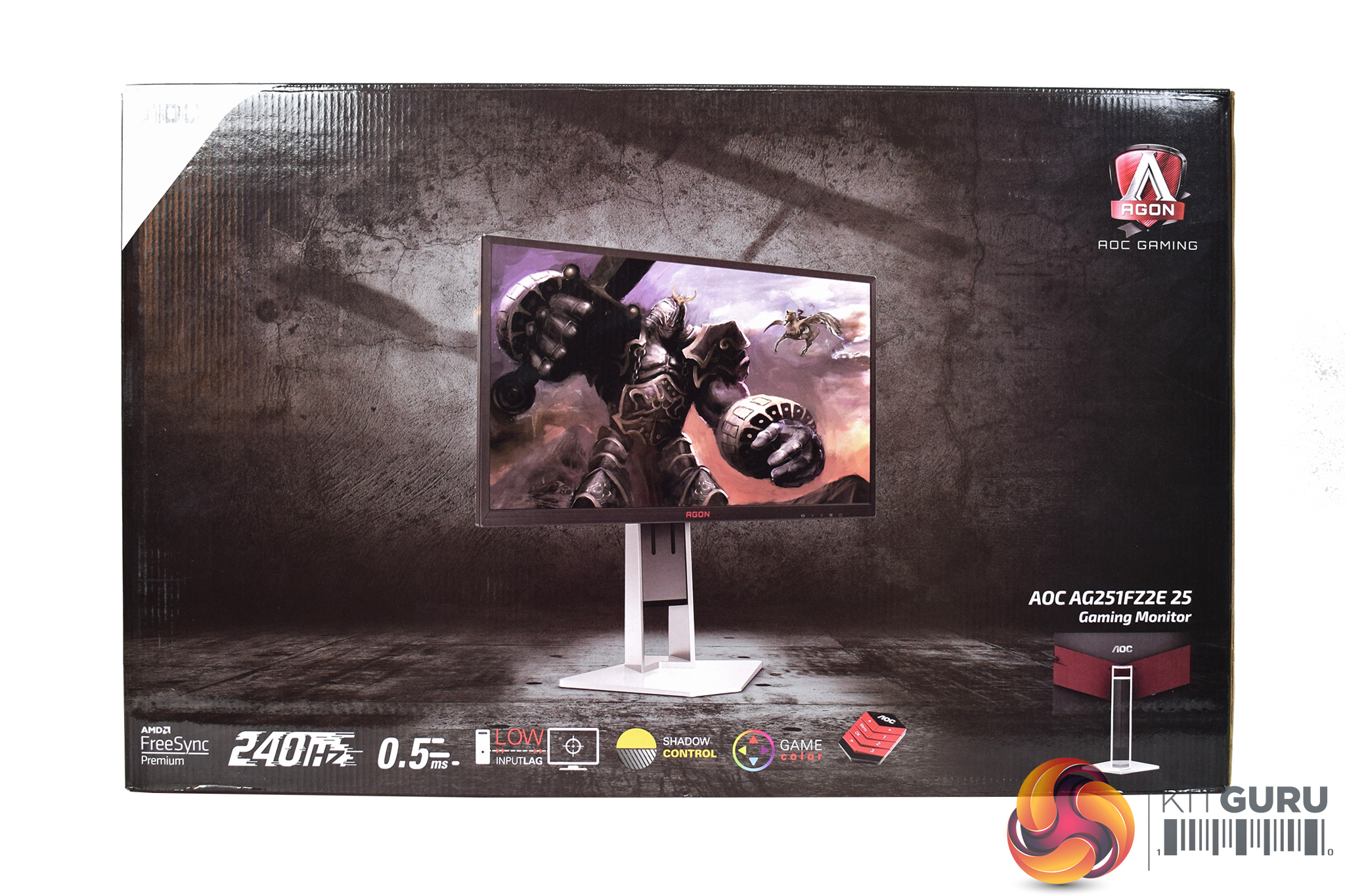
The AOC AG251FZ2E ships in a fairly typical monitor box, with an image of the display visible on the front, with a number of key features highlighted at the bottom.
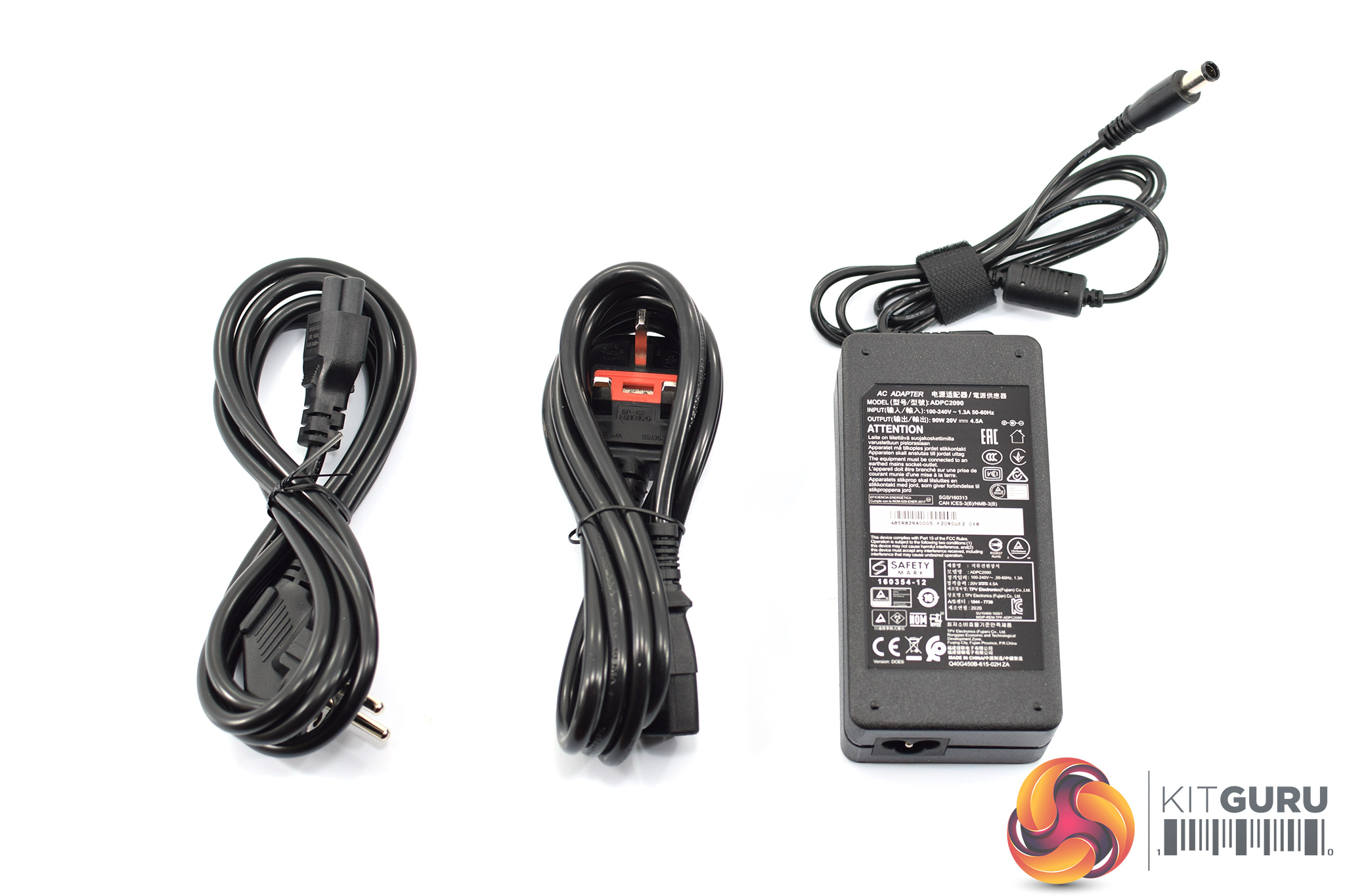

The accessory bundle includes both UK and EU power leads, the external power brick, one HDMI cable, one DisplayPort cable and an external controller used to navigate the OSD.


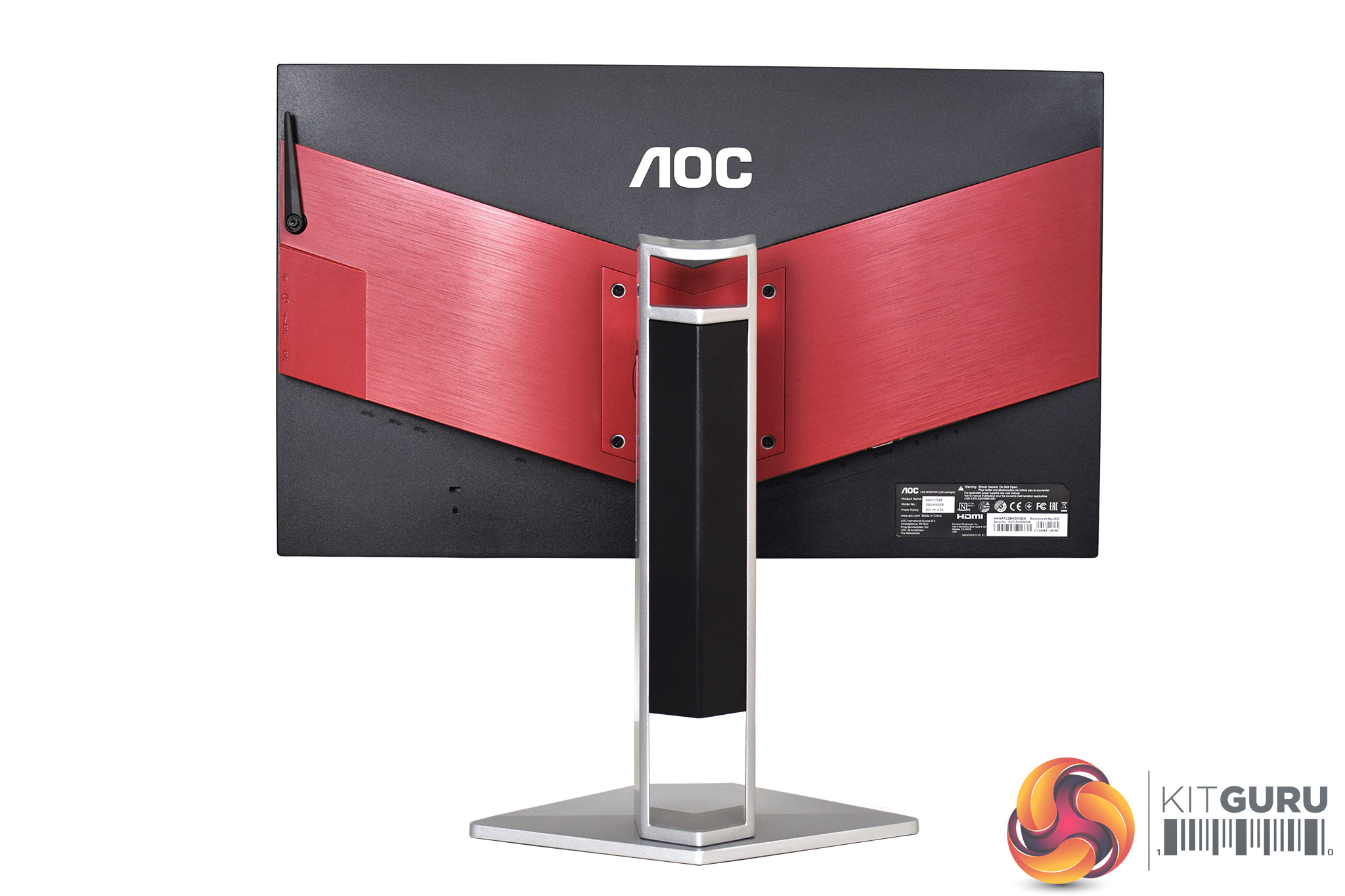

As for the monitor itself, this may well look familiar as it uses AOC's signature design styling, meaning it is mostly black but with some obvious red accents, particularly that large section on the back.
There are a couple of things to note, though. First of all, there's no bezel-free design here – instead, AOC has opted for a traditional bezel on all four sides of the screen. The bezel on the top and sides measures approximately 9mm, while the bottom bezel is thicker at approximately 21mm. Personally, this does look a touch dated to my eye, as almost all modern monitors are going for that bezel-free approach, though this is of course a matter of personal preference.
The other thing to note is the metal stand. AOC is keen to stress the ‘flat base' design that has been deployed here, which should allow for increased room for your mouse movements when compared to a typical v-shaped base.
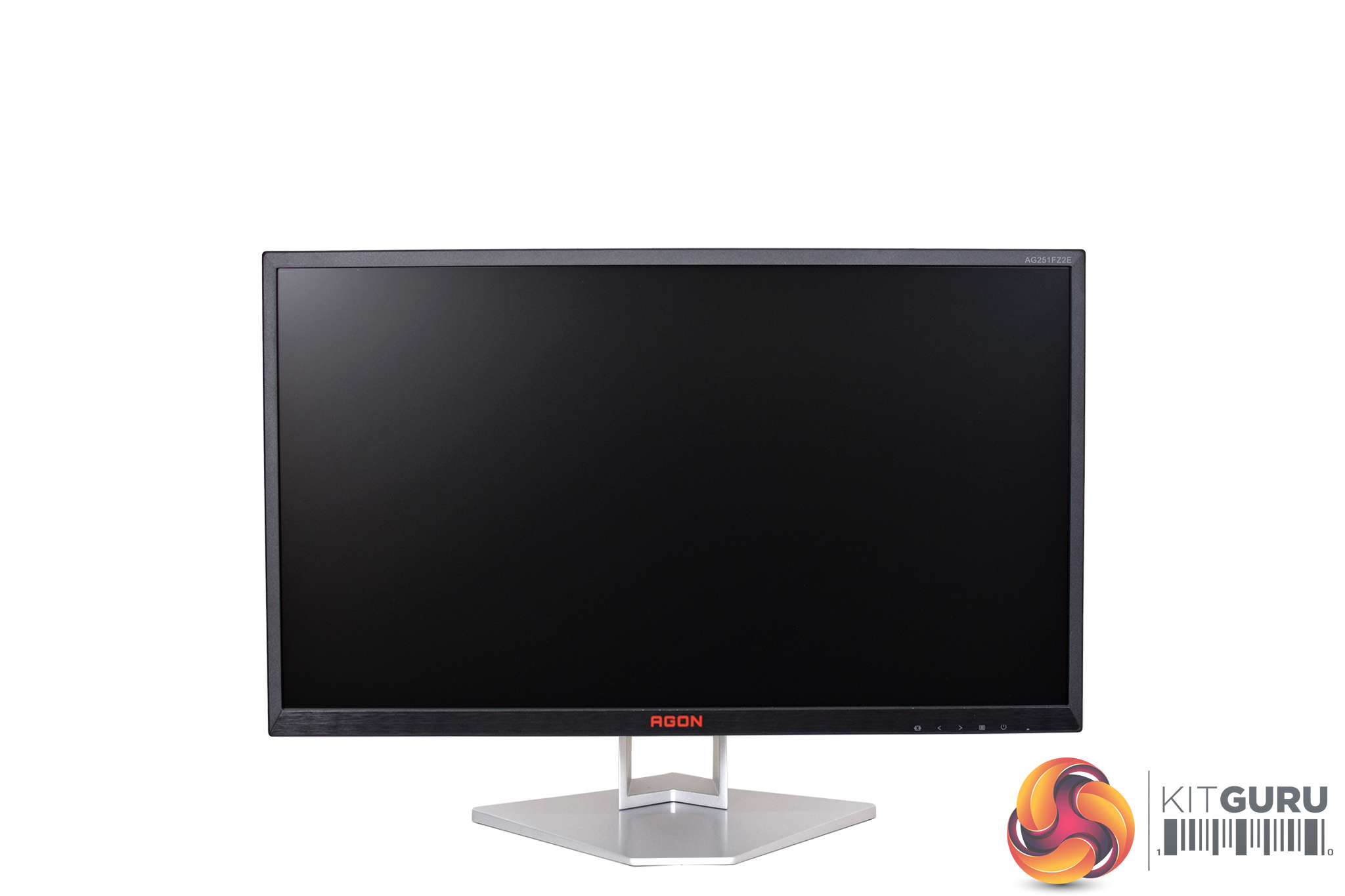
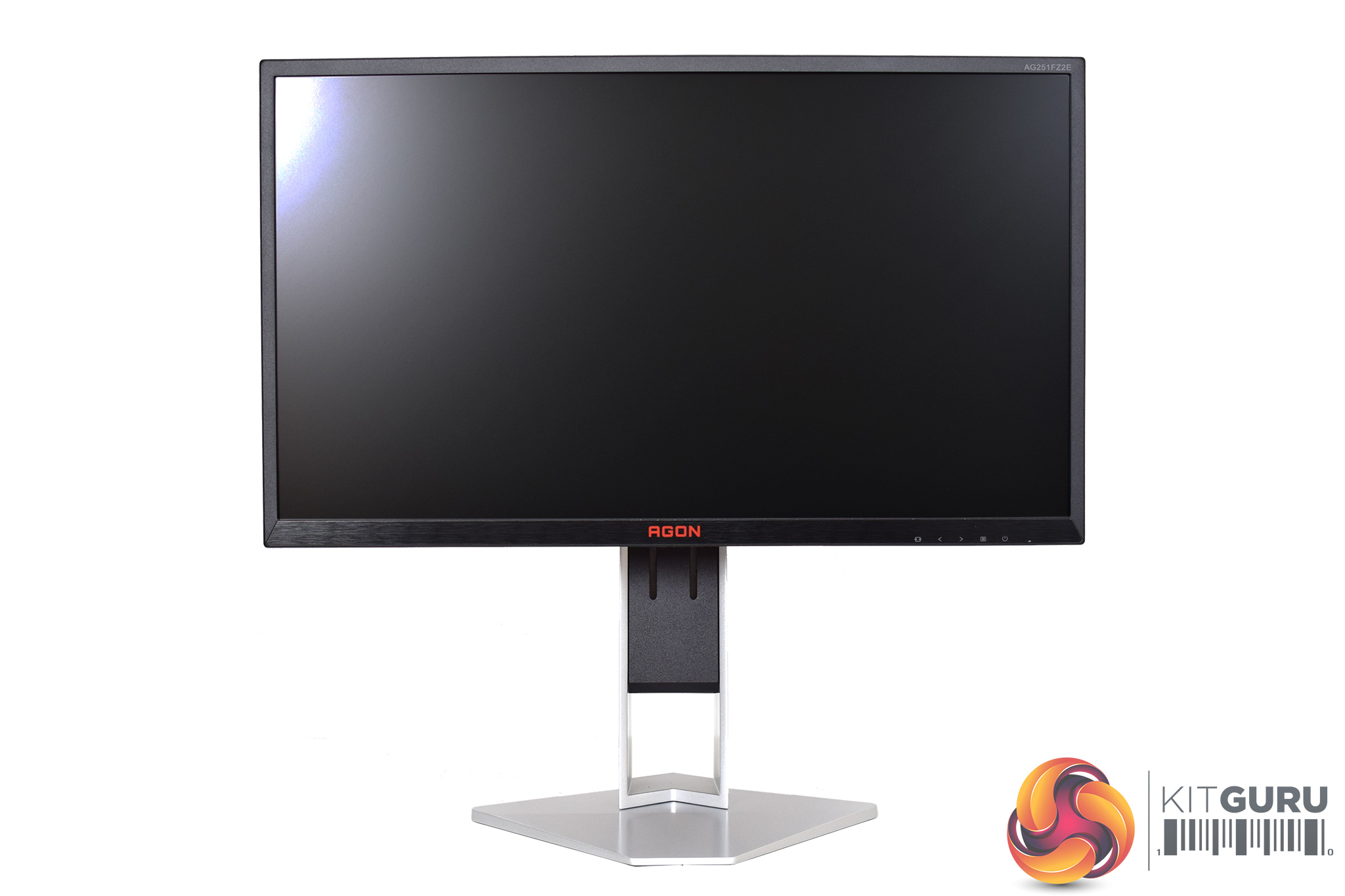
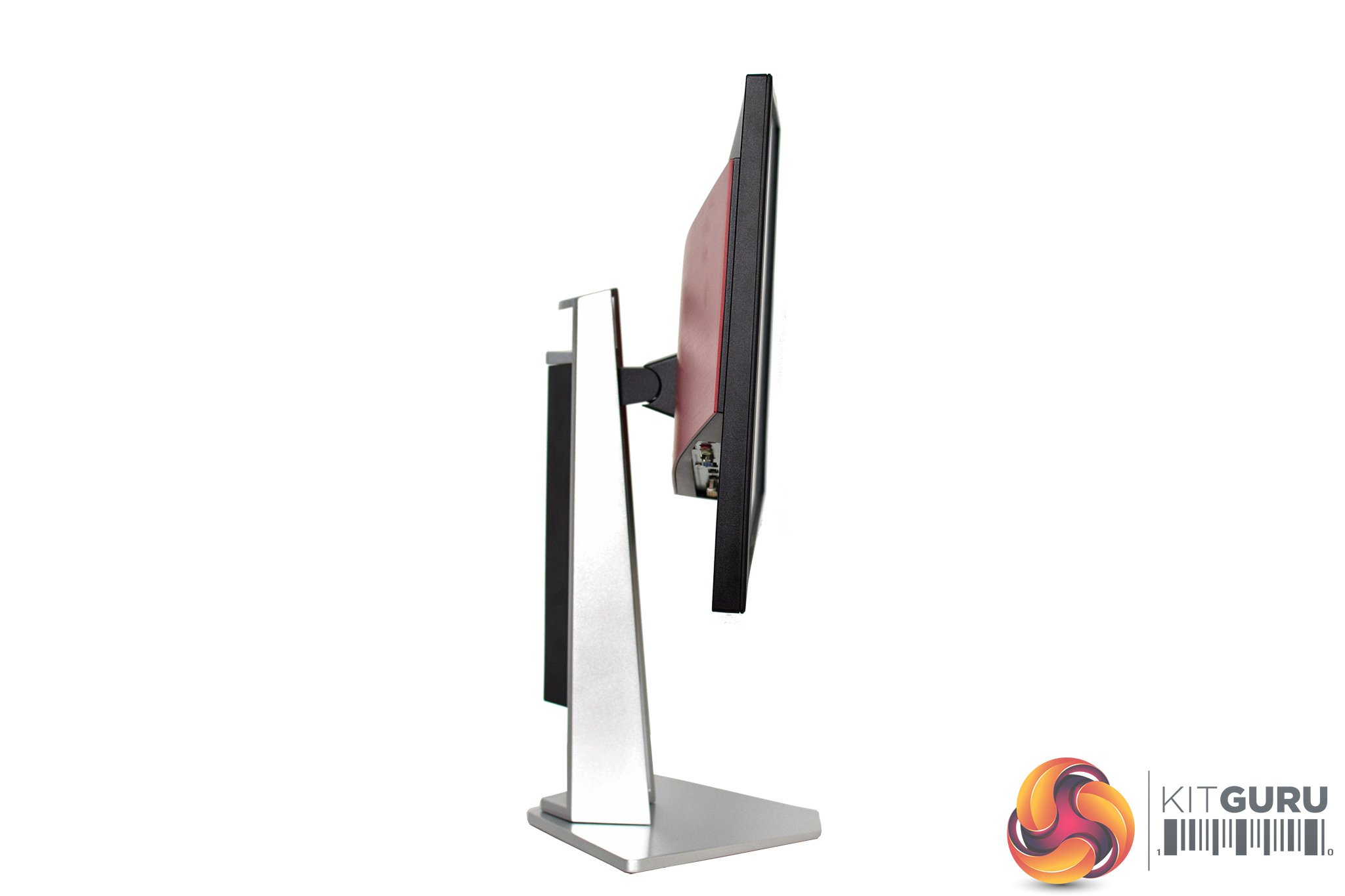
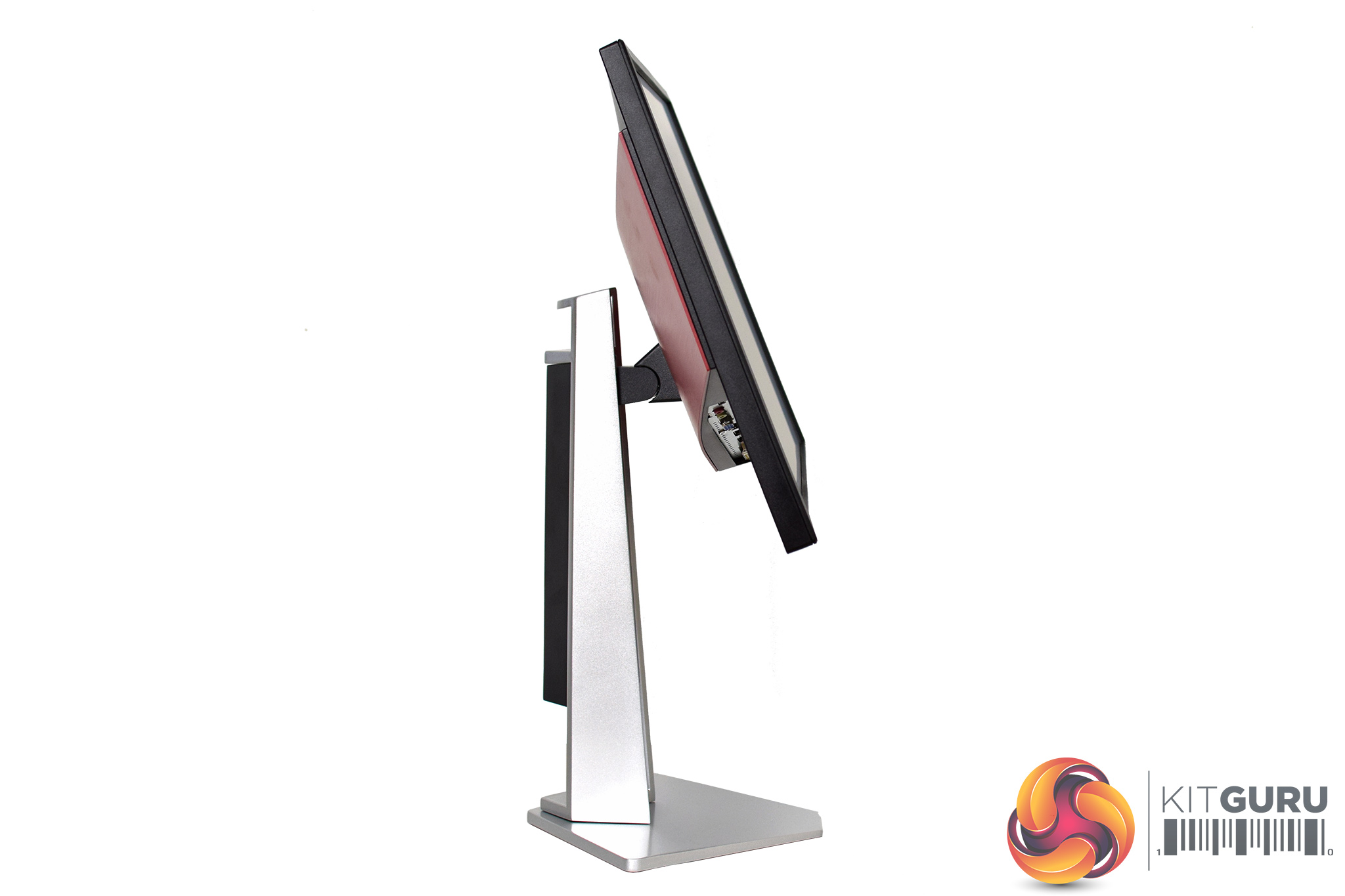
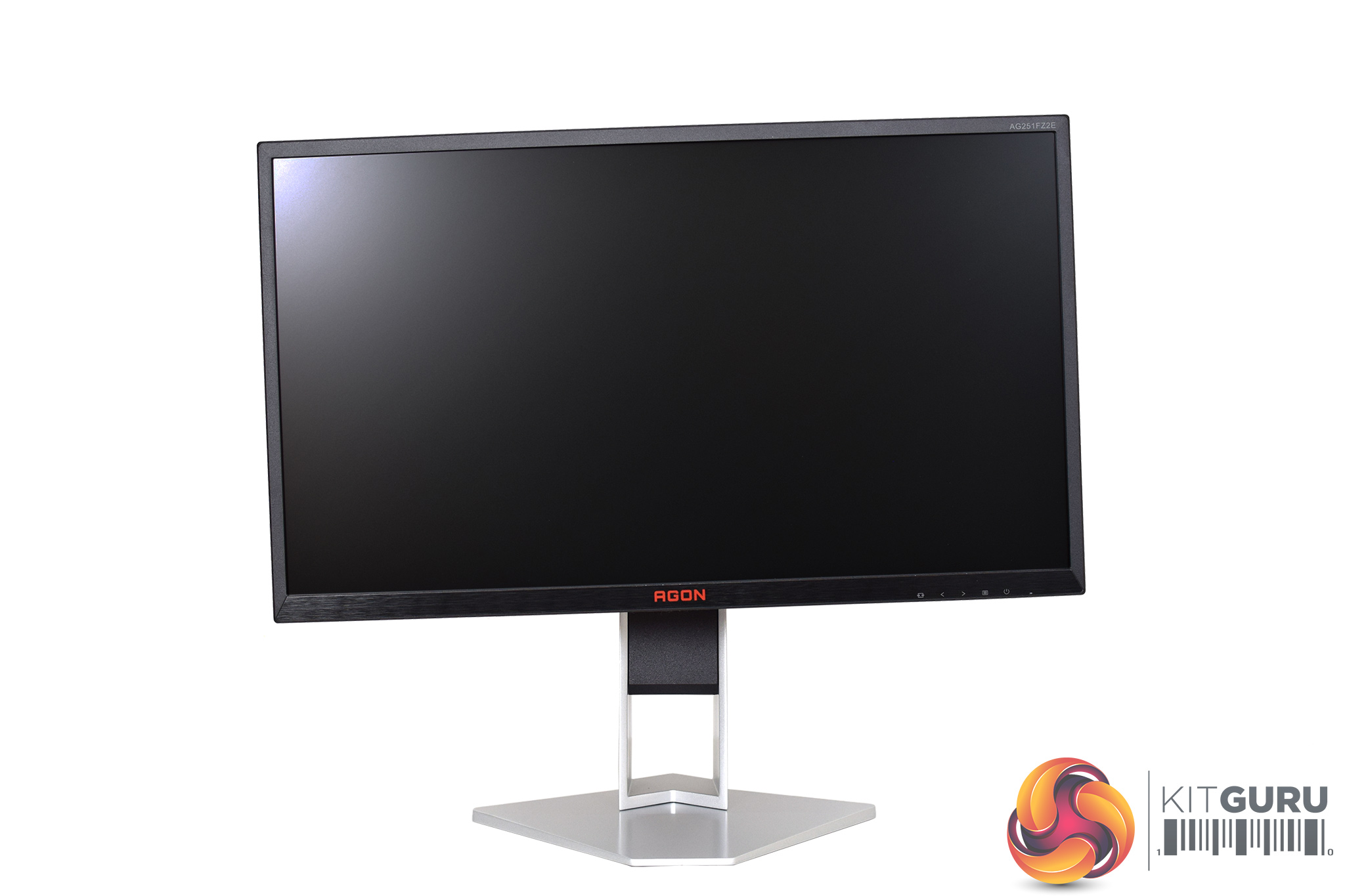

There's a whole range of ergonomic adjustments to be had from the stand, too. It can swivel 20 degrees left and right, adjust its height by up to 130mm, and tilt from -3.5° ±1° to 21.5° ±1.5°. You can also rotate the display so it sits vertically.


The left-hand edge of the screen is home to two USB 3.0 ports, one of which supports fast charge, as well as the 3.5mm headset output and mic jacks.
Just above this section we find a small headset holder arm, something we have come to expect from an AOC monitor.
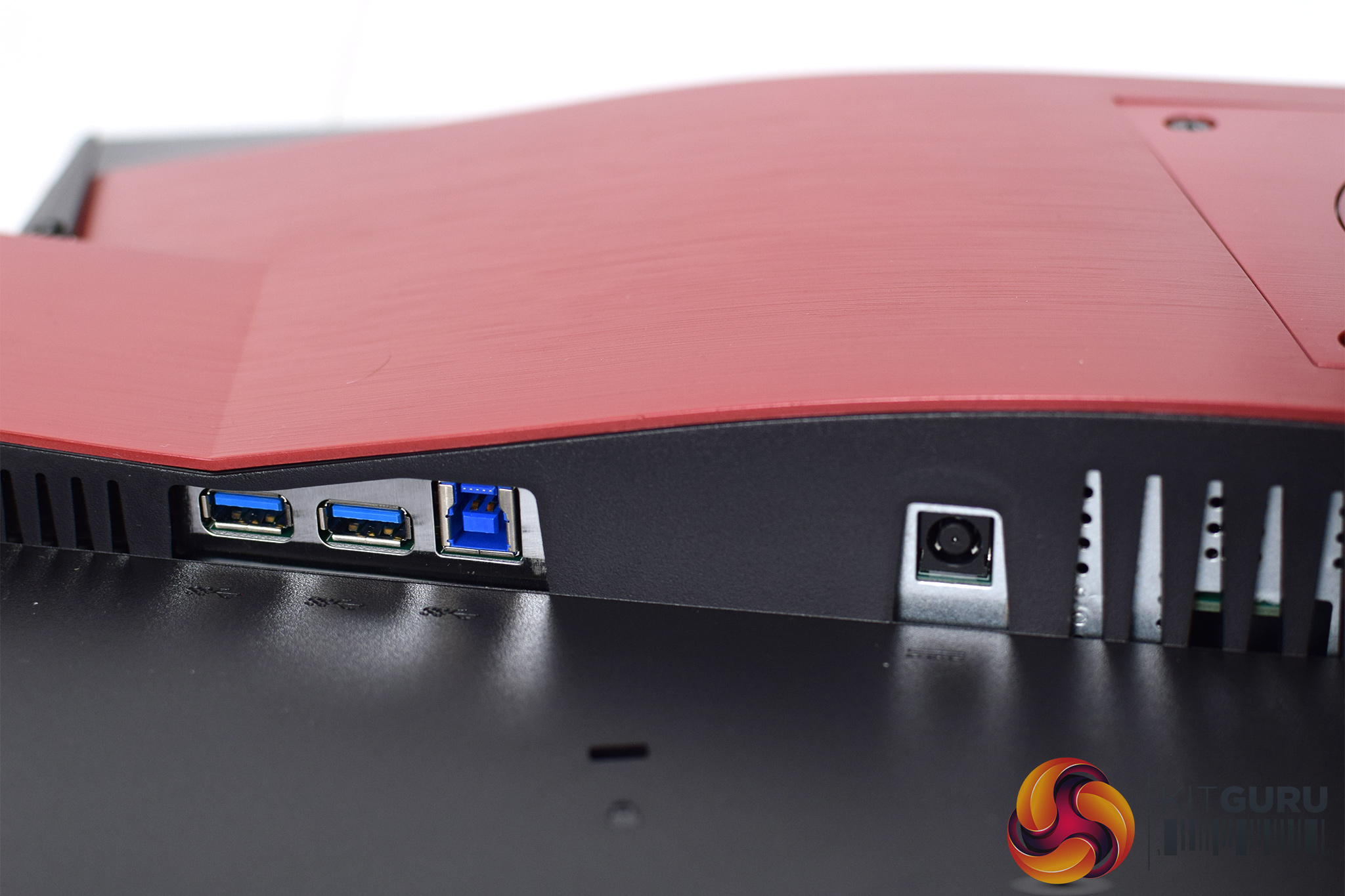
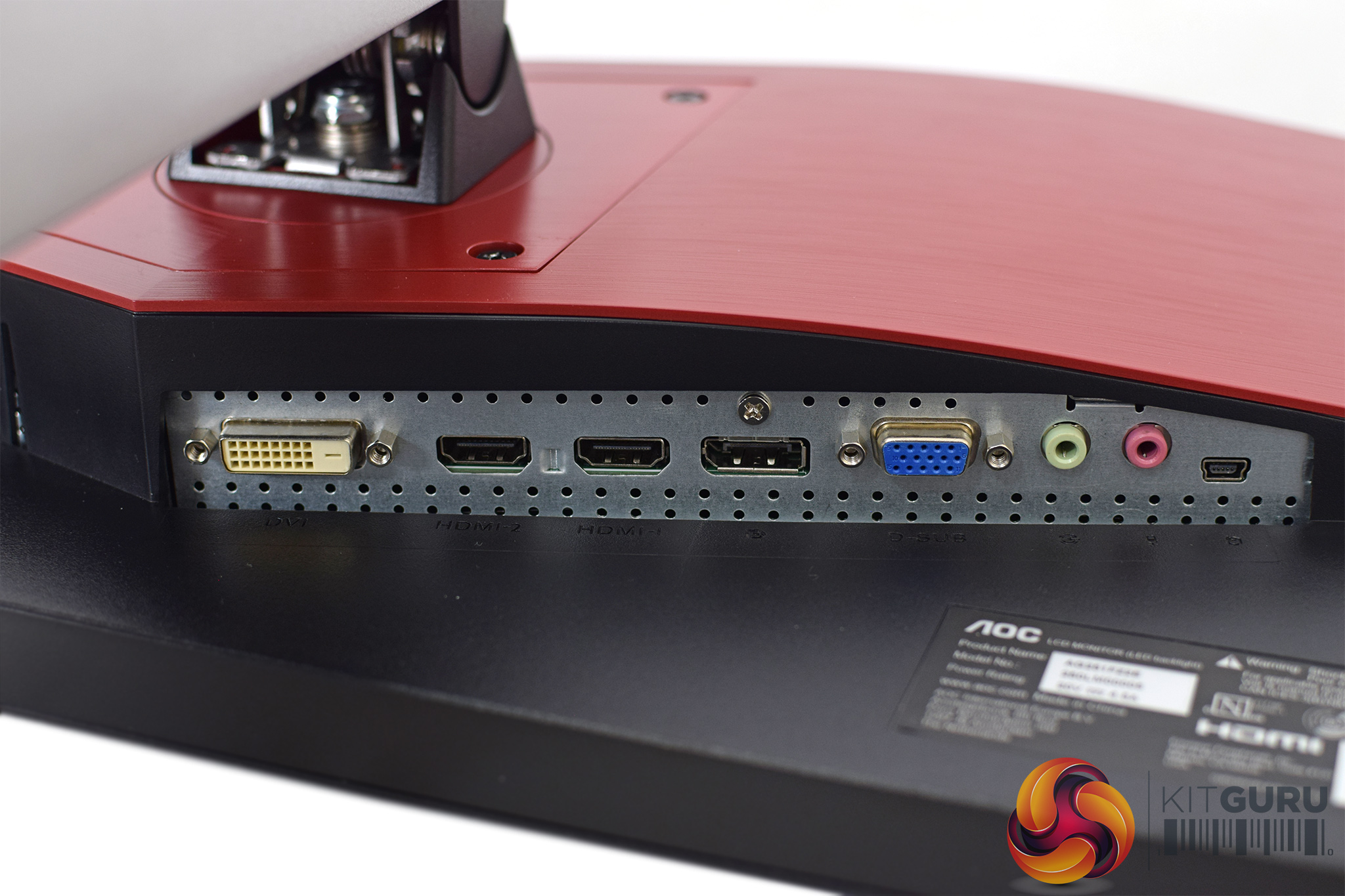
Meanwhile, on the back of the screen we have the rest of the ports, split into two banks. The left-hand side holds the USB upstream connector and two more USB downstream ports, as well as the power input. On the right hand side, we have a DVI port, two HDMI 2.0 ports, one DisplayPort 1.2, one VGA connector (very old school!) as well and the other two line in/mic jacks. The final port is a USB Mini B connector, used for that external OSD controller we mentioned above.


Alternatively, if you'd rather use a more traditional method of navigating the OSD, five small buttons are positioned on the bottom right edge of the bezel, with their corresponding icons visible from the front.
The OSD for the AG251FZ2E is pretty straightforward, and is entirely consistent with what we have seen from other AOC monitors in recent times.

The main menu is broken down into 8 main tabs, although Image Setup is only available if you are using a VGA input.
Starting with Luminance, this offers typical control over contrast, brightness and gamma, along with DCR (dynamic contrast ratio) and a choice of Eco mode.

Next we come to Color Setup, which adjusts the RGB levels of the panel, with a range of presets to choose from. The monitor defaults to the Warm preset.

Then it's Picture Boost. This lets you allocate an area of the screen to have different brightness or contrast levels compared to the rest of the display. I can't imagine myself ever using this, but perhaps there is someone out there who would value a feature just like this.

As for OSD Setup, this has a range of options all relating to the OSD itself. Users can adjust the transparency of the OSD window – with 0 being no transparency – as well as adjust its positioning on the screen. For some reason, the in-built speaker volume is also placed here.

Game Setting is where we find some other key controls, including the ability to select one of six gamer-oriented image presets, adjust Low Input Lag, tweak Overdrive and enable/disable FreeSync. I would've liked to see a ‘sharpen' function included personally, but it isn't a huge omission.

The penultimate tab is Extra, where users can choose their inputs, enable DDC/CI, specify the Off Timer and reset all values to default.

The final tab isn't really a tab – it's just an exit option.
Overall, the OSD is fine. I can't say the UI is particularly attractive, but it works and there's a healthy set of options to adjust. I'm not sold on the external controller, however, as surely an OSD joystick would be a cleaner solution – and one that you couldn't mis-place too!
Our main test involves using a DataColor SpyderX Colorimeter to assess a display’s image quality. The device sits on top of the screen while the software generates colour tones and patterns, which it compares against predetermined values to work out how accurate the screen is.
The results show –
- A monitor’s maximum brightness in candelas or cd/m2 at various levels set in the OSD.
- A monitor’s contrast ratio at various brightness levels in the OSD.
- The brightness deviation across the panel.
- The black and white points.
- The colour accuracy, expressed as a Delta E ratio, with a result under 3 being fine for normal use, and under 2 being great for colour-accurate design work.
- The exact gamma levels, with a comparison against preset settings in the OSD.
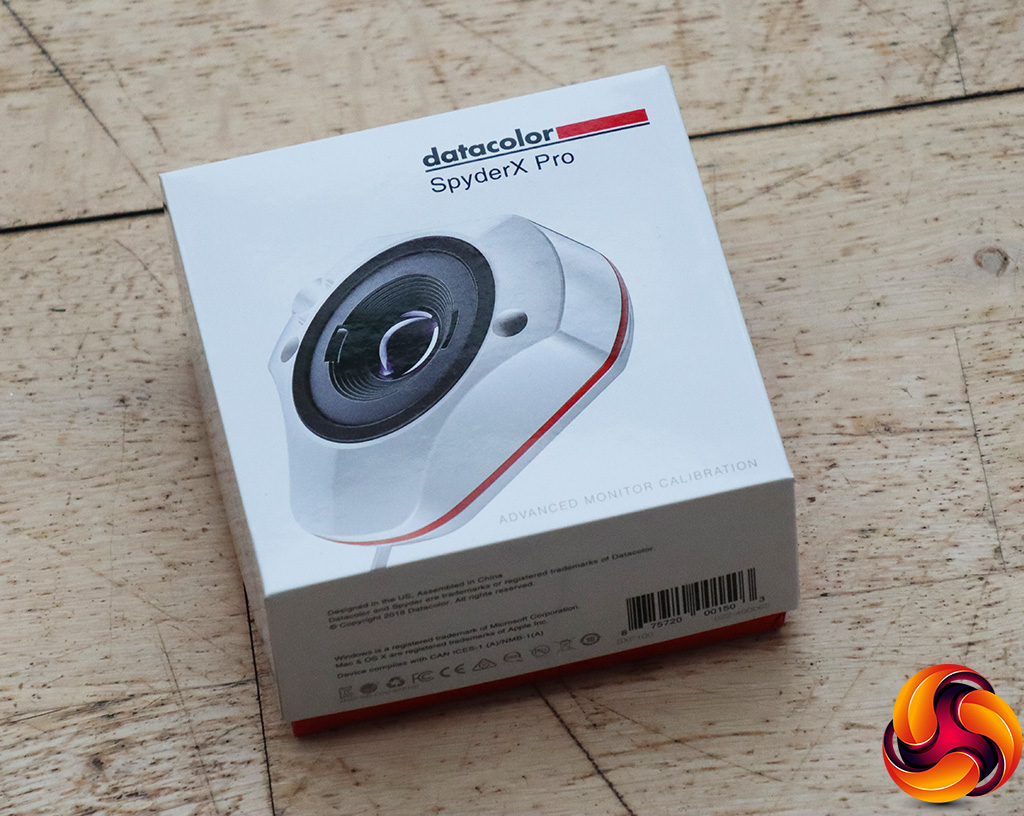
We first run this test with the display in its default, out-of-the-box state, with all settings on default. We then calibrate the screen using the Spyder software and run the test again.
Pre-calibration
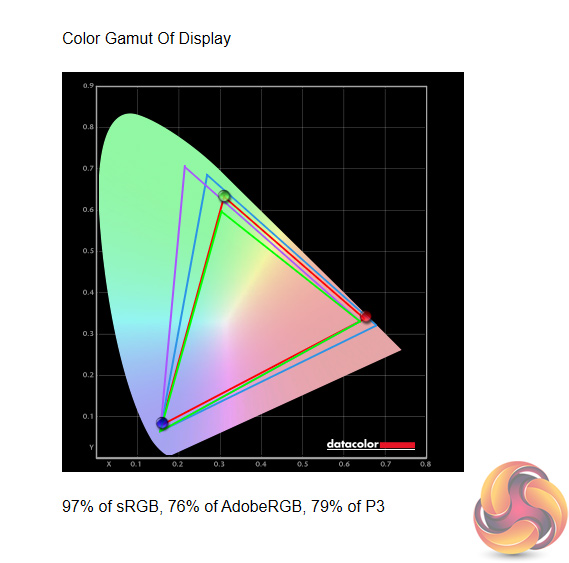
Starting off with gamut, the AG251FZ2E registers 97% sRGB coverage, with 76% AdobeRGB and 79% DCI-P3 coverage as well. This isn't amazing, but it's not awful either.
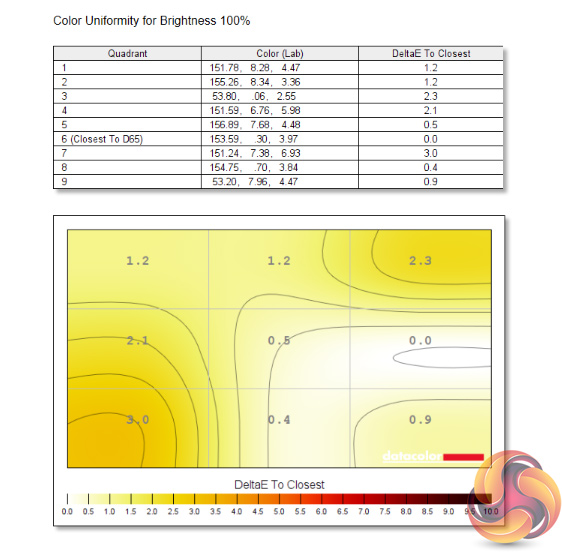
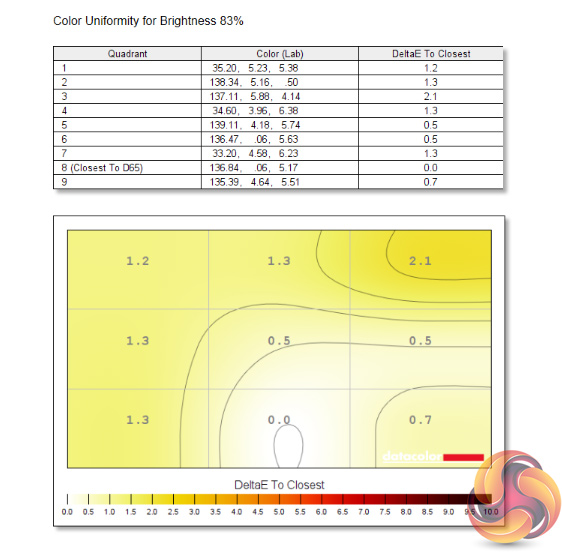
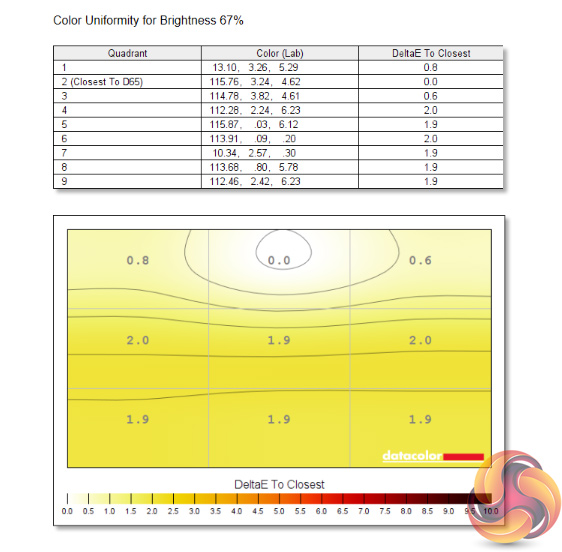
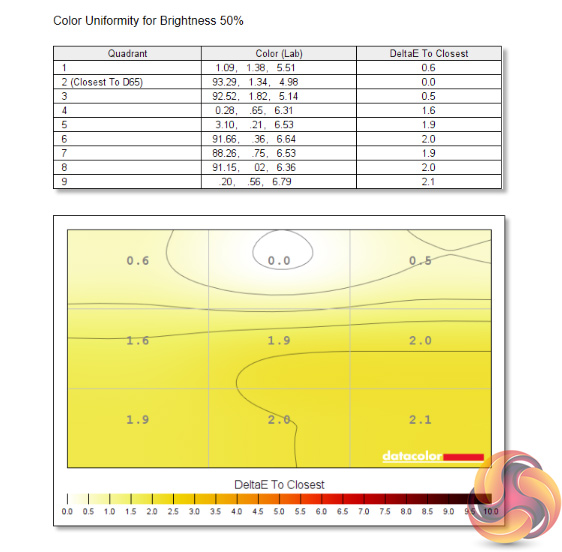
Colour uniformity is very good however, with hardly any deviation at all – colour is very consistent across the panel.

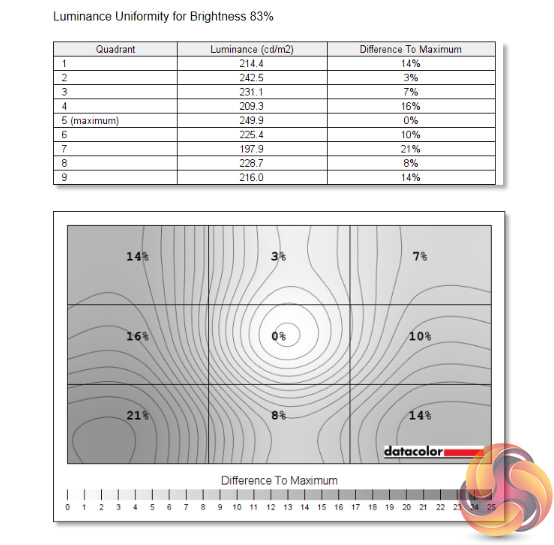

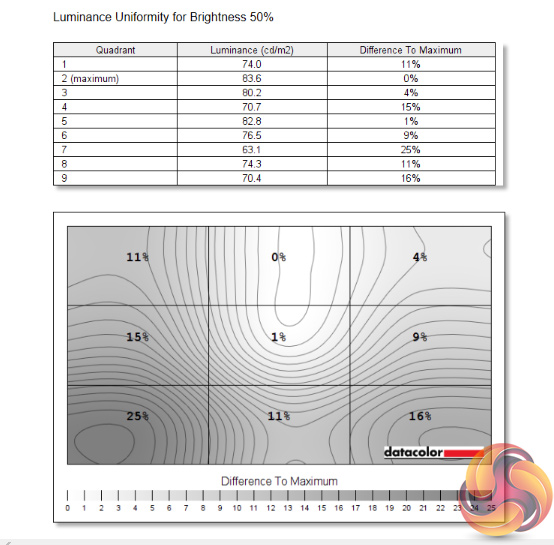
The same cannot be said for brightness uniformity though, with some significant aberration to the left-hand side of the display, as well as the bottom-right corner. Usually we'd like to see uniformity variation kept to single-digit figures, but we can see up to a 25% difference with the AG251FZ2E.
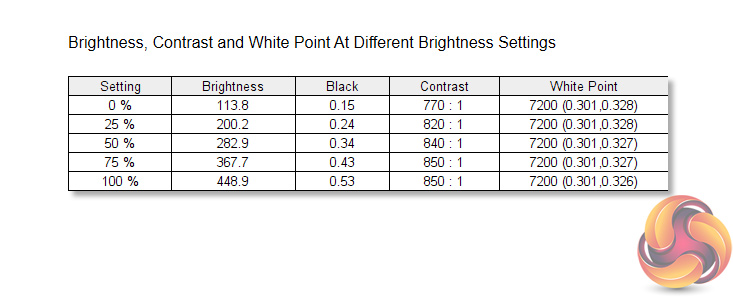
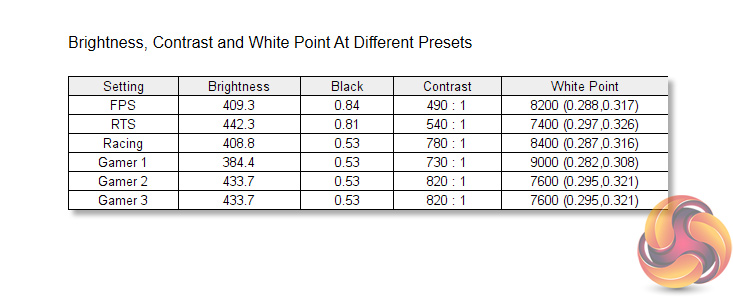
As for overall brightness levels, the AG251FZ2E does well. It manages to hit a peak brightness of 449 nits, with pretty even increases to brightness as we go from 0%, to 25%, to 50% and up to 100%. The lowest value of 113 nits isn't especially low, but it should be fine for most users.
Moving onto contrast, a peak ratio of 850:1 is pretty typical of a TN panel – it's not especially great, but we have seen worse. Finally, the white point is consistently warm, hitting 7200K at every brightness level we tested. Ideally, this would be a little closer to the 6500K standard.
There's also six different Game Mode presets: FPS, RTS, Racing,Gamer 1, Gamer 2, and Gamer 3. FPS and RTS are most noticeable as they drop the contrast further, to just 490:1 for the former, but the Gamer modes are generally pretty similar apart from some difference to white balance.
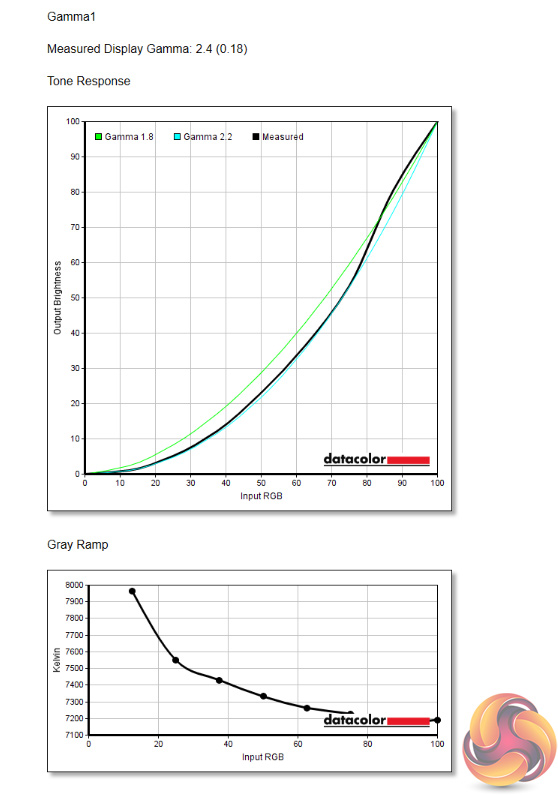
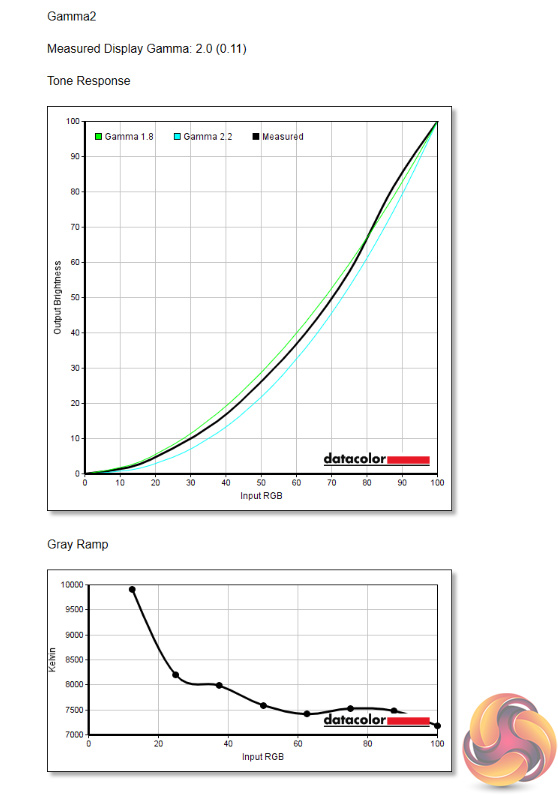
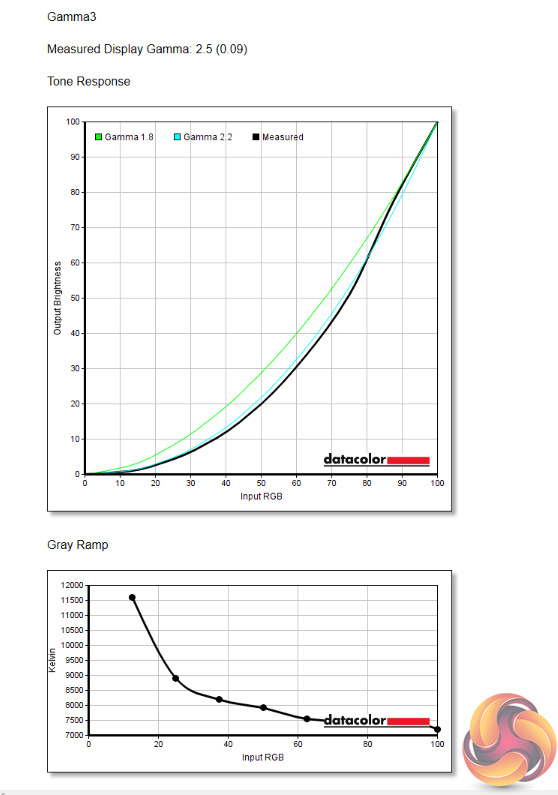
Next up is Gamma, with three options available within the OSD. I can't quite make sense of what AOC is trying to achieve here – Gamma 1 gives a value of 2.4, Gamma 2 gives a value of 2.0, while Gamma 3 hits 2.5. This feels a bit random, especially as the settings aren't in ascending or descending order, while none of the options hit a gamma level of 2.2, which is the standard value.
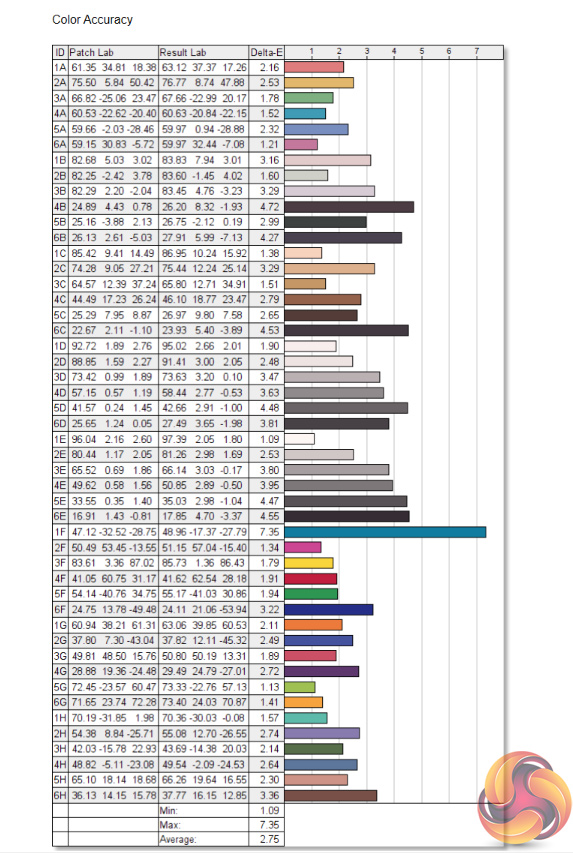
Finally we have colour accuracy. Here the AG251FZ2E records an average Delta E of 2.75. Again, this is pretty mediocre. You could argue it's not so important as this is very much a gaming screen, rather than one for content creators or photographers, and that is true. However, many other gaming panels we have reviewed still do significantly better here, such as the ASUS TUF VG279QM, which is itself a 280Hz 1080p monitor.
Post-calibration
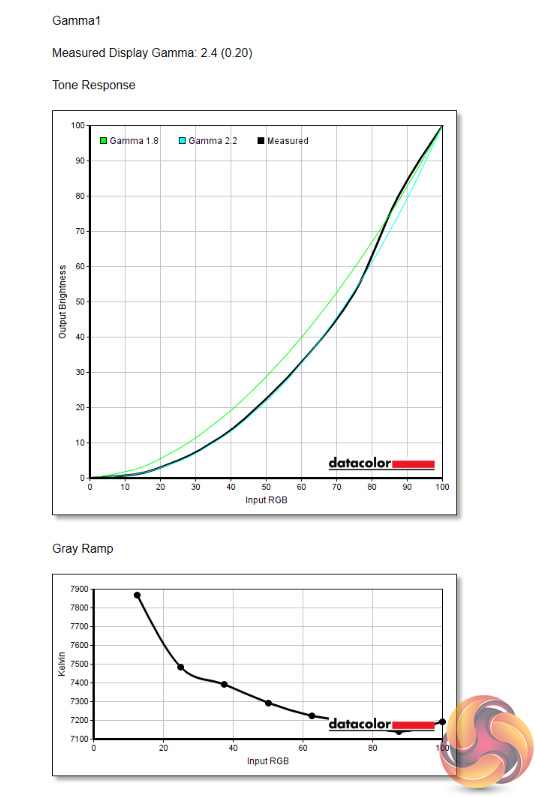
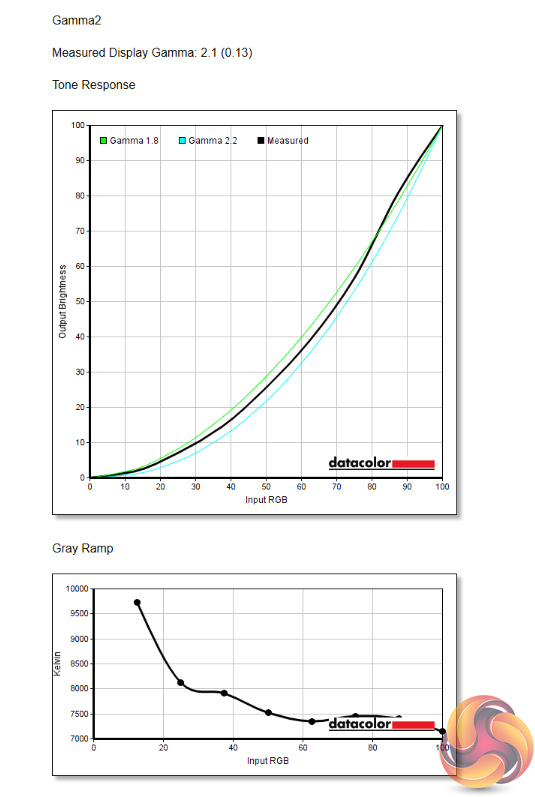
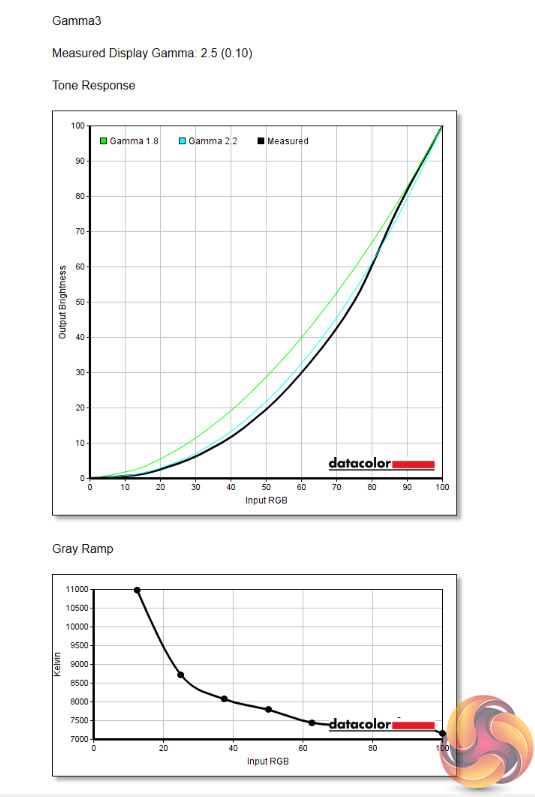
After calibrating the display, we do see a slightly improvement for the Gamma settings, as Gamma 2 is now delivering a reading of 2.1, which is slightly closer to the 2.2. value we want to hit.
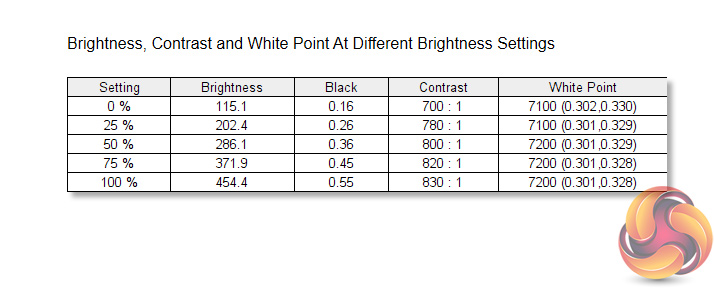
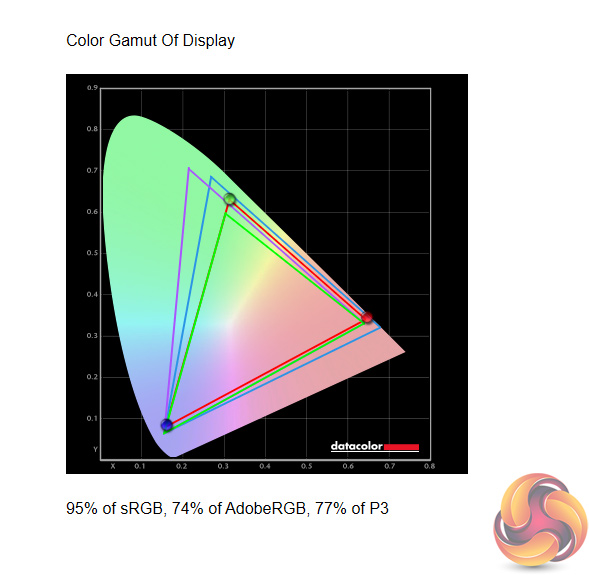
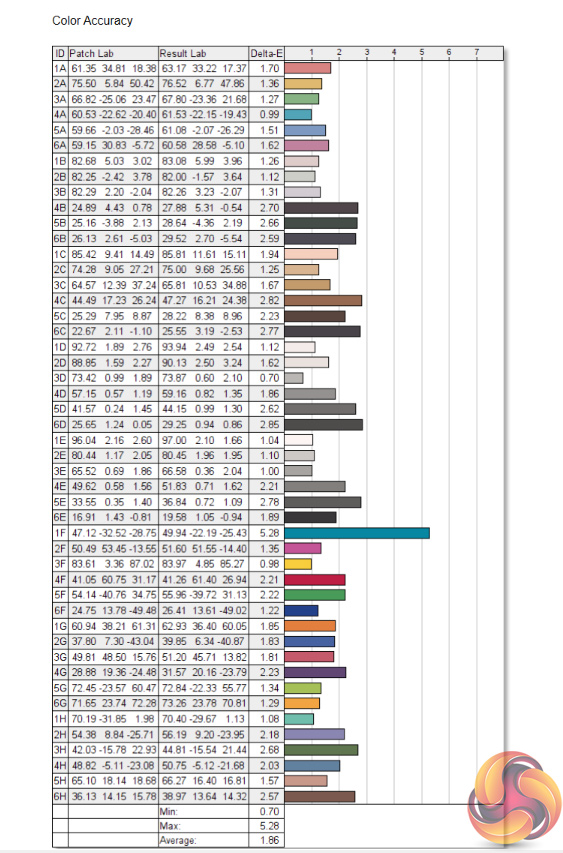
Brightness and white point haven't changed, while gamut is marginally reduced, to 95% sRGB down from 97%. Lastly, colour accuracy has improved, with an average Delta E of 1.86, so this is definitely a better result. It's still not up there with the best we've tested, but it is passable.
In sum, the AOC AG251FZ2E is a bit of a mixed bag. Or rather, it does one thing very, very well, with a few other areas that are less successful.
What I mean by this, is the AG251FZ2E is a terrific gaming display in terms of its speed and motion handling. A large part of this is thanks to the 240Hz TN panel, and coming from a 144Hz display, I definitely felt the difference in responsiveness. Some gamers may not be able to tell the difference, but for me at least, the jump to 240Hz was a welcome one.
AOC has ensured there is essentially no visible ghosting too, as its overdrive settings work incredibly well. Coming from a VA panel, the difference is again very noticeable – even with overdrive turned off, the AG251FZ2E handled motion better than my personal VA monitor with its overdrive cranked to the max. If all you care about is having a fast, responsive gaming monitor, the AG251FZ2E will serve you very well.
Unfortunately, there are a number of drawbacks elsewhere. For one, I think the overall design is perhaps a little uninspired, to me it looks more like a screen from 2015 than something I'd expect to see in 2020. Additionally, the TN panel has a number of weaknesses, including particularly poor luminance uniformity, mediocre out of the box colour accuracy, and some strange gamma settings too.
For £309, there are a number of impressive monitors around this price-point which offer stiff competition. We've already mentioned the ASUS TUF VG25/VG279QM, which offer 280Hz refresh rates and IPS panels, while there are several 1440p panels – albeit ‘only' 165Hz – available, including the MSI Optix MAG272CQR. AOC's own IPS 24G2U is tempting at £200 if you don't mind dropping down to 144Hz.
Ultimately, if you are considering a 240Hz 1080p display, there is a good chance you only care about speed, in which case the AG251FZ2E will still appeal. For many other gamers, however, we feel there are other screens to consider around this price point which can deliver a more well-rounded experience.

You can pre-order the AOC AG251FZ2E from Overclockers UK for £308.99 HERE.
Discuss on our Facebook page HERE.
Pros
- Very fast 240Hz refresh rate.
- Superb motion handling.
- Hits almost 450 nits peak brightness.
- Compact stand base.
- Range of ergonomic adjustments.
Cons
- Poor luminance uniformity.
- Strange gamma settings.
- Colour accuracy is mediocre.
- Design feels outdated.
- Contrast is typical of a TN panel – it isn't very high.
KitGuru says: The AG251FZ2E is a very fast gaming monitor, but it is let down in one too many areas to earn a stronger recommendation.