KitGuru KitGuru.net – Tech News | Hardware News | Hardware Reviews | IOS | Mobile | Gaming | Graphics Cards


The availability of multiplier-locked Skylake chips has sparked an even greater emphasis on the need for low-cost motherboards to partner with such processors. ASRock's affordable Z170 Extreme4 utilises the Z170 chipset's host of worthwhile features but minimises add-on components in order to maintain aggressive pricing. Aside from the Z170 chipset's rich set of native offerings, a feature that ASRock is coining – ‘Sky OC' gives users the ability to overclock their multiplier-locked Skylake CPU by simply tweaking the BCLK.

Retailing for a little less than £110, ASRock makes strict decisions as to where corners should be cut in order to give the Z170 Extreme4 its affordable price tag. Native two-card CrossFire and SLI support is maintained, and there's also an additional full-length PCIe 3.0 slot for high-bandwidth devices such as PCIe SSDs. Keeping the focus on storage offerings, ASRock utilises the Z170 chipset's native characteristics by offering a trio of SATA-Express ports that can alternatively be used as six SATA 6Gbps connections. There's also a single ‘Ultra' M.2 connector which offers support for up to 32Gbps PCIe devices as well as SATA 6Gbps drives.
Other than the exclusion of a set of add-on USB 3.0 and SATA 6Gbps controllers, you may be hard-pushed to see where ASRock has cut costs. Redundancy is offered in the form of two BIOS chips, there are onboard power and reset buttons, the audio solution is of ASRock's Purity Sound 3 calibre, and 10Gbps USB 3.1 is offered in Type-A and Type-C forms.
Eager to find out if any of ASRock's strategies for meeting the aggressive pricing goal have affected under-the-hood performance, let's get started with a thorough analysis of the Z170 Extreme4.
Features:
- ASRock Super Alloy
- Supports 6th Generation Intel® Core™ Processors (Socket 1151)
- Digi Power, 10 Power Phase design
- Supports DDR4 3866+(OC) memory modules
- 3 PCIe 3.0 x16, 3 PCIe 3.0 x1
- NVIDIA® Quad SLI™, AMD 3-Way CrossFireX™
- Graphics Output Options: DVI-D, HDMI, DisplayPort 1.2
- Supports Triple Monitor
- 7.1 CH HD Audio (Realtek ALC1150 Audio Codec), Supports Purity Sound™ 3 & DTS Connect
- 3 SATA Express, 6 SATA3, 1 Ultra M.2 (PCIe Gen3 x4 & SATA3)
- 2 USB 3.1 (1 Type-C & 1 Type-A), 8 USB 3.0 (2 Front, 6 Rear)
- Supports Full Spike Protection, ASRock Live Update & APP Shop
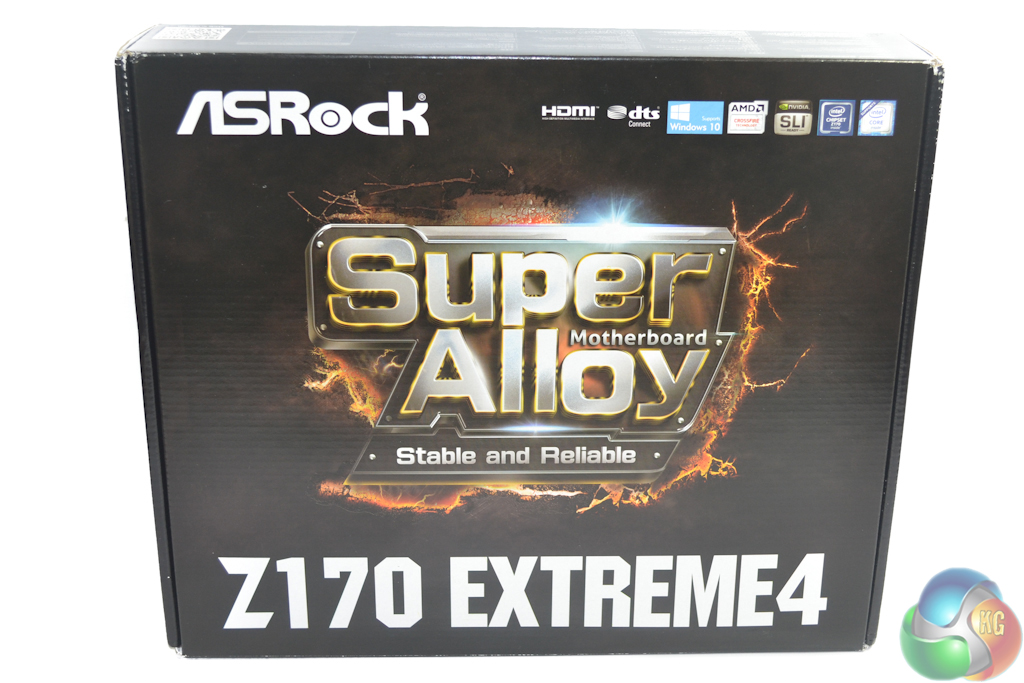
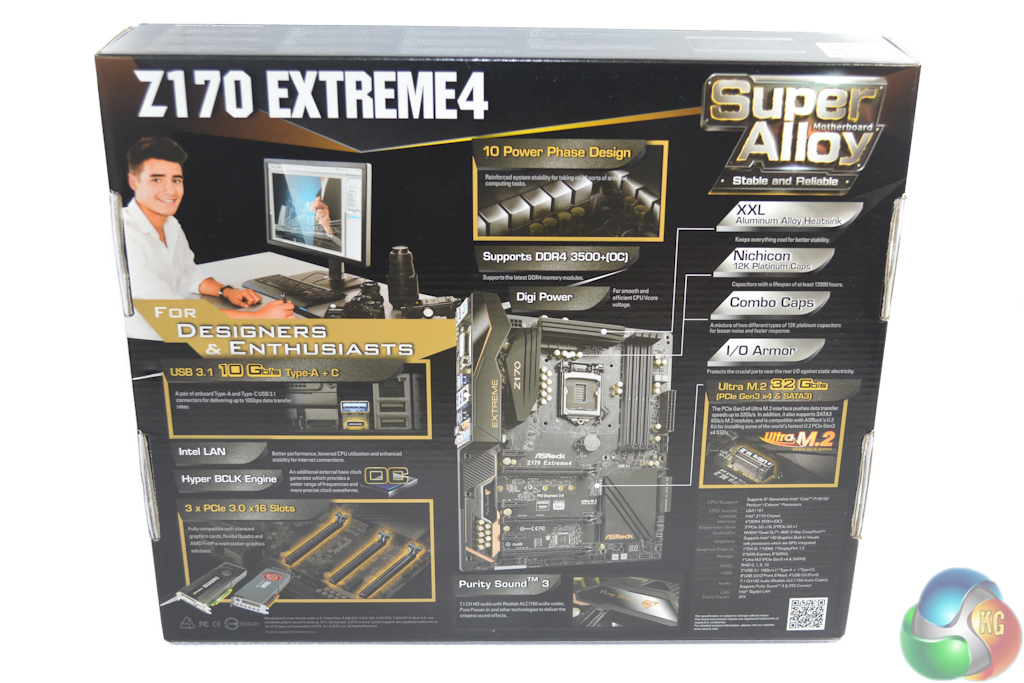
ASRock's Z170 Extreme4 ships in packaging that is typical for the company's ‘Extreme' series products. The front side features a graphic and clear interpretation of the name, whilst the rear is home to a densely-packed array of specifications and product features.
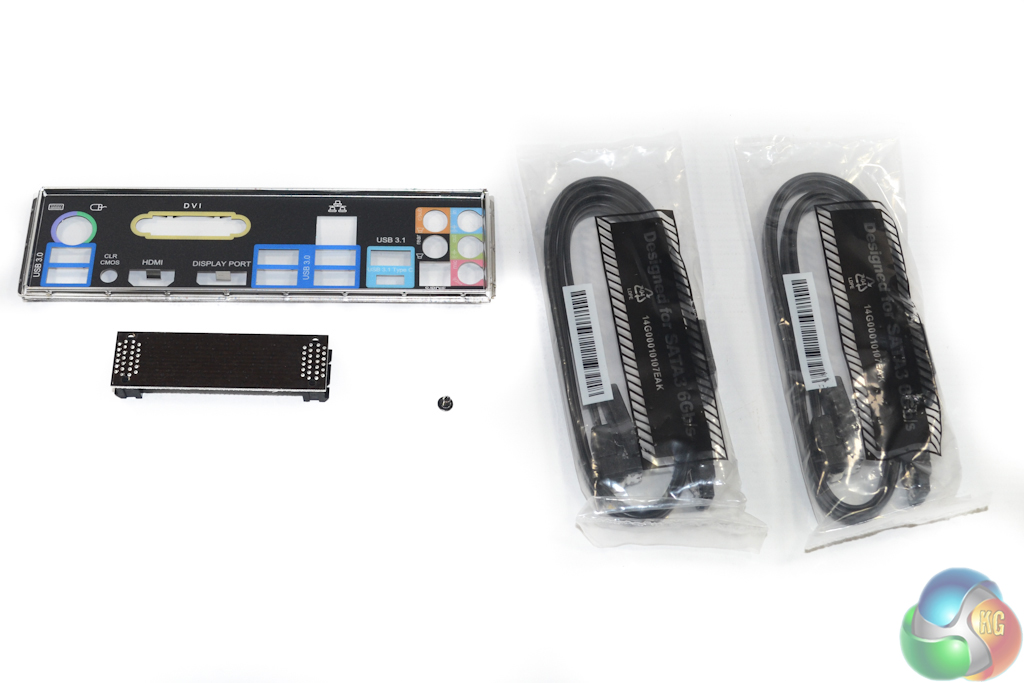
One way to keep a budget motherboard hitting its pricing target is by offering a basic accessory bundle. ASRock does pretty much that by including four SATA cables, the rear IO shield, a screw for the M.2 connector, and a rigid SLI bridge.
While the bundle is undeniably basic, it should do the job for most users buying this calibre of motherboard. I am very pleased to report that the rigid SLI bridge should fit suitably inside a colour-matched gaming rig thanks to ASRock's use of a dark black shade, rather than an ugly brown.
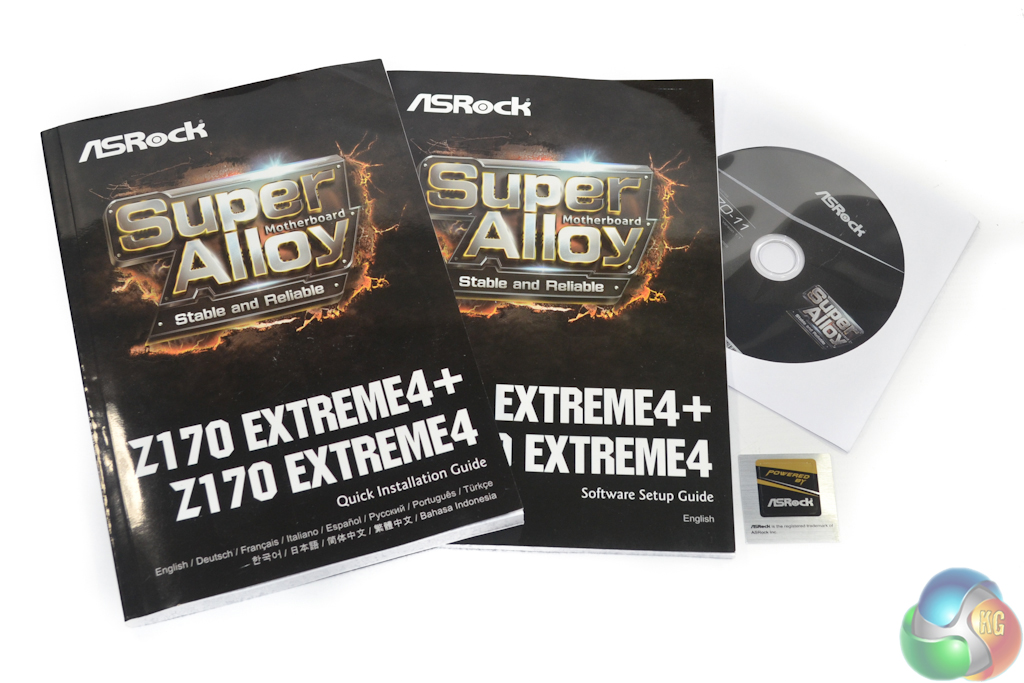
The standard affair of hardware and software manuals is provided alongside a drivers CD and a black and gold case sticker.
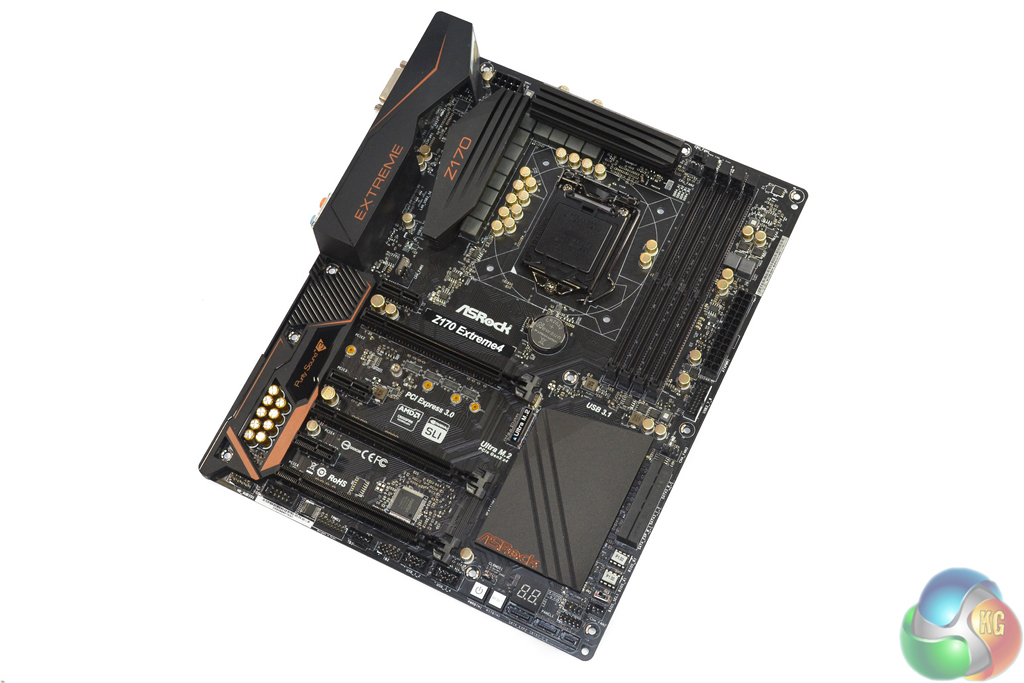
A positive tick is firmly positioned in the appearance box for ASRock's Z170 Extreme4 motherboard. While this aggressively-priced offering isn't the most stylish motherboard on the market, ASRock has smartly chosen a dark black primary colouring throughout the board's entirety.
Complementing the fully-black PCB, connectors, and heatsinks are subtle shades of gold for hardware such as the 12K-rated Nichicon capacitors. The darkish-orange text may not appeal to all, however the negativity of its presence is thankfully outweighed by the (correct) omission of an ugly brown PCB shade. The PCB is proper black, as it should be for high-end hardware.
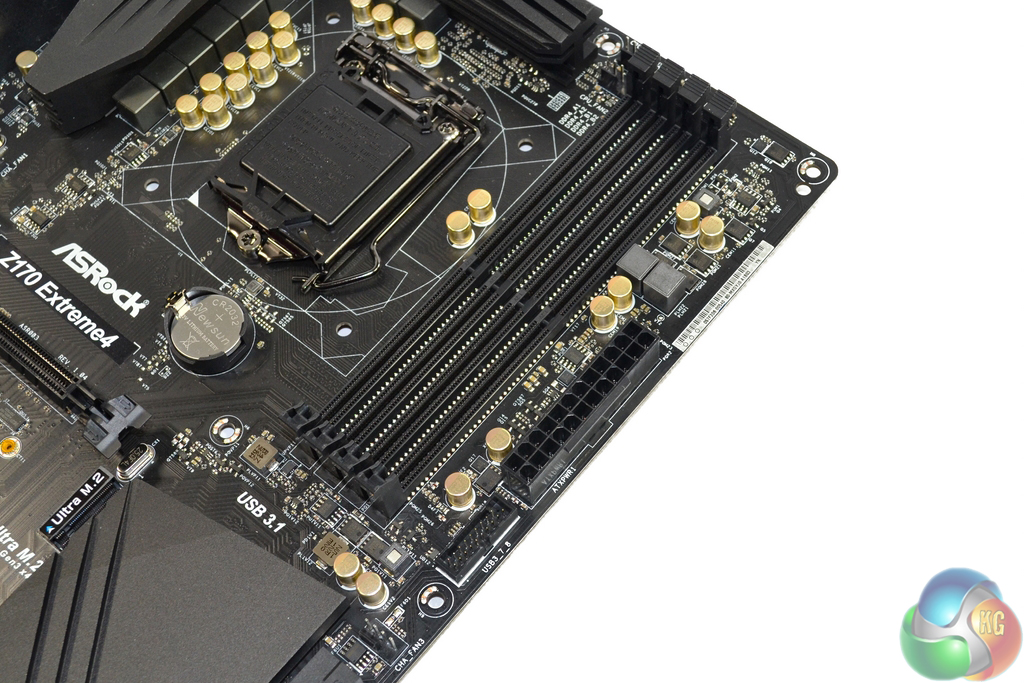
Up to 64GB of DDR4 memory can be installed in the four single-latch DIMM slots. ASRock quotes frequency support of over 3866MHz via overclocking, however such success is likely to depend on a number of factors.
For the first time on a Z170 motherboard, we were unable to get our trusty Corsair Vengeance LPX memory kit to operate at its 3200MHz XMP frequency. 2933MHz was the highest frequency that we could achieve, however this could be related to the current BIOS revision on the motherboard.
In close proximity to the 24-pin power connector is a single outwards-facing 5Gbps USB 3.0 header which can feed a pair of front panel ports. It is not uncommon to see a pair of internal USB 3.0 headers deployed on a Z170 motherboard, however this seems to be another area where ASRock minimises component expenditure.
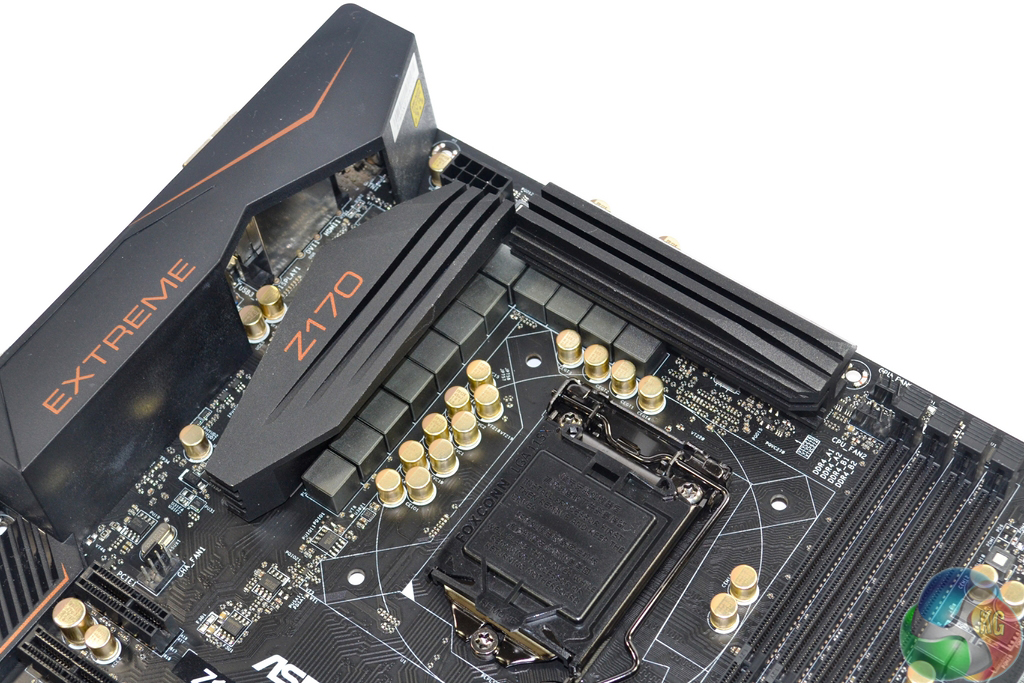
A total of ten power delivery phases are used to feed a CPU installed in the LGA 1151 socket and its integrated GPU. Beneath the sturdy pair of heatsinks are Sinopower SM4336 and SM4337 high- and low-side MOSFETs which are controlled by an Intersil ISL95824 PWM controller. Two additional components marked ‘5AX XWZ' are likely allocated to PWM phase-splitting duties (alongside additional components that I could not locate).
Spacing around the CPU socket is generally good and is unlikely to cause significant interference with large CPU coolers. Using ASRock's latest BIOS versions for the Z170 Extreme4, overclocking of multiplier-locked non-K LGA 1151 processors is possible by tweaking the CPU BCLK. The popular IDT-built clock generator is called upon for management of BCLK adjustments.
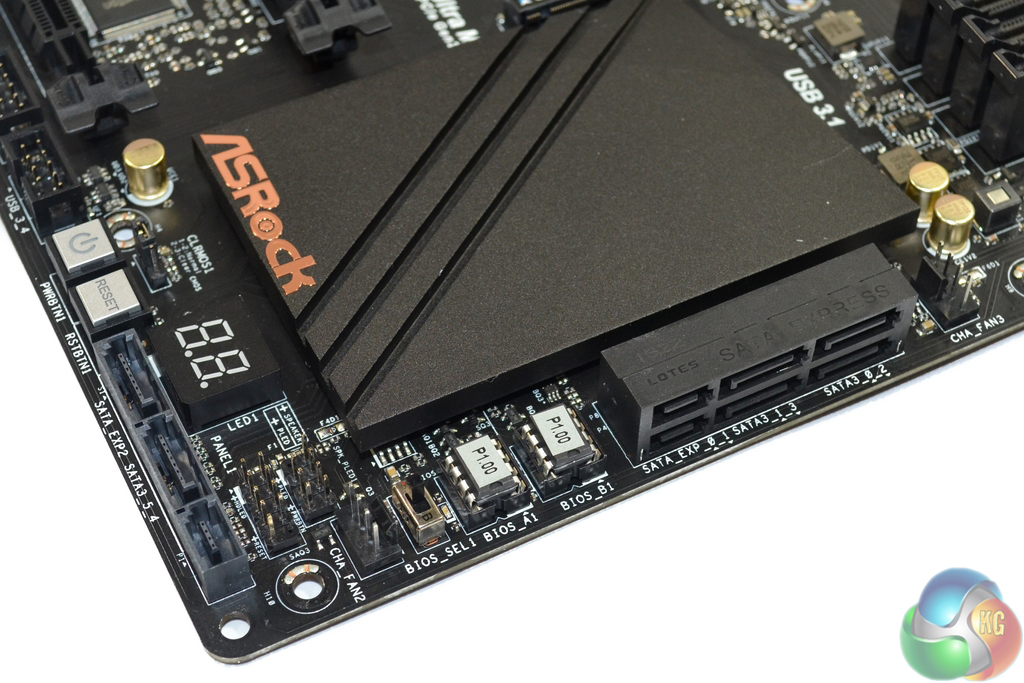
A total of three SATA-Express connectors form the internal storage interfaces. These connectors can instead be deployed as six SATA 6Gbps connections (or a mixture of both), however bandwidth for ports 0 and 1 is shared with the M.2 connector. SATA-Express has been given new life thanks to the availability of front panel USB 3.1 ports that make use of the cumbersome connector's sufficient bandwidth allocation.
I like ASRock's decision to deploy two thirds of the internal SATA interfaces in the right-angled orientation and the remaining third facing outwards. This gives users with internal chassis constraints greater flexibility.
Slightly higher-priced motherboard typically offer an additional two SATA 6Gbps ports by way of an add-on chipset, however the Extreme4 does not in order to minimise cost. This limits storage options – somebody using an M.2 SSD and a front panel USB 3.1 bay delivered through SATA-Express is only left with two usable SATA 6Gbps (or a single SATA-Express) ports. This configuration is likely to be sufficient for many users in the board's target market, however it does castrate future expansion options.
Dual BIOS chips and a dedicated selector switch are extremely positive features that are seldom found on budget Z170 motherboards. The same can be said about onboard power and reset buttons and the two-digit diagnostic LED.
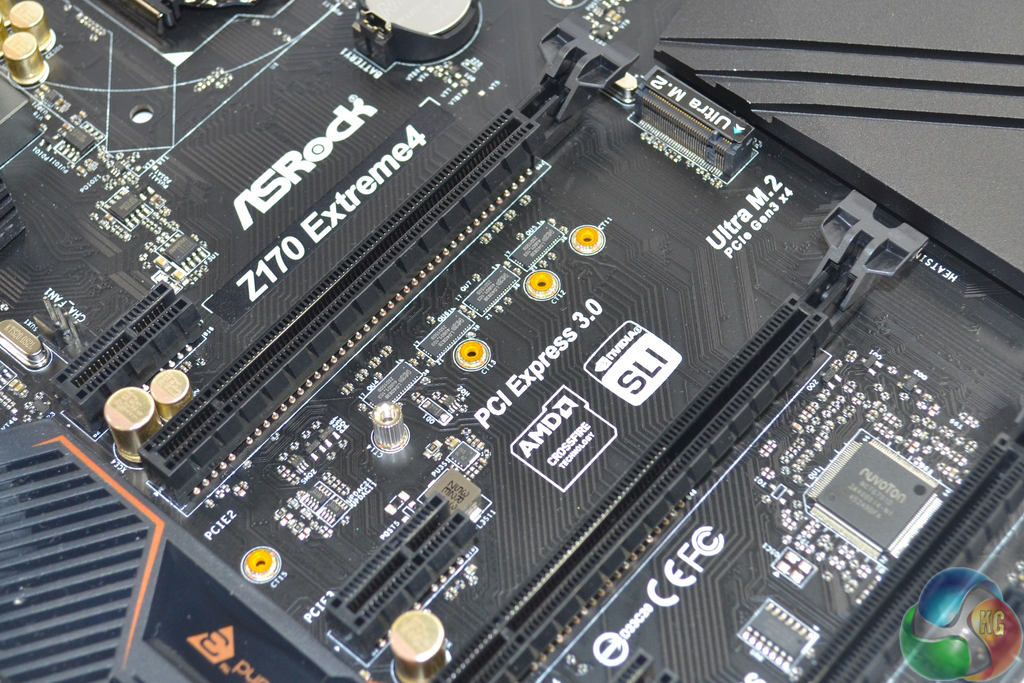
Up to 32Gbps of bandwidth is provided to M.2 PCIe SSDs via four lanes of PCIe 3.0 connectivity. The PCIe lanes are taken from the Z170 chipset's quota and therefore do not interfere with CPU-derived lanes that are crucial for maintaining full-speed SLI/CrossFire capability.
SATA 6Gbps M.2 SSDs can also be used in the slot. The ‘Ultra‘ M.2 socket is compatible with devices up to 110mm in length, including the popular 80mm-long interface. Positioning sees M.2 SSD's sat beneath a graphics card, which has the benefit of hiding ugly green PCBs, but also limits cooling performance of the SSD's controller.
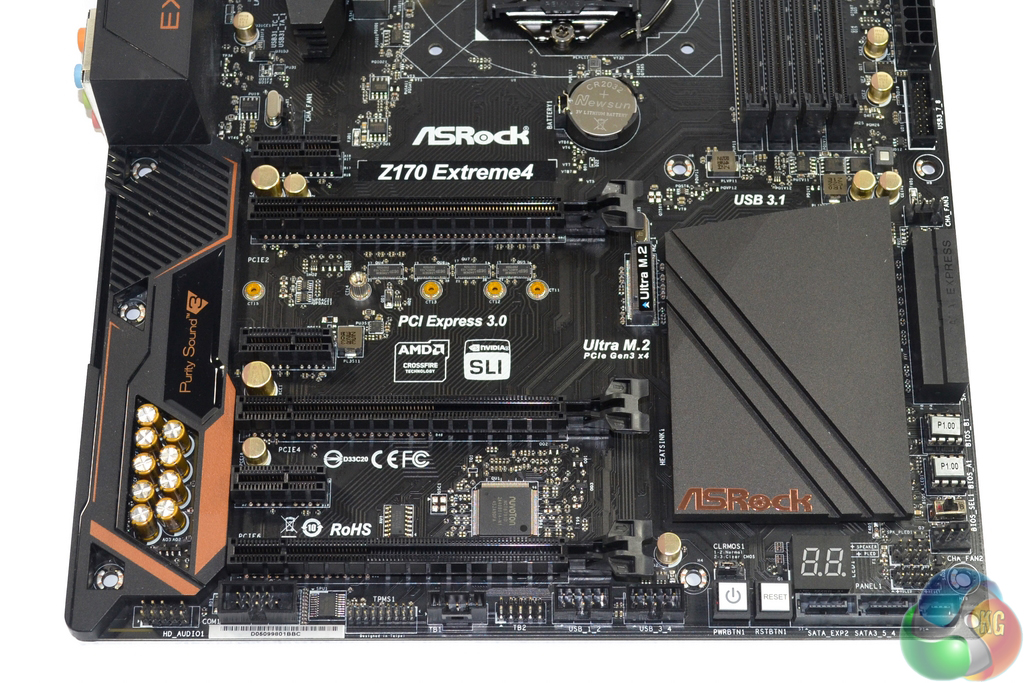
ASRock distributes the LGA 1151 CPU's 16 PCIe 3.0 lanes across the two uppermost full-length PCIe slots as: x16/x0 and x8/x8. The lowermost full-length PCIe slot receives its four lanes of bandwidth from the Z170 chipset, meaning that an x8/x8/chipset x4 PCIe configuration is possible.
Up to three-card CrossFire is supported, however only two discrete cards can be used in SLI due to Nvidia's requirements for PCIe x8 links. The use of chipset PCIe 3.0 lanes for the lower slot means that a pair of high-bandwidth graphics cards can run with PCIe 3.0 x8 links alongside an additional PCIe 3.0 x4 device such as an Intel SSD 750.
Expansion slot spacing is ideal for this calibre of motherboard. A pair of dual-slot graphics cards are given a cooling gap between them and can be used alongside a high-bandwidth device installed in the lowest PCIe slot. There's also room for a pair of triple-slot graphics cards to be used in tandem.
ASRock also outfits the Z170 Extreme4 with a trio of open-ended PCIe 3.0 x1 slots. These connectors can be used for devices which utilise a connector that is physically larger than PCIe x1 but do not necessarily need more than a single lane of PCIe bandwidth.
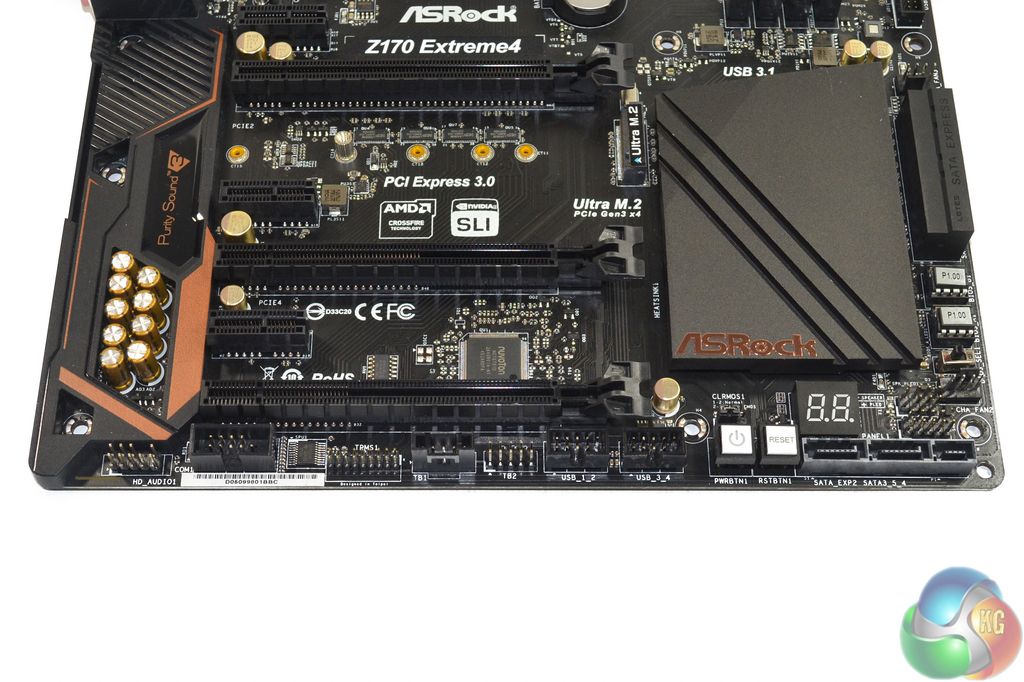
The usual array of front panel ports is found along the board's bottom edge. In addition to a Thunderbolt add-in card connector, there are two USB 2.0 headers as well as legacy TPM and COM headers.
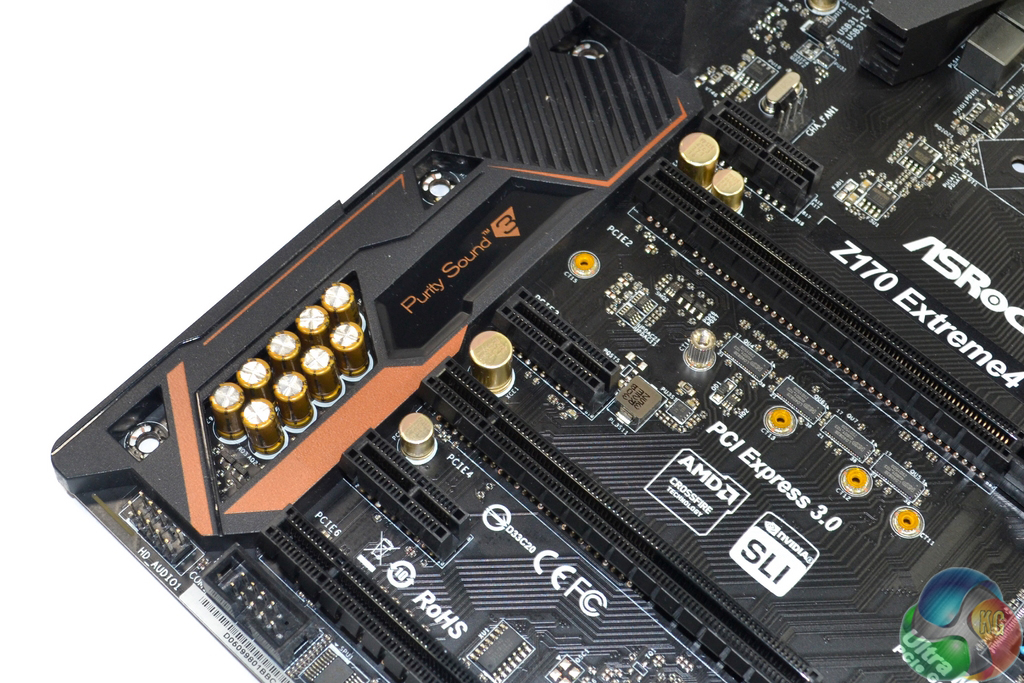
ASRock’s Purity Sound 3 audio system is based around the Realtek ALC 1150 codec. Two Texas Instruments NE5532 op-amps drive rear and front panel headphone jacks, while Nichicon capacitors filter the audio signals.
PCB segregation is used to separate the audio signals, however the Realtek ALC 1150 codec is deployed in an unshielded state – many motherboards ship with dedicated EMI shielding for the audio codec.
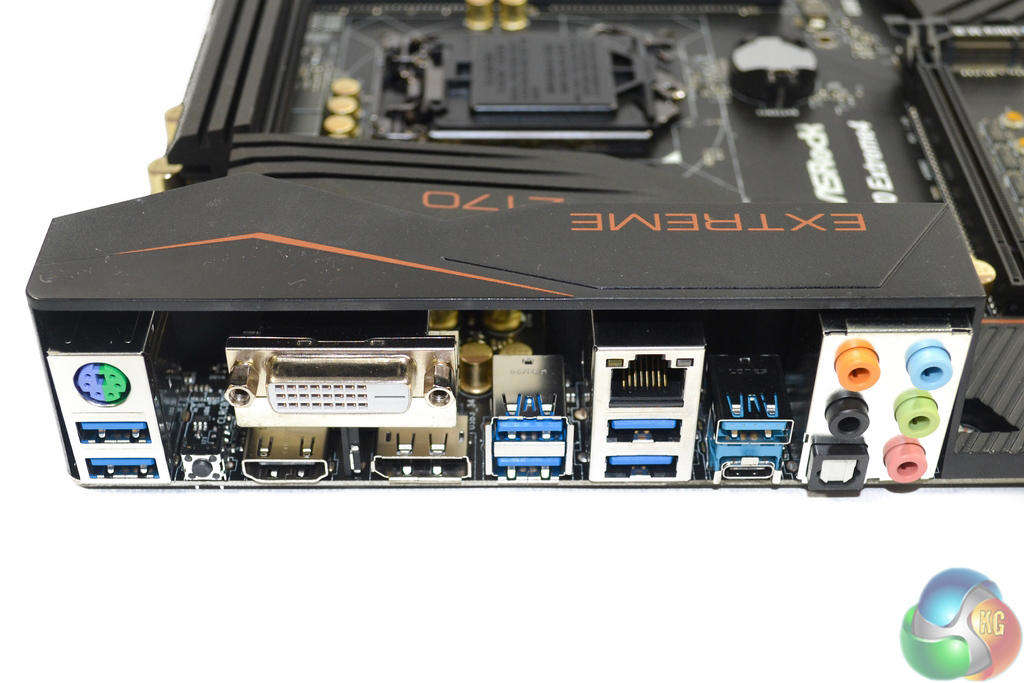
A total of six USB 3.0 ports are found in the rear IO section, all of which stem from the Z170 chipset. ASMedia’s ASM1142 chipset feeds the pair of 10Gbps USB 3.1 ports, while an EtronTech EJ179V switch makes the reversible Type-C USB 3.1 connector physically possible and provides it with a 3A current rating.
Despite providing legacy keyboard and mouse support via the PS/2 connector, there are no USB 2.0 ports on the motherboard. This can hardly be deemed a negative now that the Windows OS is more USB-aware, although I would have liked to see two of the rear IO USB 3.0 re-assigned to an extra internal header duty, and then replaced by a pair of USB 2.0 connections. This is perfectly acceptable given that the Z170 chipset supports up to fourteen USB connections in total.
Gigabit Ethernet is provided by Intel's I219V NIC. HDMI, DVI-D, and DisplayPort 1.2 cater for high-resolution outputs from the iGPU. Audio connections are the standard affair and the venerable clear CMOS button is an always-welcomed addition to the rear IO.
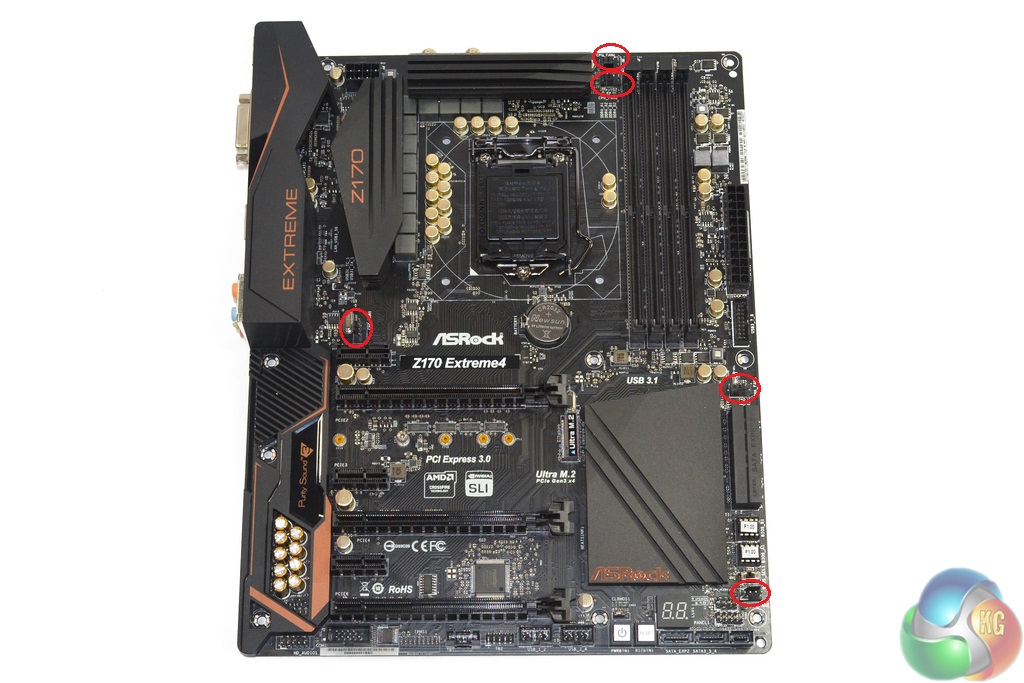
Positioning of the five 4-pin fan headers is generally good. Two are dedicated for CPU control duties, although there is no supplementary 3-pin header for use with an AIO watercooler's pump. Front, rear, and side chassis fans are effectively served by the three remaining well-positioning 4-pin headers.
Control of the fan headers, as well as general motherboard monitoring, is the duty of Nuvoton's NCT6791D chipset.
ASRock Z170 UEFI
Firstly, we are pleased to report that our generic wireless mouse worked to its usual standard in ASRock's Z170 UEFI. We’ve found the wireless mouse to be troubling with UEFI support in the past, so when it functions correctly in the interface, that is usually a good sign for overall mouse support.
ASRock's Z170 UEFI styling and feature set is very similar for the boards across its line-up. As such, we reused some of the screenshots gathered for our review of the Fatal1ty Gaming K6+ motherboard.
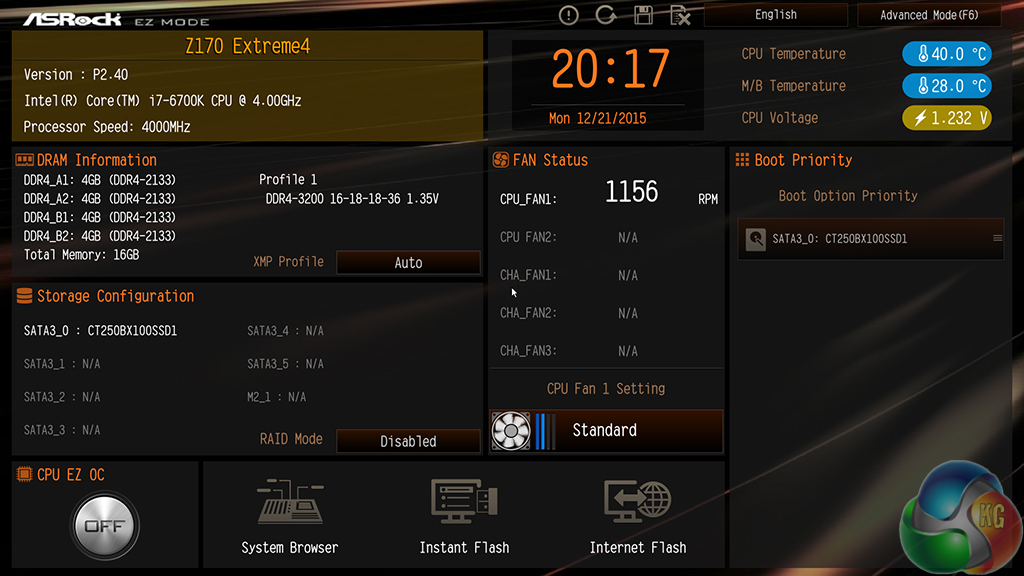
ASRock has recently added a new entry page to its UEFI. This simplified entry page allows novice users to tweak some important settings without being overcome by the extensive set of features in ASRock's deeper UEFI zones.
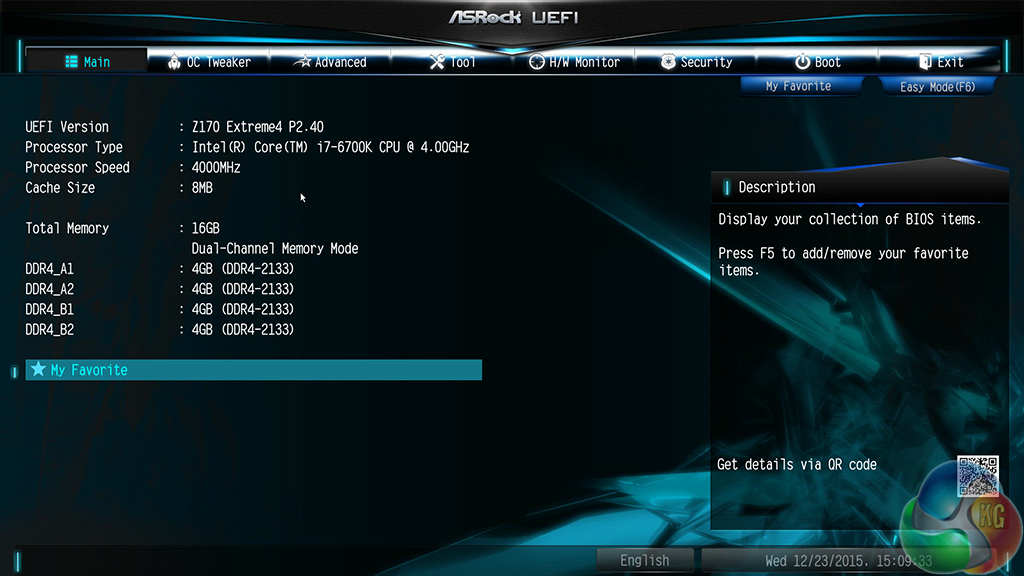
The Main page displays information about the system components. There is a My Favorite section that gives users quick access to their most desirable settings.
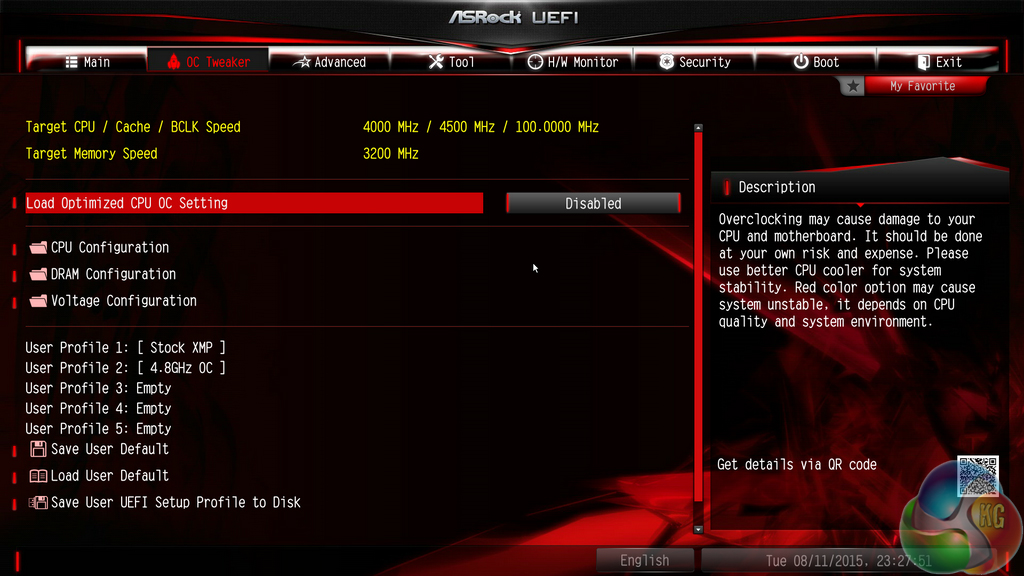

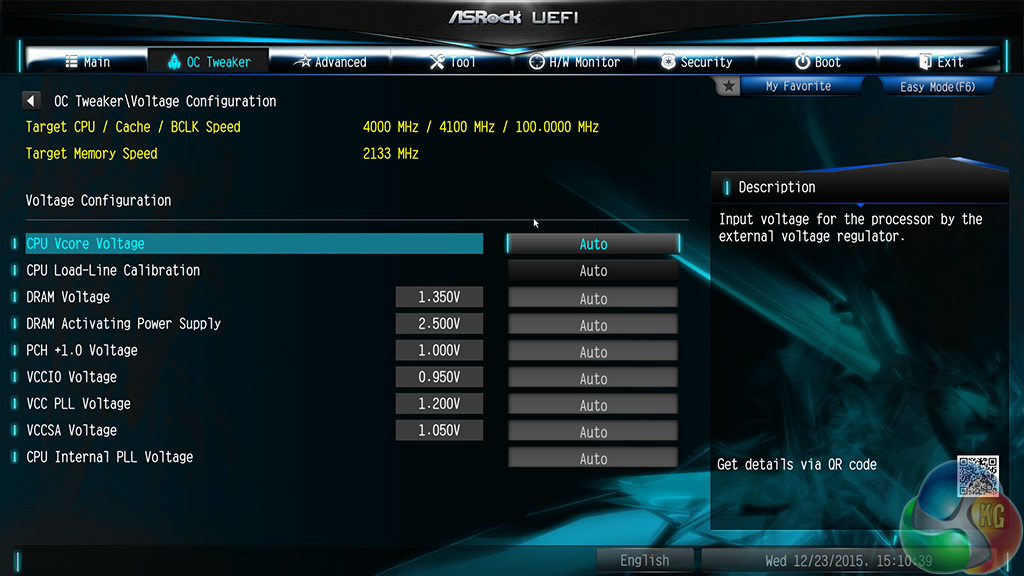
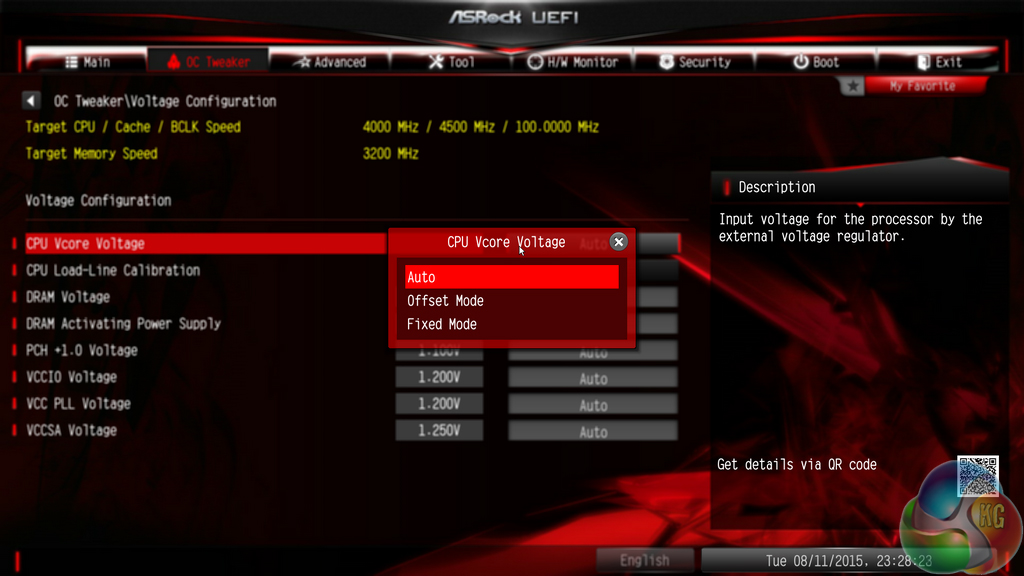
The OC Tweaker page controls access to the board’s numerous overclocking-related sub-sections. I like the way that ASRock has split its main overclocking sections into separate folders. This keeps the interface clean and makes the desirable settings easy to find. It also proves that ASRock has listened to previous feedback and taken steps to improve its UEFI user experience.
Up to five customised user profiles can be saved to the board’s internal memory. I feel that five profiles is sufficient for a motherboard that is not intended for competitive overclocking. A USB flash drive can be used to transfer profiles to and from the board.
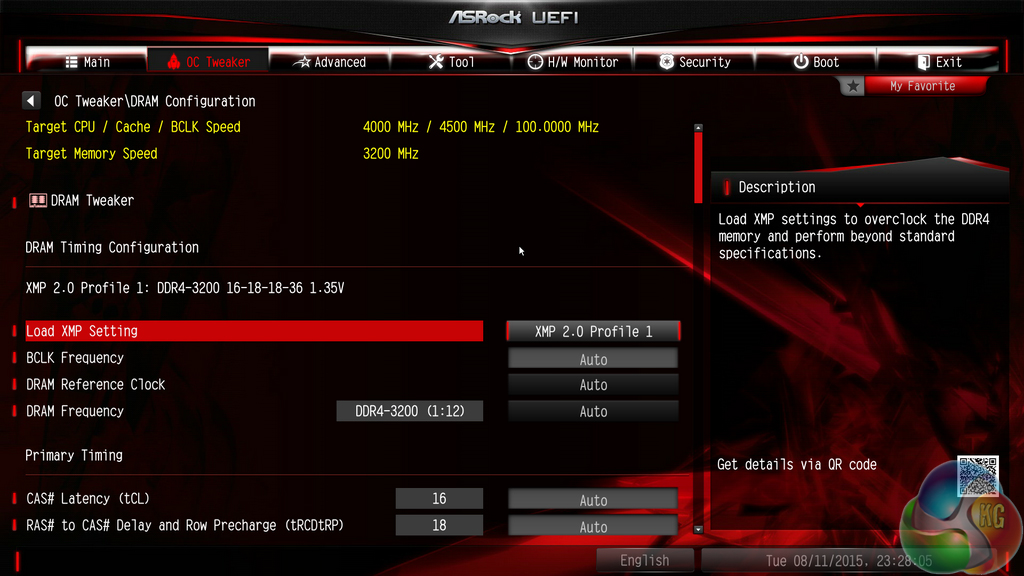
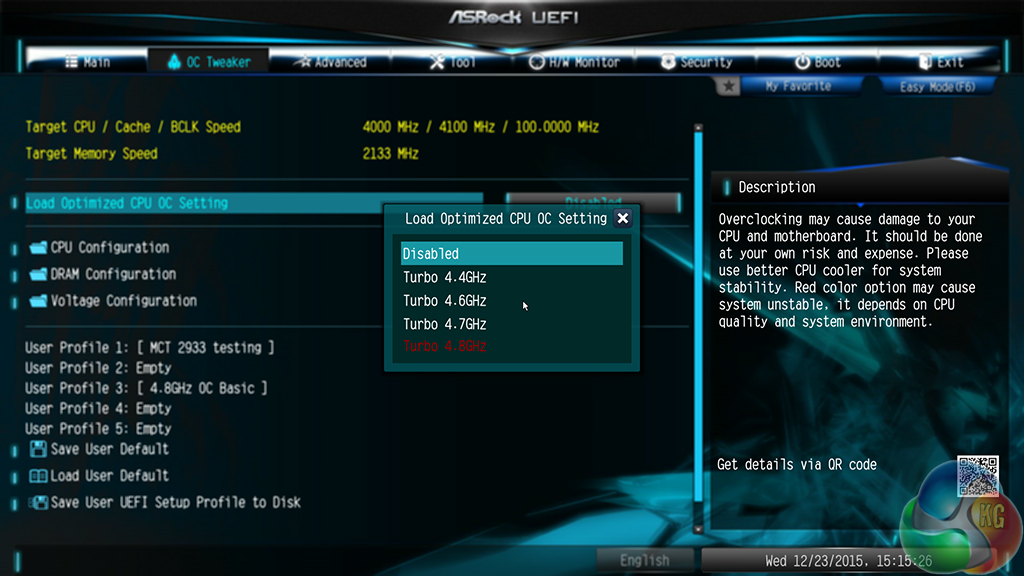
A good degree of control is given to DRAM settings. A number of frequency multipliers can be selected and timings can be tweaked with ease.
CPU overclocking profiles set by ASRock’s engineers can be applied. These are convenient for gamers who want to boost their CPU clock speed with minimal time spent fussing in the UEFI.
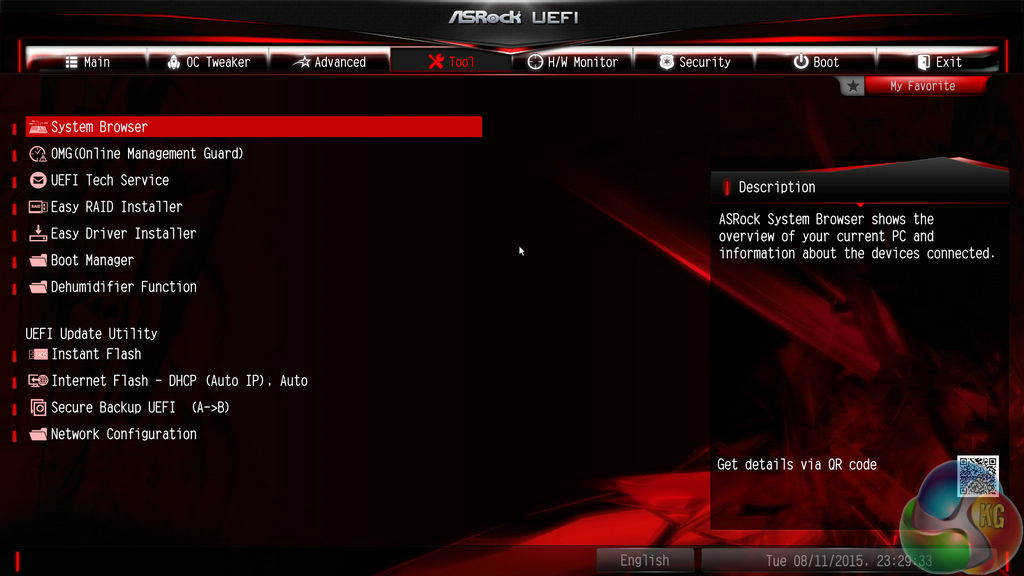
ASRock includes a number of convenient tools in its UEFI. Users can rapidly apply a number of system configurations and drivers can also be downloaded via the interface.
Instant Flash, ASRock’s simple BIOS updating tool, scans through one’s USB flash drive to search for the relevant BIOS file. While this sounds good, with the tool’s ability to scan all the way through your flash drive until it finds the relevant BIOS profile, users with a large amount of data on their drive could find the search time to be in the order of minutes. There’s little wrong with a manual folder search.
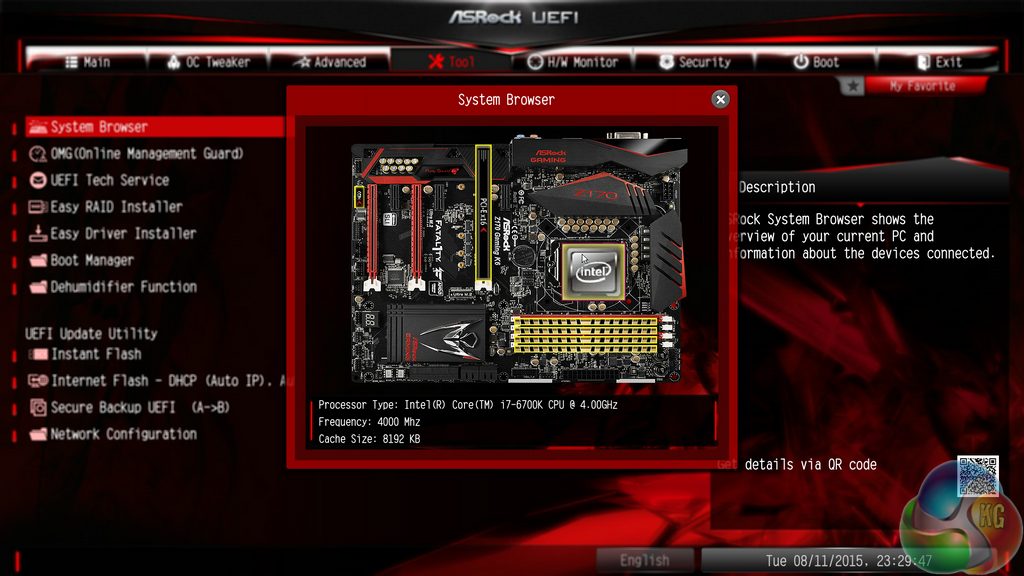
Included both via the UEFI and OS-based software, System Browser is a convenient tool that displays which components are connected to the motherboard. The tool is particularly useful for troubleshooting purposes; if, for example, a memory stick is faulty, it will not show up in the System Browser window.
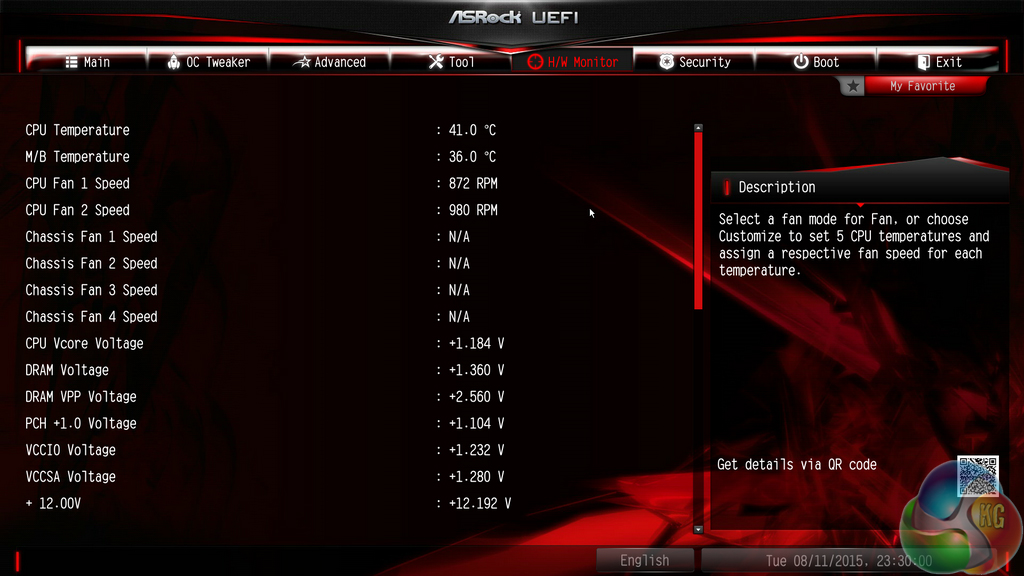
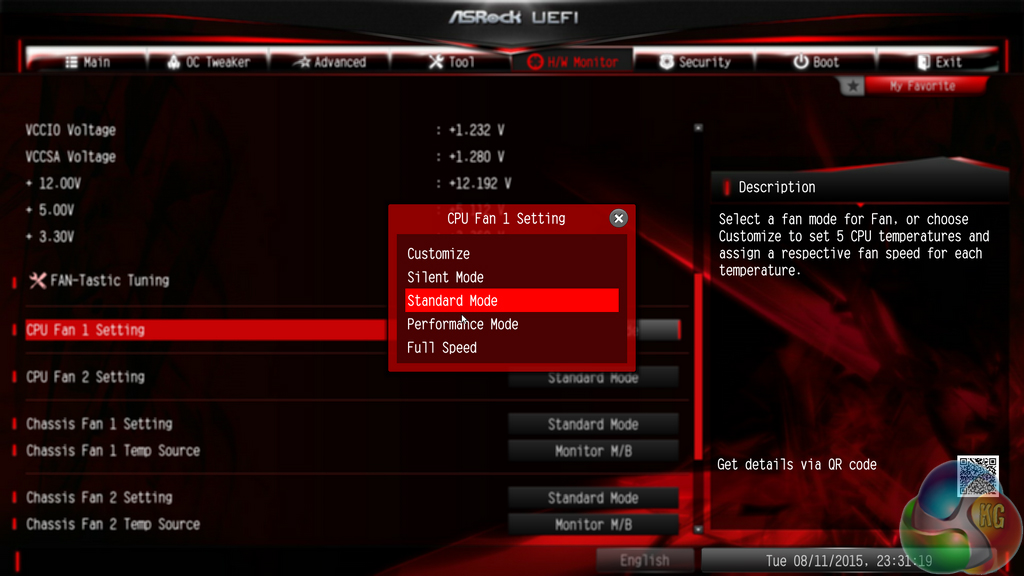
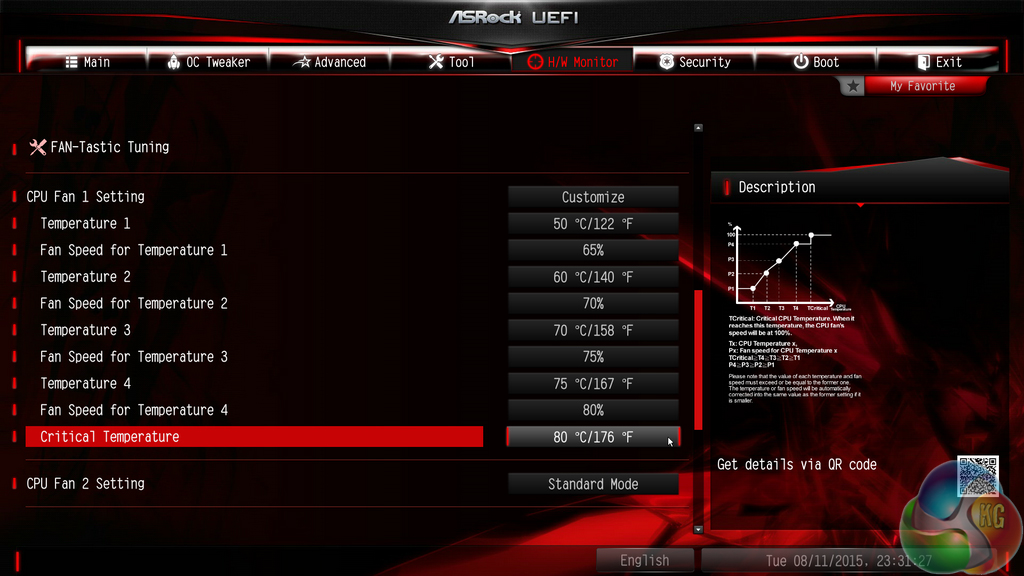
ASRock includes an extensive set of voltage, temperature, and fan speed readings on its HWMonitor page.
There are two ways of setting fan speeds in ASRock’s UEFI. Users can either select from pre-defined profiles, or they can fine-tune their own custom fan speeds. There’s the old way of doing this – by selecting the relevant choices from multiple drop-down lists. Or there’s ASRock’s modern FAN-Tastic Tuning visual tool.
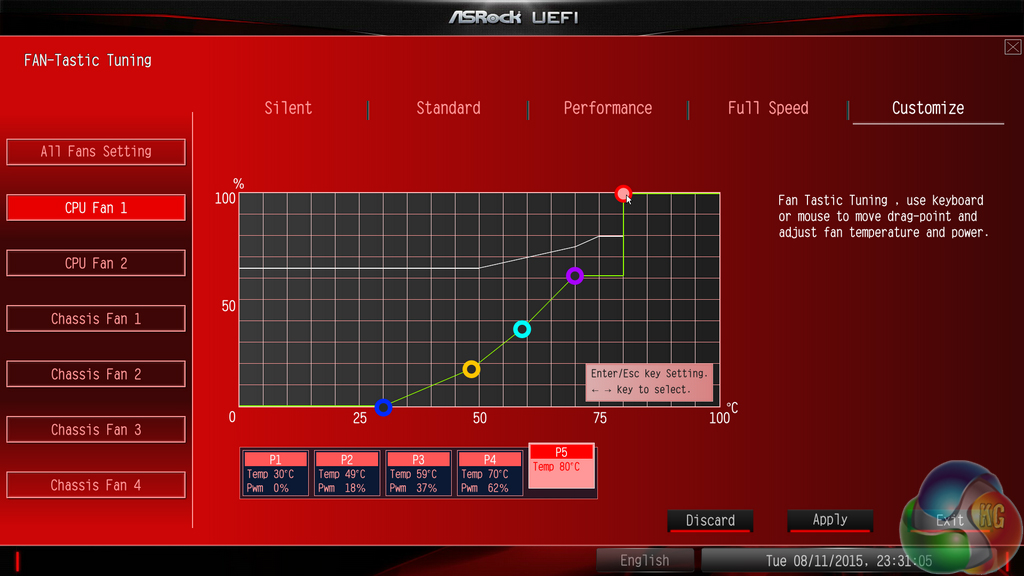
I was very impressed by the capabilities of the FAN-Tastic Tuning tool (the cheesy name, on the other hand…). The five-point curve can be adjusted to an individual’s preference with a large range of freedom; a CPU temperature as low as 30°C can be set, while the fan can run at 0-100% in fine increments. And what is particularly impressive is the board’s ability to completely shut-off a controlled fan below a user-defined temperature threshold.
The level of control FAN-Tastic Tuning provides is excellent, especially when a fan can be set to stop spinning in order to provide a particularly quiet system.
ASRock Z170 Software
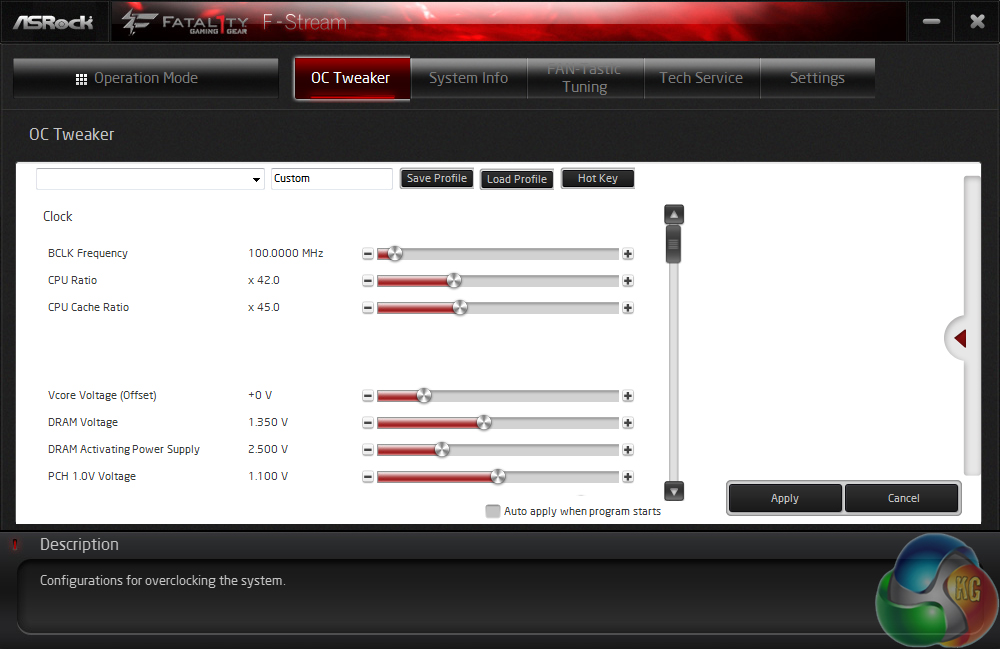
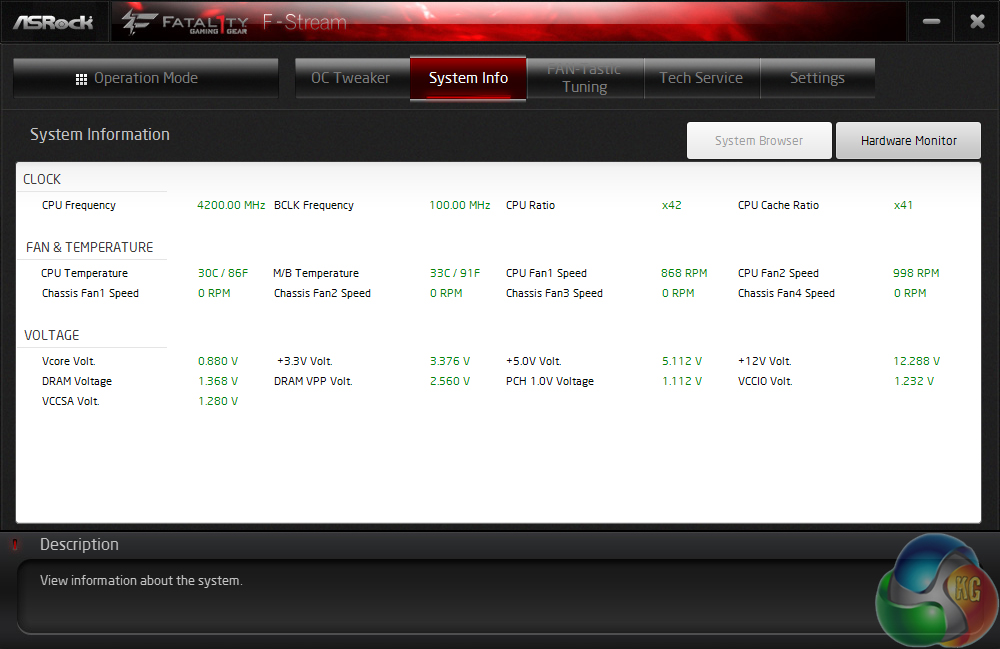
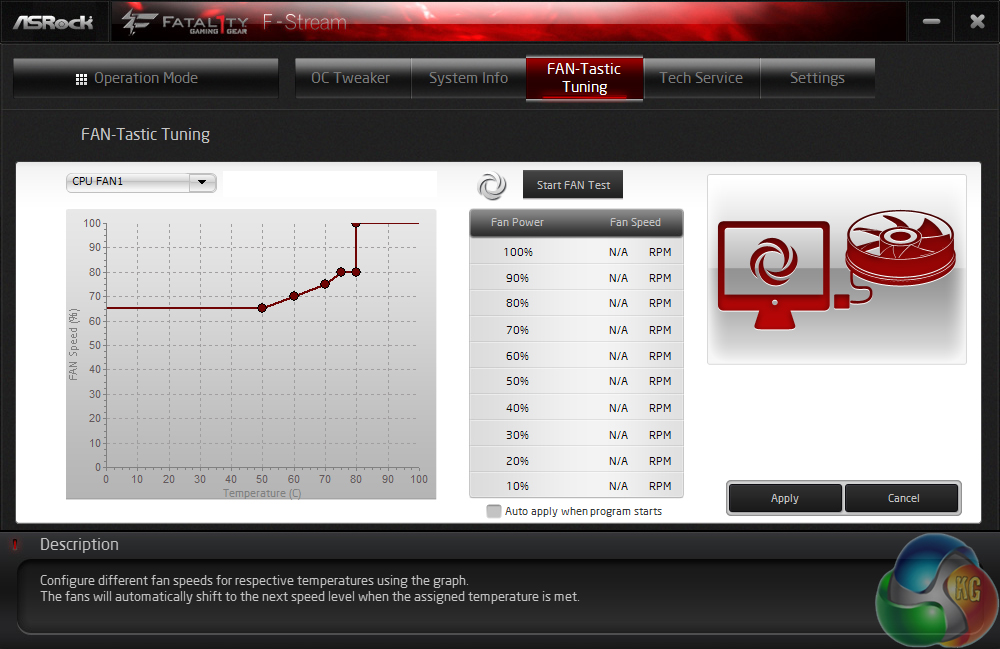
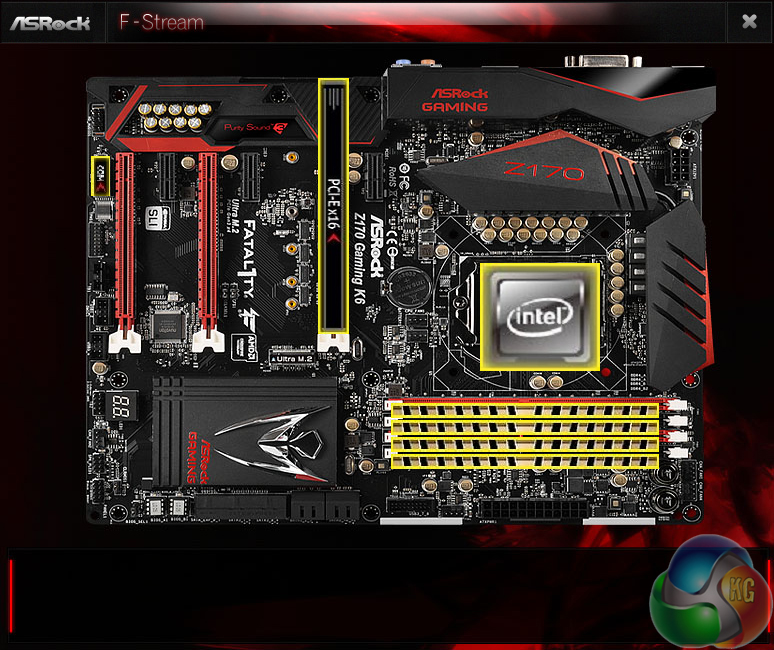
Using ASRock's OS-based A-Tuning software (which is practically identical to ASRock's F-Stream software in the screenshots), users can manage their system's operating states without diving into the UEFI BIOS. Overclocking settings can be adjusted, system activity can be monitored, and the fan speed profiles can be tweaked.
System Browser also shows up in the OS software, bringing with it benefits for troubleshooting scenarios.
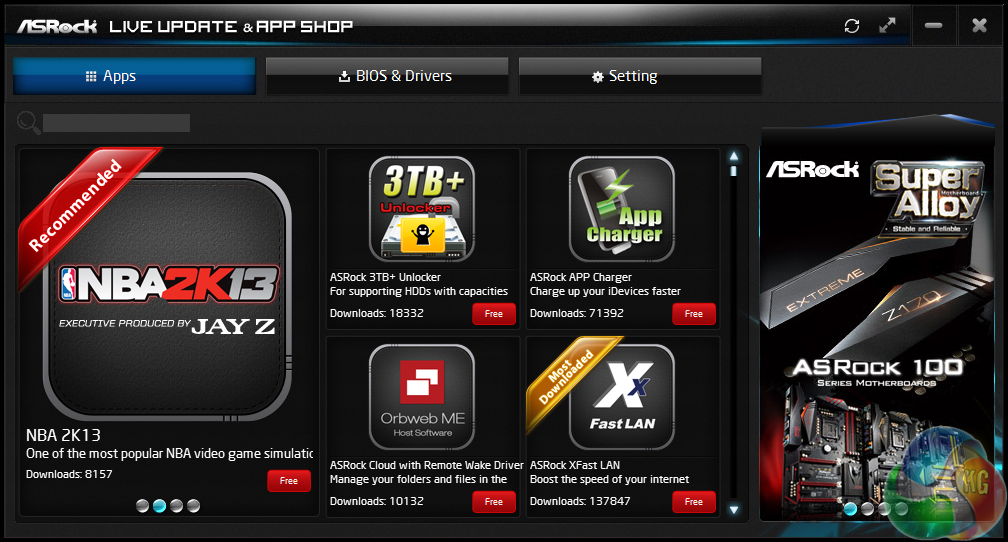
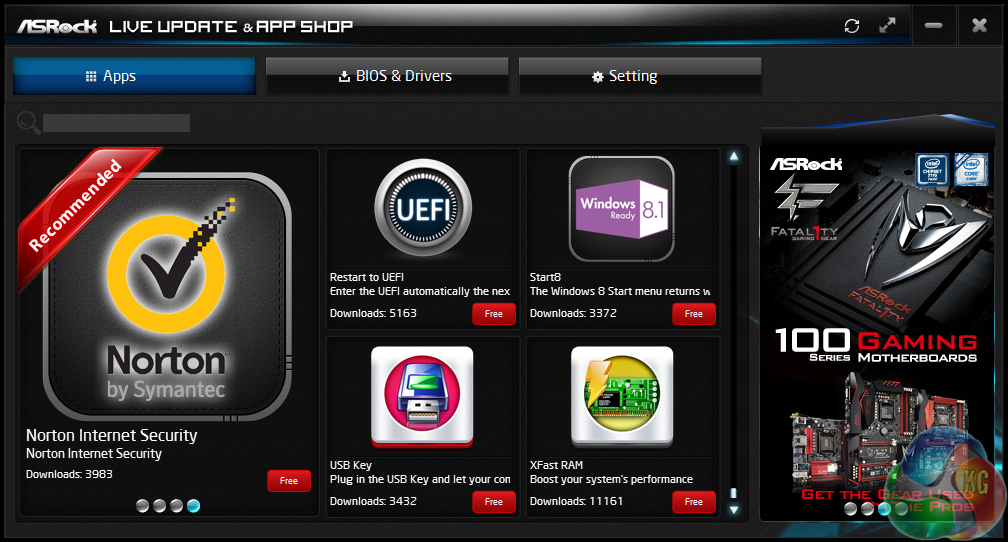
The App Shop allows users to download many of ASRock's dedicated tools. This is where tools such as XFast LAN and XFast RAM are found. As a bonus, ASRock also gives users access to NBA 2K13 and other useful pieces of third-party software.
The variety of ASRock's supported software is strong. From apps that launch directly into the UEFI (useful for Windows 8.1/10 users) to ones that can create a RAM disk, ASRock definitely has the variety aspect covered for general usage.
Intel's Skylake processors are just the latest Intel CPU architecture to see many of the critical system operations handled by the processor. As such, benchmarking a motherboard becomes more of a test to certify that the part operates correctly and meets the anticipated performance levels.
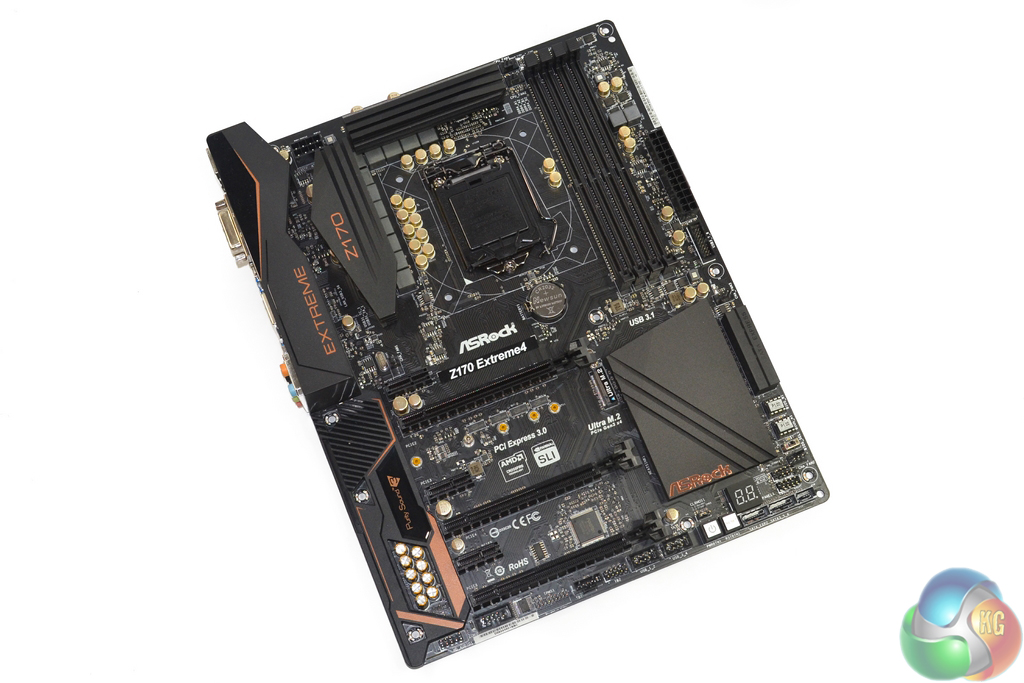
We will be outlining the ASRock Z170 Extreme4 motherboard's performance with the Core i7-6700K CPU at its stock frequency (4.2GHz due to forced turbo). Overclocked performance will be outlined later in the review.
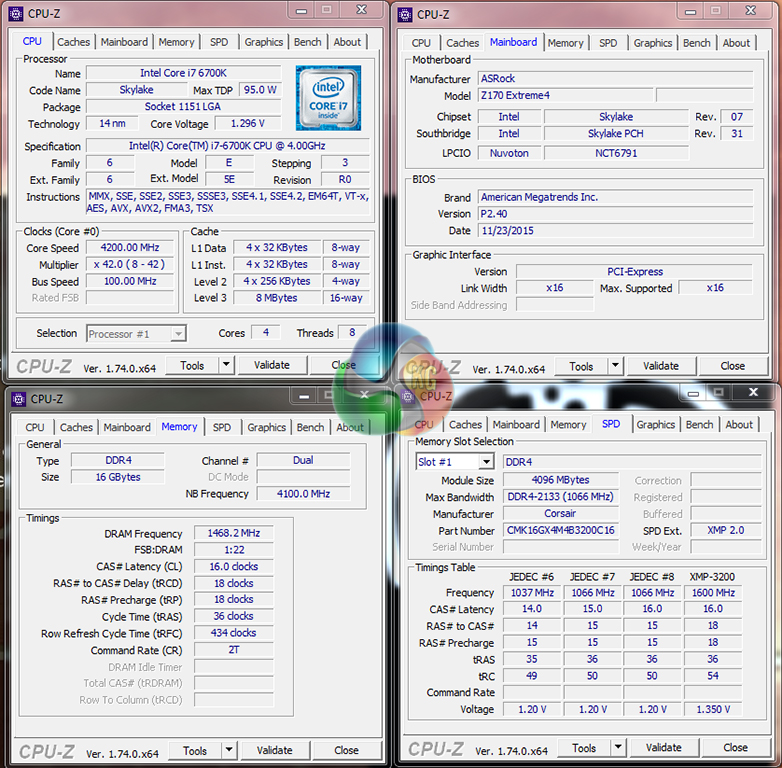
The ASRock Z170 Extreme4 motherboard allows users to manually apply multi-core turbo (MCT) and force the 6700K to a constant 4.2GHz, however this setting is not automatically applied when XMP is enabled (as many other boards will do). This setting can be easily enabled through the UEFI in order to provide enhanced performance, or it can be disabled to reduce power consumption and CPU temperatures. We apply MCT for the ‘stock’ testing.
Unfortunately, due to previously mentioned issues with ASRock's BIOS profile, we were unable to achieve system stability with our 3200MHz Corsair Vengeance LPX DDR4 kit set to its XMP frequency. Instead, we had to reduce the DRAM frequency to 2933MHz in order to maintain testing stability. This is likely to have a small impact on the motherboard's performance.
Z170 Motherboard Test System:
- Processor: Intel Core i7-6700K (4.2GHz forced turbo).
- Memory: 16GB (4x4GB) Corsair Vengeance LPX 3200MHz @ 2933MHz 16-18-18-36 DDR4 @ 1.35V.
- Graphics Card: Nvidia GTX 980 Ti.
- System Drive: 250GB Crucial BX100 SSD.
- CPU Cooler: Noctua NH-D14.
- Case: NZXT Phantom 630.
- Power Supply: Seasonic Platinum 760W.
- Operating System: Windows 7 Professional with SP1 64-bit.
Compared Z170 Motherboards:
- ASRock Fatal1ty Z170 Gaming K6+.
- Asus Maximus VIII Hero.
- Asus Sabertooth Z170 Mark 1.
- Gigabyte Z170XP-SLI.
- Gigabyte Z170X-Gaming 7.
- MSI Z170A XPower Gaming Titanium Edition.
Software:
- ASRock Z170 Extreme4 BIOS P2.40.
- GeForce 353.30 VGA drivers.
Tests:
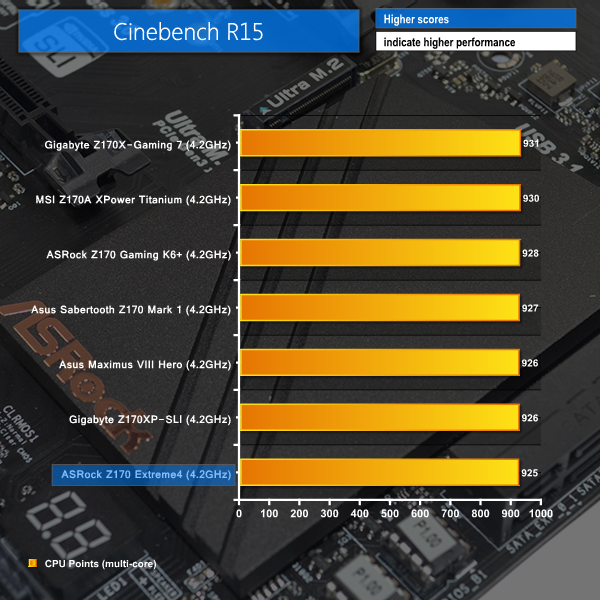
- Cinebench R15 – All-core CPU benchmark (System)
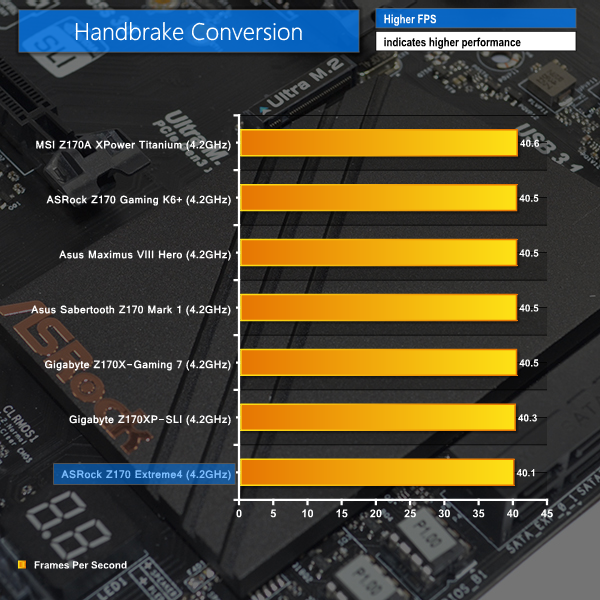
- HandBrake 0.10.2 – Convert 1.23GB 1080P game recording using the High Profile setting and MP4 container (System)
- 7-Zip 15.05 beta – Manual video archival (System)
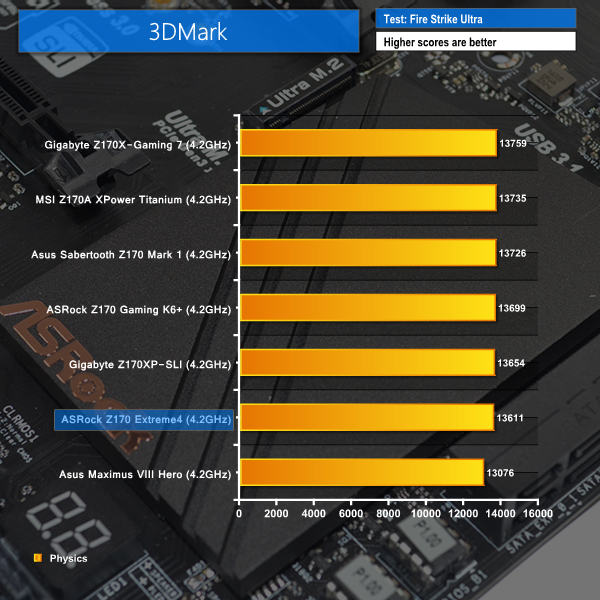
- 3DMark 1.5.915 – Fire Strike Ultra (Gaming)
- Grand Theft Auto V – 1920 x 1080, near-maximum quality (Gaming)
- Middle Earth: Shadow of Mordor – 1920 x 1080, ultra quality (Gaming)
- ATTO – SATA 6Gbps and USB 3.0 transfer rates (Motherboard)
- RightMark Audio Analyzer – General audio performance test (Motherboard)
Cinebench
We used the ‘CPU’ test built into Cinebench R15 .
Handbrake Conversion
We measured the average frame rate achieved for a task of converting a 1.23GB 1080P game recording using the High Profile setting and MP4 container.
7-Zip
We manually archive a 1.23GB MP4 game recording to test the performance in 7-Zip.
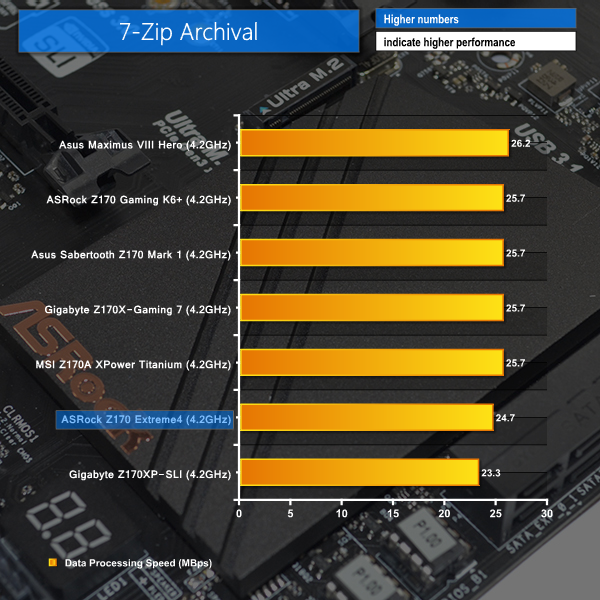
The memory speed deficit hampers the performance of ASRock's Z170 Extreme4 in CPU-heavy workloads. When data is being transferred across the DDR4 memory that is forced to operate at a lower speed due to the motherboard's insufficiencies, performance in the test programs suffers.
3DMark
We used 3DMark‘s ‘Fire Strike Ultra’ benchmark which is designed to be used on high-resolution gaming PCs.
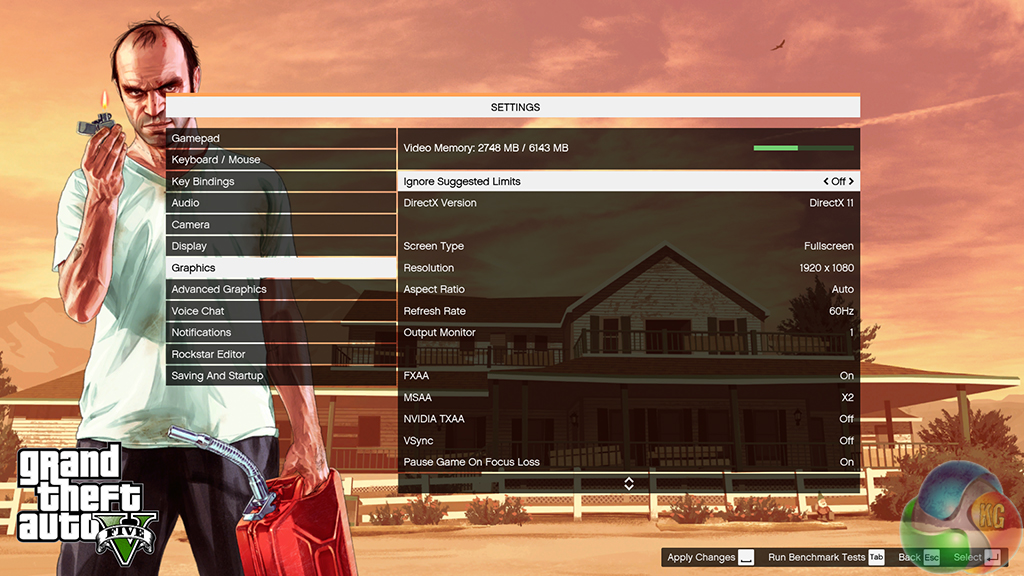
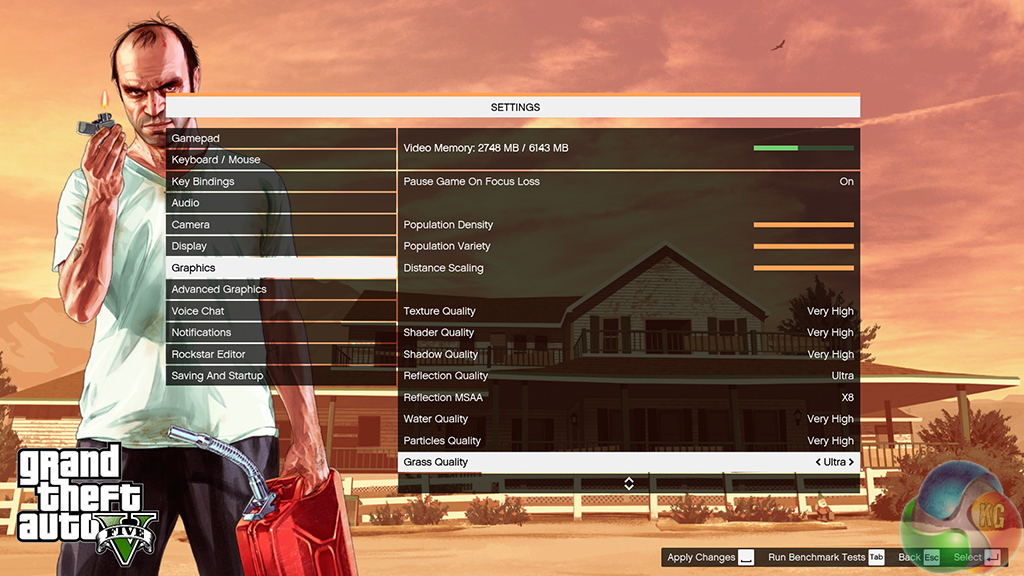
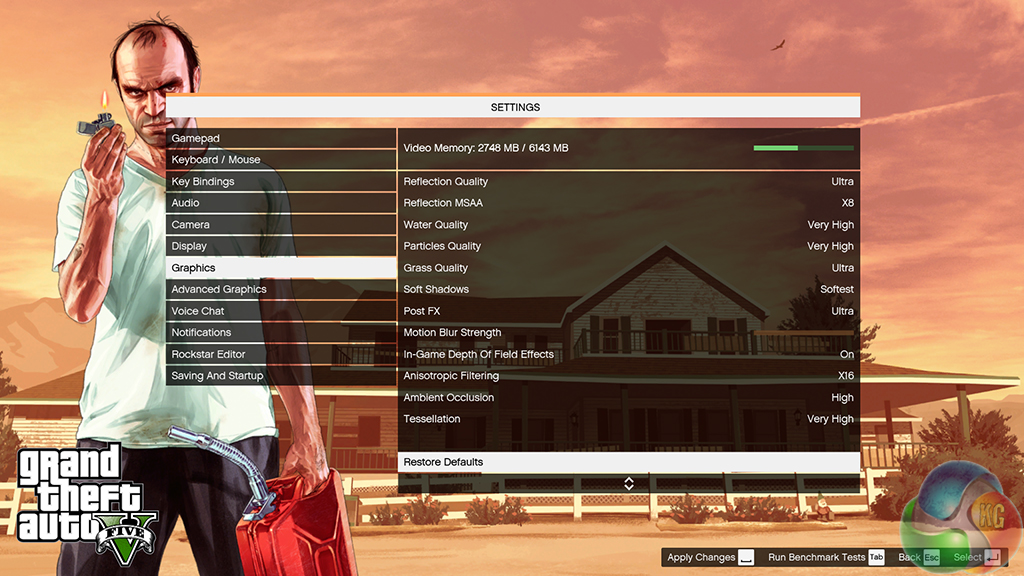
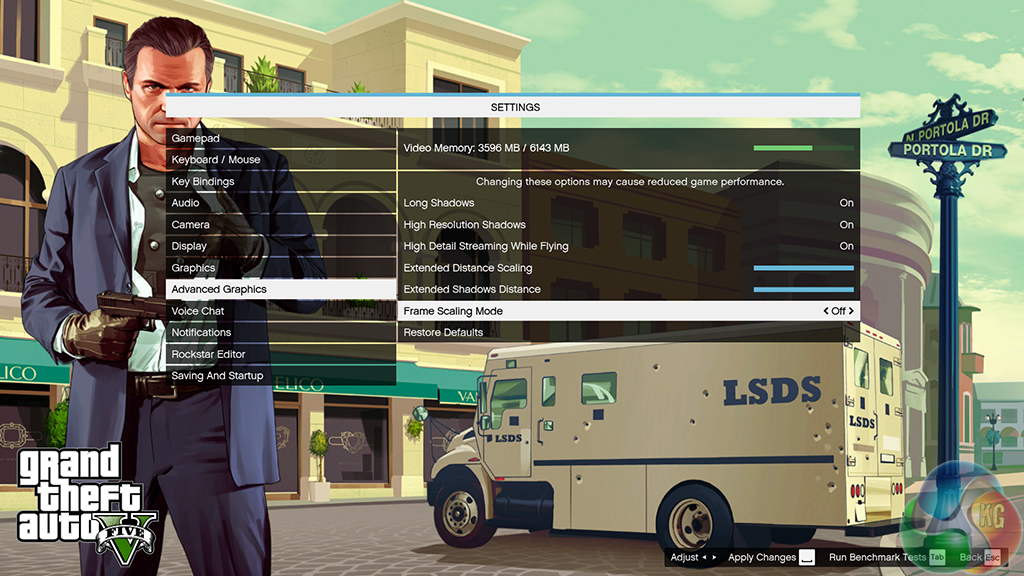
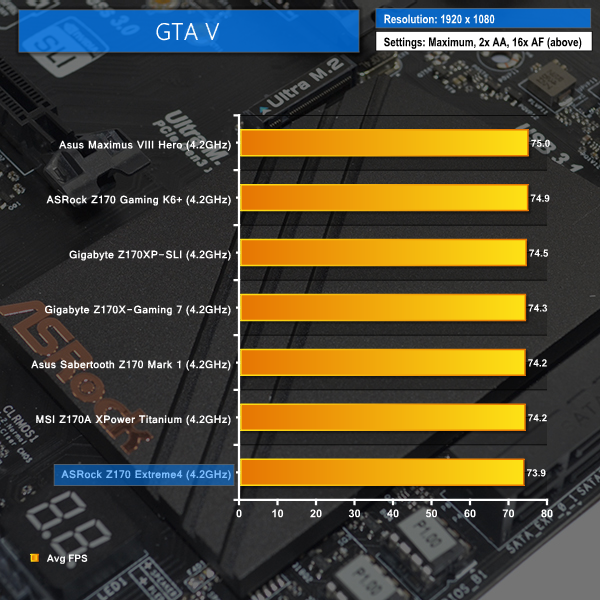
Grand Theft Auto V
We apply very near maximum settings in Grand Theft Auto V and a 1920×1080 resolution to push today’s hardware. Our data was recorded using the built-in benchmark.
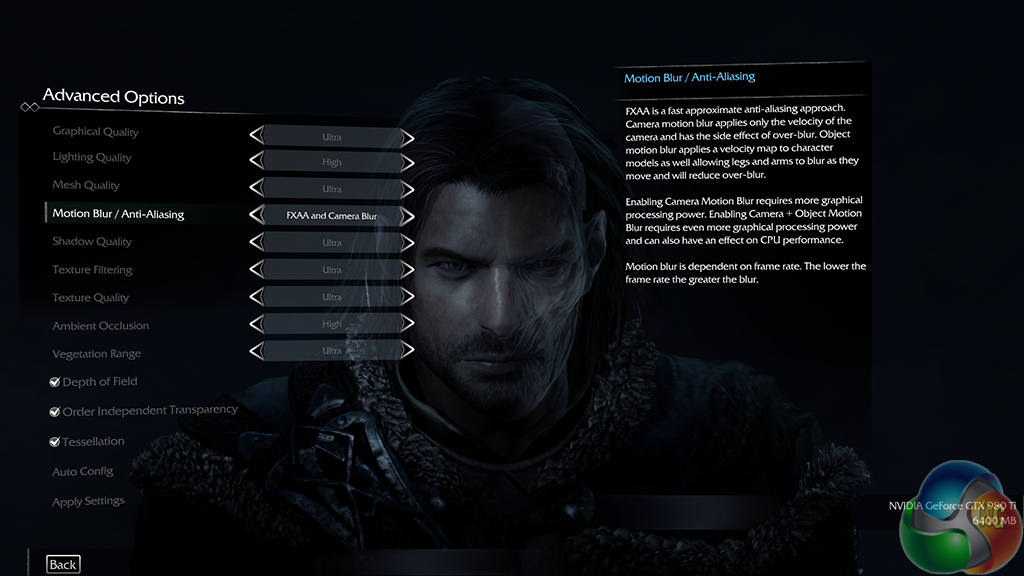
Middle Earth: Shadow of Mordor
We used a 1920×1080 resolution and the Middle Earth: Shadow of Mordor built-in benchmark set to ‘Ultra’ quality.
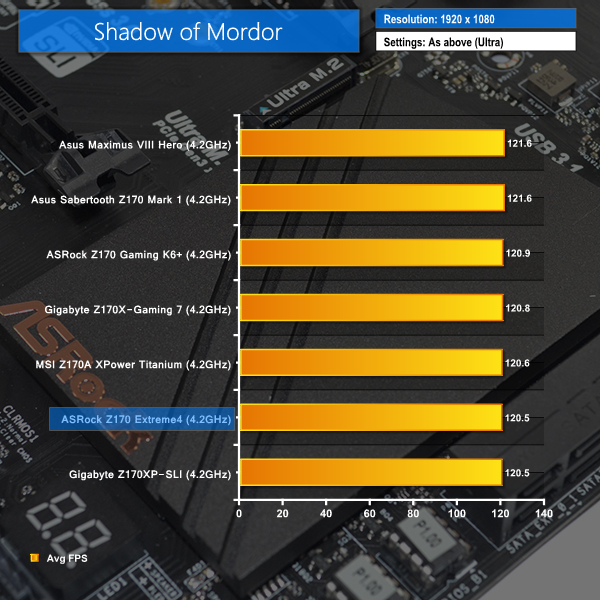
GTA V and Shadow of Mordor frame rates and the physics score in 3DMark also react badly to the reduced memory performance offered by ASRock's Z170 Extreme4.
With that said, the performance is still above the slowest competitors (except for GTA V), and the percentage difference is very small. Error margins of the benchmarks could account for the slight performance reduction, however this is unlikely to be the relevant reason due to the performance consistency between the competing motherboards.
Automatic CPU Overclocking:
ASRock’s four included CPU OC profiles are:
- 4.4GHz static, 4.2GHz cache, auto voltages and LLC, disabled power savings.
- 4.6GHz static, 4.2GHz cache, auto voltages and LLC, disabled power savings.
- 4.7GHz static, 4.0GHz cache, 1.36V Core Voltage and Level 1 LLC, disabled power savings.
- 4.8GHz static, 4.0GHz cache, 1.39V Core Voltage and Level 1 LLC, disabled power savings.
I think this is a decent set of overclocking profiles that should be achievable on a wide range of CPUs, even with mid-range cooling hardware.
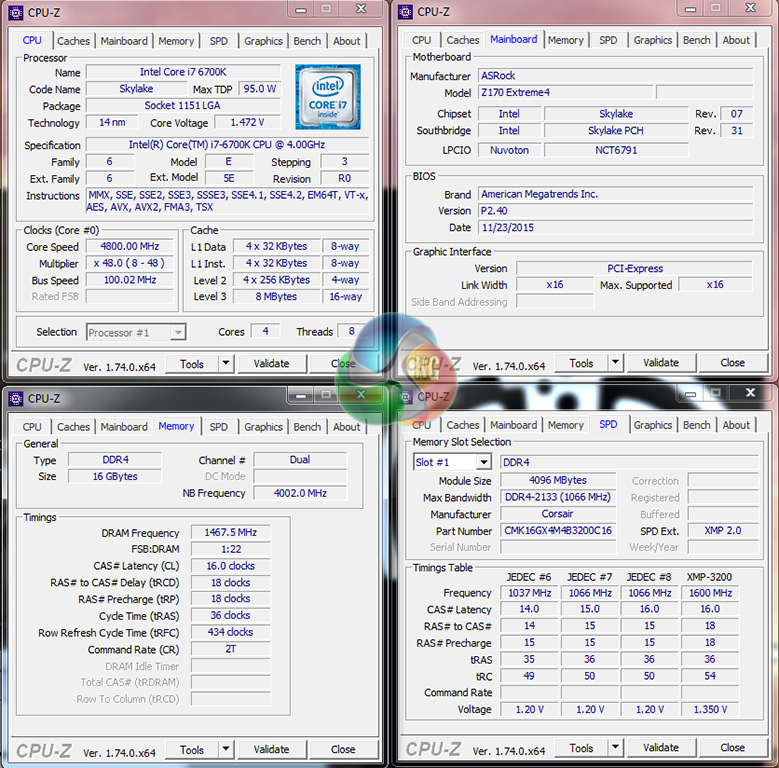
The 4.8GHz overclocking preset was technically stable (with the exception of the high-speed memory support while overclocking, which made a 2933MHz DRAM frequency unstable), although the Z170 Extreme4 motherboard forced the CPU VCore as high as 1.472V.
This is an obscenely high voltage level which is potentially dangerous for the long-term life of a 14nm Skylake CPU. With 1.472V being registered via software, despite the 1.39V BIOS setting and Level 1 LLC, the level of overshoot being applied by ASRock's motherboard is very concerning. This issue is likely to be related to the current BIOS profile, rather than the power delivery hardware, meaning that it could potentially be fixed with future updates.
Manual CPU Overclocking:
As already mentioned, the P2.40 BIOS profile used for the Z170 Extreme4 applies a CPU VCore overshoot of around 70mV when overclocked. As such, we manually adjusted the desired voltage levels to account for the significant overshoot. We were also forced to reduce the DDR4 memory to 2133MHz as it was unstable at 2933MHz when the system was overclocked.
To test the ASRock Z170 Extreme4 motherboard’s CPU overclocking potential, we first increased the CPU VCore to 1.34V and also set the PCH voltage to 1.10V. We selected level 1 load-line calibration (LLC) and set the cache ratio to 45x.
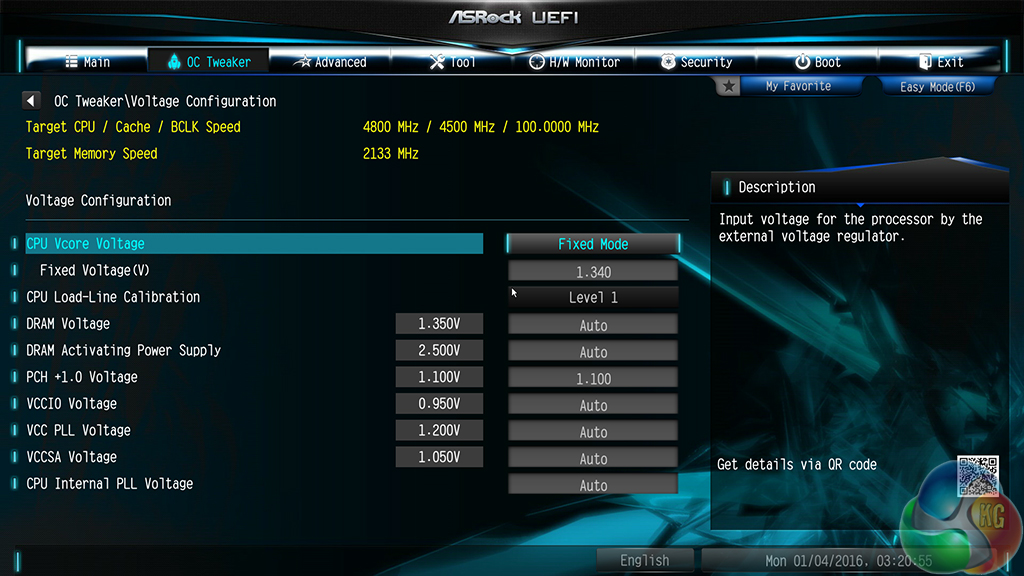
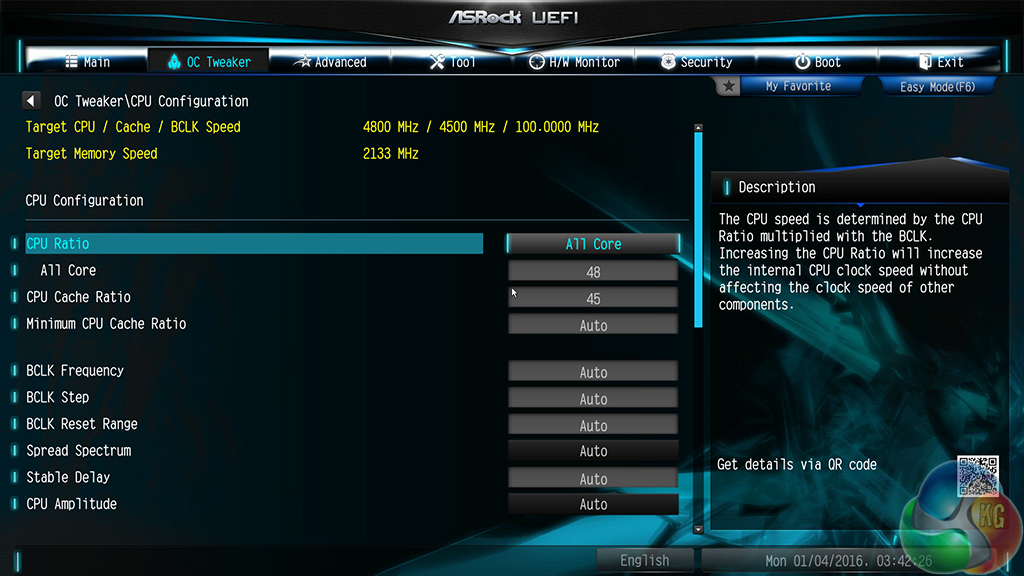
Navigating ASRock's UEFI is simple, as is finding the appropriate overclocking settings.
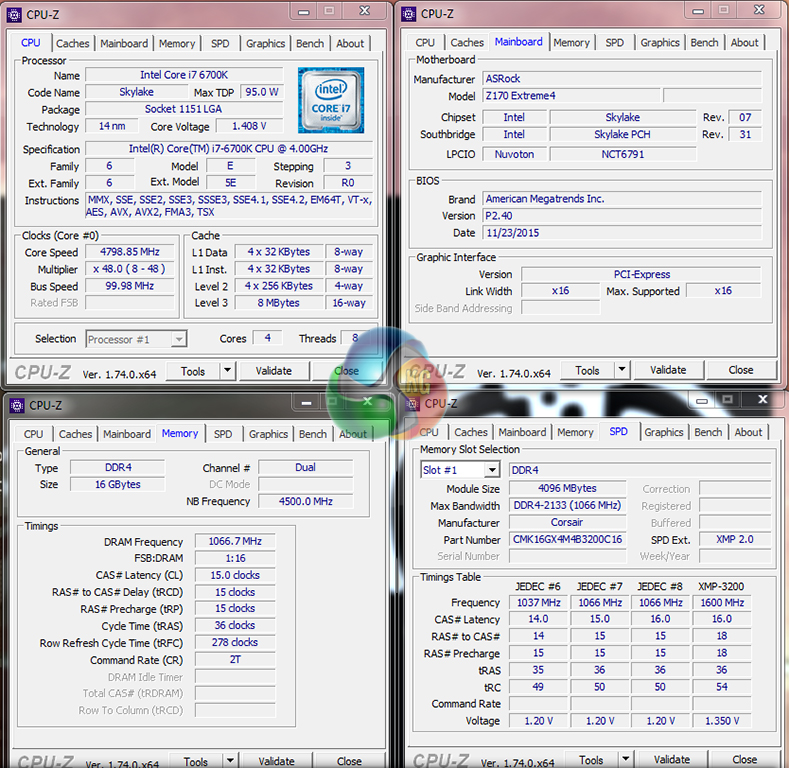
Only once the DDR4 memory was reduced from 2933MHz was the 4.8GHz CPU overclock (with 4.5GHz CPU Cache) fully stable. ASRock clearly has memory stability issues with the board's current BIOS profile.
CPU VCore under Prime95 load sat around the 1.41V mark, which is an overshoot of 70mV compared to what we set in the UEFI. This is disappointing and needs addressing in future iterations of the board's BIOS.
We will outline the performance increases that can be obtained from using the ASRock Z170 Extreme4 motherboard to overclock our system. Our overclocked processor frequency was 4.8GHz and memory speed was forced to be reduced to 2133MHz.
As a performance comparison, we have included the overclocked results from five other Z170 motherboards. The maximum overclocked configuration achieved with each competing board was a 4800MHz (48 x 100MHz) processor frequency and 3200MHz CL16 memory speed.

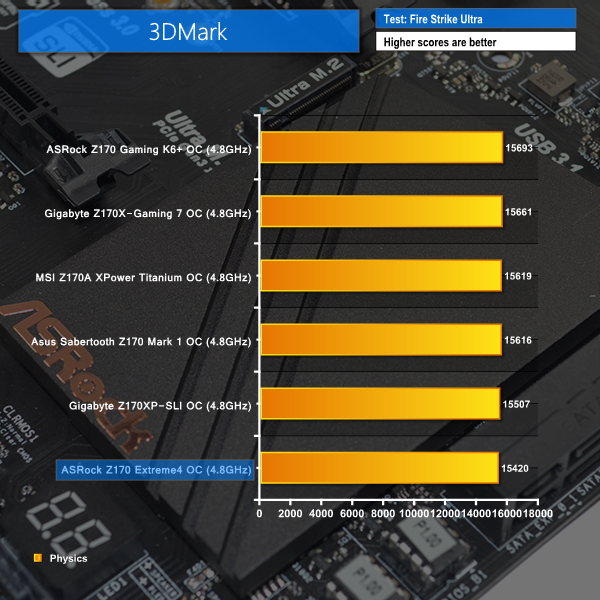
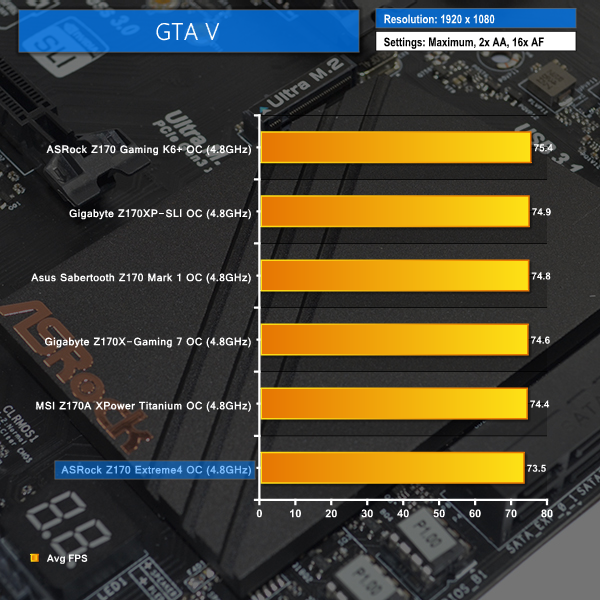
The forced reduction to a 2133MHz DDR4 operating frequency renders the ASRock Z170 Extreme4 with two out of three last-place finishes. The gaming-related tests show the most notable performance deficits induced by the reduced memory frequency for ASRock's board.
SATA
For SATA 6Gb/s testing we use a Kingston HyperX 3K (SandForce SF-2281) SSD.
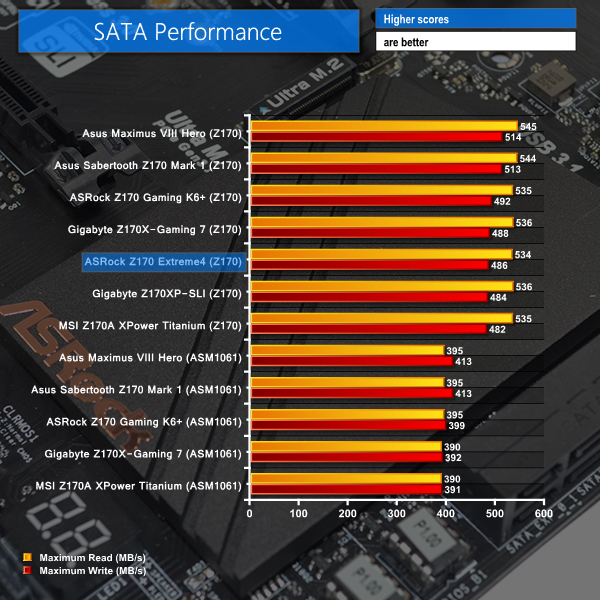
SATA 6Gbps performance from the Z170-fed ports shows no performance issues.
USB 3.0
We tested USB 3.0 performance using the Kingston HyperX 3K SSD connected to a SATA 6Gb/s to USB 3.0 adapter powered by an ASMedia ASM1053 controller. The test system uses Windows 7 with SP1 as the OS.
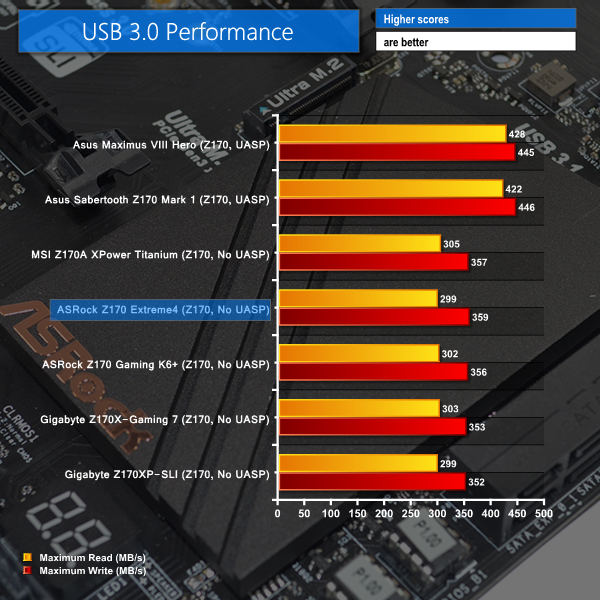
USB 3.0 performance for the Z170 Extreme4 is strong, given the lack of a UASP-activating program for Windows 7 users. Windows 8.1 and 10 users can expect higher transfer rates thanks to the UASP drivers included within those operating systems.
Audio
We use RightMark Audio Analyzer (RMAA) to analyse the performance of the motherboard’s onboard audio solution. A sampling mode of 24-bit, 192 kHz was tested.
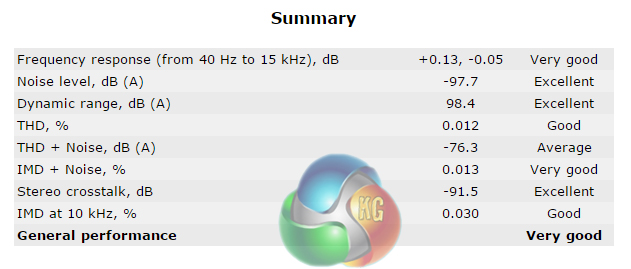
General audio performance is ‘Very Good‘ according to RMAA. Noise level and dynamic range of the audio system are particular strengths.
Power
We measured the power consumption with the system resting at the Windows 7 desktop, representing idle values.
The power consumption of our entire test system (at the wall) is measured while loading only the CPU using Prime95′s in-place large FFTs setting. The rest of the system’s components were operating in their idle states, hence the increased power consumption values (in comparison to the idle figures) are largely related to the load on the CPU and motherboard power delivery components.
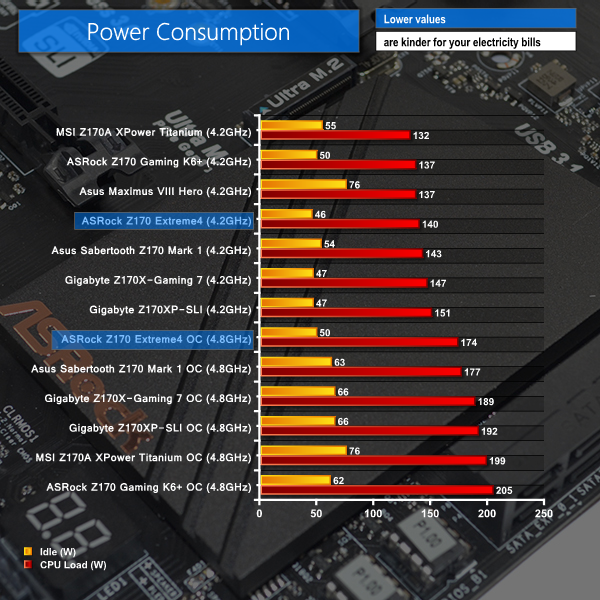
ASRock's power delivery system presents extremely pleasing idle consumption numbers thanks to the speed at which the PWM controller drops the CPU VCore under low load conditions.
Load power consumption levels are also generally positive, which indicates that the choice of electrical components has been wise. The differing voltage level means that the load power consumption level when overclocked is not directly comparable to that of other motherboards.
The ASRock Z170 Extreme4 is a low-cost point of entry onto the Z170 and Skylake platform which allows buyers to utilise a good variety of features with little additional expenditure.
Core functionality that is required by gamers and power users is offered by the Z170 Extreme4. There's CrossFire and SLI support, capacity for PCIe 3.0 x4 SSDs via M.2 or a native PCIe slot, and USB 3.1 Type-A and Type-C tick the box for a degree of future-proofing.
Dual BIOS chips provide redundancy as well as longevity for the motherboard. Unfortunately, stability is not one of the areas where ASRock's Z170 Extreme4 is shown in a positive light.
Memory frequencies above 2933MHz start to present system instability. While this is not currently an issue for a budget motherboard due to the expense of 2933MHz+ DDR4 kits, it will be an undesirable problem for the future. Poor memory stability also caused problems when trying to push the CPU and CPU Cache frequencies during overclocking.
Voltage accuracy also presents a significant problem for the Z170 Extreme4. When manually adjusting the CPU VCore, or even when applying on of the four CPU overclocking presets, a core voltage overshoot in the region of 70mV was registered. Seeing your CPU being delivered 70mV more than you asked for is unreasonable. It takes the operating voltage from a sensible 1.35-1.40V up to a more worrying 1.42-1.47V.
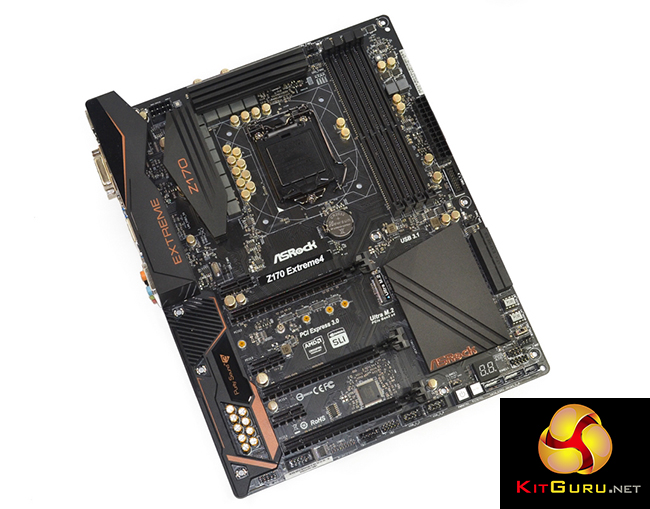
Despite the stability and voltage accuracy negatives, ASRock's UEFI layout is a positive. The interface is easy for novices and more advanced users to operate with good success. And the ease at which the UEFI can be operated is beneficial to allowing an overclocking user to manually compensate for the high CPU voltage overshoot and poor memory stability.
Further positives come in the form of a smart motherboard layout with very few questionable decisions, a likable dark black styling, and a solid audio solution. ASRock's OS-based software suite also offers some decent tools. And let's not forget the Z170 Extreme4's ability to overclock multiplier-locked Skylake CPUs, which could be a critical feature for many users.
Priced at £109.99 from Novatech, the ASRock Z170 Extreme4 is one of the lowest cost Z170 motherboards to offer CrossFire and SLI capability. The general set of features offered by ASRock, and the smart way in which they are deployed, make the Z170 Extreme4 a notable contender at its price point. Despite the healthy feature set, issues relating to high-speed memory and CPU voltage accuracy prevent the ASRock Z170 Extreme4 from being a clear winner at its price point.
If you have the patience to wait for a BIOS fix to the board's bugs, or simply don't need support for high-speed memory and are happy to spend extra time tweaking CPU voltages, the ASRock Z170 Extreme4 is worth considering. Just don't expect straightforward, problem-free performance until a new BIOS addresses the board's current downfalls.
Discuss on our Facebook page, over HERE.
Pros:
- Smart application of features from the Z170 chipset and good layout.
- USB 3.1 Type-A and Type-C ports.
- Can operate two-card CrossFire or SLI in addition to a high-bandwidth PCIe device.
- Easy-to-navigate UEFI with plenty of options.
- Dual BIOS chips for redundancy as well as onboard debug LED and buttons.
- Dark black colour scheme.
Cons:
- Huge, potentially dangerous CPU VCore overshoot when overclocking.
- Overclocking presets practically unusable due to large CPU VCore overshoots.
- Limited operation and hampered overclocking results with high frequency DDR4 modules.
KitGuru says: ASRock's Z170 Extreme4 offers a good set of features for an attractive price tag, however further work is needed in the form of BIOS updates to enhance the board's stability when operating at higher CPU and DDR4 frequencies.