KitGuru KitGuru.net – Tech News | Hardware News | Hardware Reviews | IOS | Mobile | Gaming | Graphics Cards


The GT75VR is a classic big gaming laptop that stops at nothing in the pursuit of providing the most powerful portable gaming experience you can get. With a 120Hz screen, GTX 1080 graphics card and Intel Core i7-7700HQ, it is sure to make mincemeat of any games you throw at it.
Joining the top-notch CPU and GPU are two super-fast 256GB M.2 SSDs configured in an even faster RAID 0 arrangement. You also get a 1TB hard drive, a fully backlit keyboard, a mass of connectivity and much more besides.
The one big caveat with this laptop, though, is that its 120Hz, 17.3-inch screen, has just a 1080p resolution and more importantly is only a TN LCD panel, not IPS. Potentially this kills the slightly broader appeal of this laptop as a day-to-day work machine, as well as one for gaming. So let’s see how it holds up.
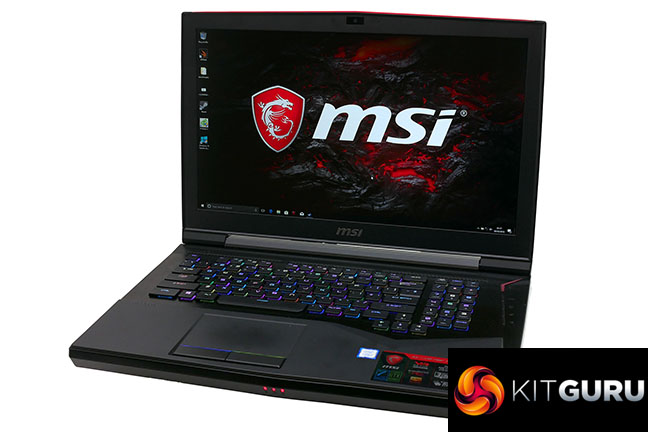
Specifications:
- OS: Windows 10 64-bit
- CPU: Intel core i7 7700HQ (2.8Ghz – 3.8GHz)
- Display: 17.3” 120Hz Full HD LCD in LED backlight 1920×1080 16:9
- Memory Supplied: 2 x 8GB
- Memory Type: DDR4
- Memory Speed: 2,400
- Max Memory Support: 32GB
- Graphics Chipset: nVidia GeForce GTX 1080
- Graphics Memory: 6GB GDDR5
- Storage: 512GB RAID with 2 x M.2 SSD, 1TB hard drive
- Keyboard Type: Chiclet, mechanical
- USB Ports: 4
- HDMI Port(s): 1
- Microphone/headphone Jack(s): 1
- Card Reader: SD (XC/HC)
- Audio: 2.0 sound by Realtek
- Wireless LAN – Intel 2×2 802.11ac
- Bluetooth: V4.2
- Webcam: Full HD type (30fps@1080p)
- Warranty: 1yr RTB
Total cost: £2,999
Given the price of this laptop, it’s notable just how basic the unboxing experience is here. There’s none of the careful presentation of the laptop nor meticulous wrapping of accessories that you get when unboxing an Apple or Razer product.
It comes in a basic box and everything’s rather stuffed in in there. It’s all well protected but a thrilling experience, it isn’t.
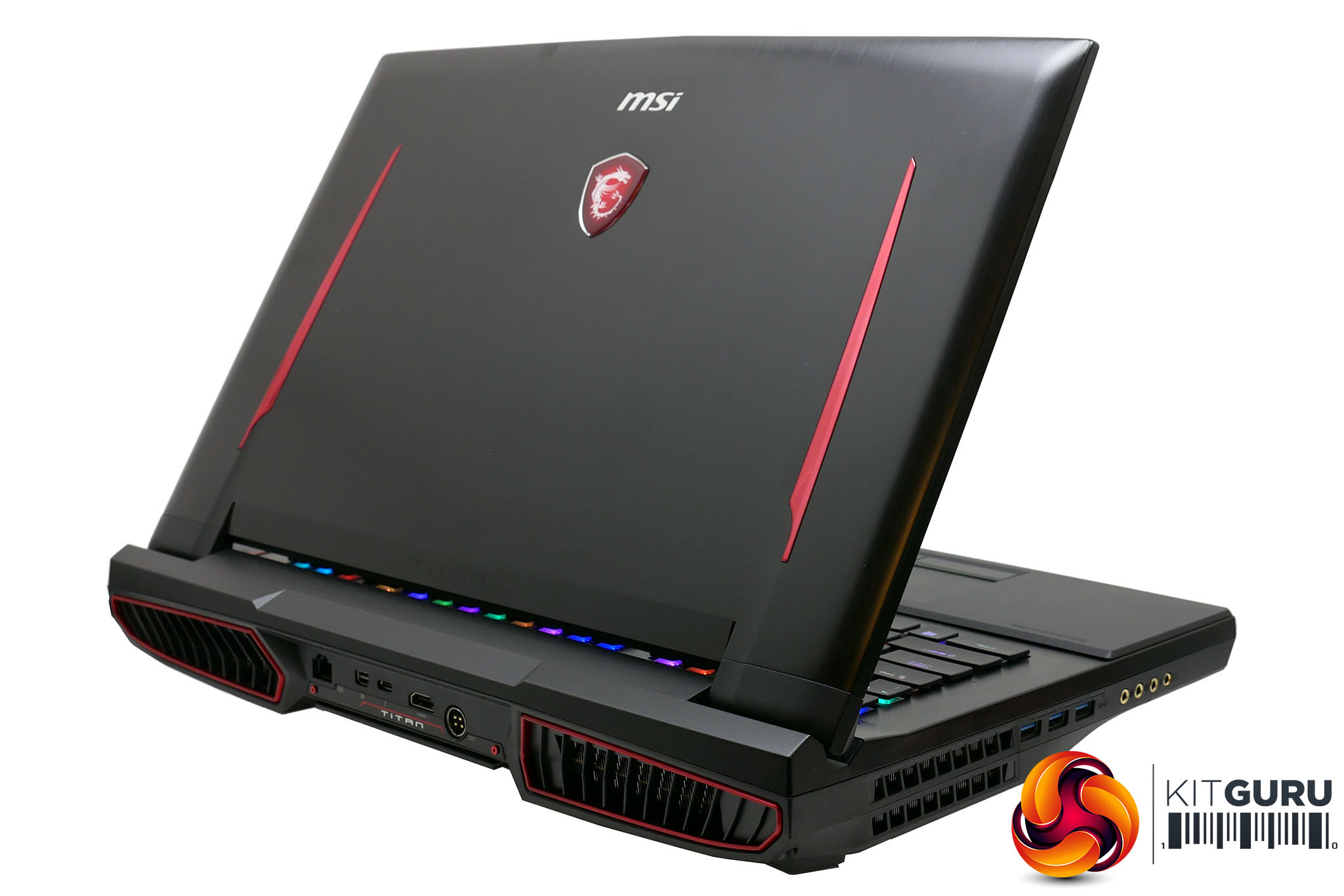
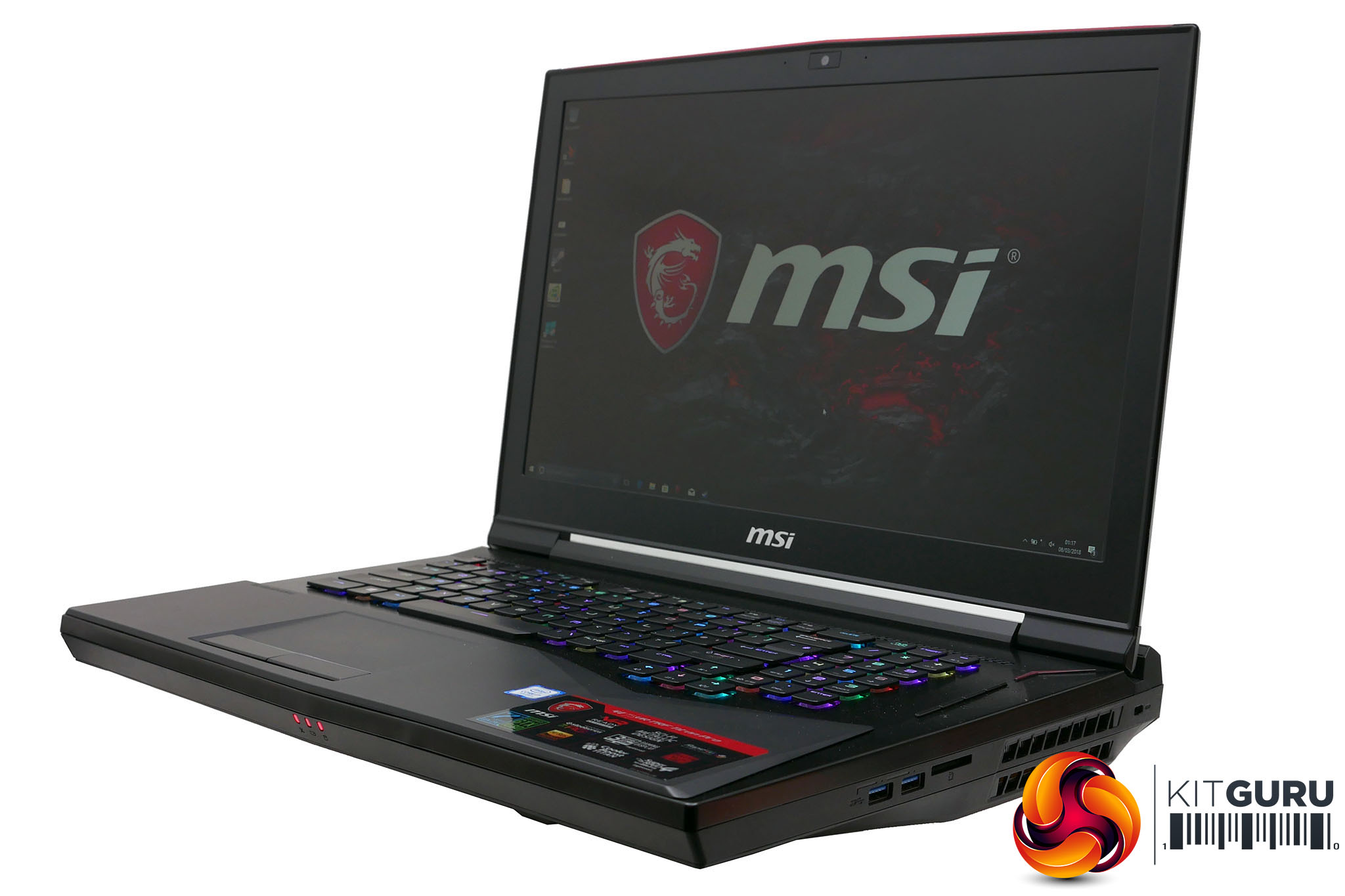
What’s more, the laptop itself is fairly uninspiring too. The top and keyboard surround has a brushed aluminium finish, there are a few red highlights and there’s plenty of jaunty angles on show but there’s no real panache or sense of cohesion.
The bulk of the machine is plastic and although perfectly sturdy, there’s none of the heft and sense of quality you get with more typical premium laptops.
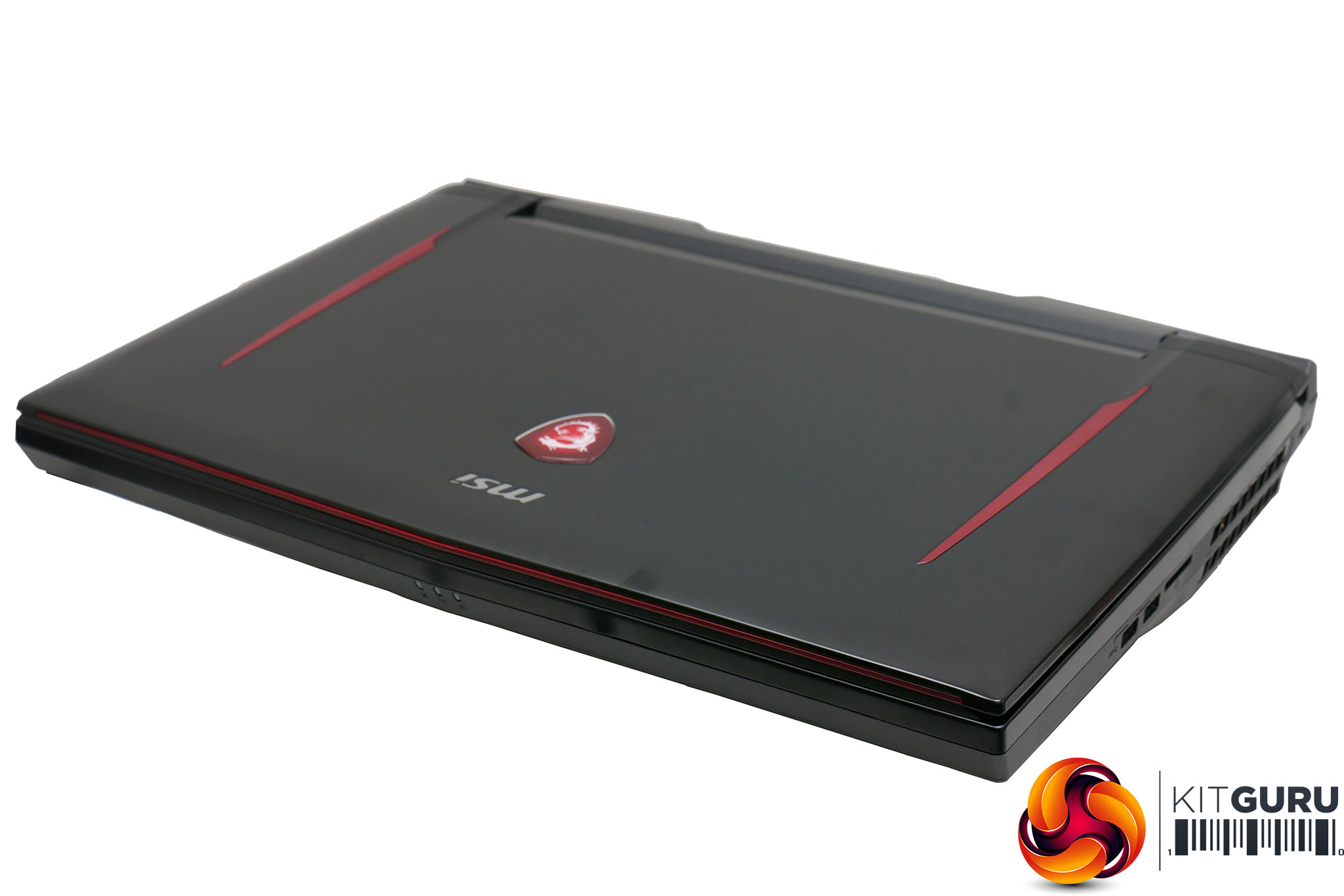
Of course, it doesn’t help that this is a huge beast of a machine that is up to 58mm thick and weighs 4.5kg. Any concession to style or slimness, such as the tapered front edge pales in comparison to the sheer bulk of the rest of the machine.
None of this is unique to the GT75VR – such gaming laptops are all about compromising everything else in the name of performance – but it’s worth noting just how not special this machine feels in terms of design and build, considering its price.
So a design icon it isn’t, but boy does this machine have a lot else going for it. The core specs are mouth-watering.
An Intel Core i7-7700HQ leads the way. This quad-core, hyper-threaded chip runs at between 2.8GHz and 3.8GHz. That’s quite a bit slower than the desktop 7700K but it’s still plenty powerful enough for any gaming needs.
Taking care of graphics duties is an Nvidia GeForce GTX 1080 8GB. With Nvidia’s latest mobile graphics chips being the same as their desktop counterparts, you get true GTX 1080 performance too.
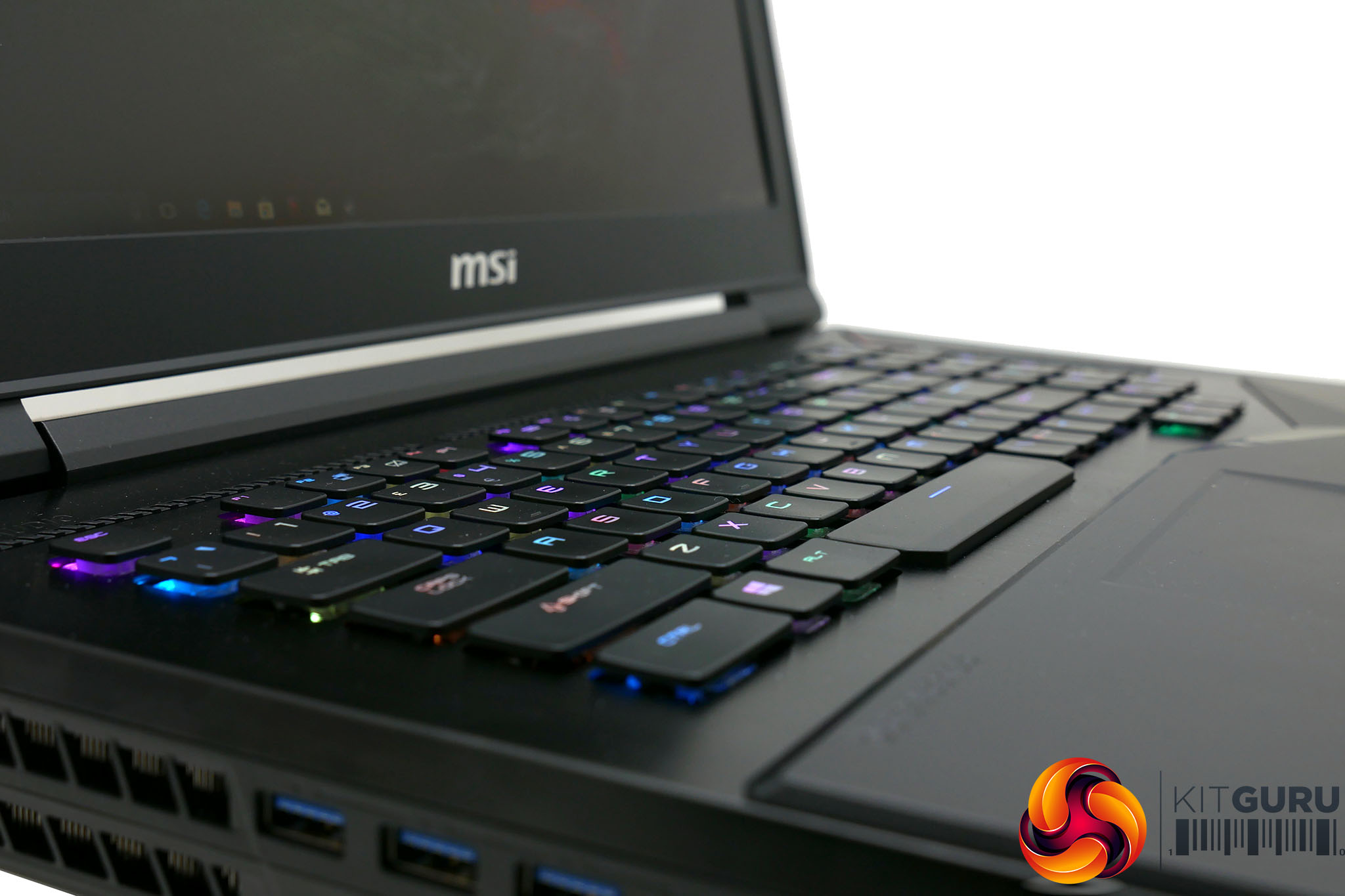
For RAM, you get 32GB of 2400MHz DDR4 in a two-stick configuration. Meanwhile storage is taken care of by two 256GB Samsung SM961 SSDs. These are TLC NVMe M.2 drives with rated read and write speeds of 3100MB/s and 1400MB/s. However, MSI has bumped things up another notch by running them in RAID 0.
This makes for potentially even greater performance but also runs the risk of complete data loss if there’s a problem with the drive. Data can be recovered from corrupted RAID arrays but not easily so with a system like this you’ll want to be sure you have a water-tight backup regime.
Making all these tasty treats even more delectable is that it’s easy to do some upgrades yourself. As ever with laptops, the CPU and GPU are basically off limits but the hard drive and SSDs are all easily accessed thanks to the entire bottom section of the laptop being removable. There are also two more memory slots and you can access the wireless module, speakers and comprehensive cooling system.
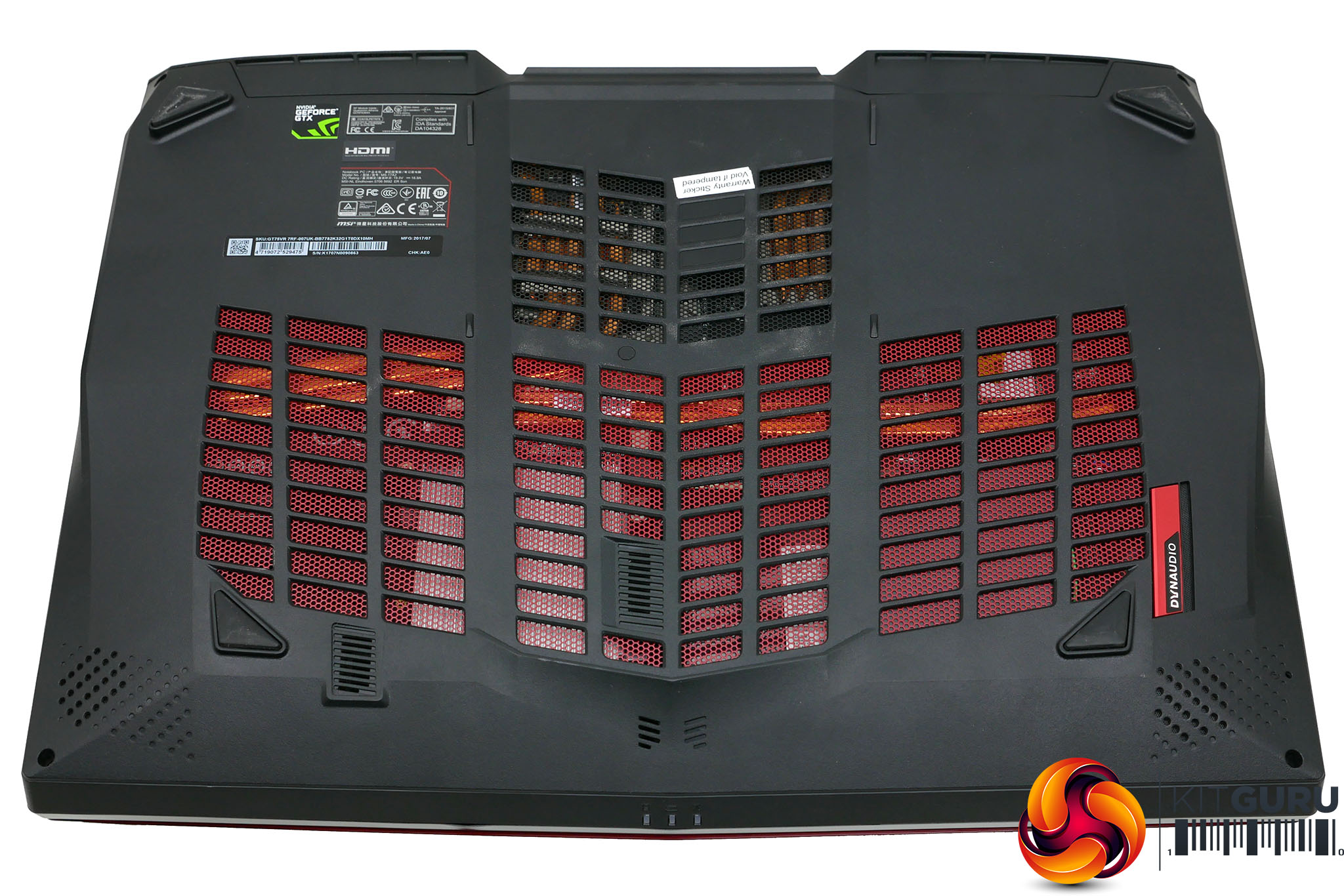
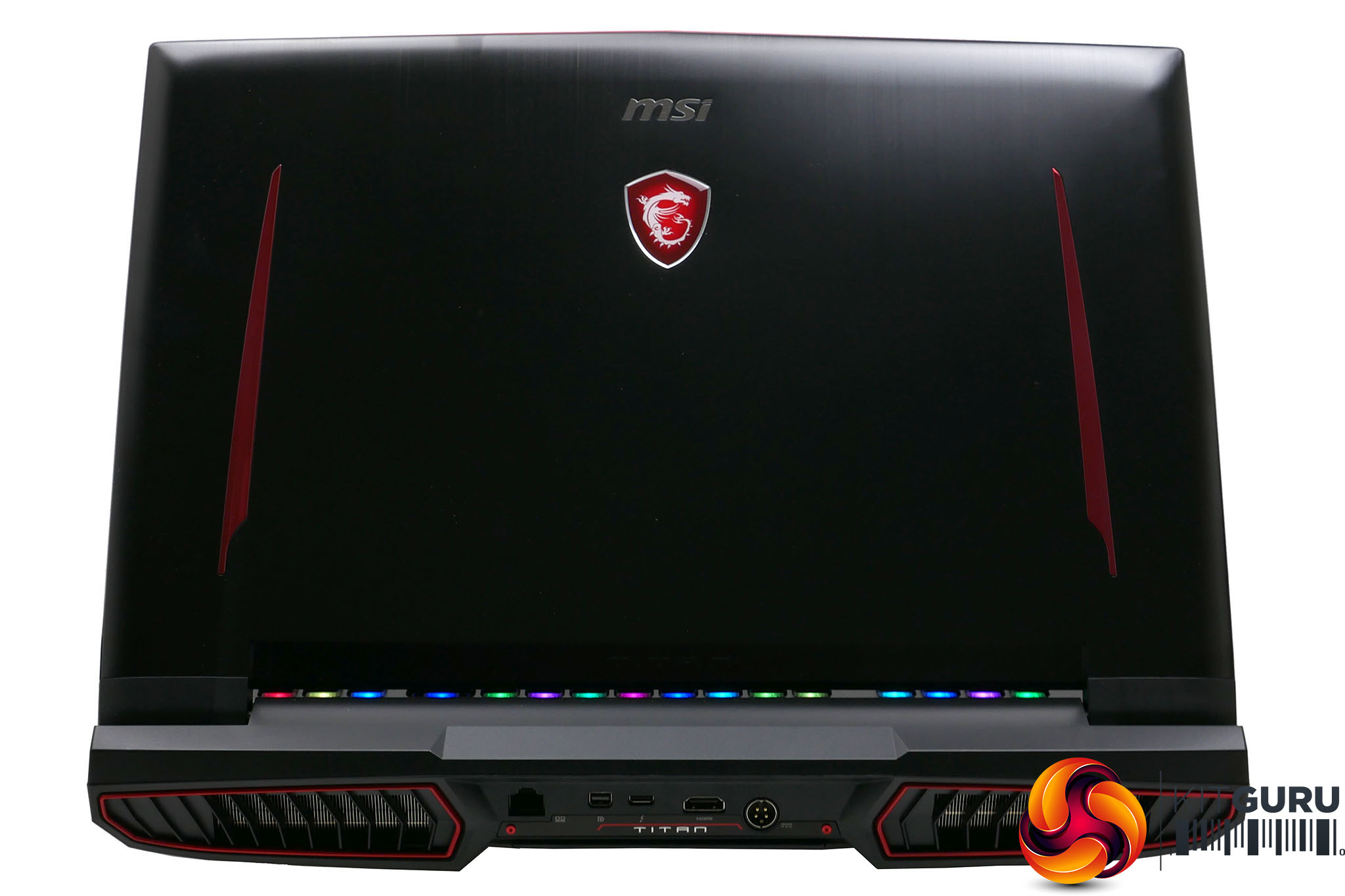
It’s interesting to note, though, that the use of space isn’t the most efficient we’ve seen. It certainly seems like MSI could’ve slimmed things down a little bit with some slightly more inventive cooling placements and the like. But, given the laptop would still have been gargantuan, we can see why it didn’t bother.
Moving on to connectivity and it’s as ample as you’d expect for a machine this size. Round the back is the power input – a hefty four pronged thing that leads to an enormous power brick – an HDMI socket, a Thunderbolt port, a mini DisplayPort and a gigabit Ethernet socket.
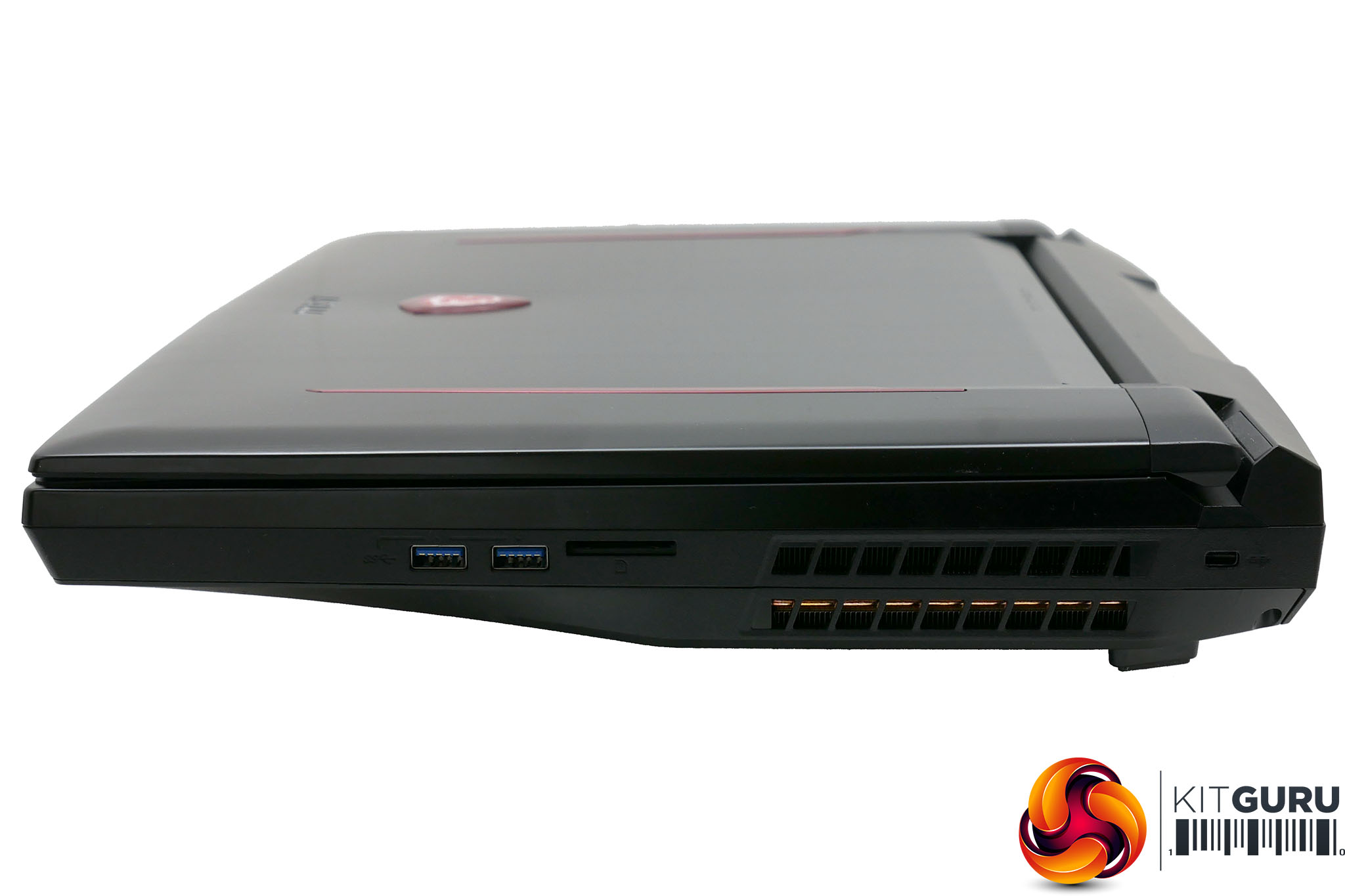
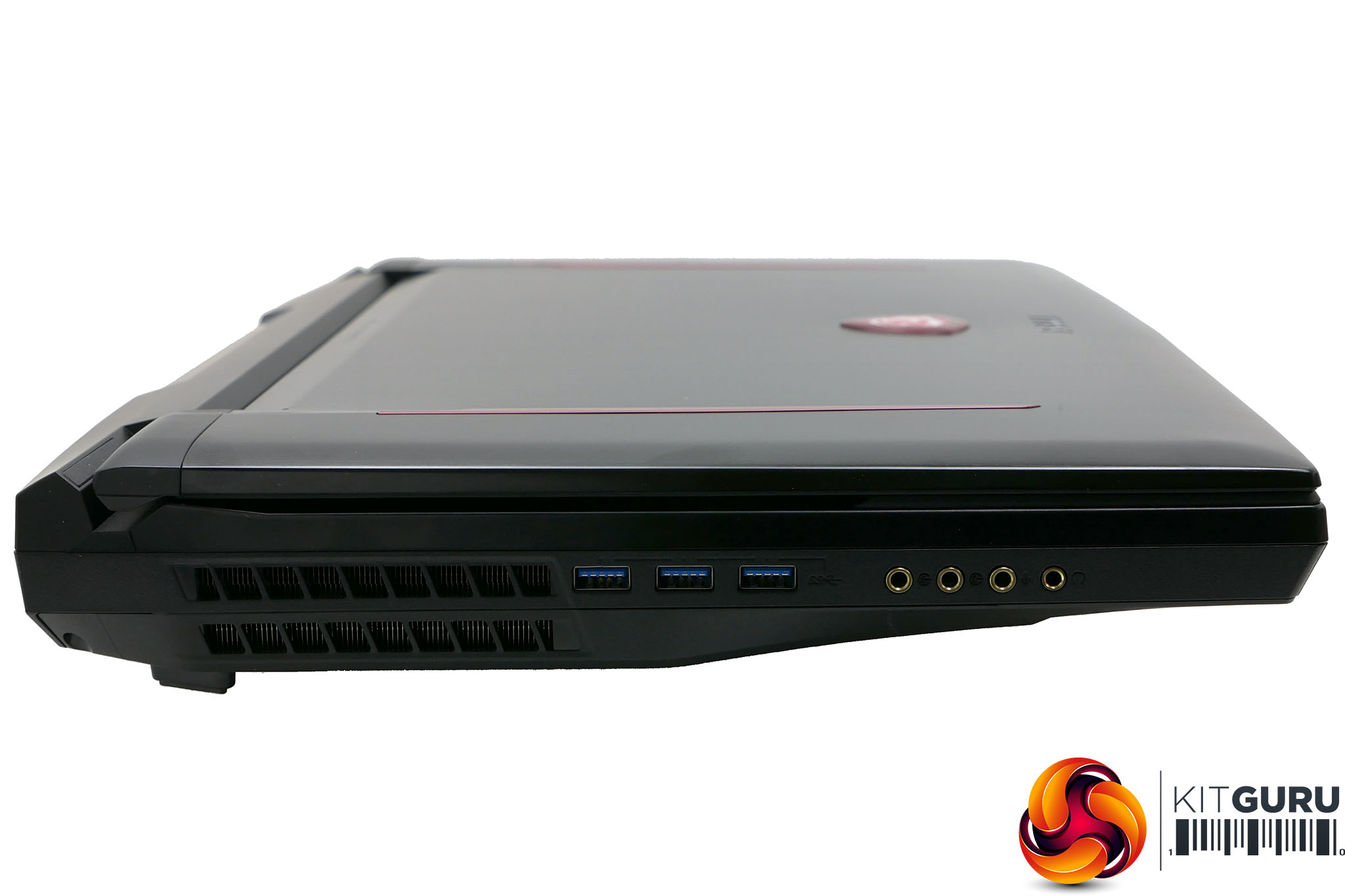
On the left are three full-size USB 3.0 ports as well as four jack sockets for surround sound audio output. Finishing things off is the right side that has another couple of USB 3.0 ports, an SD card reader and a Kensington lock slot. Both sides and the back also have huge openings for all the cooling ventilation.
MSI has teamed up with SteelSeries to create the keyboard for this laptop. It uses a form of low-profile mechanical keyswitch for a clickarific typing experience, plus of course it’s RGB backlit and you get a full set of keys including a numpad.
However, all is not well with the key layout. It’s great to see full-size cursor keys but the numpad is a strange layout that’s missing the fourth column of keys, so those used to rapidly typing in calculations on a normal numpad will find it takes a bit of getting used to.
Moreover, the layout isn’t a proper UK style one with a large Enter key and small left Shift key. You still get UK labelling – so there’s a pound sign, and the @ sign is in the right place – but for touch typists, the slightly different feel will again take some getting used to.
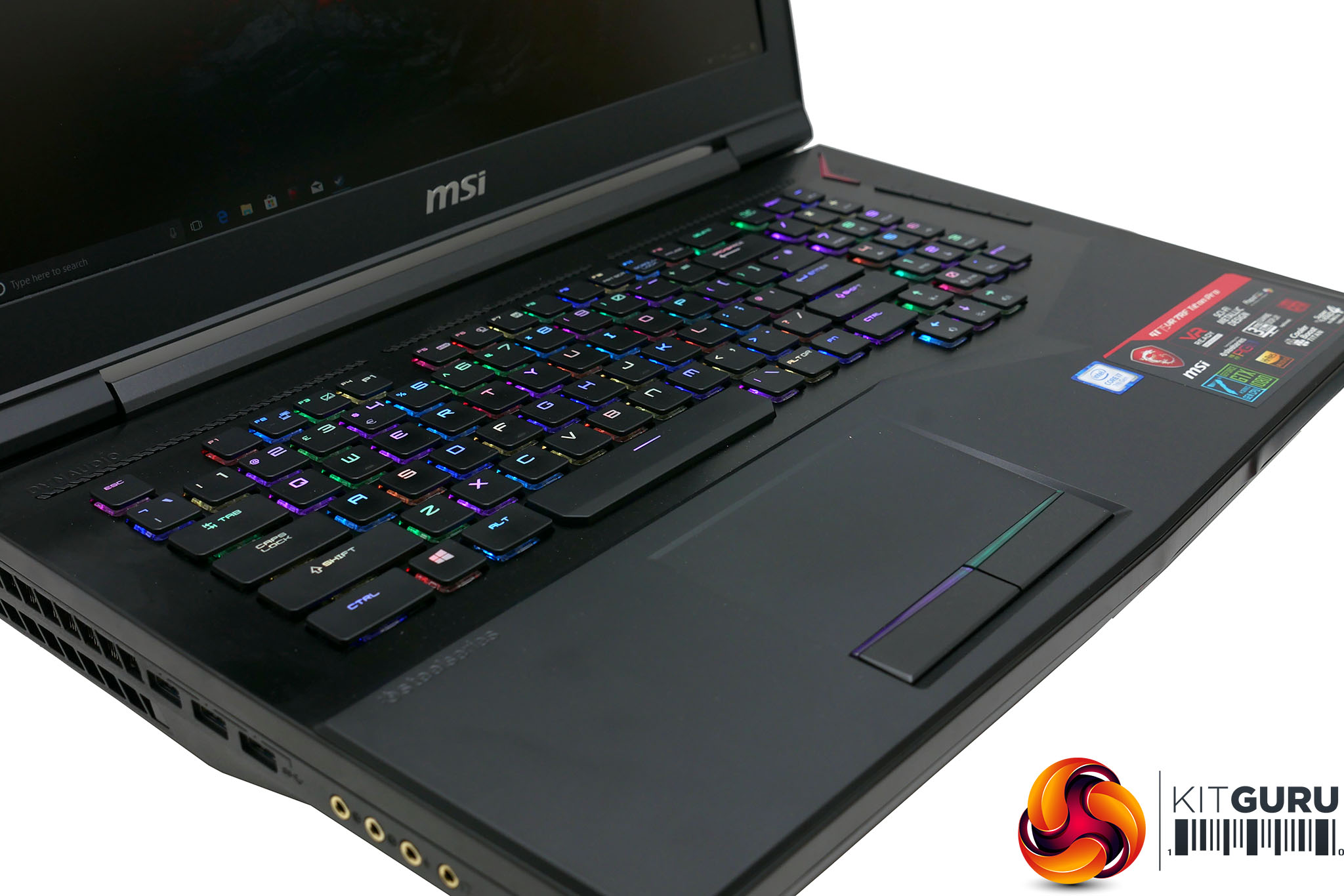
Then there’s the action of the keyswitches. The keys have an impressively sharp, light yet defined action with a very pronounced click but the action is almost too short. You have to be very precise and careful in order not to make typos – it’s a far cry from the somewhat forgiving, heavy-handed feel of a desktop mechanical keyboard.
All of which isn’t to say it’s a bad keyboard by any stretch. It just didn’t feel as immediately comfortable and easy to use as expected.
Also, having the default colour scheme for the backlighting be an ever-changing array of random colours didn’t strike us as the best way to sell it, but the lighting effects can be tailored to your liking using SteelSeries’ Engine software.
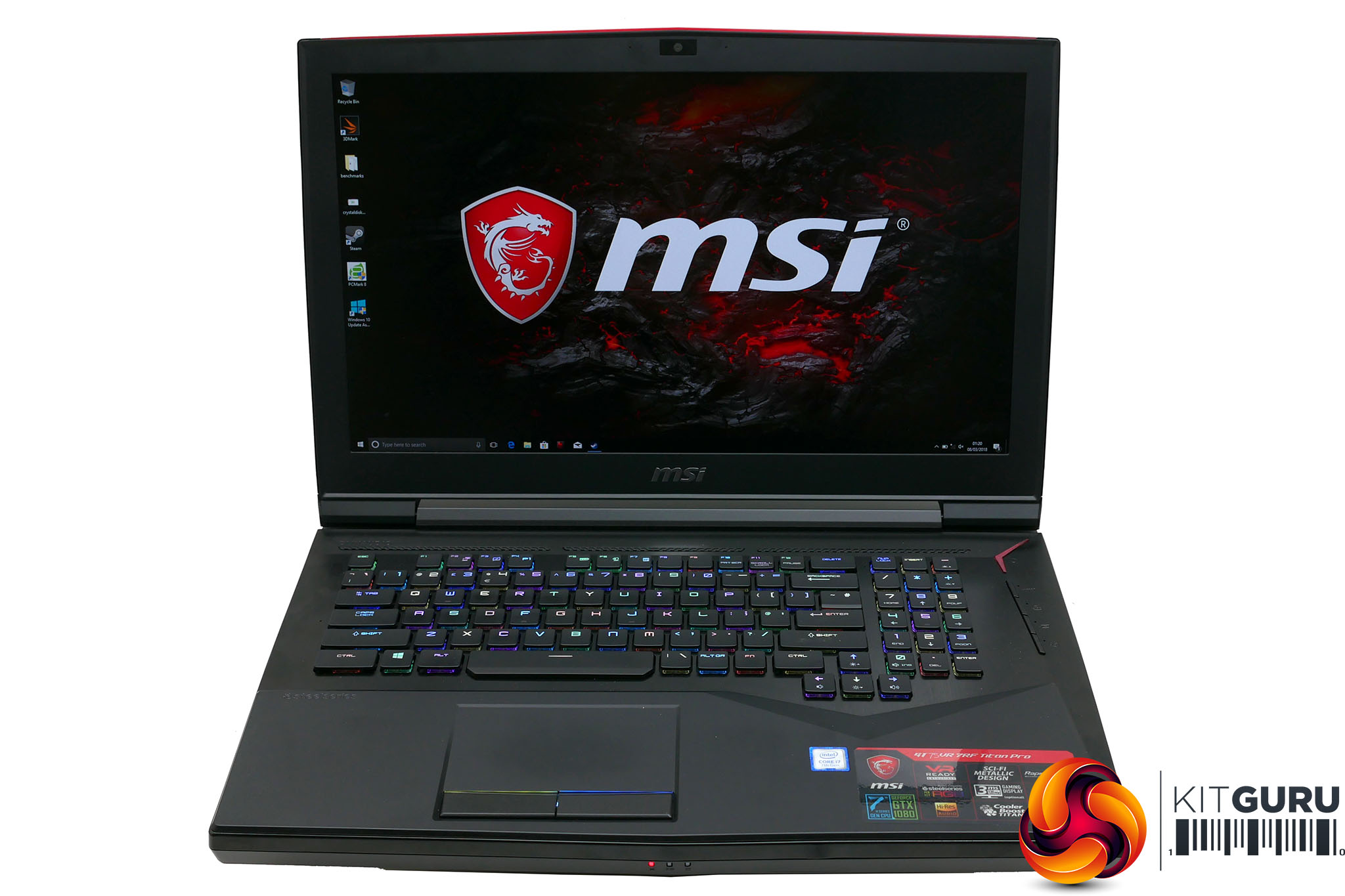
As for the screen, this will perhaps be the make or break moment for this laptop, for many people. Largely it delivers decent image quality. A maximum brightness of 276nits is a little low but the anti-glare finish means it still works reasonably well in bright environments.
What’s more, a contrast ratio of 1265:1 is impressive and sure enough the image has the sort of depth and richness that a strong contrast provides. It also arrives with reasonably accurate colour reproduction. A gamma setting of 2.11 is close enough to the ideal of 2.2 and while a white point colour temperature of 7275K is technically a little high, in use there’s no obvious colour cast to the image.
Meanwhile, the 120Hz refresh rate is of course fantastic for gaming. Sure, desktop monitors can hit 144Hz, or even 240Hz, but the jump up to 120Hz is still enough to get you a really snappy feeling display that’s good enough for competitive eSports gaming.
The problems, then, are two-fold. The first is that a resolution of 1920 x 1080 may be ideal for competitive gaming and entirely adequate for most uses but it’s not exactly cutting edge and, moreover, it hardly means the GTX 1080 graphics card is being used to its full potential.
Then there’s the use of a TN panel. It means you’re again getting the best possible gaming performance but for everything else – including non-eSports gaming – the better viewing angles and image stability of an IPS screen would’ve been welcome.
All told, if you’re after a laptop purely for competitive gaming then this display fits the bill, but it’s less of an all-rounder.
When it comes to audio, MSI has fitted the GT757VR with a hefty-looking speaker configuration. You get an extra sub woofer as well as the two conventional drivers, for a 2.1 configuration.
It gets reasonably loud too, though the sub isn't exactly room-rumbling. It's a nice step up from more typical laptop speakers but it's maybe not as hefty a sound as you might expect from such a large machine.
To test the MSI T75VR, we have pushed it through our standard array of benchmarks and tests. We have tested CPU performance, GPU performance, drive performance, thermals, screen quality and battery life to give a comprehensive view of the laptop.
Here are the benchmarks you can expect to find in this review:
- Cinebench R15
- CrystalDiskMark
- 3DMark Fire Strike
- 3DMark Fire Strike Extreme
- 3DMark Time Spy
Screen quality was tested using an Xrite iDisplay Pro colorimeter and DisplayCal software.
We also tested 1080p gaming performance with the following games:
- Deus Ex: Mankind Divided
- Rise of the Tomb Raider
Here are the machines we’ve used for comparisons against the Razer Blade Pro:
CINEBENCH R15 is a cross-platform testing suite that measures hardware performance and is the de facto standard benchmarking tool for leading companies and trade journals for conducting real-world hardware performance tests. With the new Release 15, systems with up to 256 threads can be tested.
CINEBENCH is available for both Windows and OS X and is used by almost all hardware manufacturers and trade journals for comparing CPUs and graphics cards.
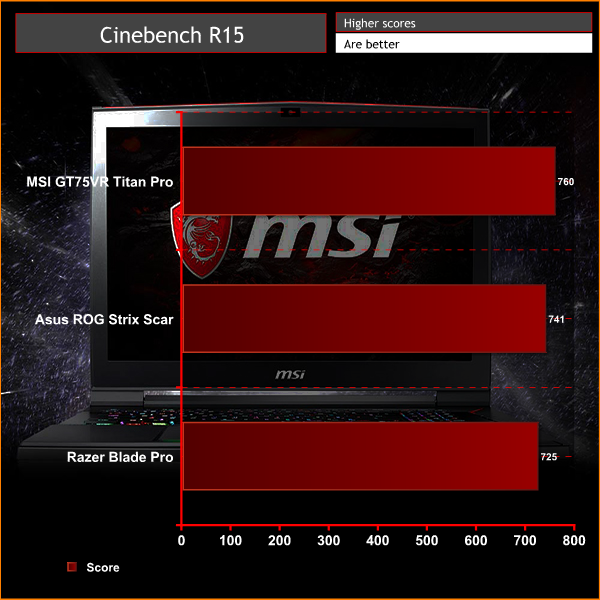
With essentially the fastest laptop CPU you can buy onboard, it’s no surprise the GT75VR puts in an impressive performance in our Cinebench test. Its multi-core score of 747 is among the fastest we’ve seen for laptops using this processor and its single-core score of 163 is mighty nippy too.
Meanwhile, comparing to desktop chips, there is a noticeable step up to the likes of the 7700K – which is to be expected given their relative clock speeds – but this is somewhat academic as there’s more than enough performance here for any gaming use, especially given the relative limitation of a 120Hz screen.
CrystalDiskMark 5.1.1 is an industry standard benchmark for testing the raw speed of a storage device. It uses a test file to variously write data to or read data from the drive, checking for sequential read and write speed and random read and wirte performance, with it also testing performance at various queue depths. The size of the test file can be selected from 50MB to 32GB. We test using the default 1GB file size.
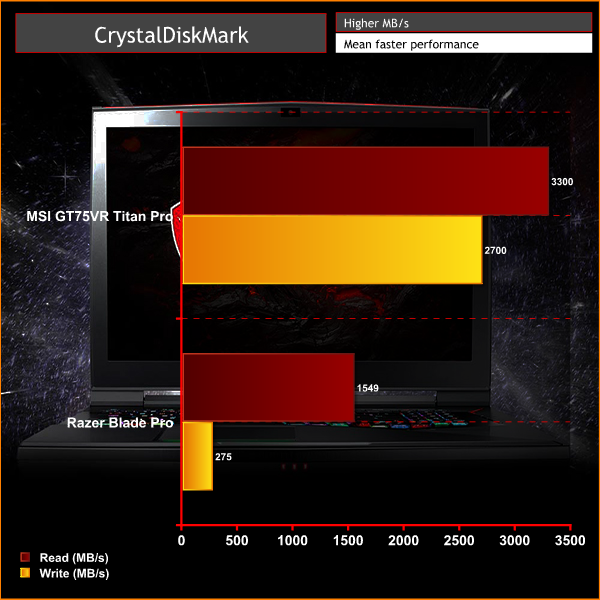
MSI’s fancy RAID 0 storage doesn’t disappoint when it comes to raw performance. The two 256GB drives combine to provide blistering read and write speeds of 3,300MB/s and 2,700MB/s respectively.
However, those figures aren’t meaningfully faster than a single 500GB Samsung 960 Evo. Given the extra data-loss risk of running RAID 0, we know which we’d prefer. Then again, you can always disable the RAID 0 and use the drives individually – or even run them in RAID 1 if you’re really paranoid about your data – and they’re still fast enough on their own that most users won’t notice the difference anyway. The PM961 drives on their own can deliver 1600MB/s read and 1500MB/s write.
Another industry-standard benchmark, 3DMark provides a number of different tests for taxing graphics cards and emulating different gaming challenges. We use the Firestrike and Firestrike Extreme tests, which run the same test but at two different resolutions: 1080p and 1440p.
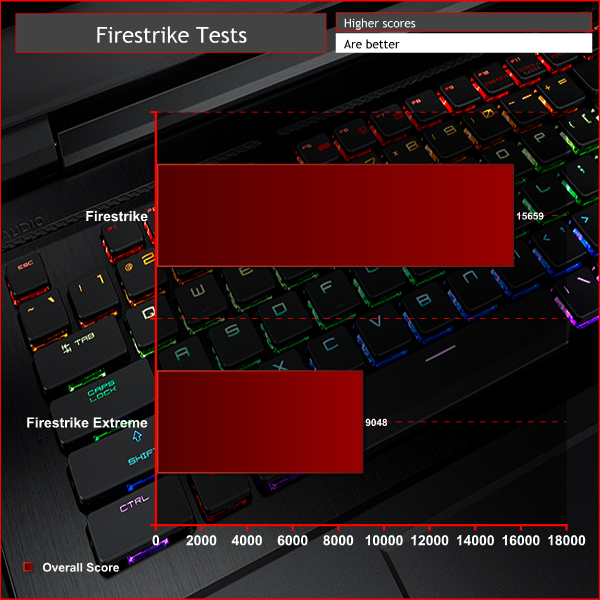
Thanks to its mighty Nvidia GeForce GTX 1080 graphics card, this laptop blitzes our 3DMark tests.
Its overall score of 15659 is not the absolute highest we’ve seen but it’s still a huge figure. Likewise the even more demanding FireStrike Extreme test where a score of 9048 is there or thereabouts with other GTX 1080-equipped laptops.
Next up we ran some real-world gaming tests, using Deus Ex: Mankind Divided and Rise of the Tomb Raider. We tested at 1080p resolution then bumped up the in-game detail settings from High to Very High. We used each game’s in-built benchmark.
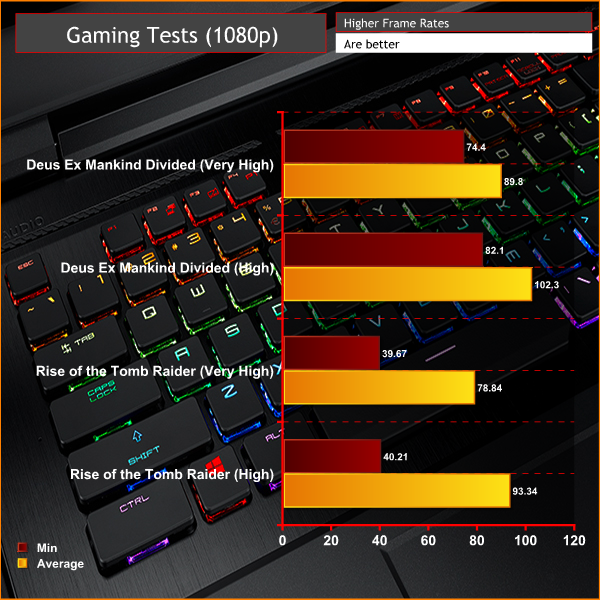
This laptop made mincemeat of Deus-Ex: Mankind Divided and Rise of the Tomb Raider despite them being two of the latest, most graphically demanding games available.
In the former title, at 1080p with detail settings on medium, you’ll get over 100fps average while at High settings it’ll still hit over 75fps. It’s a similar story with Tomb Raider. Nearly 100fps is achievable at high detail settings and at ultra detail you’re still getting nearly 90fps.
As alluded to early, the GTX 1080 is almost overkill for this screen resolution. Neither of these games quite hit 120Hz at 1080p but plenty of less demanding titles will and most eSports titles will be delivering well beyond this figure.
To measure idle temperatures, a reading was taken after having Windows open on the desktop for 30 minutes. A CPU reading under load was taken with Prime 95’s SmallFFt test running while a GPU-load reading was taken with 3DMark Fire Strike running.
Noise levels were tested using a decibel meter held 30cm from the front and centre of the laptop.
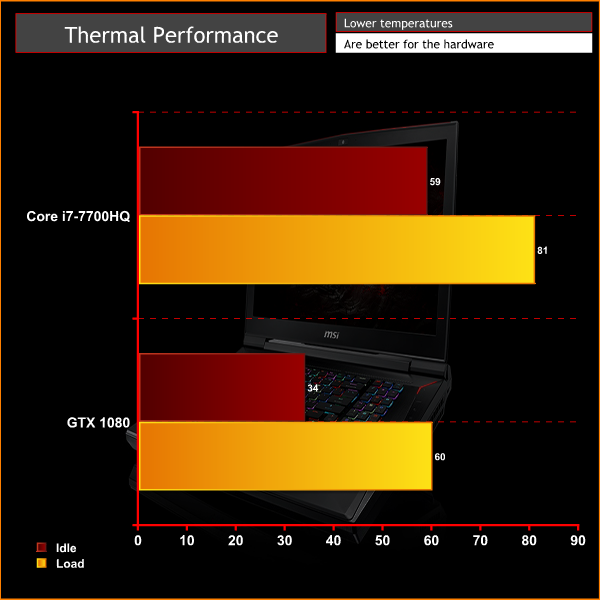
You’d certainly hope a machine as large as this can keep its innards running nice and cool, and sure enough, it hardly breaks a sweat. That said, at idle the CPU is a little hotter than expected, sitting at 59C, but the GPU is as cool as a cucumber, at just 34C.
Meanwhile, under load, the CPU again gets a little hotter than you might expect but is still well below a level that would cause concern, at 81C. As for the GPU, it hit a mere 60C.
All told, they’re good results that mean you should be able to game comfortably for hours on end.
However, when it comes to acoustics, this laptop is less accomplished. The 48dB fan noise under load is certainly quite loud and noticeable, but is largely forgivable given the amount of work that’s being done.
Instead it’s the idle noise that’s a concern. Not only does the fan never seem to shut off completely but while in its lower speeds it emits an electric buzzing, humming noise. By no means is it particularly loud – just a couple of dB above ambient – but if you’re just working or watching video without headphones on, it’s a bit distracting.
It’s not a deal-breaker but it’s a small thing we’d like to see improved upon.
Battery life on enormous laptops like this is all but meaningless but, for the record, using the PC Mark 8 Home battery test this laptop lasted two hours and ten minutes. You might be able to squeeze closer to three hours out of it if you drop the screen brightness down and turn off any extraneous apps, but largely that’s your lot.
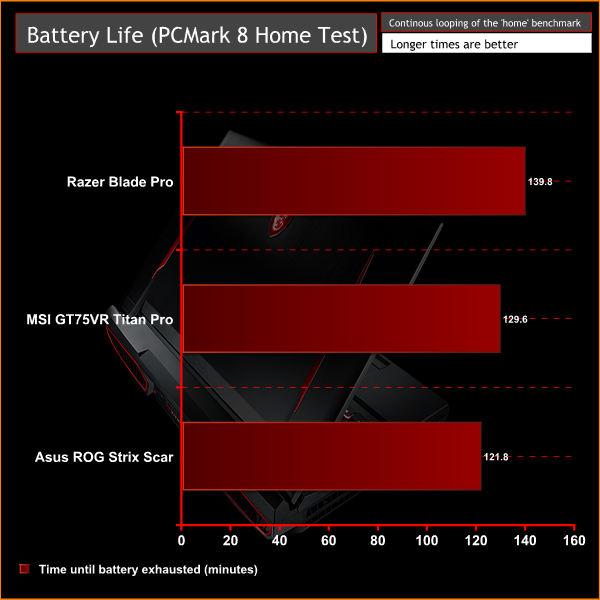
Meanwhile, if you’re considering gaming on battery power, you’ll struggle to get an hour. All of which is typical of machines like this.
The MSI GT75VR 7RF Titan Pro is a hugely powerful laptop that offers just about the pinnacle of portable performance. The combination of an Intel 7700HQ and Nvidia GTX 1080 simply monsters through any game and of course is plenty for anything else you might want to do on a machine like this.
The 17-inch, 120Hz screen also offers impress quality considering it’s a TN panel and provides the ultimate in laptop eSports gaming.
Add in a super fast SSD, plenty of secondary storage, loads of connectivity and a highly responsive keyboard and there sure is a lot to like. At £3,000, it even offers reasonable value, considering how expensive gaming laptops are generally.
However, we have several minor quibbles and a couple of bigger ones too.
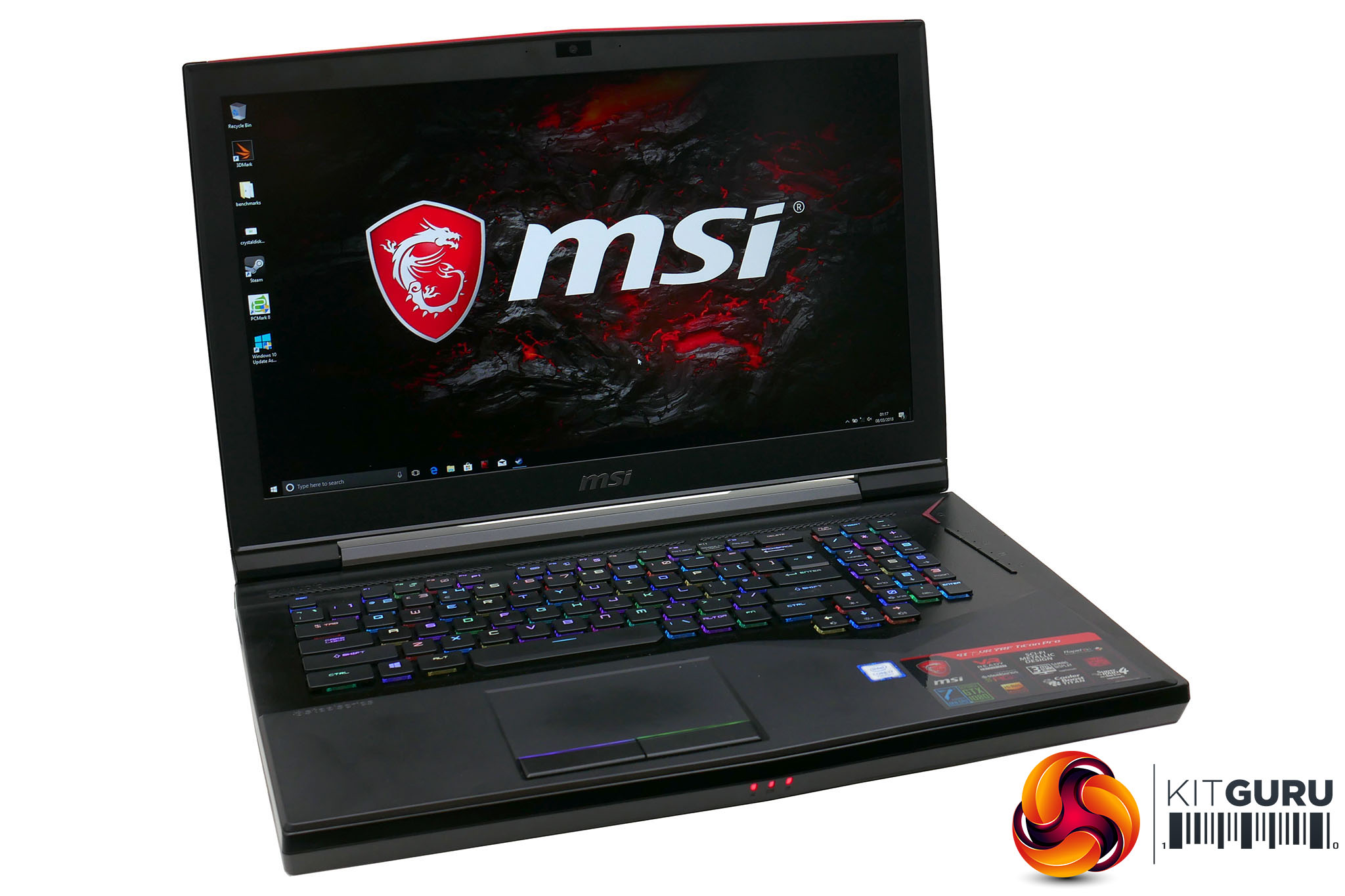
As regards the smaller stuff, the snazzy SteelSeries keyboard didn’t entirely convince compared to either more conventional laptop keyboards or proper mechanical desktop keyboards.
The RAID 0 SSD configuration seems somewhat unnecessary too, as single drives can deliver essentially the same performance. Meanwhile, for such a big machine the speakers weren’t exactly booming and the slightly noisy fan was a shame.
The biggest problem, though, is the use of a 1080p TN screen. That’s great for eSport gaming but for single-player and more casual games where you just want to enjoy the visuals, it doesn’t make for the most impressive display possible. Opting for a 120Hz IPS display would’ve made all the difference.
Similarly, the overall styling and build, while perfectly adequate doesn’t exactly scream £3000! This is a far, far cry from the likes of the Razer Blade Pro.
All of which isn’t to say this laptop isn’t any good, but just be aware of its compromises before you buy.
Kitguru says: A monster of a gaming laptop with hugely impressive performance. However, it's not without compromise.