 KitGuru KitGuru.net – Tech News | Hardware News | Hardware Reviews | IOS | Mobile | Gaming | Graphics Cards


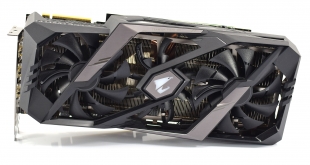
Our first aftermarket RTX 2080 review was the Gigabyte Gaming OC model which was essentially a triple-fan cooler on top of a reference PCB. Gigabyte's Aorus brand, however, is known for delivering feature-rich custom cards, and this is certainly the case with the RTX 2080 Xtreme 8G we are looking at today. It's one of the most expensive 2080s currently going, though, with a price of £899 here in the UK. Can it justify the extra £150 over Nvidia's Founders Edition?
For £899, it is safe to say Aorus is delivering a number of interesting features that it will hope justifies the extra expense for its RTX 2080 Xtreme 8G. For one, the card comes factory overclocked to 1890MHz – the joint fastest out of the box clock speed we have seen so far – while it also boasts a whopping 12+2 power phase design. On top of that its RGB implementation is quite unique, while there are a total of seven display outputs as well – two more than usual.
| GPU | RTX 2080 Ti (FE) | GTX 1080 Ti | RTX 2080 (FE) | GTX 1080 | RTX 2070 (FE) | GTX 1070 |
| SMs | 68 | 28 | 46 | 20 | 36 | 15 |
| CUDA Cores | 4352 | 3584 | 2944 | 2560 | 2304 | 1920 |
| Tensor Cores | 544 | N/A | 368 | N/A | 288 | N/A |
| Tensor FLOPS | 114 | N/A | 85 | N/A | 63 | N/A |
| RT Cores | 68 | N/A | 46 | N/A | 36 | N/A |
| Texture Units | 272 | 224 | 184 | N/A | 144 | 120 |
| ROPs | 88 | 88 | 64 | 64 | 64 | 64 |
| Rays Cast | 10 Giga Rays/sec | 1.1 Giga Rays/sec | 8 Giga Rays/sec | 0.877 Giga Rays/sec | 6 Giga Rays/sec | 0.65 Giga Rays/sec |
| RTX Performance | 87 Trillion RTX-OPS | 11.3 Trillion RTX-OPS | 60 Trillion RTX-OPS | 8.9 Trillion RTX-OPS | 45 Trillion RTX-OPS | 6.5 Trillion RTX-OPS |
| GPU Boost Clock | 1635 MHz | 1582 MHz | 1800 MHz | 1733 MHz | 1710 MHz | 1683 MHz |
| Memory Clock | 14 Gbps | 11 Gbps | 14 Gbps | 10 Gbps | 14 Gbps | 8 Gbps |
| Total Video Memory | 11GB GDDR6 | 11GB GDDR5X | 8GB GDDR6 | 8GB GDDR5X | 8GB GDDR6 | 8GB GDDR5 |
| Memory Interface | 352-bit | 352-bit | 256-bit | 256-bit | 256-bit | 256-bit |
| Memory Bandwidth | 616 GB/sec | 484 GB/sec | 448 GB/sec | 320 GB/sec | 448 GB/sec | 256 GB/sec |
| TDP | 260W | 250W | 225W | 180W | 185W | 150W |
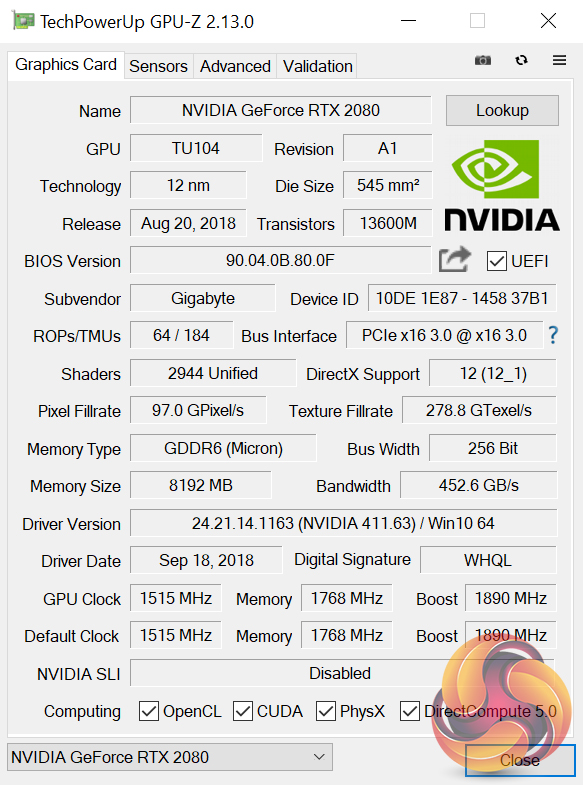
With the same number of CUDA cores (2944), Tensor cores (368) and RT cores (46) as any other RTX 2080, what helps differentiate this Xtreme edition is its 1890MHz boost clock, which is the joint fastest we have seen – tied with the Palit GameRock Premium.
This Aorus card, however, is the first we have seen to ship with overclocked memory – 14140MHz instead of the default 14000MHz. With both of these increased clock speeds, it will be interesting to see how the real-world performance compares to the other RTX 2080 cards we have seen so far.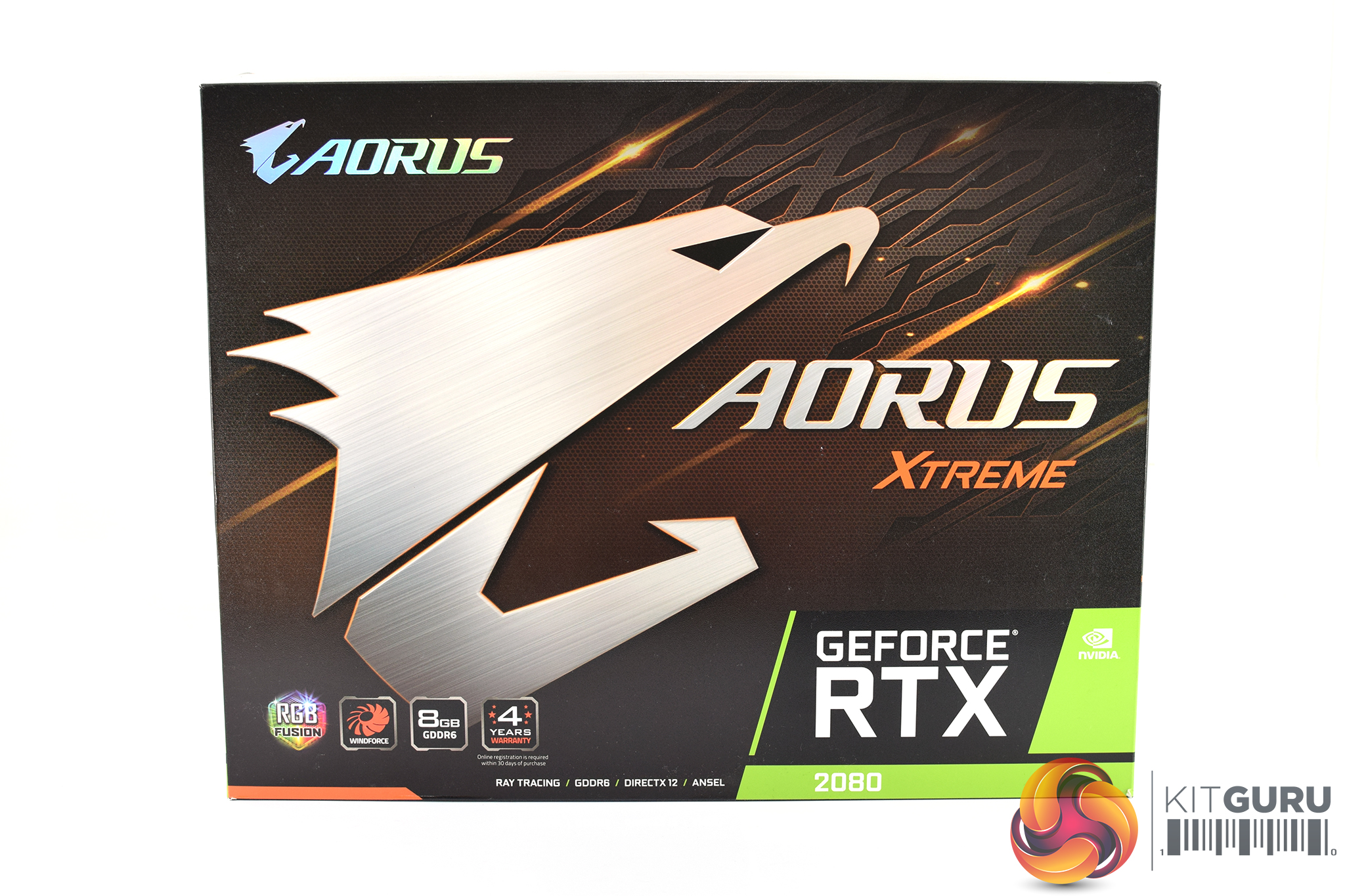
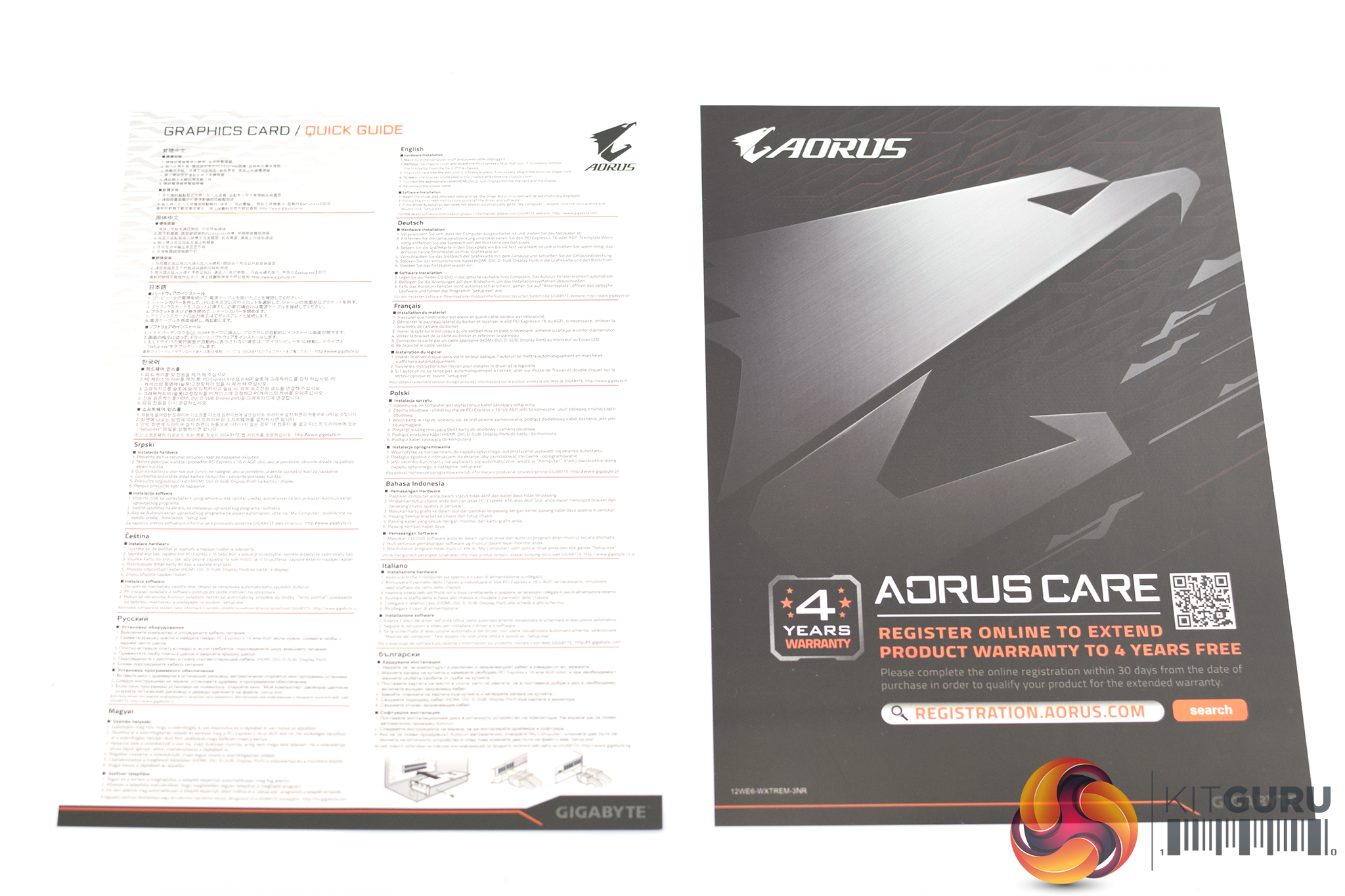
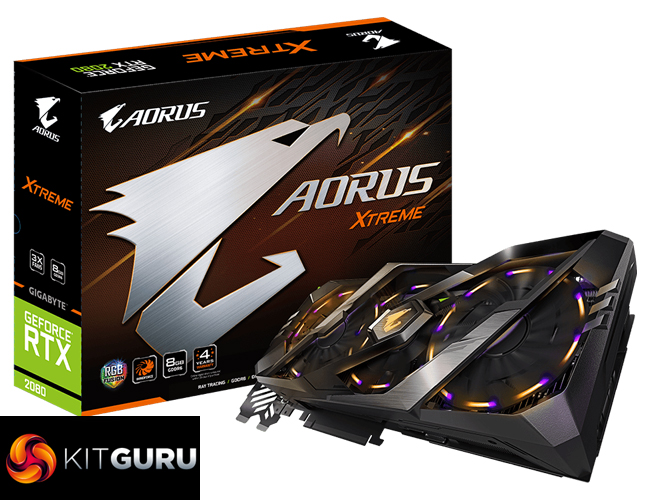
The Aorus RTX 2080 Xtreme 8G ships in a dark box with a very large Aorus logo taking pride of place on the front. There is not an image of the graphics card itself visible.
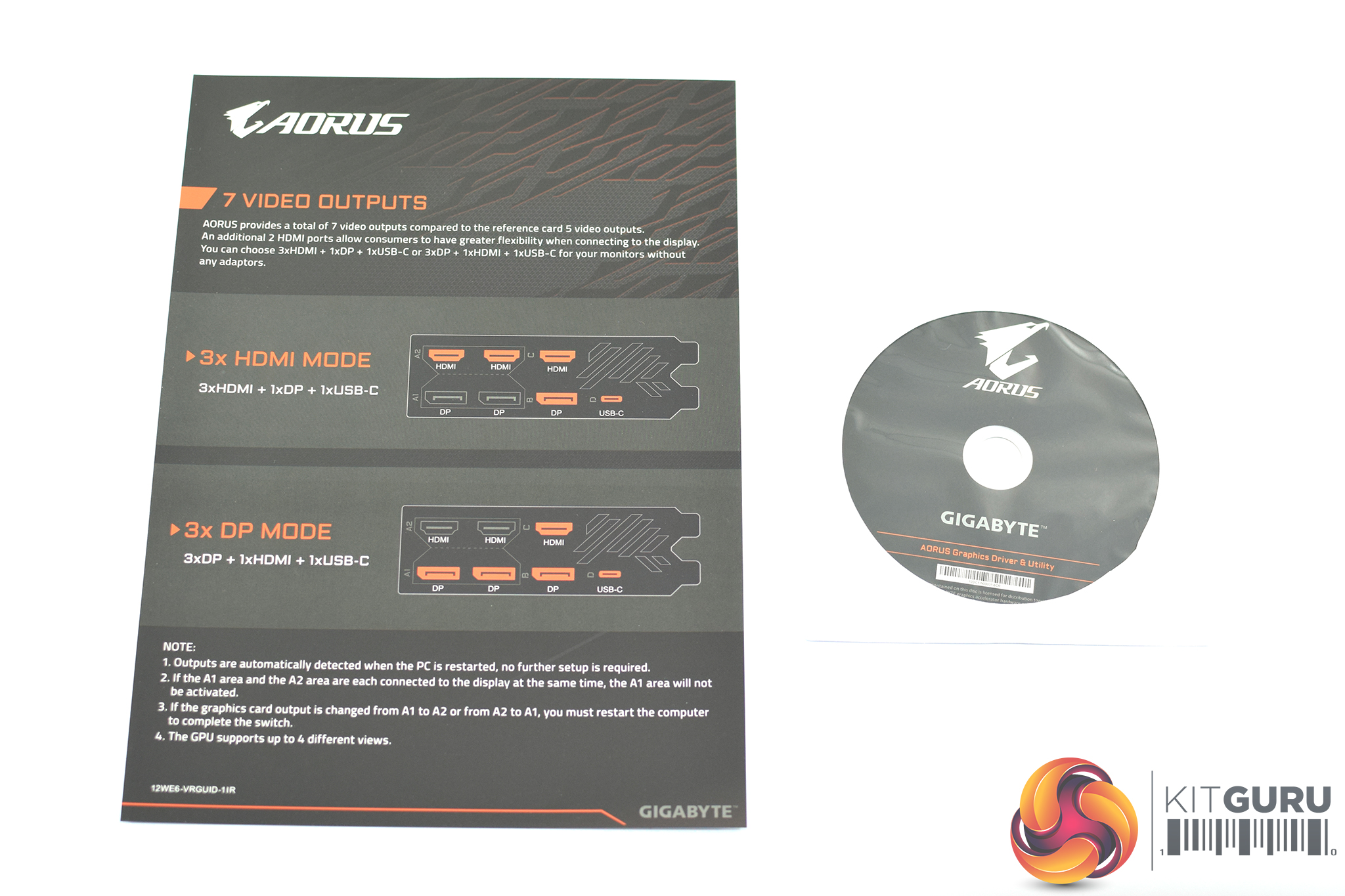
Inside, we find plenty of leaflets and user guides – there is 1x quick start guide, 1x warranty card (which provides an extra year of warranty when you register the product online), 1x driver disk and then 1x display output guide which we will get to later.
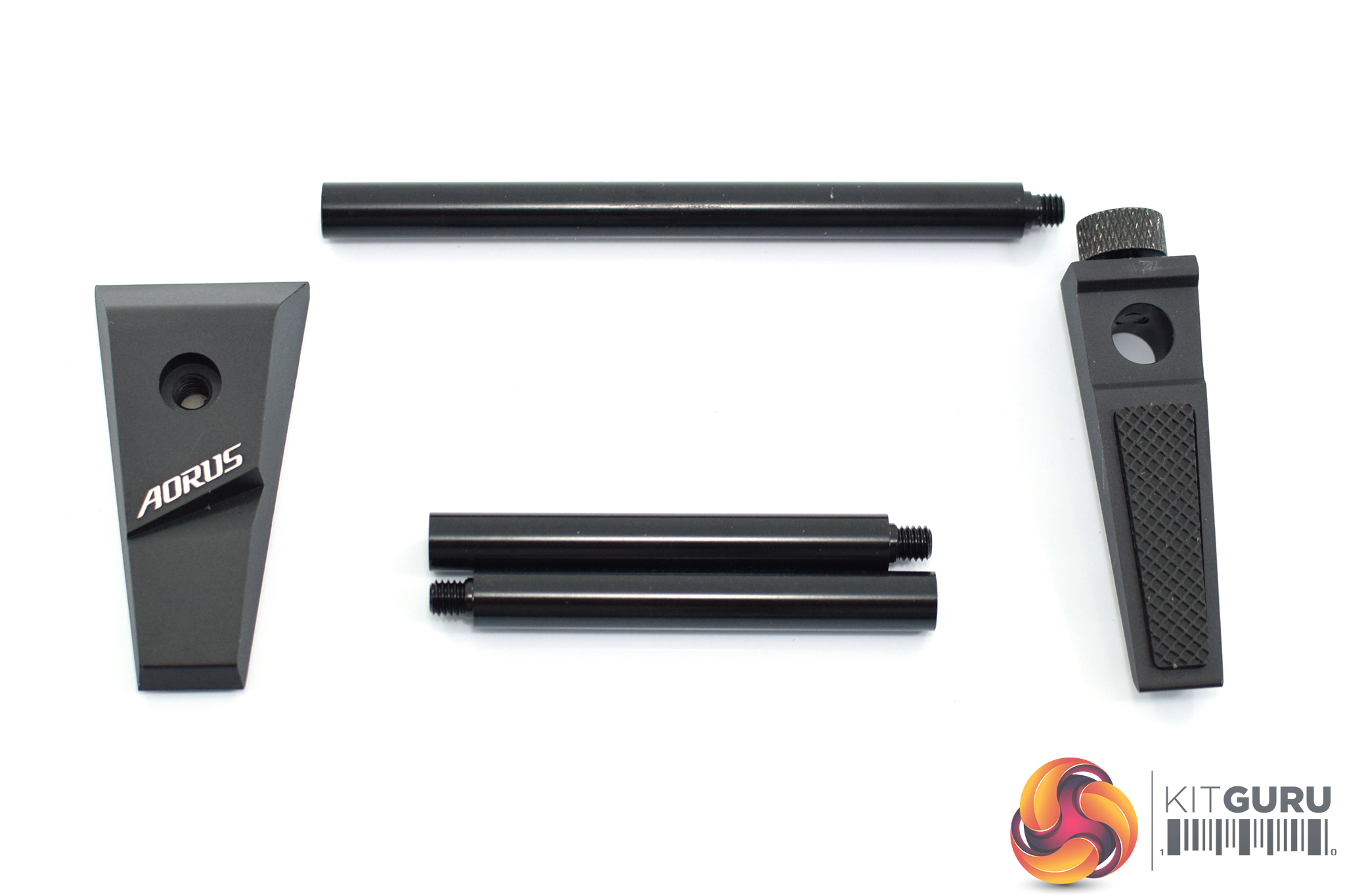
Most interesting is the small bundle of metal rods and small wedge-shaped brackets. As it turns out…
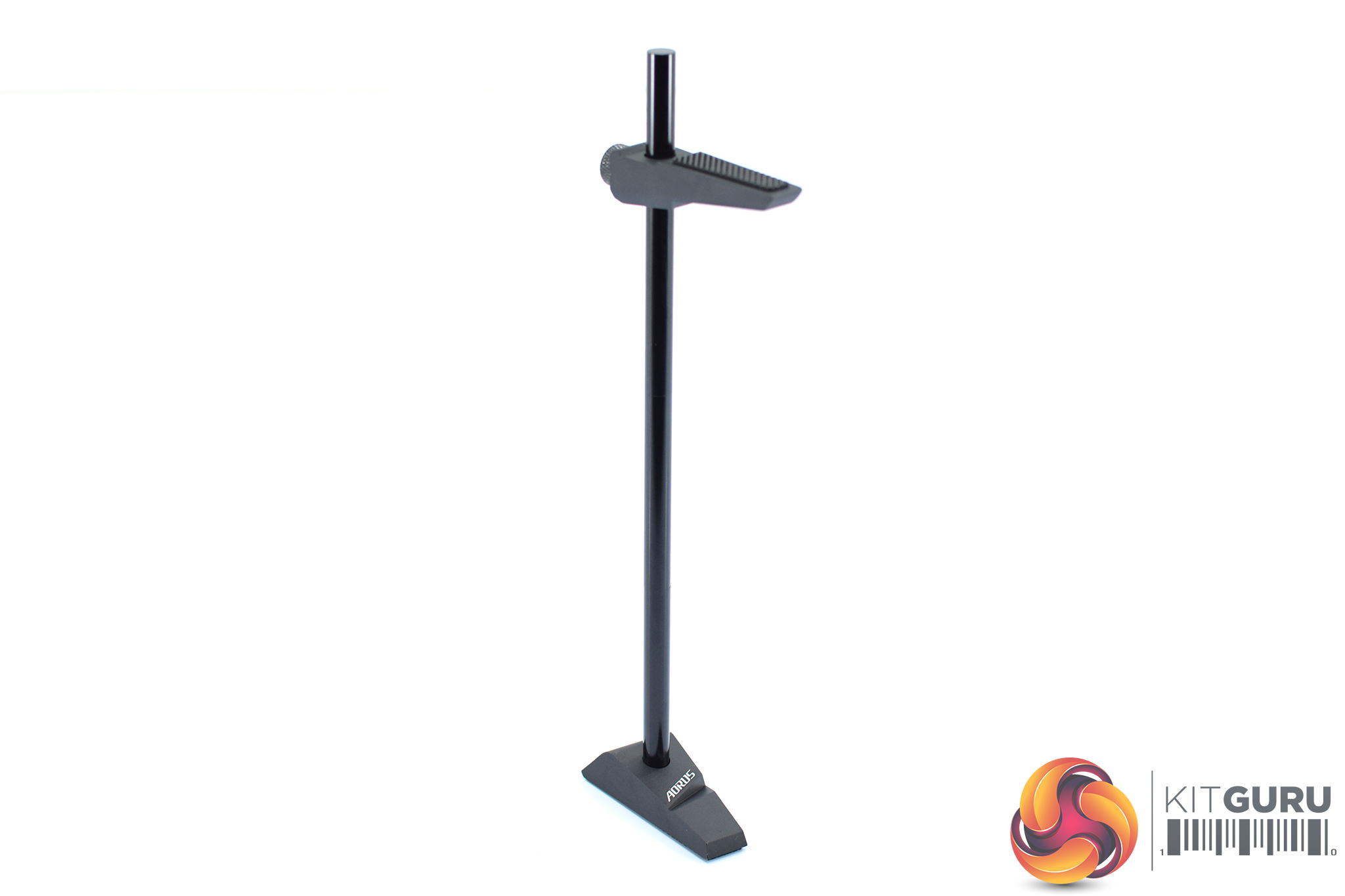
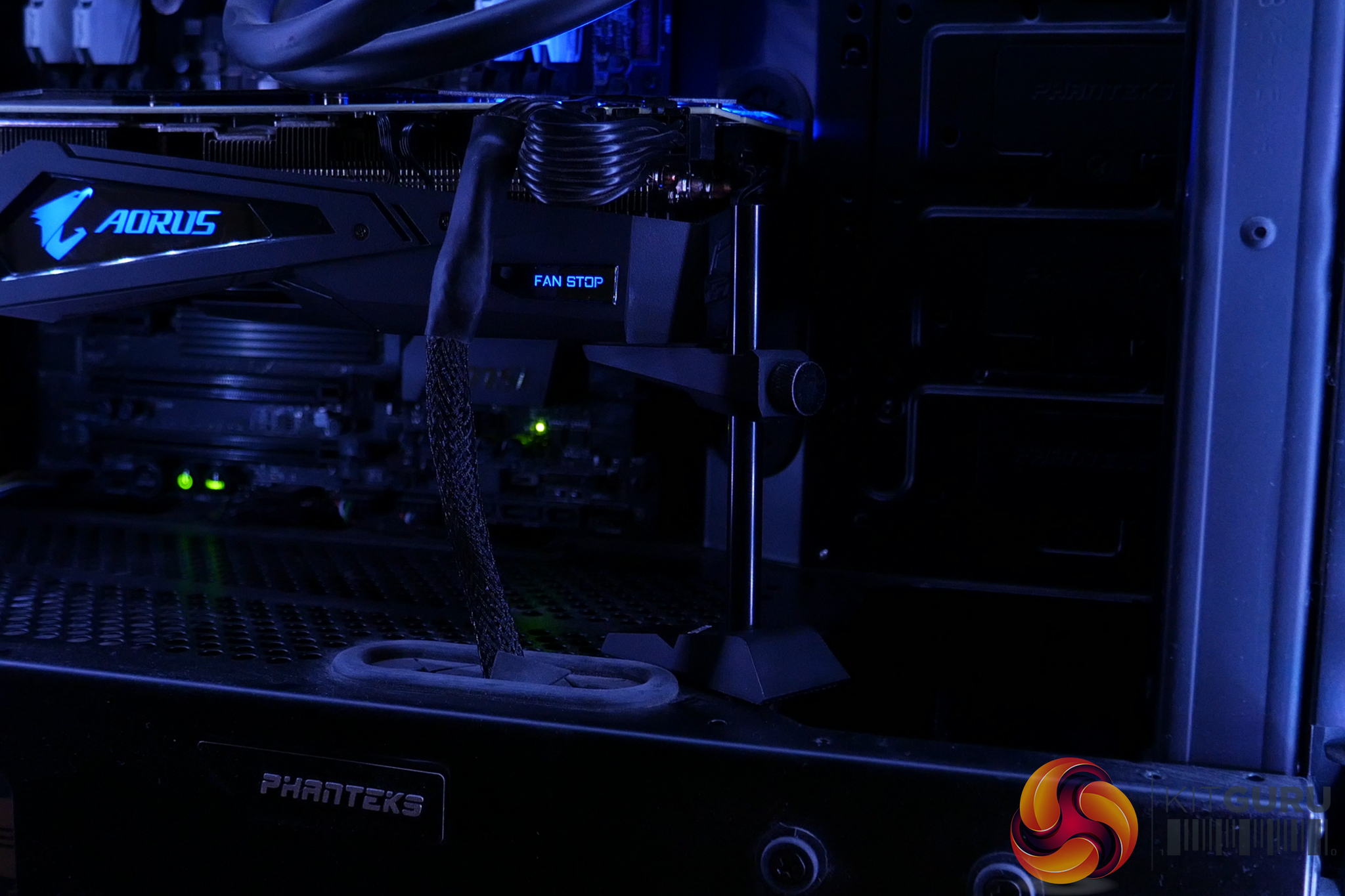
… these piece together to make a GPU support stand. The Xtreme card itself is very large and quite heavy, so Aorus includes this to prevent any sagging and potential damage to your PCIe slot. It's certainly not the most subtle way to go about this, but I think it is much better to have it than not, so thanks Aorus for including that.
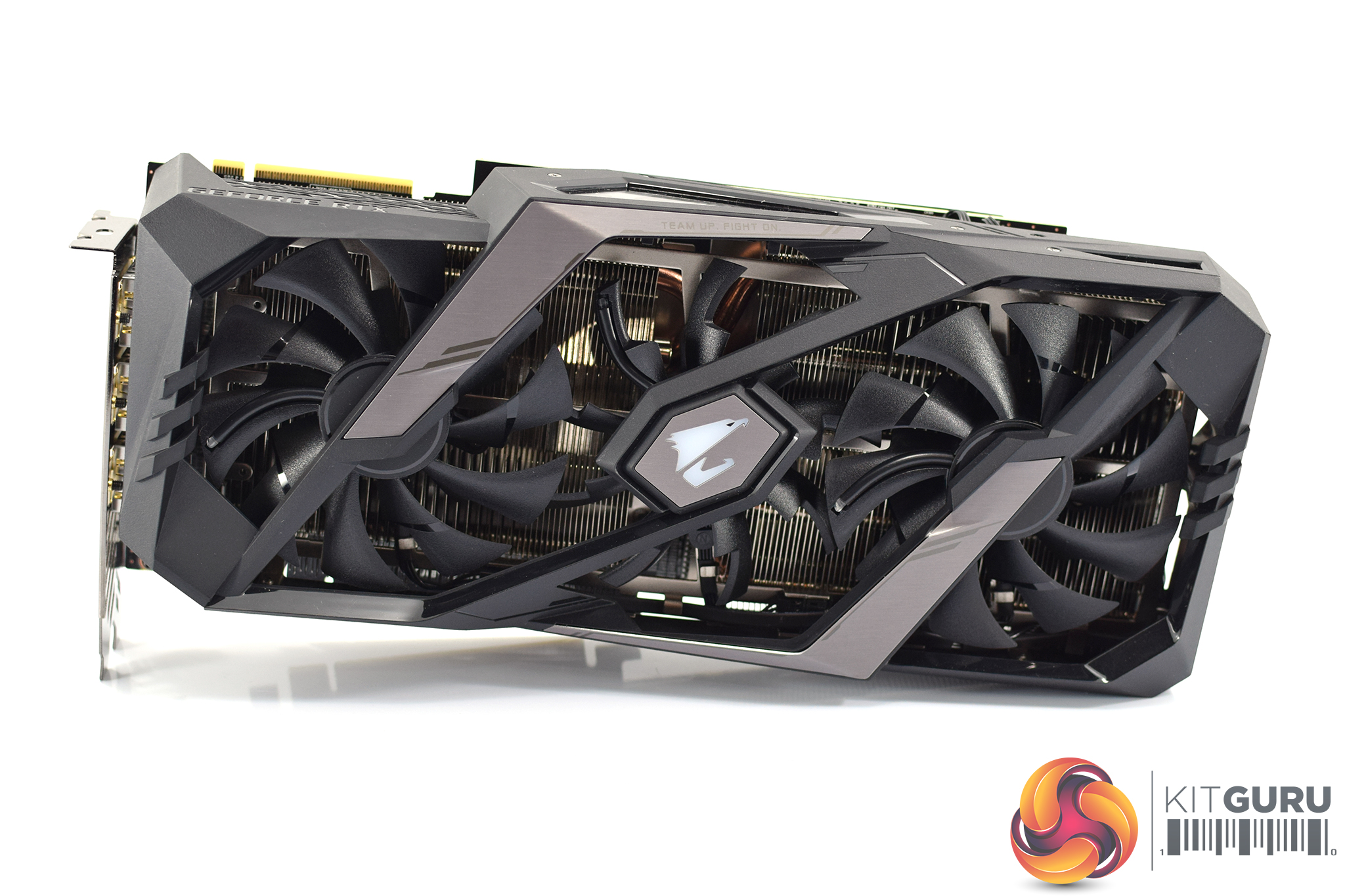
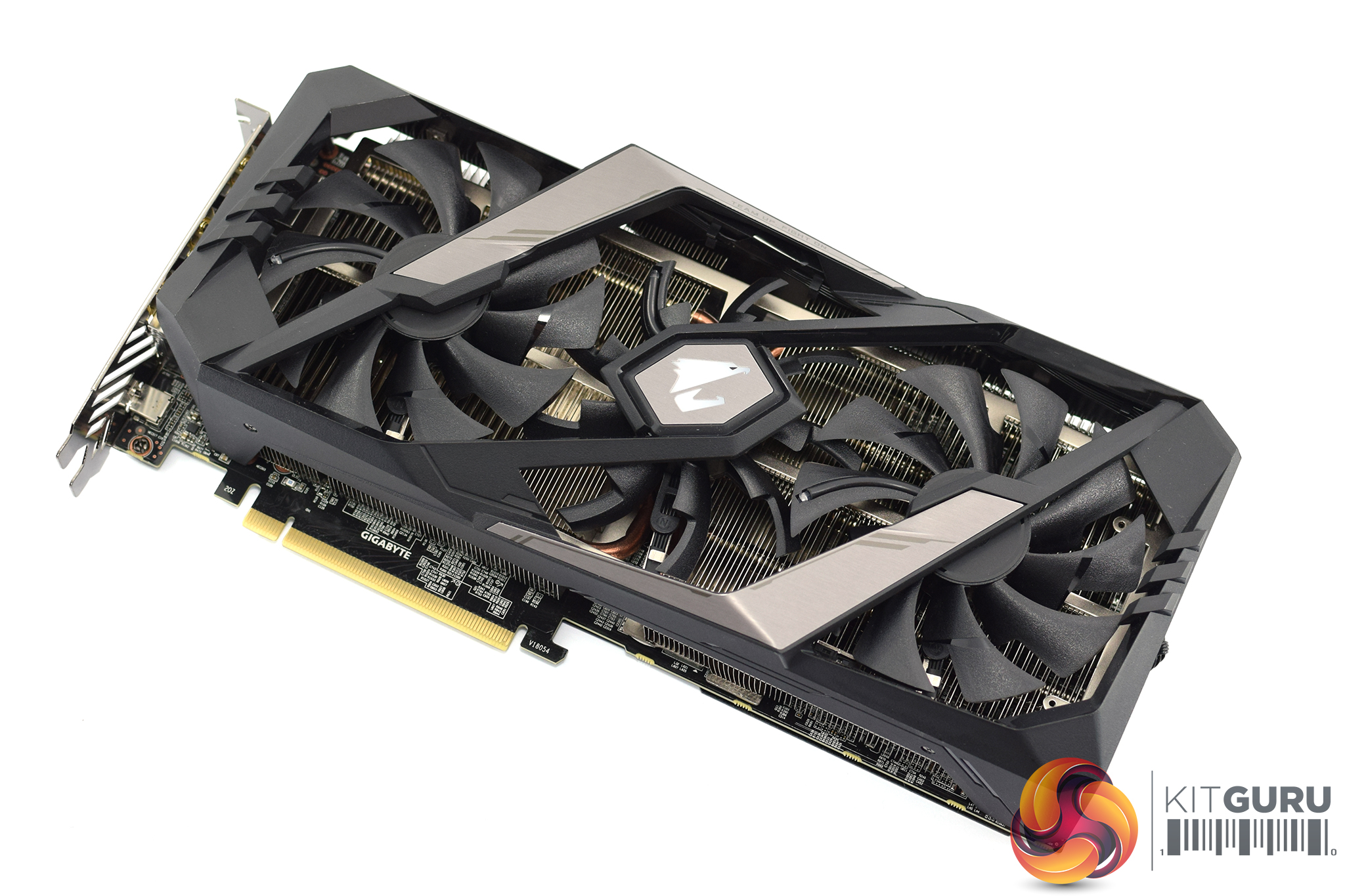
Moving onto the card itself, the front of the shroud is mostly made from black plastic, but the metallic silver sections that cross over the two outer fans is indeed made from metal. Speaking of the fans, each of the three spinners measures 100mm in diameter which is quite impressive when you consider most cards with 100mm fans only use two of them, and not three. The Gaming OC 2080 we saw from Gigabyte, which also has three fans, could only squeeze in 82mm units.
Interestingly, these also use what Gigabyte calls its ‘alternate spinning' technology, so the central fan actually spins the opposite direction to the two outer fans. This is meant to help reduce turbulence and this increase heat dissipation efficiency.
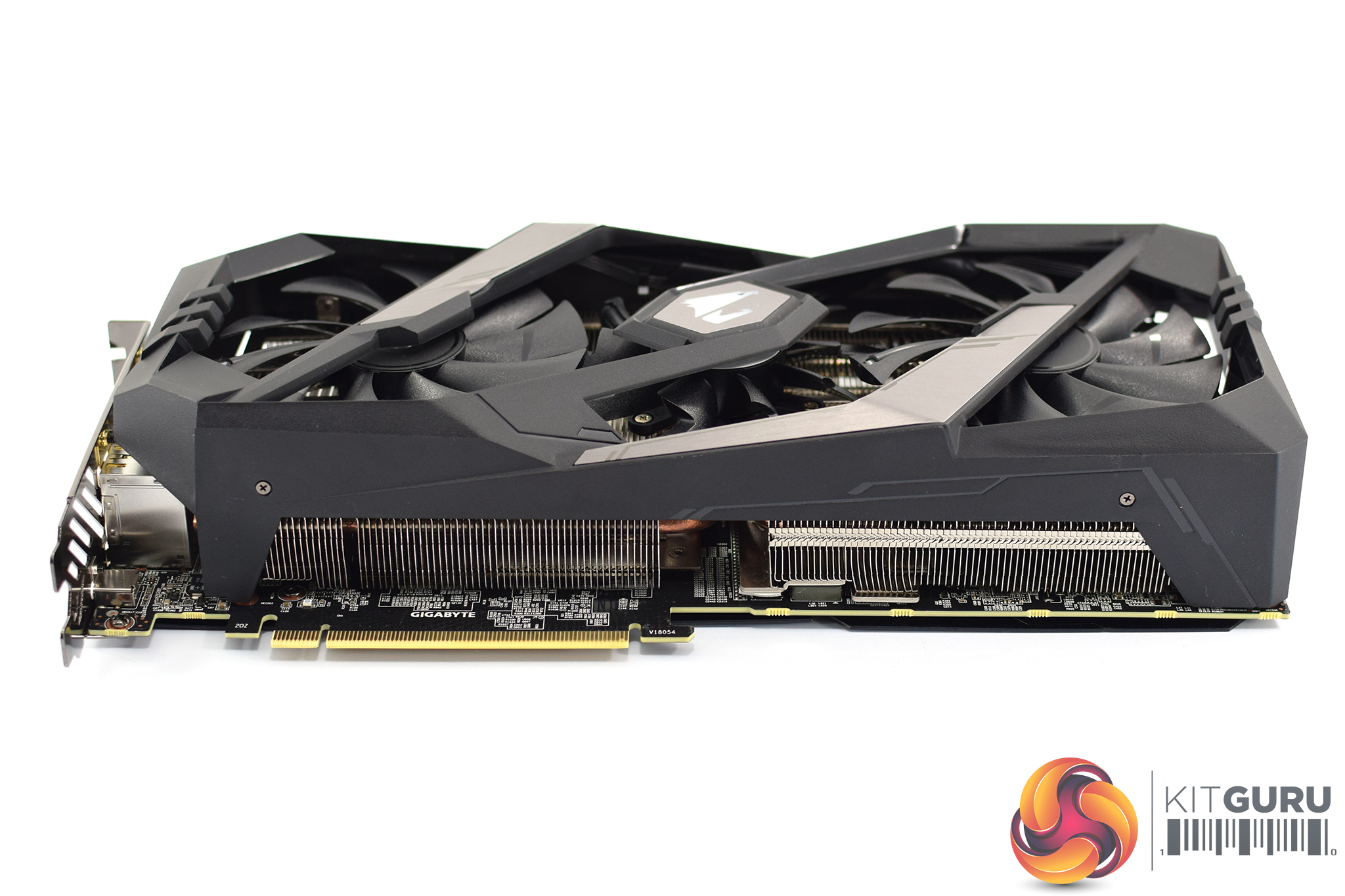
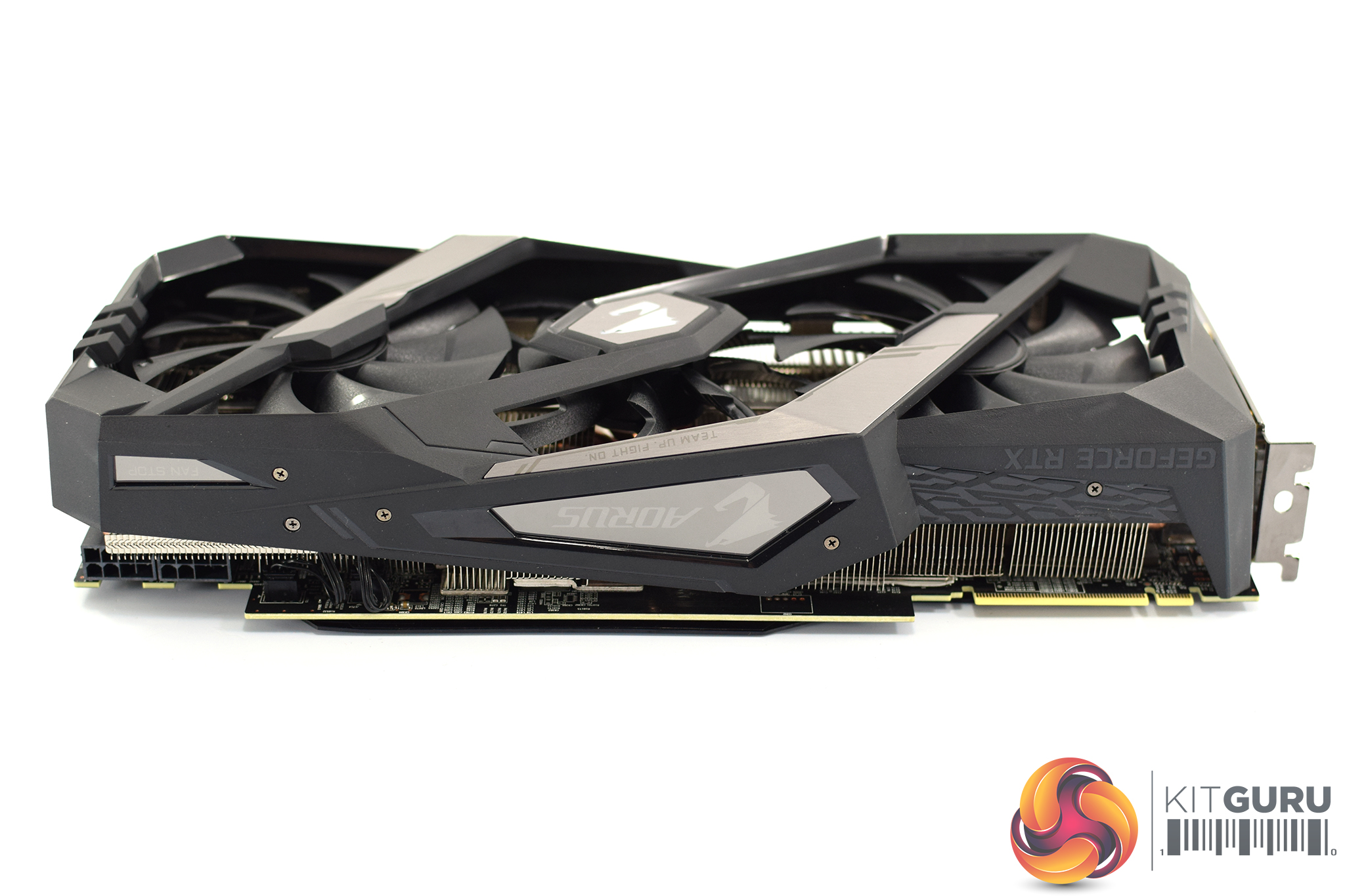
Taking a look at the card from the side, it is clearly a monster. It measures 290mm x 134.31mm x 59.9mm (L x W x H), making it effectively a triple slot card. Given this size, and its weight of 1.35KG according to my scales, it is easy to understand why Aorus included the support bracket in the box!
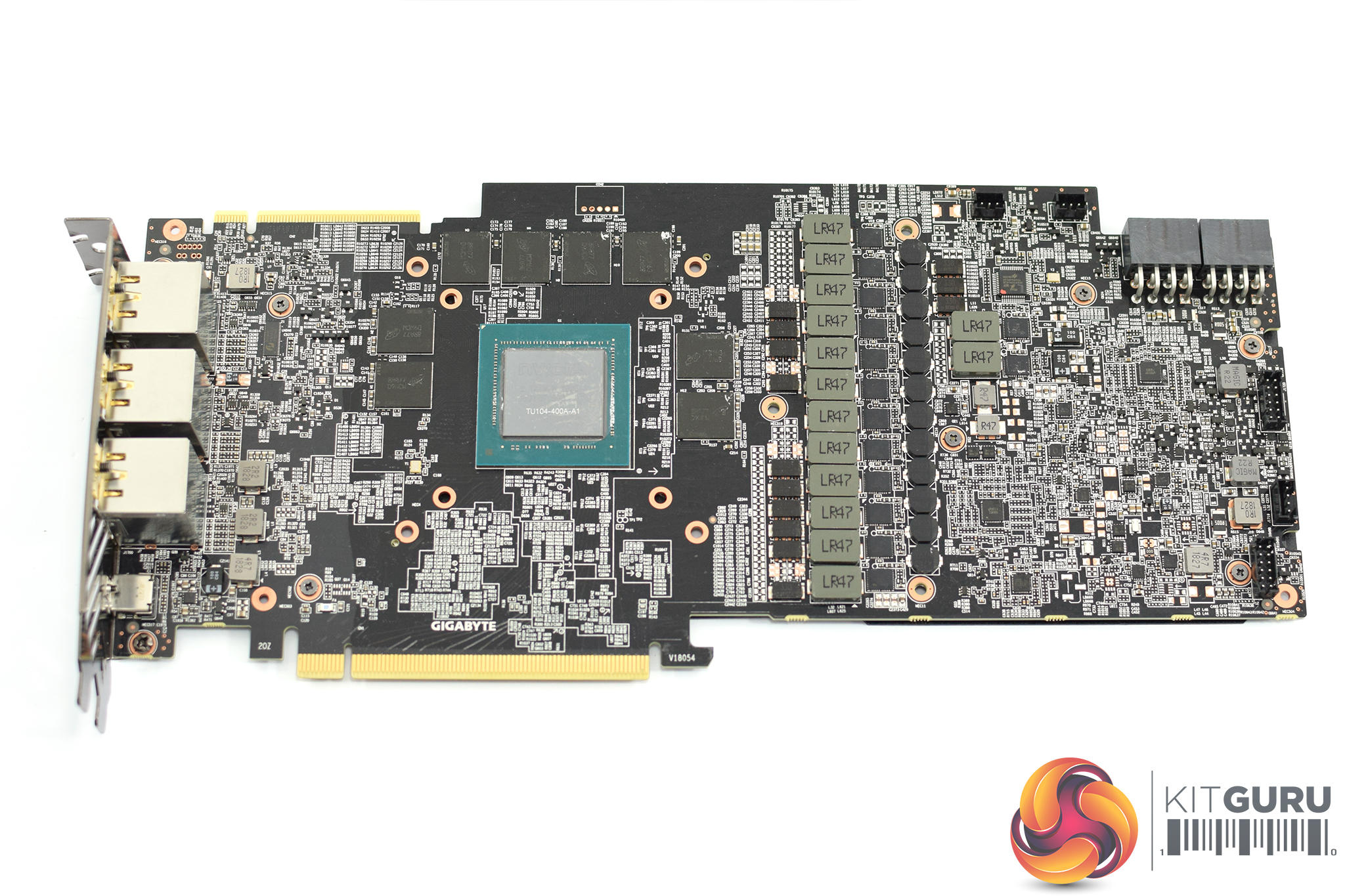
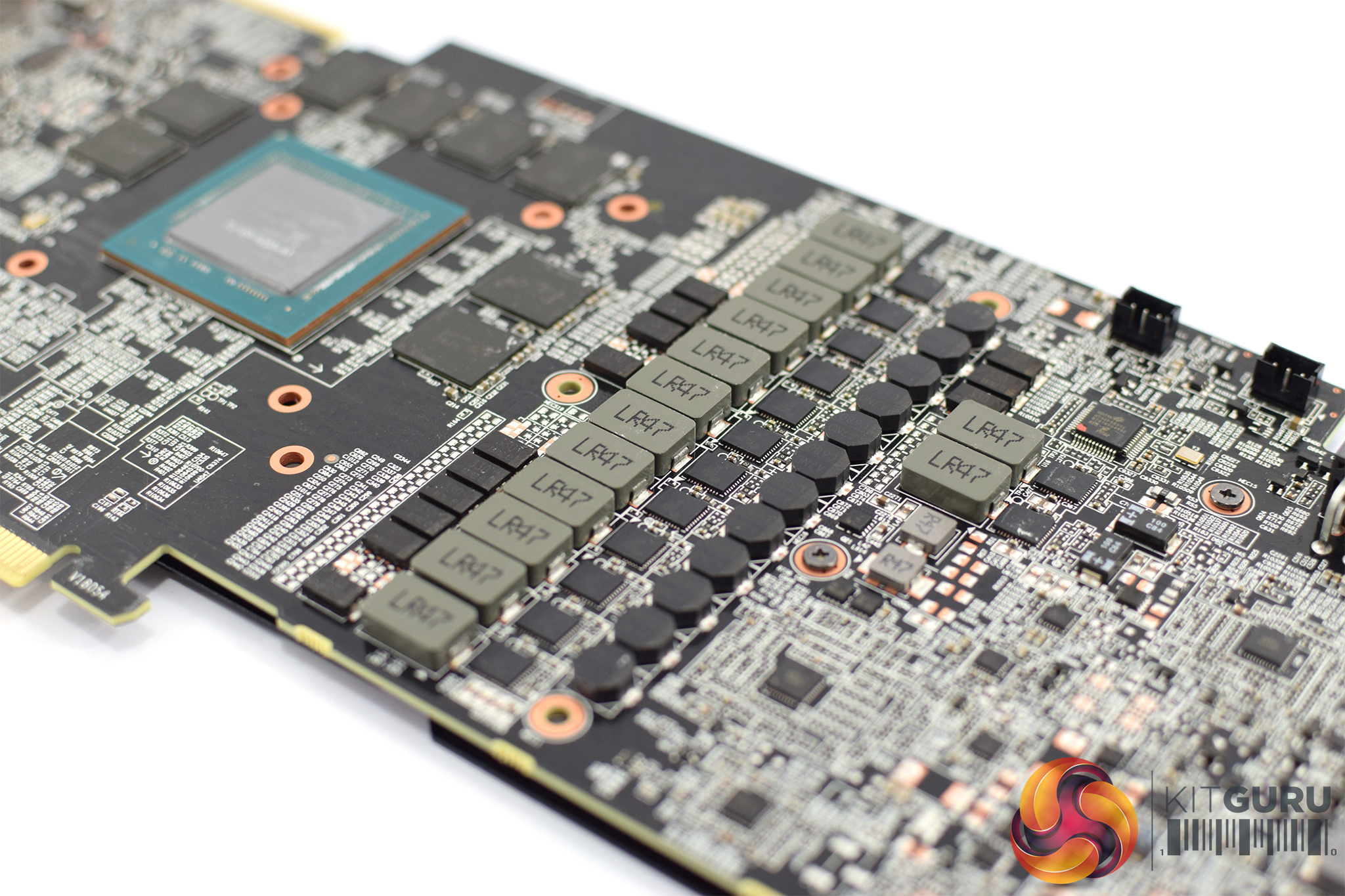
Opening up the card requires the removal of ten screws from the back of the card. This reveals a very busy-looking PCB, and the standout thing here is the mammoth 12+2 power phase design Aorus has opted for. The Founders Edition 2080, for reference, ‘only' uses 8+2 power phases, so Aorus has clearly gone overboard which it claims should help with ‘extreme overclocking'.
Elsewhere, the 8GB of memory comes from Micron, with the chips labelled ‘8RA77D9WCW.' The GPU is labelled ‘TU104-400A', with the ‘A' signifying this is a binned chip suitable to be sold with a factory overclock.
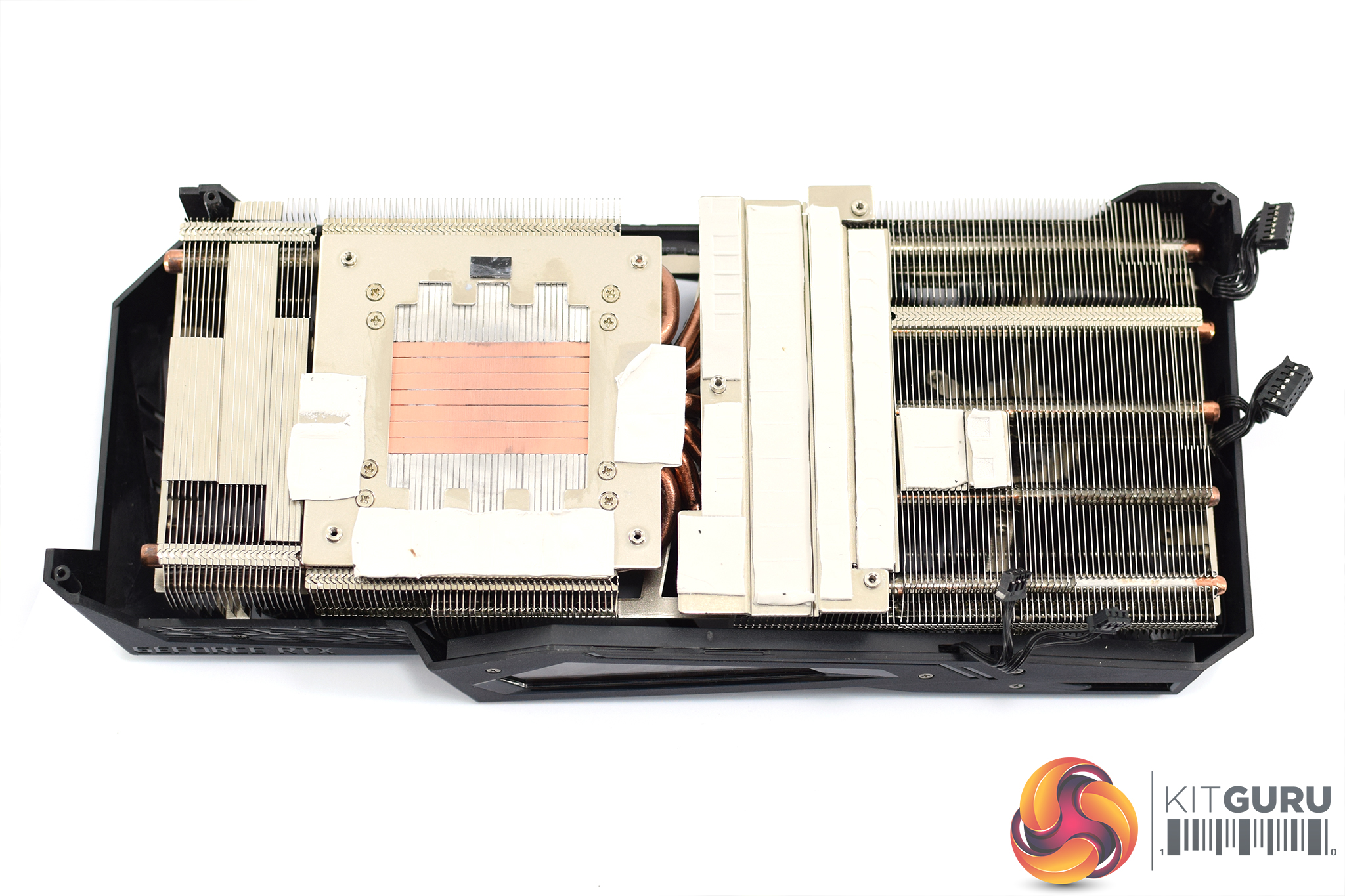
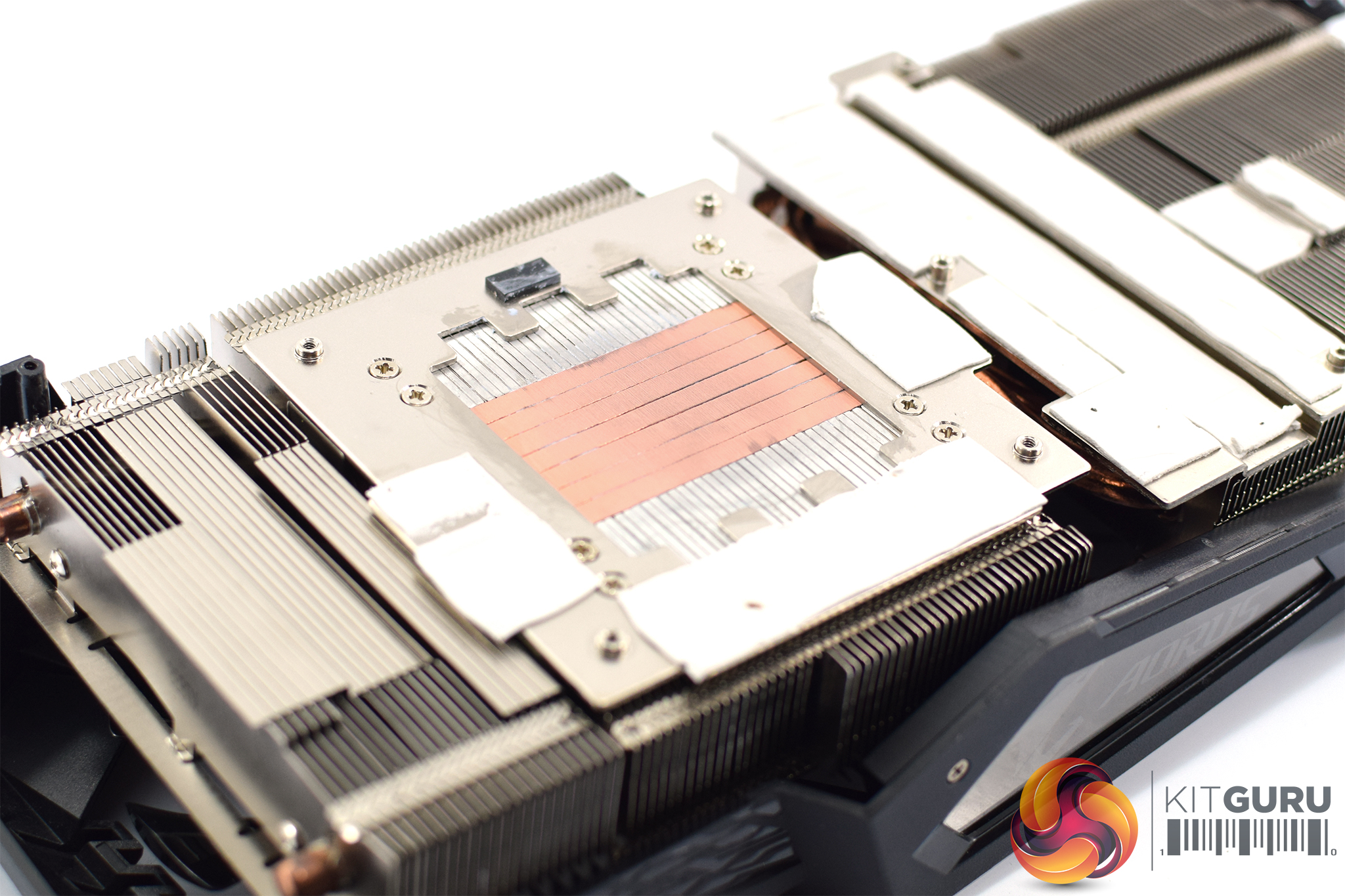
The cooler itself weighs just over 900g and uses seven copper heatpipes, each of which measures 6mm. These make direct contact with the GPU die which is an interesting decision, as I would have thought the outer two heatpipes would be making very little contact with the GPU core, thus reducing thermal transfer – but we will look at GPU temperatures later in the review.
There is a separate coldplate for the VRAM chips and VRM, though, and of course plenty of thermal pads are used here as well.
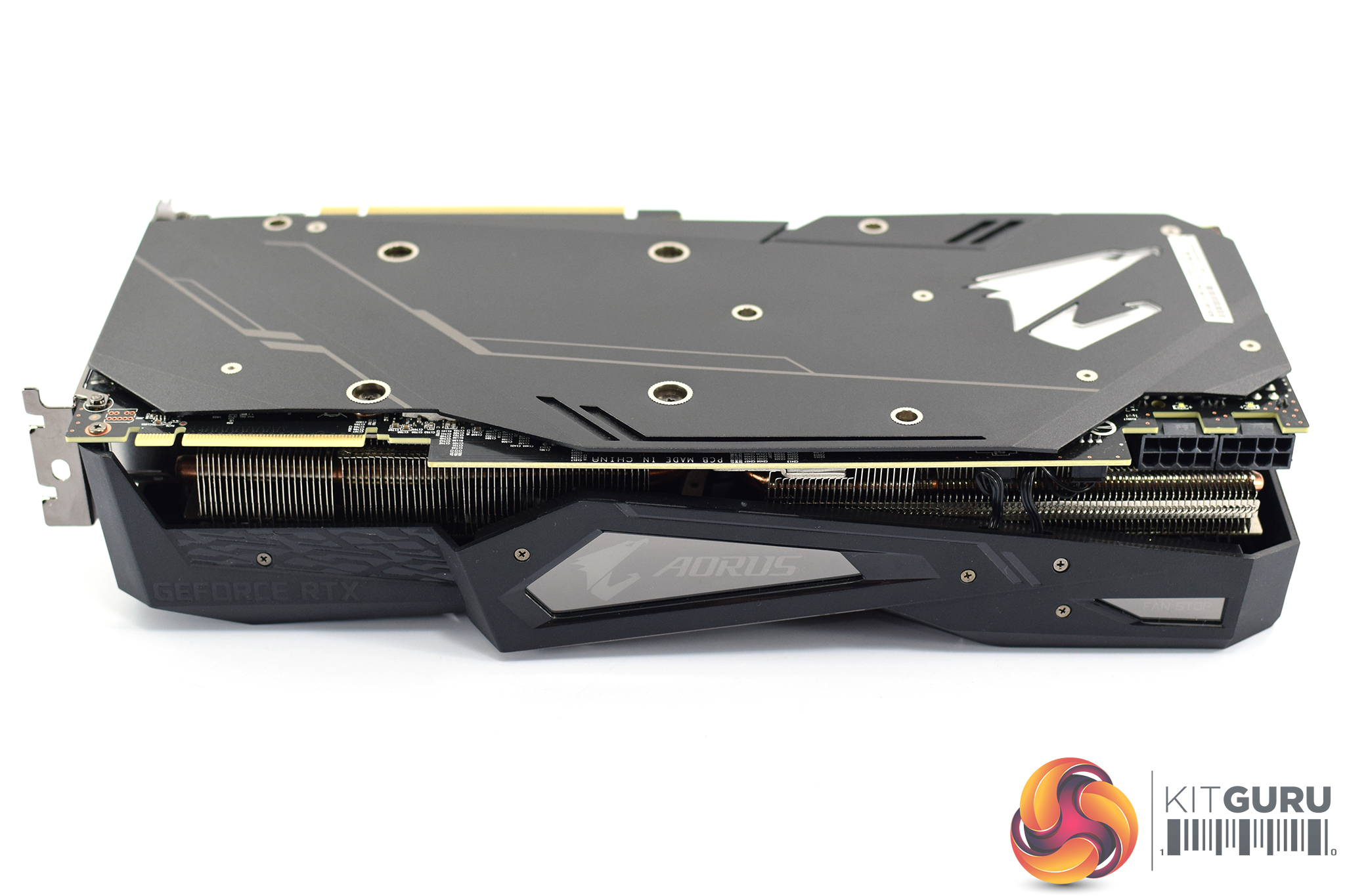
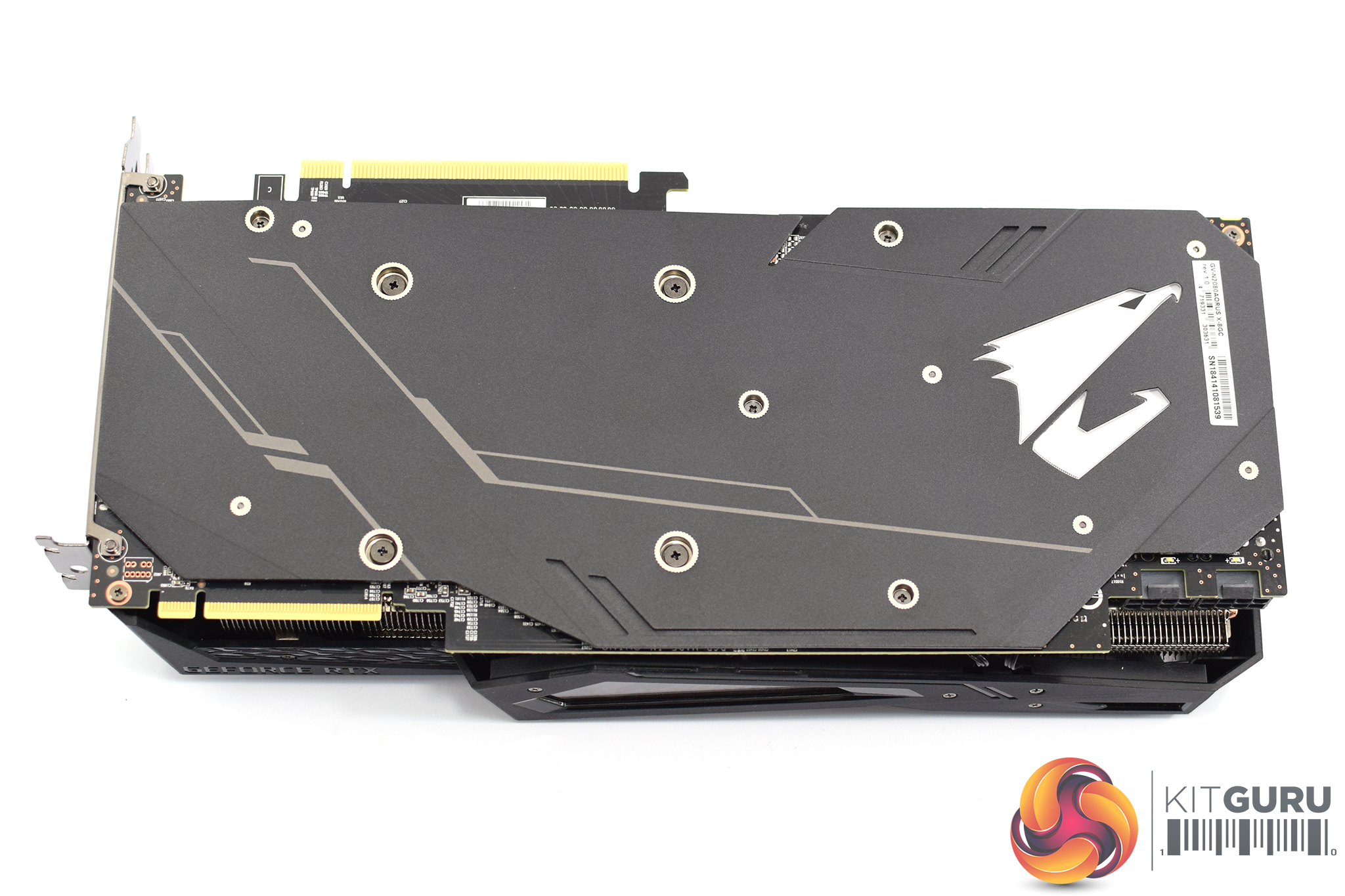
Moving back round to the front side of the card, here we find some (very) subtle GeForce RTX branding on the left-hand side, with the Aorus logo taking pride of place in the middle of the card.
The backplate is made of anodised aluminium and again features the Aorus eagle logo on the right-hand edge.
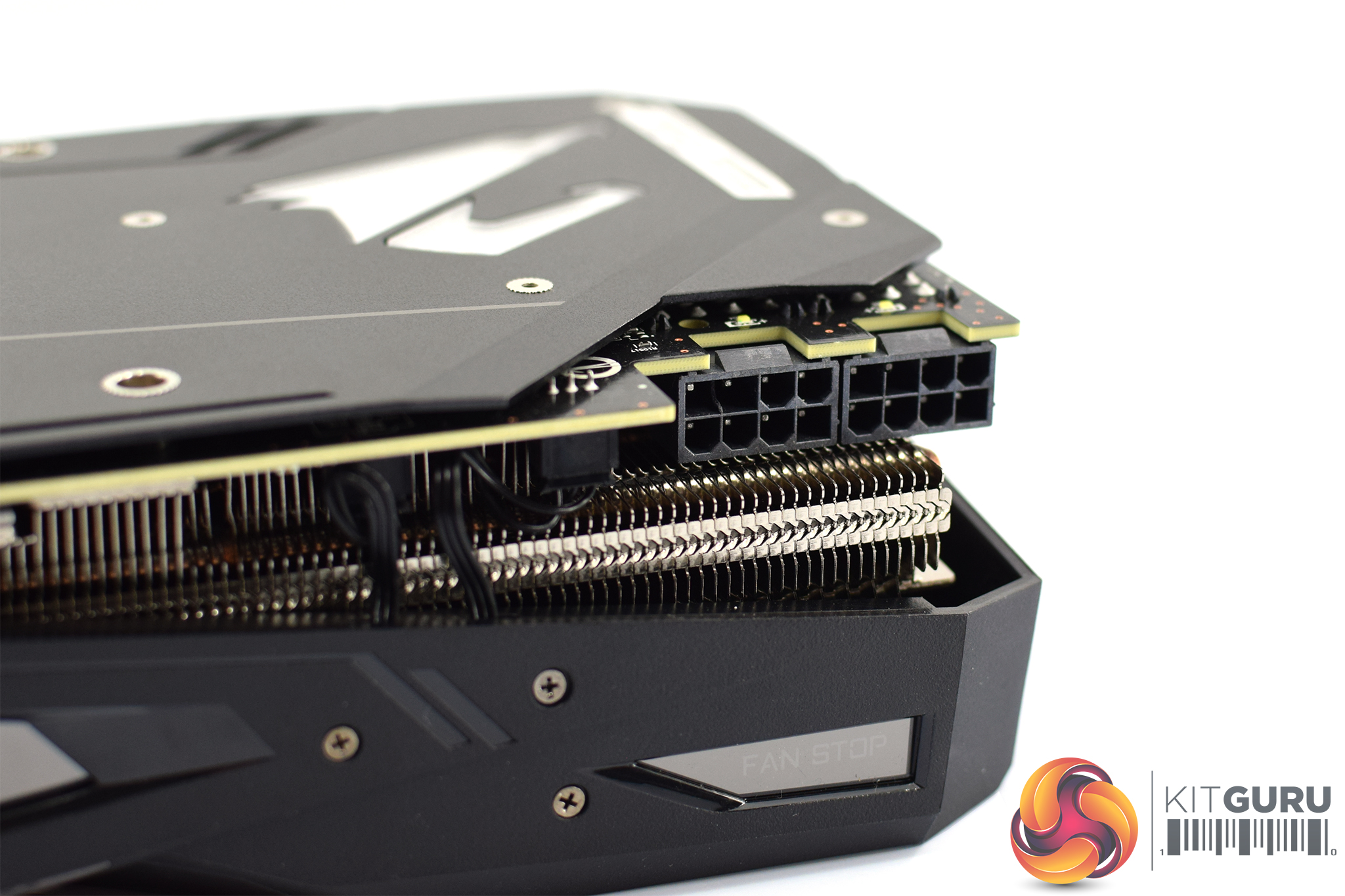
As for power requirements, the Aorus RTX 2080 Xtreme requires 2x 8-pin PCIe power connectors which is quite standard for an aftermarket 2080.
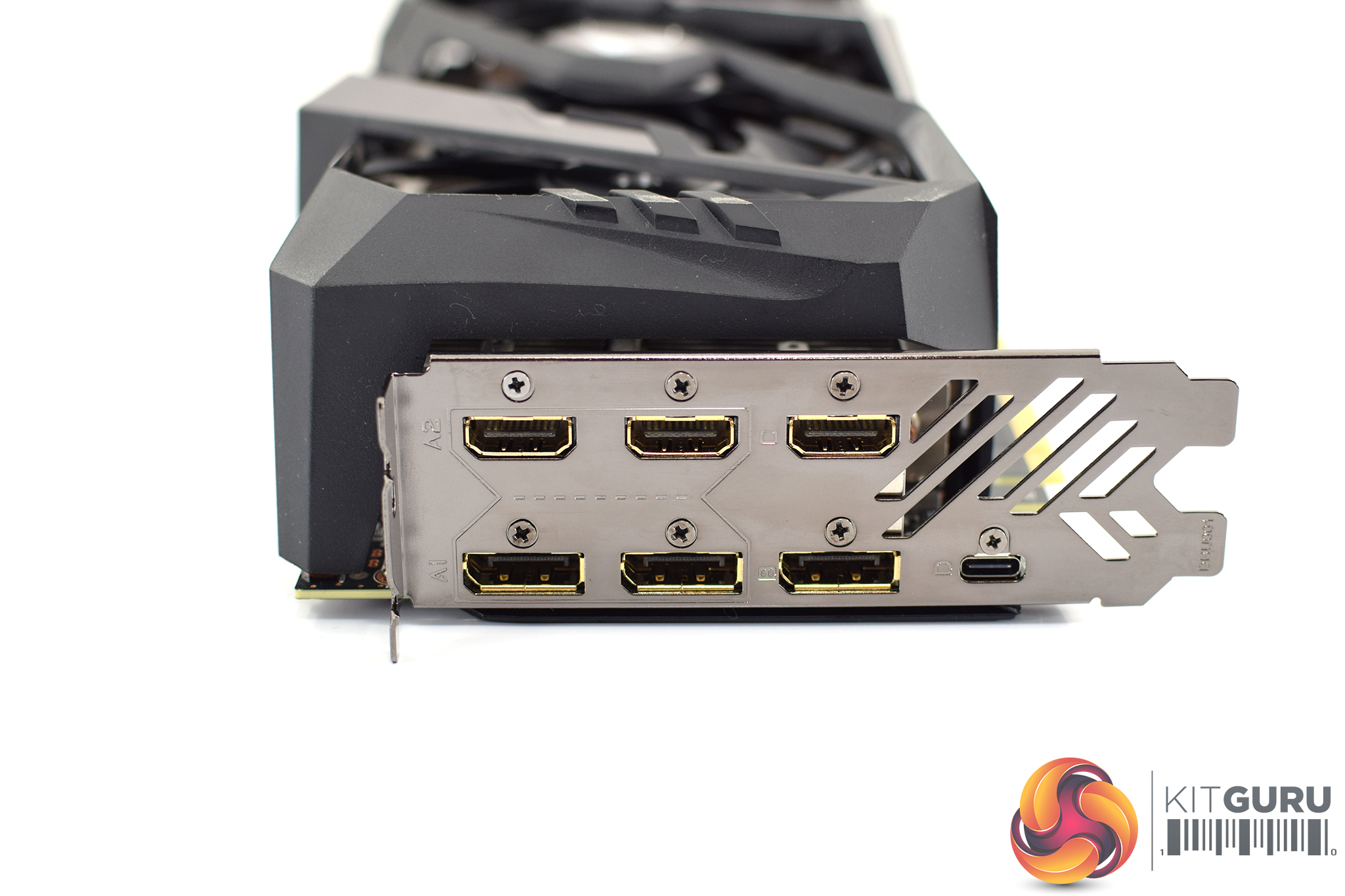
Quite unusually, though, there are a total of seven display outputs, when we typically see just five. That's because there are no less than 3x HDMI 2.0b, 3x DisplayPort 1.4 and 1x USB-C ports. Before you get too excited, you can't use all of them simultaneously – you are still limited to a maximum of 5 display outputs – but the extra ports give you flexibility in terms of what connector you want to use.
So if you look at the outputs above, you can see the two HDMI ports and the two DisplayPorts on the left-hand side are segregated by lines etched into the I/O bracket. Essentially, you can only use either pair – either the top HDMI ports, or the bottom DP ports. The single HDMI, DP and USB-C on the right-hand side are always active. In a nutshell, you can have 3x HDMI, 1x DP and 1x USB-C outputs or 3x DP, 1x HDMI and 1x USB-C outputs at any given time.Our newest GPU test procedure has been built with the intention of benchmarking high-end graphics cards. We test at 1920×1080 (1080p), 2560×1440 (1440p), and 3840×2160 (4K UHD) resolutions.
We try to test using the DX12 API if titles offer support. This gives us an interpretation into the graphics card performance hierarchy in the present time and the near future, when DX12 becomes more prevalent. After all, graphics cards of this expense may stay in a gamer’s system for a number of product generations/years before being upgraded.
We tested the RX Vega64 and Vega56 using the ‘Turbo‘ power mode in AMD’s WattMan software. This prioritises all-out performance over power efficiency, noise output, and lower thermals.
As mentioned, the Aorus Xtreme operates with a 1890MHz boost clock out of the box.
Driver Notes
- AMD graphics cards were benchmarked with the Adrenalin 18.9.1 driver.
- Nvidia graphics cards (apart from RTX 20 series cards) were benchmarked with the Nvidia 399.24 driver.
- RTX 2080 and 2080 Ti cards were benchmarked with the Nvidia 411.63 driver.
- RTX 2070 cards were benchmarked with the Nvidia 416.33 driver.
Test System
We test using the Overclockers UK Germanium pre-built system. You can read more about it over HERE. It is important to note we have had to re-house the components to an open-air test bench to accommodate our new GPU power testing (more on that later) but the core of the system is unchanged and the performance figures you see presented here are what you can expect from the Germanium.
| CPU |
Intel Core i7-8700K
Overclocked to 4.8GHz |
| Motherboard |
ASUS ROG Strix Z370-F Gaming
|
| Memory |
Team Group Dark Hawk RGB
16GB (2x8GB) @ 3200MHz 16-18-18-38 |
| Graphics Card |
Varies
|
| System Drive |
Patriot Wildfire 240GB
|
| Games Drive | Crucial M4 512GB |
| Chassis | Streacom ST-BC1 Bench |
| CPU Cooler |
OCUK TechLabs 240mm AIO
|
| Power Supply |
SuperFlower Leadex II 850W 80Plus Gold
|
| Operating System |
Windows 10 Professional
|
Comparison Graphics Cards List
- Nvidia RTX 2080 Ti Founders Edition (FE) 11GB
- Nvidia RTX 2080 Founders Edition (FE) 8GB
- Gigabyte RTX 2080 Gaming OC 8GB
- Palit RTX 2080 GameRock Premium 8GB
- ASUS ROG RTX 2080 Strix OC 8GB
- MSI RTX 2070 Gaming Z 8GB
- MSI RTX 2070 Armor 8GB
- Nvidia GTX 1080 Ti Founders Edition (FE) 11GB
- Gigabyte GTX 1080 G1 Gaming 8GB
- Palit GTX 1070 Ti Super Jetstream 8GB
- Nvidia GTX 1070 Founders Edition (FE) 8GB
- Nvidia GTX 1060 Founders Edition (FE) 6GB
- Gigabyte GTX 980 Ti XTREME Gaming 6GB
- AMD RX Vega 64 Air 8GB
- AMD RX Vega 56 8GB
- Sapphire RX 580 Nitro+ Limited Edition (LE) 8GB
- ASUS RX 570 ROG Strix Gaming OC 4GB
Software and Games List
- 3DMark Fire Strike & Fire Strike Ultra (DX11 Synthetic)
- 3DMark Time Spy (DX12 Synthetic)
- Deus Ex: Mankind Divided (DX12)
- Far Cry 5 (DX11)
- Tom Clancy’s Ghost Recon: Wildlands (DX11)
- Middle Earth: Shadow of War (DX11)
- Shadow of the Tomb Raider (DX12)
We run each benchmark/game three times, and present averages in our graphs.3DMark Fire Strike is a showcase DirectX 11 benchmark designed for today’s high-performance gaming PCs. It is our [FutureMark’s] most ambitious and technical benchmark ever, featuring real-time graphics rendered with detail and complexity far beyond what is found in other benchmarks and games today.
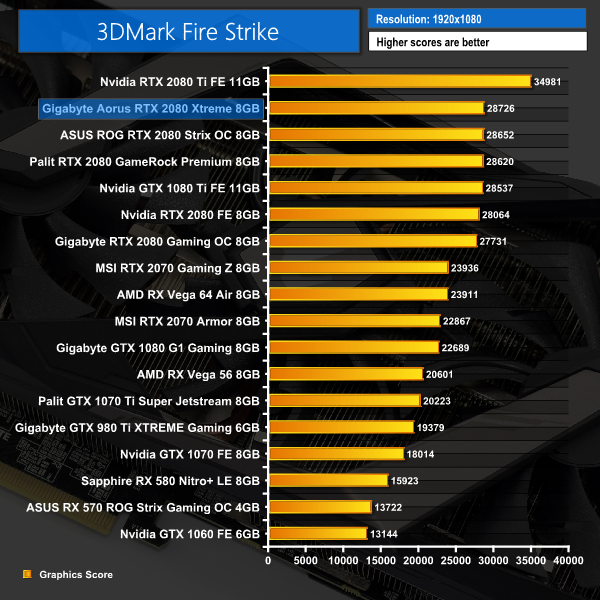
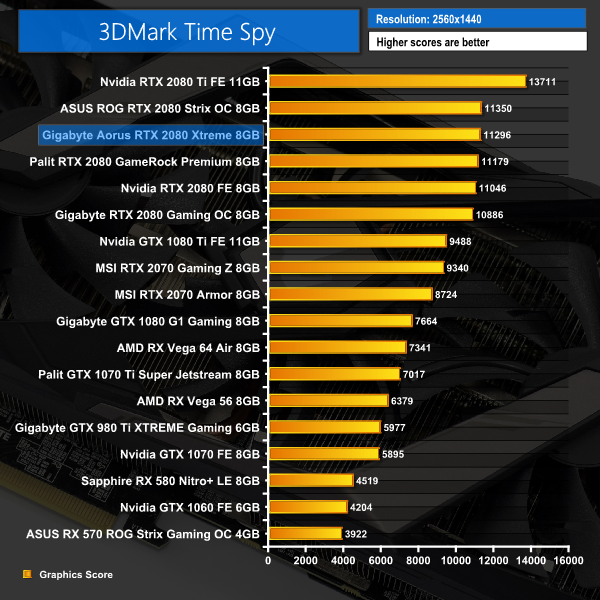
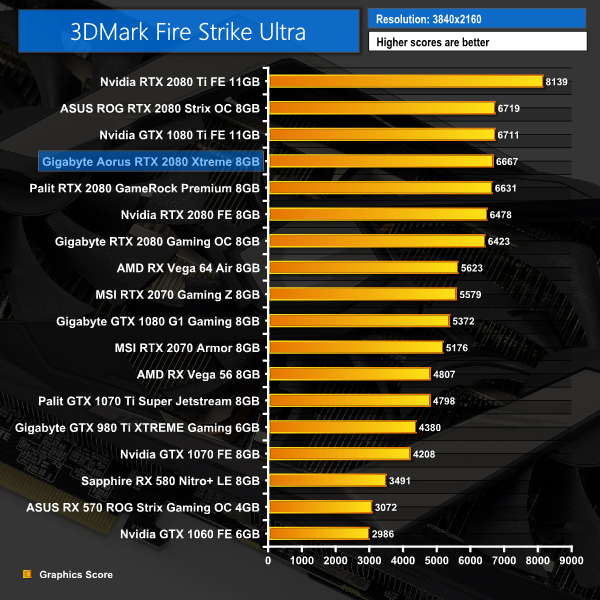
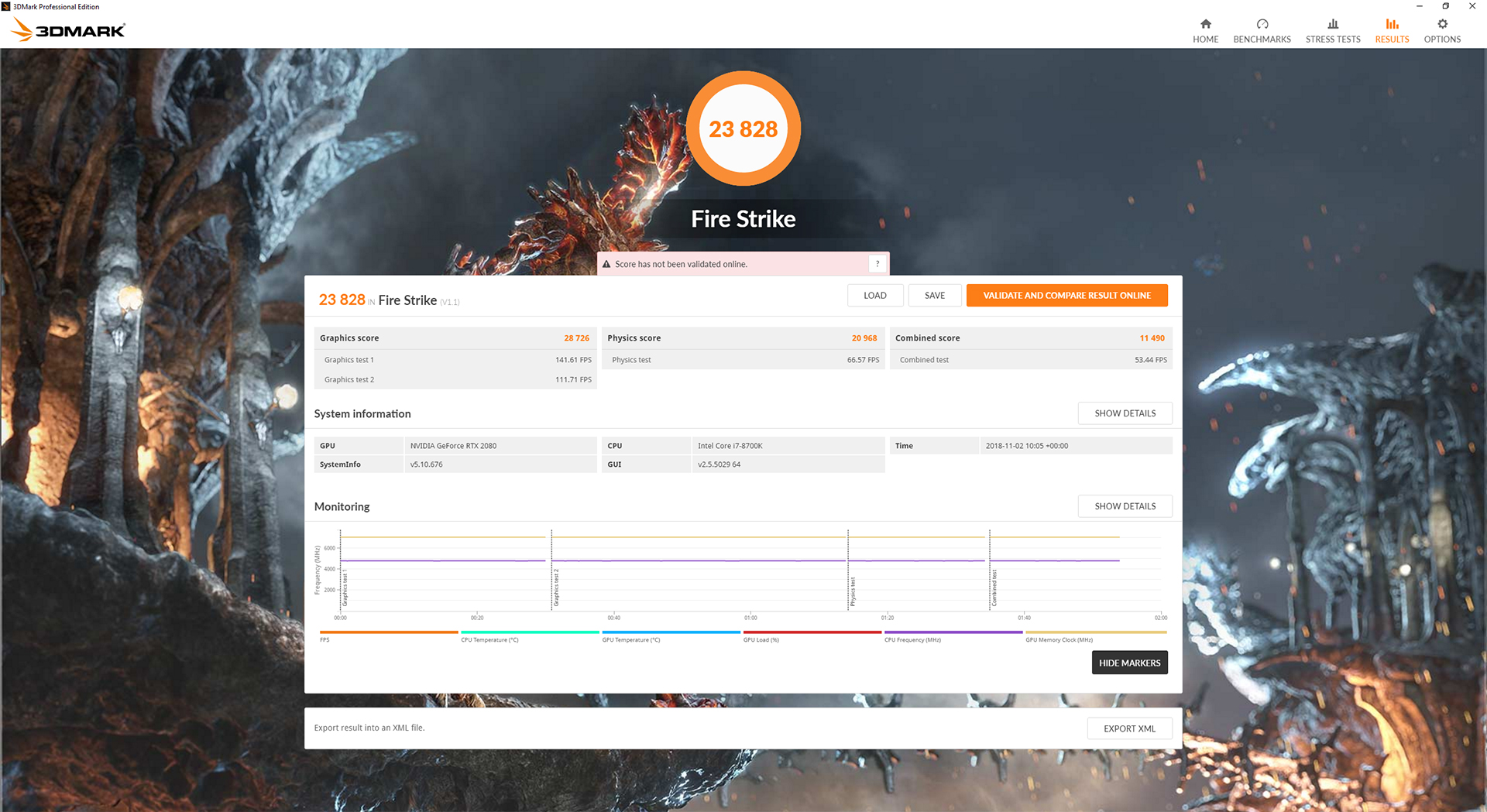
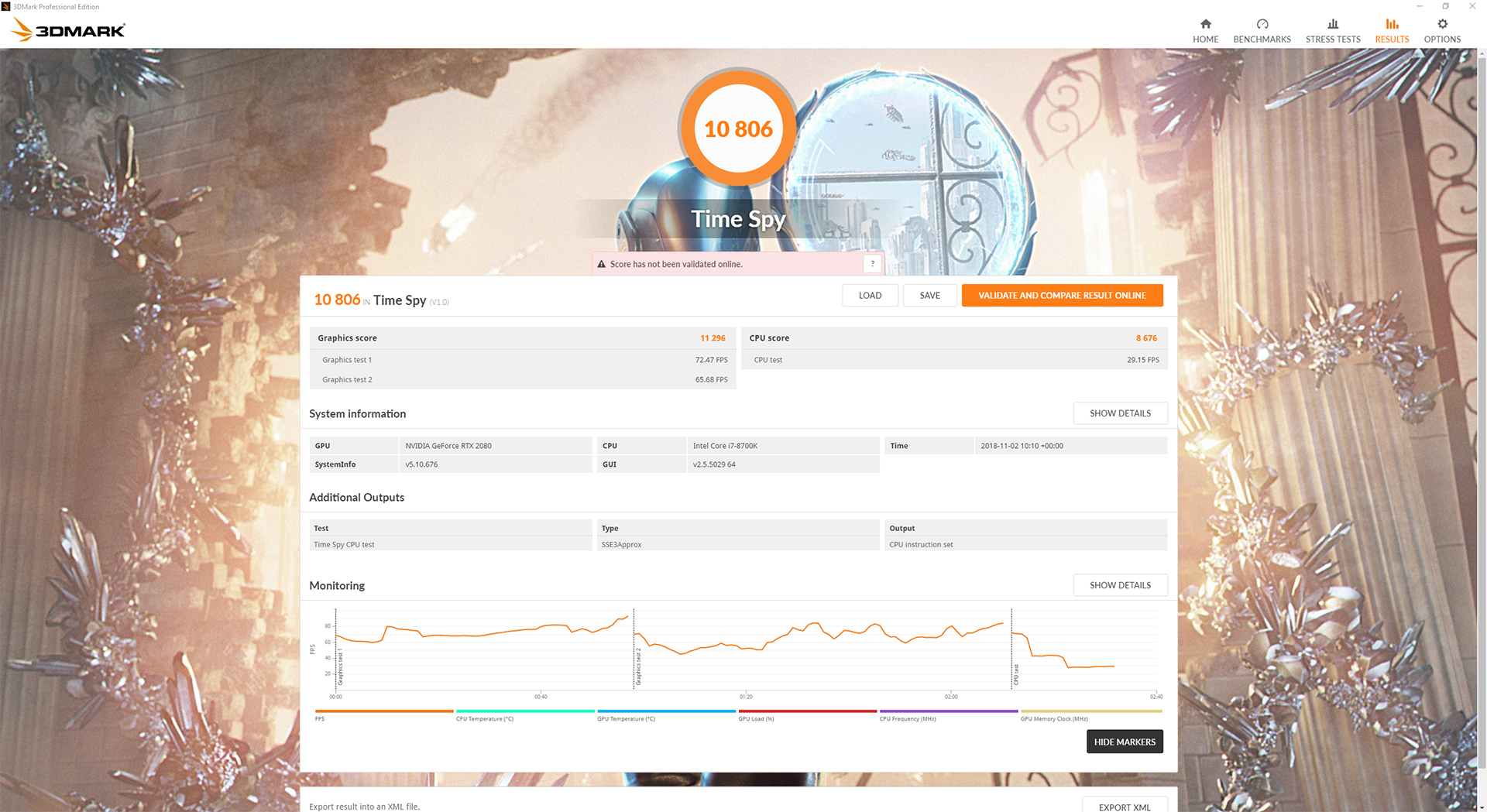
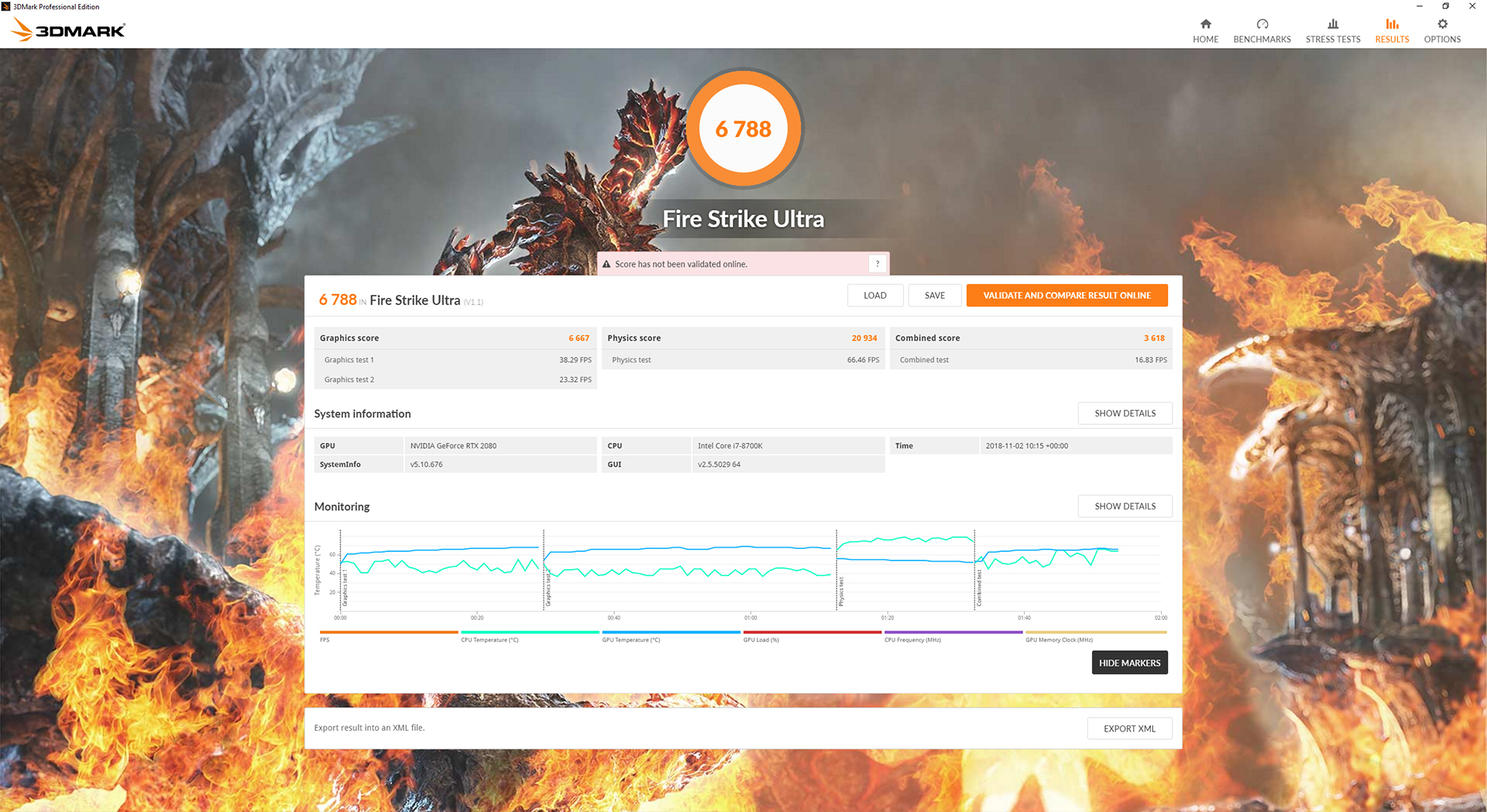
It's a good start for the Aorus RTX 2080 Xtreme. There is some variation in scores across the three different tests, but in every one it is right up there with the fastest RTX 2080s we have tested so far – namely, the ASUS ROG Strix 2080 and the Palit GameRock Premium 2080.Deus Ex: Mankind Divided is set in the year 2029, two years after the events of Human Revolution and the “Aug Incident”—an event in which mechanically augmented humans became uncontrollable and lethally violent. Unbeknownst to the public, the affected augmented received implanted technology designed to control them by the shadowy Illuminati, which is abused by a rogue member of the group to discredit augmentations completely. (Wikipedia).
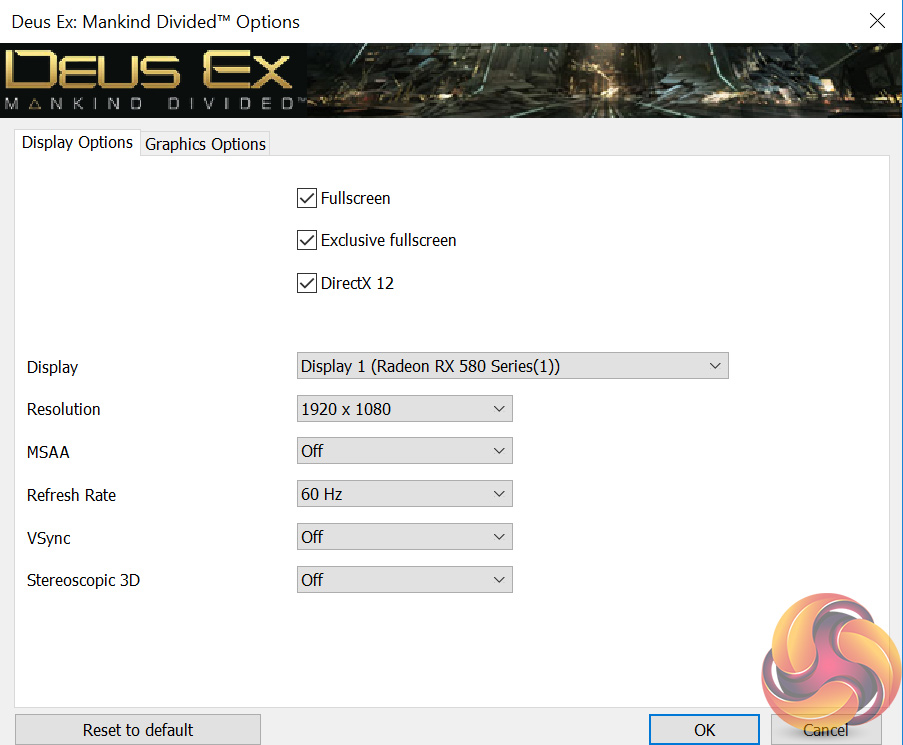
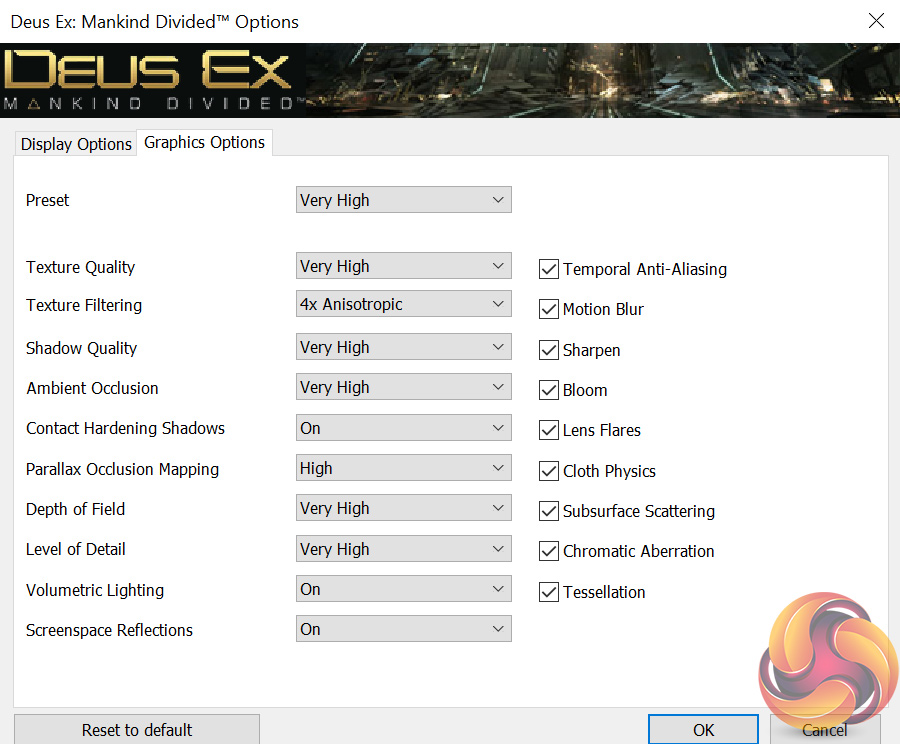
We test using the Very High preset, with MSAA disabled. We use the DirectX 12 API.
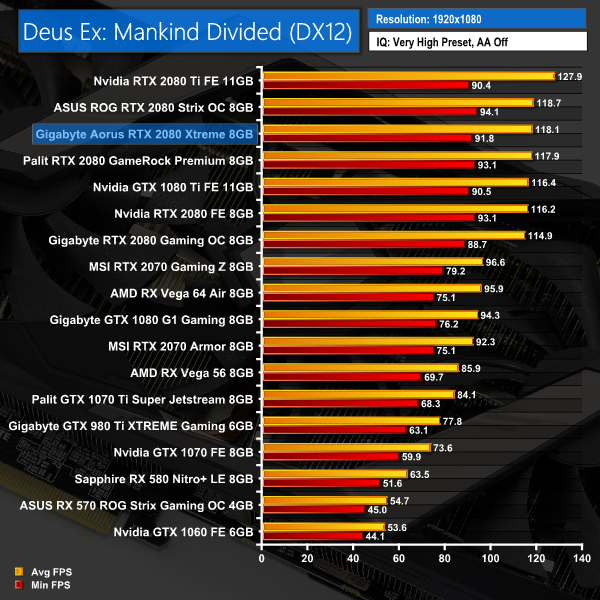
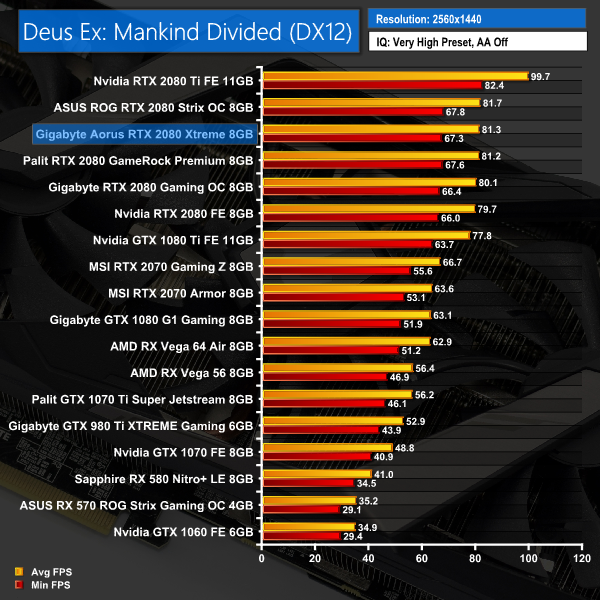
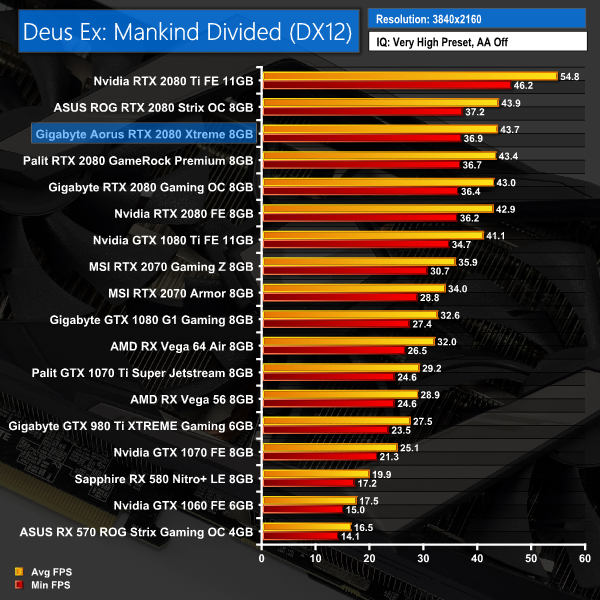
Deus Ex: Mankind Divided shows more of a concrete pattern – the Aorus Xtreme sits directly between the Palit and ASUS ROG RTX 2080 cards, although the gap between all three is very small indeed, with just 0.6FPS difference at 4K.Far Cry 5 is an action-adventure first-person shooter game developed by Ubisoft Montreal and Ubisoft Toronto and published by Ubisoft for Microsoft Windows, PlayStation 4 and Xbox One. It is the eleventh entry and the fifth main title in the Far Cry series, and was released on March 27, 2018.
The game takes place in the fictional Hope County, Montana, where charismatic preacher Joseph Seed and his cult Project at Eden’s Gate holds a dictatorial rule over the area. The story follows an unnamed junior deputy sheriff, who becomes trapped in Hope County and works alongside factions of a resistance to liberate the county from Eden’s Gate. (Wikipedia).
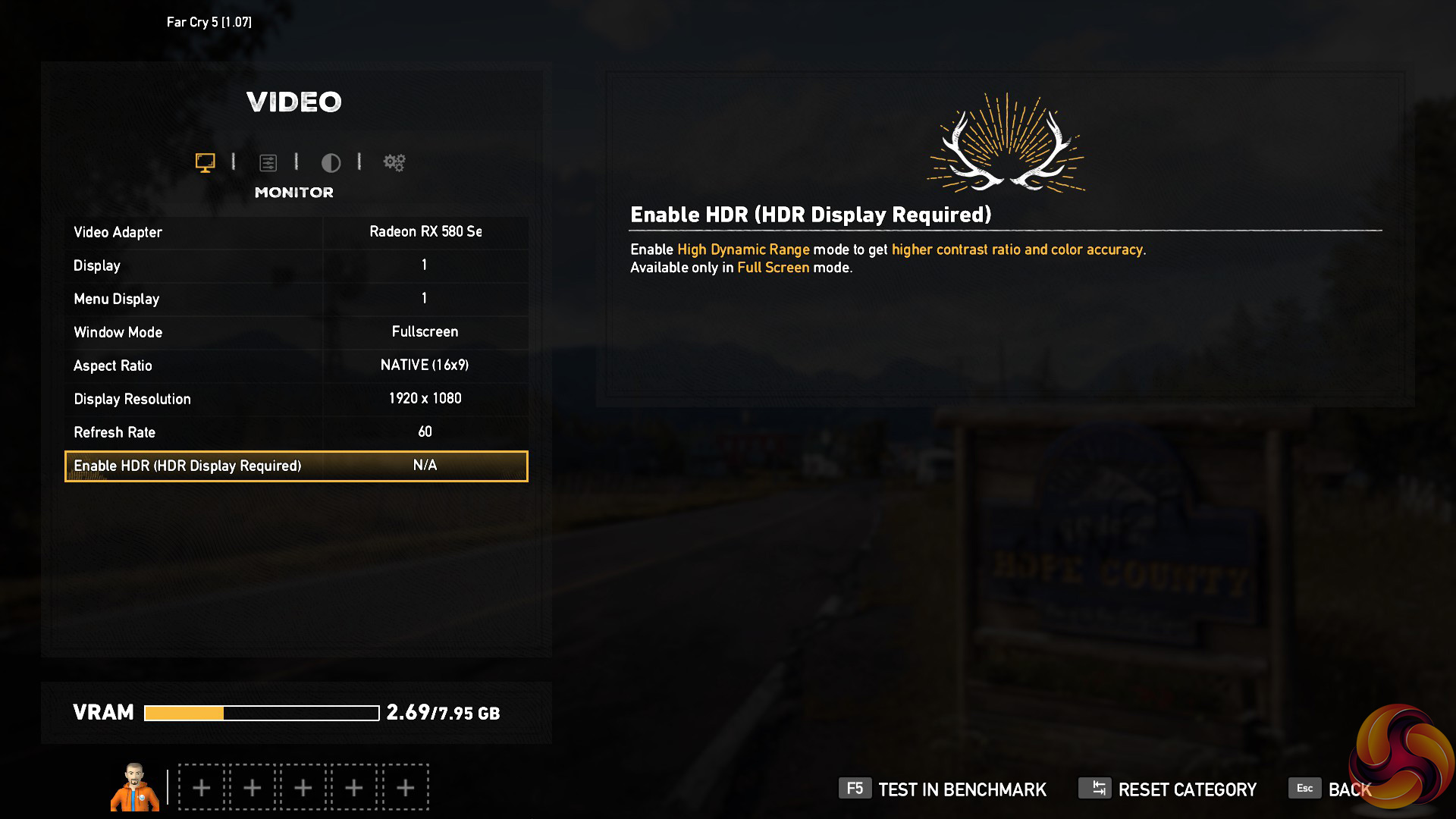
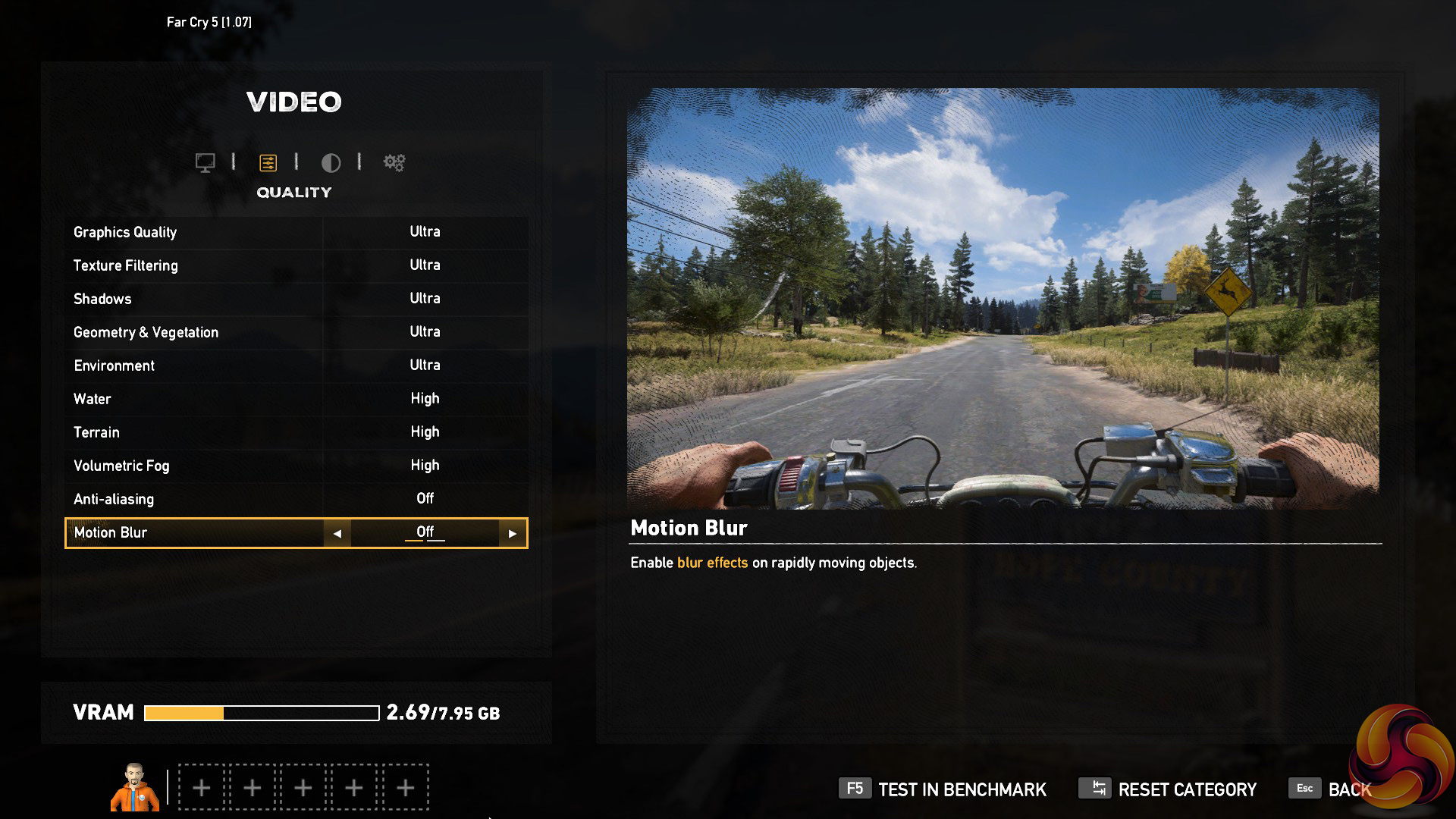
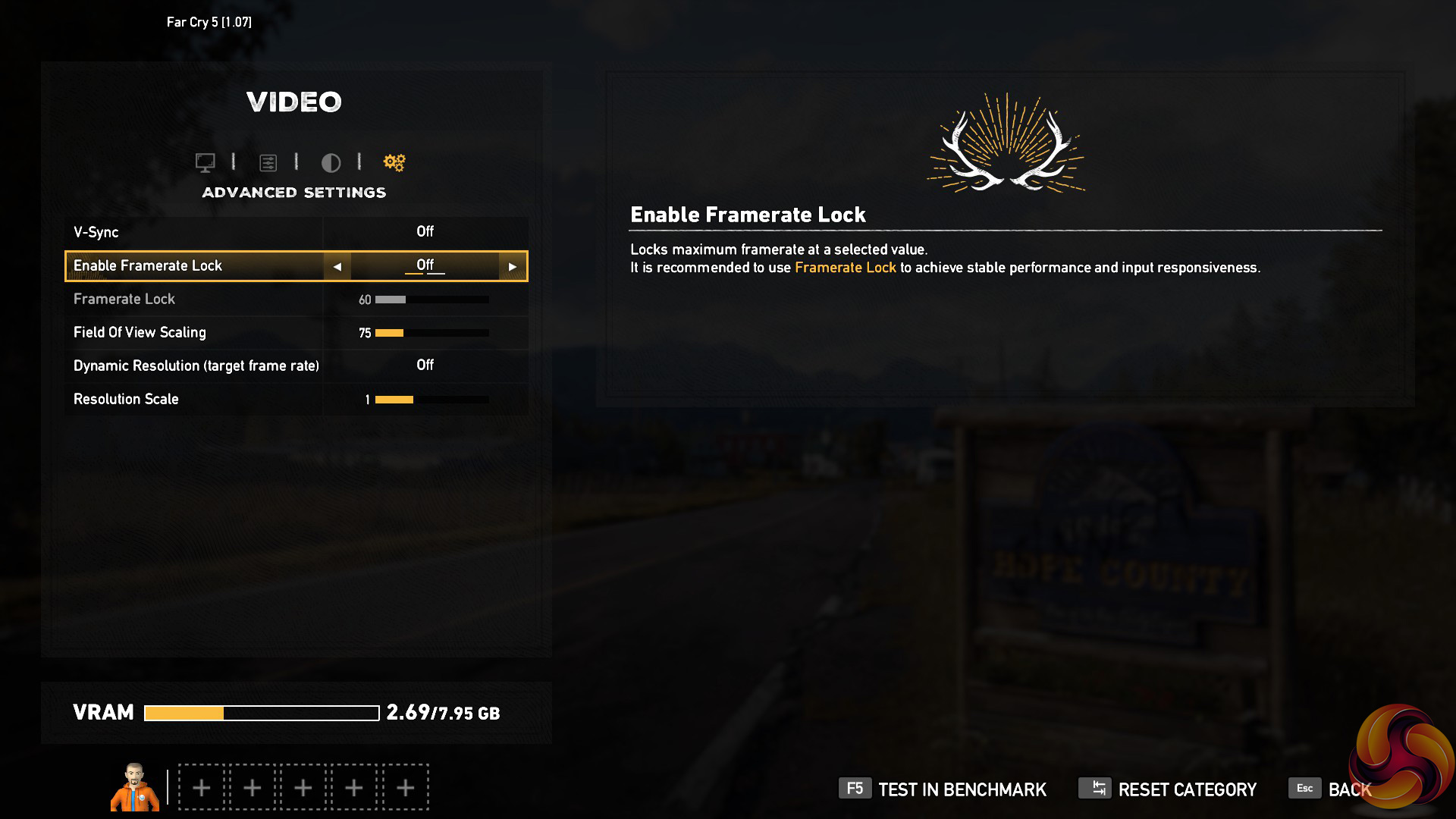
We test using the Ultra preset, with AA and motion blur disabled.
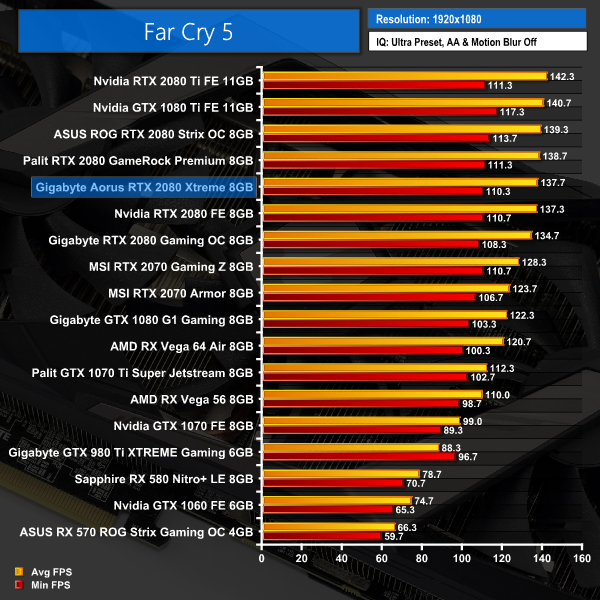
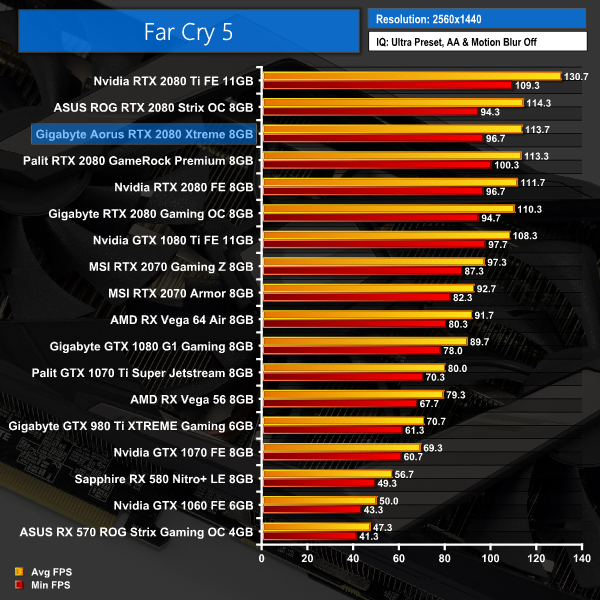
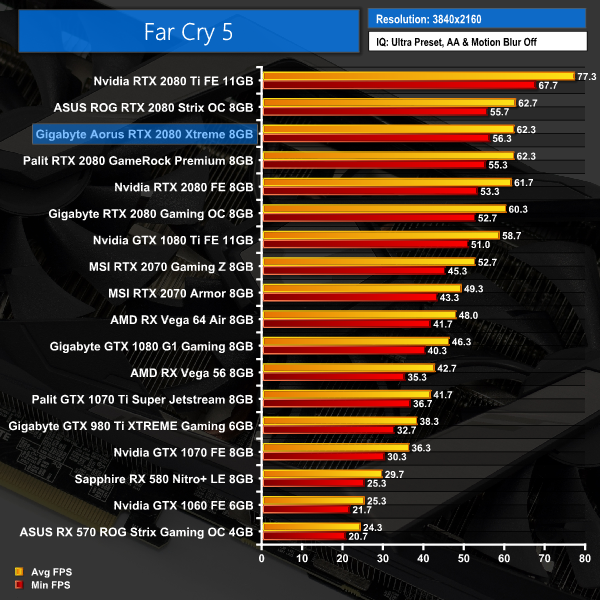
Despite the anomaly at 1080p, Far Cry 5 again shows the Aorus 2080 slotting in just behind the ASUS ROG Strix model, though it is just a fraction of an FPS faster than the Palit GameRock Premium card.Tom Clancy’s Ghost Recon Wildlands is a tactical shooter video game developed by Ubisoft Paris and published by Ubisoft. It was released worldwide on March 7, 2017, for Microsoft Windows, PlayStation 4 and Xbox One, as the tenth installment in the Tom Clancy’s Ghost Recon franchise and is the first game in the Ghost Recon series to feature an open world environment. (Wikipedia).
We test using the Very High preset.
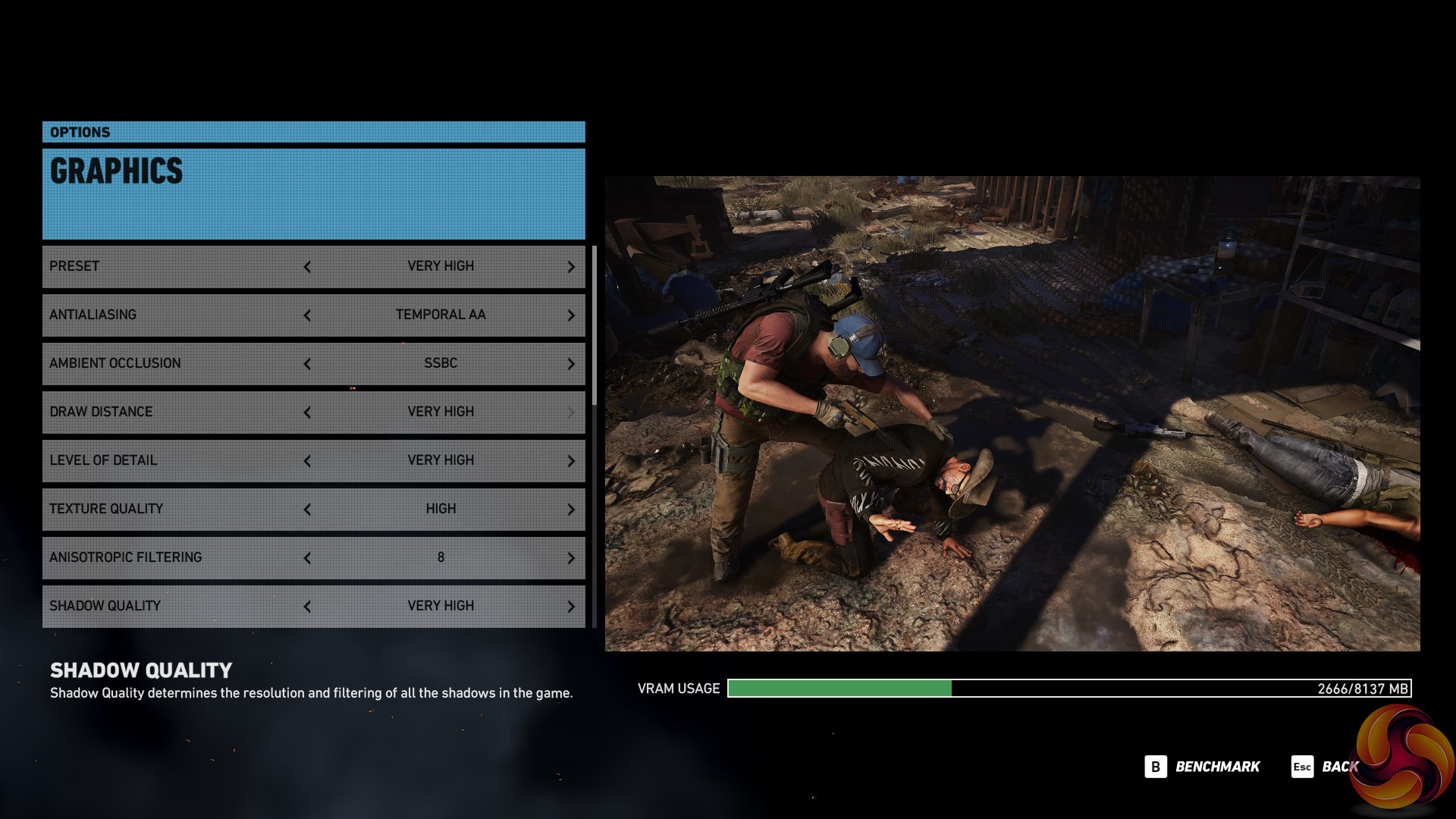
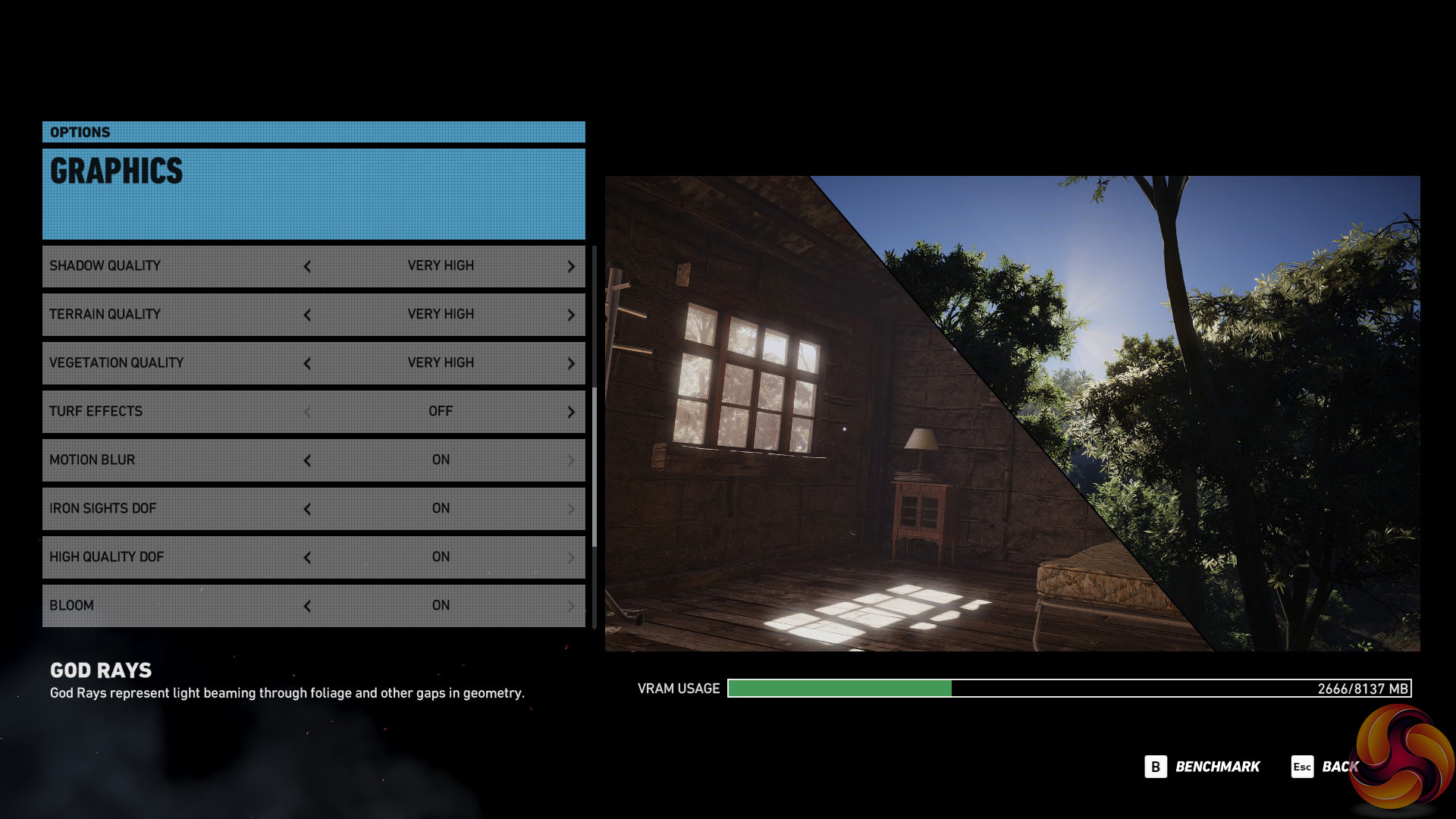
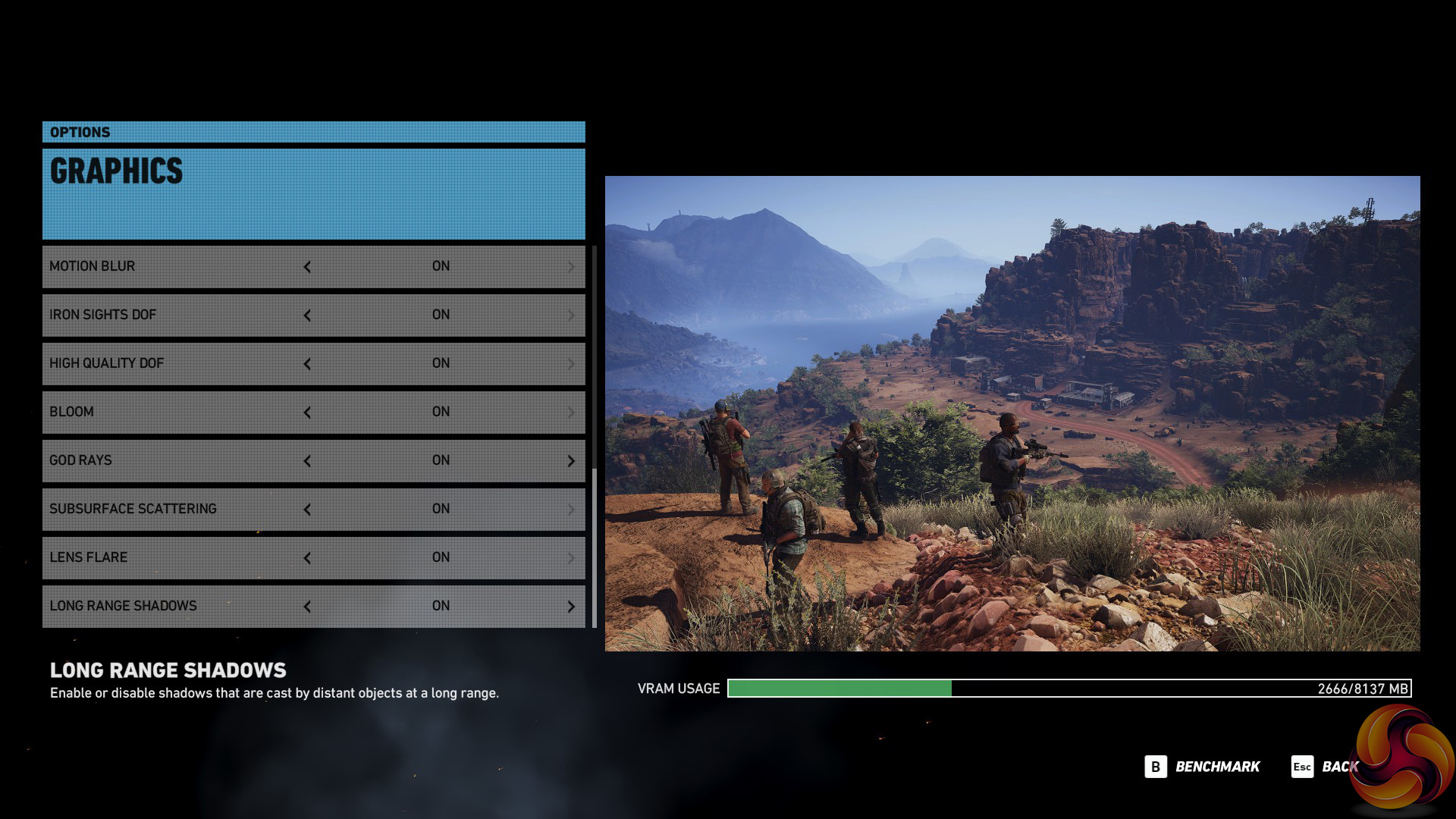
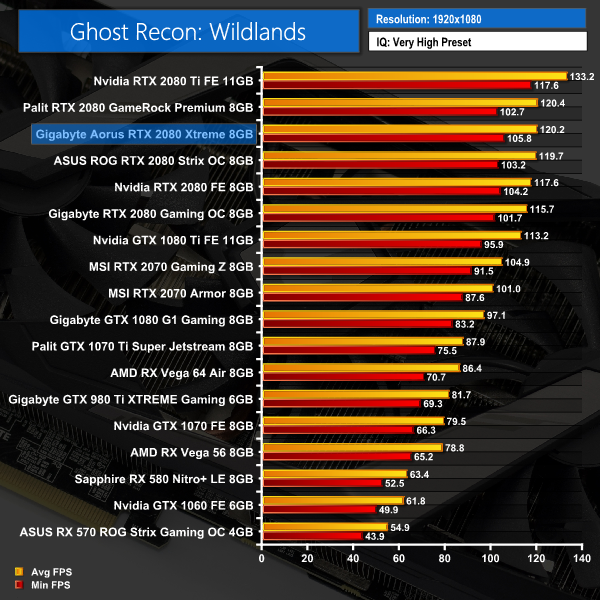
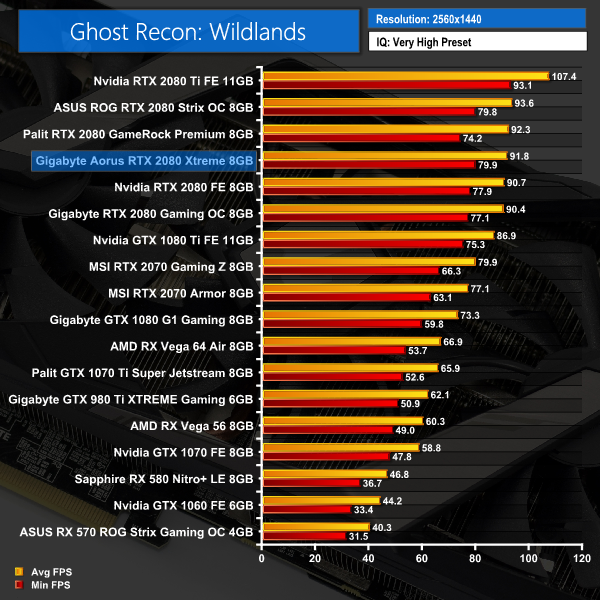
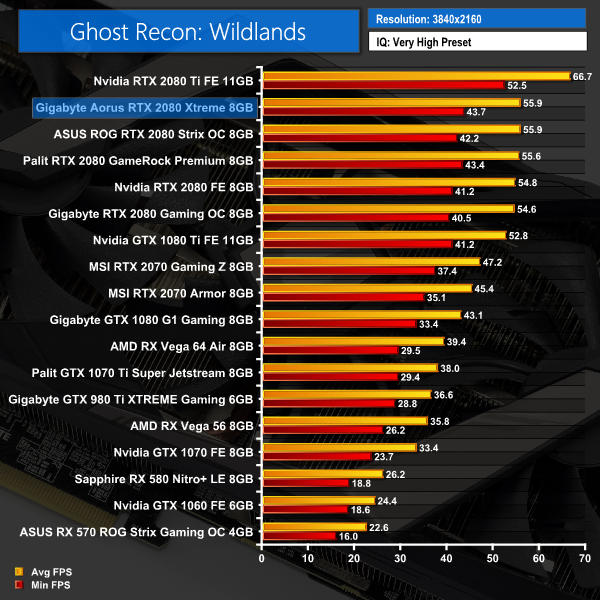
Ghost Recon: Wildlands is another mixed bag, with all three of the top RTX 2080s trading places depending on the resolution. You can see, however, that even though one card may be faster than the others, the differences really are not big at all.Middle-earth: Shadow of War is an action role-playing video game developed by Monolith Productions and published by Warner Bros. Interactive Entertainment. It is the sequel to 2014’s Middle-earth: Shadow of Mordor, and was released worldwide for Microsoft Windows, PlayStation 4, and Xbox One on October 10, 2017. (Wikipedia).
We test using the Very High preset.

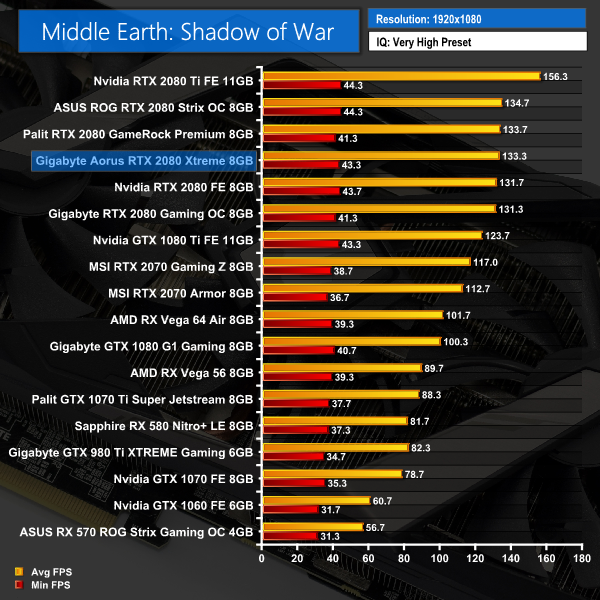
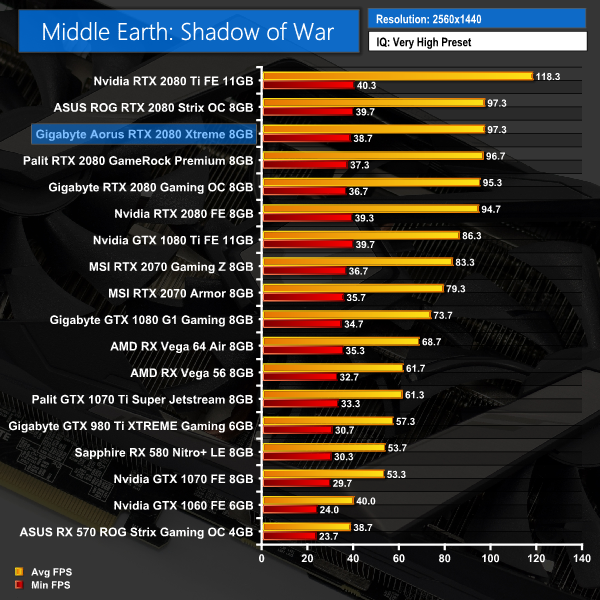
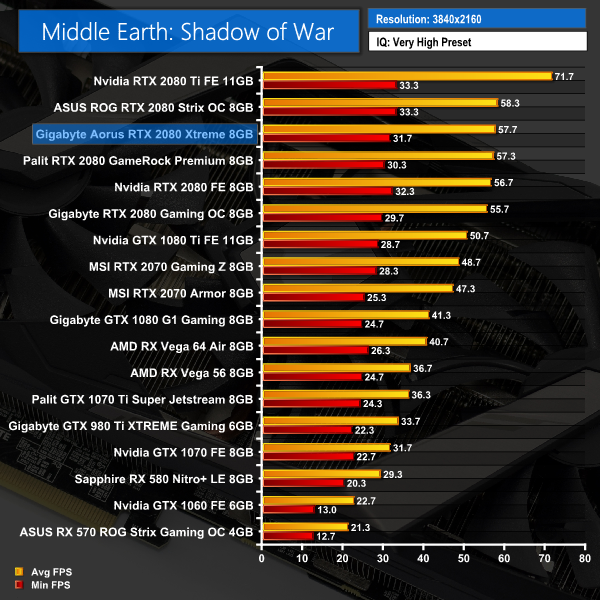
At 1080p when playing Middle Earth: Shadow of War, the Aorus falls just behind the Palit RTX 2080, but at both 1440p and 2160p it just edges ahead. The ASUS ROG Strix card, though, is still marginally faster.Shadow of the Tomb Raider is an action-adventure video game developed by Eidos Montréal in conjunction with Crystal Dynamics and published by Square Enix. It continues the narrative from the 2013 game Tomb Raider and its sequel Rise of the Tomb Raider, and is the twelfth mainline entry in the Tomb Raider series. The game released worldwide on 14 September 2018 for Microsoft Windows, PlayStation 4 and Xbox One. (Wikipedia).
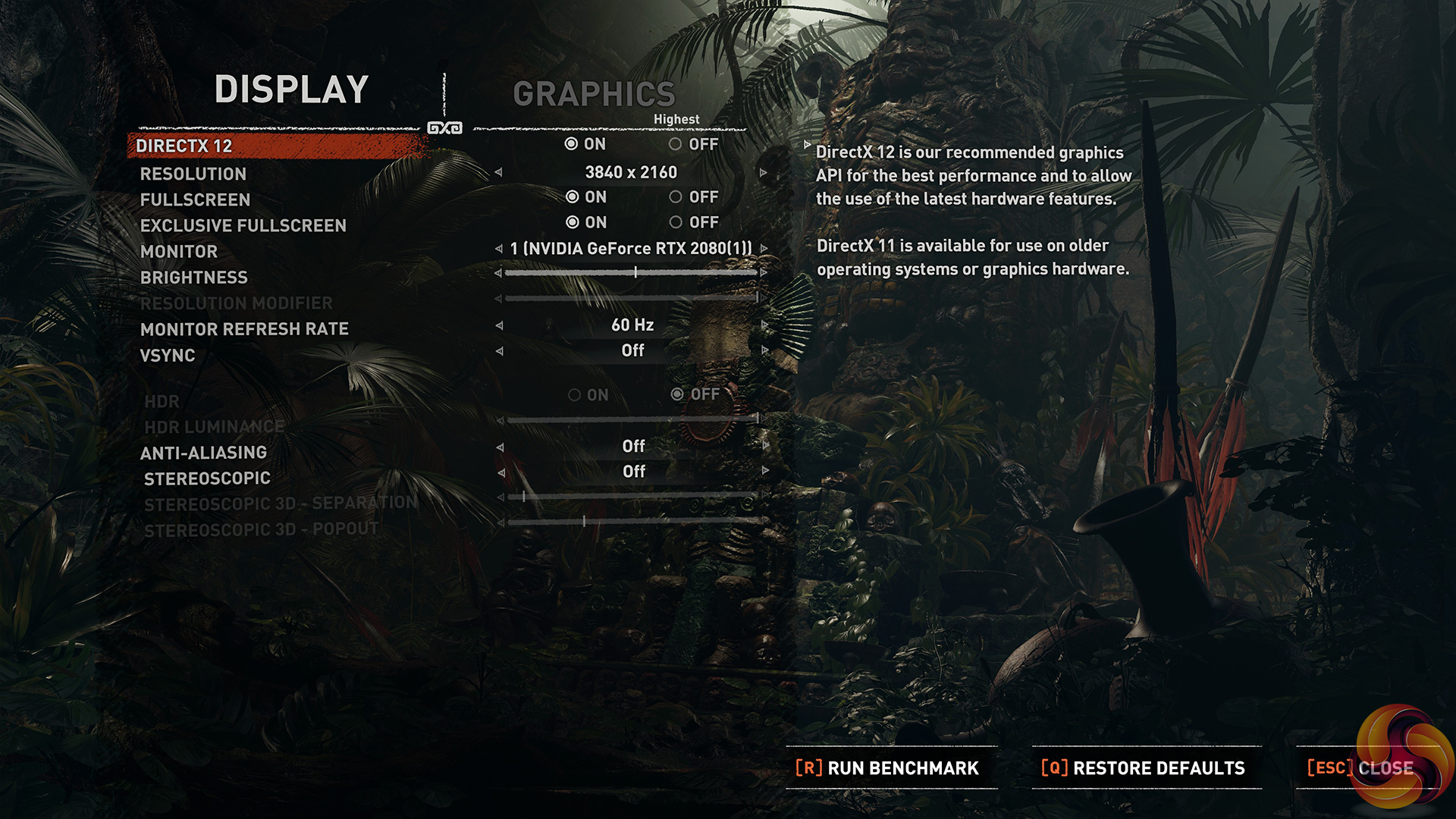
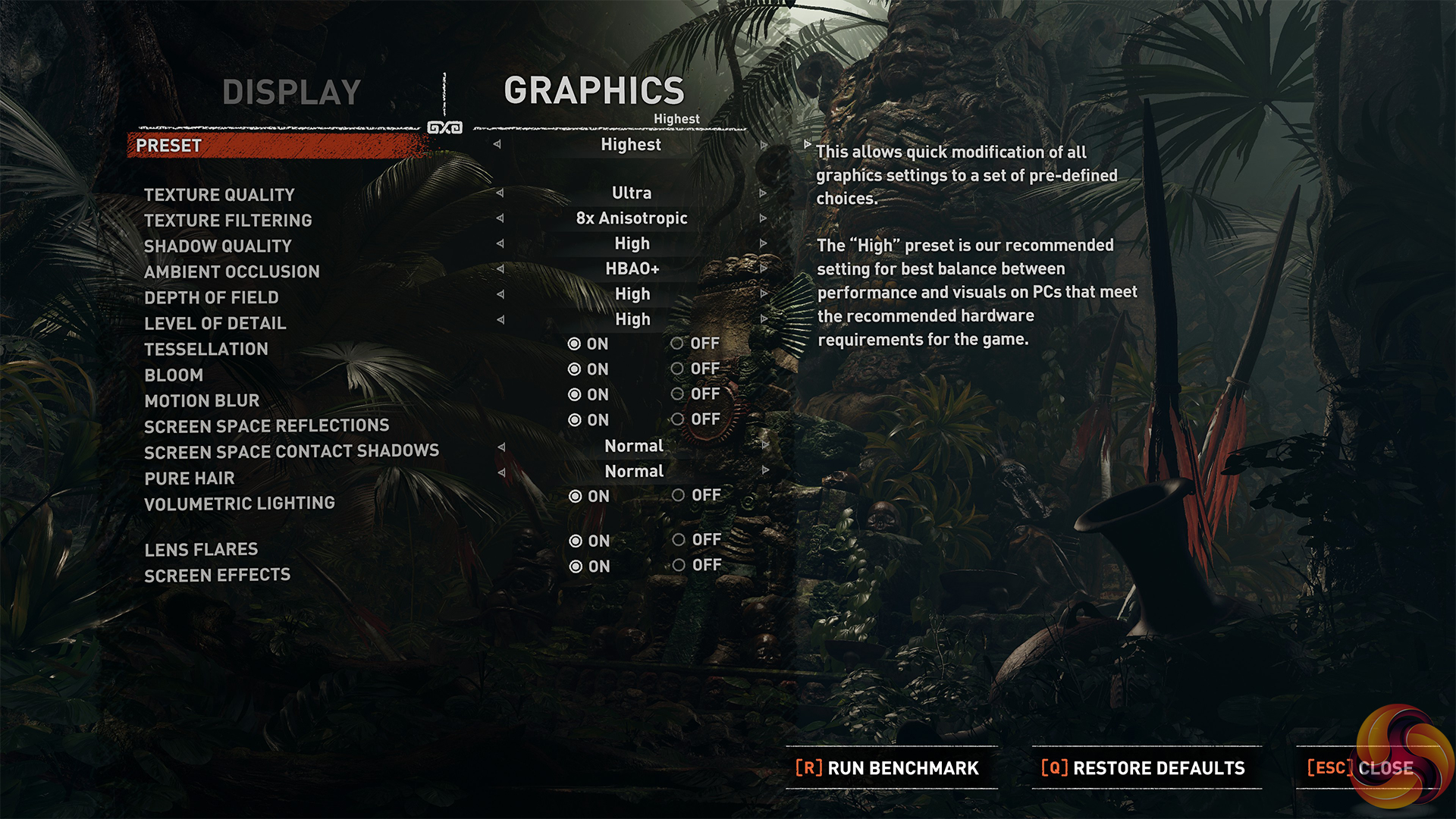
We test using the Highest preset, with AA disabled. We test using the DX12 API.
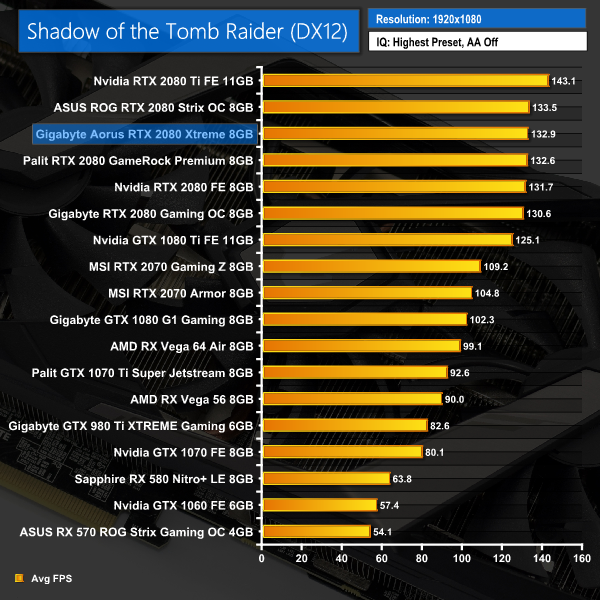
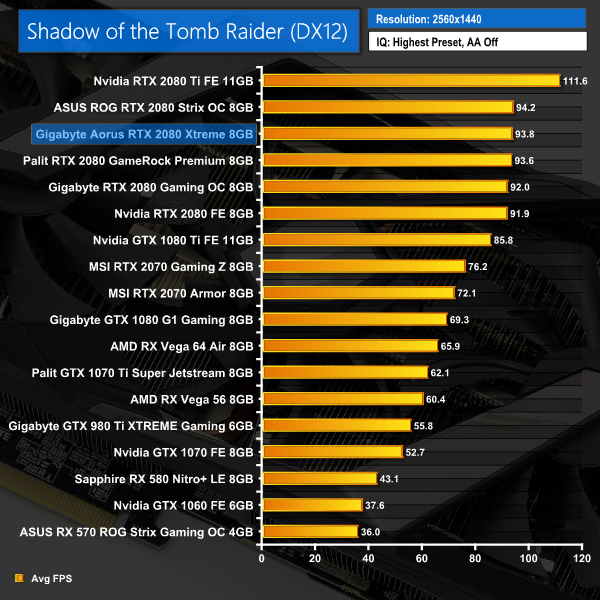
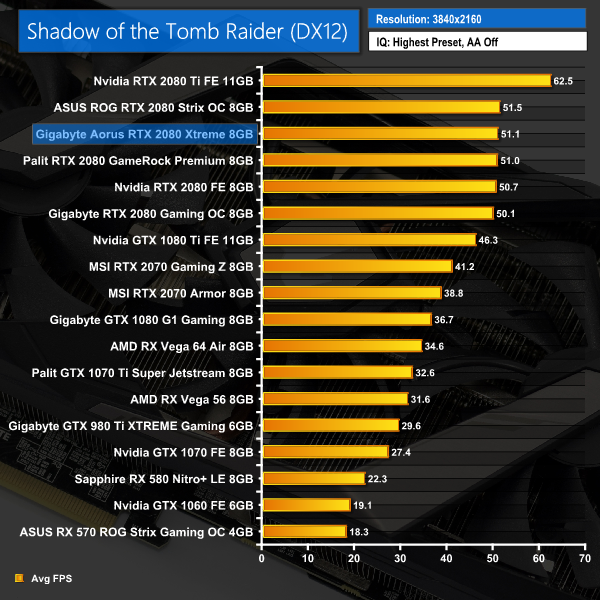
Our last game on test today, Shadow of the Tomb Raider again has the Aorus just ahead of the Palit GameRock Premium (even if it is merely 0.1FPS faster at 4K resolution), but still just behind the ASUS ROG Strix.Here we present the average clock speed for each graphics card while running the 3DMark Fire Strike Ultra stress test 20 times. We use GPU-Z in tandem with the Powenetics Project to record the GPU core frequency during the Fire Strike Ultra runs – at the end, we are left with around 4300 data entries.
We calculate the average core frequency during the entire 20-run test to present here.
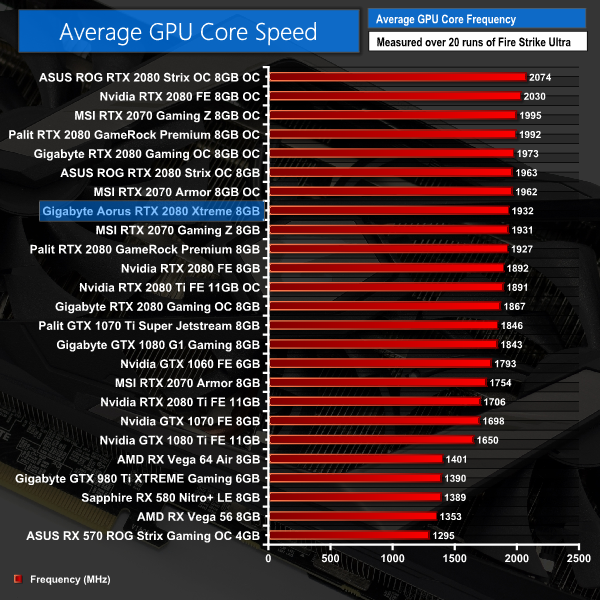
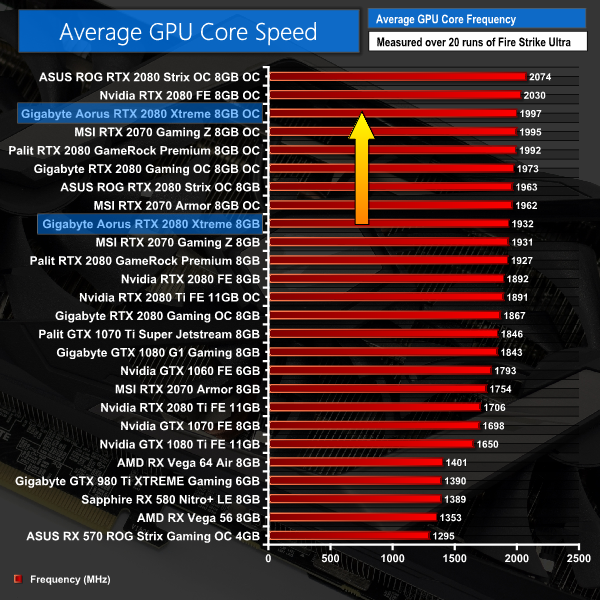
With a rated boost clock of 1890MHz, we do see the Aorus card exceed this when stressed in 3DMark – its average frequency proved to be 1932MHz under load. In the real world, this makes it just 5MHz faster than the Palit GameRock Premium which explains why the two cards performed so similarly. The ASUS ROG Strix 2080 has a 31MHz clockspeed advantage over the Aorus Xtreme, which also explains why that card proved marginally faster across our suite of games.For our temperature testing, we measure the peak GPU core temperature under load, as well as the GPU temperature with the card idling on the desktop. A reading under load comes from running the 3DMark Fire Strike Ultra stress test 20 times. An idle reading comes after leaving the system on the Windows desktop for 30 minutes.
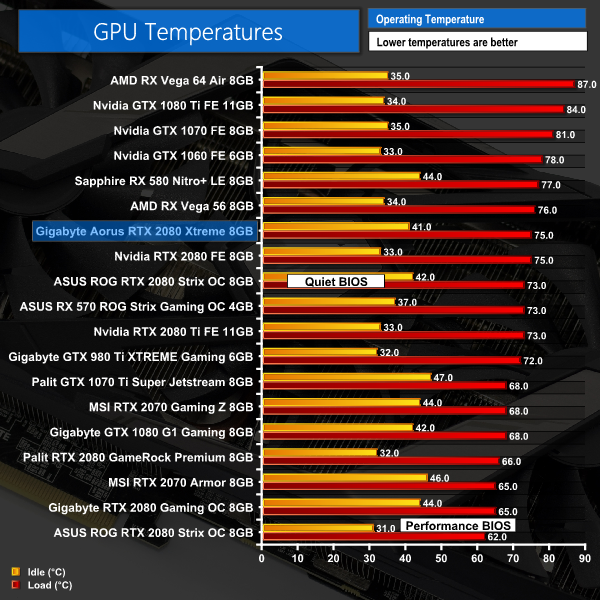
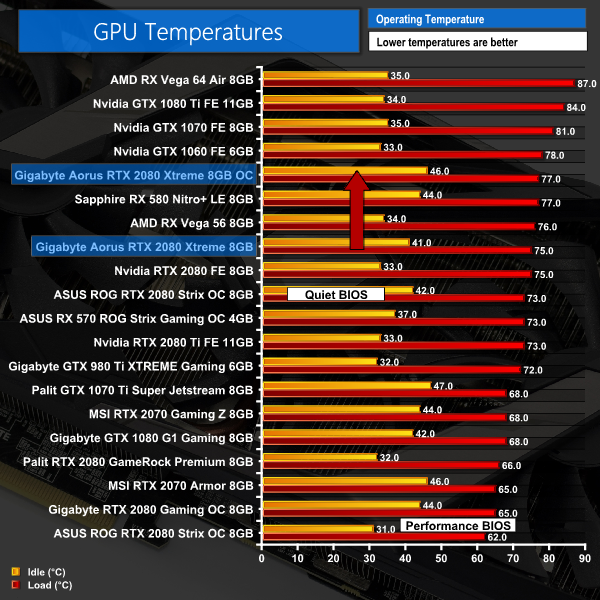
At this point we have established that the Aorus Xtreme 2080 is up there with the fastest RTX 2080s out there – no doubt about it. Surprisingly, however, it is actually a relatively hot-running card, with a peak of 75C during 3DMark stress testing. Now, this isn't a worrying figure at all – it is still well below the maximum operating temperature for an RTX 2080 – but for an aftermarket card like this, it is really quite warm. After all, it is essentially the same temperature as Nvidia's Founders Edition, and a full 10C hotter than Gigabyte's own Gaming OC 2080 model.
For me, I have to say I don't understand this at all. A card of this size, with such a hefty heatsink and three 100mm fans, I would really expect the GPU core to be running in the low 60s. I mentioned at the start of the review how I wasn't sure about the direct contact with the heatpipes and the GPU die, and it is possible that is part of the problem, but it still baffles me that Gigabyte would release this Aorus card to market – priced £120 above its own Gaming OC 2080 – despite it running hotter.
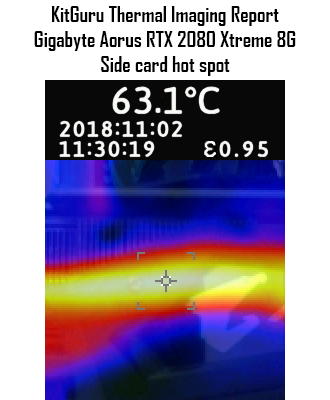
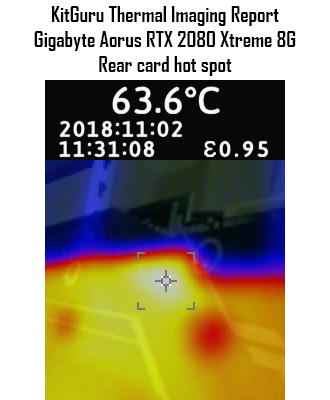
In fairness, the GPU itself seems to be the hottest point of the card, as our thermal imaging camera could not find any hot spots above 64C which is more in line with what we'd expect from a card like this.We take our noise measurements with the sound meter positioned 1 foot from the graphics card. I measured the sound floor to be 34 dBA, thus anything above this level can be attributed to the graphics cards. The power supply is passive for the entire power output range we tested all graphics cards in, while all CPU and system fans were disabled.
A reading under load comes from running the 3DMark Fire Strike Ultra stress test 20 times. An idle reading comes after leaving the system on the Windows desktop for 30 minutes.
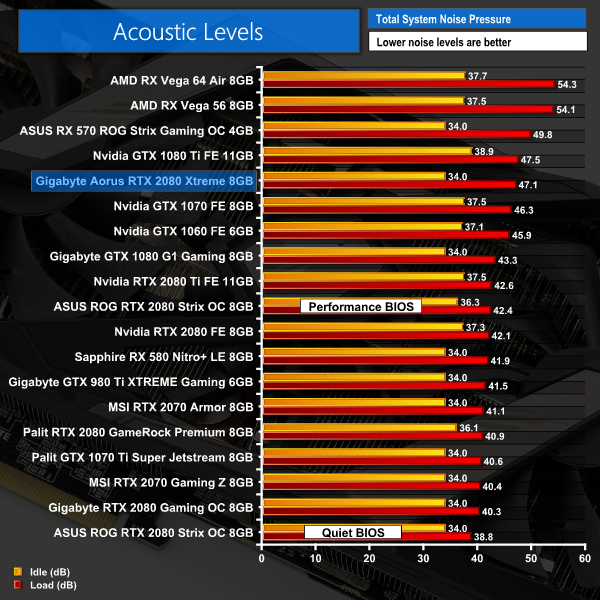
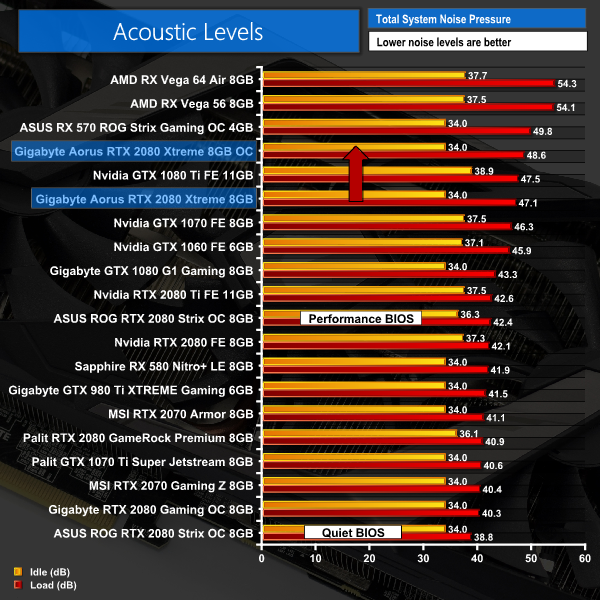
As with our temperature testing, the noise levels of this Aorus card again surprised me – it is loud! Peaking at 47dB, it is a full 5dB louder than Nvidia's Founders Edition 2080, making it by far the loudest RTX 2080 card we have tested so far. It does have a fan stop mode, so the fans don't spin while the card is idling, but again – I don't understand why this Aorus model, a flagship card, is almost 7dB louder than the cheaper RTX 2080 Gaming OC.
Just to clarify as well, this card was tested with all the same settings as our previous RTX 2080s – auto fan curve, stock Nvidia GPU settings from the control panel etc. It just runs a lot louder.We have recently revamped our GPU power consumption testing. Previously we would measure the total system power draw with each graphics card installed. Given that the rest of the components did not change, this gave us an idea of the relative power consumption of each graphics card, but we could not be more specific than that.
Now, however, thanks to Cybenetics Labs and its Powenetics Project, we are able to measure the power consumption of the graphics card alone, giving much more precise and accurate data. Essentially, this works by installing sensors in the PCIe power cables, as well as the PCIe slot itself thanks to a special riser card. This data is recorded using specialist software provided by Cybenetics Labs and given it polls multiple times a second (between 6 and 8 times a second, based on my observations) we can track the power consumption in incredible detail over any given amount of time.
You can read more about the Powenetics Project over HERE.
As with previous testing, a reading under load comes from running the 3DMark Fire Strike Ultra stress test 20 times. An idle reading comes after leaving the system on the Windows desktop for 30 minutes. This stress test (20 runs) produces approximately 4300 data entries in the Powenetics software, which we can then export to an Excel file and analyse further. Here we present the average continuous power consumption of each graphics card across the entire 20 run test.
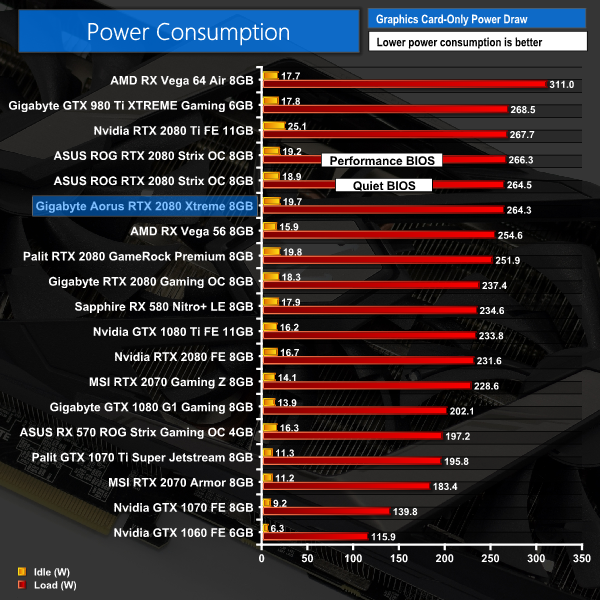
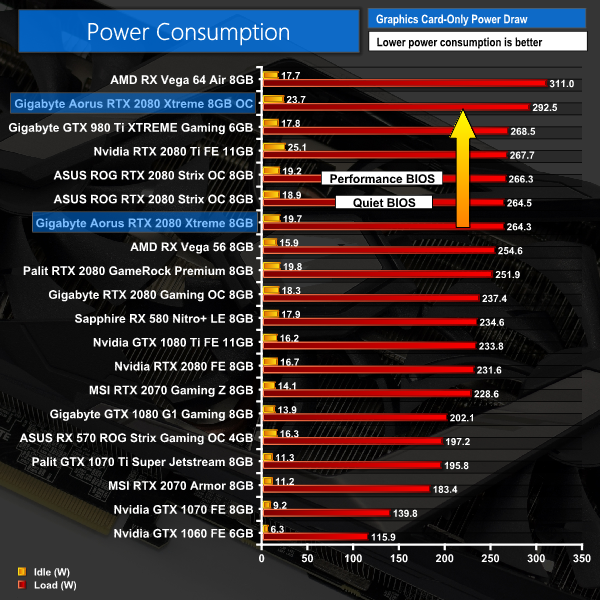
Power consumption levels are more of what we would expect – it is a heavily factory overclocked card so around the 264W model really is par for the course. You can also see just how close it is to the ASUS ROG Strix 2080 – another factory overclocked model – in terms of power draw.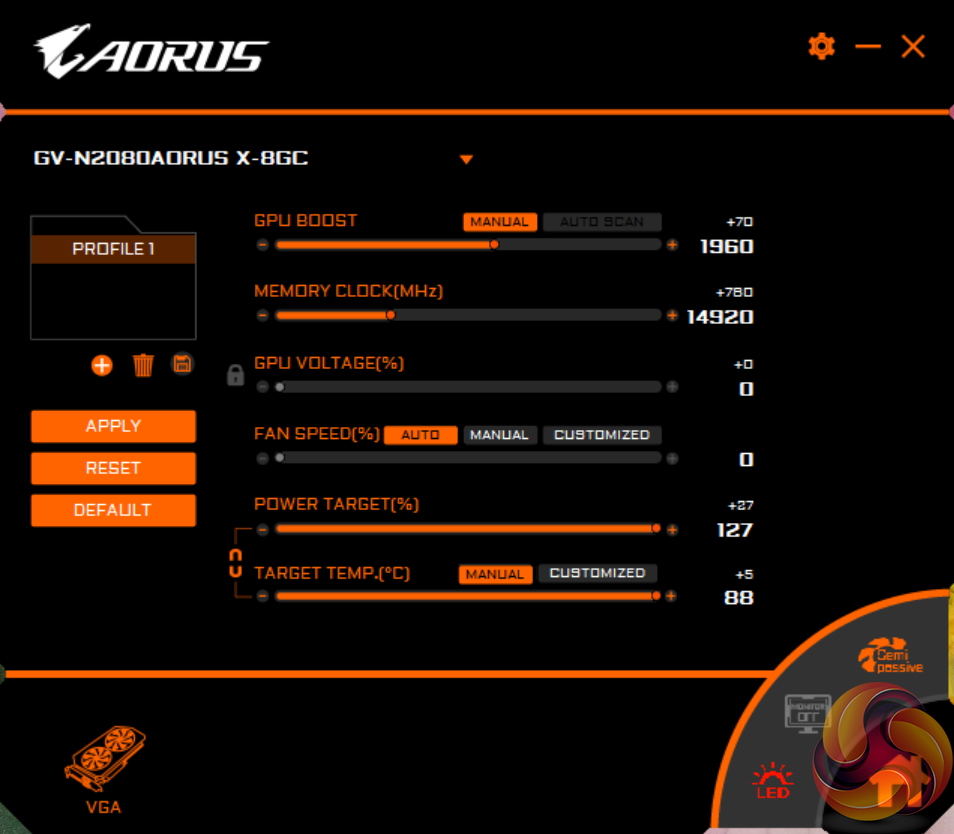
Considering this card is already factory overclocked to 1890MHz – a full 180MHz faster than reference – I was not expecting much in the way of manual overclocking headroom. Sadly, that is exactly how it played out, as I could only add +70MHz to the GPU core. The already overclocked memory, however, was receptive to another +780MHz, though, bringing the total speed to 14920MHz.
3DMark and Games Testing
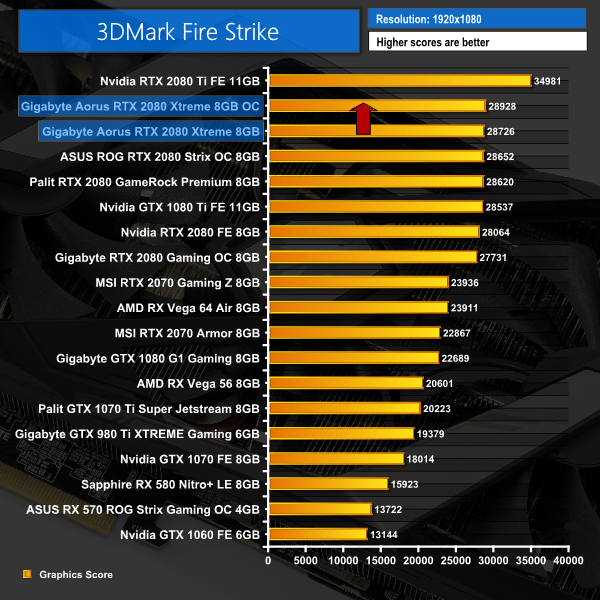
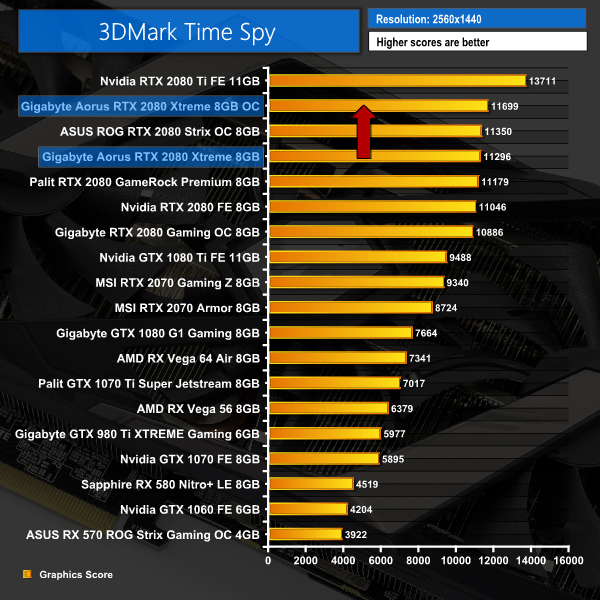
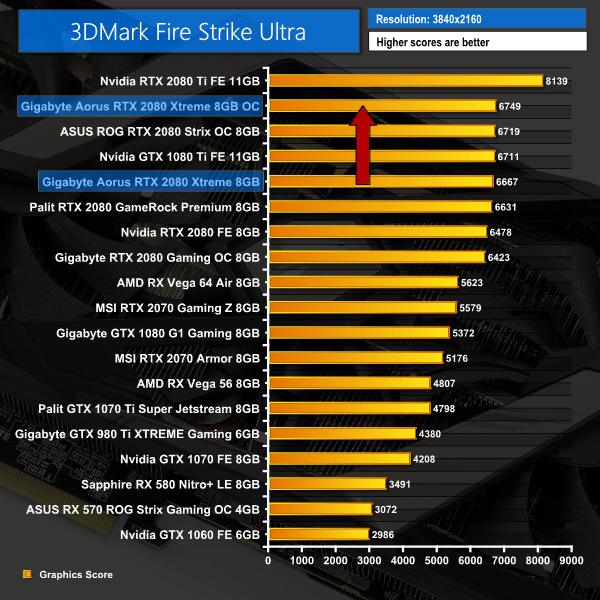
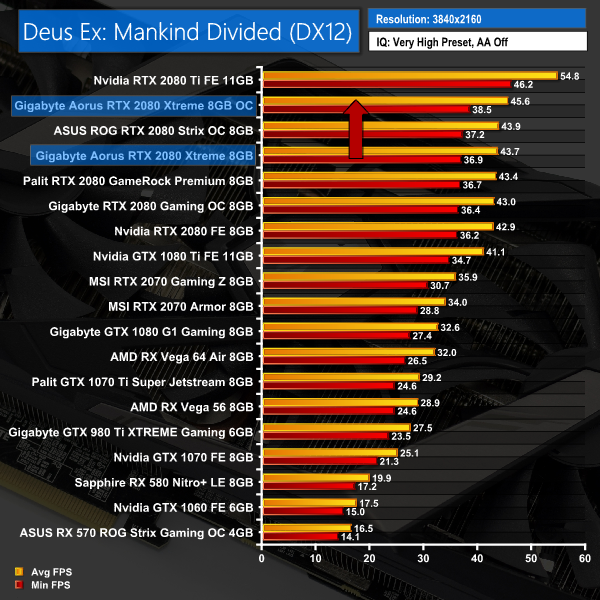
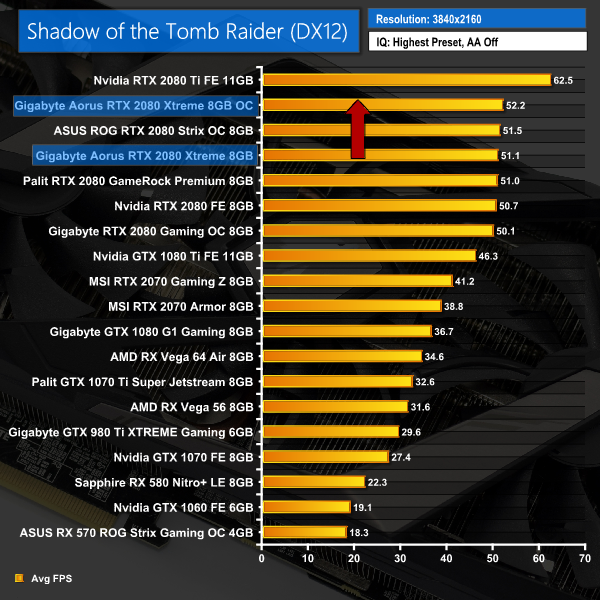
Not surprisingly, this overclock didn't bring massive gains – we saw a jump of just over 1000 points in Fire Strike which proved to be the biggest margin of increase, but we only saw an extra 1-2FPS in Deus Ex: Mankind Divided and Shadow of the Tomb Raider when played at 4K resolution.Here, we take a further look at the impact of our overclock, looking at the increased temperatures, acoustics, power draw, and lastly, the effect had on the average clock speed.
Temperatures
Acoustics
Power consumption
Average clock speed under load
Overview
While the likes of GPU temperatures and noise levels didn't increase that much – relatively speaking – when dealing with the overclock, considering the card was already running relatively hot, and certainly on the loud side of things, this overclock obviously doesn't help. In fact, the peak noise level of 48.6dB when overclocked makes this the loudest Nvidia card on test. Power consumption jumped up nearly 30W, too, bringing total consumption almost to 300W, with just our Vega 64 drawing more juice.
I wouldn't say the clock speed gain is worth it, either, We saw a real-world average frequency of 1997MHz, which is 65MHz faster than what we achieved at stock clocks – and as we saw on the previous page, this didn't bring much performance benefit at all.The Gigabyte Aorus RTX 2080 Xtreme 8G promised to be a seriously fast card, packed with features and offering flagship-level performance. I have to say, it has left me disappointed after testing it this week.
If you saw all of the benchmarks earlier in this review, you will know it is a fast card – the rated boost clock of 1890MHz sees to that, and we actually saw the card running closer to 1930MHz in the real world.
That means performance figures in the latest games are up there with the best – this Aorus card was trading blows with the ASUS ROG Strix 2080 and the Palit GameRock Premium 2080, and even though it might not be the outright fastest 2080 we have tested, it is certainly very close.
That's all fine and good, but what has let me down the most are the noise levels and GPU temperatures recorded by this card. Just to recap, it comes in at 47dB loud under load, making it a whole 5dB louder than Nvidia's Founders Edition card. With a peak temperature of 75C, it runs just as hot as the Founders card, too.
I have to say, I really don't get that – we even reached out to Gigabyte with our concerns, but our findings matched Gigabyte's own internal testing figures. So what that means is, Gigabyte has released a card that is not only more expensive that its own RTX 2080 Gaming OC (which can now be had for £779 compared to the Aorus' £899 price tag) but it is actually both hotter and louder. I don't get it at all.
In fairness, you do get some extra features with the Aorus Xtreme – it is still the faster card, even if the differences are marginal, while the RGB is pretty funky and I like the included GPU support bracket.
But are those things worth paying an extra £120 for? Even if they were, you still have to deal with noticeably increased noise levels and limited overclocking headroom.
That makes it very hard to recommend the Gigabyte Aorus RTX 2080 Xtreme 8G. I just can't see how it justifies its price when Gigabyte's own Gaming OC RTX 2080 model is £120 cheaper, and both cooler-running and significantly quieter.

If you do want to buy the Aorus Xtreme, we found it on Overclockers UK for £899 HERE.
Update: The Aorus Xtreme is currently on sale for £60 off, at £839. We have been told this is only until Wednesday 14th November, at which point the price will revert to £899. This sale price is certainly better for the card, but it is still £60 more expensive than the Gaming OC which is cooler and quieter, so our original conclusion still stands.
Pros
- Fast clock speed out of the box.
- Bling-tastic RGB.
- Included GPU support bracket.
- Extra display outputs adds flexibility.
Cons
- Hottest aftermarket 2080 we've tested so far.
- Loud – 5dB louder than even Nvidia's Founders Edition card.
- Limited manual overclocking headroom.
- £120 more expensive than Gigabyte's Gaming OC model – which is both cooler and quieter.
KitGuru says: The Aorus RTX 2080 Xtreme 8G is certainly a fast card – but when you're paying £120 more than you would for the RTX 2080 Gaming OC, which is significantly cooler and quieter, it really doesn't make any sense to me.
