 KitGuru KitGuru.net – Tech News | Hardware News | Hardware Reviews | IOS | Mobile | Gaming | Graphics Cards


Sitting in the middle of ASRock's current Z97 gaming motherboard line-up, the Fatal1ty Z97X Killer targets the fierce sub-£130 marketplace. Can its feature set, overclocking capabilities, and general performance allow it to stand out in a hotly-contested segment of the market?
ASRock supplies its Z97X Killer with a number of popular gaming-orientated features that we have come to expect from boards competing in this segment of the market. Networking is provided by Killer's E2200 series NIC, while ASRock's Purity Sound 2 audio implementation is powered by the Realtek ALC1150 codec. Three full-length PCIe 3.0 slots permit for three-card CrossFire and two-card SLI capabilities.
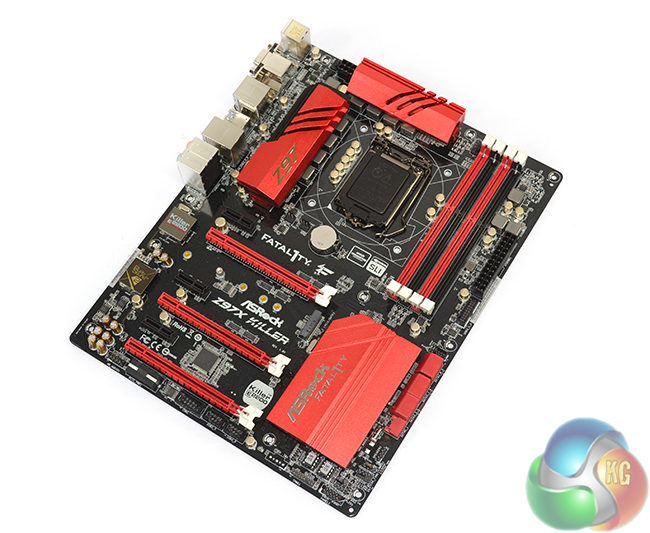
Aiming to put its own stamp on the sub-£130 gaming motherboard market, ASRock adds unique features to its Z97X Killer. HDD saver provides users with an extended amount of control over their SATA drive. A choice between M.2 and SATA Express is welcomed on a £125 board, as is the upgraded power delivery system that ASRock calls Super Alloy. And when software comes into the picture, ASRock provides its F-Stream utility and a 3-month XSplit premium license.
Can the bright and bold Z97X Killer prove that it is capable of competing in the fierce sub-£130 gaming motherboard market?
Features:
- Killer E2200 series NIC.
- Purity Sound 2 audio.
- M.2 and SATA Express connectors.
- ASRock Super Alloy.
- Gaming Armor.
- XSplit Gamecaster & Broadcaster 3-month premium license.
- 1-year Orbweb.ME professional subscription.
- HDD Saver technology.
Our sample of the ASRock Z97X Killer motherboard was sent directly from the factory in Taiwan, hence it was supplied without retail packaging or bundle. We have included photographs of the packaging and bundle sent to us by ASRock.
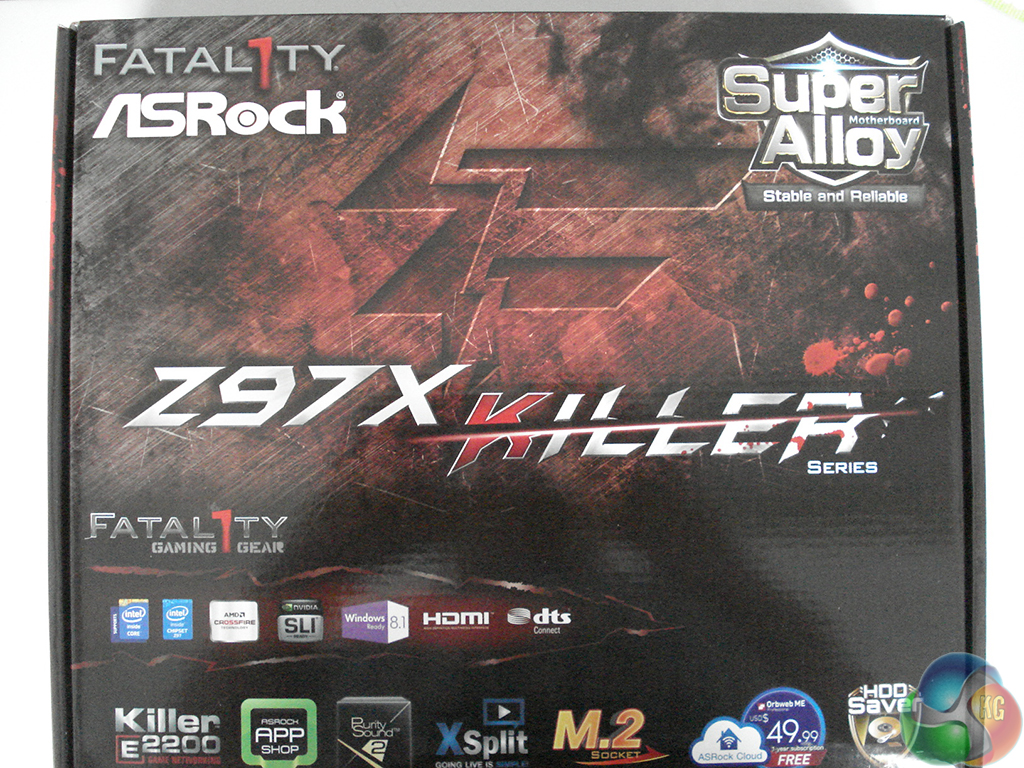
The front of the Z97X Killer motherboard's box outlines a number of the key features, including the Killer E2200 NIC, M.2 connector, and XSplit license.
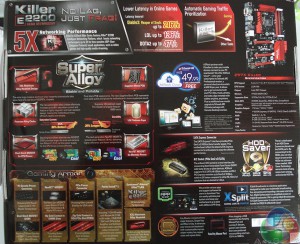
A more detailed set of specifications is outlined on the packaging's rear side. Information regarding ASRock's Super Alloy power components and gaming features are given precedence.
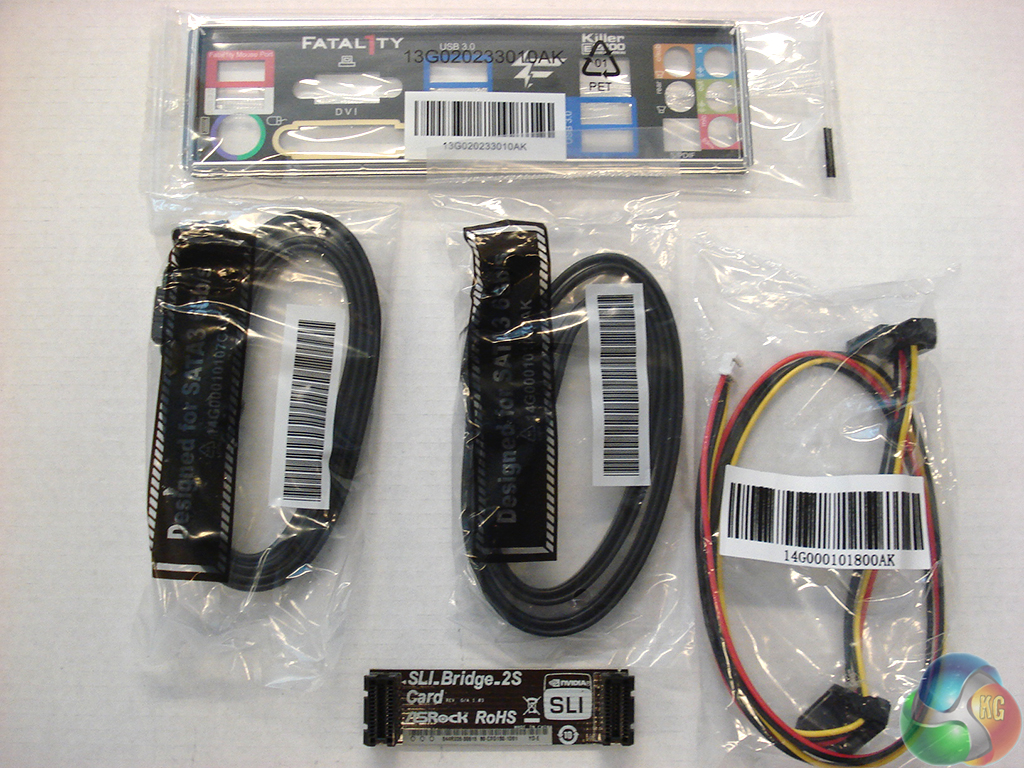
The supplied bundle consists of: four SATA cables, a rigid SLI bridge, the IO shield, and ASRock's HDD saver cable.
HDD Saver is a feature on ASRock's Z97X Killer that allows users to control the operating state of their SATA hard drive, thanks to the discrete connecting cable. For example, the HDD can be switched off via software to aid security or drive longevity.
Unfortunately we cannot test out the feature as our sample was not supplied with the HDD saver cable. While we can see the cable's potentially useful operation, many gamers will be quick to show their disregard for the ugly colours – a black cable would have been preferable.
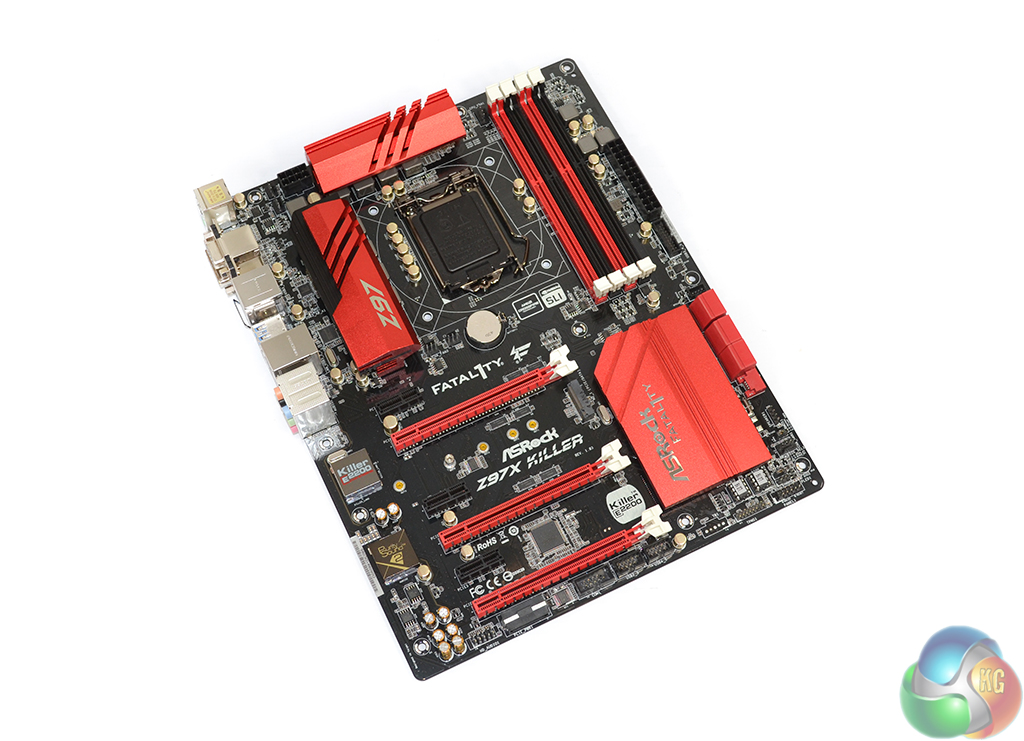
As is convention for its Fatal1ty series of products, ASRock finishes the Z97X Killer in a red and black colour scheme. Compared to previous generation Fatal1ty motherboards, the red used on the Z97X Killer is far brighter than before. The in-your-face approach can take some getting used to, although after a period of time I personally took a liking to the bold colour scheme.
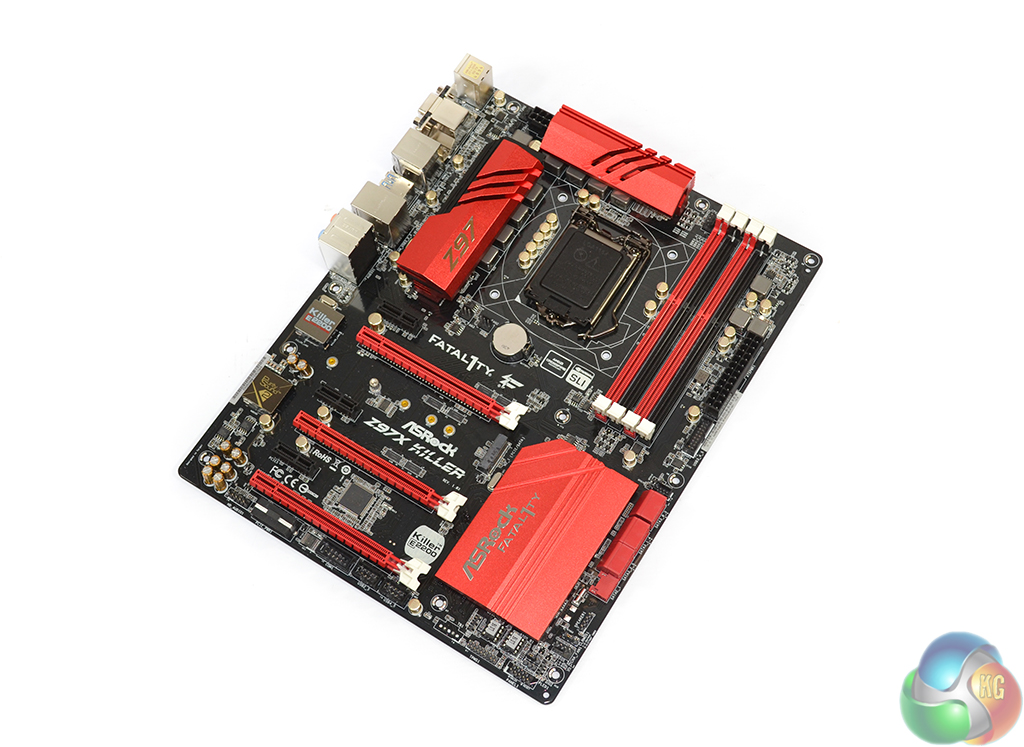
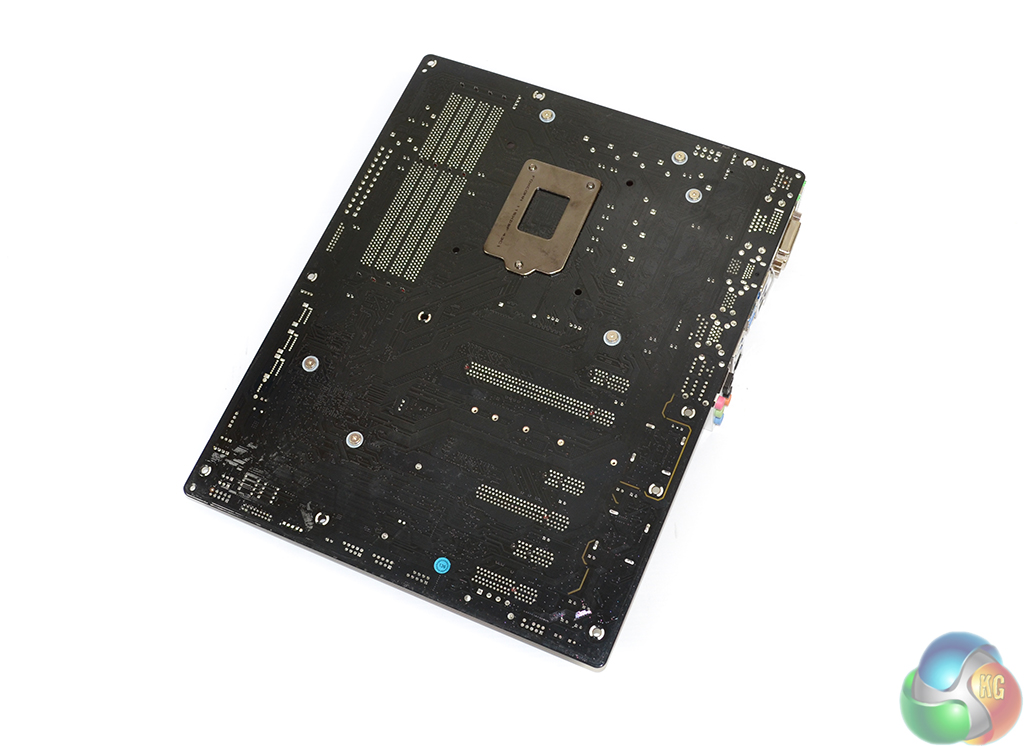
I am pleased to report that ASRock is using a matte black PCB for its Z97X Killer, not the cheap brown alternative that was extensively used on its previous generation of motherboards. For the additional cost, the upgrade to an elegant matte black PCB is well worth it, as gamers and enthusiasts have made clear on a number of occasions.
The only major divergences from the red and black colour scheme are the gold audio capacitors and the white slot latches. Many people like the contrast of white latches on black and red slots, while others may prefer a consistent colour.
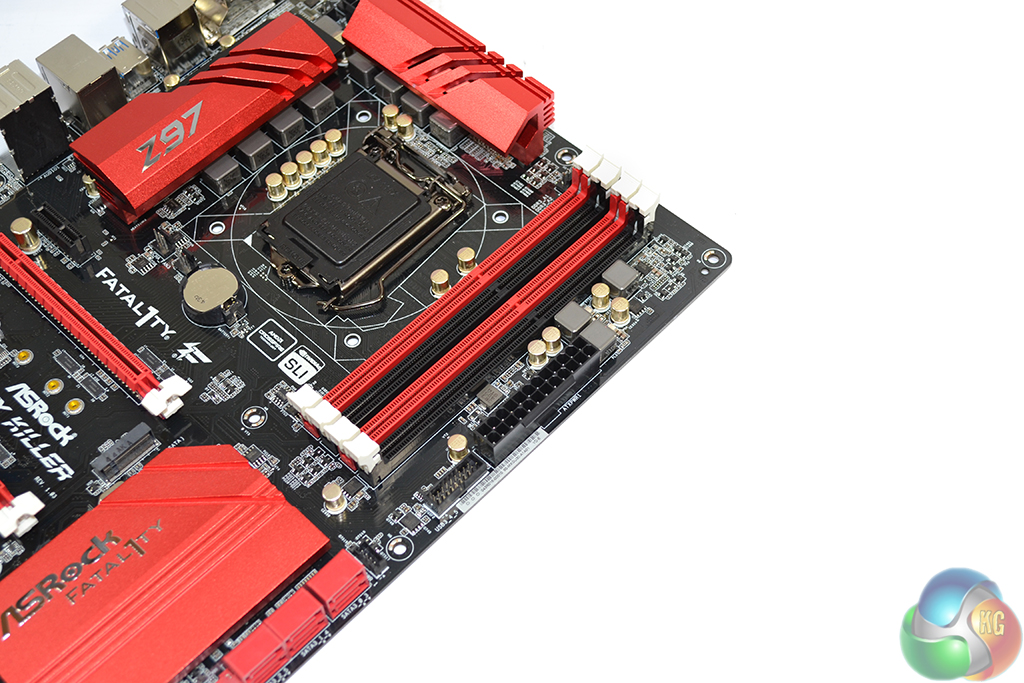
Up to 32GB of DDR3 memory can be installed in four DIMM slots. ASRock states support for 3200MHz+ memory speeds, and the BIOS features 4000MHz dividers, although the maximum frequency is heavily tied to a CPU's IMC.
Sat next to the 24-pin connector is an outwards-facing USB 3.0 header. MSI has treated us with its right-angled approach but ASRock is opting for the more conventional upwards-facing installation that makes cable management more difficult.

A pair of bright red heatsinks cool MOSFETs that form part of the Z97X Killer motherboard's 8-phase power delivery system.
Under ASRock's Super Alloy branding, the power delivery system comprises Texas Instruments' NexFET MOSFETs for memory, dual-stack MOSFETs for the CPU, platinum capacitors rated for a service life of 12,000 hours at 105°C, and alloy chokes. The components (namely the MOSFETs) are cooled by an ‘XXL' heatsink design, although we don't see anything extra, extra large about the aluminium alloy coolers.
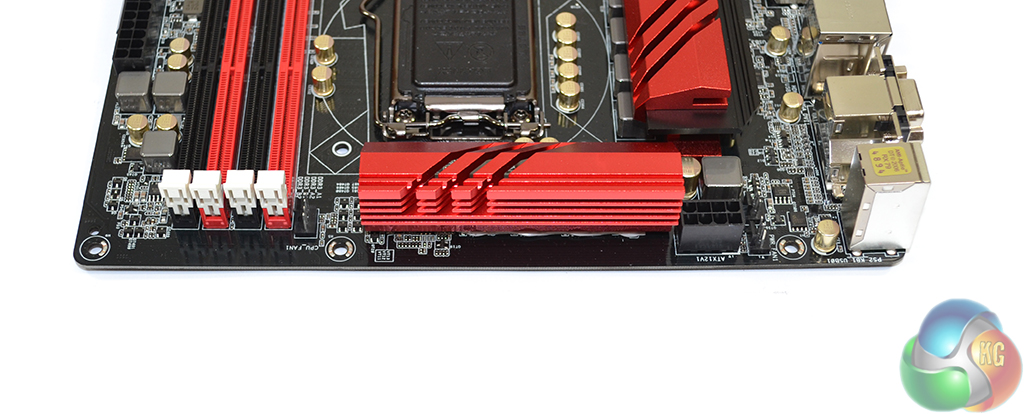
One 4-pin CPU fan connector is positioned above the DIMM slots while the other is accompanied by a 3-pin powered header near the IO shield. We would have liked to see the headers positioned closer together, although we must compliment ASRock for including a 3-pin powered connection which is convenient for pump units.
ASRock places the 8-pin power connector in an ideal location for routing a cable up behind the motherboard tray.
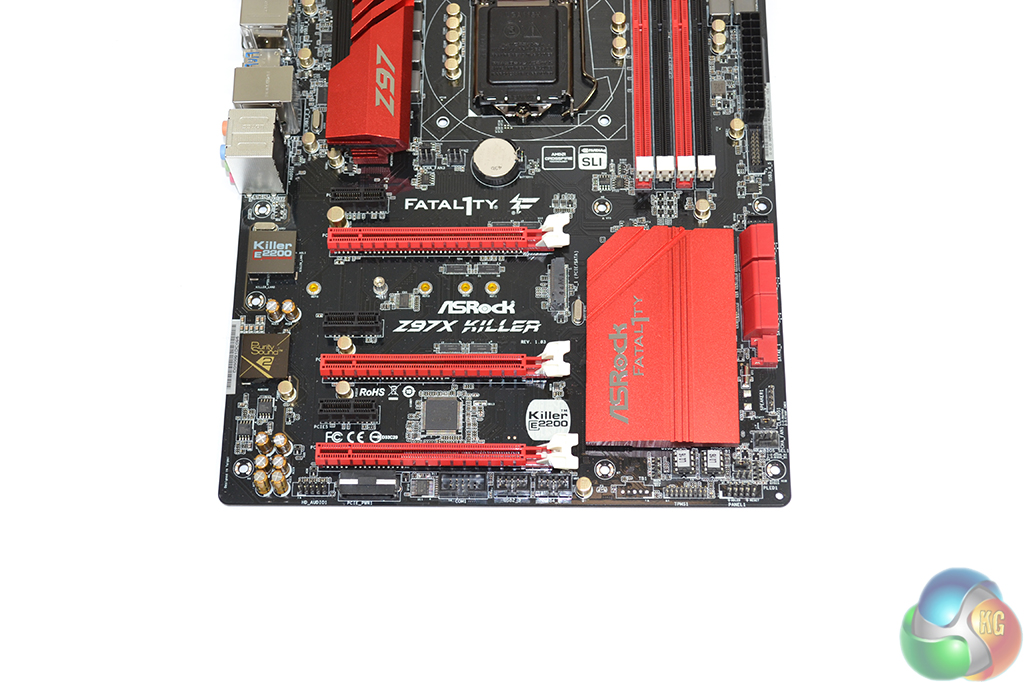
Three full-length PCIe 3.0 slots are fed by the LGA1150 CPU's lanes. For common CPU's such as the 4670K and 4770K, the slots will receive sixteen PCIe 3.0 lanes between them. Lanes can be split as x16/x0/x0, x8/x8/x0, or x8/x4/x4. The lane allocation indicates support for three-card CrossFire, although only two-card SLI is supported by virtue of x8 link requirements.
Installing a PCIe device such as an x4 SSD in the lower full-length PCIe slot will take bandwidth from the connections above it and force SLI to be disabled. Given the support for M.2 and SATA Express, this isn't as much of an issue as it was with the 8-series chipset.
A further three chipset-fed PCIe 2.0 x1 slots fill out the expansion area. Spacing of the slots is as good as it gets for a gaming motherboard of this calibre. Dual-width cards can be given a breathing gap in the upper connectors, or three-slot boards can be installed without hassle.
Sat beneath the primary PCIe x16 slot is the board's 10Gbps M.2 connector. Access to the connector will dictate the removal of a graphics card, which will be a frustrating procedure to some users. On the other hand, having a large VGA board sat above an M.2 SSD will completely hide the drive's (typically) ugly green or blue PCB. The latter point may be of more worth to many appearance-conscious gamers.
The reason behind ASRock's positioning is to allow the M.2 slot to support drives up to 110mm in length. PCIe and SATA devices are supported in the M.2 slot; the bandwidth is allocated via the chipset's PCIe or SATA links.
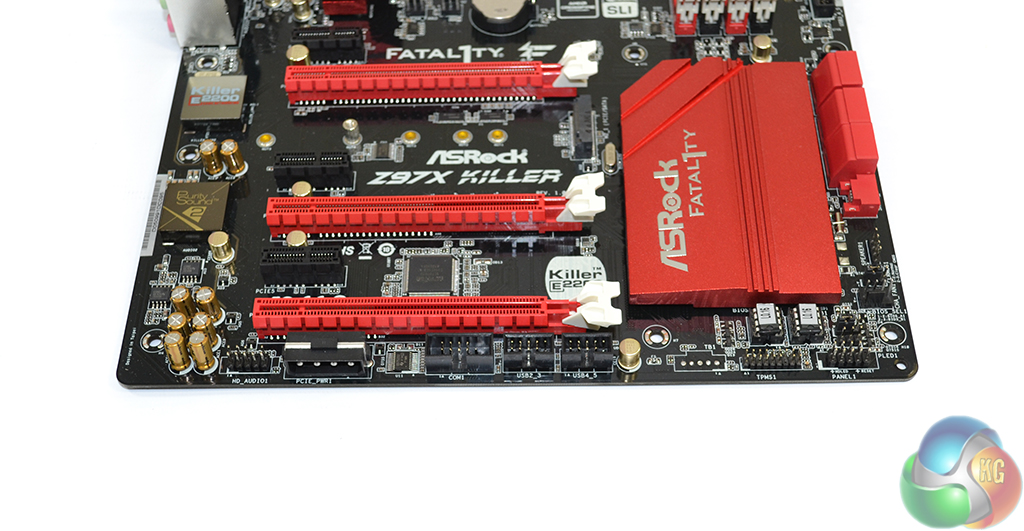
The standard affair of front panel headers is found on the Z97X Killer – audio to the left and front panel connections to the right. A downwards-facing molex connector can be used to provide additional power to multi-GPU configurations.
Dual socketed BIOS chips are used by the Z97X Killer, giving users redundancy and the option to switch out chips in the event of a failure.
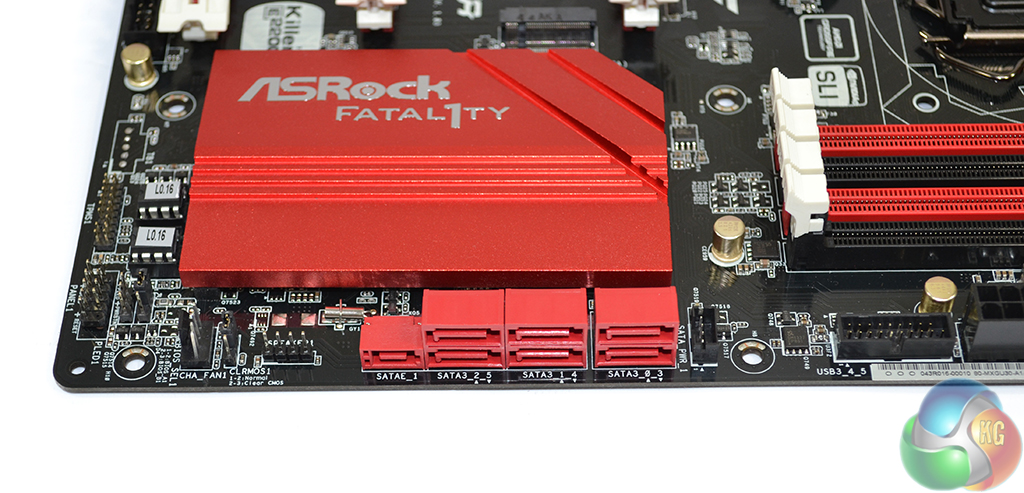
Six SATA 6Gbps ports are provided, all of which are fed by the Z97 chipset. ASRock also provides a SATA Express connector which is formed by using two of the chipset SATA ports and an additional bandwidth-carrying link.
Bandwidth for the SATA Express connection is shared with the aforementioned pair of SATA 6Gbps ports and the M.2 slot (only one of the three sets can be used at any one time). We like the inclusion of M.2 and SATA Express connections as it allows users to choose to interface that best suits their needs when both become more predominant.
To the right of the SATA banks is ASRock's HDD Saver header. Connecting a drive to the port allows its operating state to be controlled via the OS. For example, a user can choose to shut down their drive while their system is in operation, for reasons such as security, noise, and longevity. Up to two SATA devices can be controlled via the one header.
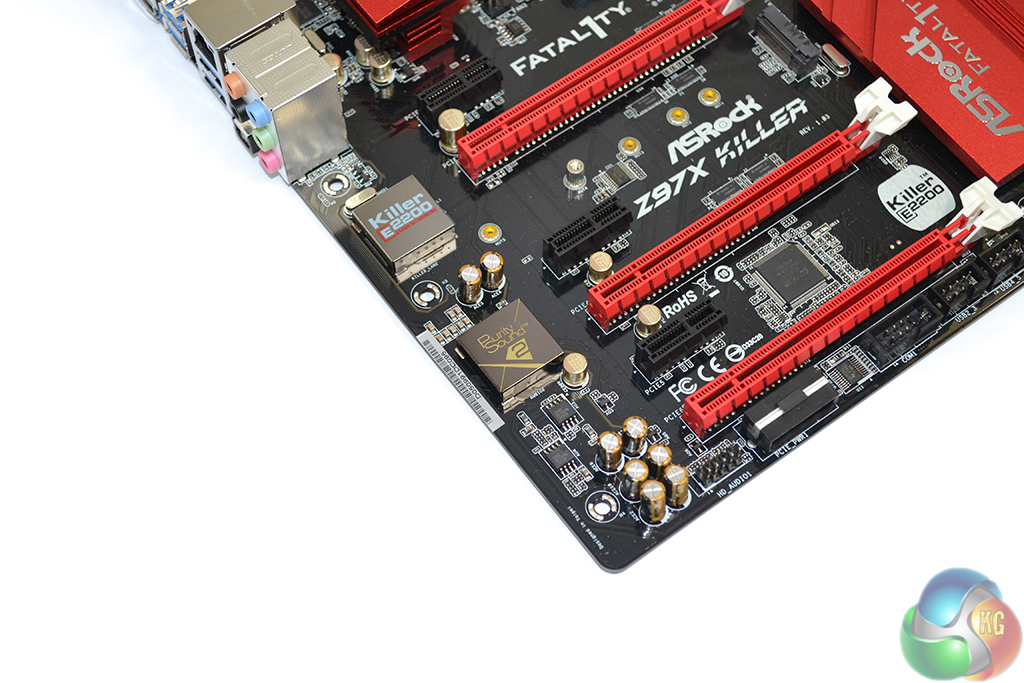
Networking capacity is provided by a Killer E2200 series NIC. Killer's E2200 devices have proven popular on gaming motherboards for their low-ping performance and software tools, both of which are useful to gamers. A metal shield is used to prevent electromagnetic interference (EMI).
ASRock's Purity Sound 2 audio system is powered by a Realtek ALC1150 codec, hidden beneath an EMI shield. Nichicon fine gold capacitors are used to assist signals that are sent along a discrete PCB pathway. A pair of Texas Instruments NE5532 amplifiers is used to drive headphones with impedance levels of up to 600 Ohms and to amplify audio signals.
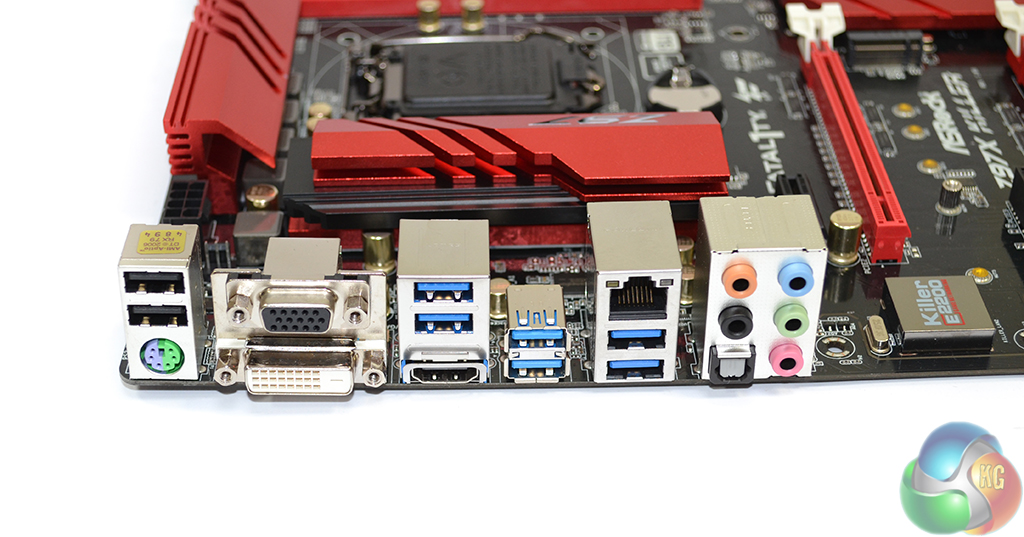
Six USB 3.0 ports are found on the rear panel, two of which are provided by an ASMedia ASM1042AE host controller. The Fatal1ty mouse port and ASRock's Key Master software can be used to tweak the operation of a mouse. PS/2 is provided for gamers still rocking their older mechanical keyboards.
Switched via an ASMedia 1442K controller, the three video connections provide support for high resolution monitors via the onboard GPU.
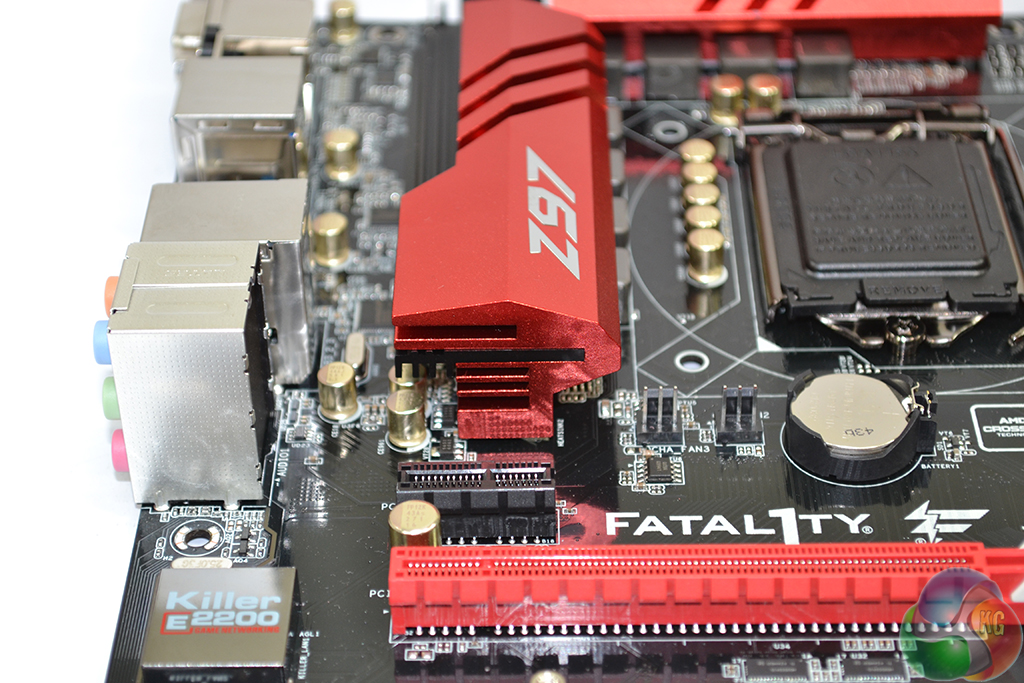
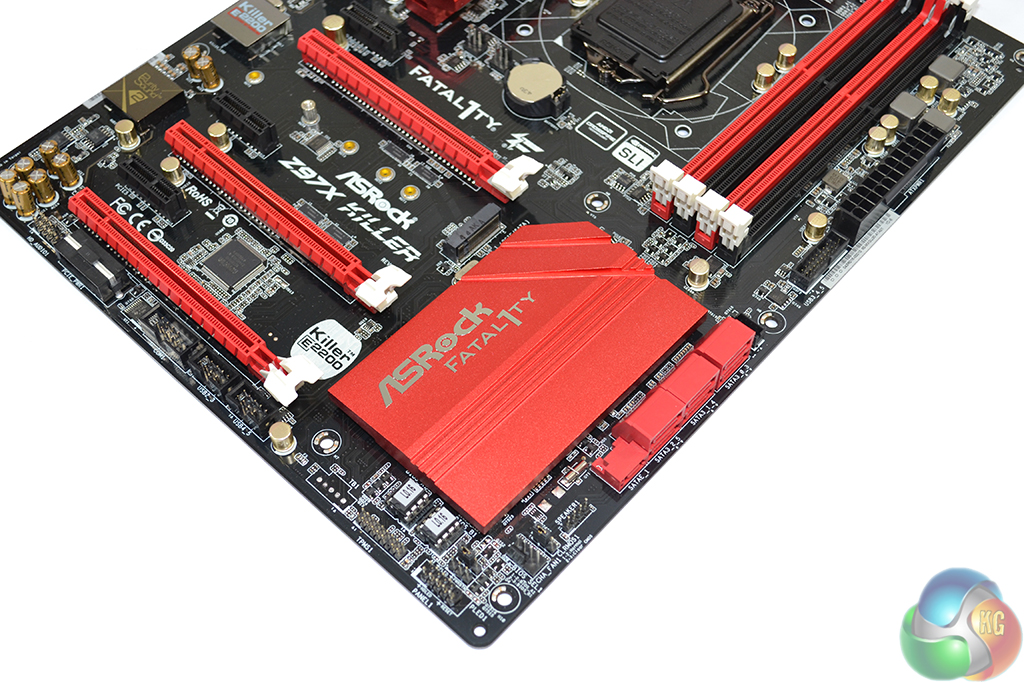
ASRock's bright red heatsinks use an aluminium alloy material to cool the components beneath them. As is typically the case for mainstream-chipset motherboards that aren't designed for extreme overclocking, the heatsinks serve as much of an aesthetic purpose as they do a cooling one.
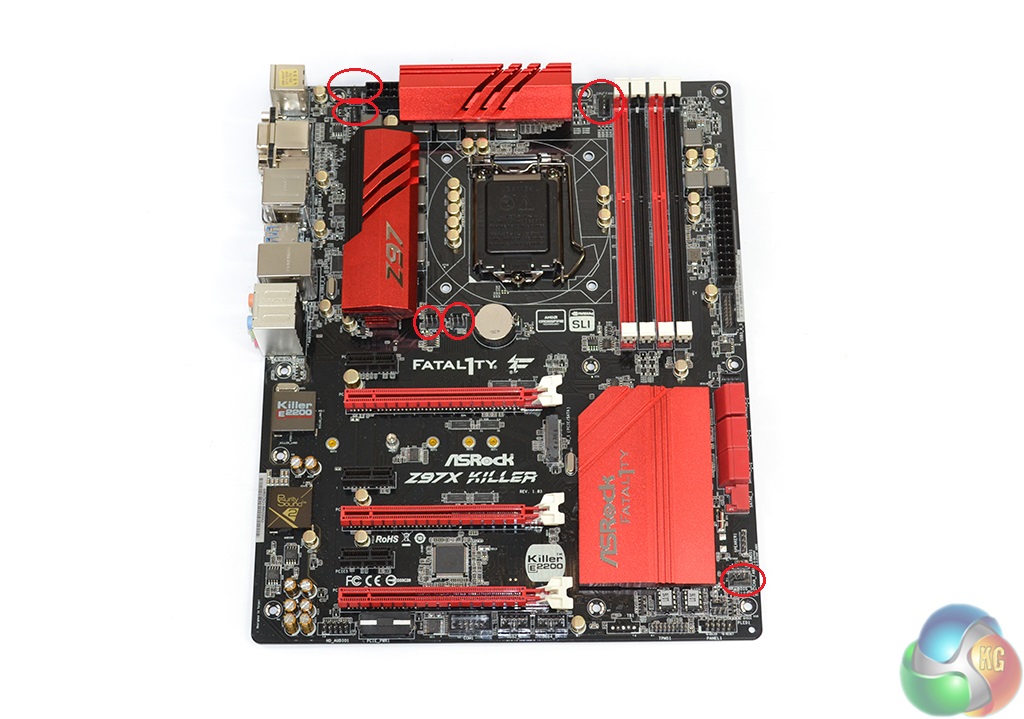
Controlled by a Nuvoton NCT6791D Super IO chip, a total of six fan headers are found on the Z97X Killer. Two of the headers are powered via the CPU PWM channel (one of which is 3-pin), a further three operate chassis fan duties (one 4-pin, two 3-pin), and a 3-pin connector is used as a powered header.
Distribution of the fan headers is very good. ASRock positions five within reach of the CPU socket, all of which can be accessed by rear or roof chassis fans. The final header is found near the motherboard's bottom edge, making it suited to side panel fan duties.
Being particularly critical, shifting one of the mid-board headers nearer the SATA slots would have been convenient for cable management duties.
We are disappointed to report that our Leetgion Hellion mouse would not work to its usual standard in the ASRock Z97X Killer motherboard’s UEFI BIOS. On successive boots, the interface could shift between detecting mouse movement and ignoring it.
We discovered that installing a USB flash drive would lead to the mouse functioning correctly. When the movement worked, it worked uninterrupted. But upon entering the BIOS, it could take a while before the mouse started to function correctly. The problem could be related to an early revision of the interface.
ASRock is using a high resolution, 1920×1080, approach for its updated UEFI BIOS. Many of the layout properties are similar to the company's Z87 implementation, although there are a few welcomed adjustments.
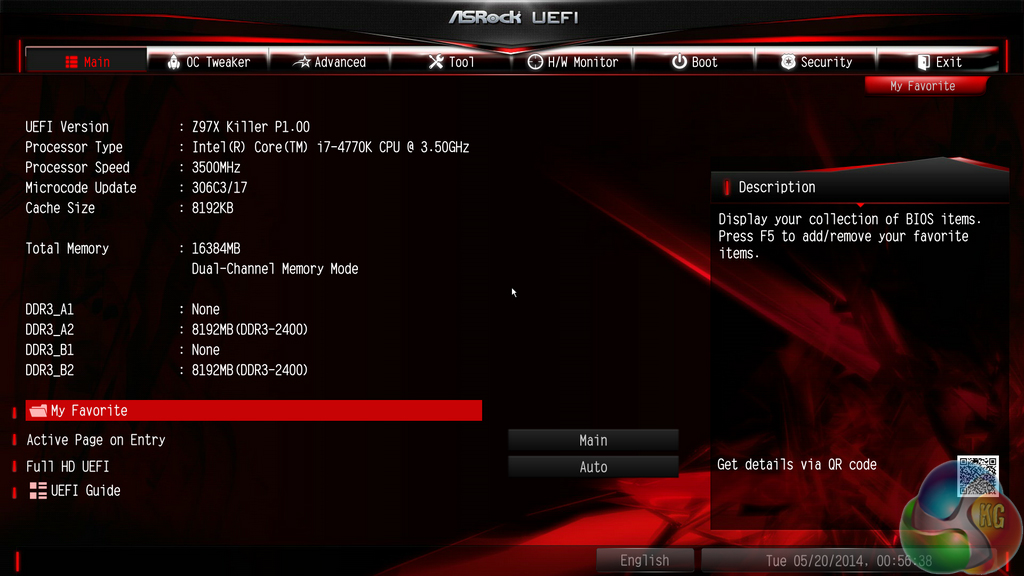
ASRock has added a favourites section to the main page, allowing users to quickly jump to commonly-accessed settings.
A UEFI Guide tool is also provided, allowing users to be guided through the interface to gain knowledge about it.
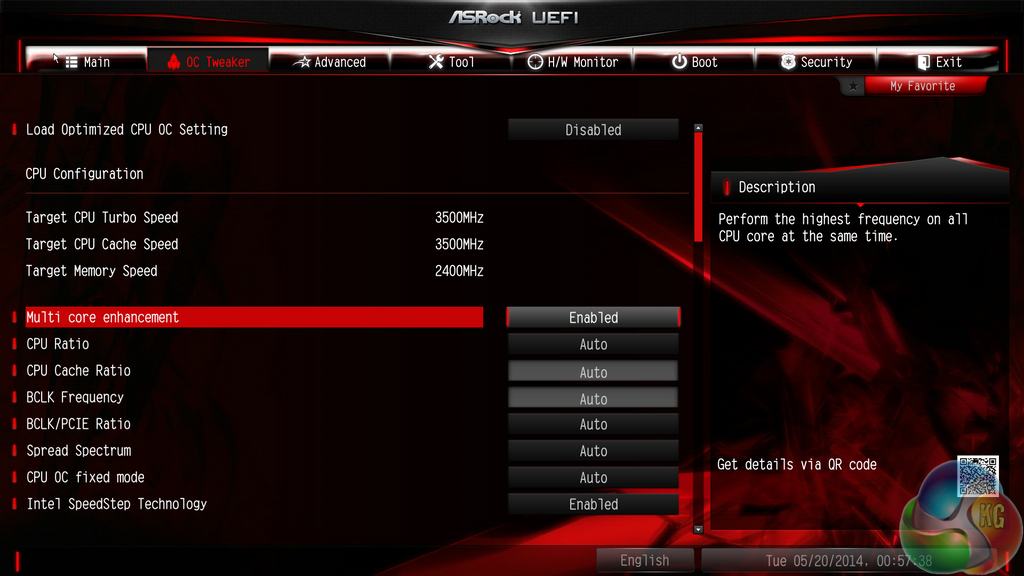
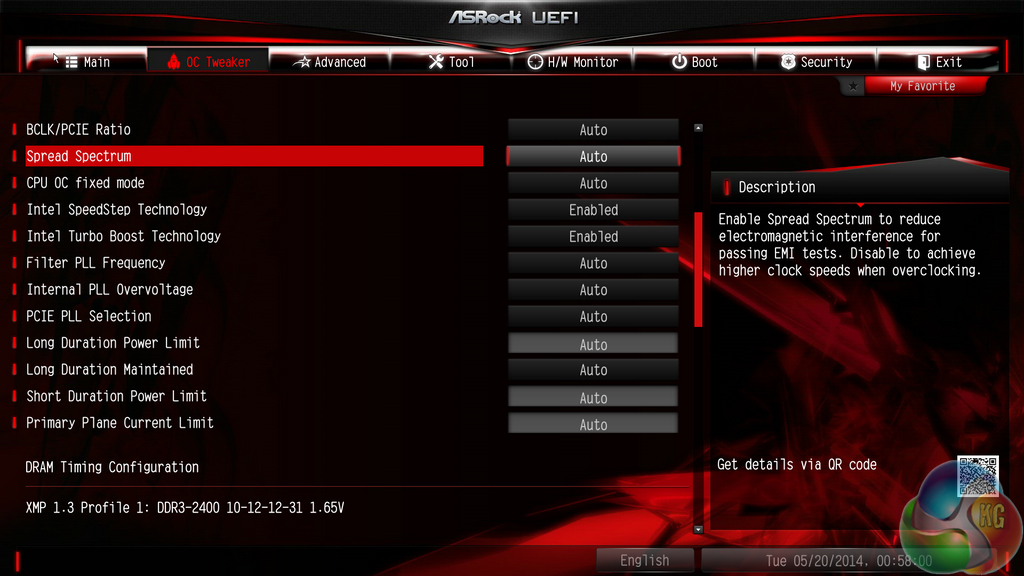
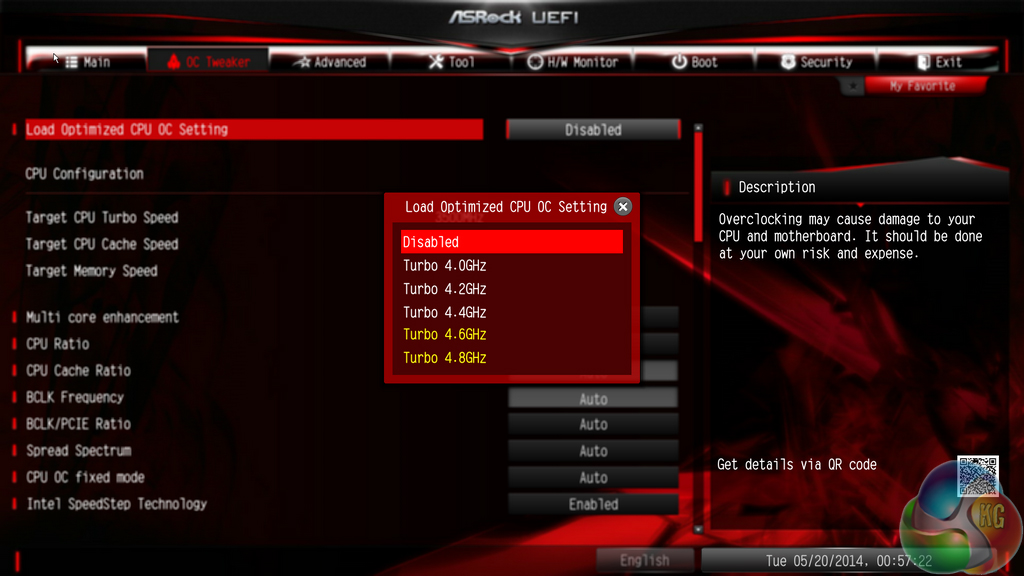
ASRock provides users with a good amount of frequency tweaking options. Automatic CPU overclocking profiles allow frequencies of up to 4.8GHz to be selected, although the feasibility of such settings will be tied to a CPU's potential.
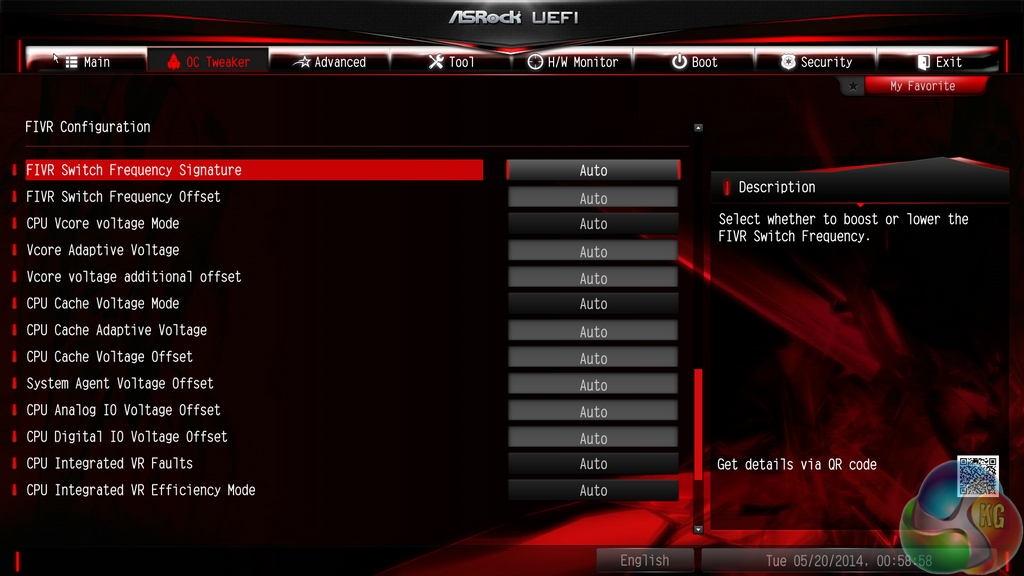
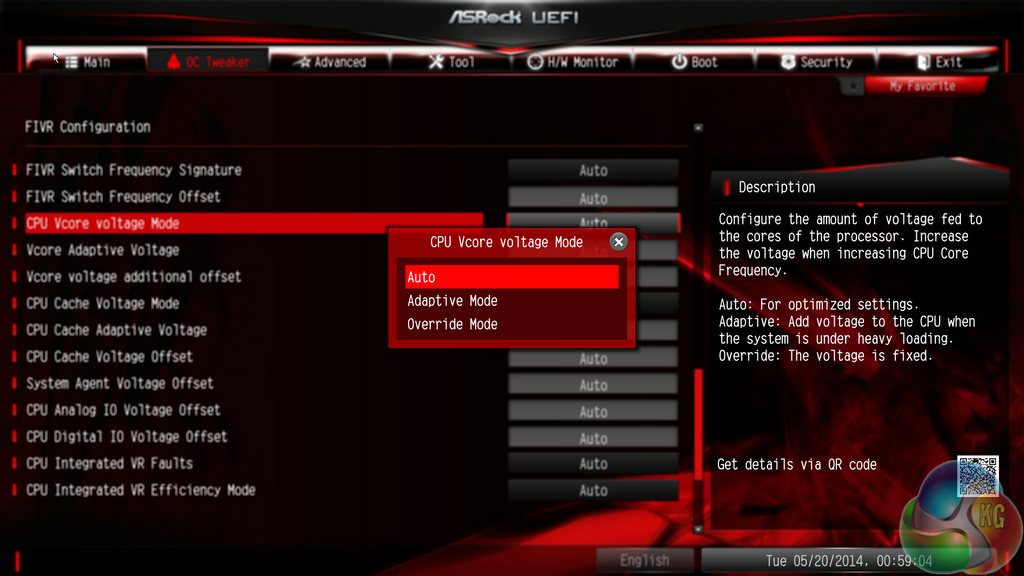
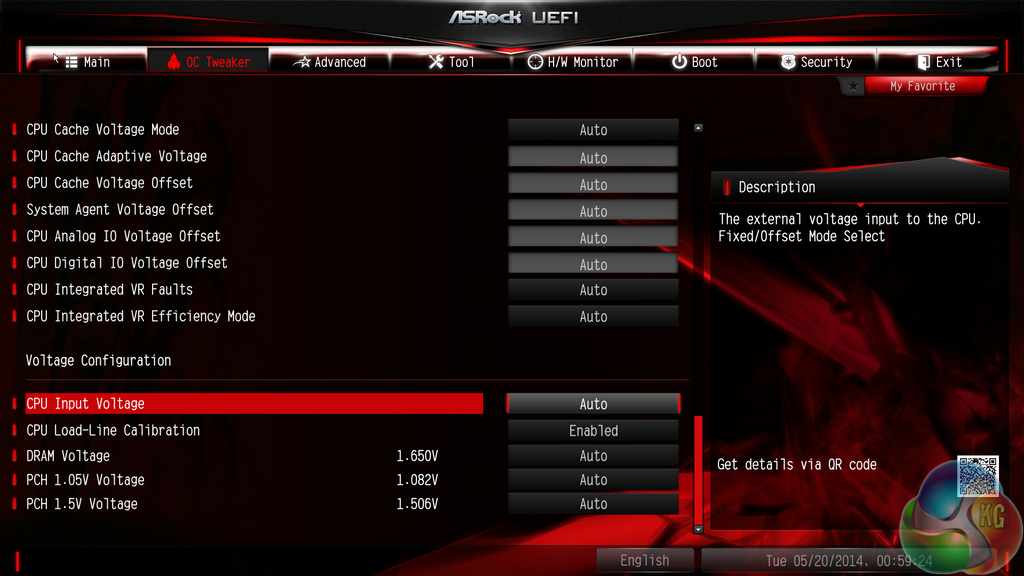
An extensive range of voltage and power settings can be adjusted in the Fatal1ty motherboard's UEFI BIOS.
Offset voltages can be set, or users can opt for manually-configured static levels.
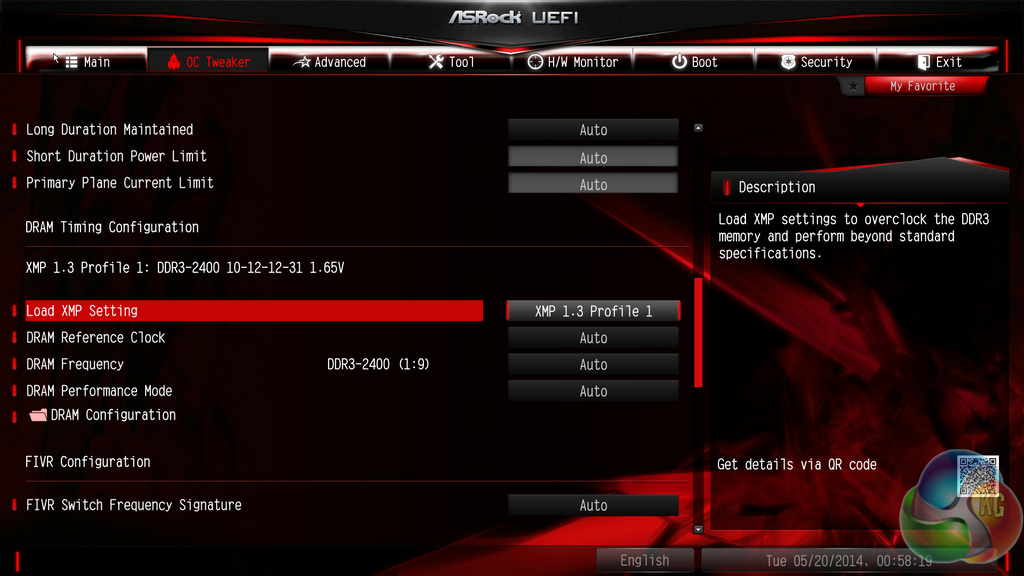
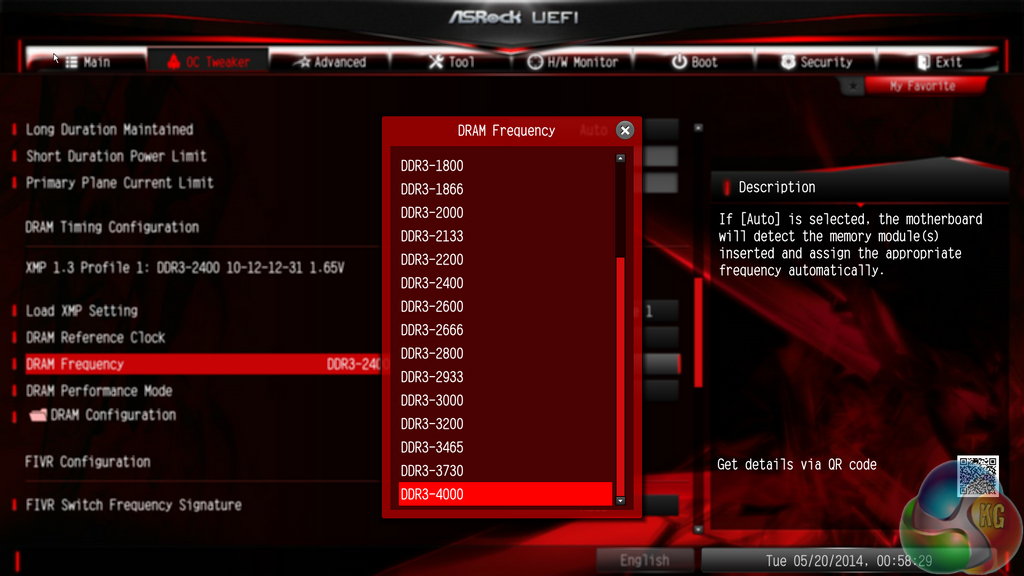
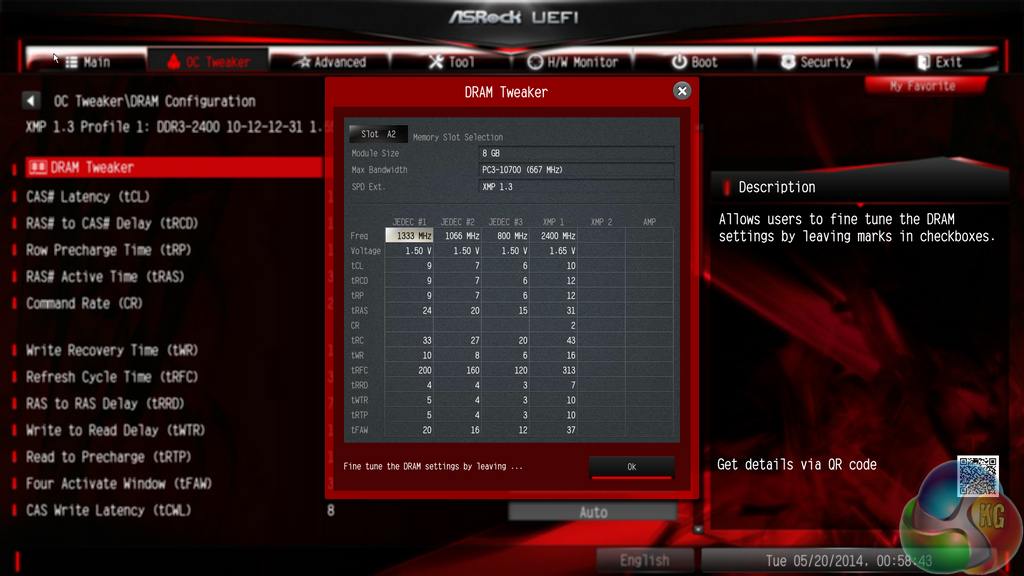
ASRock allows users to select memory dividers for DRAM frequencies of up to 4GHz. That kind of multiplier is going to be impossible to reach for Haswell chips.
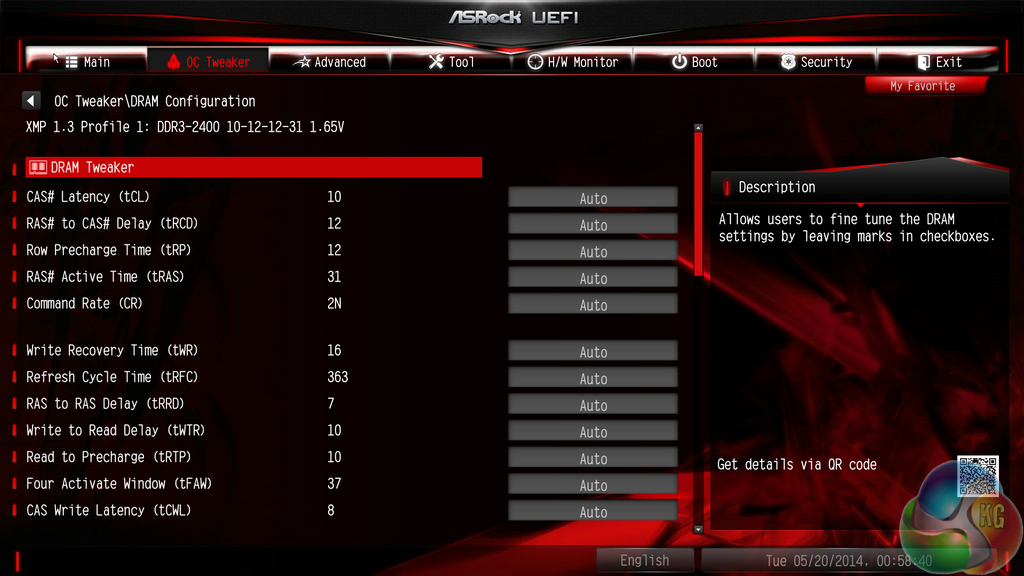
Timings can be adjusted via their own section and a tweaking tool.
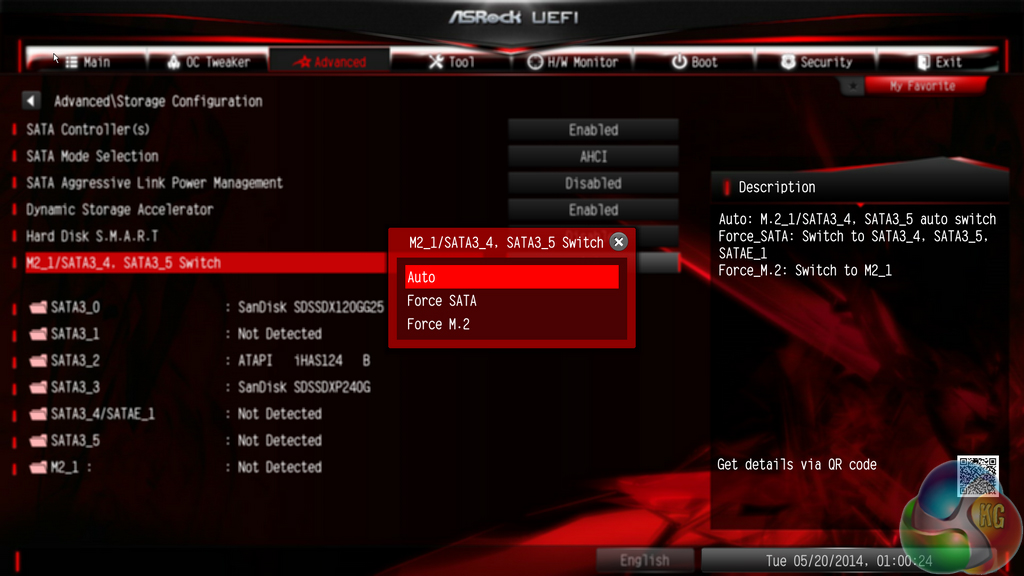
Operation of the M.2 connector can be manually set via the UEFI, if such an approach is preferred.
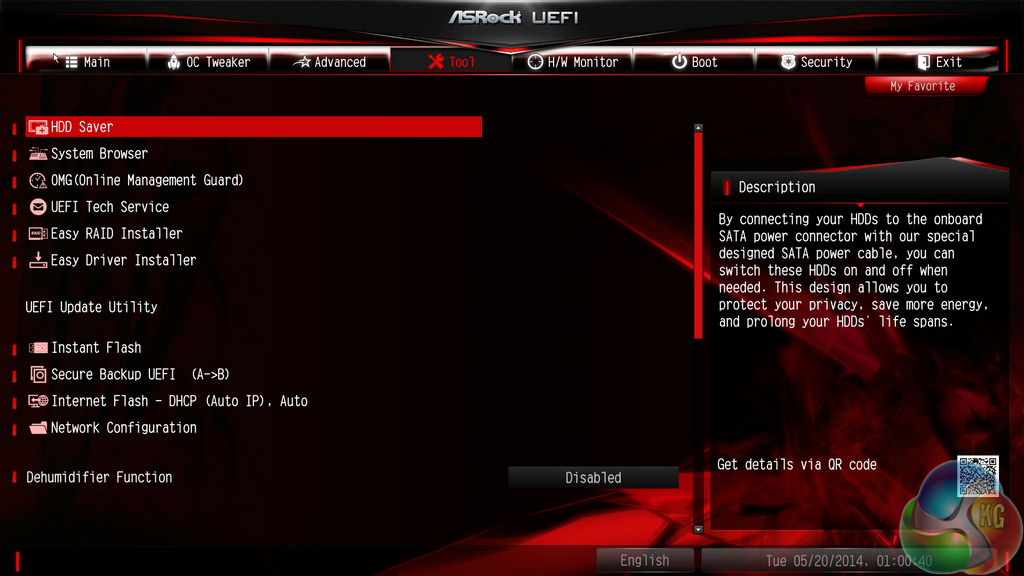
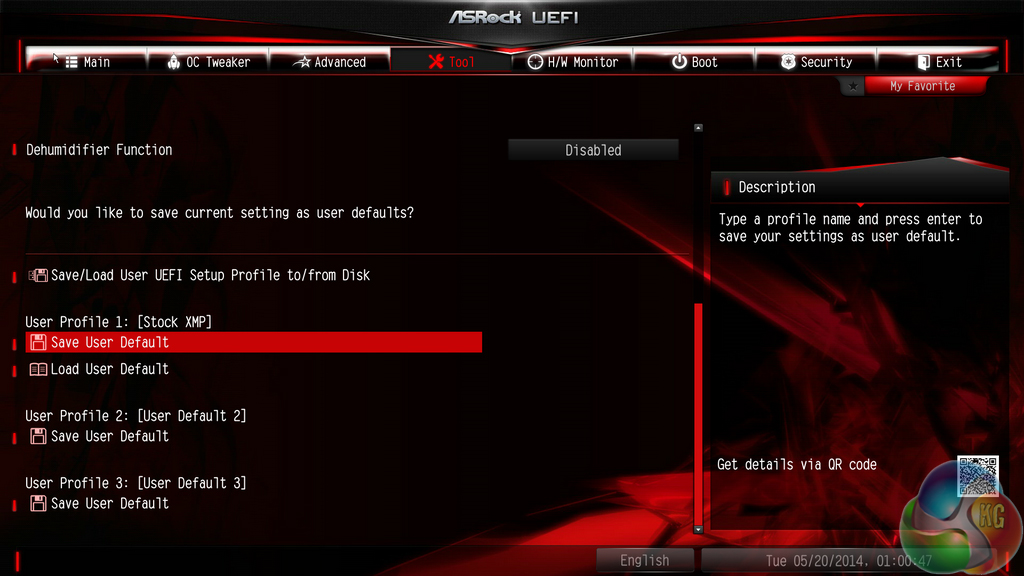
ASRock includes a number of convenient tools in its UEFI. Users can rapidly apply a number of system configurations and drivers can also be downloaded via the interface.
Only three settings profiles can be saved to the Z97X Killer's UEFI. To many users who overclock their system, three will be an insufficient number of profiles that will cause inconvenience when testing out different system configurations. But once stable clocks are achieved, three profiles should suffice for many gaming users.
While ASRock does allow the named profiles to be copied to and from a USB flash drive, increasing the capacity to five would have been a welcomed improvement.
A positive for ASRock is the interface's ability to scan through a USB drive to search for a BIOS file. Users simply select the Simple Flash tool and the board scans until a BIOS file is found and can be used to update the revision.
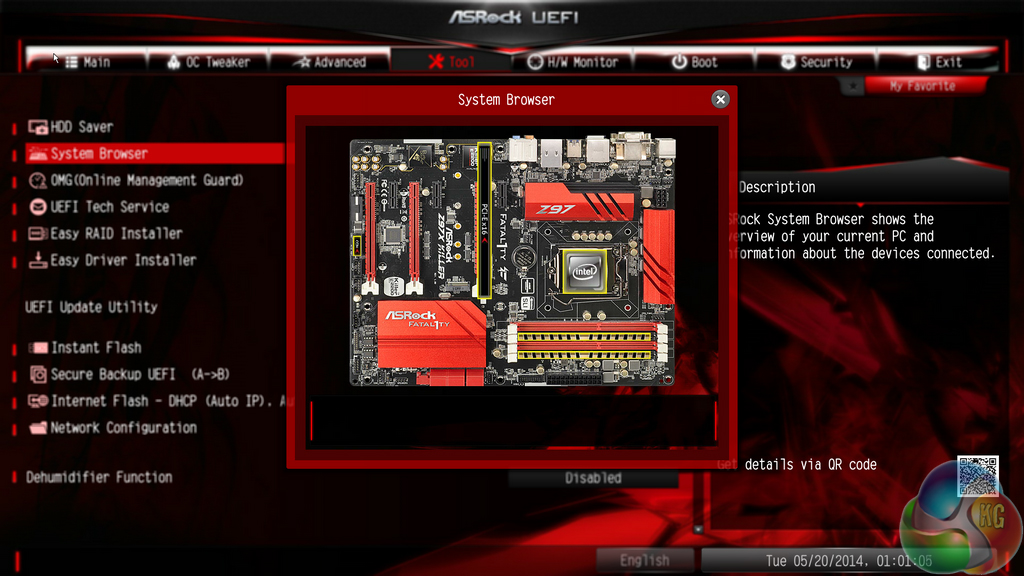
System Browser is a convenient tool that displays which components are connected to the motherboard. The tool is particularly useful for troubleshooting purposes; if, for example, a memory stick is faulty, it will not show up in the System Browser window.
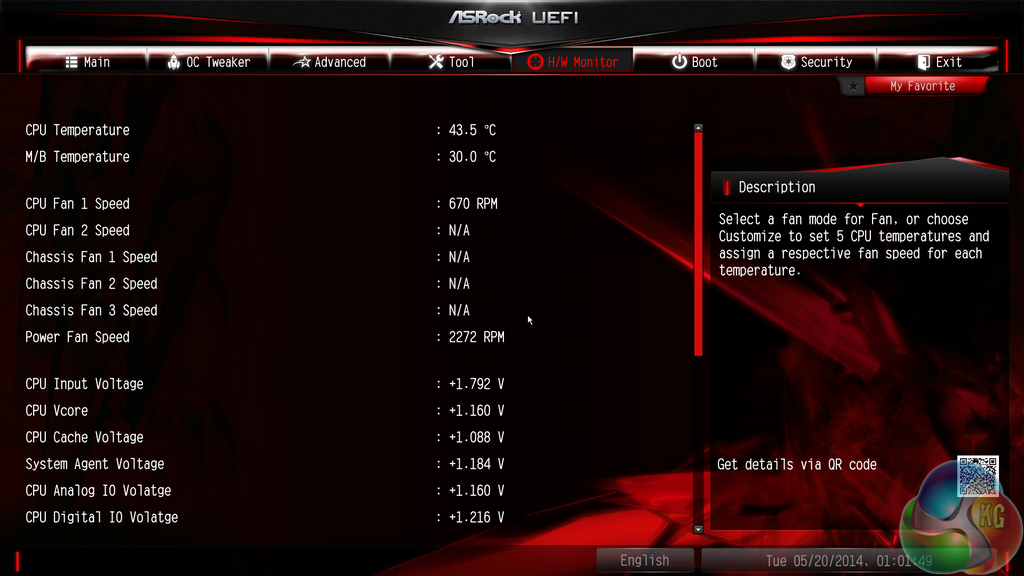
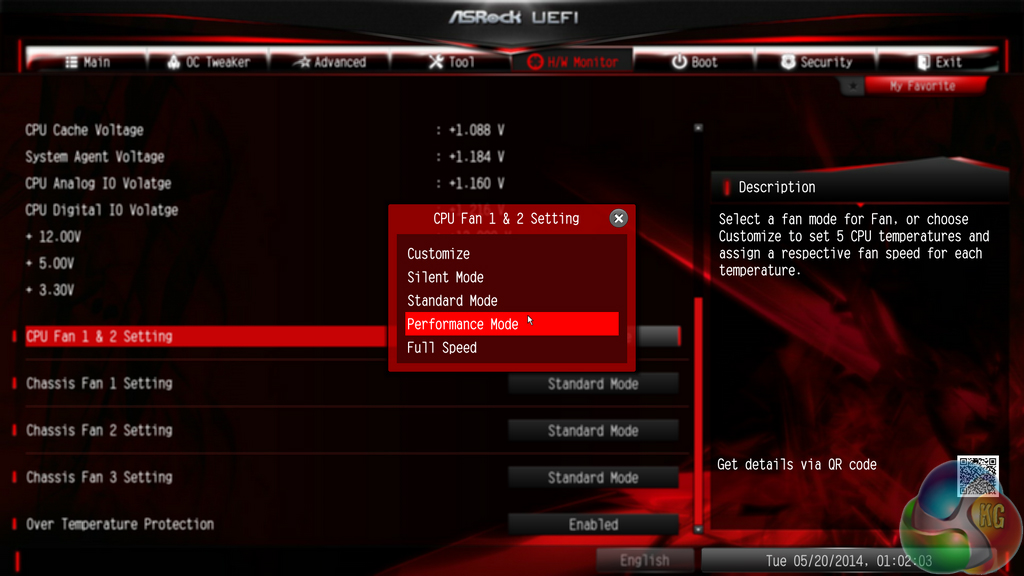
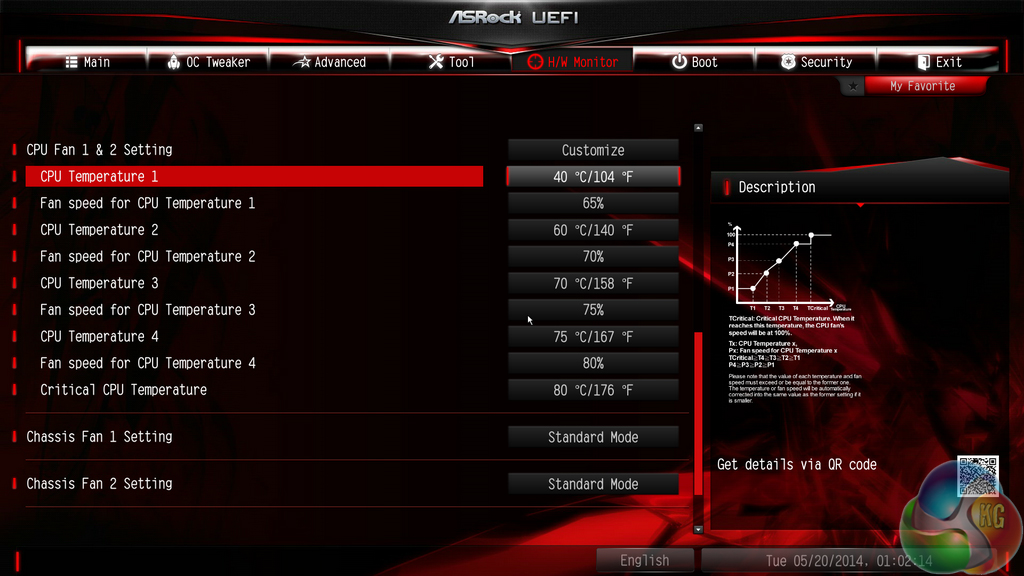
ASRock includes a balanced set of voltage, temperature, and fan speed readings on its HWMonitor page. Operation of the CPU and chassis fans can be set to pre-defined configurations via the BIOS, or a user can create their own profile.
The method for creating a fan speed profile is far less intuitive than the approach adopted by MSI; ASRock forces users to select from a list of numbers whereas MSI allows points to be toggled on a graph which shows the fan speed curve.
Overall, ASRock UEFI's implementation is a positive one. While it's not at the same level as Asus' implementation, it does have its merits in comparison to competing interfaces. The System Browser tool is useful and a high resolution is most certainly welcomed. The interface is also relatively easy to navigate and does not swamp users with information.
There are a few layout adjustments that we would welcomed. Placing the saving points for settings profiles on the OC Tweaker page would make sense. We weren't admirers of the basic fan profile creation method, either. Mouse support seems to be hit-or-miss, but that could be related to an early BIOS revision.
But as far as UEFI implementations go, ASRock's updated Z97 offering is one of the better options.
Software
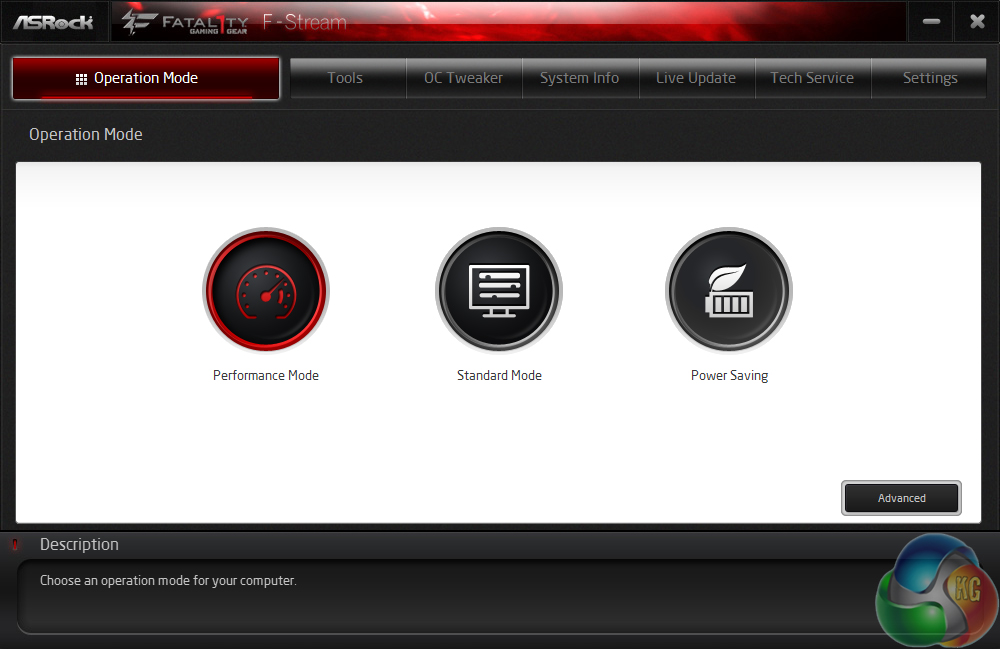
ASRock's F-Stream software gives users access to their system's operating state and a number of convenient tools. Performance, Standard, or Power Saving modes can be applied via F-Stream. We noticed that the Standard mode would result in slightly decreased benchmark results compared to the Performance option.
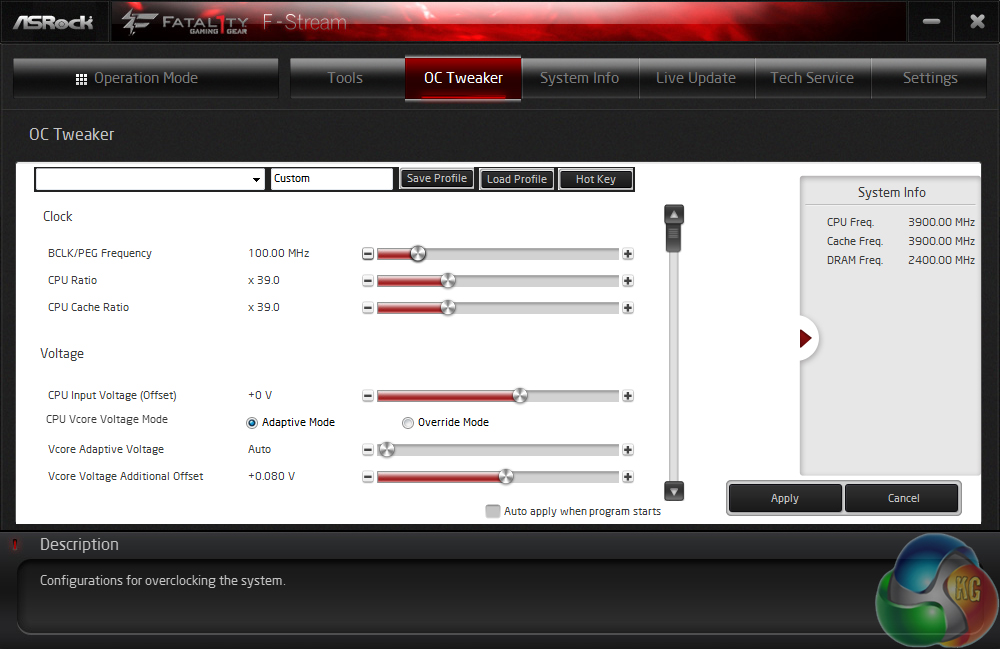
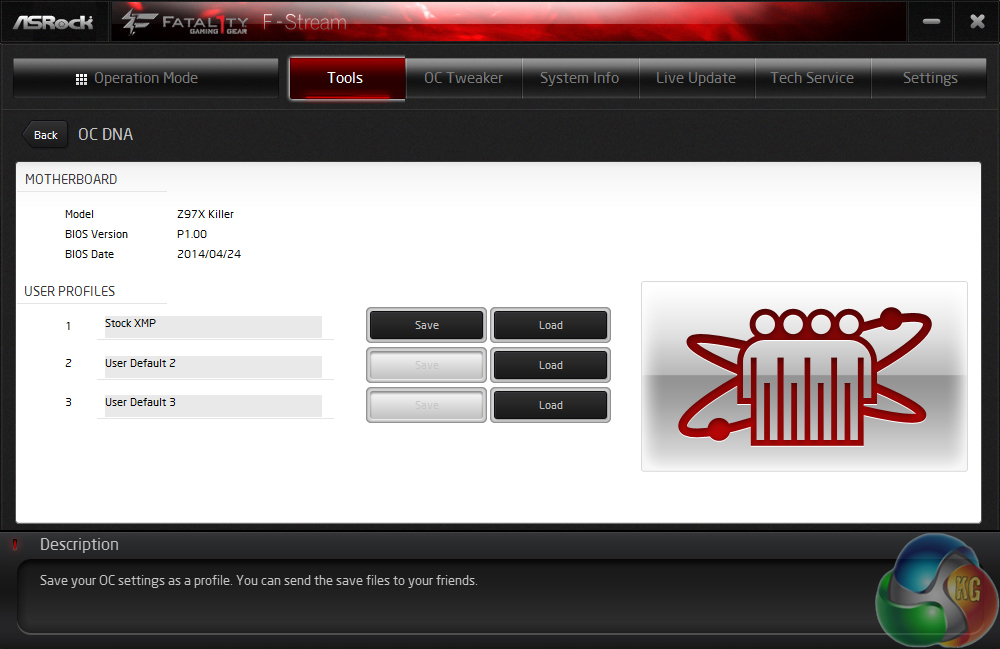
Overclocking settings and parameters can be tweaked via the software, in an OS environment.
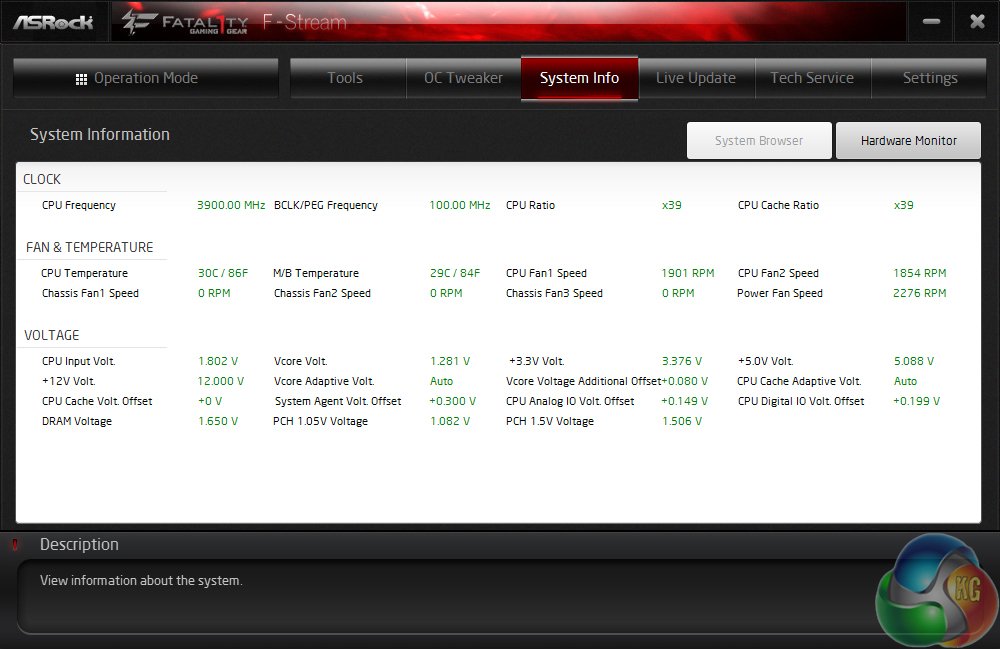
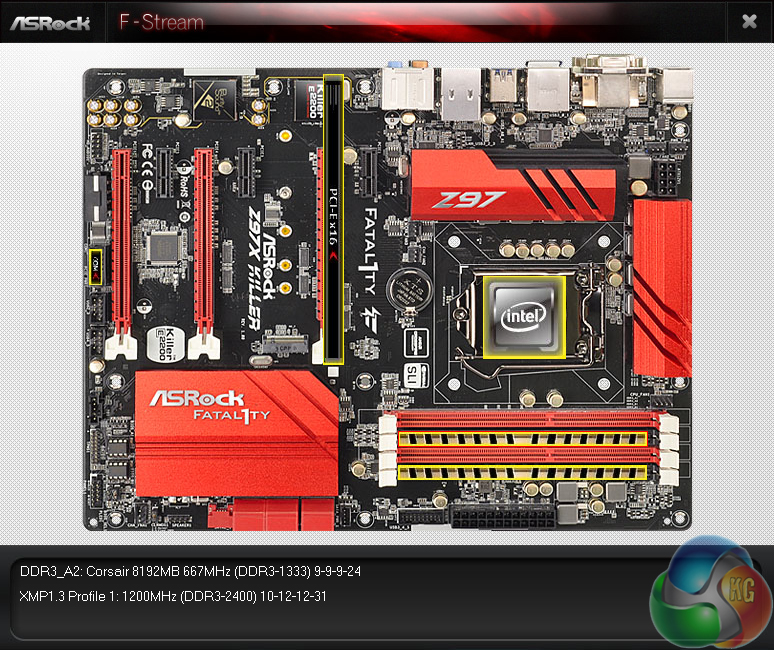
Readings relating to system parameters such as voltages, frequencies, and fan speeds are outlined in the System Info page. ASRock also puts its convenient Board Explorer tool in the F-Stream software package.
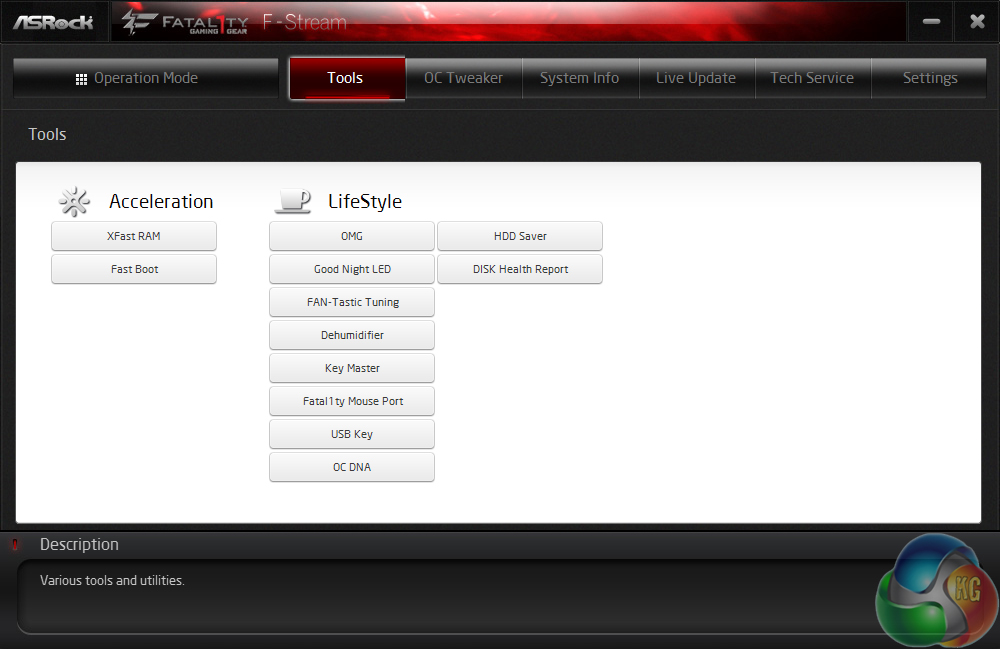
ASRock's main motherboard tools can be accessed via F-Stream. We did notice the omission of XFast USB which seems to have been terminated by ASRock. This is a disappointment as we found the speed-boosting software to work excellently and provide noticeable results.

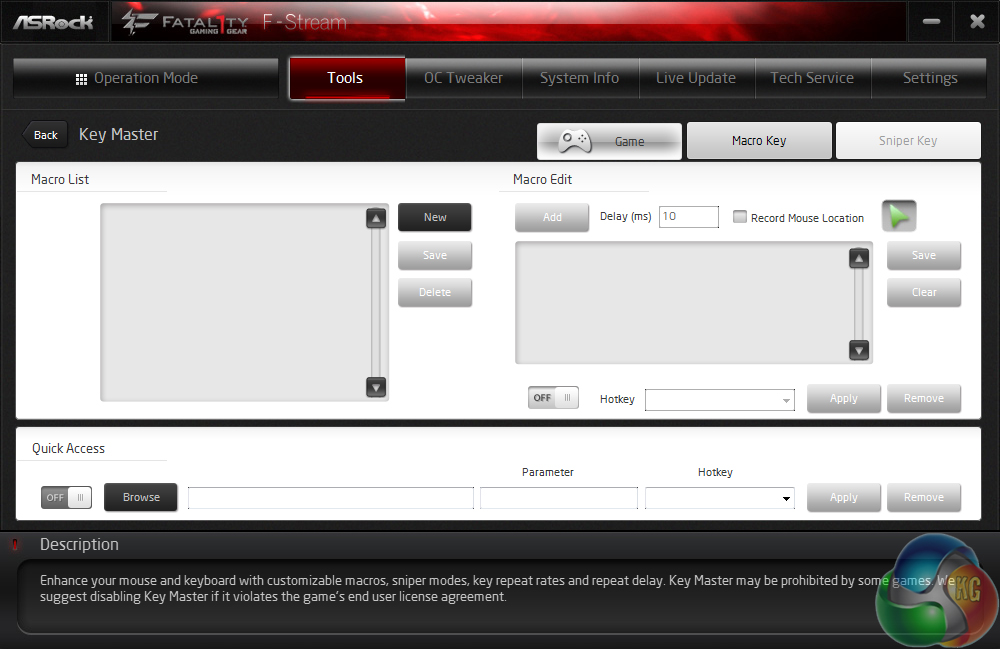
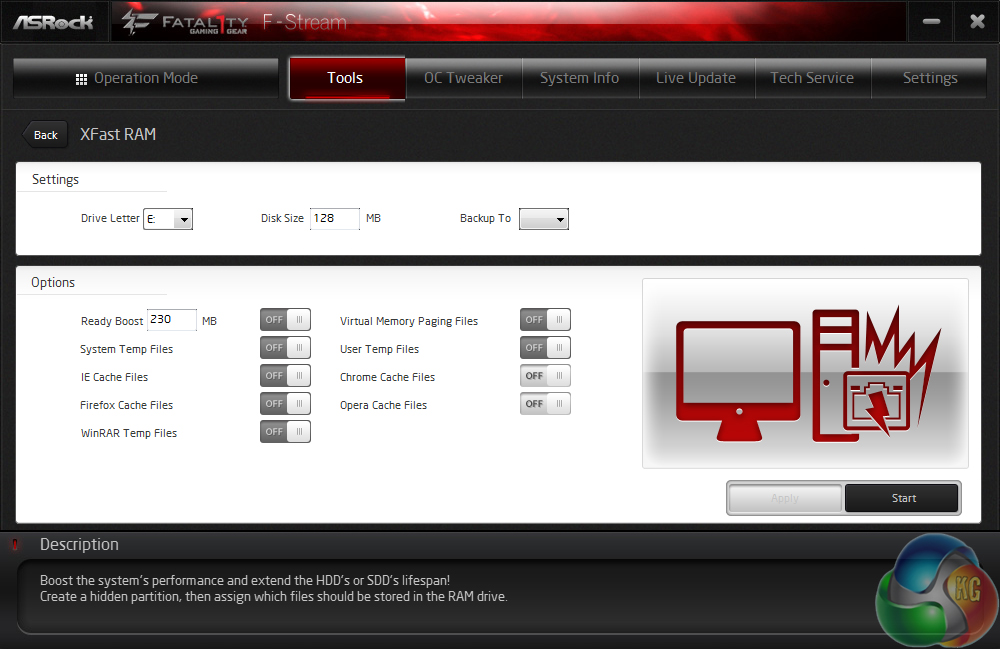
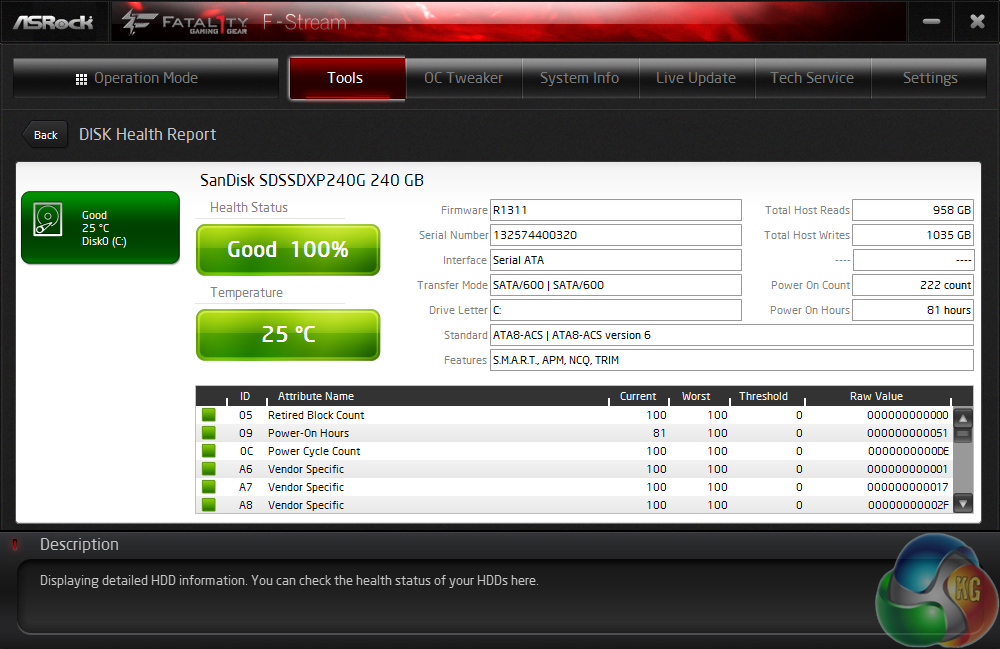
ASRock includes a wide array of tools that have a range of duties, from tweaking fan speeds to reading storage drive health to setting up a RAM drive. We are glad to see that the OS-based method of tweaking fan speeds is far more user friendly than the UEFI-based alternative.

Killer Network manager is one of the key reasons that Killer’s NICs are popular choices for gaming motherboards. The software allows users to control their system’s network operations so that gaming, or other tasks, can be given priority. This can help to ensure that a sufficient level of network bandwidth is delivered where it is required.
ASRock also includes a 3-month premium license to XSplit services which, while only half as long as MSI's offering, is still welcomed and carries a value of $25. A 1-year subscription to Orbweb.ME (worth $50) is also provided and will be welcomed by users who opt for cloud storage.
Haswell is just the latest Intel CPU architecture to see many of the critical system operations handled by the processor. As such, benchmarking a motherboard becomes more of a test to certify that the part operates correctly and meets the anticipated performance levels.

We will be outlining the ASRock Z97X Killer motherboard's performance with the Core i7 4770K CPU at its stock frequency (3.9GHz due to forced turbo). Overclocked performance will be outlined later in the review.
Performance of the ASRock Z97X Killer motherboard will be compared to that of three other Z97 parts. All motherboards are partnered with identical hardware and software, so the results are directly comparable.
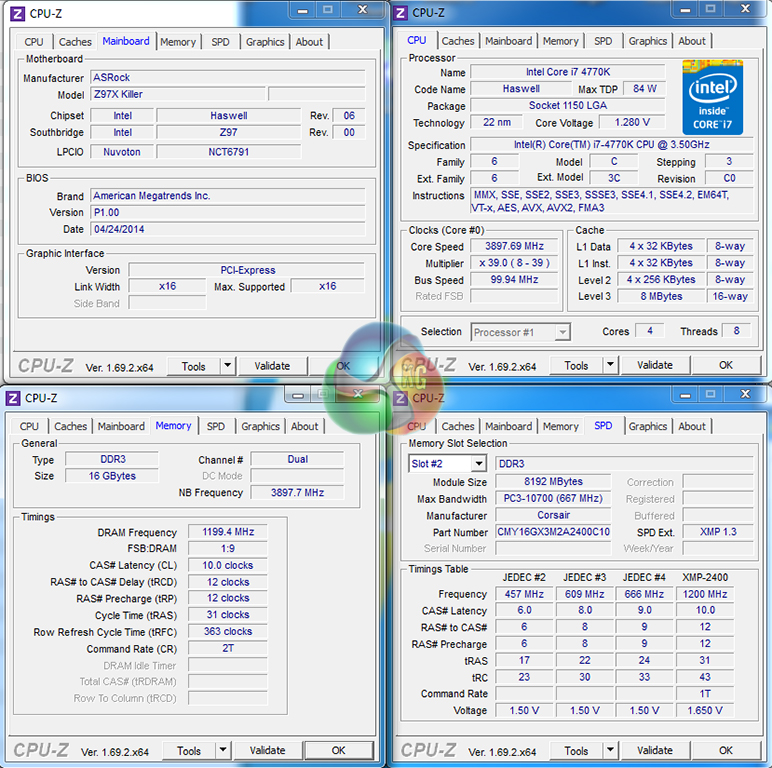
By default, the ASRock Z97X Killer motherboard does not apply multi-core turbo (MCT) when XMP is enabled, which is very unusual for a mainstream Z97 motherboard. We manually applied MCT in order to directly compare the performance differences between each tested motherboard. This will be displayed as the ‘stock’ setting (and outlined in the charts’ brackets after the non-turbo stock speed is displayed). Automatic application of MCT can easily be added into a BIOS update.
Selecting the Performance mode in ASRock's F-Tuning software allows an accurate interpretation of the motherboard's stock performance to be provided. We tested the Standard mode, but its performance figures were slightly lower due to fluctuations between 3.9GHz and lower multiplier levels.
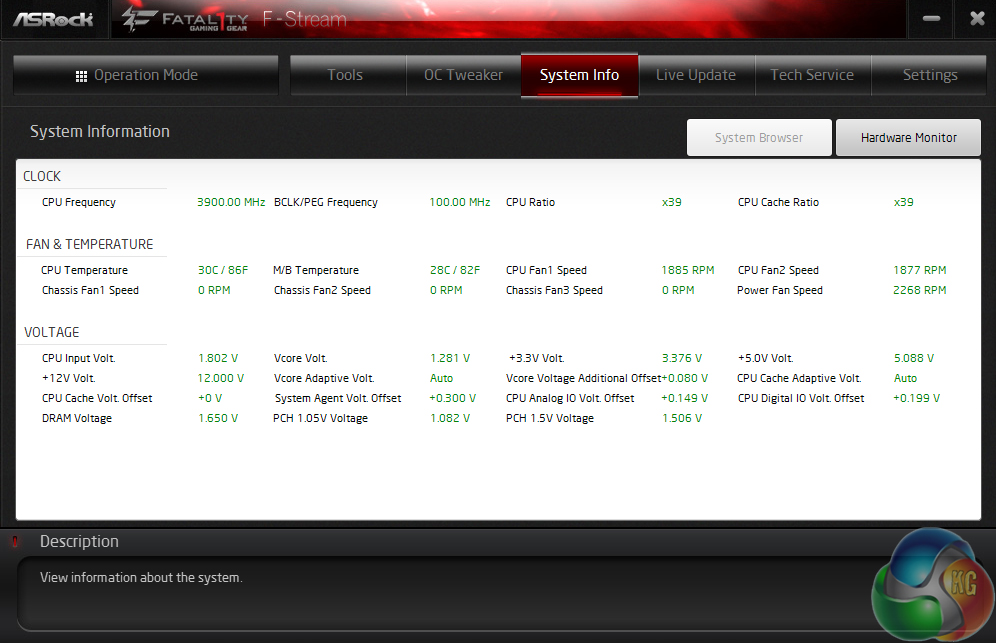
ASRock continues to use a core voltage of up to 1.28V for its MCT setting. We outlined this with the company's Z87 motherboards, but it continues to be used. 1.28V is around 40-80mV higher than the levels competing vendors use and is nothing more than wasted heat and power.
To be frank, configuring ASRock's Z97X Killer for stock testing was a pain. Most motherboards are a simple case of plug and play, but for ASRock's board we needed to manually select all-core turbo and Performance mode in the OS software just to keep results accurate and comparable. Many users may just accept the dip in performance, making it disappointing that ASRock does not optimise the stock performance out-of-the-box.
Note: Unfortunately we could not test the Z97X Killer motherboard's M.2 performance because our direct-from-factory sample was provided without the necessary mounting hardware (screw and motherboard mount).
Z97 Motherboard Test System:
- Processor: Intel Core i7 4770K Retail (3.9GHz forced turbo).
- Memory: 16GB (2x 8GB) Corsair Vengeance Pro 2400MHz CL10.
- Graphics Card: Asus R9 280X Matrix Platinum 3GB.
- System Drive: 240GB SanDisk Extreme II SSD.
- CPU Cooler: Corsair H100i.
- Case: NZXT Phantom 630.
- Power Supply: Seasonic Platinum 1000W.
- Operating System: Windows 7 Professional with SP1 64-bit.
Compared Z97 Motherboards:
- Asus Sabertooth Z97 Mark 1.
- Gigabyte Z97X-UD5H-BK Black Edition.
- MSI Z97 Gaming 5.
Software:
- ASRock Z97X Killer BIOS v1.00 (latest).
- Catalyst 14.4 VGA drivers.
- Intel 10.0 chipset drivers.
Tests:
- 3DMark 1.1.0 – Fire Strike (System)
- SiSoft Sandra 2014 SP2 – Processor arithmetic, memory bandwidth (System)
- Cinebench R15 – All-core CPU benchmark (CPU)
- WinRAR 5.01 – Built-in benchmark (CPU)
- HandBrake 0.9.9 – Convert 4.36GB 720P MKV to MP4 (CPU)
- ATTO – SATA 6Gbps, USB 3.0 (Motherboard)
- RightMark Audio Analyzer – General audio performance test (Motherboard)
- Bioshock Infinite – 1920 x 1080, ultra quality (Gaming)
- Metro: Last Light – 1920 x 1080, high quality (Gaming)
- Tomb Raider – 1920 x 1080, ultimate quality (Gaming)
3DMark
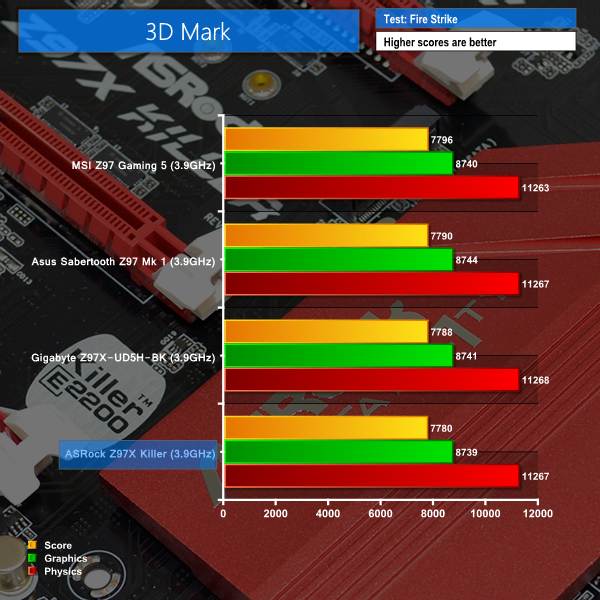
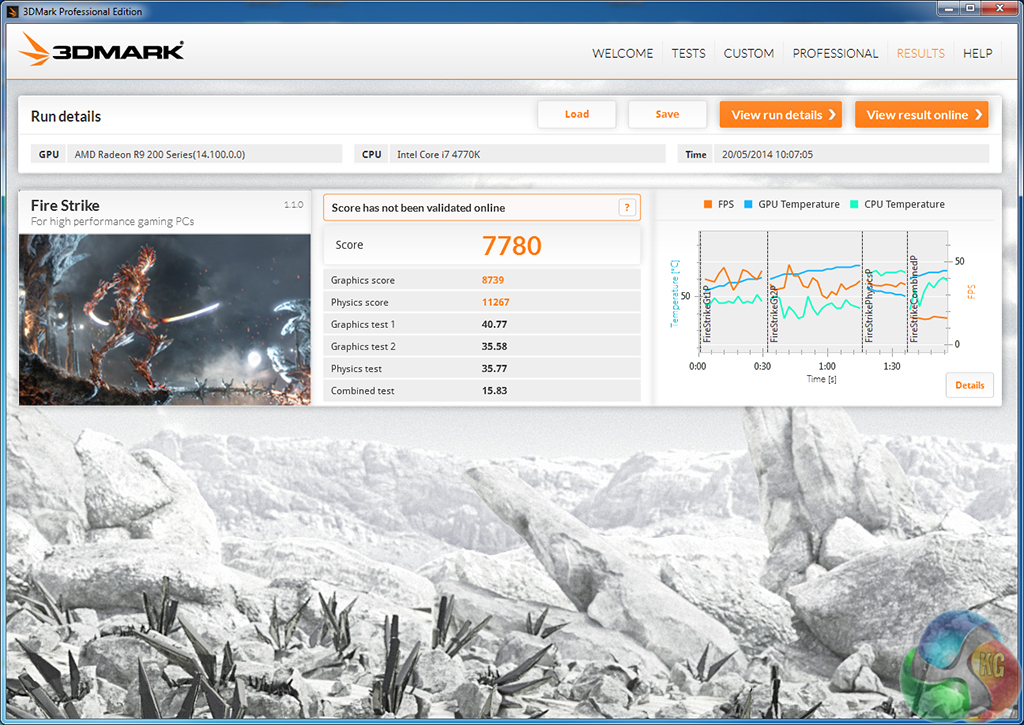
We used 3DMark‘s ‘Fire Strike’ benchmark which is designed to be used on gaming PCs. We opted for the Normal setting, NOT the Extreme mode.
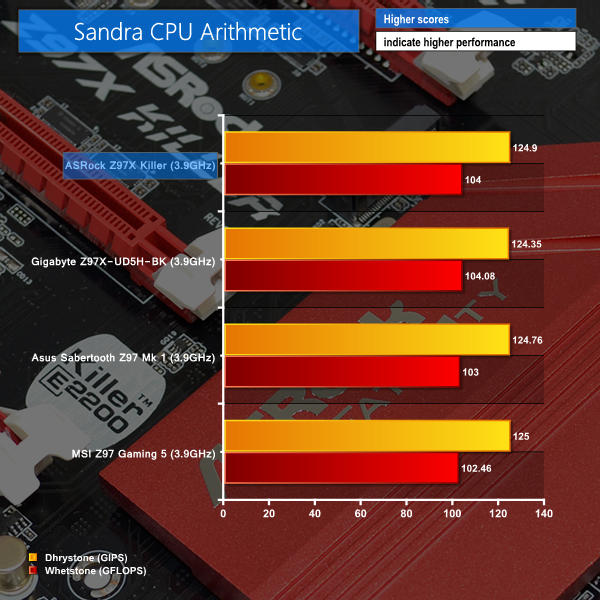
Sandra Processor Arithmetic

Sandra Memory Bandwidth
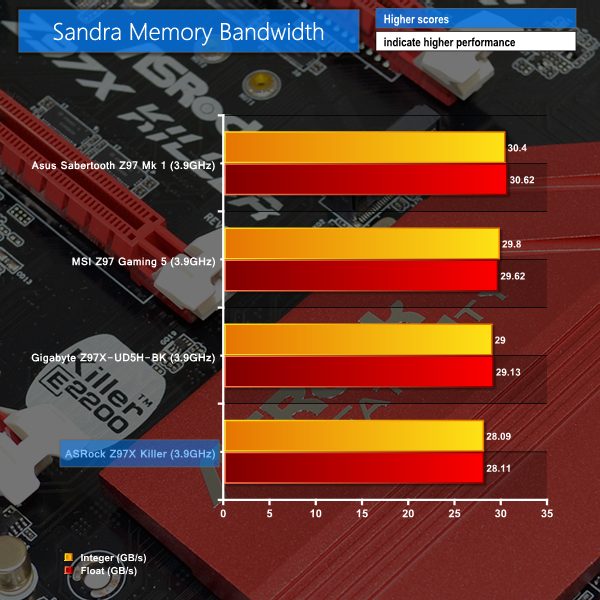

Performance of ASRock's Z97X Killer varies from test to test. The CPU arithmetic score is high, while 3DMark and memory bandwidth scores sit ASRock's board at the bottom of the pile.
We looked into the reasoning and noticed that ASRock's board applies slacker secondary timings for our Corsair memory kit's XMP profile than many of the competing boards do. The increased latency could be affecting the performance of ASRock's board in memory-intensive benchmarks.
Cinebench
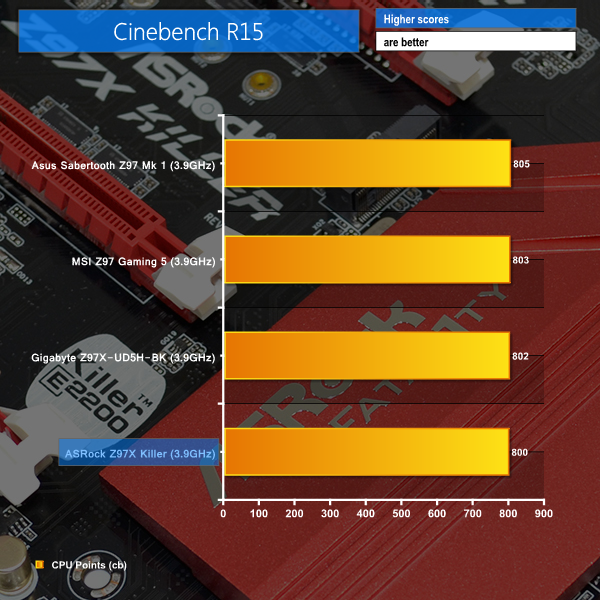
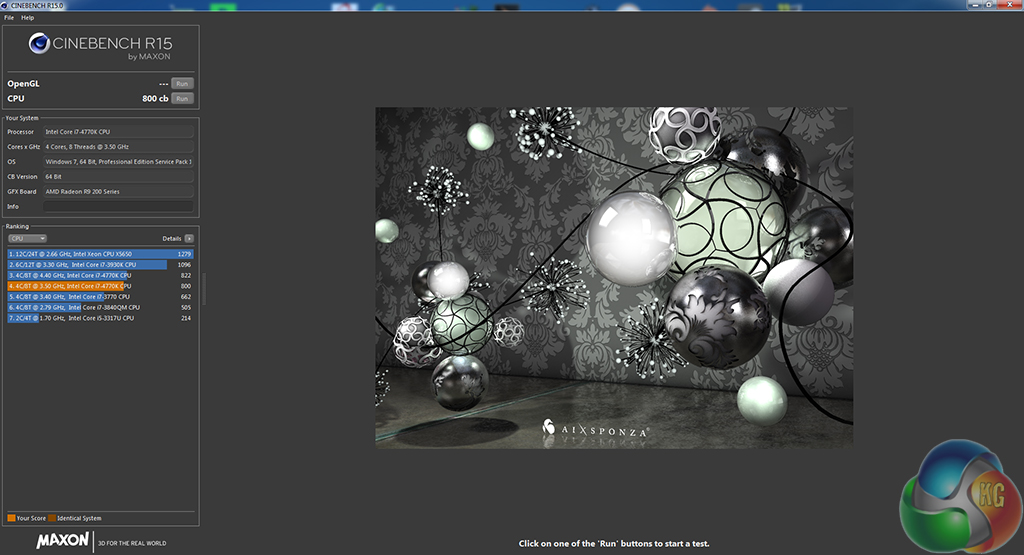
We used the ‘CPU’ test built into Cinebench R15 .
WinRAR
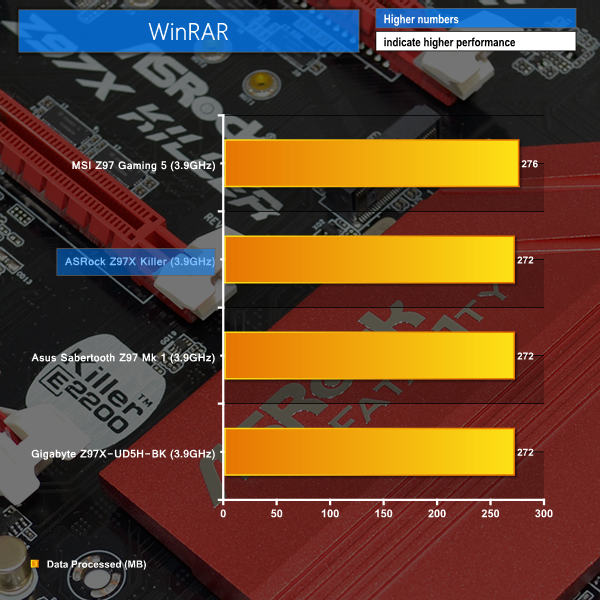
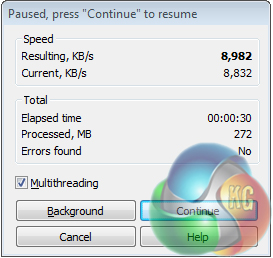
WinRAR’s built in benchmark and hardware test can help us outline the performance differentials between each motherboard. We record the amount of data processed after a 30-second run.
Handbrake Conversion
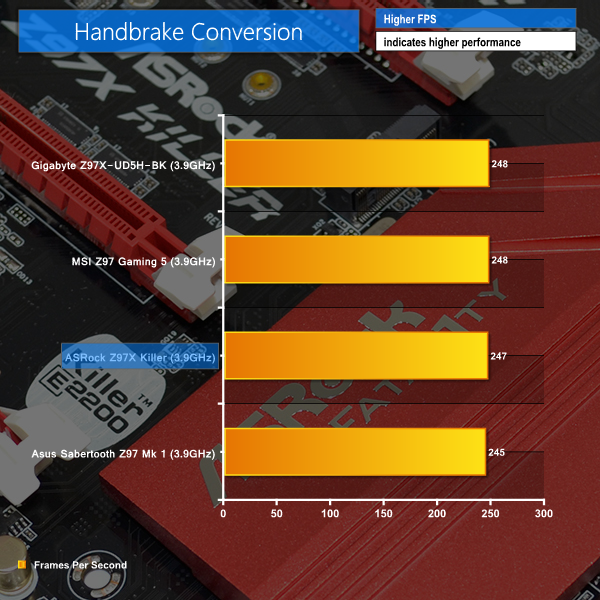
We measured the average frame rate achieved for a task of converting a 4.36GB 720P MKV movie to 720P MP4 format.
Cinebench gives further indication that the increased memory latency applied by ASRock's Z97X Killer could be having an effect on its performance.
Solid performance figures are delivered in the WinRAR and Handbrake conversion tests.
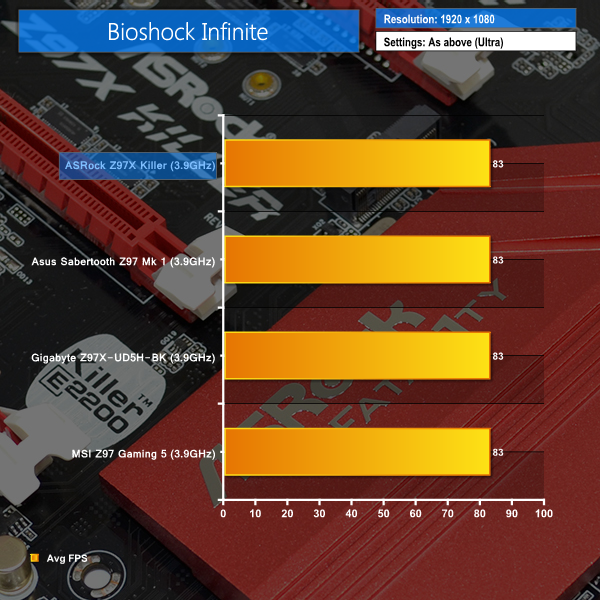
Bioshock Infinite
We used the Bioshock Infinite demanding ‘Ultra’ setting and a 1920 x 1080 resolution to push today’s gaming hardware. Our data was recorded using a section of the game, not the built-in benchmark.

Metro: Last Light
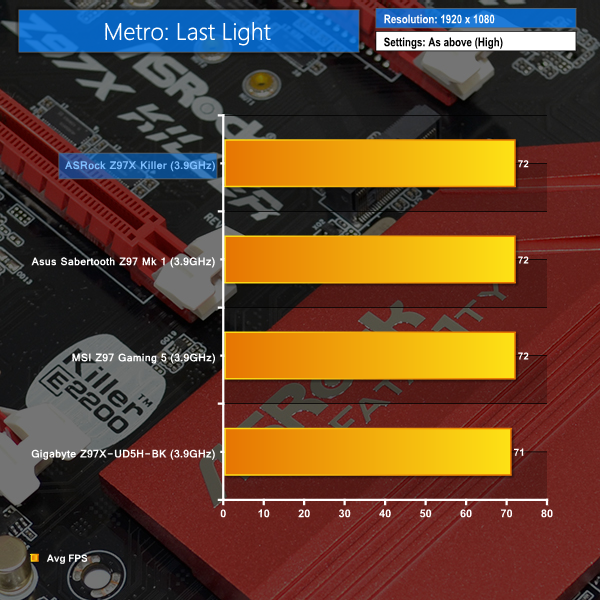
We used a 1920 x 1080 resolution and the Metro: Last Light built-in benchmark set to ‘High’ quality to offer an intense challenge for the gaming hardware while also making playable frame rates a possibility.

Tomb Raider
We used a 1920 x 1080 resolution and the Tomb Raider built-in benchmark set to ‘Ultimate’ quality.
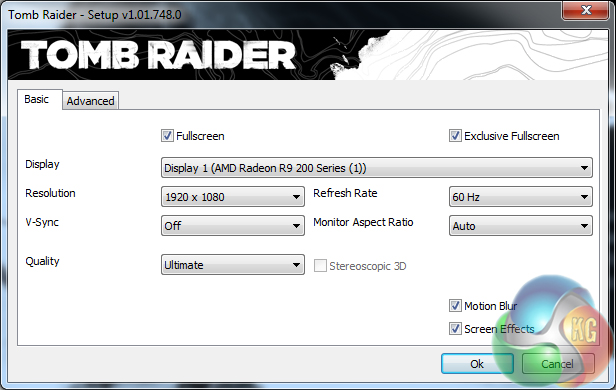
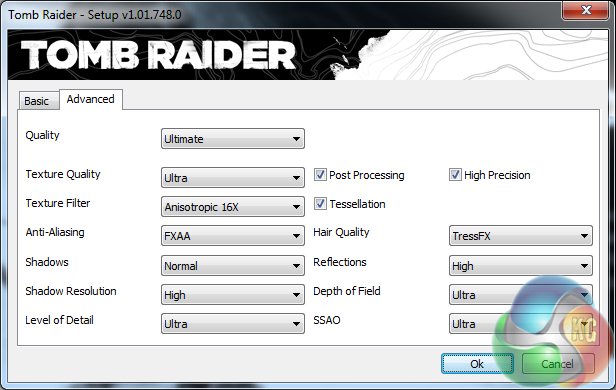
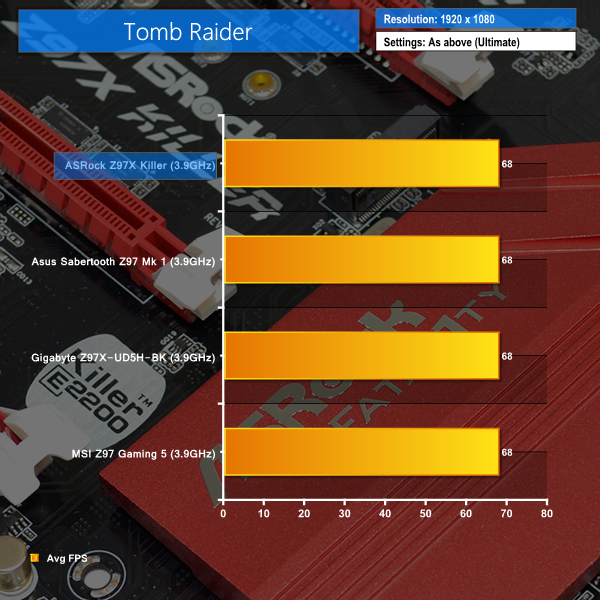
Gaming performance of the ASRock Z97X Killer is as good as competing Z97 motherboards. Frame rates are up there with the fastest options that we have tested, indicating that the Z97X Killer will allow a system's gaming performance to flourish.
SATA
For SATA 6Gb/s testing we use a Kingston HyperX 3K (SandForce SF-2281) SSD.
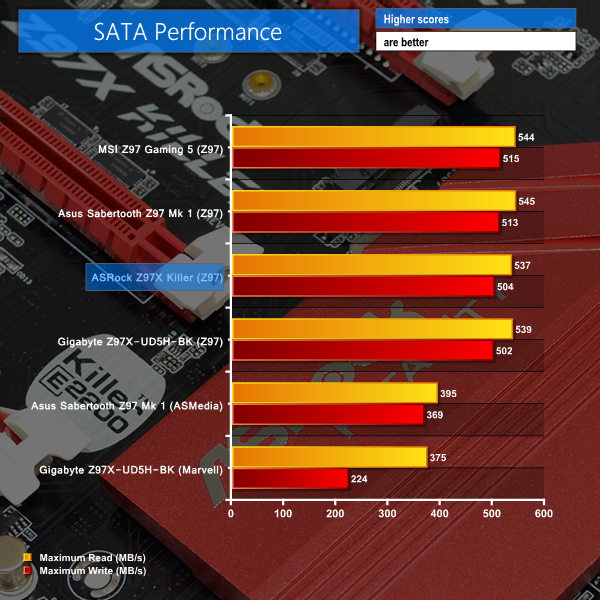
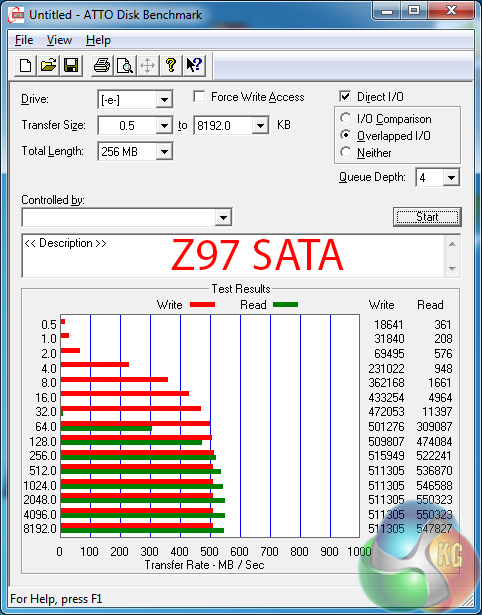
Given the use of chipset-fed ports, SATA 6Gbps performance is as high as expected from ASRock's Z97X Killer.
USB 3.0
We tested USB 3.0 performance using the Kingston HyperX 3K SSD connected to a SATA 6Gb/s to USB 3.0 adapter powered by an ASMedia ASM1053 controller.
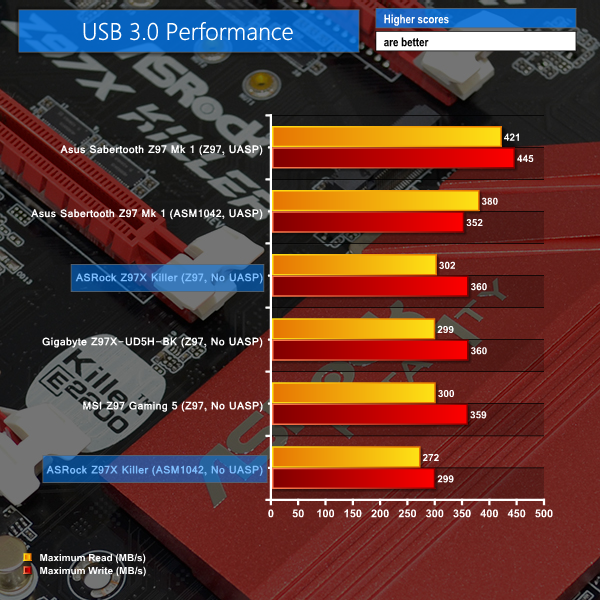
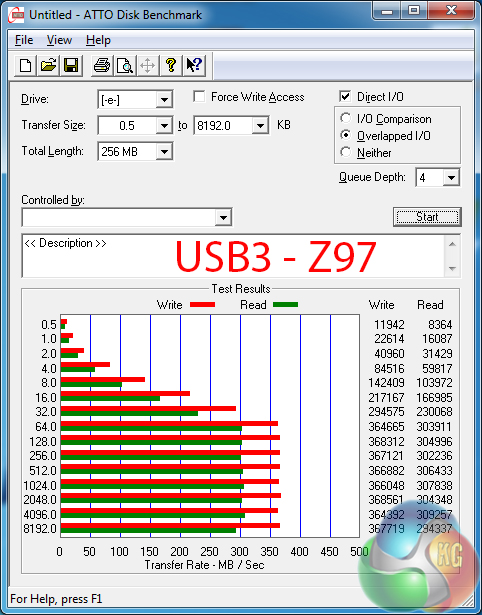
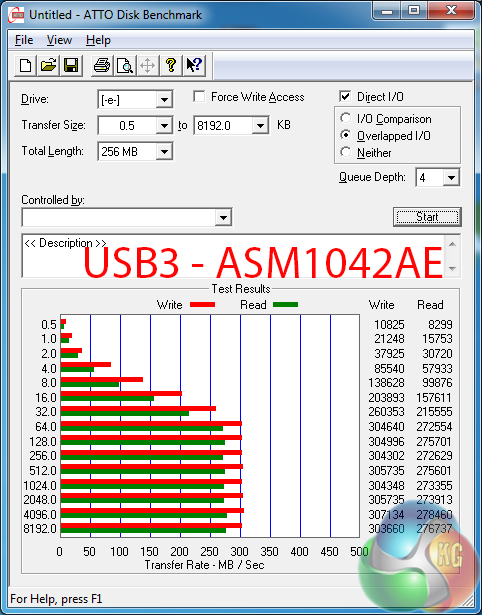
Despite offering it for previous generation motherboards, ASRock does not include its XFast USB software (built by FNet) with the Z97X Killer. This is likely due to built-in UASP support offered by Windows 8/8.1. It is a move that forces Windows 7 users to settle for lower USB 3.0 transfer rates than a UASP-activating tool (such as that offered by Asus) would provide.
Nevertheless, ASRock's Z97-fed USB 3.0 ports deliver strong speeds that will provide limitless performance for an old SATA 3Gbps external SSD, for example. Transfer rates of the USB 3.0 ports fed by the ASM1042AE host controller are not as fast as the native alternatives.
Audio
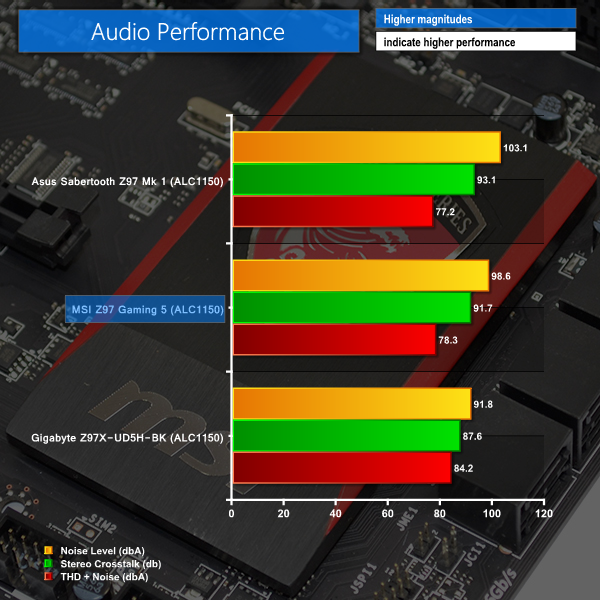
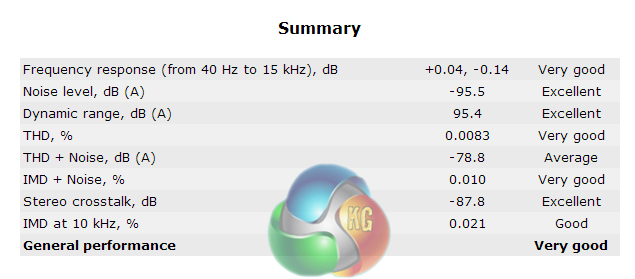
We use RightMark Audio Analyzer (RMMA) to analyse the performance of the motherboard’s onboard audio solution. A sampling mode of 24-bit, 192 kHz was tested.
ASRock's Purity Sound 2 audio system is powered by a Realtek ALC1150 codec, hidden beneath an EMI shield. Nichicon fine gold capacitors are used to assists signals that are sent along a discrete PCB pathway. A pair of Texas Instruments NE5532 amplifiers also features.
The Purity Sound 2 implementation delivers competitive audio performance, being rated as Very Good by RMAA. Overall audio performance numbers aren't quite as strong as those shown by competing Z97 models.
Automatic CPU Overclocking:
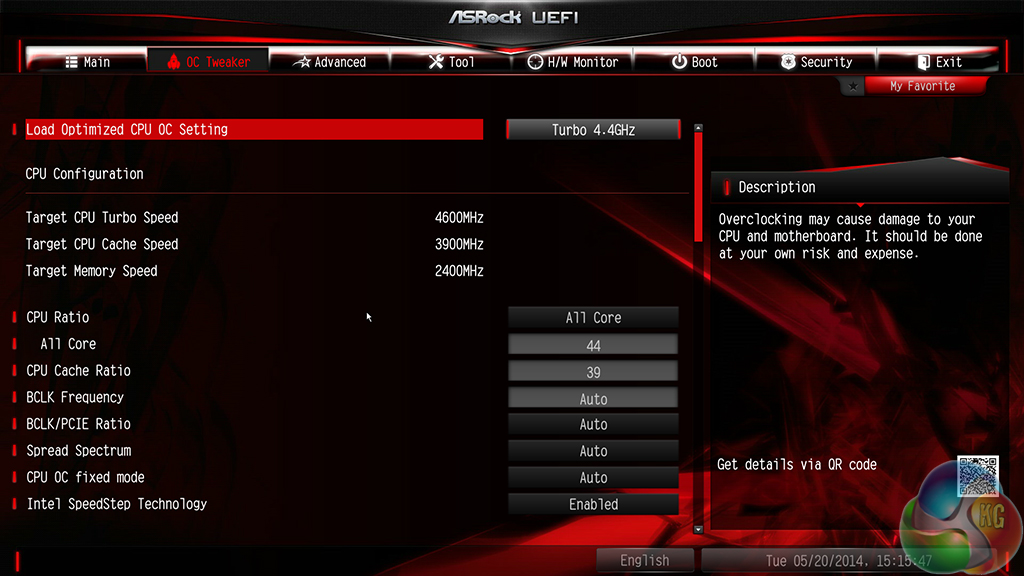
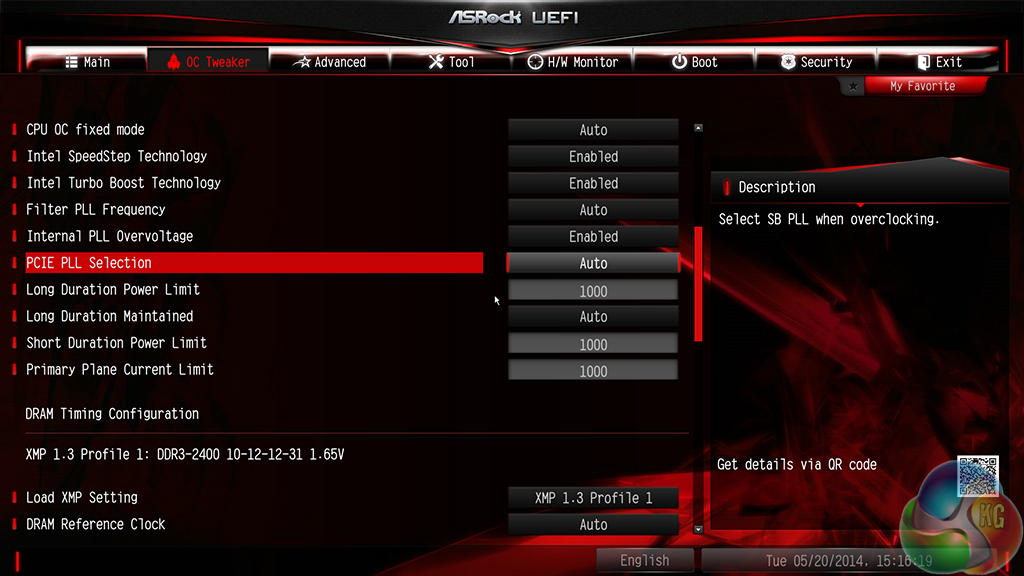
ASRock equips the Z97X Killer with a number of pre-configured CPU speed boost profiles. We aimed for stability with the 4.6GHz profile (1.32V VCore), but we were soon met by a BSOD after launching Windows.
Knowing our chip’s realistic limit of around 4.5GHz, ASRock’s 4.4GHz profile gave us perfect stability with controllable temperature levels.
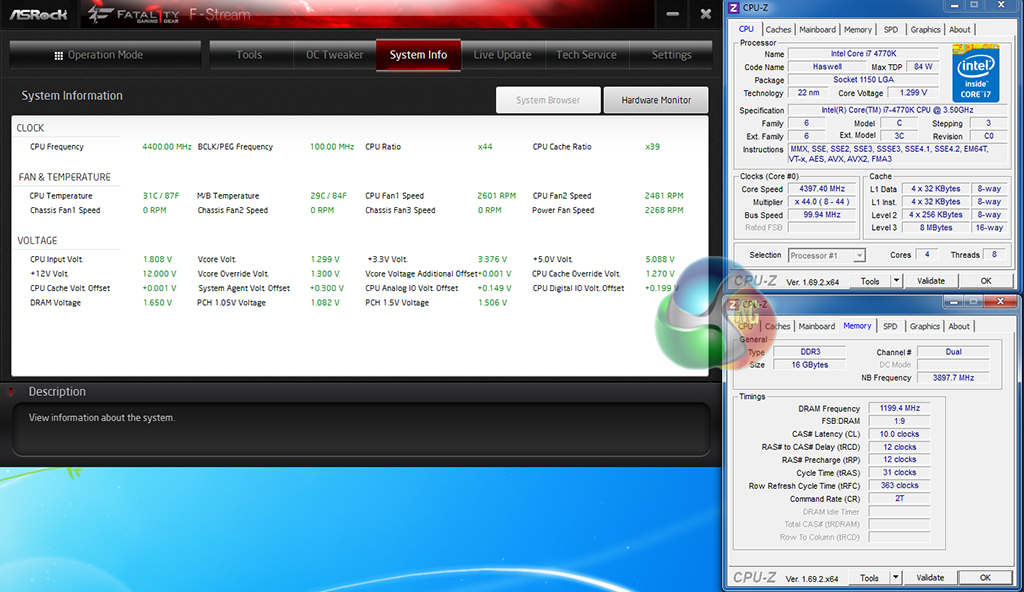
Given that the profiles do little more than adjust the CPU-related multipliers and increase voltages, our 2400MHz memory continued to operate at its XMP frequency.
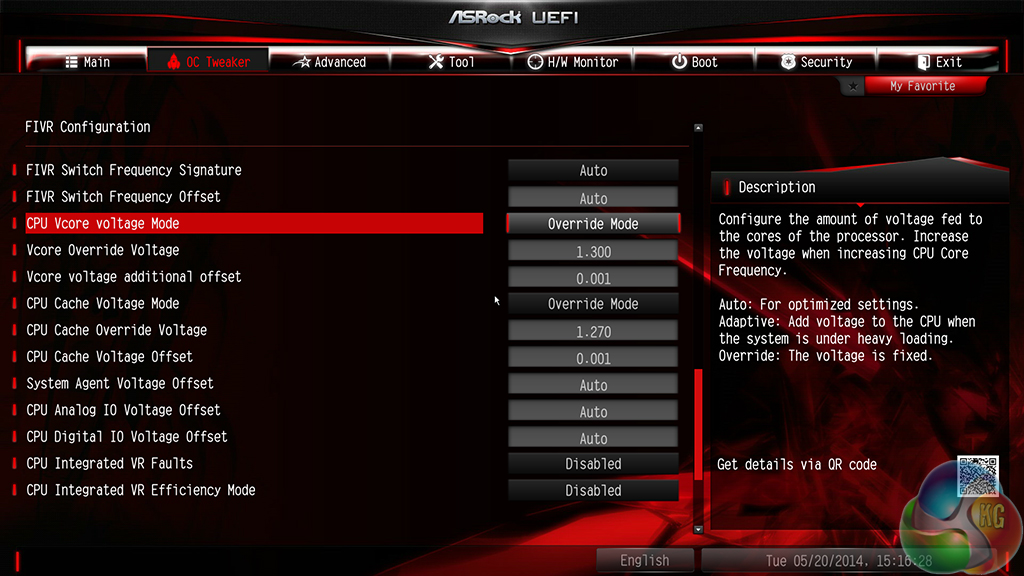
The 4.4GHz profile uses a CPU VCore of 1.30V and seems to be optimised well. Only a 20mV increase over MCT VCore levels is required for an extra 500MHz, putting into perspective how needlessly high ASRock's MCT VCore levels are.
Additional overclocking and system tuning functions can be accessed via ASRock's F-Stream software, in an OS environment.
Manual CPU Overclocking:
To test the ASRock Z97X Killer motherboard’s CPU overclocking potential, we first increased the CPU VCore to 1.325V, Cache voltage to 1.275V, and CPU Input Voltage to 1.900V. The CPU Cache ratio was set to 39x and LLC was set to ‘Enabled’.
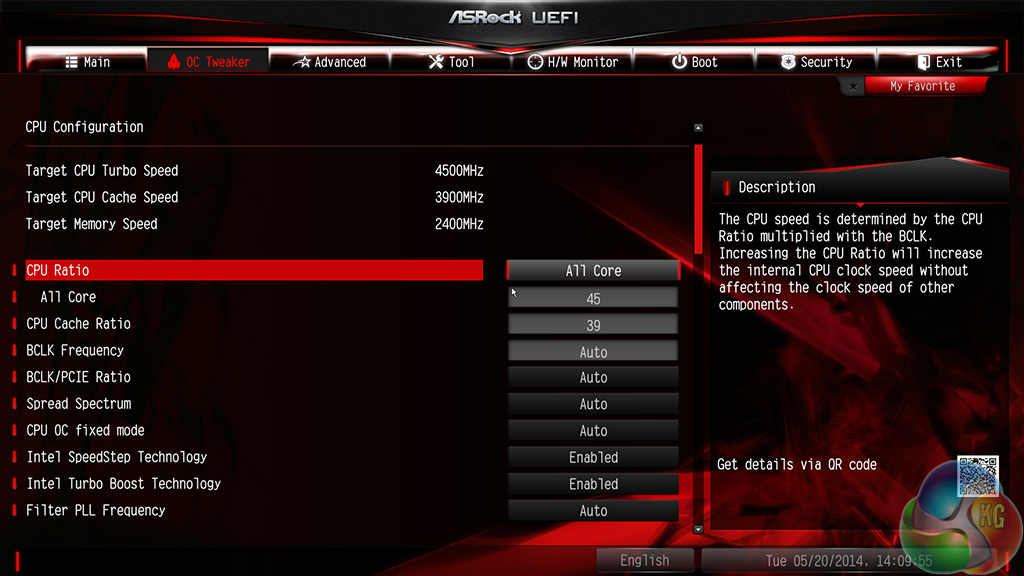
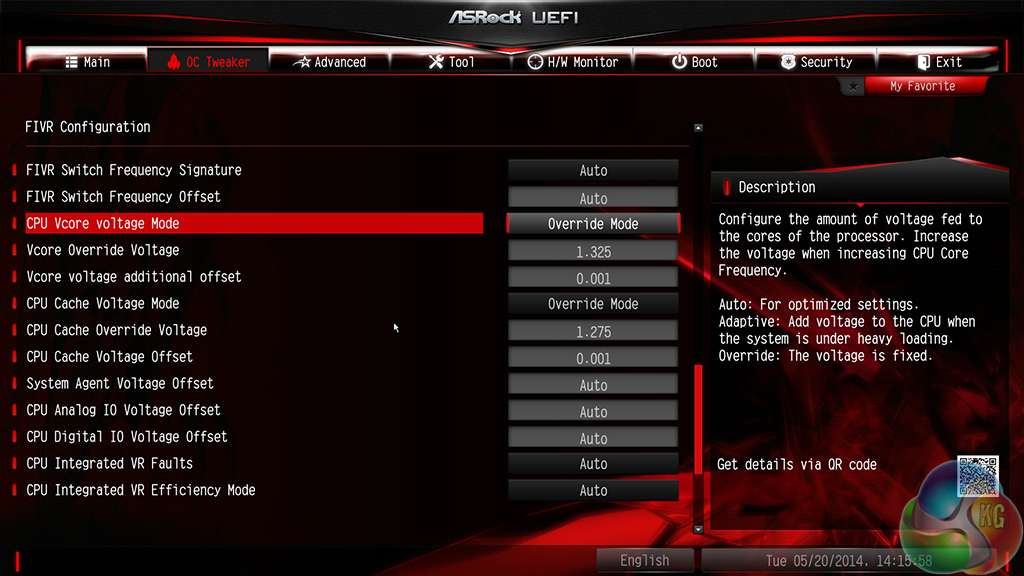
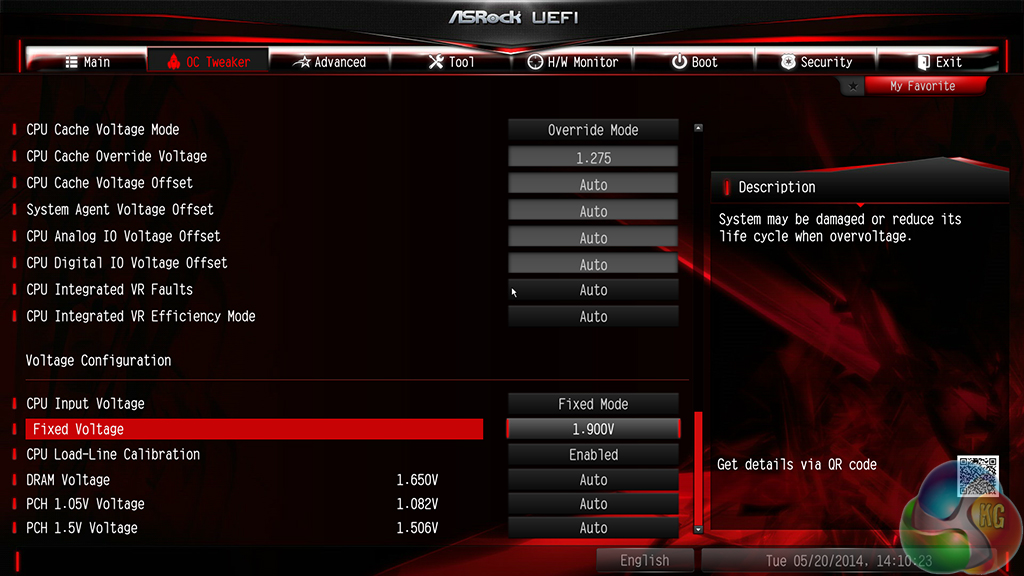
Overclocking with ASRock's Z97X Killer is more complicated than it needs to be. Upon applying the ‘override' voltage mode for the VCore, the board still provides a +80mV offset. This translates into a worrying 1.405V in Windows with our safe 1.325V setting.
A way around the issue is to manually set the offset to +0.001V. Even ASRock's engineers and system builders seem to be using this workaround, as proven by its use in the pre-tuned overclocking profiles.
We have reported this problem a number of times with ASRock's Z87 motherboards so the company clearly isn't listening to feedback. Selecting an ‘override' voltage should give an override voltage; all other parameters and offsets should be disabled to provide the user-defined voltage level, otherwise there is absolutely no point in providing the ‘override' setting.
Quite simply, the voltage tweaking system is not good enough. Competing vendors have no problem disabling their offset configurations when a user opts for an override voltage. ASRock needs to do the same.
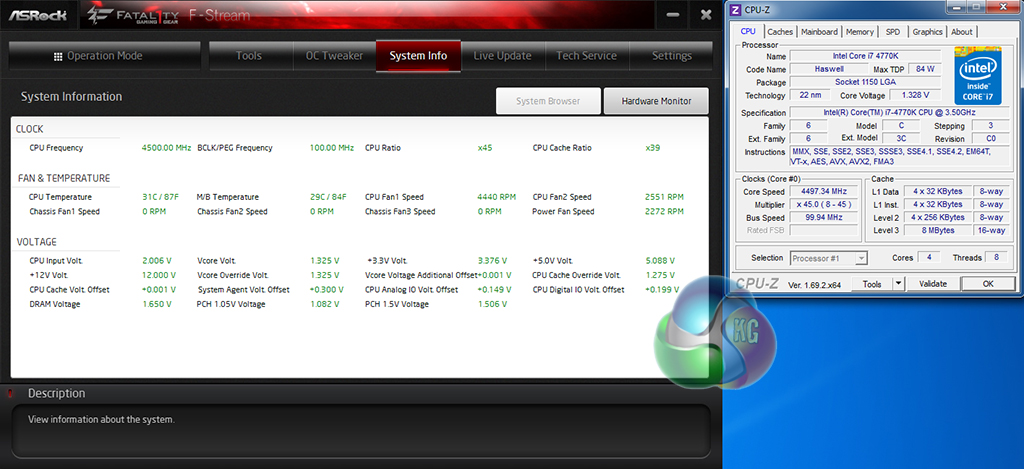
Our advice to users of this board would be to carefully monitor the voltage level being fed to your CPU. With a +0.08V offset being automatically applied, overclocking voltages can quickly reach worrying levels.
Despite the difficulties, we were able to reach the 4.5GHz frequency limit of our chip without much additional effort.
We will outline the performance increases that can be obtained from using the ASRock Z97X Killer motherboard to overclock our system. Our overclocked processor frequency was 4.5GHz and memory speed was 2400MHz.
As a performance comparison, we have included the overclocked results from three other Z97 motherboards. The maximum overclocked configuration achieved with each board was a 4500MHz (45 x 100MHz) processor frequency and 2400MHz CL10 memory speed.
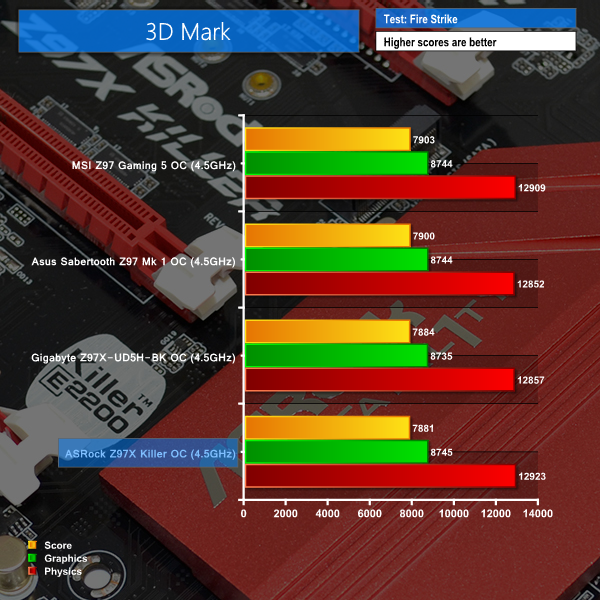

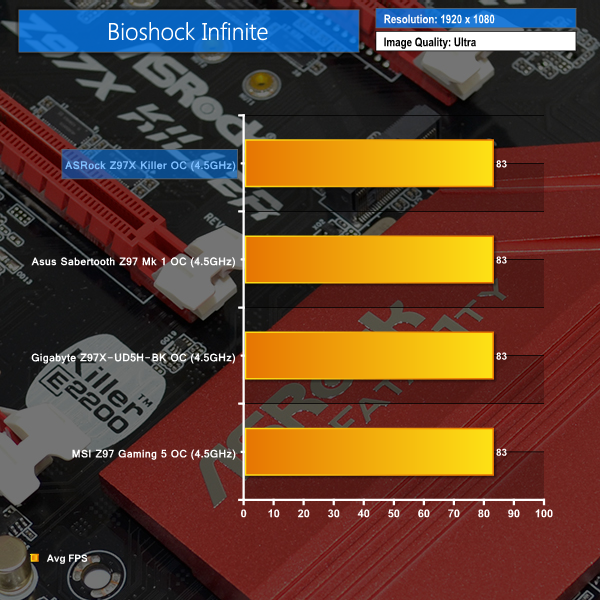
ASRock's Z97X Killer seems to struggle to compete when overclocked frequencies are applied. In the CPU-heavy tests, the motherboard renders two bottom-place finishes in the overclocked charts. This could still be related to the increased memory latency or it could indicate further underlying problems. Fortunately the margins aren't large enough to warrant major concern.
Many modern games are heavily GPU dependent at higher resolutions, hence why the Bioshock Infinite frame rate doesn't change with a 500MHz boost in CPU frequency.
We measured the power consumption with the system resting at the Windows 7 desktop, representing idle values.
The power consumption of our entire test system (at the wall) is measured while loading only the CPU using Prime95′s in-place large FFTs setting. The rest of the system’s components were operating in their idle states, hence the increased power consumption values (in comparison to the idle figures) are largely related to the load on the CPU and motherboard power delivery components.
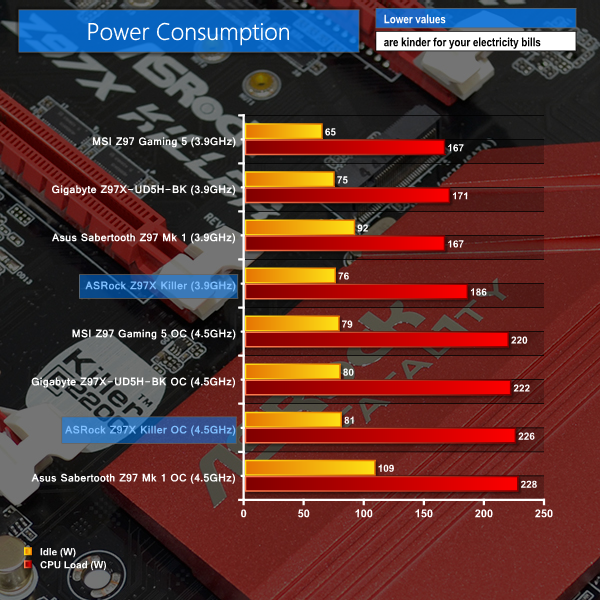
Due to its needlessly high MCT VCore of 1.28V, ASRock's Z97X Killer shows poor efficiency at stock settings. The load power consumption is 19W higher than the next Z97 motherboard (Asus' Sabertooth Z97 Mark 1) even though ASRock's board is relatively scarce in regards to add-on controllers.
Overclocked power consumption numbers are in line with other Z97 motherboards. The recorded data would indicate that ASRock can't quite match the efficiency levels shown by the Gigabyte and MSI boards.
The ASRock Z97X Killer is a well-balanced gaming motherboard that offers a range of useful features and a likeable style.
Performance is generally good. Memory-intensive tests will suffer due to ASRock's use of slacker secondary timings than competing motherboards. In games, ASRock's Z97X Killer doesn't show any cause for concern, managing to match the frame rates shown by other Z97 boards.
ASRock's Z97X Killer offers an impressive variety of features, given its £125 price tag. Killer's E2200 series NIC and a pumped-up audio configuration will please gamers, as will the optimised multi-VGA support. HDD Saver is an interesting tool which we are disappointed that we couldn't test out. Support for 10Gbps storage connections via M.2 or SATA Express connectors is also pleasing.
Layout of the Z97X Killer is excellent. Fan header distribution is sensible and multiple graphics cards can fit without cooling concerns. The M.2 connector is difficult to access in a built system, although a drive's (typically) ugly PCB is also hidden from sight, allowing the eye-catching colour scheme to flourish.
ASRock has made subtle changes to its UEFI implementation. The 1920×1080 resolution is welcomed, as is the convenient My Favourites section. The interface is well-laid-out and easy to navigate, although we would prefer more slots to save BIOS settings and an improved method of tweaking fan speeds. Intermittent issues with mouse operation is a big disappointment.
The most glaring issue we encountered was performance at stock speeds. Unlike its competitors, ASRock does not automatically apply all-core turbo upon enabling XMP. Not only that, but in order to get a representative view of stock performance, users must apply the Performance mode via ASRock's OS software, otherwise rapid multiplier adjustments hamper the board's stock execution.
While both of these points are easy to solve manually, many users may question why the best possible performance is not available ‘out-of-the-box', as it is with many competing motherboards. And then there's the wasted heat and power from the 1.28V MCT VCore level, as well as the dysfunctional ‘override' voltage mode that forces overclockers to tweak additional settings.
Available to pre-order for £124.99 from OverclockersUK, the ASRock Z97X Killer is a worthy option in the sub-£130 gaming motherboard market. Its price does put it above the competing options from MSI and Gigabyte, and Asus' ROG Maximus VII Ranger is around £5 more expensive. We have said it many times, but the sub-£150 gaming motherboard market is a particularly fierce battling ground.
With a strong set of gaming-orientated features, as well as some novel but useful additions, ASRock's Z97X Killer is a good option for a mid-range gaming motherboard. Add in the XSplit and Orbweb.ME licenses and the Z97X Killer becomes an option with even better value. Just make sure that you're able to operate the UEFI to get the board's best performance. If you aren't confident in a UEFI environment, there are better options available, such as MSI's Z97 Gaming 5.
Discuss on our Facebook page, over HERE.
Pros:
- Good set of gaming features – Killer E2200 NIC, Purity Sound 2, mouse setting controls.
- M.2 and SATA Express connectors.
- XSplit 3-month premium license and Orbweb.ME 1-year subscription.
- Unique HDD Saver tool.
- High resolution, thorough UEFI implementation.
- Good colour scheme with matte black PCB.
Cons:
- UEFI implementation has its issues with mouse support.
- Poor optimisation for out-of-the-box and MCT performance.
- Override voltage setting in UEFI still doesn't do what it should.
KitGuru says: A competitive motherboard packed with useful features, but many users will be inconvenienced by the awkward settings affecting the part's ease-of-use. A good option if you're confident when entering the UEFI.


Hi Luke,
For Leetgion Hellion mouse issue, ASRock already release the new BIOS L1.21D to solve it.
BIOS L1.21D Download link: http://www.asrock.com/mb/Intel/Fatal1ty%20Z97X%20Killer/?cat=Beta
If possible, please take some time to test the BIOS with Hellion mouse and then update the result to us.
Thanks for your assistance.
ASRock TSD team