 KitGuru KitGuru.net – Tech News | Hardware News | Hardware Reviews | IOS | Mobile | Gaming | Graphics Cards


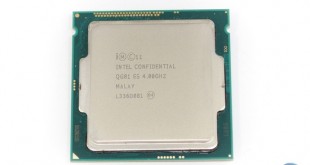
Intel's Haswell-based processors are stellar performers on a clock-for-clock basis, but their overclocking performance typically leaves enthusiasts and gamers crying out for more. Gone are the days of the i5 and i7 LGA 115X parts hitting 4.8GHz without problems, or even a hassle-free 5GHz if we specifically reference Sandy Bridge.
Intel aims to change all of that with a refresh to the K-series Haswell chips. Codenamed Devil's Canyon, the new i5 and i7 K-series parts bring about under-the-hood tweaks to satisfy the overclocking audience. And if the hassle of trying to squeeze every last MHz out of a processor just isn't for you, the flagship Core i7 4790K ships with an out-of-the-box base clock of 4GHz, with turbo speeds of up to 4.4GHz. That's fast in anybody's language.
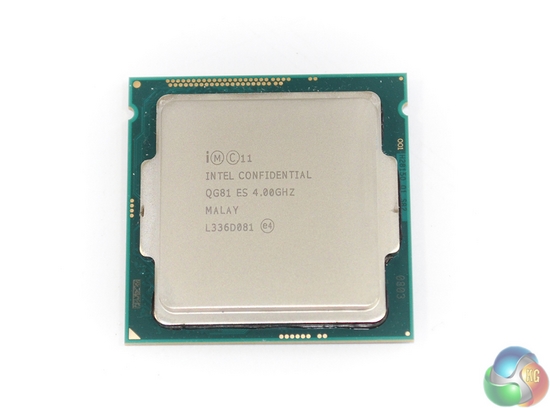
As far as micro-architecture goes, there's nothing different about the pair of Devil's Canyon parts in comparison to their Haswell predecessors. Both the i5 and i7 chips still feature the same Haswell micro-architecture engineered onto the silicon via a 22nm processing node. And there has been no change to core counts, either.
The biggest difference comes from clock speed. Focusing specifically on the flagship Core i7 4790K part, Intel has taken the initiative and shipped the chip with an out-of-the-box base speed of 4GHz, with turbo multipliers reaching up to 4.4GHz under certain load scenarios. ‘How?', you ask. Updated thermal interface material (TIM) and some tweaked electronics engineering.
But more on those later.
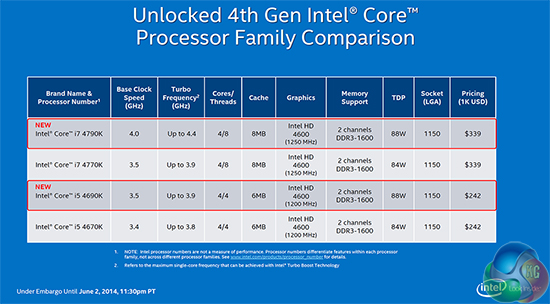
Perhaps of greatest importance is the fact that Devil's Canyon parts have replaced the Haswell 4670K and 4770K without any form of price bump. Tray price remains firm at $339 for the i7 and $242 for the i5. Current retail pricing looks identical to Haswell's ‘K' chips, with the 4790K commanding around £260-270 and the 4690K selling for under £190.
Clearly Intel is aiming to once again take command of the enthusiast market by giving overclockers and gamers a tweaking-friendly chip that they so desire. Without further ado, let's take a look at whether the Devil's Canyon 4790K can fly the flag for the series and prove that Intel does indeed cater for mid-range users enthusiastic about overclocking.
Features (Core i7 4790K):
- 4.00GHz base frequency (up to 4.40GHz turbo frequency).
- Unlocked core ratio multiplier.
- 4 cores, 8 threads.
- 8MB Intel Smart Cache.
- Dual-channel DDR3 1600MHz native memory support.
- 16 PCIe 3.0 lanes.
- Intel HD 4600 GPU.
- 88W TDP.
- LGA 1150 socket.
The engineering sample we have at hand is Devil's Canyon's flagship part – the four-core, eight-thread Core i7 4790K. Haswell's 4770K has been replaced by the 4790K, which actually sells at an identical price to its predecessor.
Starting with the biggest news of all, Intel clocks the 4790K at a hefty 4GHz out-of-the-box, on all four cores. And if that wasn't high enough, turbo boost can take individual cores up to a maximum of 4.4GHz, under the correct workloads.
Let's put this into perspective; coupled with a motherboard that supports multi-core turbo (MCT), out-of-the-box operating frequencies for the 4790K are as high as the maximum overclock that many 4770K processors could reach. That's impressive, provided stability is also present.
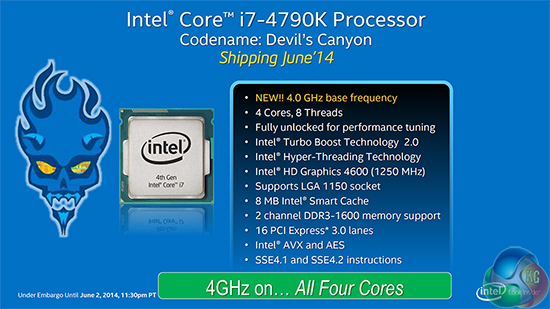
We still see the same features offered by the Haswell Core i7 4770K; Intel's HD 4600 GPU is clocked at 1250MHz, native support for 1600MHz DDR3 memory is present, 16 PCIe 3.0 lanes are still fed directly from the CPU, and the chip slots into an LGA 1150 socket (making it compatible with 9-series and selected 8-series motherboards).
Put simply, the 4790K is a Core i7 4770K with higher out-of-the-box operating frequencies and optimised (hopefully) overclocking and thermal performance. To be quite honest, that seems to be exactly what enthusiasts want. There's very little reason to complain about the Haswell micro-architecture – it's fast and efficient.
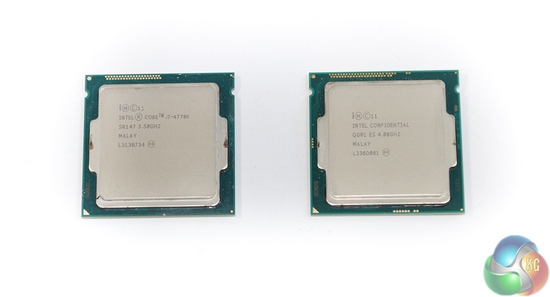
As already pointed out, Haswell was given a hard time amongst the enthusiast crowd, and on many levels, it was deserved. Variations in overclocking performance from chip-to-chip were some of the largest that we have seen in recent generations, and even if you won the silicon lottery, the chances of finding a 4.8GHz+ 4770K were uncharacteristically low.
Many retail processors simply would not push past 4.5GHz, and that's a problem to users looking to upgrade their 2-3-year old Sandy Bridge system that runs smoothly at 4.8GHz+. Better overclocking performance was one of the ways for Intel to re-light enthusiasts' interest in the company's current mainstream offerings.
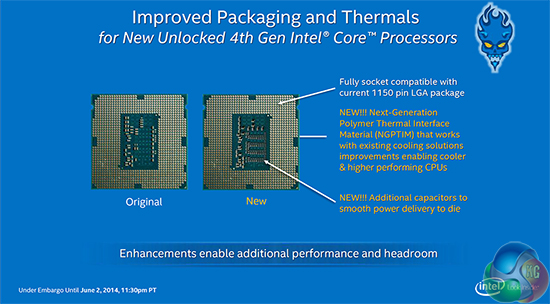
Devil's Canyon is all about improving overclocking performance so that enthusiasts can once again feel loved by Intel. The company has used two main methods to increase Devil's Canyon's overclocking potential in comparison to Haswell.
Improvement number one is optimising thermal transfer from the processor to a CPU cooler. Recent CPU generations have seen Intel switch to an interface between the processor die and heatspreader which is basically a layer of thermal paste. Temperatures suffered considerably in comparison to previous designs that saw the use of a heatspreader soldered directly onto the processor.
Being termed ‘Next-Generation Polymer Thermal Interface Material (NGPTIM)' by Intel, the poorly performing TIM used on Haswell parts seems to have been upgraded (hopefully). Temperature thresholds certainly were a limiting factor to many Haswell processors when pushing for maximum frequency, so hurdle number one has been addressed.
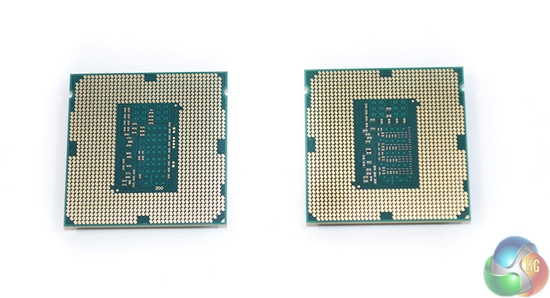
The other main improvement is more of a fine-tuned one. Intel's other way of aiming to improve overclocking performance for Devil's Canyon comes in the form of a tweaked circuit layout.
Aiming to counteract the anomalous overclocking lottery that Haswell was prone to, Intel has equipped Devil's Canyon chips with additional capacitors in an attempt to deliver smoother power to the processor's die.
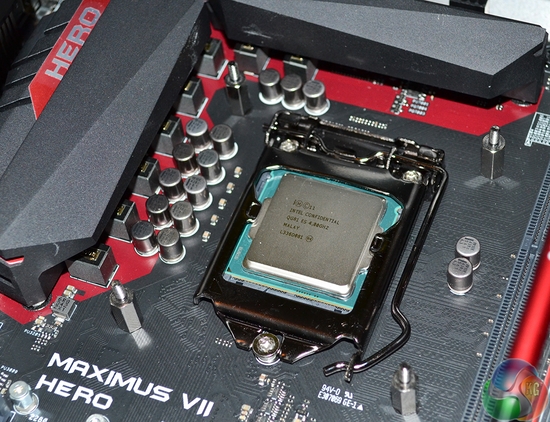
There should be no problems using the 4790K in newly-released motherboards based on Intel 9-series chipset, such as Asus' Maximus VII Hero. Being an LGA 1150 part, Devil's Canyon CPUs should also work fine on 8-series based motherboards, although relevant BIOS updates are at the discretion of motherboard vendors.
Intel noted that Devil's Canyon's 88W TDP (4W higher than Haswell K-series chips) could cause issues with 8-series motherboards, although that seems highly unlikely (as we will prove later in the review).
There are a number of different users and audiences who will be interested in Devil's Canyon's overclocking characteristics. Some people will be interested in the maximum 24/7-stable overclock they can achieve with no more than a voltage and multiplier bump. Other users will search for an optimal balance between core frequency an operating voltage.
Furthermore, there will be those who are interested in nothing but raw performance and maximum clocks, irrelevant of heat and CPU lifespan.
We will overclock Devil's Canyon in a number of manners to analyse our sample's important characteristics and tendencies, such as: increased voltages, thermal loads, and core frequencies.
We are using an engineering sample processor provided by Intel, so if past data is anything to go by, the behaviour of our chip may differ from that of a retail part. Hopefully we will also have the chance to produce a comparison with a retail Devil's Canyon processor in the near future.
Maximum overclock attempts
Keen to find out exactly what our chip was capable of, we set high voltage and power settings and strived to find our 4790K's overclocking limit.
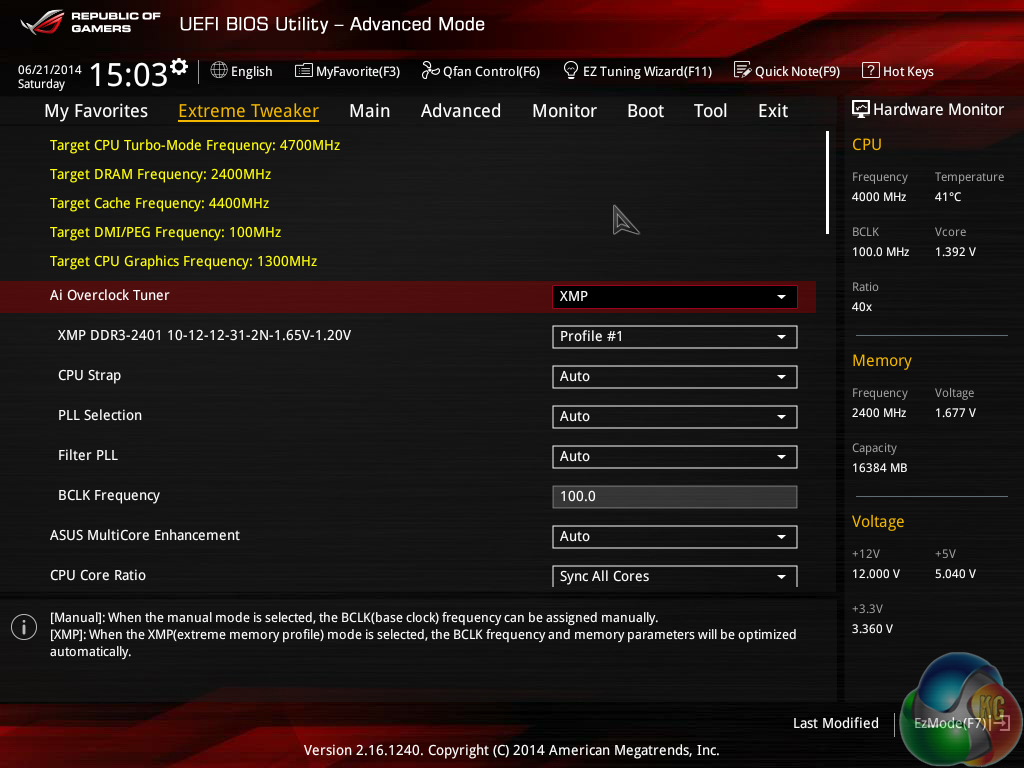
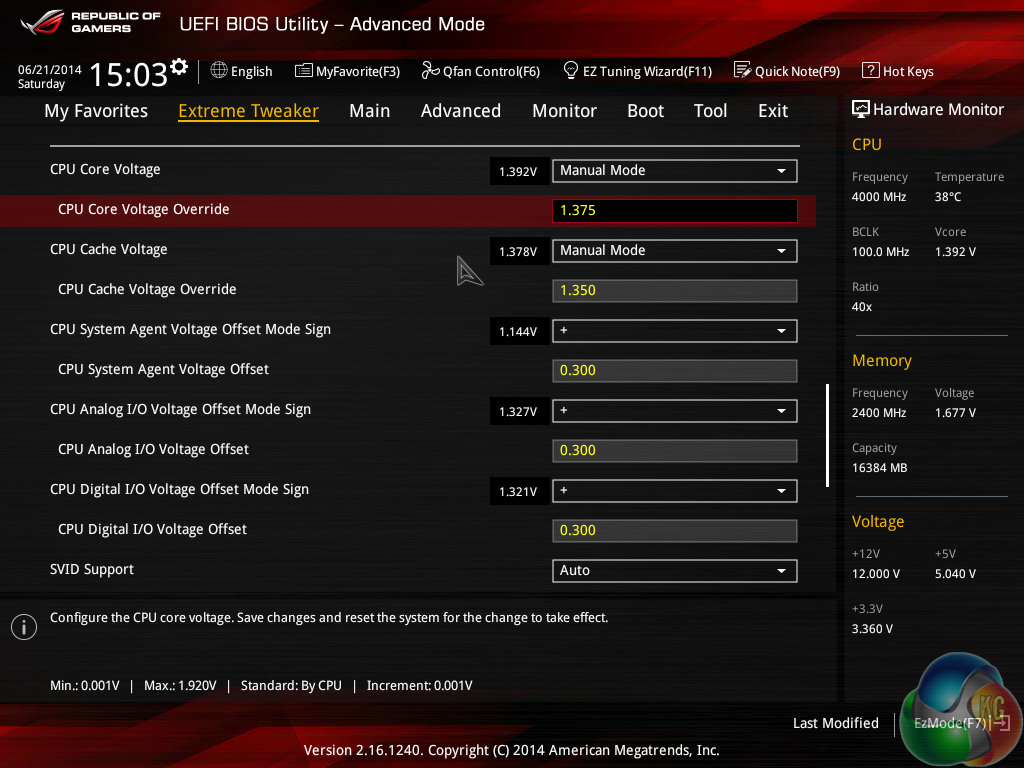
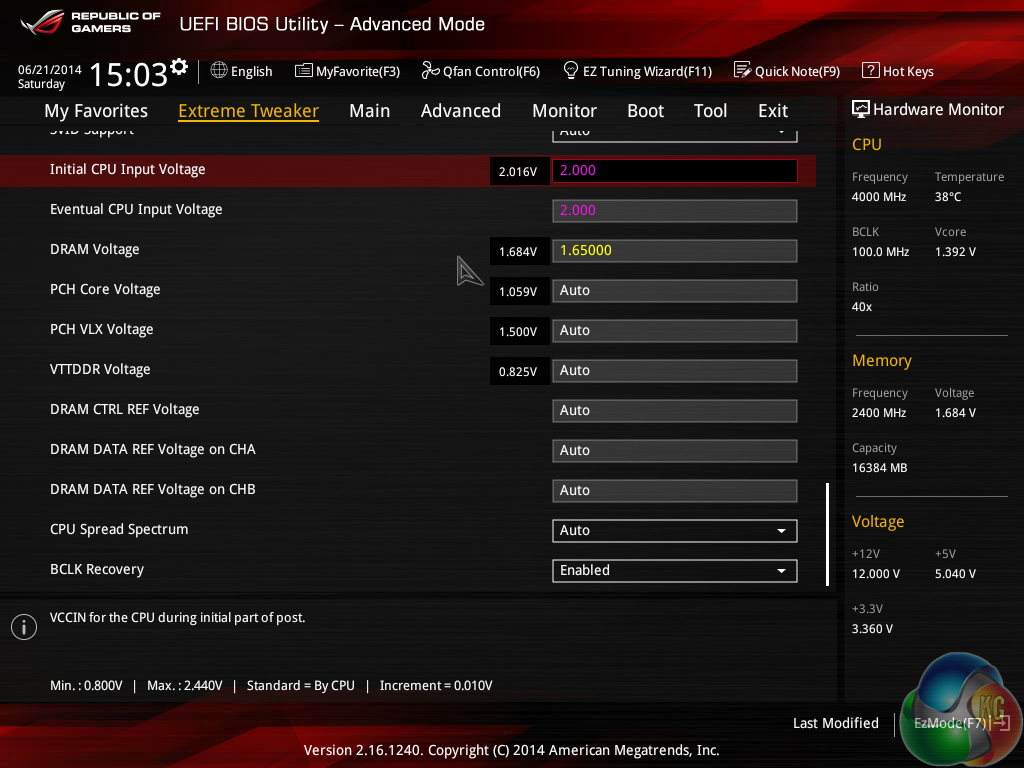
Our voltage levels were far from optimised but they were intended to remove limiting factors from our chip's frequency potential.

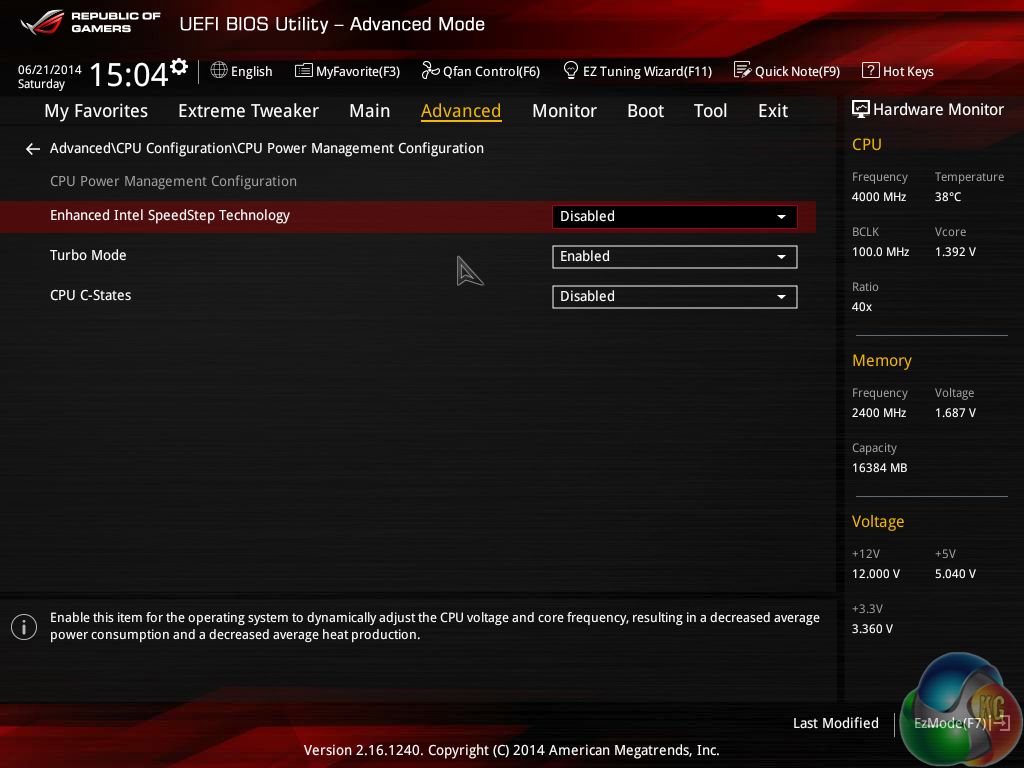
We also selected overkill power settings to eliminate frequency-hindering bottlenecks.
Hitting 4.7GHz was simple, but 4.8GHz was where trouble started to occur. After many hours of tweaking settings, optimising voltages, and recording temperatures, we simply could not achieve a 4.8GHz overclock that would run more than 10 minutes of Prime95. Even a load voltage of 1.408V would not give us stability, despite temperatures staying below 85°C.
We switched to the 125MHz base clock configuration and tested at 4.750GHz to see if a lower CPU core ratio could provide stability. The setting could pass a few minutes of Prime95, but it was not completely stable for extended periods of time.
Unlike Haswell, high temperatures were not the limiting factor in our overclocking results – at no point did we break the 90°C barrier.
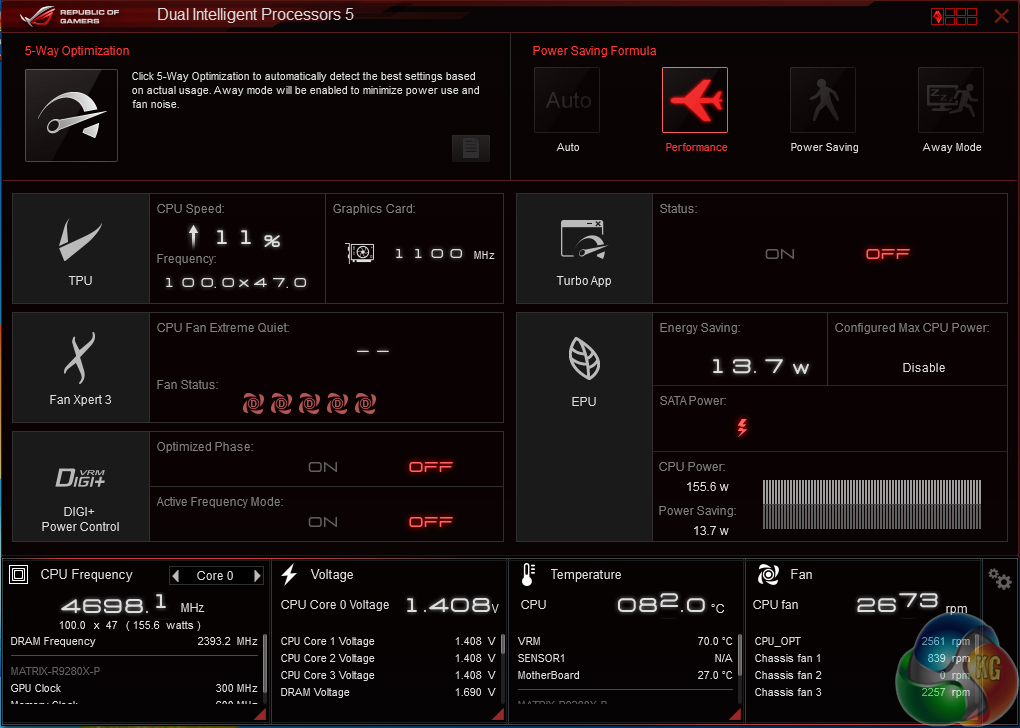
In the end, our maximum Prime95-stable overclock was 4.7GHz (47x100MHz). This required a BIOS-set VCore of 1.375V (although 1.35V was largely stable), which peaked at 1.408V under load.
While the maximum temperature remained under 85°C when running Prime95, we would not be happy to put such high voltage levels through our own processor for anything other than a handful of benchmark runs.
Quick-and-easy overclock
Our ‘quick-and-easy' overclock testing consists of a simple voltage boost to a few key parameters, followed by incremental increases in multiplier ratios until we reach the processor's peak frequency.
This is a typical overclocking method used by gamers and users who simply want the highest 24/7 stable overclock that their system can reach without considerable time and effort being input.
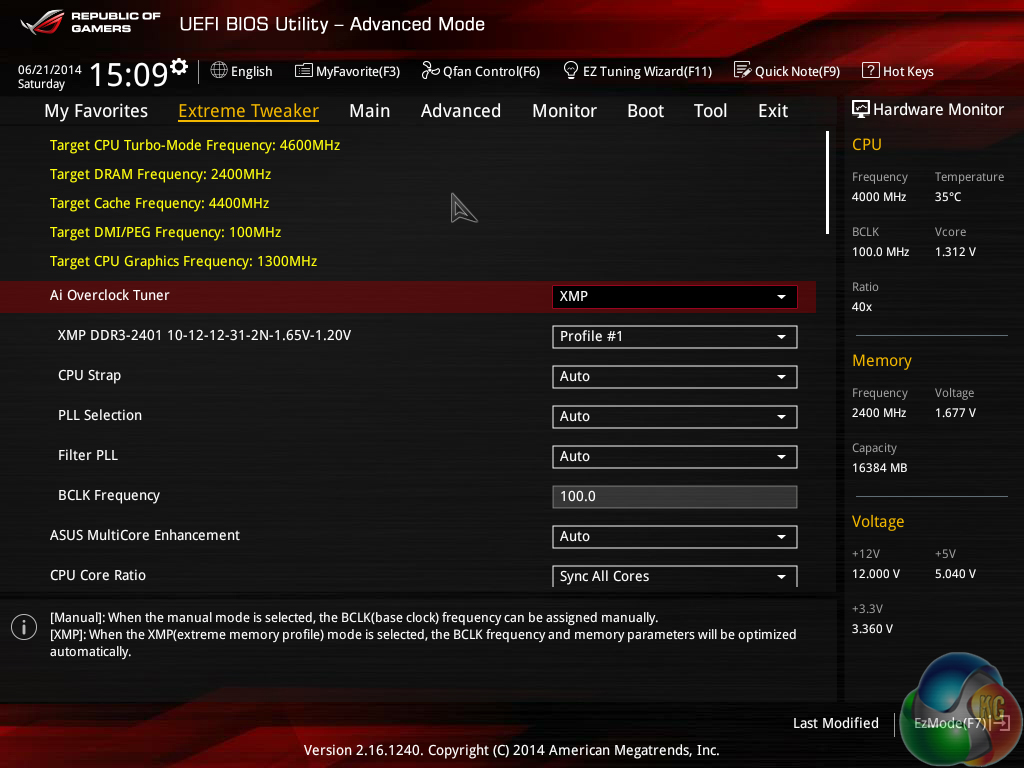
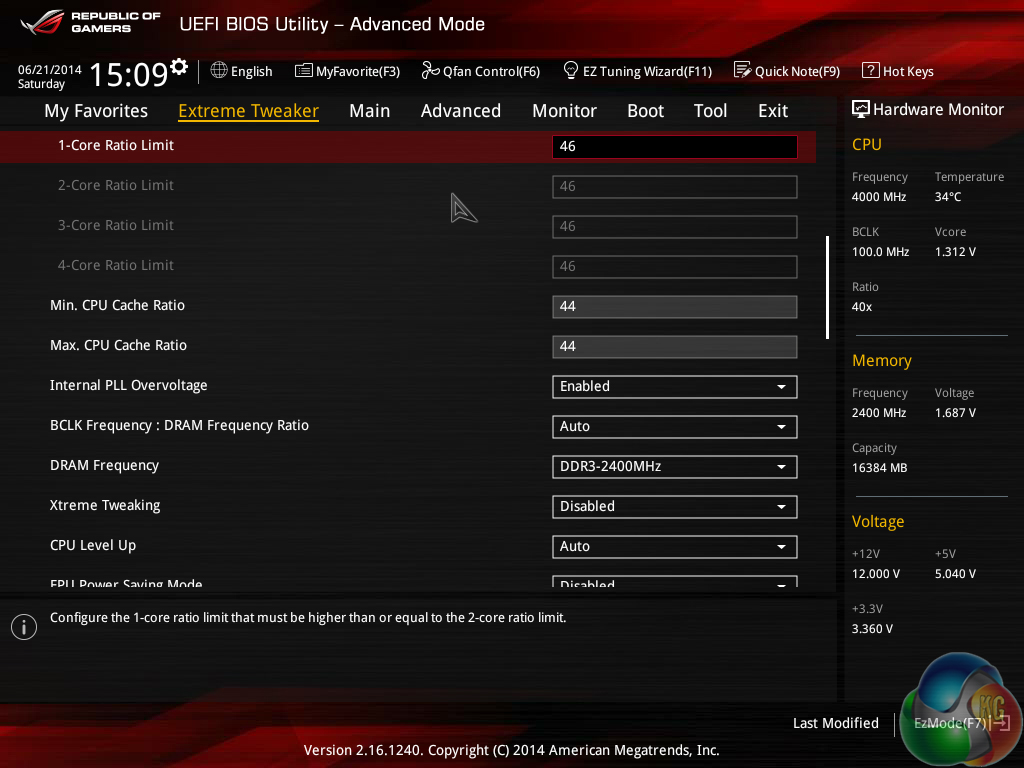
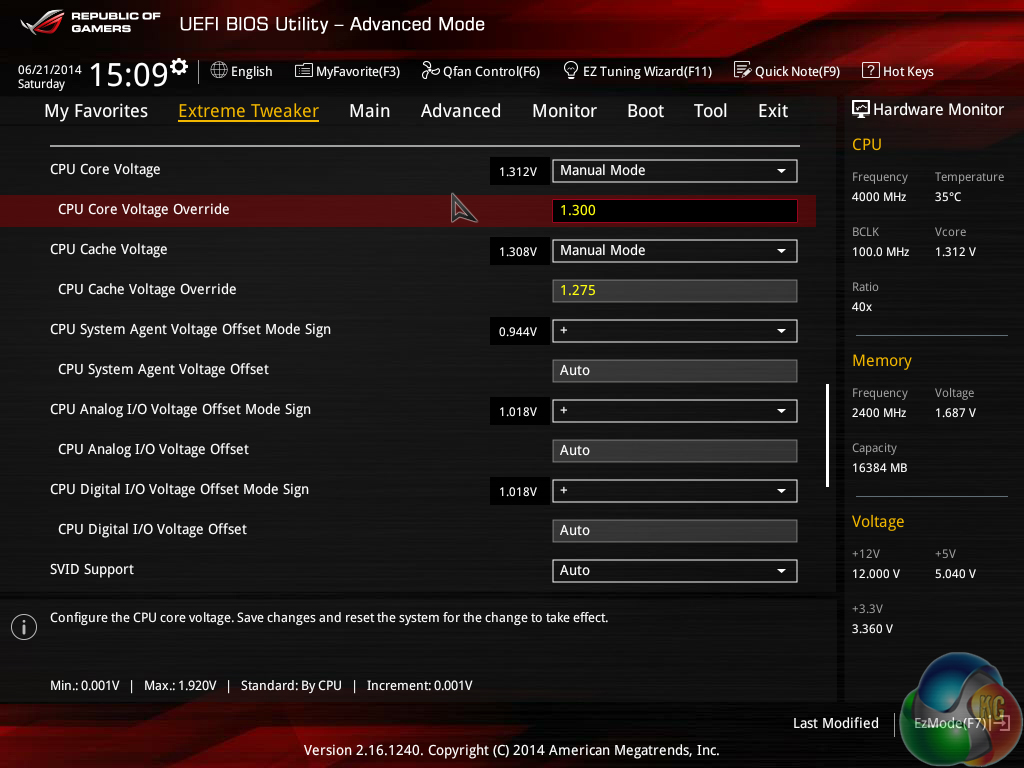
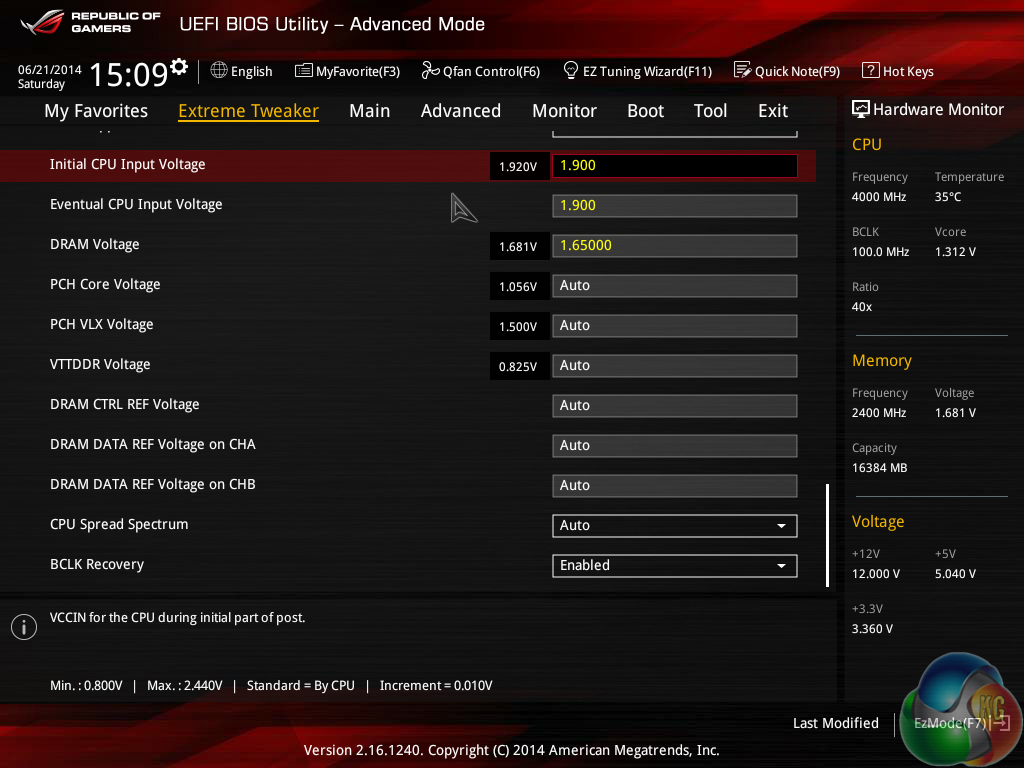
The settings that we used for our quick-and-easy overclock consisted of: 1.30V VCore (peaked at 1.328V under load), 1.275V Cache voltage, 1.90V Input voltage, and ‘auto‘ load-line calibration. XMP was enabled, as was PLL overvoltage, and the cache ratio was maintained at 44x.
We feel that these settings represent safe voltage levels for the demands of a gamer when used with a strong CPU cooler.
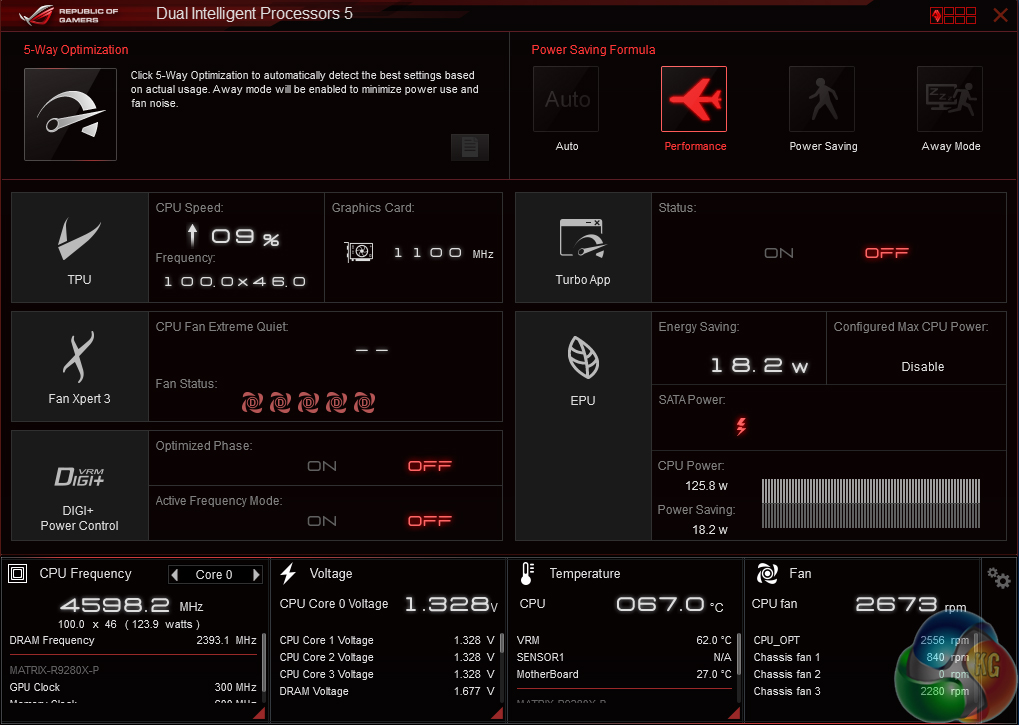
The highest overclock that we could achieve with simple voltage and multiplier adjustments was 4.6GHz. Temperatures were sufficiently low using our Corsair H100i, but we still desired a lower voltage level with the same clock speed. This is where our fine-tuned tweaking session began.
Tweaked overclock
Having found the maximum frequency that our chip is capable of without too much effort, we spent further time tweaking settings to reduce operating voltages.
This is a typical approach adopted by users who understand their chip's abilities and look to fine-tune their overclock to ensure that a strong balance between voltage (hence heat and lifespan) and operating frequency is met. 24/7 stability is critical for a tweaked overclock, hence our configuration must pass at least 30 minutes of Prime95 stress testing.
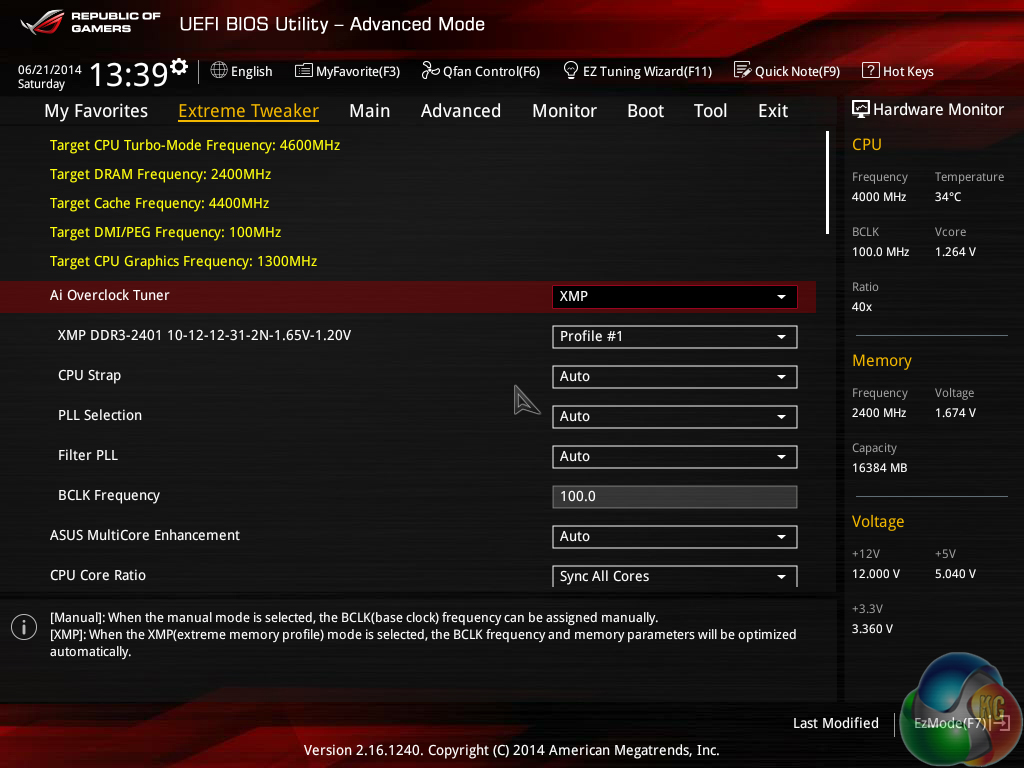
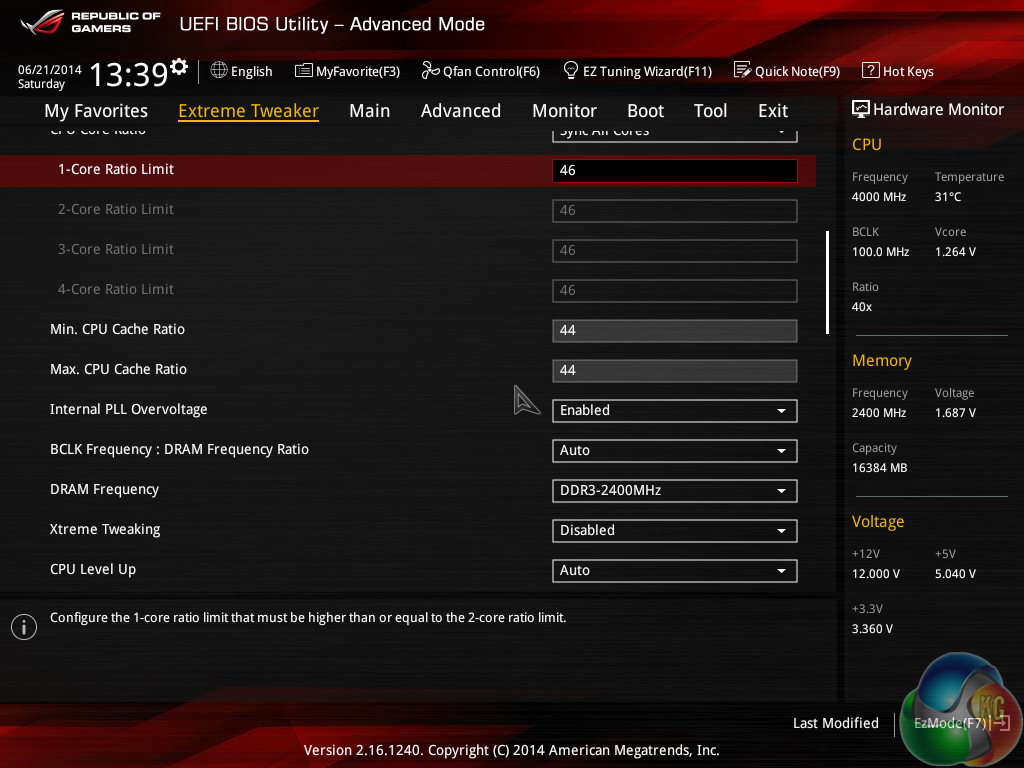
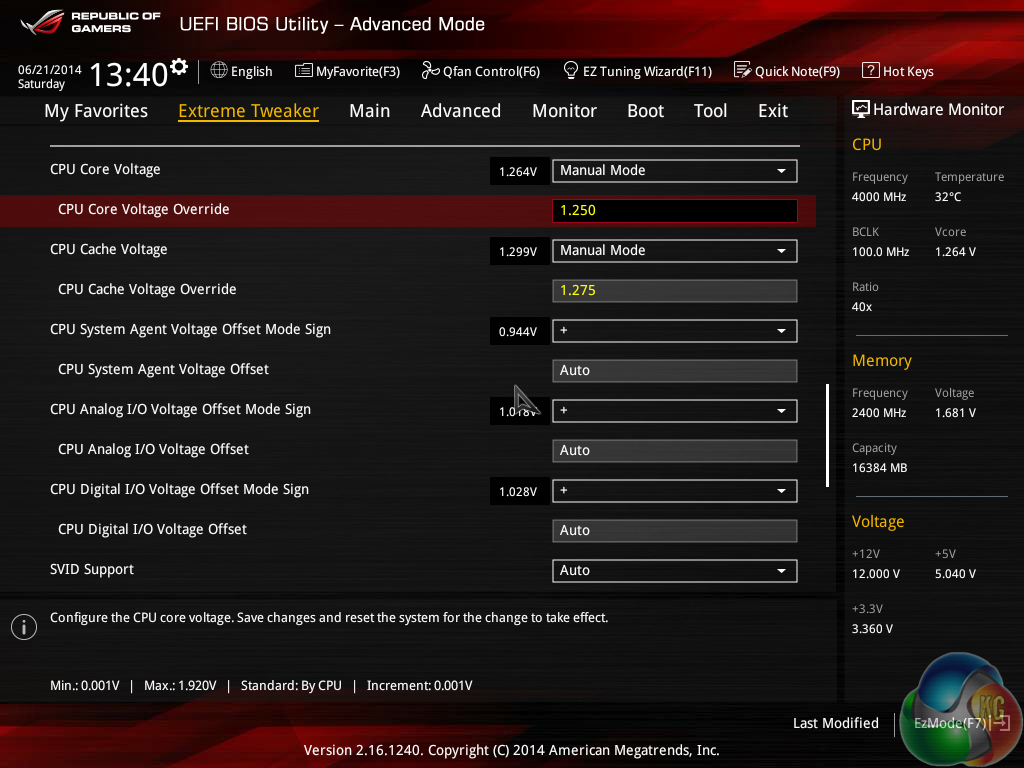
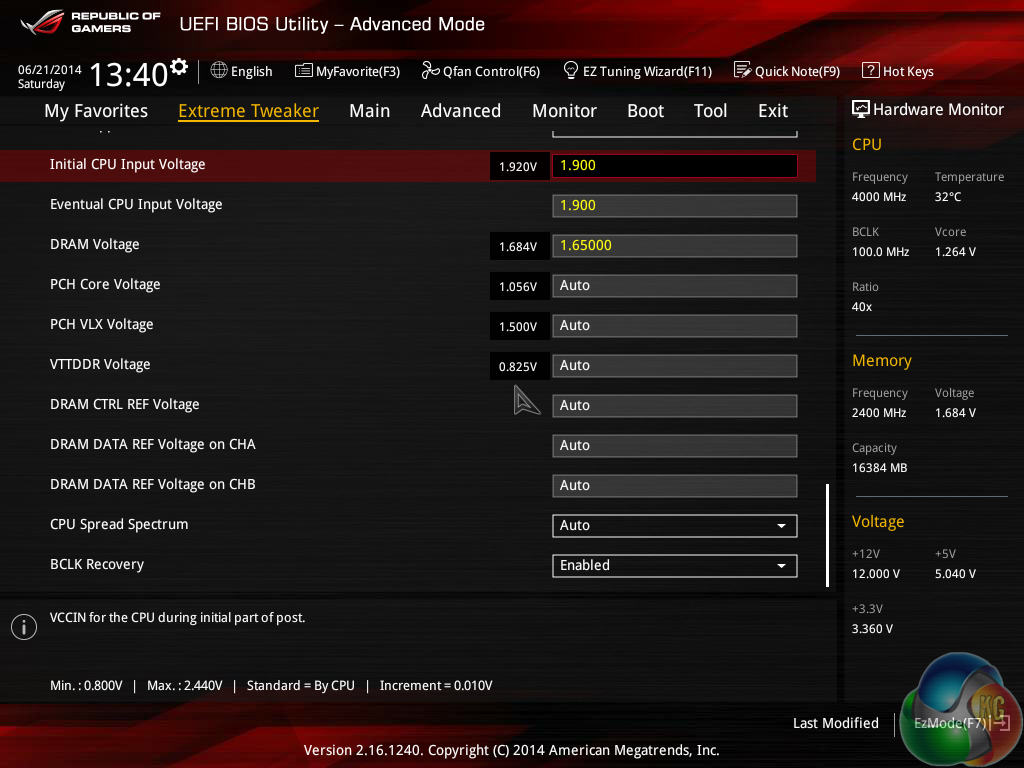
We used the same voltage settings as our ‘quick-and-easy' overclock but managed to shave 50mV off the CPU VCore level. The BIOS voltage was set at 1.250V (typically 1.264-1.280V in the OS).
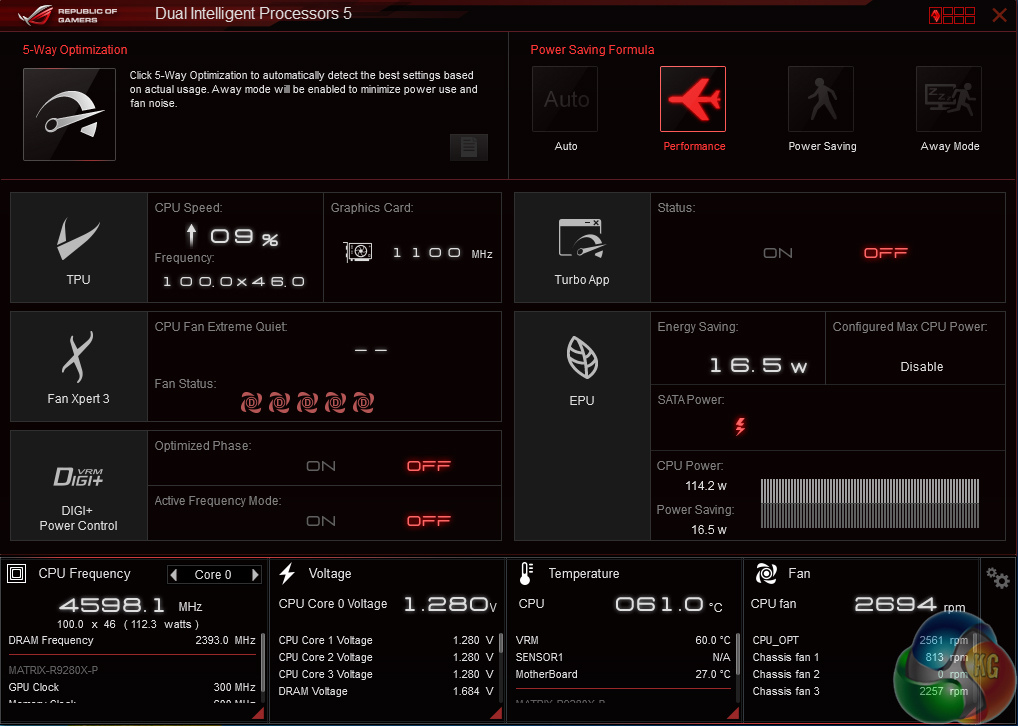
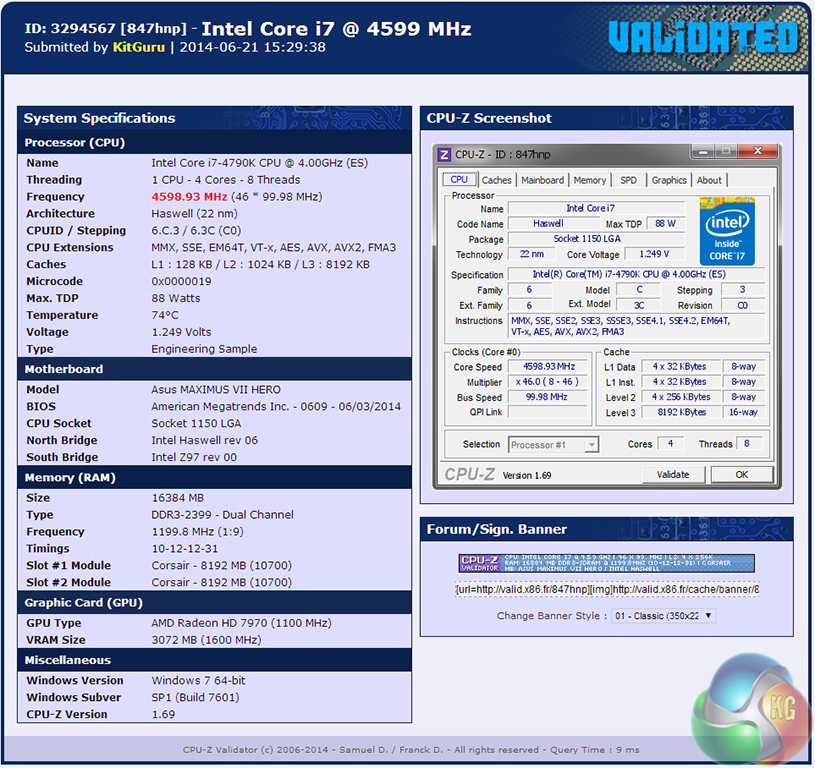
The lowest voltage that allowed us to maintain Prime95 stability at 4.6GHz was a BIOS-set 1.250V, which typically operated at 1.264V in the OS and topped out at 1.280V when loaded. Thermal loads were easily tamed by our Corsair H100i CPU cooler and shouldn't cause many issues even with lower-cost, mid-range models.
We will use the above settings to obtain overclocked benchmark data for the 4790K.
Processor degradation
Let's speak a little about processor degradation. It's a fact of life with electronics and is not something that we can hide from, but how it can affect each individual chip or even series of processors can be very different.
Through our first bout of testing, we had no problem breezing straight up to 4.7GHz with our ‘quick-and-easy' voltage settings. Prime95 gave us stability after running for 15 minutes and temperatures stayed well below 75°C. Thinking that we had found our chip's limit without changing voltage settings, we went on to check its maximum frequency with higher voltage levels.
Now it was time for the real problems to show their face. After settling for 4.7GHz using high voltage levels, we reverted back to our previously-stable 4.7GHz ‘quick-and-easy' overclocked settings. Much to our surprise, the stability that was previously shown in Prime95 had disappeared. The reason? We would wager that accelerated degradation had something to do with it.
From what we can tell, the 4-6 hours we spent torturing our chip into (unsuccessfully) providing stability at 4.8GHz (with voltages as high as 1.408V) resulted in a surprisingly rapid decrease in its overclocking potential. Chip degradation can indeed dictate the requirement for higher voltage levels at an identical clock speed, but seeing the onset of this effect after a handful of hours was slightly worrying.
Obviously with just a single engineering sample at hand, we cannot confidently say that voltage-induced degradation is going to be an issue for Devil's Canyon. But if our results are anything to go by, that shiny new overclocked processor may need to be cranked down a multiplier level after a relatively short period of time.
Performance-wise, we expect the Core i7 4790K to act exactly as a speed-bumped 4770K would. After all, architectural changes have not been implemented on the new processors.
The big difference is that Intel is claiming that the Devil's Canyon parts should be able to operate at noticeably lower temperature levels than the constrained Haswell predecessors.
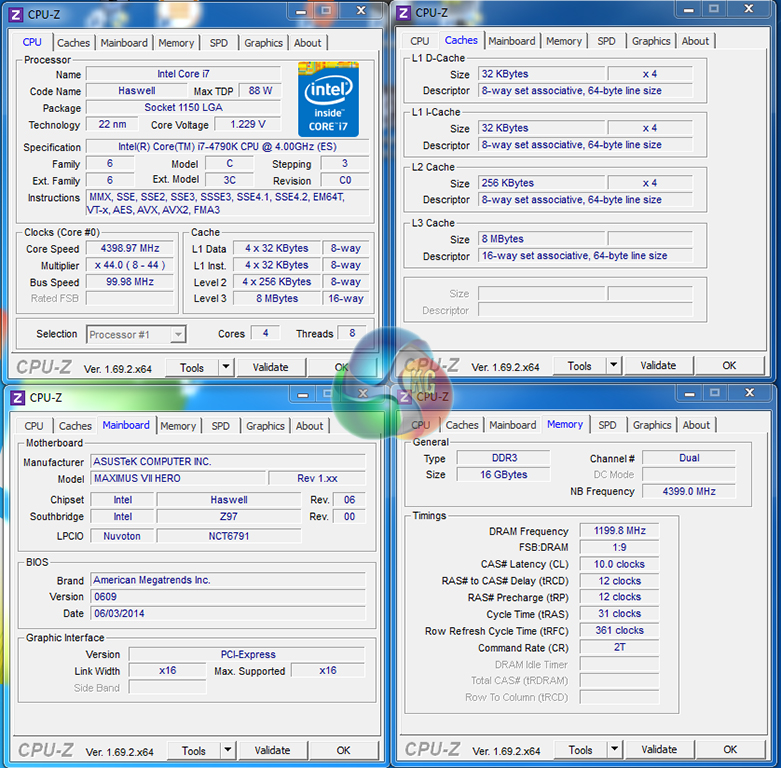
When XMP is enabled, many LGA 1150 motherboards apply multi-core turbo (MCT) which forces a processor to continuously operate at its maximum turbo level on all cores. This will be displayed as the ‘stock’ setting.
While this is perhaps not the most accurate representation of ‘stock' performance for a processor, people buying this kind of chip are likely to be using high-speed XMP memory kits. By that logic, testing with MCT enabled is arguably more representative of real-world performance.
We will be outlining the 4790K Devil's Canyon processor's performance to that of its predecessor – the Haswell Core i7 4770K CPU. Both chips will be compared at stock and maximum overclock speeds. Small portions of data for the 4770K are plucked from our review of the Asus Sabertooth Z97 Mark 1 – a Z97 motherboard that is almost identical to the Maximus VII Hero in terms of performance. The results are directly comparable.
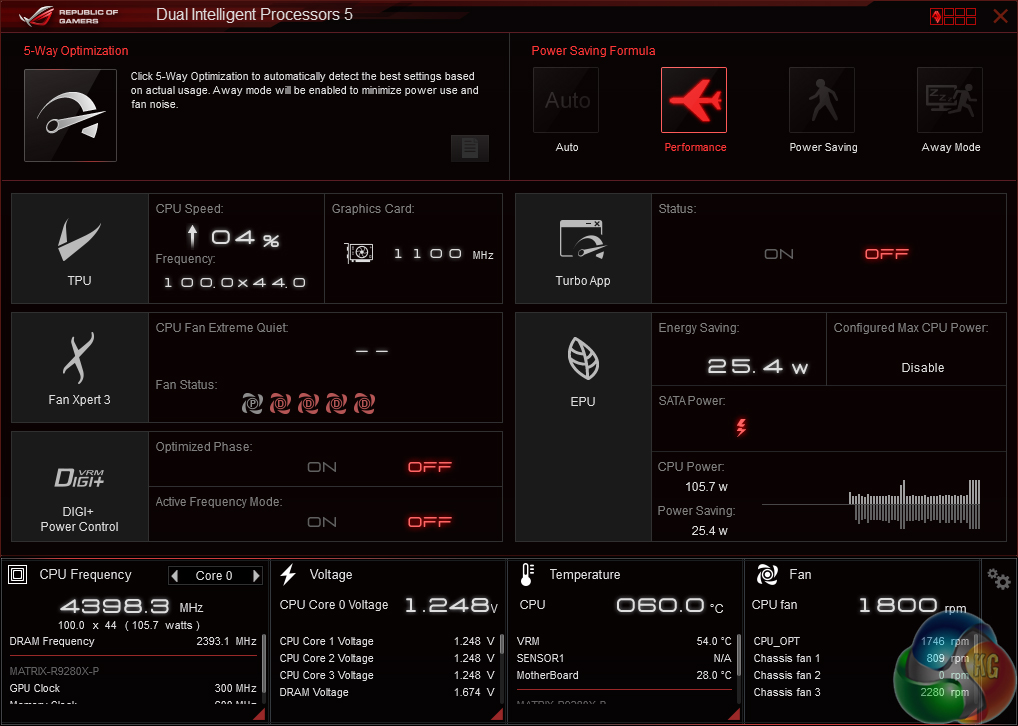
CPU-Z tends to only read the BIOS-set voltage and doesn't take load-line calibration effects into account. As such, we relied on the monitoring tool found as part of Asus' AI Suite software.
The Maximus VII Hero sent the 4790K around 1.23V at the MCT settings. Load voltage peaked at 1.248V. A different voltage level more in line with Intel's reference specification will be set if MCT is disabled.
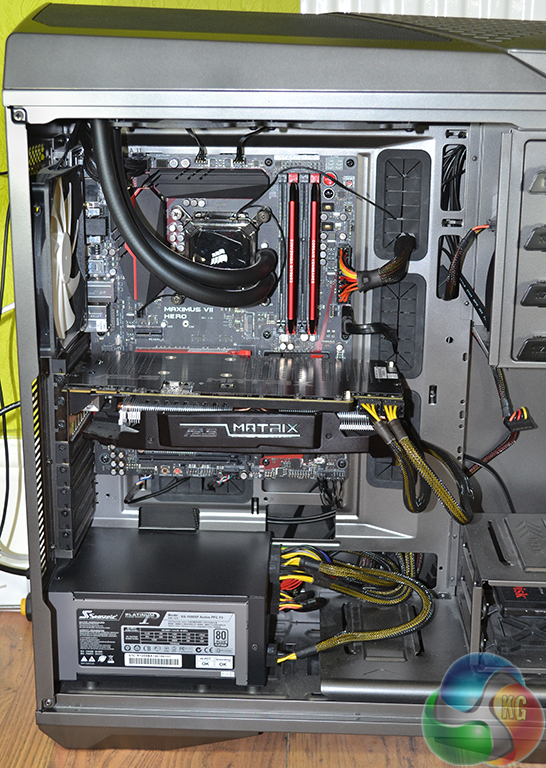
LGA 1150 Test System:
- Motherboard: Asus Maximus VII Hero (Z97).
- Memory: 16GB (2x 8GB) Corsair Vengeance Pro 2400MHz CL10.
- Graphics Card: Asus R9 280X Matrix Platinum 3GB.
- System Drive: 240GB SanDisk Extreme II SSD.
- CPU Cooler: Corsair H100i.
- Case: NZXT Phantom 630.
- Power Supply: Seasonic Platinum 1000W.
- Operating System: Windows 7 Professional with SP1 64-bit.
Compared Processor:
- Intel Core i7 4790K ‘Devil's Canyon' (Engineering Sample) @ 4.4GHz (stock MCT) & 4.6GHz (1.250V BIOS – maximum 24/7 stable OC)
- Intel Core i7 4770K ‘Haswell' (Retail) @ 3.9GHz (stock MCT) & 4.5GHz (1.325V BIOS – typical maximum 24/7 stable OC)
Software:
- Asus Maximus VII Hero BIOS 0609 (latest).
- Catalyst 14.4 VGA drivers.
- Intel 10.0 chipset drivers.
Tests:
- Super Pi – 32M test (CPU)
- Cinebench R15 – All-core CPU benchmark (CPU)
- HandBrake 0.9.9 – Convert 4.36GB 720P MKV to MP4 (CPU)
- SiSoft Sandra 2014 SP2 – Processor arithmetic, cryptography, memory bandwidth (CPU & Memory)
- 3DMark 1.3.708 – Fire Strike (System)
- PCMark 8 v2.0.288 – Home (System)
- WinRAR 5.10 – Built-in benchmark (System)
- Bioshock Infinite – 1920 x 1080, ultra quality (Gaming)
- Metro: Last Light – 1920 x 1080, high quality (Gaming)
- Tomb Raider – 1920 x 1080, ultimate quality (Gaming)
Cinebench
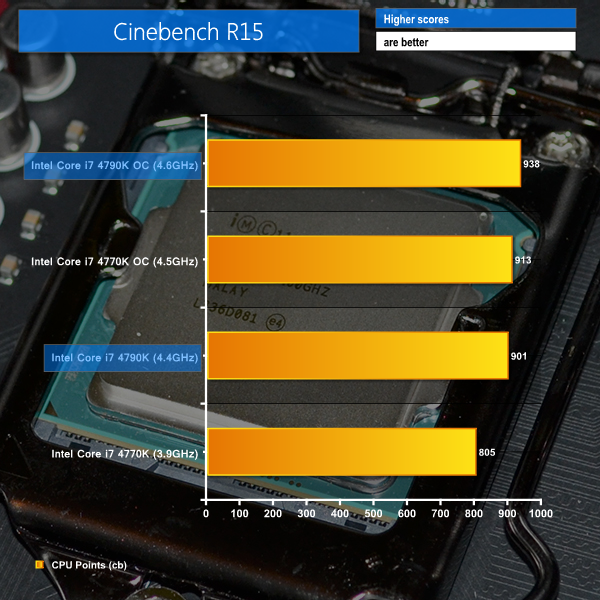
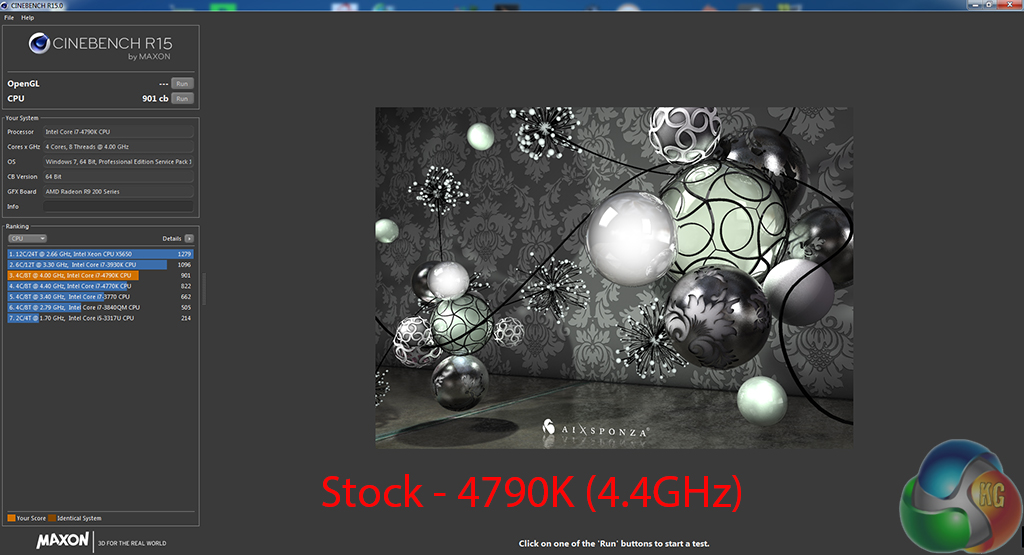
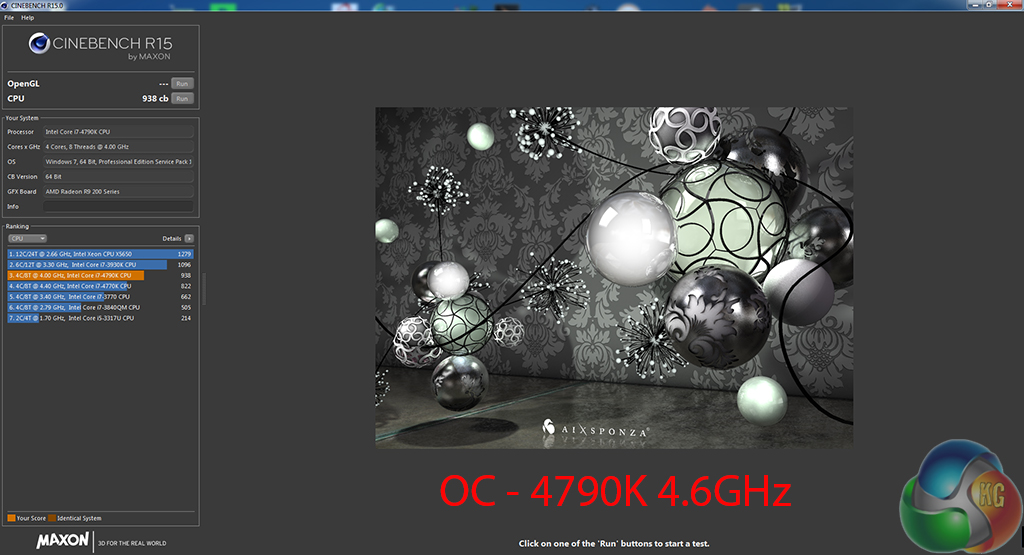
We used the ‘CPU’ test built into Cinebench R15 .
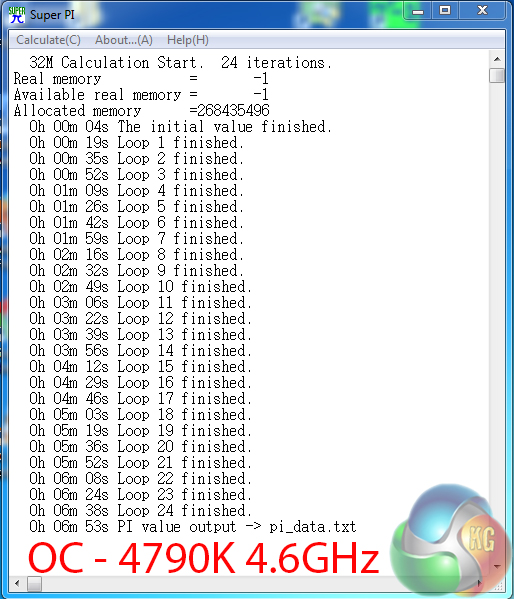
Super Pi
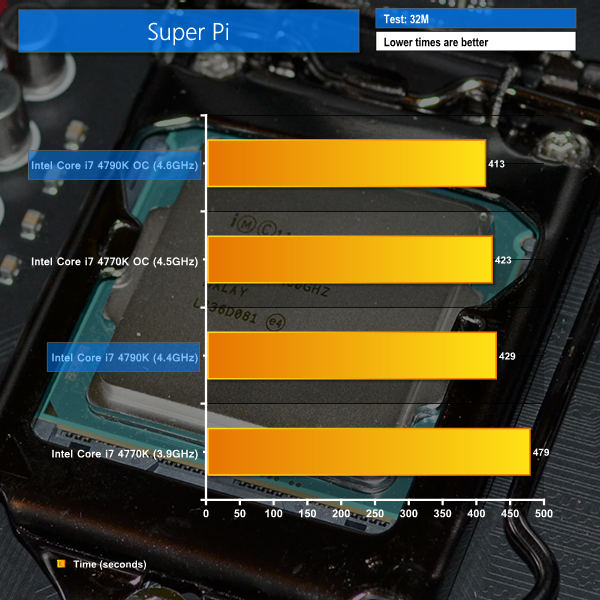
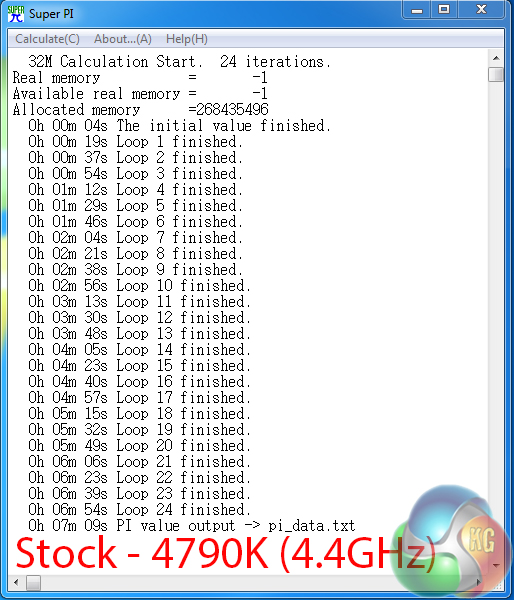
We used the 32M test in Super Pi to analyse single-threaded performance.
Handbrake Conversion
We measured the average frame rate achieved for a task of converting a 4.36GB 720P MKV movie to 720P MP4 format.
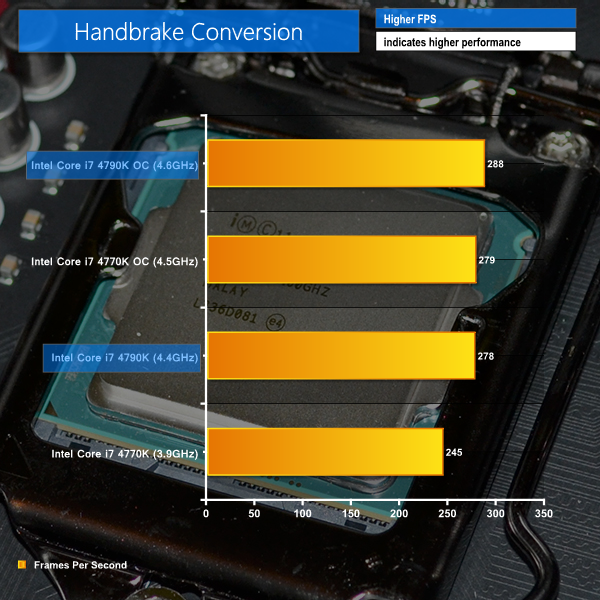
The Devil's Canyon-based 4790K makes a strong start in the CPU-heavy benchmarks. At its stock MCT clock speed of 4.4GHz the chip's performance is within touching distance of a heavily overclocked 4770K.
Also shown in the CPU-heavy benchmarks is the importance of cache frequency for processors based on the Haswell micro-architecture. The 4790K utilises a 4.4GHz cache frequency which managed to close the performance gap from the higher-clocked 4770K at 4.5GHz (and 3.9GHz cache frequency).
Jump up to 4.6GHz on the Devil's Canyon chip and the enhanced CPU and cache operating speeds help give the configuration a noticeable performance boost over an overclocked 4770K.
Sandra Processor Arithmetic


Sandra Cryptographic


Sandra Memory Bandwidth
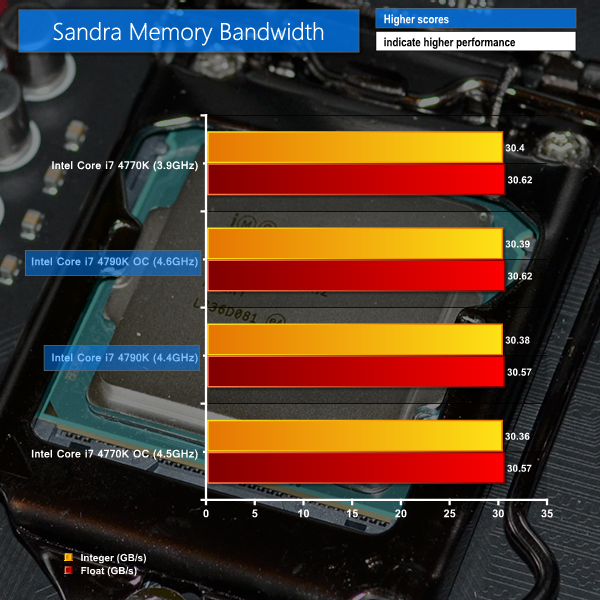


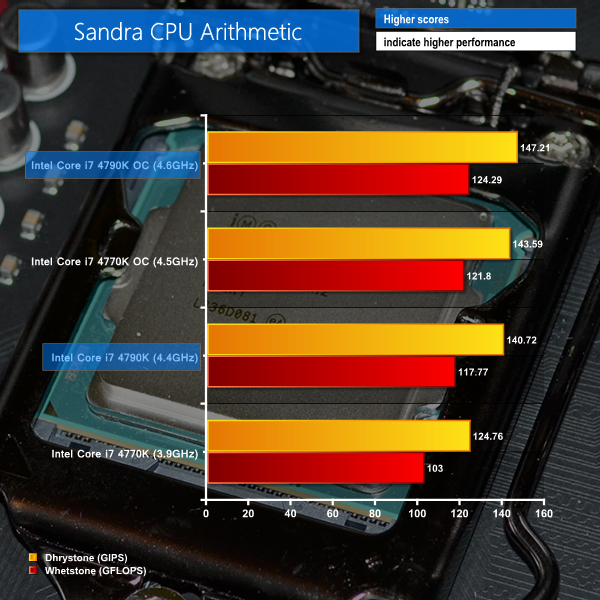
Sandra's processor arithmetic test shows how increased CPU frequency can enhance the speed at which calculations are carried out.
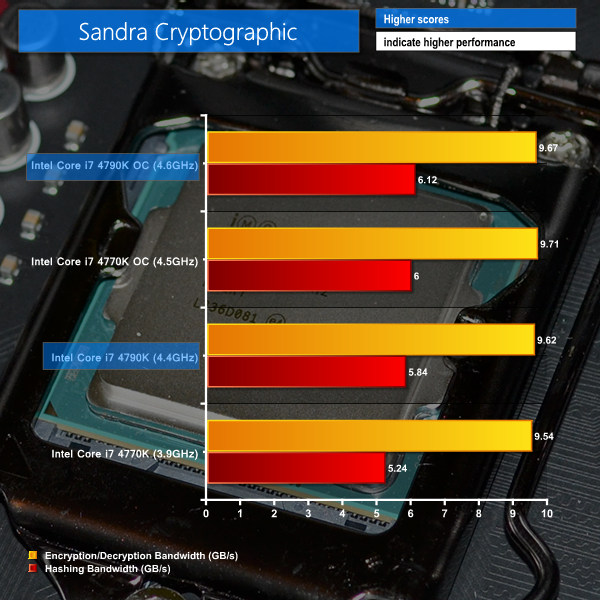
Hashing bandwidth of the processors also scales effectively with operational frequency, so it's no surprise that the overclocked Devil's Canyon part takes the lead in the Sandra Cryptographic test.
As we have already pointed out, the 4790K still uses the underlying Haswell micro-architecture, hence memory bandwidth results show very little variation between chips.
3DMark
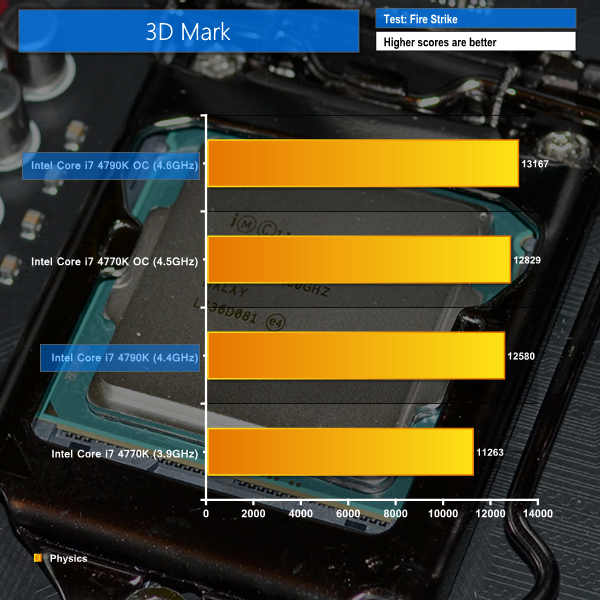
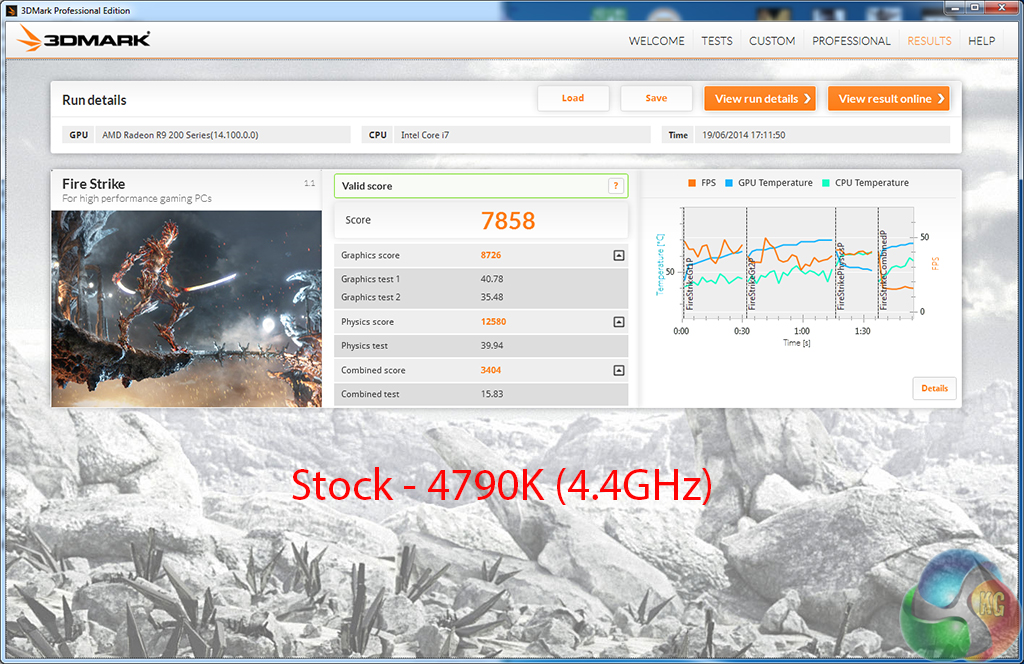
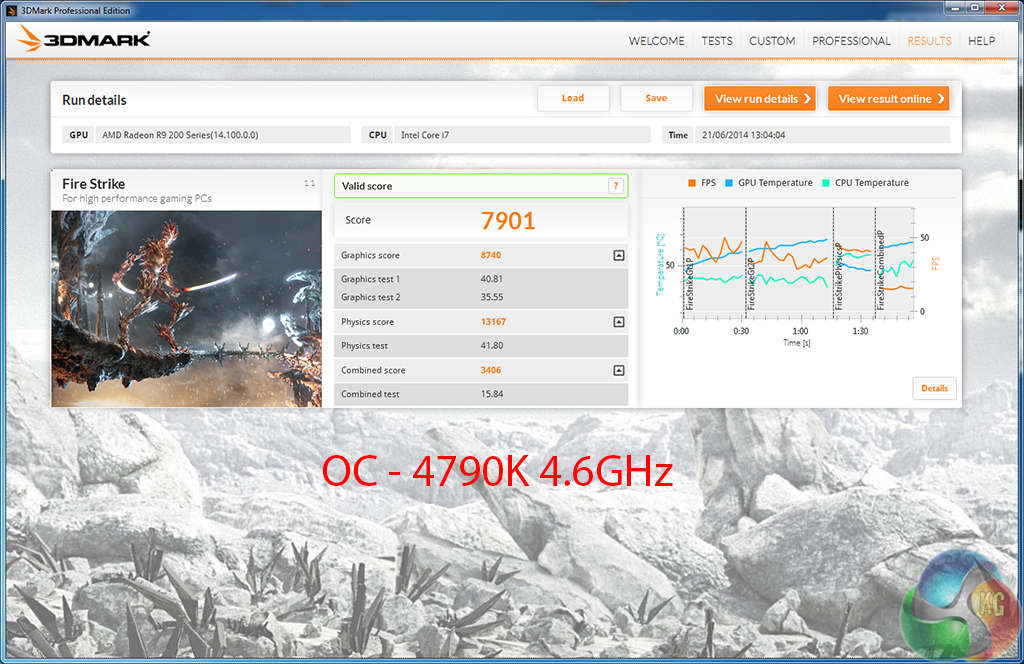
We used 3DMark‘s ‘Fire Strike’ benchmark which is designed to be used on gaming PCs. We opted for the Normal setting, NOT the Extreme mode.
PCMark 8 v2
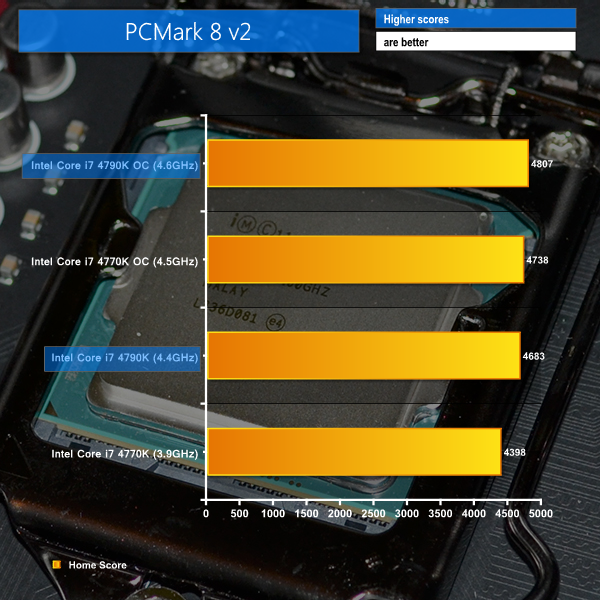
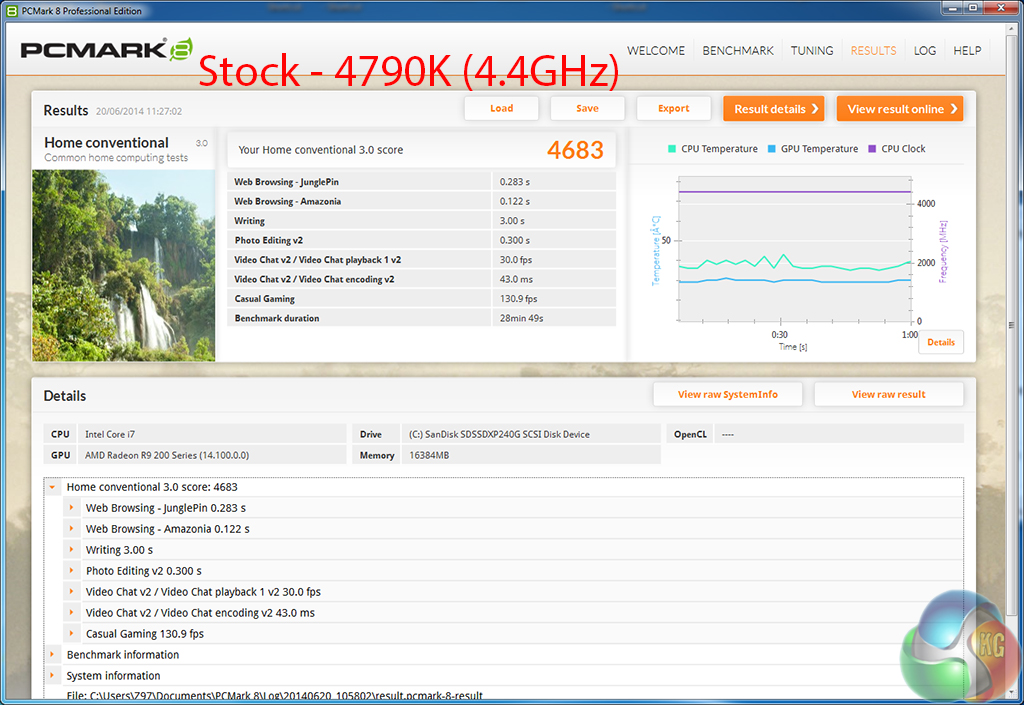
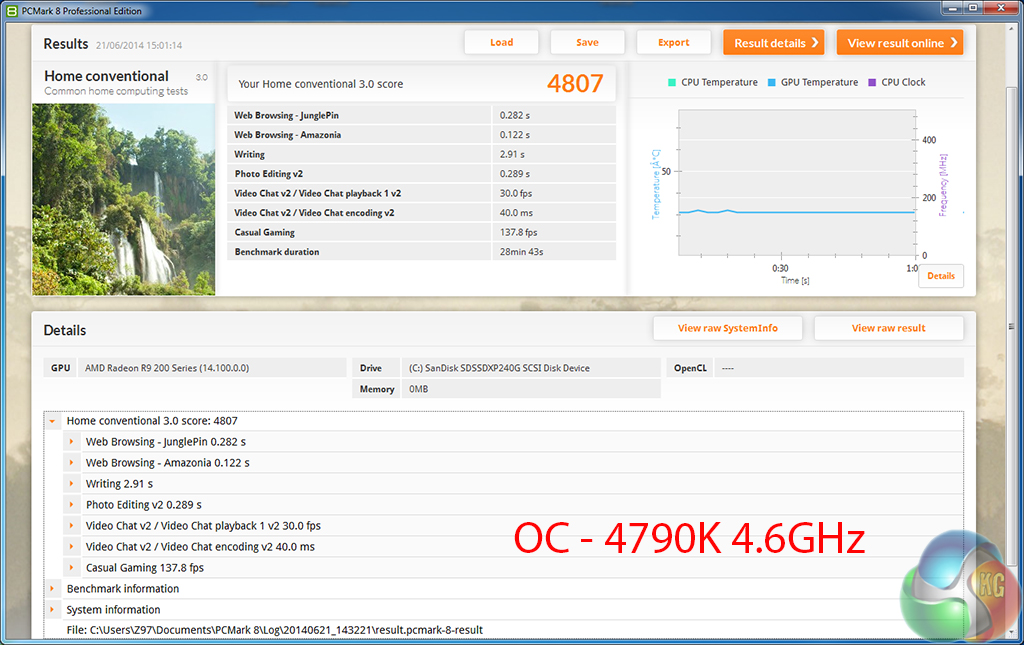
We used the ‘Home' test in PCMark 8 v2 to analyse the general-usage performance of each processor configuration.
WinRAR
WinRAR’s built in benchmark and hardware test can help us outline the performance differentials between each processor configuration. We record the amount of data processed after a 30-second run.
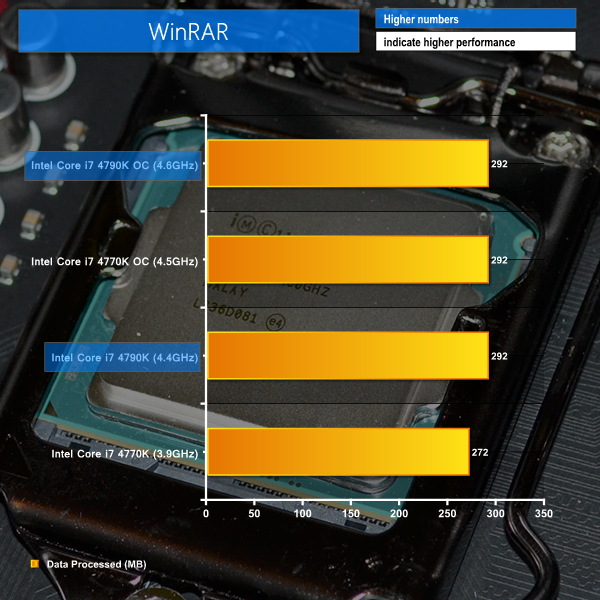
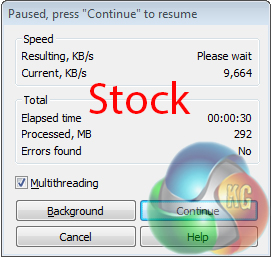
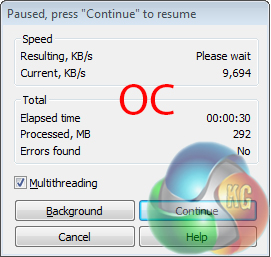
Futuremark's benchmarks show positive results with Devil's Canyon's increased CPU frequency. As expected, the 4.5GHz 4770K sits between the stock and overclocked 4790K in 3DMark and PCMark 8 performance.
WinRAR shows very little performance improvement unless a substantial clock boost is applied. Limitations in the WinRAR benchmarking procedure also make it difficult to observe minimalistic performance differentials.
Bioshock Infinite
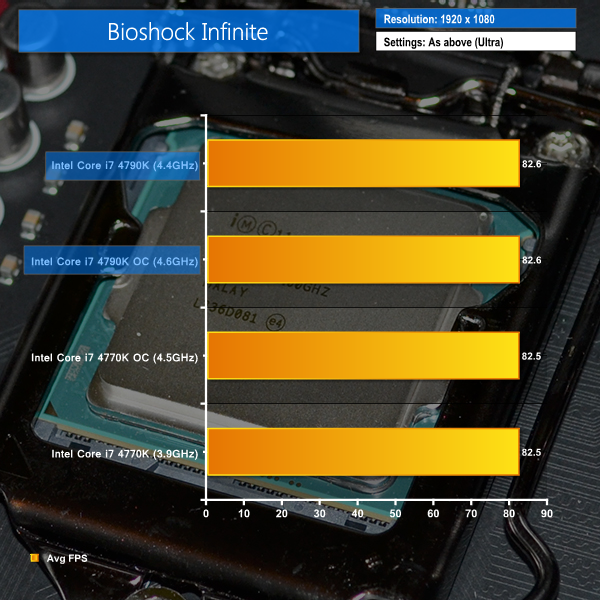
We used the Bioshock Infinite demanding ‘Ultra’ setting and a 1920 x 1080 resolution to push today’s gaming hardware. Our data was recorded using a section of the game, not the built-in benchmark.

Metro: Last Light
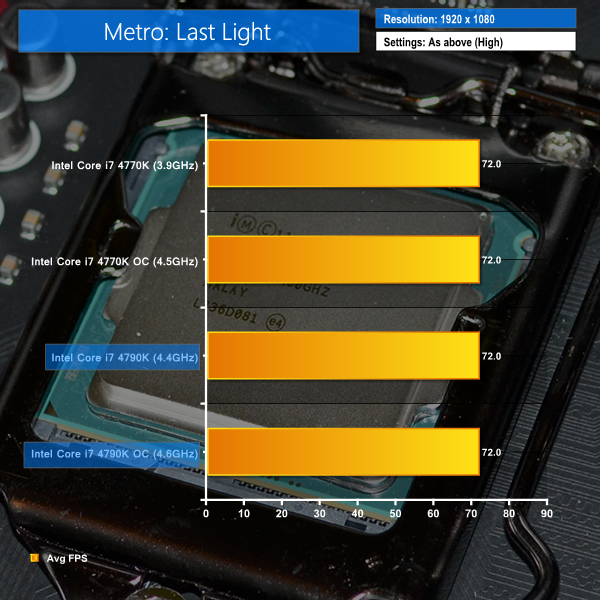
We used a 1920 x 1080 resolution and the Metro: Last Light built-in benchmark set to ‘High’ quality to offer an intense challenge for the gaming hardware while also making playable frame rates a possibility.

Tomb Raider
We used a 1920 x 1080 resolution and the Tomb Raider built-in benchmark set to ‘Ultimate’ quality.
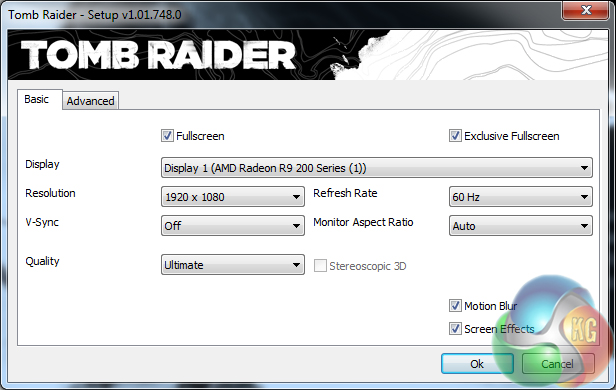
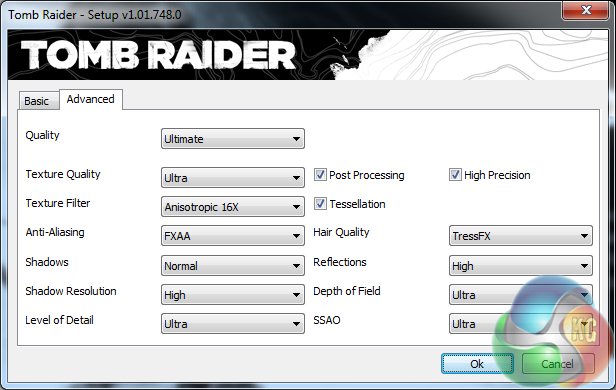
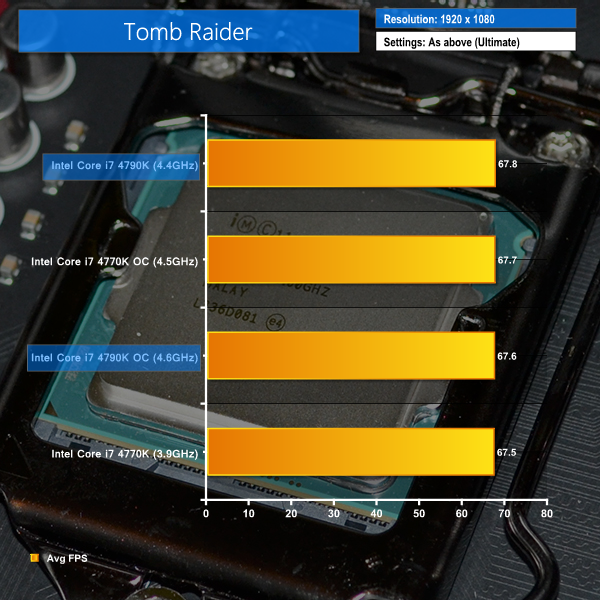
Gaming at 1920×1080 quickly becomes GPU-limited when high image quality settings are used. CPU performance becomes a case of diminishing returns.
As proven by the results in the charts shown above, minute improvements in frame rates are sometimes observed with increased CPU frequency. Tomb Raider results prove that even a higher clock speed can result in lower average frame rates in volatile gaming environments.
The results between all four processor configurations are close enough to declare an across-the-board tie.
We measured the idle temperatures and power consumption levels with the system resting at the Windows 7 desktop.
The temperature of the Devil's Canyon CPU and power consumption of our entire test system (at the wall) is measured while loading only the CPU using Prime95′s in-place large FFTs setting.
Temperature recordings were taken using Asus' AI Suite software. HW Monitor delivered contradictory readings that were sometimes as much as 10°C higher than the Asus software.
Temperatures
Temperature recordings were taken with the Corsair H100i CPU cooler's fans running at full speed. Ambient temperature was maintained at a toasty 24°C.
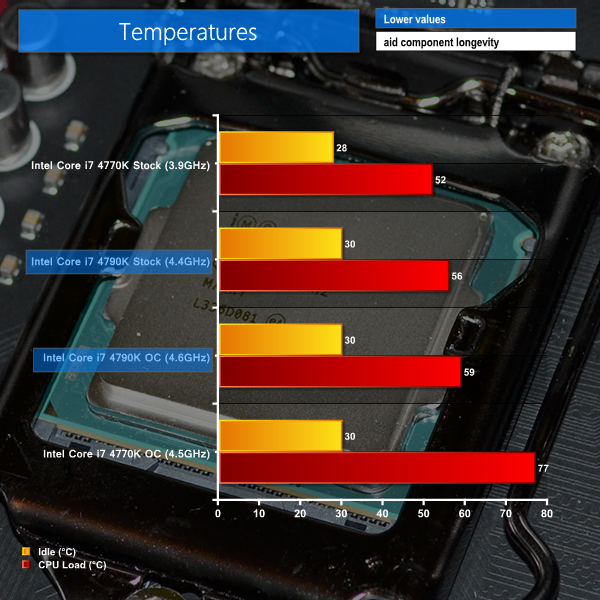
By virtue of its increased operating frequency, the 4790K uses a higher voltage level at its stock MCT speeds. The 4770K's lower voltage level helps boost it to a stock-clocked temperature win, despite the Devil's Canyon chip featuring supposedly improved thermal interface material.
Intel's NGPTIM does indeed seem to be doing a stellar job at taming the Devil's Canyon chip's heat output. Going from a load voltage of 1.248V at stock speeds to 1.280V when overclocked only results in a 5% increase in load temperature of the CPU.
A 77°C load temperature proves that Haswell is a fiery beast when the voltage levels are cranked up (we used 1.325V in the BIOS which hits 1.360V when loaded). Thankfully Devil's Canyon is able to pass its thermal energy over to a CPU cooler with vastly improved efficiency.
Power Consumption
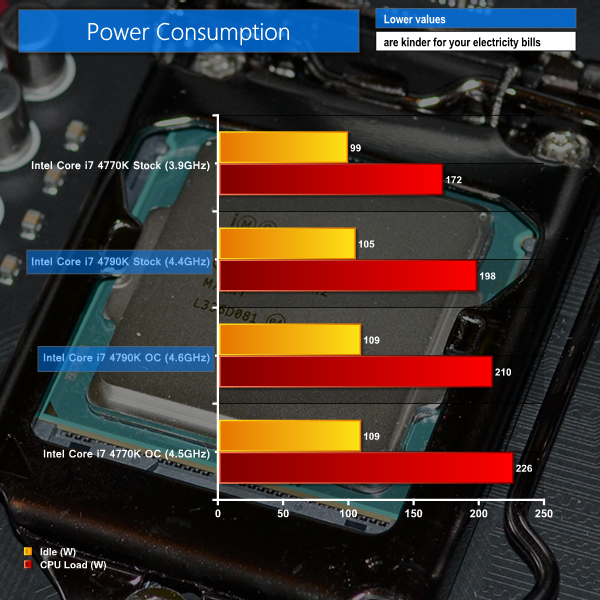
As is to be expected with its increased operating voltage, the stock-clocked Devil's Canyon also dictates greater power delivery when loaded. The improved overclocking capability of our 4790K, in comparison to the retail 4770K, helps to reduce voltage requirements and therefore power consumption levels when overclocked.
The eagle-eyed amongst you will notice that our idle power consumption numbers for the 4770K are different to those recorded in our motherboard reviews. This is a minor issue that we are looking into and does not affect the legitimacy of the recordings displayed above (the same test system was used for all power and temperature recordings).
Z87 Compatibility
A number of burning questions and scare-stories have arisen as rumours and information surrounding Devil's Canyon have grown. One of the biggest points of confusion was compatibility with Z87-based motherboards. Supposedly Devil's Canyon was only compatible with 9-series boards.
We pulled out an MSI Z87-G43 Gaming motherboard and updated to the latest BIOS to prove that Devil's Canyon processors are indeed compatible with the Z87 chipset, provided the motherboard vendor releases a relevant BIOS update.
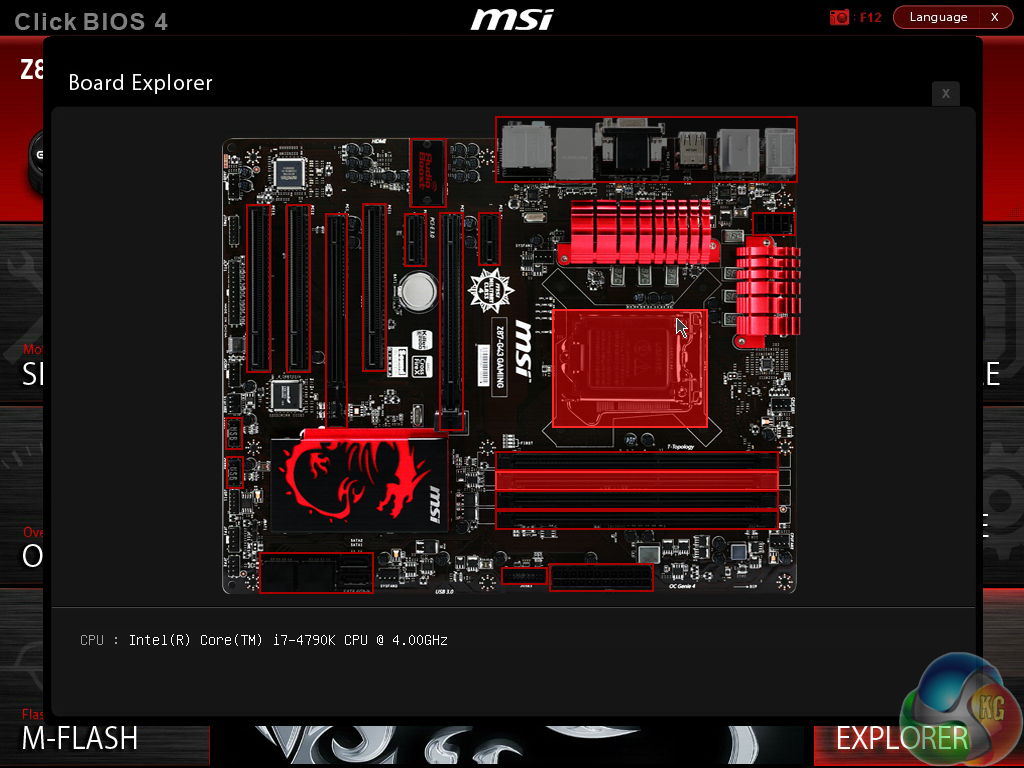
After updating to the latest BIOS we simply inserted the Devil's Canyon chip and booted the system. Devil's Canyon does indeed work with Z87.
Devil's Canyon vs Haswell: A direct comparison
To examine the benefit of the NGPTIM used by Intel, we set our Haswell 4770K and the 4790K to identical frequency and voltage settings and compared their temperature levels. Minor differences could be related to chip-to-chip variations, but substantial temperature differentials will be as a result of the improved TIM.
The configuration that we chose consisted of: 1.30V VCore (peaked at 1.328V under load), 1.275V Cache voltage, 1.90V Input voltage, and ‘auto‘ load-line calibration. XMP was enabled, as was PLL overvoltage, and the cache ratio was maintained at 44x for both chips.
We opted for a CPU frequency of 4.5GHz as we know that this is the highest our 4770K will clock to.
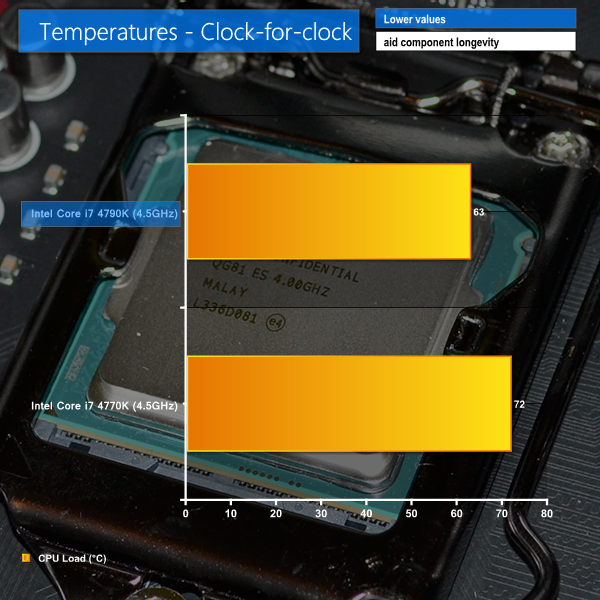
Intel's NGPTIM is able decrease temperatures by a considerable amount. Even taking chip-to-chip thermal variations out of the equation, it is clear that the new TIM is a big improvement over that used on Haswell.
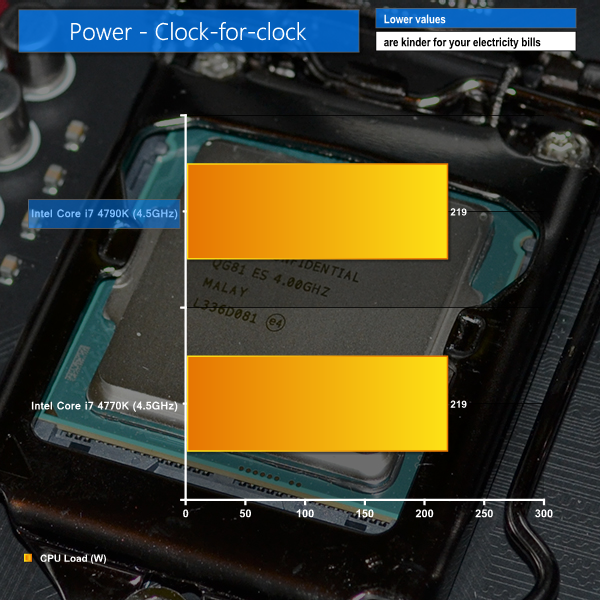
Irrelevant of the added power-smoothing capacitors used on Devil's Canyon, power consumption numbers remain identical to those shown by the underlying Haswell micro-architecture.
Devil's Canyon is a cooler Haswell
And just to prove that Devil's Canyon is indeed a Haswell chip with tweaked power delivery and a better thermal interface, we set both chips to 4.4GHz and compared benchmark results.
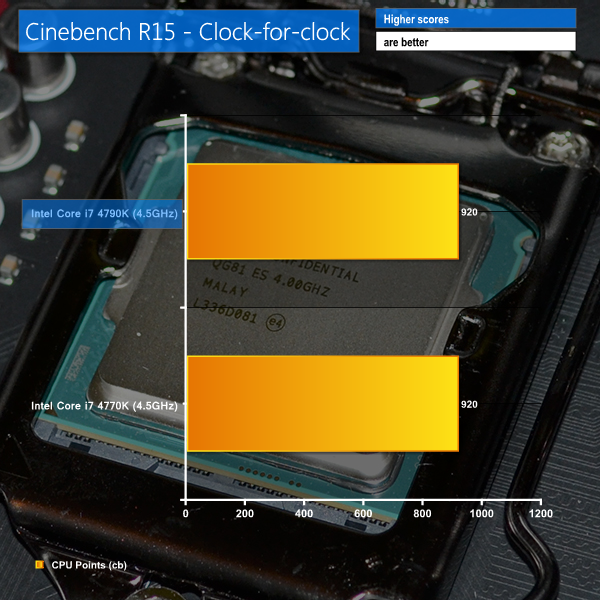
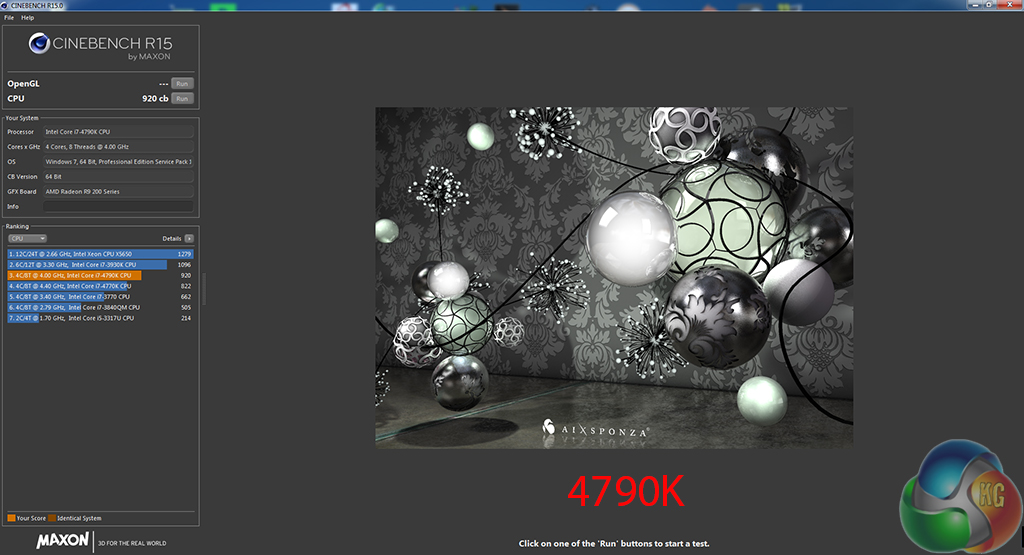
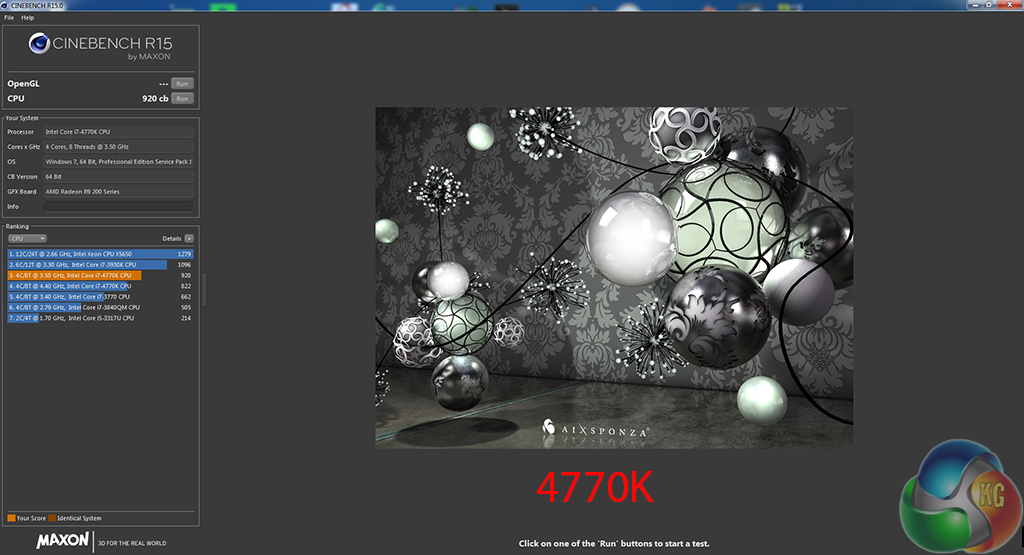
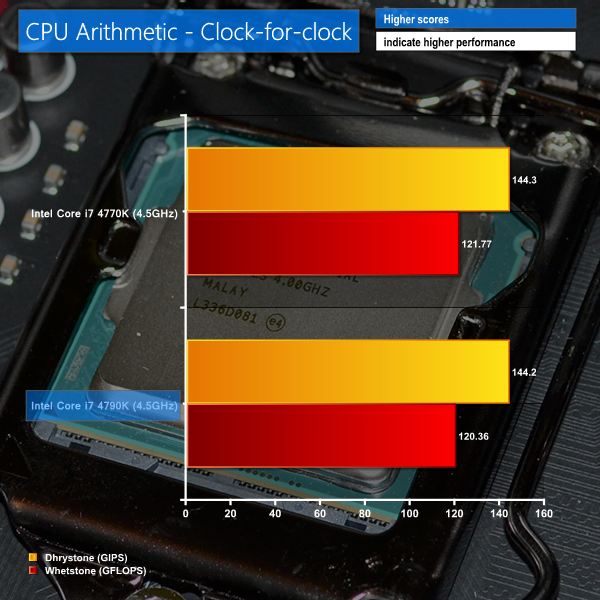


Devil's Canyon's additional power-delivery capacitors and NGPTIM may boost its overclocking potential, but the same Haswell micro-architecture exists under-the-hood, making DC almost identical to Haswell on a clock-for-clock basis.
So there we have it. The Devil's Canyon 4790K is indeed a cooler-running Haswell 4770K and with seemingly greater overclocking potential to boot.
Focusing more on overclocking, we cannot speak for the entire Devil's Canyon series from our sample size of a single chip. But if our engineering sample's overclocking performance is indicative of retail processors' capabilities, Devil's Canyon should be able to reach around 200-400 MHz higher than the average 4770K.
We can safely say that Intel's improvements are welcomed. The added power-delivery capacitors seem to be doing a good job in negating the requirement for high voltage levels that many Haswell chips would require for their peak frequencies. For example, our 4790K hit a rock-solid 4.6GHz at 1.25V, whereas the retail 4770K we use requires 1.325V for 4.5GHz.
The other major improvement comes from Intel's NGPTIM. Our clock-for-clock temperature recordings show that the enhanced thermal interface material is able to shave around 9°C (12.5%) off load temperatures in our arbitrary test scenario. That's a solid improvement and does make higher voltage levels tameable with consumer CPU coolers, but it's still not as big as the temperature drop we would expect when using solder.
There's not a lot to dislike about the 4790K, especially not when it retails for the same price as the 4770K it replaces. Its out-of-the-box performance is impressive thanks to a particularly high maximum operating frequency of 4.4GHz. Overclocking performance seems to be better than Haswell's. And temperature and overclocked voltage levels have shown a noticeable decrease.
Haswell's primary negative aspects have been addressed and in all honesty, with success.
If there's one gripe that many enthusiast users (myself included) will have, it's going to be overclocking potential. I must re-emphasise that it's difficult to make judgements based on the capabilities of a single chip (as well as some behind-the-scenes chatter), but Devil's Canyon does not seem to be the series of processors that takes us back to the overclocking heights that Sandy Bridge could reach with ease.
If you're still rocking a 5GHz 2600K, 4.8GHz 3770K, or 4.4GHz 4770K, all of which are fairly common overclocks, there's probably not much reason for you to ‘upgrade' to Devil's Canyon.
However, if you are about to start building your high-performance system and want the number-crunching boost that Hyper-threading can offer, the cool-running 4790K and Z97 platform are almost a no-brainer, especially when the Devil's Canyon processor retails for £269.99.
Discuss on our Facebook page, over HERE.
Pros:
- Excellent out-of-the-box performance.
- Overclocking potential seems greater than Haswell's.
- Lower operating temperatures than Haswell.
- Retails for the same price as Haswell.
- Strong and efficient clock-for-clock performance from the underlying Haswell micro-architecture.
Cons:
- Still does not seem to offer overclocking frequency potential competitive with Sandy Bridge (or Ivy Bridge, to a lesser extent).
- Potential for relatively quick voltage-induced degradation (more results will make the issue clearer).
KitGuru says: With lower operating temperatures, better overclocking potential, and excellent out-of-the-box performance, Devil's Canyon is the much-needed improvement to Haswell. Just don't bank on overclocking frequencies competitive with Sandy Bridge.

Same sh*t than 4770K. This processor was launched just for idiots that wants to stick to the top products. I’ll stick to my 4770K and won’t spend any more penny with new cpu for a long long time. Anything beyond a 4770K is to spent money in vain.
There are a couple of minor differences not mentioned in the article between the 4770K and the 4790K that while not relevant to gamers would be of note to users who do more esoteric things with their systems.
VT-d and TSX-NI are included, not sure about TSX-NI but VT-d is important to myself as I run multiple guested OS’s on top of my Linux system and having a faster base line processor that can access dedicated hardware is quite a bonus over its nearest equivalent 4770; it also runs a faster inbuilt GPU (not a gamer so the ability to run 3 dedicated screens direct from the MB is useful) as to how much the aforementioned actually improves things in the real world over numbers on the page is a debate as old as the PC industry and a multitude of incremental updates.
You missed out an option that a lot of people new to overclocking might make use of, im talking about the now pretty much universal motherboard one press self overclock. I’d like to see what overclock the onboard tools like Asus 4 way optimisation etc give.
Think you lucked out with that sample, I’ve read a few reviews and spoke to a few people who are really struggling to justify the necessity for the refresh although temperature never seems to be an issue.
Its finally time to upgrade my i7-920 system from the end of 2008. I’m thinking of getting this and just leaving it at stock. It doesn’t seem like there’s much upside left on he table anyway, and the introduction leaves me feeling there may be long term longevity benefits to just leaving it at spec.
disappointing overall, I was hoping these would all hit 5ghz with minimal effort and good cooling. maybe next time…
Not one I will be upgrading too. Good article, well written. 4770k for me has been disappointing as well. mine only hits 4.4ghz no matter what I do with it. I think Kitguru actually got a good sample of the 4790k, a lot of them online are not overclocking past 4.5ghz.
good overclocking info. I managed to get my 4790k to 4.6ghz as well, interesting stuff on the degradation. wont be pushing mine any higher,.
My 2500k has been overclocked to 4.5 GHz with corsair h60 cooler, the only reason I scaled it down to 4.3 was that I couldn’t deal with the noise of the fans working faster.
Just wondering as per my earlier post if anyone at Kitguru fancies trying Asus 4 way optimization (you do have a advertising banner on the main page). I’d love to see how much the one press technology has advanced and how it works with the Devils Canyon processors. I know its asking a bit much but it would be nice to see it tried out with a few mobo manufacturers.
Hi Lelisevis,
Thanks for the feedback.
We analyse the motherboard’s automated overclocking performance as standard for our motherboard reviews. Our motherboard test system is set to be updated with the 4790K from here onwards.
We will have full reviews of the Asus Maximus VII Hero and Ranger boards soon, therefore the automated overclocking will be analysed in their reviews.
Luke
Thanks Luke, i’ll keep my eyes peeled for the reviews, I must be getting old but i’d be quite happy with the one press overclock if it yields decent results, my days of increasing 1mhz at a time till 3am in the morning are behind me. Its a cup of cocoa and bed for me these days.
This is pretty disappointing. Seems there’s something wrong internally. I’ve heard people say it’s because it’s on 22nm, but that doesn’t explain why Haswell (and Devil’s Canyon) seem to be even worse than Ivy Bridge 22nm for overclocking.
I guess moving forward it makes sense that CPUs will start to have more cores and perhaps lower clock speeds to keep power consumption down. Maybe AMD had the right idea but poor execution… we need 8-core CPUs @ 3GHz or something.
I’ve a 2600K@5Ghz with off-the-shelf watercooling. It runs hot on full load, often 90+ in summer and it’s been like that for close to three years and will run Prime95 all day long. I’m looking for an excuse to upgrade but it’s looking like the 2600K will be good for another year. It seems incredible that a three year old CPU can still hold it’s own with Intels latest.
this is way faster and better then any 4770k. POS 4770k can suck a dizznik
You have to remember, that the new line of CPU’s 4xxx series, were not intended to be a frequency-deamon. BTW Ghz has nothing to do with speed. I have 4Ghz chips that have passmark-scores around 1,000, and others with lower Ghz that perform with passmark scores over 12,000. What changed is the GPU-component and the instruction-sets. They stripped out all the old MMX, SSE, etc… and used the faster and updated instruction sets.
Translation, everything you do is now faster. Mostly the memory-read/write to RAM and to the hard-drives and instructions to the PCIe-busses. Having the cooler-running and more top-adaptive threading control and independent core-frequency, is where we see “powered value”. They produce the same powerful operations, with less power, with less internal damage, and with greater potential longevity as programs start using this stuff. (Pulling away from the old dead instructions.)
This is the cusp of the technology edge. The plateau before the next generation has funding and a market. This is the result of why the 3xxx series was made, for consumers. These are the fine-tuned, adaptive and solidified versions of the past generation. Sure, you don’t want to buy one if you just got one last year… These were not made for you. These were made for those of us who waited for what your funding contributed towards. Thanks for funding our future. Now we are funding the next generation, which, undoubtedly, you will buy and we will not.
These are more snappy, more responsive, and more advanced than the prior series of 3xxx, and well worth every penny spent on them.
I hear this. I never bought into degredation, Atleast at such low voltages. It is a case by case basis largely however. My 4770k had little to none. That said it topped out at 4.7. My 4790k I had 100 runs of x264 at 1.42/4.9ghz which turned into 1.45 v which then turned Into 1.52v wouldn’t stabilize it. This is all in the course of about a month. Insane. My 4770k on the other hand ran 4675 at 1.43v which turned into 1.46v which was stable for about a year until I sold it.
I think it is a combo of particular chip, voltage, and frequency.
It’s worth noting that the same chip I couldn’t get prime stable at 1.42/4.9 is the same chip that I could game on at 5.0 when 1.45v wouldn’t get 4.9 stress test stable.
A lot of guys think they’re stable, but for me.. It seemed encoding was a tipping point and I didn’t care if I could use my PC reliably for everything I do but I risked a hard lock during encoding .
The solution was 4.8 and now I’m stable at 1.37 (which is irritating since even 1.52 wouldn’t stabilize 4.9 after the first few weeks)
I wouldnt run any Intel chip at 1.4 let alone 1.52. get what ever yuo can get at 1.35 MAX and call it a day.