 KitGuru KitGuru.net – Tech News | Hardware News | Hardware Reviews | IOS | Mobile | Gaming | Graphics Cards


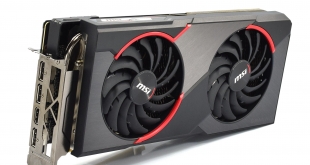
Today we are back with another RX 5600 XT review as we assess the MSI Gaming X model. Despite this card receiving a new BIOS update to improve GPU clock speeds, unlike the other two 5600 XT cards we have tested, the Gaming X's memory still runs at 12Gbps instead of 14Gbps. How much of a difference does this make when gaming, and is the card still worth buying?
Regular readers may recall news emerging about the MSI RX 5600 XT Gaming X, when MSI revealed in a livestream that not all 5600 XTs can run the memory at 14Gbps. I've since had further discussions with MSI about this, and they explained to me that based on their own internal testing, they cannot guarantee that all 5600 XT Gaming X cards would be stable with 14Gbps memory. Therefore, with the card's BIOS update, only GPU clock speed has increased.
That said, there is a chance that users who buy a Gaming X will be able to run 14Gbps no problem. As we will see later on in this review, I encountered no issues manually overclocking from 12Gbps to beyond 14Gbps. It seems to be somewhat of a ‘silicon lottery' as to which Gaming X's can or can't hit the higher memory clock, but considering MSI can't validate 14Gbps for all its cards, it makes sense that memory speed has been left alone.
To ensure that MSI does have a card that can run at 14Gbps, the company will be shortly releasing a RX 5600 XT Gaming Z model, which guarantees that faster memory speed out of the box. According to my conversations with MSI, this will be exactly the same cooler and PCB as the Gaming X, only it will be validated for 14Gbps memory. Again, this brings us back to the point that some Gaming X cards out there will handle the higher speeds, and some of those will now be designated as a Gaming Z.
The downside for the Gaming X is that its specifications don't match that of other RX 5600 XT cards, like the Sapphire Pulse or Gigabyte Gaming OC. Accordingly, we expect the card will run slower than those models in our tests, but by how much? Let's find out.
| RX 5600 XT | RX 5700 | RX 5700 XT | RX Vega 56 | RX Vega 64 | ||
| Architecture | Navi | Navi | Navi | Vega 10 | Vega 10 | |
| Manufacturing Process | 7nm | 7nm | 7nm | 14nm | 14nm | |
| Transistor Count | 10.3 billion | 10.3 billion | 10.3 billion | 12.5 billion | 12.5 billion | |
| Die Size | 251mm² | 251mm² | 251mm² | 486mm² | 495mm² | |
| Compute Units | 36 | 36 | 40 | 56 | 64 | |
| Stream Processors | 2304 | 2304 | 2560 | 3584 | 4096 | |
| Base GPU Clock | n/a | Up to 1465MHz | Up to 1605MHz | 1156 MHz | 1274 MHz | |
| Game GPU Clock | 1375MHz | Up to 1625MHz | Up to 1755MHz | n/a | n/a | |
| Boost GPU Clock | Up to 1560MHz | Up to 1725MHz | Up to 1905MHz | 1471 MHz | 1546 MHz | |
| Peak Engine Clock | n/a | n/a | n/a | 1590 MHz | 1630 MHz | |
| Peak SP Performance | Up to 7.19 TFLOPS | Up to 7.95 TFLOPS | Up to 9.75 TFLOPS | Up to 10.5 TFLOPS | Up to 12.7 TFLOPS | |
| Peak Half Precision Performance | Up to 14.4 TFLOPS | Up to 15.9 TFLOPS | Up to 19.5 TFLOPS | Up to 21.0 TFLOPS | Up to 25.3 TFLOPS | |
| Peak Texture Fill-Rate | Up to 224.6 GT/s | Up to 248.4 GT/s | Up to 304.8 GT/s | Up to 330.0 GT/s | Up to 395.8 GT/s | |
| ROPs | 64 | 64 | 64 | 64 | 64 | |
| Peak Pixel Fill-Rate | Up to 99.8 GP/s | Up to 110.4 GP/s | Up to 121.9 GP/s | Up to 94.0 GP/s | Up to 98.9 GP/s | |
| Memory | 6GB GDDR6 | 8GB GDDR6 | 8GB GDDR6 | 8GB HBM | 8GB HBM | |
| Memory Bandwidth | 288 GB/s | 448 GB/s | 448 GB/s | 410 GB/s | 483.8 GB/s | |
| Memory Interface | 192-bit | 256-bit | 256-bit | 2048-bit | 2048-bit | |
| Board Power | 150W | 185W | 225W | 210W | 295W | |
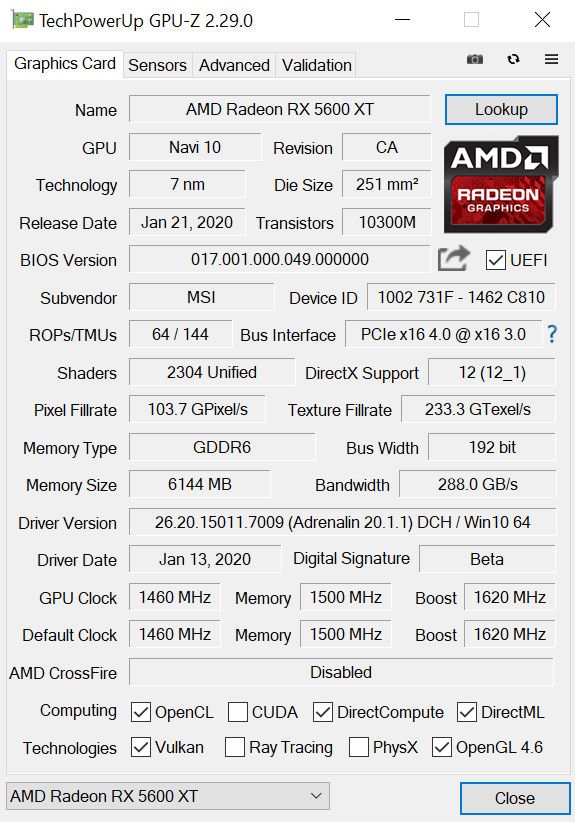
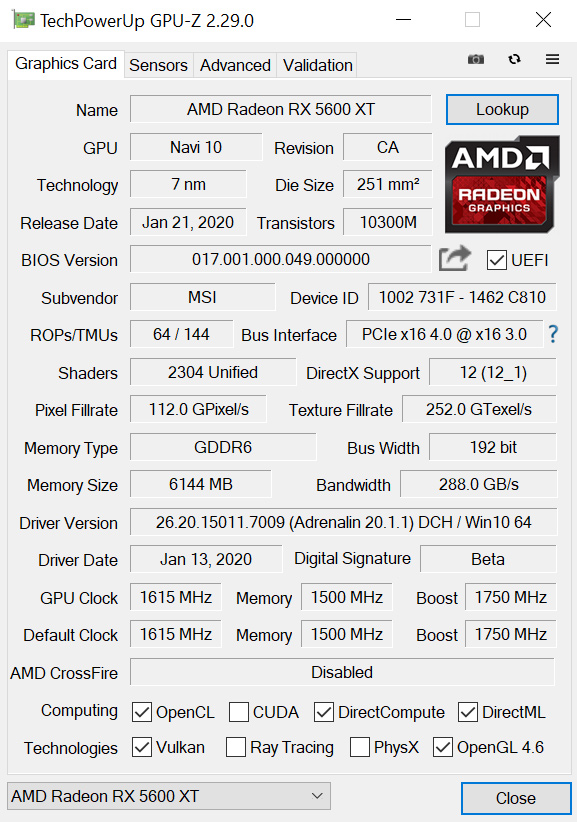
Original BIOS spec, left, compared with updated BIOS spec, right.
Just to confirm the changes made by the Gaming X's BIOS update (available within MSI's Dragon Center utility), memory speed remains unchanged at 1500MHz (12Gbps.) GPU speed, however, has increased from 1620MHz boost to 1750MHz boost, with the game clock now sitting at 1615Mhz which is up from 1460MHz.
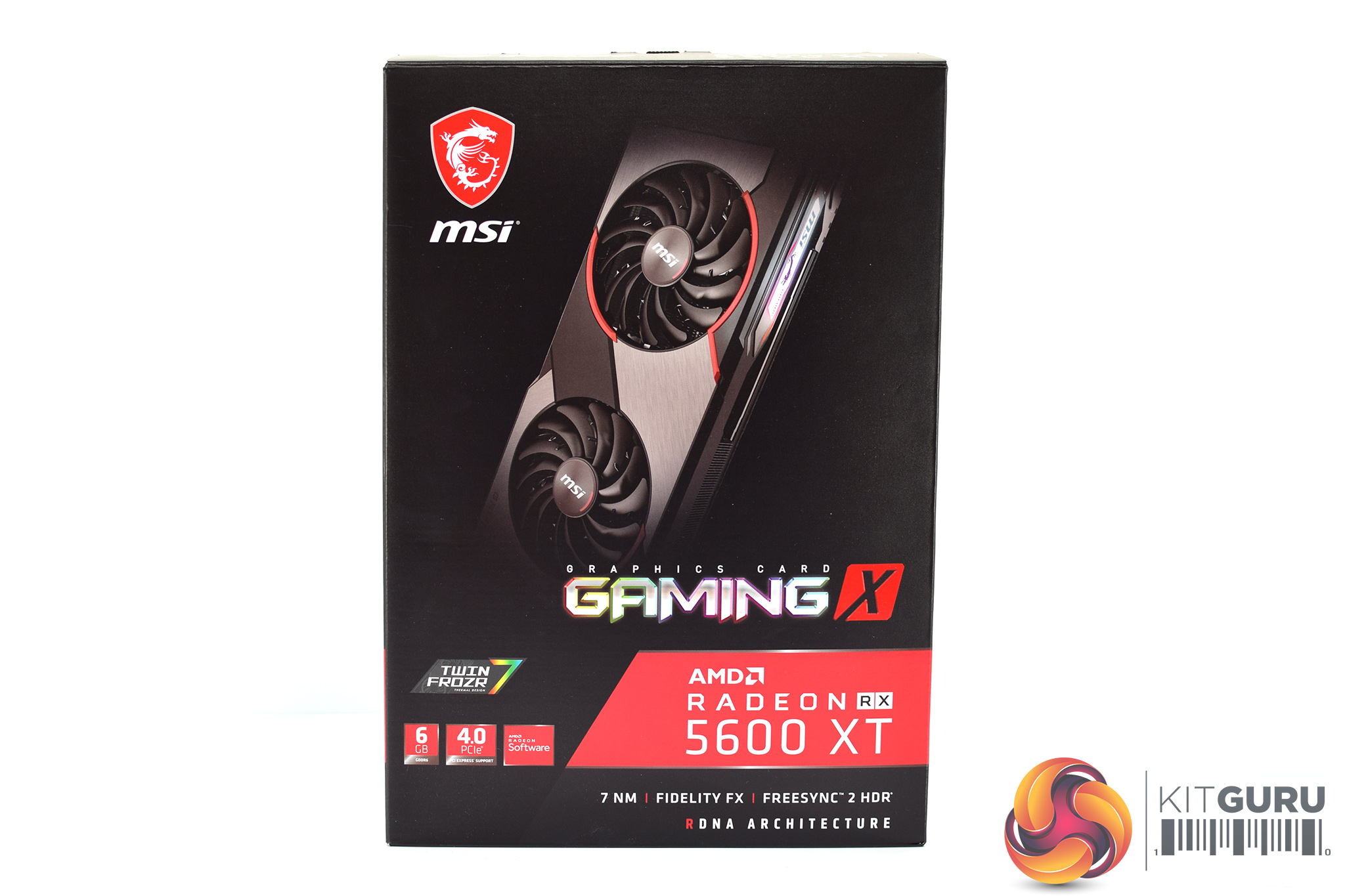
The MSI RX 5600 XT Gaming X ships in a black box, with MSI and AMD branding – alongside an image of the graphics card – visible on the front.
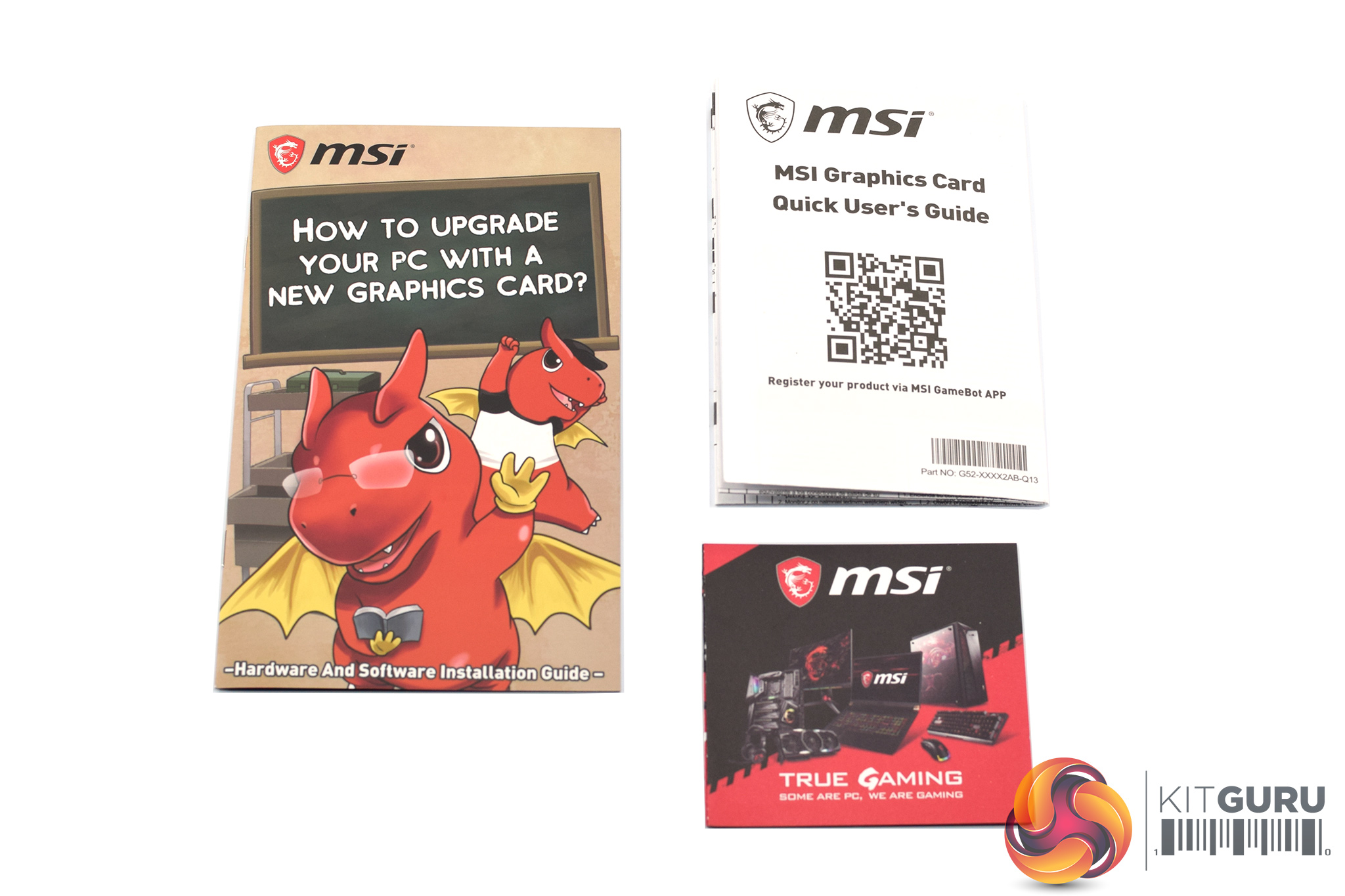
Inside, we get three small pieces of documentation – a quick start guide, ‘how to upgrade your PC' cartoon, and an overview of other MSI products.

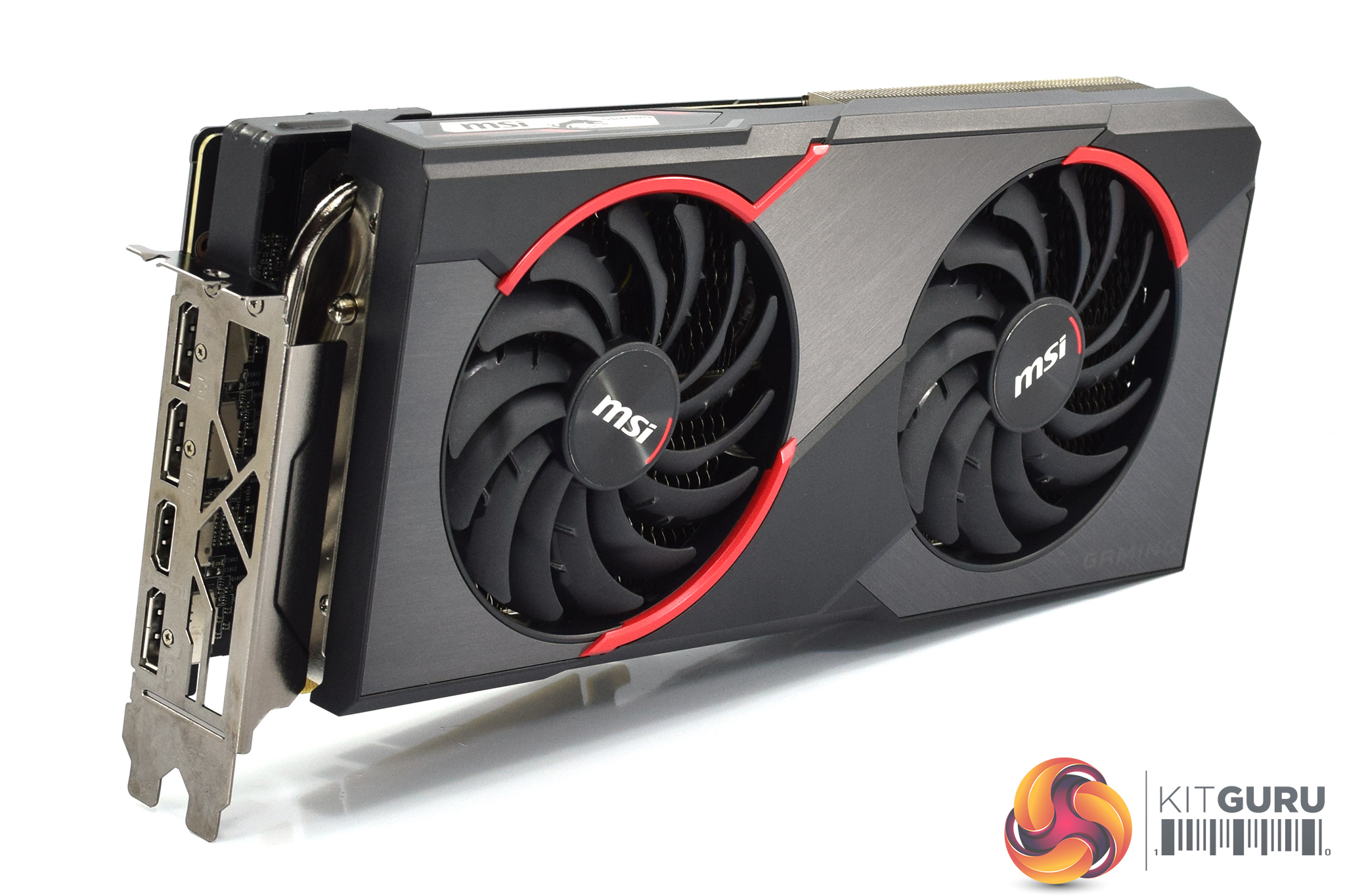
As for the Gaming X itself, I have to say this is one of the best looking graphics cards I have seen in the last few years. It uses a two-tone shroud, with some black plastic sections, but also three brushed metal sections which provide a lovely contrast to the plastic. Additionally, the red accents around the fans definitely remind you this is a Gaming X card – the series has always had some red in the design, even if that is slowly being undone as the cards become more colour-neutral.
The cooler also uses two of MSI's Torx 3.0 fans, with each measuring 100mm. These fans use what MSI calls the ‘dispersion fan blade', and as MSI describes them, they have ‘a special curved blade which accelerates the airflow, increasing its effectiveness.'
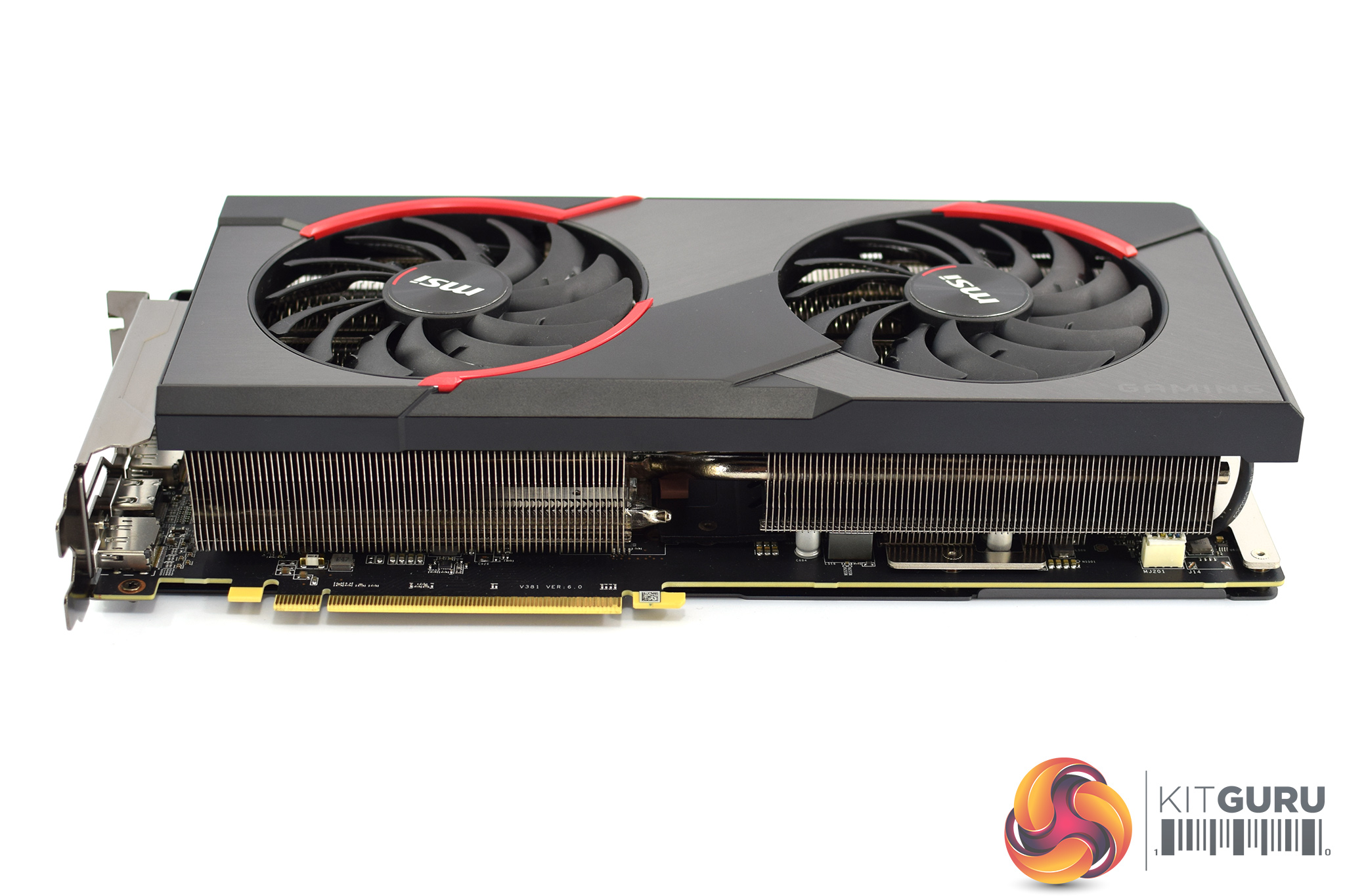
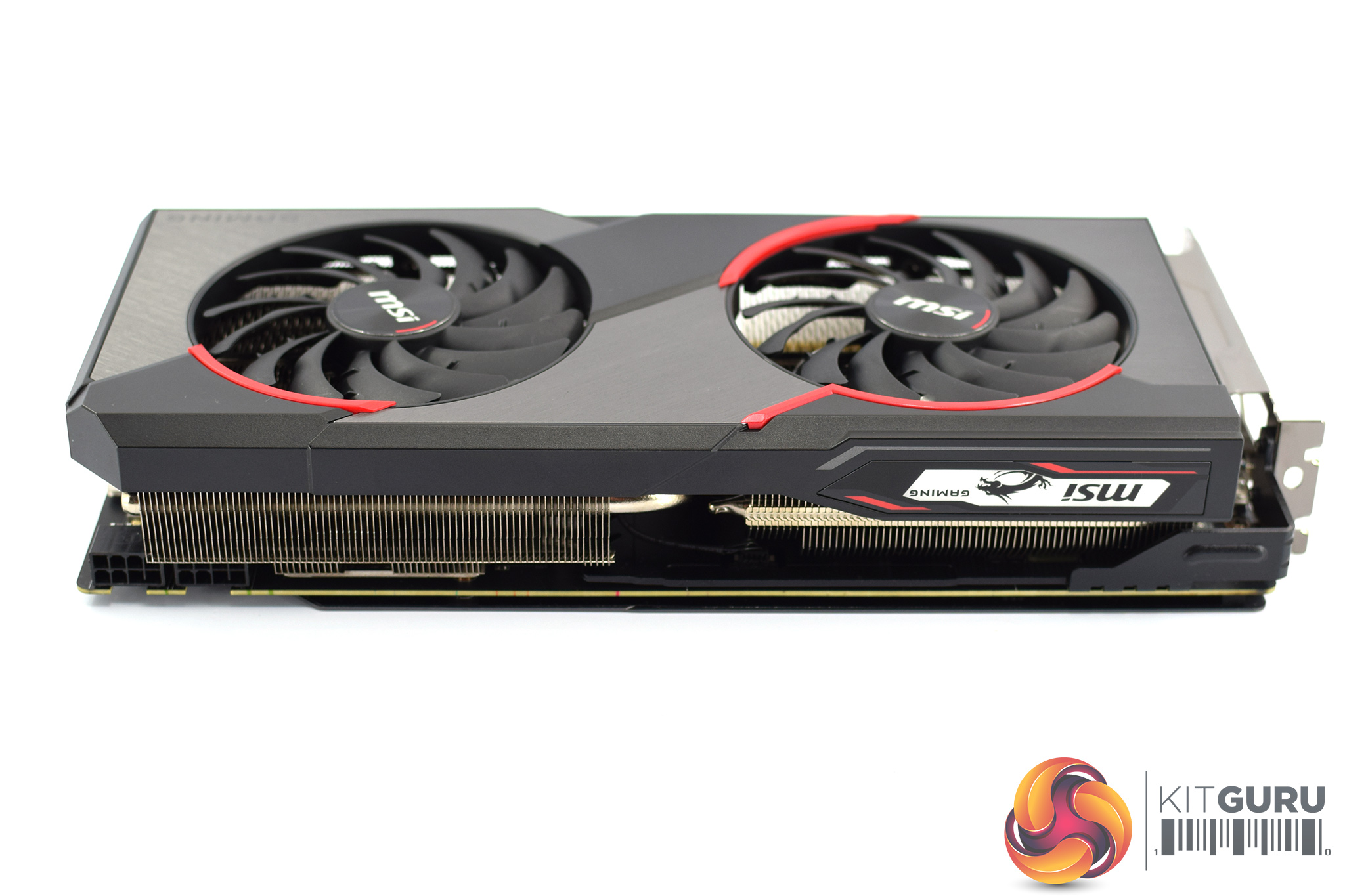
As for the cards' size, it's certainly not small, measuring 297 x 140 x 58 mm. At almost 30cm long, and occupying three slots in your case, it is worth taking extra care to ensure this will fit in your chassis.
Elsewhere, on the front side of the card we can get a look at a small MSI dragon logo. This is the only RGB zone on the card.
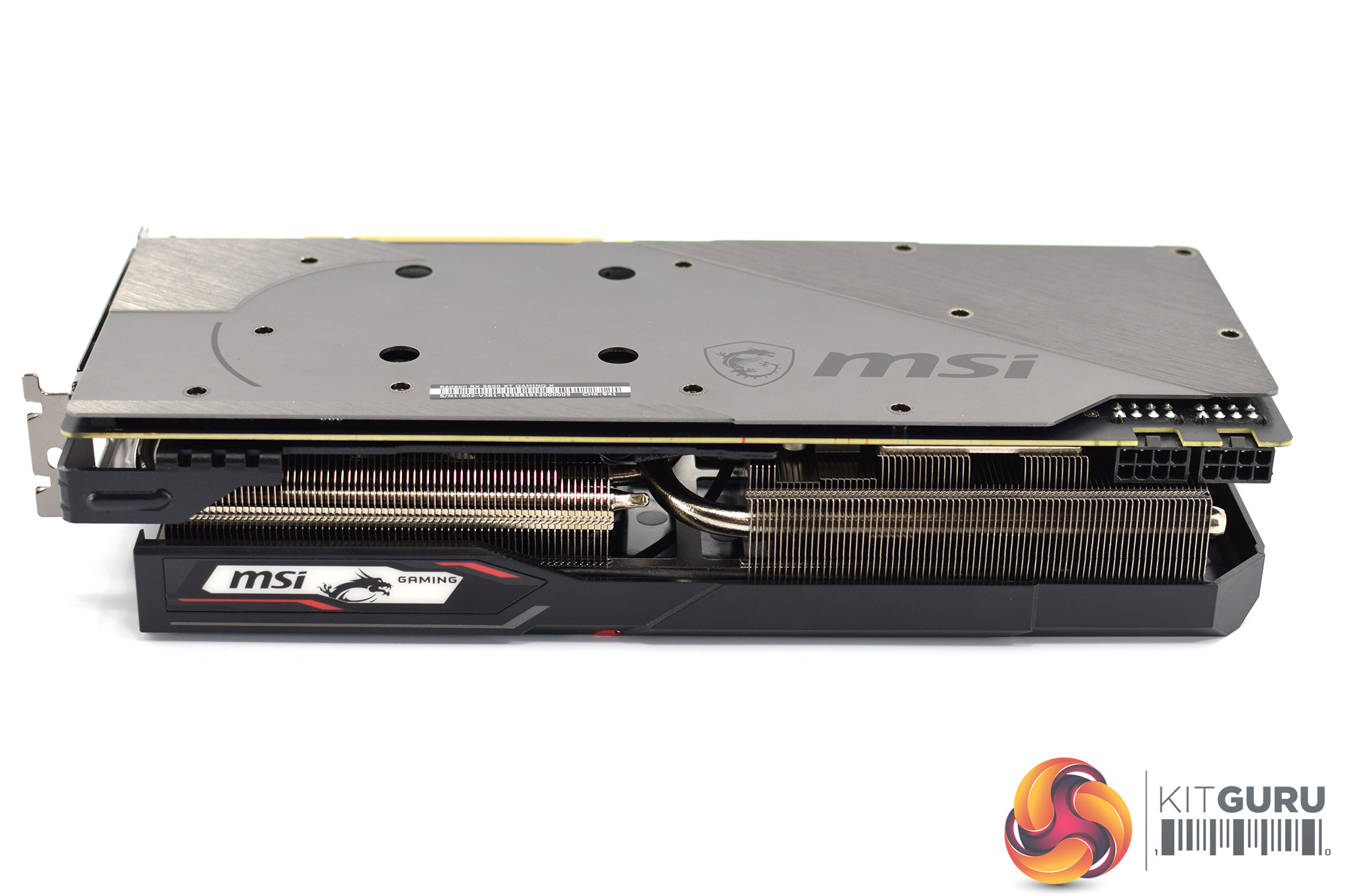
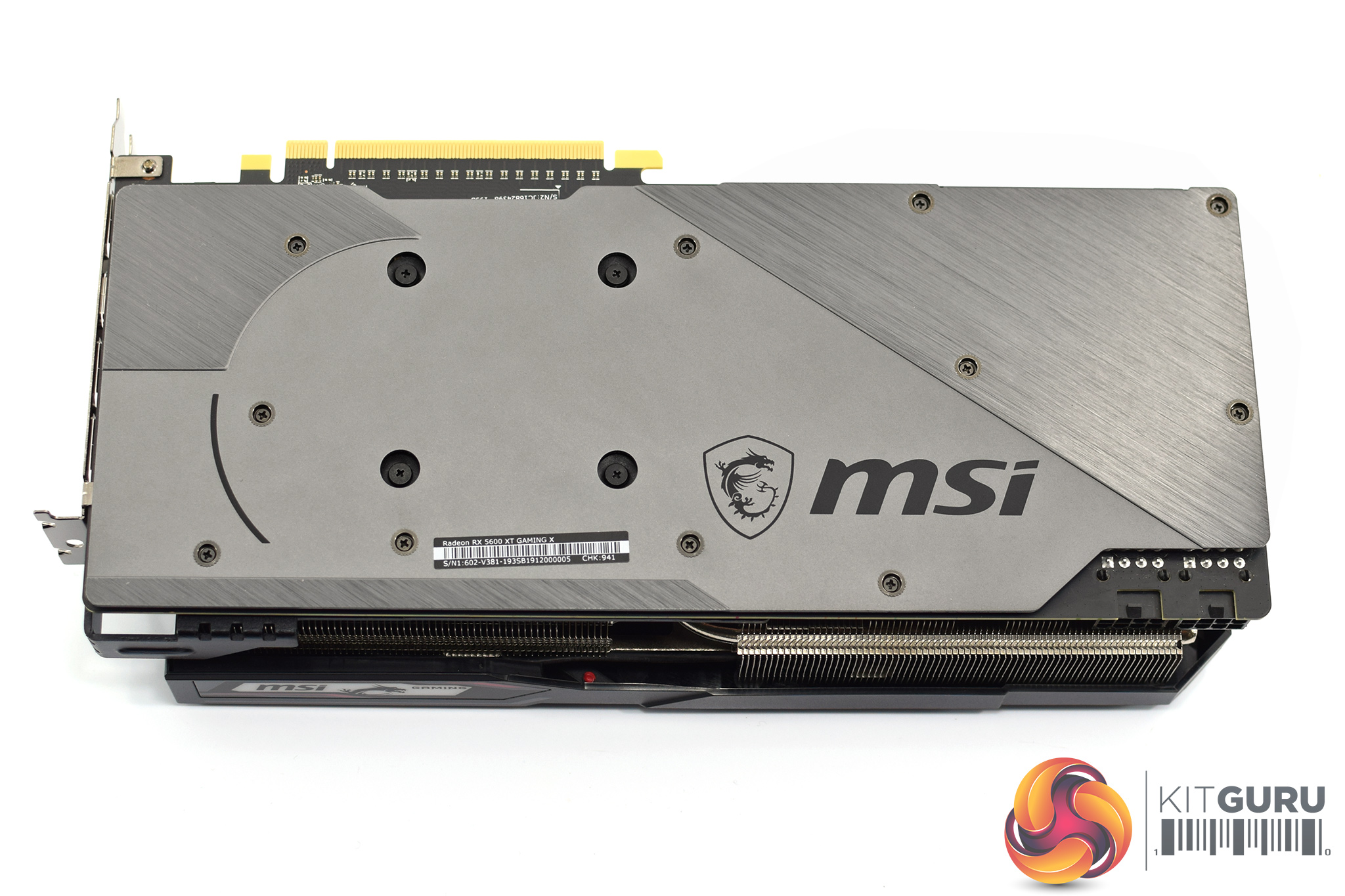
As for the backplate, this is a full-length design and it is made from aluminium, so it looks and feels premium. You can also notice that some parts of the backplate are brushed metal and others are left plain, which again gives it a tasteful contrast and adds interest. From a purely aesthetic standpoint, I really do rate this card highly.
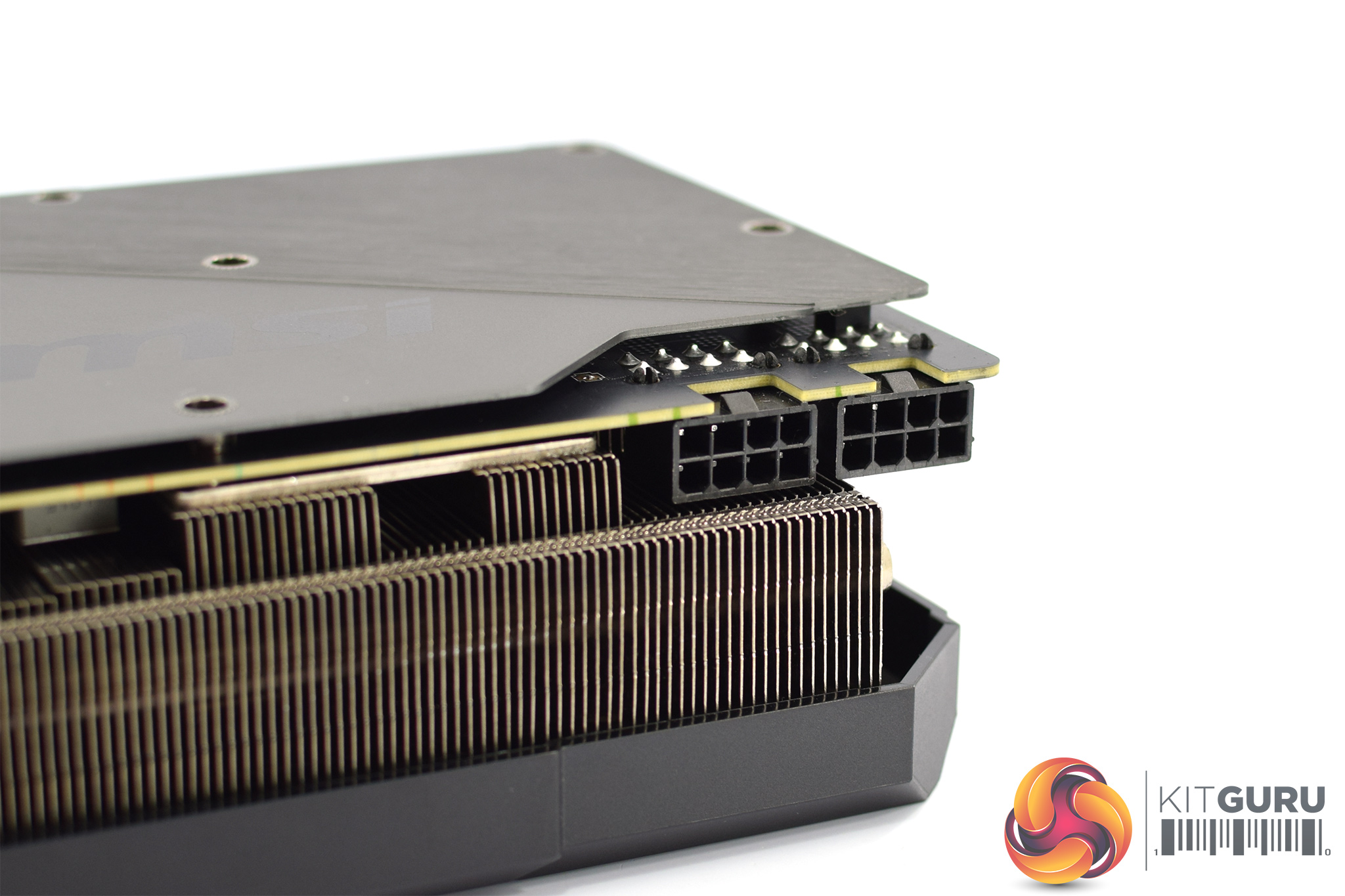
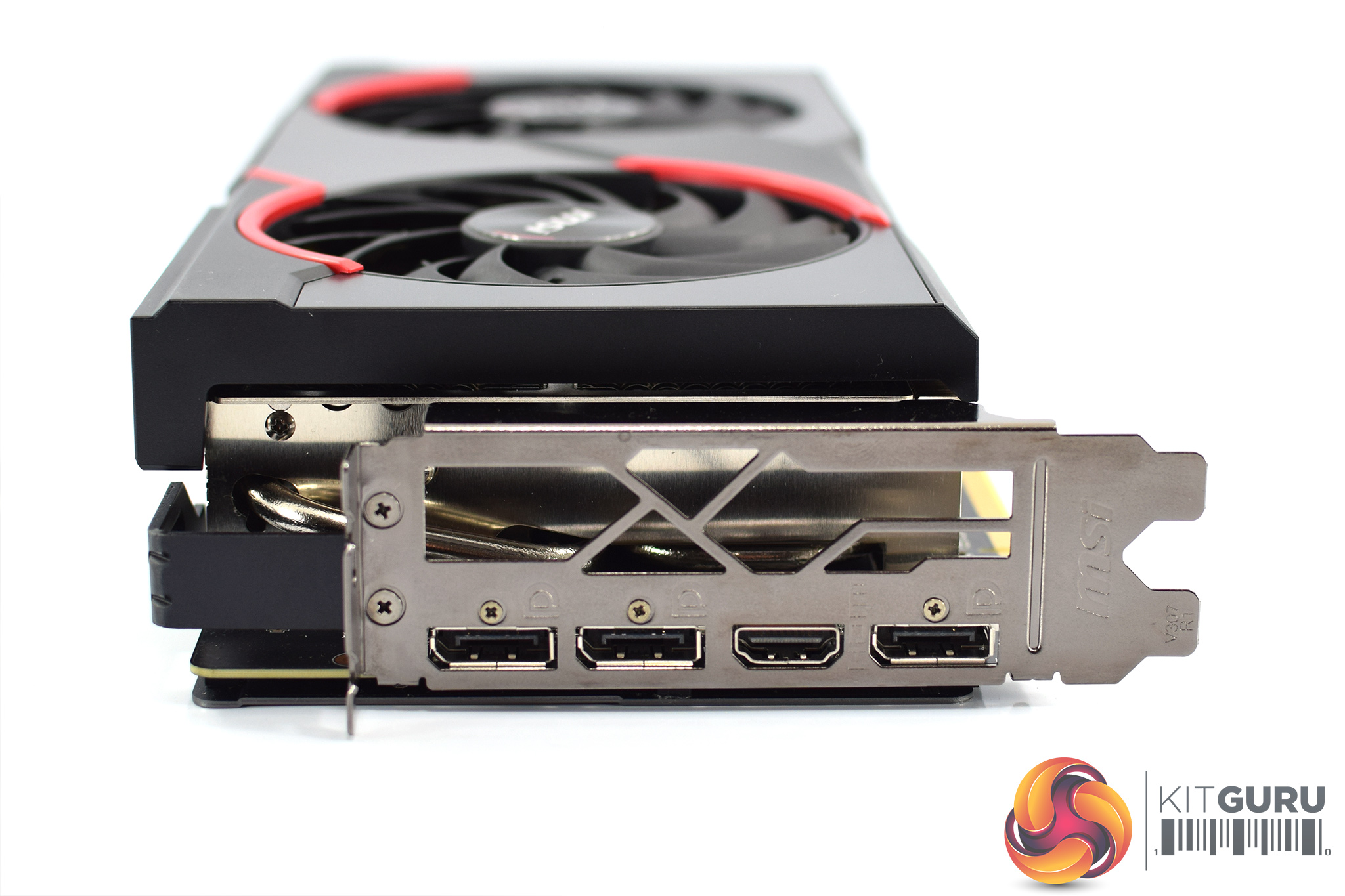
For power requirements, likely as MSI is re-using the PCB from its RX 5700 XT cards, this model needs 2x 8-pin connectors. We can also see the 3x DisplayPort and 1x HDMI video outputs.
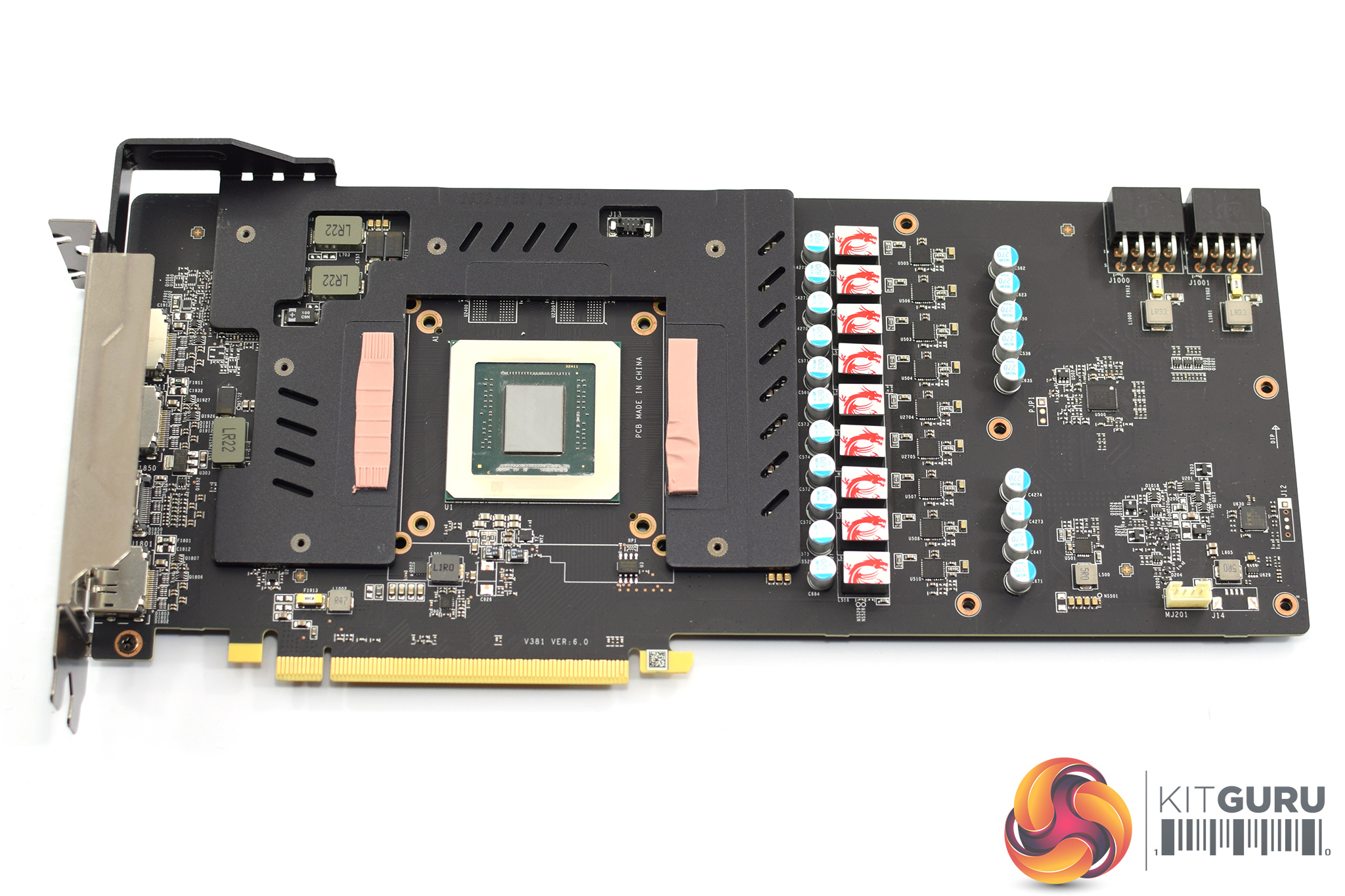
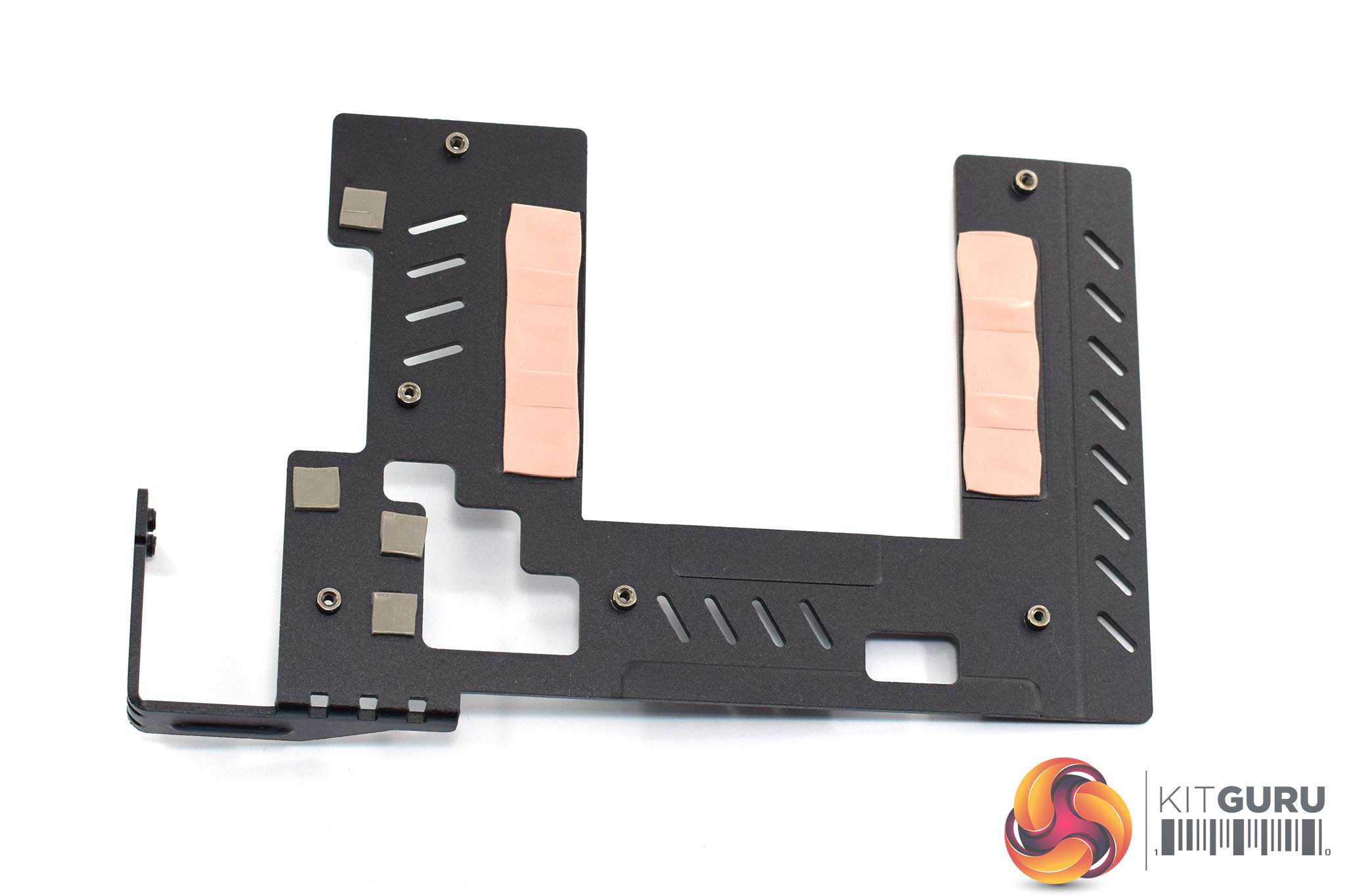
Opening up the card to get a look at the PCB, we can see that about half of the board is covered with an aluminium plate. This sits over the VRAM and some power circuitry to act as a mini heatsinks for those components.
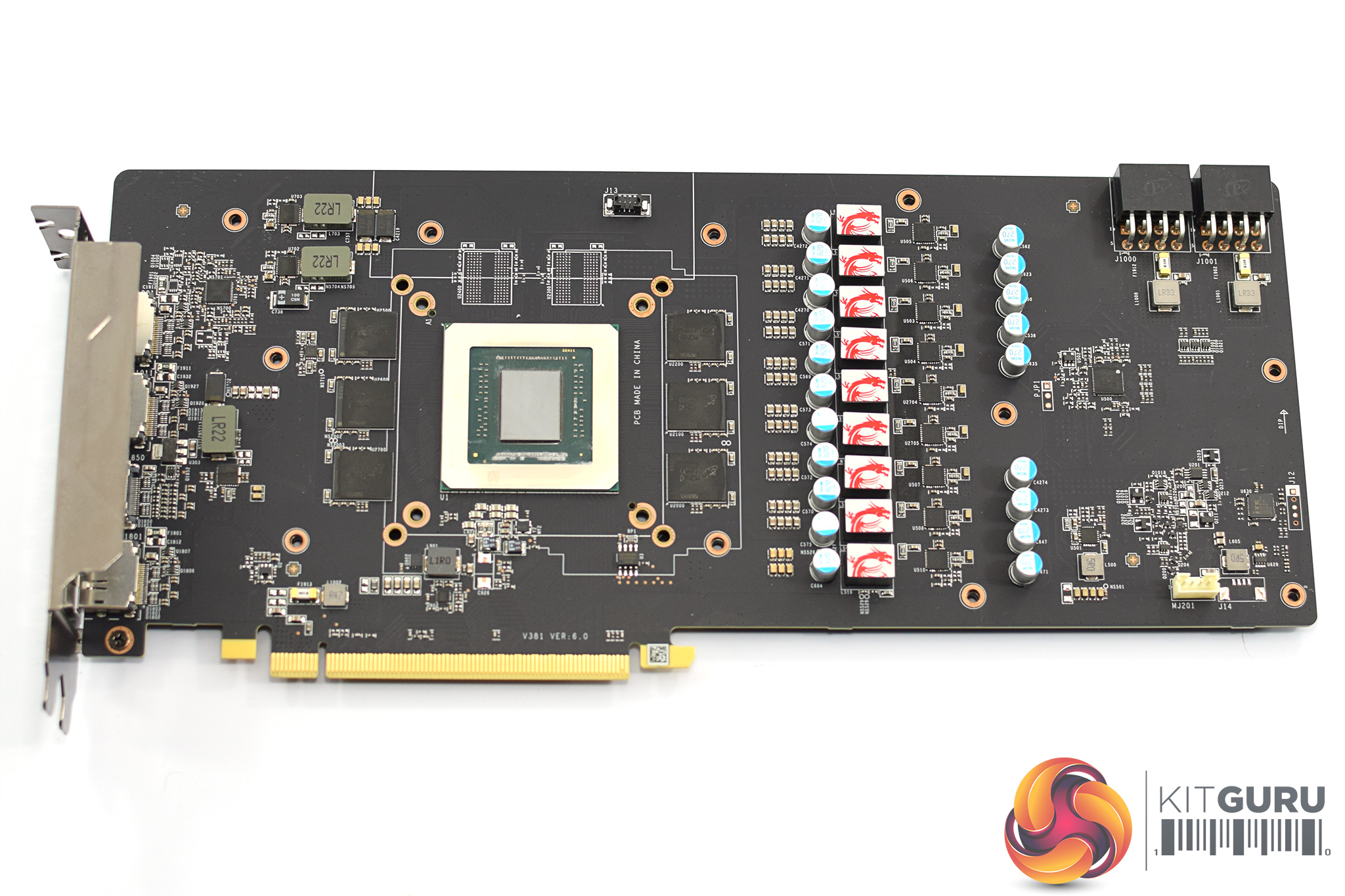
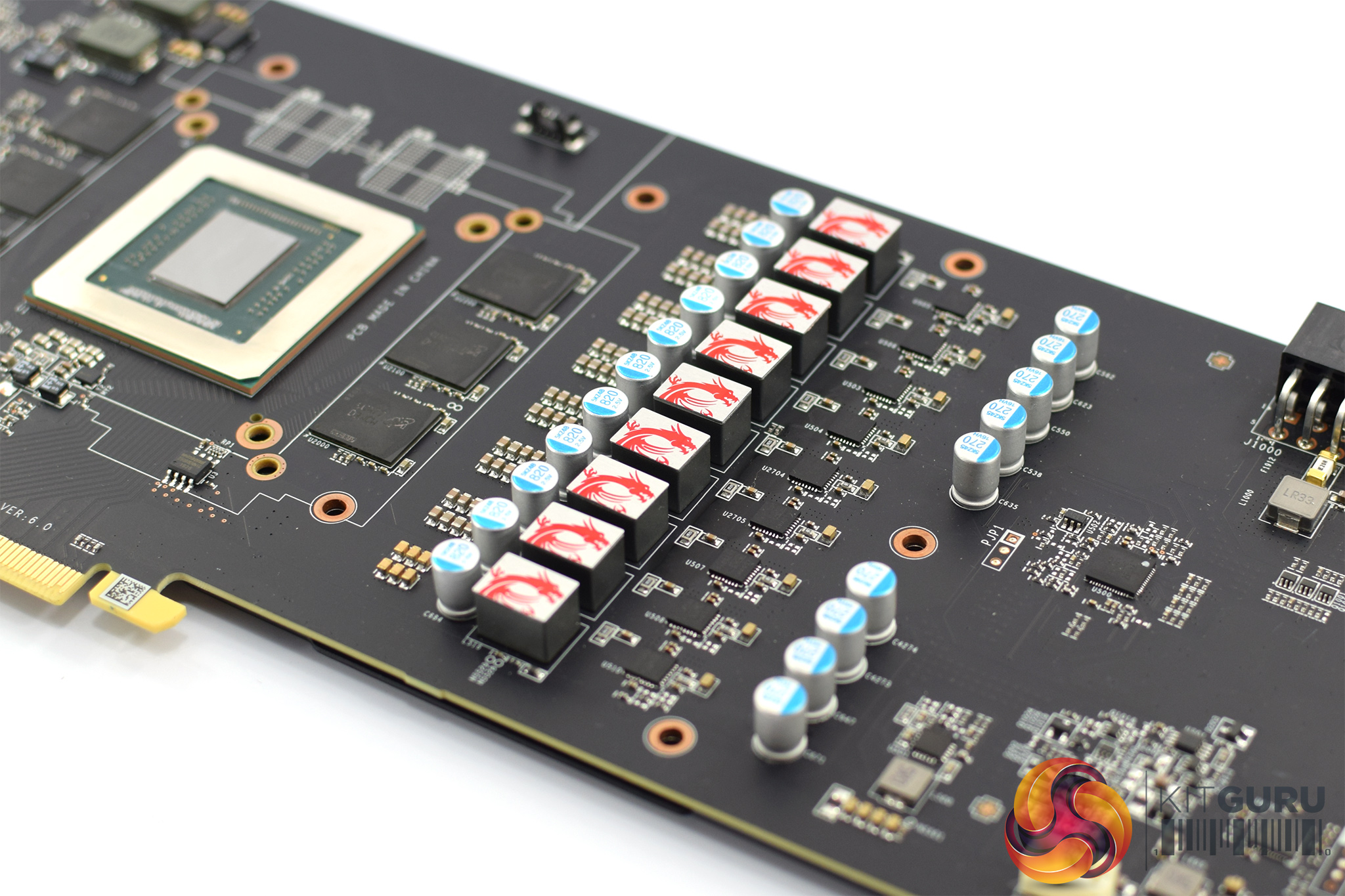
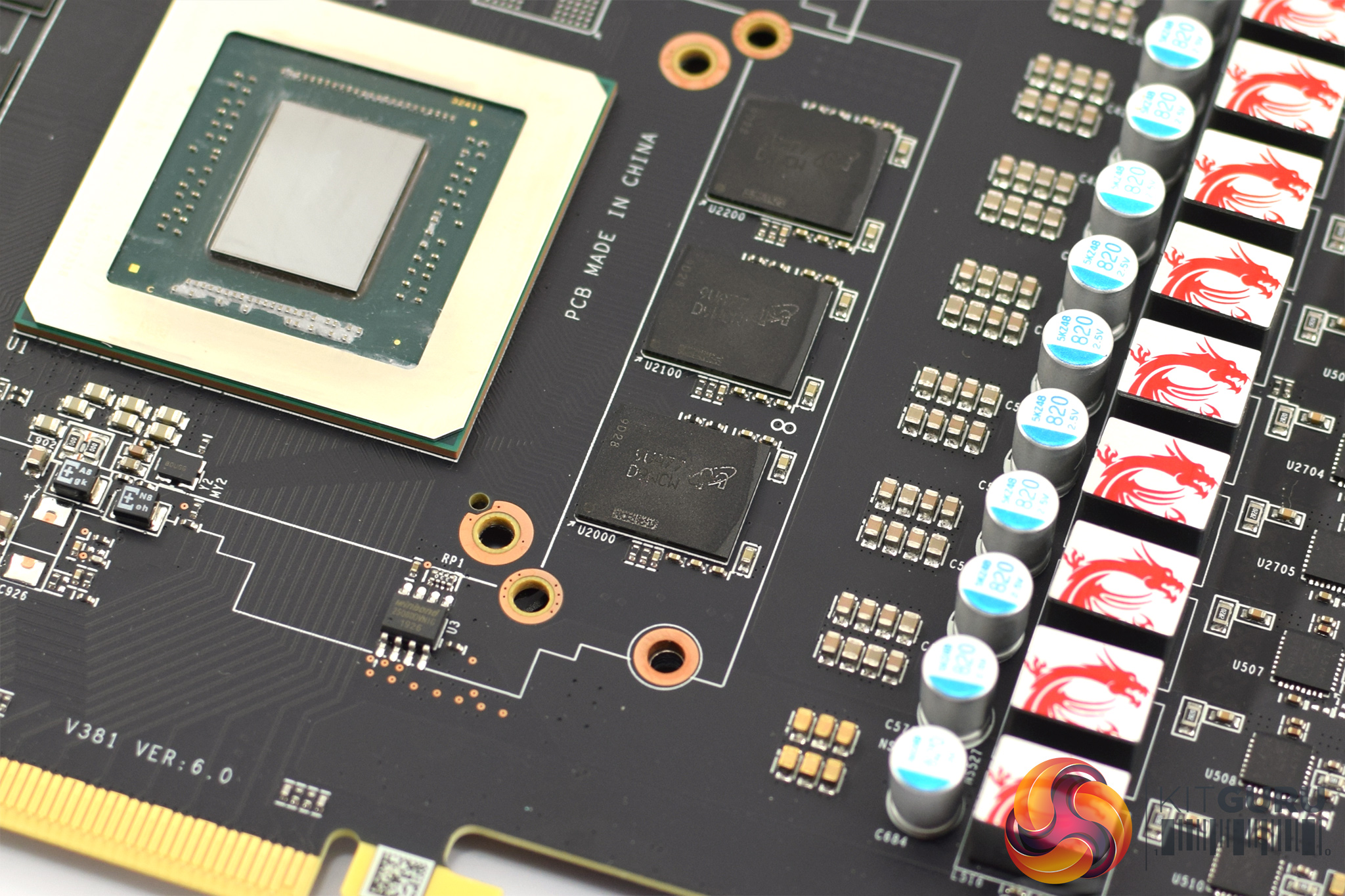
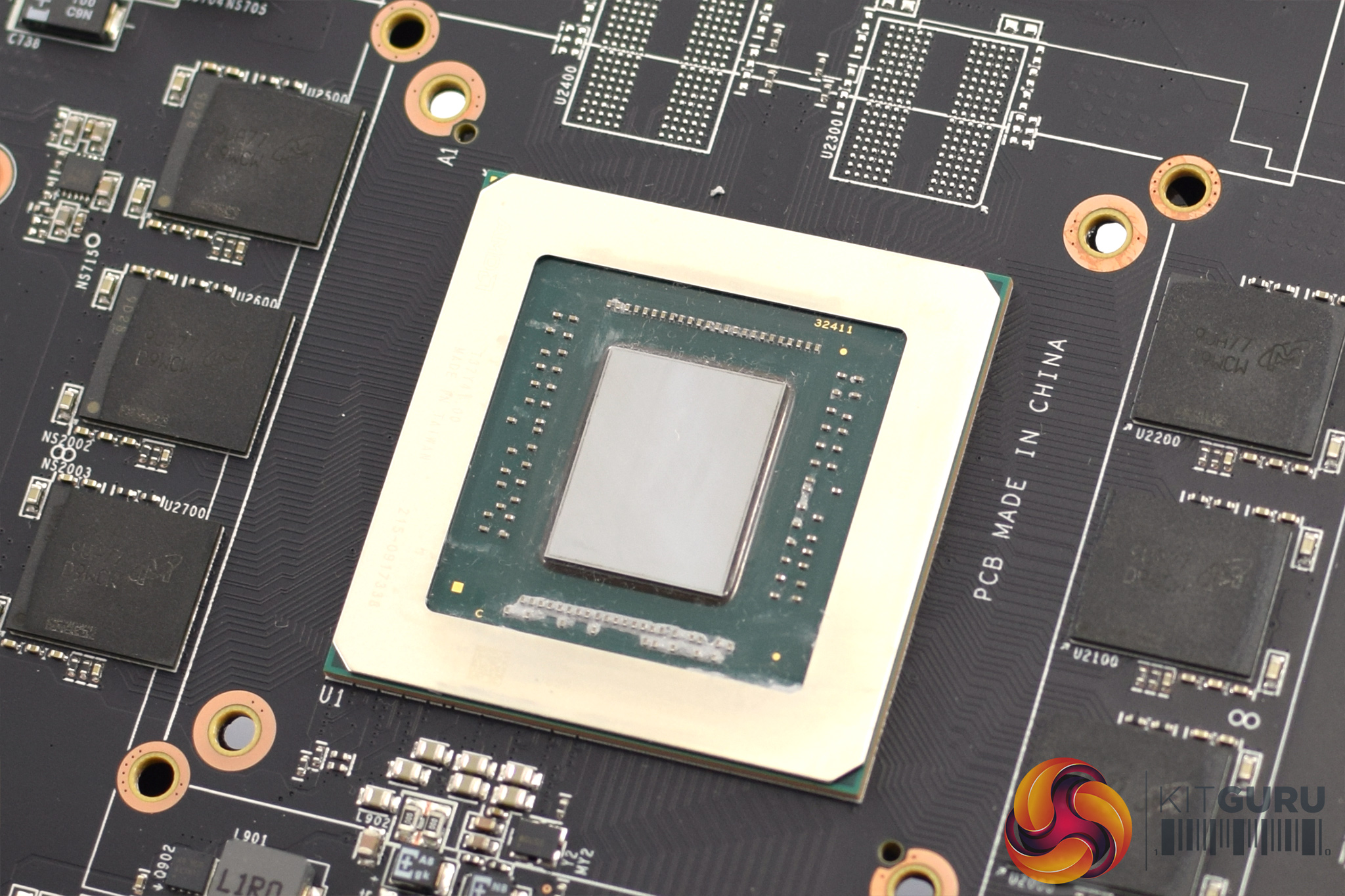
Removing that plate gives us a proper look at the board itself. As far as I can tell it is the same PCB as the Gaming X 5700 XT, with a beefy 9-phase VRM for the GPU and a 2-phase VRM for the memory.
We can also get a look at the memory modules which are from Micron. Despite being labelled ‘D9WCW', which is 14Gbps memory as per Micron's specifications, it seems the 5600 XT memory controller can struggle to keep the modules at that speed. Thus explaining why MSI has only validated the Gaming X memory for 12Gbps as discussed on the first page.
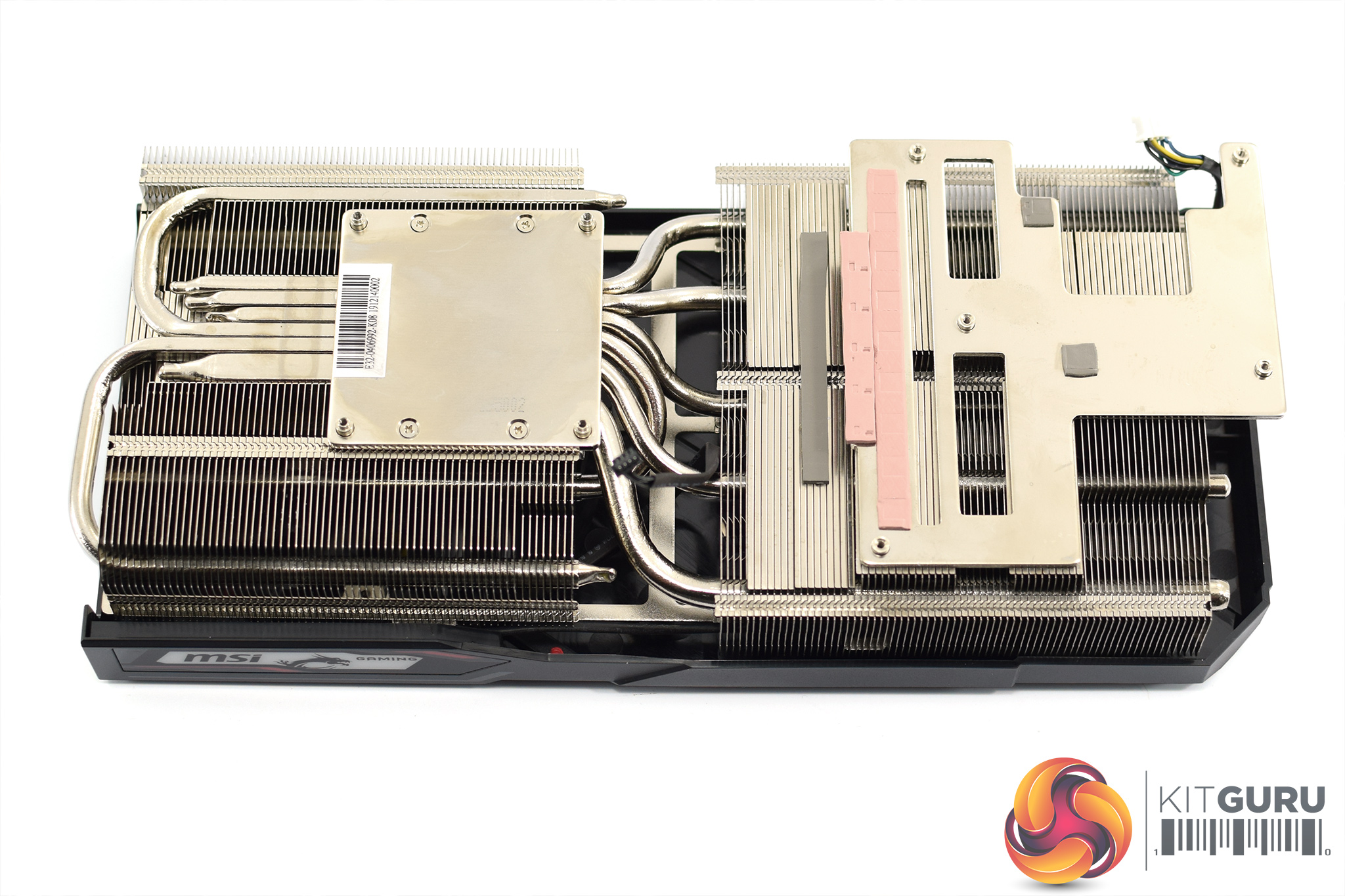
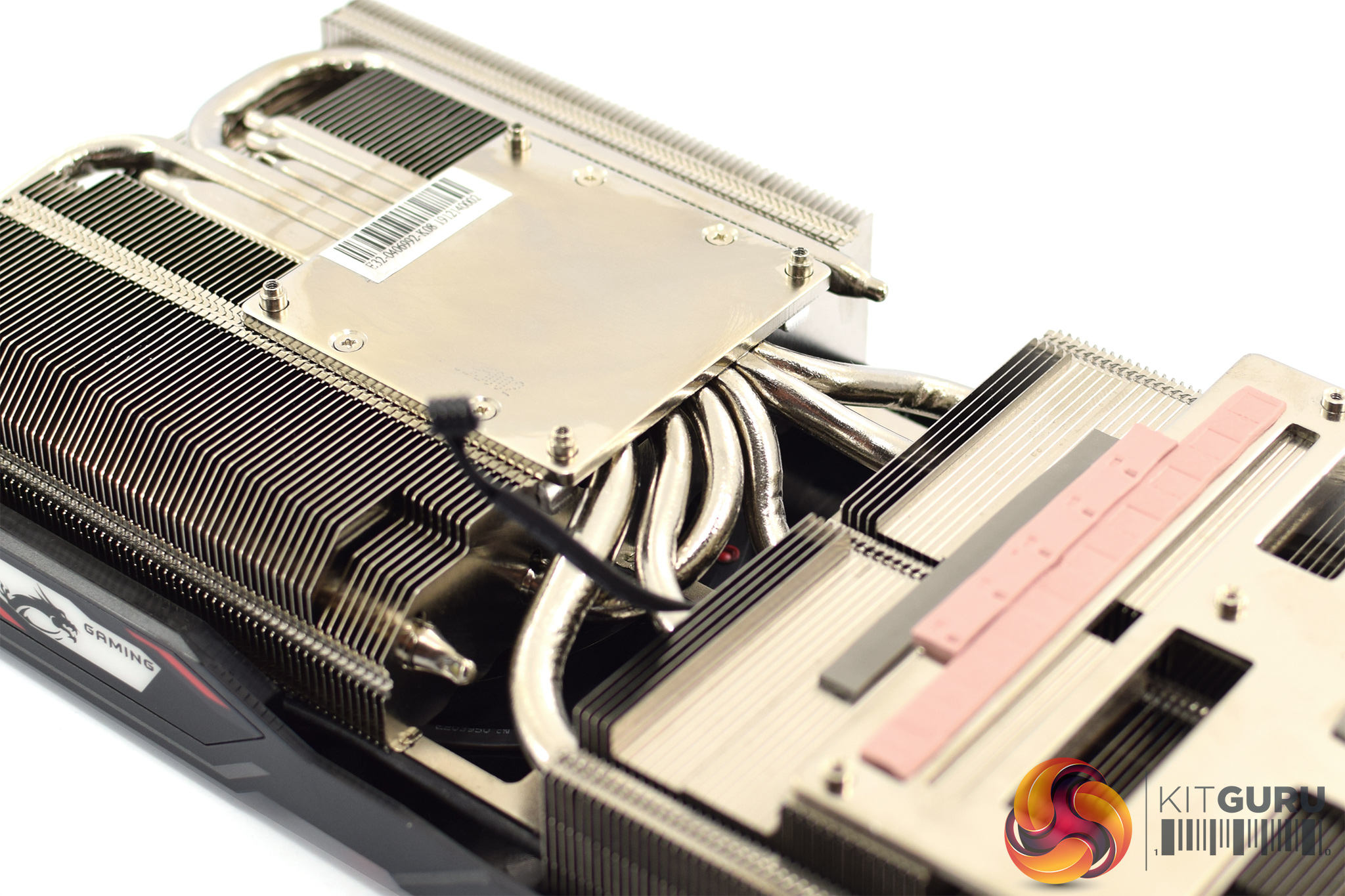
Finally, the cooler is a very beefy unit, comprised of two fin stacks which are connected by a total of six heatpipes – five of those are 6mm pipes, and one is a bigger 8mm pipe. The GPU die contacts with a nickel-plated copper plate, with there are separate coldplates for the VRM as well. The memory is cooled by the additional black plate, as shown above.
Our newest GPU test procedure has been built with the intention of benchmarking high-end graphics cards. We test at 1920×1080 (1080p), 2560×1440 (1440p), and 3840×2160 (4K UHD) resolutions.
We try to test using the DX12 API if titles offer support. This gives us an interpretation into the graphics card performance hierarchy in the present time and the near future, when DX12 becomes more prevalent. After all, graphics cards of this expense may stay in a gamer’s system for a number of product generations/years before being upgraded.
Driver Notes
- All AMD graphics cards (except RX 5600 XT) were benchmarked with the Adrenalin 20.1.1 public driver.
- RX 5600 XT graphics cards were benchmarked with the Adrenalin 20.1.1 driver supplied to press.
- All Nvidia graphics cards were benchmarked with the Nvidia 441.87 public driver.
Test System
We test using the Overclockers UK Germanium pre-built system, though it has been re-housed into an open-air test bench. You can read more about it over HERE.
| CPU |
Intel Core i7-8700K
Overclocked to 5.0GHz |
| Motherboard |
ASUS ROG Strix Z370-F Gaming
|
| Memory |
Team Group Dark Hawk RGB
16GB (2x8GB) @ 3200MHz 16-18-18-38 |
| Graphics Card |
Varies
|
| System Drive |
Samsung 960 EVO 500GB
|
| Games Drive | Crucial M4 512GB |
| Chassis | Streacom ST-BC1 Bench |
| CPU Cooler |
OCUK TechLabs 240mm AIO
|
| Power Supply |
Corsair AX1500i 80+ Titanium PSU
|
| Operating System |
Windows 10 1903
|
Comparison Graphics Cards List
- Nvidia RTX 2060 SUPER Founders Edition (FE) 8GB
- Nvidia RTX 2060 Founders Edition (FE) 6GB
- Gigabyte GTX 1660 Ti Gaming OC 6G
- EVGA GTX 1660 SUPER SC Ultra 6GB
- Palit GTX 1650 SUPER StormX OC 4GB
- Nvidia GTX 1060 Founders Edition (FE) 6GB
- Gigabyte RX 5600 XT Gaming OC 6GB
- Sapphire RX 5600 XT Pulse 6GB
- Sapphire RX 5500 XT Pulse 4GB
- ASRock RX 5500 XT Challenger OC Edition 8GB
- AMD RX 5700 8GB
- AMD RX Vega 56 8GB
- Sapphire RX 590 Nitro+ SE 8GB
Software and Games List
- 3DMark Fire Strike & Fire Strike Ultra (DX11 Synthetic)
- 3DMark Time Spy (DX12 Synthetic)
- Battlefield V (DX12)
- The Division 2 (DX11)
- F1 2019 (DX12)
- Far Cry New Dawn (DX11)
- Gears 5 (DX12)
- Ghost Recon: Breakpoint (DX11)
- Metro: Exodus (DX12)
- Middle Earth: Shadow of War (DX11)
- Red Dead Redemption 2 (DX12)
- Shadow of the Tomb Raider (DX12)
- Total War: Three Kingdoms (DX11)
We run each benchmark/game three times, and present averages in our graphs.
3DMark Fire Strike is a showcase DirectX 11 benchmark designed for today’s high-performance gaming PCs. It is our [FutureMark’s] most ambitious and technical benchmark ever, featuring real-time graphics rendered with detail and complexity far beyond what is found in other benchmarks and games today.
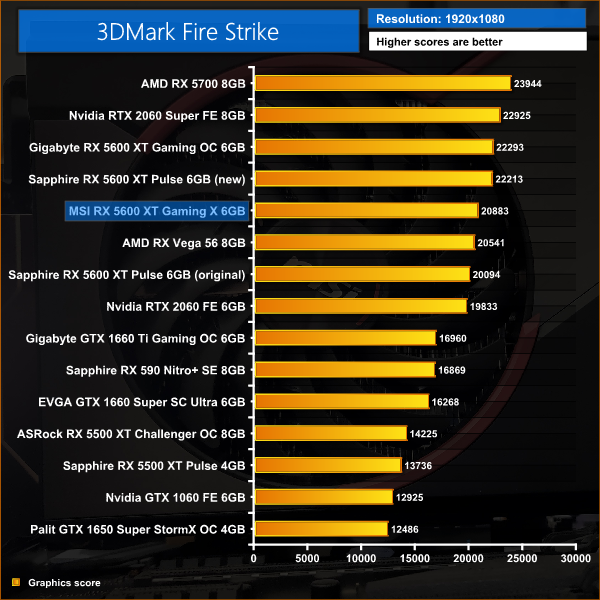
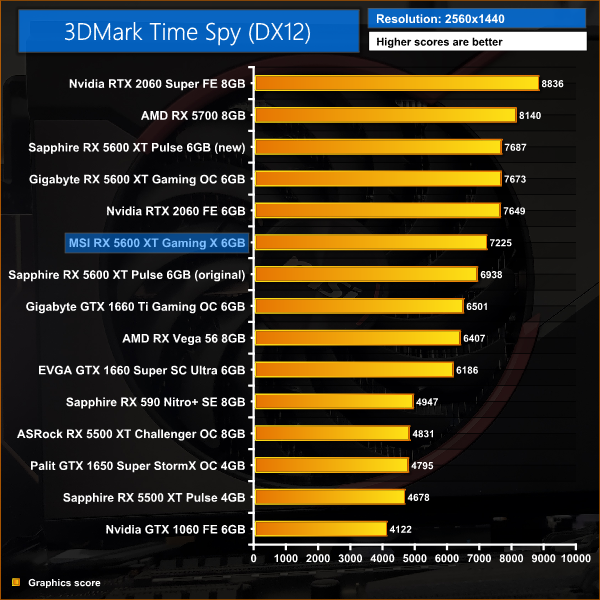
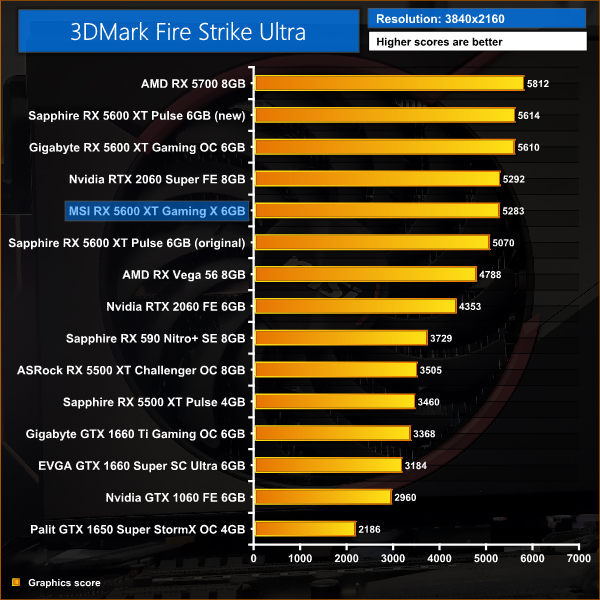
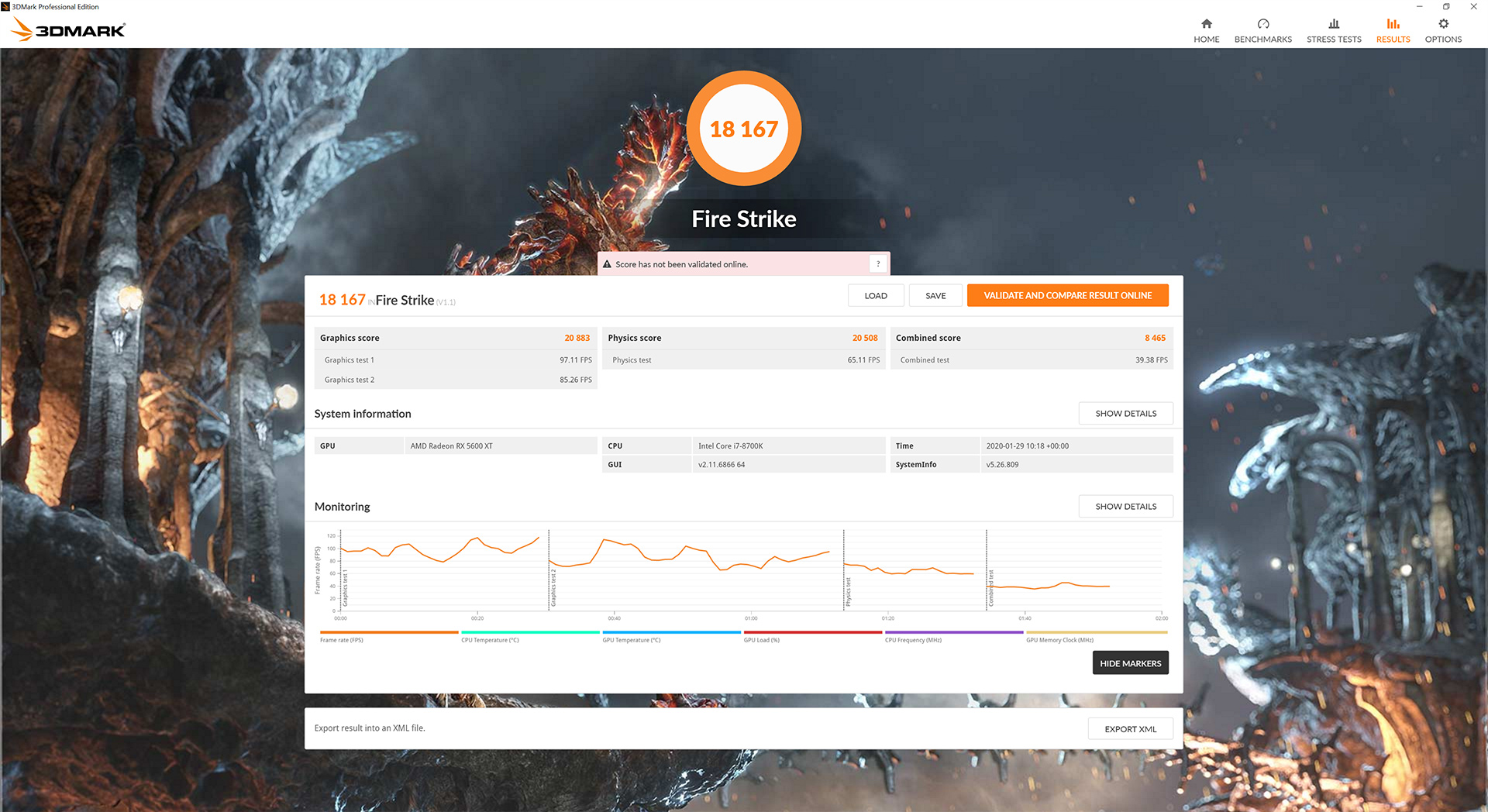
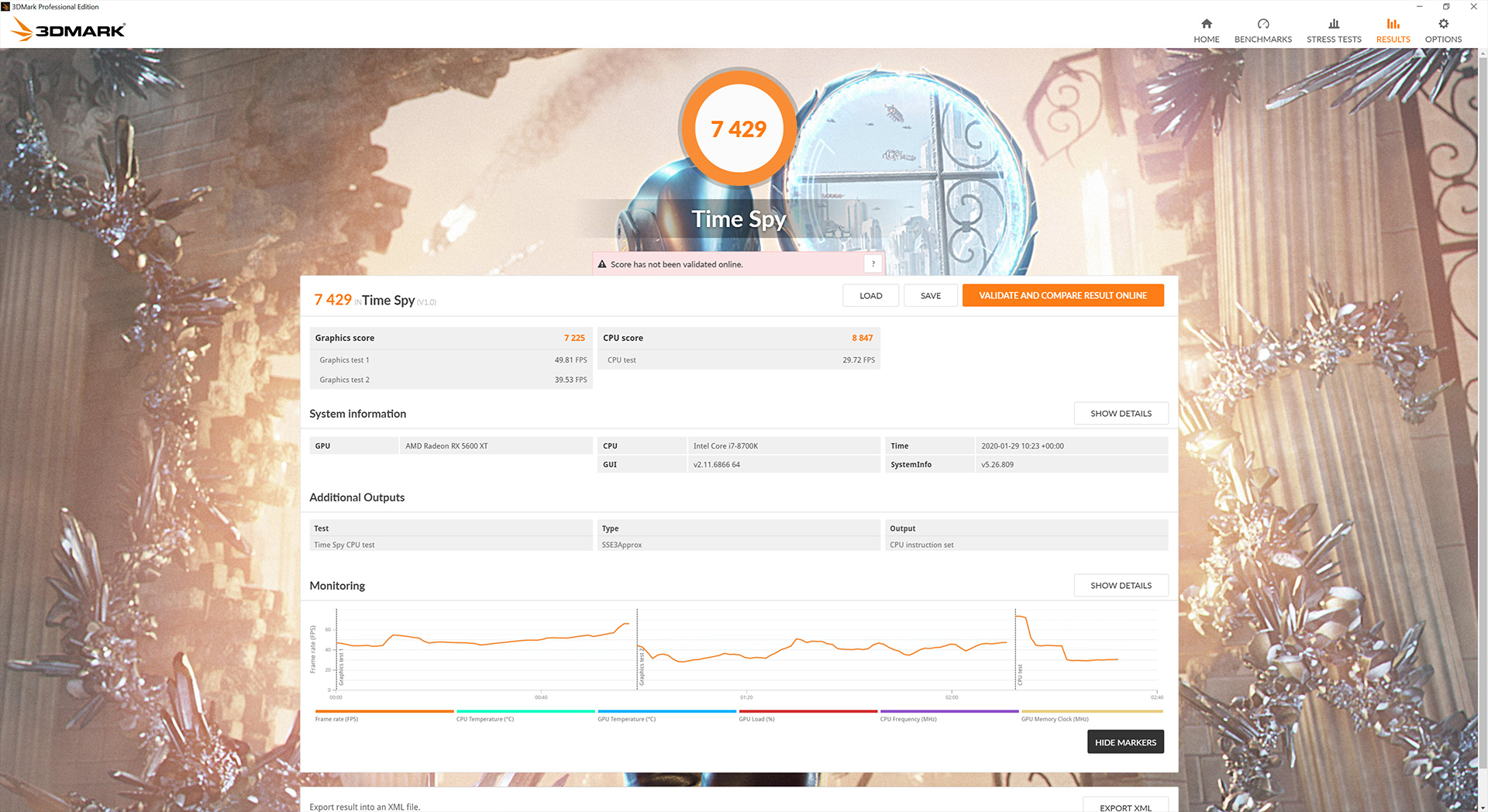
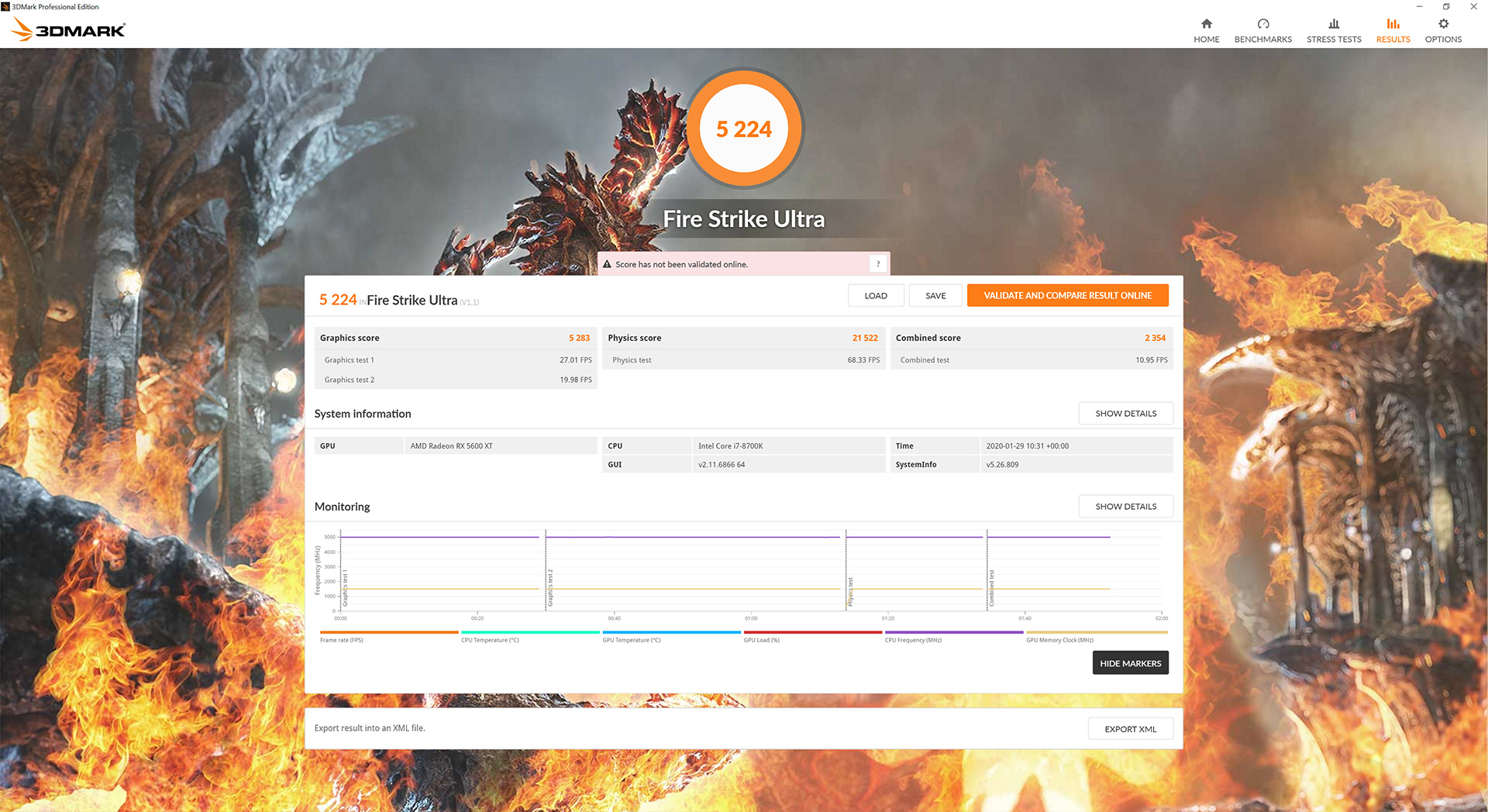
Kicking things off with our 3DMark benchmarks, we can immediately see the Gaming X is at a disadvantage compared to the Sapphire Pulse (14Gbps and 1750MHz boost clock with the BIOS update.) Across all three benchmarks, the Gaming X is 6% slower than the Pulse due to its slower memory.
Compared to the Pulse when tested with its original BIOS (12Gbps memory and 1620MHz boost clock), the Gaming X is faster thanks to its 1750MHz boost clock, with the card posting 4% higher scores in these tests.
Battlefield V is a first-person shooter video game developed by EA DICE and published by Electronic Arts. Battlefield V is the sixteenth instalment in the Battlefield series. It was released worldwide for Microsoft Windows, PlayStation 4, and Xbox One on November 20, 2018. (Wikipedia).
We test using the Ultra preset, DX12 API.

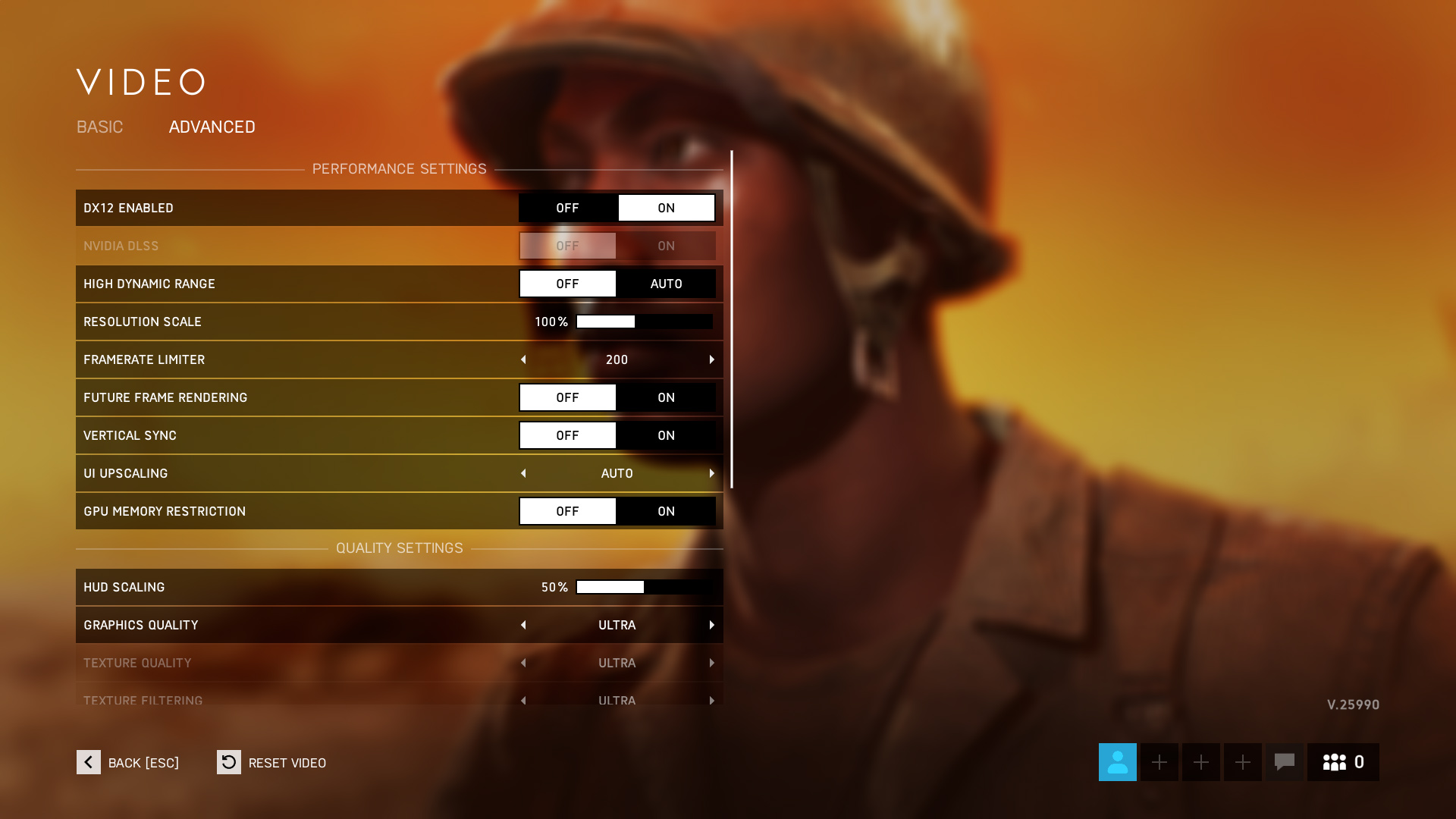
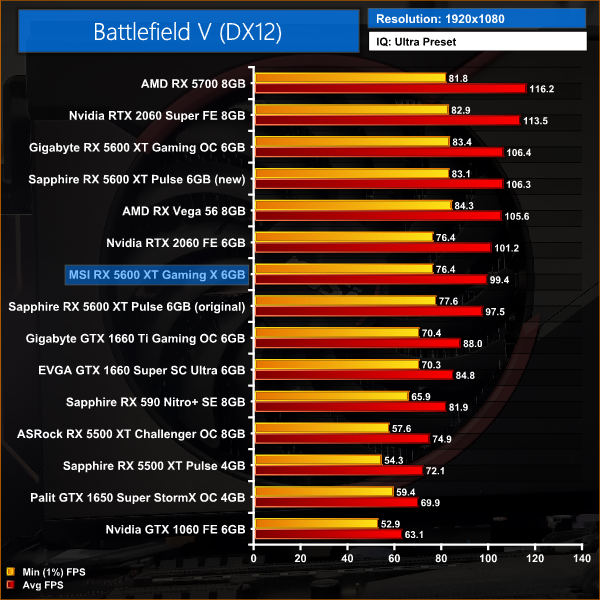
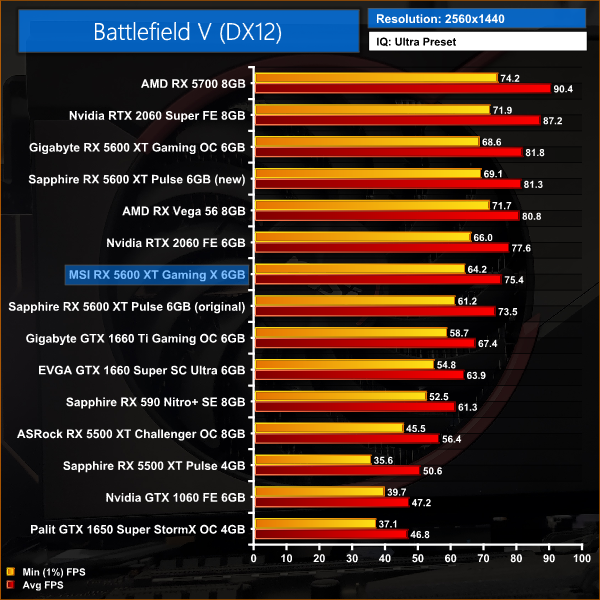
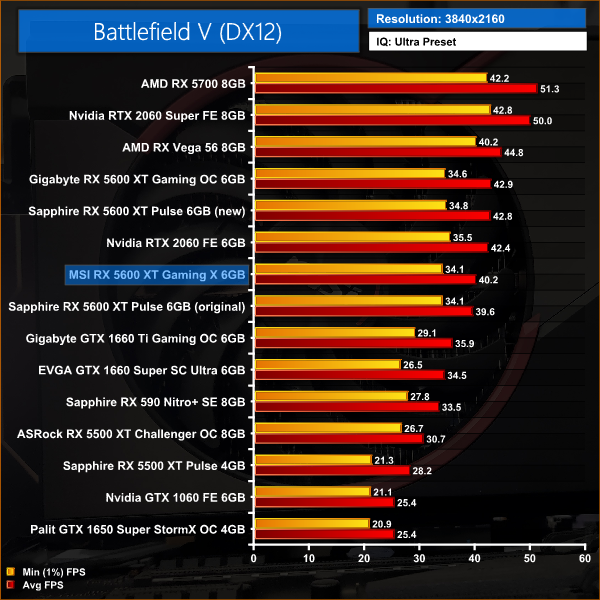
Our first game today is Battlefield V, and at 1080p we see the Gaming X coming in 6% slower than the Sapphire Pulse 5600 XT with its updated BIOS, and 2% slower than the RTX 2060. Compared to the Sapphire Pulse with the old BIOS, the Gaming X is 2% faster thanks to its higher core speed.
At 1440p, the slower memory speeds seem to make more of a difference as the Gaming X is now 7% slower than the Pulse and 3% slower than the RTX 2060. Compared to the Pulse with its original BIOS, the Gaming X is 3% faster.
Tom Clancy's The Division 2 is an online action role-playing video game developed by Massive Entertainment and published by Ubisoft. The sequel to Tom Clancy's The Division (2016), it is set in a near-future Washington, D.C. in the aftermath of a smallpox pandemic, and follows an agent of the Strategic Homeland Division as they try to rebuild the city. (Wikipedia).
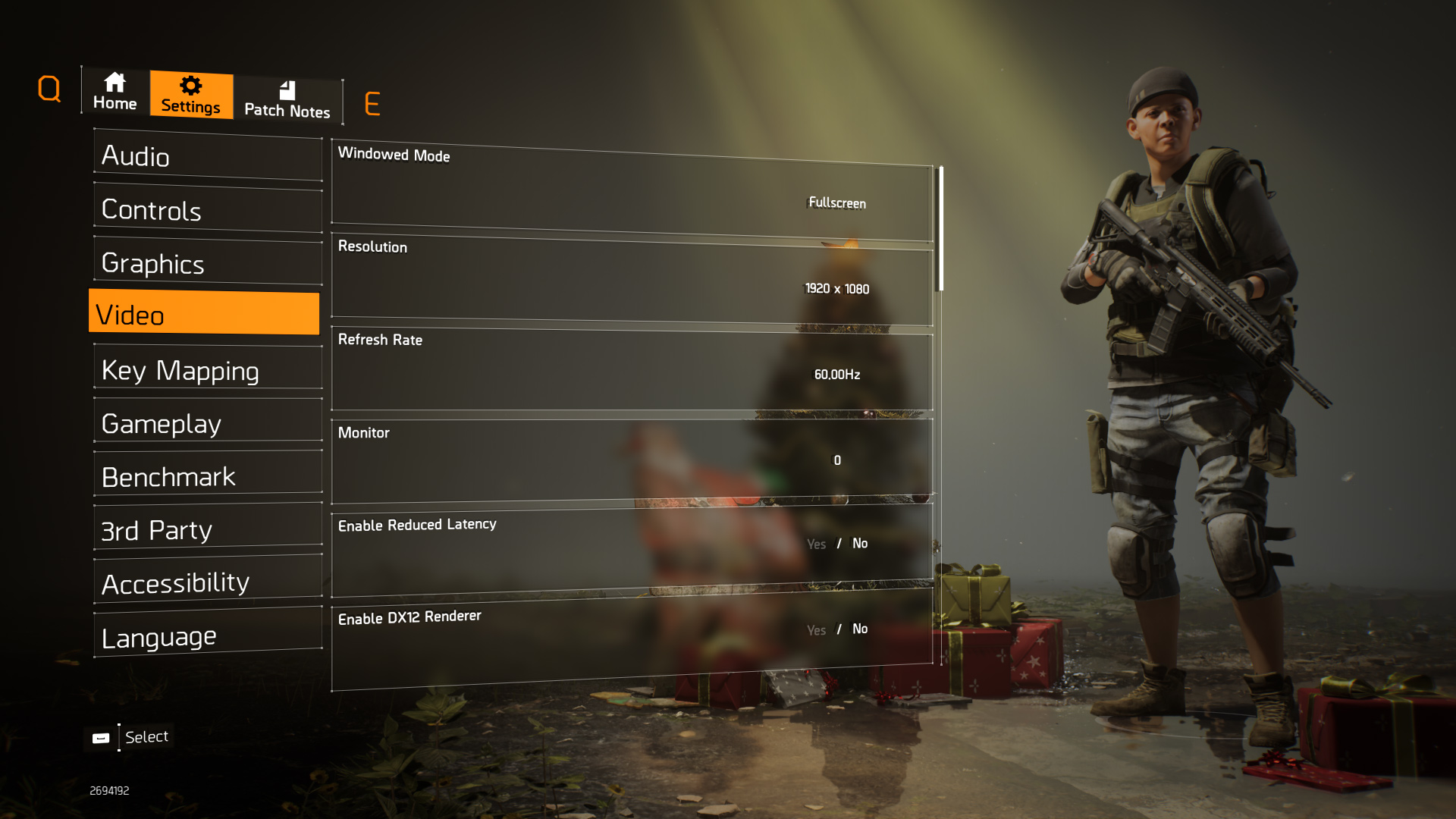
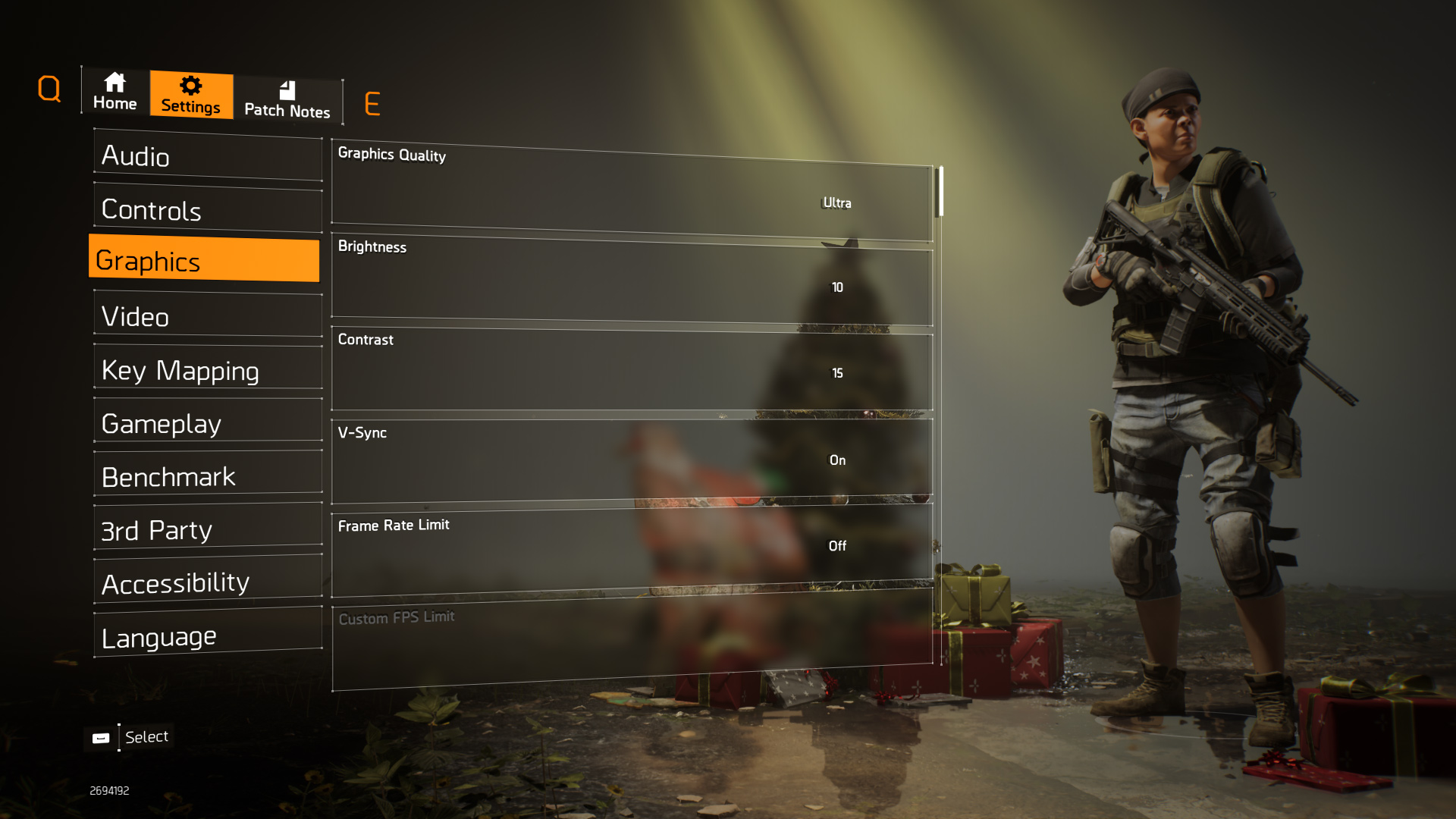
We test using the Ultra preset, but with V-Sync disabled, DX11 API.
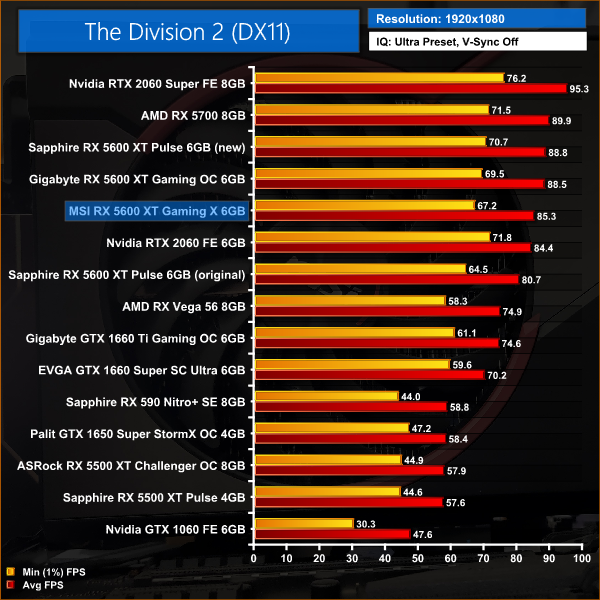
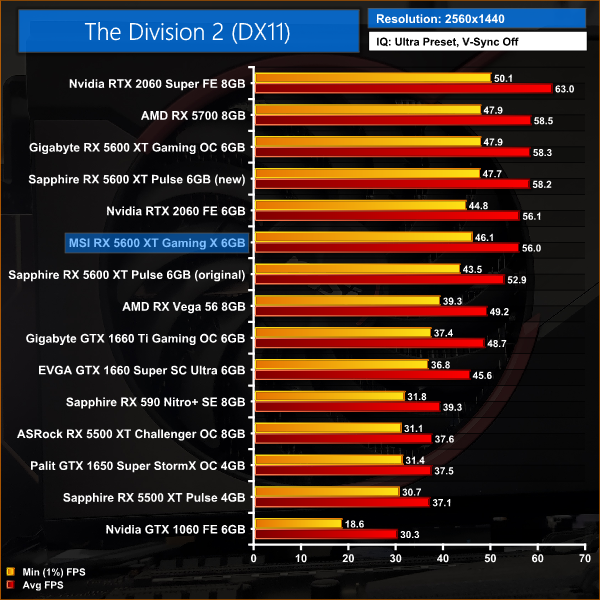
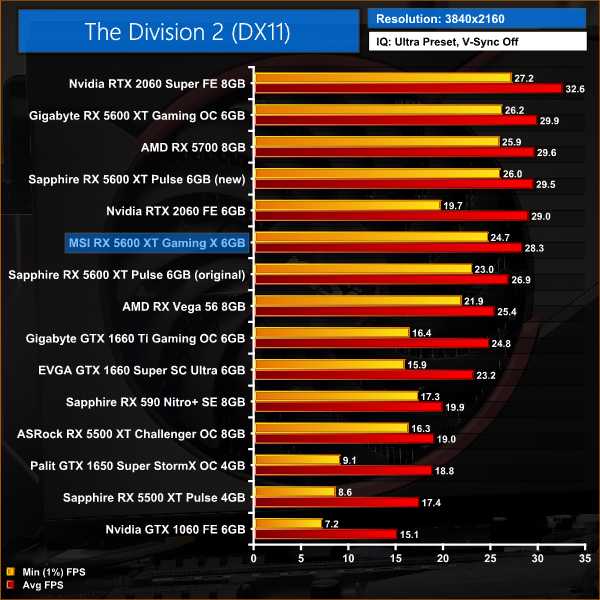
In the Division 2, we see more favourable results for the Gaming X – it would seem this game responds better to increased GPU speed as opposed to increased memory speed. At 1080p for instance, the Gaming X is just 4% slower than the Pulse with its new BIOS, while compared to the Pulse using the old BIOS, MSI's card is 6% faster.
At 1440p, those margins of difference are exactly the same, so the Gaming X is still performing closer to the Pulse with its updated BIOS than it is to the Pulse using the old BIOS.
F1 2019 is a racing video game based on the 2019 Formula One and Formula 2 Championships. The game is developed and published by Codemasters and is the twelfth title in the Formula One series developed by the studio. The game was announced by Codemasters on 28 March 2019. (Wikipedia).
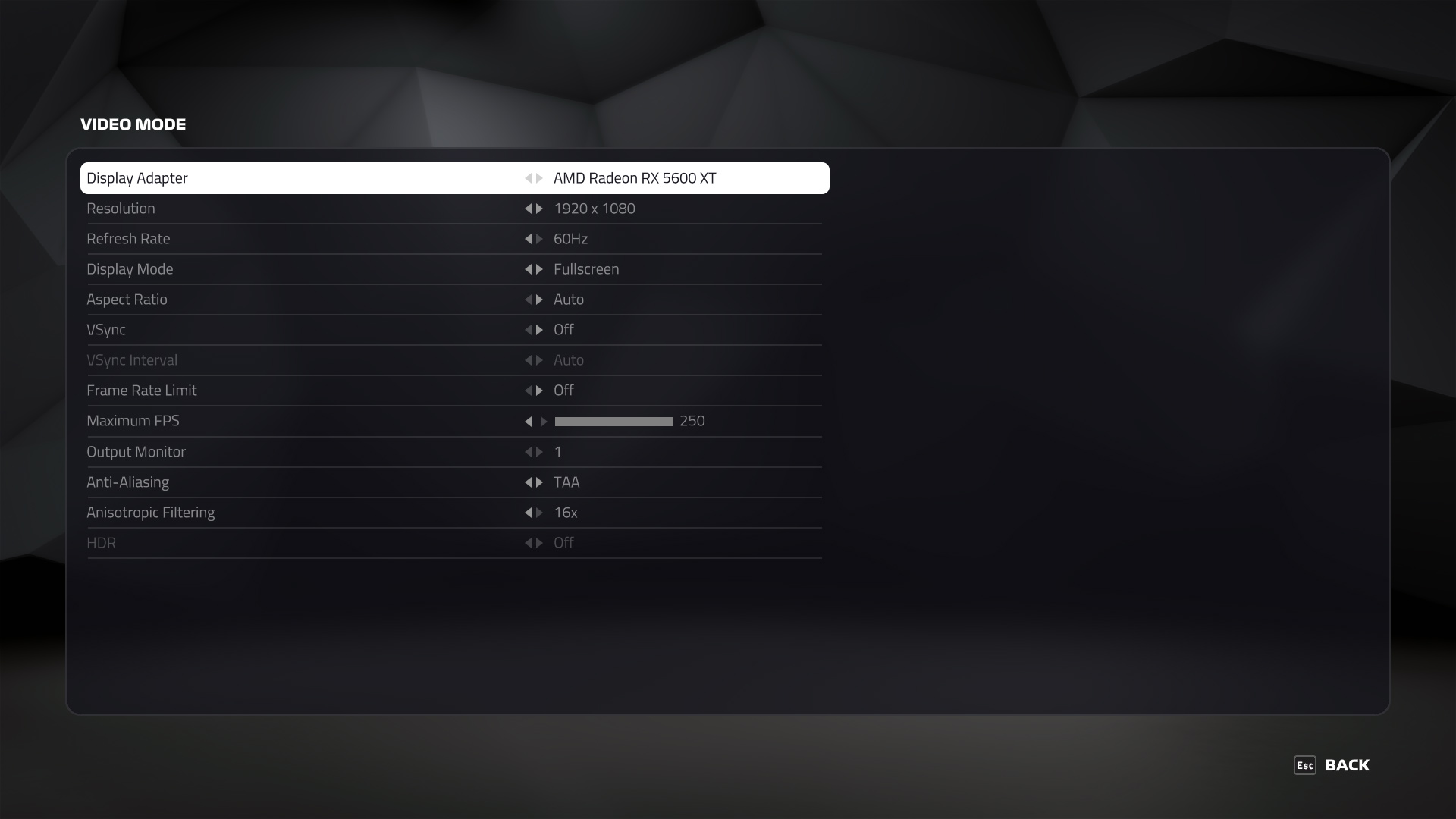
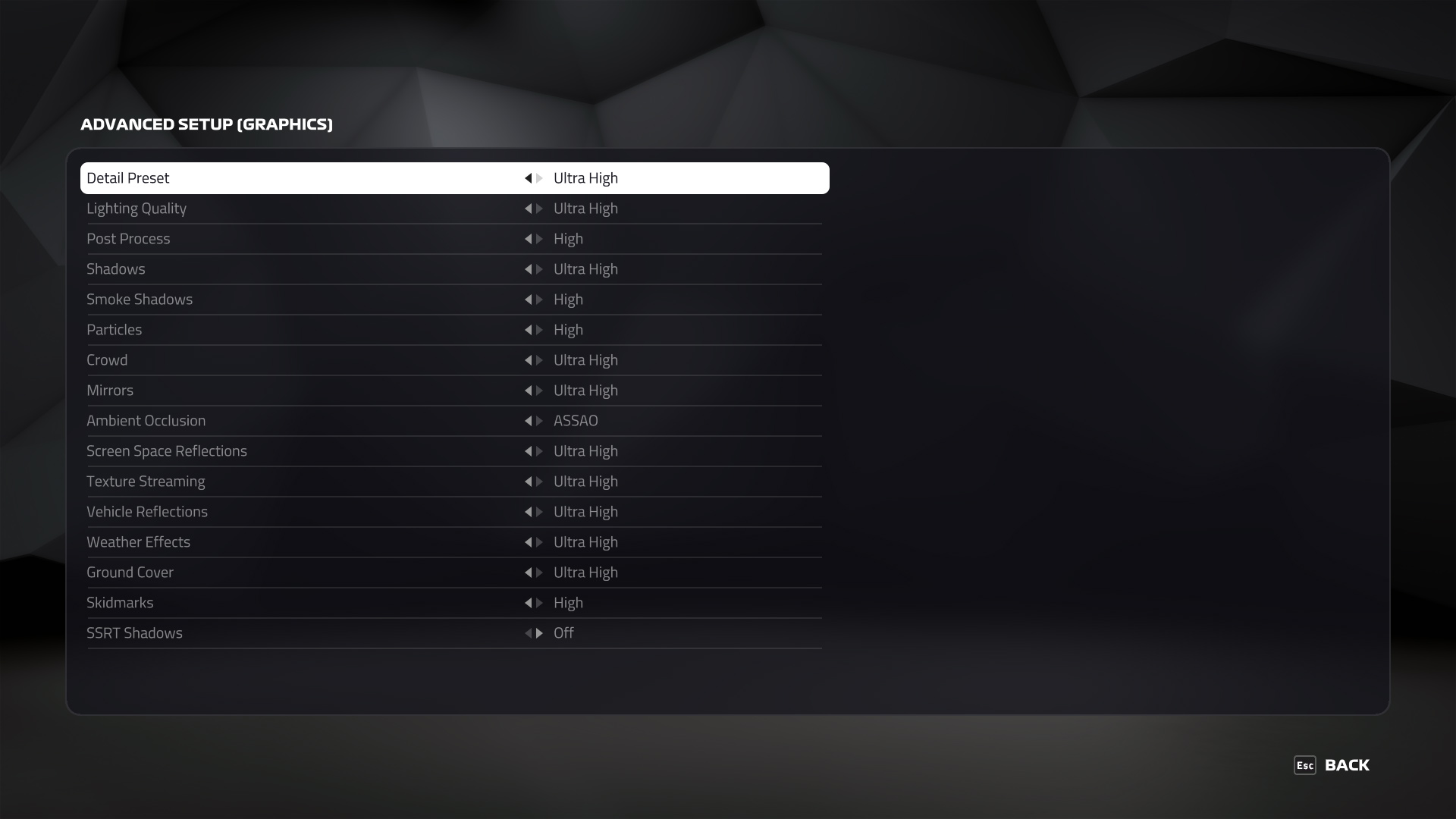
We test using the Ultra High preset, with TAA and 16x Anisotropic Filtering, DX12 API.
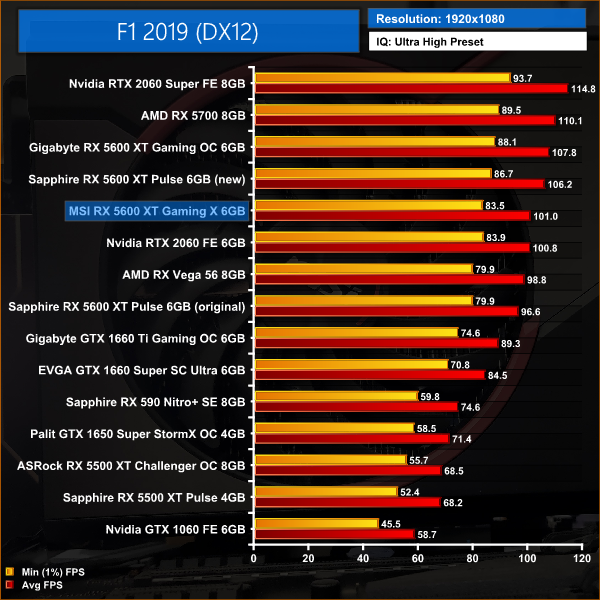
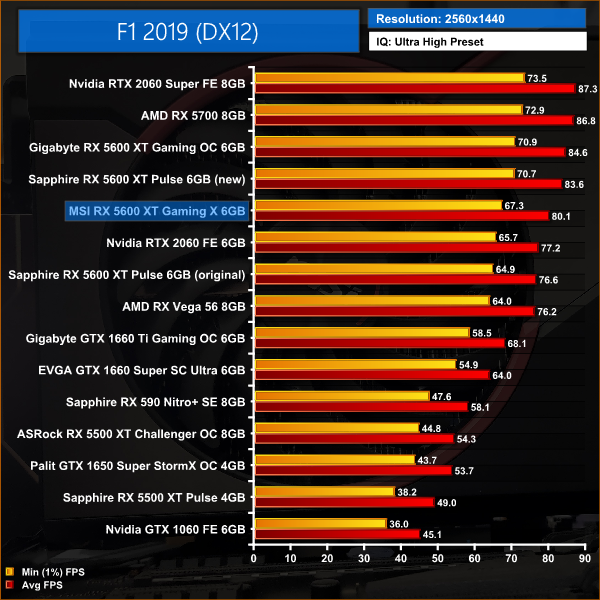
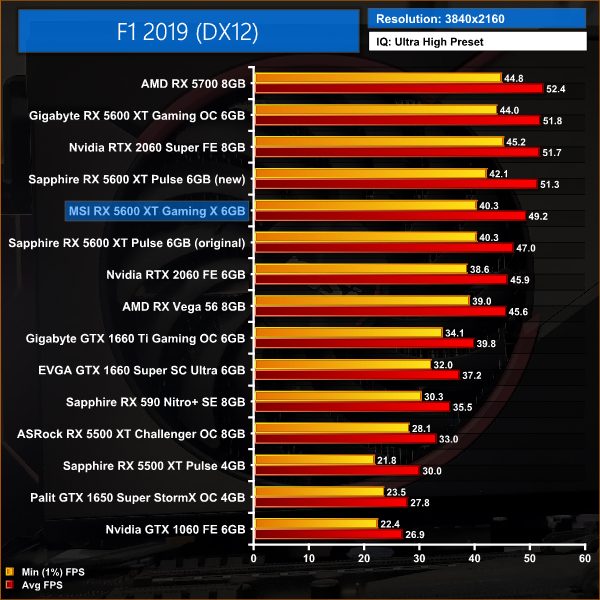
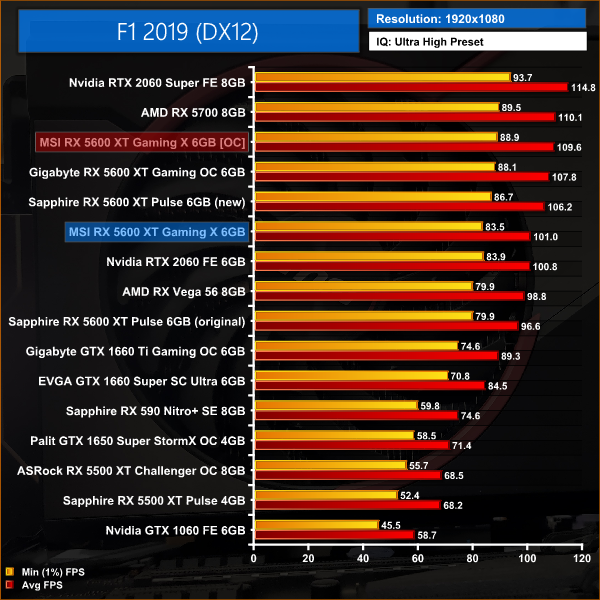
F1 2019 sees the Gaming X sit right in the middle of the other 5600 XTs. At 1080p, the Gaming X is 5% faster than the Pulse with the old BIOS, but it is also 5% slower than the Pulse when using its updated BIOS.
At 1440p, the Gaming X is still 5% ahead of the Pulse using 12Gbps memory, but now the MSI card is 4% slower when compared to the Pulse using the new BIOS. It's also 4% faster than RTX 2060 at this resolution.
Far Cry New Dawn is an action-adventure first-person shooter developed by Ubisoft Montreal and published by Ubisoft. The game is a spin-off of the Far Cry series and a narrative sequel to Far Cry 5. It was released for Microsoft Windows, PlayStation 4 and Xbox One on February 15, 2019. (Wikipedia).
We test using the Ultra preset, with the HD Textures pack, DX11 API.
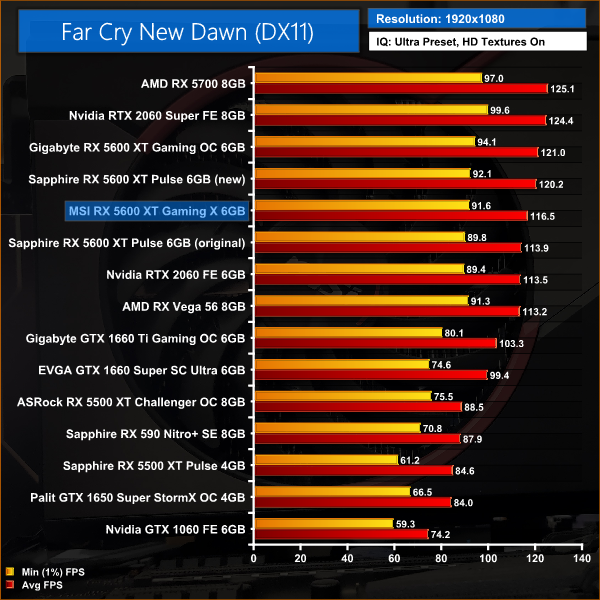
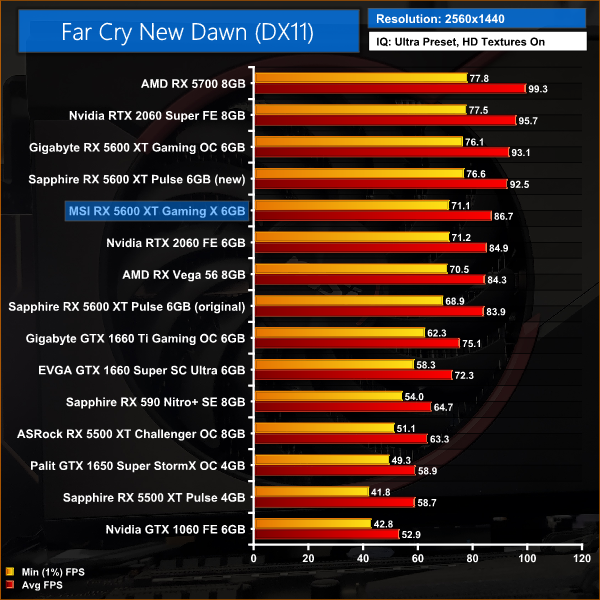
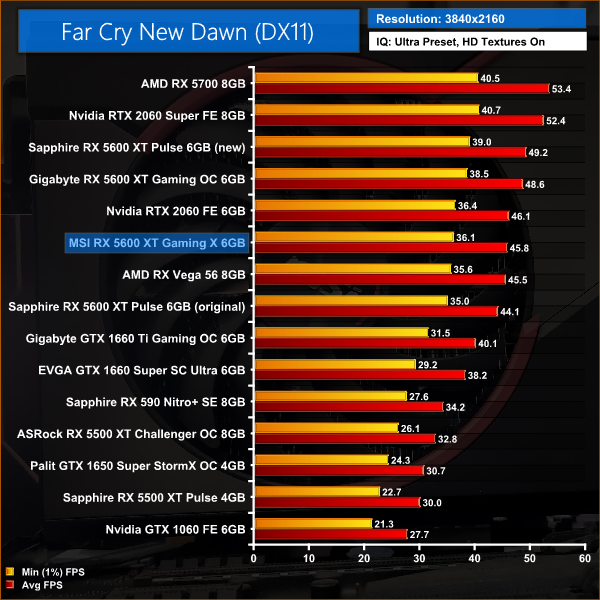
There's not a whole lot of difference between any of our 5600 XT configurations at 1080p, as the Gaming X is 2% ahead of the Pulse using the old BIOS, and only 3% behind the Pulse using its new BIOS.
Upping the resolution does change things though – here, the Gaming X is now 3% faster than the Pulse using 12Gbps memory, but it is 6% slower than the Pulse when tested with 14Gbps memory.
Gears 5 is a third-person shooter video game developed by The Coalition and published by Xbox Game Studios for Microsoft Windows and Xbox One. It is the sixth instalment of the Gears of War series, and is the second Gears of War game not to be developed by Epic Games.
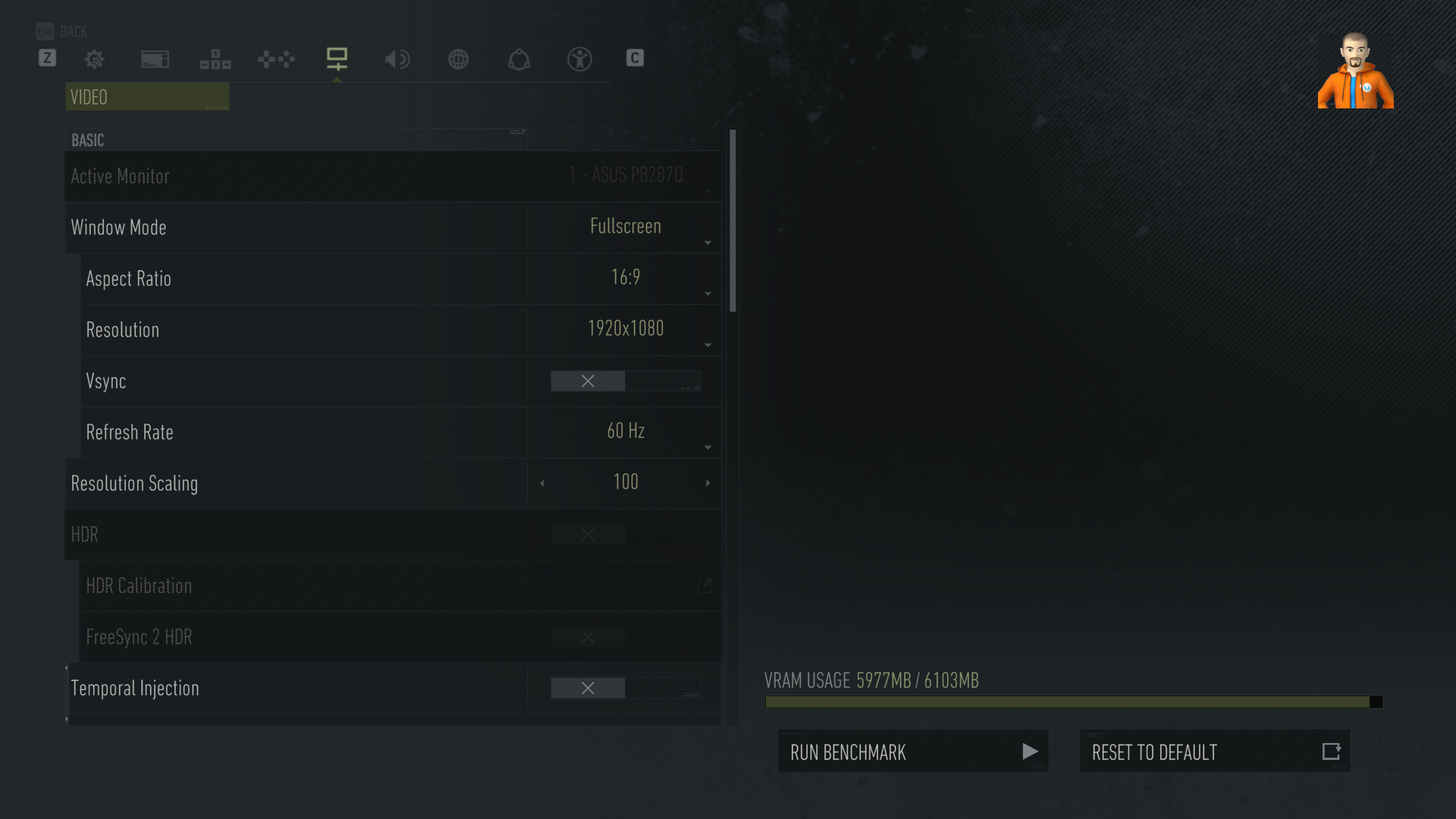
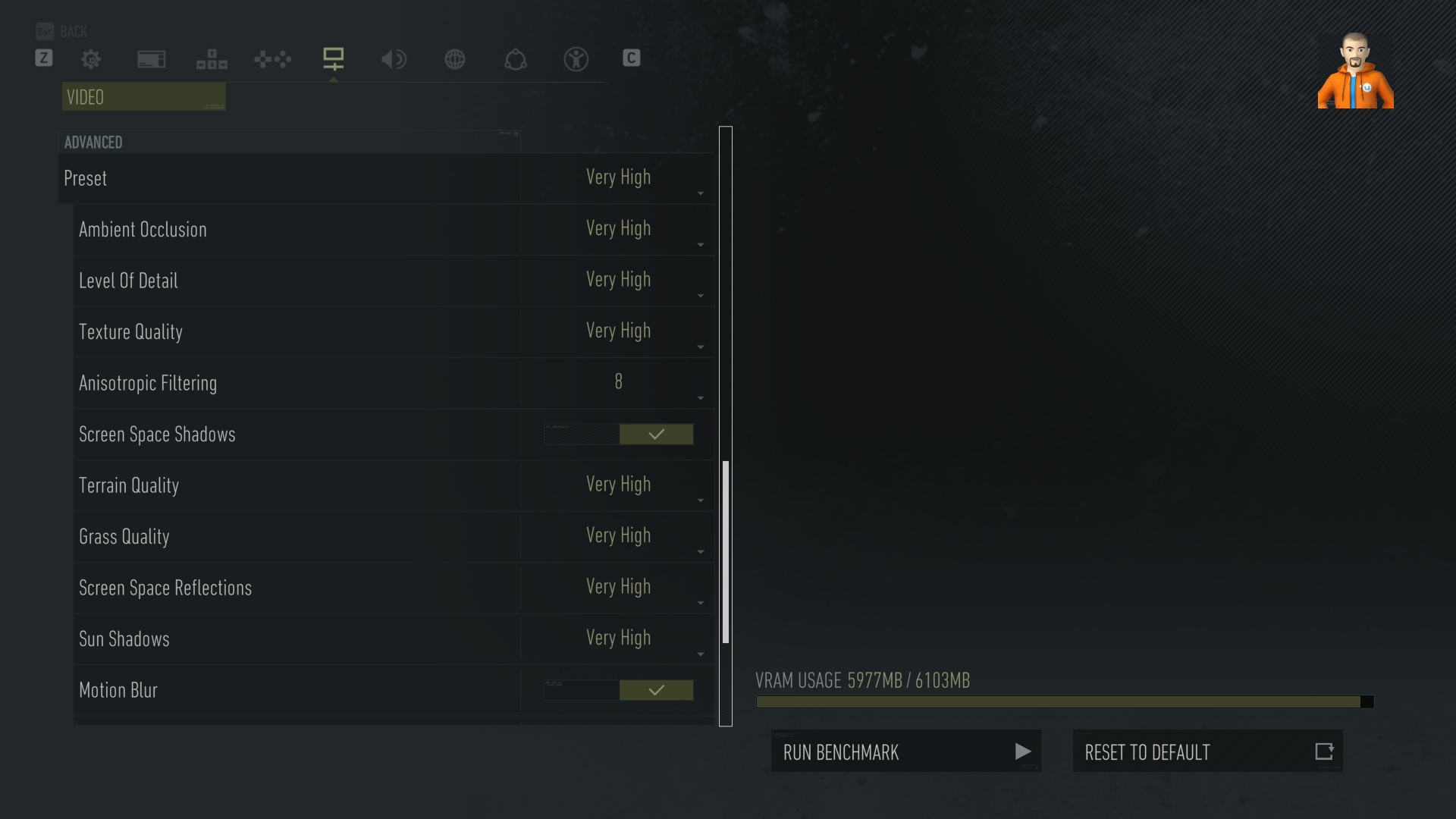
We test using the Ultra preset, with Best Animation Quality (instead of Auto), DX12 API.
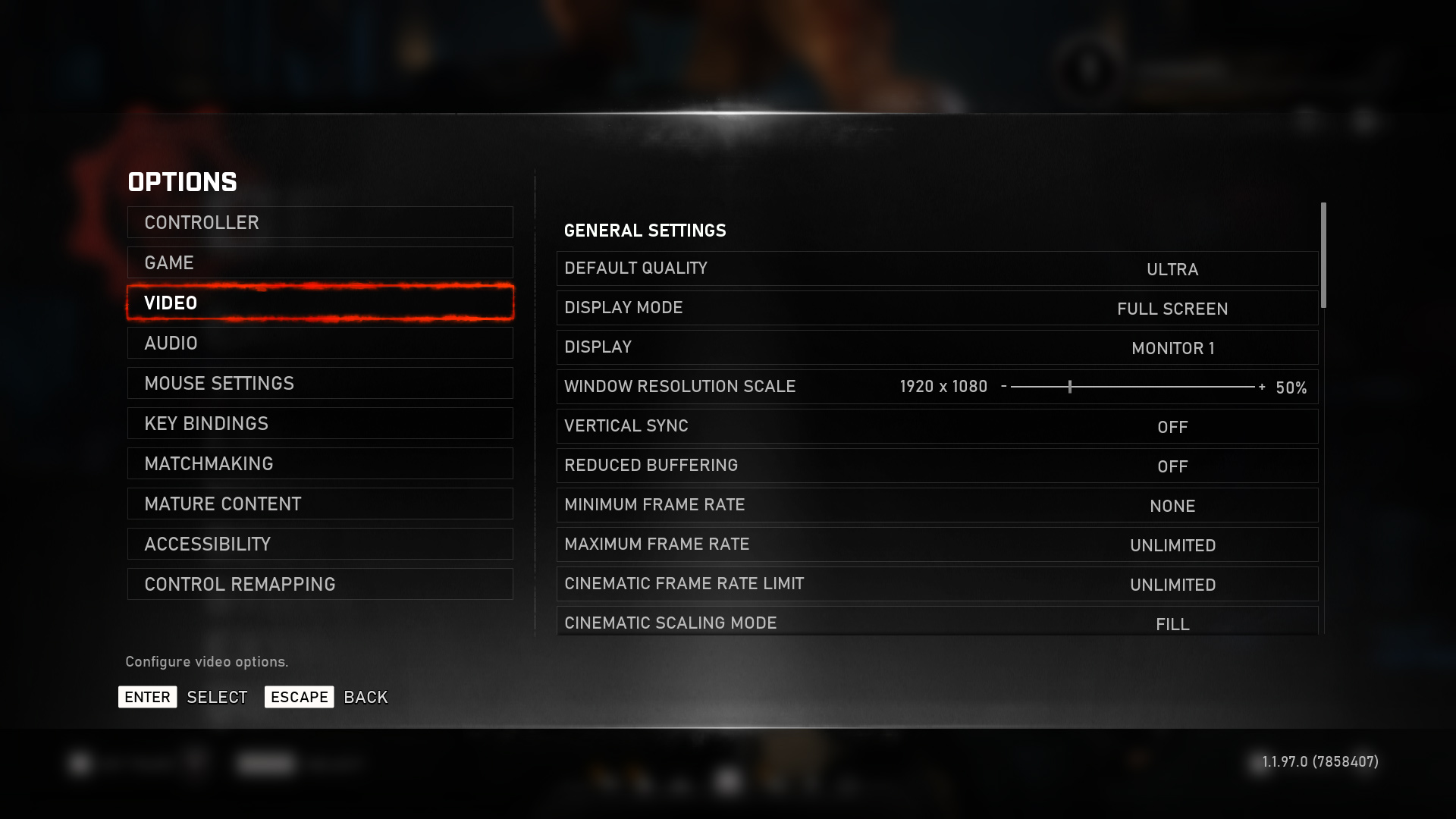
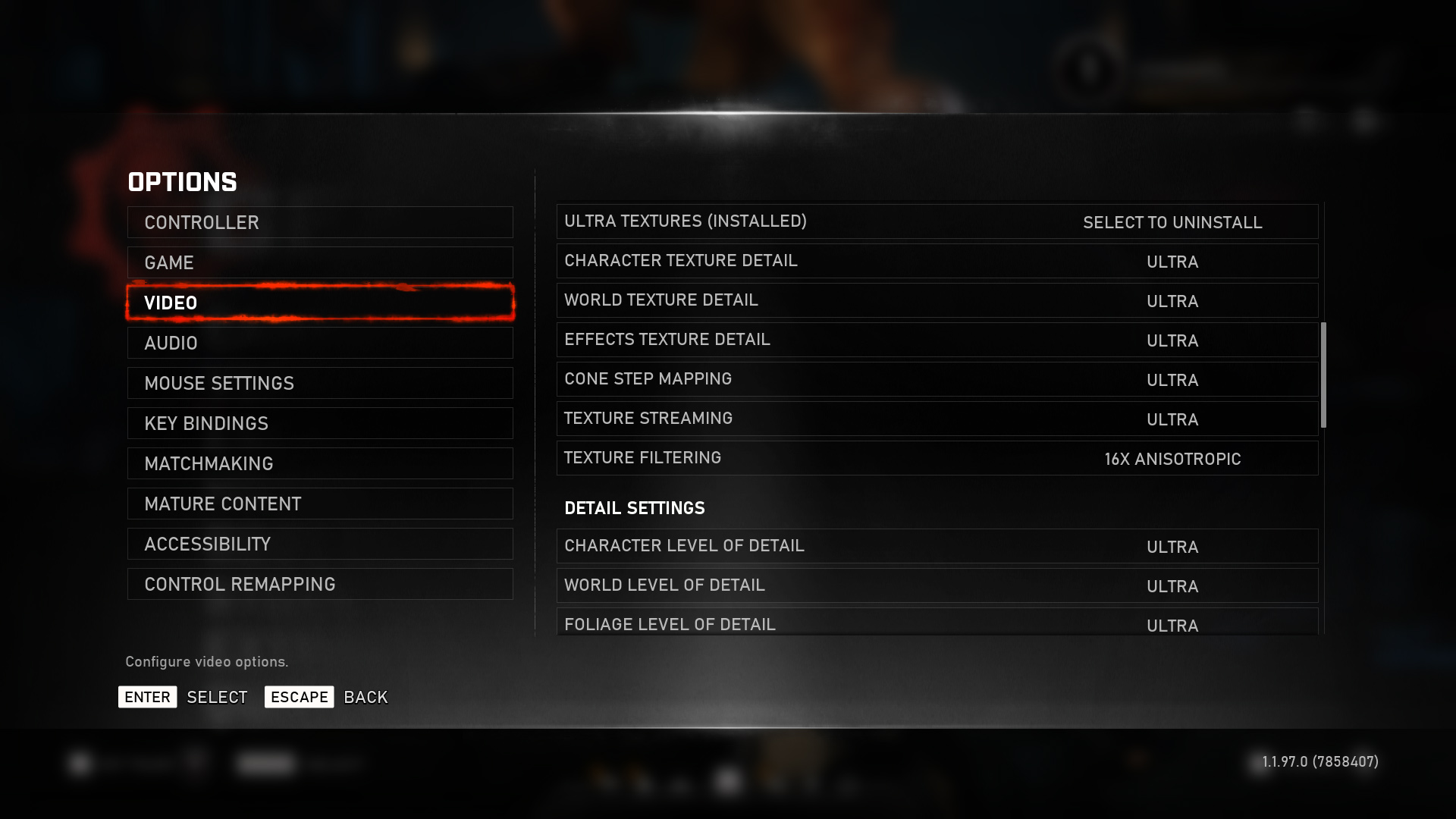
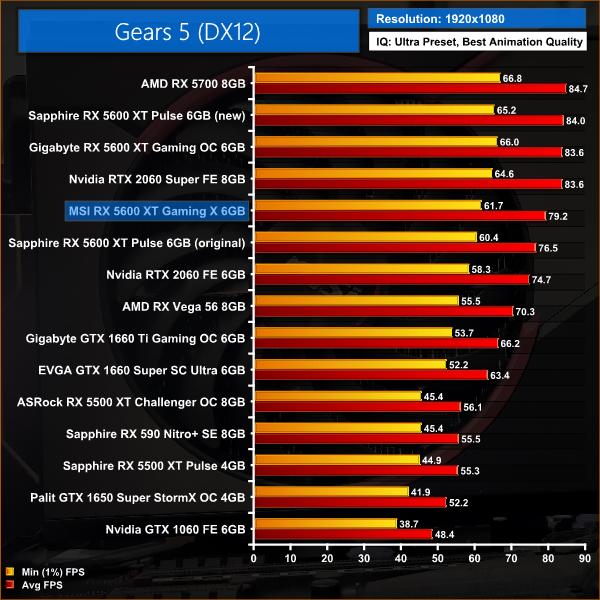
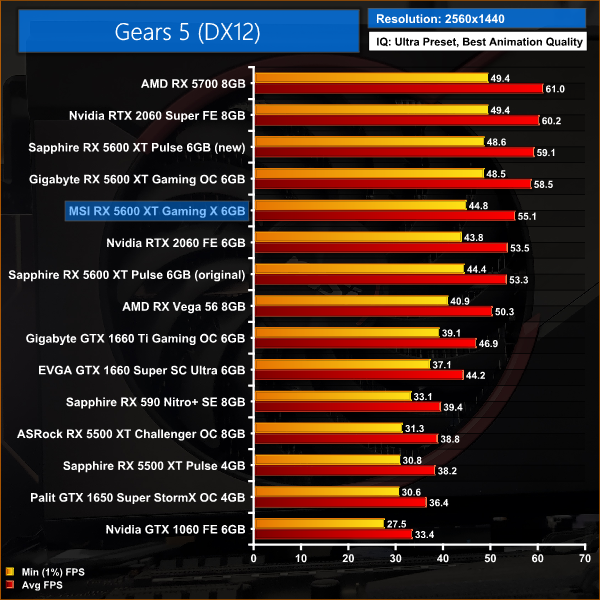
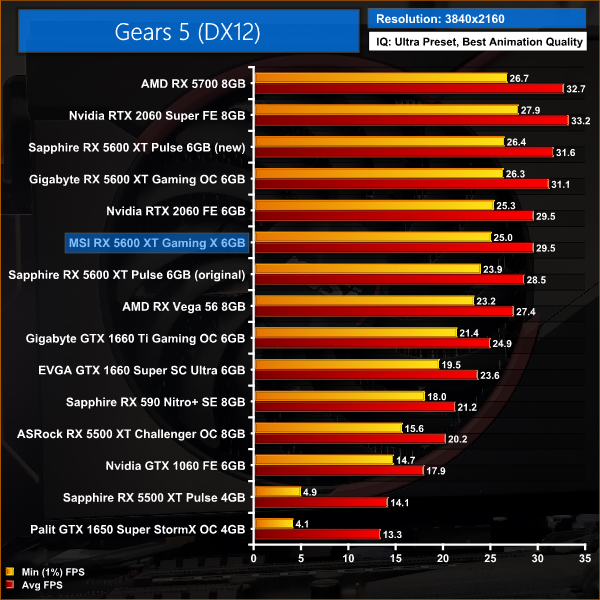
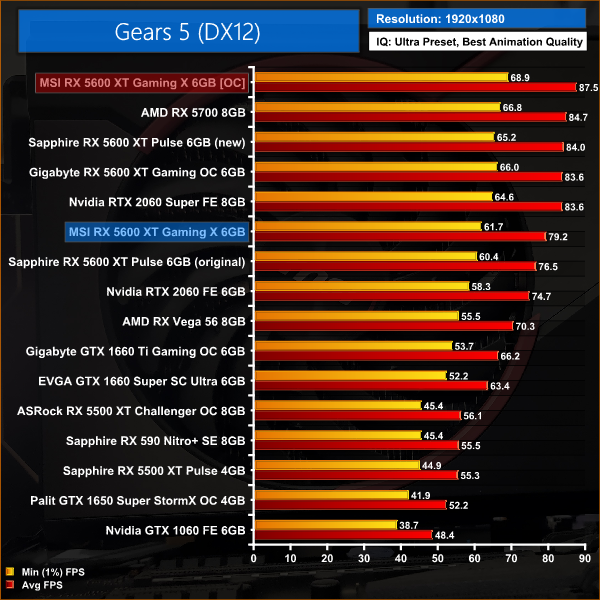
Gears 5 sees the Gaming X fall further behind the other 5600 XTs which are running 14Gbps memory – at 1080p, for instance, it is 6% slower than the Pulse using its updated BIOS. Compared to the Pulse running 12Gbps memory, the MSI card is 4% faster.
These margins change slightly at 1440p. Here, the Gaming X is just 3% faster than the Pulse using the old BIOS, while it also now 7% slower than the Pulse with 14Gbps memory.
Tom Clancy's Ghost Recon Breakpoint is an online tactical shooter video game developed by Ubisoft Paris and published by Ubisoft. The game was released worldwide on 4 October 2019, for Microsoft Windows, PlayStation 4 and Xbox One, (Wikipedia).
We test using the Very High preset, with AA disabled, DX11 API.
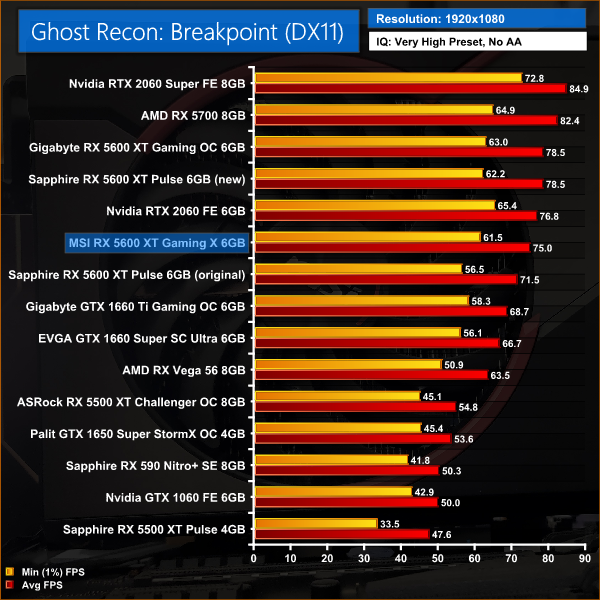
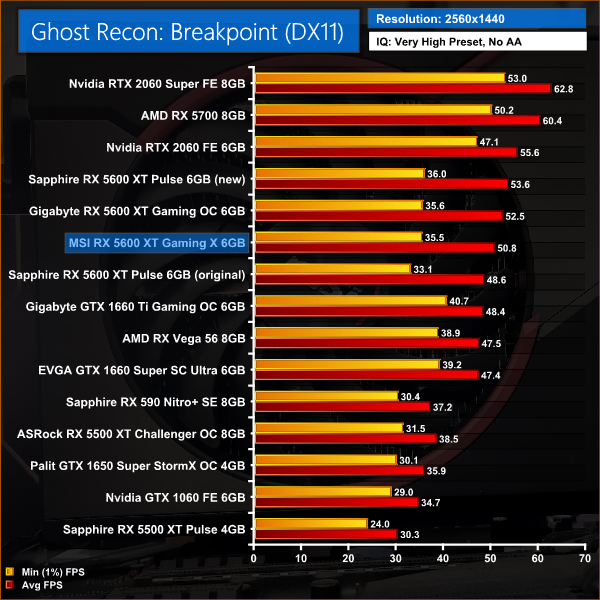
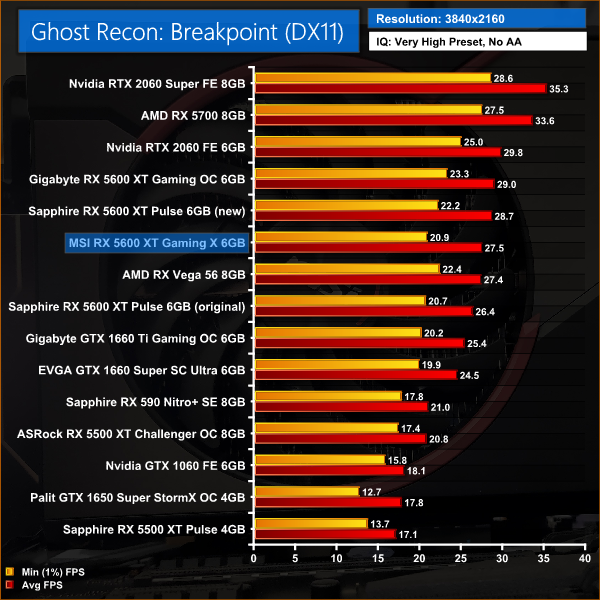
Moving onto Ghost Recon: Breakpoint, this is another title where the Gaming X falls pretty neatly between the Pulse using 12Gbps memory, and the Pulse with its updated 14Gbps spec – at 1080p, the Gaming X is 5% faster than the former GPU, and 4% slower than the latter GPU.
At 1440p, the MSI card is 5% slower than the Pulse with 14Gbps memory, but we can also see the GTX 1660 Ti has closed the gap significantly on the Gaming X as there's just a 5% difference between the two.
Metro Exodus is a first-person shooter video game developed by 4A Games and published by Deep Silver in 2019. It is the third instalment in the Metro video game series based on Dmitry Glukhovsky's novels, following the events of Metro 2033 and Metro: Last Light. (Wikipedia).
We test using the Ultra preset, but with Hairworks and Advanced PhysX turned off, DX12 API.
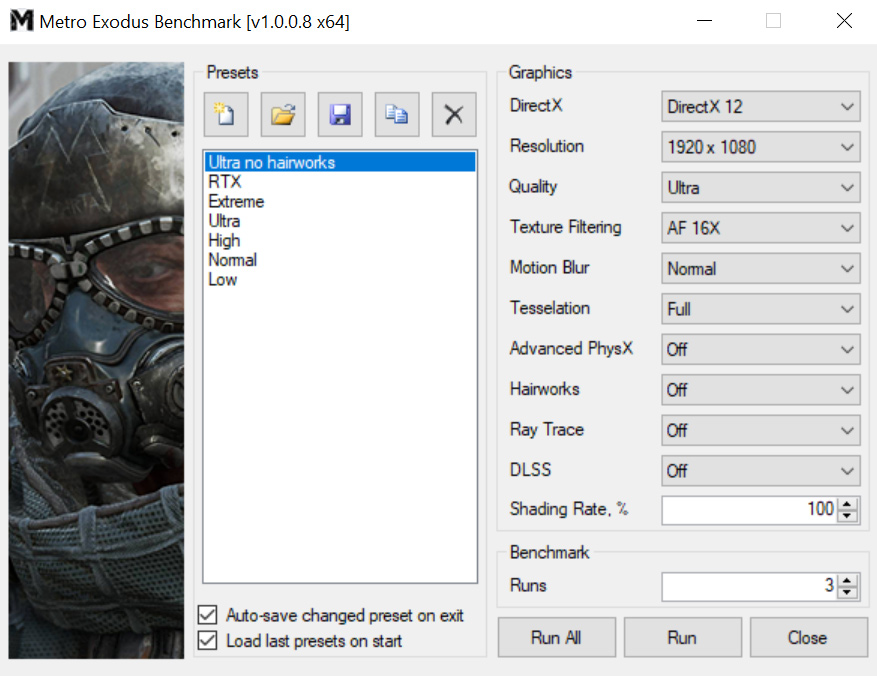
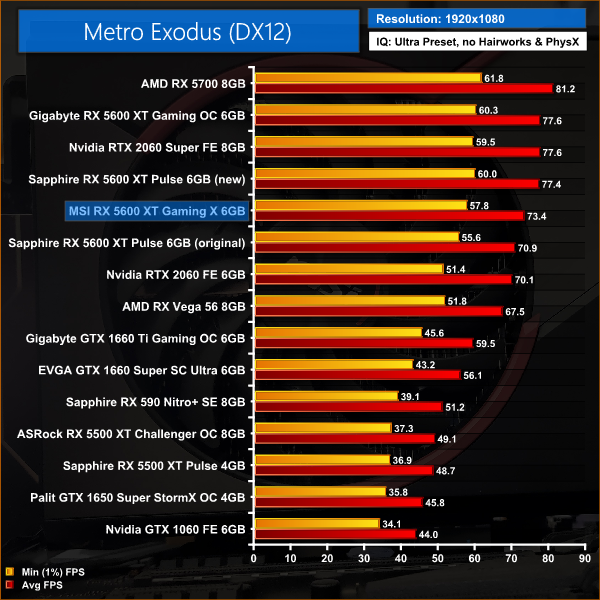
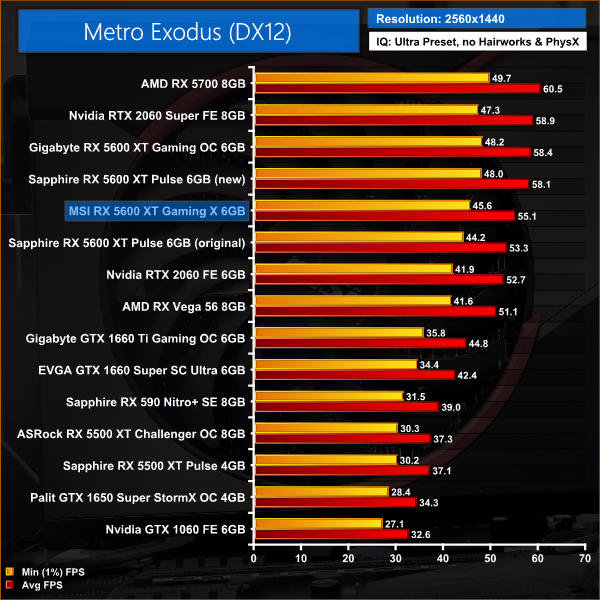
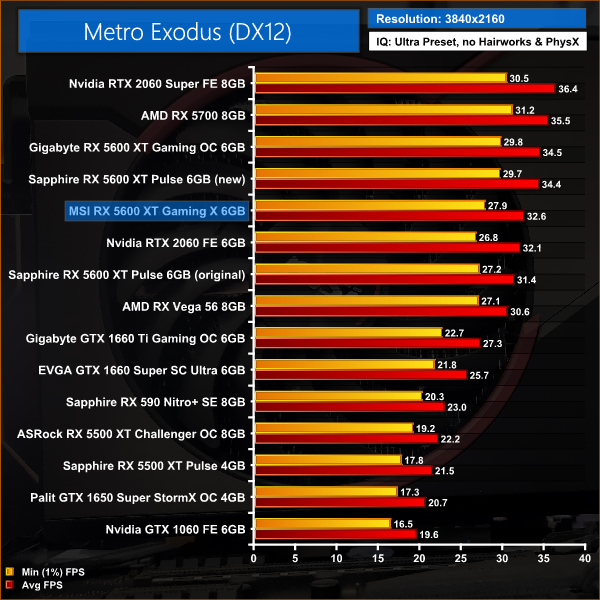
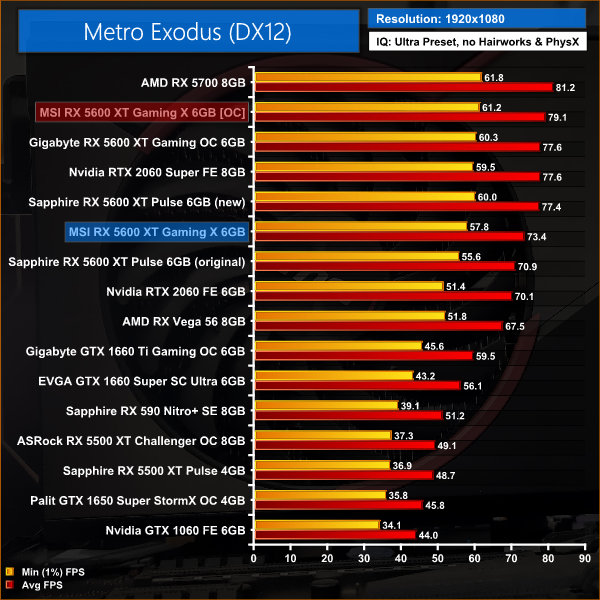
Metro Exodus follows a similar pattern to Ghost Recon: Breakpoint – here, the Gaming X is 5% slower than the Pulse with 14Gbps memory, across all three resolutions tested.
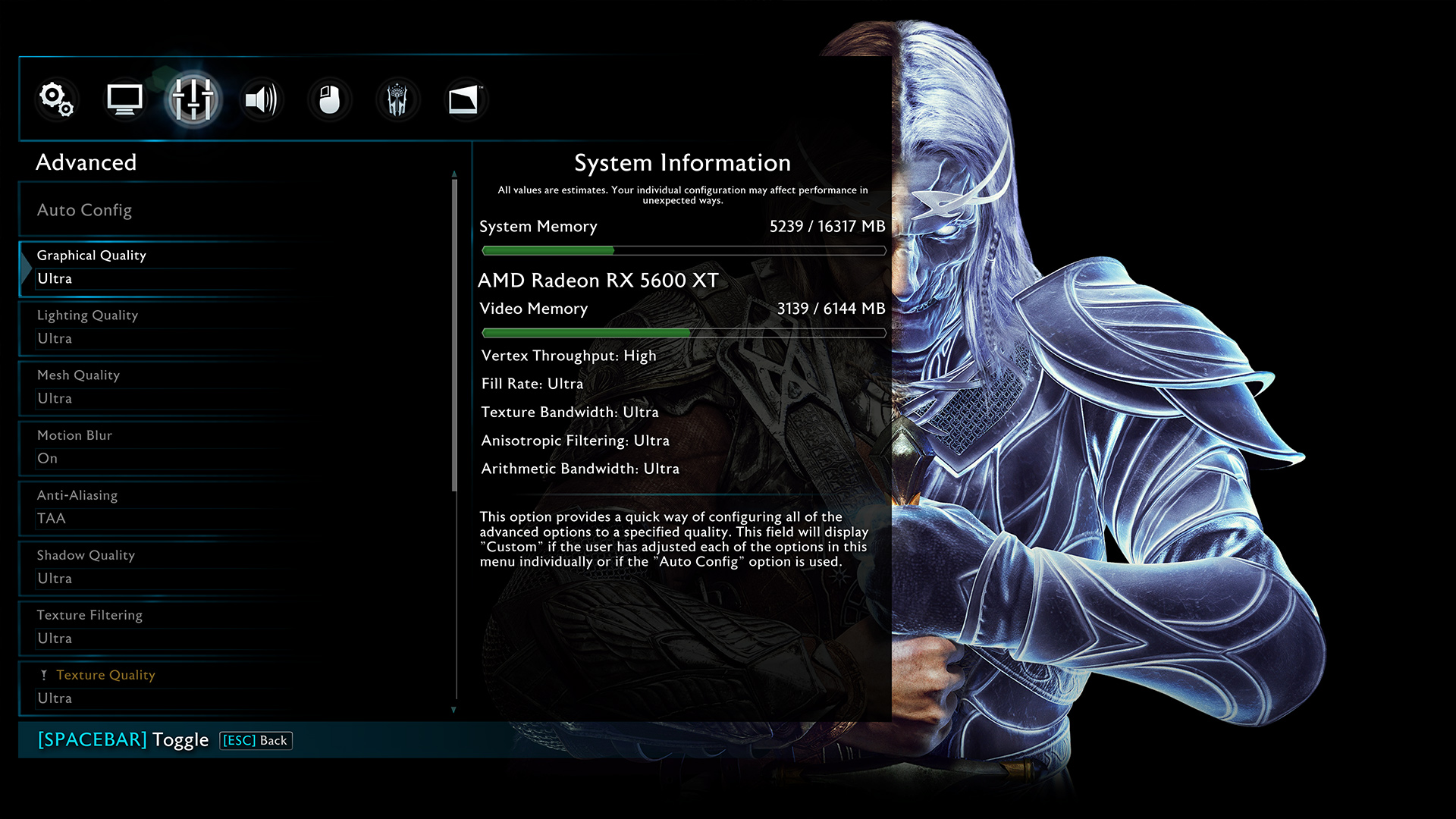
Middle-earth: Shadow of War is an action role-playing video game developed by Monolith Productions and published by Warner Bros. Interactive Entertainment. It is the sequel to 2014’s Middle-earth: Shadow of Mordor, and was released worldwide for Microsoft Windows, PlayStation 4, and Xbox One on October 10, 2017. (Wikipedia).
We test using the Very High preset, DX11 API.
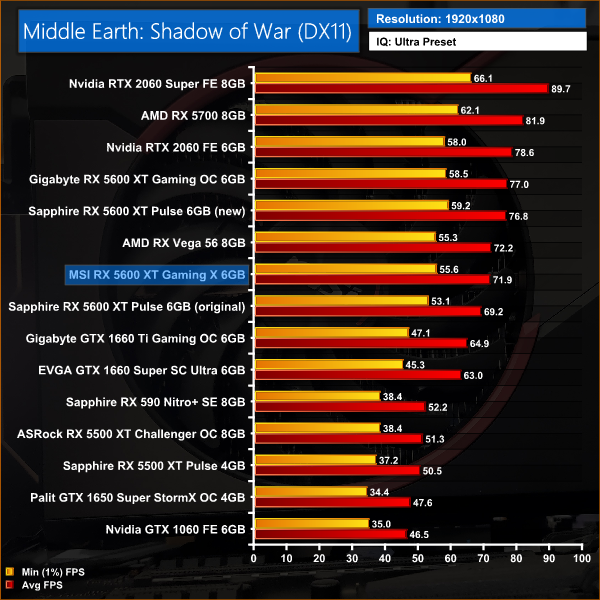
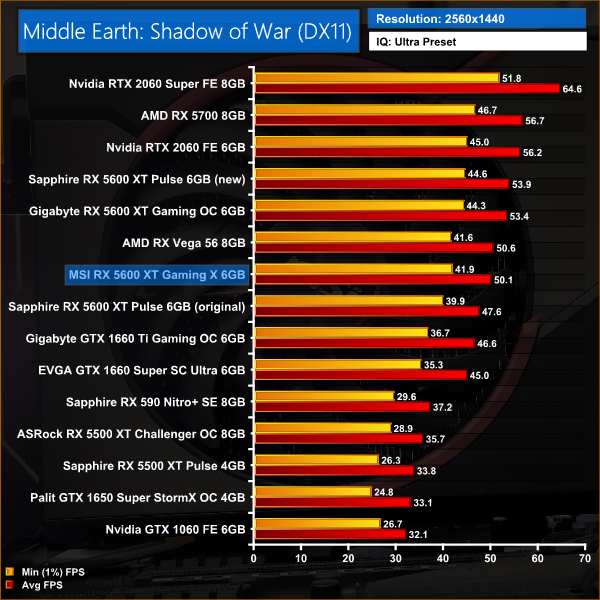
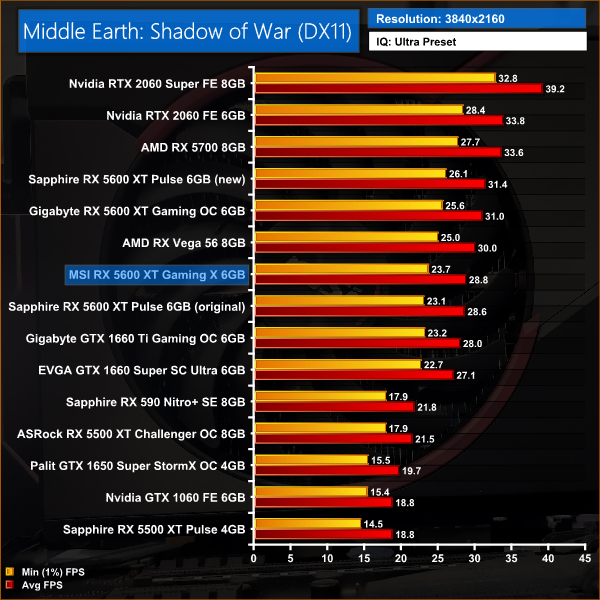
In Middle Earth: Shadow of War, it's another 6% performance deficit for the Gaming X when compared to the Sapphire Pulse using the updated BIOS. At 1440p, that gap increases to a 7% difference as the resolution increases.
Red Dead Redemption 2 is a 2018 action-adventure game developed and published by Rockstar Games. The game is the third entry in the Red Dead series and is a prequel to the 2010 game Red Dead Redemption. Red Dead Redemption 2 was released for the PlayStation 4 and Xbox One in October 2018, and for Microsoft Windows and Stadia in November 2019. (Wikipedia).
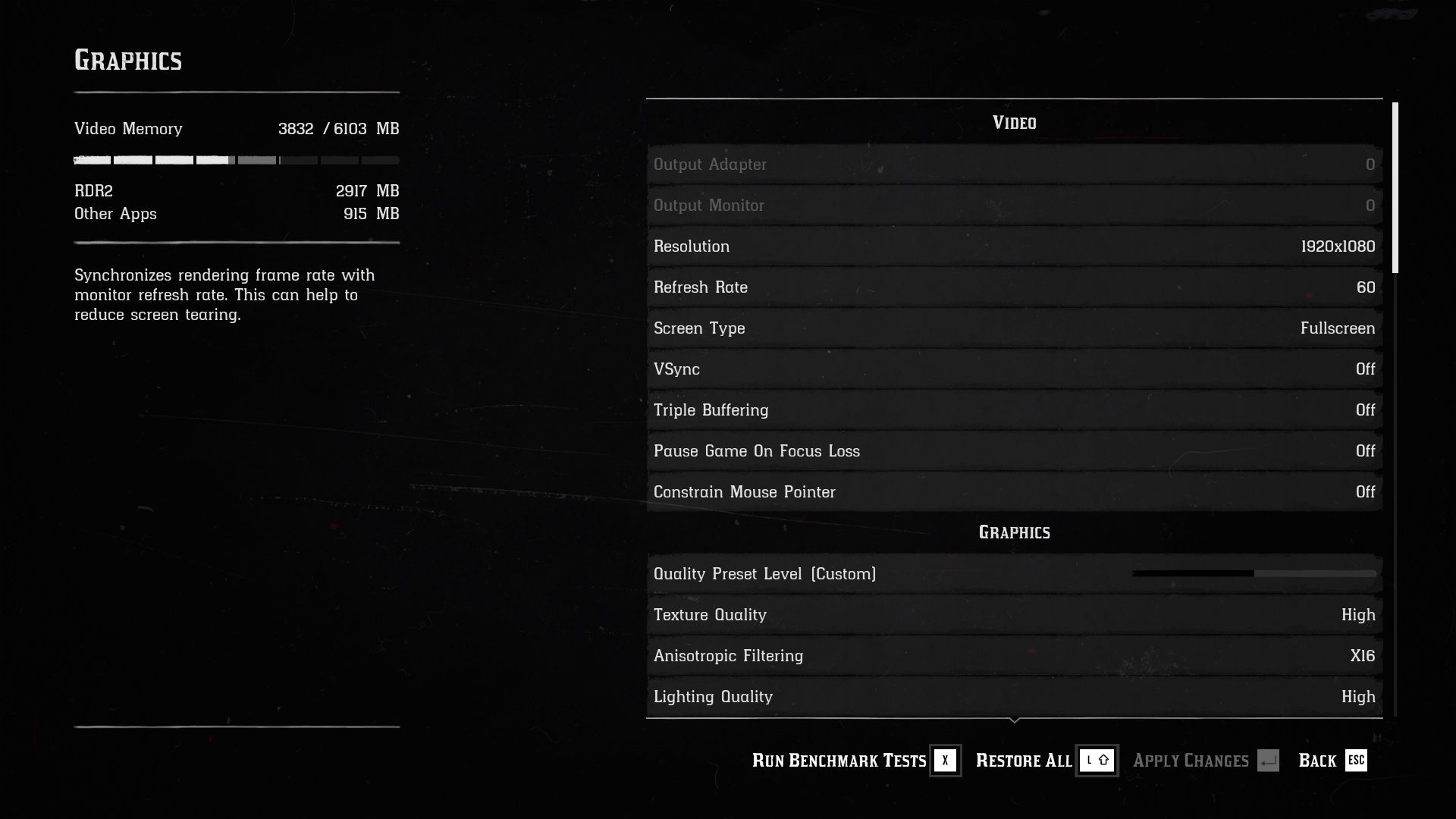
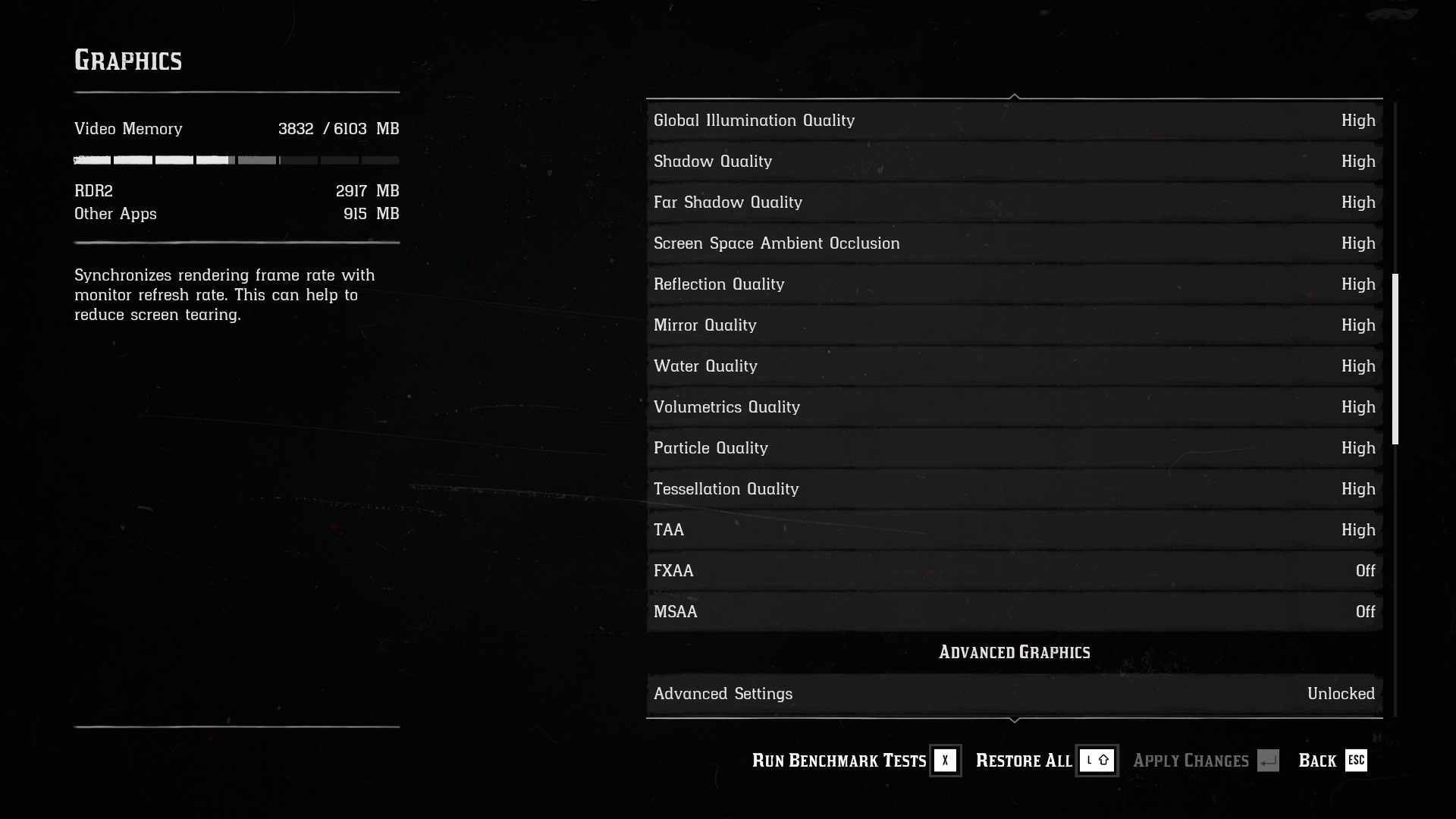
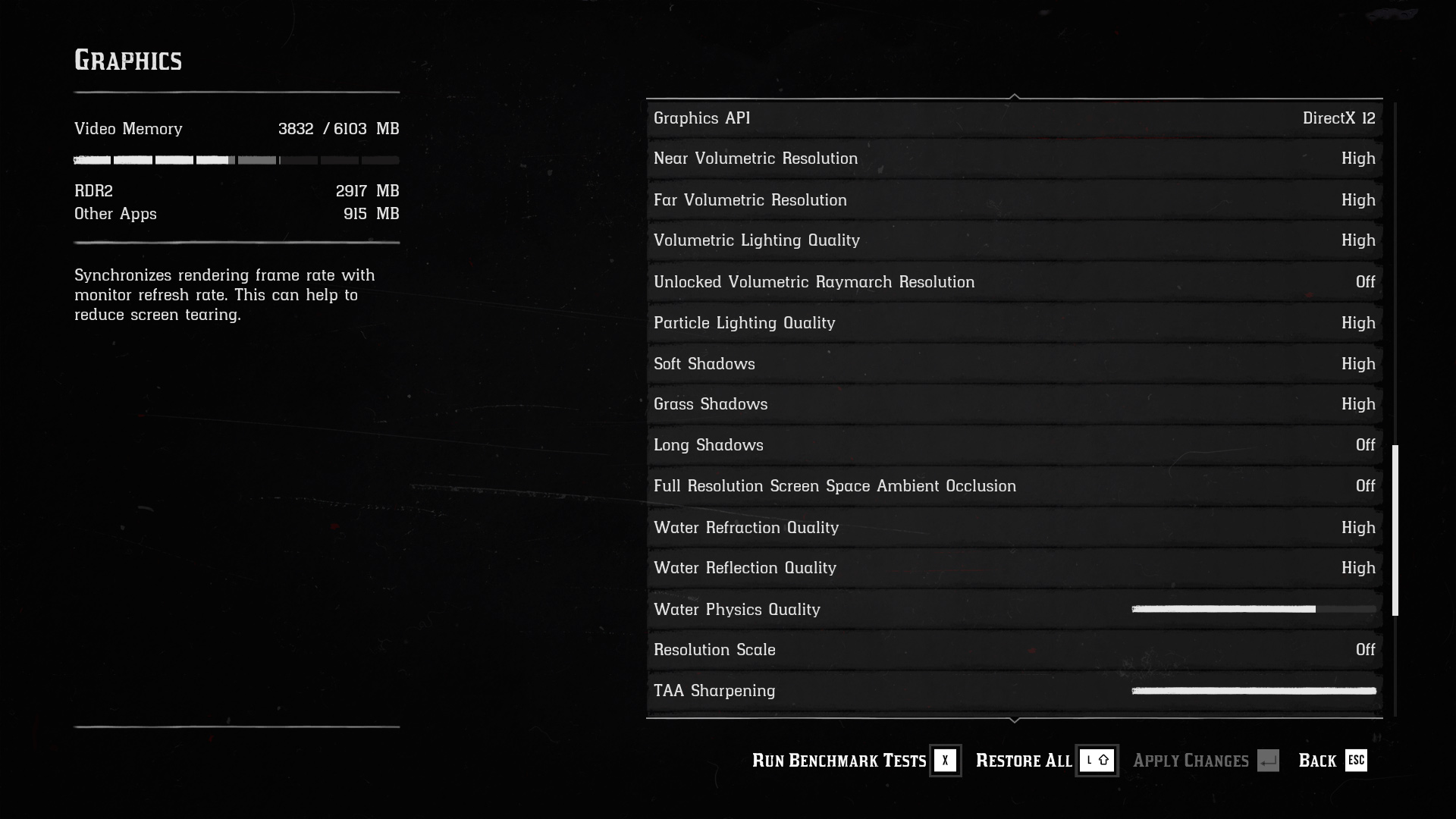
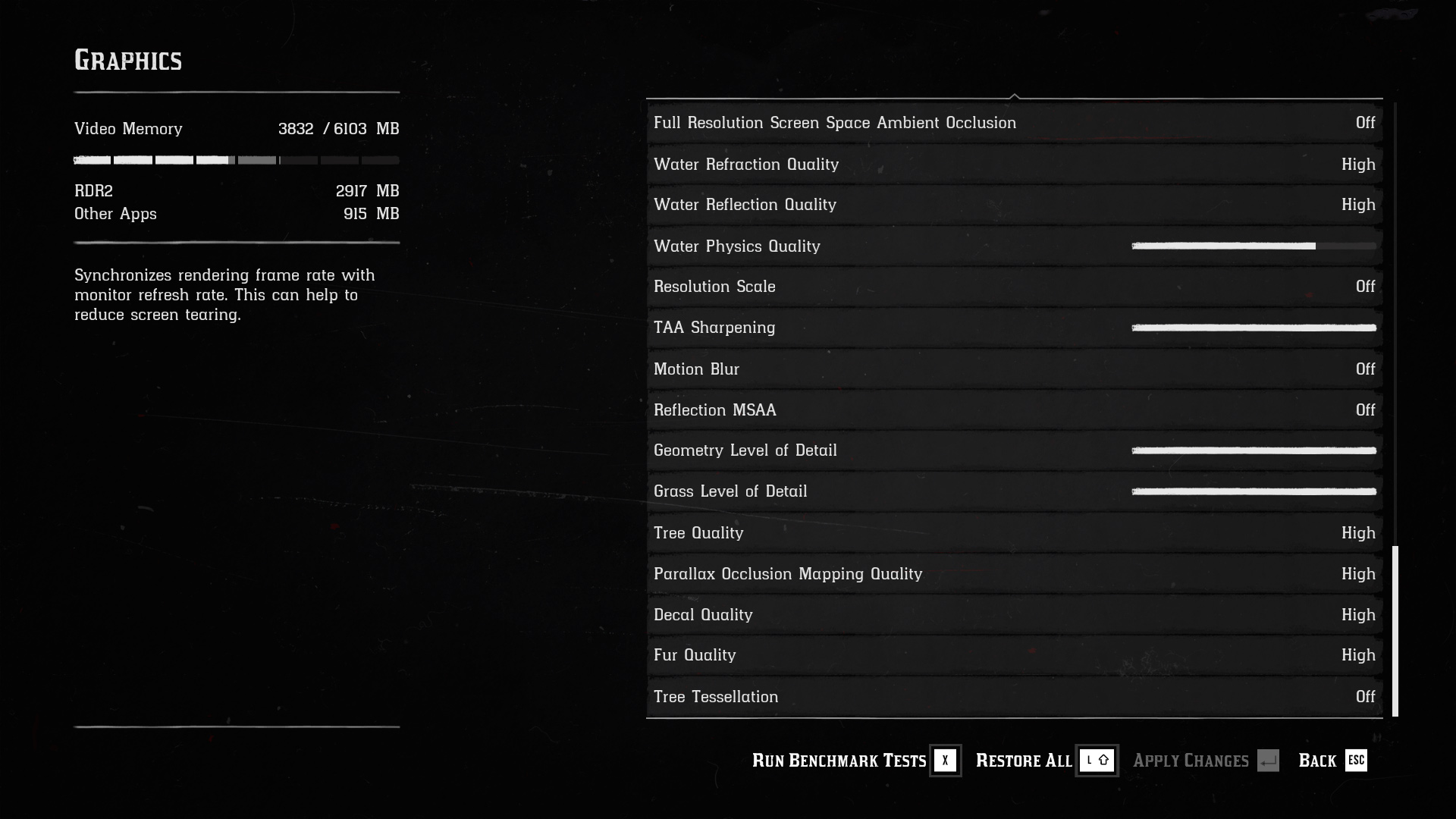
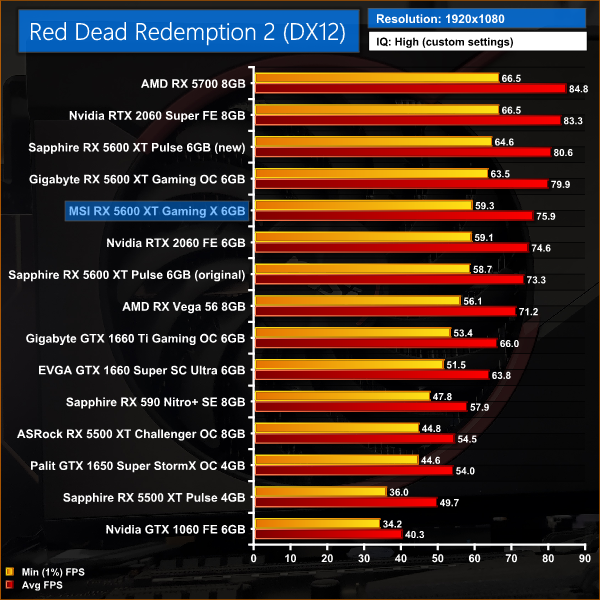
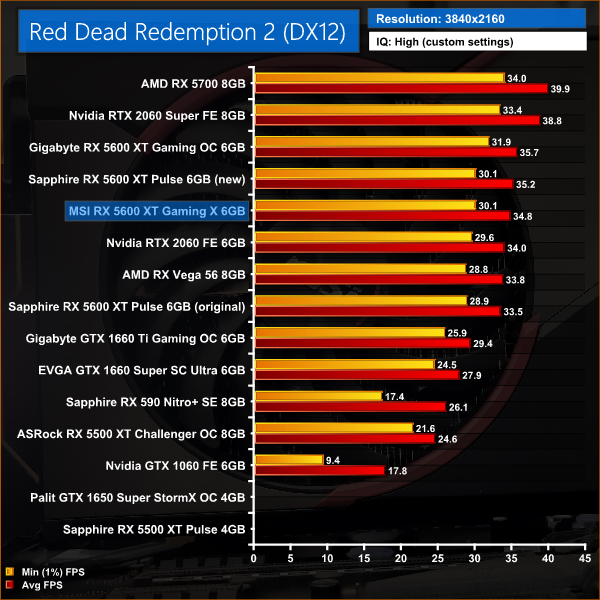
As for Red Dead Redemption 2, at 1080p the Gaming X holds a 4% performance lead over the Pulse running the old BIOS, thanks to its higher GPU frequency. Updating the BIOS on the Pulse, however, pushes that GPU into another 6% lead over the Gaming X.
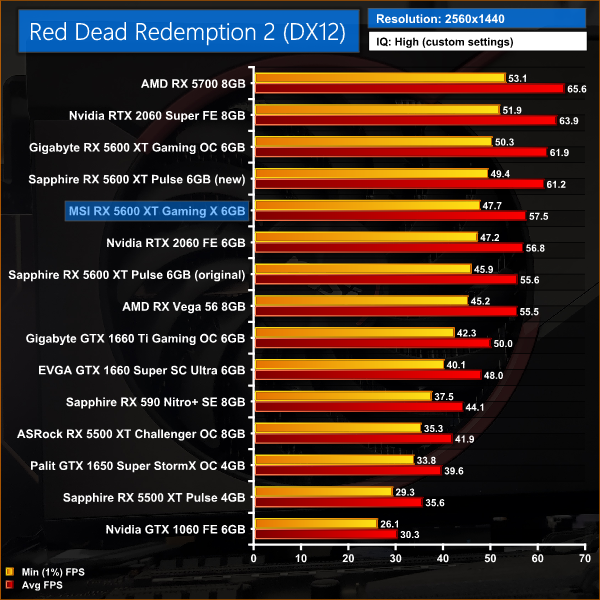
At 1440p, the Gaming X is just 3% faster than the Pulse with 12Gbps memory, while it is once more 6% slower than the other two 5600 XTs running 14Gbps memory.
Shadow of the Tomb Raider is an action-adventure video game developed by Eidos Montréal in conjunction with Crystal Dynamics and published by Square Enix. It continues the narrative from the 2013 game Tomb Raider and its sequel Rise of the Tomb Raider, and is the twelfth mainline entry in the Tomb Raider series. The game released worldwide on 14 September 2018 for Microsoft Windows, PlayStation 4 and Xbox One. (Wikipedia).
We test using the Highest preset, with AA disabled, DX12 API.
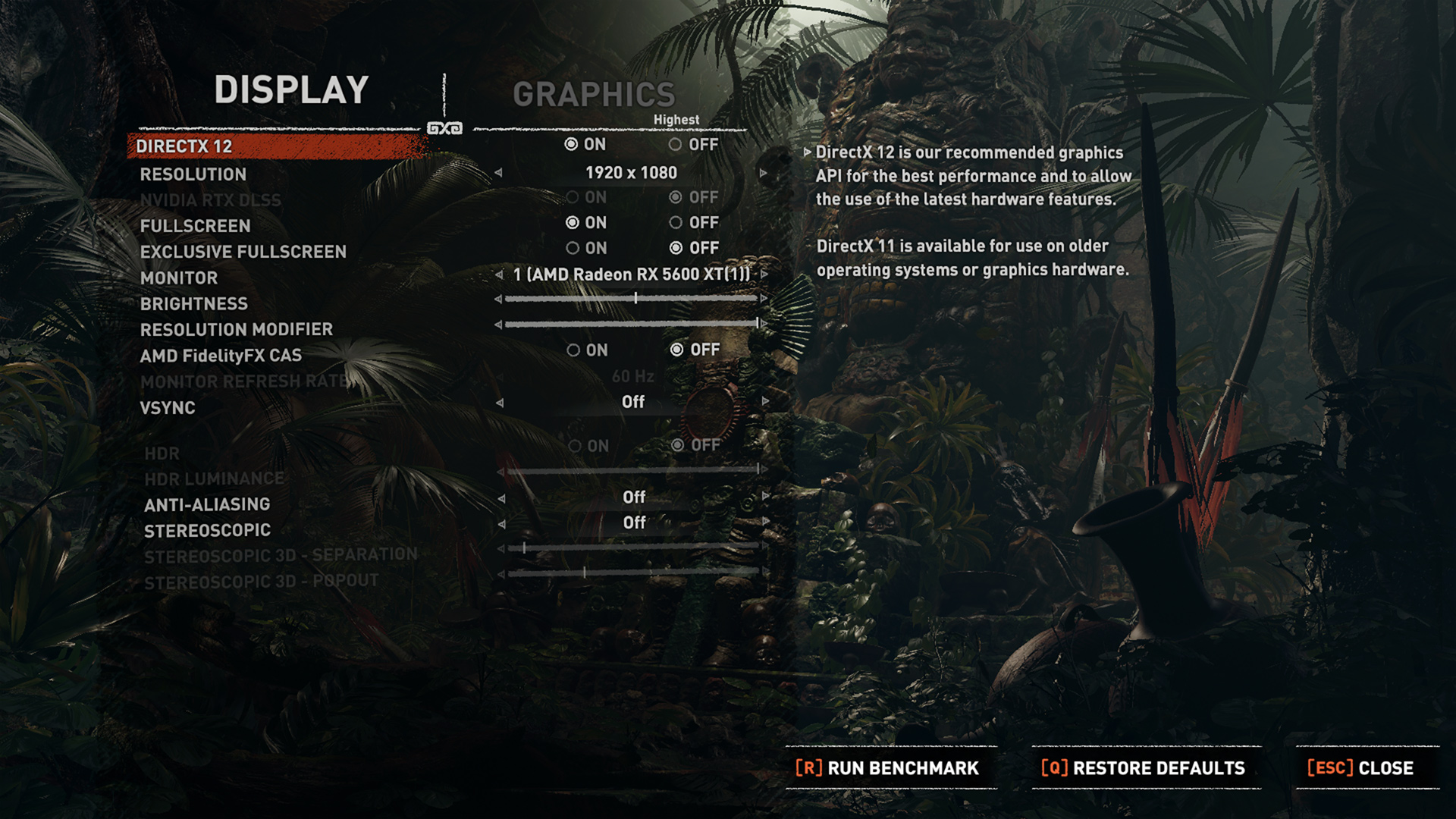
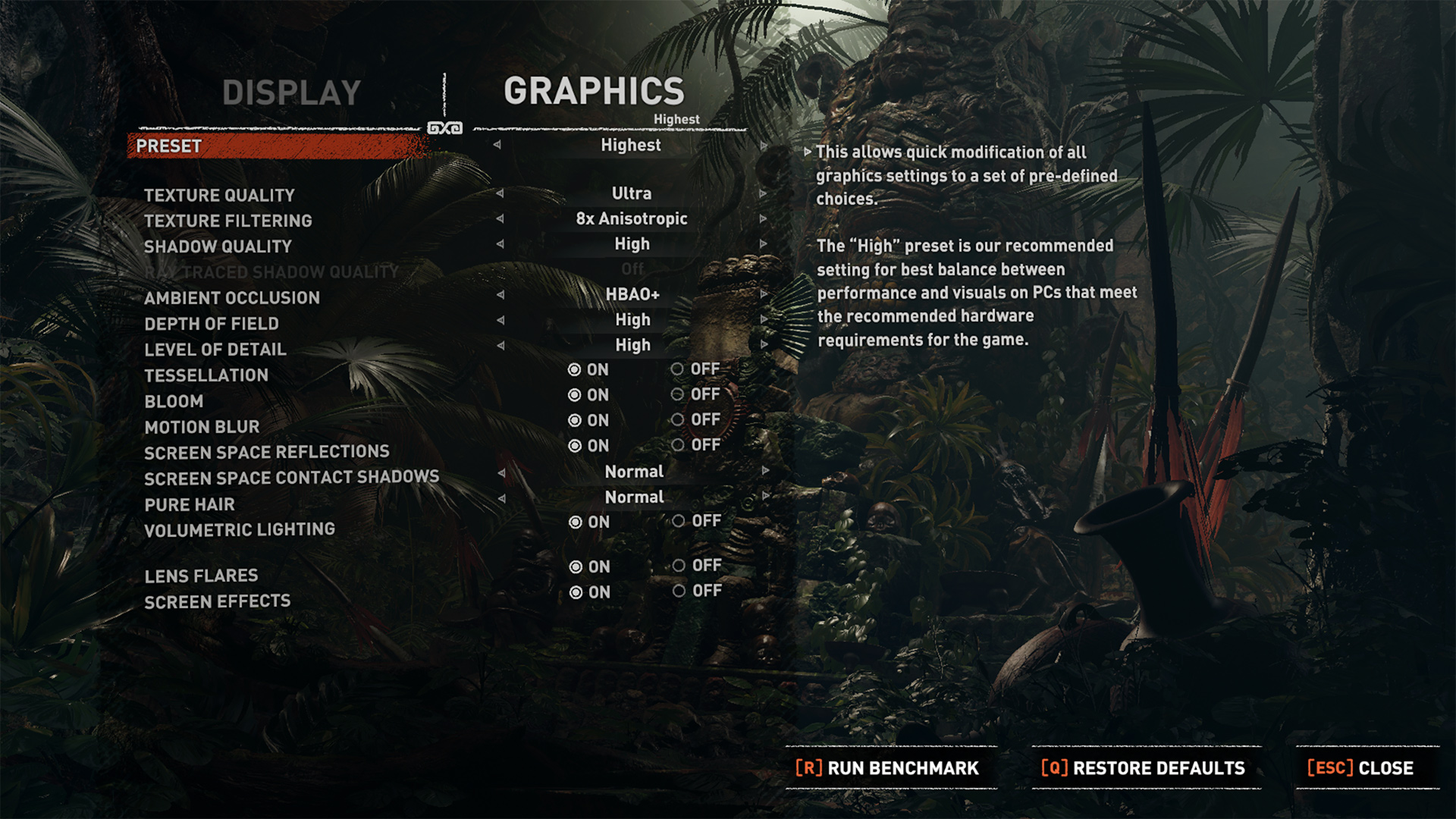
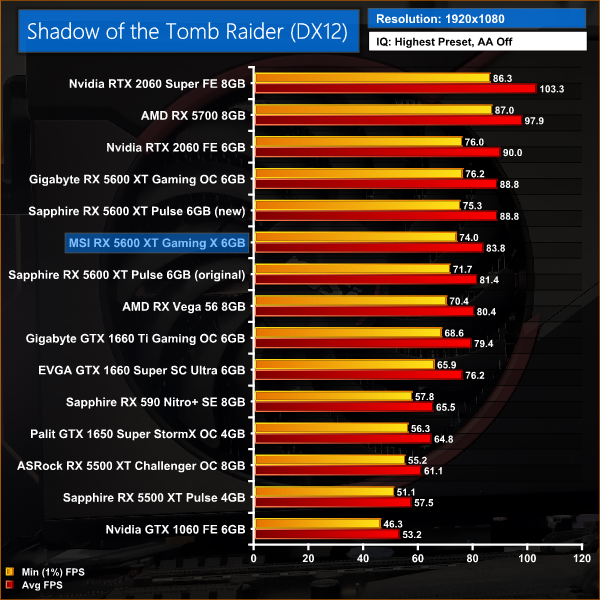
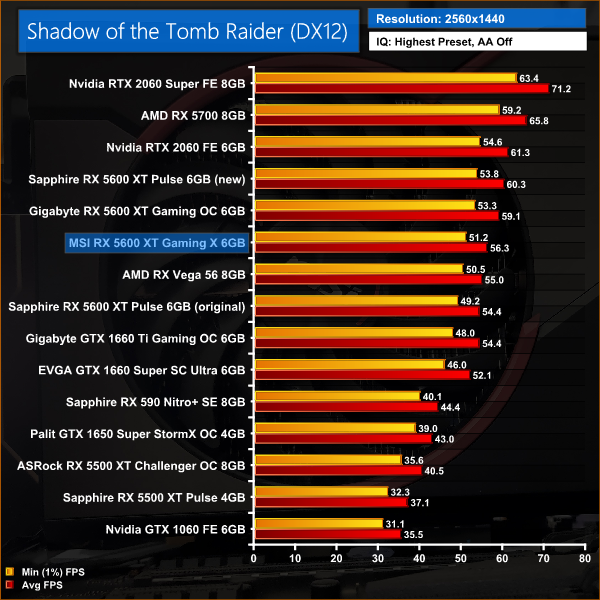
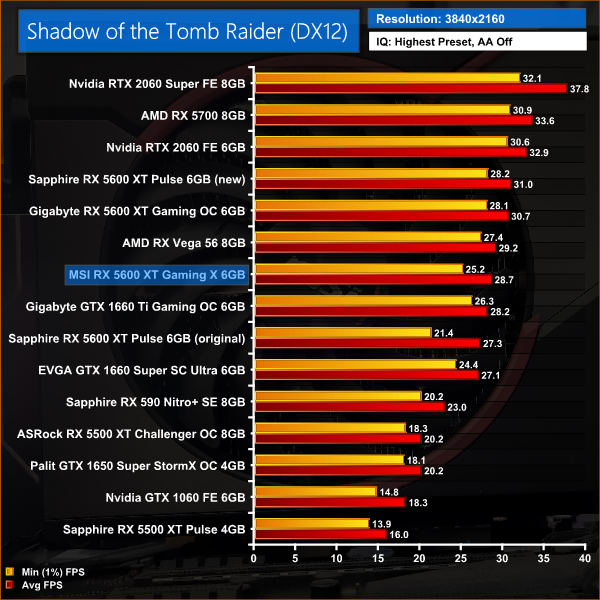
Shadow of the Tomb Raider shows very similar performance margins to Red Dead Redemption 2. For instance, the Gaming X is no more than 3% faster than the Pulse with its old BIOS, either at 1080p or 1440p. The Pulse when running the new BIOS, however, is 6% faster at 1080p and 7% faster at 1440p.
Total War: Three Kingdoms is a turn-based strategy real-time tactics video game developed by Creative Assembly and published by Sega. As the 12th mainline entry (the 13th entry) in the Total War series, the game was released for Microsoft Windows on May 23, 2019.
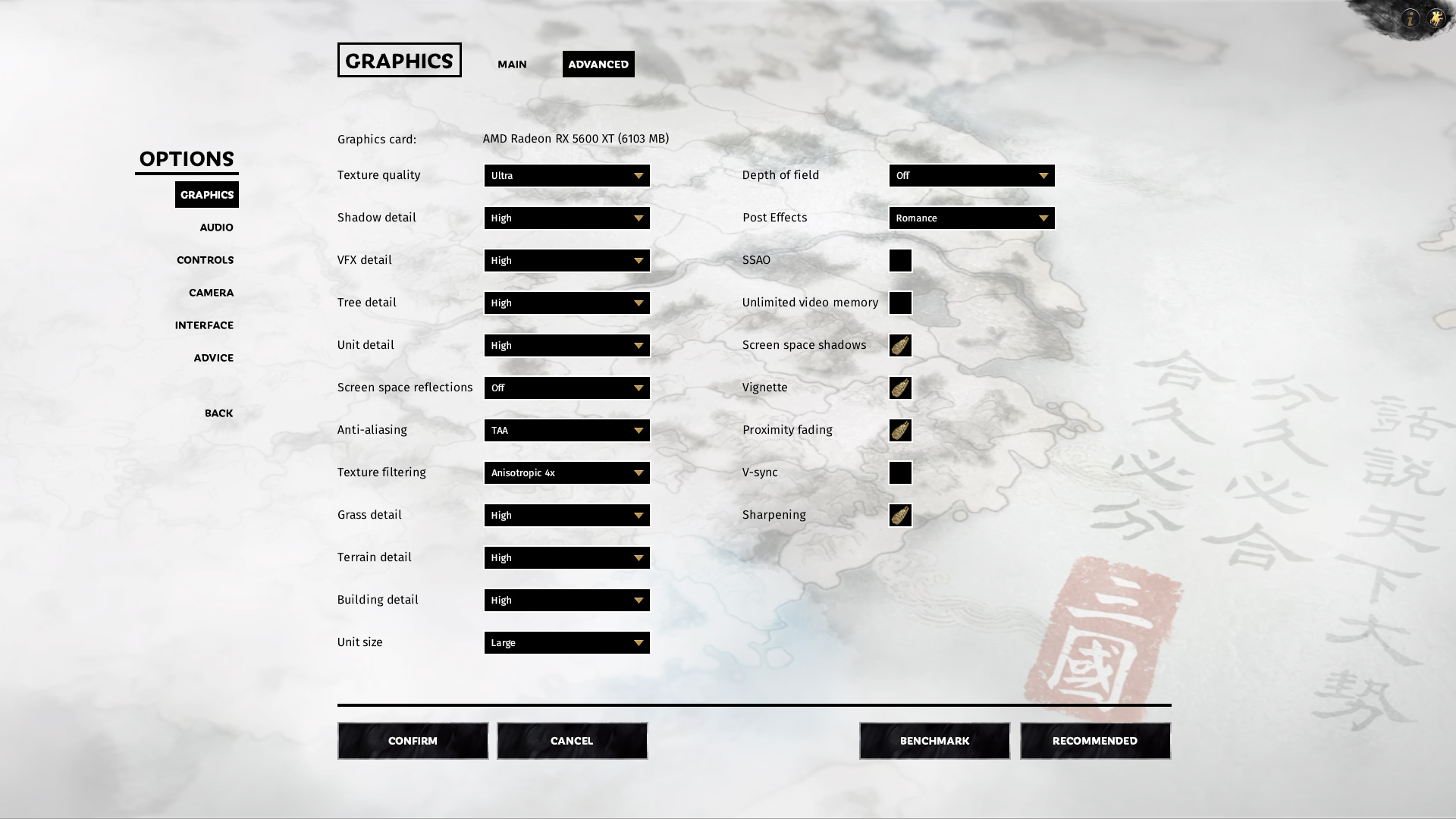
We test using the Ultra preset, DX11 API.
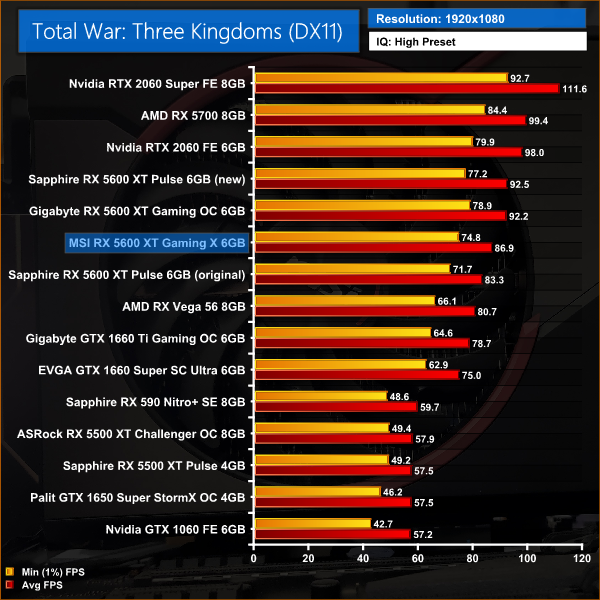
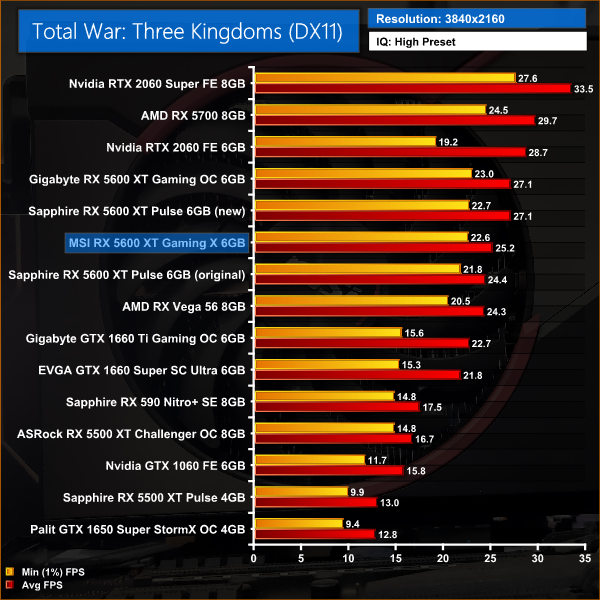
Finally we come to Total War: Three Kingdoms. This sums up the performance differences of all our 5600 XT models very well as the Gaming X is once more 6% slower than the Pulse with 14Gbps memory, at 1080p. Compared to the Pulse with 12Gbps memory, MSI's 5600 XT is 4% faster.
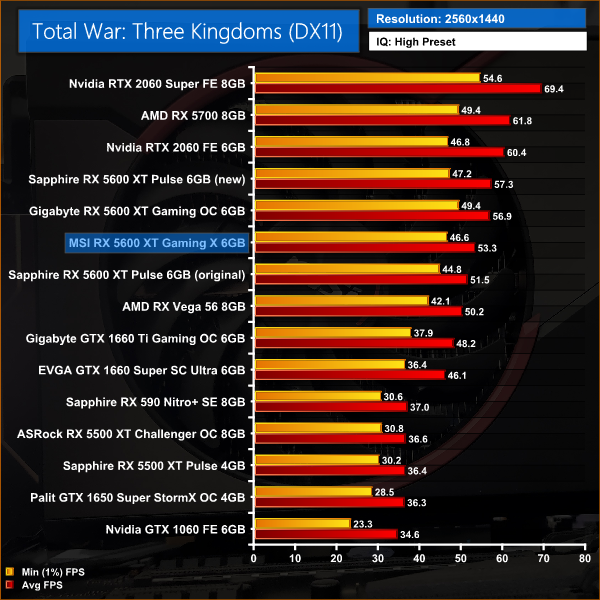
Upping the resolution to 1440p, the Gaming X falls further behind the Pulse with its new BIOS, with a 7% margin. Compared to the original BIOS, the Gaming X is now just 3% faster.
Here we present the average clock speed for each graphics card while running the 3DMark Time Spy stress test for 30 minutes. We use GPU-Z to record the GPU core frequency during the Time Spy runs. We calculate the average core frequency during the 30 minute run to present here.
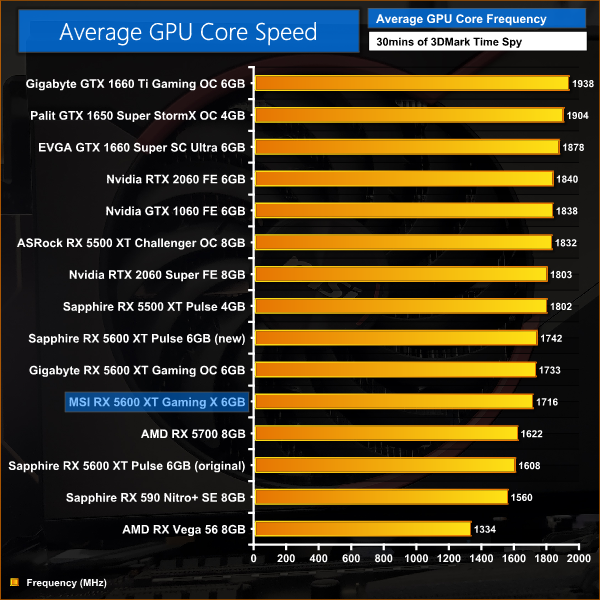
All three RX 5600 XTs we have tested have the same rated boost clock of 1750MHz, so it's not a surprise to see average clock speed figures are within a very small margin of each other. You could point out that the Gaming X did record a marginally lower frequency than the Gigabyte Gaming OC or Sapphire Pulse, but the difference is no more than 26MHz which is frankly trivial.
The Gaming X is over 100MHz faster than the Pulse with its original BIOS, too, so that explains why we saw 3-4% performance gains for the Gaming X throughout our gaming benchmarks, despite both cards using 12Gbps memory.For our temperature testing, we measure the peak GPU core temperature under load. A reading under load comes from running the 3DMark Time Spy stress test for 30 minutes.
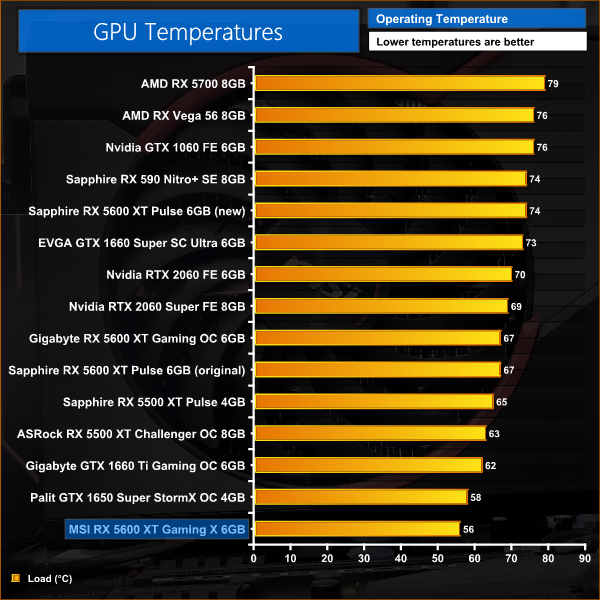
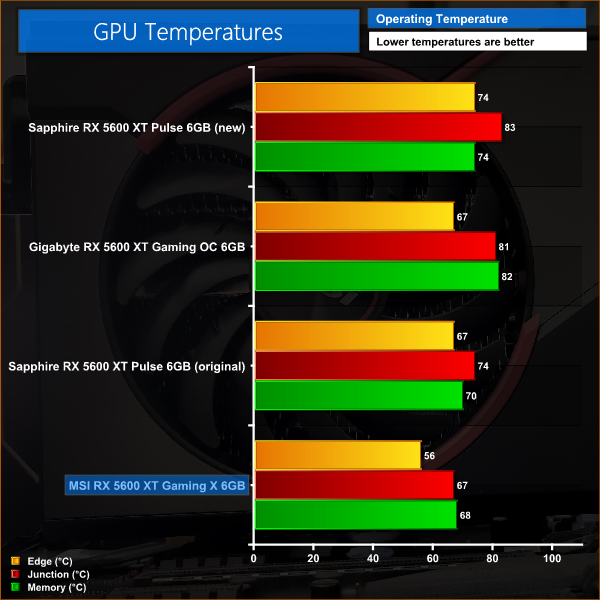
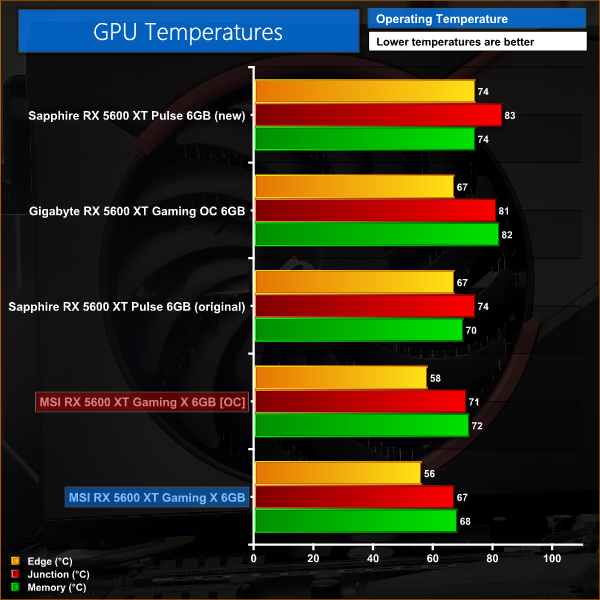
There's no getting round the fact that the Gaming X is a fantastic card in regards to its thermal performance. It records the lowest edge temperature, junction temperature and memory temperature of any 5600 XT we have seen so far. Of course, memory temperature is helped by the fact the memory is running at 12Gbps not 14Gbps, but even the Pulse's memory ran 2C hotter before it received the BIOS update. Simply put, the thermal results from this card are second to none.
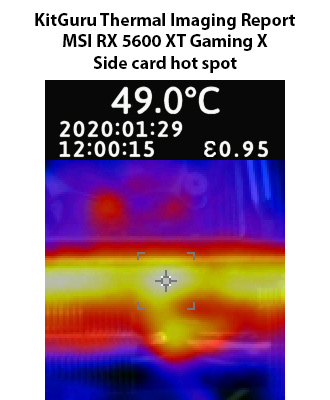
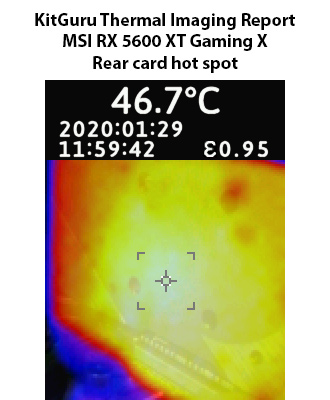
That is also demonstrated by our thermal images, with hot spots not even reaching 50C on the side of the card. Clearly MSI's large cooler is more than capable of cooling this Navi GPU.
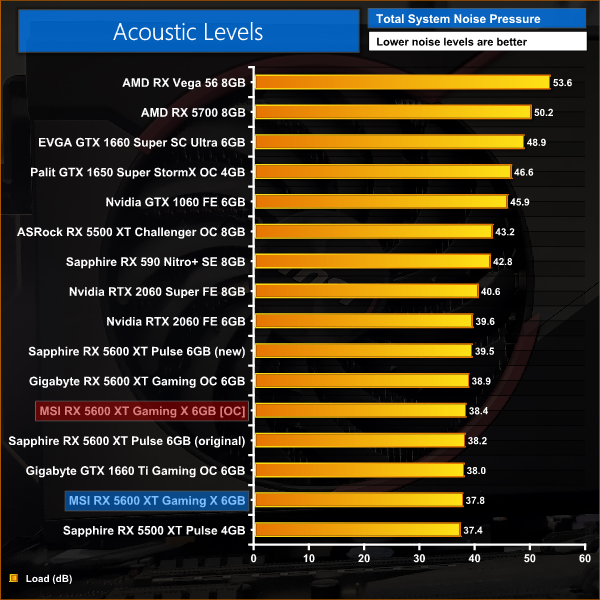
We take our noise measurements with the sound meter positioned 1 foot from the graphics card. I measured the noise floor to be 32 dBA, thus anything above this level can be attributed to the graphics cards. The power supply is passive for the entire power output range we tested all graphics cards in, while all CPU and system fans were disabled. A reading under load comes from running the 3DMark Time Spy stress test for 30 minutes.
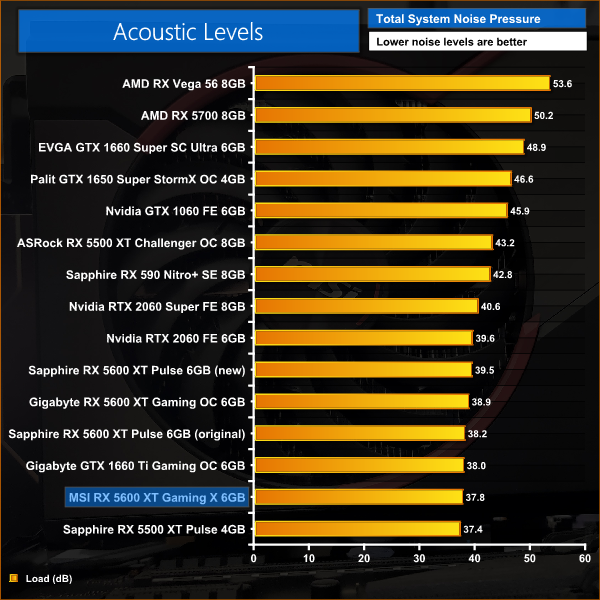
Noise levels are similarly excellent, with a peak reading of just under 38dB on our sound meter. This isn't loads quieter than the Pulse or Gaming OC, and to be honest all three cards are effectively inaudible, but our sound meter did shows the levels from the Gaming X are marginally lower.
To give some context for these noise results, the two 100mm fans spin very slowly which is why the card is so quiet – they hit just 35% fan speed, or around 1050rpm, during our stress test.
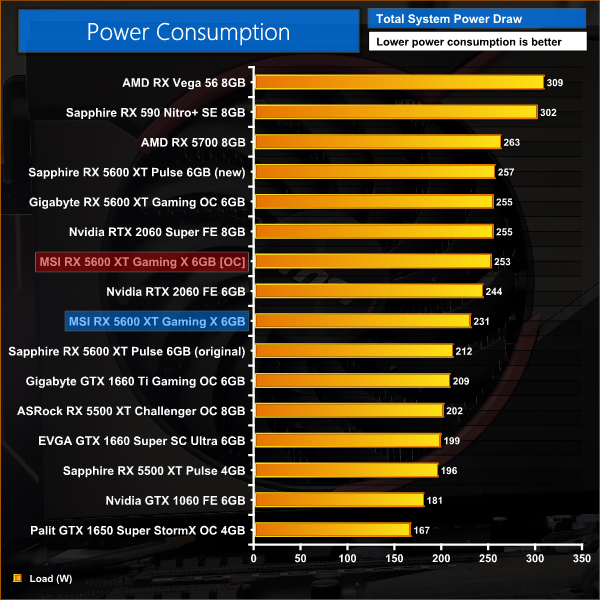
We measure system-wide power draw from the wall while running the 3DMark Time Spy stress test for 30 minutes.
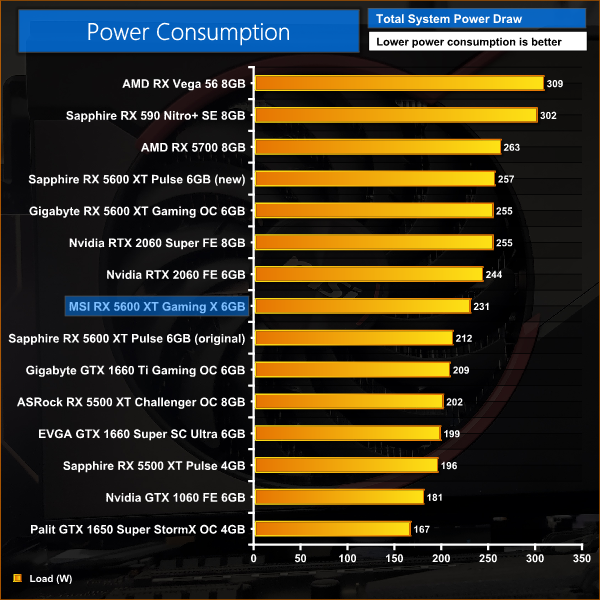
As for power draw, the Gaming X sits neatly between the 5600 XT Pulse using its old BIOS, and the Pulse with its updated BIOS. This gives an interesting look at the difference memory speed makes on power draw, though there are also other factors at play. Either way, total system power draw is pretty much as expected.
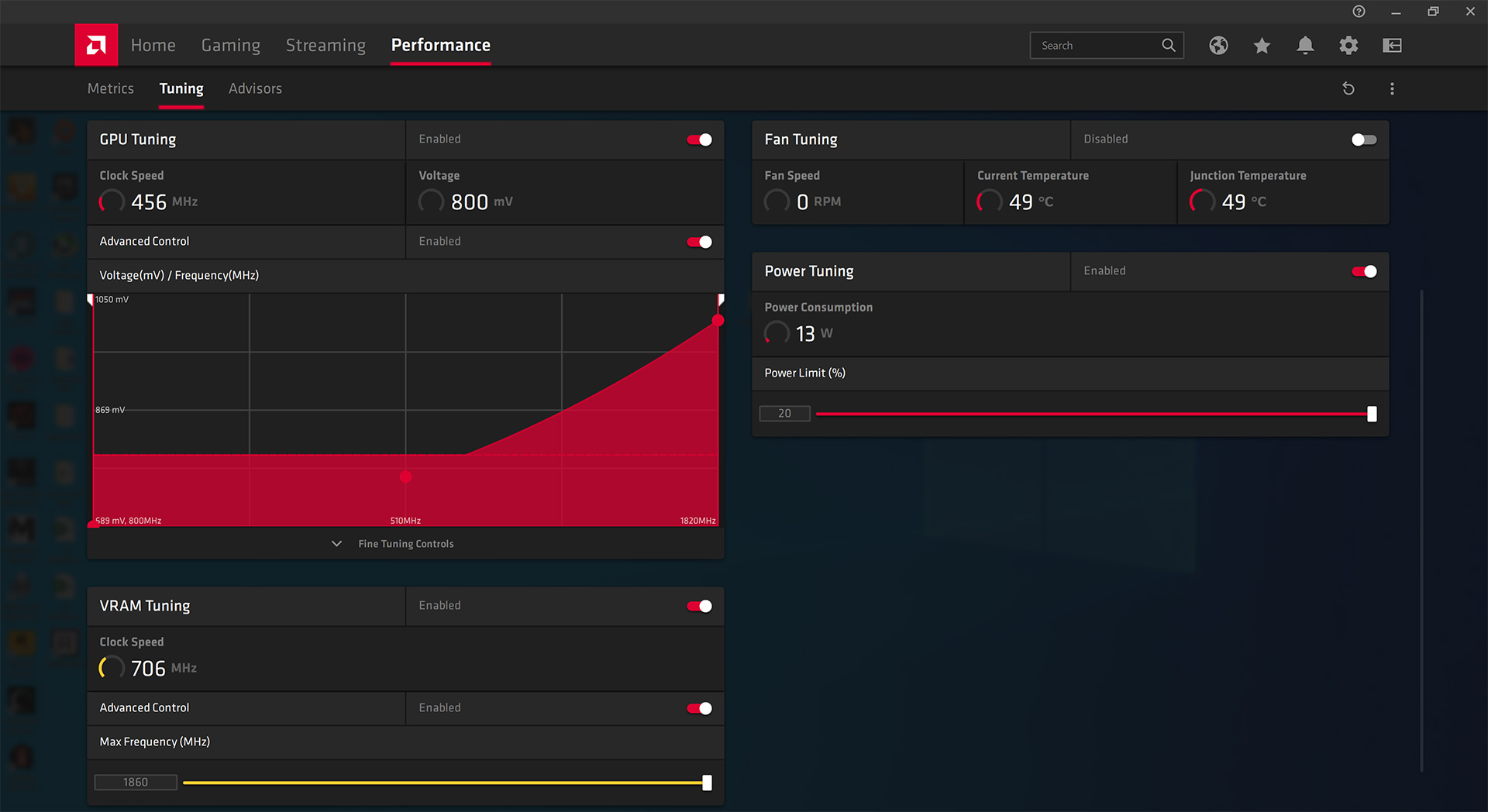
When manually overclocking the Gaming X, we used AMD's own tuning tool in the Adrenalin 2020 software. The GPU frequency is limited to 1820MHz, which was achievable with this card. As the Gaming X's memory runs at 12Gbps, however, we had a lot more headroom and our card was still able to max out its memory speed at 1860MHz, or 14.88Gbps.
Average clock speed under load
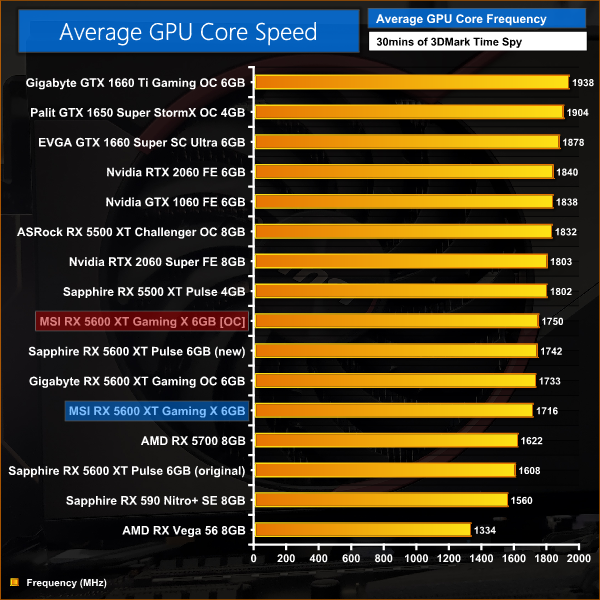
While our memory frequency increased quite significantly, by 24%, our average GPU clock speed increased by just 2%.
Games
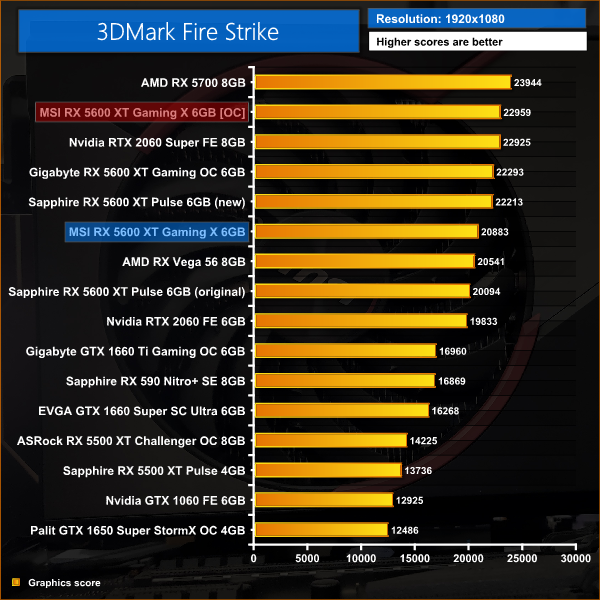
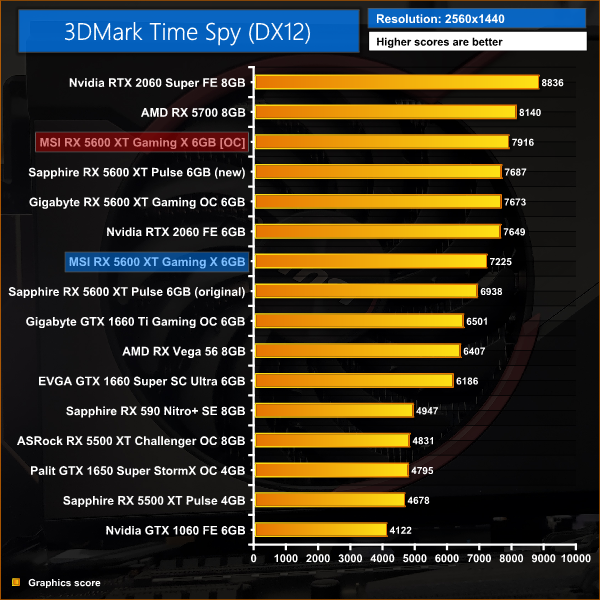
Despite a negligible increased to GPU frequency, as expected the memory overclock brings significant gains to our game testing. F1 2019 saw a 9% improvement in average frame rate, frame rates in Gears 5 improved by 10%, and Metro Exodus saw an 8% performance improvement.
Here, we take a further look at the impact of our overclock, looking at the increased temperatures, acoustics and power draw.
Temperatures
Acoustics
Power consumption
Overview
MSI's Gaming X is clearly an incredible cooler, as even when manually overclocked to the limit (literally), temperatures barely rose and the same goes for noise levels. Power draw increased by just over 20W, but all in all the card dealt with the overclock fantastically well.
It has been three weeks now since AMD launched the RX 5600 XT, and today we have focused on MSI's high-end RX 5600 XT Gaming X.
There's a lot this card does well. First of all, I have to say it is one of the best-looking graphics cards I have seen in recent years. This is obviously subjective, but for me the contrast of the plastic and metal on the shroud, the red accents around the fans, plus the full-length backplate, all make for thing of real beauty.
The beauty isn't only skin-deep, too, as MSI's cooler is the best of all the 5600 XT cards we have seen so far. Edge temperature didn't even hit 60C when manually overclocked, and memory temperature also stayed under 70C out of the box. This is achieved with the fans spinning at barely 1000rpm under load, so the Gaming X is fantastically quiet.
Unfortunately, there is a catch – and it's quite significant. Despite AMD announcing its board partners can ship their 5600 XT models with 14Gbps memory – instead of 12Gbps per the official reference spec – MSI has chosen not to do so. This is because, according to the company, they cannot guarantee 14Gbps will work on all of the Gaming X cards. MSI told me they don't even want to have a ‘1% chance' that a card could be faulty with the higher memory speed, so they took the decision to leave memory speeds at 12Gbps.
Of course, I understand the decision and it's a good thing that MSI wants its customers to have a product it can guarantee works 100% out of the box. The downside, however, is that the Gaming X runs on average 6% slower than the Sapphire Pulse which does run with 14Gbps memory. Compared to the Pulse before it received the BIOS update, the Gaming X is 4% faster on average thanks to its increased GPU frequency.
This really does put the card in a very tricky spot. Not only is it slower than the Sapphire Pulse, it is also £60 more expensive – the Pulse retails for £269.99 at the time of writing, while the Gaming X is listed at £329.99.
Ultimately, I think that makes the conclusion of this review very straightforward. I think AMD deserves some flack for the BIOS situation as that has obviously complicated things for MSI, but when your graphics card is both slower and more expensive than a competitor's card, it becomes very hard to justify. Yes, MSI's card does run very cool and very quiet, but it's not the like the Pulse is a hot or loud-running card – at the end of the day, it's faster and cheaper, so that really is enough to opt for the Pulse instead.
If you do want to buy the MSI Gaming X, we found it for £329.99 at CCL HERE. MSI has also told us it will be launching a Gaming Z model, that will run with 14Gbps memory out of the box, but we don't yet have further details on that.
Discuss on our Facebook page HERE.
Pros
- Looks great.
- Runs very cool under load.
- Two large fans spin very slowly, resulting in low noise levels.
Cons
- 6% slower on average than the Sapphire Pulse 5600 XT.
- Also £60 more expensive than the Pulse.
KitGuru says: MSI's RX 5600 XT Gaming X is a beautiful card that runs incredibly cool under load. it just makes little sense to pay more money for a slower graphics card.

